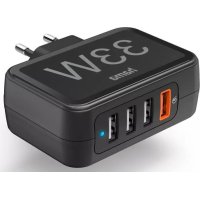
201629 - Smartphone accessory HAMA - Free user manual and instructions
Find the device manual for free 201629 HAMA in PDF.


| Product type | USB mains charger |
| Brand | Hama |
| Model | 00201629 |
| Power supply | 100-240 V AC, 50/60 Hz |
| Maximum total output | 33.0 W |
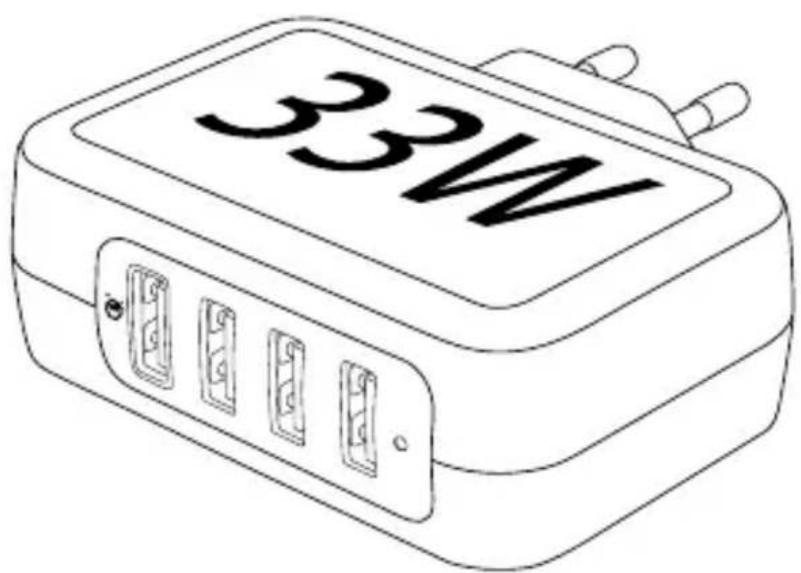
| USB ports | 3 USB-A ports (A1, A2, A3) + 1 USB-A QC port |
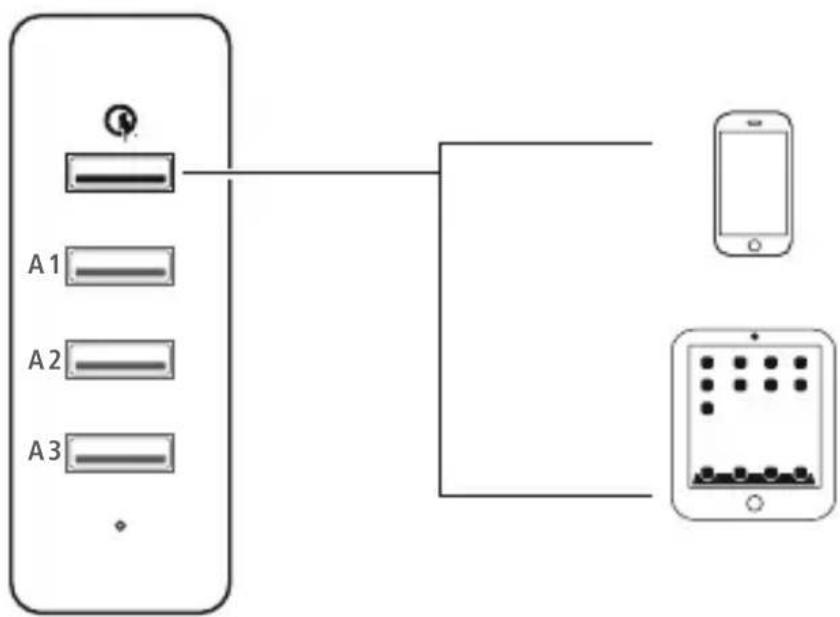
| USB-A QC output | 3.6-6.0 V/3.0 A (10.8-18 W); 6.0-9.0 V/2.0 A (12-18 W); 9.0-12.0 V/1.5 A (13.5-18 W) |
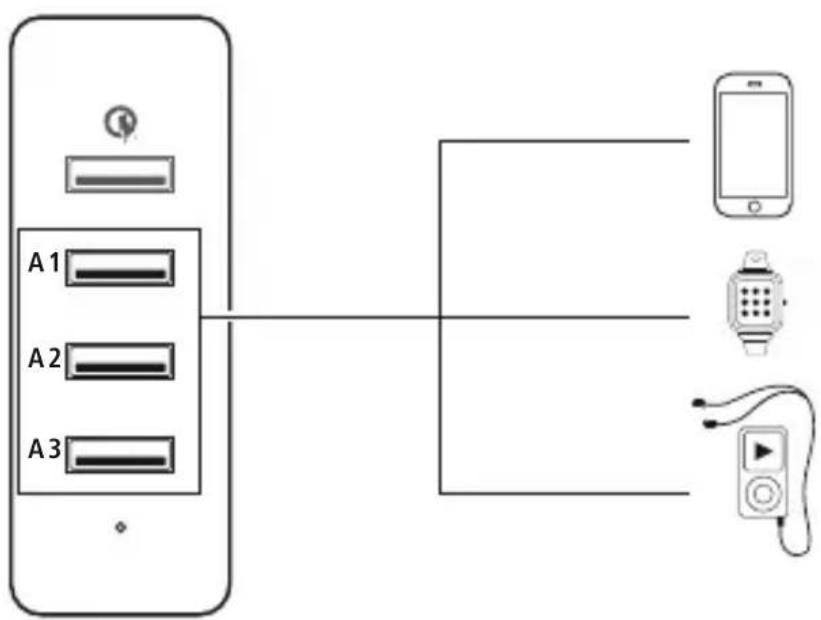
| USB-A1, A2, A3 output | 5.0 V/3.0 A (15 W max. total) |
| Fast charging technology | Quick Charge 3.0, 2.0 |
| Plug & Play function | Yes, automatic voltage and current adjustment |
| Average operating efficiency | 80.5% |
| Efficiency at low load (10%) | 78.0% |
| No-load consumption | 0.14 W |
| Package contents | Charger, instruction manual |
| Maintenance and cleaning | Disconnect before cleaning, use a soft dry cloth |
| Safety instructions | Protect from moisture, do not open, use indoors only, avoid shocks |
| Operating conditions | Indoor, moderate climate |
Frequently Asked Questions - 201629 HAMA
User questions about 201629 HAMA
0 question about this device. Answer the ones you know or ask your own.
Ask a new question about this device
Download the instructions for your Smartphone accessory in PDF format for free! Find your manual 201629 - HAMA and take your electronic device back in hand. On this page are published all the documents necessary for the use of your device. 201629 by HAMA.
USER MANUAL 201629 HAMA
ChargingStation,4-wayUSB-A,33W
Ladestation,4-fachUSB-A,33W
| GB | OperatingInstructions | Návodk p oužití | CZ |
| D | Bedienungsanleitung | Návodnapoužitie | SK |
| F | Moded'emploi | Manualdeinstruções | P |
| E | Instruccionesdeuso | Bruksanvisning | S |
| NL | Gebruiksaanwijzing | Руководствопоэксплуатации | RUS |
| I | Istruzioniperl'uso | Работнаинструкция | BG |
| PL | Instrukcjaobstugi | Обнгієсхрήσης | GR |
| H | Használatiútmutató | Kullanmakılavuzu | TR |
| RO | Manualdeutilizare | Käyttöohje | FIN |
USB-AQualcomm3.0(QC):max.18W
flowchart
graph TD
    A["Device"] --> B["Port 1"]
    A --> C["Port 2"]
    A --> D["Port 3"]
    B --> E["Mobile Phone"]
    C --> F["Mobile Phone"]
    D --> G["Mobile Phone"]
USB-A1,A2,A3:totalmax.15W
flowchart
graph TD
    A["Port 1"] --> B["A1"]
    A --> C["A2"]
    A --> D["A3"]
    B --> E["Smartwatch"]
    C --> E
    D --> E
    E --> F["Phone"]
ThankyouforchoosingthisHamaproduct! Takeyourtimeandreadthefollowinginstructions andinformationcompletely. P leasekeepthese instructions in a safe place for future reference.
1. Explanationofwarningsymbolsandnotes
Riskofelectricshock

This symbol indicates a risk of electric shock from touching uninsulated product part that may carry hazardous voltage.
Warning

This symbol is used to indicate safety instructions ortodraw your attention to specific hazard and risks.
Note

This symbol is used to indicate additional information or important notes.
2.Packagecontents
- charger
• t heseoperatinginstructions
3. Safetyinstructions
- P rotectheproductfromdirt,moisture a nd overheatinganduseitindryroomsonly.
- D o n otdroptheproductanddonotexposeitto anymajorshocks.
- Do not operate the product outside the power limit specified in the technical data.
- Do not modify the device in any way. Doing so voidsthewarranty.
• D o n otcontinuetooperatetheproductifitis visiblydamaged.
• U setheproductonlyfortheintendedpurpose. - A s w ithallelectricalproducts, this devices should be kept out of thereachofchildren.
- D o n otusetheproductintheimmediatevicinity of heaters, otherheatsourcesorindirectsunlight.
- Route all cables so there is no risk of tripping.
• D o n otbendorcrushthecable.
• A lwayspulldirectlyontheplugwhen disconnectingthecable,neveronthecableitself.
• D isposeofpackagingmaterialimmediatelyin accordancewiththelocallyapplicableregulations.
• Theproductisintendedonlyforuseinside buildings.
- O nlyusethearticleundermoderateclimatic conditions.
- D o n otusetheproductinareasinwhichelectronic productsare n otpermitted.
- Do not use the product in a damp environment and avoids splashingwater.
Riskofelectricshock

- Do n otopenthedeviceorcontinuetooperate itifitbecomesdamaged.
- Do n otusetheproductifthe ACadapter, t headaptercableorthemains cableare d amaged.
- Do not attempt to service or repair the product yourself. L eave any and all servicework to qualified experts.
4.Operation
Note - mains voltage 100 - 240 V

Thechargerissuitableformainsvoltages of 100 - 240 V and therefore can be used worldwide. Please note that a country-specific adapter may be necessary.
Warning- c onnectingdevices

- Before connecting a device, check whether it can be adequately supplied with the charger's current capacity.
- If portsUSB-A1,A2,A3are used simultaneously, t hemaximumoutputpower(for technical reasons) is 15 W (5 V / 3 A).
- N otetheinstructionsinyourdevice'soperating manual.
Note-Q C 3 .0,2.0

- Plug & go: No manual setup necessary, just connectandstart:Voltageandpowerare automaticallyconfiguredbyQC3.0,2.0.
- F orefficientandoptimisedcharging,theQC 3.0,2.0functionmustbesupportedbyyour terminaldevice.
- With the large quantity of QC-enabled terminal devices with different firmware versions, it can happen that the function is not fully supported.
Warning

- Only operate the product from a socket that has been approved for the device. Thesocket must be installed closet to the product and must be easily accessible.
- D isconnecttheproductfromthepowersupply usingtheOn/Offswitch— if t hisisnotavailable, unplug the power cord from the socket.
- If using a multi-socket power strip, make sure t hatthetotalpowerconsumptionofall connecteddevicesdoesnotexceedthepower strip'smaximumthroughputrating.
- If you will not be using the product fora prolonged period, disconnect it from mains power.
Unlessdifferentinstructionshavebeenexpressly givenintheoperatinginstructionsforthedevices youare charging,proceedasfollows:
- C onnectyourdevicetoa U SBchargingsocket using a suitableUSBcable.
- Connect the charger to a properly installed and easilyaccessible mainssocket.
• Thechargingprocessisdisplayedonyourdevice. - D isconnectthedevicefromthechargerifyouwish tointerruptthechargingprocessorwhenthe deviceisfullycharged.
- T hendisconnectthechargerfromtheline connection.
Whenchargingtherechargeablebatteriesinthe device, notethemaximumchargingtimesforthe built-inbatteries.
5. Careandmaintenance
- O nlyusesoft,drytowelstocleantheproduct.

Note
Disconnect the device from themains before cleaning and during prolonged periods of non-use.
6.Technicaldata
Specificationsaccordingto Regulation(EU)2019/1782

| Brandname, commercialregister number, a d d r e s s | Hama,HRA12159, DresdnerStr.9, 86653Monheim, Germany |
| Modelidentifier00201629 | |
| Inputvoltage100-240V | |
| InputAC frequency | 50/60 Hz |
| Outputvoltage/outputcurrent/outputpowertotal | USB-AQC: 3.6-6.0V DC/3.0A/10.8W-18.0W; 6.0-9.0V DC/2.0A/12.0W-18.0W; 9.0-12.0V DC/1.5A/13.5W-18.0W; USB-A1,A2,A3: 5.0V DC/3.0A/15.0W USB-A1,2,3:Total max.15W Total:max.33.0W |
| Averageefficiency duringoperation | 80.5% |
| Efficiencyatlowload (10%) | 78.0% |
| Powerconsumption atzero load | 0.14W |
7.Warrantydisclaimer
HamaGmbH& C o KGassumesnoliabilityand providesnowarrantyfordamageresultingfrom improperinstallation/mounting,improperuseof theproductorfromfailure t o o bservetheoperating instructionsand/orsafetynotes.
All listed brands are trademarks of the corresponding companies. Errors and omissions excepted, and subject to technical changes. Our general terms of delivery and payment are applied.
- ChargingStation,4-wayUSB-A,33W
- Ladestation,4-fachUSB-A,33W
- Explanationofwarningsymbolsandnotes
- Riskofelectricshock
- Warning
- Note
- 2.Packagecontents
- Safetyinstructions
- 4.Operation
- Note - mains voltage 100 - 240 V
- Warning- c onnectingdevices
- Note-Q C 3 .0,2.0
- Careandmaintenance
- 6.Technicaldata
- 7.Warrantydisclaimer
Brand : HAMA
Model : 201629
Category : Smartphone accessory