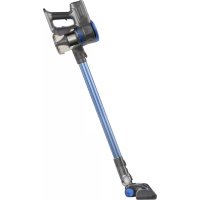
Ideal Lithium - Vacuum Cleaner TAURUS - Free user manual and instructions
Find the device manual for free Ideal Lithium TAURUS in PDF.



| Brand | Taurus |
| Model | Ideal Lithium |
| Product type | Bagless stick vacuum cleaner |
| Power supply | Rechargeable lithium battery |
| Battery voltage | Not specified (estimated: 18-22 V) |
| Charger type | Mains charger included |
| Charging time | 3-4 hours (first charge: 5 hours) |
| Battery life | Not specified (estimated: 20-30 minutes) |
| Dust container capacity | Not specified (estimated: 0.5 L) |
| Filtration type | HEPA filter + metal filter |
| Noise level | Not specified |
| Main functions | Dry vacuuming, two speeds |
| Included accessories | 2-in-1 brush (upholstery brush + crevice tool), long crevice nozzle, telescopic tube, rotating brush, wall mount |
| Usage modes | Handheld, with tube, with accessories |
| Care and cleaning | Empty the container after use, clean filters, replace HEPA filter after 50 hours |
| Safety instructions | Do not vacuum liquids, do not use without filter, do not expose to temperatures above 40°C |
| Spare parts available | HEPA filters, batteries, brushes, accessories |
| Warranty | Compliant with current legislation, authorized technical support |
| Weight | Not specified (estimated: 2-3 kg) |
| Color | Not specified (probably white/gray) |
Frequently Asked Questions - Ideal Lithium TAURUS
User questions about Ideal Lithium TAURUS
0 question about this device. Answer the ones you know or ask your own.
Ask a new question about this device
Download the instructions for your Vacuum Cleaner in PDF format for free! Find your manual Ideal Lithium - TAURUS and take your electronic device back in hand. On this page are published all the documents necessary for the use of your device. Ideal Lithium by TAURUS.
USER MANUAL Ideal Lithium TAURUS
Stick vacuum cleaner
Aspirateur balai
Bodenstaubsauger
Scopa elettrica
Aspirador vertical
Aspirador escombra
Steelstofzuiger
Szczotka odkurzacz
Ηλεκτρική σκούπα
natural_image
Line drawing of a vacuum cleaner with handle and mounting base (no text or symbols)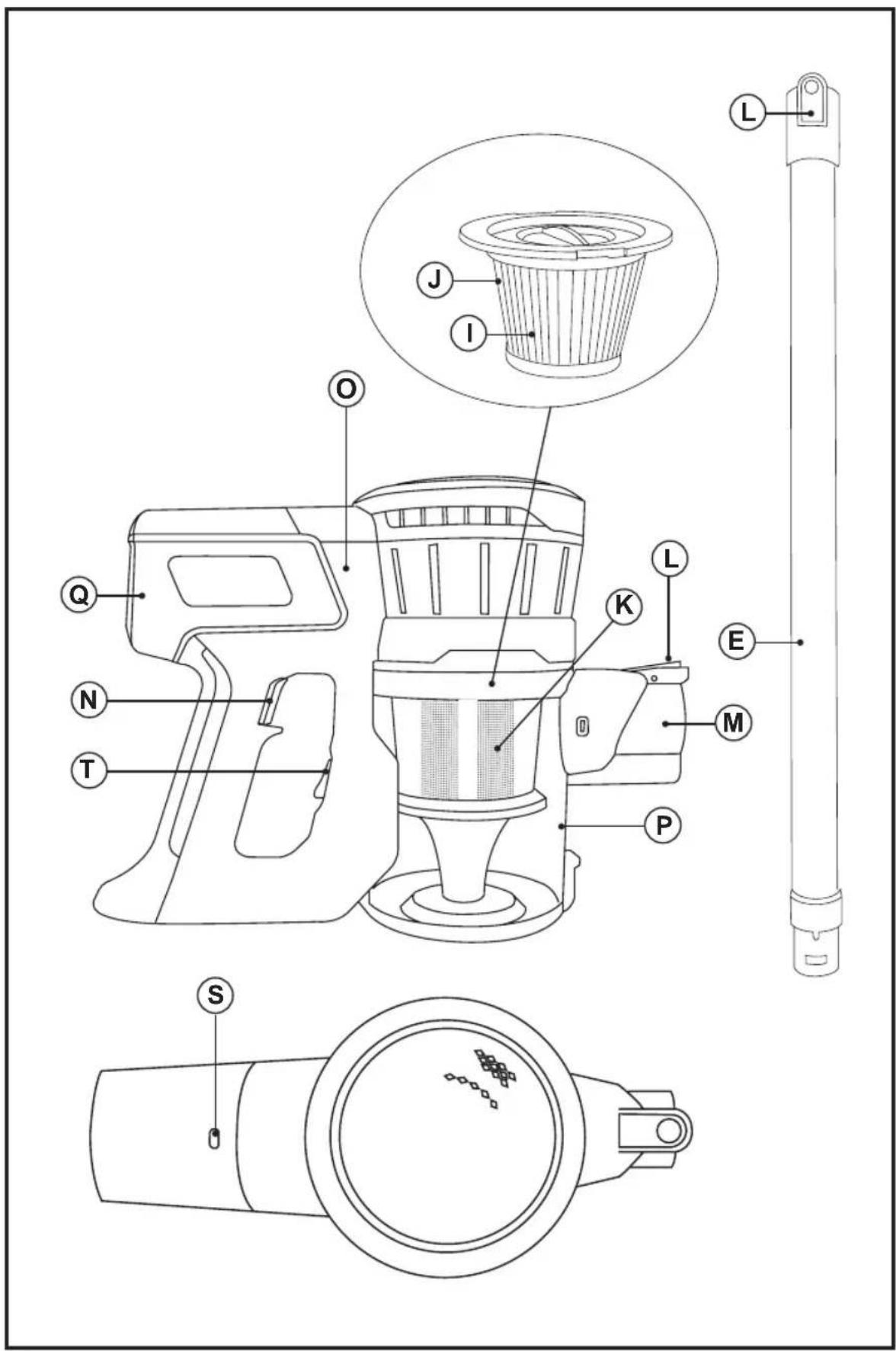
natural_image
Technical line drawing of a mechanical device with a black arrow pointing to a component (no text or symbols present)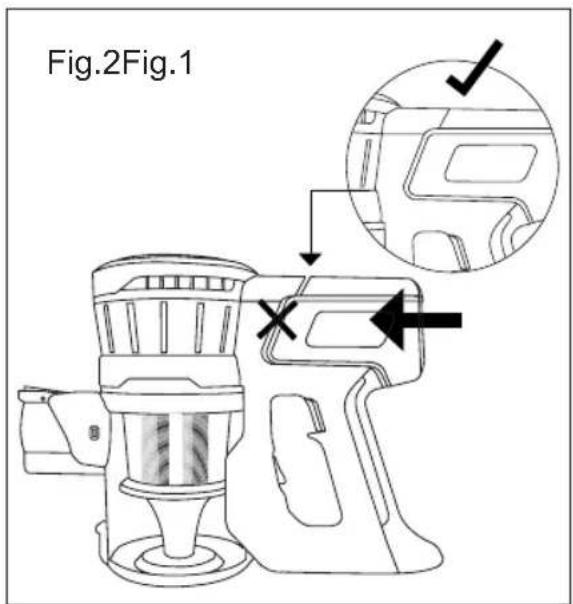
natural_image
Line drawing of a hand holding a device with a curved arrow indicating rotation (no text or symbols)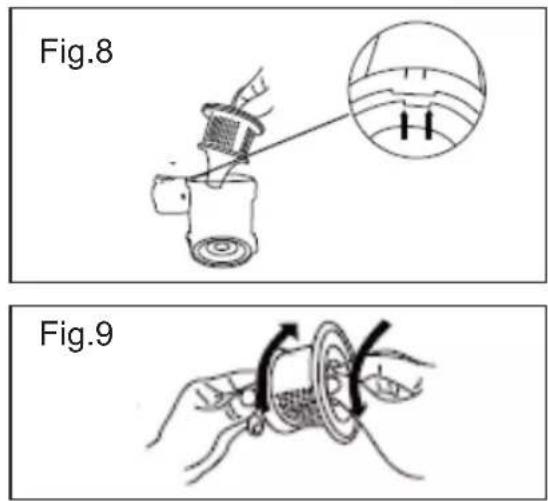
natural_image
Line drawing of a cleaning brush with an arrow indicating direction (no text or symbols)Español
Aspirador escoba Ideal Lithium Cross Id All-Over
Stick vacuum cleaner Ideal Lithium Cross Id All-Over
USE AND CARE:
- Do not use the appliance if its filter(s) are not correctly in place.
- Do not use the appliance if its accessories are not properly fitted.
- Do not use the appliance to vacuum up water or any other type of liquid.
- Do not use the appliance if the on/off switch does not work.
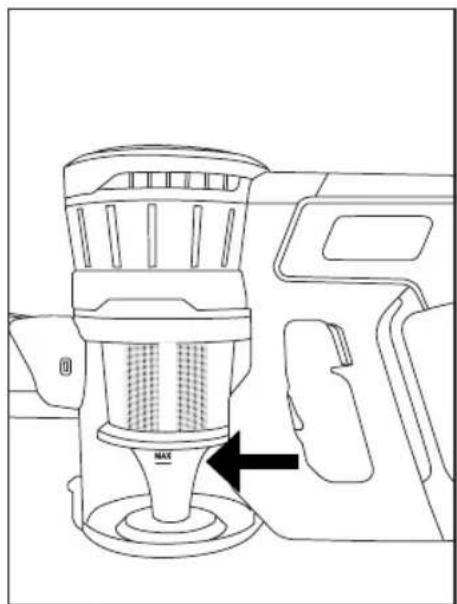
- Respect the MAX level indicator. (Fig. 1).
- Store this appliance out of reach of children and/or those with reduced physical, sensorial or mental abilities or who are unfamiliar with its use
- Do not operate on areas which contain metal objects such as nails and/or screws.
- Never vacuum hot or sharp objects (cigarette butts, ash, nails, etc.).
- Do not open the battery/ies under any circumstances whatsoever.
- When the battery/ies is not in use, keep it away from other metal objects like paper clips, coins, keys, screws ... that could connect a terminal to another.
- Do not short-circuit the battery terminals as this may cause an explosion or fire.
- The battery/ies should be stored at a temperature of below 40^ C.
- Use the appliance only for dry working tasks.
- Never leave the appliance connected and unattended if is not in use. This saves energy and prolongs the life of the appliance.
- Do not use the appliance on any part of the body of a person or animal.
- Recharge the battery/ies only with the charger supplied by the manufacturer. A charger that is suitable for one typ of battery may cause explosion or fire hazard when used with other battery
- Use the device only with the battery/ies for which has been specifically designed. The use
of any other battery/ies s can cause an explosion or fire hazard.
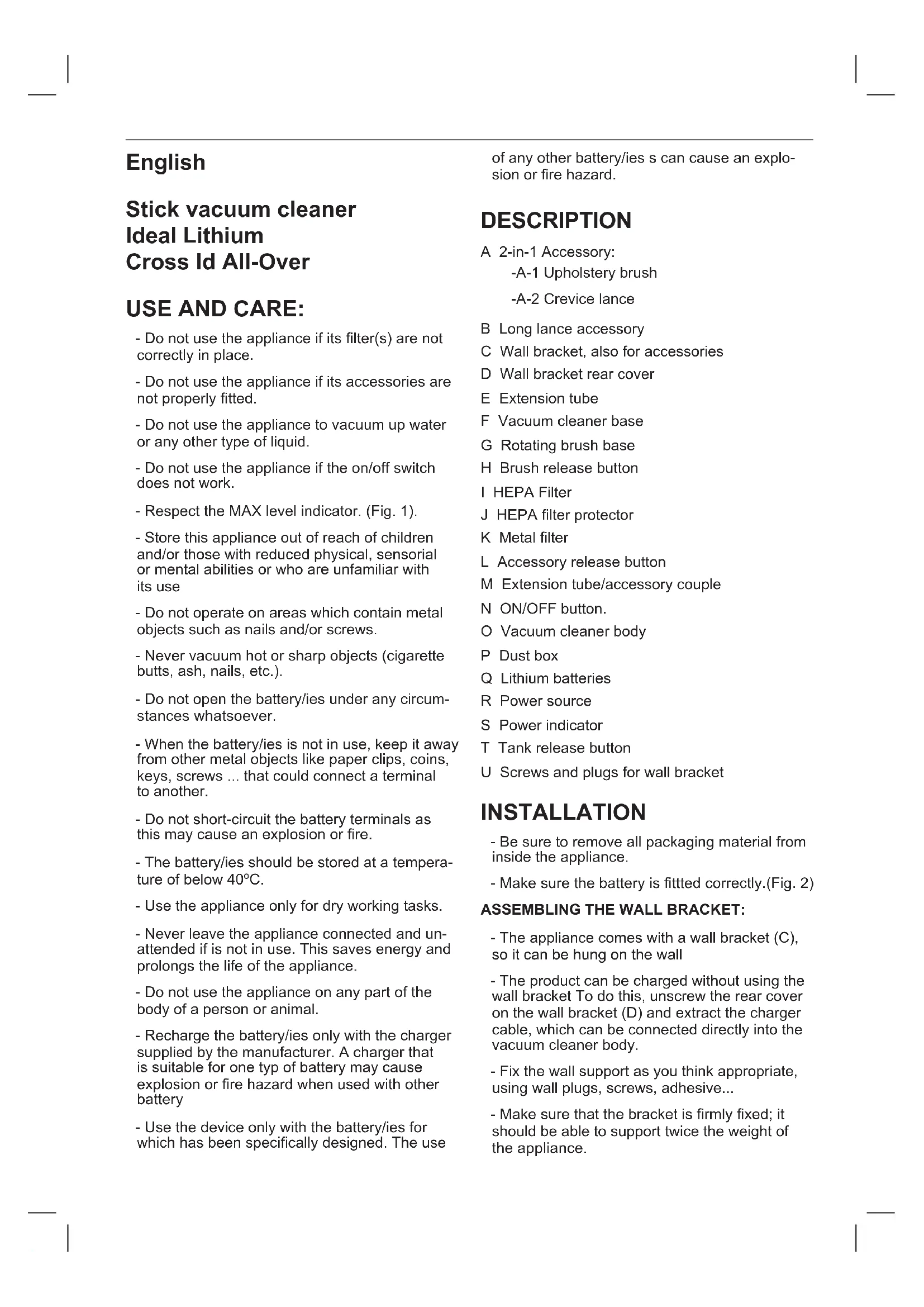
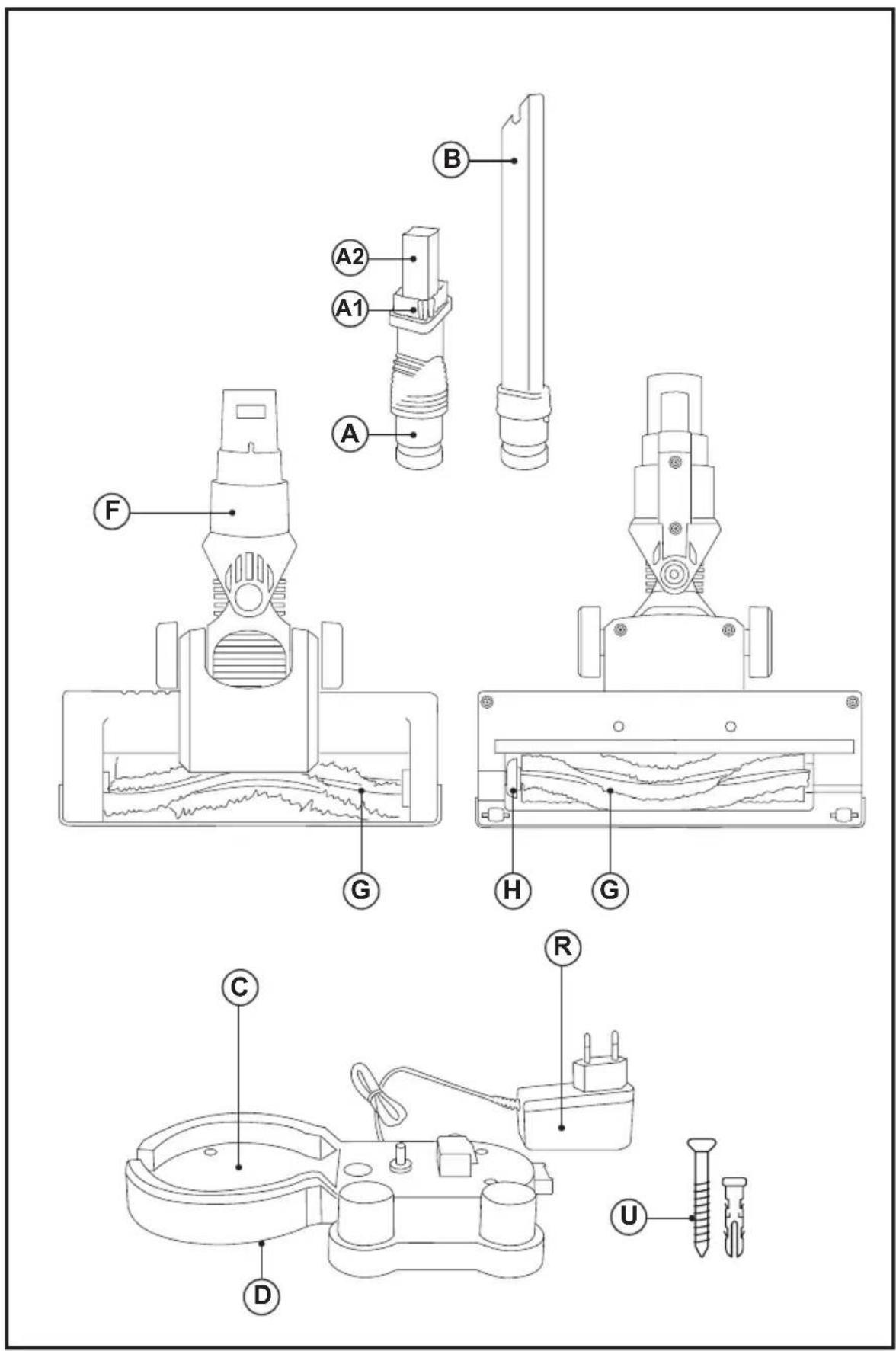
DESCRIPTION
A 2-in-1 Accessory:
-A-1 Upholstery brush
-A-2 Crevice lance
B Long lance accessory
C Wall bracket, also for accessories
D Wall bracket rear cover
E Extension tube
F Vacuum cleaner base
G Rotating brush base
H Brush release button
I HEPA Filter
J HEPA filter protector
K Metal filter
L Accessory release button
M Extension tube/accessory couple
N ON/OFF button.
O Vacuum cleaner body
P Dust box
Q Lithium batteries
R Power source
S Power indicator
T Tank release button
U Screws and plugs for wall bracket
INSTALLATION
- Be sure to remove all packaging material from inside the appliance.
- Make sure the battery is fitted correctly.(Fig. 2)
ASSEMBLING THE WALL BRACKET:
- The appliance comes with a wall bracket (C), so it can be hung on the wall
- The product can be charged without using the wall bracket To do this, unscrew the rear cover on the wall bracket (D) and extract the charger cable, which can be connected directly into the vacuum cleaner body.
- Fix the wall support as you think appropriate, using wall plugs, screws, adhesive...
- Make sure that the bracket is firmly fixed; it should be able to support twice the weight of the appliance.
- Fit the appliance into the wall support.
CHARGING THE BATTERY
- Caution: The new battery does not come completely charged and must be charged up to the maximum before using the appliance for the first time.
- Charge the battery at room temperature between 4 and 40°C.
- Plug the charger(R) into the mains.
-- Approximately 3-4 hours are needed for a complete charge of the battery. Never attempt to over charge the battery (although it is recommended that the first charge of the battery be of 5 hours in duration). - Connect the charger to the jack using the socket on the appliance. The socket is located at the lower/back part of the appliance.
- While the battery is charging, the pilot light will come on indicating that the charger is charging the battery.
- After the specified time, remove the battery from the charger.
- When the battery is charged disconnect the charger from the mains supply.
- Note: Do not use the appliance while it is connected to the charger.
- Note: For a long battery life, it is advisable to charge the battery, only, when it has run out completely.
INSTRUCTIONS FOR USE
BEFORE USE:
- Before using this product for the first time, it is important to make a full charge of batteries.
- Prepare the appliance according to the function you wish to use.
VACUUMING FUNCTION:
- Attach the vacuum's air intake tube and the brush base to the end of the extension tube(E).
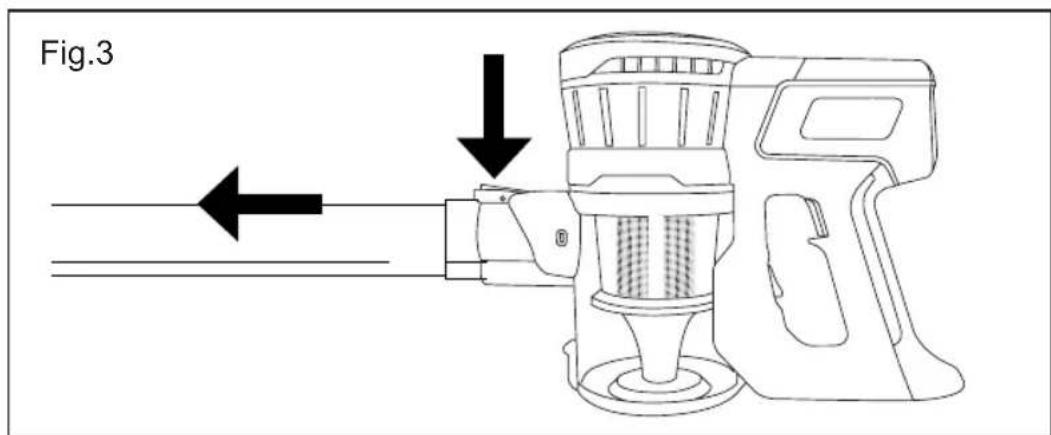
- To uncouple the extension tube from the vacuum, press the accessory release button (L) and pull outward. (Fig. 3).
USE:
- Turn the appliance on using the on/off button. (N)
- The "on" light on the brush base and the battery indicator will both light.
- Select the desired speed (1 / 2) by pressing the on/off button once or twice. Pressing the button 3 times switches the appliance off.
FITTING AN ACCESSORY TO THE HAND-HELD VACUUM CLEANER OR EXTENSION TUBE:
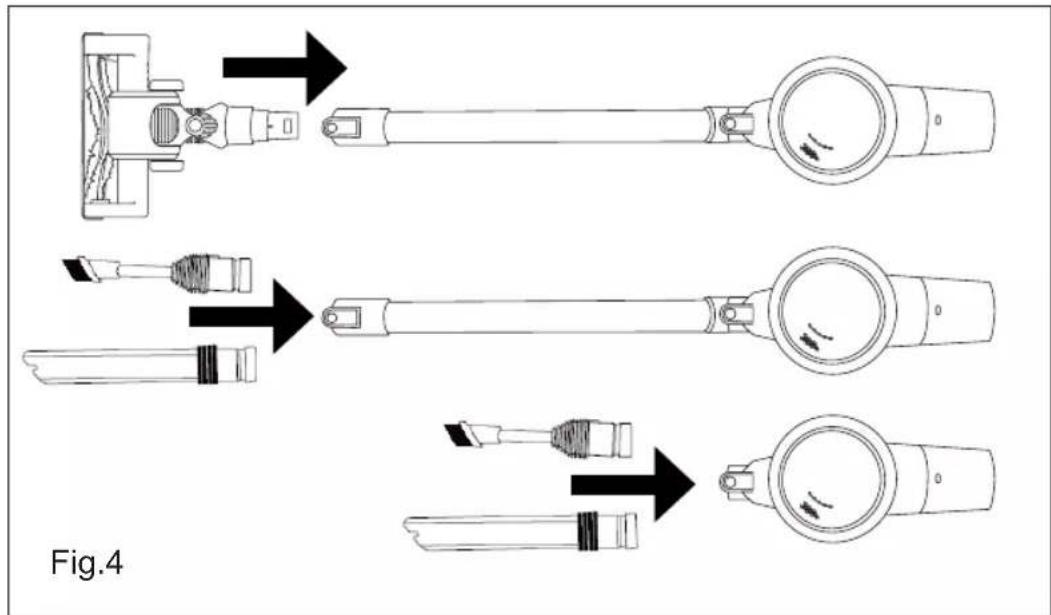
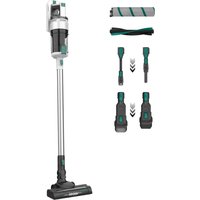
- The hand-held vacuum cleaner and the extension tube are designed in such a way to allow the following accessories to be fitted: (use the combination that best meets your requirements). (Fig. 4).
- 2-in-1 Accessory:
-A-1 Upholstery brush
-A-2 Crevice lance
- Long lance
ONCE YOU HAVE FINISHED USING THE APPLIANCE:
- Turn the appliance off, using the on/off switch.
- Remove the batteries from the appliance if you are not going to use it for some time.
- Clean the appliance
CLEANING
- Disconnect the charger from the mains and let it cool before undertaking any cleaning task.
- Clean the equipment with a damp cloth with a few drops of washing-up liquid and then dry.
- Do not use solvents, or products with an acid or base pH such as bleach, or abrasive products, to clean the appliance.
- Do not submerge the appliance in water or any other liquid, or place it under a running tap.
- Empty the vacuum deposit when dust is visible though the transparent walls, when it is full, or when the vacuum cleaner does not work to its full potential.
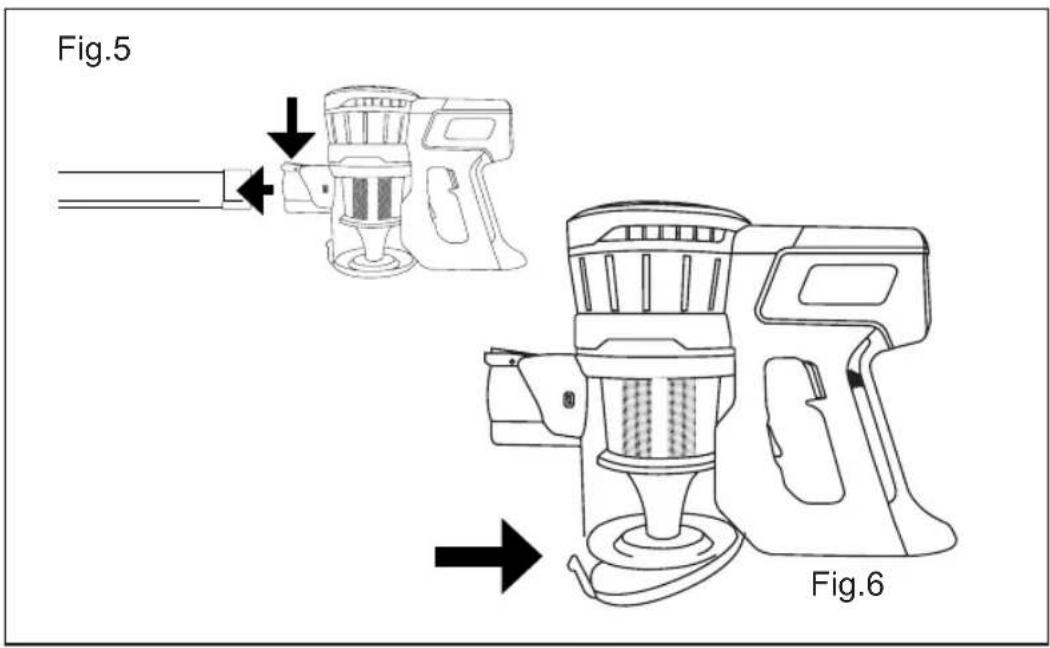
- Disconnect the accessories from the vacuum cleaner's air intake. (Fig. 5).
- Open the lid of the dust box and empty the contents into the appropriate waste disposal receptacle. (Fig. 6).
CHANGING THE FILTERS:
- HEPA type dust box filter (High efficiency air filter that efficiently retains spores, ash, sawdust, pollen...), it is advisable to periodically check the condition of the filter and change it after every 50 hours of use.
TO REMOVE THE FILTERS:
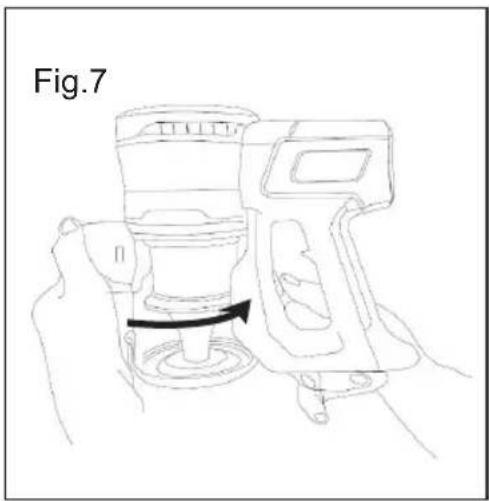
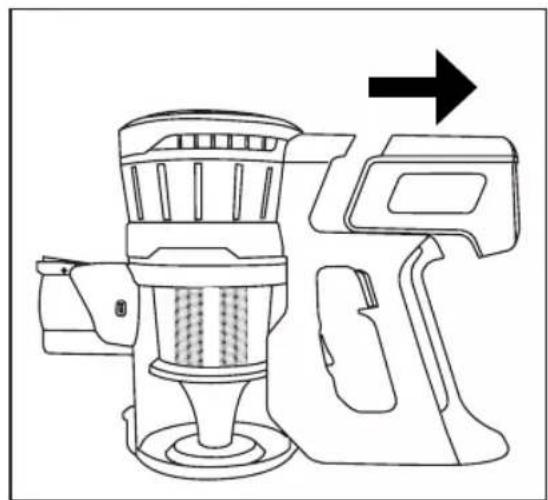
- Uncouple the appliance's dust box by pressing the dust box release button (T) and turning the box in the direction shown by the arrows. (Fig. 7).
- Remove the cyclone from its housing. (Fig. 8).
- To remove the HEPA filter, turn it slightly to the right to free it from the cyclone. (Fig. 9)
- Remove the HEPA filter protector
- To reassemble the filter, proceed with the above instructions, in reverse order.
- Be sure to put the protector back on the HEPA filter
TO REMOVE THE BRUSH:
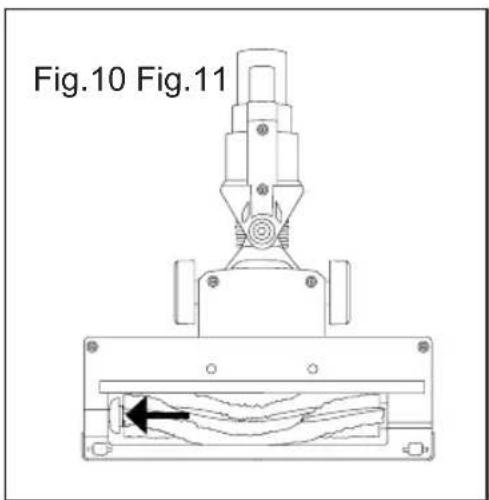
- Move the button at the bottom of the brush base outward to release the brush. (Fig. 10).
- Remove the brush and clean.
- To reassemble, follow the above instructions but in reverse.
SUPPLIES
- Supplies can be acquired from distributors and authorized establishments (such as filters, etc.) for your appliance model.
- Always use original supplies, designed specifically for your appliance model.
HOW TO REMOVE THE BATTERIES FROM THE INTERIOR OF THE DEVICE:
- Caution: It is important that the batteries are fully discharged prior to its withdrawal from the apparatus.
- Caution: the appliance must be disconnected from the mains when removing the batteries.
TO REMOVE THE BATTERIES, ONCE THE LIFE OF THE APPLIANCE, PROCEED AS FOLLOWS:
- Pull the battery upward to remove it from its housing. (Fig. 11).
Français
Aspirateur balai
Ideal Lithium Cross Id All-Over
Ideal Lithium Cross Id All-Over
GEBRUIK EN ONDERHOUD:
J Bescherming HEPA filter
K Metaalfilter
Q Akumulatory litowe
R Zasilacz
Aspirator vertical Ideal Lithium Cross Id All-Over
UTILIZARE ŞI İNGRIJIRE:
This product enjoys the recognition and protection of the legal guarantee in accordance with current legislation. To enforce your rights or interests you must go to any of our official technical assistance services.
You can find the closest one by accessing the following web link: http://taurus-home.com/
You can also request related information by contacting us.
You can download this instruction manual and its updates at http://taurus-home.com/
Français
GARANTIE ET ASSISTANCE TECHNIQUE
COUNTRY ADDRESS PHONE
| Algeria Zone d'Activite, N° 62, Constantine 213770777756 | ||
| Argentina Av. del Libertador 1298,(B1638BEY), Vicente López (Pcia. Buenos Aires) | 541153685223 | |
| Belgium Mariëndonkstraat 5, 5154 EG, Elshout 31620401500 | ||
| Benin 359 Av. Steinmetz, 1930, Cotonou 0299-21313798 | ||
| Bulgaria | 265,Okolovrasten Pat, Mladost 4, 1766, Sofia | 35929211120 / 35929211193 |
| Burkina Faso Avenue Bassawarga, 01 BP915, Ouagadougou 226 25301038 | ||
| Congo (Republic of) 98 Blvd General Charles de Gaulle, Pointe Noire 242066776656 | ||
| Cyprus | 20, Bethlehem Str. / P.O.Box 20430, 2033, Strovolos | 35722711300 |
| Czech Republic | Milady Horakove 357/4, 568 02, Svitavy | 420 461 540 130 |
| Democratic Republic of the Congo | AV. Pont Canale N° 3440, Kinshasa | 00243-991223232 |
| Equatorial Guinea | SN Av Patricio Lumumba y C/ Jesus B, Bata | 00240 333 082958 / 00240 333 082453 |
| Equatorial Guinea | Calle de las Naciones Unidas, PO box 762, Malabo | 240333082958 / 240333082453 |
| España Avda Barcelona, S/N, 25790 Oliana (Lleida) atencioncliente@taurus.es | 902 118 050 | |
| Ethiopia Lideta Sub City Kebele 10 H.NO 124, Addis Ababa | +251 11 5518300 | |
| France | Za les bas musats 18, 89100, Malay-le-Grand | 03 86 83 90 90 |
| Gabon | BP 574, Port-Gentil Centre-ville | 24101552689 / 24101560698 |
| Ghana | Ederick Place, Accra-Ghana | 302682448 / 302682404 |
| Gibraltar 11 Horse Barrack Lane, 54000, Gibraltar 00350 200 75397 / 00350 200 | ||
| 41023 | ||
| Greece Sapfous 7-9, 10553, Athens +30 21 0373 7000 | ||
| Guinea BP 206, GN, Conakry (224) 622204545 | ||
| Hong Kong Unit H,13/F., World Tech Centre, Hong kong (852) 2448 0116 / 9197 3519 | ||
| Hungary Késmárk utca 11-13, 1158, Budapest +36 1 370 4519 | ||
| India C-175, Sector-63, Noida, Gautam Budh Nagar - 201301, Delhi | (+91) 120 4016200 | |
| Ivory Coast 01 Rue Des Carrossiers-Zone 3, B.P 3747, Abidjan 01 (RCI) | 22521251820 / 225 21 353494 | |
| Jordan 28 Basman St Down town, Amman +962 6 46 222 68 | ||
| Kuwait | P.O. BOX 3379 hawally, 32034, Hawally | +965 2200 1010 |
| Lebanon Damascus Highway; Sciale Building, Jamhour | 9615922963 | |
| Luxembourg | Mariëndonkstraat 5, 5154 EG, Elshout 31620401500 | |
| Mali | BP E2900, Dravela Bolibana | 223227216 / 223227259 |
| Marruecos | Big distribution society 4 Rue 13 Lot. Smara Oulfa, Casablanca | (+212) 522 89 40 21 |
| Mauritania | 134 Avenue Gamal Abdener Ilot D, Nouakchott | 2225254469 / 2225251258 |
| Mexico Rosas Moreno N° 4-203 Colonia de San Rafael C.P. 06470 – Delegación Cuauhtémoc, Ciudad de México | (+52) 55 55468162 | |
| Montenegro | Rastovac bb, 81400, Niksic | +382 40 217 055 |
| Netherlands | Mariëndonkstraat 5, 5154 EG, Elshout 31620401500 | |
| Nigeria 8, Isaac; John Str,G.R.A Ikeja Lagos | 23408023360099 | |
| Paraguay | Denis Roa 155 c/ Guido Spano, Asunción | 21665100 |
| Peru | Calle los Negocios 428, Surquillo, Lima | (511) 421 6047 |
| Portugal Avenida Rainha D. Amélia, n°12-B, 1600-677, Lisboa | +351 210966324 | |
| Romania | Dudesti Pantelimon 23, 410554, Bucharest | 031.805.49.58 |
| Serbia | Rastovac bb, 81400, Niksic | +382 40 217 055 |
| Slovakia Milady Horakove 357/4, 568 02, Svitavy | 420 461 540 130 | |
| Southafrica | Unit 25 & 26, San Croy Office Park, Die Agora Road, Croydon, Kempton Park, 1619, Johannesburg | (+27) 011 392 5652 |
| Tunisia | 2, Rue de Turquie, Tunis | 21671333066 |
| Ukraine | Block 6, Ap Housing Estate Topol-2, B, 49000, Dnepropetrovsk | 380563704161 / 380563704161 |
| United Arab Emirates | P.O.BOX 8543, Dubai | 14506246200 |
| Uruguay | Luis Alberto de Herrera 3468, 11600, Montevideo | 598 2209 28 00 |
| Vietnam Lot 7 Ind. Zone for, Ha Noi | 84437658111 / 84437658110 | |


- Español
- Aspirador escoba Ideal Lithium Cross Id All-Over
- Stick vacuum cleaner Ideal Lithium Cross Id All-Over
- USE AND CARE:
- DESCRIPTION
- INSTALLATION
- ASSEMBLING THE WALL BRACKET:
- CHARGING THE BATTERY
- INSTRUCTIONS FOR USE
- BEFORE USE:
- VACUUMING FUNCTION:
- USE:
- FITTING AN ACCESSORY TO THE HAND-HELD VACUUM CLEANER OR EXTENSION TUBE:
- ONCE YOU HAVE FINISHED USING THE APPLIANCE:
- CLEANING
- CHANGING THE FILTERS:
- TO REMOVE THE FILTERS:
- TO REMOVE THE BRUSH:
- SUPPLIES
- HOW TO REMOVE THE BATTERIES FROM THE INTERIOR OF THE DEVICE:
- TO REMOVE THE BATTERIES, ONCE THE LIFE OF THE APPLIANCE, PROCEED AS FOLLOWS:
- Français
- Aspirateur balai
- Ideal Lithium Cross Id All-Over
- GEBRUIK EN ONDERHOUD:
- Aspirator vertical Ideal Lithium Cross Id All-Over
- UTILIZARE ŞI İNGRIJIRE:
- GARANTIE ET ASSISTANCE TECHNIQUE
Brand : TAURUS
Model : Ideal Lithium
Category : Vacuum Cleaner