AP220H - Air purifier HISENSE - Free user manual and instructions
Find the device manual for free AP220H HISENSE in PDF.



| Product type | Air purifier |
| Brand | Hisense |
| Model | AP220H |
| Power supply | 220-240 V ~ 50 Hz |
| Fan speeds | 3 (low, medium, high) + Night mode |
| Timer | 1, 4 or 8 hours |
| Filter replacement indicator | Yes, flashes when filter life is exhausted |
| Safety switch | Automatic shut-off if filter cover is opened |
| Filter type | Air filter (remove plastic packaging before use) |
| Filter replacement | Press and hold the Filter button for 5 seconds after replacement |
| Cleaning and maintenance | Unplug before maintenance; clean the exterior with a dry cloth |
| Safety instructions | Do not use outdoors, near water, combustible gases, or heat sources |
| Intended use | Household use only, do not use for commercial purposes |
| Safety distance | 1.5 m from areas where oxygen is administered |
| Number of pages in the manual | 96 |
Frequently Asked Questions - AP220H HISENSE
User questions about AP220H HISENSE
0 question about this device. Answer the ones you know or ask your own.
Ask a new question about this device
Download the instructions for your Air purifier in PDF format for free! Find your manual AP220H - HISENSE and take your electronic device back in hand. On this page are published all the documents necessary for the use of your device. AP220H by HISENSE.
USER MANUAL AP220H HISENSE
natural_image
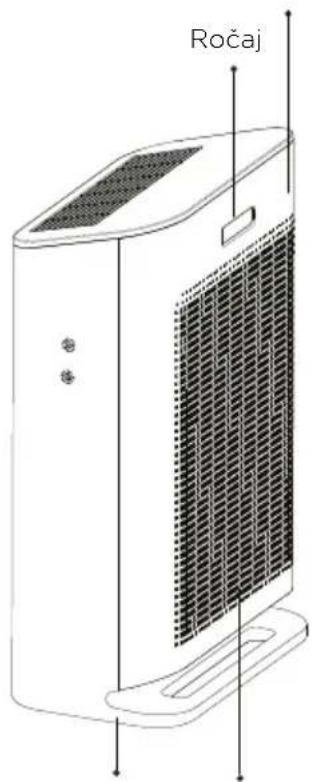
Line drawing of a Hiense air purifier unit with ventilation grille and mounting feet (no text or symbols on the device itself)Čelna plošča
text_image
RočajPlease read this manual carefully and keep it for future reference.
SAFETY INFORMATION

To reduce the risk of fire, electric shock or other injuries, follow all instructions and safety guidelines.
This warning is not for EUROPEAN market:
- This appliance is not intended for use by persons (including children) with reduced physical, sensory or mental capabilities, or lack of experience and knowledge, unless they have been given supervision or instruction concerning use of the appliance by a person responsible for their safety.
- Children should be supervised to ensure that they do not play with the appliance.
This warning is only for EUROPEAN market only:
- This appliance can be used by children aged from 8 years and above and persons with reduced physical, sensory or mental capabilities or lack of experience and knowledge if they have been given supervision or instruction concerning use of the appliance in a safe way and understand the hazards involved. Children shall not play with the appliance. Cleaning and user maintenance shall not be made by children without supervision
General Safety
- Only use your air purifier as described in this manual.
- Do not use without removing the plastic wrap from the filter. The purifier will not filter air and may overheat, causing a fire hazard.
- Do not use your air purifier outdoors.
- Keep your air purifier away from water and wet or damp areas. Never place in water or liquid.
- Do not use in excessively humid areas.
- Keep your air purifier away from heat sources.
- Do not use where combustible gases, vapours, metallic dust, aerosol (spray) products, or fumes from industrial oil are present.
- Keep 5 ft / 1.5 m away from where oxygen is being administered.
- Supervise children when they are near the air purifier.
- Do not place anything into any opening on the air purifier.
- Do not sit or place heavy objects on the air purifier.
- Keep the inside of the air purifier dry. To prevent moisture build-up, avoid placing in rooms with major temperature changes or underneath air conditioners.
- Always unplug your air purifier before servicing (such as changing the air filter).
- Do not use your air purifier if it is damaged or not working correctly, or if the cord or plug is damaged. Do not try to repair it yourself.
- WARNING: Do not use this air purifier with solid-state speed controls (such as a dimmer switch).
- Not for commercial use. Household use only.
Power and Cord
- Keep the air purifier near the outlet it is plugged into.
- Never place the cord near any heat source.
- Do not cover the cord with a rug, carpet, or other covering. Do not place the cord under furniture or appliances.
- Keep the cord out of areas where people walk often. Place the cord where it will not be tripped over.
READ AND SAVE THESE INSTRUCTIONS
PRODUCT DESCRIPTION
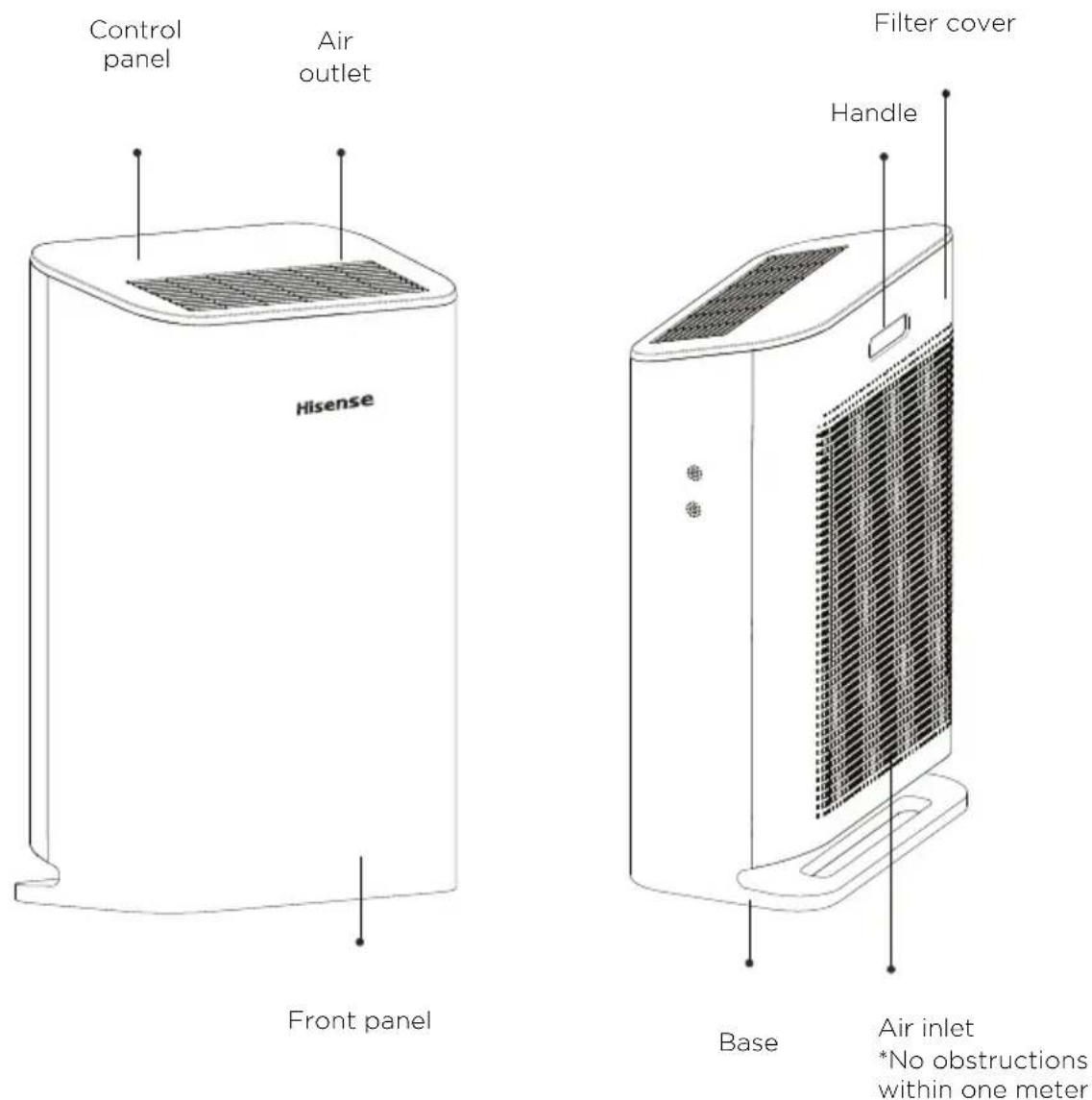
*No obstructions within one meter
text_image
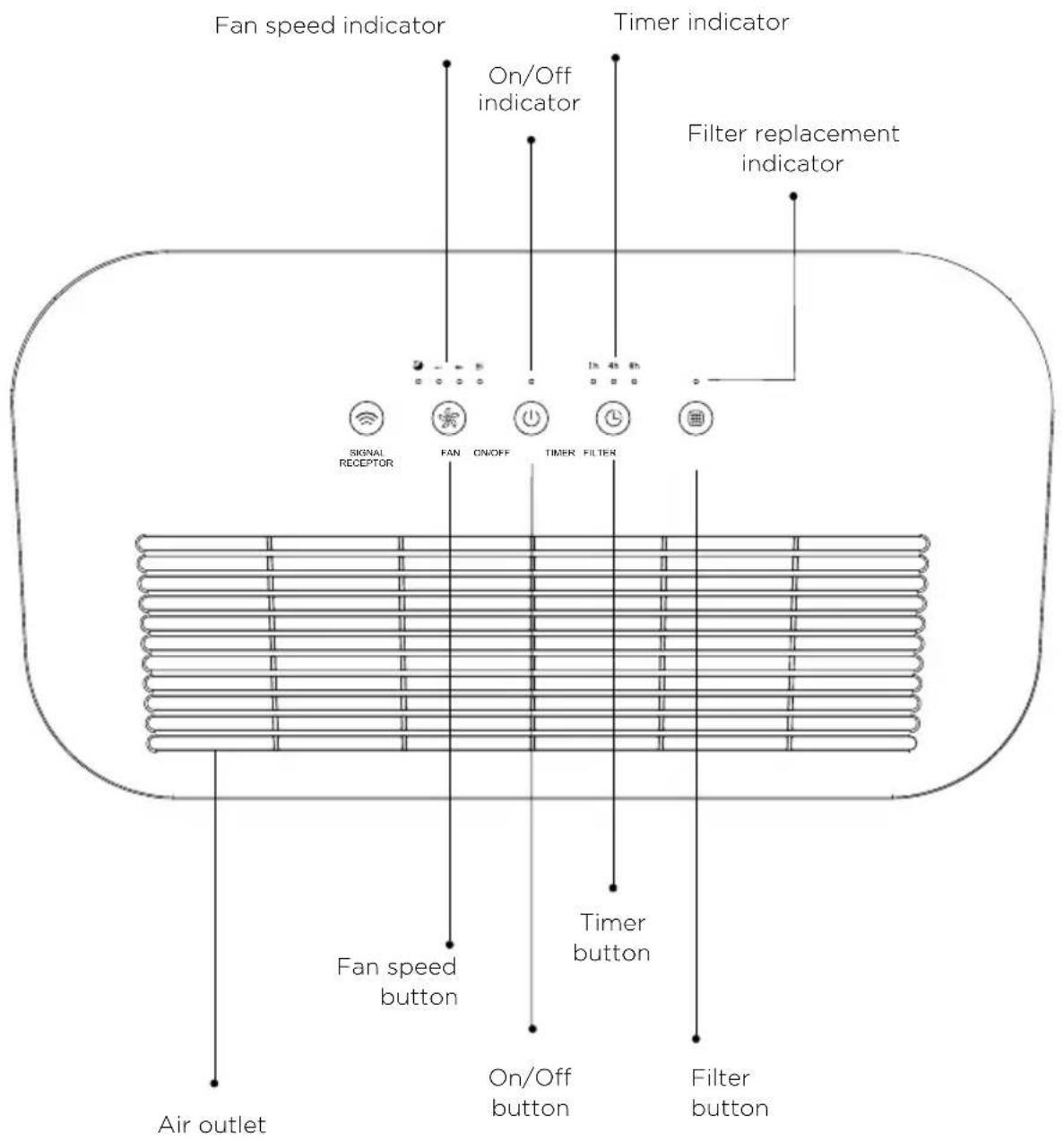
Fan speed indicator Timer indicator On/Off indicator Filter replacement indicator Signal RECEPTOR FAN ON/OFF TIMER FILTER Fan speed button Timer button Air outlet On/Off button Filter button
On/off button
Plug in the air purifier. Tap this button to turn the air purifier on/off. The indicator lights up, accompanied by a beep sound. The purifier runs at low speed by default.

Fan speed button
If you tap this button, the fan speed cycles through:

text_image
(low) → ≡ (median) → ☆ (high)The corresponding indicator lights up, accompanied by a beep sound.
In Sleep Mode the air purifier operates quietly by using the lowest possible fan speed and all indicator lights are turned off.
Tap any button to wake up the display for 5 seconds. During the wake up, the purifier runs according to your settings.
Timer button
You can set the timer for 1, 4 or 8 hours. Tap this button repeatedly to select a time. The corresponding indicator lights up, accompanied by a beep sound. The timer indicators will light up when active. Once the timer has finished, the air purifier will power off. To cancel a timer, tap this button until all timer indicators are off.
You can change the fan speed at any time while the timer is on. The timer will restart if the time is changed.
Filter replacement button
When the filter life expires, the filter replacement indicator will blink to remind you. After changing the filter, press and hold this button for 5 seconds to reset.
Safety switch
In the startup state, the air purifier will turn off automatically once the filter cover is opened.
After the filter cover is installed in place, the purifier can be turned on manually.
Before using the air purifier, please install the appliance correctly using the following four steps to ensure that the machine is installed and placed properly, then connect it to the power source.
1.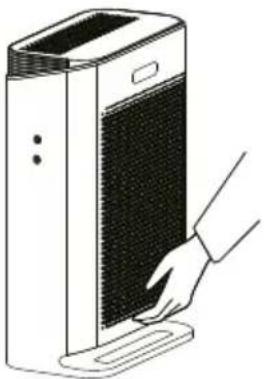 Remove the filter cover by pulling the bottom handle Remove the filter cover by pulling the bottom handle | 2.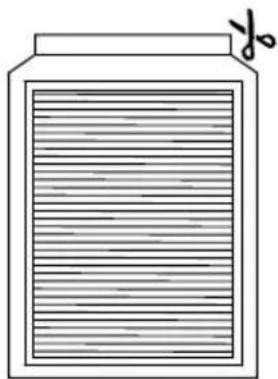 Remove the filter from its plastic packaging Remove the filter from its plastic packaging |
3.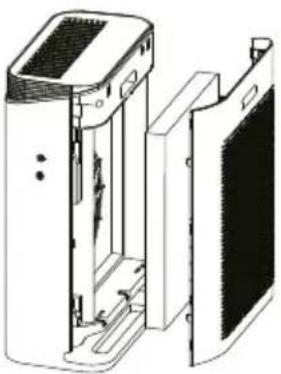 Place the filter back into the purifier with its little handle facing outwards. Place the filter back into the purifier with its little handle facing outwards. | 4.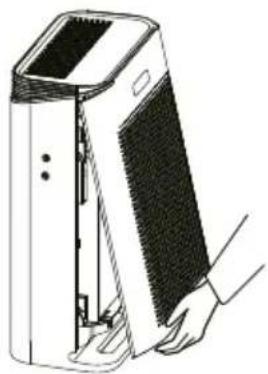 Replace the filter cover and connect to the power source. Replace the filter cover and connect to the power source. |
NOTICE D'UTILISATION