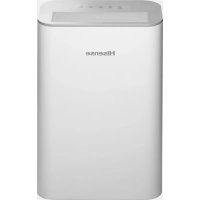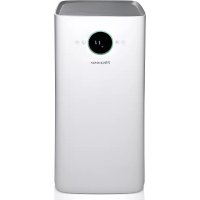
AP580H - Air purifier HISENSE - Free user manual and instructions
Find the device manual for free AP580H HISENSE in PDF.


| Product type | Air purifier with UV-LED lamp |
| Brand | Hisense |
| Model | AP580H |
| Use | Indoor air purification |
| Power supply | 220-240 V, 50 Hz (estimated) |
| Power | Approximately 50 W (estimated) |
| Dimensions (W x H x D) | Approximately 400 x 600 x 200 mm (estimated) |
| Weight | Approximately 5 kg (estimated) |
| Fan speed levels | 4 manual speeds + automatic mode (A) |
| Night mode | Yes, with low-brightness indicator |
| Timer | From 1 to 12 hours, scheduled stop and delayed start |
| Filter | Combined filter (activated carbon + dust filter) |
| Filter replacement indicator | Yes, red indicator + reset by long press |
| Filter replacement frequency | Approximately every 6 months (depending on environment) |
| UV-LED lamp | Yes, lifespan 30,000 hours |
| Essential oil diffuser | Yes, with storage box and absorbent sponge |
| Air quality indicator | Yes, visual indicator |
| Cleaning | Dry cloth, no water or abrasive detergents |
| Child safety | Yes, key lock |
| Operating temperature range | 0°C to 40°C |
| Spare parts available | Replacement filters, absorbent sponge |
| Repairability | Do not disassemble yourself, contact customer service |
| Warranty | Consult after-sales service |
Frequently Asked Questions - AP580H HISENSE
User questions about AP580H HISENSE
0 question about this device. Answer the ones you know or ask your own.
Ask a new question about this device
Download the instructions for your Air purifier in PDF format for free! Find your manual AP580H - HISENSE and take your electronic device back in hand. On this page are published all the documents necessary for the use of your device. AP580H by HISENSE.
USER MANUAL AP580H HISENSE
natural_image
Line drawing of a white industrial air purifier unit with mesh grille and control panel (no text or symbols)AIR PURIFIER
AP580H HSN
natural_image
Front view of a smartphone with a circular button and two small dots on the screen (no text or symbols visible)Čistilnik zraka (Filter je v aparatu)
natural_image
Grid-patterned panel with uniform vertical lines, no text or symbols visibleHEPA filter

Filter z aktivnim ogljem
Priročnik
SESTAVNI DELI
text_image
8.88 PM 2.5Upravljalna plošča
Po priključitvi je aparat v stanju pripravljenosti.
Vklop
natural_image
Line drawing of a computer monitor internal components (no text or symbols)Predalček za eterično olje
natural_image
Diagram of a computer monitor with an open case and a cable, showing internal components and directional arrows (no text or symbols)- Odprite hrbtni pokrov, izvlecite predalček za eterično olje, nakapajte olje na vpojno gobico, potem pritisnite predalček za eterično olje v zarezo in zaprite pokrov filtra.
text_image
Protiprašna mrežica predalček za eterično oljetext_image
Diagram showing a power button icon transforming into an electrical socket with plug, illustrating the process of switching or discharging.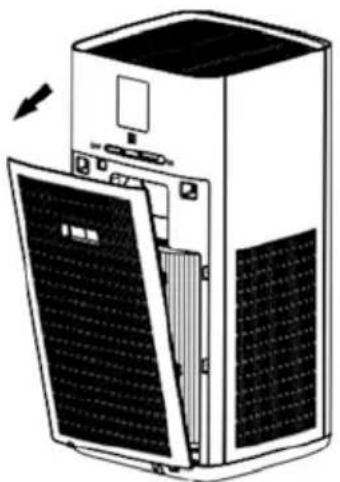
natural_image
Diagram of a server rack with open panel and ventilation slots (no text or symbols)(Filter z aktivnim ogljem)
natural_image
Exploded view diagram of a server unit showing internal components including fan, cylinder, and door (no text or labels)(HEPA filter)
natural_image
Diagram of a large industrial air conditioner unit with internal components and a separate panel showing solar panels (no text or labels)-
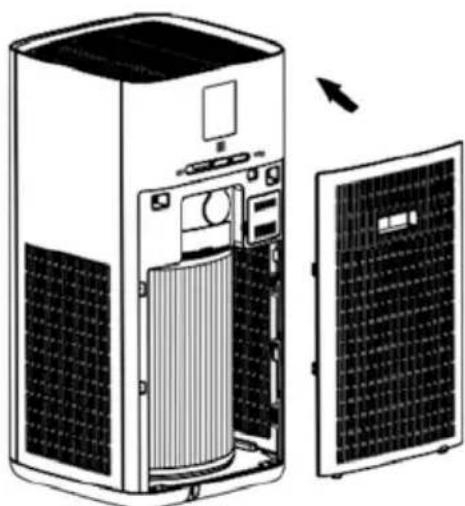
Odprite hrbtni pokrov, primite ročaj na tem pokrovu in ga izvlecite.
-
Odstranite filter in ga zavijte v vrečko za smeti, da nečistoče s filtra ne umažejo prostora.
Opomba:
text_image
8.88 PM 2.5Panel-Diagramm
natural_image
Line drawing of a computer monitor with labeled ports and screen (no text or symbols)natural_image
Diagram of a computer monitor with an open case showing the internal components and a black arrow pointing to a button (no text or symbols present)text_image
Diagram showing a power button icon transforming into an electrical socket with plug, illustrating the process of switching or discharging.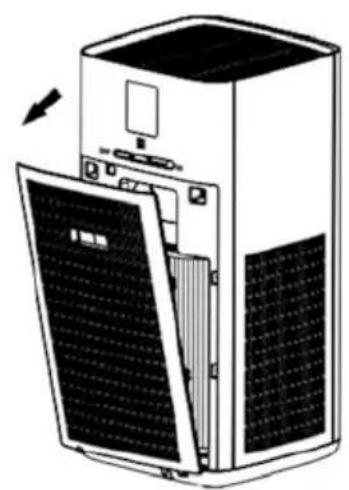
natural_image
Diagram of a server rack with open panel and solar panels, showing internal components (no text or symbols)(Aktivkohlefilter)
natural_image
Exploded view diagram of a server rack with internal components including fan, cylinder, and door (no text or labels)(HEPA-Filter)
natural_image
Diagram of a server unit with internal components and external panel (no text or symbols)natural_image
Front view of a smartphone with a circular button and two small dots on the screen (no text or symbols visible)natural_image
Two rectangular panels: one with vertical grid lines on the left, the other with a solid dark rectangle on the right (no text or symbols)natural_image
Two simple line drawings of a printer and its blank cover, no text or symbols present.Manual
PARTES DEL PRODUCTO
text_image
8.88 PM 2.5Diagrama del panel
natural_image
Line drawing of a computer monitor internal components (no text or symbols)natural_image
Diagram of a refrigerator interior showing the door, front panel, and side panel with an arrow pointing to the door (no text or symbols present)text_image
Diagram showing a power button icon transforming into an electrical outlet plug, illustrating the process of switching or installation.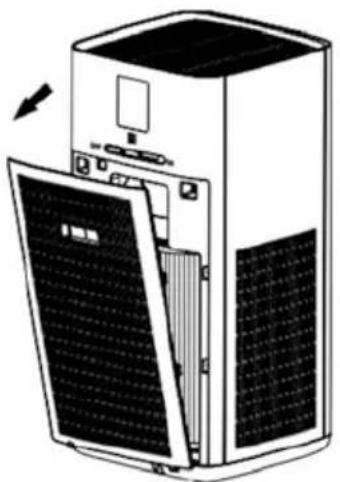
natural_image
Diagram of a server rack with open panel and ventilation slots (no text or symbols)natural_image
Exploded view diagram of a server unit showing internal components including fan, cylinder, and door (no text or labels)(filtro HEPA)
natural_image
Diagram of an air conditioner unit showing internal components and exterior panel (no text or labels)natural_image
Front view of a smartphone with a circular button and two small dots on the screen (no text or symbols visible)natural_image
Grid-patterned panel with uniform rectangular cells (no text or symbols)text_image
8.88 PM 2.5Diagramma del pannello
natural_image
Line drawing of a computer monitor internal components (no text or symbols)natural_image
Diagram of a computer monitor with an open case showing the internal components and a black arrow pointing to a button (no text or symbols present)text_image
Diagram showing a power button icon transforming into an electrical socket with plug, illustrating the process of switching or discharging.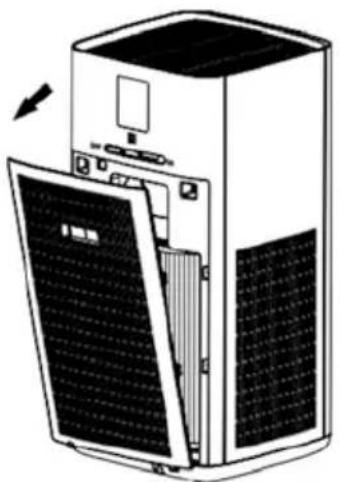
natural_image
Diagram of a server rack with open panel and ventilation slots (no text or symbols)natural_image
Exploded view diagram of a server unit showing internal components including fan, cylinder, and door (no text or labels)(Filtro HEPA)
natural_image
Diagram of a large industrial air conditioner unit with internal components and a separate panel showing solar panels (no text or labels)natural_image
Front view of a smartphone with a circular button and two small dots on the screen (no text or symbols visible)natural_image
Grid-patterned panel with uniform vertical lines, no text or symbols visibletext_image
8.88 PM 2.5Управлінна панель
natural_image
Line drawing of a computer monitor internal components (no text or symbols)natural_image
Diagram of a computer monitor with an open case showing the internal components and a black arrow pointing to a button (no text or symbols present)text_image
Diagram showing a power button icon being replaced by an electrical socket, illustrating the process of switching or discharging.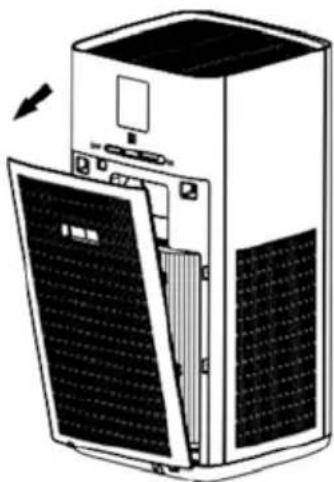
natural_image
Diagram of a server rack with open panel and ventilation slots (no text or symbols)natural_image
Exploded view diagram of a server unit with internal components including fan, cylinder, and cover (no text or labels)(Високоефикасен филтер)
natural_image
Diagram of an air conditioner unit showing internal components and exterior panel (no text or labels)text_image
8.88 PM 2.5Zaslon
natural_image
Diagram of a computer monitor internal components, showing front panel, rear panel, and screen (no text or labels)natural_image
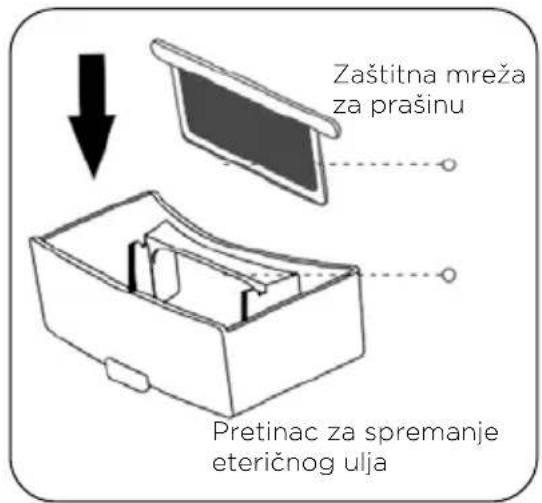
Diagram of a computer monitor with an open case showing the internal components and a black arrow pointing to a button (no text or symbols present)- Otvorite poklopac na poledini kućišta, izvucite pretinac za spremanje eteričnog ulja, nakapajte eterično ulje u upijajuću spužvu, zatim gurnite pretinac za držanje eteričnog ulja u utor i zatvorite poklopac filtra.
text_image
Zaštitna mreža za prašinu Pretinac za spremanje eteričnog ulja- Očistite pretinac za spremanje eteričnog ulja.
Nakon određenog vremena, pretinac za držanje eteričnog ulja potrebno je očistiti. Način čišćenja: Izvucite pretinac, izvadite zaštitnu mrežu za prašinu i isperite je vodom. Na kraju gurnite pretinac za spremanje eteričnog ulja natrag u utor. (Preporučuje se češća zamjena upijajuće spužve.)
text_image
Diagram showing a power button icon transforming into an electrical socket with plug, illustrating the process of switching or discharging.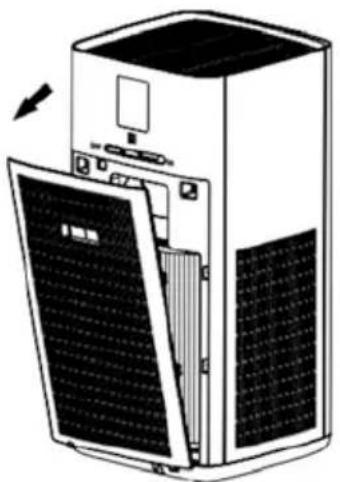
natural_image
Diagram of a server rack with open panel and ventilation slots (no text or symbols)(Aktiviran ugljeni filtar)
natural_image
Exploded view diagram of a server unit showing internal components including fan, cylinder, and door (no text or labels)(Filtro HEPA)
natural_image
Diagram of an air conditioner unit showing internal components and exterior panel (no text or labels)natural_image
Front view of a smartphone with a circular button and two small dots on the screen (no text or symbols visible)natural_image
Two rectangular panels: one with vertical grid lines on a gray surface, the other with a dark rectangle on a white background (no text or symbols)natural_image
Two abstract diagrams showing a 3D box and a blank sheet, no text or symbols present.Instrukcja
CZEŚCI SKŁADOWE URZĄDZENIA
text_image
8.88 PM 2.5Schemat panelu
natural_image
Diagram of a computer refrigerator internal structure with an arrow pointing to the front panel (no text or symbols present)text_image
Diagram showing a power button being replaced by an electrical socket, illustrating the process of switching or discharging.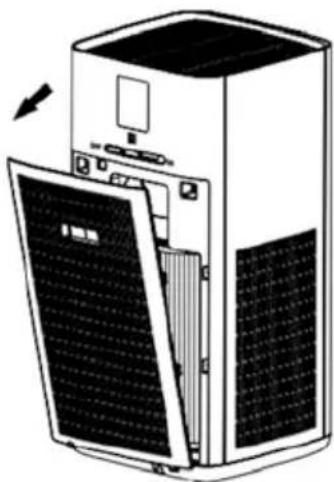
natural_image
Diagram of a server rack with open panel and ventilation slots (no text or symbols)natural_image
Exploded view diagram of a server unit with internal components including fan, cylinder, and panel (no text or labels)(Filtro HEPA)
natural_image
Diagram of an air conditioner unit with internal components and a separate panel showing solar panels (no text or labels)natural_image
Front view of a smartphone with a circular button and two small dots on the screen (no text or symbols visible)natural_image
Grid-patterned panel with uniform vertical lines, no text or symbols visibleFiltru HEPA Filtru de carbon activ

1 * Filtru combinat
Manual
COMPONENTELE PRODUSULUI
text_image
8.88 PM 2.5Diagrama panoului
natural_image
Line drawing of a computer monitor internal components (no text or symbols)natural_image
Diagram of a refrigerator interior showing the door, front panel, and side panel with an arrow pointing to the door (no text or symbols present)text_image
Diagram showing a power button icon transforming into an electrical socket with plug, illustrating the process of switching or discharging.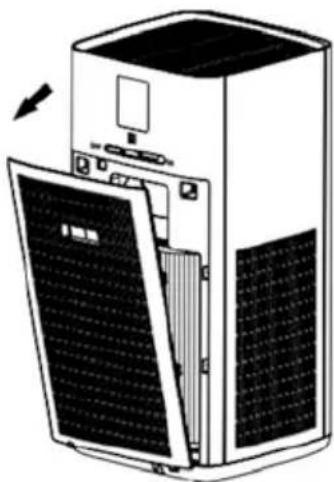
natural_image
Diagram of a server rack with open panel and ventilation slots (no text or symbols)(Filtru de carbon activ)
natural_image
Exploded view diagram of a server unit showing internal components including fan, cylinder, and door (no text or labels)(Filtru HEP)
natural_image
Diagram of a server unit with internal components and external panel (no text or symbols)natural_image
Front view of a smartphone with a circular button on the top (no text or symbols visible)text_image
8.88 PM 2.5Ovládací panel
natural_image
Line drawing of a computer monitor with labeled ports and screen (no text or symbols)natural_image
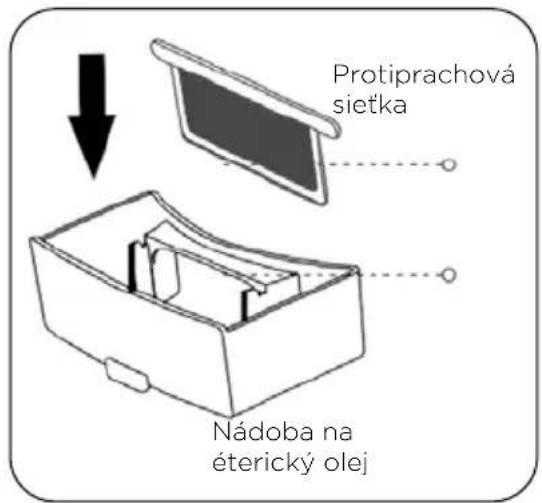
Diagram of a computer tower with an open refrigerator and a cable box, showing internal components and directional arrows (no text or symbols)- Otvorte zadný kryt, vytiahnite nádobu na éterický olej, nakvapkajte olej na absorpčnú špongiu, potom nádobku na éterický olej zasuňte do otvoru a zatvorte kryt filtra.
text_image
Diagram showing a power button icon transforming into an electrical socket with plug, illustrating the process of switching or discharging.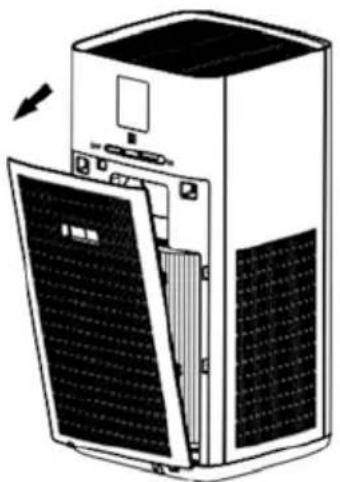
natural_image
Diagram of a server rack with open panel and ventilation slots, showing internal components (no text or symbols)(Aktiviran ugljeni filtar)
natural_image
Exploded view diagram of a server unit showing internal components including fan, cylinder, and door (no text or labels)(Filtro HEPA)
natural_image
Diagram of a server unit with internal components and external panel (no text or symbols)-
Otvorte zadný kryt, uchopte rukováť na zadnom kryte a vytiahnite ho.
-
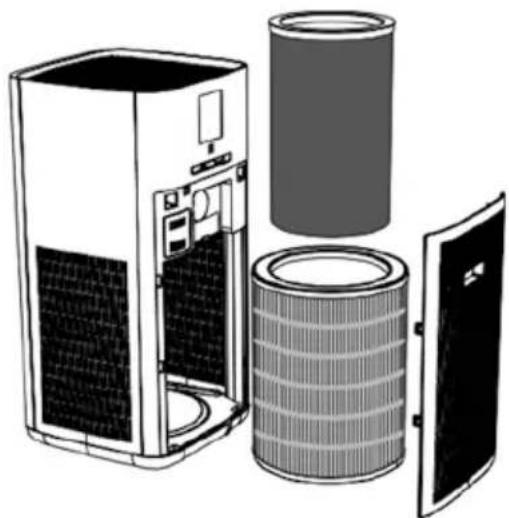
Vyberte filter a zabalte ho do odpadkového vrecka tak, aby nečistoty z filtra nezašpinili miestnost.
Poznámka:
natural_image
Front view line drawing of a smartphone with a circular button on the top (no text or symbols)Aparat za pročišćavanje
vazduha
(Filter je ugrađen u unutrašnjosti aparata)
natural_image
Two rectangular panels: one with a grid pattern on the left, the other with a dark rectangle on the right (no text or symbols)HEPA Filtar Aktivni karbon filter
1*Kombinacioni filter
natural_image
Two simple line drawings of a device and a blank sheet, no text or symbols present.Priručnik
DELOVI APARATA
text_image
8.88 PM 2.5Displej
Nakon što aparat spojite na električnu energiju, on se postavlja u način pripremljenosti (stendbaj).
natural_image
Line drawing of a computer monitor internal components (no text or symbols)natural_image
Diagram of a computer monitor with an open case showing the internal components and a black arrow pointing to a device (no text or symbols present)- Otvorite poklopac na poledini kućišta, izvucite fioku za držanje eteričnog ulja, nakapajte eterično ulje u upijajući sunderčić, a zatim gurnite fioku za držanje eteričnog ulja nazad na svoje mesto i zatvorite poklopac filtera.

text_image
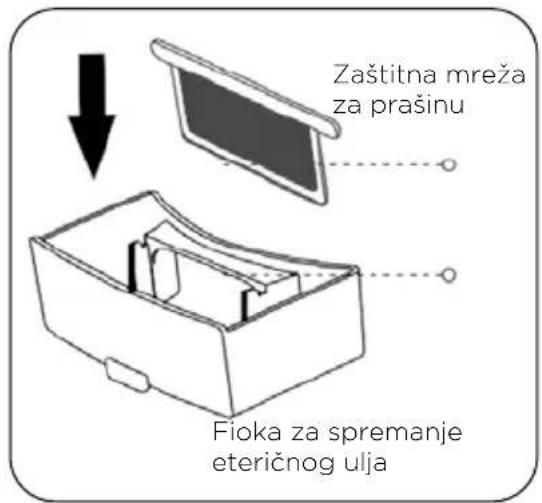
Zaštitna mreža za prašinu Fioka za spremanje eteričnog ulja- Očistite fioku za držanje eteričnog ulja.
Nakon određenog vremena, fioku za držanje eteričnog ulja trebaće očistiti. Način čišćenja: Izvucite fioku, izvadite zaštitnu mrežu za prašinu i isperite je vodom. Na kraju gurnite fioku za držanje eteričnog ulja nazad na svoje mesto. (Preporučuje se češća zamena upijajućeg sundera).
text_image
Diagram showing a power button being replaced by an electrical socket, illustrating the process of switching or discharging.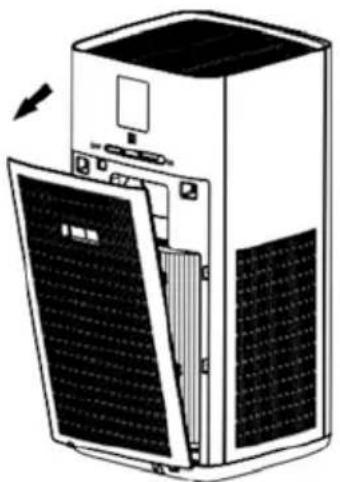
natural_image
Diagram of a server rack with open panel and ventilation slots, showing internal components (no text or symbols)(Aktiviran karbonski filter)
natural_image
Exploded view diagram of a server unit showing internal components including fan, cylinder, and door (no text or labels)(HEPA Filter)
natural_image
Diagram of a large industrial air conditioner unit with internal components and a separate panel showing solar panels (no text or labels)text_image
Donji deo filtera
Napomena:
Filter treba postaviti sa dnom okrenutim prema dole.
- Nakon što ste zamenili filter, molimo vas da podete na interfejs filtera; pritisnite i držite ga pritisnutog 5 sekundi kako biste resetirali vek trajanja filtera.

Napomena:
a. Molimo pažljivo pročitajte uputstva za zamenu filtera kako biste obezbedili efekat pročišćivanja kog aparat garantuje.
b. Pre čišćenja aparata izvadite utikač priključnog kabla i time odspojite aparat iz napajanja.
c. Unutrašnjost aparata treba da bude stalno suva kako biste sprečili oštećenje strujnih krugova.
d. Kada opazite da je površina prašnjava, usisavačem za prašinu očistite prašinu sa površine, čime ćete produžiti životni vek filtera.
Ako vaš pročišćivač vazduha ne radi ispravno, molimo vas proverite savete i uputstva iz donje tabele pre nego što aparat pošaljete na popravku.
Problem Uzrok Rešenje
| Aparat ne radi. A. Nema napajanjaelektričnom energijom.B. Kvar motora ili PCBA sklopa | A. Proverite napajanje električnom energijom.B. Molimo vas da se obratite Centru za pomoć korisnicima | |
| Neprijatan vonj izlazi iz otvora za izlaz vazduha na aparatu. | A. Kapacitet filtriranja i zapremina adsorpcije filtera su zasićeni.B. Koncentracija mirisa u vazduhu unutar prostore je previsoka. | A. Zamenite filter novim filterom.B. Otvorite prozore kako biste provetrili prostoriju, i proverite da li loš miris izlazi iz aparata ili ne. |
| Učinak pročišćivanja vazduha je skroman, a kvalitet vazduha nije bitnije poboljšan. | A. Filter nije instaliran.B. Naprava je postavljena u uzak prolaz ili blizu prepreka koje utiču na pročišćavanje.C. Filter je previše zaprljan. | A. Namestite filter.B. Uklonite prepreku ili zamenite položaj aparata.C. Očistite ili zamenite filter. |
| Aparat proizvodi prekomernu buku. | A. U aparat su pali strani predmeti.B. Aparat je smešten na neravnoj površini.C. Loša montaža delova. | A. Namestite filter.B. Uklonite prepreku ili zamenite položaj aparata.C. Očistite ili zamenite filter |
| Kvar tastera aparata blokade za decu? | Da li je aparat u načinu bezbednosne | Nakon okretanja dugmeta prebacite se na ikona, pritisnite i držite 3 sekunde pritisnut taster kako biste deaktivirali bezbednosnu blokadu za decu. |
Ne mogu montirati filter Filter je postavljen naopačke. Pravilno obrnite filter i izravnajte ga s donjim utorom.

Napomena:
Ako i unatoč poduzimanju gore navedenih mera problemi u radu naprave i dalje postoje, obratite se serviseru ili tehničkom osoblju koje vam je na raspolaganju u našem centru za pomoć korisnicima. Kako biste izbegli opasnosti i oštećenja nemojte sami rastavljati i popravljati aparat.
USER MANUAL
Thank you for your purchase and use. In order to get the best experience, please read the instruction manual carefully before installing, using and maintaining this product, and keep it for future reference.
This appliance contains a UV-LED
SAFETY INFORMATION
Before Use
- Before connecting the plug to a wall socket, verify the correct mains voltage. Refer to the specifications on the rating label of the device.
- If the power cord is damaged, it must be replaced by the manufacturer, its service agent or similarly qualified personnel to avoid hazards. Do not repair the device by yourself.
- When cleaning or putting the device away, switch it off and always pull out the plug from the socket (pull by the plug and not the cord) if the device is not being used and remove the attached accessories.
- Unintended use of the appliance or damage to the housing may result in the escape of dangerous UV radiation. UV radiation may, even in little doses, cause harm to the eyes and skin.
Usage Environment
- Never operate the device in a room where explosive gas may accumulate. Risk of explosion if solvent or gasoline leaks from paint and adhesive.
-
Never place burning items (such as candles, cigarettes or similar) near the device, otherwise there will be danger of damage or even fire.
-
Never operate the device in a room with high air humidity, such as a bathroom, shower or swimming pool, as moisture can accumulate in the device and cause an electric shock.
- Never use any spray in the room.
- Never add aromatic oil to the filter.
- Operate the device only at room temperature between 0^ and 40^ .
During Use
- Operate the device only with the filter element inserted and the cover closed.
- Do not insert any items into the openings of the device.
- Never place the device directly next to ovens or other sources of heat.
- Do not hesitate to pull the plug if you detect any bad smell released from the running device.
- Pull the plug from the socket before moving the device.
- The swicth of UV-LED is in sync with Essential Oil Open Key.
Cleaning
- Do not use a wire brush or other abrasive objects.
- Do not use acidic or abrasive detergents.
• Always pull the plug before cleaning and maintenance. -
Clean the housing using a dry cloth, without additives.
-
Never immerse the motor housing in water for cleaning. It could result in an electric shock or fire.
- No need to cleaning, the life of UV-LED is 30,000 hours normally.
Safety Precautions
- In order to ensure your children's safety, please keep all packaging materials (plastic bags, boxes, polystyrene etc.) out of their reach.
- This device can be used by children aged from 8 years and above and persons with reduced physical, sensory or mental capabilities or lack of experience and knowledge if they have been given supervision or instruction concerning use of the device in a safe way and understand the hazards involved.
• Children should not play with the device.
- Cleaning and user maintenance should not be done by children without supervision.
• This warning is not for EUROPEAN market: This appliance is not intended for use by persons (including children) with reduced physical, sensory or mental capabilities, or lack of experience and knowledge, unless they have been given supervision or instruction concerning use of the appliance by a person responsible for their safety. Children should be supervised to ensure that they do not play with the appliance.
natural_image
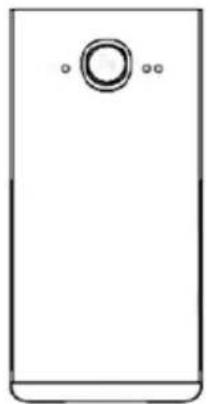
Front view of a smartphone with a circular button on top (no text or symbols visible)Air Purifier Device (The filter is placed inside the device)
natural_image
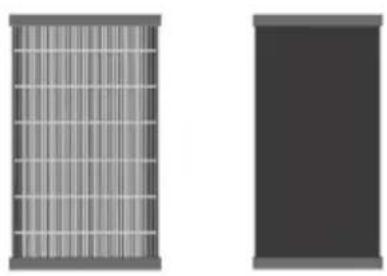
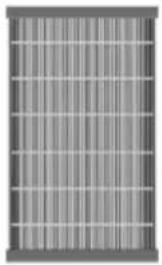
Grid-patterned panel with uniform vertical lines, no text or symbols visibleHEPA Filter

Activated Carbon Filter
1*Combination Filter
Manual
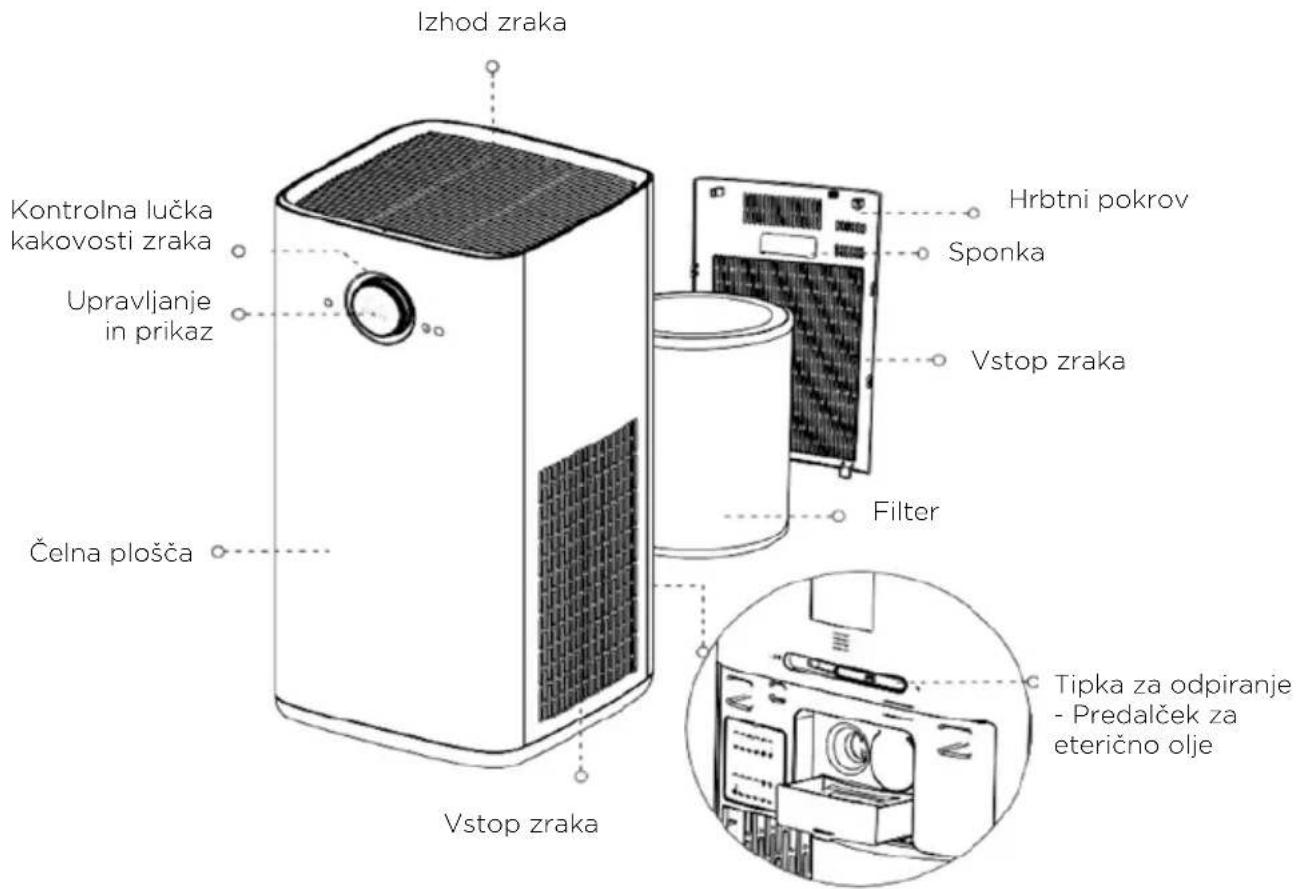
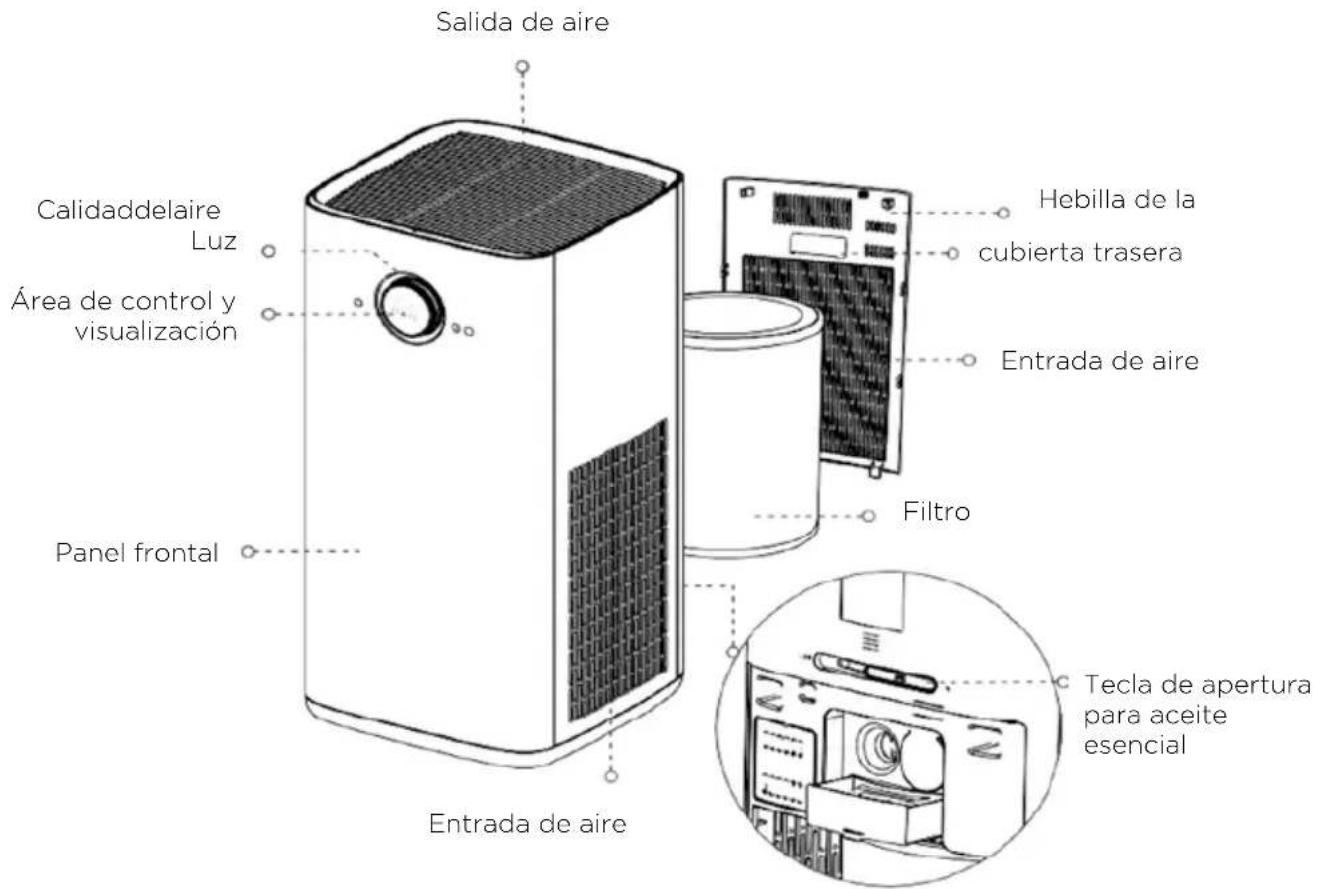
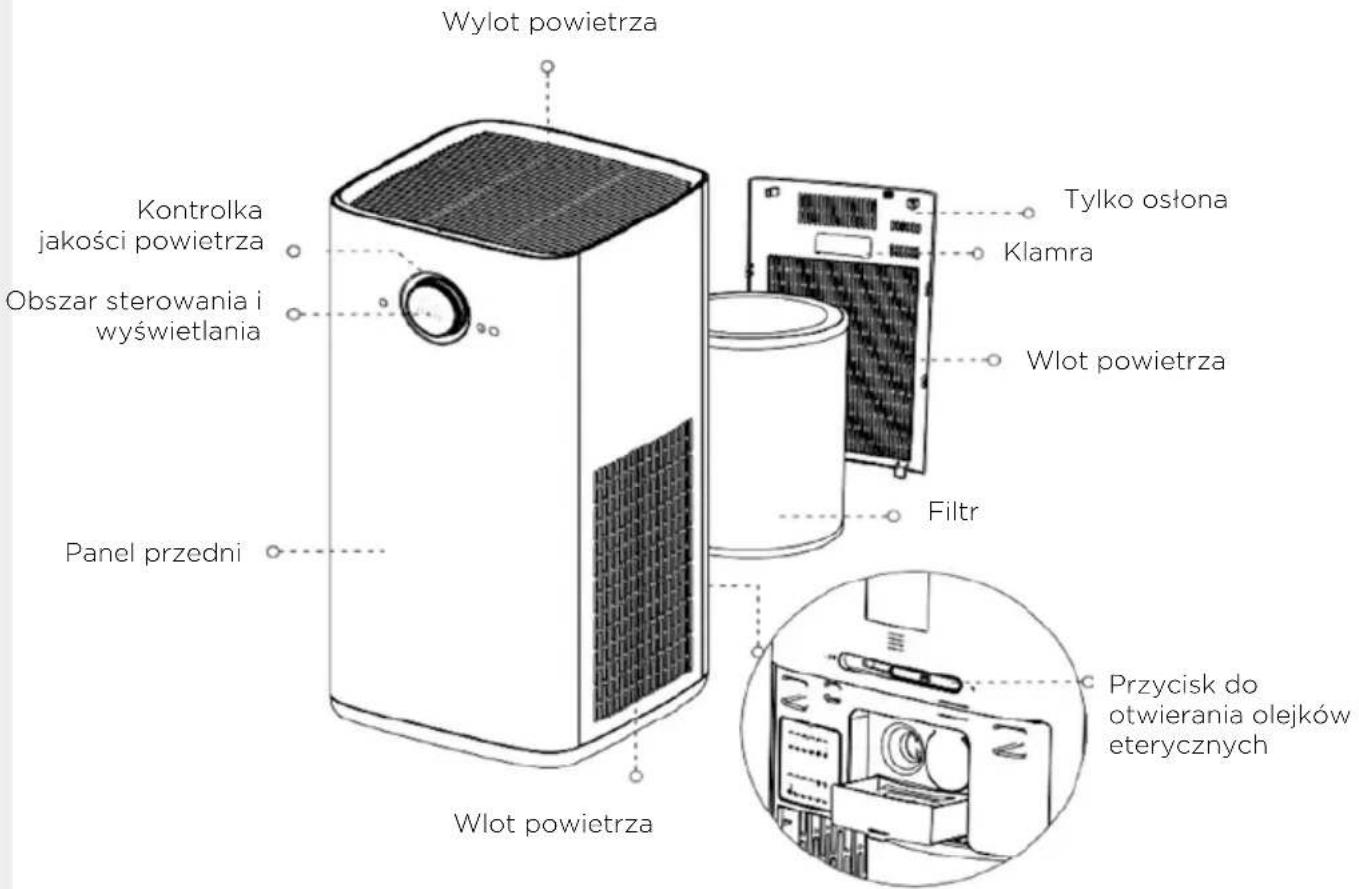
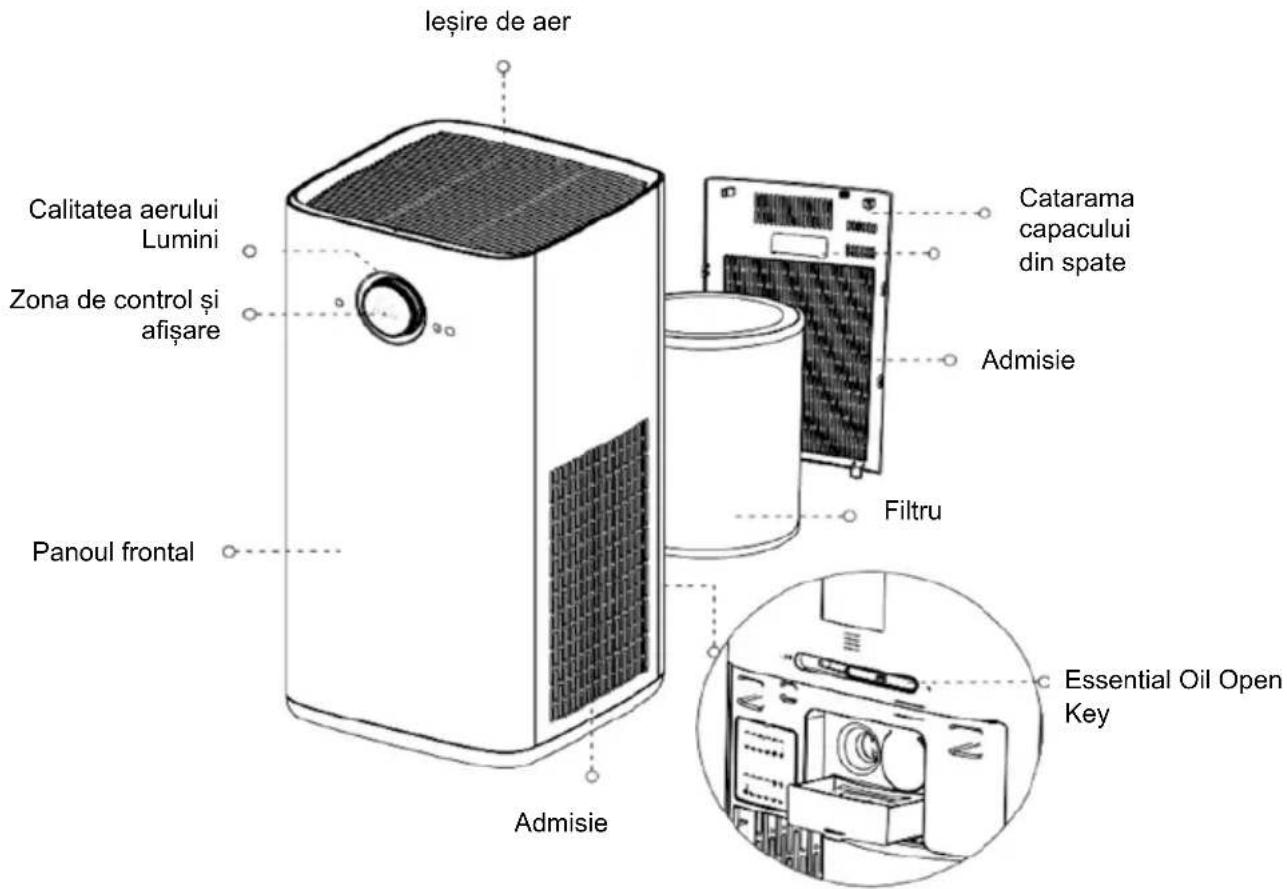
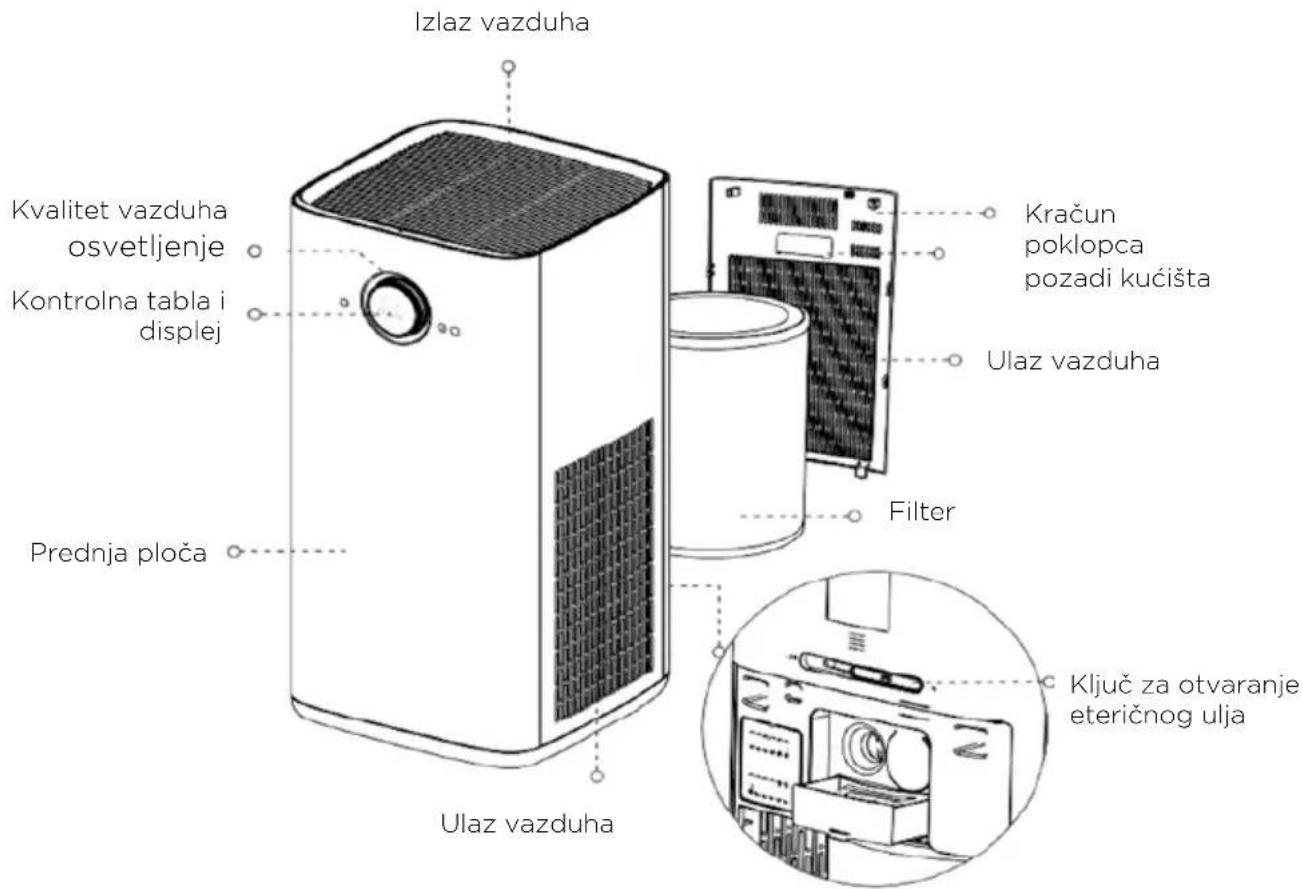
PRODUCT COMPONENTS
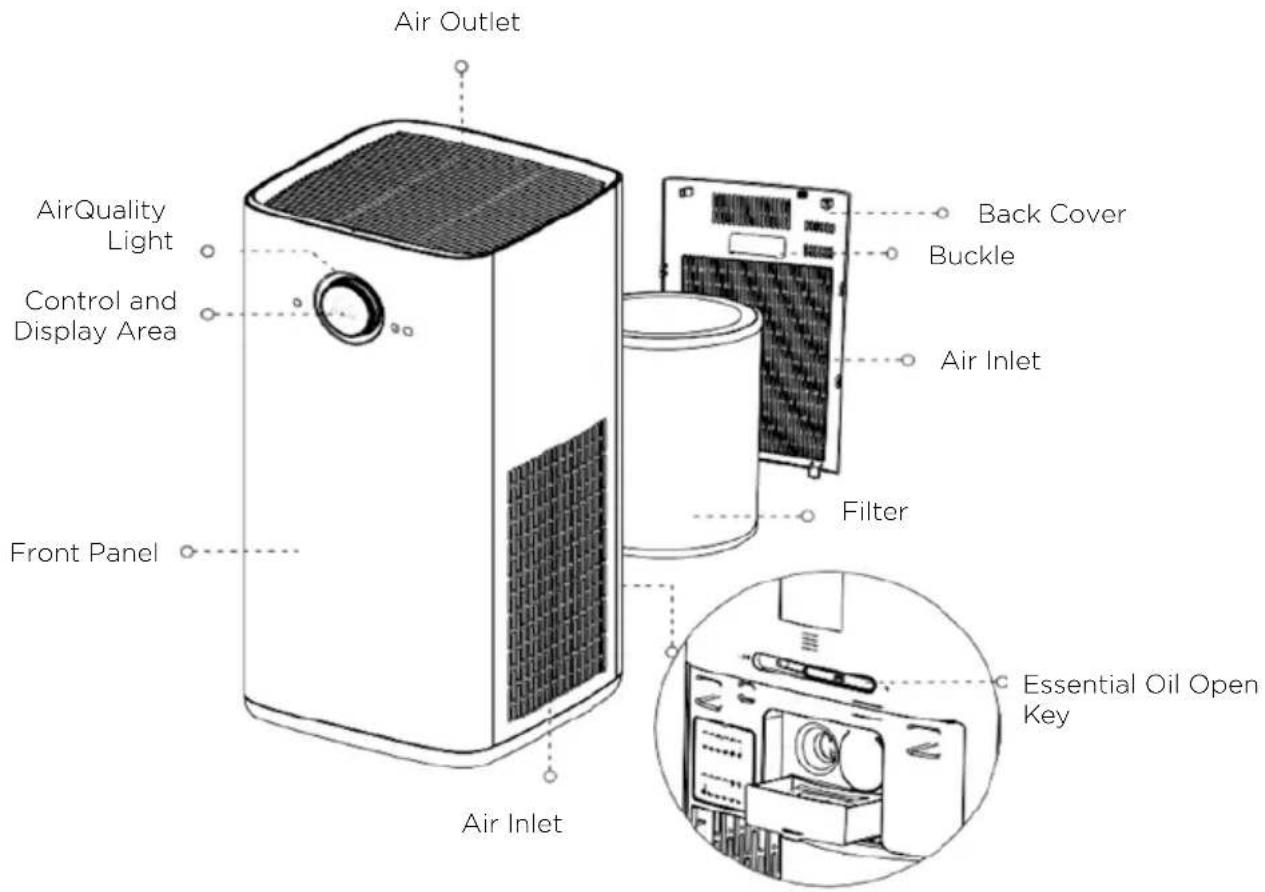
text_image
Air Outlet AirQuality Light Control and Display Area Front Panel Air Inlet Back Cover Buckle Air Inlet Filter Essential Oil Open KeyPanel Diagram
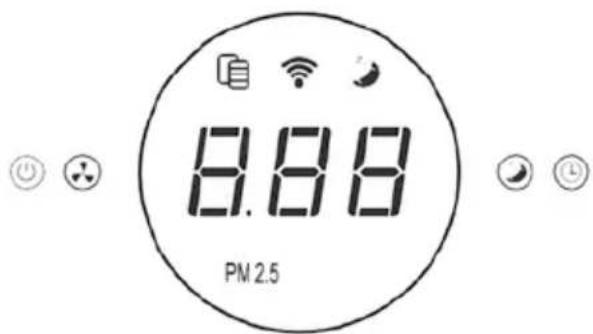
text_image
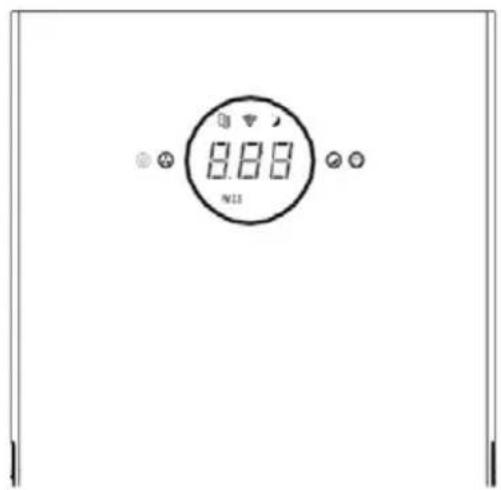
8.88 PM 2.5Panel Diagram
After the device is powered on, it enters standby mode.
Power Switch
Press this key to start operation or shut down.


Fan Speed
a. Switch between fan speed 2-3-4-A-1-2-3 cyclically.
b. Fan speed A is an automatic mode, which automatically adjusts the wind speed according to the air quality.
Sleep Mode
Press this key to enter sleep mode. The sleep light is dimly on, and the other lights are off.
Timer
a. The product switches cyclically from 01h to 012h, and enters the countdown state after displaying for 2s:
b. Scheduled shutdown: If it is on, it will shut down at the scheduled time.
c. Timing power-on: If it is in standby mode, it will power on regularly.
Filter Reminder
a. When the filter indicator turns red, it prompts to replace the filters.
b. Press the “+” at the same time and hold for 3s to reset the filter life.
INSTRUCTIONS FOR APPLICATION OF ESSENTIAL OILS
Open/Lock Switch
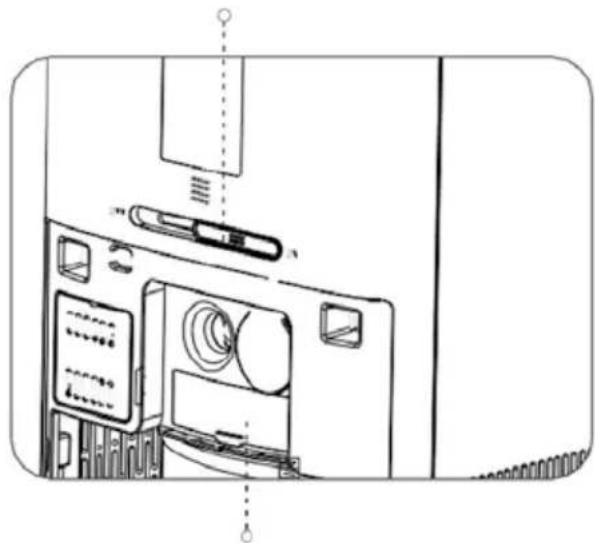
natural_image
Line drawing of a computer monitor internal components (no text or symbols)Essential Oil Storage Box
- When the switch is pushed to "ON", the essential oil evaporates in greater quantities; when the switch is pushed to "OFF", the quantity of essential oil that evaporates is minimal.
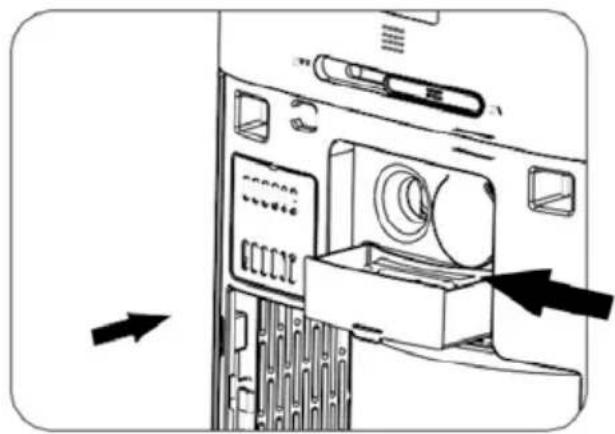
natural_image
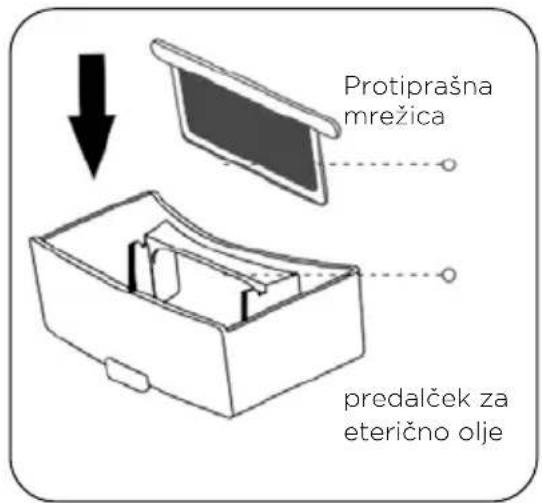
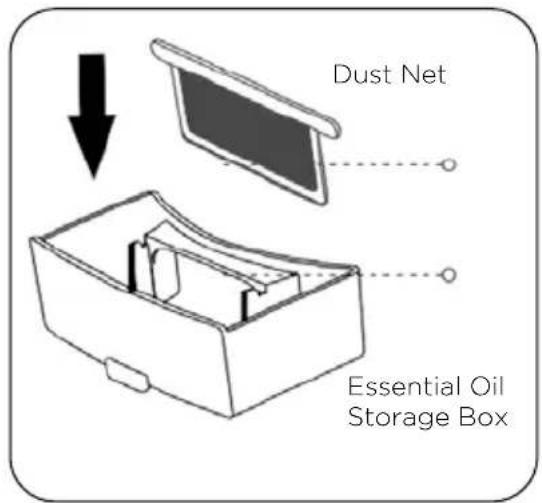
Diagram of a computer monitor with an open case and a cable, showing internal components and directional arrows (no text or symbols)- Open the back cover, pull out the essential oil storage box, drip the essential oil into the absorbent sponge, then push the essential oil storage box into the slot and close the filter cover.
text_image
Dust Net Essential Oil Storage Box- Clean the essential oil storage box. After a certain time, the essential oil storage box needs to be cleaned. Cleaning method: Pull out the box, take out the dust net and rinse it with water. Finally, push the essential oil storage box into the slot. (It is recommended to replace the absorbent sponge frequently.)
Tips: Please turn off the device and cut off the power when cleaning.
FILTER REPLACEMENT
text_image
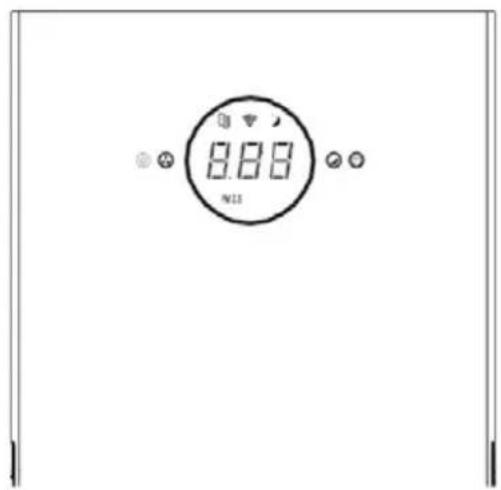
8.88 N11The Filter Interface Prompts to Replace the Filter.
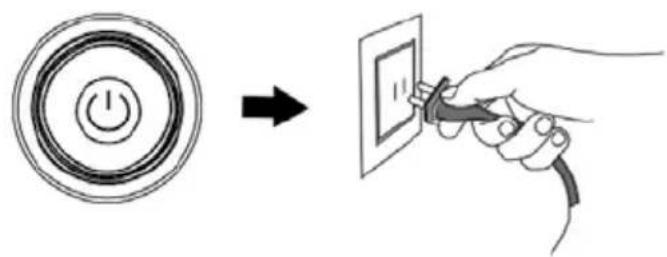
- Shut Down and Cut Off the Power of the Device. Note: If the device has been started, turn the knob and switch to “☐”. Short press the knob to turn it off. (At this time, the purifier is in standby mode. It needs to be unplugged to cut off the power.)
text_image
Diagram showing a power button icon transforming into an electrical socket with plug, illustrating the process of switching or discharging.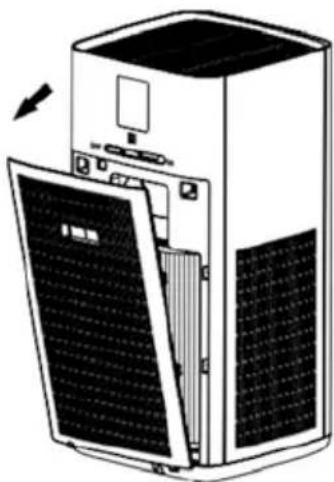
natural_image
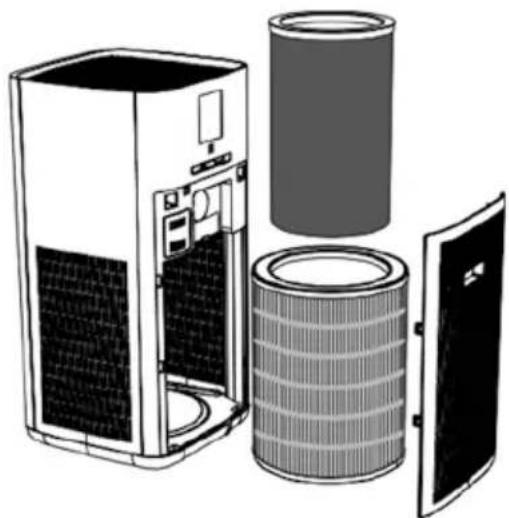
Diagram of a server rack with open panel and ventilation slots (no text or symbols)(Activated Carbon Filter)
natural_image
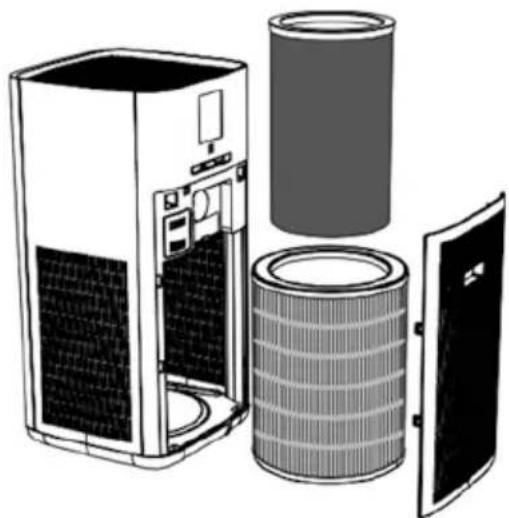
Exploded view diagram of a server unit showing internal components including fan, cylinder, and door (no text or labels)(HEPA Filter)
natural_image
Diagram of a server unit with internal components and external panel (no text or symbols)-
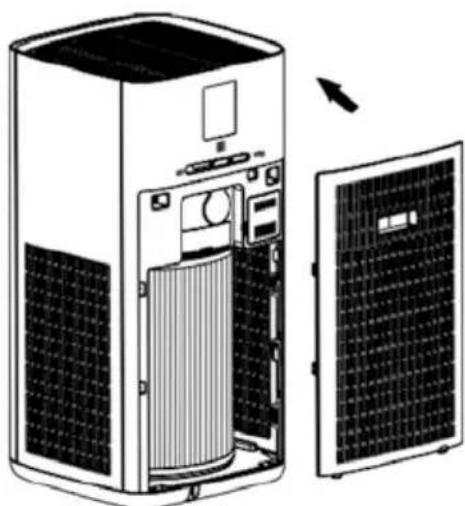
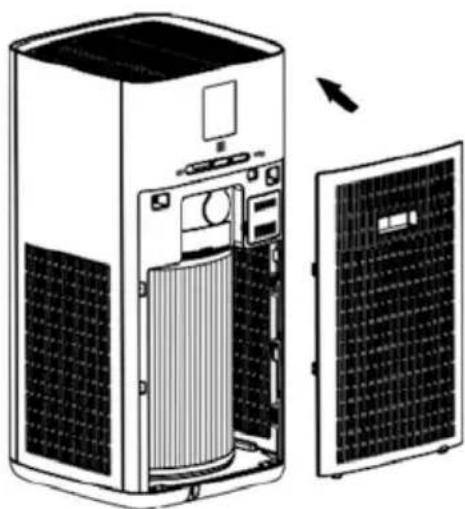
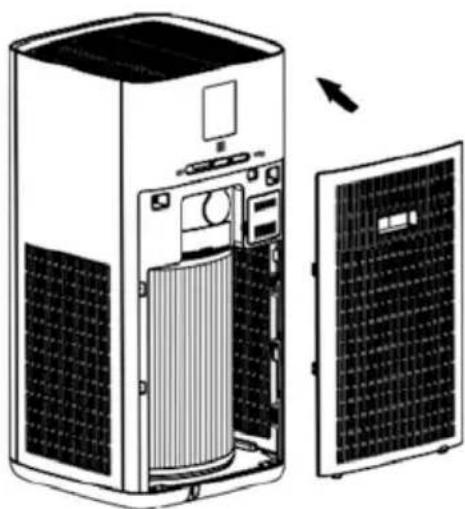
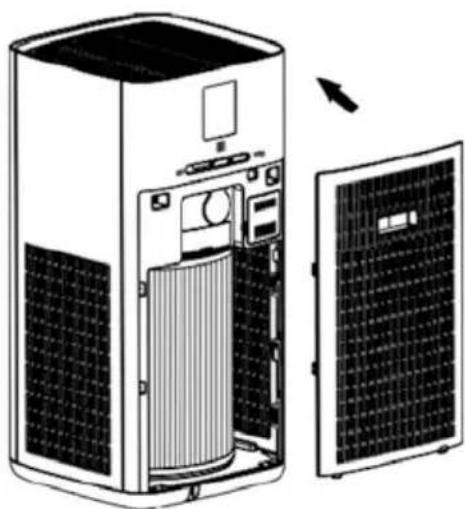
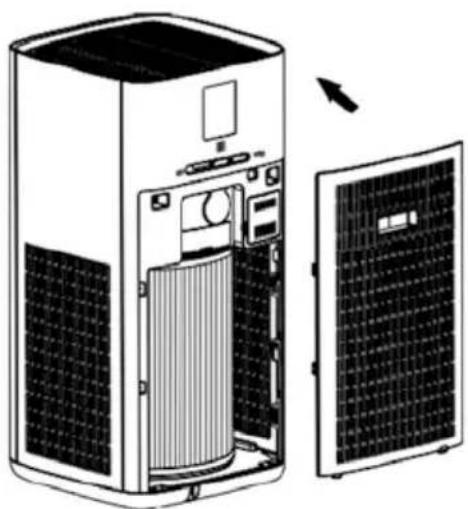
Open the back cover, grasp the handle on the back cover and pull it out.
-
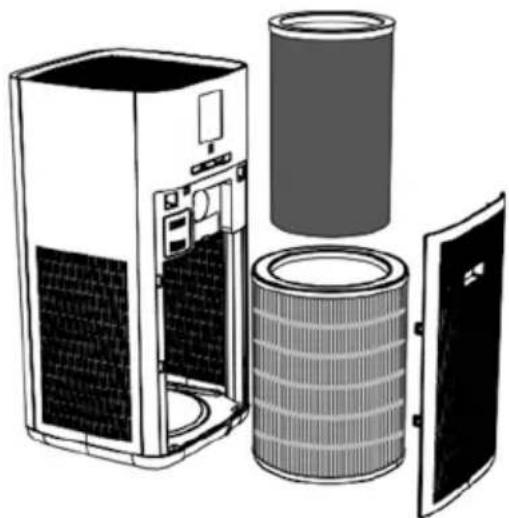
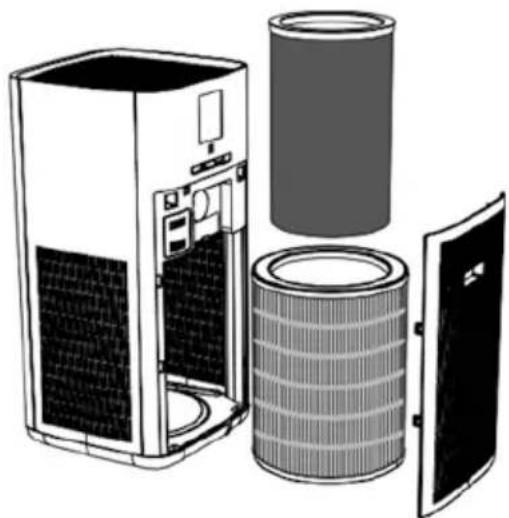
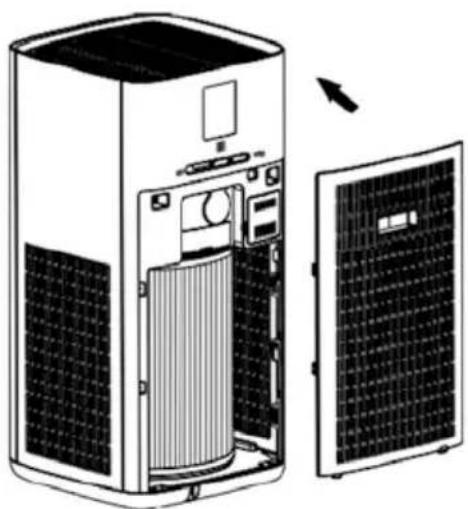
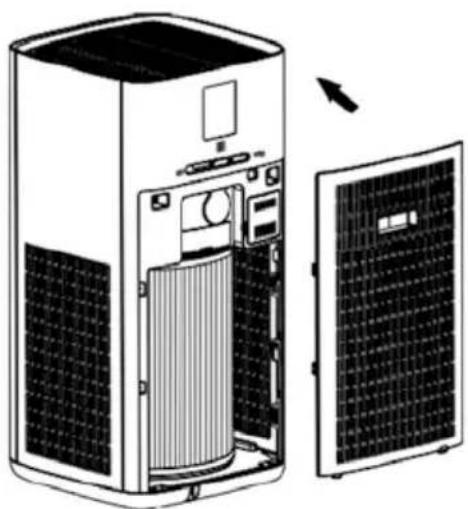
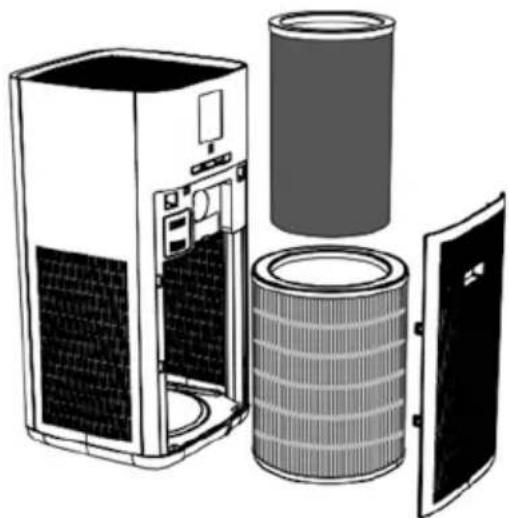
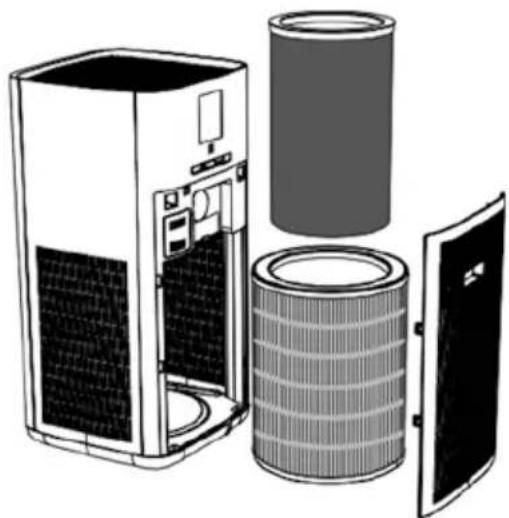
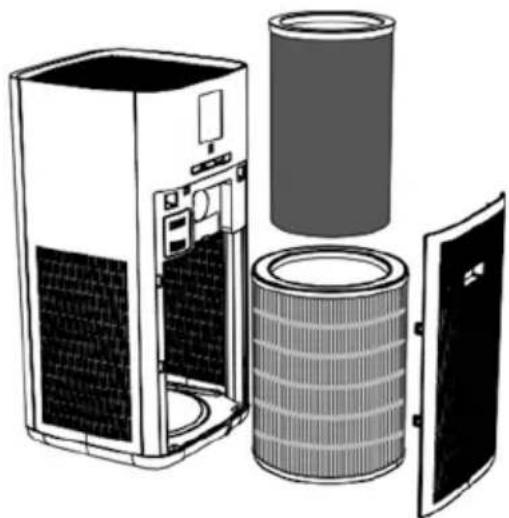
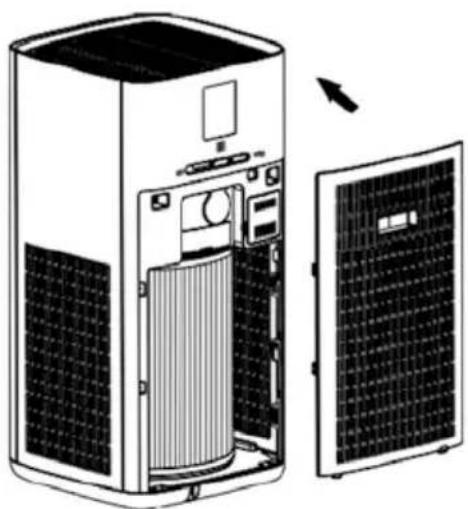
Take out the filter and wrap it in a garbage bag to prevent the pollutants from the filter from soiling the room.
Note:
a. Please dispose of the used filters as non-combustible garbage.
b. The replacement cycle of the filters is about half a year (the cycle of replacing the filter varies greatly depending on the use environment).
c. When the filter reminder interface displays the message "Please replace the filter in time", please replace the filter and reset the filter life.
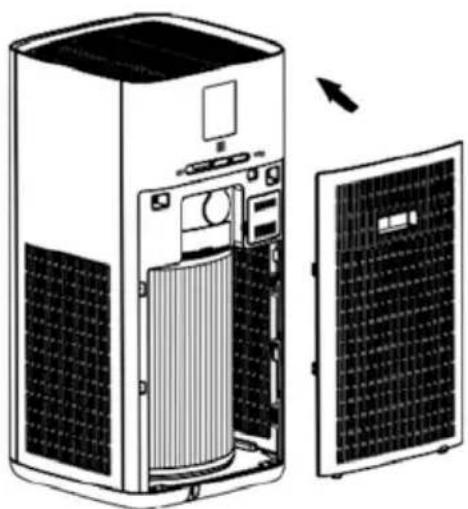
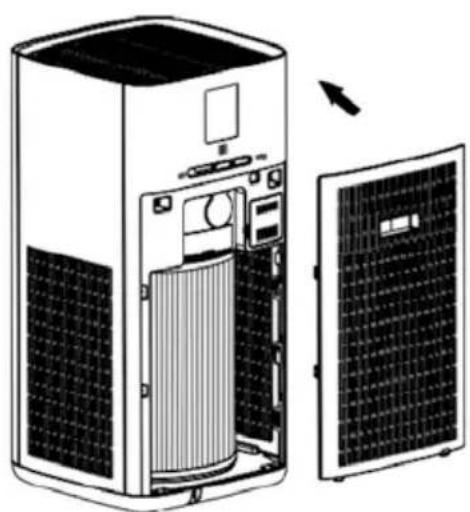
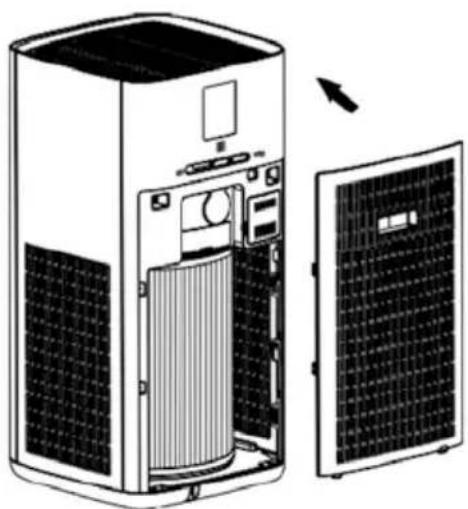
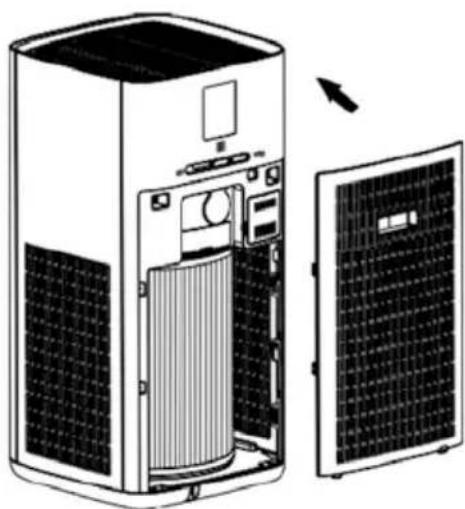
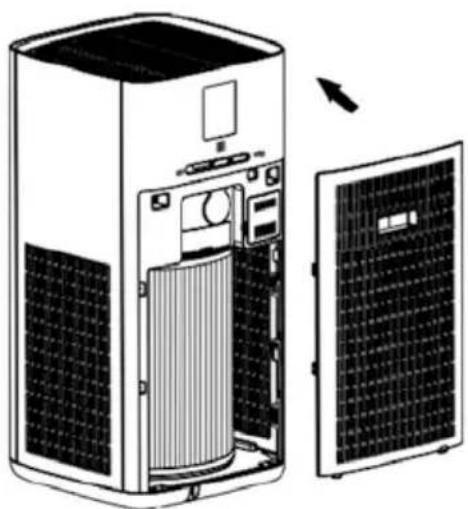
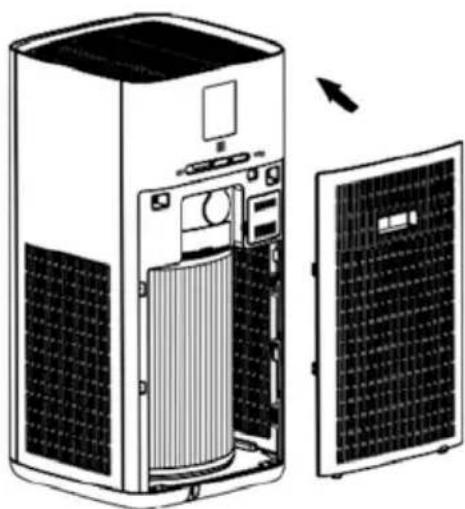
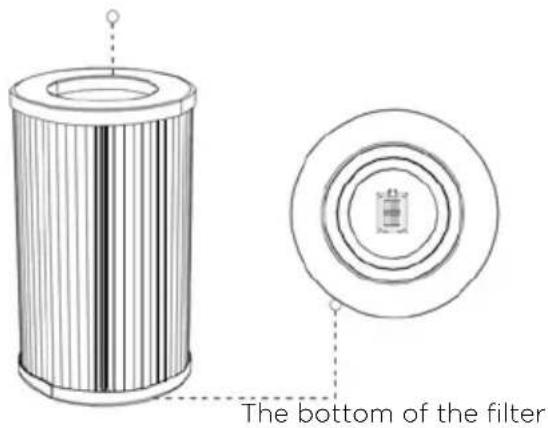
- Adjust the direction of a new filter (align with the filter slot of the purifier) and insert the filter. Then hold the handle on the back cover to align the bottom of the back cover with the groove on the bottom of the device and then close the back cover.
The top of the filter
text_image
The bottom of the filterNote
The filter should be installed with the bottom facing down.
- After the filter is replaced, please go to filter interface, press and hold for 5s to reset the filter life.

Note
a. Please read the filter replacement instructions carefully to ensure the purification effect of the device.
b. Before cleaning the device, unplug the device and cut off the power.
c. Keep the inside of the device dry to prevent circuit damage
d. When the surface area is dusty, use a vacuum cleaner to clean the surface dust, which can prolong the life of the filter.
If your air purifier is not working properly, please check the following before sending it for repair.
Problem Cause Solution
| The device does not work. A. No power supply.B. Motor or PCBA breakdown | A. Examine the power supply connection.B. Please contact the after-sales center | |
| Bad smell released from the air outlet of the device. | A. The filter's filtration and adsorption volume is saturated.B. The odor concentration of the indoor air is too high. | A. Replace with a new filter.B. Open windows for ventilation and check if the bad smell is from the device or not. |
| The purification effect is not significant, and the air quality is not significantly improved. | A. The filter is not installed.B. The machine is placed on a narrow floor or near obstacles that affect the purification.C. The filter is too dirty. | A. Install the filter.B. Clear the obstruction or change location.C. Clean or replace the filter. |
| The device is too noisy A. Foreign objects have fallen into the device.B. Placed on uneven ground.C. Poor assembly of parts. | A. Install the filterB. Clear the obstruction or change placeC. Clean or replace the filter | |
| Device Key Failure Is it in child-lock mode? After turning the knob switch to the icon, press and hold the knob for 3 seconds to release the child lock. | ||
| Can't fit the filter The filter is installed upside down. | Adjust the correct orientation of the filter and align it with the bottom slot. | |

Note
If problems persist despite taking the measures above, please contact the repair shop or technical service center provided by our service center. Do not disassemble and repair by yourself to avoid danger and damage to the device.
NOTICE D'UTILISATION
natural_image
Front view of a smartphone with a circular button and two small dots on the screen (no text or symbols visible)natural_image
Grid-patterned panel with uniform vertical lines, no text or symbols visibleFiltre HEPA
text_image
8.88 PM 2.5Schéma du bandeau
natural_image
Line drawing of a computer monitor with labeled ports and screen (no text or symbols)natural_image
Diagram of a computer monitor with an open case showing internal components and a black arrow pointing to the screen (no text or symbols present)REPLACEMENT DU FILTRE
text_image
8.88 N11text_image
Diagram showing a power button icon transforming into an electrical socket with plug, illustrating the process of switching or discharging.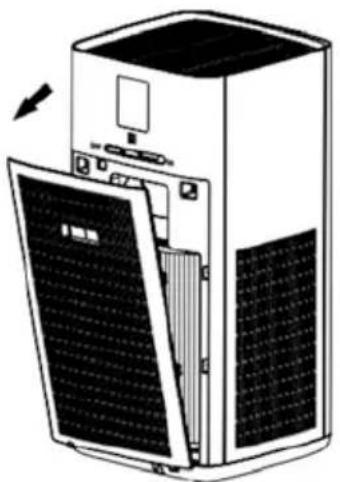
natural_image
Diagram of a server rack with open panel and ventilation slots (no text or symbols)natural_image
Exploded view diagram of a server unit showing internal components including fan, cylinder, and door (no text or labels)Filtre HEPA
natural_image
Diagram of a large industrial air conditioner unit with internal components and a separate panel showing solar panels (no text or labels)natural_image
Front view of a smartphone with a circular button and two small dots on the screen (no text or symbols visible)text_image
8.88 PM 2.5natural_image
Line drawing of a computer monitor internal components (no text or symbols)natural_image
Diagram of a computer monitor with an open case and a cable, showing internal components and directional arrows (no text or symbols)text_image
Diagram showing a power button icon transforming into an electrical socket with plug, illustrating the process of switching or discharging.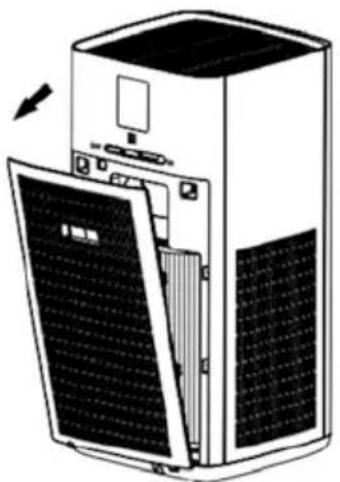
natural_image
Diagram of a server rack with open panel and ventilation slots (no text or symbols)(Aktív szénszűrő)
natural_image
Exploded view diagram of a server unit showing internal components including fan, cylinder, and door (no text or labels)(HEPA szürö)
natural_image
Diagram of a server unit with internal components and external panel (no text or symbols)natural_image
Front view of a smartphone with a circular button on the top (no text or symbols visible)natural_image
Grid-patterned panel with uniform vertical lines, no text or symbols visibleHEPA Filtr
text_image
8.88 PM 2.5Ovládací panel
natural_image
Line drawing of a computer monitor with ventilation slots and control panel (no text or symbols)natural_image
Diagram of a computer tower with an open refrigerator and a cable, showing internal components and directional arrows (no text or symbols)text_image
Diagram showing a power button icon transforming into an electrical socket with plug, illustrating the process of switching or discharging.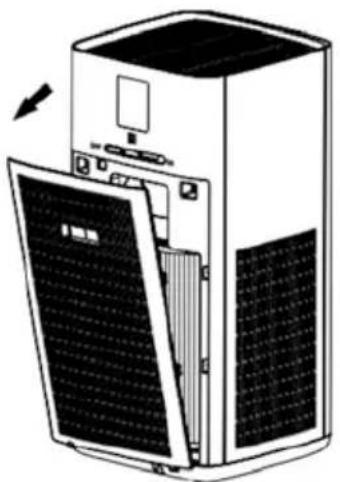
natural_image
Diagram of a server rack with open panel and ventilation slots, showing internal components (no text or symbols)natural_image
Exploded view diagram of a server unit showing internal components including fan, cylinder, and door (no text or labels)(HEPA Filter)
natural_image
Diagram of a large industrial air conditioner unit with internal components and a separate panel showing solar panels (no text or labels)natural_image
Front view of a smartphone with a circular button and two small dots on the screen (no text or symbols visible)natural_image
Grid-patterned panel with uniform vertical lines, no text or symbols visibleНЕРА-фільтр
text_image
8.88 PM 2.5Схема відображення
natural_image
Line drawing of a computer monitor with ventilation slots and drive bays (no text or symbols)natural_image
Diagram of a computer monitor with an open case showing the internal components and a black arrow pointing to a button (no text or symbols present)text_image
Diagram showing a power button icon transforming into an electrical socket with plug, illustrating the process of switching or discharging.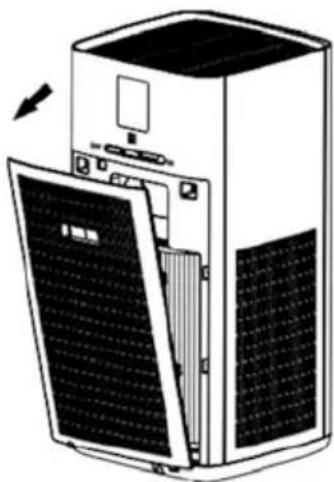
natural_image
Diagram of a server rack with open panel and ventilation slots, showing internal components (no text or symbols)natural_image
Exploded view diagram of a server rack with internal components including fan, cylinder, and panel (no text or labels)(НЕРА-фільтр)