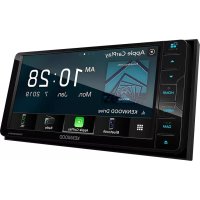
DDX819WBTL - Media player KENWOOD - Free user manual and instructions
Find the device manual for free DDX819WBTL KENWOOD in PDF.


| Product Type | Monitor with DVD receiver and multimedia player |
| Brand | Kenwood |
| Model | DDX819WBTL |
| Dimensions (W × H × D) | 178 × 100 × 160 mm |
| Weight | Approximately 1.5 kg |
| Power Supply | Car battery 12 V DC |
| Screen Size | 6.95 inches (diagonal), 156.6 × 81.6 mm |
| Screen Resolution | 1,152,000 pixels (800 × 480 × RGB) |
| Supported Disc Formats | DVD-Video, VCD, CD-DA |
| Supported Audio Formats (USB/Disc) | MP3, WMA, AAC, WAV, FLAC, Vorbis (up to 192 kHz / 24 bits) |
| Supported Video Formats (USB/Disc) | MPEG-1, MPEG-2, MPEG-4, H.264, WMV, MKV |
| Wireless Connectivity | Bluetooth 5.0 (hands-free, audio), Apple CarPlay (wired), Android Auto (wired) |
| USB Connectors | 1 USB port (front, 5 V / 1.5 A) |
| Video Inputs | 1 mini-jack (rear view camera), 1 RCA (AV-IN) |
| Audio Outputs | 4 V preamp (front/rear), subwoofer output |
| Output Power | 50 W × 4 max, 22 W × 4 typical |
| Main Features | Disc/DVD playback, USB, iPod/iPhone, FM/AM radio, Bluetooth streaming, Apple CarPlay, Android Auto, Spotify, Pandora (optional), SiriusXM (optional), rear view camera, touch screen, security code |
| Maintenance and Cleaning | Wipe with a soft dry cloth; do not use solvents or abrasive products |
| Security | Anti-theft security code (4 or 8 digits); automatic shutdown in case of overheating |
| Spare Parts and Repairability | Contact an authorized Kenwood dealer for parts and repairs |
| General Information | Manual downloadable at kenwood.com/cs/ce/; system updates availability on the website |
Frequently Asked Questions - DDX819WBTL KENWOOD
User questions about DDX819WBTL KENWOOD
0 question about this device. Answer the ones you know or ask your own.
Ask a new question about this device
Download the instructions for your Media player in PDF format for free! Find your manual DDX819WBTL - KENWOOD and take your electronic device back in hand. On this page are published all the documents necessary for the use of your device. DDX819WBTL by KENWOOD.
USER MANUAL DDX819WBTL KENWOOD
natural_image
Diagram of a device with a panel and clamped components, no text or symbols presentDMX906S / DMX9706S
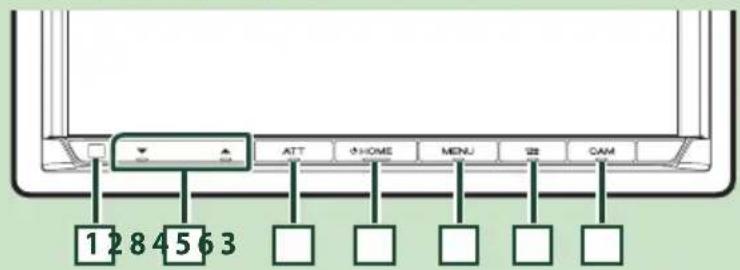
DDX819WBTL
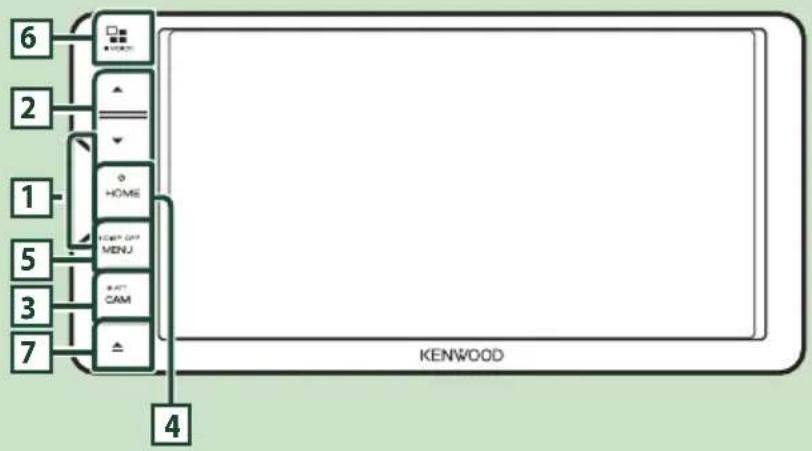
flowchart
graph TD
    6 --> A["BOX"]
    2 --> B["▼"]
    1 --> C["HOME"]
    5 --> D["HOME GET MENU"]
    3 --> E["CAM"]
    7 --> F["▲"]
    4 --> G["KENWOOD"]
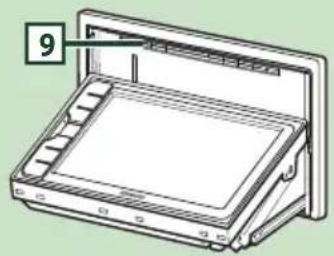
natural_image
Line drawing of a mechanical device with a labeled component (no text or symbols present)REMARQUE
[Language]
REMARQUE
1 Angle de vue
natural_image
Hand cursor icon pointing at a button (no text or symbols)
natural_image
Hand cursor icon pressing a circular button on a light green background (no text or symbols)

REMARQUE

[Photo Frame is .....]
natural_image
Technical line drawing of a CD or DVD disc assembly with an arrow indicating motion (no text or symbols present)DDX819WBTL
![KENWOOD DDX819WBTL - [Photo Frame is .....] - 1](/content/2026/04/623705/images/b8d30abaa71ab8fa61553572ec788db1bc9ab583dc34e7c209f170da5df1976d.jpg)
natural_image
Diagram of a CD or DVD drive assembly showing internal components and an open lid (no text or symbols)natural_image
Scenic coastal landscape with three framed photos of plants and sea, numbered 6 and 7 to 8 (no text or symbols on the images themselves)La lecture commence.
natural_image
Coastal landscape with green foliage and ocean background, no visible text or symbolsnatural_image
Cityscape with highway traffic and two inset images of high-speed rail infrastructure (no visible text or symbols)REMARQUE
natural_image
Coastal landscape with green foliage and ocean background under a partly cloudy sky (no text or symbols visible)■Menu Language/Subtitle Language/Audio Language]
■[Dynamic Range Control]
[Menu Language], [Subtitle Language], [Audio Language].
Apple CarPlay is connected
REMARQUE
1
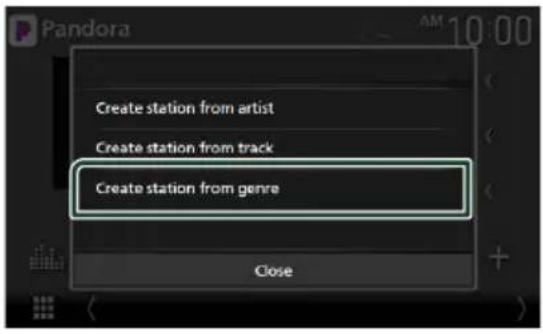
1 Touchez [Create station from genre].
natural_image
Line drawing of a USB connector with a cable, showing a port and connector (no text or symbols)▶ (lecture), ▶▶ (avance rapide),
◀◀ (retour rapide), ▪ (pause).
natural_image
Scenic coastal landscape with green foliage and distant hills under a cloudy sky (no text or symbols)REMARQUE
REMARQUE
REMARQUE
Fermer le tiroir
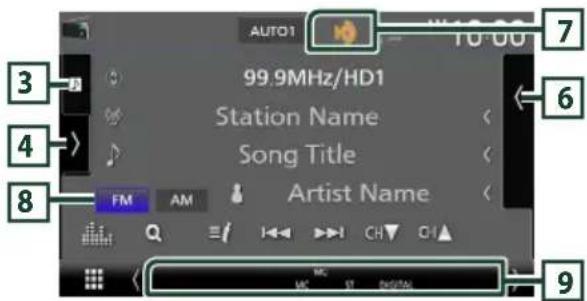
HD2/HD3
[Auto]
REMARQUE
Enregistre un favori.
REMARQUE

REMARQUE
2 Touchez [Traffic & Weather].
[Listen]
REMARQUE
REMARQUE
REMARQUE
REMARQUE
[√ All]
SiriusXM®
REMARQUE
[Edit]
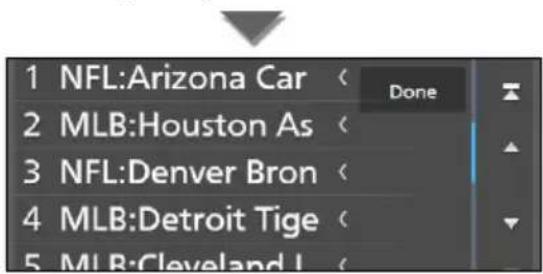
3 Touchez [Done].
REMARQUE
■ HFP [Hands Free1/Hands Free2/No Connection.]
[TEL (HFP) 1], [TEL (HFP) 2]
[√ All]
La lecture commence.
REMARQUE
REMARQUE
■[Add number from phonebook]
[√ All]
[Bluetooth HF/Audio]
REMARQUE
[Rear Camera Interruption]
[Parking Guidelines]
[Front Camera Interruption \*3]
1 [Picture from view camera]
1 [Picture from view camera]
natural_image
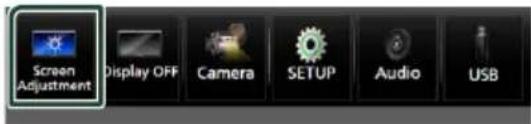
Two-panel image showing a coastal scene with banana plants and ocean, one with a magnified inset highlighting the sea (no text or symbols)2 Touchez [Screen Adjustment].
■ [Backlight/Contrast/Black/Brightness/Color/Tint]
![KENWOOD DDX819WBTL - [Picture from view camera] - 2](/content/2026/04/623705/images/3e1c4804dfda082abfe811b8c05cce73eb4c47c159f504dc208dd68f6a897434.jpg)
[Beep Volume] (DDX9906XR)
REMARQUE
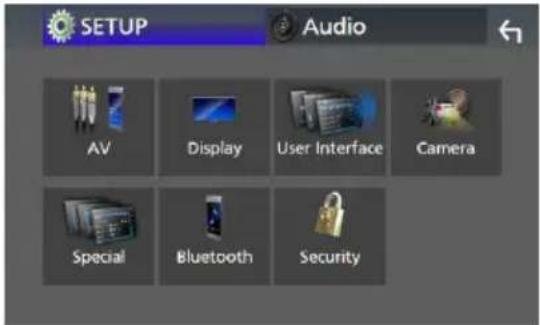
Configuration
5 Touchez [Learning completed].
REMARQUE
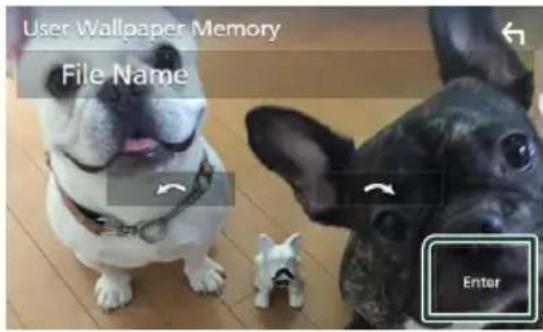
[Wallpaper Customize]
[User]
3 Touchez [Enter].
■[Speech Quality Adjust]
5 Touchez [Enter].
Contrôle de l'audio
[Speaker]
REMARQUE
[HPF FREQ]
[Phase Inversion] ^4
■ [FREQ] (Bande passante haute)
[Fader / Balance]
REMARQUE
Décalage du volume
5 Touchez [Dual Zone].
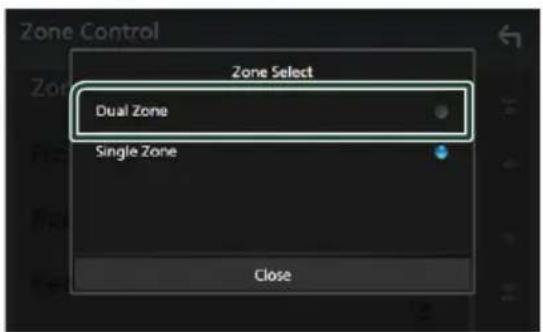
[Zone Select]
[Front Source], [Rear Source]
[Bass Boost]
"OFF", "Low" (Bas), "High" (Haut)
[Drive Equalizer]
3 Touchez [Position/DTA].
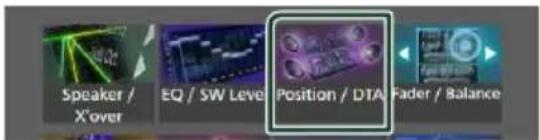

![KENWOOD DDX819WBTL - Touchez [Position/DTA]. - 3](/content/2026/04/623705/images/ca053afd239883c2fd5b3be00acd279c6dd2e12184b9485af78a664056680447.jpg)
[Sound Image LR (Front)]
[Sound Image LR (Rear)]
[Audio SETUP Memory]
[Audio SETUP Recall]
natural_image
Diagram of a mobile phone rear panel with battery and switch components (no text or labels)Mode AUD
natural_image
Top-down schematic of a computer case with internal components and a central fan-like device (no text or labels)Ventilateur
![⑤[1] x2 ⑥ (M5 x 8 mm) x6 ⑦ (M5 x 8 mm) x6 ⑧[1] x1 ⑨[1] (3,5 m) x1 ⑩[1] x1 ⑪[2] x1 ⑫[2] x1 ⑬[3] x1 ⑭[2] x1](/content/2026/04/623705/images/7d87dfc72bda5b3703f54abeab1752022c3a70ed195ed4e3cfd9f8cd2181d999.jpg)
[1] Sauf DDX819WBTL
[2] DDX819WBTL uniquement
[3] DDX9906XR/ DDX8906S/ DMX906S
uniquement
Connexion/Installation

natural_image
Diagram showing a rectangular box being inserted into a frame, with an arrow indicating the direction of insertion (no text or symbols present)
Antenne GPS
(Sauf DDX819WBTL)
REMARQUE
natural_image
Diagram showing light rays interacting with a rectangular object, with an arrow indicating direction (no text or symbols present)natural_image
Technical line drawing of a mechanical component with a triangular tool and numbered part (no text or symbols)natural_image
Illustration of hands using a tool to adjust or install a rectangular object (no text or symbols visible)REMARQUE
natural_image
Line drawing of a hand holding a rectangular device with mounting brackets (no text or symbols)
natural_image
Technical illustration of a mechanical component with two cylindrical parts connected by a shaft (no text or symbols)
Branchement d'un iPod/iPhone
●Sauf DDX819WBTL
![KCA-iP103 (0,8 m) [3] iPod/iPhone [2] Accessoire ③ (Gris) (1 m) [4] Accessoire ② (Noir) (1 m) [4] Borne USB (grise) 1 Borne USB (Noir) 1 iPhone (avec Apple CarPlay) [2] KCA-iP103 (0,8 m) [3]](/content/2026/04/623705/images/47bf9fb94c90b53004948afa706b002f8a9494a592f8a36625d82de297edfee0.jpg)
Connexion/Installation
DDX819WBTL
![KCA-iP103 (0,8 m) [3] iPod/iPhone[2] Borne USB (noir) (1 m) [1] iPhone (avec Apple CarPlay)[2] KCA-iP103 (0,8 m) [3]](/content/2026/04/623705/images/b8c7780d677efefce3432c470f1f1d593f6814de459b41215cb76e61b32c0edd.jpg)
There is an error in the speaker wiring.
Subscription Updated - Press Return To Continue
Incorrect Pass Code entered
The speed sensor must be connected to use Apple CarPlay wirelessly. Please verify the proper connections or plug in by USB to use Apple CarPlay.
The GPS antenna must be connected to use Apple CarPlay wirelessly. Please verify the proper connections or plug in by USB to use Apple CarPlay.
The speed sensor and the GPS antenna must be connected to use Apple CarPlay wirelessly. Please verify the proper connections or plug in by USB to use Apple CarPlay.
6-3/16 × 3-3/16 pouces
Système d'affichage
DDX9906XR: Panneau LCD AAS
: 16 bits/20 bits/24 bits
■Section interface USB
Norme USB
7-3/16 × 4-7/16 × 6 pouces
Poids
DDX9906XR / DDX8906S / DDX8706S /
DDX819WBTL
: 2,4 kg (5,3 lb)
DMX906S / DMX9706S
: 1,7 kg (3,8 lb)
REMARQUE
is a trademark of DVD Format/Logo Corporation registered in the U.S., Japan countries.
- This item incorporates copy protection technology that is protected by U.S. patents and other intellectual property rights of Rovi Corporation. Reverse engineering and disassembly are prohibited.
- Microsoft and Windows Media are either registered trademarks or trademarks of Microsoft Corporation in the United States and/or other countries.
- This software is based in part on the work of the independent JPEG Group.
- The "AAC" logo is a trademark of Dolby Laboratories.
- Use of the Made for Apple badge means that an accessory has been designed to connect specifically to the Apple product(s) identified in the badge, and has been certified by the developer to meet Apple performance standards. Apple is not responsible for the operation of this device or its compliance with safety and regulatory standards. Please note that the use of this accessory with an Apple product may affect wireless performance.
- Apple, iPhone, iPod, iPod touch, and Lightning are trademarks of Apple Inc., registered in the U.S. and other countries.
• Apple, Siri, Apple CarPlay and Apple CarPlay logo are trademarks of Apple Inc., registered in the U.S. and other countries. - Sirius, XM and all related marks and logos are trademarks of Sirius XM Radio Inc. All rights reserved.
- HD Radio Technology manufactured under license from iBiquity Digital Corporation. U.S. and Foreign Patents. For patents see http://dts.com/patents. HD Radio and the HD, HD Radio, and "ARC" logos are registered trademarks or trademarks of iBiquity Digital Corporation in the United States and/or other countries.
- Pandora, the Pandora logo, and the Pandora trade dress are trademarks or registered trademarks of Pandora Media, Inc., used with permission.
- SPOTIFY and the Spotify logo are among the registered trademarks of Spotify AB.
• Android, Android Auto, Google Play and other marks
are trademarks of Google LLC.
- BlackBerry®, RIM®, Research In Motion® and related trademarks, names and logos are the property of Research In Motion Limited and are registered and/or used in the U.S. and countries around the world. Used under license from Research In Motion Limited.
- Wi-Fi ^ is a registered trademark of Wi-Fi Alliance ^ .
- The Wi-Fi CERTIFIED™ Logo is a certification mark of Wi-Fi Alliance®.
- This product includes FontAvenue® fonts licenced by NEC Corporation.FontAvenue is a registered trademark of NEC Corporation.

FontAvenue

- This product includes "Ubiquitous QuickBoot TM" technology developed by Ubiquitous Corp. Ubiquitous QuickBoot TM is a trademark of Ubiquitous Corp. Copyright© 2017 Ubiquitous Corp. All rights reserved.
- THIS PRODUCT IS LICENSED UNDER THE AVC PATENT PORTFOLIO LICENSE FOR THE PERSONAL USE OF A CONSUMER OR OTHER USES IN WHICH IT DOES NOT RECEIVE REMUNERATION TO (j)ENCODE VIDEO IN COMPLIANCE WITH THE AVC STANDARD ("AVC VIDEO") AND/OR (jj)DECODE AVC VIDEO THAT WAS ENCODED BY A CONSUMER ENGAGED IN A PERSONAL ACTIVITY AND/OR WAS OBTAINED FROM A VIDEO PROVIDER LICENSED TO PROVIDE AVC VIDEO. NO LICENSE IS GRANTED OR SHALL BE IMPLIED FOR ANY OTHER USE. ADDITIONAL INFORMATION MAY BE OBTAINED FROM MPEG LA, L.L.C. SEE HTTP://WWW.MPEGLA.COM
- THIS PRODUCT IS LICENSED UNDER THE MPEG-4 VISUAL PATENT PORTFOLIO LICENSE FOR THE PERSONAL AND NON-COMMERCIAL USE OF A CONSUMER FOR (i) ENCODING VIDEO IN COMPLIANCE WITH THE MPEG-4 VISUAL STANDARD ("MPEG-4 VIDEO") AND/OR (ji) DECODING MPEG-4 VIDEO THAT WAS ENCODED BY A CONSUMER ENGAGED IN A PERSONAL AND NON-COMMERCIAL ACTIVITY AND/OR WAS OBTAINED FROM A VIDEO PROVIDER LICENSED BY MPEG LA TO PROVIDE MPEG-4 VIDEO. NO LICENSE IS GRANTED OR SHALL BE IMPLIED FOR ANY OTHER USE. ADDITIONAL INFORMATION INCLUDING THAT RELATING TO PROMOTIONAL, INTERNAL AND COMMERCIAL USES AND LICENSING MAY BE OBTAINED FROM MPEG LA, LLC. SEE HTTP://WWW.MPEGLA.COM.
- THIS PRODUCT IS LICENSED UNDER THE VC-1 PATENT PORTFOLIO LICENSE FOR THE PERSONAL AND NON-COMMERCIAL USE OF A CONSUMER TO (i) ENCODE VIDEO IN COMPLIANCE WITH THE VC-1 STANDARD ("VC-1 VIDEO") AND/OR (ii) DECODE VC-1 VIDEO THAT WAS ENCODED BY A CONSUMER ENGAGED IN A PERSONAL AND NON-COMMERCIAL ACTIVITY AND/OR WAS OBTAINED FROM A VIDEO PROVIDER LICENSED TO PROVIDE VC-1 VIDEO. NO LICENSE IS
GRANTED OR SHALL BE IMPLIED FOR ANY OTHER USE. ADDITIONAL INFORMATION MAY BE OBTAINED FROM MPEG LA, L.L.C. SEE HTTP://WWW.MPEGLA.COM
- libFLAC
Copyright (C) 2000-2009 Josh Coalson
Copyright (C) 2011-2013 Xiph.Org Foundation
Redistribution and use in source and binary forms, with or without modification, are permitted provided that the following conditions are met:
– Redistributions of source code must retain the above copyright notice, this list of conditions and the following disclaimer.
– Redistributions in binary form must reproduce the above copyright notice, this list of conditions and the following disclaimer in the documentation and/or other materials provided with the distribution.
- Neither the name of the Xiph.org Foundation nor the names of its contributors may be used to endorse or promote products derived from this software without specific prior written permission.
THIS SOFTWARE IS PROVIDED BY THE COPYRIGHT HOLDERS AND CONTRIBUTORS ``AS IS'' AND ANY EXPRESS OR IMPLIED WARRANTIES, INCLUDING, BUT NOT LIMITED TO, THE IMPLIED WARRANTIES OF MERCHANTABILITY AND FITNESS FOR A PARTICULAR PURPOSE ARE DISCLAIMED. IN NO EVENT SHALL THE FOUNDATION OR CONTRIBUTORS BE LIABLE FOR ANY DIRECT, INDIRECT, INCIDENTAL, SPECIAL, EXEMPLARY, OR CONSEQUENTIAL DAMAGES (INCLUDING, BUT NOT LIMITED TO, PROCUREMENT OF SUBSTITUTE GOODS OR SERVICES; LOSS OF USE, DATA, OR PROFITS; OR BUSINESS INTERRUPTION) HOWEVER CAUSED AND ON ANY THEORY OF LIABILITY, WHETHER IN CONTRACT, STRICT LIABILITY, OR TORT (INCLUDING NEGLIGENCE OR OTHERWISE) ARISING IN ANY WAY OUT OF THE USE OF THIS SOFTWARE, EVEN IF ADVISED OF THE POSSIBILITY OF SUCH DAMAGE.
- libvorbis
Copyright (c) 2002-2008 Xiph.org Foundation Redistribution and use in source and binary forms, with or without modification, are permitted provided that the following conditions are met:
– Redistributions of source code must retain the above copyright notice, this list of conditions and the following disclaimer.
- Redistributions in binary form must reproduce the above copyright notice, this list of conditions and the following disclaimer in the documentation and/or other materials provided with the distribution.
- Neither the name of the Xiph.org Foundation nor the names of its contributors may be used to endorse or promote products derived from this software without specific prior written permission.
THIS SOFTWARE IS PROVIDED BY THE COPYRIGHT HOLDERS AND CONTRIBUTORS ``AS IS'' AND ANY EXPRESS OR IMPLIED WARRANTIES, INCLUDING,
BUT NOT LIMITED TO, THE IMPLIED WARRANTIES OF MERCHANTABILITY AND FITNESS FOR A PARTICULAR PURPOSE ARE DISCLAIMED. IN NO EVENT SHALL THE FOUNDATION OR CONTRIBUTORS BE LIABLE FOR ANY DIRECT, INDIRECT, INCIDENTAL, SPECIAL, EXEMPLARY, OR CONSEQUENTIAL DAMAGES (INCLUDING, BUT NOT LIMITED TO, PROCUREMENT OF SUBSTITUTE GOODS OR SERVICES; LOSS OF USE, DATA, OR PROFITS; OR BUSINESS INTERRUPTION) HOWEVER CAUSED AND ON ANY THEORY OF LIABILITY, WHETHER IN CONTRACT, STRICT LIABILITY, OR TORT (INCLUDING NEGLIGENCE OR OTHERWISE) ARISING IN ANY WAY OUT OF THE USE OF THIS SOFTWARE, EVEN IF ADVISED OF THE POSSIBILITY OF SUCH DAMAGE.
- libogg
Copyright (c) 2002, Xiph.org Foundation Redistribution and use in source and binary forms, with or without modification, are permitted provided that the following conditions are met:
– Redistributions of source code must retain the above copyright notice, this list of conditions and the following disclaimer.
– Redistributions in binary form must reproduce the above copyright notice, this list of conditions and the following disclaimer in the documentation and/or other materials provided with the distribution.
– Neither the name of the Xiph.org Foundation nor the names of its contributors may be used to endorse or promote products derived from this software without specific prior written permission.
THIS SOFTWARE IS PROVIDED BY THE COPYRIGHT HOLDERS AND CONTRIBUTORS ``AS IS'' AND ANY EXPRESS OR IMPLIED WARRANTIES, INCLUDING, BUT NOT LIMITED TO, THE IMPLIED WARRANTIES OF MERCHANTABILITY AND FITNESS FOR A PARTICULAR PURPOSE ARE DISCLAIMED. IN NO EVENT SHALL THE FOUNDATION OR CONTRIBUTORS BE LIABLE FOR ANY DIRECT, INDIRECT, INCIDENTAL, SPECIAL, EXEMPLARY, OR CONSEQUENTIAL DAMAGES (INCLUDING, BUT NOT LIMITED TO, PROCUREMENT OF SUBSTITUTE GOODS OR SERVICES; LOSS OF USE, DATA, OR PROFITS; OR BUSINESS INTERRUPTION) HOWEVER CAUSED AND ON ANY THEORY OF LIABILITY, WHETHER IN CONTRACT, STRICT LIABILITY, OR TORT (INCLUDING NEGLIGENCE OR OTHERWISE) ARISING IN ANY WAY OUT OF THE USE OF THIS SOFTWARE, EVEN IF ADVISED OF THE POSSIBILITY OF SUCH DAMAGE.
Annexes
■Note de 'IC (Industrie Canada)
This HD Radio receiver enables:
HD2/HD3
Bookmark
Digital Sound
Program Info
Artist Experience
Emergency Alerts