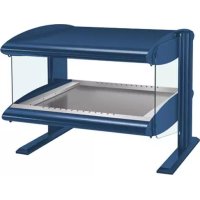
HZMH30 - Food Warmer Hatco - Free user manual and instructions
Find the device manual for free HZMH30 Hatco in PDF.


| Product Type | Intelligent heated display cabinet (food warmer) |
| Brand | Hatco |
| Model | HZMH30 (equivalent to IHDCH-28) |
| Dimensions (W x D x H) | 718 mm x 728 mm x 766 mm |
| Base dimensions (W x D) | 711 mm x 686 mm |
| Net weight | Approximately 68 kg |
| Power supply | 208-240 V, 50/60 Hz, 12.9-14.9 A |
| Plug configuration | NEMA 6-20P |
| Operating temperature | Preset at 82 °C (180 °F), adjustable |
| Relative humidity | Preset at 17% RH, adjustable |
| Required water pressure | 138 to 345 kPa (20 to 50 psi) |
| Materials | Stainless steel, aluminum, tempered glass |
| Main functions | Forced air heating, humidification, timers, touchscreen, USB port |
| Controls | Touch panel with digital display, I/O switch |
| Capacity | Up to three support arms or shelves, suitable for pizzas up to 56 cm |
| Maintenance | Daily cleaning with a soft, non-abrasive cloth; monthly descaling of atomizer trays |
| Safety | Mandatory grounding, emergency stop, burn protection (hot surfaces) |
| Spare parts | Use only genuine Hatco parts; repair by qualified personnel |
| Warranty | 1 year parts and labor, with possible extension depending on components |
| Available accessories | Sign holder, elevating support, pressure regulator kit, front door kit, glass cleaning kit, reverse osmosis system |
| Standards | NSF compliant |
Frequently Asked Questions - HZMH30 Hatco
User questions about HZMH30 Hatco
0 question about this device. Answer the ones you know or ask your own.
Ask a new question about this device
Download the instructions for your Food Warmer in PDF format for free! Find your manual HZMH30 - Hatco and take your electronic device back in hand. On this page are published all the documents necessary for the use of your device. HZMH30 by Hatco.
USER MANUAL HZMH30 Hatco
Intelligent Heated Display Cabinet Vitrine intelligente
IHDCH Series/Série
Do not operate this equipment unless you have read and understood the contents of this manual! Failure to follow the instructions contained in this manual may result in serious injury or death. This manual contains important safety information concerning the maintenance, use, and operation of this product. If you're unable to understand the contents of this manual, please bring it to the attention of your supervisor. Keep this manual in a safe location for future reference.
English = 2
ADVERTENCIA
Electrical Rating Chart. 5
Dimensions. 5
Water Supply Specifications 5
Installation 6
General. 6
Removing the Atomizer Pans. 7
Installing the Atomizer Pans 7
Operation 8
General 8
Using the Timers 8
Changing the Cabinet Settings. 8
Changing the Timer Settings. 9
Changing Between Celsius and Fahrenheit 9
Updating the Firmware 9
Maintenance. 10
General 10
Daily Cleaning 10
Monthly Cleaning. 10
troubleshooting Guide 11
Alert Message Guide 11
Options and Accessories 123
Limited Warranty 13
Authorized Parts Distributors Back Cover
IMPORTANT OWNER INFORMATION
Record the model number, serial number, voltage, and purchase date of the unit in the spaces below (specification label located on the back of the unit). Please have this information available when calling Hatco for service assistance.
Model No.
Serial No.
Voltage
Date of Purchase
Register your unit!
- Completing online warranty registration will prevent delay in obtaining warranty coverage. Access the Hatco website at www.hatcocorp.com, select the Support pull-down menu, and click on "Warranty".
Business
Hours: 7:00 AM to 5:00 PM Monday-Friday,
Central Time (CT)
(Summer Hours: June to September—
7:00 AM to 5:00 PM Monday-Thursday
7:00 AM to 4:00 PM Friday)
Telephone: 800-558-0607; 414-671-6350
E-mail: support@hatcocorp.com
24 Hour 7 Day Parts and Service
Assistance available in the United States
and Canada by calling 800-558-0607.
Additional information can be found by visiting our web site at www.hatcocorp.com.
INTRODUCTION
Hatco Intelligent Heated Display Cabinets are designed to hold prepared foods for prolonged periods of time while maintaining that "just-made" quality. Intelligent Heated Display Cabinets provide the best environment for food products by regulating the air temperature while at the same time balancing the humidity level. The use of controlled, moisturized heat maintains serving temperature and food texture longer than conventional dry holding equipment.
The air flow pattern is designed to maintain consistent cabinet temperature without drying out foods. The precise combination of heat and humidity creates a "blanket" effect around the food. The air flow rate enables the cabinet to recover temperature rapidly after opening and closing a door.
Hatco Intelligent Heated Display Cabinets are products of extensive research and field testing. The materials used were selected for maximum durability, attractive appearance, and optimum performance. Every unit is inspected and tested thoroughly prior to shipment.
This manual provides the installation, safety, and operating instructions for Intelligent Heated Display Cabinets. Hatco recommends all installation, operating, and safety instructions appearing in this manual be read prior to installation or operation of a unit.
Safety information that appears in this manual is identified by the following signal word panels:

WARNING indicates a hazardous situation which, if not avoided, could result in death or serious injury.

CAUTION indicates a hazardous situation which, if not avoided, could result in minor or moderate injury.
NOTICE
NOTICE is used to address practices not related to personal injury.

Read the following important safety information before using this equipment to avoid serious injury or death and to avoid damage to equipment or property.

WARNING
ELECTRIC SHOCK HAZARD:
- Plug unit into a properly grounded electrical receptacle of the correct voltage, size, and plug configuration. If plug and receptacle do not match, contact a qualified electrician to determine and install proper voltage and size electrical receptacle.
- Turn OFF power switch, unplug power cord, and allow unit to cool before performing any cleaning, adjustments, or maintenance.
- DO NOT submerge or saturate with water. Unit is not waterproof. Do not operate if unit has been submerged or saturated with water.
- Unit is not weatherproof. Locate unit indoors where ambient air temperature is a minimum of 70^ (21^) .
- This unit is not "jet-proof" construction. Do not use jet-clean spray to clean this unit.
- Do not steam clean or use excessive water on unit.
- Do not pull unit by power cord.
- Discontinue use if power cord is frayed or worn.
- Do not attempt to repair or replace a damaged power cord. Cord must be replaced by Hatco, an Authorized Hatco Service Agent, or a person with similar qualifications.
- This unit must be serviced by qualified personnel only. Service by unqualified personnel may lead to electric shock or burn.
- Use only Genuine Hatco Replacement Parts when service is required. Failure to use Genuine Hatco Replacement Parts will void all warranties and may subject operators of the equipment to hazardous electrical voltage, resulting in electrical shock or burn. Genuine Hatco Replacement Parts are specified to operate safely in the environments in which they are used. Some aftermarket or generic replacement parts do not have the characteristics that will allow them to operate safely in Hatco equipment.
FIRE HAZARD:
- Install unit on non-combustible surface only.
- Locate unit a minimum of 1" (25 mm) from combustible walls and materials. If safe distances are not maintained, discoloration or combustion could occur.
- Do not place anything on top of unit.
Make sure food product has been heated to the proper food-safe temperature before placing in unit. Failure to heat food product properly may result in serious health risks. This unit is for holding pre-heated food product only.
Hatco Corporation is not responsible for actual food product serving temperature. It is the responsibility of the user to ensure that food product is held and served at a safe temperature.
The light fixtures in this unit have safety shields covering the light bulbs to meet National Sanitation Foundation (NSF) standards. To avoid personal injury and/or food contamination, always operate the unit with the safety shields properly installed.

WARNING
Make sure all operators have been instructed on the safe and proper use of the unit.
This unit is not intended for use by children or persons with reduced physical, sensory, or mental capabilities. Ensure proper supervision of children and keep them away from the unit.
This unit has no "user-serviceable" parts. If service is required on this unit, contact an Authorized Hatco Service Agent or contact the Hatco Service Department at 800-558-0607 or 414-671-6350.

CAUTION
BURN HAZARD:
- Some exterior surfaces on the unit will get hot. Use caution when touching these areas.
- Do not remove or adjust atomizer pans when unit is hot. Allow unit to cool completely before working with atomizer pans.
Locate unit at proper counter height in an area that is convenient for use. Location should be level to prevent unit or its contents from falling accidentally and strong enough to support the weight of the unit and contents.
The National Sanitation Foundation (NSF) requires that units over 36^ (914 mm) in width or weighing more than 80 lbs. (36 kg) either be sealed to or raised above the installation surface.
Do not move or relocate the unit for cleaning. The unit is bulky and heavy.
Transport unit in upright position only. Before moving unit, secure all glass surfaces, doors, and support arms with tape. Failure to do so may result in damage to unit or personal injury.
NOTICE
Do not locate unit in area with excessive air movement around unit. Avoid areas that may be subject to active air movements or currents (i.e., near exhaust fans/woods, air conditioning ducts, and exterior doors).
Use non-abrasive cleaners and cloths only. Abrasive cleaners and cloths could scratch finish of unit, marring its appearance and making it susceptible to soil accumulation.
IMPORTANT—DO NOT use paper towel or glass cleaner to clean plastic surfaces such as sliding doors. Paper towel and glass cleaner may scratch the material. Wipe off plastic surfaces using a soft, clean, water-dampened cloth.
Use detachable hose sets supplied with unit. Do not use old hose sets.
Clean unit daily to avoid malfunctions and maintain sanitary operation.
All Models
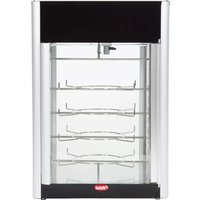
All Hatco Intelligent Heated Display Cabinets are constructed of stainless steel and aluminum with tempered glass top, front, side, and door panels. Units are available with a black, powdercoated finish or in stainless steel.
All models feature a touchscreen controller, a lighted Power I/O (on/off) switch, an air heating/circulation system, a humidity system, a USB port, and LED display lights. The inside of the cabinet features removable base pieces as well as removable front and rear crumb trays. Units are equipped with a 6' (1829 mm) power cord with plug.
NOTE: A water filter assembly is included with the unit to install on the water supply line before it enters the unit.
NOTE: Refer to the OPTIONS AND ACCESSORIES section for details on available accessories and factory-installed options.
Model IHDCH-28
IHDCH-28 models can be configured with up to three adjustable product support arms or up to three movable shelves. The product support arms and shelves are capable of holding a maximum pizza size of 22^ . Access to the cabinet is through a rear, hinged door—which can be installed as either right or left-hinged.
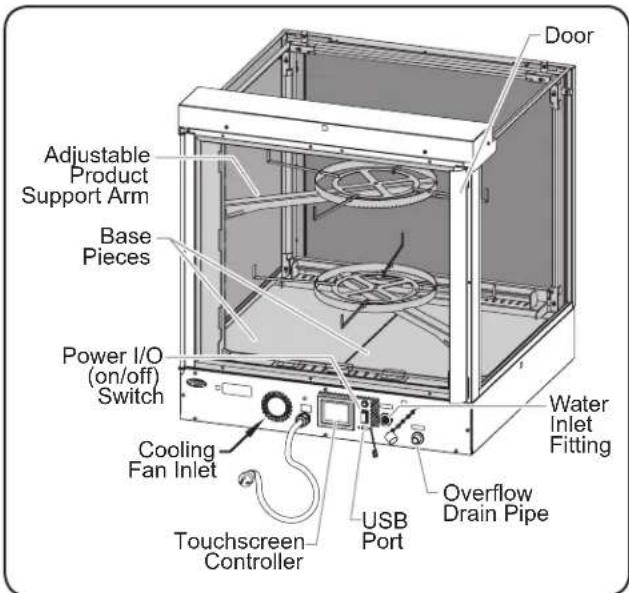
Rear view of Model IHDCH-28
Model IHDCH-45
IHDCH-45 models can be configured with up to six adjustable product support arms. The product support arms are capable of holding a maximum pizza size of 19 - 1 / 2^ . Access to the cabinet is through rear sliding doors.
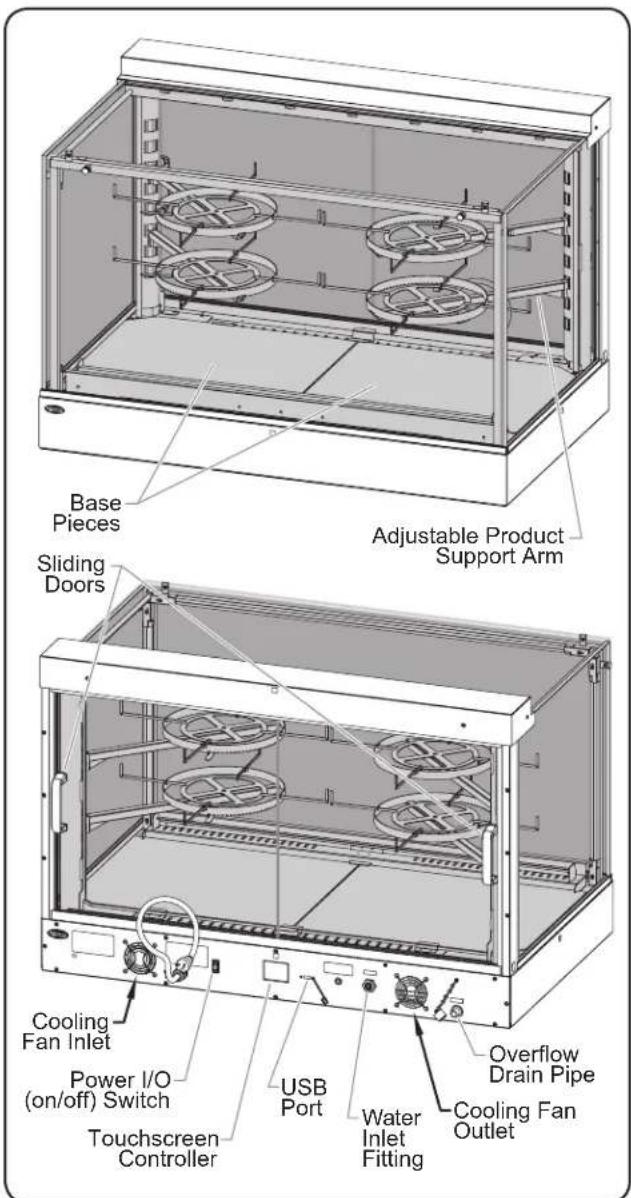
Front and Rear view of Model IHDCH-45
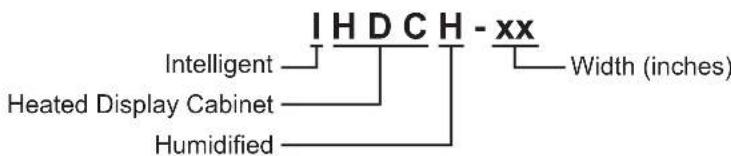
MODEL DESIGNATION
Plug Configurations
Units are supplied from the factory with an electrical cord and plug installed (plugs are supplied according to the application).
WARNING
ELECTRIC SHOCK HAZARD: Plug unit into a properly grounded electrical receptacle of the correct voltage, size, and plug configuration. If plug and receptacle do not match, contact a qualified electrician to determine and install proper voltage and size electrical receptacle.
NOTE: Specification label located on the back of the unit. See label for serial number and verification of unit electrical information.

Plug Configurations
NOTE: Receptacle not supplied by Hatco.
Electrical Rating Chart
| Model Voltage | Age Watts | Amps Plug | Configuration | Shipping Weight |
| IHDCH-28 208 | 3090 | 14.9 | NEMA 6-20P 150 lbs. (68 kg) | |
| 240 12.9 | ||||
| IHDCH-45 208 | 3090 | 14.9 | NEMA 6-20P 200 lbs. (91 kg) | |
| 240 12.9 | ||||
Dimensions
| Model | Width (A) | Depth (B) | Height (C) | Base Width (D) | Base Depth (E) | Support Arm Diameter (F) | Riser Diameter (G)* |
| IHDCH-28 | 28-1/4" (718 mm) | 28-11/16" (728 mm) | 30-3/16" (766 mm) | 28" (711 mm) | 27" (686 mm) | 13-1/2 to 22" (343 to 559 mm) | 12" (305 mm) |
| IHDCH-45 | 45-1/4" (1149 mm) | 28-3/8" (721 mm) | 30-3/16" (766 mm) | 45" (1143 mm) | 27" (686 mm) | 12 to 19-1/2" (305 to 495 mm) | 12" (305 mm) |
Heated Chamber Dimensions: IHDCH-28 = 27-1/8" W × 25-1/2" D × 22-5/8" H (689 × 648 × 574 mm)
IHDCH-45=44-1/8"W×25-1/2"D×22-5/8"H(1121×648×574mm)
Food Product Riser Height = 1 - 1 / 4^ (32 mm)*

Front View
Side View
Front View
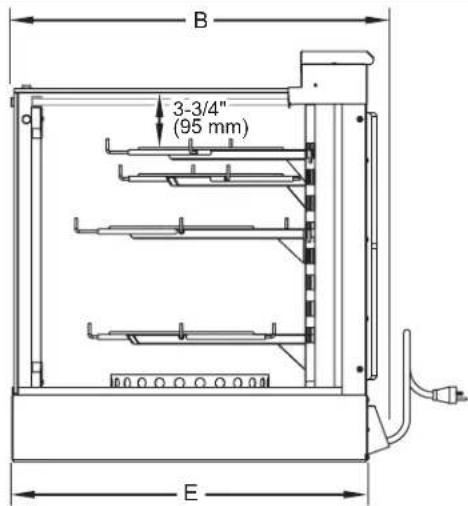
* Available as an accessory.
Water Supply Specifications
Water Pressure = 20 psi (138 kPa) minimum, 50 psi (345 kPa) maximum
General
Hatco Intelligent Heated Display Cabinets are shipped with most components installed and ready for operation. Care should be taken when unpacking shipping carton to avoid damage to unit and the components enclosed. The following installation instructions must be performed before connecting electricity and operating the cabinet.
WARNING
ELECTRIC SHOCK HAZARD: Unit is not weatherproof. Locate unit indoors where ambient air temperature is a minimum of 70^ (21^)
FIRE HAZARD:
- Locate unit a minimum of 1^ (25 mm) from combustible walls and materials. If safe distances are not maintained, discoloration or combustion could occur.
- Do not place anything on top of unit.
CAUTION
Locate unit at proper counter height in an area that is convenient for use. Location should be level to prevent unit or its contents from falling accidentally and strong enough to support the weight of the unit and contents.
The National Sanitation Foundation (NSF) requires that units over 36^ (914 mm) in width or weighing more than 80 lbs. (36 kg) either be sealed to or raised above the installation surface.
- Remove the unit from the shipping carton.
- Remove tape and protective film from all surfaces of unit.
NOTE: To prevent delay in obtaining warranty coverage, complete online warranty registration. See the IMPORTANT OWNER INFORMATION section for details.
- Place the unit in the desired location. Two or more people are required for this procedure.
- Locate the unit in an area where the ambient air temperature is constant and a minimum of 70^ (21^) . Avoid areas that may be subject to active air movements or currents (i.e., near exhaust fans/hoods, air conditioning ducts, and exterior doors/openings).
Make sure the unit is at the proper counter height in an area convenient for use.
Make sure the countertop is level and strong enough to support the weight of the unit and food product. - Seal the unit to the countertop using an NSF-approved sealant.
NOTE: A shut-off valve must be installed on the water supply line immediately upstream from the water filter and unit.
NOTE: Incoming water pressure for the unit must be between 20 psi (138 kPa) and 50 psi (345 kPa). If incoming pressure is too high, a pressure regulator must be installed upstream from the water filter. See OPTIONS AND ACCESSORIES for details.
- Connect the on-site water supply from the shut-off valve to the included water filter.
NOTE: Make sure to note the flow direction arrow on the water filter, which should be pointing toward the unit.
- Flush the water filter to remove loose carbon particles. Residual particles from a new filter can affect the humidity system.
a. Connect the included 1 / 4'' clear tubing to the water outlet on the filter, and place the opposite end of the tube into a waste container.
b. Turn on the water supply and flush the filter into the container until the water is clear of carbon particles. -
Connect the 1/4'' clear tubing from the water outlet on the filter to either fitting on the included water strainer.
-
The fittings on the water strainer are "push-in"-style connections for 1/4 plastic tubing.
-
Connect the water strainer to the 1/4'' water inlet fitting on the back of the unit.
- The water inlet fitting is a "push-in"-style connection for 1/4 plastic tubing.
-
Provide a catch pan for the overflow drain pipe on the back of the unit.
-
The 3/8 overflow drain pipe also can be connected to an on-site drain line. Consult a licensed plumber for proper drain installation that conforms to local codes.
NOTE: Water will drain only if a problem occurs with the water supply connection. During normal operation, all water will be atomized into the cabinet by the humidity system.
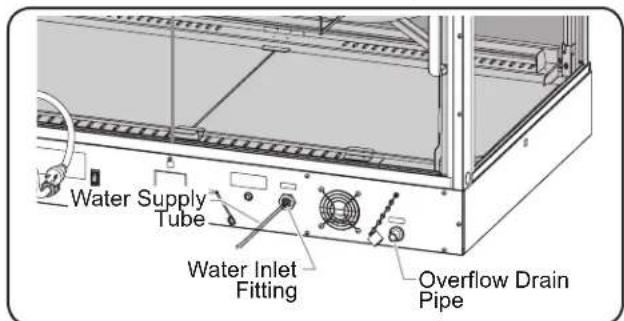
Connecting the Water Supply (IHDCH-45 shown)
CAUTION
BURN HAZARD: Do not remove or adjust atomizer pans when unit is hot. Allow unit to cool completely before working with atomizer pans.
- Verify that each atomizer pan is in the proper position.
NOTE: The humidity system includes two atomizer pans, one on each side of the unit underneath the vent cover at the front of the unit. These pans are loose and may have moved out of position during shipping and installation.
a. Remove the vent cover located along the bottom, front of the unit by reaching in through the rear sliding doors.
b. Inspect the position of the atomizer pans on each side of the unit.
- The handle of the atomizer pan should be aligned vertically with the top edge of the opening.
c. If the handle is pushed into the unit too far: - Remove the atomizer pan, reposition on top of the pan supports, and push the pan toward the back of the unit on the pan supports until it stops against the backstop.
d. If the handle extends out into the opening:
- Push the atomizer pan toward the back of the unit until it stops against the backstop.
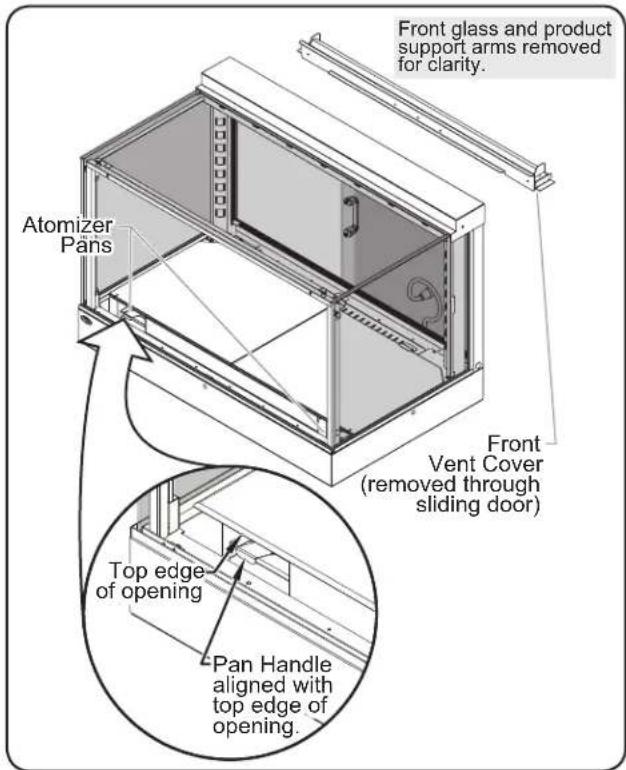
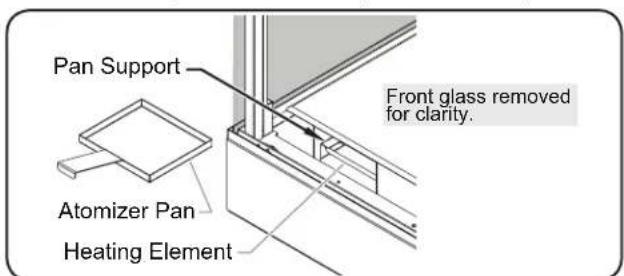
Checking the Atomizer Pans (IHDCH-45 shown)
Atomizer Pan Location (IHDCH-45 shown)
- Turn on the water supply and check for leaks.
- Install the product support arms or shelves in the desired positions.
To install a product support arm:
a. Align the hooks on the end of the arm with the desired slots on the support bracket.
b. Insert the hooks into the slots, and lower the support arm until it stops.
To install a shelf:
a. Align the hooks on each side of the shelf with the desired slots on the support brackets.
b. Insert the hooks into the slots, and lower the shelf until it stops.
13. Plug the unit into a properly grounded electrical receptacle of the correct voltage, size, and plug configuration. See the SPECIFICATIONS section for details.
Removing the Atomizer Pans
Use the following procedure to remove the two atomizer pans located underneath the vent cover at the front of the unit.
- Make sure the Power I/O (on/off) switch is in the O (off) position, the power cord is unplugged, and the unit is cool.
- Remove the vent cover located along the bottom, front of the unit by reaching in through the rear sliding doors.
- Locate the atomizer pans inside the opening at the front of the unit, one on each side.
- The atomizer pans sit on pan supports directly above a heating element.
- Remove the atomizer pans. To remove a pan:
a. Reach inside the front opening and grab the pan handle.
b. Start pulling the pan toward the front of the unit while angling the pan up.
c. Continue to lift and angle the pan up until it is clear of the front opening.
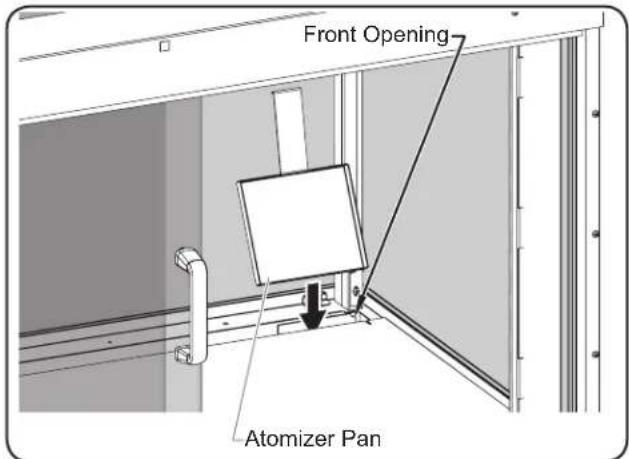
Removing/Installing the Atomizer Pans (IHDCH-45 shown)
Installing the Atomizer Pans
Use the following procedure to install the atomizer pans.
- Make sure the Power I/O (on/off) switch is in the O (off) position, the power cord is unplugged, and the unit is cool.
-
If it is present, remove the vent cover located along the bottom, front of the unit by reaching in through the rear sliding doors.
-
Install the atomizer pans. To install a pan:
a. Hold the pan by the handle and at an angle above the front opening.
b. Lower the pan into the opening and set the front edge of the pan onto the pan supports located directly above the heating element.
c. Push the pan toward the back of the unit on the pan supports until it stops against the backstop.
NOTE: If the atomizer pan does not stop, it was installed improperly. Repeat step 3 of this procedure.
d. Make sure the handle of the atomizer pan is aligned vertically with the top edge of the opening.
General
Use the following procedures to operate a Hatco Intelligent Heated Display Cabinet.
WARNING
Read all safety messages in the IMPORTANT SAFETY INFORMATION section before operating this equipment.
Make sure food product has been heated to the proper food-safe temperature before placing in unit. Failure to heat food product properly may result in serious health risks. This unit is for holding pre-heated food product only.
CAUTION
BURN HAZARD: Some exterior surfaces on the unit will get hot. Use caution when touching these areas.
Startup
- Verify that the unit is plugged into a properly grounded electrical receptacle of the correct voltage, size and plug configuration. See the SPECIFICATIONS section for details.
- Verify that the atomizer pans are installed correctly (see INSTALLATION section for details). NOTICE: Never operate unit without atomizer pans in proper position.
- Verify that the unit is connected to the on-site water supply (see INSTALLATION section for details).
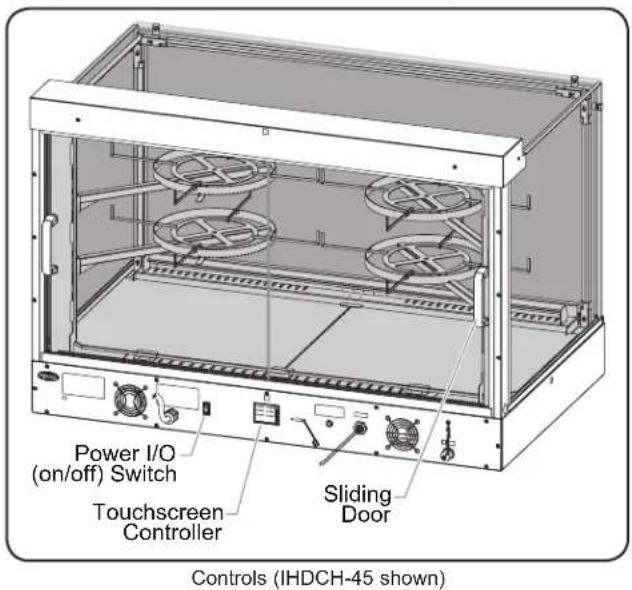
- Move the Power I/O (on/off) switch to the I (on) position.
The display lights will turn on, the heating and humidity systems will start up.
- The touchscreen controller will energize and show the Home Screen. The Home Screen shows the available timers that correspond with each product position inside the cabinet.
0:40:000:40:00
0:40:000:40:00
0:40:000:40:00
0:40:000:40:00

NOTE: The and key will appear in red during preheating. Once the cabinet reaches the operating setpoints, the keys will change to green.
- Allow the unit 60 minutes to reach operating temperature and humidity setting before loading the cabinet with preheated food product.
NOTE: The cabinet can hold pizzas with a maximum diameter of 18" (457 mm).
- Touch the key to show the current air temperature and relative humidity (RH) inside the cabinet. Touch the key to return to the timers on the Home Screen.
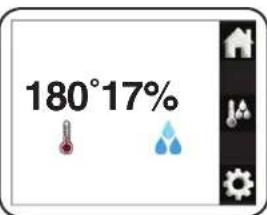
NOTE: The cabinet is pre-set at the factory to an air
temperature of 180^ (82^) and 17% relative humidity.
- Refer to the "Adjusting the Settings" procedure in this section to change the air temperature and relative humidity (RH) settings, if necessary.
Shutdown
- Move the Power I/O (on/off) Switch to the O (off) position and allow the unit to cool completely.
- Perform the "Daily Cleaning" procedure in the MAINTENANCE section of this manual.
Using the Timers
Use the following procedure to use timers for the product in the cabinet.
- Make sure the Home Screen with the available timers is shown on the display. If not, touch the key.
NOTE: The position of the timers on the screen corresponds with the position of the product in the cabinet, when viewing from the operator side.
-
Start the desired timer(s).
-
Touch a timer to start a countdown from the pre-set time setting.
- Touch and hold a timer for three seconds to turn off and reset the timer.
- When a timer has one minute remaining, it will be highlighted in flashing red.

When a timer reaches zero, the red highlight on the timer will remain solid until it is reset by the operator.
Changing the Cabinet Settings
Use the following procedure to set or change the air temperature and humidity settings of the cabinet. The cabinet is pre-set at the factory to an air temperature of 180^ (82^) and 17% relative humidity.
- Move the Power I/O (on/off) switch to the I (on) position.
- The unit will turn on and the touchscreen controller will energize and show the Home Screen.
2. Touch the key.
- Enter the password "248" using the number keys that appear.
The Service screen will appear on the display.

-
Touch the TEMPHUMID key on the Service screen to access the air temperature and
-
Adjust the air temperature and/or relative humidity settings.
-
Touch the red or key on the left side of the display to set the desired air temperature.
- Touch the blue or key on the right side of the display to set the desired relative humidity (RH).
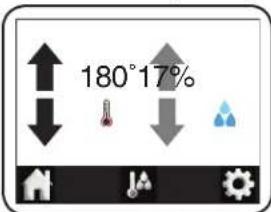
NOTE: Air temperature and humidity settings may vary depending upon product make-up and consistency.
- Touch the key to save the settings and return to the Home Screen.
Changing the Timer Settings
Use the following procedure to change the time setting on each of the product timers.
- Move the Power I/O (on/off) switch to the I (on) position.
- The unit will turn on and the touchscreen controller will energize and show the Home Screen.
2. Touch the key.
- Enter the password "248" using the number keys that appear.
-
The Service screen will appear on the display.
-
Touch the TIMERS key on the Service screen to access the Timers screen.
NOTE: The check boxes on the Timers screen correspond with each available product timer, when viewing unit from the operator side. Touch the appropriate check box to toggle the timer between visible and invisible on the Home screen.

- Touch the MAXSETTING key on the Timers screen to access the timer settings.
a. Touch the SET key to highlight the first timer setting.
b. Touch the red or key on the display to change the timer setting.
c. Touch the next desired timer setting to make it active for change, and repeat the previo
d. Touch the DONE key when timer setting changes are complete.

- Touch the key to save the settings and return to the Home Screen.
Changing Between Celsius and Fahrenheit
Use the following procedure to change the air temperature unit of measure between Celsius and Fahrenheit.
- Move the Power I/O (on/off) switch to the I (on) position.
- The unit will turn on and the touchscreen controller will energize and show the Home Screen.
2. Touch the
- Enter the password "248" using the number keys that appear.
The Service screen will appear on the display.
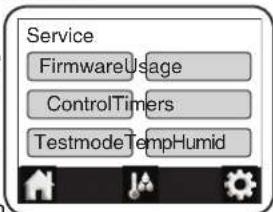
- Touch the CONTROL key on the Service screen to access the Control Settings screen.
-
Choose the desired unit of measure on the "Units" line:
-
Touch the "F" box to select Fahrenheit.
- Touch the "C" box to select Celsius.
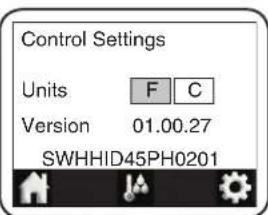
NOTE: The box for the active unit of measure is highlighted in green.
- Touch the key to save the settings and return to the Home Screen.
Updating the Firmware
Use the following procedure to perform a firmware update on the touchscreen controller.
- Move the Power I/O (on/off) switch to the I (on) position.
- The unit will turn on and the touchscreen controller will energize and show the Home Screen.
2. Touch the
- Enter the password "248" using the number keys that appear.
-
The Service screen will appear on the display.
-
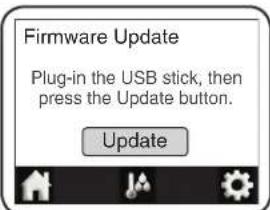
Touch the FIMWARE key on the Service screen to access the Firmware Update screen.
-
Insert the USB drive into the USB port next to the controller, and touch the UPDATE key on the Firmware Update screen.
The update will begin. When complete, the touchscreen controller will restart and show the Home screen.
General
Hatco Intelligent Heated Display Cabinets are designed for maximum durability and performance, with minimum maintenance.
WARNING
ELECTRIC SHOCK HAZARD:
- Turn OFF power switch, unplug power cord, and allow unit to cool before performing any cleaning, adjustments, or maintenance.
- DO NOT submerge or saturate with water. Unit is not waterproof. Do not operate if unit has been submerged or saturated with water.
- This unit is not "jet-proof" construction. Do not use jet-clean spray to clean this unit.
- Do not steam clean or use excessive water on unit.
- Use only Genuine Hatco Replacement Parts when service is required. Failure to use Genuine Hatco Replacement Parts will void all warranties and may subject operators of the equipment to hazardous electrical voltage, resulting in electrical shock or burn. Genuine Hatco Replacement Parts are specified to operate safely in the environments in which they are used. Some aftermarket or generic replacement parts do not have the characteristics that will allow them to operate safely in Hatco equipment.
This unit has no "user-serviceable" parts. If service is required on this unit, contact an Authorized Hatco Service Agent or contact the Hatco Service Department at 800-558-0607 or 414-671-6350.
Daily Cleaning
To maintain performance and preserve the finish of the cabinet, it is recommended that the unit be cleaned daily.
NOTICE
Use non-abrasive cleaners and cloths only. Abrasive cleaners and cloths could scratch finish of unit, marring its appearance and making it susceptible to soil accumulation.
- Move the Power I/O (on/off) switch to the O (off) position and unplug the power cord. Allow the unit to cool.
- Remove and clean all internal components.
- Components include risers, product supports arms, shelves, front and rear vent covers, crumb trays (located directly below the front and rear vent covers), and the decorative base pieces.
- Clean and sanitize the components in a 3-compartment sink, and allow to air dry.
NOTE: The above listed components are dishmachine-safe. Not all dishmachine detergents have been tested. If a noticeable change in color or gloss occurs, an alternate detergent should be used.
- Wipe down all interior and exterior metal surfaces using a clean, damp, non-abrasive cloth. A non-abrasive cleaner may be used for difficult stains. Hard to reach areas should be cleaned using a small brush and mild soap.
- Clean all glass panels and glass doors using a standard glass cleaner.
-
Clean polycarbonate sliding doors using soft, microfiber cleaning cloths, mild soap, and water. NOTICE: Do not use paper towel or glass cleaner on plastic surfaces—scratching or damage may occur.
-
Spray all interior and exterior surfaces with sanitizing solution and allow to air dray.
- Reassemble the unit.
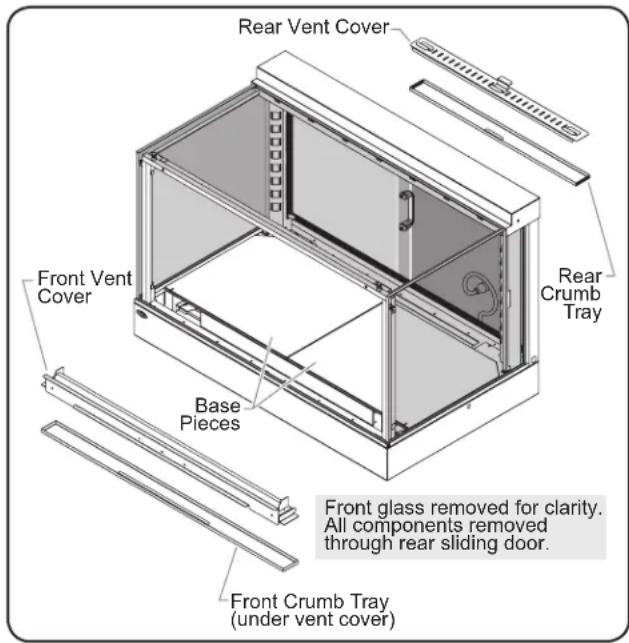
Removing/Installing Components (IHDCH-45 shown)
Monthly Cleaning
Use the following procedure for periodic cleaning and deliming of the atomizer pans.
NOTE: The lime and mineral content of the water used for daily operation will determine how often the deliming procedure must be performed.
NOTE: Perform this procedure when the unit will not be used for a period of time, such as the end of the day.
- Move the Power I/O (on/off) switch to the O (off) position and unplug the power cord. Allow the unit to cool completely.
- Perform steps 2-5 of the "Daily Cleaning" procedure.
- Remove both atomizer pans (refer to the "Removing the Atomizer Pans" procedure in the INSTALLATION section of this manual).
- Fill an appropriate container with a mixture of 75% water and 25% white vinegar. Do not use flavored vinegar.
- Place both atomizer pans into the vinegar solution and allow to soak for several hours, preferably overnight.
- Remove both atomizer pans from the vinegar solution and clean using warm, soapy water and a soft cloth.
- Rinse both atomizer pans with clean water, and allow to air dry.
- Install the cleaned atomizer pans into the unit (refer to the "Installing the Atomizer Pans" procedure in the INSTALLATION section of this manual).
- Spray all interior and exterior surfaces with sanitizing solution and allow to air dry.
- Reassemble the unit.

WARNING
This unit must be serviced by trained and qualified personnel only. Service by unqualified personnel may lead to electric shock or burn.

WARNING
ELECTRIC SHOCK HAZARD: Turn OFF power switch, unplug power cord, and allow unit to cool before performing any cleaning, adjustments, or maintenance.
| Symptom Probable | Cause Corrective Action | |
| Unit operates, but is not circulating air inside cabinet. | Blower motor(s) defective. | Contact Authorized Service Agent or Hatco for assistance. |
| The correct voltage may not be supplied to blowers. | ||
| Unit is plugged in, but nothing works. | No power to unit. | Check electrical receptacle and verify that power supply matches specifications on unit. If receptacle is not working, check circuit breaker and reset, or plug unit into a different known working receptacle. |
| Power cord connections are loose or disconnected. | Contact Authorized Service Agent or Hatco for assistance. | |
| Power cord is damaged. | ||
| Defective Power I/O (on/off) switch. | ||
| Unit is not producing any "hot air" inside cabinet. | Safety high-limit is tripped or open. | Contact Authorized Service Agent or Hatco for assistance.. |
| Incorrect voltage supplied to heating element. | ||
| Blower motor(s) not working. | ||
| Air heating element(s) defective. | ||
| Unit is heating, but is not producing humidity inside cabinet. | Unit has not been operating for at least 30 minutes. | Allow at least 30 minutes after unit is turned on for humidity cycle to start. Then, allow another 30 minutes to reach humidity setting. Every time power is turned off, unit requires 30 minutes after it is turned on for humidity cycle to start. |
| Humidity setting too low. Increase the hum | ||
| Water supply is off or not connected. | Make sure unit is connected to water supply and the shut-off valve is open. | |
| Incorrect voltage supplied to water heating elements or heating elements defective. | Contact Authorized Service Agent or Hatco for assistance. |
Alert Message Guide
Touch SNOOZE to postpone an Alert Message for five minutes and return to operation. Touch DISABLE to reset an Alert Message. Always investigate and correct the causes of an Alert Message.
| Alert Message Troubleshooting | Pricing | Corrective Action(if Troubleshooting fails to fix) | |
| ErrorSNOOZEDISABLE | Low Cabinet Temp | Make sure doors are closed. Contact Authorized | d Service Agent or Hatco for assistance. |
| ErrorSNOOZEDISABLE | Low Cabinet Humidity | Make sure water supply is connected and turned on. Allow 60 minutes for cabinet to reach humidity setting. | Contact Authorized Service Agent or Hatco for assistance. |
| ErrorSNOOZEDISABLE | Bad Probe Connection | Defective temperature probe. Contact Authorized | d Service Agent or Hatco for assistance. |
| ErrorSNOOZEDISABLE | PCB Temp Too High | Make sure inlet and outlet openings for the cooling fan are not blocked and air flow is not restricted. Restart cabinet. | Contact Authorized Service Agent or Hatco for assistance. |
Troubleshooting Questions?
If you continue to have problems resolving an issue, please contact the nearest Authorized Hatco Service Agency or Hatco for assistance. To locate the nearest Service Agency, log onto the Hatco website at www.hatcocorp.com, select the Support pulled-down menu, and click on "Find A Service Agent"; or contact the Hatco Parts and Service Team at:
Telephone: 800-558-0607 or 414-671-6350
e-mail: support@hatcocorp.com
OPTIONS AND ACCESSORIES
Sign Holders
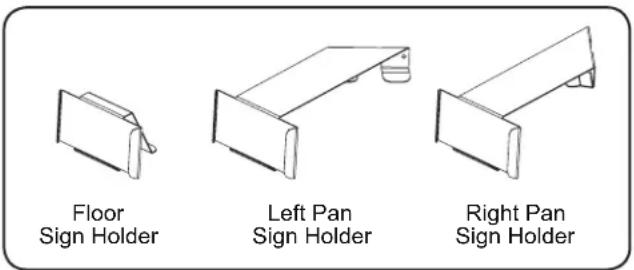
Three different sign holders are available as accessories: floor sign holder, left pan sign holder, and right pan sign holder. The floor sign holder rests on the base pieces inside the cabinet. The left pan sign holder and right pan sign holder are installed on the product support arms.
Food Product Riser
A circular food product riser is available as an accessory with a black, powdercoated finish or in stainless steel. Food product risers sit directly on the base pieces inside the cabinet to allow additional food display options. One riser will fit in IHDCH-28 model will fit in IHDCH-45 models.

Water Pressure Regulator Kit
A water pressure regulator kit is available as an accessory. A water pressure regulator is required when the incoming water pressure is greater than 50 psi (345kPa) . The water pressure regulator kit includes a pressure regulator, pressure gauge, and shutoff valve.
Front Door Kit
A hinged, self-closing front door kit is available for IHDCH-28 models as an accessory. Installing a front door converts the unit to a pass-through style cabinet, and allows customer access to the food product.
Glass Cleaning Kit
A glass cleaning kit is available as an accessory. The glass cleaning kit consists of a cleaning base, removable extension pole, and re-usable/washable microfiber pads. The microfiber pads attach to the cleaning base to provide lint-free cleaning of glass surfaces.
Reverse Osmosis System
A reverse osmosis (RO) system is available as an accessory. The RO system is installed upstream from the unit in the water supply line. RO water will decrease the amount of lime and mineral deposits in the humidification system, extending the time between necessary cleanings.
1.PRODUCT WARRANTY
Hatco warrants the products that it manufactures (the "Products") to be free from defects in materials and workmanship, under normal use and service, for a period of one (1) year from the date of purchase when installed and maintained in accordance with Hatco's written instructions or 18 months from the date of shipment from Hatco. Buyer must establish the Product's purchase date by registering the Product with Hatco or by other means satisfactory to Hatco in its sole discretion.
Hatco warrants the following Product components to be free from defects in materials and workmanship from the date of purchase (subject to the foregoing conditions) for the period(s) of time and on the conditions listed below:
a) One (1) Year Parts and Labor PLUS One (1) Additional Year Parts-Only Warranty:
Conveyor Toaster Elements (metal sheathed)
Drawer Warmer Elements (metal sheathed)
Drawer Warmer Roller and Slides
Strip Heater Elements (metal sheathed)
Display Warmer Elements (metal sheathed air heating)
Holding Cabinet Elements (metal sheathed air heating)
Heated Well Elements - HW and HWB Series
(metal sheathed)
b) Two (2) Year Parts and Labor Warranty:
Induction Ranges
Induction Warmers
c) One (1) Year Parts and Labor PLUS Four (4) Years Parts-Only Warranty:
3CS and FR Tanks
d) One (1) Year Parts and Labor PLUS Nine (9) Years Parts-Only Warranty on:
Electric Booster Heater Tanks
Gas Booster Heater Tanks
e) Ninety (90) Day Parts-Only Warranty:
Replacement Parts
THE FOREGOING WARRANTY ARE EXCLUSIVE AND IN LIEU OF ANY OTHER WARRANTY, EXPRESSED OR IMPLIED, INCLUDING BUT NOT LIMITED TO ANY IMPLIED WARRANTY OF MERCHANTABILITY OR FITNESS FOR A PARTICULAR PURPOSE OR PATENT OR OTHER INTELLECTUAL PROPERTY RIGHT INFRINGEMENT. Without limiting the generality of the foregoing, SUCH WARRANTYES DO NOT COVER: Coated incandescent light bulbs, fluorescent lights, heat lamp bulbs, coated halogen light bulbs, halogen heat lamp bulbs, xenon light bulbs, LED light tubes, glass components, and fuses; Product failure in booster tank, fin tube heat exchanger, or other water heating equipment caused by liming, sediment buildup, chemical attack, or freezing; or Product misuse, tampering or misapplication, improper installation, or application of improper voltage.
2. LIMITATION OF REMEDIES AND DAMAGES
Hatco's liability and Buyer's exclusive remedy hereunder will be limited solely, at Hatco's option, to repair or replacement using new or refurbished parts or Product by Hatco or a Hatcoauthorized service agency (other than where Buyer is located outside of the United States, Canada, United Kingdom, or Australia, in which case Hatco's liability and Buyer's exclusive remedy hereunder will be limited solely to replacement of part under warranty) with respect to any claim made within the applicable warranty period referred to above. Hatco reserves the right to accept or reject any such claim in whole or in part. In the context of this Limited Warranty, "refurbished" means a part or Product that has been returned to its original specifications by Hatco or a Hatco-authorized service agency. Hatco will not accept the return of any Product without prior written approval from Hatco, and all such approved returns shall be made at Buyer's sole expense. HATCO WILL NOT BE LIABLE, UNDER ANY CIRCUMSTANCES, FOR CONSEQUENTIAL OR INCIDENTIAL DAMAGES, INCLUDING BUT NOT LIMITED TO LABOR COSTS OR LOST PROFITS RESULTING FROM THE USE OF OR INABILITY TO USE THE PRODUCTS OR FROM THE PRODUCTS BEING INCORPORATED IN OR BECOMING A COMPONENT OF ANY OTHER PRODUCT OR GOODS.
1. GARANTIE DU PRODUIT
Byassee Equipment Co.
Phoenix 602-252
CALIFORNIA
Industrial Electric
Commercial Parts & Service, Inc.
Huntington Beach 714-379-7100
Chapman Appl. Service
San Diego 619-298-7106
P & D Appliance
Commercial Parts & Service, Inc.
S. San Francisco 650-635-1900
COLORADO
Hawkins Commercial Appliance Englewood 303-781
FLORIDA
Whaley Foodservice Re
Jacksonville 904-725-7800
Whaley Foodservice Repair
Orlando 407-757-0851
B.G.S.I./Heritage
Pompano Beach 954-971-0456
Comm. Appliance Service
Tampa 813-663-0313
GEORGIA
Heritage Service Group
Norcross 866-388-9837
HAWAII
Burney's Comm. Service
Honolulu 808-848-1466
Food Equip Parts & Service
Honolulu 808-847-4871
ILLINOIS
Parts Town
Addison 708-865-7278
Eichenauer Elec. Service
Decatur 217-429-4229
Midwest Elec. Appl. Service
Elmhurst 630-279-8000
Cone's Repair Service
Moline 309-797-5323
IOWA
Goodwin Tucker Group
Des Moines 515-262-9308
KENTUCKY
Tech 24
Lexington 859-254-8854
Tech 24
Louisville 502-451-5411
LOUISIANA
Chandlers Parts & Service
Baton Rouge 225-272-6620
MARYLAND
Electric Motor Service
Baltimore
410-467-8080
MASSACHUSETTS
Ace Service Co. Inc.
Needham 781-449-4220
MICHIGAN
Bildons Appliance Service
Detroit 248-478-3320
Commercial Kitchen Service
Bay City 989-893-456
Midwest Food Equip. Service
Grandville 616-261-2000
MISSOURI
General Parts
Kansas City 816-421-5400
Commercial Kitchen Services
St. Louis 314-890-0700
Kaemmerlen Parts & Service
St. Louis 314-535-2222
NEBRASKA
Anderson Electric
Omaha 402-341-1414
Purpovics
Bunny's Commercial Las Vegas 702-736-0006
Hi. Tech Commercial Service
N. Las Vegas 702-649-4616
NEW JERSEY
Jay Hill Repair
Fairfield 973-575-9145
Service Plus
Flanders
NEW YORK
Alpro Service Co.
Maspeth 718-386-2515
Duffy's - AIS
Buffalo 716-884-7425
3Wire
Plattsburgh 800-634-5005
Duffy's - AIS
Sauquoit 800-836-1014
J.B. Brady, Inc.
Syracuse
315-422-9271
NORTH CAROLINA
Authorized Appliance
Charlotte 704-377-4501
OHIO
Akron/Canton Comm. Svc. Inc.
Akron 330-753-6634
Tech 24
Cincinnati 513-772-6600
Commercial Parts and Service
Columbus 614-221-0057
Electrical Appl. Repair Service
Brooklyn Heights 216-459-8700
E.A.Wichman Co.
Toledo
UTAH
La Monica's Rest, Equip. Service
Murray 801-263-3221
VIRGINIA
Daubers
Norfolk 757-855-4097
Daubers
Springfield
WASHINGTON
3Wire
Seattle
WISCONSIN
A.S.C., Inc.
Madison
A.S.C., Inc.
Milwaukee
703-866-3600
800-207-3146
608-246-3160
414-543-6460
CANADA
ALBERTA
Key Food Equipment Service
Edmonton 780-438-1690
BRITISH COLUMBIA
Key Food Equipment Service
Vancouver 604-433-4484
Key Food Equipment Service
Victoria 250-920-4888
MANITOBA
Air Rite, Inc.
Winnipeg 204-895-2300
NEW BRUNSWICK
EMR Services, Ltd.
Moncton 506-855-4228
ONTARIO
R.G. Henderson Ltd.
Toronto 416-422-5580
Choquette-CKS,Inc.
Ottawa 613-739-8458
QUEBEC
Choquette -
Montreal 514-722-2000
Choquette - CKS, Inc.
Quebec City 418-681-3944
UNITED KINGDOM
Marren Group
Northants
+44(0)1933665313
HATCO CORPORATION
P.O.Box 340500
Milwaukee, WI 53234-0500 U.S.A.
800-558-0607 414-671-6350
support@hatcocorp.com
www.hatcocorp.com
Register your unit online!
See IMPORTANT OWNER INFORMATION
section for details.
- Intelligent Heated Display Cabinet Vitrine intelligente
- ADVERTENCIA
- IMPORTANT OWNER INFORMATION
- Register your unit!
- INTRODUCTION
- NOTICE
- Read the following important safety information before using this equipment to avoid serious injury or death and to avoid damage to equipment or property.
- WARNING
- ELECTRIC SHOCK HAZARD:
- FIRE HAZARD:
- CAUTION
- BURN HAZARD:
- All Models
- Model IHDCH-28
- Model IHDCH-45
- MODEL DESIGNATION
- Plug Configurations
- Electrical Rating Chart
- Dimensions
- Water Supply Specifications
- General
- Removing the Atomizer Pans
- Installing the Atomizer Pans
- Startup
- Shutdown
- Using the Timers
- Changing the Cabinet Settings
- Touch the key.
- Changing the Timer Settings
- Changing Between Celsius and Fahrenheit
- Touch the
- Updating the Firmware
- Daily Cleaning
- Use non-abrasive cleaners and cloths only. Abrasive cleaners and cloths could scratch finish of unit, marring its appearance and making it susceptible to soil accumulation.
- Monthly Cleaning
- Alert Message Guide
- Troubleshooting Questions?
- OPTIONS AND ACCESSORIES
- Sign Holders
- Food Product Riser
- Water Pressure Regulator Kit
- Front Door Kit
- Glass Cleaning Kit
- Reverse Osmosis System
- 1.PRODUCT WARRANTY
- a) One (1) Year Parts and Labor PLUS One (1) Additional Year Parts-Only Warranty:
- b) Two (2) Year Parts and Labor Warranty:
- c) One (1) Year Parts and Labor PLUS Four (4) Years Parts-Only Warranty:
- d) One (1) Year Parts and Labor PLUS Nine (9) Years Parts-Only Warranty on:
- e) Ninety (90) Day Parts-Only Warranty:
- LIMITATION OF REMEDIES AND DAMAGES
- GARANTIE DU PRODUIT
- CALIFORNIA
- COLORADO
- FLORIDA
- GEORGIA
- HAWAII
- ILLINOIS
- IOWA
- KENTUCKY
- LOUISIANA
- MARYLAND
- MASSACHUSETTS
- MICHIGAN
- MISSOURI
- NEBRASKA
- Purpovics
- NEW JERSEY
- NEW YORK
- 3Wire
- NORTH CAROLINA
- OHIO
- UTAH
- VIRGINIA
- WASHINGTON
- WISCONSIN
- CANADA
- ALBERTA
- BRITISH COLUMBIA
- MANITOBA
- NEW BRUNSWICK
- ONTARIO
- QUEBEC
- UNITED KINGDOM
- HATCO CORPORATION
- P.O.Box 340500
- Register your unit online!
Brand : Hatco
Model : HZMH30
Category : Food Warmer