
DWE356 - Dishwasher BRANDT - Free user manual and instructions
Find the device manual for free DWE356 BRANDT in PDF.


| Product type | Dishwasher |
| Brand | Brandt |
| Model | DWE356 |
| Capacity | 12 place settings |
| Number of programs | 6 (Intensive 70°C, Normal 60°C, Eco 55°C, Bio 50°C, Delicate 45°C, Soak) |
| Water consumption | 5 to 18 L depending on program |
| Electricity consumption | 0.10 to 1.80 kWh depending on program |
| Options | Condenser drying, Delayed start (3h/9h), Quick |
| Detergent type | Tablet, powder, liquid |
| Water softener | Yes, adjustable (0 to >70°F) |
| Salt reservoir | Yes, with indicator light |
| Rinse aid dispenser | Yes, adjustable (positions 1 to 3) |
| Filter | Self-cleaning microfilter + debris trap |
| Cleaning | Regularly clean the debris trap and drain sump |
| Annual maintenance program | Run an empty intensive program with special dishwasher cleaner |
| Overflow protection | Yes, automatically activates drain pump if abnormal water level |
| Upper basket adjustment | 2 positions (high/low) |
| Indicator lights | Salt, rinse aid, program progress |
| Installation | Must be installed under a continuous worktop fixed to adjacent cabinets |
| Original parts | Use only original parts for repairs |
Frequently Asked Questions - DWE356 BRANDT
User questions about DWE356 BRANDT
0 question about this device. Answer the ones you know or ask your own.
Ask a new question about this device
Download the instructions for your Dishwasher in PDF format for free! Find your manual DWE356 - BRANDT and take your electronic device back in hand. On this page are published all the documents necessary for the use of your device. DWE356 by BRANDT.
USER MANUAL DWE356 BRANDT
GB Dishwasher OPERATING INSTRUCTIONS F Lave-Vaisselle NOTICE D'UTILISATION D Geschirrspüler GEBRAUCHSANWEISUNG DK Opvaskemaskine BRUGSANVISNING P Máquina de lavar MANUAL DE INSTRUÇÕES NL Afwasmachine GEBRUIKSAANWIJZING GR Πλυντήριο πιάτων Οδηγίες χρήσης E Lavavajillas MANUEL DE INSTRUCCIONES PL Zmywarka INSTRUKCJA OBSŁUGI
| Page | |
| Safety precautions | 3 |
| Softening the water | 4 |
| Adding the rinse aid | 5 |
| Adding the detergent | 5 |
| Loading the dishwasher | 6 - 7 |
| Presenting your Dishwasher | 7 |
| Selecting a washing programme | 8 - 9 |
| Cleaning and maintenance instructions | 10 |
| Information for test laboratories | 10 |
| Troubleshooting | 11 |
Presenting your dishwasher Fig. 1
Please read the information in this instruction leaflet carefully. It gives all the information you need for safety, installation, use and guarantees for the appliance. We advise you to keep this leaflet and to pass it on to the new owner if you sell the machine.
Please be sure to comply with the information below, so that we can fulfil our responsibilities:
- Dispose of the packaging in a suitable manner and comply with legal standards regarding protection of the environment.
- If there is any visible damage to the machine, do not connect it to the mains power supply, but contact your supplier.
- The machine must be located in a frost-free environment. In the event of frost, the hydraulic components may be damaged.
- The inlet and outlet pipes must be connected in accordance with the leaflet. Incorrect connections can lead to damage.
- In order to ensure good stability, flush-fitting machines must be installed under a continuous work top fixed to the adjoining cabinets.
- Do not climb or lean on the door of the dishwasher when it is open. The machine can overbalance or be damaged.
- The machine is designed as a dishwasher and must not be used for any other purpose.
- We advise you to only use dishwasher products and not solvents.
- You should store dishwasher products as well as other cleaning products out of the reach of children. These products have a corrosive effect on the mouth and pharynx if they are swallowed.
- Keep dishwasher products as well as other cleaning products out of reach of children. These products, if swallowed, have a corrosive effect in the mouth and pharynx.
- If the machine does not operate correctly for reasons other than those mentioned in this leaflet, disconnect the machine from the mains power supply (pull out the plug) or disconnect the fuse in the circuit concerned and contact our after-sales service.
- Broken machines should be taken to the closest recycling centre. Destroy the door closing system so it no longer works (children may close themselves in whilst playing and suffocate). Cut the electric cable after having removed the plug from the socket.
- You are strongly advised to disconnect the machine after use and turn off the water supply.
- Do not allow children to play with the machine or handle it.
- The water inside the machine is not drinkable.
- When the machine is running, do not open the door. This may provoke important steam leakage or splattering of water.
Adjusting the water softener
The water softener should be properly adjusted to optimise salt consumption and for best washing results.
- Check the hardness of the water using the water-testing strip provided.
- Adjust the water softener following the instructions with the strip and using the table opposite.
- Consult your fitter for water that is more than 28° (position 5)
| Hardness of your water supply (in British (clarke degrees) | salt requirements | Position | Adjust the cursor depending on the result to the adjustment position on the left of the tub. | Number of washes between two fills (about) |
| > à 28° * | YES | 5 | 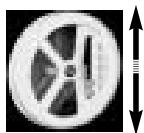 | |
| 22° to 28° | YES | 4 | 20 | |
| 14° to 21° | YES | 3 | 30 | |
| 10.5° to 14° | YES | 2 | 50 | |
| 7° to 10.5° | YES | 1 | 120 | |
| 0° to 7° | NO | 1 | — |
Important : The cursor must be in front of a figure
If you move or your water supply changes, adjust the water hardness settings. Check with your local water company.
Filling the container with regenerating salt (fig. 5)
Filling with salt is essential for the regeneration of the resins that soften the water, removing hardness from it, except if the water supply is already sufficiently soft (see "Adjusting the water softener").
You should fill just before starting the programme.
1 - Unscrew and remove the salt container cap. 2 - Use a funnel to pour: fill the container with regenerating salt specially designed for dishwashers. 3 - The first time, fill up with water. Screw down the salt container cap again properly.
Important: If adjusting the water softener does not require the addition of regenerating salt (Wash light on), you should nevertheless fill the salt container with water before using.
Never pour detergent into the container; you will destroy the water softener.
Only use "special dishwasher" regeneration salt. Do not use table salt, cooking salt, etc. These salts can contain insoluble elements and will cancel out the effect of the softener.
Identifying the regenerating salt level
A light \$ on the control band tells you to add regenerating salt.
Rinsing product is necessary as it avoids stains on the dishes and makes drying easier. IMPORTANT! Only use products intended for dishes and NOT detergents intended for hand washing!
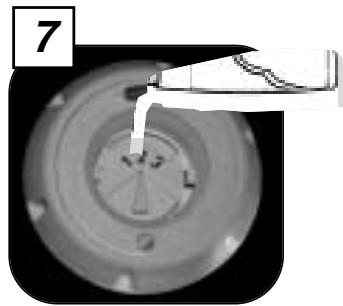
Filling and adjusting the rinsing product container (Fig. 6 - 7)
Put the door in a horizontal position when filling the container and unscrew the cap in the door. Fill to just below the adjusting lever.
If the product overflows during filling, remove the excess with a sponge to avoid foam forming.
If you experience stains or bad drying after several cycles, you may if necessary adjust the dosage using the selector:
Soft water: level 1 to reduce the dose
Hard water: level 3 to increase it.
Finding the level of the rinsing product
A light on the control panel shows you the rinsing product level when the door is ajar.
Adding the detergent
The washing product container has been placed in front of the upper basket to make the machine easier to fill. This means that you can load the washing powder without bending down or completely opening the door.
Use washing products specifically designed for dishwashers. See the manufacturers' recommendations on the packet as well as the advice for use below.
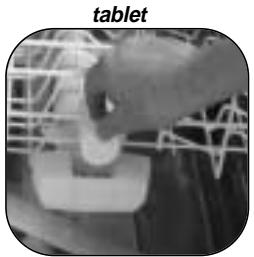
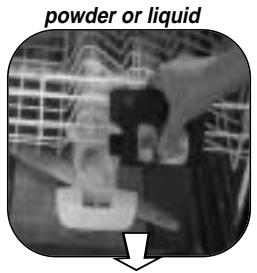
The distributor offers you a choice between using tablets or powder or liquid detergent.
Before starting the programme:
Put the tablet in the upper compartment.
Put the tablet in the outside compartment. Using tablets is particularly recommended for the Eco programme and for full loads of dishes.
Or,
Pull the container to fill with washing powder or liquid and fill up to:
Minimum setting for slightly dirty dishes Maximum setting for dirty dishes
Close the container
VERY IMPORTANT: keep all products out of the reach of children and away from humidity.
GB
In order to obtain good cleaning results, be sure to remove any large food residues before switching on the machine. Any burnt or stuck-on residues must be removed beforehand.
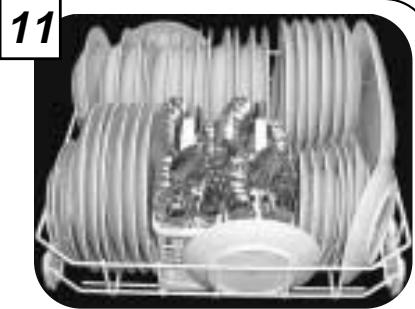
The model dishwasher has two racks for 12 place settings, or 162 items (figures 10-11), to standard DIN 44990. Always point the inside of the crockery downwards. Ensure that no item conceals another and that nothing obstructs the spraying facility. After switching on, check that the spraying arms can move freely. No item should overlap the baskets.
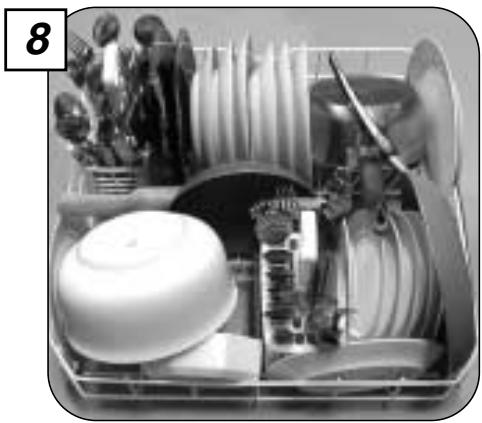
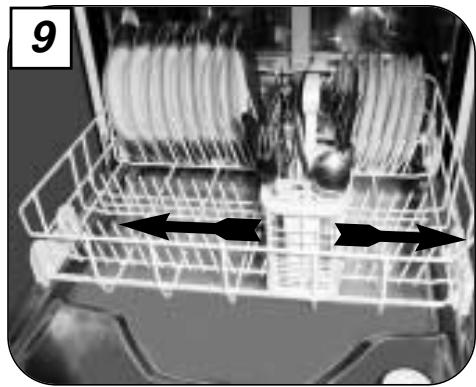
Lower basket (Fig. 8 - 9 - 11)
Place the dishes so that water may circulate freely and spray all the utensils. (Avoid attaching and piling dishes up).
This basket is especially intended to hold: plates, cutlery, dishes, frying pans, saucepans.
Put large-sized plates and frying pans on the side.
Avoid mixing plates and soup dishes. You should preferably place same-sized plates together. Place soup dishes at the back, in the high pin area.
Make sure nothing obstructs the rotation of the lifting arm (saucepan handles, cutlery or large dishes).
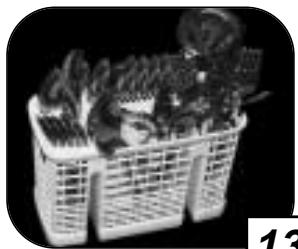
The cutlery trays slide and can be put anywhere on the lower basket. You can adjust them according to the dishes you wash.
Removable grids are available if you wish to load cutlery in an orderly fashion.
For optimum washing, you can use these separation grids.
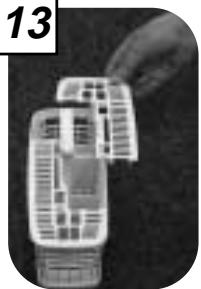
Cutlery: (Fig. 13)
- Place handles downwards.
- Separate silverware from other metals using the separating grill.
- It is preferable to place small spoons in the separating grills.
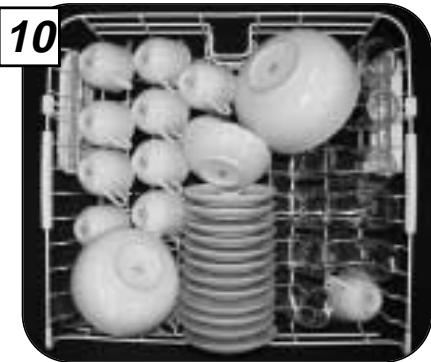
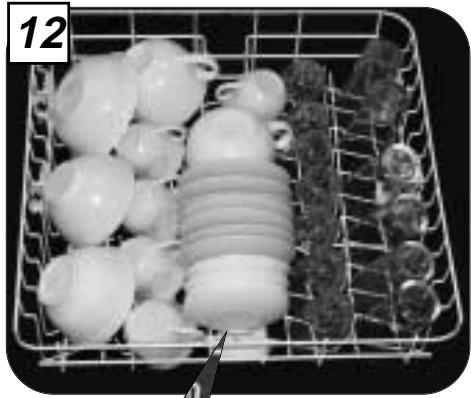
Upper basket (Fig. 10 - 12)
This basket is particularly intended to hold glasses, cups, ramekins, small salad bowls, bowls, saucers, etc.
Place glasses so that they do not touch and tip them sufficiently so that they do not retain any water. Place the hollow end of glasses, cups, and bowls facing downwards. Arrange the dishes methodically to gain space (rows of glasses, cups, and bowls).
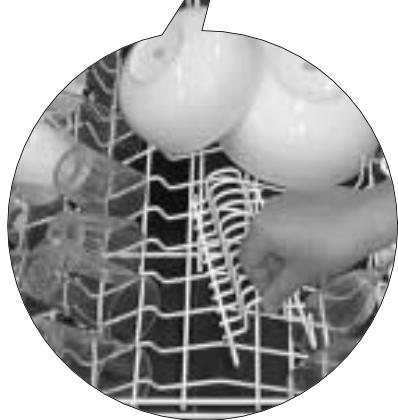
You can, if you wish, unclip the saucer rack to gain space.
The upper basket should be adjusted to the HIGH position when loading large plates in the lower basket. The setting can be done with the basket loaded.
...① Setting the HIGH POSITION: Slowly lift the basket until you hear a click on each side.
...② Setting the LOW POSITION
Lift the basket completely on both sides (click) and then lower it.
Make sure that the two runners are adjusted to the same level.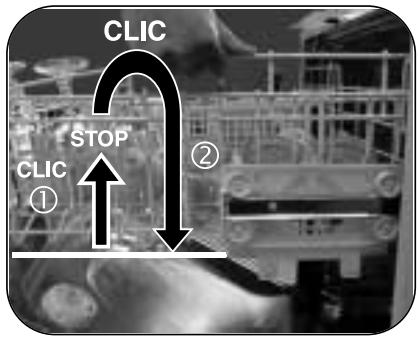

Objects not suitable for your
dishwasher
- Wooden chopping boards
- Pewter or copper objects
- Non-stainless steel objects
- Cutlery with wooden, horn, or mother-of-pearl handles
- Antique or hand-painted crockery: When buying dishes or cutlery, check they are suitable for dishwashers.
IMPORTANT NOTE: For reasons of safety, we recommend you place sharp-ended table knives blade down in the cutlery basket.
Long-bladed cutlery and other sharp utensils should be placed flat in the upper basket.
Presenting your Dishwasher
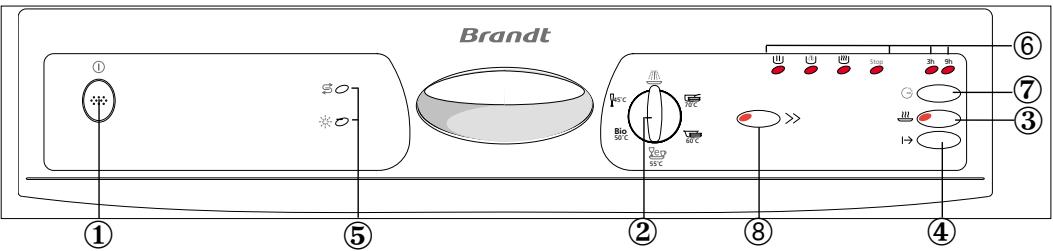
① START/STOP: Press this button to switch your dishwasher on. ② PROGRAMME KNOB: Turn this knob to select your programme. ③ OPTION BUTTON: Press this button if you wish condenser drying. ④ START/CANCEL: Pressing this button starts the programme. Holding the button pressed down for 2 seconds cancels the programme. ⑤ INDICATOR LIGHTS: These indicate lack of a washing product: regenerating salt, rinsing agent. ⑥ PROGRAMME INDICATORS: These show the programme time, the delayed start time and the water hardness setting. ⑦ DELAYED START: Press this button to delay the start of the programme. ⑧ RAPID BUTTON: Press this button if you want a quick wash cycle.
| Water* | Electricity | These values refer to normal conditions of use. | |
| Intensive 70°C | 17/18 L. | 1,80 kWh | They may vary depending on the load, the temperature, the hardness of the water or the supply voltage |
| Normal 60°C | 17/18 L. | 1,70 kWh | |
| Eco 55°C | 17/18 L | 1,55 kWh | |
| Bio 50°C | 18 L. | 1,24 kWh | |
| Fragile 45°C | 17/18 L. | 1,25 kWh | |
| Soak | 5 L. | 0,10 kWh |
*(according to drying)
① Switching on your machine
After switching on your machine and selecting your programme, press the "Start" button.
The programme progress lights illuminate according to their role as the programme progresses.
② Selecting a traditional
programme
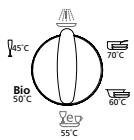
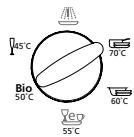
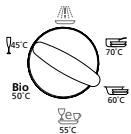
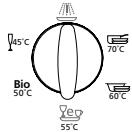
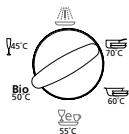
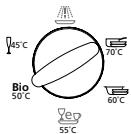
After switching on your machine, set the programme knob to the desired position.
The programme progress lights illuminate according to their role as the programme progresses.
Soak
This very short cycle, which uses no detergent, enables you to keep your crockery from drying out while waiting to be washed, if it will not be washed until the following or the day after.
Intensive 70°C
Recommended for very dirty crockery with a large amount of dried-on residue: grease, sauce, baked-on cheese and other residue. Everyday crockery and cookware.
Normal 60°C
Recommended for dirty crockery with a normal amount of dried-on residue: everyday crockery.
This programme is particularly suitable for "powder or liquid" detergent.
Eco 55°C
Recommended for dirty crockery with a normal amount of dried-on residue: everyday crockery
This programme is particularly suitable for detergent in "tablet" form.
Bio 50°C
Recommended for slightly dirty crockery, not greasy and with only a small amount of residue: coffee cups, dessert dishes or everyday crockery.
Bio 50°C + "Condenser drying" button selected
An economical, low-temperature programme suitable for all types of crockery stains. The washing cycle is extended to compensate for the low energy consumption - low temperature. Consequently, we recommend using this programme in the evening.
Fragile 45°C
Recommended for fragile crockery, only slightly dirty and with only a small amount of residue: glass or fragile porcelain that does not withstand high temperatures
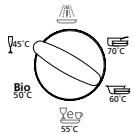
④ Starting the washing cycle |→
After programming the machine, press the "START" button.
This button does not remain pressed in.
The programme starts immediately if delayed start has not been selected (indicator lights 3 - 9 hours unlit).
⑦ Selecting delayed programme start
After selecting your programme, press the "Delayed Start" button.
If you wish to delay the start by 3 hours, the relevant light illuminates.
Press the button again for a 9-hour delay (pressing the button after a 9-hour delay is indicated, selects immediate start).
Press the "Start" button.
The 3-hour or 9-hour light remains lit until the programme starts.
Cancelling a programme
To do this, press the "Start" button down for 2 seconds. The programme stops, the progress light goes out and the "Stop" light illuminates.
End of programme
The programme is ended when the "Stop" light illuminates.
You can then remove your crockery.
The selected programme and the selected "Condenser Drying" option remain in memory at the end of the cycle.
If you wish to cancel the option, press the button again. The indicator light will go out.
Selecting option ③ or ⑧
First select the washing programme (position 70° C to 45° C). The selected programme will adapt itself to the chosen washing option.
Press the button for the chosen option. The relevant light illuminates and goes out at the end of the cycle.
If you wish to cancel the chosen option, press the button again. The light will go out and you can then select a new option, if required.
⑧ Rapid wash
A rapid programme recommended for slightly dirty crockery, not greasy and composed of fragile items.
③ "Condenser Drying" option
To complete the drying of the various items of crockery, your machine is equipped with a condenser drying system.
This process dries your crockery perfectly, with no steam when you open the door.
The missing product indicator lights do on when the machine is turned on.
Salt: lights up when salt is low. After you have added regenerating salt it may stay on until the salt has dissolved sufficiently. This happens generally after a cycle (or if you have not properly filled the machine – see page 4) for example when starting off with the sample.
Note: where water is particularly soft regenerating salt is not needed but the light will remain on.
Rinsing product: 📄 Goes on, door ajar, when you should add rinsing product (see filling page 5)
Economical and ecological washing
Do not pre-wash your dishes by hand.
Use all the capacities of your dishwasher. It will wash economically and ecologically.
Always choose the programme best adapted to the stains and the type of dishes.
Avoid using too much detergent, regenerating salt and rinsing liquid. Observe the recommendations contained in this manual (pages 5, 6 and 7) as well as the product manufacturer's instructions.
Make sure that the water softener is properly adjusted. (see page 4)
- Your dishwasher comes with a self-cleaning pulse filter that constantly filters small particles of dirt trapped in the washing bath.
The filter and the main filter cannot be dismantled as the cleaning arm constantly cleans them.
NEVERTHELESS:
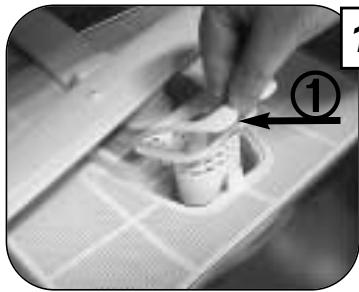
- regularly clean the waste trap. To do this: Fig. 14 ① Pull the waste trap handle upwards. - clean the drainage outlet (3 to 4 times per annum). To do this:
Fig. 14 ② Remove the drainage outlet by pushing the tab backwards, and then pulling upwards.
- Remove residue using a brush.
- Clean under running water.
- Return the unit to its housing taking care that it is well engaged.
Clean as necessary
- Underneath the filters, around the door and the door joint with a damp sponge to remove any deposit.
- Use only soap and water for the bodywork and control board.
Do not clean with abrasive powders, scouring pads, spirit-based products or solvent. Use preferably a cloth or a sponge.
If you have stainless steel door you may use products adapted for stainless steel. See the manufacturer's instructions for advice on their use.
Every year
To maintain your machine in perfect working order you should clean it once or twice a year. Run an intensive programme with the machine empty and a special dishwasher cleaning product available from any reputable dealer.
Prolonged period of non-use
Clean your machine completely then unplug the electricity supply and close the water tap. Keep the machine away from frost.
Information for test laboratories
COMPARATIVE TESTS according to : Fig. 10-11 with the drying condensor activated
IEC 436, DIN 44990 : Program "Normal 60° C"
EN 50242 : Program "Bio 50° C"
• Capacity : 12 place setting
- Rinsing product set at : 2
- Quantity of washing product : 30 g. product B
- It is essential that the softener be adjusted to a setting immediately above the recommended one, according to the hardness of your water, to take into account the lack of phosphate in the standardised detergent.
- Should deviations exist compared with EN0242 comparative tests regarding the degree of soiling, the type of dishes and cutlery etc..., contact the manufacturer of the equipment before starting tests.
Electronic water-hardness setting
Prior to any operation, set the mechanical cursor to position 5 (refer to the paragraph on softener setting).
Hold down the "Condenser Drying" key, and press the "Start" key. The water-hardness range is then indicated by the indicator lights for programme progress as indicated below:
To change the range, release and then repress the "Start" key while holding down the "Condenser Drying" key.
| Light on or flashing | Hardness of your water supply (in French degrees of hardness) | salt requirements | Number of washes between two fills (about) |
| Light on | 0 to 10°F | NO | — |
| Light on | 10 to 25°F | YES | 120 |
| Light on | 25 to 35°F | YES | 50 |
| Light flashing | 35 to 45°F | YES | 30 |
| Light flashing | 45 to 70°F | YES | 20 |
| Light flashing | >70°F | YES | 15 |
| Problems | Causes |
| The dishwasher will not start | - Is it plugged in ?- Is the door properly closed ?- Is the water connected ?- Check that the “delayed start” is on “0” (according to the model) |
| The dishes are not properly washed (or their are stains in it) | - Programme choice. Choose the programme best adapted to the type of wash- Make sure nothing is blocking the circulation of the water- Check the dishes are properly arranged.- Only use specially designed washing products- Check the waste well, filters, arms, joints and door rim are clean- Clean the filter- Check that the washing arm can freely rotate |
| Greasy stains | - Increase the dose of washing product- Use a new packet of washing product- Choose a better adapted programme |
| Limescale deposits on the dishes | Check it is limescale (clean with vinegar). If yes :- Check the hardness of the water |
| The dishes are dull | Too soft water is aggressive for glasses.- Check the hardness of the water- Reduce the softener and if necessary remove the regenerating salt. |
| Traces of salt (salty taste on the dishes) | - Add water to the salt pot and reload if necessary.- Cap badly closed. |
| Blackened or marked silverware | - Remove food residue immediately after use- Separate silverware from other metals- Choose detergent recommended for silverware |
| Traces of rust on knife blades | - Use knives suitable for dishwashers |
| The dishwasher does not empty | - Remove the siphon stop valve- Check the drain pipe is not bent or crushed- You have moved your dishwasher and have tipped it backwards. To restart the pump, unhook the draining rod, lay it on the floor at the end of a basin, draining should restart. Then turn off the “Start/Stop” button, put the draining rod back and restart your programme.This machine complies with all applicable safety standards. Any repairs should be carried out by a qualified technician. Repairs carried out by unqualified technicians may be dangerous for the user. |
If you have problems not covered by these remarks, consult your dealer or After-Sales Service. Have the machine type, series number or that mentioned on the rating plate (inside the door) ready. You will so avoid unnecessary delays and cost.

powder or liquid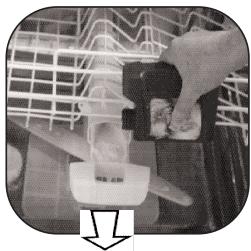

powder or liquid detergent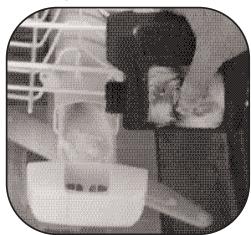
④ Programme start
powder or liquid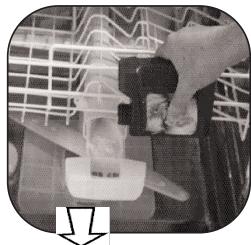
The photograph above, with the lower basket removed, shows the main points described in this Instruction Book.
1 - Upper basket 2 - Cleaning liquid container 3 - Regenerating salt container 4 - Self-cleaning micro filter 5 - Rating plate (After sales service references) 6 - Lower sprinkling arm 7 - Main filter 8 - Waste trap 9 - Rinsing product container
F
P
Protection against water damage
- The anti-overflow safety device. The system automatically activates the drain pump if the water level in the tub rises too high.

- ADJUSTING THE WATER SOFTENER
- FILLING THE CONTAINER WITH REGENERATING SALT (FIG. 5)
- IDENTIFYING THE REGENERATING SALT LEVEL
- FILLING AND ADJUSTING THE RINSING PRODUCT CONTAINER (FIG. 6 - 7)
- FINDING THE LEVEL OF THE RINSING PRODUCT
- ADDING THE DETERGENT
- OR
- LOWER BASKET (FIG. 8 - 9 - 11)
- CUTLERY: (FIG. 13)
- UPPER BASKET (FIG. 10 - 12)
- OBJECTS NOT SUITABLE FOR YOUR
- DISHWASHER
- PRESENTING YOUR DISHWASHER
- ① SWITCHING ON YOUR MACHINE
- ② SELECTING A TRADITIONAL
- PROGRAMME
- SOAK
- INTENSIVE 70°C
- NORMAL 60°C
- ECO 55°C
- BIO 50°C
- BIO 50°C + "CONDENSER DRYING" BUTTON SELECTED
- FRAGILE 45°C
- ④ STARTING THE WASHING CYCLE |→
- ⑦ SELECTING DELAYED PROGRAMME START
- CANCELLING A PROGRAMME
- END OF PROGRAMME
- SELECTING OPTION ③ OR ⑧
- ⑧ RAPID WASH
- ③ "CONDENSER DRYING" OPTION
- THE MISSING PRODUCT INDICATOR LIGHTS DO ON WHEN THE MACHINE IS TURNED ON
- ECONOMICAL AND ECOLOGICAL WASHING
- NEVERTHELESS
- CLEAN AS NECESSARY
- EVERY YEAR
- PROLONGED PERIOD OF NON-USE
- INFORMATION FOR TEST LABORATORIES
- ELECTRONIC WATER-HARDNESS SETTING
- F
- P
- PROTECTION AGAINST WATER DAMAGE
Brand : BRANDT
Model : DWE356
Category : Dishwasher