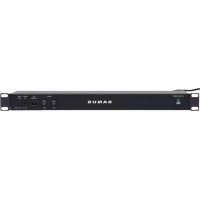
CAPT01 - Wardrobe SANUS - Free user manual and instructions
Find the device manual for free CAPT01 SANUS in PDF.


User questions about CAPT01 SANUS
0 question about this device. Answer the ones you know or ask your own.
Ask a new question about this device
Download the instructions for your Wardrobe in PDF format for free! Find your manual CAPT01 - SANUS and take your electronic device back in hand. On this page are published all the documents necessary for the use of your device. CAPT01 by SANUS.
USER MANUAL CAPT01 SANUS
natural_image
Line drawing of a SANUS power bank rack with connected cable and connector, shown alongside a vertical panel (no text or symbols on main components)We are here to help!
Please contact Customer Service with any questions.
Customer Service
Americas: 800-359-5520 • 651-484-7988 • info@sanus.com
Europe, Middle East, and Africa: +31 40 2324700 • europe.sanus@milestone.com
Asia Pacific: 86 755 8996 9226 • sanus.ap@milestone.com
SANUS • 2221 Hwy 36 West • Saint Paul, MN 55113 USA
©2011 Milestone AV Technologies, a Duchossois Group Company. All rights reserved. Sanus is a division of Milestone. All other brand names or marks are used for identification purposes and are trademarks of their respective owners.
English - How to use this manual
For best results, reference both the text and illustrations.
OPT This item is optional
English Text Pages 3-8
IMPORTANT SAFETY INSTRUCTIONS – SAVE THESE INSTRUCTIONS – PLEASE READ ENTIRE MANUAL PRIOR TO USE
Thank you for choosing a Sanus Rack Accessory. The CAPT01 SANUS EcoSystem™ Multi-volt Power Supply is designed to work with any 19 in. (48.26 cm) rack.
⚠️CAUTION: Avoid potential personal injuries and property damage!
To Reduce the Risk of Electric Shock - Use Only in Dry Locations Indoors!
The input plug of this power tap is intended to serve as the disconnect device, it shall be easily accessible and withdrawn.
This power center does not contain internal circuit breaker protection. INSTALLER MUST ensure that the input of this power center is connected individually to an electrical service panel that is protected with a UL Listed 20A (Maximum) circuit breaker for overload protection of the power center.
All doors and accessories must be grounded.
Elevated Operating Ambient - If installed in a closed or multi-unit rack assembly, the operating ambient temperature of the rack environment may be greater than room ambient. Therefore, consideration should be given to installing the equipment in an environment compatible with the maximum ambient temperature (0-40°C/32-104°F) specified by the manufacturer.
- Reduced Air Flow - Installation of the equipment in a rack should be such that the amount of air flow required for safe operation of the equipment is not compromised.
Mechanical Loading - Mounting of the equipment in the rack should be such that a hazardous condition is not achieved due to uneven mechanical loading.
Circuit Overloading - Consideration should be given to the connection of the equipment to the supply circuit and the effect that overloading of the circuits might have on overcurrent protection and supply wiring. Appropriate consideration of equipment nameplate ratings should be used when addressing this concern.
- Reliable Earthing - Reliable earthing of rack-mounted equipment should be maintained. Particular attention should be given to supply connections other than direct connections to the branch circuit (e.g. use of power strips).
Do not use this product for any purpose not explicitly specified by manufacturer.
If you do not understand these instructions, or have doubts about the safety of the installation, assembly or use of this product, contact Customer Service or call a qualified contractor.
Manufacturer is not responsible for damage or injury caused by incorrect assembly or use.
WARRANTY
The CAPT01 SANUS EcoSystem™ Multi-volt Power Supply is covered by a five year product warranty against manufacturer's defects. If you have any questions or experience any problems with your Sanus product, please contact Sanus Customer Service.
Specifications
Designed to work with any 19 in. (48.26) rack.
Power Input Connection: IEC 320 C14
* Thermostat cycles on at 85°/off at 706±
Input: 100 to 240V AC 50/60 Hz 3 A Max
■ Outputs:
USB Charging 12V DC 10 Amps Max
| USB Charging - 5V --- 2.1 A Max(per jack and total) | Lights Always on | Thermostat Controlled | |
| 12V --- 1.2 A Max(per jack) | 12V = 2.5 A Max(per jack) | 12V = 2.5 A Max(per jack) | |
⚠️ CAUTION: Check voltage and polarity before connecting any device.
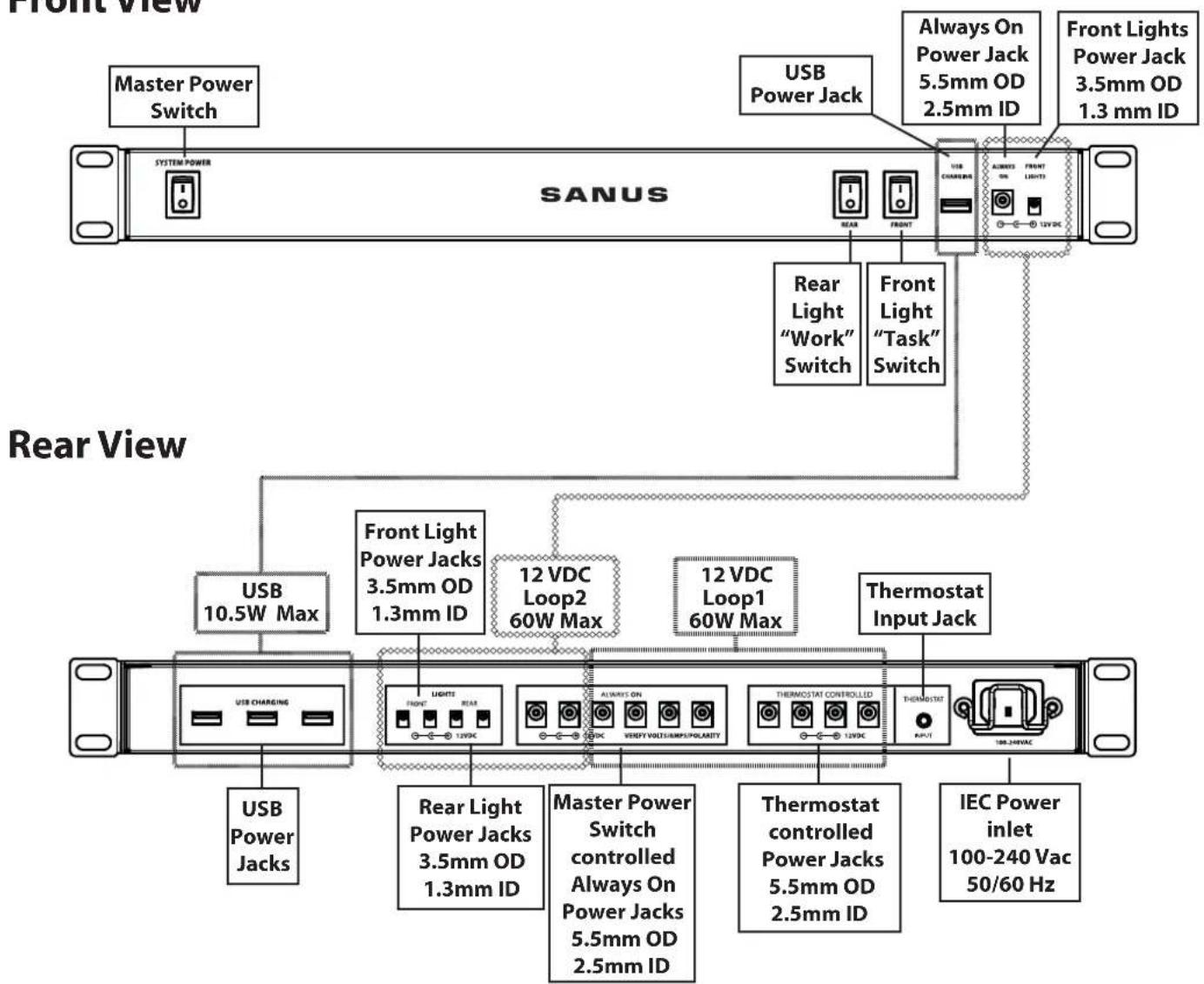
Front View
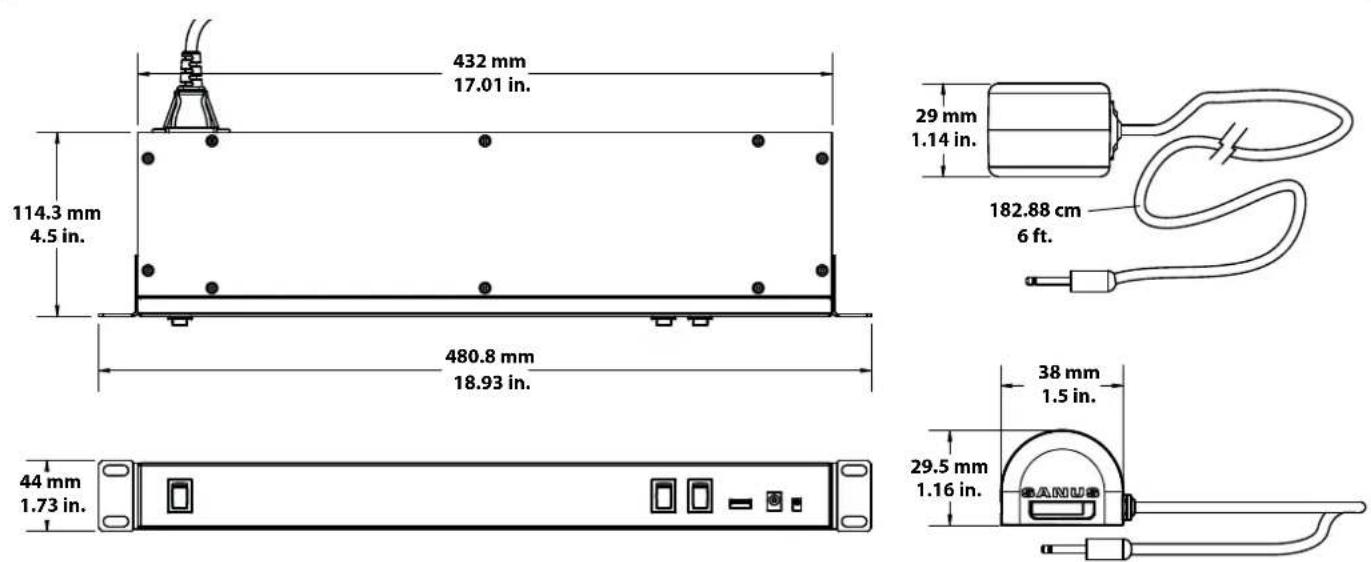
Dimensions
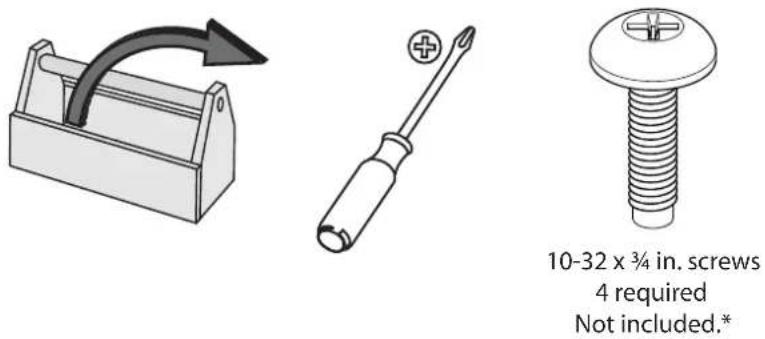
10-32 x 34 in. screws
4 required
Not included.*
*Available from Sanus.
Supplied Parts and Hardware
WARNING: This product contains small items that could be a choking hazard if swallowed.
Before starting assembly, verify all parts are included and undamaged. If any parts are missing or damaged, do not return the damaged item to your dealer; contact Customer Service. Never use damaged parts!
![SANUS SYSTEM POWER [01] x 1 STAR POWER USB COMPUTER RUNNING OUTPUT RUNNING OUTPUT [02] x 1 [03] x 2 [04] x 1](/content/2026/04/621225/images/bd092165be84f2f2b6c22146a295e11781c099e7f740b3ad91b3d4f4a0c6e0cd.jpg)
![Make sure that the power is off. Mount the CAPT01 SANUS EcoSystem™ Multi-volt Power Supply [01] in the upper part of the rack using four 10-32 x 3/4 in. screws (not included).](/content/2026/04/621225/images/2fe714a1d7156fb157677143bc927914dd8236d082260f57708f3af331d7eaf2.jpg)
2 Mount Thermostat
![The thermostat [02] mounts to the rack magnetically. Place it near the top of the rack for the most accurate operation. Plug the thermostat [02] into the input in the back of the Multivolt Power Supply [01]. The thermostat [02] will control the fans plugged into the THERMOSTAT CONTROLLED jacks of the power supply [01]. The fans will cycle on and off dependent on the temperature detected by the thermostat [02]. [01] USER CHARGING PRINT RUN ALABOVE ON UNITIC/TEMPLENTY THERMOSTAT CONTROLLED RUN TURCH/SPRING](/content/2026/04/621225/images/fd96d3c38c330dffc9d501c10bb6b8c0ba16a8eced037d4e96fafff4ff4f20cc.jpg)
3-1
![Press clips [03] into square holes in rack rails. [03] [03]](/content/2026/04/621225/images/05c34abd6bb7e0df7552c8d79150afc56b08ac5830d7a49d9faddaa2eb63f7eb.jpg)
3-2
![Snap cable channel [04] into clips [03]. [04] [03] [04]](/content/2026/04/621225/images/2cc18d20df61a6046b3ac9bcbae1f1ff1ddce607ecb9d546ca443e307fdfe061.jpg)
3-3
![Slip wires into cable channel [04]. [04]](/content/2026/04/621225/images/328b8255cfbaabc48bbd39c0147674a3dd2a9b17161fed49c68aa0a3de298ce5.jpg)
4-1
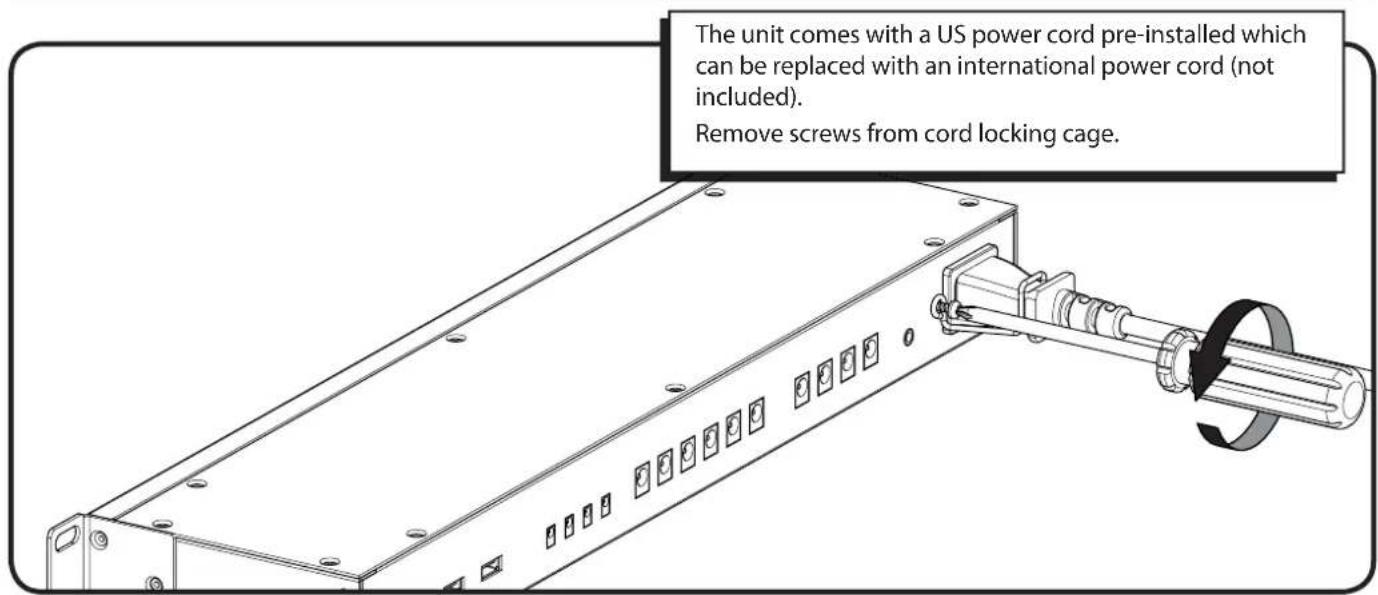
4-2
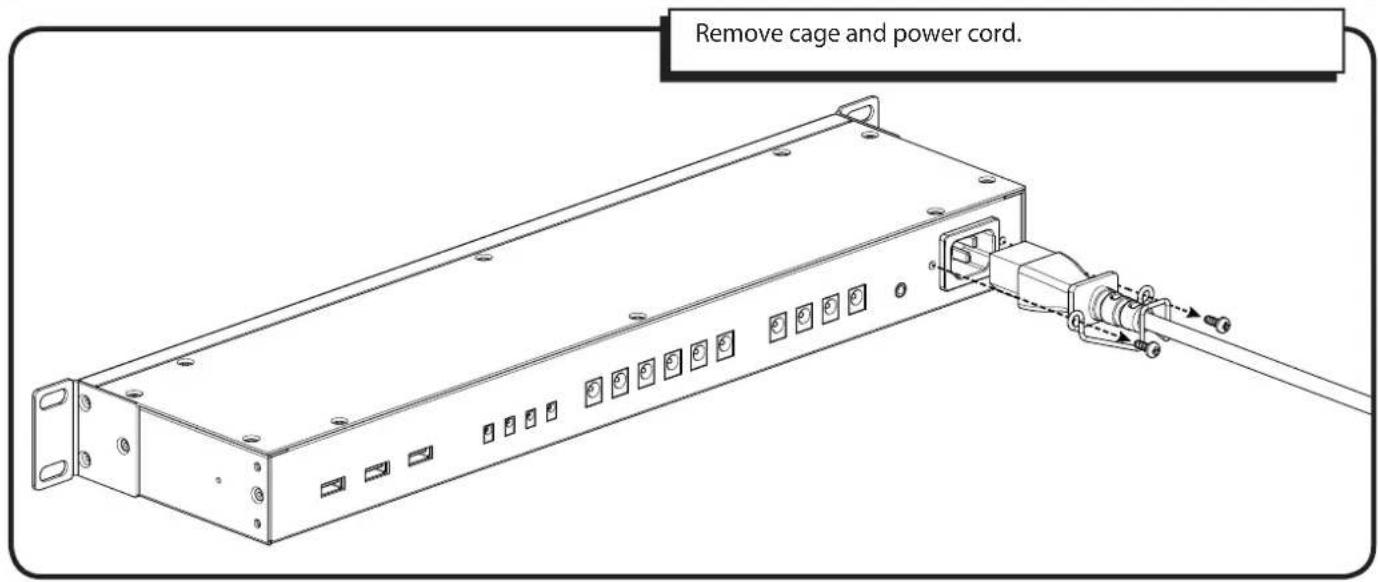
4-3
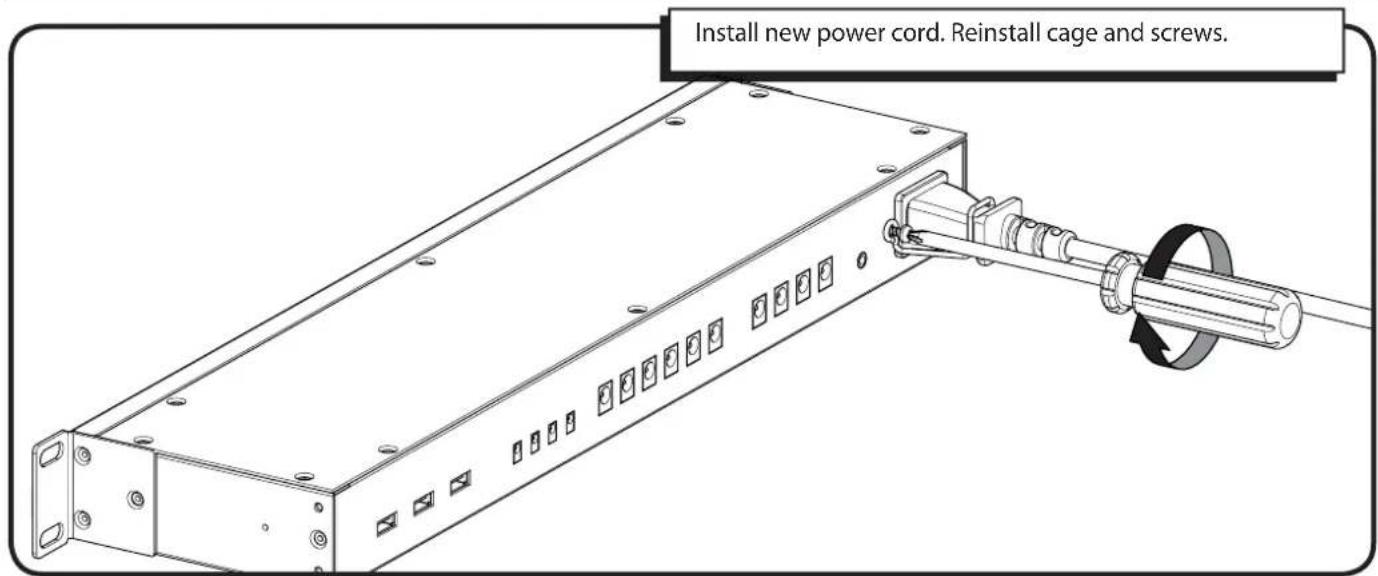
SANUS®
Français
CONSIGNES DE SÉCURITÉ IMPORTANTES – CONSERVEZ CES INSTRUCTIONS – VEUILLEZ LIRE ATTENTIVEMENT LE MANUEL AVANT D'UTILISER CE PRODUIT
Milestone AV Technologies and its affiliated corporations and subsidiaries (collectively, "Milestone"), intend to make this manual accurate and complete. However, Milestone makes no claim that the information contained herein covers all details, conditions, or variations. Nor does it provide for every possible contingency in connection with the installation or use of this product. The information contained in this document is subject to change without notice or obligation of any kind. Milestone makes no representation of warranty, expressed or implied, regarding the information contained herein. Milestone assumes no responsibility for accuracy, completeness or sufficiency of the information contained in this document.