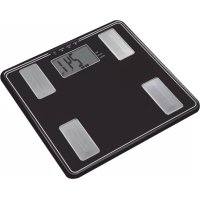
USER MANUAL FitScan UM041F TANITA
Model: UM-041F

Instruction Manual
Read this Instruction Manual carefully and keep it for future reference.

Mode d'emploi
FEATURES AND FUNCTIONS 4
PREPARATIONS BEFORE USE 4
USEFUL FEATURES 5
SWITCHING THE WEIGHT MODE 5
AUTOMATIC SHUT-DOWN FUNCTION 5
GETTING ACCURATE READINGS 5
SETTING AND STORING PERSONAL DATA IN MEMORY 6
TAKING WEIGHT AND BODY FAT READINGS 7
PROGRAMMING THE GUEST MODE....7
TAKING WEIGHT MEASUREMENT ONLY 7
UNDERSTANDING YOUR READING 8
TROUBLESHOOTING 8
FR
Table des matières
INTRODUCTION 9
PRINCIPES DE MESURE DU TAUX DE GRAISSE CORPORELLE ..... 10
CARACTÉRISTIQUES 12
AVANT UTILISATION 12
FONCTIONS 13
METTRE EN MODE POIDS 13
FONCTION D'ARRÊT AUTOMATIQUE 13
COMMENT OBTENIR DES RÉSULTATS EXACTS 13
CALCUL DU TAUX DE GRAISSE
CORPORELLE 14
RELEVÉS DE COMPOSITION CORPORELLE 15
PROGRAMMATION DU MODE INVITÉ 15
LECTURE DU POIDS UNIQUEMENT 15
INTERPRÉTATION DE VOS RÉSULTATS 16
DÉPANNAGE 16
ES
Índice de materias
INTRODUCCIÓN 17
LOS PRINCIPIOS PARA CALCULAR EL PORCENTAJE DE GRASA
CORPORAL 18
Thank you for selecting a Tanita Body Fat Monitor/Scale.
This monitor is one in a wide range of home healthcare products produced by Tanita. This Instruction Manual will guide you through the setup procedures and outline the key features.
Please keep it handy for future reference. Additional information on healthy living can be found on our website www.tanita.com.
Tanita products incorporate the latest clinical research and technological innovations.
All data is monitored by our Tanita Medical Advisory Board to ensure accuracy.
Note: Read this Instruction Manual carefully and keep it handy for future reference.

Safety Precautions
- Persons with implanted electronic medical equipment, such as a pacemaker, should not use the Body Fat Monitor feature on this Tanita Body Fat Monitor/Scale. This Body Fat Monitor/Scale passes a low-level electrical signal through the body, which may interfere with the operation of a pacemaker.
- Do not use this unit on slippery surfaces such as wet floors.
Important Notes for Users
This Body fat monitor is intended for adults and children (ages 7-17) with inactive to moderately active lifestyles.
It is not intended for people with athletic body types. Tanita defines “athlete” as a person involved in intense physical activity of at approximately 10 hours per week and who has a resting heart rate of approximately 60 beats per minute or less.
People with athletic body types should use Tanita Body Fat Monitor/Scales equipped with Athlete mode.
This scale is not intended for pregnant women, professional athletes or bodybuilders.
Recorded data may be lost if the unit is used incorrectly or is exposed to electrical power surges. Tanita takes no responsibility for any kind of loss caused by the loss of recorded data. Tanita takes no responsibility for any kind of damage or loss caused by these units, or any kind of claim made by a third person.
Note: Body fat percentage estimates will vary with the amount of water in the body, and can be affected by dehydration or over-hydration due to such factors as alcohol consumption, menstruation, illness, intense exercise, etc.
PRINCIPLES OF ESTIMATING BODY FAT PERCENTAGE
Tanita Body Fat Monitor/Scales allow you to determine your body fat percentage at home as easily as you measure your weight.
What is Body Fat Percentage?
Body fat percentage is the percentage of fat in your body. Too much body fat has been linked to conditions such as high blood pressure, heart disease, diabetes, cancer, and other disabling conditions.
Body Fat Ranges for Standard Adults 1,2
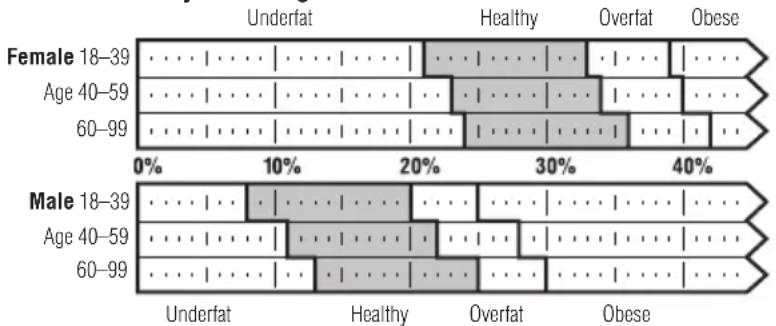
1 Based on NIH/WHO BMI Guidelines.
2 As reported by Gallagher, et al, at NY Obesity Research Center. To determine the percentage of body fat that is appropriate for your body, consult your physician.
The BIA Method
Tanita Body Fat Monitor/Scales use the BIA (Bioelectrical Impedance Analysis) technique. In this method, a safe, low-level electrical signal is passed through the body. It is difficult for the signal to flow through fat in the human body, but easy to flow through moisture in the muscle and other body tissues. The difficulty with which a signal flows through a substance is called impedance. So the more resistance, or impedance, the signal encounters, the higher the body fat reading.
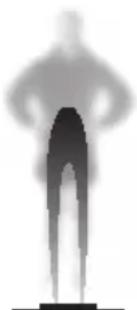
Tanita's patented "foot-pad" design sends a safe, lowlevel electrical signal through the body to determine its composition.
Body Fat Percentage Fluctuations in a Day
Hydration levels in the body may affect body fat readings. Readings are usually highest in the early waking hours, since the body tends to be dehydrated after a long night's sleep. For the most accurate reading, a person should take a body fat percentage reading at a consistent time of day under consistent conditions.
Besides this basic cycle of fluctuations in the daily body fat readings, variations may be caused by hydration changes in the body due to eating, drinking, menstruation, illness, exercising, and bathing. Daily body fat readings are unique to each person, and depend upon one's lifestyle, job and activities.
What is Total Body Water Percentage?
(Applicable age 18-99)
Total Body Water Percentage is the total amount of fluid in a person's body expressed as a percentage of their total weight. Approximately 50 –65% of the weight of a healthy person is water. Water plays a vital role in many of the body's processes and is found in every cell, tissue and organ. Maintaining a healthy total body water percentage will ensure the body functions efficiently and will reduce the risk of developing associated health problems.
How To Measure Total Body Water?
Deuterium Dilution Method is currently used as a typical method to measure a total body water percentage. This instrument estimates the total body percentage by the analysis (Multiple Regression Analysis) based on the parameter found by the BIA method. A mutuality over 0.8 is obtained between this instrument and the “deuterium dilution method”.
Note: Deuterium Dilution Method is in terms of total body water based on the analysis of the dilution of orally ingested deuterium oxide in urine.
![| TBW by BIA [%] | TBW by D20 dilution method [%] | | -------------- | ------------------------------ | | 25 | 25 | | 30 | 30 | | 35 | 35 | | 40 | 40 | | 45 | 45 |](/content/2026/04/620886/images/fe8aa806a199d9048f357a54ae13e215df09c0230badbee6afb27a2588bdee8b.jpg)
![| TBW by D20 dilution method [%] | | ------------------------------ | | 30 | | 40 | | 50 | | 60 |](/content/2026/04/620886/images/184c20d0b6f6c2197609b4d616ffbbec69f125ff9ec6a67559ffcc282056eb6a.jpg)
Healthy Total Body Water Percentage (%TBW)
The average total body water percentage ranges for a healthy adult are:
Female: 45 to 60%
Male: 50 to 65%
Note: The total body water percentage of a person with a high percentage of body fat may fall below the average healthy ranges.
Daily Rhythm of Total Body Water
Try to measure total body water percentage at the same time of day and under the same conditions. This increases the accuracy of the readings. The best time is in the early evening, before the evening meal, when hydration levels are more stable. Total body water percentage tends to be underestimated to a degree if measured immediately after getting out of bed, not only because of dehydration but also because the fluid in the body will be stored centrally in the body's trunk.
As the day progresses this fluid becomes more evenly distributed due to the effect of gravity.
On the contrary, it may be overestimated after exercise or taking a bath because of the movement of body water or a rise in the body temperature despite actual dehydration.
Important Notes
• Take your measurements at the same time of day and under the same conditions.
- Measured results depend on the movement of water in the body and/or changes in body temperature. Factors affecting total body water levels include sleep, physical activity, eating and drinking, illness and medications, bathing patterns and urination.
- Take fluid immediately if you have any symptoms of dehydration, particularly after physical activity or bathing. Symptoms include a dry mouth, headache, nausea, dizziness, skin dryness, a rise in temperature, loss of concentration, etc. If symptoms persist, consult your doctor immediately.
- Elderly people are at increased risk of dehydration as they have less sensitivity to thirst and other rational symptoms.
- This instrument cannot be used to specifically determine an individual's recommended total body water percentage. Look for the long-term changes in total body water percentage and try to maintain a consistent, healthy total body water percentage.
FEATURES AND FUNCTIONS
- Display Screen
- Weight-Only Key
- MEMORY/UP Key
- SET/RECALL Key
- GUEST/DOWN Key
- Ball-of-Foot Electrodes
- Heel Electrodes

Accessories
- AAA-Size Batteries (4)
8

PREPARATIONS BEFORE USE
Inserting the Batteries
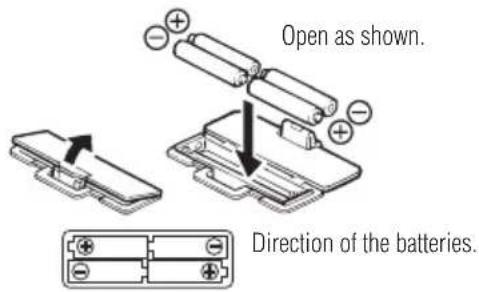
Open the battery cover on the back of the measuring platform. Insert the supplied AAA-batteries as indicated.
Note: Be sure that the polarity of the batteries is set properly. If the batteries are incorrectly positioned the fluid may leak and damage floors. If you do not intend to use this unit for a long period of time, it is advisable to remove the batteries before storage.
Please note that the included batteries from factory may have decreased energy levels over time.

Positioning the Monitor
Place the measuring platform on a hard, flat surface where there is minimal vibration to ensure safe and accurate measurement.
Note: To avoid possible injury, do not step on the edge of the platform.


Handling Tips
This monitor is a precision instrument utilizing state-of-the-art technology.
To keep the unit in the best condition, follow these instructions carefully:
- Do not attempt to disassemble the measuring platform.
- Store the unit horizontally, and place it so that the buttons will not be pressed accidentally.
- Avoid excessive impact or vibration to the unit.
- Place the unit in an area free from direct sunlight, heating equipment, high humidity, or extreme temperature change.
- Never submerge in water. Use alcohol to clean the electrodes and glass cleaner (applied to a cloth first) to keep them shiny; avoid soaps.
- Do not step on the platform when wet.
- Do not drop any objects onto the platform.
USEFUL FEATURES
- Tanita Body Fat Monitor/Scales allow you to measure both weight and body fat percentage simultaneously and easily, simply by stepping on a scale.
- Your Body Fat Monitor/Scale can be set for Adults or Children (ages 7-17), Male or Female.
- Personal data (Female/Male, Age, Height) can be pre-set and stored in personal data memories.
- Guest feature allows you to take readings without reprogramming one of the Personal keys.
- The unit emits a helpful "beep" when activated, and also at various stages in the programming and measuring process. Listen for these sounds which will prompt you to step on the unit, look at your readings, or confirm a setting.
SWITCHING THE WEIGHT MODE
Note: For use only with models containing the weight mode switch
You can switch the unit indication by using the switch on the back of the scale as shown in the figure.
Note: If weight mode is set to pounds or stone-pounds, the height programming mode will be automatically set to feet and inches. Similarly, if kilograms is selected, height will be automatically set to centimetres.
lb (pounds) kg (kilograms) st-lb (stone pounds)

AUTOMATIC SHUT-DOWN FUNCTION
The automatic shut-down function shuts off the power automatically in the following cases:
- If you interrupt the measurement process. The power will shut down automatically within 10 to 20 seconds, depending upon the type of operation.
- If an extraordinary weight is applied to the platform.
- If you make a mistake during measurement or a key or button operation.
- During programming, if you do not touch any of the keys or buttons within 60 seconds.
• After you have completed the measuring process.
Note: If the power shuts off automatically, repeat the steps from "General Programming" (p. 6).
GETTING ACCURATE READINGS
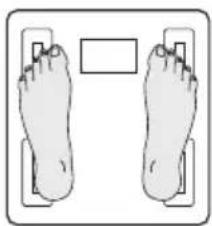
Heels centered on electrodes

Toes may overhang measuring platform
Note: An accurate reading will not be possible if the soles of your feet are not clean, or if your knees are bent or you are in a sitting position.
To ensure accuracy, readings should be taken without clothing and under consistent conditions of hydration. If you do not undress, always remove your socks or stockings, and be sure the soles of your feet are clean before stepping on the measuring platform.
Be sure that your heels are correctly aligned with the electrodes on the measuring platform. Don't worry if your feet appear too large for the unit - accurate readings can still be obtained if your toes overhang the platform.
It is best to take readings at the same time of day. Try to wait about three hours after rising, eating, or hard exercise before taking measurements.
While readings taken under other conditions may not have the same absolute values, they are accurate for determining the percentage of change as long as the readings are taken in a consistent manner. To monitor progress, compare weight and body fat percentage taken under the same conditions over a period of time.
SETTING AND STORING PERSONAL DATA IN MEMORY
General Programming
You will receive readings only if data has been programmed into one of the personal data memories or the Guest mode.
1. Turn on Power
Use the Set button to activate the unit.
Note: If you don't operate the unit for sixty seconds after the unit has been turned on, the unit will turn off automatically.
Note: If you make a mistake or want to turn the unit off before you have finished programming it, press the Weight-Only Key( 🔊)to force quit.

2. Select Personal Data Number
Personal data numbers store your personal data.
Use Up/Down buttons to select a personal data number.
Press Set.

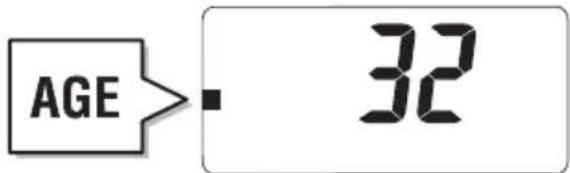
3. Set Age
Use Up/Down buttons to select age. Press Set.
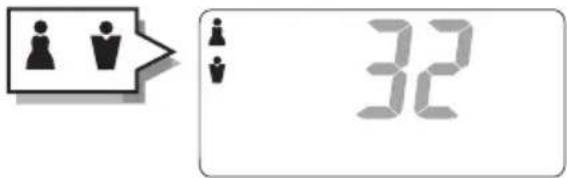
4. Select Female or Male
Use Up/Down buttons to select Female ( ) or Male ( ). Press Set.
5. Specify Height
Use Up/Down buttons to select height. Press Set.

The unit will beep twice and the display will flash all data three times to confirm the programming. The power will then shut down automatically.

Warning
Do not use the body fat reading feature of this product if you have a pacemaker or other implanted electronic medical device.
TAKING WEIGHT AND BODY FAT READINGS
Take a Reading
After programming your personal data you are ready to take a reading.
Select Personal Data Number
Press the "Up" arrow button to turn the unit on.
Press the "Up/Down" arrow buttons to select personal data number.
Press the set button.
The unit will beep and the display will show "0.0".
Now step onto the platform.

Note:
- If you step onto the platform before "0.0" appears the display will show "Error" and you will not obtain a reading. Furthermore, if you do not step onto the measuring platform within about 30 seconds after "0.0" appears, the power is shut-off automatically.
- When using the "Up" button to turn the unit on, the personal data number last used will appear first.
- Numbers that are not pre-programmed are automatically skipped.
Get Your Readings
Your weight will be shown first. Continue to stand on the platform.
"00000" will appear on the display and disappear one by one from left to right.
The readings will be shown alternately 3 times as follows:

Weight Body fat percentage Total body water percentage
Note: Do not step off until Body Fat % is shown.
Note: For children (age 7-17), the unit will only display the Weight and the Body Fat % (it will not display the Healthy Range Indicator).
Recall Function
To obtain previous readings, press the SET button while the current readings are being displayed. Press the SET button again to go back to the current Weight and Body Fat % result display.

PROGRAMMING THE GUEST MODE
Guest Mode
Guest mode allows you to programme the unit for a one-time use without resetting
a Personal data number.
Press the Down button to activate the unit. Then follow the steps: Set Age, Select Female or Male, and Specify Height.
Note: If you step onto the platform before "0.0" appears the display will show "Error" and you will not obtain a reading.

Select Weight-Only Mode
Tap the Weight-Only key to select Weight only mode.

UNDERSTANDING YOUR READING
Healthy Range Indicator
Your body fat monitor/scale automatically compares your body fat reading to the Healthy Body Fat Range chart.
Following your body fat percentage reading, a black bar will flash along the bottom of the display, identifying where you fall within the Body Fat Ranges for your age and gender. For example, if the squares appear above (0) area your reading is within the Healthy Range – if they appear over (-) area, your reading is below the Healthy Range. For more about the Healthy Range, see page 2.

Note: Range of user age is between 18-99.
(-) : Underfat; below the healthy body fat range. Increased risk for health problems.
(0) : Healthy; within the healthy body fat percentage range for your age/gender.
(+) : Overfat; above the healthy range. Increased risk for health problems.
(++) : Obese; high above the healthy body fat range. Greatly increased risk of obesity-related health problems.
TROUBLESHOOTING
If the following problems occur ...then...
- A wrong weight format appears followed by kg, lb, or st-lb
Refer to "SWITCHING THE WEIGHT MODE" on p. 5.
- “Lo” appears on the display, or all the data appears and immediately disappears.
Batteries are low. When this message appears, be sure to replace the batteries immediately, since weak batteries will affect the accuracy of your measurements. Change all the batteries at the same time with new AAA-size batteries.
Note: Your settings will not be erased from the memory when you remove the batteries.
- "Error" appears while measuring.
Please stand on the platform keeping movement to a minimum.
The unit cannot accurately measure your weight if it detects movement.
- The Body Fat Percentage measurement does not appear or “----” appears after the weight is measured.
Your personal data has not been programmed. Follow the steps on p. 6.
Make sure socks or stockings are removed, and the soles of your feet are clean and properly aligned with the guides on the measuring platform.
- "OL" appears while measuring.
Reading cannot be obtained if the weight capacity is exceeded.
- "Error %" appears while measuring.
The Body Fat Percentage is more than 75%, readings cannot be obtained from the unit.
Specifications
Weight Capacity
150 kg (330 lb) (23 st 8 lb)
Weight Increments
0.1 kg (0.2 lb) (0.2 lb)
Body Fat Increments
0.1%
Personal Data
4 memories
Power Supply
4 AAA batteries (included)
Power Consumption
60 mA maximum
Measuring Current
50 kHz, 100 μA

Notice:
These marks can be found out on contaminant-containing
Batteries: Pb Pb = Battery contains lead,
Cd Cd = Battery contains cadmium,
Hg Hg = Battery contains mercury.
Not allowed to mix batteries with consumer wastes!
As consumer you are legally bound to return used or discharged batteries. You can deposit your old batteries at the public collecting points in your town, or wherever the corresponding batteries are sold and specifically marked collecting boxes have been set up. In case of scrapping the apparatus, the batteries should be removed from it and deposited at the collecting points as well.
CE The device features radio interference suppression in compliance with EC regulation 2004/108/EC
INTRODUCTION
4 AAA piles (incluses)
Como obter as leituras
Federal Communications Commission and Canadian ICESNotice
This equipment has been tested and found to comply with the limits for a Class B digital device, pursuant to Part 15 of the FCC Rules and Canadian ICES-003. These limits are designed to provide reasonable protection against harmful interference in a residential installation. This equipment generates, uses and can radiate radio frequency energy and, if not installed and used in accordance with the instructions, may cause harmful interference to radio communications. However, there is no guarantee that interference will not occur in a particular installation. If this equipment does cause harmful interference to radio or television reception, which can be determined by turning the equipment off and on, the user is encouraged to try to correct the interference by one or more of the following measures:
•Reorient or relocate the receiving antenna.
• Increase the separation between the equipment and receiver.
- Connect the equipment into an outlet on a circuit different from that to which the receiver is connected.
- Consult the dealer or an experienced radio or television technician for help.
Modifications
The FCC requires the user to be notified that any changes or modifications made to this device that are not expressly approved by Tanita Corporation may void the user's authority to operate the equipment.
After sales service
Please contact TANITA for any inquiry regarding operation or trouble, request for repair and/or placement of an order for parts or products. Call 1-847-640-9241 (USA and Canada only).
Representative Tanita Europe B.V
Hoogoorddreef 56-E
1101 BE Amsterdam
The Netherlands
Tel: +31 (0) 20 560 2970
Fax: +31 (0) 20 560 2988
TANITA India Private Limited
Level 8, Vibgyor Towers G Block,
C-62 Bandra Kurla Complex, Bandra (East),
Mumbai 400 051 INDIA
Tel: +91 22 40907174
Fax: +91 22 40907178
Manufacturer Tanita Corporation
1-14-2, Maeno-Cho, Itabashi-ku,
Tokyo, Japan 174-8630
Tel: +81(0)-3-3968-2123
Fax: +81(0)-3-3967-3766
www.tanita.co.jp
ISO 9001 Certified
Tanita Corporation of America Inc.
2625 South Clearbrook Drive
Arlington Heights, IL 60005 USA.
Tel: +1-847-640-9241
Fax: +1-847-640-9261
www.tanita.com
Tanita Health Equipment H.K. Ltd.
Unit 301-303 3/F Wing On Plaza,
62 Mody Road, Tsimshatsui East,
Kowloon, Hong Kong
Tel: +852-2838-7111
Fax: +852-2838-8667