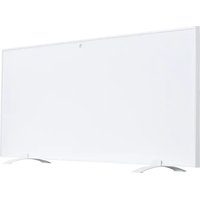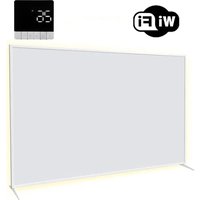
SHX22HEAT100 - Heating SHX - Free user manual and instructions
Find the device manual for free SHX22HEAT100 SHX in PDF.


User questions about SHX22HEAT100 SHX
0 question about this device. Answer the ones you know or ask your own.
Ask a new question about this device
Download the instructions for your Heating in PDF format for free! Find your manual SHX22HEAT100 - SHX and take your electronic device back in hand. On this page are published all the documents necessary for the use of your device. SHX22HEAT100 by SHX.
USER MANUAL SHX22HEAT100 SHX
natural_image
Front view of a white rectangular electronic device with metallic legs (no visible text or symbols)HERZLICHEN GLÜCKWUNSCH!
VIELEN DANK, DASS SIE SICH FÜR DIESES PRODUKT VON SHX ENTSCHIEDEN HABEN.

text_image
Three black-and-white warning symbols: a hand crossed out, an exclamation mark, and a lightning bolt symbol.text_image
Technical line drawing of a rectangular electronic device with labeled components 1, 2, and 3.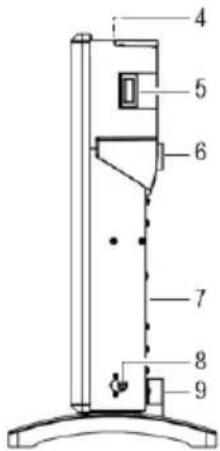
text_image
Technical diagram of a vertical mechanical device with numbered components for identificationnatural_image
Technical line drawing of a rectangular electronic component with two curved top tabs and a grid base (no text or symbols)
natural_image
Technical line drawings of mechanical components including a tool, screwdriver, and pushpin assembly (no text or labels)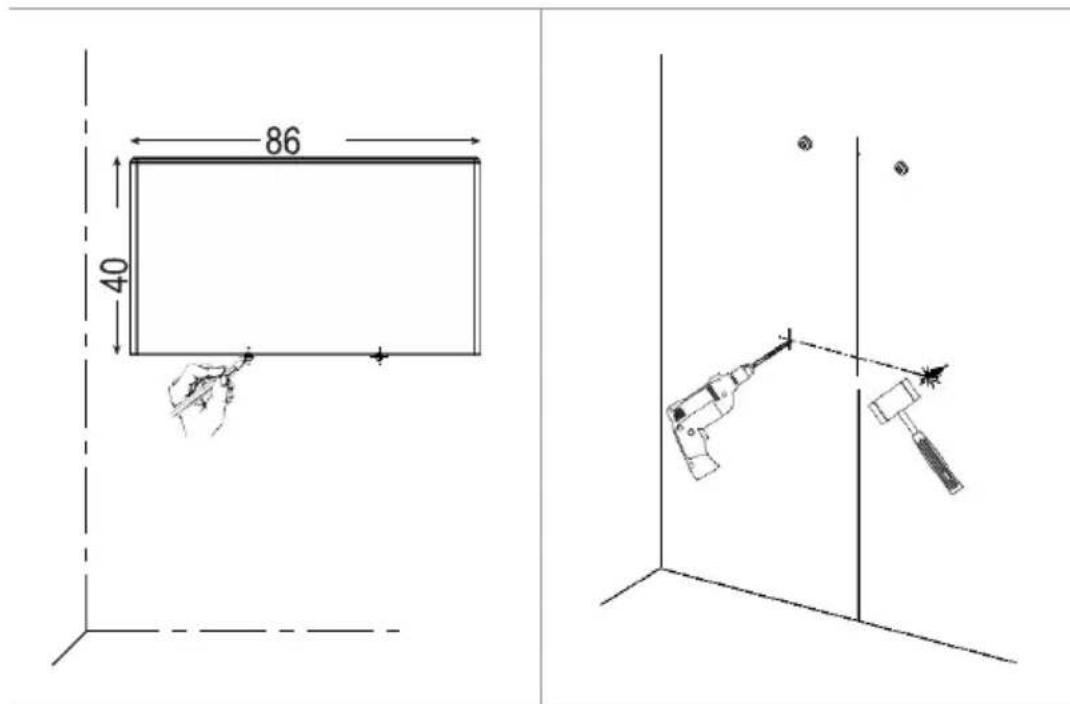
text_image
86 40natural_image
Technical line drawing of two mechanical assembly components with fasteners and a rotation arrow (no text or symbols)flowchart
graph LR
    A["0.5x3"] --> B["0.5"]
    B --> C["15s"]
flowchart
graph LR
    A[" gears + x2"] --> B[" "]
    B --> C[" "]
    C --> D["/ 15s"]
flowchart
graph LR
    A[" gears + x2 "] --> B[" X "]
    B --> C[" ↑ "]
    C --> D[" 15s /"]
    D --> E[" stopwatch"]
text_image
+ x1 ● ↗ ○ ↗ ● ↗ ● ↗ + ) x1 ● ↗ ○ ↗ ○ ↗ ▶ ○ ↗ ● ↗ ● ↗text_image
Diagram showing two sets of icons representing solar and wind patterns, with labeled 3s symbols and directional arrows.natural_image
White rectangular electronic device with metallic legs and base, isolated on white background (no text or symbols)FÉLICITATIONS !
MERCI D'AVOIR OPTÉ EN FAVEUR DE CE PRODUIT DE SHX.

text_image
Technical line drawing of a rectangular electronic device with labeled components 1, 2, and 3.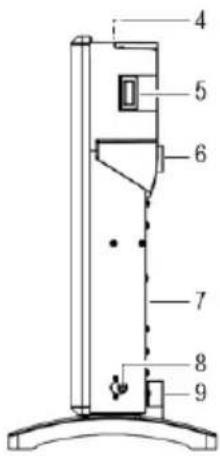
text_image
Technical diagram of a vertical device with numbered components, likely a scientific instrument or measurement setup.natural_image
Technical line drawing of a rectangular panel with two curved connectors and internal grid structure (no text or symbols)natural_image
Technical line drawings of mechanical components including a tool, screwdriver, and pushpin assembly (no text or labels)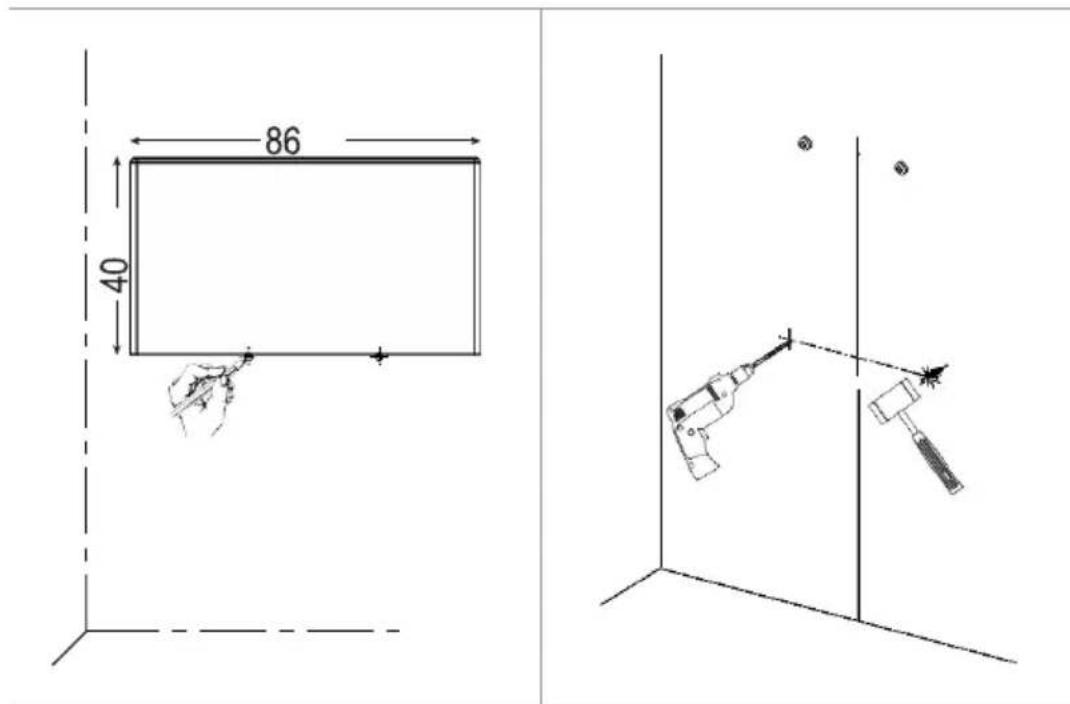
text_image
86 40natural_image
Technical line drawing of two mechanical assembly components with fasteners and a rotation arrow (no text or symbols)flowchart
graph LR
    A["01"] --> B["02"]
    B --> C["15s"]
flowchart
graph LR
    A[" gears + x2"] --> B[" "]
    B --> C[" "]
    C --> D["/ 15s"]
flowchart
graph LR
    A[" gears + x2 "] --> B[" X "]
    B --> C[" ↑ "]
    C --> D[" 15s /"]
    D --> E[" stopwatch"]
text_image
+ x1 ● ↗ ○ ↗ ● ↗ ● ↗ + ) x1 ● ↗ ○ ↗ ○ ↗ ▶ ○ ↗ ● ↗ ● ↗text_image
Diagram showing two sets of icons representing solar and wind patterns, with labeled 3s symbols and directional arrows.NE PAS COUVRIR – RISQUE D'INCENDIE !
natural_image
White rectangular electronic device with metallic base plates (no visible text or symbols)CONGRATULAZIONI!
GRAZIE PER AVER DECISO DI ACQUISTARE QUESTO PRODOTTO DI SHX.

text_image
Three black-and-white warning symbols: a no-hand symbol, a triangular warning sign with an exclamation mark, and a lightning bolt symbol.text_image
Technical line drawing of a rectangular electronic device with labeled components 1, 2, and 3.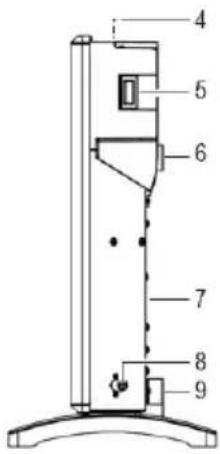
text_image
4 5 6 7 8 9natural_image
Technical line drawing of a rectangular device with two curved components above it, no text or symbols present.natural_image
Technical line drawings of mechanical components including a tool, screwdriver, and pushpin assembly (no text or labels)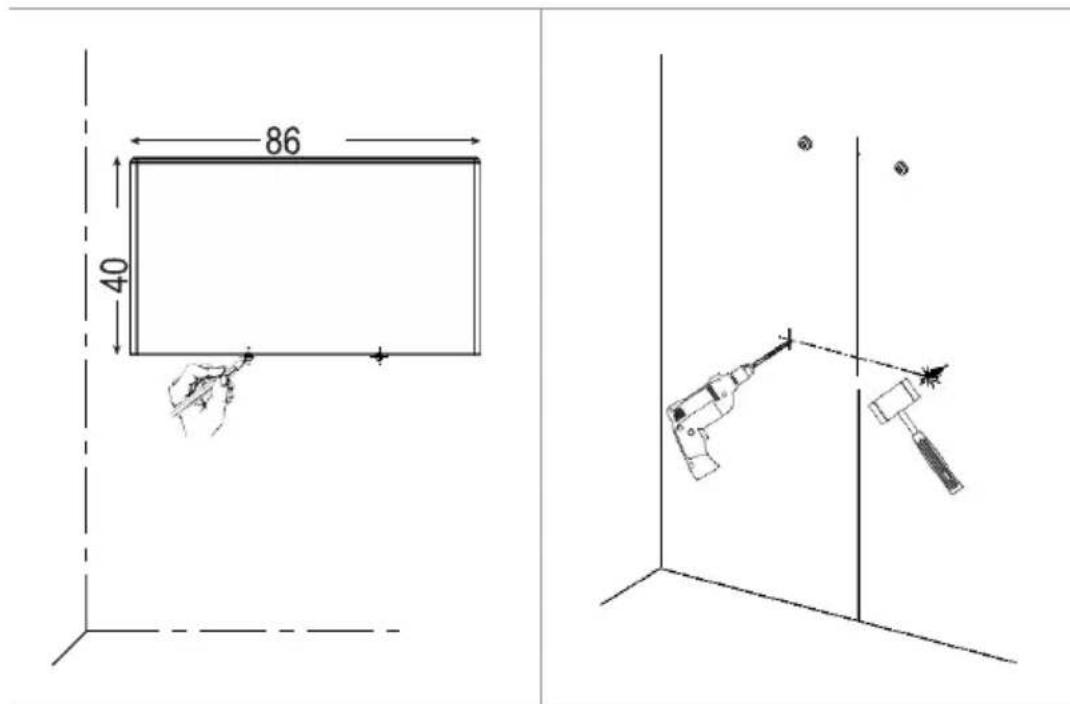
text_image
86 40natural_image
Technical line drawing of two mechanical assembly components with fasteners and a rotation arrow (no text or symbols)flowchart
graph LR
    A["Hand with gear icon"] --> B["Timer: 0.5"]
    B --> C["Double-headed arrow"]
    C --> D["Two hands adjusting gear icon"]
    D --> E["/ 15s stopwatch"]
flowchart
graph LR
    A[" gears + x2"] --> B[" "]
    B --> C[" "]
    C --> D["/ 15s"]
text_image
Diagram showing solar system and moonlight interaction with 3s clock, illustrating light and moon cycles.natural_image
White rectangular electronic device with metallic base plates (no visible text or symbols)HARTELIJK GEFELICITEERD!
HARTELIJK BEDANKT DAT U VOOR DIT PRODUCT VAN SHX HEBT GEKOZEN.

text_image
Three black-and-white warning symbols: a hand crossed out, a triangular warning sign with an exclamation mark, and a triangular hazard symbol with a lightning bolt.text_image
Technical line drawing of a rectangular electronic device with labeled components 1, 2, and 3.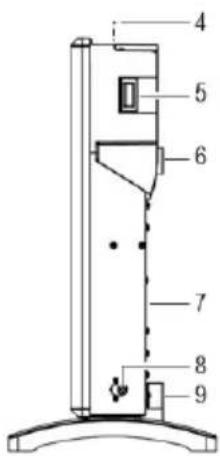
text_image
Technical diagram of a vertical device with numbered components, likely a scientific instrument or device assembly.natural_image
Technical line drawing of a rectangular electronic component with two curved top tabs and a grid base (no text or symbols)
natural_image
Technical line drawings of mechanical components including a tool, a magnified view of a screwdriver, and a threaded fastener (no text or symbols present)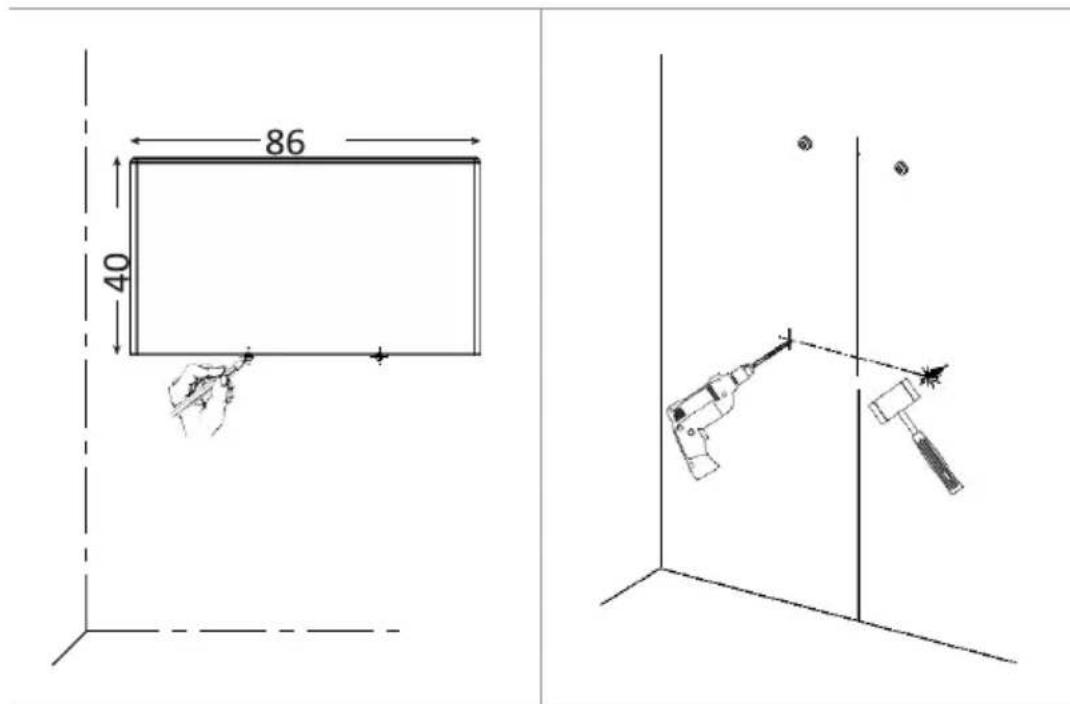
text_image
86 40natural_image
Technical line drawing of two mechanical assembly components with fasteners and a rotation arrow (no text or symbols)Schroef de trapswandbeugel (9) stevig vast.
Bediening

flowchart
graph LR
    A["0.5x3"] --> B["0.5"]
    B --> C["15s"]
flowchart
graph LR
    A[" gears + x2"] --> B[" "]
    B --> C[" "]
    C --> D["/ 15s"]
flowchart
graph LR
    A[" gears + x2 "] --> B[" "]
    B --> C[" "]
    C --> D["/ 15s"]
text_image
Diagram showing two sets of icons representing sun, moon, and moon with corresponding 3s symbols and directional arrows.natural_image
White rectangular electronic device with metallic base plates (no visible text or symbols)GRATTIS!
TACK FÖR ATT DU HAR BESTÄMT DIG FÖR DEN HÄR PRODUKTEN FRÅN SHX.

INNEHÅLLSFÖRTECKNING
SE
text_image
Three black-and-white warning symbols: a no-hand symbol, a triangular warning sign with an exclamation mark, and a lightning bolt symbol.text_image
Technical line drawing of a rectangular electronic device with labeled components 1, 2, and 3.
text_image
Technical diagram of a vertical mechanical device with numbered components for identificationnatural_image
Technical line drawing of a rectangular electronic component with two curved top tabs and a grid base (no text or symbols)natural_image
Technical line drawings of mechanical components including a tool, screwdriver, and pushpin assembly (no text or labels)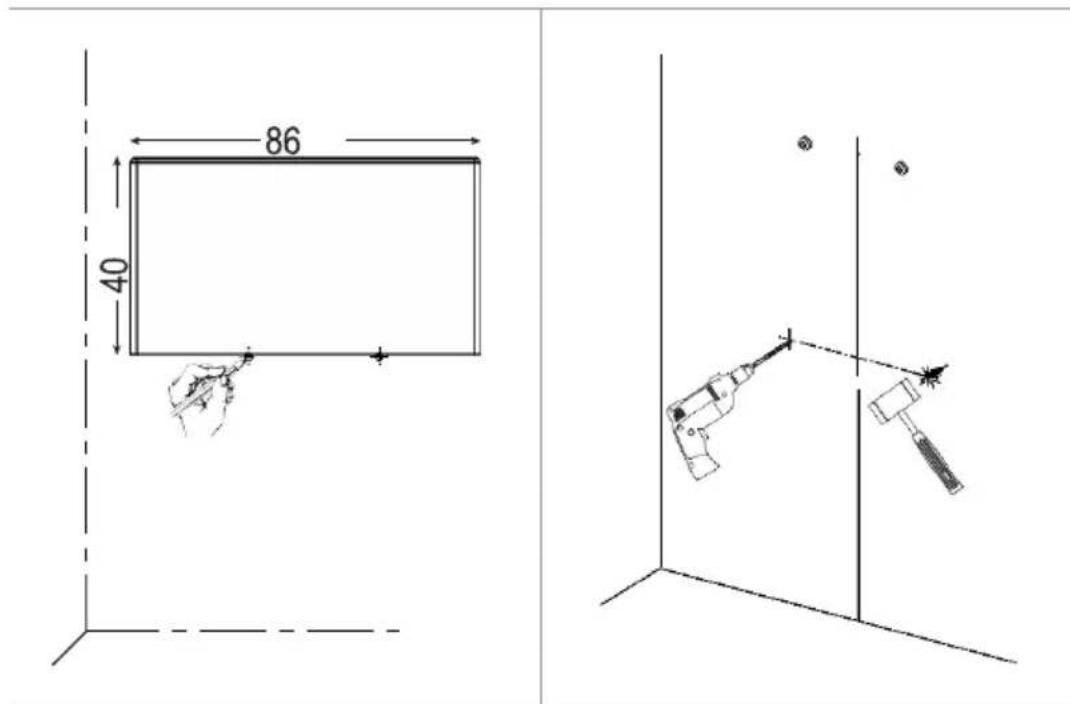
text_image
86 40natural_image
Technical line drawing of two mechanical assembly components with fasteners and a rotation arrow (no text or symbols)flowchart
graph LR
    A["Camera with gear icon"] --> B["Timer: 0.5"]
    B --> C["Reverse: Leftward arrow"]
    C --> D["Delay: 15s"]
    D --> E["Monitor/ stopwatch"]
text_image
+ x1 ● ⚡ ⚡ ● ↗ ↗ ○ ⚡ ● ↗ ↗ ● ↗ + x1 ● ⚡ ⚡ ○ ⚡ ↗ ○ ⚡ ● ↗ ↗ ● ↗text_image
Diagram showing two sets of icons representing solar and moon cycles, with clock and moon symbols indicating light and night phases.natural_image
White rectangular electronic device with metallic legs and a flat top, isolated on white background (no text or symbols)SRDEČNĚ BLAHOPŘEJEME!
DĚKUJEME, ŽE JSTE SE ROZHODLI PRO TENTO PRODUKT SPOLEČNOSTI SHX.

https://www.schuss-home.at/downloads
text_image
Technical line drawing of a rectangular electronic device with labeled components 1, 2, and 3.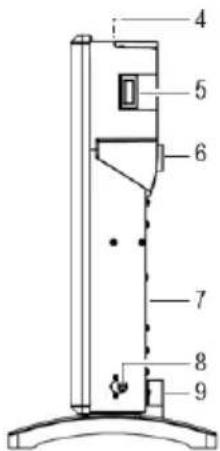
text_image
Technical diagram of a vertical device with numbered components, likely a scientific instrument or apparatus.natural_image
Technical line drawing of a rectangular device with two curved components and mounting holes (no text or symbols)
natural_image
Technical line drawings of mechanical components including a tool, screwdriver, and pushpin assembly (no text or labels)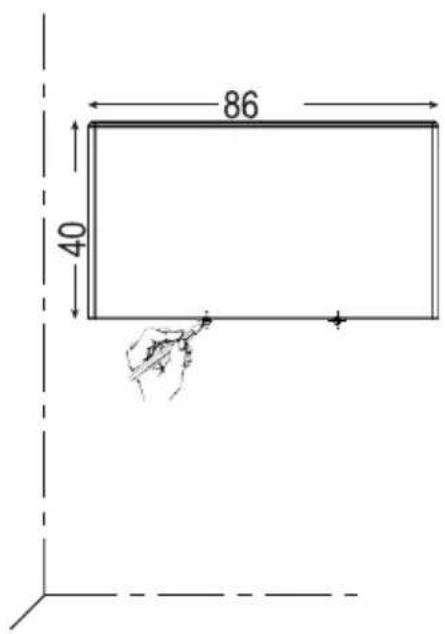
text_image
86 40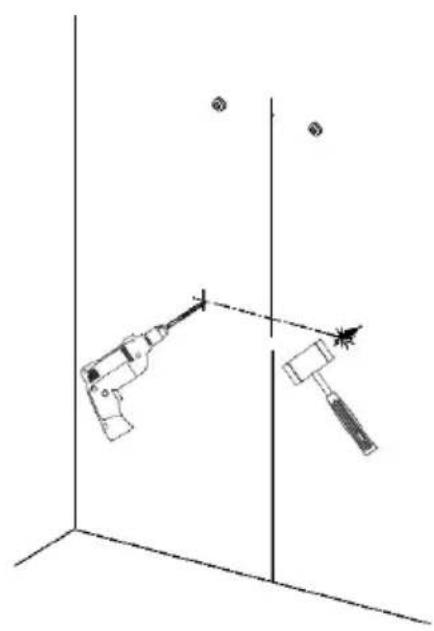
natural_image
Diagram of two mechanical devices positioned at a vertical axis, with no visible text or symbolsnatural_image
Technical line drawing of two mechanical assembly components with fasteners and a bolt, no text or symbols presentflowchart
graph LR
    A["0.5x3"] --> B["0.5"]
    B --> C["15s"]
flowchart
graph LR
    A[" gears + x2"] --> B[" "]
    B --> C[" "]
    C --> D["/ 15s"]
flowchart
graph LR
    A[" gears + x2 "] --> B[" X "]
    B --> C[" ↑ "]
    C --> D[" 15s /"]
    D --> E[" stopwatch"]
text_image
Diagram showing two sets of symbolic patterns: sun, moon, and moon with corresponding icons and directional arrows.natural_image
White rectangular electronic device with metallic legs and base, isolated on white background (no text or symbols)SRDEČNE BLAHOŽELÁME!
ĎAKUJEME, ŽE STE SA ROZHODLI PRE TENTO VÝROBOK OD SHX.

text_image
Technical line drawing of a rectangular electronic device with labeled components 1, 2, and 3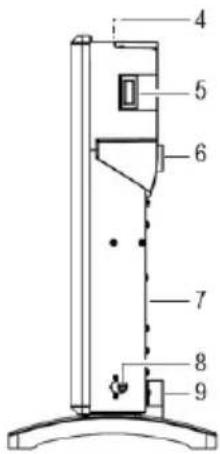
text_image
Technical diagram of a vertical device with numbered components, likely a scientific instrument or measurement setup.natural_image
Technical line drawing of a rectangular device with two curved components and mounting holes (no text or symbols)
natural_image
Technical line drawings of mechanical components including a tool, screwdriver, and pushpin assembly (no text or labels)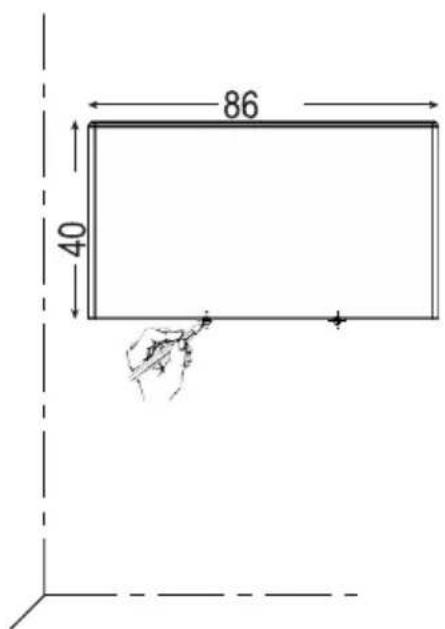
text_image
86 40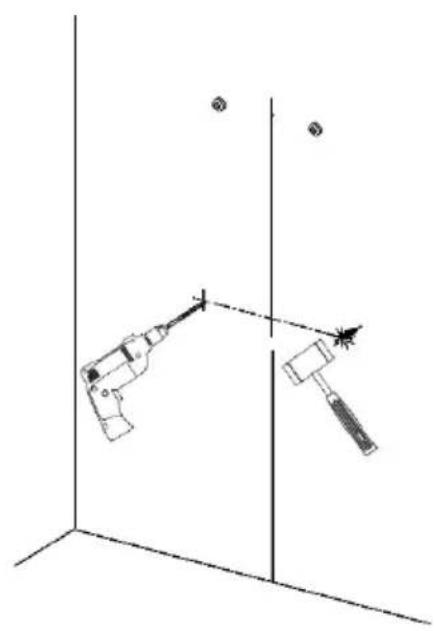
natural_image
Diagram of two mechanical devices positioned at a vertical axis, with no visible text or symbols- Ohrievač zaveste na skrutky. Presvedčte sa, že ohrievač je stabilne zafixovaný, až potom ho pustite.
- Vyznačte miesto, kam treba vyvřtat' spodné upevňovacie body, a potom ohrievač odstráňte.
• Vyvítajte dva otvory (∅ 8 mm) a vložte do nich plastové hmoždinky. - Ohrievač zaveste na horné skrutky. Presvedčte sa, že pevne sedí na svojom mieste, až potom ho pustite.
natural_image
Technical line drawing of two mechanical assembly components with fasteners and a rotation arrow (no text or symbols)flowchart
graph LR
    A["Hand gestures with sun icon + x2"] --> B["Input x2 icon"]
    B --> C["Arrow to right, arrow left"]
    C --> D["Hand gestures with gear icon"]
    D --> E["/ 15s speed indicator"]
flowchart
graph LR
    A[" gears + x2 "] --> B[" "]
    B --> C[" "]
    C --> D["/ 15s"]
text_image
+ x1 ● ⚡ ⚡ ● ↗ ↗ ○ ⚡ ● ↗ ↗ ● ↗ + x1 ● ⚡ ⚡ ○ ⚡ ↗ ○ ⚡ ● ↗ ↗ ● ↗text_image
Diagram showing solar system and moonlight interaction with 3s symbols, illustrating light and moon cycles.natural_image
Exterior view of a white rectangular electronic device with two metallic legs (no text or symbols visible)FELICITĂRI!
VĂ MULȚUMIM CĂ AȚI DECIS SĂ ACHIZIȚIONAȚI ACEST PRODUSUL DE LA SHX.

https://www.schuss-home.at/downloads
text_image
Technical line drawing of a rectangular electronic device with labeled components 1, 2, and 3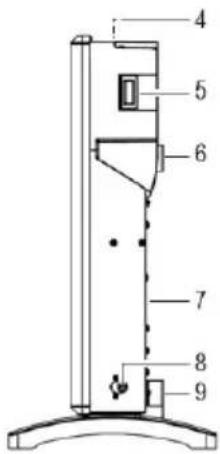
text_image
Technical diagram of a vertical mechanical device with numbered components for identificationnatural_image
Line drawing of a rectangular electronic device with two curved components and mounting holes (no text or symbols)b) Montaj pe perete

natural_image
Technical line drawings of mechanical components including a tool, screwdriver, and pushpin assembly (no text or labels)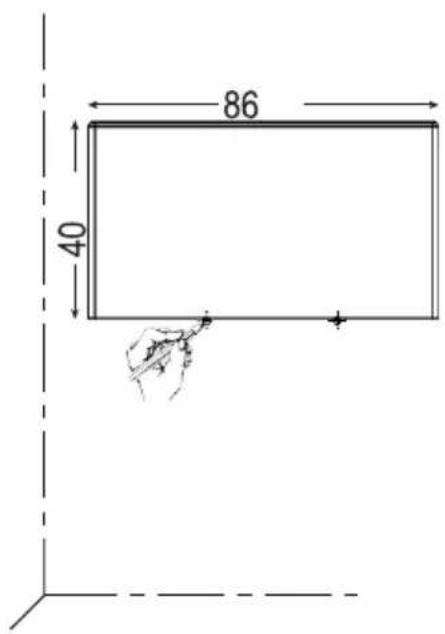
text_image
86 40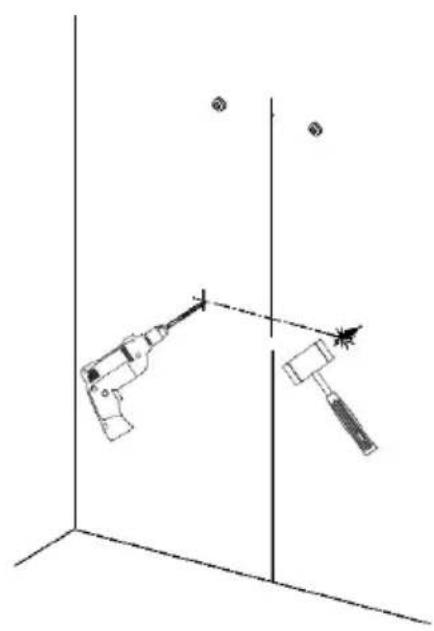
natural_image
Diagram of two mechanical devices positioned at a vertical axis, with no visible text or symbolsnatural_image
Technical line drawing of two mechanical assembly components with fasteners and a rotation arrow (no text or symbols)flowchart
graph LR
    A["Clock with gear icon"] --> B["0:1 Display"]
    B --> C["Inverse Shift"]
    C --> D["2x3 Clock with gear icon"]
    D --> E["/15s stopwatch"]
flowchart
graph LR
    A[" gears + x2"] --> B[" "]
    B --> C[" "]
    C --> D["/ 15s"]
text_image
+ x1 ● ⚡ ⚡ ● ↗ ↗ ○ ⚡ ● ↗ ↗ ● ↗ + x1 ● ⚡ ⚡ ○ ⚡ ↗ ○ ⚡ ● ↗ ↗ ● ↗text_image
Diagram illustrating solar system states with sun, moon, and star symbols, showing 3s orbital transitionsnatural_image
White rectangular electronic device with metallic base plates (no visible text or symbols)CONGRATULATIONS!
THANK YOU FOR PURCHASING THIS SHX PRODUCT.

This product is intended for use in well-insulated areas and for occasional use only.
TABLE OF CONTENTS
| Important information on safety, place of use and electrical connections |
| Recycling, disposal and Declaration of Conformity |
| Scope of delivery |
| Description of the appliance |
| Starting up and functions |
| Safety features |
| Cleaning and maintenance |
| Activities at the start/end of the season |
| Technical information |
| Required data for single-room electrical heating devices |
PLEASE READ THE OPERATING MANUAL CAREFULLY BEFORE BEGINNING ASSEMBLY, INSTALLATION, OPERATION OR MAINTENANCE. PROTECT YOURSELF AND OTHERS BY FOLLOWING THE SAFETY INSTRUCTIONS. FAILURE TO COMPLY WITH THESE INSTRUCTIONS MAY RESULT IN PERSONAL INJURY AND/OR PROPERTY DAMAGE AND/OR LOSS OF CLAIMS UNDER WARRANTY.
Intended Use
This appliance is intended exclusively for the heating of domestic living spaces and may not be used for any other purpose. The product is intended to be used as a convection heater. When the air is heated it rises upwards, then cools and circulates back down to be reheated again. It is only suitable for well-insulated spaces and occasional use. The heater can be mounted on the wall or on a floor stand and is operated via the built-in control unit. Two week-long timers are available, offering 12 hours each. This product is intended for indoor, non-commercial, non-industrial and household use only. Do not use out of doors. Do not use the product for any other purpose. It must not be used in construction sites, greenhouses, barns, stables, mills or other areas that may contain combustible dust. For safety and approval purposes, you must not rebuild and/or modify this product. If you use the product for purposes other than those described above, the product may be damaged. In addition, improper use can result in hazards such as short circuits, fires or electric shocks. Read the operating manual carefully and store it in a safe place. If the product is passed on to a third party, be sure to include this operating manual with it.
IMPORTANT INFORMATION ON SAFETY, STANDARDS AND ELECTRICAL CONNECTIONS


-
Use this appliance only in accordance with the guidelines in this operating manual. Any other use not recommended by the manufacturer may result in fire, electrical shock or personal injury.
-
This appliance is intended exclusively for the heating of domestic living spaces and may not be used for any other purpose.
-
Remove the packaging and check that the appliance is not damaged. If you are in doubt, do not use the appliance and contact your dealer.
-
Before connecting to the mains power supply, check that the mains voltage and type matches the information provided on the type plate of the appliance.
-
The electrical socket to which you connect the appliance must not be defective or loose, must be suitable for the current load required, and above all must be reliably earthed.
-
Avoid using an extension cable, because this could overheat and cause a fire.
-
Do not situate the appliance directly beneath a wall power socket. In case of doubt, have your electrical installation checked by a qualified electrician.
-
It is forbidden to adapt or modify the properties of this appliance in any way. Use only replacement parts and accessories recommended by the manufacturer (failure to do so may result in loss of warranty cover).
-
Do not use this heater if it shows visible signs of damage.
-
Children over 3 and under 8 years may only switch the appliance on or off under supervision or if they have been instructed in its safe use and understand the resultant dangers, on the condition that the appliance is positioned or installed in its normal place of use. Children over 3 and under 8 years must not be allowed to insert the plug into the
socket, alter the settings, clean the appliance or perform user maintenance on the appliance.
- Do not operate the appliance unattended. Whenever you leave the room, always switch off the appliance.
- Do not use the appliance in small rooms where people are present who are unable to leave the room by themselves, unless they are under constant supervision.
- Do not allow children to play with the appliance.
Keep children under 3 years away from the appliance unless they are under constant supervision.
- Keep the packaging materials away from children.
If swallowed, these pose a risk of suffocation.
- The appliance is not suitable for continuous or high-precision operation.
- Do not use this heater if it has previously been dropped.
- This appliance is for use in dry indoor spaces only.
- Do not use the appliance near water or high humidity, e.g. in damp cellars, or hear swimming pools, baths or showers. Make sure that water cannot get into the appliance.
-
Do not use the appliance in close proximity to petrol, gas, oil, alcohol or other explosive or flammable liquids or gases.
-
To minimise the risk of fire, ensure a distance of at least one metre between the air outlet of the appliance and any flammable materials such as:
a. Pressurised containers (e.g. spray cans)
b. Furniture
c. Textiles of any kind
- This heater should be operated on a level, stable surface or attached to a wall if necessary.
Do not place any objects on top of the appliance. - Never cover the appliance while it is in operation or while cooling down after use.
- Always switch the appliance off before unplugging it.
- Do not pull the mains cable to disconnect the appliance from the mains supply. Always pull by the plug to disconnect the mains cable.
- Caution: certain parts of this appliance may become very hot and cause burns. Take particular care if children or vulnerable persons are present. Always allow the appliance to cool down before cleaning it or removing it from its mounting.
- Unplug the appliance when you are not using it and before cleaning it or performing any maintenance.
Do not allow children to clean or perform user maintenance on the appliance without supervision.
- To avoid electric shocks, do not touch the plug with wet hands.
WARNING: Children of 8 years and above and persons with limited physical, sensory or mental capabilities or without experience or knowledge may use the appliance under supervision or if they have been instructed in its safe use and understand the resultant dangers.
WARNING: If the power cable to this appliance becomes damaged, it must be replaced by the manufacturer, its customer services department or a similarly qualified person in order to prevent hazards.
WARNING: To prevent the heater becoming overheated, do not cover it or place any item over it.
ATTENTION | RISK OF INJURYThis appliance becomes hot while it is in operation!Never touch the appliance while it is in operation → this may result in severe BURNS. |
ATTENTION | RISK OF FIREWARNING: To prevent the heater becoming overheated, do not cover it or place any item over it. |
ATTENTION

SAFE DISTANCE
Maintain a safe distance of at least one metre from flammable items such as furniture, curtains, paper and similar.
PLACE OF USE
Position the appliance in such a way that air can flow in and out without hindrance.
RISK OF BURNS
This appliance becomes very hot during use and can cause burns. Take particular care if children or vulnerable persons are present.
RISK OF OVERHEATING
Do not use the appliance in rooms with a volume less than 4m^3 .
Symbol markings on the appliance Symbol:
Meaning:

Attention! Do not cover
The symbol on the device indicates that it is not permitted to suspend any item (e.g. towels, clothing etc.) above the appliance or directly in front of it. To prevent overheating and the risk of fire, the heater must not be covered.
Recycling, disposal and Declaration of Conformity
 | RECYCLINGThe packaging materials can be recycled. It is recommended that you dispose of them in separated waste. |
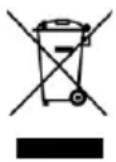 | DISPOSALThe pictogram with the crossed out dustbin indicates that electrical and electronic appliances must be disposed of separately from household waste (WEEE). Electrical and electronic appliances can contain harmful and environmentally hazardous materials. Do not dispose of them in unsorted residual waste, but at a registered collection centre for waste electrical and electronic equipment. By doing so, you will help to conserve resources and protect the environment. For further information please consult your dealer or your local authorities. Directive 2012/19/EU |
 | DISPOSAL OF BATTERIESIn accordance with Legislative Decree no. 188 of 20 November 2008 implementing Directive 2006/66/EC on batteries, accumulators and their associated waste, the symbol of the crossed-out dustbin shown on the battery indicates that it is prohibited to dispose of batteries in household waste. Batteries and accumulators contain environmentally hazardous substances. Users are obliged to dispose of used batteries at municipal collection centres or in collectors set up for the purpose. This service is free of charge. This ensures that the legal requirements are complied with and the environment is preserved.You may find the following symbols on batteries:Li = battery contains lithiumAl = battery contains alkaliMn = battery contains manganeseCR 2025 (Li); AA (Al, Mn); AAA (Al, Mn) |
CE
DECLARATION OF CONFORMITY
We hereby confirm that this article complies with the essential requirements, regulations and guidelines of the EU. The detailed declaration of conformity can be viewed at any time via following link:
https://www.schuss-home.at/downloads
Errata and technical changes reserved.
Scope of delivery
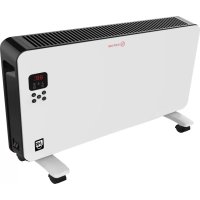
- Convector heater
- Feet (x2)
- Fixing screws (×8)
■ Wall mounting accessories - Operating manual
Description of the appliance
text_image
Technical line drawing of a rectangular electronic device with labeled components 1, 2, and 3.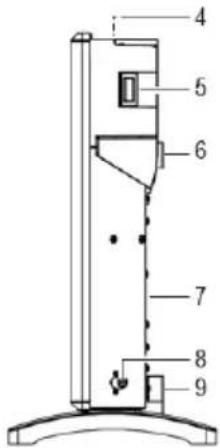
text_image
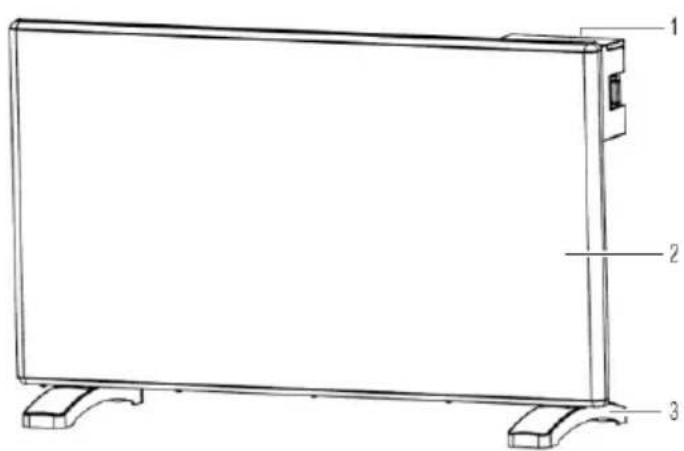
Technical diagram of a vertical device with numbered components, likely a scientific instrument or assembly.(1) Control panel
(2) Front cover
(3) Feet
(4) Hot air outlet
(5) ON/OFF power switch
(6) Top wall bracket
(7) Back wall
(8) Temperature sensor
(9) Bottom wall bracket
Control panel

This symbol appears in the LED display (10) if the temperature sensor is not functioning correctly. If this occurs, switch the appliance OFF. Disconnect from the power supply and contact our technical support service or other technical personnel.
text_image
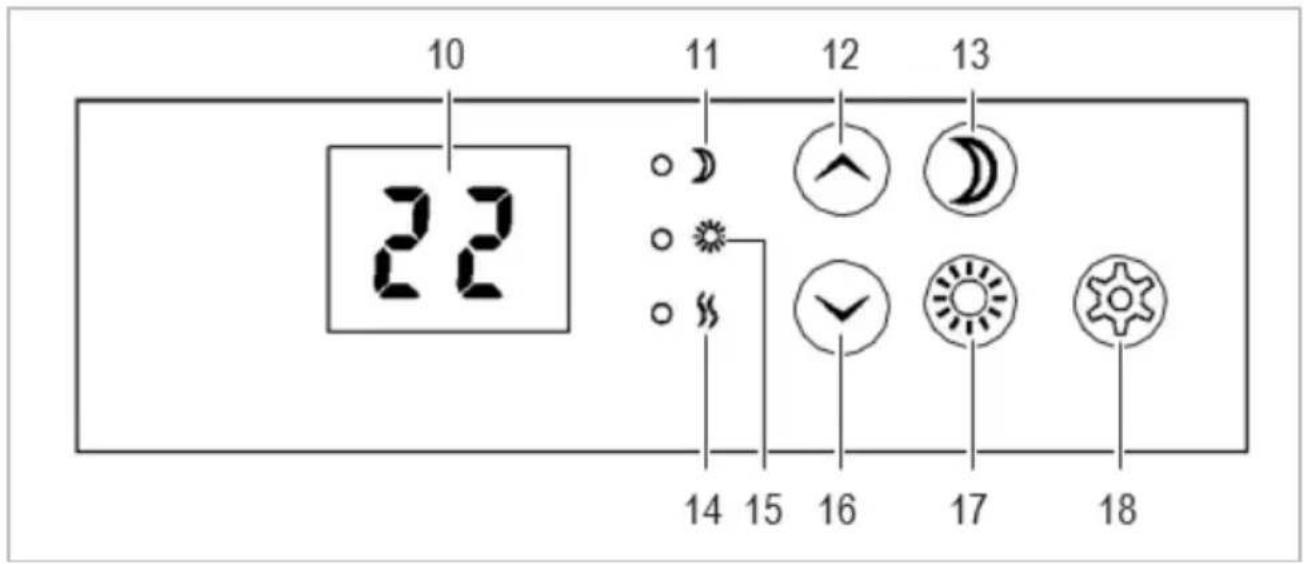
10 22 11 12 13 14 15 16 17 18(10) LED display field
(11) Night mode LED indicator
(12) Increase value/temperature button
(13) Night mode function button
(14) Heating indicator
(15) Daytime timer indicator
(16) Reduce value/temperature button
(17) Daytime mode function button
(18) Settings button
Installation

Disconnect the heater from the power supply before attaching the feet or mounting the appliance.
The heater must be operated in a horizontal position, as otherwise it may not function correctly. This must be borne in mind during installation.
The feet may scratch sensitive surfaces if the heater is placed on them.
Position the heater so that no object such as a shelving unit is within 1 metre of the heater on any side.
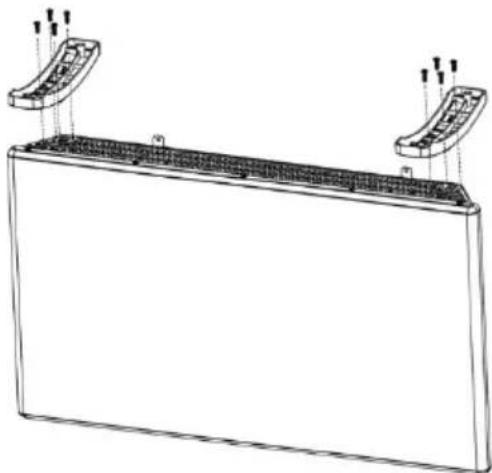
a) Fitting the feet
- Carefully place the heater upside down on a level surface.
- Screw each of the feet onto the unit with a Phillips-type (cross-headed) screwdriver. Use the screws supplied as illustrated.
b) Wall mounting

Take care when drilling the mounting holes or tightening the screws that no cables or pipes are damaged. If you are in doubt about how or where to mount the heater, contact a qualified specialist.
natural_image
Technical line drawing of a rectangular device with two curved components and mounting holes (no text or symbols)When selecting a mounting location, take the length of the power cable into account. Do not use any extension cable.
The screws and plugs provided are designed for solid walls. If you have another type of wall, use screws and plugs appropriate for that type. If you are in doubt about this, contact a qualified specialist.
The hook brackets are already mounted on the rear of the heater. To drill the holes for the plastic plugs, use an 8-mm drill.
text_image
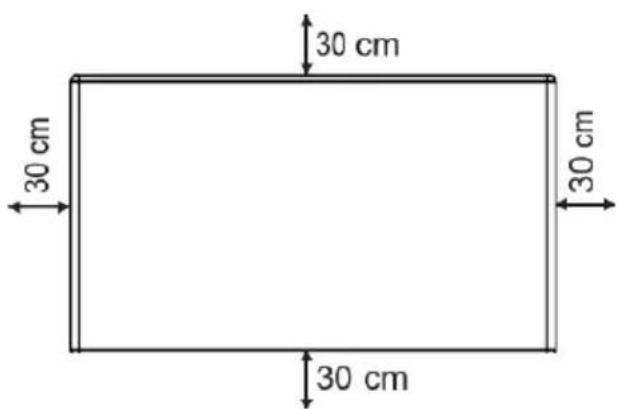
30 cm 30 cm 30 cm 30 cmThe heater must be mounted so that there is a distance of at least 30 cm to the floor, to adjacent walls and to the ceiling.
→ Use the drilling template provided to mark the position for the two upper holes. To ensure that the mounting is perfectly horizontal, use a spirit level.
- Drill two holes (∅ 8 mm) and insert the plugs.
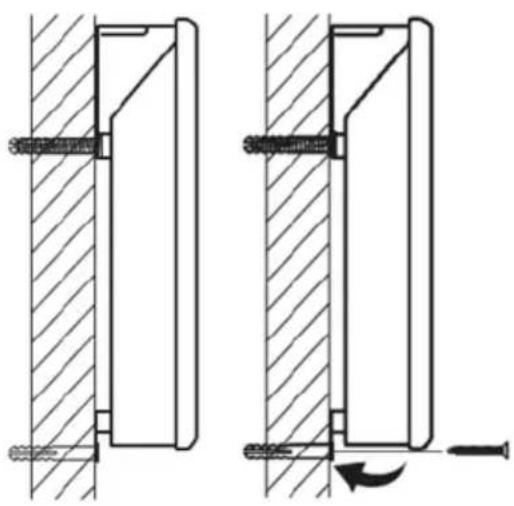
- Insert the screws such that they still protrude a little and the bracket can be hooked on. The bracket must sit behind the head of the screw and not above its top edge.
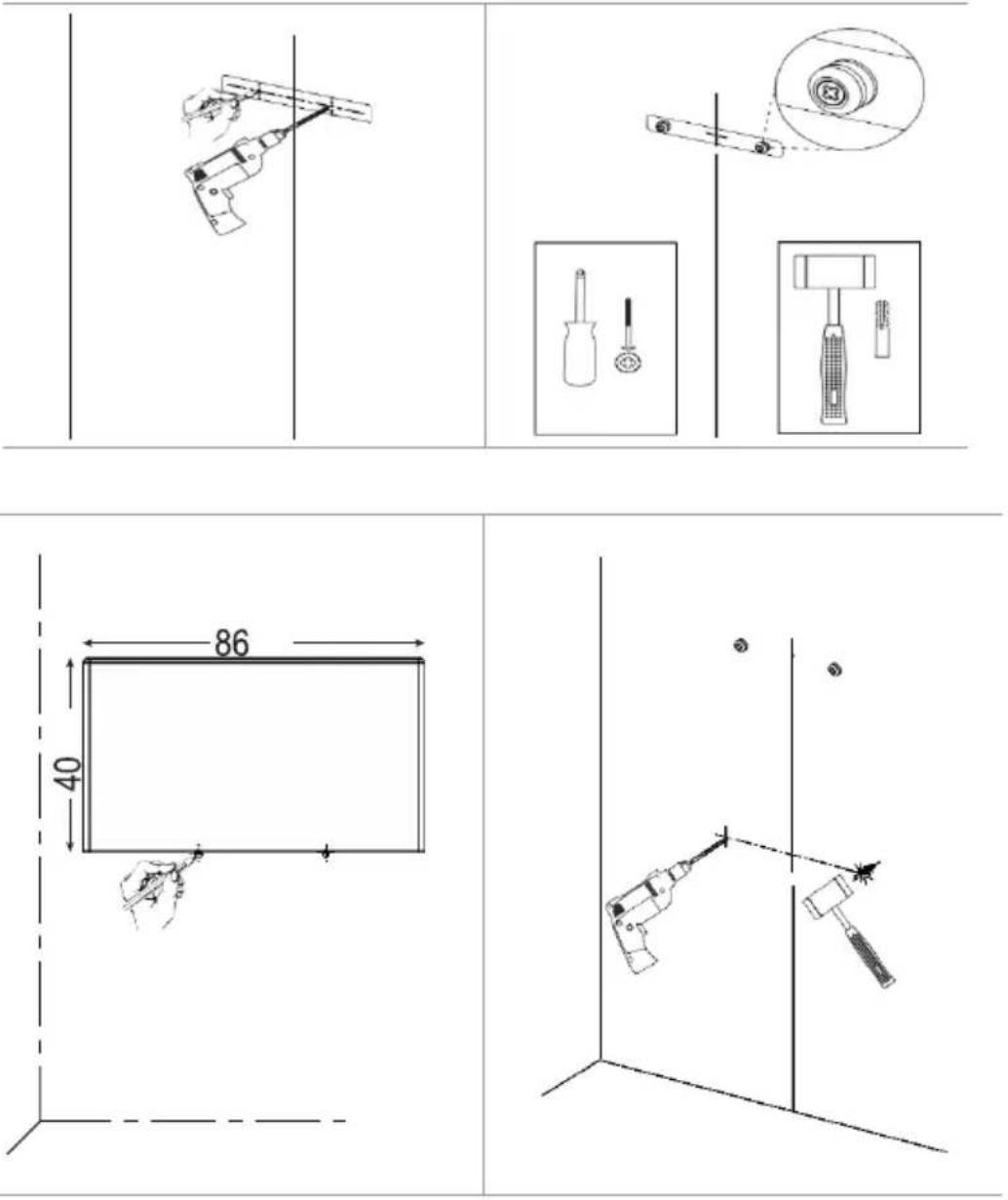
- Hang the heater onto the screws. Ensure that the heater is mounted securely before letting go of it.
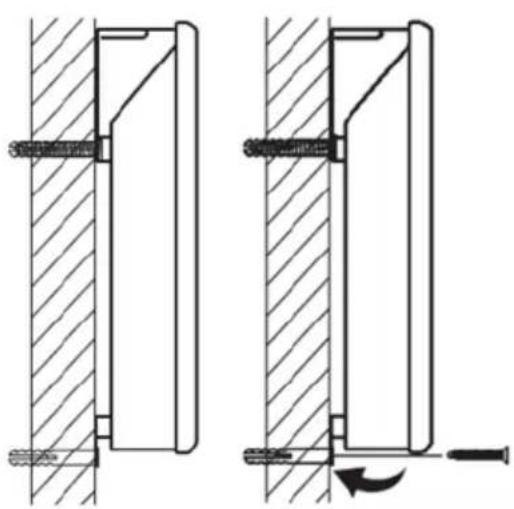
- Mark the positions for drilling the lower fixing points and then remove the heater.
- Drill two holes (∅ 8 mm) and insert the plastic plugs.
- Hang the heater onto the upper screws. Ensure that the heater sits securely in position before letting go of it.
natural_image
Technical line drawing of two mechanical assembly components with hatched walls and screw fasteners (no text or symbols)Screw the lower wall bracket (9) tight.
Operation

In the event of a power failure or if the heater is disconnected from the supply, the temperature mode remains in 'free mode', but all timer settings are lost.
When the heater is used for the first time, some hot parts of the housing may give off an unpleasant smell. This is normal. If this happens, ventilate the room in which the heater is positioned.
a) Free mode
In free mode, the appliance can be used as an electronic thermostat to maintain a constant temperature.
- Switch on the heater (5).
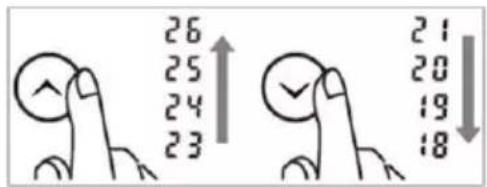
- Set the desired temperature with the arrow keys ( / )
text_image
26 25 24 23 21 20 19 18• The LED display for heating (14) lights up to indicate that the heater is active.
- The heater automatically adjusts the heating power to the set temperature.
b) Daytime timer
About the daytime timer:
• The daytime timer is an energy-saving function that switches the heater off at weekends
during the times set. It is designed so that the heater is always switched off on days 6 and 7 (Saturday and Sunday).
- Days 1 - 5 (Mon - Fri): The heater is ON.
-
Days 6 - 7 (Sat - Sun): The heater switches itself OFF.
-
The timer must be set to the time at which it is to start on each day. If for example you wish the timer to start at 09:00, set the timer to 09:00.
- The timer can be set to run for between 1 and 12 hours.
- See the sections h) (Overriding the timers) and i) (Deleting the timers) for information on how to delay or disable the daytime timer.
• If the daytime and nighttime timers overlap, the next timer runs in sequence. - If a timer has been set but is not active, the heater goes into sleep mode and switches off.
Activating the daytime timer:
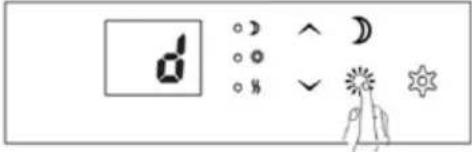 | Press and the display (10) will showd. |
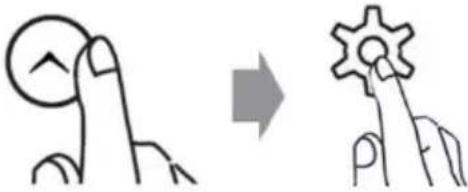 | Select the current day of the week with the arrow keys (^^).√(Monday = 1, Tuesday = 2, Wednesday = 3,Thursday = 4, Friday = 5, Saturday = 6, Sunday =7).Press to save |
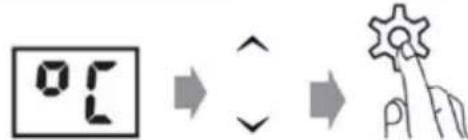 | Select the desired temperature with the arrow keys (^^).√Press to save |
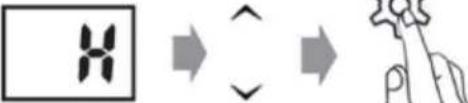 | Use the arrow keys to select the desired number of hours (^^).√Press to save |
• The daytime timer LED (15) lights up green when the timer is set and active.
- It lights up red to show that a timer has been programmed but is not active.
c) Nighttime timer
About the nighttime timer
- Once set, the nighttime mode operates every night of the week (Monday to Sunday).
- The timer must be set to the time at which it is to start each night. If for example you wish the timer to start at 19:00, set the timer to 19:00.
• The timer can be set to run for between 1 and 12 hours. - See the sections h) (Overriding the timers) and i) (Deleting the timers) for information on how to delay or disable the nighttime timer.
- If the daytime and nighttime timers overlap, the next timer runs in sequence.
- If a timer has been set but is not active, the heater goes into sleep mode and switches off.
Setting the nighttime timer:
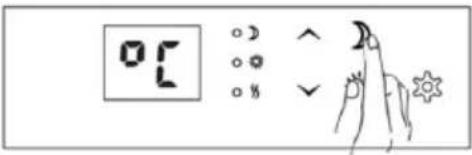 | Press and the display (10) will show °C. |
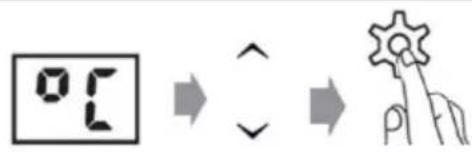 | Select the desired temperature with the arrow keys (∧). √Press to save |
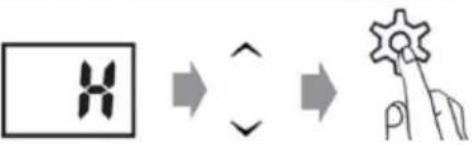 | Use the arrow keys to select the desired number of hours (∧). √Press to save |
- The nighttime timer LED (11) lights up green when the timer is set and active.
- It lights up red to show that a timer has been programmed but is not active.
d) Daytime timer: Setting the temperature
You can adjust the temperature that you set for the daytime timer.
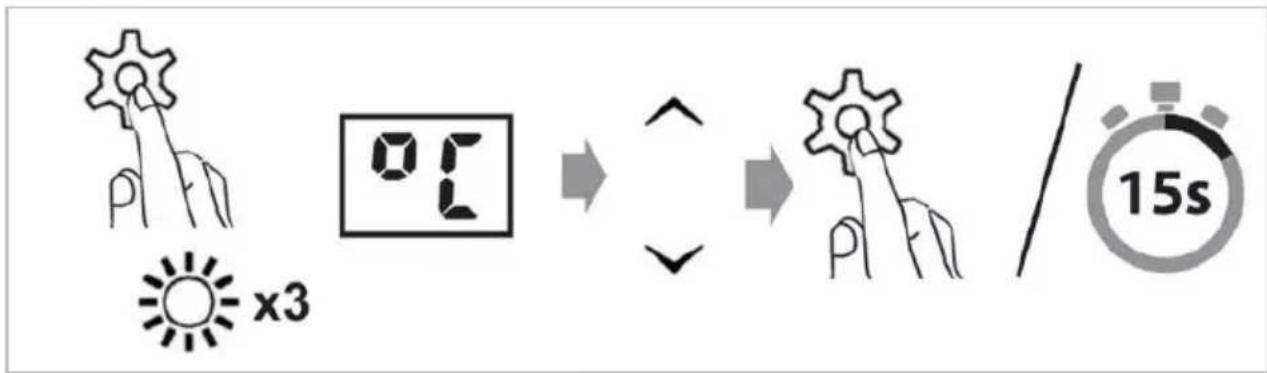
flowchart
graph LR
    A["Sensor Input"] --> B["0:1 Screen"]
    B --> C["Arrow Up/Down"]
    C --> D["→ Gear Icon"]
    D --> E["/ 15s"]
- While holding down press three times.
- Enter a new temperature.
- Save your setting by pressing ⚙ or wait for 15 seconds for automatic confirmation.
e) Nighttime timer: Setting the temperature
You can adjust the temperature that you set for the nighttime timer.
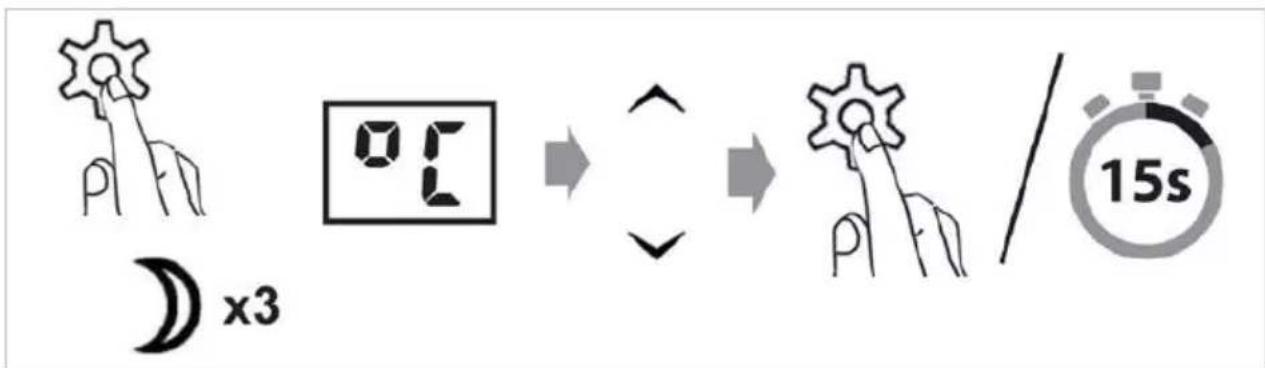
flowchart
graph LR
    A["0:3 Hand Icon"] --> B["0:5 Square"]
    B --> C["Arrow Up/Down"]
    C --> D["15s Check/Timer/15s"]
- While holding down, press three times.
- Enter the required temperature.
- Save your setting by pressing 🌿 or wait for 15 seconds for automatic confirmation.
f) Daytime timer: Setting the hours
You can adjust the number of hours for which the timer runs during the day.
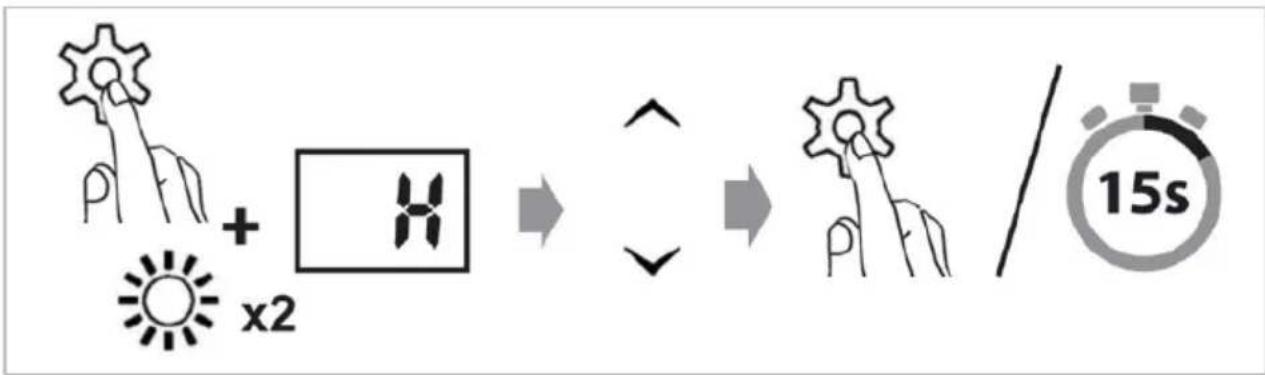
flowchart
graph LR
    A[" gears + x2 "] --> B[" ↑ "]
    B --> C[" 15s "]
    style A fill:#f9f,stroke:#333
    style B fill:#ccf,stroke:#333
    style C fill:#cfc,stroke:#333
- While holding down press two times.
- Enter the number of hours for which the timer should run.
- Save your setting by pressing ⚙ or wait for 15 seconds for automatic confirmation.
g) Nighttime timer: Setting the hours
You can adjust the number of hours for which the timer runs during the night.
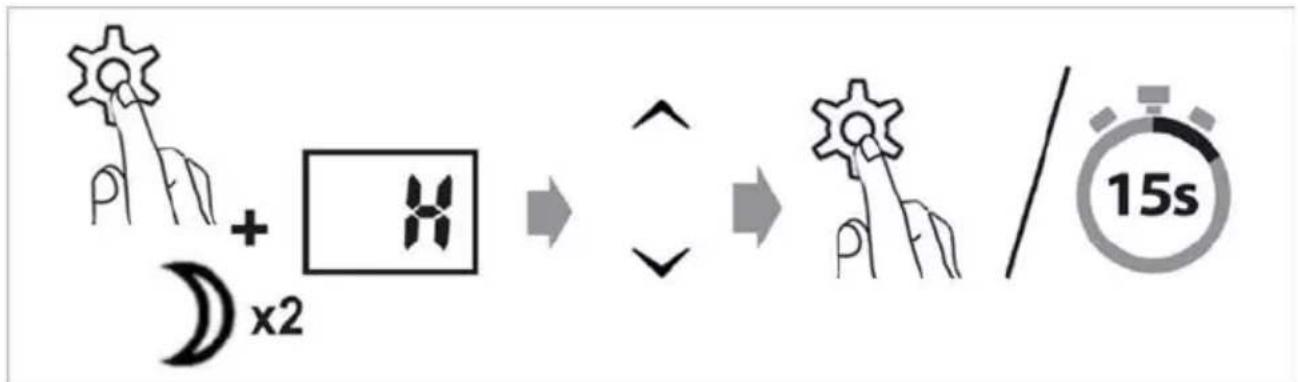
flowchart
graph LR
    A[" gears + x2 "] --> B[" ↑ "]
    B --> C[" 15s /"]
    style A fill:#f9f,stroke:#333
    style B fill:#ccf,stroke:#333
    style C fill:#cfc,stroke:#333
- While holding down press two times.
- Enter the number of hours for which the timer should run.
- Save your setting by pressing 🌿 or wait for 15 seconds for automatic confirmation.
h) Overriding the timers
You can override an active timer or the next timer.

text_image
+ x1 ● ⚡ ⚡ ● ↗ ↗ ○ ⚡ ● ↗ ↗ ● ↗ + x1 ● ⚡ ⚡ ○ ⚡ ↗ ○ ⚡ ● ↗ ↗ ● ↗- Hold down, then press or (depending on which timer you wish to override).
• The heater overrides an active timer or the next timer.
The daytime timer or nighttime timer LED lights up red to show that it has been programmed but is not currently active.
i) Deleting the timers
Hold down for 3 seconds to delete the daytime timer.
Hold down for 3 seconds to delete the nighttime timer.

text_image
Diagram showing solar system and moonlight interaction with 3s clock, illustrating light and moon cycles.j) Open Window function
This function allows you to save energy. If the ambient temperature falls by 2^ C or more within 2 minutes, the sensor detects the temperature change and switches the heater off.
Activating the open window function
- Hold down for 5 seconds. The display then shows .. FO
- Press ^ to activate the open window function; the display shows ON.
- Confirm your setting by pressing ⚙ or wait for 15 seconds for automatic confirmation.
- If the ambient temperature falls by 2^ C or more within 2 minutes, a sensor detects the temperature change and switches the heater off. The display shows FQ
- After 10 minutes the heater switches automatically on again. You can switch the heater on manually again by pressing. The symbol goes out.
Deactivating the open window function
- Hold down for 5 seconds. The display then shows .. F0
- Press √ to deactivate the open window function; the display shows OFF.
- Confirm your setting by pressing 🌿 or wait for 15 seconds for automatic confirmation.
k) Deleting all settings
To delete all settings and to restore the factory defaults, proceed as follows:
- Switch the appliance OFF.
- Hold down and switch the appliance on.
Troubleshooting
| Problem | Cause | Suggested solution |
| The heater does not switch on. | No power to the power socket or main fuse defective. | Check the power supply and main fuse. |
| Power plug has not been fully inserted. | Insert the plug into the power socket. | |
| The appliance was not switched on using the main switch (5). | Switch the appliance on (5). | |
| The room temperature is above the temperature set on the thermostat. | Normal operation. Appliance automatically switches on and produces heat as soon as the temperature drops below the set value. | |
| The daytime timer is active, and the current day of the week is 6 (Saturday) or 7 (Sunday). | See the sections h (Overriding the timers) and i (Deleting the timers). | |
| Overheating protection is triggered. | Remove any objects that are covering or impeding the heater (if applicable) and switch the appliance OFF (5).Wait until the appliance has cooled down sufficiently, then switch the power back ON (5).If the heater fails to start again after cooling, it possible that it has been damaged by excessive heat. In this case, switch the heater OFF (5) and disconnect it from the power supply. Contact our technical support service or other technical personnel. | |
 is shown in the display (10). is shown in the display (10). | The temperature sensor is not functioning properly. | Switch the appliance OFF! Disconnect from the power supply and contact our technical support service or other technical personnel. |

Do not use any aggressive detergent, alcohol or other chemical solvents as these may cause damage to the housing and malfunctioning of the appliance.
- Disconnect the appliance from the power supply and allow it to cool sufficiently before performing any cleaning.
- Use a dry, lint-free cloth for cleaning the product.
• Under no circumstances allow water to enter the heater, as this is highly dangerous.
ATTENTION
Do not immerse the heater in water or other liquids or allow it to come into contact with these.
Never use petrol, alcohol or solvents to clean the appliance – this could be dangerous.
Do not spray insecticides or similar agents onto the heater.
Do not use the appliance in wet rooms.
DO NOT COVER – RISK OF FIRE
To remove dust, use a vacuum cleaner, particularly at the air inlet and outlet grilles.
Activities at the start of the season
Check that the power supply cable is in good condition and that the earthing is functioning.
Follow the installation and safety instructions carefully.
Activities at the end of the season
Switch the appliance off and disconnect the mains plug. Pack the appliance away, ideally in its original packaging, and store it in a cool, dry place.
TECHNICAL INFORMATION
| Article number: | SHX22HEAT101 |
| Input voltage: | 230 V~ |
| Frequency: | 50 Hz |
| Power consumption: | 2000 W |
| Heating temperature range: | 5 – 35°C |
| Protection class: | I |
| Heating element: | Aluminium |
| Overheating protection: | Yes |
| Weight: | 5.5 kg |
| Dimensions including feet | 86 × 22 × 43,6 cm |
| Dimensions, wall mounted | 86 × 8 × 40 cm |
| Contact address for further information: | Schuss Home Electronic GmbHScheringgasse 3, A-1140 Vienna, AustriaServiceline: +43 (1) 97 0 21www.schuss-home.at | www.shx.atReg. no: 236974 t / Reg. Court: Vienna |
Required data for single-room electrical heating devices
| Article number SHX22HEAT101 | ||||||
| Information | Symbol | Value | Unit | Information | Unit | |
| Heat output | Single-room electric storage heaters only:Method of heat transfer control | |||||
| Nominal heat output | P_nom | 2.000 | kW | Manual control of heat transfer with integrated thermostat | No | |
| Minimum heat output (guideline) | P_min | 2.000 | kW | Manual control of heat transfer with feedback of room and/or outside temperature | No | |
| Maximum continuous heat output | P_max,c | 2.000 | kW | Electronic control of heat transfer with feedback of room and/or outside temperature | No | |
| Auxiliary current consumption | Fan-assisted heat outlet | No | ||||
| At Nominal heat output | eI_max | N/A | kW | Type of heat output/room temperature control | ||
| At Minimum heat output | eI_min | N/A | kW | Single heat output level, no room temperature control | No | |
| In standby mode | eI_sB | 0.000 | kW | Two or more manually settable output levels, no room temperature control | No | |
| Room temperature control with mechanical thermostat | No | |||||
| With electronic room temperature control | No | |||||
| Electronic room temperature control and timed control through the day | No | |||||
| Electronic room temperature control and timed control through the week | Yes | |||||
| Other control options | ||||||
| Room temperature control with presence detection | No | |||||
| Room temperature control with detection of open windows | Yes | |||||
| With remote control option (WiFi) | No | |||||
| With adaptive start-up control | No | |||||
| With operating time limiter | No | |||||
| With ball-type sensor | No | |||||
| Contact information: | Schuss Home Electronic GmbH Scheringgasse 3 - 1140 Vienna - Austria https://www.schuss-home.at/ | |||||
WARRANTY
By purchasing this SHX quality product, it means you have decided to place trust in durability, reliability and innovation.
For this SHX appliance, we grant a warranty period of 2 years from the date of purchase valid in Austria and Germany!
If, contrary to expectations, service work on your appliance is still necessary during this period, we hereby guarantee either free repairs (spare parts and working time) or (at the discretion of Schuss) that we will replace the product. If it is not possible to either repair or exchange the product for economic reasons, we reserve the right to create a time value credit.
In any case, please contact the customer hotline as a first step (see the operating manual – 'contact addresses for further information and service line').
We would like to point out that repair work that has not been performed by authorised contract workshops will immediately terminate the validity of this warranty.
This warranty does not cover:
- Damage due to non-adherence to the operating manual
- Repair or replacement of parts due to normal wear and tear
- Appliances that are used commercially, even in part
- Appliances mechanically damaged due to external influence (any fall(s), impact(s), breakage(s), improper use, etc.) as well as signs of wear and tear of an aesthetic nature
- Appliances that have been improperly treated
- Appliances that have not been opened by our authorised service workshop
• Unfulfilled consumer expectations - Damage caused by force majeure, water, lightning and overvoltage
- Appliances that have had their type designation and/or serial number on the appliance changed, deleted, made illegible or removed
• Defects due to extreme contamination
• Services outside our contract workshops, the transport costs to either an authorised workshop or to us and back, and the associated risks
We would like to expressly point out that a fixed amount of €60 (indexed basis CPI 2015, June 2020) will be charged within the warranty period in the event of operating errors or if no error has been detected.
The provision of a warranty service (repairs or replacement of the appliance) does not extend the absolute warranty period of 2 years from the date of purchase.
The 2-year warranty is only valid upon presentation of the proof of purchase (name and address of the dealer as well as the complete appliance designation must be included) and the corresponding warranty certificate, on which the appliance type and the serial number (on the box and on both the back and underside of the appliance) are to be noted! Without presenting the warranty certificate, only the legal warranty applies!
We would like to expressly point out that the statutory warranty rights are unaffected by this warranty and continue unabated.
A liability for damage on the part of Schuss Home Electronic GmbH and its vicarious agents only exists in the event of gross negligence or intent. In any event, liability for lost profits, expected but not occurred savings, consequential damage and damage arising from claims of third parties is excluded.
The contact address of the relevant service workshop is available on our homepage www.schuss-home.at.
Congratulations on making your choice. We wish you a lot of pleasure with the SHX appliance!
ADDRESS:
SHX Vertrieb
Schuss Home Electronic GmbH
A-1140 Wien, Scheringgasse 3
Tel.: +43 (0)1/ 970 21
Type designation: ....
Serial number: ....