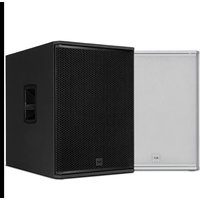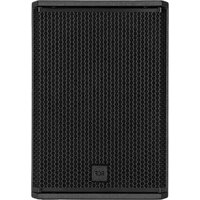
Ayra Pro 10 Sub - Subwoofer RCF - Free user manual and instructions
Find the device manual for free Ayra Pro 10 Sub RCF in PDF.



User questions about Ayra Pro 10 Sub RCF
0 question about this device. Answer the ones you know or ask your own.
Ask a new question about this device
Download the instructions for your Subwoofer in PDF format for free! Find your manual Ayra Pro 10 Sub - RCF and take your electronic device back in hand. On this page are published all the documents necessary for the use of your device. Ayra Pro 10 Sub by RCF.
USER MANUAL Ayra Pro 10 Sub RCF
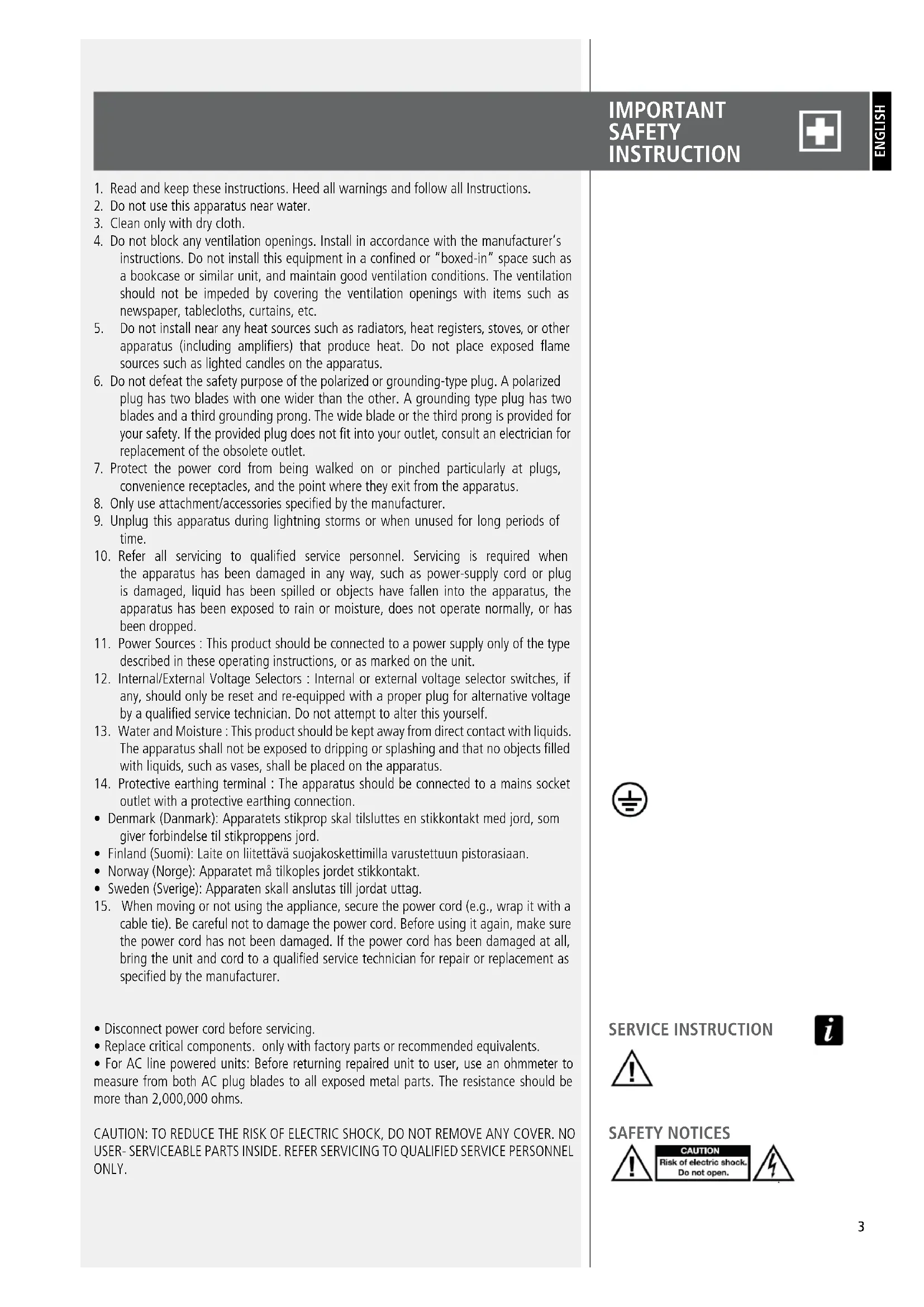
- Read and keep these instructions. Heed all warnings and follow all Instructions.
- Do not use this apparatus near water.
- Clean only with dry cloth.
- Do not block any ventilation openings. Install in accordance with the manufacturer's instructions. Do not install this equipment in a confined or "boxed-in" space such as a bookcase or similar unit, and maintain good ventilation conditions. The ventilation should not be impeded by covering the ventilation openings with items such as newspaper, tablecloths, curtains, etc.
- Do not install near any heat sources such as radiators, heat registers, stoves, or other apparatus (including amplifiers) that produce heat. Do not place exposed flame sources such as lighted candles on the apparatus.
- Do not defeat the safety purpose of the polarized or grounding-type plug. A polarized plug has two blades with one wider than the other. A grounding type plug has two blades and a third grounding prong. The wide blade or the third prong is provided for your safety. If the provided plug does not fit into your outlet, consult an electrician for replacement of the obsolete outlet.
- Protect the power cord from being walked on or pinched particularly at plugs, convenience receptacles, and the point where they exit from the apparatus.
- Only use attachment/accessories specified by the manufacturer.
- Unplug this apparatus during lightning storms or when unused for long periods of time.
- Refer all servicing to qualified service personnel. Servicing is required when the apparatus has been damaged in any way, such as power-supply cord or plug is damaged, liquid has been spilled or objects have fallen into the apparatus, the apparatus has been exposed to rain or moisture, does not operate normally, or has been dropped.
- Power Sources : This product should be connected to a power supply only of the type described in these operating instructions, or as marked on the unit.
- Internal/External Voltage Selectors: Internal or external voltage selector switches, if any, should only be reset and re-equipped with a proper plug for alternative voltage by a qualified service technician. Do not attempt to alter this yourself.
- Water and Moisture: This product should be kept away from direct contact with liquids. The apparatus shall not be exposed to dripping or splashing and that no objects filled with liquids, such as vases, shall be placed on the apparatus.
- Protective earthing terminal: The apparatus should be connected to a mains socket outlet with a protective earthing connection.
- Denmark (Danmark): Apparatets stikprop skal tilsluttes en stikkontakt med jord, som giver forbindelse til stikproppens jord.
- Finland (Suomi): Laite on liitettävä suojakoskettimilla varustettuun pistorasiaan.
- Norway (Norge): Apparatet må tilkoples jordet stikkontakt.
- Sweden (Sverige): Apparaten skall anslutas till jordat uttag.
-
When moving or not using the appliance, secure the power cord (e.g., wrap it with a cable tie). Be careful not to damage the power cord. Before using it again, make sure the power cord has not been damaged. If the power cord has been damaged at all, bring the unit and cord to a qualified service technician for repair or replacement as specified by the manufacturer.
-
Disconnect power cord before servicing.
- Replace critical components. only with factory parts or recommended equivalents.
- For AC line powered units: Before returning repaired unit to user, use an ohmmeter to measure from both AC plug blades to all exposed metal parts. The resistance should be more than 2,000,000 ohms.
CAUTION: TO REDUCE THE RISK OF ELECTRIC SHOCK, DO NOT REMOVE ANY COVER. NO USER- SERVICEABLE PARTS INSIDE. REFER SERVICING TO QUALIFIED SERVICE PERSONNEL ONLY.

SERVICE INSTRUCTION


SAFETY NOTICES
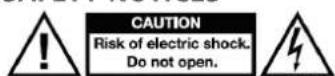
DANGEROUS VOLTAGE: The lightning flash with arrowhead symbol within the equilateral triangle is intended to alert the user to the presence of un-insulated "dangerous voltage" within the product's enclosure that may be of sufficient magnitude to constitute a risk of electric shock.
INSTRUCTIONS: The exclamation point within the equilateral triangle is intended to alert the user to the presence of important operating and maintenance (servicing) instructions in the literature accompanying this appliance.
WARNING: To reduce the risk of fire or electrical shock, do not expose this appliance to rain or moisture. Electrical equipment should NEVER be kept or stored in damp environments.
CAUTION (for U.S.A. & CANADIAN models only): TO PREVENT ELECTRIC SHOCK DO NOT USE THIS (POLARIZED) PLUG WITH AN EXTENSION CORD, RECEPTACLE OR OTHER OUTLET UNLESS THE BLADES CAN BE FULLY INSERTED TO PREVENT BLADE EXPOSURE.
IMPORTANT NOTES
To prevent the occurrence of noise on line signal cables, use screened cables only and avoid putting them close to:
- Equipment that produces high-intensity electromagnetic fields
- Power cables
- Loudspeaker lines.
The equipments considered in this manual can be used in electromagnetic environment E1 to E3 as specified on EN 55103-1/2: 2009.


IMPORTANT NOTES

OPERATING PRECAUTIONS

OPERATING PRECAUTIONS
- Place this product far from any heat sources and always ensure an adequate air circulation around it.
- Do not overload this product for a long time.
- Never force the control elements (keys, knobs,etc.).
- Do not use solvents, alcohol, benzene or other volatile substances for cleaning the external parts of this product.
IMPORTANT NOTES
Before connecting and using this product, please read this instruction manual carefully and keep it on hand for future reference. The manual is to be considered an integral part of this product and must accompany it when it changes ownership as a reference for correct installation and use as well as for the safety precautions. RCF S.p.A. will not assume any responsibility for the incorrect installation and / or use of this product.
WARNING: To prevent the risk of fire or electric shock, never expose this product to rain or humidity.
IMPORTANT NOTES

WARNING

Note: This equipment has been tested and found to comply with the limits for a Class B digital device, pursuant to part 15 of the FCC Rules. These limits are designed to provide reasonable protection against harmful interference in a residential installation. This equipment generates, uses and can radiate radio frequency energy and, if not installed and used in accordance with the instructions, may cause harmful interference to radio communications. However, there is no guarantee that interference will not occur in a particular installation. If this equipment does cause harmful interference to radio or television reception, which can be determined by turning the equipment off and on, the user is encouraged to try to correct the interference by one or more of the following measures:
- Reorient or relocate the receiving antenna.
- Increase the separation between the equipment and receiver.
- Connect the equipment into an outlet on a circuit different from that to which the receiver is connected.
- Consult the dealer or an experienced radio/TV technician for help.
Modifications: Any modifications made to this device that are not approved by RCF may void the authority granted to the user by the FCC to operate this equipment.
PRODUCT INFORMATIONS

AYRA PRO10 SUB is a reference studio subwoofer monitor designed for professional applications, but equally suitable for your home recording studio. The AYRA PRO10 SUB subwoofer has a powerful 10" composite woofer with a 2.5" double-layer moving coil driven by a True Active 300W-RMS Class D amplifier.
AYRA PRO10 SUB is optimized to offer the best sound for a variety of applications. Whether you're working with a nearfield mix in your studio or a broadcast control room, or simply need great speakers for your home entertainment system, you'll want a clear and powerful sound. Thanks to the front bass reflex ports, AYRA PRO10 SUB directs the largest portion of energy forward, away from the rear walls.
PRECISION TRANSDUCERS
ULTIMATE PERFORMANCE
text_image
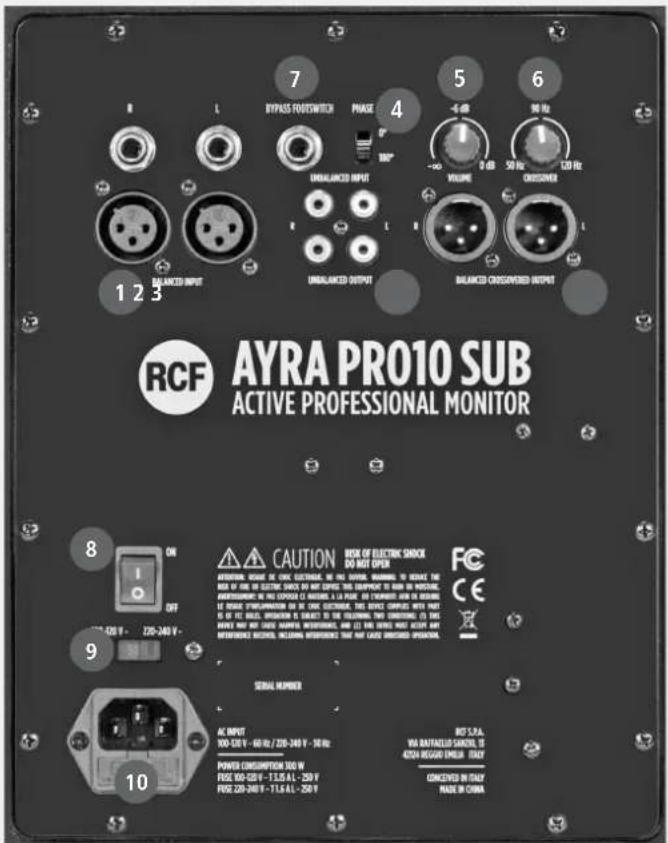
RCF AYRA PRO10 SUB ACTIVE PROFESSIONAL MONITOR 7 BYPASS ROUTSWITCH PHASE 4 UNBALANCED INPUT VOLUME 0 dB 50 Hz 120 Hz UNBALANCED OUTPUT BALANCED CROSSWATER OUTPUT 1 2 3 8 ON CAUTION BOX OF ELECTRIC SHOCK DO NOT OPEN OPERATING NAME OF CREAM ELECTRIC NO. THE WIND BEAMING TO BREAK THE BOX OF THE ICE ELECTRIC SHOCK OR ANY DENTURE THIS EQUIPMENT TO RUN IN BUSINESS. OPERATING IN THE EXPOUND (A) FORUM, A LA PUE OF CHAMPION AND IN BUSINESS, THE PRICE COMPANIES ARE NOT AVAILABLE. IF YOU ARE, WORKS, IS SUBJECT TO THE CEILING TWO CURRENTS (I) THIS BRINCH AND BUT ONLY SAUGHTS, INSISTMENTS, AND (L) ANY DENTURE MUST ACCEPT ANY METHODORE RECOOL, INCLUDING INTERIORS THAT MAY CAUSE DIRECTED OPERATIONS. 9 ON SERIAL NUMBER AC INPUT 100-200 V - 60 Hz / 200-240 V - 30 Hz POWER DISCUPTION 100 W FUSE 80-200 V - 11.5 A/L - 250 V FUSE 220-240 V - 11.5 A/L - 250 V INT 5.2A: VIA BATTULLO GEARLY, IS 420A REGULAR EMBUS ITALY CONCERN IN ITALY MADE IN CHINA1 XLR and JACK TRS STEREO INPUT (BAL / UNBAL). The system accepts JACK TRS or XLR input connectors. These balanced inputs can be used to connect balanced or unbalanced line level audio sources.
2 RCA INPUT (UNBAL). The system accepts RCA input connectors. These unbalanced inputs can be used to connect unbalanced audio sources at line level.
3 STEREO XLR OUTPUTS (BAL). Balanced stereo outputs for connecting the monitors adopted in the system. The studio monitors connected to these outputs are subject to the action of the high pass filter (CROSSOVER KNOB - 6).
4 PHASE SWITCH. This switch allows you to reverse the phase of the input signal by 180°; useful, in some cases, to correct an imperfect positioning of AYRA PRO10 SUB compared to the connected monitors.
5 INPUT VOLUME. This potentiometer adjusts the input level to the AYRA PRO10 SUB subwoofer.
6 CROSSOVER KNOB. This potentiometer allows you to select the crossover frequency between the AYRA PRO10 SUB subwoofer and the connected monitors. The adjustment allows cutting frequencies from 50Hz to 120Hz, allowing the subwoofer to reproduce the selected low frequencies.
7 BYPASS FOOTSWITCH. Connect an unlatch footswitch to this TS jack to bypass the subwoofer function. When the subwoofer is bypassed the signal flows from stereo inputs to stereo outputs bypassing also the crossover control. Press again the footswitch to restore the subwoofer function.
8 MAIN POWER SWITCH. The power switch turns the AC power on and off.
9 MAINS VOLTAGE SELECTOR. This switch allows you to select the mains voltage with which to power the AYRA PRO10 SUB subwoofer. With the switch on the right, select a mains voltage at 220 / 240V \~ 50-60Hz, with the switch on the left position, the selected supply voltage will be 90 / 110V \~ 50-60Hz. IMPORTANT: before use select the correct mains voltage corresponding to the one that conforms to the country in which it will be used.
10 AC VDE SOCKET. AC VDE socket to connect the subwoofer to the AC power supply.
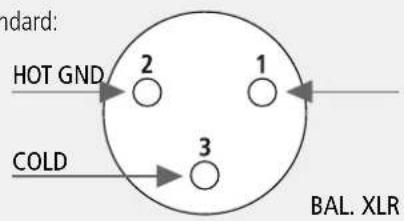
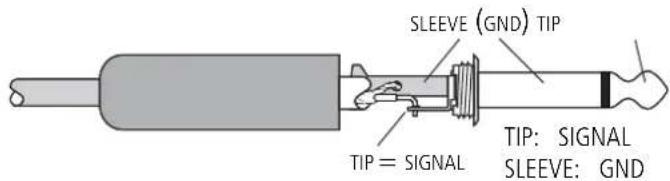
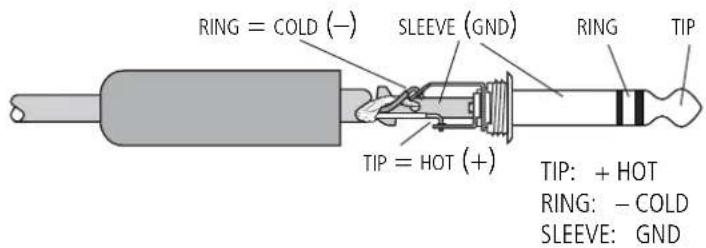
The XLR connectors use the following AES standard:
$$ \text { PIN } 1 = \text { GROUND (SHIELD) } $$
$$ \text { PIN } 2 = \text { HOT } (+) $$
$$ \text { PIN 3 } = \text { COLD } (-) $$
text_image
HOT GND 2 1 3 COLD BAL. XLR1/4" TRS JACK CONNECTOR
BALANCED CONNECTION
text_image
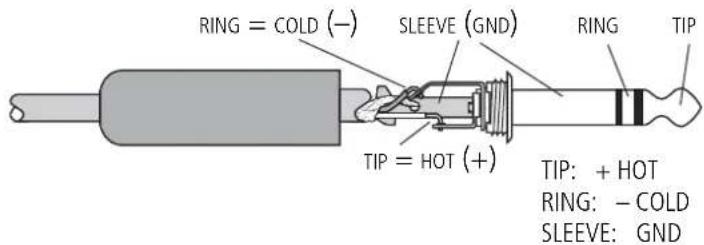
RING = COLD (−) SLEEVE (GND) TIP = HOT (+) RING TIP TIP: + HOT RING: − COLD SLEEVE: GNDUNBALANCED CONNECTION
text_image
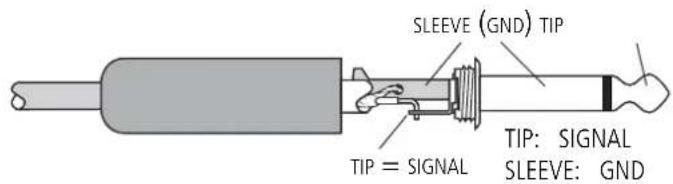
SLEEVE (GND) TIP TIP = SIGNAL TIP: SIGNAL SLEEVE: GNDAYRA PRO10 SUB has a universal internal power supply with a mains voltage selector. The switch allows you to select the mains voltage with which to power the AYRA PRO10 SUB subwoofer. With the switch positioned on the right, a mains voltage of 220 / 240V \~ 50-60Hz is selected, with the switch positioned on the left the selected mains voltage will be 90 / 110V \~ 50-60Hz.
On the rear panel there are also the input and output level controls.
Insert the power connector and the signal connector, but before turning on the speaker, make sure to select the power supply voltage corresponding to that of the country where the device is used, and that the volume control is at minimum on both the speaker and the sound source connected to the speakers; it is also important that the sound source is already on when the speaker connected to it is turned on.
These two precautions will prevent you from: first turning on the speakers in the presence of strong input signals (avoiding causing damage to the speaker itself but above all to people in front of it), also avoiding the annoying "bump" caused by the switching on of the audio equipment upstream of the speakers. In fact it is a good rule that the amplified speakers and amplifiers in general are always the last equipment to be turned on and the first to be switched off at the end of their use.
At this point you can turn on the speaker and raise the level control up to the marker line on the scale between "0" and "MAX", and then correct the level as needed.
CONNECTIONS
text_image
standard AES: HOT GND 2 1 COLD 3 BAL. XLR1/4" TRS JACK CONNECTOR
BALANCED CONNECTION
text_image
RING = COLD (−) SLEEVE (GND) TIP = HOT (+) RING TIP TIP: + HOT RING: − COLD SLEEVE: GNDUNBALANCED CONNECTION
text_image
SLEEVE (GND) TIP TIP = SIGNAL TIP: SIGNAL SLEEVE: GNDInput signal (Impedance)
Input connectors
Output connectors
Input sensitivity
AMPLIFIER
Total power
Low frequencies
Connection
PROCESSOR
Crossover frequency
Sensitivity control
Frequency Control
PHYSICAL SPECIFICATIONS
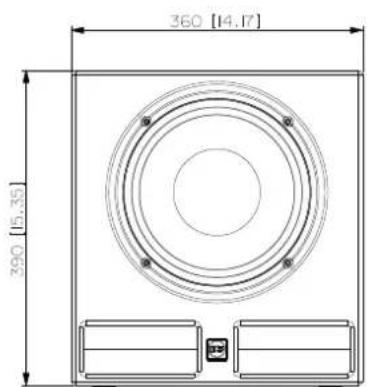
Dimensions (w, h, d)
Net Weight
Colour
AYRA PRO 10 SUB
30 - 124 Hz
130 dB
10 "composite woofer with a 2.5" double-layer moving coil
5 KΩ
Xlr, Jack, RCA
XLR
+4/-2 dBu
300 Watt RMS
300 Watt RMS
VDE
Variable 50-120 Hz
-∞, -6 dB, 0 dB
High Pass filter 50-120Hz
360 x 390 x 400 mm
17,7 Kg
Black
text_image
360 [14.17] 390 [15.35]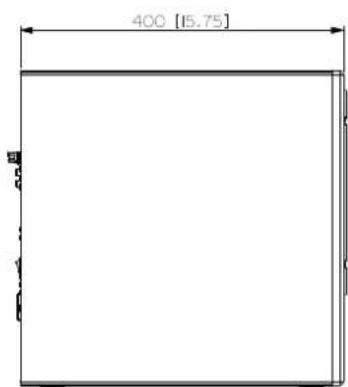
text_image
400 [15.75]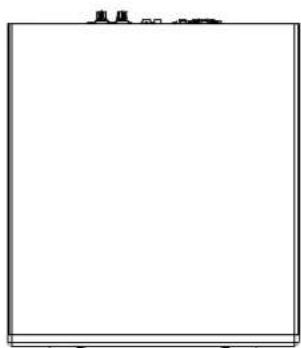
natural_image
Blank whiteboard with a small icon at the top (no text or symbols)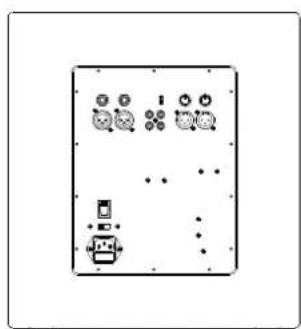
natural_image
Pure electrical circuit lines without any symbolswww.rcf.it