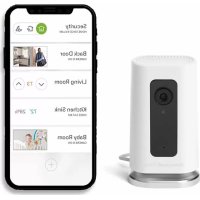
RCHC4100WF1002 - Surveillance Camera HONEYWELL - Free user manual and instructions
Find the device manual for free RCHC4100WF1002 HONEYWELL in PDF.


| Product Type | Indoor Wi-Fi Surveillance Camera |
| Brand | Honeywell |
| Model | RCHC4100WF1002 |
| Manufacturer | Resideo Technologies, Inc. |
| Power Supply | USB 5V (USB cable included) |
| Connectivity | Wi-Fi 2.4 GHz, Bluetooth 4.0 (or later) |
| Video Resolution | HD 1080p (estimated) |
| Night Vision | Yes (infrared, estimated) |
| Viewing Angle | 120° (estimated) |
| Local Storage | SD Card (8 GB included, expandable) |
| Cloud Storage | Via Honeywell Home app (optional subscription) |
| Motion Detection | Yes, with push alerts |
| Sound Detection | Smoke/CO alarm detection |
| Two-Way Audio | Yes (built-in microphone and speaker) |
| Mobile App | Honeywell Home (iOS and Android) |
| Voice Assistant | Compatible with Amazon Alexa and Google Assistant (estimated) |
| Mounting | On magnetic base or wall mount |
| Dimensions (approx.) | 7.5 cm diameter x 10 cm height (estimated) |
| Weight (approx.) | 150 g (estimated) |
| Operating Temperature | 0°C to 40°C (estimated) |
| Maintenance | Clean with a soft, dry cloth. Do not use abrasive products. |
| Security | Data encryption, FCC and IC compliance |
| Spare Parts / Repairability | Removable SD card. Other parts not specified. |
| Warranty | Check the retailer or the Honeywell Home website |
Frequently Asked Questions - RCHC4100WF1002 HONEYWELL
User questions about RCHC4100WF1002 HONEYWELL
0 question about this device. Answer the ones you know or ask your own.
Ask a new question about this device
Download the instructions for your Surveillance Camera in PDF format for free! Find your manual RCHC4100WF1002 - HONEYWELL and take your electronic device back in hand. On this page are published all the documents necessary for the use of your device. RCHC4100WF1002 by HONEYWELL.
USER MANUAL RCHC4100WF1002 HONEYWELL
natural_image
Line drawing of a rectangular electronic device with a circular vent and base (no text or symbols)Installation
Download the Honeywell Home app
Note: Have your Wi-Fi password available and confirm your router communicates at 2.4 GHz before installation.
1 Make sure bluetooth is enabled on your mobile device.
2 Search for Honeywell Home in the App Store or Google Play.
3 Download the Honeywell Home app.
Launch the Honeywell Home app
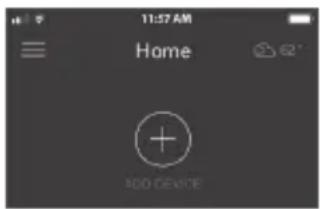
1 Launch the Honeywell Home app.
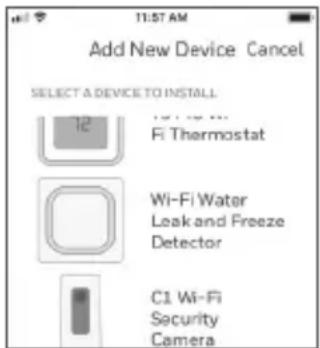
2 Create an account (if necessary), or sign in to your Honewell Home account. Tap ADD DEVICE or the plus sign.
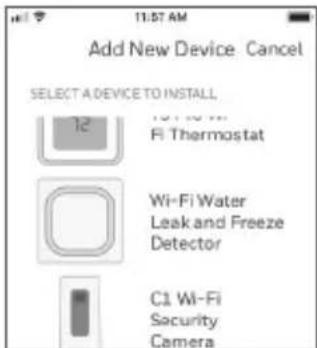
3 Select the C1 Wi-Fi Camera to install, then follow the instructions in the Honeywell Home app to name the camera and its location.
Connect the power cord
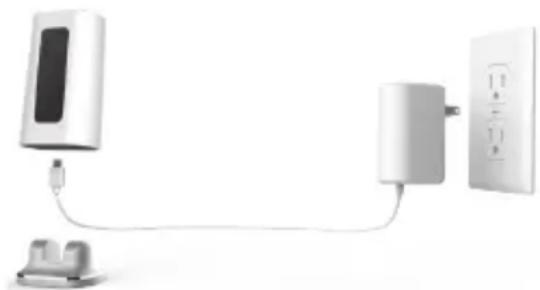
1 Remove the camera base and plug the power cord's USB end into the camera.
2 Reinsert the camera base and plug the camera into a power outlet.
3 Wait until the LED on the camera blinks blue (about 1 minute), then tap NEXT.
Note: If the LED turns solid red, it means the connection mode timed out. Unplug the camera and plug it back in.
natural_image
Diagram of a wall-mounted device connected to a power outlet, showing cable routing (no text or symbols)Connect
Connect to mobile device
1 Enable bluetooth on your mobile device.
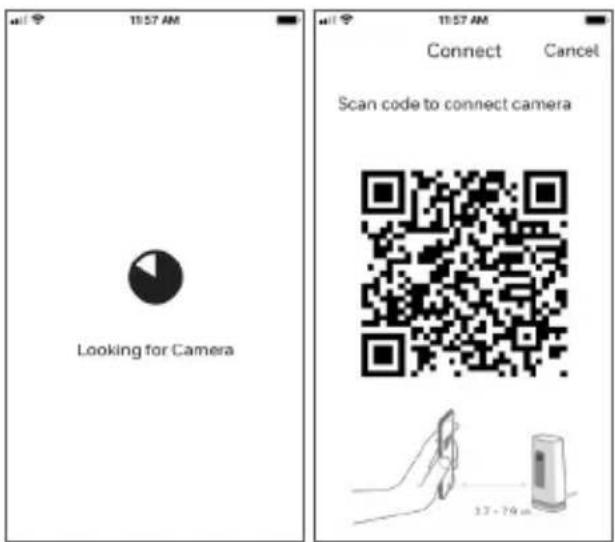
2 The app will look for the camera.
- For one camera, it will connect automatically.
- For more than one camera, the app will prompt you to select one camera at a time. Each camera has a unique MAC ID printed on the back. Use that ID to select the camera you want to connect.
3 A QR code will display in the app. To connect your camera to the app, hold the QR code approximately 3-8 inches (7-20 cm) from the camera lens.
4 The camera LED turns purple and the camera beeps.
Connect to Wi-Fi
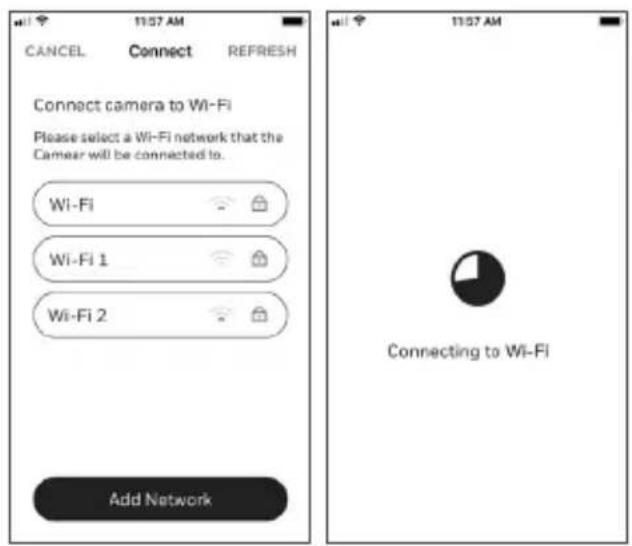
Note: Be sure you are on the same Wi-Fi network you wish to connect your camera to.
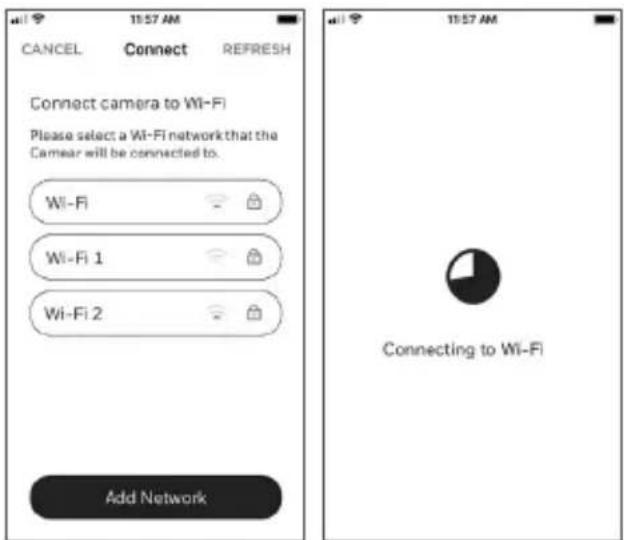
1 Choose your Wi-Fi network from the list. Tap NEXT.
2 Enter your Wi-Fi password, if necessary. Tap DONE.
Note: The camera will beep during some steps in this process.
Wi-Fi connection LEDs
During Wi-Fi connection, the LED indicates the following.
| LED Camera state | |
| Blinking Green Connecting to Wi-Fi network. | |
| Solid Green Connected to Wi-Fi network. | |
| Solid Red (for 2 seconds) | Connection failed. LED will then turn solid purple. |
| Solid Purple QR Code | scan complete. Go to “Connect to Wi-Fi” on page 3. |
| Blinking Blue Camera | has lost bluetooth connection. Unplug camera and plug it back in. See “Connect the power cord” on page 2 for instructions. |
Options
Choose your Geofencing and Resideo Membership options (if you skip them you can change them easily later).
Placement
With stand
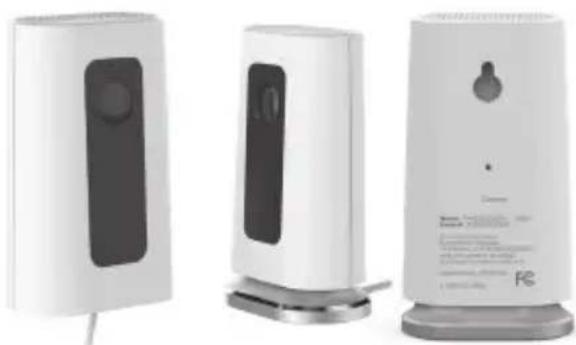
Place the camera in a desired location for viewing and recording.
On the wall
You can also mount the camera directly to the wall without the stand.
natural_image
Three white electronic devices with black buttons and a speaker tower, displayed against a white background (no visible text or symbols)Operation
Remove/replace the stand
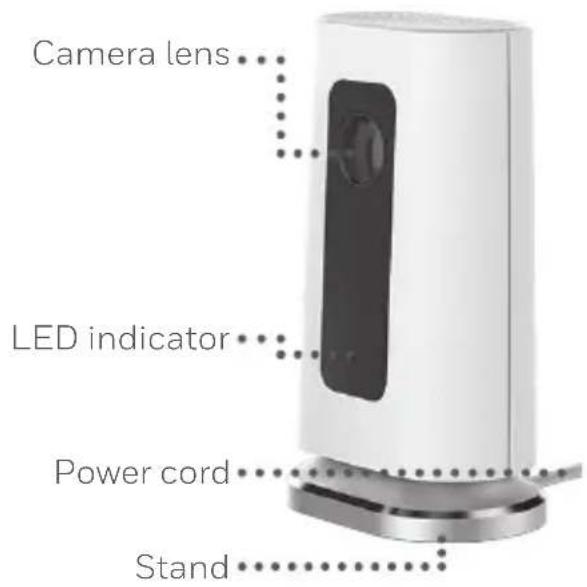
The stand is connected to the camera by a magnet.
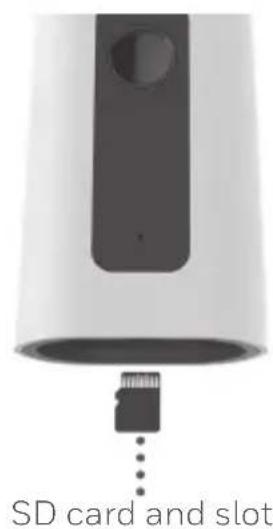
If you want to remove the stand to hang the camera on the wall or replace the SD card, simply pull the stand off of the camera. To replace, just snap it back on the camera.
Honeywell Home app experience
When you launch the application, your Home screen is displayed.
All of your devices (cameras, thermostats, water leak detectors, etc.) are displayed. Select a camera from the list to view live video from that camera.
Testing smoke/CO alarm detection
If your smoke or carbon monoxide alarm goes off and your camera is on, it will send you an alert that a smoke or CO alarm has been detected.
To test this feature, press and hold the Test button on your smoke/CO detector for at least 5 seconds or 3 cycles of the detector's alarm. A shorter test might not trigger a sound event.
For a list of compatible alarms see Honeywellhome.com.
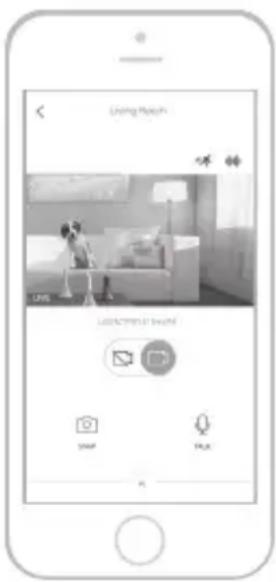
Camera overview
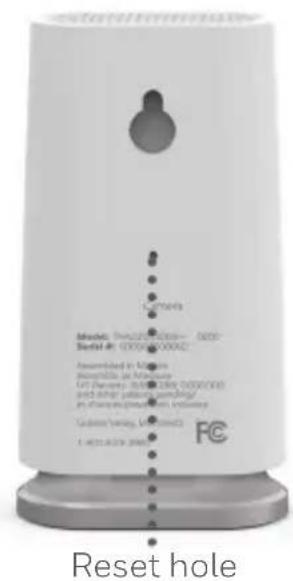
Reset
If your Wi-Fi connection fails or you need to connect to a different Wi-Fi network, insert one end of a paperclip into the reset hole. Press and hold it for 5 seconds to reset the Wi-Fi connection.
To reset all settings to factory defaults, press and hold the paperclip in the reset hole for 10 seconds.
SD card
The camera comes with an encrypted 8GB SD card installed. It stores images if the camera's connection to the cloud is lost. You can replace it with any compatible SD card.
Status LED
The camera has an LED that gives device status.
| LED Camera state | |
| During installation | |
| Blinking Blue Powered up. Ready to begin setup. | |
| Solid Blue Connected to App. Ready to complete setup. | |
| Solid Purple QR Code scan complete. Go to “Connect to Wi-Fi” on page 3. | |
| Blinking Green Connecting to Wi-Fi network. | |
| Solid Green Connected to Wi-Fi network. | |
| Solid Red Setup timed out. Unplug camera, plug it back in, and restart the process. | |
| During operation | |
| Blinking Green Connecting to Wi-Fi network. | |
| Solid Green Connected to Wi-Fi and operating. | |
| Blinking Red Not connected to Wi-Fi. |
FCC Regulations
§ 15.19 (a)(3)
This device complies with part 15 of the FCC Rules. Operation is subject to the following two conditions: (1) This device may not cause harmful interference, and (2) this device must accept any interference received, including interference that may cause undesired operation.
§ 15.21
Changes or modifications not expressly approved by the party responsible for compliance could void the user's authority to operate the equipment.
§ 15.105(b)
This equipment has been tested and found to comply with the limits for a Class B digital device, pursuant to part 15 of the FCC Rules. These limits are designed to provide reasonable protection against harmful interference in a residential installation. This equipment generates, uses and can radiate radio frequency energy and, if not installed and used in accordance with the instructions, may cause harmful interference to radio communications. However, there is no guarantee that interference will not occur in a particular installation. If this equipment does cause harmful interference to radio or television reception, which can be determined by turning the equipment off and on, the user is encouraged to try to correct the interference by one or more of the following measures:
- Reorient or relocate the receiving antenna.
- Increase the separation between the equipment and receiver.
- Connect the equipment into an outlet on a circuit different from that to which the receiver is connected.
- Consult the dealer or an experienced radio/TV technician for help.
FCC Radiation Exposure Statement:
This equipment complies with FCC radiation exposure limits set forth for an uncontrolled environment. This equipment should be installed and operated with minimum distance 20cm between the radiator & your body.
This device and its antenna(s) must not be co-located or operating in conjunction with any other antenna or transmitter.
IC Regulations
This device contains license-exempt transmitter(s)/receiver(s) that comply with Innovation, Science and Economic Development Canada's license-exempt RSS(s). Operation is subject to the following two conditions:
- This device may not cause interference.
- This device must accept any interference, including interference that may cause undesired operation of the device.
IC Radiation Exposure Statement:
This equipment complies with IC RSS-102 radiation exposure limits set forth for an uncontrolled environment. This equipment should be installed and operated with minimum distance 20cm between the radiator & your body.
The operation of this equipment is subject to the following two conditions: (1) this equipment or device may not cause harmful interference, and (2) this equipment or device must accept any interference, including interference that may cause undesired operation.
Need help?
• Web: Honeywellhome.com
• Phone: 1-800-633-3991
The product should not be disposed of with other household waste. Check for the nearest authorized collection centers or authorized recyclers. The correct disposal of end-of-life equipment will help prevent potential negative consequences for the environment and human health.

resideo
www.resideo.com
Resideo Technologies Inc.
1985 Douglas Drive North, Golden Valley, MN 55422
1-800-633-3991
33-00364EFS-07 M.S. Rev. 09-20 | Printed in United States
© 2020 Resideo Technologies, Inc. All rights reserved.
The Honeywell Home trademark is used under license
from Honeywell International, Inc. This product is manufactured by Resideo Technologies, Inc. and its affiliates.
33-00364EFS-07
Honeywell Home

natural_image
Line drawing of a rectangular electronic device with a circular vent and base (no text or symbols)Installation
natural_image
Diagram of a wall-mounted power supply connected to a wall-mounted electrical outlet (no text or symbols visible)Connexion
natural_image
Three white electronic devices with black buttons and display stands, one emitting a dropper (no visible text or symbols)Fonctionnement
natural_image
Close-up of a white cylindrical device with a black handle and a small connector inserted (no visible text or symbols)Fente et carte SD
Réinitialisation
Resideo Technologies Inc.
1985 Douglas Drive North, Golden Valley, MN 55422
1-800-633-3991
© 2020 Resideo Technologies, Inc. All rights reserved.
The Honeywell Home trademark is used under license
from Honeywell International, Inc. This product is manufactured by Resideo Technologies, Inc. and its affiliates.
33-00364EFS-07
Honeywell Home

natural_image
Line drawing of a rectangular electronic device with a circular vent and base (no text or symbols)Instalación
natural_image
Diagram of a smart home connected to an electrical outlet via a cable (no text or symbols visible)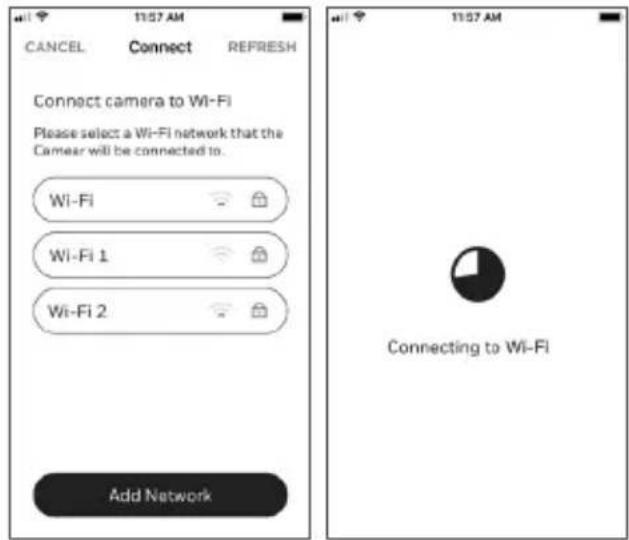
natural_image
Three white industrial water purifiers with black covers and metallic bases, displayed against a plain background (no visible text or symbols)Funcionamiento
Resideo Technologies Inc.
1985 Douglas Drive North, Golden Valley, MN 55422
1-800-633-3991
© 2020 Resideo Technologies, Inc. All rights reserved.
The Honeywell Home trademark is used under license
from Honeywell International, Inc. This product is manufactured by Resideo Technologies, Inc. and its affiliates.
33-00364EFS-07

- Installation
- Download the Honeywell Home app
- Launch the Honeywell Home app
- Connect the power cord
- Connect
- Connect to mobile device
- Connect to Wi-Fi
- Wi-Fi connection LEDs
- Options
- Placement
- With stand
- On the wall
- Operation
- Remove/replace the stand
- Honeywell Home app experience
- Testing smoke/CO alarm detection
- Camera overview
- Reset
- SD card
- Status LED
- FCC Regulations
- § 15.19 (a)(3)
- § 15.21
- § 15.105(b)
- FCC Radiation Exposure Statement:
- IC Regulations
- IC Radiation Exposure Statement:
- Need help?
- resideo
- Honeywell Home
- Connexion
- Fonctionnement
- Réinitialisation
- Instalación
- Funcionamiento
Brand : HONEYWELL
Model : RCHC4100WF1002
Category : Surveillance Camera