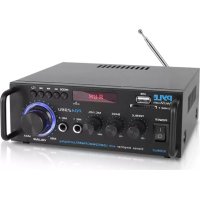
PDA29BU - Receiver Pyle - Free user manual and instructions
Find the device manual for free PDA29BU Pyle in PDF.



| Product Type | Bluetooth Wireless Stereo Amplifier Receiver |
| Brand | Pyle |
| Model | PDA29BU |
| Dimensions (W x H x D) | 7 x 6.2 x 2.4 inches |
| Power | 100 W x 2 max, 8 W x 2 RMS at 8 ohms |
| Bluetooth Version | 5.0 |
| Bluetooth Range | 40+ feet |
| Audio Inputs | RCA (L/R), USB, SD/MMC, FM, Microphone (2x) |
| Audio Outputs | Speaker terminals L/R |
| Signal-to-Noise Ratio | 75 dB |
| Frequency Response | 20 Hz - 20 kHz |
| Total Harmonic Distortion (T.H.D.) | 0.1% |
| Tone Controls | Treble and Bass: +/-10 dB (100 Hz / 10 kHz) |
| Display | LED |
| Remote Control | Included, CR-2025 battery |
| Antennas | Bluetooth and FM |
| Main Functions | Bluetooth streaming, USB/SD player, FM radio, stereo amplifier, mic input |
| Care and Cleaning | Unplug the device, clean with a dry cloth. Do not use liquids. |
| Safety | Do not expose to rain or moisture. Unplug during storms. Refer repairs to qualified technician. |
| Spare Parts and Repairability | No user-serviceable parts. Contact a qualified professional. |
Frequently Asked Questions - PDA29BU Pyle
User questions about PDA29BU Pyle
0 question about this device. Answer the ones you know or ask your own.
Ask a new question about this device
Download the instructions for your Receiver in PDF format for free! Find your manual PDA29BU - Pyle and take your electronic device back in hand. On this page are published all the documents necessary for the use of your device. PDA29BU by Pyle.
USER MANUAL PDA29BU Pyle
Blue Series Compact and Audio Streaming Amp with RCA & Speaker Terminals
User Manual
WARNING!
CAUTION: TO REDUCE THE RISK OF ELECTRIC SHOCK, DO NOT REMOVE THE COVER OF THIS UNIT. THERE ARE NO USER SERVICEABLE PARTS INSIDE. REFER ALL SERVICING TO A QUALIFIED TECHNICIAN.

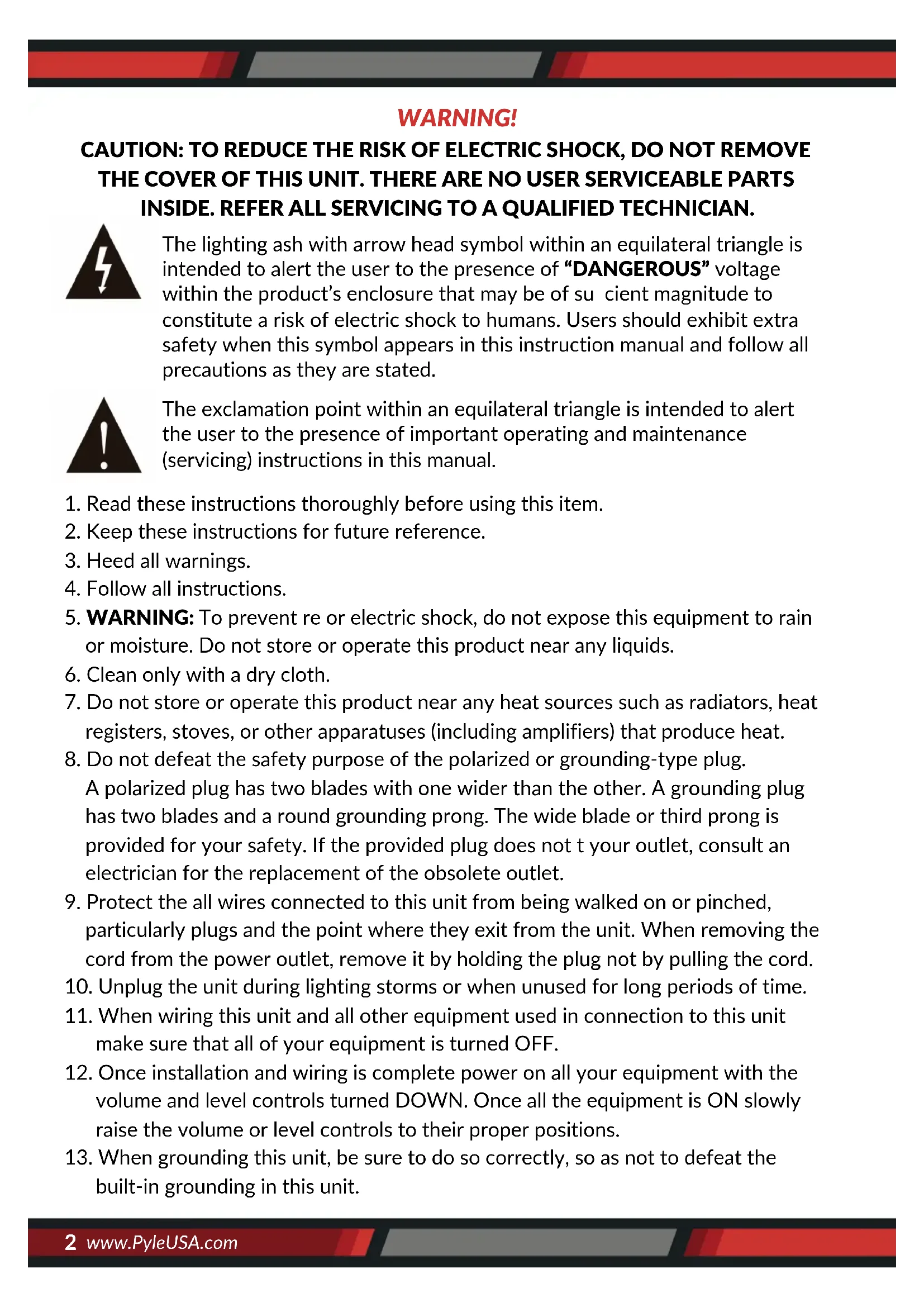
The lighting ash with arrow head symbol within an equilateral triangle is intended to alert the user to the presence of “DANGEROUS” voltage within the product’s enclosure that may be of sufficient magnitude to constitute a risk of electric shock to humans. Users should exhibit extra safety when this symbol appears in this instruction manual and follow all precautions as they are stated.

The exclamation point within an equilateral triangle is intended to alert the user to the presence of important operating and maintenance (servicing) instructions in this manual.
- Read these instructions thoroughly before using this item.
- Keep these instructions for future reference.
- Heed all warnings.
- Follow all instructions.
- WARNING: To prevent re or electric shock, do not expose this equipment to rain or moisture. Do not store or operate this product near any liquids.
- Clean only with a dry cloth.
- Do not store or operate this product near any heat sources such as radiators, heat registers, stoves, or other apparatuses (including amplifiers) that produce heat.
- Do not defeat the safety purpose of the polarized or grounding-type plug.
A polarized plug has two blades with one wider than the other. A grounding plug has two blades and a round grounding prong. The wide blade or third prong is provided for your safety. If the provided plug does not t your outlet, consult an electrician for the replacement of the obsolete outlet. - Protect the all wires connected to this unit from being walked on or pinched, particularly plugs and the point where they exit from the unit. When removing the cord from the power outlet, remove it by holding the plug not by pulling the cord.
- Unplug the unit during lighting storms or when unused for long periods of time.
- When wiring this unit and all other equipment used in connection to this unit make sure that all of your equipment is turned OFF.
- Once installation and wiring is complete power on all your equipment with the volume and level controls turned DOWN. Once all the equipment is ON slowly raise the volume or level controls to their proper positions.
-
When grounding this unit, be sure to do so correctly, so as not to defeat the built-in grounding in this unit.
-
Before placing, installing, rigging, or suspending any product, inspect all hardware, suspension, cabinets, transducers, brackets and associated equipment for damage. Any missing, corroded, deformed, or non-load rated component could significantly reduce the strength of the installation, placement or array. Any such condition severely reduces the safety of the installation and should be immediately corrected. Use only hardware which is rated for the loading conditions of the installation and any possible short-term, unexpected overloading. Never exceed the rating of the hardware or equipment.
- Consult a licensed, professional engineer regarding physical equipment installation. Ensure that all local, state and national Regulations regarding the safety and operation of equipment are understood and adhered to.
- Refer all servicing to qualified service personnel. Servicing is required when the apparatus has been damaged in any way, such as power supply cord or plug is damaged, liquid has been spilled or objects have fallen into the apparatus, the apparatus has been exposed to rain or moisture, does not operate normally, or has been dropped.
IMPORTANT SAFETY INSTRUCTIONS
Turn o the power and DO NOT operate this equipment immediately incase of any of the following irregularities to avoid re or electric shock:
- If you detect smoke or a strange smell coming from the unit.
- If water or any metal object is immersed or dropped into the device.
- If the unit has been dropped or damaged.
- If the supply cord or plug is damaged.
- If the unit fails to operate properly (No sound comes out of the speakers).
- Do not drop metal or combustible objects into the ventilation slot.
- During lightning storms or when unused for long periods of time
• Refer all servicing to qualified personnel. - Servicing is required when the apparatus has been damaged in any way, such as power supply cord or plug is damaged, liquid has been spilled or objects have fallen into the apparatus has been exposed to rain or moisture, does not operate normally, or has been dropped.
- When unplugging the power cord, do not pull on the cord itself but pull on the plug.
- Do not install this equipment in a confined or a built-in space. Only install the equipment in a well ventilated and open location. The ventilation should not be impeded by covering the ventilation openings with items such as newspaper, table-cloths, curtains etc.
- Do not expose the product to moisture (mist, steam, humidity, condensation) or excessive heat (direct sun, radiator) for a long period of time to avoid re or electric shock.
WHEN THE UNIT IS IN USE
- Do not place heavy objects on the unit as this may cause it to fall or break which may result in personal injury and/or property damage. In addition, the object itself may fall o and cause injury and/or damage.
- Remove the electric plug from the outlet if you want to clean the device or when the device is not to be used for extended periods of time.
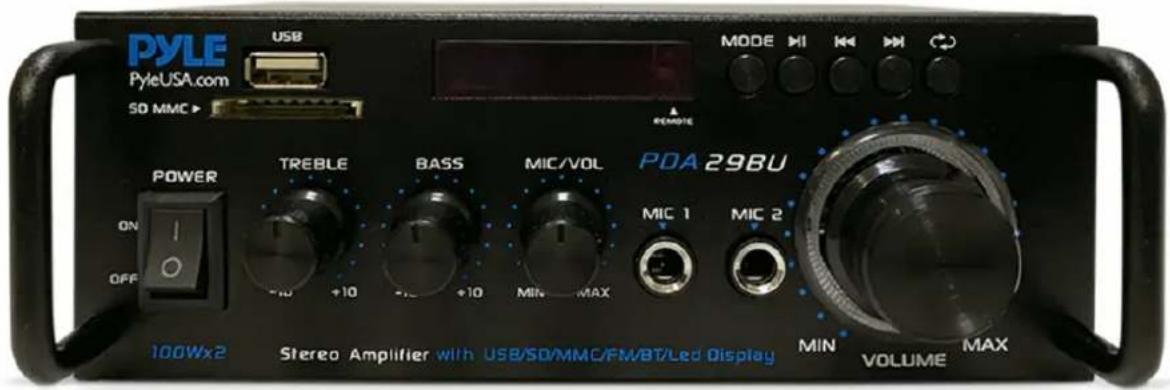
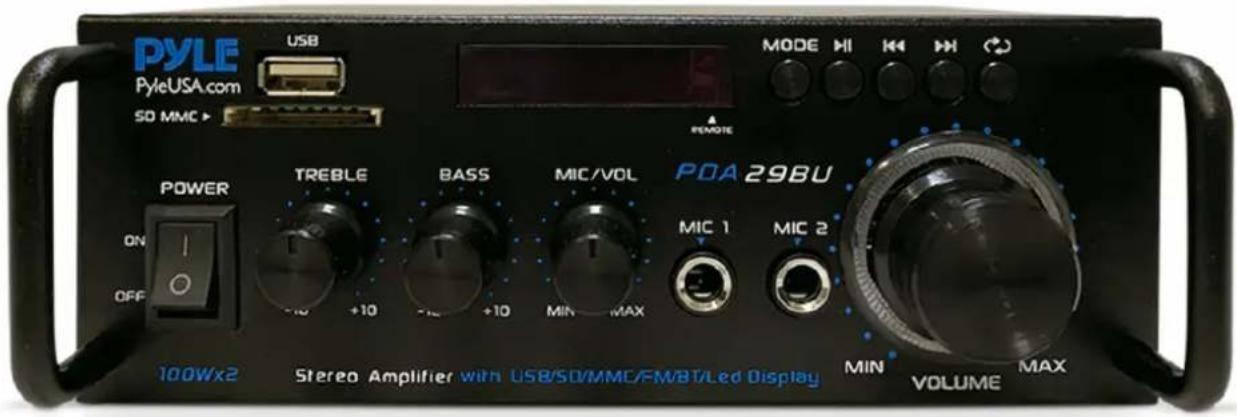
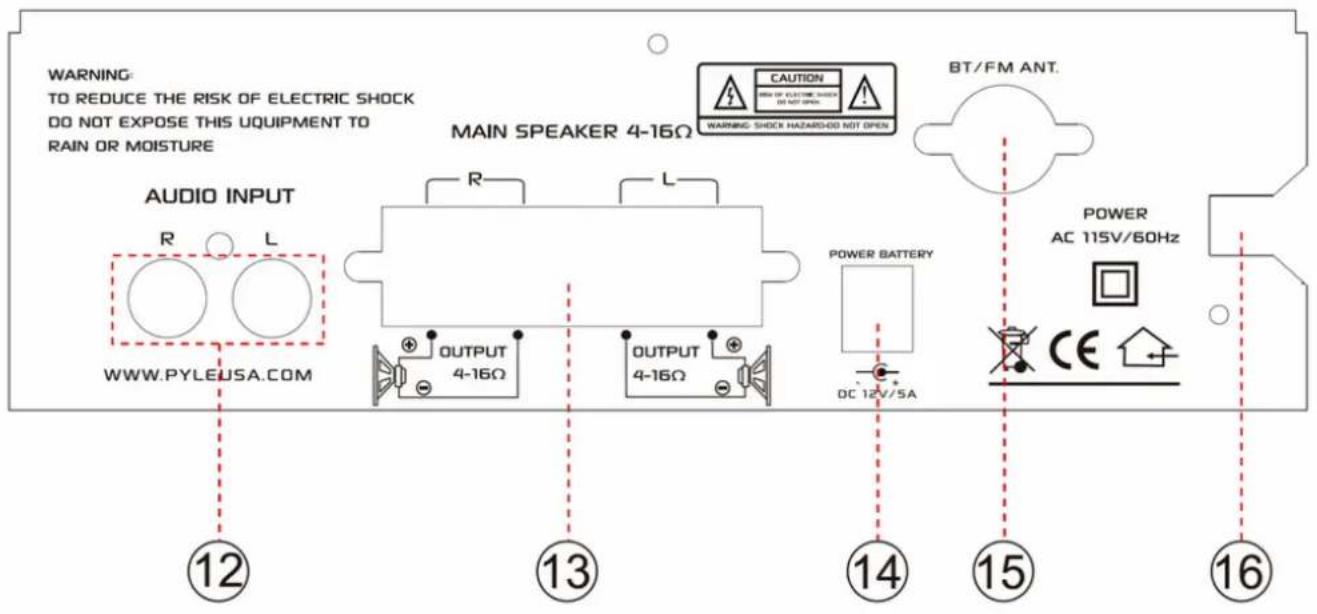
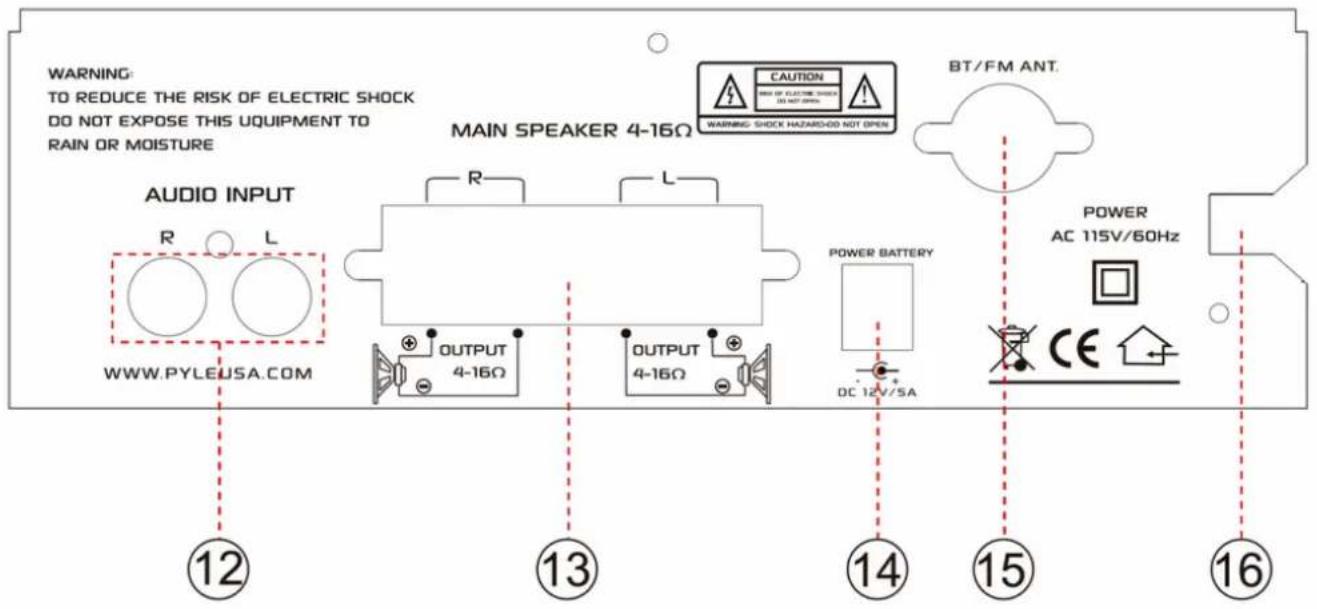
FRONT AND REAR PANEL FUNCTION DESCRIPTION
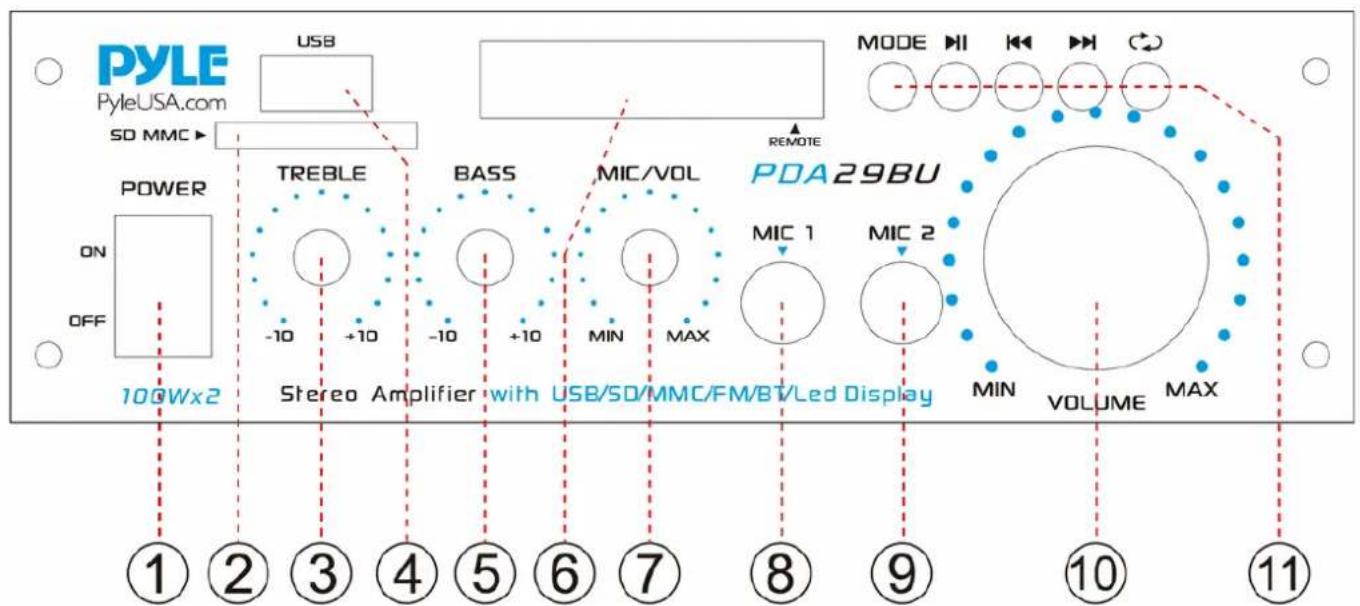
◀◀ : Select the previous song
▶▶: Select the next song
▶II : Mp3, for play or pause
In the FM Mode, click to automatically search the station.
All or single repeat model
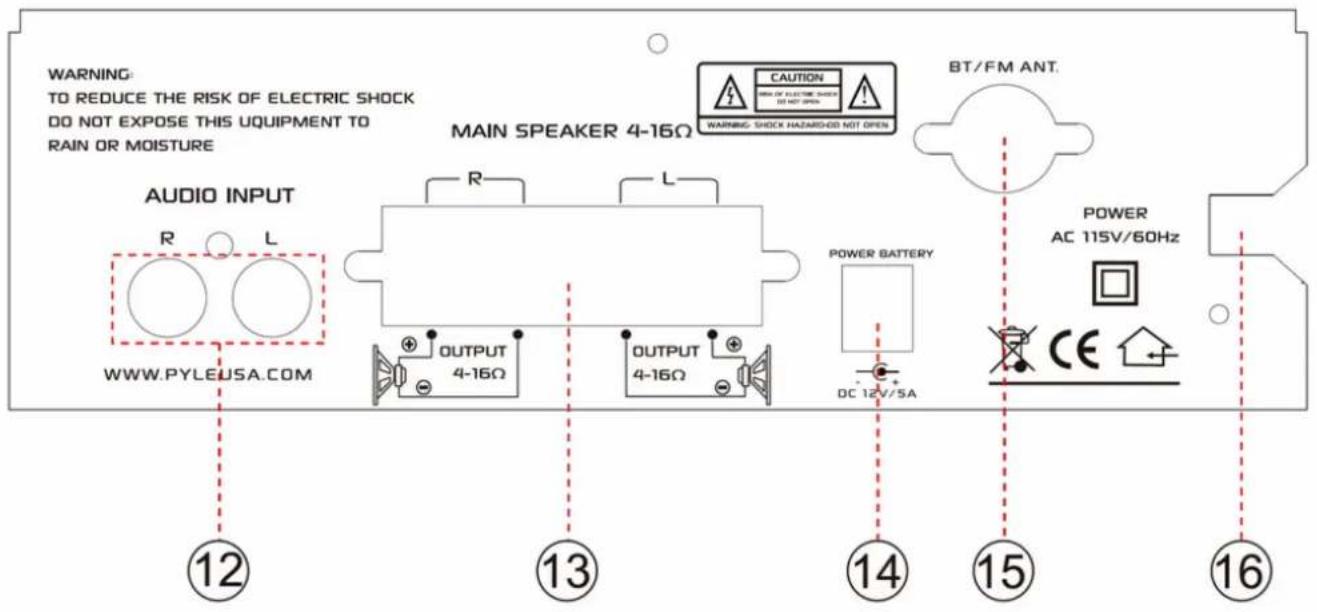
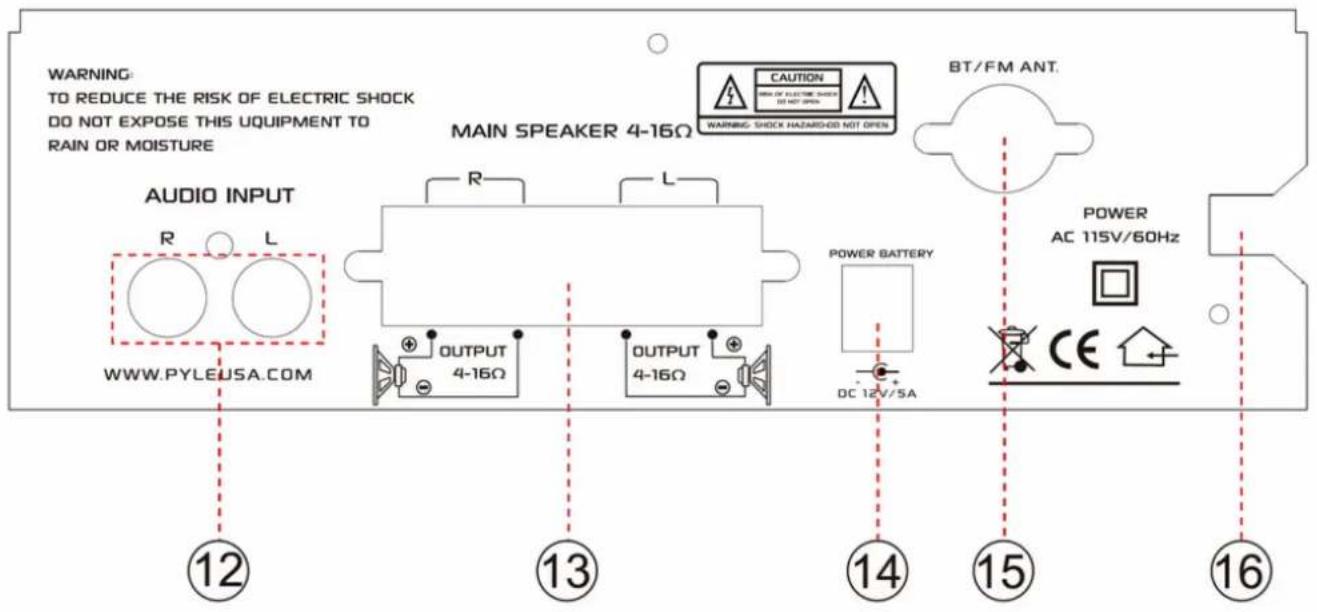
- Audio input interface
- Left and right Output
- DC power supply 12V/5A input jack
- BT and FM antenna
- Power Input Cable
WIRELESS BT CONNECTION
A. Press MODE button and enter into Wireless BT mode. Blue light will ash on the screen.
B. Search for the Wireless BT device and the bluetooth name "PYLEUSA" or "BT".
C. Select the "PYLEUSA" or "BT" Wireless BT name and wait for the device to pair.
D. The unit will make a sound confirming that the devices have successfully paired and the Blue light will stop ashing.
E. Once paired you can play music from your Wireless BT device. You can also use the control buttons on the unit to select the tracks from your Wireless BT device.
STEPS FOR FM RADIO CONTROL
A. Press MODE button and enter into FM Radio model, the FM frequency will be displayed on the screen.
B. Please turn the FM radio antenna and lengthen it to the longest position.
C. Press Play/Pause button and will auto scan and store FM Radio station from 87.5Mhz to 108Mhz.
D. Press NEXT/PREV button to select the FM station.
NOTE:
The USB input is ONLY mean to connect to a USB ash drive (thumb drive).
Connecting a MP3 player or computer directly to the USB ash drive input will result in the unit failing to play the audio from those devices.
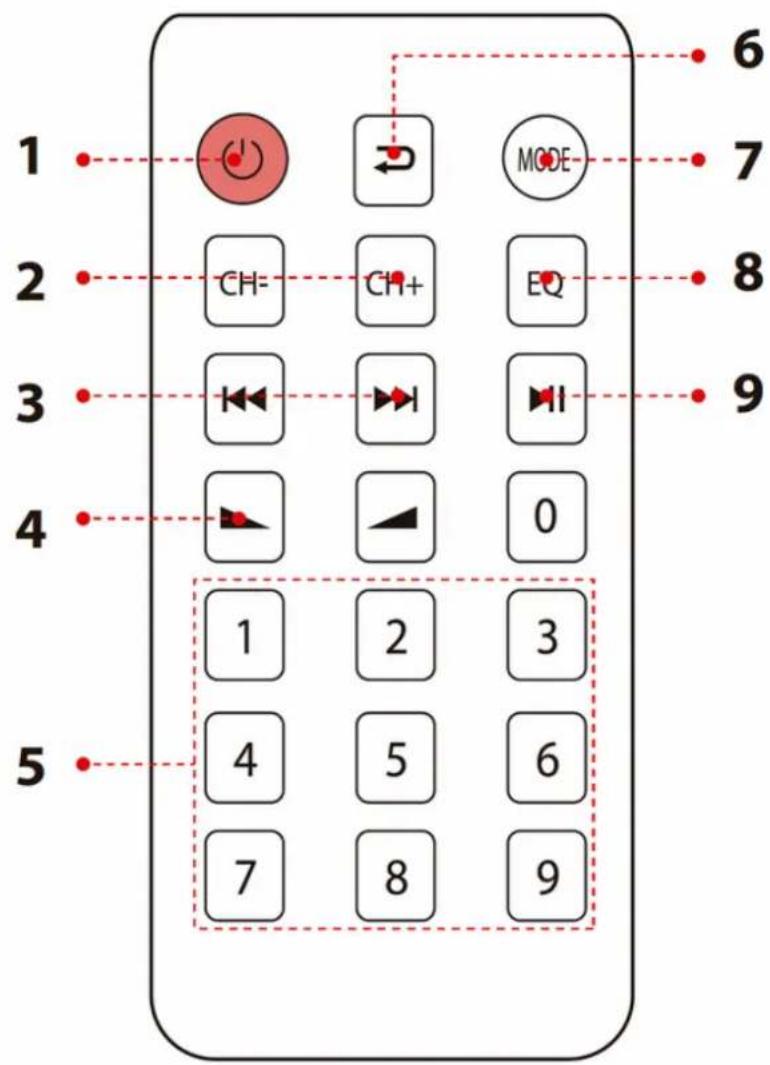
MP3 PLAYER REMOTE CONTROL FUNCTIONS
Press this button to turn ON or OFF the MP31.
When in the FM mode, press this two buttons to select previous or next channel.2.
- Press these two buttons to select the previous or next track in USB or SD or Wireless BT mode
Volume up or down4.
- Press the numbers to select the tracks directly. The unit takes 1-2 seconds to response in USB or SD mode.
Press this button to repeat mode.6.
Press this button to select the playing mode, such as USB/SD/FM/WIRELESS BT7.
EQ function: Select a pre-set mode of the equalizer that is designed accordingly.8.
Play and Pause function for MP3.9.
FEATURES:
- Compact and Powerful Mini Amp System
• BT Receiver for Wireless Audio Streaming Ability
• RCA (L/R) Audio Input - USB/SD/FM playing
- Connect & Stream Audio from External Devices
- Push-Type Speaker L/R Terminals
• Front Panel Rotary Controls
• Power ON / OFF Switch - LED Indicator Light
- Configurable Treble, Bass and Volume Adjustment
- LED Display
- With Wireless BT Antenna to Improve BT Distance
- With FM Antenna to Improve FM Sensitivity
- MIC Input
WHAT'S IN THE BOX:
- Stereo Amplifier System
- Remote Control
- FM Antenna
WIRELESS BT CONNECTIVITY:
- Simple & Hassle-Free Pairing Ability
- Works with All of Today's Latest Devices (Smartphones, Tablets, Laptops, Computers, etc.)
• Wireless BT Network Name: 'PyleUSA' - Wireless BT Version: 5.0
- Wireless Range: 40'+ ft.
TECHNICAL SPECS:
• Power Supply: 100WX2 Max
• 10% RMS at 8-Ohm Impedance: 8WX2
• Signal-to-Noise Ratio: 75dB
• Frequency Response: 20Hz - 20kHz
- Input Sensitivity: 200mV
• T.H.D.: 0.1%
• Signal-to-Noise Ratio: 75dB
• Power Cable Length: 4.9' ft. (1.49 m)
- Tone Controls: Bass & Treble: +/-10dB (100Hz/10kHz)
• Power Fuse: 1 A, 250V Fast-Acting (5 x 20mm)
- Battery Operated Remote, Requires (1) x CR-2025 Button Cell Battery, Included
- Dimensions (W x H x D): 7" x 6.2" x 2.4" -inches (17.7 x 15.7 x 6 -cm)

This product can expose you to a chemical or group of chemicals, which may include "Nickel Carbonate" which is known in the state of California to cause cancer, birth defects, or other reproductive harm. For more info, go to https://www.p65warnings.ca.gov/.
PYLE
PyleUSA.com
This device has been tested and found to comply with the limits for a Class B digital device, pursuant to Part 15 of the FCC Rules. These limits are designed to provide reasonable protection against harmful interference in a residential installation. This device generates, uses and can radiate radio frequency energy and, if not installed and used in accordance with the instructions, may cause harmful interference to radio communications.
However, there is no guarantee that interference will not occur in a particular installation. If this device does cause harmful interference to radio or television reception, which can be determined by turning the device off and on, the user is encouraged to try to correct the interference by one or more of the following measures:
• Reorient or relocate the receiving antenna.
- Increase the separation between the device and receiver.
- Connect the device into an outlet on a circuit different from that to which the receiver is connected.
- Consult the dealer or an experienced radio/TV technician for help
Changes or modifications not expressly approved by the party responsible for compliance could void the user's authority to operate the equipment
Questions or Comments
We are here to help!
Phone: 1.718.535.1800
PyleUSA.com/ContactUs
PDA29BUEU - PDA29BUUK
Changes or modifications not expressly approved by the party responsible for compliance could void the user's authority to operate the equipment

Domande o commenti
- WARNING!
- CAUTION: TO REDUCE THE RISK OF ELECTRIC SHOCK, DO NOT REMOVE THE COVER OF THIS UNIT. THERE ARE NO USER SERVICEABLE PARTS INSIDE. REFER ALL SERVICING TO A QUALIFIED TECHNICIAN.
- IMPORTANT SAFETY INSTRUCTIONS
- Turn o the power and DO NOT operate this equipment immediately incase of any of the following irregularities to avoid re or electric shock:
- WHEN THE UNIT IS IN USE
- WIRELESS BT CONNECTION
- STEPS FOR FM RADIO CONTROL
- NOTE:
- MP3 PLAYER REMOTE CONTROL FUNCTIONS
- FEATURES:
- WHAT'S IN THE BOX:
- WIRELESS BT CONNECTIVITY:
- TECHNICAL SPECS:
- PYLE
- PyleUSA.com
- PDA29BUEU - PDA29BUUK
Brand : Pyle
Model : PDA29BU
Category : Receiver