IBAC517 - USB adapter Icy Box - Free user manual and instructions
Find the device manual for free IBAC517 Icy Box in PDF.


User questions about IBAC517 Icy Box
0 question about this device. Answer the ones you know or ask your own.
Ask a new question about this device
Download the instructions for your USB adapter in PDF format for free! Find your manual IBAC517 - Icy Box and take your electronic device back in hand. On this page are published all the documents necessary for the use of your device. IBAC517 by Icy Box.
USER MANUAL IBAC517 Icy Box
USB3.0 to Gigabit LAN + 3x USB 3.0 Adapter
Handbuch IB-AC517
USB3.0 zu Gigabit LAN + 3x USB 3.0 Adapter
Manuel IB-AC517
USB3.0 - Gigabit LAN + 3x USB 3.0 Adaptateur
Manuale IB-AC517
USB3.0 - Gigabit LAN + 3x USB 3.0 Adapter
Manual IB-AC517
USB3.0 - Gigabit LAN + 3x USB 3.0 Adapter
Manual IB-AC517
USB3.0 - Gigabit LAN + 3x USB 3.0 Adapter
Instrukcja IB-AC517
USB3.0 - Gigabit LAN + 3x USB 3.0 Adapter
Ručník IB-AC517
USB3.0 - Gigabit LAN + 3x USB 3.0 Adapter
Εγχειρίδιο IB-AC517
USB3.0 - Gigabit LAN + 3x USB 3.0 Adapter
natural_image
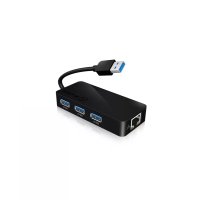
Black ICY BOX network device with USB cable and three Ethernet ports, accompanied by two circular logos (WINDOWS Compatible and MAC Compatible) on the right.USB 3.0 to Gigabit LAN + 3x USB 3.0
IB-AC517
Package content
1x IB-AC517, 1x CD, 1x QuickInstallationGuide
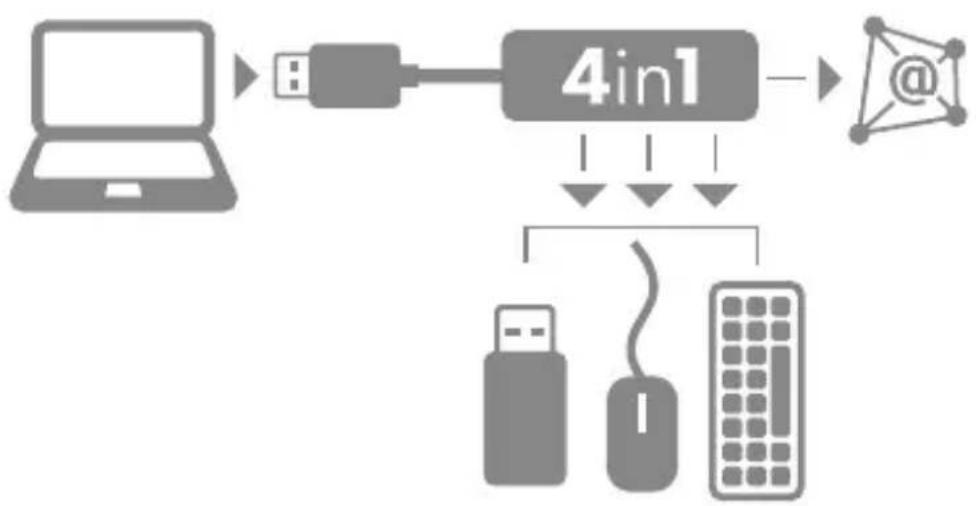
Connection diagram
flowchart
graph TD
    A["Laptop"] --> B["4in1"]
    B --> C["@"]
    B --> D["Server"]
    D --> E["User"]
    D --> F["Mouse"]
    D --> G["Computer"]
Features
- Input: 1x USB 3.0 Type A male - up to 5 Gbit/s
• Output: 1x Gigabit LAN RJ45 female - up to 1 Gbit/s 3x USB 3.0 Type A female - up to 5 Gbit/s - Bus powered: 5V/900mA, no power supply needed
- Supported OS:
LAN: Windows 7/8/8.1, MAC OS®
USB 3.0: Windows 7/8/8.1, MAC OS®
• LED for Ethernet Connection - Portable design due to small size
• Supports Green Ethernet (IEEE 802.3az)
USB 3.0 to Gigabit LAN + 3x USB 3.0
IB-AC517
Description
This ICY BOX 4in1 USB 3.0 Adapter can extend a USB 3.0 port on your PC or notebook to 1x Gigabit LAN and 3x SuperSpeed USB 3.0 ports for external harddrives, cardreader, speaker, printer and more, especially for Notebooks without Ethernet Port to connect them via Gigabit LAN, up to 3x faster as WLAN to the network.
Install the Driver
* Caution: Do not connect the adapter to your computer before installing the driver from the delivered CD or from the download area of http://www.raidsonic.de.
Windows 7/8/8.1:
A. Insert the CD into the CD ROM drive.
B. The installer program will run automatically.
C. Click on "Run Setup.exe".
D. Follow the instructions and finish the driver installation.
E. Connect the adapter to a USB port on the PC.
F. Restart the PC.
G. The IB-AC517 is ready to be used.
MAC OS X 10.9:
A. Insert the CD into the CD ROM drive.
B. Run the file *driver.pkg by double click.
C. Follow the instructions and finish the driver installation.
D. Connect the adapter to a USB port on the mac.
E. Restart the mac.
F. The IB-AC517 is ready to be used.
Now the installation is completed. You can connect the adapter to a network device by an Ethernet cable:
- Connect an Ethernet cable to the Ethernet port on the adapter.
- Connect the other end of the Ethernet cable to your network hub, switch or router.
The Link LED should light up green to indicate a proper physical connection between the adapter and the network. If the Link LED doesn't light up, please verify the cable connections between all the network devices.
USB 3.0 to Gigabit LAN + 3x USB 3.0
IB-AC517
Beschreibung
text_image
CE ROHS ROHS - conforce (2002/05/16)© Copyright 2014 by RaidSonic Technology GmbH. All Rights Reserved
The information contained in this manual is believed to be accurate and reliable. RaidSonic Technology GmbH assumes no responsibility for any errors contained in this manual. RaidSonic Technology GmbH reserves the right to make changes in the specifications and/or design of the above mentioned product without prior notice. The diagrams contained in this manual may also not fully represent the product that you are using and are there for illustration purposes only. RaidSonic Technology GmbH assumes no responsibility for any differences between the product mentioned in this manual and the product you may have. All the information contained in this manual was correct at the time of publication. However, as our engineers are always updating and improving the product, your device's software may have a slightly different appearance or modified functionality than presented in this manual.