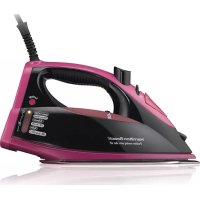
14348 - Iron HAMILTON BEACH - Free user manual and instructions
Find the device manual for free 14348 HAMILTON BEACH in PDF.



| Product Type | Steam Iron |
| Brand | Hamilton Beach |
| Model | 14348 |
| Power Supply | 120 V, 60 Hz |
| Power | 1500 W |
| Water Tank Capacity | 175 ml (3/4 cup) |
| Main Functions | Dry ironing, steam ironing, vertical steam, spray, steam burst |
| Cord | Retractable |
| Automatic Shut-off | Yes, motion detection: 30 s on soleplate, 15 min on heel |
| Power Indicator | Red (off/heating) and green (ready/preheat) |
| Adjustable Steam Dial | Yes, from minimum to maximum steam |
| Self-Clean Button | Yes |
| Warranty | 1 year limited |
| Safety | Polarized plug, automatic shut-off, tangle-resistant cord |
| Maintenance | Empty tank after use, regular self-cleaning for limescale deposits |
| Usage | Household only |
| Dry Ironing | Yes, with steam dial on 'dry' position |
| Steam Ironing | Yes, with temperature setting in steam range |
| Vertical Steam | Yes, for de-wrinkling hanging garments |
| Spray | Yes, fine water spray |
| Steam Burst | Yes, press button for powerful burst |
Frequently Asked Questions - 14348 HAMILTON BEACH
User questions about 14348 HAMILTON BEACH
0 question about this device. Answer the ones you know or ask your own.
Ask a new question about this device
Download the instructions for your Iron in PDF format for free! Find your manual 14348 - HAMILTON BEACH and take your electronic device back in hand. On this page are published all the documents necessary for the use of your device. 14348 by HAMILTON BEACH.
USER MANUAL 14348 HAMILTON BEACH
natural_image
Line drawing of two iron iron holders, one with handle and neck, the other with clasp and placket (no text or symbols)English 2
USA: 1-800-851-8900
Visit www.hamiltonbeach.com for our complete line of products and Use and Care Guides – as well as delicious recipes, tips, and to register your product online!
Français 14
When using your flatiron, basic safety precautions should always be followed, including the following:
READ ALL INSTRUCTIONS BEFORE USING
- Use iron only for its intended use.
- Verify that the voltage in your home corresponds to that of your appliance.
- To protect against risk of electric shock, do not immerse the iron in water or other liquids.
- The iron should always be turned to OFF before plugging or unplugging from outlet. Never yank cord to disconnect from outlet; instead, grasp plug and pull to disconnect.
- Do not allow cord to touch hot surfaces. Let iron cool completely before putting away. Loop cord loosely around iron when storing.
- Always disconnect iron from electrical outlet when filling with water or emptying and when not in use.
- Do not operate iron with a damaged cord or if the iron has been dropped or damaged. To avoid the risk of electric shock, do not disassemble the iron. Call our toll-free customer service number for information on examination and repair. Incorrect reassembly can cause a risk of electric shock when the iron is used.
- Close supervision is necessary for any appliance being used by or near children. Do not leave iron unattended while connected or on an ironing board.
- Burns can occur from touching hot metal parts, hot water, or steam. Use caution when you turn a steam iron upside down – there may be hot water in the reservoir.
SPECIAL INSTRUCTIONS
- To avoid a circuit overload, do not operate another high-wattage appliance on the same circuit.
- If an extension cord is absolutely necessary, a 10-ampere cord should be used. Cords rated for less amperage may overheat. Care should be taken to arrange the cord so that it cannot be pulled or tripped over.
SAVE THESE INSTRUCTIONS!
OTHER CONSUMER SAFETY INFORMATION
This product is intended for household use only.
WARNING! Shock Hazard: This appliance has a polarized plug (one wide blade) that reduces the risk of electric shock. The plug fits only one way into a polarized outlet. Do not defeat the safety purpose of the plug by modifying the plug in any way or by using an adapter. If the plug does not fit, reverse the plug. If it still does not fit, have an electrician replace the outlet.
Please Read Before First Use
- During first use of the iron, it may appear to smoke. This will stop and does not indicate a defect or hazard.
- Many irons spit or sputter during the first few uses with tap water. This happens as the steam chamber becomes conditioned. This will stop after a few uses.
- Steam vents should be cleared before first use. Prepare iron for steam ironing; then iron over an old cloth for a few minutes while letting iron steam.
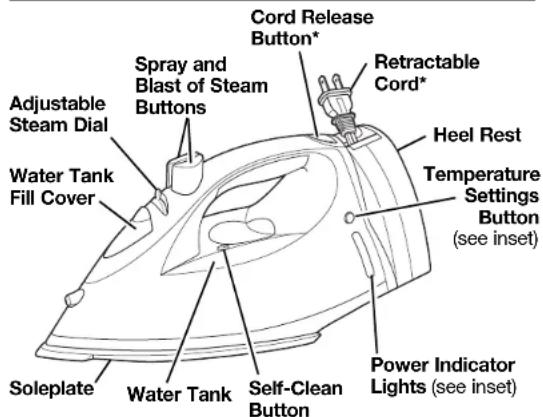
Parts and Features
*on selected models only
Position Sensing Feature
The iron is equipped with a position sensor. If iron is left motionless, it will turn off automatically and cool to room temperature.
To restart, move iron and allow it to reheat on heel position:
— Iron will reheat to the previously selected setting.
— Iron will lose memory when turned off (O) or unplugged.
The iron turns off automatically when left in these positions:
| Iron Position | Motionless Time | |
| Inadvertently resting on soleplate |  | 30 seconds |
| Inadvertently resting on either side |  | 15 minutes max |
| Resting on heel |  | 15 minutes |
| The light is . . . This means . . . | |
| RED and Solid | Power OFF (O). This light will remain on until iron is unplugged. |
| RED and Blinking Iron | was heating/reheating and went to OFF (O). Iron will reheat when moved. |
| GREEN and Solid Iron | is heated and ready for ironing. |
| GREEN and Blinking | iron is preheating/heating. |
To Dry Iron
- Plug in iron.
- Turn Adjustable Steam Dial to the (Dry Iron) position.
- Set Temperature Settings to desired temperature. With iron in an upright position, allow 3 minutes for iron to reach desired temperature. Do not preheat iron with soleplate facing down.
- To turn iron off, set Temperature Settings to OFF (O). The iron may be turned off by pressing the Temperature Settings Button for 3 seconds.
To Steam Iron
- Unplug iron. Open Water Tank Fill Cover. Using a cup, slowly pour 6 ounces (3/4 cup) of tap water into the water tank opening. Close Water Tank Fill Cover.
- Plug in iron.
- Set Temperature Settings to desired setting in steam range. With iron in an upright position, allow 3 minutes for iron to reach desired temperature. Do not preheat iron with soleplate facing down.
- Set Adjustable Steam to desired steam output.
- To turn off, turn Adjustable Steam Dial to (Dry Iron). Set Temperature Settings to OFF (O). (Iron may also be turned off by pressing Temperature Settings Button for 3 seconds.)
- Empty water from the iron following directions in "Care and Cleaning."
Water
Please use ordinary tap water. If you have extremely hard water, alternate between tap water and distilled water for use in the iron.
Features (on selected models)
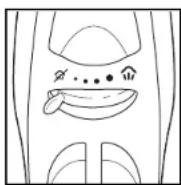
Adjustable Steam Dial
Provides minimum steam for wool or maximum steam for linen. Set the dial to change to Dry Iron.
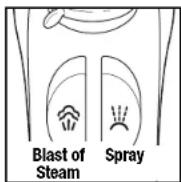
Blast of Steam and Spray Buttons
Push Blast of Steam Button for an extra blast of steam. Push Spray Button to release a fine spray of water for difficult wrinkles in cotton or linen.
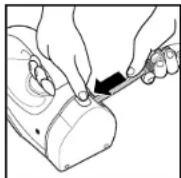
Retractable Cord
- Pull cord to desired length. Do not unwind cord beyond colored tape indicator on cord.
- To store cord, press and hold the Cord Release Button while guiding the cord into the storage area.
WARNING! To reduce the risk of an eye injury, hold the plug while retracting the cord.
Features (cont.)
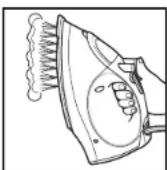
Vertical Steam
- Follow Steps 1 through 4 in "To Steam Iron."
- Hang garment in a location that is not susceptible to damage from heat or moisture. Do not hang in front of wallpaper, window, or mirror.
- Hold iron about 6 inches away from garment. Press and release the Blast of Steam Button to steam out wrinkles. Do not press Blast of Steam Button more than once every 3 seconds.
- To turn iron off, turn Temperature Settings to OFF (O). Unplug iron.
- Empty water from the iron following directions in "Care and Cleaning."
NOTICE: Do not allow the hot soleplate to touch delicate garments.
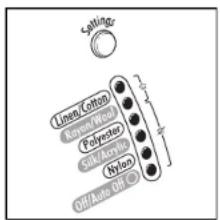
Temperature Settings
| Steam Setting | To Iron | Ironing Instructions |
 | Off | |
| Nylon | Dry iron on the reverse side of the fabric. | |
| Acrylic | Dry iron on the reverse side of the fabric. | |
| Silk | Dry iron on the reverse side of the fabric. | |
| Polyester | Iron with fabric still damp. | |
 | Rayon | Iron on the reverse side of fabric. |
| Wool | Steam iron on the reverse side of fabric. | |
| Cotton | Iron while still damp using steam and/or spray. | |
| Linen | Iron on reverse side of fabric while still damp. |
Care and Cleaning
Iron
- The Water Tank of your iron should be emptied after each use. Set Temperature Settings Button to OFF (O). Unplug the iron and open Water Tank Fill Cover. Turn iron upside down until Water Tank Opening is parallel with sink. Water will run out of water tank opening.
- After iron has completely cooled, store in an upright position. NOTICE: Do not store iron laying flat on soleplate.
Care and Cleaning (cont.)
Soleplate
- Never iron over zippers, pins, metal rivets, or snaps, since these may scratch the soleplate.
- To clean occasional buildup on the soleplate, wipe with a sudsy cloth. Do not use abrasive cleansers or metal scouring pads.
- Always store iron upright in the heel rest position.
Self-Clean
To keep the steam vents clear of any buildup, follow these instructions each time you iron using steam.
- Set Temperature Settings Button to OFF (O) and set Adjustable Steam Dial to (DRY). Fill iron with water to 1/2 of its maximum capacity.
- Set Temperature Settings Button to Linen setting and let iron heat for 2 minutes. Keep Adjustable Steam Dial on (DRY).
- Set Temperature Settings Button to OFF (O). Unplug iron and hold over a sink with soleplate facing down.
- Turn Adjustable Steam Dial to 📋 (MAX), while pressing Self-Clean Button often. Boiling water and steam will flow out of steam vents. Allow all water to drain from iron.
- Gently move iron front to back to allow water to clean entire soleplate area.
- If water still remains inside of soleplate, reheat iron as indicated in Step 2. Boiling water and steam could still flow out of steam vents.
Troubleshooting
| PROBLEM | PROBABLE CAUSE |
| Won't heat | Is the iron plugged in and the outlet working?Check the outlet by plugging in a lamp.Is the Temperature Settings Button set on a fabric setting?Iron may have gone to auto off (blinking red light). Push “Settings” to restart and adjust to desired temperature. |
| Water is leaking | Do not overfill the water tank.If steam ironing, is Adjustable Steam Dial in a steam position, the Temperature Settings Button in the steam range, and did the iron have enough time to preheat?If dry ironing, make sure the Adjustable Steam Dial is in the (DRY IRON) position. |
| Won't steam | Check the water level.Is the Adjustable Steam Dial in a STEAM position?Has the iron had enough time to preheat? |
| Leaves spots | ALWAYS empty the water tank of the iron after using. Water left in the tank may discolor clothing and soleplate. |
| Twisted cord | If the iron cord should become twisted, unplug iron and let cool. Hold iron cord in the middle of entire length. Let plug and iron dangle freely until cord uncoils. This will extend the life of your iron cord. |
| Blinking red light | Iron went to auto off. Iron will reheat when moved. |
| All lights blinking | Unplug iron; then plug back in to reset. Reselect previous temperature setting. If all lights are still blinking, call Customer Service. |
| Continuous blinking green light | Overuse of steam causes the soleplate to cool. The light blinks as the iron reheats. |
LIMITED WARRANTY
This warranty applies to products purchased in the U.S. and Canada. This is the only express warranty for this product and is in lieu of any other warranty or condition.
This product is warranted to be free from defects in material and workmanship for a period of one (1) year from the date of original purchase. During this period, your exclusive remedy is repair or replacement of this product or any component found to be defective, at our option; however, you are responsible for all costs associated with returning the product to us and our returning a product or component under this warranty to you. If the product or component is no longer available, we will replace with a similar one of equal or greater value.
This warranty does not cover glass, filters, wear from normal use, use not in conformity with the printed directions, or damage to the product resulting from accident, alteration, abuse, or misuse. This warranty extends only to the original consumer purchaser or gift recipient. Keep the original sales receipt, as proof of purchase is required to make a warranty claim. This warranty is void if the product is used for other than single-family household use.
We exclude all claims for special, incidental, and consequential damages caused by breach of express or implied warranty. All liability is limited to the amount of the purchase price. Every implied warranty, including any statutory warranty or condition of merchantability or fitness for a particular purpose, is disclaimed except to the extent prohibited by law, in which case such warranty or condition is limited to the duration of this written warranty. This warranty gives you specific legal rights. You may have other legal rights that vary depending on where you live. Some states or provinces do not allow limitations on implied warranties or special, incidental, or consequential damages, so the foregoing limitations may not apply to you.
To make a warranty claim, do not return this appliance to the store. Please call 1,800.851.8900 in the U.S. or 1,800.267.2826 in Canada or visit hamiltonbeach.com in the U.S. or hamiltonbeach.ca in Canada. For faster service, locate the model, type, and series numbers on your appliance.
PRÉCAUTIONS IMPORTANTES
Col. Palmitas Polanco
Mixcoac MEXICO 03910 D.F.
Tel: 01 55 5563 8723
Fax: 01 55 5615 1856
Jalisco
SERVICIOS DE
MANTENIMIENTO CASTILLO
Garibaldi No. 1450
Ladrón de Guevara
GUADALAJARA 44660 Jal.
Tel: 01 33 3825 3480
Fax: 01 33 3826 1914
Chihuahua

- READ ALL INSTRUCTIONS BEFORE USING
- SPECIAL INSTRUCTIONS
- SAVE THESE INSTRUCTIONS!
- OTHER CONSUMER SAFETY INFORMATION
- Please Read Before First Use
- Position Sensing Feature
- To Dry Iron
- To Steam Iron
- Water
- Features (on selected models)
- Adjustable Steam Dial
- Blast of Steam and Spray Buttons
- Retractable Cord
- Features (cont.)
- Vertical Steam
- Care and Cleaning
- Iron
- Care and Cleaning (cont.)
- Soleplate
- Self-Clean
- LIMITED WARRANTY
- PRÉCAUTIONS IMPORTANTES
- Jalisco
- Chihuahua
Brand : HAMILTON BEACH
Model : 14348
Category : Iron