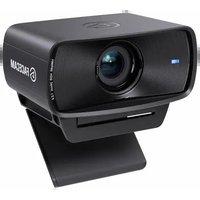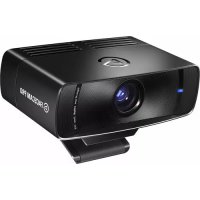
Facecam Pro 4K60 - Webcam ELGATO - Free user manual and instructions
Find the device manual for free Facecam Pro 4K60 ELGATO in PDF.


| Product Type | 4K Webcam |
| Brand | Elgato |
| Model | Facecam Pro 4K60 |
| Maximum Resolution | 2160p (4K) at 60 fps |
| Supported Resolutions | 2160p60, 2160p30, 1080p60, 1080p30, 720p60, 720p30 |
| Sensor | CMOS SONY STARVIS |
| Lens | Elgato Premium AF Lens |
| Aperture | f/2.0 |
| Focal Length | 21 mm (full-frame equivalent) |
| Field of View | 90° (diagonal) |
| Focus Range | 10 cm to infinity |
| Connectivity | USB-C (USB 3.0 SuperSpeed) |
| Power Supply | Via USB (7.5 W minimum required) |
| Dimensions (without mount) | 116 x 38 x 79 mm |
| Weight (without mount) | 240 g |
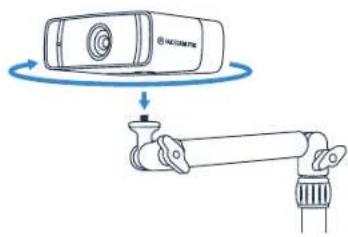
| Mount | On screen or tripod (1/4" thread) |
| Compatible Applications | OBS, Zoom, Teams, Skype, Slack, Google Meet, FaceTime |
| Operating Systems | Windows, macOS (via UVC) |
| Reset | Reset button (5 seconds) |
| Maintenance | Clean the lens with a soft, lint-free cloth; do not cover the vents |
Frequently Asked Questions - Facecam Pro 4K60 ELGATO
User questions about Facecam Pro 4K60 ELGATO
0 question about this device. Answer the ones you know or ask your own.
Ask a new question about this device
Download the instructions for your Webcam in PDF format for free! Find your manual Facecam Pro 4K60 - ELGATO and take your electronic device back in hand. On this page are published all the documents necessary for the use of your device. Facecam Pro 4K60 by ELGATO.
USER MANUAL Facecam Pro 4K60 ELGATO
Mn (at an) 0141923110000000000000000000000000000000000000
Elgato, a division of:
Coral Memory Inc., 115 North McCarthy, Bic, Michael, CA 9603: USA
Conserv Components Lim boc, 1000 Eavole Road, Wimath Triangle, Wokrigram. R311 575, UK
Consolidated by Women's, 8.1511 No. 40063. Reconciliation
Copyright 2021 - 2022 Consar Memory Inc. All rights reserved. Exports and the Buto logo are trademarks of Consar Memory Inc., registered in the U.S.
and other countries, SONY and STNY. See registered trademarks of Sony Corporation. All other trademarks belong to their respective owners.
Part IVWABHUS

FACECAM PRO
Quick Start Guide
Contents
EN Quick Start Guide 2
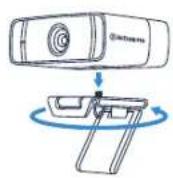
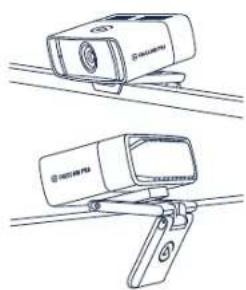
Mount Facecam Pro on your monitor.
natural_image
Line drawings of two types of camera sensors mounted on wires, no text or symbols presentAlternatively, secure Facecam Pro to your Elgato Multi Mount system via the 1/4-inch thread.
natural_image
Diagram showing a camera mounted on a cylindrical device with a rotating blue arrow indicating rotational motion (no text or symbols present)Installation
Download and install the Camera Hub app.

elgato.com/download

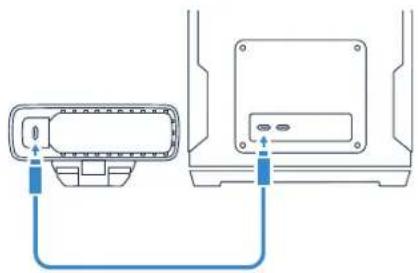
Connect Facecam Pro directly to a USB 3.0 port (minimum transfer rate of 5 Gbit/s, or better) on your PC or Mac – do not use a USB hub.

Use the supplied USB-C-to-C cable. If using a USB-C-to-A cable, make sure it supports 5 Gbit/s data transfer and 7.5 watts power delivery.
natural_image
Diagram showing two connected devices with blue arrows indicating connection (no text or symbols)Maintenance
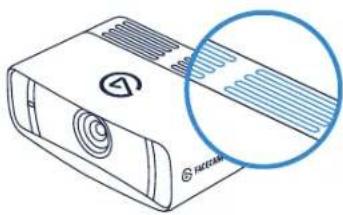
Do not cover the air vents. Doing so may cause overheating.
natural_image
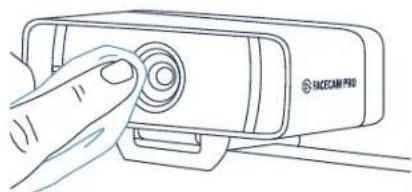
Illustration of a white electronic device with a circular inset showing a blue ring detail (no text or symbols)Clean the lens with a soft, lint-free cloth. Do not use paper towels or detergents.
natural_image
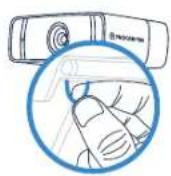
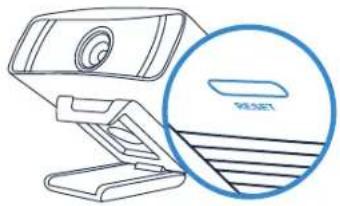
Line drawing of a hand pressing a button on a device labeled 'SICZAM PRO' (no other text or symbols)Reset
While Facecam is powered on, press and hold the RESET button for five seconds to reset your current settings like focus, saturation or shutter speed to factory defaults.
natural_image
Line drawing of a webcam with a magnified inset showing a reset button (no text or symbols on the device itself)Use Facecam Pro with your favorite apps:
OBS, Zoom, Teams, Skype, Slack, Google Meet, FaceTime
or any other UVC-compliant apps.
elgato /elgato
Technical specifications
Supported Resolutions
2160p60, 2160p30, 1080p60, 1080p30,
720p60, 720p30
Optics
Elgato Premium AF Lens
Focus Range
10 cm | 4 in - Infinity (∞)
Aperture
†/2.0
Focal Length
21 mm (full-frame equivalent)
Field of View
90° (diagonal)
Sensor
SONY® STARVIS™ CMOS
Connection
USB 3.0 (or better). Type C
Dimensions
W 116 x H 38 x D 79 mm | 4.6 x 1.5 x 3.1 in
(without mount)
Weight
240 g | 0.53 lb (without mount)
Dimensions: (ancho x and x brightness)
116×35×79 mm | 4,6×1,5×3,1 pulg.
Pesn: 240 p L 0.53 lb (sin montura)
(1)
Montaggio
• Monta Facecam Pro sul tuo monitor.
Teams, Skype, Slack, Google Meet, FaceTime of andere UVC-compatiblele apps.
Technische specificaties
Ondersteunde resoluties: 2160p60, 2160p30, 1080p60,
1080p30, 720p60, 720p30
Optiek: Elgato Premium AF Lens
Aansluiting: USB 3.0 (of better), Type C
Afmetingen: B 116 x H 38 x D 79 mm | 4.6 x 1.5 x 3.1 in
(zonder houder)
Blenderåpning: f/2,0
• Monte a Facecam Pre no monitor
- Opcionalmente, prenda a Facecam Pro no sistema Multi
Mount da Elgato com a rosca de 1/4 de polegada.
Instalação
1080p30.720p60.720p30
Sensör: SONY® STARVISTM CMDS
• 甲二,Facecam Pro是 Elgato Multi Mount
Federal Communication Commission Interference Statement
This device complies with Part 15 of the FCC Rules. Operation is subject to the following two conditions: (1) This device may not cause harmful interference, and (2) this device must accept any interference received, including interference that may cause undesired operation.
This equipment has been tested and found to comply with the limits for a Class B digital device, pursuant to Part 15 of the FCC Rules. These limits are designed to provide reasonable protection against harmful interference in a residential installation. This equipment generates, uses and can radiate radio frequency energy and, if not installed and used in accordance with the instructions, may cause harmful interference to radio communications. However, there is no guarantee that interference will not occur in a particular installation. If this equipment does cause harmful interference to radio or television reception, which can be determined by turning the equipment off and on, the user is encouraged to try to correct the interference by one of the following measures:
- Reorient or relocate the receiving antenna.
- Increase the separation between the equipment and receiver.
- Connect the equipment into an outlet on a circuit different from that to which the receiver is connected.
- Consult the dealer or an experienced radio/TV technician for help.
FCC Caution: Any changes or modifications not expressly approved by the party responsible for compliance could void the user's authority to operate this equipment. This equipment complies with FCC radiation exposure limits set forth for an uncontrolled environment. This equipment should be installed and operated with a minimum distance of 20 cm between the radiator and a human body.
For questions about Elgato product compliance with FCC regulations, please contact: Compliance Officer, Corsair Memory Inc., 115 North McCarthy Blvd, Milpitas, CA 95035, USA
This device complies with Industry Canada license-exempt RSS standard(s).
Operation is subject to the following two conditions: (1) this device may not cause interference, and (2) this device must accept any interference, including interference that may cause undesired operation of the device.