
KCP110UW - Air purifier SHARP - Free user manual and instructions
Find the device manual for free KCP110UW SHARP in PDF.
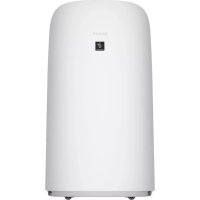

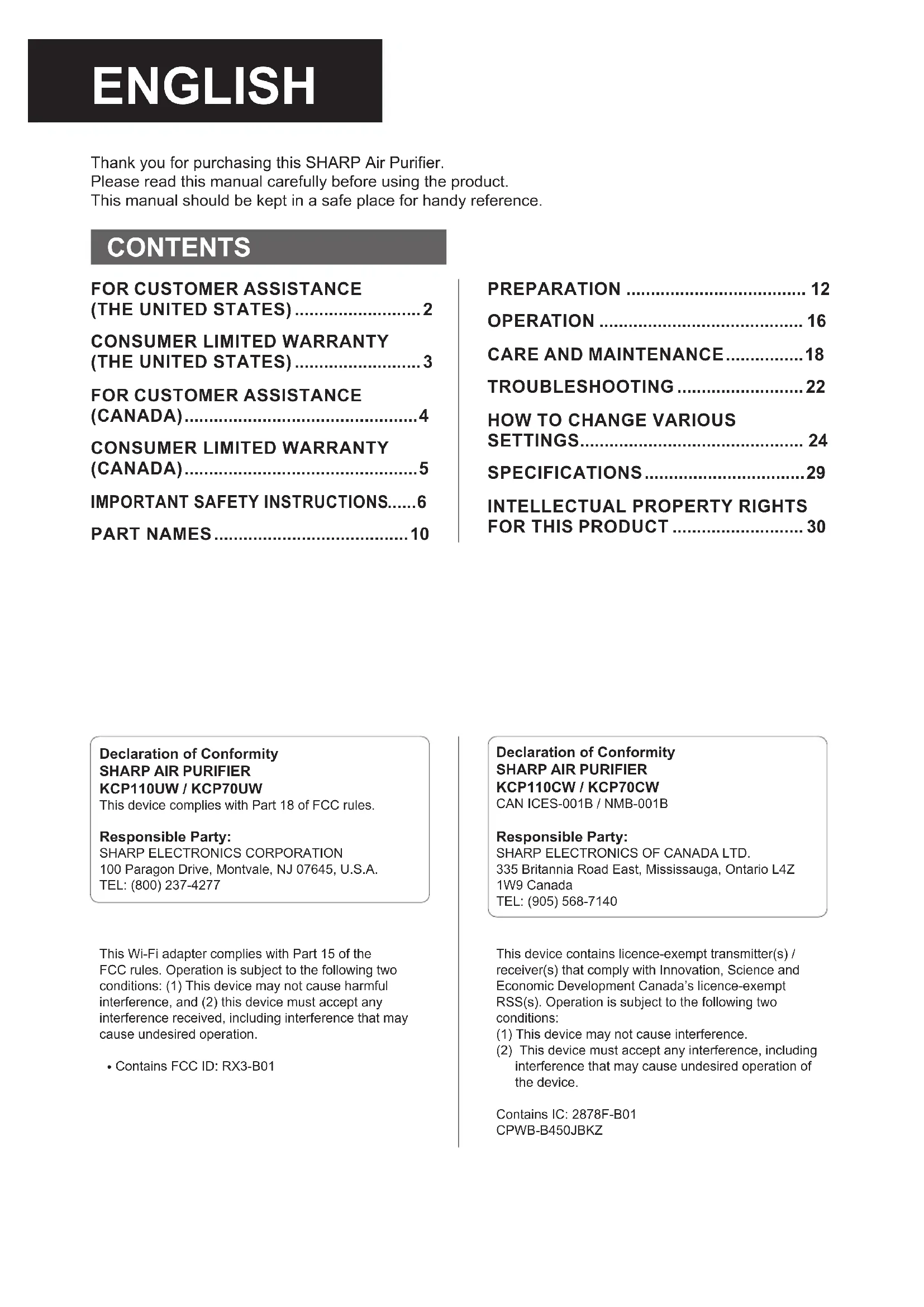


| Product type | Air purifier with humidification function |
| Dimensions (W × D × H) | 402 mm × 315 mm × 727 mm (15.8 in × 12.4 in × 28.6 in) |
| Weight | 10.1 kg (22.3 lbs) |
| Power supply | 120 V ~ 60 Hz |
| Power consumption (MAX / MEDIUM / SILENT) | 94 W / 27 W / 4.8 W |
| Fan speed | MAX, MEDIUM, SILENT |
| CADR (dust / smoke / pollen) | 352 / 347 / 443 |
| Recommended room size | 50 m² (538 sq ft) |
| Authentic HEPA filter | Model FZ-P11HFU, captures 99.97% of particles ≥ 0.3 µm |
| Activated carbon deodorizing filter | Model FZ-J80DFU |
| Humidification filter | Model FZ-P11MFU |
| Plasmacluster technology | Positive and negative ions to purify the air |
| Sensors | Sensitive dust, odor, light, temperature and humidity |
| Connectivity | Wi-Fi 2.4 GHz, Sharp Air app |
| Humidification | Tank capacity: 0.53 gal (approx. 2 L), humidification rate up to 0.70 pt/h |
| Sound level (MAX / MEDIUM / SILENT) | 55 / 42 / 21 dBA |
| Safety | Automatic restart after power outage, child lock, filter maintenance indicator |
| Maintenance | Clean the humidification filter every month; vacuum the HEPA and carbon filters |
| Filter lifespan | HEPA and carbon filters: up to 2 years; humidification filter: 2 years |
Frequently Asked Questions - KCP110UW SHARP
User questions about KCP110UW SHARP
0 question about this device. Answer the ones you know or ask your own.
Ask a new question about this device
Download the instructions for your Air purifier in PDF format for free! Find your manual KCP110UW - SHARP and take your electronic device back in hand. On this page are published all the documents necessary for the use of your device. KCP110UW by SHARP.
USER MANUAL KCP110UW SHARP
KCP110UW KCP110CW KCP70UW KCP70CW

"Plasmacluster" and "Device of a cluster of grapes" are registered trademarks of Sharp Corporation in Japan, USA and elsewhere.
AIR PURIFIER with Humidifying Function OPERATION MANUAL
This product earned the ENERGY STAR label by meeting strict energy efficiency guidelines set by the U.S. EPA. Room air cleaners have demonstrated the potential for improving air quality and providing health benefits. EPA does not endorse manufacturer claims regarding the
degree to which a specific product will produce healthier indoor air.
The energy efficiency of this ENERGY STAR certified model is measured based on a ratio between the model's CADR for Smoke and the electrical energy it consumes, or CADR/Watt.
Thank you for purchasing this SHARP Air Purifier.
Please read this manual carefully before using the product.
This manual should be kept in a safe place for handy reference.
CONTENTS
FOR CUSTOMER ASSISTANCE
(THE UNITED STATES)....2
CONSUMER LIMITED WARRANTY
(THE UNITED STATES)....3
FOR CUSTOMER ASSISTANCE
(CANADA)......4
CONSUMER LIMITED WARRANTY
(CANADA)......5
IMPORTANT SAFETY INSTRUCTIONS.....6
PART NAMES....10
PREPARATION 12
OPERATION 16
CARE AND MAINTENANCE......18
TROUBLESHOOTING 22
HOW TO CHANGE VARIOUS
SETTINGS.... 24
SPECIFICATIONS....29
INTELLECTUAL PROPERTY RIGHTS
FOR THIS PRODUCT .... 30
Declaration of Conformity
SHARP AIR PURIFIER
KCP110UW / KCP70UW
This device complies with Part 18 of FCC rules.
Responsible Party:
SHARP ELECTRONICS CORPORATION
100 Paragon Drive, Montvale, NJ 07645, U.S.A.
TEL: (800) 237-4277
This Wi-Fi adapter complies with Part 15 of the
FCC rules. Operation is subject to the following two conditions: (1) This device may not cause harmful interference, and (2) this device must accept any interference received, including interference that may cause undesired operation.
- Contains FCC ID: RX3-B01
Declaration of Conformity
SHARP AIR PURIFIER
KCP110CW / KCP70CW
CAN ICES-001B / NMB-001B
Responsible Party:
SHARP ELECTRONICS OF CANADA LTD.
335 Britannia Road East, Mississauga, Ontario L4Z
1W9 Canada
TEL: (905) 568-7140
This device contains licence-exempt transmitter(s) / receiver(s) that comply with Innovation, Science and Economic Development Canada's licence-exempt RSS(s). Operation is subject to the following two conditions:
(1) This device may not cause interference.
(2) This device must accept any interference, including interference that may cause undesired operation of the device.
Contains IC: 2878F-B01
CPWB-B450JBKZ
Please Read Before Operating Your Air Purifier
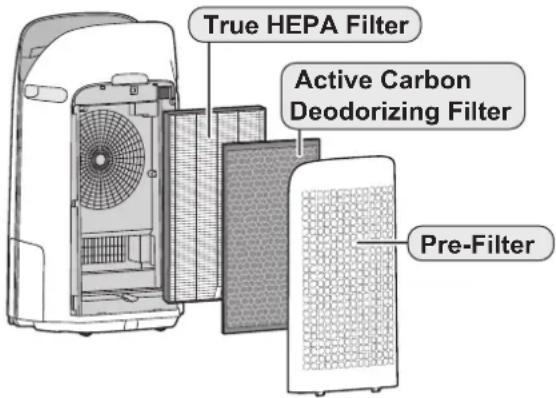
The air purifier draws in room air through the air inlet, circulates it through a Pre-Filter, an Active Carbon Deodorizing Filter and a True HEPA Filter inside the product, and then discharges it through the air outlet. The True HEPA Filter can remove 99.97% of dust particles as small as 0.3 microns that pass through the filter and also helps absorb odors.
The Active Carbon Deodorizing Filter gradually absorbs odors as they pass through the filter.
Some odors absorbed by the filters will break down over time, causing additional odors. Depending on usage conditions, and especially if the product is used in environments significantly more severe than a normal household, these odors may become noticeable sooner than expected. If these odors persist, replace the filters.
When minerals in tap water adhere to the filters and become hard and white, they absorb odors in the room that can cause the emission of an unpleasant odor when the Humidifying Filter is dry. (Varies depending on water quality and other environmental factors)
If this occurs, perform the Humidifying Filter maintenance. (Page 19)
NOTE
- The air purifier is designed to remove air-suspended dust and odors.
The air purifier is not designed to remove harmful gases such as carbon monoxide contained in cigarette smoke.
The air purifier may not completely remove an odor if the source of the odor is still present.
Scan the QR code for more information about the Sharp Air Purifiers.
[ U.S. Models ] KCP110UW KCP70UW
[ Canada Models ]
KCP110CW (English)
KCP70CW (English)
KCP110CW (French)
KCP70CW (French)
The Sharp Air Application is a helpful tool that puts you in control of your indoor air quality.
With the Sharp Air Application:
- You can control your air purifier from anywhere with your smart device to do things like turn the air purifier on and off, set a weekly schedule, and more!
- You can monitor indoor air quality in real time to stay in control, even if you're not home.
- You can monitor remaining filter life and receive alerts when it's time to replace the filters.
- You can enable and disable the optional "Sharp Cloud" feature. When enabled, your usage history will be used to adjust the Sensor Sensitivity settings of "Auto" Mode over time in order to optimize your Air Purifier's performance.
REGISTER YOUR PRODUCT
Registering your new product is easy and offers benefits that help you get the most out of your Sharp product including:
√ Convenience: If you ever need warranty support, your product information is already on file. √ Communication: Stay up to date with important notifications and special offers from SHARP. √ Support: Quickly access support content including Owner's Manuals, FAQ's, How-to Videos, and much more.
3 EASY WAYS TO REGISTER TODAY!
SCAN
Use the camera or QR code scanning application on your smart phone
ONLINE
Visit our sites to learn more about your product at sharpusa.com and sbl.sharpusa.com
CALL US
US 800-BE-SHARP 800-237-4277 Mon-Fri: 7am-7pm CST Sat-Sun: 9am-7pm CST
Scan this QR Code on your smart phone Visit http://www.sharpusa.com/register
Contact a Sharp Advisor on the phone
PRODUCT SUPPORT
If you have questions about the setup or operation of your product, please refer to the corresponding section within this manual.
Additionally, visit www.sharpusa.com/support to access exclusive content about your product including:
→ FAQ's and How-To Videos → Find or Request Service → Downloads including the Installation Guide, Spec Sheet, and Owner's Manual
CONTACT US
If at any time you have questions or comments concerning your SHARP product, please contact the SHARP Customer Assistance Center. We are available to assist you through multiple contact methods for your convenience:
EMAIL
Available 24/7
US: sharpusa.com
CHAT ONLINE
Mon-Fri: 7am-7pm CST Sat-Sun: 9am-7pm CST
CALL US
US 800-BE-SHARP 800-237-4277
Mon-Fri: 7am-7pm CST Sat-Sun: 9am-7pm CST
See the Contact Us section on our sites U.S. | www.sharpusa.com/support Contact a Sharp Advisor on the phone
CONSUMER LIMITED WARRANTY FOR U.S. USERS
SHARP ELECTRONICS CORPORATION warrants to the first consumer purchaser that this Sharp brand product (the "Product"), when shipped in its original container, will be free from defective workmanship and materials, and agrees that it will, at its option, either repair the defect or replace the defective Product or part thereof with a new or remanufactured equivalent at no charge to the purchaser for parts or labor for the period(s) set forth below.
This warranty does not apply to any appearance items of the Product nor to the additional excluded item(s) set forth below nor to any Product the exterior of which has been damaged or defaced, which has been subjected to improper voltage or other misuse, abnormal service or handling, or which has been altered or modified in design or construction.
In order to enforce the rights under this limited warranty, the purchaser should follow the steps set forth below and provide proof of purchase to the servicer.
The limited warranty described herein is in addition to whatever implied warranties may be granted to purchasers by law. ALL IMPLIED WARRANTIES INCLUDING THE WARRANTIES OF MERCHANTABILITY AND FITNESS FOR USE ARE LIMITED TO THE PERIOD(S) FROM THE DATE OF PURCHASE SET FORTH BELOW. Some states do not allow limitations on how long an implied warranty lasts, so the above limitation may not apply to you.
Neither the sales personnel of the seller nor any other person is authorized to make any warranties other than those described herein, or to extend the duration of any warranties beyond the time period described herein on behalf of Sharp.
The warranties described herein shall be the sole and exclusive warranties granted by Sharp and shall be the sole and exclusive remedy available to the purchaser. Correction of defects, in the manner and for the period of time described herein, shall constitute complete fulfillment of all liabilities and responsibilities of Sharp to the purchaser with respect to the Product, and shall constitute full satisfaction of all claims, whether based on contract, negligence, strict liability or otherwise. In no event shall Sharp be liable, or in any way responsible, for any damages or defects in the Product which were caused by repairs or attempted repairs performed by anyone other than an authorized servicer. Nor shall Sharp be liable or in any way responsible for any incidental or consequential economic or property damage. Some states do not allow the exclusion of incidental or consequential damages, so the above exclusion may not apply to you.
THIS LIMITED WARRANTY IS VALID ONLY IN THE FIFTY (50) UNITED STATES, THE DISTRICT OF COLUMBIA, AND PUERTO RICO.
Your Product Model Number & Description:
Warranty Period for this Product:
Additional Item(s) Excluded From Warranty Coverage:
Where to Obtain Service:
What to Do to Obtain Service:
KCP110UW / KCP70UW Air Purifier. Be sure to have this information available when you need service for your Product.
One (1) year parts and labor from date of purchase.
Appearance items of the Product, filters, accessories, or any printed materials. Product which has been used for rental and/or commercial purposes.
From a Sharp Authorized Servicer located in the United States. To find the location of the nearest Sharp Authorized Servicer, call Sharp Toll Free at 1-800-BE-SHARP.
Ship prepaid or carry in your Product to a Sharp Authorized Servicer. Be sure to have Proof of Purchase available. If you ship the Product, be sure it is insured and packaged securely.
TO OBTAIN SERVICE, SUPPLY, ACCESSORY OR PRODUCT INFORMATION, CALL 1-800-BE-SHARP, OR VISIT OUR WEBSITE AT www.sharpusa.com
SAVE THE PROOF OF PURCHASE AS IT IS NEEDED SHOULD YOUR AIR PURIFIER EVER REQUIRE WARRANTY SERVICE.
SHARP®
SHARP ELECTRONICS CORPORATION
100 Paragon Drive, Montvale, NJ 07645, U.S.A.
FOR CUSTOMER ASSISTANCE (CANADA)
To aid in answering questions for a service call or for reporting loss or theft, please use the space below to record the model and serial number located on either the side or back of the product.
| Model Number: | |
| Serial Number: | |
| Date of Purchase: | |
| Dealer Name: | |
| Address: | |
| City: | |
| Province: | |
| Postal Code: | |
| Telephone: |
PRODUCT SUPPORT
If you have questions about the setup or operation of your product, please refer to the corresponding section within this manual.
Additionally, visit www.sharp.ca to access exclusive content about your product including:
→ Find a Dealer → Find Service Locations → Downloads including the Installation Guide, Spec Sheet, and Owner's Manual
CONTACT US
If at any time you have questions or comments concerning your SHARP product, please contact the SHARP Customer Assistance Center. We are available to assist you through multiple contact methods for your convenience:
EMAIL
Available 24/7
See the Contact Us section on our site.
SUPPORT SITE
Product Downloads, Service Locator, Where to Buy, Toner Recycling Program and more.
CALL US
CA 877-278-6709 Mon-Fri: 8am-5pm EST (except statutory holidays)
https://sharp.ca/contact-sharp CA | www.sharp.ca
Contact a Sharp Advisor on the phone
SHARP
LIMITED WARRANTY
Consumer Electronics Products
Congratulations on your purchase!
Sharp Electronics of Canada Ltd. ("Sharp") warrants to the first purchaser of this Sharp brand product ("Product"), when shipped in its original container and sold or distributed in Canada by Sharp or by an authorized Sharp dealer, and the Product was not sold "as is" or "sales final," that the Product will, during the applicable warranty period, be free from defects in material and workmanship, and will, within the applicable warranty period, either repair the defective Product or provide the first purchaser with a replacement of the defective Product.
Conditions: This limited warranty shall not apply to:
(a) Any defects caused or repairs required as a result of abusive operation, negligence, accident, improper installation, or inappropriate use as outlined in the owner's manual or other applicable Product documentation. (b) Any defects caused or repairs required as a result of any Product that has been tampered with, modified, adjusted, or repaired by any person other than Sharp, a Sharp authorized service centre, or a Sharp authorized servicing dealer. (c) Any defects caused or repairs required as a result of the use of the Product with items not specified or approved by Sharp, including but not limited to chemical cleaning agents. (d) Any replacement of accessories required through normal use of the Product, including but not limited to remote controls, AC adapters, batteries, temperature probes, trays, filters, belts, ribbons, cables, and paper. (e) Any cosmetic damage to the Product surface or exterior that has been defaced or caused by normal wear and tear. (f) Any defects caused or repairs required as a result of damage caused by any external or environmental conditions, including but not limited to transmission line/power line voltage, liquid spillage, or acts of God. (g) If the serial number or model number affixed to the Product has been removed, defaced, changed, altered, or tampered with. (h) This limited warranty will not apply if the Product has been used or is being used in a commercial setting or application; this warranty is meant solely for the non-commercial, household use of the Product by consumers in their home or residence. (i) Any installation, delivery, setup, and/or programming charges. (j) The removal and reinstallation of an Over-The-Range Microwave, Microwave Drawer, or Steam Oven if it is installed in an inaccessible location or requires removal of cupboards, handles, or other cosmetic parts, or is not installed in accordance with the installation instructions included with the Product.
How to get service: Warranty service may be obtained upon delivery of the Product, together with proof of purchase (including date of purchase) and a copy of this limited warranty statement, to an authorized Sharp service centre or an authorized Sharp servicing dealer. In-home warranty service will be carried out to locations accessible by on-road service vehicle and within 50 km of an authorized Sharp service centre on any Over-The-Range Microwave Oven, Microwave Drawer Oven or Steam Oven. The servicer may if necessary take the unit for repair at the servicer's facility. No other person (including any Sharp dealer or service centre) is authorized to extend, enlarge or transfer this warranty on behalf of Sharp. The purchaser will be responsible for any and all removal, reinstallation, transportation and insurance costs incurred with exception for Over-The-Range Microwave Oven, Microwave Drawer Oven or Steam Oven whereby Sharp will be responsible for the removal and reinstallation.
The express warranties in this limited warranty are, except for consumer purchasers domiciled in Quebec, in lieu of and, except to the extent prohibited by applicable law, Sharp disclaims all other warranties and conditions, express or implied, whether arising by law, statute, by course of dealing or usage of trade, including, without limitation, implied warranties or conditions of merchantability and/or quality, fitness for a particular use or purpose, and/or noninfringement. Limitations (not applicable to consumer purchasers domiciled in Quebec to the extent prohibited under Quebec law): (a) Sharp shall not be liable for any incidental, special, consequential, economic, exemplary or indirect damages of any kind or nature (including lost profits or damages for loss of time or loss of use or loss of data) arising from or in any connection with the use or performance of a Product or a failure of a Product, even if Sharp is aware of or has been advised of the possibility of such damages; (b) the remedies described in this limited warranty constitute complete fulfillment of all obligations and responsibilities of Sharp to the purchaser with respect to the Product and shall constitute full satisfaction of all claims, whether based on contract, negligence, strict liability or otherwise. Some provinces may not allow the exclusion or limitation of certain damages, or limits on the duration or voiding of implied warranties or conditions; in such provinces, the exclusions and limits herein may not apply. This limited warranty is, except for consumer purchasers domiciled in Quebec, governed by the laws of the Province in Canada in which the purchaser has purchased the Product. For consumer purchasers domiciled in Quebec this limited warranty is governed by the laws of Quebec.
WARRANTY PERIODS (calculated from the date of original purchase): Parts & Labour (exceptions noted)
Microwave Oven 1 year (magnetron - 4 additional years)
Steam Oven 1 year
Small Kitchen Appliances 1 year
Air Purifiers 1 year
To obtain the name and address of the nearest Authorized Sharp Service Centre or Dealer, or for more information on this Limited Warranty, Sharp Extended Warranty Offers, Sharp Canada Products or Accessory Sales, please contact Sharp:
- By writing to Sharp Electronics Of Canada Ltd. at 335 Britannia Road East, Mississauga, Ontario L4Z 1W9
- Calling: at 905-568-7140
- Visiting our Web site: www.sharp.ca
THIS LIMITED WARRANTY IS VALID ONLY IN CANADA
READ AND SAVE THESE INSTRUCTIONS before using this product.
When using electrical appliances, basic safety precautions should always be followed to reduce the risk of fire, electric shock, and injury to persons, including the following:
WARNING
- Read all instructions before using the product.
- Use the product only for intended household use as described in this manual. Any other use not recommended by the manufacturer may cause fire, electric shock, or injury to persons.
- This appliance is not intended for use by persons (including children) with reduced physical, sensory or mental capabilities, or lack of experience and knowledge, unless they have been given supervision or instruction concerning use of the appliance by a person responsible for their safety. Children should be supervised to ensure they do not play with the appliance.
- Never operate the product if the power cord or plug is damaged or the product is malfunctioning or damaged.
- If the power cord or plug is damaged, it must be replaced by the manufacturer, its service agent or a Sharp authorized Service Center in order to avoid a hazard. Contact the nearest Service Center for any problems, adjustments, or repairs.
- Do not repair or disassemble the product yourself.
- Follow the instructions "a" to "h" below for the power cord or plug. It may cause short circuit, excessive heat, electric shock or fire. a. Use only AC 120 volt outlet. b. Do not use the product if the power cord or plug is damaged or the connection to the wall outlet is loosened. c. Always turn off the product before unplugging the power plug. d. Always unplug the product before moving or maintaining it, refilling
the Humidifying Tray, opening the Back Panel, changing the filters and whenever the product is not in use.
e. Be sure to pull the power plug and not the power cord.
f. Do not touch the power plug with wet hands when inserting or unplugging from the wall outlet.
g. Periodically remove dust from the power plug.
h. Always observe the following as to not damage the power cord.
- Do not damage cord with Caster Wheels when moving the product.
- Do not run cord under carpeting. Do not cover the power cord with throw rugs, runners, or similar coverings.
- Do not put heavy things on the power cord or pinch it.
- Do not run the power cord under furniture or other appliances.
- Run the power cord away from traffic area and where it will not be tripped over.
- To reduce the risk of electric shock, this product has a polarized plug (one blade is wider than the other). This plug will fit in a polarized outlet only one way. If the plug does not fit fully in the outlet, reverse the plug. If it still does not fit, contact qualified personnel to install the proper outlet. Do not alter the plug in any way.
- Do not use this product near gas appliances, fire places, candle fire, incense or sparks from lit cigarettes. When the product is operated with gas appliances in the same room, Ventilate a room periodically, otherwise it may cause carbon monoxide poisoning.
- Do not operate the product in a room with flammable gas, such as oily residue or chemical fumes.
- Do not expose the product to rain, or use it near water, in a bathroom, laundry area, or other damp location.
- Do not insert fingers or foreign objects into the air inlets or air outlets.
- Do not look into the air outlets.
- Do not drink the water in the humidifying tray.
- Replace the water in the humidifying
tray daily with fresh tap water, and regularly clean it.
When the product is not in use, dispose of the water in the humidifying tray.
Leaving water in the Humidifying Tray can cause mold, bacteria, and bad odors. In rare cases, such bacteria can be a health hazard.
NOTE
- Radio or TV Interference -
If the product should cause interference to radio or television reception, try to correct the interference by one or more of the following measures:
- Reorient or relocate the receiving antenna.
- Increase the separation between the product and radio/TV receiver.
- Connect the product into an outlet on a circuit different from that to which the receiver is connected.
- Consult the dealer or an experienced radio/TV technician for help.
This product complies with the maximum allowable concentration of ozone of 0.050 parts per million by volume (ppmv) in a 24-hour period. The Health Canada Guideline 2010 recommends that the maximum exposure limit, based on an averaging time of 8 hours, is 0.020 ppmv or less when tested in a sealed, controlled room approximately 30 m 3 .
CAUTIONS CONCERNING INSTALLATION
- Place the product on a level and stable surface with sufficient air circulation. When placed on heavy carpet, the product may vibrate slightly. Place the product on a level surface to avoid water leakage from the Humidifying Tray.
- Avoid a location where the sensors are exposed to direct breeze or draft if the product has sensors. The product may not operate properly.
- Avoid use in locations where furniture, fabrics, or other items may come in contact with and restrict the air inlets
and/or outlets.
- Avoid locations exposed to direct sunlight. It may cause to change shape or color of the product.
- Avoid locations where the product is exposed to condensation or drastic changes in temperature. Use under appropriate conditions between 32 °F - 95 °F (0 °C - 35 °C).
- Avoid use in locations where greasy or oily smoke is generated (such as in a kitchen, etc.). The Main Body surface may crack and the sensors may malfunction as a result.
- The dust collecting ability of the product is effective even when the product is as close as 1.2 inches (3 cm) from the wall, but the surrounding walls or floor may get dirty. Please place the product at a distance from the wall. The wall directly behind the air outlets and the floor or rug on which the product is placed may become dirty over time. When using the product for an extended period of time at the same location, periodically clean the walls, the floor, or the rug.
- Do not place the product near or on hot objects, such as stoves or heaters, or where it may come into contact with steam.
CAUTIONS CONCERNING FILTER
- Follow the instructions in this manual for filter installation and maintenance. (Page 12, 21)
- Take out the filters from the plastic bag before placing the filter in the Main Body.
- Do not operate the product without the filters properly installed.
- Do not wash and reuse the True HEPA Filter and the Active Carbon Deodorizing Filter. Washing will not improve filter performance and can also cause electric shock or operating malfunctions.
- Do not operate the product in a room where aerosol insecticides are present. It may cause the odor of insecticide to remain in the product and be emitted from the air outlets.
CAUTIONS CONCERNING OPERATION
- Do not block the air inlets or air outlets.
- Always operate the product in an upright position.
- When carrying the product, first remove the Humidifying Tray to avoid spilling water, and then hold the product by the handles on both sides.
- Always lift up the product when moving it on easily damaged flooring, an uneven surface, or carpet.
- Do not change the direction of the product while moving it using the caster wheels.
- When moving the product by its caster wheels, move it slowly and in a horizontal direction.
- Do not operate the product without the humidifying tray properly installed.
- When refilling the humidifying tray, make sure no water is leaking from it.
- Be sure to wipe off any excess water on the outside of the humidifying tray.
- Do not use hot water (104 °F (40 °C) or more), chemical agents, aromatic substances, dirty water, or other damaging substances. Doing so can deform the product or cause it to malfunction.
- Use only fresh tap water. Using other water sources risks the growth of molds, fungi, or bacteria.
- Do not shake the humidifying tray while holding the tray handle.
CAUTIONS CONCERNING MAINTENANCE
- Follow the instructions in this manual for maintenance. (Pages 18-21)
- Clean the exterior with a soft cloth only.
- Do not use detergents other than what is mentioned in this manual (Page 20). Do not use volatile fluids and/or detergents.
The main body surface may be damaged or cracked with strong corrosive cleansers, benzine, paint thinner, polishing powder, or grease. The humidifying tray may cause
deformation, tarnishing, cracking (water leakage). In addition, the sensors may malfunction as a result if the product has sensors.
- Do not scrub the back panel (pre-filter) hard during its maintenance.
- The frequency of descaling maintenance will depend on the hardness of and the impurities in the water that you use; the harder the water the more often descaling will be necessary.
- Do not remove the Humidifier Float. If the Humidifier Float comes off, refer to page 20.
- When replacing filters or any accessories, use specified parts in this manual.
WARNING
In case of remote operation from outside, you may not be able to check air purifier current condition or the area around it and the situation concerning anyone possibly staying there, so please adequately confirm safety before use.
- Make sure the electric plug is fully inserted into a power socket, and there is no dust on the plug or in the socket hole. (It may cause heat, combustion, fire, etc., due to poor contact or contact failure)
- Make sure beforehand that although there are some wind changes, no negative impact will occur to the environment inside the room. (such as whether there is anything flying easily in the wind) Because the wind may cause something to fall down, resulting in fires, wounds, defacement of household belongings.
CAUTION FOR USE
- Agreement with “Terms of Service” is needed to use App.
- App will be periodically revised because of version upgrade.
- Screens and illustrations in this book are for explanation, there are some differences to the real product.
- In the case of bad connection, the App may not be able to control the air purifier. The current operation of the air purifier may not be accurately reflected on the App.
- Locking smart device display is recommended to avoid wrong operation.
- Although the App is free, communications expenses for download of dedicated App and operation with smart device or tablet are customer's obligation.
CAUTION FOR Wi-Fi
Caution for usage about electrical wave
- In case of the usage at the following place, the operation cannot be guaranteed: Near Bluetooth wireless communications device using the same frequency (2.4GHz) as this product or specified low power wireless device. Also in the place like
magnetic field of the device such as microwave oven, or the place with static electricity or the place radio disturbance is occurred, it may not be available temporarily due to weak electrical wave.
- Wireless connection and performance cannot be guaranteed for all routers or housing environment. At the following places, it is likely electrical wave cannot reach or is disconnected: Inside of the building made with concrete, reinforcing steel or metal / near the obstruction / near the wireless communications device applying the same frequency.
- Wi-Fi of this product corresponds to channel 1 - 11. It's not available to communicate with the routers set up to other channels.
Caution for personal information (related to Security)
- Using Wi-Fi device has the possibility of interception as long as using electrical wave regardless of secret code setting.
- Wi-Fi has the advantage of free LAN connection in the service area because of the communication between this product and the router applying electrical wave. On the other side, intercept of communication or unfair intrusion are likely to occur because electrical wave reaches everywhere in the certain area through the obstructions (e.g. walls).
- Do not connect to the device or network that you do not have permission to use when setting up Wi-Fi connection.
- The Wi-Fi function of this product should be initialized in case of disposal or handover to a third person.
- The Wi-Fi function of the product should be initialized in case of handover from a third person to avoid illegal access of outsider. See page 26 for instructions on how to initialize.
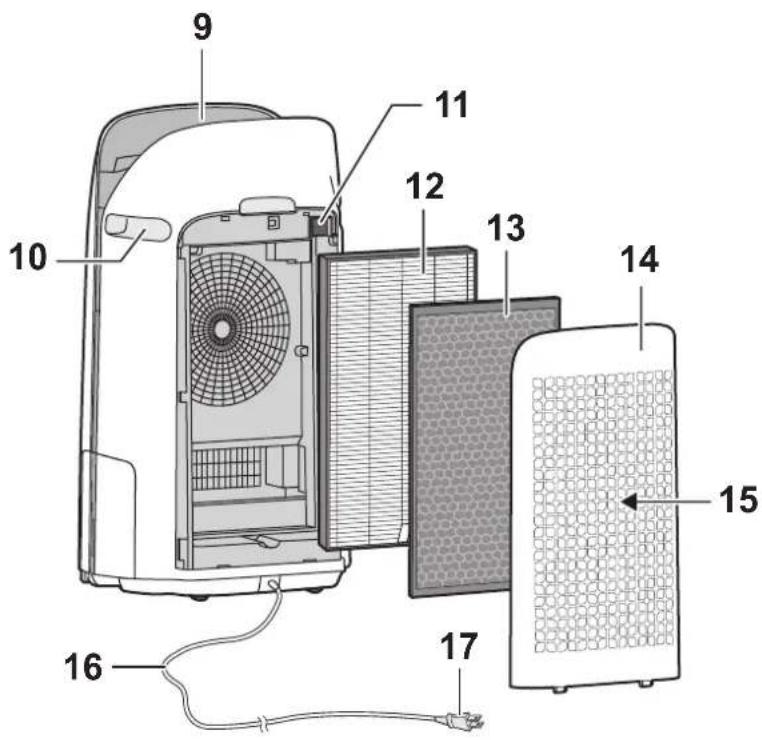
MAIN BODY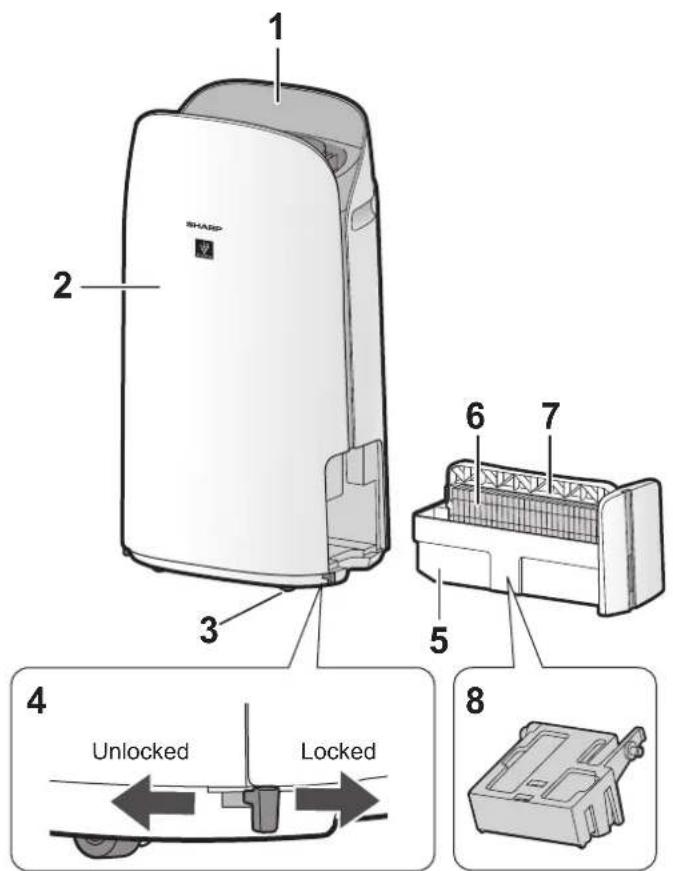
| 1 Operation Panel / Display | |
| 2 Main Body | |
| 3 Caster Wheels (4 Locations) | |
| 4 Caster Stopper (Right & Left) | |
| 5 Humidifying Tray | |
| 6 Humidifying Filter | |
| 7 Tray Handle | |
| 8 Humidifier Float | |
| 9 Air Outlet | |
| 10 Handle (2 Locations) | |
| 11 | Sensor Filter |
| Sensor (Internal)Sensitive Dust / Odor / Temperature / Humidity | |
| 12 True HEPA Filter | |
| 13 Active Carbon Deodorizing Filter | |
| 14 Back Panel (Pre-Filter) | |
| 15 Air Inlet | |
| 16 Power Cord | |
| 17 Power Plug | |
LIGHT SENSOR
When the Light Control (Display Brightness) is set to "Auto", the brightness of the Display and Air Quality Indicator will be switched automatically based on room brightness. (Page 25)
NOTE
Detection range of Light sensor
Do not install the product in the following places. The Light Sensor may not sense correctly.
Directly under a light fixture.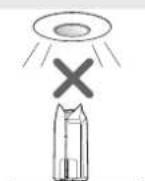
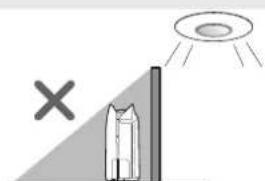
In shadow.
| 1 Light Sensor | |
| 2 Power ON/OFF Button | |
| 3 | App-Only Modes: Pollen, Sleep and Plasmacluster Express Clean Lamps(White) *2 |
| 4 Fan Speed Button, Lamps (White) | |
| 5 | AUTO Button, Lamp (White) |
| Child-Lock Button(Press 3 sec.) *3 | |
| 6 Wi-Fi Button | |
| 7 | Switching Display Button |
| Filter Reset Button, Lamp (White)(Press 3 sec.) *3 | |
| 8 | Display *4 |
| • HumidityHumidity 25 % to 75 % is displayed.24 %or lessLo % ↔ 55 % ↔ Hi % 76 %or more | |
| • TemperatureFor KCP110UW or KCP70UWTemperature 32 °F to 122 °F is displayed.31 °For lessLo °F ↔ 77 °F ↔ Hi °F 123 °For more | |
| For KCP110CW or KCP70CWTemperature 0 °C to 50 °C is displayed.-1 °Cor lessLo °C ↔ 25 °C ↔ Hi °C 51 °Cor more | |
| • PM2.5 Concentration *5PM2.5 10 μg/m3 (micrograms per cubic meter air) to 499 μg/m3 is displayed.9 μg/m3or lessLo Hm ↔ 34 Hm ↔ Hi Hm 500 μg/m3or more | |
| • WattageIndicates wattage of current operation.20 W | |
| 9 | PM2.5 Indicator (White)Indicates the Sensitive Dust Sensordetects microscopic dust.PM2.5 |
| 10 | Dust Indicator (White)Indicates the Sensitive Dust Sensordetects usual dust. |
| 11 | Odor Indicator (White)Indicates the Odor Sensor detects odors. ≈ |
| 12 | OFF Timer Indicator (White) *2OFF |
| 13 | ON Timer Indicator (White) *2ON |
| 14 | Child-Lock Indicator (White) |
| 15 | Filter Maintenance Indicator (Orange) |
| 16 | Plasmacluster Ion Indicator (White)Ion |
| 17 | Humidifying Indicator (White) |
| Illuminates: Humidify ONOFF: Humidify OFFFlashing: the product needs water(The indicator flashes for 10 minutes and then goes off.) | |
| 18 | Wi-Fi Indicator (White)Illuminates when air purifier is connected to a router. |
| 19 | Cloud Service Indicator (White) *2Illuminates when air purifier is connected to Sharp's cloud service. |
| 20 | Air Quality IndicatorIndicates the air purity of the room in 5 levels with color changes.Clean BlueYellow (Flashing)Impure Red (Flashing fast) |
FILTER INSTALLATION
• To maintain the quality of the filter, it is installed in the product and packaged in a plastic bag.
- Be sure to stop operation and unplug the product before filter installation or replacement.
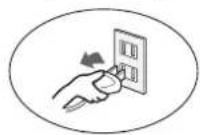
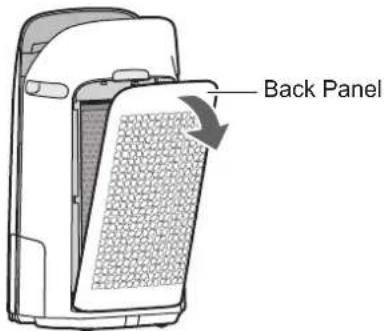
1. Remove the Back Panel.
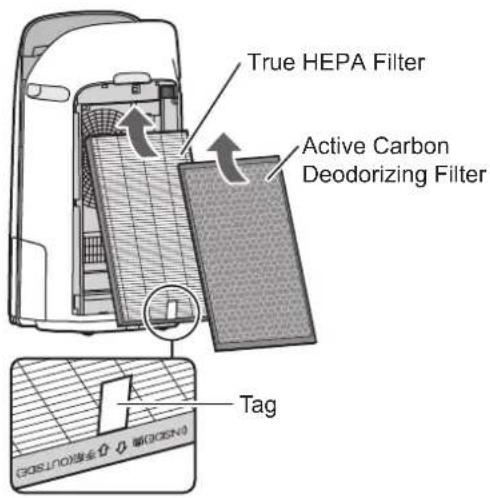
2. Take out the filters from the plastic bag.
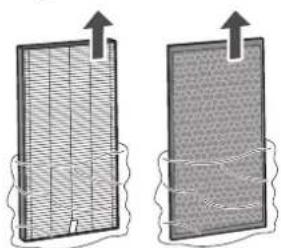
3. Install the filters in the correct order as shown.
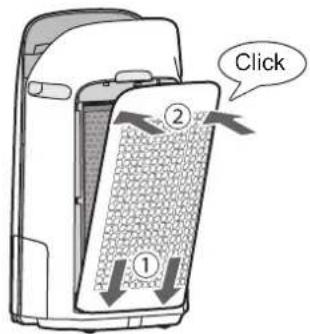
4. Install the Back Panel.
5. Record the date when you start or replace the filters on the back cover of this manual.
- Do not operate the product without the filters.
- When humidifying, fill the Humidifying Tray with water.
- When not humidifying, discard the water in the Humidifying Tray.
1. Pull out the Humidifying Tray.
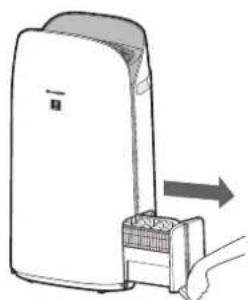
NOTE
- When removing and installing the Humidifying Tray, be careful not to spill any water.
2. Fill the Humidifying Tray with tap water using method "A" or "B".
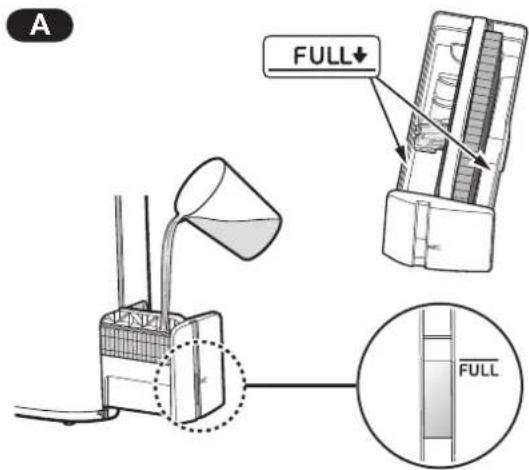
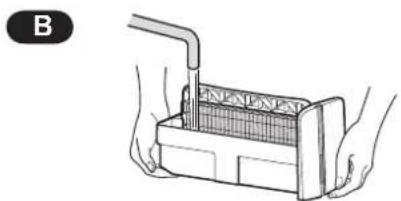
NOTE
- The Humidifier Float will float up when tray is filled with water.
- Slowly fill it with water to avoid splashing.
- Do not fill beyond the "FULL" indicator.
- When carrying the Humidifying Tray, hold it with both hands or grip the Tray Handle.
- Clean the Humidifying Tray if it becomes dirty or there is a noticeable odor.
3. Carefully install the Humidifying Tray.
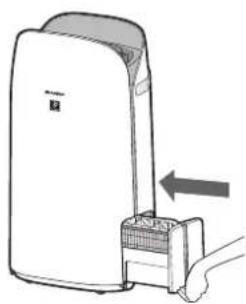
About Tray Handle
- When holding and carrying the Humidifying Tray, use tray handle
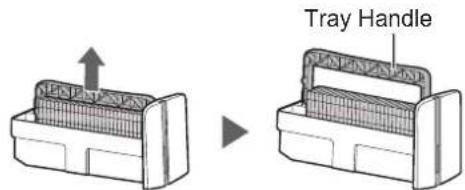
- When cleaning the Humidifying Filter, you can turn the Tray Handle down on its side.
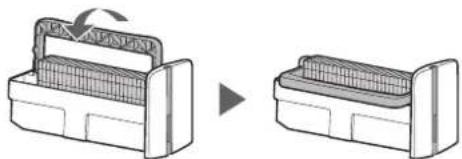
• After cleaning, install the Tray Handle back in its original position.
![graph TD A["Top Box with Internal Structure"] --> B["Step 1: Insert Top Box"] B --> C["Step 2: Insert Bottom Box"]](/content/2026/04/615546/images/7a8d375e5102cf934e5752e85c2a7643aa258d745732c8cba026c2bbd348a7f0.jpg)
NOTE
- Return the Tray Handle to its original position before installing.
Wi-Fi SETTINGS
BEFORE YOU BEGIN
- By connecting your air purifier with your smart device, you can use the air purifier more conveniently.
Ensure your smart device is connected to a 2.4 GHz Wi-Fi Network.
Wi-Fi Protected Setup (WPS) Access Point (Router)
- The recommended encryption method is WPA2 (AES).
Ensure your smart device meets minimum software requirements:
• Smartphones / tablets of Android 8 or later - iPhones, iPod touch, iPads of iOS 12 or later
Product Wi-Fi specifications
• Wireless LAN: IEEE802.11b/g/n • Frequency range: 2.4GHz frequency band
Trademarks
- "Wi-Fi®" is a registered trademark of Wi-Fi Alliance®.
- "Android" is the trademark of Google Inc.
- "iPhone", "iPod touch", "iPad" are registered trademarks or trademarks of Apple Inc.
- Other company names, corporate names, and product names mentioned in the handling instructions are trademarks and registered trademarks of their respective companies.
INITIAL SET UP
NOTE
- When pairing the smart device to the air purifier, ensure they are both connected to the same router.
① DOWNLOAD & SIGN UP
1. Install the Sharp Air App on your smart device.
• Available for download from the Apple Store or Google Play.
2. Connect your smart device to the router and launch the App.
Follow the instructions in the App.
i. Review the “Privacy and Data Utilization Policy” and “Terms of Use”. ii. Enter your date of birth. iii. Sign in using your Sharp account (SHARP ID). - If you do not have a SHARP ID, please register to create one. iv. Enter a name for your smart device.
② CONNECTION OF THE AIR PURIFIER AND A ROUTER
NOTE
- If you have stealth settings or MAC filtering settings on the router, please cancel them.
- The product network ID is displayed as "AP-SHARP-XX" (where XX is a 2-digit number below the product MAC address).
1. Tap “≡” at the upper left part of the “Home” screen, and select “Pairing” → “Connection with a router”.
![graph TD A["Home"] --> B["Manage"] B --> C["Pairing"] B --> D["Update"] C --> E["Connection with a router"] D --> E](/content/2026/04/615546/images/b956021bb8ad4534c8db40a95f103ca91b1132bd166a1f43f4119b55d3d524ef.jpg)
2. Follow instructions on the App.
- If the Wi-Fi Indicator lights up after the notification sound, the connection is successfully completed.
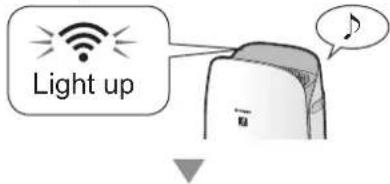
Tap "NEXT".
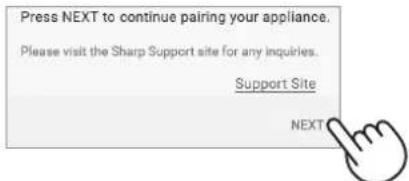
③ CONNECTION BETWEEN THE AIR PURIFIER AND A SMART DEVICE
1. Tap "Pair" for the air purifier you would like to pair.
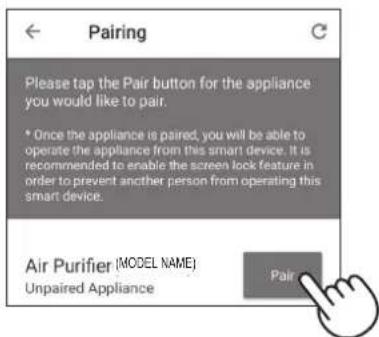
- If you do not see the screen above, tap "≡" at the "Home" screen, and select "Pairing" → "Already connected with a router".
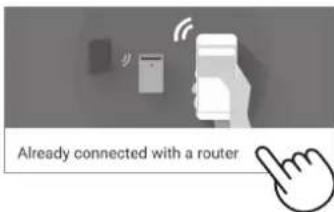
2. Follow instructions on the App.
- If the Wi-Fi Indicator lights up after the notification sound, the connection is successfully completed.
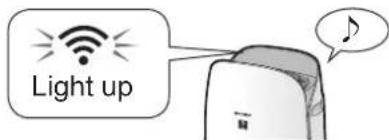
The INITIAL SET UP is completed.
How to set Wi-Fi ON / OFF after completing the INITIAL SET UP
If you would like to turn the Wi-Fi OFF:
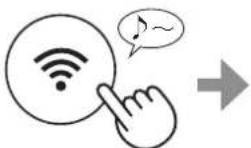
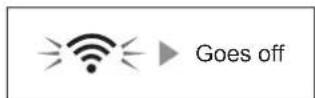
Press for 3 sec.
NOTE
- Turning the Wi-Fi off will result in not being able to control the air purifier with the Sharp Air App.
If you would like to turn the Wi-Fi ON again:
Press for 3 sec.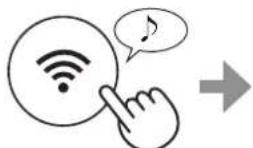
The Wi-Fi Indicator will flash after you press the Wi-Fi Button. And within about 3 minutes, you will hear four short beeps. Some time after this beep sounds, the Wi-Fi Indicator lights up and
the Wi-Fi connection is complete. The Sharp Air App can now be used again to control the Air Purifier.
NOTE
- Wi-Fi ON / OFF can also be set from "A1: Wi-Fi adapter ON/OFF". (Page 24, 26) In this case, Wi-Fi connection with the router will be automatically restored.
- Reconnection to the Wireless Router may take a few minutes to complete, after turning Wi-Fi on again.
START/STOP
START STOP
NOTE
- Unless the power plug has been unplugged, the operation will Auto Resume in the previous mode it was operating in. (However, in the case of Plasmacluster Express Clean mode, the operation will resume to the mode before Plasmacluster Express Clean mode and settings.)
Example: if the power is lost during operation, the operation will resume to previous operation mode and settings if power is restored.
AUTO MODE
The fan speed is automatically controlled depending on the six detections. (PM2.5 / Usual dust / Odor / Temperature / Humidity / Light)
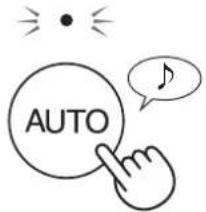
FAN SPEED BUTTON
![graph TD A["Hand Icon"] --> B["Low Engagement Icon"] A --> C["MED Engagement Icon"] A --> D["MAX Engagement Icon"]](/content/2026/04/615546/images/078ca610543c4e16bc8a7b2a16f335f2f68ce3cd55a100ae4ea8b9e96b609733.jpg)
ADDITIONAL FAN SPEED FUNCTIONS: APP ONLY
POLLEN:
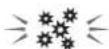
The dust sensor sensitivity is automatically increased and the dust sensor quickly detects impurities such as dust and pollen and cleans the air powerfully.
SLEEP:

The product will operate quietly, and the fan speed will automatically switch depending on the amount of impurities in the air and room brightness. When the Light Control is set to "Auto", the Display and Air Quality Indicator will automatically switch Dim or OFF based on room brightness.
Room is bright: Light is dimmed Room is dark: Light is OFF
PLASMACLUSTER EXPRESS CLEAN MODE:

The product releases Plasmacluster ions at max air flow for 10 minutes. After that, the air purifier operates for 50 minutes on high fan speed.
NOTE
- When the operation finishes after 60 minutes, the product will return to the prior operation mode. It is able to change to other modes during this operation.
- The Plasmacluster ion cannot be turned "OFF".
SWITCH DISPLAY
![graph TD A["°F W % PM 2.5"] --> B["55 % Humidity"] A --> C["77 °F Temperature *1"] A --> D["34 PM2.5 Concentration"] A --> E["20 W Wattage"]](/content/2026/04/615546/images/36d543aa9abbed91786edbe795c0ca4e78465c04a508e79dca43646389a674b0.jpg)
*1: For KCP110CW or KCP70CW, °F " on the control panel is " °C ".
CHILD LOCK
The operation panel will be locked.
ON CANCELLATION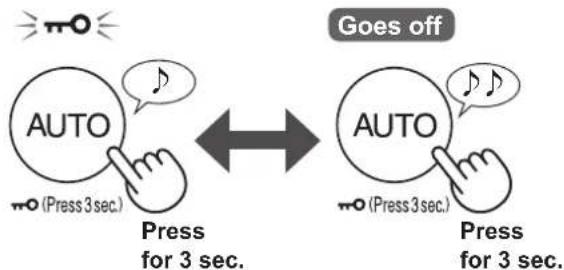
NOTE
- It is possible to turn Wi-Fi off while in Child Lock Mode.
WEEKLY SCHEDULER: APP ONLY
ON TIMER:

You can set a weekly scheduler for the air purifier to start a specific mode on a specific day and time. The ON Timer Indicator will turn on while there is a schedule set.
OFF TIMER:

You can set a weekly scheduler for the air purifier to stop operation on a specific day and time. The OFF Timer Indicator will turn on while there is a schedule set.
CARE
• To maintain optimum performance of this air purifier, please clean the product including the filter periodically.
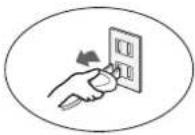
- Be sure to stop operation and unplug the product before any maintenance or replacing accessories.
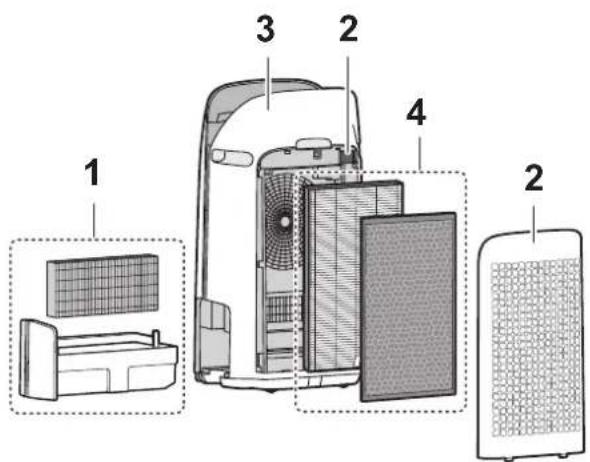
| Place Page | ||
| 1 | Humidifying Filter / Humidifying Tray 19 | |
| 2 | Back Panel / Sensor Filter 20 | |
| 3 | Main Body 20 | |
| 4 | True HEPA Filter / Active Carbon Deodorizing Filter | 21 |
FILTER MAINTENANCE INDICATOR
When the cumulative operation period or the water containing period is more than approximately 720 hours, the Filter Maintenance Indicator will turn on.
- It will not calculate the time when the product is unplugged.
• 30 days × 24 hours = 720 hours
This is a reminder to perform the maintenance described for the Humidifying Filter and Tray, Main Body, Back Panel, and Sensors.
After maintenance, connect the power plug to the wall outlet and press the Power ON/OFF Button, then the Switching Display Button for 3 seconds.
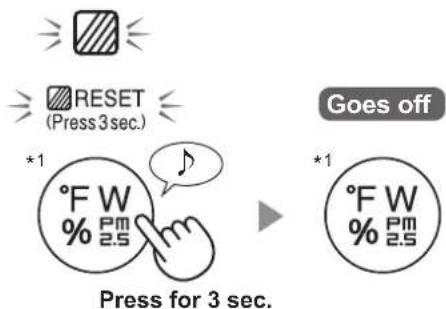
*1: For KCP110CW or KCP70CW, "F" on the control panel is "°C".
REPLACEMENT AND MAINTENANCE CYCLE
| Filter Name Maintenance Cycle Max Service Life Replacement Filter Model | |||
| Humidifying Filter | When odor emanates from the air outlet, or once a month. | 2 years FZ-P1 | 1MFU |
MAINTENANCE
- Remove the Humidifying Filter and Tray.
![graph LR A["Initial Washer"] --> B["Cut into Top Box"] B --> C["Add to Top Box with Down Arrow"] C --> D["Cut down Top Box with Up Arrow"] D --> E["After Cooling"] E --> F["Final Washer with Down Arrow and Up Arrow"]](/content/2026/04/615546/images/fd033cd87090e7d5ecc1ecaa2525488cdefdb7b7cef28c5f02f882d7672aaa3b.jpg)
- Rinse with plenty of water.
- Do not remove the Humidifier Float. If it comes off, refer to page 20. • Refer to page 20 for how to clean the Humidifying Filter when it is very dirty.
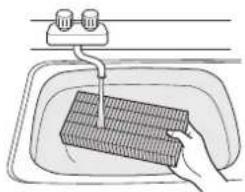
Humidifier Float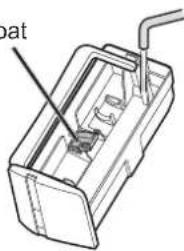
- Attach the Humidifying Filter and Tray.
• After maintenance, correctly reattach the parts.
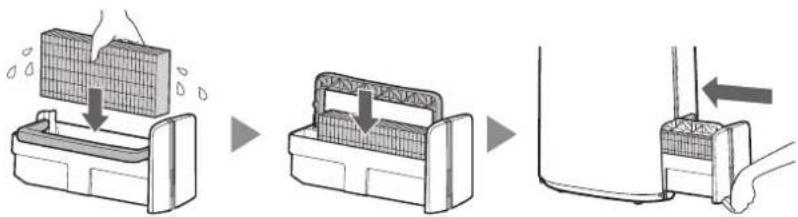
REPLACEMENT
See this page for directions on how to install the filter when replacing.
- Please consult your dealer for purchase of replacement filter.
- Only use filter designed for this product.
Record the date when you replace the filters on the back cover of this manual.
- Scan the QR code for product on page 1 information and accessories.
FZ-P11MFU (1 unit)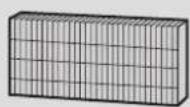
Disposal of Filters
Please dispose of the replaced filter according to the local disposal laws and regulations.
Humidifying Filter materials: Polyester, Rayon
NOTE
How to Clean Hard-to-Remove Dirt.
| Mild Kitchen Detergent(only Humidifying tray) | Citric Acid(available at some drugstores) | 100% Bottled Lemon Juice with No Pulp | |
| 1 | Fill the tray half-way with water.Add a small amount of mild kitchen detergent. | 2 1/2 cups of water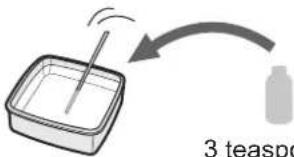 cons cons | 3 cups of water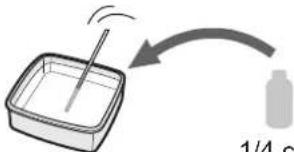 up up |
| 2 | Soak for 30 minutes.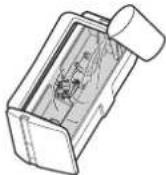 | 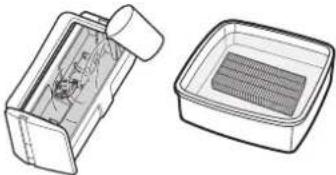 | Soak for 30 minutes.(When using lemon juice as your descaling solution, allow for more soak time.) |
| 3 | Rinse off the mild kitchen detergent or the descaling solution with clean water. | ||
NOTE
How to install the Humidifier Float.
- Insert the Humidifier Float under this tab.
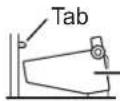
Humidifier Float
Cross-Section view
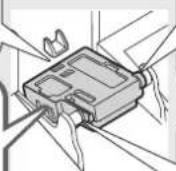
- Insert the tab of the Humidifier Float into the hole.
- Insert the tab on the other side of the Humidifier Float into the hole.
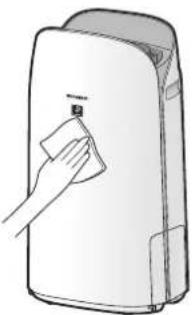
MAIN BODY / BACK PANEL / SENSOR FILTER
Wipe with a dry, soft cloth.
Remove the dust gently with a cleaning tool such as a vacuum cleaner.
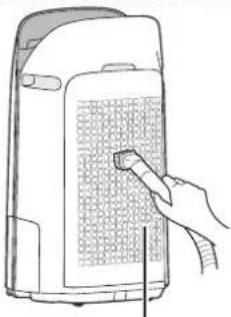
Back Panel (Pre-Filter)
NOTE
- Do not apply excessive pressure when scrubbing the Back Panel.
NOTE
How to Clean Hard-to-Remove Dirt.
Back Panel
- Add a small amount of mild kitchen detergent to water and soak for about 10 minutes.
- Rinse off the mild kitchen detergent with clean water.
- Completely dry the filter in a well-vented area.
Sensor Filter
- Remove the Back Panel.
- Remove the Sensor Filter.
- If the Sensor Filter is very dirty, wash it with water and dry it thoroughly.
Back Panel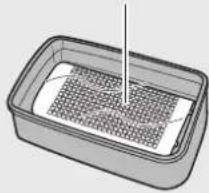
Sensor Filter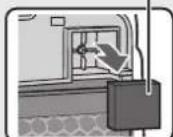
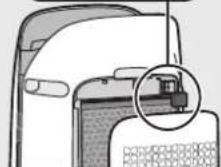
True HEPA Filter / Active Carbon Deodorizing Filter
REPLACEMENT AND MAINTENANCE CYCLE
| Filter Name Maintenance Cycle Max Service Life Replacement Filter Model | |||
| True HEPA Filter | Whenever dust accumulates, when odor emanates from the air outlet, or once a month. | 2 years*1, 2 | FZ-P11HFU |
| Active Carbon Deodorizing Filter | FZ-J80DFU | ||
*1: According to Japan Electric Manufacture's Association JEM 1467, the Max service life is based on the equivalent condition of the smoke from 5 cigarettes per day whereby the dust collection/deodorization power is reduced by half compared with that of new filter. It is recommended to replace the filter more frequently under more severe conditions. *2: Designated App notifies when filters should be replaced according to usage.
MAINTENANCE
Remove the dust on the filters.
NOTE
- Do not wash the filters. Do not expose to sunlight. (Otherwise these filters may lose efficacy.)
TRUE HEPA FILTER ACTIVE CARBON DEODORIZING FILTER
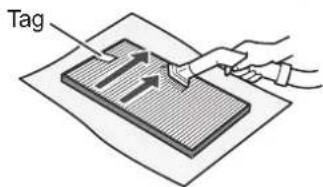
Maintain and clean only the tagged surface. Do not clean the opposite surface. The filter is fragile, so be careful not to apply too much pressure.
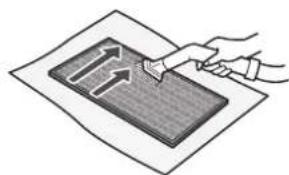
Both surfaces can be maintained and cleaned. The filter is fragile, so be careful not to apply too much pressure.
Some odors absorbed by the filters will break down over time, causing additional odors. Depending on usage conditions, and especially if the product is used in environments significantly more severe than a normal household, these odors may become noticeable sooner than expected.
Replace the filter in those cases or if dust is unable to be removed after maintenance.
REPLACEMENT
See page 12 for directions on how to install the filter when replacing.
- Please consult your dealer for purchase of replacement filter.
- Use only filter designed for this product.
Record the date when you replace the filters on the back cover of this manual.
- Scan the QR code on page 1 for product information and accessories.
Disposal of Filters
Please dispose of the replaced filter according to the local disposal laws and regulations.
True HEPA Filter materials: Polypropylene, Polyethylene Active Carbon Deodorizing Filter materials: Polypropylene, Polyester, Activated carbon
FZ-P11HFU (1 unit)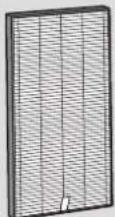
FZ-J80DFU (1 unit)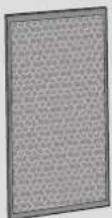
NOTE
- Do not wash and reuse replaced filter.
- Before calling for service, please review the Troubleshooting list below, since the problem may not be the product malfunction.
ABOUT THE PRODUCT
Odor and smoke persists.
- Check the filters. If they appear to be extremely dirty, clean or replace them.
Air discharged from the product has an odor.
- Check to see if the filters are extremely dirty.
- Clean or replace the filters.
- Use only fresh tap water. Using other water sources risks the growth of mold, fungi, or bacteria.
The product does not operate when cigarette smoke is in the air.
- Make sure the product is installed in a location in which the sensors can detect cigarette smoke.
- Check to see if the Sensitive Dust Sensor openings are blocked or clogged. If they are blocked or clogged, clean the Sensor Filter or the Back Panel.
Smell from a new product and/or filter.
- Immediately after removing the plastic bag, a slight odor may occur. This odor is not harmful for filter performance or human exposure.
The product makes a clicking or ticking sound.
- The product may make clicking or ticking sounds when it is generating ions.
The Air Quality Indicator is blue even when the air is not clean.
- The air may have been dirty when the product was plugged in. Unplug the product, wait one minute, and then plug the product in again.
The Air Quality Indicator is red even when the air is clean.
- Dirty or clogged Sensitive Dust Sensor openings interfere with sensor operation. Gently clean the Sensor Filter or the Back Panel.
The Air Quality Indicator changes color frequently.
- The Cleanliness Indicator automatically changes color when the Sensitive Dust Sensor and Odor Sensor detect impurities. If you are concerned about the change, you can change sensor sensitivity. (Page 24, 25)
Filter Maintenance Indicator is on.
- Whenever after performing maintenance or replacing the Humidifying Filter, connect the power cord to an outlet and then press the Filter Reset Button for more than 3 seconds. (Page 18)
The Display goes off.
- When the Light Control is set to "OFF", the light is always off. If you do not want the light to be off, set the Light Control to "Auto" or "Dim" setting. (Page 24, 25)
- In Sleep mode, when the Light Control is set to "Auto", the light will automatically switch to dim or off based on the brightness of the room.
The Display does not match weather report or another hygrometer or thermometer in the room.
- Outdoor and indoor as well as the home environment (the volume of traffic nearby, number of stories in home, etc.) may cause a reading different than those data.
- There is a difference in the level within the same room.
The Humidify Indicator on the Display does not light up when the Humidifying Tray is empty.
- The room has reached the appropriate level of humidity and has stopped humidifying.
- Check the Humidifier Float for impurities. Clean the Humidifying Tray. Make sure that the product is on a level surface.
The water level in the Humidifying Tray does not decrease or decreases slowly.
- Check to see if the Humidifying Tray is correctly installed. Check the Humidifying Filter.
- If the filter is extremely dirty, clean or replace it.
One of the following is displayed.
C1 C4 C6
- Unplug the product, wait one minute, and then plug the product in again.
ABOUT THE Wi-Fi FUNCTION
Wi-Fi connection of the air purifier and the router cannot be performed.
- Check the specifications of the router in use.
- Adjust the router and antenna direction, move the router and antenna closer, and so on. After that, reswitch to turn on the router and perform the INITIAL SET UP again.
The connection between the air purifier and your smart device cannot be established.
- Are the air purifier and your smart device connecting to the same router? If not, connect the air purifier and your smart device to the same router. If you still can't connect, try connecting your smart device to the 2.4GHz band of the router.
- Is the total number of smart devices in use exceeding the maximum number for registration on one air purifier? The maximum number of smart devices that can be registered on one air purifier is 10.
- Is the total number of products (air conditioners, air purifiers, etc.) to be registered with one smart device exceeding the maximum designated number? The maximum number of products to be registered with one smart device is 30.
Remote operation from a smart device cannot be performed.
• Is the Wi-Fi Indicator of the air purifier on? If the Wi-Fi Indicator is off, please perform "A1: Wi-Fi adapter ON/OFF" to turn on the product Wi-Fi. (Page 26) • Have the connection between the air purifier and your smart device been completed? Set up the connection between the air purifier and your smart device. (Page 15)
When changing the router
- It is necessary to reconnect the air purifier to the router.
- Hold down the "Wi-Fi" Button for 3 seconds to stop the Wi-Fi function.
- Perform "INITIAL SET UP: ② Connection of the air purifier and a router". (Page 14)
When changing the smart device
• Perform the following steps. 1. Delete the registration of the old smart device from the designated App. 2. Use the new smart device to perform "INITIAL SET UP: ① Download & Sign up, and ③ Connection between the air purifier and a smart device". (Page 14, 15)
When going to dispose or hand over the air purifier
- Perform the following steps, to prevent leak of personal information.
- Delete the registration of the air purifier from the designated App.
- Perform "A4: Initialization of Wi-Fi function". (Page 26)
In case of being handed over from a third party
- To prevent unauthorized access from a third party, perform "A4: Initialization of Wi-Fi function". (Page 26)
Wi-Fi Indicator blinks slowly
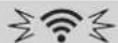
• It is one of the following status.
A. The Wi-Fi connection of the air purifier and a router is in setup. B. The connection of the air purifier and a smart device is in setup. C. The software for the Wi-Fi function in the air purifier is being updated.
Wi-Fi Indicator blinks fast
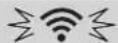
- Network error. Please confirm the Wi-Fi network status from "A7: Display Wi-Fi network status". (Page 27)
Wi-Fi Indicator goes off
- The air purifier cannot connect to the router. Check the following.
A. Is the power plug correctly connected? B. Has the Wi-Fi function been stopped? Confirm the Wi-Fi network status from "A7: Display Wi-Fi network status". (Page 27)
One of “A2” to “A6” cannot be selected in the Wi-Fi setting mode. (Page 26 - 27)
- If the Wi-Fi adapter is off, one of "A2" to "A6" may not be selectable.
HOW TO CHANGE VARIOUS SETTINGS
- You can change the product and Wi-Fi functions on page 25 - 28.
1. Turn the product OFF.
- Press for 3 sec.
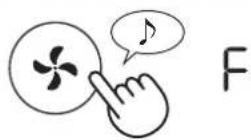
When Wi-Fi setting, change "F" to "A".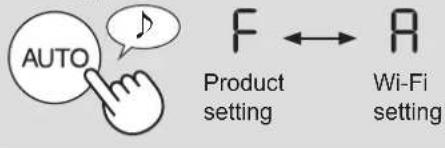
Product setting: F1, Wi-Fi setting: A1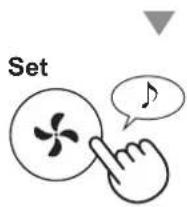
3. Select "Function number (F1-F7 or A1-A8)" on pages 25-28.
Go Forward or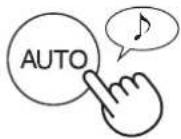
Go Back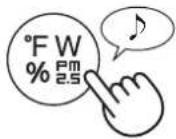
Product setting
Wi-Fi setting
Set
- When Wi-Fi setting, refer to pages 26-28 for the details of each function. When Product setting, select "Setting number (01-03)" on page 25. Go Forward or
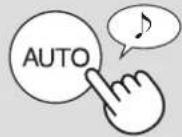
Go Back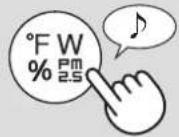

Set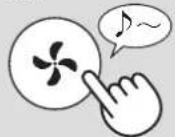
5. Finish the setting.
Goes off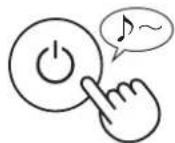
PRODUCT FUNCTIONS (F1-F7)
| Function Setting | |||
| F1Light ControlYou can select the brightness of the Display and Air Quality Indicator. | 01 OFFWhen set to “OFF”, the “Dim” light illuminates for 8 seconds after operation starts and then the light goes off.However, some indicators that need notification will remain dim.02 Dim03 Auto (default)Light automatically switches based on room brightness. | ||
| Room brightness | Display and Air Quality Indicator | ||
| ALL MODE(Except SLEEP) | SLEEPMODE | ||
| Bright ON | Dim | ||
| Dim Dim | OFF | ||
| F2Plasmacluster Ion ON/OFF | 01 OFF02 ON (default) | ||
| F3Auto resumeThis model has Auto Resume function, where the operation resumes at the previous operation mode and settings if the power is restored. | 01 Cancellation02 ON (default) | ||
| Adjusting sensor sensitivity (F4 - F6)F4 Light Sensor Low | 01 | ||
| F5 Sensitive Dust Sensor Standard | 02 (default) | ||
| F6 Odor Sensor High | 03 | ||
| F7Sound Indicator SettingYou can set the product to make a beeping sound when the Humidifying Tray is empty. | 01 Cancellation (default)02 ON | ||
Wi-Fi FUNCTIONS (A1-A8)
| Function Setting | |
| A1Wi-Fi adapterON/OFF | 1. Select “R” by following Steps 1 - 3 on page 24.2. Press "AUTO" Button to select Setting “0” or “0201 Wi-Fi OFF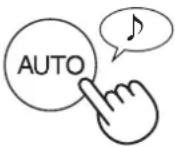 ▼02 Wi-Fi ON3. Complete ▼02 Wi-Fi ON3. Complete  NOTE• When Setting number (“0” or “”) is changed, the square rotates on the display until the setting is completed. When setting is completed, “R2” is displayed. NOTE• When Setting number (“0” or “”) is changed, the square rotates on the display until the setting is completed. When setting is completed, “R2” is displayed. |
| A2Wi-Ficonnectionwith a router(with the WPSButton) | 1. Select “R2” by following Steps 1 - 3 on page 24.2. After “6” is displayed, press the WPS (Wi-Fi Protected Setup) Button of the router. 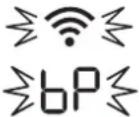 ▶ ▶ 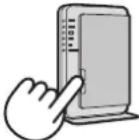 ▶ ▶ 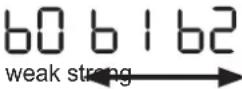 Blink Once connected, receiver level will be displayed.A connection error is occurring if “6” is displayed. Please confirm the router and try again.3. Complete Blink Once connected, receiver level will be displayed.A connection error is occurring if “6” is displayed. Please confirm the router and try again.3. Complete |
| A4Initialization ofWi-Fi function | 1. Select “R4” by following Steps 1 - 3 on page 24.2. After “RC” is displayed press “Fan Speed” Button.An error is occurring if “6” is displayed. Please try again. → → ▶ L2 ▶ L2  Blink3. Complete Blink3. Complete NOTE• Please delete the device registration from the App when initializing the air purifier which is already connected to the Wi-Fi. NOTE• Please delete the device registration from the App when initializing the air purifier which is already connected to the Wi-Fi. |
NOTE
| Function Setting | |
| A6Confirmation ofMAC address | 1. Select “Aby following Steps 1 - 3 on page 24.2. Press “AUTO” Button to display MAC address.For example:In case MAC address is “12:34:56:AB:CD:EF”.  3. Complete 3. Complete |
| A7Display Wi-Finetwork status | 1. Select “Aby following Steps 1 - 3 on page 24.2. After displaying “ _”for a few seconds, network status of Wi-Fi adapter will be displayed. |
| CO Connection is stable | |
| AO Wi-Fi adapter is off⇒ Please turn on Wi-Fi adapter. | |
| BU Router is not registered⇒ Please perform the Wi-Fi connection with the router. | |
| CU Link settings with the App is not performed⇒ Please perform the link setting with the smart device. | |
| AE Wi-Fi adapter network error⇒ Please turn off Wi-Fi adapter and turn on again after a while. | |
| BE Network error between the air purifier and the router⇒ Please confirm the network status of the router. | |
| CE Network service error⇒ Please turn off the air purifier and confirm the internet status, then try again. | |
3. Complete | |
| CO | Connection is stable |
| AO | Wi-Fi adapter is off ⇒ Please turn on Wi-Fi adapter. |
| BU | Router is not registered ⇒ Please perform the Wi-Fi connection with the router. |
| CU | Link settings with the App is not performed ⇒ Please perform the link setting with the smart device. |
| AE | Wi-Fi adapter network error ⇒ Please turn off Wi-Fi adapter and turn on again after a while. |
| BE | Network error between the air purifier and the router ⇒ Please confirm the network status of the router. |
| CE | Network service error ⇒ Please turn off the air purifier and confirm the internet status, then try again. |
| Function Setting | ||||||||
| RWi-Ficonnectionwith a router(without the WPS Button)- AP (Access Point) mode - | 1. Select “RBby following the Steps 1 - 3 on page 24.2. Perform Wi-Fi connection of the air purifier and the router based on the App screen.Refer to the App for further operations.“Brand” “Books while setting the connection between the product and the router.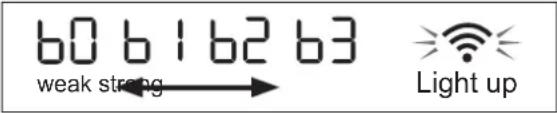 Once connected, receiver level will be displayed.A connection error is occurring if “B” is displayed. Please confirm the router and try again. Once connected, receiver level will be displayed.A connection error is occurring if “B” is displayed. Please confirm the router and try again. | |||||||
| Model KCP110UW / KCP110CW KCP70UW / KCP70CW | ||||||||
| Power supply 120 V ~ 60 Hz | ||||||||
| Fan Speed Adjustment MAX MED LOW MAX MED LOW | ||||||||
| CLEAN AIR | Fan Speed (CFM) 381 222 64 272 190 64 | |||||||
| Rated Power (W) 94 27 4.8 40 19 4.8 | ||||||||
| Noise Level (dBA) *1 | 55 42 21 47 39 21 | |||||||
| CLEAN AIR & HUMIDIFY | Fan Speed (CFM) 381 222 64 272 190 64 | |||||||
| Rated Power (W) 94 27 4.8 40 19 4.8 | ||||||||
| Noise Level (dBA) *1 | 55 42 2147 39 21 | |||||||
| Humidification (pints / hour) *2 | 0.70 0.47 0.15 0.55 0.42 0.15 | |||||||
| Standby power (W) | 1.1 (When Wi-Fi adapter is ON.)0.7 (When Wi-Fi adapter is OFF.) | |||||||
| Recommended Room Size *3 | 538 sq. ft. (50 m 2 ) | 396 sq. ft. (37 m 2 ) | ||||||
| CADR (Dust / Smoke / Pollen) | 352 / 347 / 443 | 260 / 255 / 259 | ||||||
| Humidifying Tray Capacity (gallon) | Approx. 0.53 | |||||||
| Sensors | Sensitive Dust / Odor / Light / Temperature & Humidity | |||||||
| Filter Type | Dust collection | True HEPA *4 Filter | ||||||
| Deodorization | Active Carbon Deodorizing Filter | |||||||
| Cord Length | 6.6 ft. (2.0 m) | |||||||
| Dimensions | 15.8 in. (W) × 12.4 in. (D) × 28.6 in. (H)(402 mm (W) × 315 mm (D) × 727 mm (H)) | |||||||
| Weight | Approx. 22.3 lbs. (10.1 kg) | |||||||
*1 Noise level is measured based on the JEM1467 standard of the Japan Electrical Manufactures' Association. *2 The amount of humidification changes in accordance with indoor and outdoor temperature and humidity. The amount of humidification increases as temperatures rise or humidity decreases. The amount of humidification decreases as temperatures decrease or humidity rises. - Measurement Conditions: 20 °C, 30 % humidity (according to JEM1426). *3 • The recommended room size is appropriate for operating the product at maximum fan speed. *4 • The filter removes more than 99.97% of particles at least 0.3 microns in size.
Standby Power
When the product's power plug is inserted in a wall outlet, it consumes standby power in order to operate electrical circuits. To conserve energy, unplug the power cord when the product is not in use.
INTELLECTUAL PROPERTY RIGHTS FOR THIS PRODUCT
■ Software structure
Software installed in this product is structured with multiple independent software components, each of them has our or third-party's copyright.
■ Software of our development and free software
Among the software components of this product, for software we developed or created and incidental documents has our copyright. And they are protected
by copyright law, international regulation and other related laws. Also this product uses software components distributed as free software with third-party's copyright.
■ Obligation of license indication
Some software components installed in this product are required to indicate the license by those copyright holders.
License indications of such software components are as below:
- Expat
Copyright (c) 1998, 1999, 2000 Thai Open Source Software Center Ltd and Clark Cooper
Copyright (c) 2001, 2002, 2003, 2004, 2005, 2006 Expat maintainers.
Permission is hereby granted, free of charge, to any person obtaining a copy of this software and associated documentation files (the "Software"), to deal in the Software without restriction, including without limitation the rights to use, copy, modify, merge, publish, distribute, sublicense, and/or sell copies of the Software, and to permit persons to whom the Software is furnished to do so, subject to the following conditions:
The above copyright notice and this permission notice shall be included in all copies or substantial portions of the Software.
THE SOFTWARE IS PROVIDED "AS IS", WITHOUT WARRANTY OF ANY KIND, EXPRESS OR IMPLIED, INCLUDING BUT NOT LIMITED TO THE WARRANTIES OF MERCHANTABILITY, FITNESS FOR A PARTICULAR PURPOSE AND NONINFRINGEMENT. IN NO EVENT SHALL THE AUTHORS OR COPYRIGHT HOLDERS BE LIABLE FOR ANY CLAIM, DAMAGES OR OTHER LIABILITY, WHETHER IN AN ACTION OF CONTRACT, TORT OR OTHERWISE, ARISING FROM, OUT OF OR IN CONNECTION WITH THE SOFTWARE OR THE USE OR OTHER DEALINGS IN THE SOFTWARE.
• Wslay
The MIT License
Copyright (c) 2011, 2012 Tatsuhiro Tsujikawa
Permission is hereby granted, free of charge, to any person obtaining a copy of this software and associated documentation files (the "Software"), to deal in the Software without restriction, including without limitation the rights to use, copy, modify, merge, publish, distribute, sublicense, and/or sell copies of the Software, and to permit persons to whom the Software is furnished to do so, subject to the following conditions:
The above copyright notice and this permission notice shall be included in all copies or substantial portions of the Software.
THE SOFTWARE IS PROVIDED "AS IS", WITHOUT WARRANTY OF ANY KIND, EXPRESS OR IMPLIED, INCLUDING BUT NOT LIMITED TO THE WARRANTIES OF MERCHANTABILITY, FITNESS FOR A PARTICULAR PURPOSE AND NONINFRINGEMENT. IN NO EVENT SHALL THE AUTHORS OR COPYRIGHT HOLDERS BE LIABLE FOR ANY CLAIM, DAMAGES OR OTHER LIABILITY, WHETHER IN AN ACTION OF CONTRACT, TORT OR OTHERWISE, ARISING FROM, OUT OF OR IN CONNECTION WITH THE SOFTWARE OR THE USE OR OTHER DEALINGS IN THE SOFTWARE.
• libFLAC
Copyright (C) 2000-2009 Josh Coalson
Copyright (C) 2011-2014 Xiph.Org Foundation
Redistribution and use in source and binary forms, with or without modification, are permitted provided that the following conditions are met:
- Redistributions of source code must retain the above copyright notice, this list of conditions and the following disclaimer.
- Redistributions in binary form must reproduce the above copyright notice, this list of conditions and the following disclaimer in the documentation and/or other materials provided with the distribution.
- Neither the name of the Xiph.org Foundation nor the names of its contributors may be used to endorse or promote products derived from this software without specific prior written permission.
THIS SOFTWARE IS PROVIDED BY THE COPYRIGHT HOLDERS AND CONTRIBUTORS "AS IS" AND ANY EXPRESS OR IMPLIED WARRANTIES, INCLUDING, BUT NOT LIMITED TO, THE IMPLIED WARRANTIES OF MERCHANTABILITY AND FITNESS FOR A PARTICULAR PURPOSE ARE DISCLAIMED. IN NO EVENT SHALL THE FOUNDATION OR CONTRIBUTORS BE LIABLE FOR ANY DIRECT, INDIRECT, INCIDENTAL, SPECIAL, EXEMPLARY, OR CONSEQUENTIAL DAMAGES (INCLUDING, BUT NOT LIMITED TO, PROCUREMENT OF SUBSTITUTE GOODS OR SERVICES; LOSS OF USE, DATA, OR PROFITS; OR BUSINESS INTERRUPTION) HOWEVER CAUSED AND ON ANY THEORY OF LIABILITY, WHETHER IN CONTRACT, STRICT LIABILITY, OR TORT (INCLUDING NEGLIGENCE OR OTHERWISE) ARISING IN ANY WAY OUT OF THE USE OF THIS SOFTWARE, EVEN IF ADVISED OF THE POSSIBILITY OF SUCH DAMAGE.
lw-IP
Copyright (c) 2001, 2002 Swedish Institute of Computer Science.
All rights reserved.
Redistribution and use in source and binary forms, with or without modification, are permitted provided that the following conditions are met:
- Redistributions of source code must retain the above copyright notice, this list of conditions and the following disclaimer.
- Redistributions in binary form must reproduce the above copyright notice, this list of conditions and the following disclaimer in the documentation and/or other materials provided with the distribution.
- The name of the author may not be used to endorse or promote products derived from this software without specific prior written permission.
THIS SOFTWARE IS PROVIDED BY THE AUTHOR "AS IS" AND ANY EXPRESS OR IMPLIED WARRANTIES, INCLUDING, BUT NOT LIMITED TO, THE IMPLIED WARRANTIES OF MERCHANTABILITY AND FITNESS FOR A PARTICULAR PURPOSE ARE DISCLAIMED. IN NO EVENT SHALL THE AUTHOR BE LIABLE FOR ANY DIRECT, INDIRECT, INCIDENTAL, SPECIAL, EXEMPLARY, OR CONSEQUENTIAL DAMAGES (INCLUDING, BUT NOT LIMITED TO, PROCUREMENT OF SUBSTITUTE GOODS OR SERVICES; LOSS OF USE, DATA, OR PROFITS; OR BUSINESS INTERRUPTION) HOWEVER CAUSED AND ON ANY THEORY OF LIABILITY, WHETHER IN CONTRACT, STRICT LIABILITY, OR TORT (INCLUDING NEGLIGENCE OR OTHERWISE) ARISING IN ANY WAY OUT OF THE USE OF THIS SOFTWARE, EVEN IF ADVISED OF THE POSSIBILITY OF SUCH DAMAGE.
This file is part of the lwIP TCP/IP stack.
Author: Adam Dunkels adam@sics.se
•JSMN
Copyright (c) 2010 Serge A. Zaitsev
Permission is hereby granted, free of charge, to any person obtaining a copy of this software and associated documentation files (the "Software"), to deal in the Software without restriction, including without limitation the rights to use, copy, modify, merge, publish, distribute, sublicense, and/or sell copies of the Software, and to permit persons to whom the Software is furnished to do so, subject to the following conditions:
The above copyright notice and this permission notice shall be included in all copies or substantial portions of the Software.
THE SOFTWARE IS PROVIDED "AS IS", WITHOUT WARRANTY OF ANY KIND, EXPRESS OR IMPLIED, INCLUDING BUT NOT LIMITED TO THE WARRANTIES OF MERCHANTABILITY, FITNESS FOR A PARTICULAR PURPOSE AND NONINFRINGEMENT. IN NO EVENT SHALL THE AUTHORS OR COPYRIGHT HOLDERS BE LIABLE FOR ANY CLAIM, DAMAGES OR OTHER LIABILITY, WHETHER IN AN ACTION OF CONTRACT, TORT OR OTHERWISE, ARISING FROM, OUT OF OR IN CONNECTION WITH THE SOFTWARE OR THE USE OR OTHER DEALINGS IN THE SOFTWARE.
- mbedTLS
Copyright (C) 2006-2015, ARM Limited, All Rights Reserved
Licensed under the Apache License, Version 2.0 (the "License"); you may not use this file except in compliance with the License. You may obtain a copy of the License at
http://www.apache.org/licenses/LICENSE-2.0
Unless required by applicable law or agreed to in writing, software distributed under the License is distributed on an "AS IS" BASIS, WITHOUT WARRANTIES OR CONDITIONS OF ANY KIND, either express or implied. See the License for the specific language governing permissions and limitations under the License.
•wpa supplicant
Copyright (c) 2003-2017, Jouni Malinen j@w1.fi and contributors All Rights Reserved.
Redistribution and use in source and binary forms, with or without modification, are permitted provided that the following conditions are met:
- Redistributions of source code must retain the above copyright notice, this list of conditions and the following disclaimer.
- Redistributions in binary form must reproduce the above copyright notice, this list of conditions and the following disclaimer in the documentation and/or other materials provided with the distribution.
- Neither the name(s) of the above-listed copyright holder(s) nor the names of its contributors may be used to endorse or promote products derived from this software without specific prior written permission.
THIS SOFTWARE IS PROVIDED BY THE COPYRIGHT HOLDERS AND CONTRIBUTORS "AS IS" AND ANY EXPRESS OR IMPLIED WARRANTIES, INCLUDING, BUT NOT LIMITED TO, THE IMPLIED WARRANTIES OF MERCHANTABILITY AND FITNESS FOR A PARTICULAR PURPOSE ARE DISCLAIMED. IN NO EVENT SHALL THE COPYRIGHT OWNER OR CONTRIBUTORS BE LIABLE FOR ANY DIRECT, INDIRECT, INCIDENTAL, SPECIAL, EXEMPLARY, OR CONSEQUENTIAL DAMAGES (INCLUDING, BUT NOT LIMITED TO, PROCUREMENT OF SUBSTITUTE GOODS OR SERVICES; LOSS OF USE, DATA, OR PROFITS; OR BUSINESS INTERRUPTION) HOWEVER CAUSED AND ON ANY THEORY OF LIABILITY, WHETHER IN CONTRACT, STRICT LIABILITY, OR TORT (INCLUDING NEGLIGENCE OR OTHERWISE) ARISING IN ANY WAY OUT OF THE USE OF THIS SOFTWARE, EVEN IF ADVISED OF THE POSSIBILITY OF SUCH DAMAGE.
- newLib
(1) Red Hat Incorporated
Copyright (c) 1994-2009 Red Hat, Inc. All rights reserved.
This copyrighted material is made available to anyone wishing to use, modify, copy, or redistribute it subject to the terms and conditions of the BSD License. This program is distributed in the hope that it will be useful, but WITHOUT ANY WARRANTY expressed or implied, including the implied warranties of MERCHANTABILITY or FITNESS FOR A PARTICULAR PURPOSE. A copy of this license is available at http://www.opensource.org/licenses. Any Red Hat trademarks that are incorporated in the source code or documentation are not subject to the BSD License and may only be used or replicated with the express permission of Red Hat, Inc.
(2) University of California, Berkeley
Copyright (c) 1981-2000 The Regents of the University of California. All rights reserved.
Redistribution and use in source and binary forms, with or without modification, are permitted provided that the following conditions are met:
* Redistributions of source code must retain the above copyright notice, this list of conditions and the following disclaimer. * Redistributions in binary form must reproduce the above copyright notice, this list of conditions and the following disclaimer in the documentation and/or other materials provided with the distribution. * Neither the name of the University nor the names of its contributors may be used to endorse or promote products derived from this software without specific prior written permission.
THIS SOFTWARE IS PROVIDED BY THE COPYRIGHT HOLDERS AND CONTRIBUTORS "AS IS" AND ANY EXPRESS OR IMPLIED WARRANTIES, INCLUDING, BUT NOT LIMITED TO, THE IMPLIED WARRANTIES OF MERCHANTABILITY AND FITNESS FOR A PARTICULAR PURPOSE ARE DISCLAIMED. IN NO EVENT SHALL THE COPYRIGHT OWNER OR CONTRIBUTORS BE LIABLE FOR ANY DIRECT, INDIRECT, INCIDENTAL, SPECIAL, EXEMPLARY, OR CONSEQUENTIAL DAMAGES (INCLUDING, BUT NOT LIMITED TO, PROCUREMENT OF SUBSTITUTE GOODS OR SERVICES; LOSS OF USE, DATA, OR PROFITS; OR BUSINESS INTERRUPTION) HOWEVER CAUSED AND ON ANY THEORY OF LIABILITY, WHETHER IN CONTRACT, STRICT LIABILITY, OR TORT (INCLUDING NEGLIGENCE OR OTHERWISE) ARISING IN ANY WAY OUT OF THE USE OF THIS SOFTWARE, EVEN IF ADVISED OF THE POSSIBILITY OF SUCH DAMAGE.
(3) David M. Gay (AT&T 1991, Lucent 1998)
The author of this software is David M. Gay.
Copyright (c) 1991 by AT&T.
Permission to use, copy, modify, and distribute this software for any purpose without fee is hereby granted, provided that this entire notice is included in all copies of any software which is or includes a copy or modification of this software and in all copies of the supporting documentation for such software.
THIS SOFTWARE IS BEING PROVIDED "AS IS", WITHOUT ANY EXPRESS OR IMPLIED WARRANTY. IN PARTICULAR, NEITHER THE AUTHOR NOR AT&T MAKES ANY REPRESENTATION OR WARRANTY OF ANY KIND CONCERNING THE MERCHANTABILITY OF THIS SOFTWARE OR ITS FITNESS FOR ANY PARTICULAR PURPOSE.
The author of this software is David M. Gay.
Copyright (C) 1998-2001 by Lucent Technologies All Rights Reserved
Permission to use, copy, modify, and distribute this software and its documentation for any purpose and without fee is hereby granted, provided that the above copyright notice appear in all copies and that both that the copyright notice and this permission notice and warranty disclaimer appear in supporting documentation, and that the name of Lucent or any of its entities not be used in advertising or publicity pertaining to distribution of the software without specific, written prior permission.
LUCENT DISCLAIMS ALL WARRANTIES WITH REGARD TO THIS SOFTWARE, INCLUDING ALL IMPLIED WARRANTIES OF MERCHANTABILITY AND FITNESS. IN NO EVENT SHALL LUCENT OR ANY OF ITS ENTITIES BE LIABLE FOR ANY SPECIAL, INDIRECT OR CONSEQUENTIAL DAMAGES OR ANY DAMAGES WHATSOEVER RESULTING FROM LOSS OF USE, DATA OR PROFITS, WHETHER IN AN ACTION OF CONTRACT, NEGLIGENCE OR OTHER TORTIOUS ACTION, ARISING OUT OF OR IN CONNECTION WITH THE USE OR PERFORMANCE OF THIS SOFTWARE.
(4) Advanced Micro Devices
Copyright 1989, 1990 Advanced Micro Devices, Inc.
This software is the property of Advanced Micro Devices, Inc (AMD) which specifically grants the user the right to modify, use and distribute this software provided this notice is not removed or altered. All other rights are reserved by AMD.
AMD MAKES NO WARRANTY OF ANY KIND, EXPRESS OR IMPLIED, WITH REGARD TO THIS SOFTWARE. IN NO EVENT SHALL AMD BE LIABLE FOR INCIDENTAL OR CONSEQUENTIAL DAMAGES IN CONNECTION WITH OR ARISING FROM THE FURNISHING, PERFORMANCE, OR USE OF THIS SOFTWARE.
So that all may benefit from your experience, please report any problems or suggestions about this software to the 29K Technical Support Center at 800-29-29-AMD (800-292-9263) in the USA, or 0800-89-1131 in the UK, or 0031-11-1129
in Japan, toll free. The direct dial number is 512-462-4118.
Advanced Micro Devices, Inc. 29K Support Products Mail Stop 573 5900 E. Ben White Blvd. Austin, TX 78741 800-292-9263
(7) Sun Microsystems
Copyright (C) 1993 by Sun Microsystems, Inc. All rights reserved.
Developed at SunPro, a Sun Microsystems, Inc. business. Permission to use, copy, modify, and distribute this software is freely granted, provided that this notice is preserved.
(8) Hewlett Packard
(c) Copyright 1986 HEWLETT-PACKARD COMPANY
To anyone who acknowledges that this file is provided "AS IS" without any express or implied warranty;
permission to use, copy, modify, and distribute this file for any purpose is hereby granted without fee, provided that the above copyright notice and this notice appears in all copies, and that the name of Hewlett-Packard Company not be used in advertising or publicity pertaining to distribution of the software without specific, written prior permission. Hewlett-Packard Company makes no representations about the suitability of this software for any purpose.
(9) Hans-Peter Nilsson
Copyright (C) 2001 Hans-Peter Nilsson
Permission to use, copy, modify, and distribute this software is freely granted, provided that the above copyright notice, this notice and the following disclaimer are preserved with no changes.
THIS SOFTWARE IS PROVIDED "AS IS" AND WITHOUT ANY EXPRESS OR IMPLIED WARRANTIES, INCLUDING, WITHOUT LIMITATION, THE IMPLIED WARRANTIES OF MERCHANTABILITY AND FITNESS FOR A PARTICULAR PURPOSE.
(11) Christopher G. Demetriou
Copyright (c) 2001 Christopher G. Demetriou All rights reserved.
Redistribution and use in source and binary forms, with or without modification, are permitted provided that the following conditions are met: 1. Redistributions of source code must retain the above copyright notice, this list of conditions and the following disclaimer.
- Redistributions in binary form must reproduce the above copyright notice, this list of conditions and the following disclaimer in the documentation and/or other materials provided with the distribution.
- The name of the author may not be used to endorse or promote products derived from this software without specific prior written permission.
THIS SOFTWARE IS PROVIDED BY THE AUTHOR "AS IS" AND ANY EXPRESS OR IMPLIED WARRANTIES, INCLUDING, BUT NOT LIMITED TO, THE IMPLIED WARRANTIES OF MERCHANTABILITY AND FITNESS FOR A PARTICULAR PURPOSE ARE DISCLAIMED. IN NO EVENT SHALL THE AUTHOR BE LIABLE FOR ANY DIRECT, INDIRECT, INCIDENTAL, SPECIAL, EXEMPLARY, OR CONSEQUENTIAL DAMAGES (INCLUDING, BUT NOT LIMITED TO, PROCUREMENT OF SUBSTITUTE GOODS OR SERVICES; LOSS OF USE, DATA, OR PROFITS; OR BUSINESS INTERRUPTION) HOWEVER CAUSED AND ON ANY THEORY OF LIABILITY, WHETHER IN CONTRACT, STRICT LIABILITY, OR TORT (INCLUDING NEGLIGENCE OR OTHERWISE) ARISING IN ANY WAY OUT OF THE USE OF THIS SOFTWARE, EVEN IF ADVISED OF THE POSSIBILITY OF SUCH DAMAGE.
(12) SuperH, Inc.
Copyright 2002 SuperH, Inc. All rights reserved
This software is the property of SuperH, Inc (SuperH) which specifically grants the user the right to modify, use and distribute this software provided this notice is not removed or altered. All other rights are reserved by SuperH.
SUPERH MAKES NO WARRANTY OF ANY KIND, EXPRESS OR IMPLIED, WITH REGARD TO THIS SOFTWARE. IN NO EVENT SHALL SUPERH BE LIABLE FOR INDIRECT, SPECIAL, INCIDENTAL OR CONSEQUENTIAL DAMAGES IN CONNECTION WITH OR ARISING FROM THE FURNISHING, PERFORMANCE, OR USE OF THIS SOFTWARE.
So that all may benefit from your experience, please report any problems or suggestions about this software to the SuperH Support Center via e-mail at softwaresupport@superh.com.
SuperH, Inc.
405 River Oaks Parkway
San Jose
CA 95134
USA
(13) Royal Institute of Technology
Copyright (c) 1999 Kungliga Tekniska Högskolan (Royal Institute of Technology, Stockholm, Sweden). All rights reserved.
Redistribution and use in source and binary forms, with or without modification, are permitted provided that the following conditions are met:
- Redistributions of source code must retain the above copyright notice, this list of conditions and the following disclaimer.
- Redistributions in binary form must reproduce the above copyright notice, this list of conditions and the following disclaimer in the documentation and/or other materials provided with the distribution.
- Neither the name of KTH nor the names of its contributors may be used to endorse or promote products derived from this software without specific prior written permission.
THIS SOFTWARE IS PROVIDED BY KTH AND ITS CONTRIBUTORS "AS IS" AND ANY EXPRESS OR IMPLIED WARRANTIES, INCLUDING, BUT NOT LIMITED TO, THE IMPLIED WARRANTIES OF MERCHANTABILITY AND FITNESS FOR A PARTICULAR PURPOSE ARE DISCLAIMED. IN NO EVENT SHALL KTH OR ITS CONTRIBUTORS BE LIABLE FOR ANY DIRECT, INDIRECT, INCIDENTAL, SPECIAL, EXEMPLARY, OR CONSEQUENTIAL DAMAGES (INCLUDING, BUT NOT LIMITED TO, PROCUREMENT OF SUBSTITUTE GOODS OR SERVICES; LOSS OF USE, DATA, OR PROFITS; OR BUSINESS INTERRUPTION) HOWEVER CAUSED AND ON ANY THEORY OF LIABILITY, WHETHER IN CONTRACT, STRICT LIABILITY, OR TORT (INCLUDING NEGLIGENCE OR OTHERWISE) ARISING IN ANY WAY OUT OF THE USE OF THIS SOFTWARE, EVEN IF ADVISED OF THE POSSIBILITY OF SUCH DAMAGE.
(14) Alexey Zelkin
Copyright (c) 2000, 2001 Alexey Zelkin phantom@FreeBSD.org All rights reserved.
Redistribution and use in source and binary forms, with or without modification, are permitted provided that the following conditions are met:
- Redistributions of source code must retain the above copyright notice, this list of conditions and the following disclaimer.
- Redistributions in binary form must reproduce the above copyright notice, this list of conditions and the following disclaimer in the documentation and/or other materials provided with the distribution.
THIS SOFTWARE IS PROVIDED BY THE AUTHOR AND CONTRIBUTORS "AS IS" AND ANY EXPRESS OR IMPLIED WARRANTIES, INCLUDING, BUT NOT LIMITED TO, THE IMPLIED WARRANTIES OF MERCHANTABILITY AND FITNESS FOR A PARTICULAR PURPOSE ARE DISCLAIMED. IN NO EVENT SHALL THE AUTHOR OR CONTRIBUTORS BE LIABLE FOR ANY DIRECT, INDIRECT, INCIDENTAL, SPECIAL, EXEMPLARY, OR CONSEQUENTIAL DAMAGES (INCLUDING, BUT NOT LIMITED TO, PROCUREMENT OF SUBSTITUTE GOODS OR SERVICES; LOSS OF USE, DATA, OR PROFITS; OR BUSINESS INTERRUPTION) HOWEVER CAUSED AND ON ANY THEORY OF LIABILITY, WHETHER IN CONTRACT, STRICT LIABILITY, OR TORT (INCLUDING NEGLIGENCE OR OTHERWISE) ARISING IN ANY WAY OUT OF THE USE OF THIS SOFTWARE, EVEN IF ADVISED OF THE POSSIBILITY OF SUCH DAMAGE.
(15) Andrey A. Chernov
Copyright (C) 1997 by Andrey A. Chernov, Moscow, Russia. All rights reserved.
Redistribution and use in source and binary forms, with or without modification, are permitted provided that the following conditions are met: 1. Redistributions of source code must retain the above copyright notice, this list of conditions and the following disclaimer. 2. Redistributions in binary form must reproduce the above copyright notice, this list of conditions and the following disclaimer in the documentation and/or other materials provided with the distribution.
THIS SOFTWARE IS PROVIDED BY THE AUTHOR "AS IS" AND ANY EXPRESS OR IMPLIED WARRANTIES, INCLUDING, BUT NOT LIMITED TO, THE IMPLIED WARRANTIES OF MERCHANTABILITY AND FITNESS FOR A PARTICULAR PURPOSE ARE DISCLAIMED. IN NO EVENT SHALL THE REGENTS OR CONTRIBUTORS BE LIABLE FOR ANY DIRECT, INDIRECT, INCIDENTAL, SPECIAL, EXEMPLARY, OR CONSEQUENTIAL DAMAGES (INCLUDING, BUT NOT LIMITED TO, PROCUREMENT OF SUBSTITUTE GOODS OR SERVICES; LOSS OF USE, DATA, OR PROFITS; OR BUSINESS INTERRUPTION) HOWEVER CAUSED AND ON ANY THEORY OF LIABILITY, WHETHER IN CONTRACT, STRICT LIABILITY, OR TORT (INCLUDING NEGLIGENCE OR OTHERWISE) ARISING IN ANY WAY OUT OF THE USE OF THIS SOFTWARE, EVEN IF ADVISED OF THE POSSIBILITY OF SUCH DAMAGE.
(16) FreeBSD
Copyright (c) 1997-2002 FreeBSD Project. All rights reserved.
Redistribution and use in source and binary forms, with or without modification, are permitted provided that the following conditions are met: 1. Redistributions of source code must retain the above copyright notice, this list of conditions and the following disclaimer.
- Redistributions in binary form must reproduce the above copyright notice, this list of conditions and the following disclaimer in the documentation and/or other materials provided with the distribution.
THIS SOFTWARE IS PROVIDED BY THE AUTHOR AND CONTRIBUTORS "AS IS" AND ANY EXPRESS OR IMPLIED WARRANTIES, INCLUDING, BUT NOT LIMITED TO, THE IMPLIED WARRANTIES OF MERCHANTABILITY AND FITNESS FOR A PARTICULAR PURPOSE ARE DISCLAIMED. IN NO EVENT SHALL THE AUTHOR OR CONTRIBUTORS BE LIABLE FOR ANY DIRECT, INDIRECT, INCIDENTAL, SPECIAL, EXEMPLARY, OR CONSEQUENTIAL DAMAGES (INCLUDING, BUT NOT LIMITED TO, PROCUREMENT OF
SUBSTITUTE GOODS OR SERVICES; LOSS OF USE, DATA, OR PROFITS; OR BUSINESS INTERRUPTION) HOWEVER CAUSED AND ON ANY THEORY OF LIABILITY, WHETHER IN CONTRACT, STRICT LIABILITY, OR TORT (INCLUDING NEGLIGENCE OR OTHERWISE) ARISING IN ANY WAY OUT OF THE USE OF THIS SOFTWARE, EVEN IF ADVISED OF THE POSSIBILITY OF SUCH DAMAGE.
(17) S. L. Moshier
Author: S. L. Moshier.
Copyright (c) 1984,2000 S.L. Moshier
Permission to use, copy, modify, and distribute this software for any purpose without fee is hereby granted, provided that this entire notice is included in all copies of any software which is or includes a copy or modification of this software and in all copies of the supporting documentation for such software.
THIS SOFTWARE IS BEING PROVIDED "AS IS", WITHOUT ANY EXPRESS OR IMPLIED WARRANTY. IN PARTICULAR, THE AUTHOR MAKES NO REPRESENTATION OR WARRANTY OF ANY KIND CONCERNING THE MERCHANTABILITY OF THIS SOFTWARE OR ITS FITNESS FOR ANY PARTICULAR PURPOSE.
(18) Citrus Project
Copyright (c)1999 Citrus Project, All rights reserved.
Redistribution and use in source and binary forms, with or without modification, are permitted provided that the following conditions are met: 1. Redistributions of source code must retain the above copyright notice, this list of conditions and the following disclaimer. 2. Redistributions in binary form must reproduce the above copyright notice, this list of conditions and the following disclaimer in the documentation and/or other materials provided with the distribution.
THIS SOFTWARE IS PROVIDED BY THE AUTHOR AND CONTRIBUTORS "AS IS" AND ANY EXPRESS OR IMPLIED WARRANTIES, INCLUDING, BUT NOT LIMITED TO, THE IMPLIED WARRANTIES OF MERCHANTABILITY AND FITNESS FOR A PARTICULAR PURPOSE ARE DISCLAIMED. IN NO EVENT SHALL THE AUTHOR OR CONTRIBUTORS BE LIABLE FOR ANY DIRECT, INDIRECT, INCIDENTAL, SPECIAL, EXEMPLARY, OR CONSEQUENTIAL DAMAGES (INCLUDING, BUT NOT LIMITED TO, PROCUREMENT OF SUBSTITUTE GOODS OR SERVICES; LOSS OF USE, DATA, OR PROFITS; OR BUSINESS INTERRUPTION) HOWEVER CAUSED AND ON ANY THEORY OF LIABILITY, WHETHER IN CONTRACT, STRICT LIABILITY, OR TORT (INCLUDING NEGLIGENCE OR OTHERWISE) ARISING IN ANY WAY OUT OF THE USE OF THIS SOFTWARE, EVEN IF ADVISED OF THE POSSIBILITY OF SUCH DAMAGE.
(19) Todd C. Miller
Copyright (c) 1998 Todd C. Miller Todd.Miller@courtesan.com All rights reserved.
Redistribution and use in source and binary forms, with or without modification, are permitted provided that the following conditions are met: 1. Redistributions of source code must retain the above copyright notice, this list of conditions and the following disclaimer. 2. Redistributions in binary form must reproduce the above copyright notice, this list of conditions and the following disclaimer in the documentation and/or other materials provided with the distribution. 3. The name of the author may not be used to endorse or promote products derived from this software without specific prior written permission.
THIS SOFTWARE IS PROVIDED "AS IS" AND ANY EXPRESS OR IMPLIED WARRANTIES, INCLUDING, BUT NOT LIMITED TO, THE IMPLIED WARRANTIES OF MERCHANTABILITY AND FITNESS FOR A PARTICULAR PURPOSE ARE DISCLAIMED. IN NO EVENT SHALL THE AUTHOR BE LIABLE FOR ANY DIRECT, INDIRECT, INCIDENTAL, SPECIAL, EXEMPLARY, OR CONSEQUENTIAL DAMAGES (INCLUDING, BUT NOT LIMITED TO, PROCUREMENT OF SUBSTITUTE GOODS OR SERVICES; LOSS OF USE, DATA, OR PROFITS; OR BUSINESS INTERRUPTION) HOWEVER CAUSED AND ON ANY THEORY OF LIABILITY, WHETHER IN CONTRACT, STRICT LIABILITY, OR TORT (INCLUDING NEGLIGENCE OR OTHERWISE) ARISING IN ANY WAY OUT OF THE USE OF THIS SOFTWARE, EVEN IF ADVISED OF THE POSSIBILITY OF SUCH DAMAGE.
(26) Mike Barcroft
Copyright (c) 2001 Mike Barcroft mike@FreeBSD.org All rights reserved.
Redistribution and use in source and binary forms, with or without modification, are permitted provided that the following conditions are met: 1. Redistributions of source code must retain the above copyright notice, this list of conditions and the following disclaimer. 2. Redistributions in binary form must reproduce the above copyright notice, this list of conditions and the following disclaimer in the documentation and/or other materials provided with the distribution.
THIS SOFTWARE IS PROVIDED BY THE AUTHOR AND CONTRIBUTORS "AS IS" AND ANY EXPRESS OR IMPLIED WARRANTIES, INCLUDING, BUT NOT LIMITED TO, THE IMPLIED WARRANTIES OF MERCHANTABILITY AND FITNESS FOR A PARTICULAR PURPOSE ARE DISCLAIMED. IN NO EVENT SHALL THE AUTHOR OR CONTRIBUTORS BE LIABLE FOR ANY DIRECT, INDIRECT, INCIDENTAL, SPECIAL, EXEMPLARY, OR CONSEQUENTIAL DAMAGES (INCLUDING, BUT NOT LIMITED TO, PROCUREMENT OF SUBSTITUTE GOODS OR SERVICES; LOSS OF USE, DATA, OR PROFITS;
OR BUSINESS INTERRUPTION) HOWEVER CAUSED AND ON ANY THEORY OF LIABILITY, WHETHER IN CONTRACT, STRICT LIABILITY, OR TORT (INCLUDING NEGLIGENCE OR OTHERWISE) ARISING IN ANY WAY OUT OF THE USE OF THIS SOFTWARE, EVEN IF ADVISED OF THE POSSIBILITY OF SUCH DAMAGE.
(35) - ARM Ltd (arm and thumb variant targets only)
Copyright (c) 2009 ARM Ltd All rights reserved.
Redistribution and use in source and binary forms, with or without modification, are permitted provided that the following conditions are met:
- Redistributions of source code must retain the above copyright notice, this list of conditions and the following disclaimer.
- Redistributions in binary form must reproduce the above copyright notice, this list of conditions and the following disclaimer in the documentation and/or other materials provided with the distribution.
- The name of the company may not be used to endorse or promote products derived from this software without specific prior written permission.
THIS SOFTWARE IS PROVIDED BY ARM LTD "AS IS" AND ANY EXPRESS OR IMPLIED WARRANTIES, INCLUDING, BUT NOT LIMITED TO, THE IMPLIED WARRANTIES OF MERCHANTABILITY AND FITNESS FOR A PARTICULAR PURPOSE ARE DISCLAIMED. IN NO EVENT SHALL ARM LTD BE LIABLE FOR ANY DIRECT, INDIRECT, INCIDENTAL, SPECIAL, EXEMPLARY, OR CONSEQUENTIAL DAMAGES (INCLUDING, BUT NOT LIMITED TO, PROCUREMENT OF SUBSTITUTE GOODS OR SERVICES; LOSS OF USE, DATA, OR PROFITS; OR BUSINESS INTERRUPTION) HOWEVER CAUSED AND ON ANY THEORY OF LIABILITY, WHETHER IN CONTRACT, STRICT LIABILITY, OR TORT (INCLUDING NEGLIGENCE OR OTHERWISE) ARISING IN ANY WAY OUT OF THE USE OF THIS SOFTWARE, EVEN IF ADVISED OF THE POSSIBILITY OF SUCH DAMAGE.
(41) Ed Schouten - FreeBSD
Copyright (c) 2008 Ed Schouten ed@FreeBSD.org All rights reserved.
Redistribution and use in source and binary forms, with or without modification, are permitted provided that the following conditions are met: 1. Redistributions of source code must retain the above copyright notice, this list of conditions and the following disclaimer. 2. Redistributions in binary form must reproduce the above copyright notice, this list of conditions and the following disclaimer in the documentation and/or other materials provided with the distribution.
THIS SOFTWARE IS PROVIDED BY THE AUTHOR AND CONTRIBUTORS "AS IS" AND ANY EXPRESS OR IMPLIED WARRANTIES, INCLUDING, BUT NOT LIMITED TO, THE IMPLIED WARRANTIES OF MERCHANTABILITY AND FITNESS FOR A PARTICULAR PURPOSE ARE DISCLAIMED. IN NO EVENT SHALL THE AUTHOR OR CONTRIBUTORS BE LIABLE FOR ANY DIRECT, INDIRECT, INCIDENTAL, SPECIAL, EXEMPLARY, OR CONSEQUENTIAL DAMAGES (INCLUDING, BUT NOT LIMITED TO, PROCUREMENT OF SUBSTITUTE GOODS OR SERVICES; LOSS OF USE, DATA, OR PROFITS; OR BUSINESS INTERRUPTION) HOWEVER CAUSED AND ON ANY THEORY OF LIABILITY, WHETHER IN CONTRACT, STRICT LIABILITY, OR TORT (INCLUDING NEGLIGENCE OR OTHERWISE) ARISING IN ANY WAY OUT OF THE USE OF THIS SOFTWARE, EVEN IF ADVISED OF THE POSSIBILITY OF SUCH DAMAGE.
- libgloss (1) Red Hat Incorporated
Copyright (c) 1994-2009 Red Hat, Inc. All rights reserved.
This copyrighted material is made available to anyone wishing to use, modify, copy, or redistribute it subject to the terms and conditions of the BSD License. This program is distributed in the hope that it will be useful, but WITHOUT ANY WARRANTY expressed or implied, including the implied warranties of MERCHANTABILITY or FITNESS FOR A PARTICULAR PURPOSE. A copy of this license is available at http://www.opensource.org/licenses. Any Red Hat trademarks that are incorporated in the source code or documentation are not subject to the BSD License and may only be used or replicated with the express permission of Red Hat, Inc.
(2) University of California, Berkeley
Copyright (c) 1981-2000 The Regents of the University of California. All rights reserved.
Redistribution and use in source and binary forms, with or without modification, are permitted provided that the following conditions are met:
* Redistributions of source code must retain the above copyright notice, this list of conditions and the following disclaimer. * Redistributions in binary form must reproduce the above copyright notice, this list of conditions and the following disclaimer in the documentation and/or other materials provided with the distribution. * Neither the name of the University nor the names of its contributors may be used to endorse or promote products derived from this software without specific prior written permission.
THIS SOFTWARE IS PROVIDED BY THE COPYRIGHT HOLDERS AND CONTRIBUTORS "AS IS" AND ANY EXPRESS OR IMPLIED WARRANTIES, INCLUDING, BUT NOT LIMITED TO, THE IMPLIED WARRANTIES OF MERCHANTABILITY AND FITNESS FOR A PARTICULAR PURPOSE ARE DISCLAIMED. IN NO EVENT SHALL THE COPYRIGHT OWNER OR CONTRIBUTORS BE LIABLE FOR ANY DIRECT, INDIRECT, INCIDENTAL, SPECIAL, EXEMPLARY, OR CONSEQUENTIAL DAMAGES (INCLUDING, BUT
NOT LIMITED TO, PROCUREMENT OF SUBSTITUTE GOODS OR SERVICES; LOSS OF USE, DATA, OR PROFITS; OR BUSINESS INTERRUPTION) HOWEVER CAUSED AND ON ANY THEORY OF LIABILITY, WHETHER IN CONTRACT, STRICT LIABILITY, OR TORT (INCLUDING NEGLIGENCE OR OTHERWISE) ARISING IN ANY WAY OUT OF THE USE OF THIS SOFTWARE, EVEN IF ADVISED OF THE POSSIBILITY OF SUCH DAMAGE.
(3) DJ Delorie
Copyright (C) 1993 DJ Delorie All rights reserved.
Redistribution, modification, and use in source and binary forms is permitted provided that the above copyright notice and following paragraph are duplicated in all such forms.
This file is distributed WITHOUT ANY WARRANTY; without even the implied warranty of MERCHANTABILITY or FITNESS FOR A PARTICULAR PURPOSE.
(4) (formerly GPL for fr30)
The GPL is no longer applicable to the fr30 platform. The piece of code (syscalls.c) referencing the GPL has been officially relicensed.
(5) Advanced Micro Devices
Copyright 1989, 1990 Advanced Micro Devices, Inc.
This software is the property of Advanced Micro Devices, Inc (AMD) which specifically grants the user the right to modify, use and distribute this software provided this notice is not removed or altered. All other rights are reserved by AMD.
AMD MAKES NO WARRANTY OF ANY KIND, EXPRESS OR IMPLIED, WITH REGARD TO THIS SOFTWARE. IN NO EVENT SHALL AMD BE LIABLE FOR INCIDENTAL OR CONSEQUENTIAL DAMAGES IN CONNECTION WITH OR ARISING FROM THE FURNISHING, PERFORMANCE, OR USE OF THIS SOFTWARE.
So that all may benefit from your experience, please report any problems or suggestions about this software to the 29K Technical Support Center at 800-29-29-AMD (800-292-9263) in the USA, or 0800-89-1131 in the UK, or 0031-11-1129 in Japan, toll free. The direct dial number is 512-462-4118.
Advanced Micro Devices, Inc. 29K Support Products Mail Stop 573 5900 E. Ben White Blvd. Austin, TX 78741 800-292-9263
(8) Sun Microsystems
Copyright (C) 1993 by Sun Microsystems, Inc. All rights reserved.
Developed at SunPro, a Sun Microsystems, Inc. business. Permission to use, copy, modify, and distribute this software is freely granted, provided that this notice is preserved.
(9) Hewlett Packard
(c) Copyright 1986 HEWLETT-PACKARD COMPANY
To anyone who acknowledges that this file is provided "AS IS" without any express or implied warranty:
permission to use, copy, modify, and distribute this file for any purpose is hereby granted without fee, provided that the above copyright notice and this notice appears in all copies, and that the name of Hewlett-Packard Company not be used in advertising or publicity pertaining to distribution of the software without specific, written prior permission. Hewlett-Packard Company makes no representations about the suitability of this software for any purpose.
(10) Hans-Peter Nilsson
Copyright (C) 2001 Hans-Peter Nilsson
Permission to use, copy, modify, and distribute this software is freely granted, provided that the above copyright notice, this notice and the following disclaimer are preserved with no changes.
THIS SOFTWARE IS PROVIDED "AS IS" AND WITHOUT ANY EXPRESS OR IMPLIED WARRANTIES, INCLUDING, WITHOUT LIMITATION, THE IMPLIED WARRANTIES OF MERCHANTABILITY AND FITNESS FOR A PARTICULAR PURPOSE.
(14) - National Semiconductor Corporation
Copyright (c) 2004 National Semiconductor Corporation
The authors hereby grant permission to use, copy, modify, distribute, and license this software and its documentation for any purpose, provided that existing copyright notices are retained in all copies and that this notice is included verbatim in any distributions. No written agreement, license, or royalty fee is required for any of the authorized uses. Modifications to this software may be copyrighted by their authors and need not follow the licensing terms described here, provided that the new terms are clearly indicated on the first page of each file where they apply.
SHARP ELECTRONICS CORPORATION
100 Paragon Drive, Montvale, NJ 07645, U.S.A.
TEL.: (800) 237-4277
KCP110CW (English) KCP70CW (English)
KCP70CW (French)
KCP110CW (French)
http://sharp.ca/contact-emailus.aspx CA | sharp.ca/support-home.aspx
LIGHT SENSOR
In the shade.
CONTROL PANEL / DISPLAY
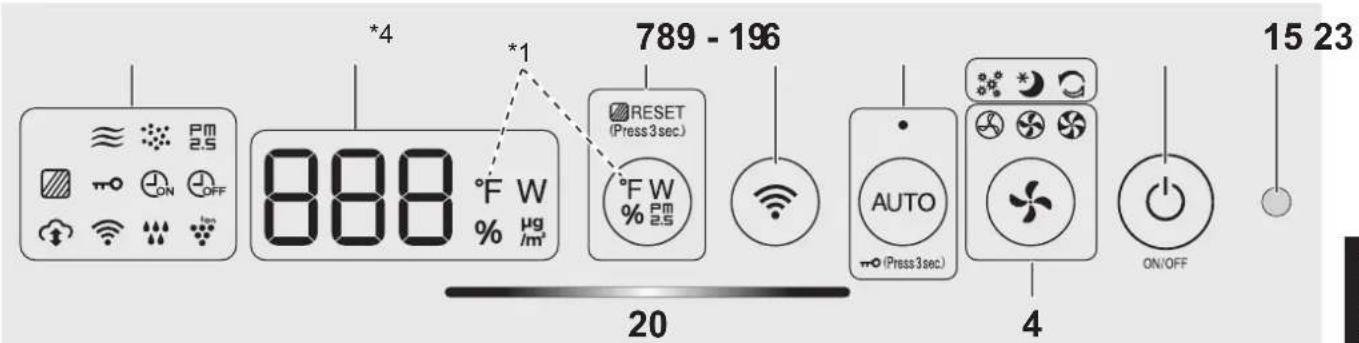
CAUTION
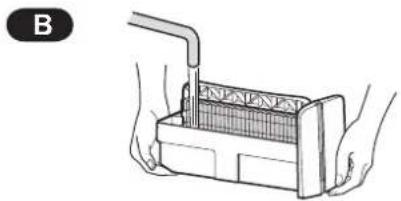
CAUTION
CAUTION
③ CONNECTION BETWEEN THE AIR PURIFIER AND A SMART DEVICE
CAUTION
REPLACEMENT
Sensor filter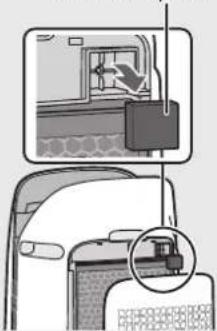
PRODUCT FUNCTIONS (F1-F7)
SHARP ELECTRONICS CORPORATION
100 Paragon Drive, Montvale, NJ 07645, U.S.A
TEL: (800) 237-4277
LIGHT SENSOR
NOTE
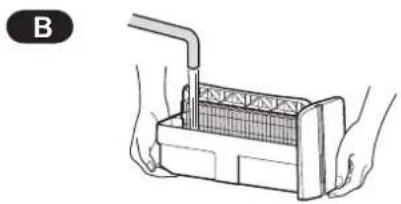
NOTE
Press for 3 sec.
NOTE
QUICK PLASMACLUSTER
REPLACEMENT
Back panel (Pre-filter)
NOTE
Sensor filter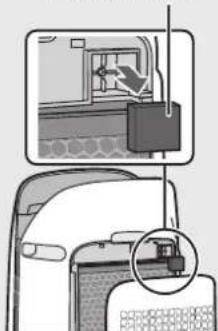
SHARP ELECTRONICS CORPORATION
100 Paragon Drive, Montvale, NJ 07645, U.S.A.
SHARP
SHARP ELECTRONICS OF CANADA LTD.
335 Britannia Road East, Mississauga, Ontario L4Z 1W9 Canada
Production control code

- KCP110UW KCP110CW KCP70UW KCP70CW
- CONTENTS
- FOR CUSTOMER ASSISTANCE
- CONSUMER LIMITED WARRANTY
- IMPORTANT SAFETY INSTRUCTIONS
- PREPARATION
- HOW TO CHANGE VARIOUS
- INTELLECTUAL PROPERTY RIGHTS
- DECLARATION OF CONFORMITY
- SHARP AIR PURIFIER
- KCP110UW / KCP70UW
- RESPONSIBLE PARTY
- KCP110CW / KCP70CW
- PLEASE READ BEFORE OPERATING YOUR AIR PURIFIER
- NOTE
- THE SHARP AIR APPLICATION IS A HELPFUL TOOL THAT PUTS YOU IN CONTROL OF YOUR INDOOR AIR QUALITY
- REGISTER YOUR PRODUCT
- EASY WAYS TO REGISTER TODAY
- PRODUCT SUPPORT
- CONTACT US
- CONSUMER LIMITED WARRANTY FOR U.S. USERS
- YOUR PRODUCT MODEL NUMBER & DESCRIPTION
- WARRANTY PERIOD FOR THIS PRODUCT
- ADDITIONAL ITEM(S) EXCLUDED FROM WARRANTY COVERAGE
- WHERE TO OBTAIN SERVICE
- WHAT TO DO TO OBTAIN SERVICE
- SHARP®
- SHARP ELECTRONICS CORPORATION
- FOR CUSTOMER ASSISTANCE (CANADA)
- SHARP
- LIMITED WARRANTY
- CONSUMER ELECTRONICS PRODUCTS
- CONGRATULATIONS ON YOUR PURCHASE
- READ AND SAVE THESE INSTRUCTIONS BEFORE USING THIS PRODUCT
- WARNING
- CAUTIONS CONCERNING INSTALLATION
- CAUTIONS CONCERNING FILTER
- CAUTIONS CONCERNING OPERATION
- CAUTIONS CONCERNING MAINTENANCE
- CAUTION FOR USE
- CAUTION FOR WI-FI
- CAUTION FOR USAGE ABOUT ELECTRICAL WAVE
- CAUTION FOR PERSONAL INFORMATION (RELATED TO SECURITY)
- LIGHT SENSOR
- DETECTION RANGE OF LIGHT SENSOR
- FILTER INSTALLATION
- REMOVE THE BACK PANEL
- TAKE OUT THE FILTERS FROM THE PLASTIC BAG
- INSTALL THE FILTERS IN THE CORRECT ORDER AS SHOWN
- INSTALL THE BACK PANEL
- RECORD THE DATE WHEN YOU START OR REPLACE THE FILTERS ON THE BACK COVER OF THIS MANUAL
- PULL OUT THE HUMIDIFYING TRAY
- FILL THE HUMIDIFYING TRAY WITH TAP WATER USING METHOD "A" OR "B
- CAREFULLY INSTALL THE HUMIDIFYING TRAY
- ABOUT TRAY HANDLE
- WI-FI SETTINGS
- BEFORE YOU BEGIN
- WI-FI PROTECTED SETUP (WPS) ACCESS POINT (ROUTER)
- ENSURE YOUR SMART DEVICE MEETS MINIMUM SOFTWARE REQUIREMENTS
- PRODUCT WI-FI SPECIFICATIONS
- TRADEMARKS
- INITIAL SET UP
- ① DOWNLOAD & SIGN UP
- INSTALL THE SHARP AIR APP ON YOUR SMART DEVICE
- CONNECT YOUR SMART DEVICE TO THE ROUTER AND LAUNCH THE APP
- ② CONNECTION OF THE AIR PURIFIER AND A ROUTER
- TAP “≡” AT THE UPPER LEFT PART OF THE “HOME” SCREEN, AND SELECT “PAIRING” → “CONNECTION WITH A ROUTER
- FOLLOW INSTRUCTIONS ON THE APP
- ③ CONNECTION BETWEEN THE AIR PURIFIER AND A SMART DEVICE
- TAP "PAIR" FOR THE AIR PURIFIER YOU WOULD LIKE TO PAIR
- HOW TO SET WI-FI ON / OFF AFTER COMPLETING THE INITIAL SET UP
- IF YOU WOULD LIKE TO TURN THE WI-FI OFF
- IF YOU WOULD LIKE TO TURN THE WI-FI ON AGAIN
- START/STOP
- AUTO MODE
- FAN SPEED BUTTON
- ADDITIONAL FAN SPEED FUNCTIONS: APP ONLY
- POLLEN
- SLEEP
- PLASMACLUSTER EXPRESS CLEAN MODE
- SWITCH DISPLAY
- CHILD LOCK
- WEEKLY SCHEDULER: APP ONLY
- ON TIMER
- OFF TIMER
- CARE
- FILTER MAINTENANCE INDICATOR
- REPLACEMENT AND MAINTENANCE CYCLE
- MAINTENANCE
- REPLACEMENT
- DISPOSAL OF FILTERS
- HOW TO CLEAN HARD-TO-REMOVE DIRT
- MAIN BODY / BACK PANEL / SENSOR FILTER
- BACK PANEL
- SENSOR FILTER
- TRUE HEPA FILTER / ACTIVE CARBON DEODORIZING FILTER
- TRUE HEPA FILTER ACTIVE CARBON DEODORIZING FILTER
- SEE PAGE 12 FOR DIRECTIONS ON HOW TO INSTALL THE FILTER WHEN REPLACING
- RECORD THE DATE WHEN YOU REPLACE THE FILTERS ON THE BACK COVER OF THIS MANUAL
- ABOUT THE PRODUCT
- ODOR AND SMOKE PERSISTS
- AIR DISCHARGED FROM THE PRODUCT HAS AN ODOR
- THE PRODUCT DOES NOT OPERATE WHEN CIGARETTE SMOKE IS IN THE AIR
- SMELL FROM A NEW PRODUCT AND/OR FILTER
- THE PRODUCT MAKES A CLICKING OR TICKING SOUND
- THE AIR QUALITY INDICATOR IS BLUE EVEN WHEN THE AIR IS NOT CLEAN
- THE AIR QUALITY INDICATOR IS RED EVEN WHEN THE AIR IS CLEAN
- THE AIR QUALITY INDICATOR CHANGES COLOR FREQUENTLY
- FILTER MAINTENANCE INDICATOR IS ON
- THE DISPLAY GOES OFF
- THE DISPLAY DOES NOT MATCH WEATHER REPORT OR ANOTHER HYGROMETER OR THERMOMETER IN THE ROOM
- THE HUMIDIFY INDICATOR ON THE DISPLAY DOES NOT LIGHT UP WHEN THE HUMIDIFYING TRAY IS EMPTY
- THE WATER LEVEL IN THE HUMIDIFYING TRAY DOES NOT DECREASE OR DECREASES SLOWLY
- ONE OF THE FOLLOWING IS DISPLAYED
- ABOUT THE WI-FI FUNCTION
- WI-FI CONNECTION OF THE AIR PURIFIER AND THE ROUTER CANNOT BE PERFORMED
- THE CONNECTION BETWEEN THE AIR PURIFIER AND YOUR SMART DEVICE CANNOT BE ESTABLISHED
- REMOTE OPERATION FROM A SMART DEVICE CANNOT BE PERFORMED
- WHEN CHANGING THE ROUTER
- WHEN CHANGING THE SMART DEVICE
- WHEN GOING TO DISPOSE OR HAND OVER THE AIR PURIFIER
- IN CASE OF BEING HANDED OVER FROM A THIRD PARTY
- WI-FI INDICATOR BLINKS SLOWLY
- WI-FI INDICATOR BLINKS FAST
- WI-FI INDICATOR GOES OFF
- ONE OF “A2” TO “A6” CANNOT BE SELECTED IN THE WI-FI SETTING MODE. (PAGE 26 - 27)
- HOW TO CHANGE VARIOUS SETTINGS
- TURN THE PRODUCT OFF
- SELECT "FUNCTION NUMBER (F1-F7 OR A1-A8)" ON PAGES
- FINISH THE SETTING
- PRODUCT FUNCTIONS (F1-F7)
- WI-FI FUNCTIONS (A1-A8)
- STANDBY POWER
- INTELLECTUAL PROPERTY RIGHTS FOR THIS PRODUCT
- SOFTWARE STRUCTURE
- SOFTWARE OF OUR DEVELOPMENT AND FREE SOFTWARE
- OBLIGATION OF LICENSE INDICATION
- EXPAT
- WSLAY
- LIBFLAC
- LW-IP
- JSMN
- MBEDTLS
- WPA SUPPLICANT
- NEWLIB
- UNIVERSITY OF CALIFORNIA, BERKELEY
- CONTROL PANEL / DISPLAY
- CAUTION
- QUICK PLASMACLUSTER
- SHARP ELECTRONICS OF CANADA LTD
Brand : SHARP
Model : KCP110UW
Category : Air purifier