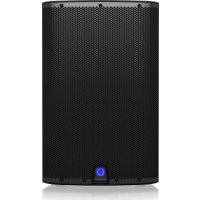
iX15 - Speaker Turbosound - Free user manual and instructions
Find the device manual for free iX15 Turbosound in PDF.


| Product type | 2-way passive speaker |
| Brand | Turbosound |
| Model | iX15 |
| Category | Speaker |
| Dimensions (W x H x D) | 450 x 700 x 380 mm |
| Weight | 22 kg |
| Rated power (RMS) | 400 W |
| Peak power | 1600 W |
| Nominal impedance | 8 Ω |
| Frequency response | 45 Hz - 20 kHz |
| Sensitivity (1W/1m) | 98 dB SPL |
| Woofer | 380 mm (15") |
| Tweeter | 25 mm (1") dome |
| Input connectors | 2 x 6.35 mm jack, 2 x SpeakON |
| Cabinet material | Birch plywood |
| Finish | Semi-matte black paint |
| Protective grille | Steel grille with acoustic foam |
| Maintenance and cleaning | Clean with a soft dry cloth. Do not use solvents or abrasive products. |
| Safety instructions | Do not open the device. Risk of electric shock. All repairs must be carried out by a qualified professional. |
| Spare parts and repairability | Spare parts are not available to the user. Contact authorized service for any repairs. |
| Warranty | Limited warranty - see terms at music-group.com/warranty |
| General information | Passive speaker designed for PA and live sound. Use with high-quality speaker cables. |
Frequently Asked Questions - iX15 Turbosound
User questions about iX15 Turbosound
0 question about this device. Answer the ones you know or ask your own.
Ask a new question about this device
Download the instructions for your Speaker in PDF format for free! Find your manual iX15 - Turbosound and take your electronic device back in hand. On this page are published all the documents necessary for the use of your device. iX15 by Turbosound.
USER MANUAL iX15 Turbosound
natural_image
Four-panel black-and-white photo collage showing a music event: stage with audience, industrial machine, and silhouetted crowd (no visible text or symbols)iX SERIES
1000 Watt 2 Way Powered Loudspeaker with KLARK TEKNIK DSP Technology, Remote Control via iPhone/iPad and Bluetooth Audio Streaming
Quickstart Guide
natural_image
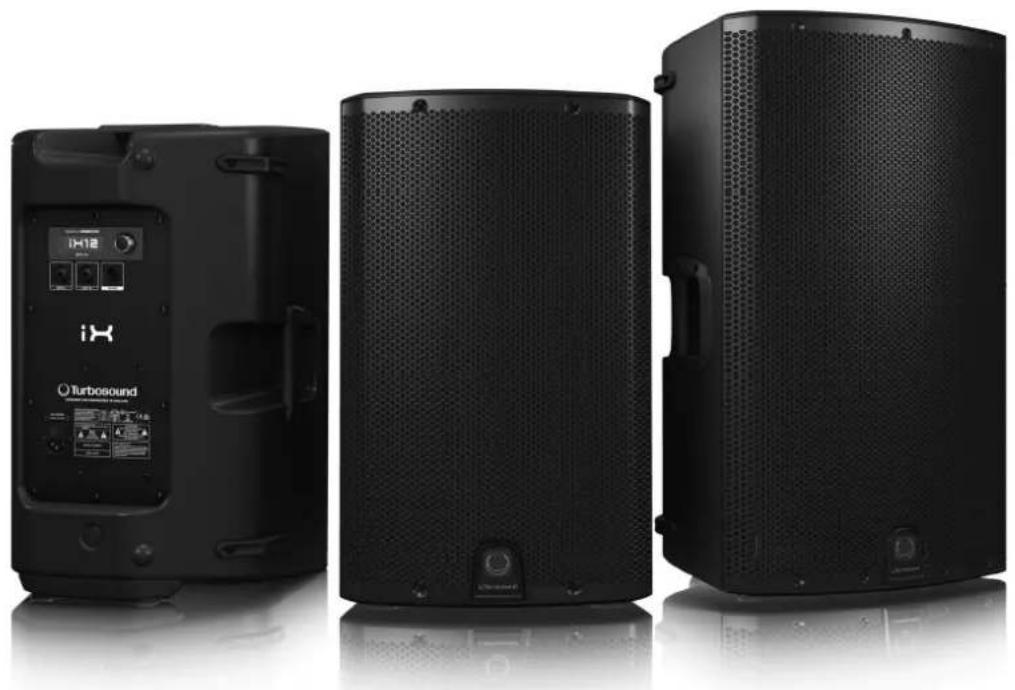
Three black outdoor audio equipment units with visible sound control buttons and branding, shown from front, side, and back angles (no text or symbols on main body)
Terminals marked with this symbol carry electrical current of suffi client magnitude to constitute risk of electric shock. Use only high quality commercially available speaker cables with plugs pre-installed. All other installation or modification should be performed only by qualified personnel.
This symbol, wherever it appears, alerts you to the presence of uninsulated dangerous voltage inside the enclosure voltage that may be sufficient to constitute a risk of shock.
This symbol, wherever it appears, alerts you to important operating and maintenance instructions in the accompanying literature. Please read the manual.
Caution To reduce the risk of electric shock, do not remove the top cover for the rear section. No user serviceable parts inside. Refer servicing to qualified personnel.
Caution To reduce the risk of fi re or electric shock, do not expose this appliance to rain and moisture. The apparatus shall not be exposed to dropping or splashing liquids and no objects filled with liquids, such as vases, shall be placed on the apparatus.
Caution These service instructions are for use by qualified service personnel only. To reduce the risk of electric shock do not perform any servicing other than that contained in the operation instructions, Repairs have to be performed by qualified service personnel.
- Read these instructions.
- Keep these instructions.
- Head all warnings.
- Follow all instructions.
- Do not use this apparatus near water.
- Clean only with dry cloth.
- Do not block any ventilation openings. Install in accordance with the manufacturer's instructions.
-
Do not install near any heat sources such as radiators, heat registers, stoves, or other apparatus (including amplifiers) that produce heat.
-
Do not defeat the safety purpose of the polarized or grounding-type plug. A polarized plug has two blades with one wider than the other. A grounding-type plug has two blades and a third grounding prong. The wide blade or the third prong are provided for your safety. If the provided plug does not fit into your outlet, consult an electrician for replacement of the obsolets outlet.
-
Protect the power cord from being walked on or pinched particularly at plugs, convenience receptacles, and the point where they exit from the apparatus.
-
Use only attachments/accessories specified by the manufacturer.

- Use only with the cart, stand, tripod, bracket, or table specified by the manufacturer, or sold with the apparatus. When a cart is used,
moving the cart/appearatus combination to avoid injury from tip over. 13. Unplug this apparatus during lightning storms or when unused for long periods of time.
-
Refer all servicing to qualified service personnel. Servicing is required when the apparatus has been damaged in any way, such as power supply cord or plug is damaged, liquid has been spilled or objects have fallen into the apparatus, the apparatus has been exposed to rain or moisture, does not operate normally, or has been dropped.
-
The apparatus shall be connected to a MAINS socket outlet with a protective washing connection.
-
Where the MAIN5 plug or an appliance coupler is used as the disconnect device, the disconnect device shall remain readily operable.

- Correct disposal of this product: This symbol indicates that this product must not be disposed of with household waste, according to the WEEE Directive (2012/19/EU) and your national law.
This product should be taken to a collection center licensed for the recycling of waste electrical and electronic equipment (EEE). The mishandling of this type of waste could have a possible negative impact on the environment and human health due to potentially hazardous substances that are generally associated with EEE. At the same time, your cooperation in the correct disposal of this product will contribute to the effi client use of natural resources. For more information about where you can take your waste equipment for recycling, please contact your local city offi ca, or your household waste collection service.
LEGAL DISCLAIMER
MUSIC Group accepts no liability for any loss which may be suffered by any person who relies either wholly or in part upon any description, photograph, or statement contained herein. Technical specific citions, appearances and other information are subject to change without notice. All trademarks are the property of their respective owners. MIDAS, KLARK TEKNIK, TURBOSOUND, BEHRINGER, BUGERA and DDA are trademarks or registered trademarks of MUSIC Group IP Ltd. © MUSIC Group IP Ltd. 2015 All rights reserved.
LIMITED WARRANTY
For the applicable warranty terms and conditions and additional information regarding MUSIC Group's Limited Warranty, please see complete details online at music group.com/warranty.

BESCHRÄNKTE GARANTIE
Thank you for choosing a TURBOSOUND loudspeaker product for your application. If you would like further information about this or any other TURBOSOUND product, please visit our website at turbosound.com.
Unpacking the Loudspeaker
After unpacking the unit please check carefully for damage. If damage is found, please notify your supplier at once. You, the consignee, must instigate any claim. Please retain all packaging in case of future re-shipment.
Controls
text_image
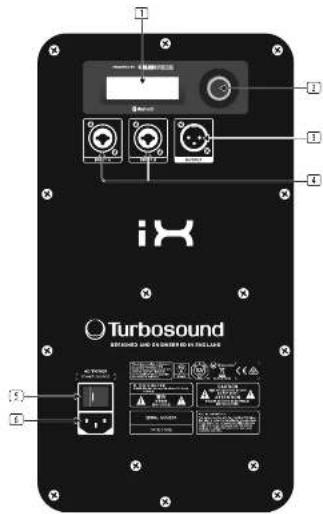
Turbosound SINEMA AND COLDERS IN THE LIME① LCD SCREEN displays the current DSP module and parameter settings.
☑ ENCODER KNOB controls volume when the default DSP menu is active. Press the encoder knob to access DSP sub-menus and parameters. When the sub-menus are active, rotate the knob to change parameters.
OUTPUT XLR connector provides a mix output of INPUT A, INPUT B and Bluetooth input for connection to additional full range speakers and subwoofers.
☐ INPUT A/INPUT B combo jacks accept input signals using XLR, balanced 12 " TRS or unbalanced 14 " TS connectors.
POWER switch turns the unit on and off.
AC INPUT accepts the included IEC power cable for connection to a mains outlet.
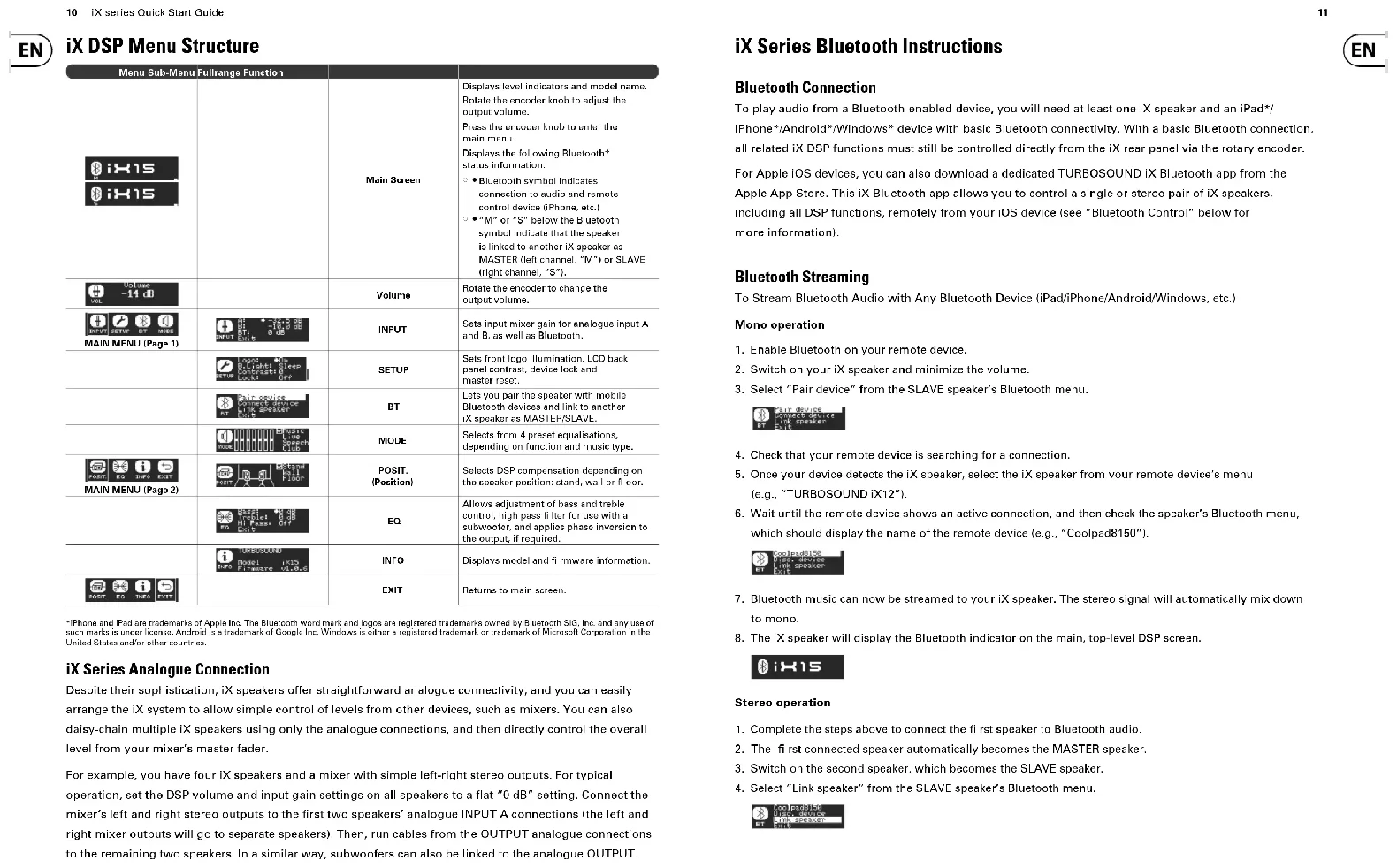
iX DSP Menu Structure
| Menu Sub-Menu | Fullrange Function | ||
| Main Screen | Displays level indicators and model name. Rotate the encoder knob to adjust the output volume.Press the encoder knob to enter the main menu.Displays the following Bluetooth status information:○●Bluetooth symbol indicates connection to audio and remote control device (iPhone, etc.)○●“M” or “S” below the Bluetooth symbol indicate that the speaker is linked to another IX speaker as MASTER (left channel, “M”) or SLAVE (right channel, “S”). | ||
| Volume | Rotate the encoder to change the output volume. | ||
| MAIN MENU (Page 1) | INPUT | Sets input mixer gain for analogue input A and B, as well as Bluetooth. | |
| SETUP | Sets front logo illumination. LCD back panel contrast, device lock and master reset. | ||
| BT | Lets you pair the speaker with mobile Bluetooth devices and link to another IX speaker as MASTER/SLAVE. | ||
| MODE | Selects from 4 preset aqualisations, depending on function and music type. | ||
| MAIN MENU (Page 2) | POSIT.(Position) | Selects DSP compensation depending on the speaker position: stand, wall or floor. | |
| EQ | Allows adjustment of bass and treble control, high pass filter for use with a subwoofer, and applies phase inflation to the output, if required. | ||
| INFO | Displays model and fi rmware information. | ||
| EXIT | Returns to main screen. |
iPhone and iPad are trademarks of Apple Inc. The Bluetooth word mark and logos are registered trademarks owned by Bluetooth SIG, Inc. and any use of such marks is under license. Android is a trademark of Google Inc. Windows is either a registered trademark or trademark of Microsoft Corporation in the United States and/or other countries.
iX Series Analogue Connection
Despite their sophistication, iX speakers offer straightforward analogue connectivity, and you can easily arrange the iX system to allow simple control of levels from other devices, such as mixers. You can also daisy-chain multiple iX speakers using only the analogue connections, and then directly control the overall level from your mixer's master fader.
For example, you have four IX speakers and a mixer with simple left-right stereo outputs. For typical operation, set the DSP volume and input gain settings on all speakers to a flat "0 dB" setting. Connect the mixer's left and right stereo outputs to the first two speakers' analogue INPUT A connections (the left and right mixer outputs will go to separate speakers). Then, run cables from the OUTPUT analogue connections to the remaining two speakers. In a similar way, subwoofers can also be linked to the analogue OUTPUT.
iX Series Bluetooth Instructions
Bluetooth Connection
To play audio from a Bluetooth-enabled device, you will need at least one iX speaker and an iPad*/iPhone*/Android*/Windows* device with basic Bluetooth connectivity. With a basic Bluetooth connection, all related iX DSP functions must still be controlled directly from the iX rear panel via the rotary encoder.
For Apple iOS devices, you can also download a dedicated TURBOSOUND iX Bluetooth app from the Apple App Store. This iX Bluetooth app allows you to control a single or stereo pair of iX speakers, including all DSP functions, remotely from your iOS device (see "Bluetooth Control" below for more information).
Bluetooth Streaming
To Stream Bluetooth Audio with Any Bluetooth Device (iPad/iPhone/Android/Windows, etc.)
Mono operation
- Enable Bluetooth on your remote device.
- Switch on your iX speaker and minimize the volume.
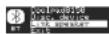
- Select "Pair device" from the SLAVE speaker's Bluetooth menu.

- Check that your remote device is searching for a connection.
- Once your device detects the iX speaker, select the iX speaker from your remote device's menu (e.g., "TURBOSOUND iX12").
- Wait until the remote device shows an active connection, and then check the speaker's Bluetooth menu, which should display the name of the remote device (e.g., "Coolpad8150").

- Bluetooth music can now be streamed to your iX speaker. The stereo signal will automatically mix down to mono.
- The iX speaker will display the Bluetooth indicator on the main, top-level DSP screen.

Stereo operation
- Complete the steps above to connect the first speaker to Bluetooth audio.
- The first connected speaker automatically becomes the MASTER speaker.
- Switch on the second speaker, which becomes the SLAVE speaker.
- Select "Link speaker" from the SLAVE speaker's Bluetooth menu.
12 iX series Quick Start Guide
- The SLAVE speaker will display "Slave linking..."

- Select "Link speaker" from the MASTER speaker's Bluetooth menu.
- The MASTER speaker will display "Master Linking..."
- WAIT for the speakers to link.
- Once the linking process is complete, Bluetooth audio will stream to the two speakers. The MASTER speaker will receive the left channel, and the SLAVE speaker will receive the right channel.
- MASTER and SLAVE connection will be indicated on the main, top-level DSP screens.


NOTE: These Bluetooth speakers can only link with another speaker of the same model (e.g., an iX 12 speaker can only be paired with another iX 12 speaker).
Bluetooth Control
A dedicated iOS control app for iX speakers can be downloaded from the Apple Store.
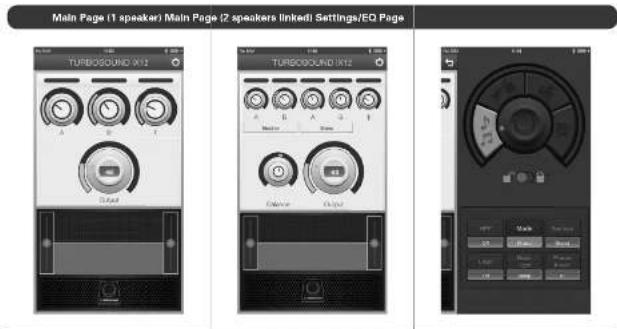
- In both mono and stereo mode, first pair the MASTER speaker, and then launch the iOS control app.
- The iOS control app will automatically detect and adapt for mono or stereo mode.
- To alter the speaker settings, swipe the screen or press the settings icon. All iX speaker settings can be accessed from the iOS control app.
text_image
Main Page (1 speaker) Main Page (2 speakers linked) Settings/EQ Page TURBOSOUND IX12 A B C D E F G H I J K L M N O P Q R S T U V W X Y Z A B C D E F G H I J K L M N O P Q R S T U V W X Y Z13
IMPORTANT NOTE: The mounting of a permanently installed sound system may be dangerous unless undertaken by qualified personnel with the required experience and certification to perform the necessary tasks. Walls, floors or ceilings must be capable of safely and securely supporting the actual load. The mounting accessory used must be safely and securely fixed both to the loudspeaker and to the wall, floor or ceiling. When mounting rigging components on walls, floors or ceilings, ensure that all fixings and fasteners used are of an appropriate size and load rating. Wall and ceiling claddings, and the construction and composition of walls and ceilings, all need to be taken into account when determining whether a particular fixing arrangement can be safely employed for a particular load. Cavity plugs or other specialist fixings, if required, must be of an appropriate type, and must be fitted and used in accordance with the maker's instructions.
The operation of your speaker cabinet as part of a flown system, if installed incorrectly and improperly, can potentially expose persons to serious health risks and even death. In addition, please ensure that electrical, mechanical and acoustic considerations are discussed with qualified and certified (by local state or national authorities) personnel prior to any installation or flying.
Make sure that speaker cabinets are set up and flown by qualified and certified personnel only, using dedicated equipment and original parts and components delivered with the unit. If any parts or components are missing please contact your Dealer before attempting to set up the system.
Be sure to observe the local, state and other safety regulations applicable in your country. MUSIC Group, including the MUSIC Group companies listed on the enclosed "Service Information Sheet", assumes no liability for any damage or personal injury resulting from improper use, installation or operation of the product. Regular checks must be conducted by qualified personnel to ensure that the system remains in a secure and stable condition. Make sure that, where the speaker is flown, the area underneath the speaker is free of human traffic. Do not fly the speaker in areas that can be entered or used by members of the public.
Speakers create a magnetic field, even if not in operation. Therefore, please keep all materials that can be affected by such fields (discs, computers, monitors, etc) at a safe distance. A safe distance is usually between 1 and 2 metres.
14 iX series Quick Start Guide
EN Technical Specifications
IX12 IX15
| System | ||
| Frequency response | 50 Hz - 20 kHz +3 dB42 Hz - 20 kHz -10 dB | 45 Hz - 20 kHz +3 dB39 Hz - 20 kHz -10 dB |
| Nominal dispersion | 80° H x 60° V @ -6 dB points 75° H x 55° V @ -6 dB points | |
| Maximum SPL | 125 dB 126 dB | |
| Crossover type | Active Active | |
| Transducers | 1 x 12" (308.5 mm) LF driver1 x 1" (25.4 mm) HF compression driver | 1 x 15" (387 mm) LF driver1 x 1" (25.4 mm) HF compression driver |
| Limitar | Independent HF, LF Independent HF, LF | |
| Amplifier | ||
| Maximum output power* | 1000 W 1000 W | |
| Type | LF: Class-D, HF: Class AB LF: Class-D, HF: Class AB | |
| Protection | Short circuit, open circuit, thermal Short circuit, open circuit, thermal | |
| Connectors | ||
| Input A / B | 2 x combo jack / XLR 2 x combo jack / XLR | |
| Sensitivity for max out with volume control at dB Input impedance Maximum input level | +4 dBu +4 dBu16 kΩ unbalanced, 33 kΩ balanced-22 dBu | 16 kΩ unbalanced, 33 kΩ balanced+22 dBu |
| Output Output impedance | XLR, servo-balanced220 Ω unbalanced, 600 Ω balanced | XLR, servo-balanced220 Ω unbalanced, 600 Ω balanced |
| Mains Supply | IEC mains connector with integrated power switch | IEC mains connector with integrated power switch |
| Controls | ||
| Hardware | Rotary push encoder | Rotary push encoder |
| Software | IOS interface via Bluetooth IOS interface via Bluetooth | |
| User DSP Functions | ||
| Factory EQ presets | Positioning, Sound mode, Phase | Positioning, Sound mode, Phase |
| Display | LCD 128 x 32, blue, backlit | LCD 128 x 32, blue, backlit |
| Equalisation | Bass and treble controls | Bass and treble controls |
| Crossover | High pass L-R 24 dB/rot | High pass L-R 24 dB/rot |
| Protection | Lock out function for all settings | Lock out function for all settings |
| Bluetooth Wireless Technology | ||
| Frequency range | 2402 MHz - 2480 MHz | 2402 MHz - 2480 MHz |
| Channel number | 79 | 79 |
| Version | Bluetooth 4.0 dual mode | Bluetooth 4.0 dual mode |
| Output | 8 dBM | 8 dBM |
| Compatibility | Supports A2DP 1.2 profile, BLE | Supports A2DP 1.2 profile, BLE |
| Maximum communication range | 35 m (without interference) | 35 m (without interference) |
| Connectivity | Master slave: stereo pairing link | Master slave: stereo pairing link |
iX12 iX15
| Power Supply | ||
| Power consumption | 80 W @ 1⁄4 max power | 80 W @ 1⁄4 max power |
| Voltage | ||
| USA / Canada | 120 V~, 60 Hz | 120 V~, 80 Hz |
| UK / Australia / Europe | 220-240 V~, 50/50 Hz | 220-240 V~, 50/60 Hz |
| Korea / China | 220-240 V~, 50/50 Hz | 220-240 V~, 50/60 Hz |
| Japan | 100 V~, 50/60 Hz | 100 V~, 50/60 Hz |
| Enclosure | ||
| Dimensions (HWD) | 809 x 370 x 370 mm [24.0 x 14.5 x 14.5") | 711 x 450 x 381 mm (27.9 x 17.7 x 15.0") |
| Net weight | 19.4kg (42.8 lbs) | 22.4 kg (49.4 lbs) |
| Construction | Injection-moulded polypropylene enclosure | Injection-moulded polypropylene enclosure |
| Finish | Black paint | Black paint |
| Grille | Powdar coated perforated steel | Powdar coated perforated steel |
| Flying hardware | - | - |
| Accessories | ||
| - | - | |
*independent of limiters and driver protection circuits
†Only qualified personnel are allowed to modify the AC-Main card and to adhere to all applicable national standards.
Other important information

Important information
-
Register online. Please register your new MUSIC Group equipment right after you purchase it by visiting turbosound.com. Registering your purchase using our simple online form helps us to process your repair claims more quickly and efficiently. Also, read the terms and conditions of our warranty, if applicable.
-
Malfunction. Should your MUSIC Group Authorized Reseller not be located in your vicinity, you may contact the MUSIC Group Authorized Fulli Iler for your country listed under "Support" at turbosound. com. Should your country not be listed, please check if your problem can be dealt with by our "Online Support" which may also be found under "Support" at turbosound. com. Alternatively, please submit an online warranty claim at turbosound. com BEFORE returning the product.
-
Power Connections. Before plugging the unit into a power socket, please make sure you are using the correct mains voltage for your particular model. Faulty fuses must be replaced with fuses of the same type and rating without exception.
FEDERAL COMMUNICATIONS COMMISSION COMPLIANCE INFORMATION
TURBOSOUND
iX15/iX12
Responsible Party Name: MUSIC Group Services NV Inc. Address: 5270 Procyon Street
Las Vegas, NV 89118 USA
Phone Number: +1 702 800 8290
iX15/iX12
This equipment has been tested and found to comply with the limits for a Class A digital device, pursuant to part 15 of the FCC Rules. These limits are designed to provide reasonable protection against harmful interference when the equipment is operated in a commercial environment. This equipment generates, uses, and can radiate radio frequency energy and, if not installed and used in accordance with the instruction manual, may cause harmful interference to radio communications. Operation of this equipment in a residential area is likely to cause harmful interference in which case the user will be required to correct the interference at his own expense. This transmitter must not be co-located or operating in conjunction with any other antennas or transmitter.
FCC Radiation Exposure Statement
This equipment complies with FCC RF radiation exposure limits set forth for an uncontrolled environment. This equipment should be installed and operated with a minimum distance of 20 centimeters between the radiator and your body.
Caution!
The manufacturer is not responsible for any radio or TV interference caused by unauthorized modifications to this equipment. Such modifications could void the user authority to operate the equipment.
This equipment complies with Part 15 of the FCC Rules. Operation is subject to the following two conditions:
(1) This device may not cause harmful interference, and (2) This device must accept any interference received, including interference that may cause undesired operation.
CE
This product complies with the requirements of Directive of 2014/53/EU.
