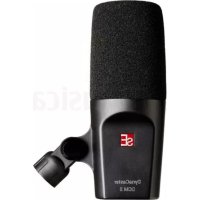
Dynacaster DCM 3 - Microphone SE Electronics - Free user manual and instructions
Find the device manual for free Dynacaster DCM 3 SE Electronics in PDF.


| Product type | Dynamic microphone |
| Brand | SE Electronics |
| Model | Dynacaster DCM 3 |
| Category | Microphone |
| Capsule | Dynamic |
| Voice coil | Copper |
| Magnet | Neodymium |
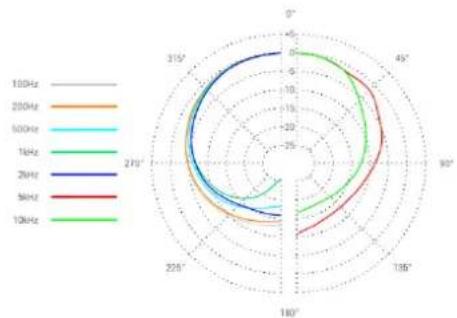
| Polar pattern | Cardioid |
| Frequency response | 40 Hz - 18 kHz |
| Sensitivity | 2.5 mV/Pa (-52 dBV) |
| Electrical impedance | 600 ohms |
| Recommended load impedance | > 1,000 ohms |
| Power supply | None (passive) |
| Connectivity | XLR 3-pin (male) |
| Built-in pop filter | Yes |
| Built-in shock absorption system | Yes |
| Dimensions (L x W x H) | 158 x 86 x 62 mm |
| Weight | 512 g |
| Warranty | 1 year, extendable to 3 years by registration |
| Maintenance and cleaning | Pop filter washable with lukewarm water; grille cleanable with damp cloth |
| Safety | Do not open; contains small parts; not for children under 14 years |
| Compliance | RoHS, WEEE |
| Box contents | Microphone, thread adapter for stand |
| Manufacturing | China |
Frequently Asked Questions - Dynacaster DCM 3 SE Electronics
User questions about Dynacaster DCM 3 SE Electronics
0 question about this device. Answer the ones you know or ask your own.
Ask a new question about this device
Download the instructions for your Microphone in PDF format for free! Find your manual Dynacaster DCM 3 - SE Electronics and take your electronic device back in hand. On this page are published all the documents necessary for the use of your device. Dynacaster DCM 3 by SE Electronics.
USER MANUAL Dynacaster DCM 3 SE Electronics
Thank you for choosing an sE microphone! In addition to some basic safety precautions, this manual includes details and specifications to help you get the most out of your microphone. Please take a few minutes to read through it.
Capturing excellent audio is our passion. We sincerely hope you'll enjoy the sound of this mic as much as we've enjoyed designing and building it for you.
Happy Broadcasting,
The sE Team
Brief description
The DynaCaster DCM 3 and DCM 6 are front-addressed dynamic microphones that are ideal for streaming and broadcasting applications. Their dynamic DMC3A capsule has been custom-designed to provide a smooth, natural sound for any voice and ensures high intelligibility, even in noisy environment. Both models are not just microphones for designated for speech alone. They are also the perfect choice for singing, acoustic instruments, and miking amplifiers.
For obstruction-free camera shots, the integrated pop filter eliminates the need for a bulky external pop filter. Moreover, the integrated shock absorption system efficiently prevents mechanical vibration from acting on the capsule. As a result, bulky external shock-mounts are no longer required.
The DynaCaster DCM 3 and DCM 6's sleek design ensures effortless compatibility and professional appeal using any desk boom.
The DynaCaster DCM 6 only: The integrated DYNAMITE preamp provides an explosive +30dB of clean, transparent gain, eliminating the need for expensive and bulky inline preamps. This provides for better sonic reproduction, more sensitivity, and less noise than the standards of decades past.
What's in the box
- Microphone
- Microphone stand thread adapter
DYNAMITE preamp (The DynaCaster DCM 6 only)
The DynaCaster DCM 6 only: The red push button on the back of the microphone controls the internal DYNAMITE preamp. If the switch is "in," the DynaCaster's internal DYNAMITE preamp is active and provides 30 dB of additional gain, which is ideal for speech and softer sources. Please note that this requires Phantom power. If the switch is "out," the internal DYNAMTE preamp is deactivated and functions as a completely passive microphone, not requiring any external or Phantom power.
Integrated pop filter
Broadcast microphones are essential elements for social media channel videos and audio recordings. The design of the DynaCaster DCM 3 and DCM 6, addresses the issue of visual disruption caused by external windscreens and pop filters. To keep your video pristine and crystal clear, both models are equipped with an integrated pop filter. This concept has been extensively tested to effectively suppress plosives without the need for any external protection.
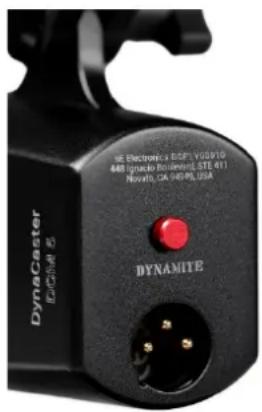
The pop filter and microphone grille can be easily removed and cleaned as needed. Simply pull off the foam wind screen and turn the microphone grille counterclockwise to remove it. Submerge the foam into lukewarm water. Do not use any cleaning agents or aggressive liquids. Now, carefully rub the foam material until it is clean. Then rinse it with lots of water. Lastly, squeeze it carefully to remove the water and let it dry in a
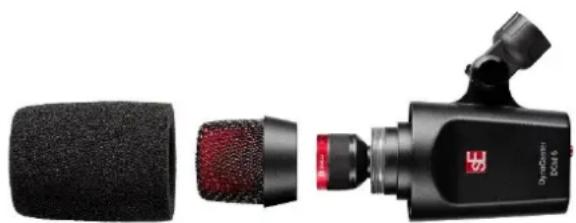
well-ventilated and arid area with plenty of light but no direct sunlight. For the microphone grille, use a soft cloth that is moistened solely with water. Do not use any cleaning agents or aggressive liquids. Once completely dry, reassembly the mic grille by turning it clockwise until it is tight, then put the foam wind screen over the mic grille. You're ready to go!
Powering
The DynaCaster DCM 6 only: To ensure proper operation, your sE product requires a Phantom power source that provides 48 Volts according to IEC 61938.

Risk of damage
Do not connect your sE product to any power supply other than a Phantom power source (input with Phantom power or external IEC standard Phantom power supply) with a floating connector, using a balanced cable with studio-grade connectors to IEC 268-12 only. This is the only way to ensure safe and reliable operation.
Please be aware that Phantom power cannot pass through TRS connectors. A balanced microphone cable with XLR connectors at both sides is required to provide Phantom power to your sE product.
Safety and maintenance

Warning
The product may contain small, detachable parts, which may cause choking, personal injury, or death, especially in children. Please exercise care in the use and handling of small parts and keep them away from children under four years of age.
- This product is safe under normal and reasonably foreseeable operating conditions.
- Do not open or modify the product.
The product must be returned to the manufacturer or destined vendors for any service or repair. - Do not disassemble or attempt to service this product.
This is not a children's product and is not intended to be used by children under 14 years old.

Risk of damage
Please make sure that any piece of equipment to which your sE product will be connected fulfills the safety regulations enforced in your country and is fitted with a ground lead.
Compliance
This product complies with relevant legal requirements for Restriction of Hazardous Substances (RoHS) and management of waste electronic and electrical equipment (WEEE).
For RoHS and WEEE information, go to http://www.seeelectronics.com/compliance
Maintenance is not required for product compliance.
Batteries, electronic and electrical equipment should not be disposed of with household waste. Wherever possible, they should be separated and brought to an appropriate collection point to be recycled and to avoid potential impact on the environment and/or human health. For more information, contact your local authorities or place of purchase, or visit
http://www.seeelectronics.com/recycling


Warranty
sE Electronics warrants that its hardware product shall be free from defects in materials and workmanship beginning from the date of original retail purchase.
See http://www.seelectronics.com/warranty for specific warranty information about your product and procedures for a warranty claim.
sE Electronics' entire liability and your exclusive remedy for any breach of warranty shall entail, at sE Electronics' option, to repair or replace a functional equivalent of the product, or to refund the price paid, provided that the hardware is returned to the purchased location along with a receipt.
Warranty protections are in addition to rights provided under local consumer laws and may vary among countries. See the full warranty information to know your consumer rights and the additional protections provided by this product warranty.
Our headquarters:
sE Electronics International, Inc.
448 Ignacio Boulevard, STE 411
Novato, CA 94949, USA
Our R&D and manufacturing center:
EP Electronics 289 B2 West Songxiu Road, Shanghai 201703, China
Full Warranty Information:
https://www.seeelectronics.com/warranty
Technical specifications
| DynaCaster DCM 3 | DynaCaster DCM 6 | |
| Capsule | Dynamic | |
| Voice coil | Copper | |
| Magnet | Neodymium | |
| Polar Pattern | Cardioid | |
| Frequency range | 40 Hz - 18 kHz | |
| Sensitivity | 2.5 / (-52 dBV) | 2.5 / 79 mV/Pa (-52 / -22 dBV) |
| Powering | - | +48V Phantom power |
| Current consumption | - | 3.1 mA |
| Electrical impedance | 600 Ohms | 600 / 135 Ohms |
| Recommended load impedance | >1k Ohms | |
| Connectivity | 3-pin male XLR connector | |
| Dimensions | 158 x 86 x 62 mm (L x W x H) 6.22 x 3.39 x 2.44 in. (L x W x H) | |
| Weight | 512 g / 18.06 oz. | 518 g / 18.27 oz. |
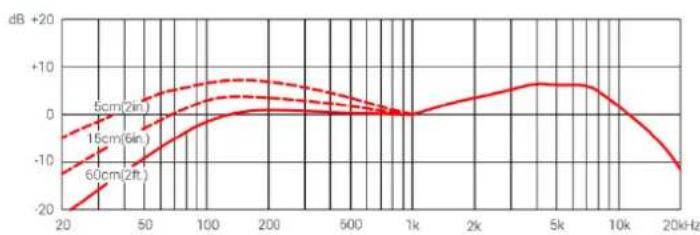
Frequency Response
Polar Pattern
Support
In case you have any questions about your new sE product, please do not hesitate to contact us directly:
http://www.seeelectronics.com/contact-us
In the event that your new sE product is operating improperly, it must be returned to us as the manufacturer or to a destined vendor for any service or repair. For the fastest and most direct service, please contact your dealer first. If authorized service is required, it will be arranged by that dealer:
http://www.seeelectronics.com/dealers
If you are experiencing difficulties with support or assistance, please do not hesitate to contact us directly.
http://www.seeelectronics.com/contact-us
Lastly, please remember to register your new gear with sE to extend your warranty to a full three years: http://www.seeelectronics.com/registration
Contact
Feel free to contact us:
sE Electronics International, Inc.
448 Ignacio Boulevard, STE 411
Novato, CA 94949, USA
Our international distributors & sales representatives: http://www.seeelectronics.com/contact-us
Danke
http://www.seeelectronics.com/recycling

Garantie
sE Electronics International, Inc.
448 Ignacio Boulevard, STE 411
Novato, CA 94949, USA
EP Electronics 289 B2 West Songxiu Road, Shanghai 201703, China
Technische Daten
http://www.seeelectronics.com/contact-us
http://www.seeelectronics.com/contact-us
http://www.seeelectronics.com/registration
Kontakt
sE Electronics International, Inc.
448 Ignacio Boulevard, STE 411
Novato, CA 94949, USA
Unsere internationalen Handler & Vertriebsverterre: http://www.seeelectronics.com/contact-us
致谢
sE Electronics International, Inc.
448 Ignacio Boulevard, STE 411
Novato, CA 94949, USA
我们的研发和制造中心:
https://www.seeelectronics.com/warranty
技术规格
http://www.seeelectronics.com/contact-us
http://www.seeelectronics.com/registration
联系方式
sE Electronics International, Inc.
448 Ignacio Boulevard, STE 411
Novato, CA 94949, USA
http://www.seeelectronics.com/recycling

Garanzia
sE Electronics International, Inc.
448 Ignacio Boulevard, STE 411
Novato, CA 94949 USA
EP Electronics 289 B2 West Songxiu Road, Shanghai 201703, Cina
Specifiche tecniche
http://www.seeelectronics.com/contact-us
http://www.seeelectronics.com/registration
Contatti
sE Electronics International, Inc.
448 Ignacio Boulevard, STE 411
Novato, CA 94949, USA
http://www.seeelectronics.com/recycling

sE Electronics International, Inc.
448 Ignacio Boulevard, STE 411
https://www.seeelectronics.com/warranty
http://www.seeelectronics.com/contact-us
http://www.seeelectronics.com/contact-us
http://www.seeelectronics.com/registration
Contact
sE Electronics International, Inc.
448 Ignacio Boulevard, STE 411
http://www.seeelectronics.com/recycling

sE Electronics International, Inc.
448 Ignacio Boulevard, STE 411
Novato, CA 94949, USA
EP Electronics 289 B2 West Songxiu Road, Shanghai 201703, China
https://www.seeelectronics.com/warranty
| DynaCaster DCM 3 | DynaCaster DCM 6 | |
| Cápsula | Dinámica | |
| Bobina de voz | Cobre | |
| Imán | Neodimio | |
| Patrón polar | Cardioide | |
| Rango de Frequencia | 40 Hz - 18 kHz | |
| Sensibilitad | 2,5 / (-52 dBV) | 2,5 / 79 mV/Pa (-52 / -22 dBV) |
| Alimentación | - | Alimentación Phantom +48V |
| Consumo de corriente | - | 3,1 mA |
| Impedancia electrica | 600 Ohms | 600 / 135 Ohms |
| Impedancia de energia recommendada | >1k Ohms | |
| Conectividad | Conector XLR macho de 3 pines | |
| Dimensiones | 158 x 86 x 62 mm (L x An x Al) 6,22 x 3,39 x 2,44 pulgadas (L x An x Al) | |
| Peso | 512 g / 18,06 oz. | 518 g / 18,27 oz. |
http://www.seeelectronics.com/contact-us
http://www.seeelectronics.com/contact-us
sE Electronics International, Inc.
448 Ignacio Boulevard, STE 411
Novato, CA 94949, USA
http://www.seeelectronics.com/recycling
TapaHTnHbIe 06a3aTeJbCTBa
KomnaHn sE Electronics rapaHTnpyET, yTo n3rotabnBaemar eIO MaTePnaIbHaayactb He 6ydet coepKaTb DeΦeKTOB TexHOIorueckoro npouceca H MaTePnaIaOB, HaunHa C DaTbI npno6peTeHn y po3HnHOrO npoDaUcaOpuHaHaNbHo npOdykCnn.
Cm. http://www.selectronics.com/warranty, rnde npedcTabneHa KOHKpeTHa NHΦopMaun no rapaHTnHbIM 063aTeNbCTBaM B OTHoWeHn npno6peTeHHoro Bam n3dEIna, a TAKKe NO npoueypaM npedbAHeHra paaHTnHbIX npTeH3n.
MaKcHMaJIbHbI O6bEm MaTePnJIbHOI OTBeTCTBHeHOctn KOMnHn sE Electronics n BaWeiCKJIIOHTeJIbHOI KOMNeHCAuIM NO BcEM HeBbIIOJHeHHbIM rapaHTnHbIM o6ra3aTeNbCTBaM DOJIKeH CBOIDITbcR (no MHeHIO KOMnAHn sE Electronics) K pemOnTy u3dJIy / ero 3aMeHe pa6OTocNcO6HbIM yCTpOJCTBOM IIN BO3MeUeHNm UeHbI erO npNo6peTHeNn PnY cLOBuN, YTO MaTePnJIbHa YacTb 6blNa BO3BpaUeHa BpyHKt ee npNo6peTeHn BMeCTe CueKOM, NODTBepXdaIoUm ONlAty.
3aunTa rapaHTnHbIX npab npeOCTaBJIeTcB DOnONHeHne K TeM npaBaM, KOtOpbIe 6blIn npedyCMOTpeHbIM MeCTHbIM 3aKOHODaTeNbCTBOM O 3auntE npab NOTpe6nteNe, N MOKeT OTnUaTbcra B 3aBnCmOCTN OT cTpaHbI. CM. NOHbI O6bem rapaHTnHbIX 063aTeNbCTB N O3HaKOMbTEcB CO CBOUMN NOTpe6NTeNbCKHM npaBaMn, a TaKKe C DOnONHnTeNbHbIMM MepaMn No 3auntE npaB, npedyCMOTpeHHbIMn rapaHTneH naHHoe n3deJIne.
Adebec rnaBHoro oofca kOMnahan:
sE Electronics International, Inc.
448 Ignacio Boulevard, STE 411
Novato, CA 94949, USA (CLIA)
Ampoc Hauchoo Hayno-ccneobatbckoro npou3BOcTBeHHoro ceHtpa:
EP Electronics 289 B2 West Songxiu Road, Shanghai 201703, China (Kun)
https://www.seeelectronics.com/warranty
http://www.seeelectronics.com/contact-us
B clyuae HehaIeKaJero fynKcHIOHPOBaHn npno6peTeHHoro n3JeJIra sE erO heo6xOIMo BepHyTb Ham KaK npOn3BOUInTeIIO nn Ha3HaueHHOMy IocTaBunky dIra npOBedeHn O6CnyKUBAHn nn peMOHTa. IJa o6ecneueHn HnOcpeIcTBeHHORO n KpaTuAWeIpoceCa 06CnyKUBAHn CBxKITcB cHaJala Co CBOHM dIIePOM. YTo6bl BOCNoJIb3OBaTbcr yClyrAmN yNOHOMOeHHORO cepBnCHORO ceHTpa, TaKxe 6bpatntecb K dTomy dInlepy:
http://www.seeelectronics.com/dealers
EcnBbI CToJKNHnCb C TpydnoCTaMn B NOLyueHn TexHnueCKo NODepKKn IIN NOMOuN, 6e3 KOle6aHn CBxKITecb HeNocepDcTBeHHo C HAMN NO aDpeCy:
http://www.seeelectronics.com/contact-us
I nocJIeJHee: He 3a6yDbTe 3apeRnCTpnpOBaTb CBOI MmKpOfoH, YTO6bl NOLyUHTb TpeXJIeTHIOI rapaHTIO: http://www.seeelectronics.com/registration
06paTHa CBa3b
Hau aDpec:
sE Electronics International, Inc.
448 Ignacio Boulevard, STE 411
Novato, CA 94949, USA (CLIA)
Ampca Haunx MejdynapoHbIX nucTpno6yTopOB n TopROBbIX npedCTaBnteJe: http://www.seelectronics.com/contact-us
This page has been intentionally left blank.
This page has been intentionally left blank.
This page has been intentionally left blank.
IMPORTANT
WARRANTY REGISTRATION
Thank you for purchasing an sE product! You are automatically entitled to a two-year warranty but can extend this to a full three years with registration. To register your new equipment and to read the full warranty details, please go here:
http://www.seeelectronics.com/registration
Sincerely,
The sE Team