NEOM USB - Microphone SE Electronics - Free user manual and instructions
Find the device manual for free NEOM USB SE Electronics in PDF.


| Product type | USB condenser microphone |
| Brand | SE Electronics |
| Model | NEOM USB |
| Capsule type | 16 mm electret condenser |
| Polar pattern | Cardioid |
| Frequency response | 20 Hz – 20 kHz |
| ADC resolution | 24 bits |
| DAC resolution | 24 bits |
| Sampling frequencies | 44.1 – 192 kHz (44.1, 48, 88.2, 96, 176.4, 192 kHz) |
| Dimensions (L x W x H) | 174 x 56 x 40 mm |
| Weight | 445 g |
| Connectivity | USB-C to USB-A (cable included), 1/8" headphone output |
| Main features | Gain control, Mute button, headphone mixing (Mic Level, Playback Level) |
| Compatibility | Windows, Mac, iOS, Android (adapters required for micro-USB or Lightning) |
| Box contents | Microphone, desk stand, clip, thread adapter, USB-C to USB-A cable |
| Warranty | Can be extended to 3 years after registration on the SE Electronics website |
| Maintenance and cleaning | Clean with a soft dry cloth, avoid moisture |
| Safety | Basic precautions: avoid shocks, moisture and extreme temperatures |
| Spare parts and repairability | Contact the retailer or SE Electronics customer service |
Frequently Asked Questions - NEOM USB SE Electronics
User questions about NEOM USB SE Electronics
0 question about this device. Answer the ones you know or ask your own.
Ask a new question about this device
Download the instructions for your Microphone in PDF format for free! Find your manual NEOM USB - SE Electronics and take your electronic device back in hand. On this page are published all the documents necessary for the use of your device. NEOM USB by SE Electronics.
USER MANUAL NEOM USB SE Electronics
Thank you for choosing an sE microphone! In addition to some basic safety precautions, this manual includes details and specifications to help you get the most out of your NEOM USB. Please take a few minutes to read through it.
Capturing excellent audio is our passion. We sincerely hope you'll enjoy the sound of this mic as much as we've enjoyed designing and building it for you.
Happy Tracking,
The sE Team
Brief Description
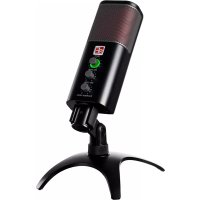
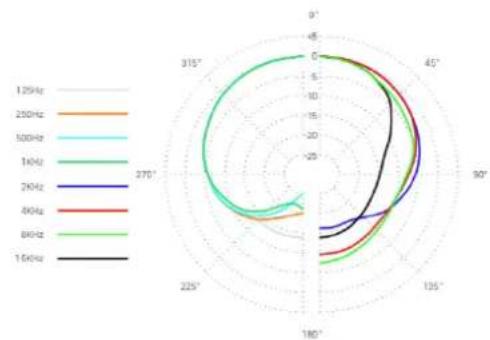
The NEOM USB is a USB condenser microphone, similar to our celebrated X1 A studio mic. Condenser mic capsules capture sound in a very detailed and vivid way, making them perfect for recording voices as well as instruments. The NEOM USB has a "cardioid" polar pattern, which means that it picks up sound mainly from the front, and less from the sides and rear. The capsule is built into an internal shock mount system, helping to keep the sound free from rumble.
USB microphones have built-in audio interfaces, which is what separates them from analog microphones. The NEOM USB's audio system allows you to record at resolutions up to 192 kHz at 24-bits. However, that maximum resolution creates very large audio files, which can be a drain on hard drive space. We recommend using 48 kHz at 24-bits for most applications.
All sE products are designed to be professional grade, and the NEOM USB is no exception! The desktop mic stand is made of metal, rather than plastic, and is equipped with rubber feet to minimize any vibration. The mic clip can also be twisted off (counter-clockwise) for use on a full-size mic stand. Additionally, the NEOM USB can be used with sE's Isolation Pack, which includes a studio shock mount and a metal pop filter.
What's in the Box?
NEOM USB microphone
Desktop microphone stand
- Microphone clip
- thread adapter
USB-C to USB-A cable
Using the Microphone
The NEOM USB is straightforward and user-friendly. Once you've plugged it into your mobile device or computer's USB input, there's not much more to do!
Mic Gain
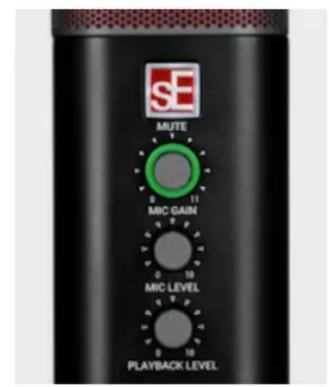
The Mic Gain knob adjusts how loudly the microphone captures sound. As you turn this knob up, the halo LED around it will light up green to show that it's hearing you. If the halo LED turns red, that means you've turned it up a bit too loud, and you may hear distortion in the audio. Back it off by 10 - 15% or until it doesn't flash red anymore.
Mute Button
The sE logo is also a Mute Button. You can use this as needed when you don't want the mic to send audio to your computer. The button flashes in red when the sound is muted. If you're having trouble recording audio with your NEOM USB, make sure the Mute Button is off.
Headphone Output
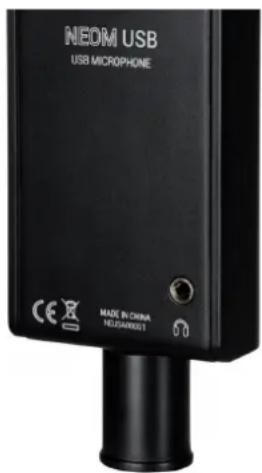
The 1/8" Headphone Output is in the back-right corner, at the bottom of the mic. Much of the time, if your headphones are plugged into the computer, you will hear a distracting delay called "latency." By plugging your headphones directly into the microphone, you can avoid that.
Mic Level andPlayback Level Knobs
The NEOM USB's Mic Level andPlayback Level knobs allow you set up a custom.
headphone mix, balancing the playback from your computer with the sound being
captured by the microphone. We set out to make this process effortless, so rather
than having to tweak software drivers, everything is easily accessible on the front of the mic! Adjust the Playback Level knob to a comfortable volume, then bring the
Mic Level knob up until you can comfortably hear yourself.
Best Practices
The NEOM USB is a side-address microphone, meaning that the sound is captured by the surface just above its controls, rather than the top of the mic. Ideally, when singing or speaking, place yourself about 6-inches from the microphone. We recommend using a pop filter when recording vocals, for the cleanest possible audio. For each new source, even if it's two different singers, make sure to readjust the Mic Gain knob. This will ensure that you are recording at adequate levels, and more importantly, not experiencing distortion.
Compatibility and Software
The NEOM USB can be used with Windows and Mac systems, as well as both portable Apple and Android devices. It comes complete with a USB-C to USB-A cable which can be used for devices equipped with an USB-A port. For connecting to a device with an USB-C port you can use a USB-C to USB-C cable. For other ports, i.e. micro-USB or Lightning, please use a suitable cable or adapter.
Although no driver is required, we recommend that Windows users install our custom ASIO driver in order to get the best out of the NEOM USB; including advanced control options, a virtual mixer, and virtual channels. This driver available on our website, www.seeelectronics.com.
Technical Specifications
| Capsule | 16mm back-electret condenser capsule |
| Polar patterns | Cardioid |
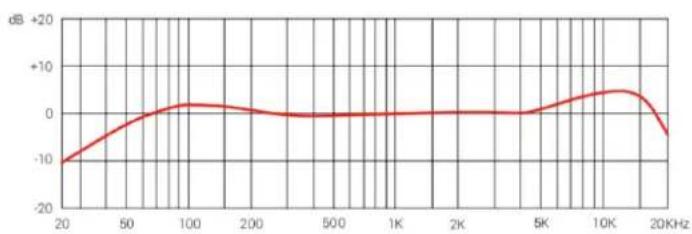
| Frequency range | 20 – 20,000 Hz |
| Bit resolution ADC | 24-bit |
| Bit resolution DAC | 24-bit |
| Supported sample rates | 44.1, 48, 88.2, 96, 176.4, 192 kHz |
| Dimensions (L x W x H) | 174 x 56 x 40 mm (6.85 x 2.2 x 1.57 in.) |
| Weight | 445 g (15.7 oz.) |
Frequency response Polar Pattern
Support
In the event that you experience any problems or have any questions regarding your sE product, please contact your dealer first for the fastest and most direct service. If authorized service is required, it will be arranged by that dealer: http://www.seeelectronics.com/dealers
If you are still having difficulties with support or assistance, please do not hesitate to contact us directly: http://www.seeelectronics.com/contact-us
Lastly, please remember to register your new gear with sE to extend your warranty to a full three years: http://www.seeelectronics.com/registration
Contact
Feel free to contact us:
sE Electronics International, Inc.
448 Ignacio Blvd, STE 411
Novato, CA 94949 USA
www.seeelectronics.com
contact@seeelectronics.com
Our international distributors & sales representatives: http://www.seelectronics.com/contact-us
This product conforms to the standards listed in the Declaration of Conformity. Please contact us if you want to order a free copy of the Declaration of Conformity. Technical data subject to change without notice.
Danke
http://www.seeelectronics.com/contact-us
http://www.seeelectronics.com/registration
联系方式
sE Electronics International, Inc. www.seeelectronics.com
448 Ignacio Blvd, STE 411
Novato, CA 94949 USA
contact@seeelectronics.com
Specifications techniques
sE Electronics International, Inc.
www.seeelectronics.com
sE Electronics International, Inc.
448 Ignacio Blvd, STE 411
Novato, CA 94949 USA
www.seeelectronics.com
contact@seeelectronics.com
http://www.seeelectronics.com/contact-us
TOT npOdyKT COOTBeTCTBye TcAHaP TaM, NpeuNcJIeHbIM B DeKJIapaCIN O COOTBeTCTBnN. NoJauNyIcTa, CBXHTecb C HAM, ecNn Bbl XOTHe 3aKa3aTb 6ecnlaTHyU KOJIIO DeKJIapaCIN O COOTBeTCTBnN.
Texnueckne daHbIe MOryT 6bITb N3MeHehbl 6e3 npeDbapntbHoro yBeDomlHeHna.
This page is intentionally left blank.
IMPORTANT
WARRANTY REGISTRATION
Thank you for purchasing an sE product! You are automatically entitled to a two-year warranty, but can extend this to a full three years with registration. To register your new equipment and to read the full warranty details, please go here:
http://www.seelectronics.com/registration
Most Sincerely,
The sE Team