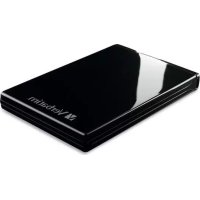
Acclaim 97393 - Hard Drive VERBATIM - Free user manual and instructions
Find the device manual for free Acclaim 97393 VERBATIM in PDF.


User questions about Acclaim 97393 VERBATIM
0 question about this device. Answer the ones you know or ask your own.
Ask a new question about this device
Download the instructions for your Hard Drive in PDF format for free! Find your manual Acclaim 97393 - VERBATIM and take your electronic device back in hand. On this page are published all the documents necessary for the use of your device. Acclaim 97393 by VERBATIM.
USER MANUAL Acclaim 97393 VERBATIM
natural_image
Split image: left shows two people in kayaking on lake with green trees; right shows a graduate in graduation cap smiling (no text or symbols)ACCLAIM™
USB
User Guide
natural_image
Three unrelated photos: a golden retriever dog wearing a red neckerchief, a bride in wedding attire with a crown, and a young girl in a blue dress (no text or symbols visible)
CONTENTS
Backup Software 1
Turbo USB Software 1
Connecting Your Portable Hard Drive 1
Disconnecting Your Portable Hard Drive 2
For Windows Users 2
For Mac OS Users 2
Getting Help 3
Limited Warranty Terms 3
Return Procedure 5
Rights 5
FCC Compliance 6

INDICE
Note: Capacity dependent on model. 1 MB = 1,000,000 bytes/1 GB = 1,000,000,000 bytes/1 TB = 1,000,000,000,000 bytes. Some capacity used for pre-loaded software, formatting and other functions, and thus is not available for data storage. As a result, and due to differing calculation methods, your operating systems may report as fewer megabytes/gigabytes/terabytes.
Backup Software (for Windows only)
Nero backup software is included on the hard drive. Double click the Nero folder on the drive and then double click the setupx file to start installation. The Nero Installation window will appear. Follow the set up wizard to install the software.
Turbo USB Software (for Windows only)
Turbo USB software can improve your USB data transfer rate and this optional software is included on the hard drive. Double click the Turbo USB folder on the drive and then double click the setup file to start installation. The software installation window will appear. Follow the setup wizard to install the software.
Connecting Your Portable Hard Drive
Installing your portable hard drive is extremely simple – just use the included mini-USB cable to connect your hard drive to any free USB port on your computer. On Windows computers, a new icon will appear in My Computer representing your hard drive. On Mac OS systems, your hard drive will appear on the desktop as a new disk.
If you are using a USB 1.1 port on your Windows computer, the following cautionary note may appear on your display: Hi-Speed USB Device plugged into non-Hi-Speed USB hub. This does not indicate a problem because the drive is compatible with both USB 1.1 and USB 2.0 ports. Simply close the message and proceed. However, in this case the drive will operate only at USB 1.1 speeds.
Disconnecting Your Portable Hard Drive
Your Verbatim portable hard drive is hot-pluggable; it can be connected and disconnected without restarting your computer. To disconnect your Verbatim hard drive at any time, simply perform the following steps. You can also disconnect your hard drive at any time while your computer is powered off.
Note: Please be careful to follow the correct procedure when disconnecting your unit. Simply unplugging the unit without first following the instructions below may result in damage to your unit and/or loss of data.
For Windows Users:
- If you have files located on your drive open in any applications, close them.
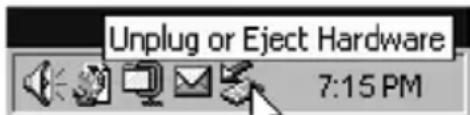
- Click the Unplug or Eject Hardware button in the System Tray.
text_image
Unplug or Eject Hardware 7:15 PM- Select your drive from the menu that appears.
- After a moment, Windows will display a message that your hardware can be safely removed.
For Mac OS Users:
- If you have files located on your drive open in any applications, close them.
- Locate the icon for your drive on the desktop, and drag it to the trash.
Getting Help
If you are experiencing difficulty installing or using your Verbatim product, please visit the main Technical Support website at www.verbatim.com/support.
Limited Warranty Terms
The Verbatim Americas, LLC warranty obligations for this hardware product are limited to the terms set forth below:
Verbatim warrants its products to be free of defects in material and workmanship under normal use and service for a period of 7 years from the date of purchase. Verbatim's sole obligation with respect to claims of non-conformance made within the warranty period described above shall be, at its option, to repair or replace any item of Equipment that Verbatim, in its sole discretion, determines to be defective, subject to the procedure set forth below.
Verbatim's warranty obligations hereunder are expressly conditioned upon (i.) the Products being properly installed, used and maintained at all times by Customer; (ii.) the Products not being subject to unusual mechanical stress or unusual electrical or environmental conditions or other acts of God; (iii.) the Products not being subjected to misuse, accident or any unauthorized installation/deinstallation by Customer or other third party; (iv.) the Products not being altered or modified in an unauthorized manner, unless approved in writing or otherwise performed by Verbatim and (v.) Customer promptly installing all Product revisions that have been released for such Products by Verbatim throughout the warranty term. Verbatim does not warrant that the Products will operate in any specific combination that may be selected for use by Customer or that the operation of the Products will be uninterrupted or error free, or that all non-conformance or defects will be remedied. Additionally, Verbatim shall have no warranty obligations for any failure of the Products to conform to the applicable product specifications resulting from the combination of any Product(s) with hardware and/or software not supplied by Verbatim. If it is determined that any Product(s) reported as defective or non-conforming by Customer during the warranty period is not defective or non-conforming, Verbatim may, at its option, charge Customer for any labor provided and expenses incurred by Verbatim in connection with such determination, at Verbatim's then current rates.
Verbatim is not liable for any damage to or loss of any programs, data, or otl information stored on any media contained within the Verbatim hardware product, or any non-Verbatim product or part not covered by this warranty. Recovery or reinstallation of programs, data or other information is not covered under this Limited Warranty.
Verbatim shall not be responsible for unauthorized sale or misrepresentation by unauthorized third party resellers. Verbatim warranties are not transferat with ownership. Products purchased by auction, yard sale, flea market or purchased as demo units may not be covered under Verbatim's warranty.
THE WARRANTIES OF VERBATIM AND REMEDIES OF CUSTOMER SET FORTH I THIS SECTION ARE EXCLUSIVE AND ARE GIVEN BY VERBATIM AND ACCEPTED BY CUSTOMER IN LIEU OF ANY AND ALL OTHER WARRANTIES, WHETHER EXPRESSED OR IMPLIED, INCLUDING WITHOUT LIMITATION, ALL WARRANTIES OF MERCHANTABILITY AND FITNESS FOR A PARTICULAR PURPOSE, ALL SUCH OTHER WARRANTIES BEING HEREBY EXPRESSLY AND UNEQUIVOCALLY DISCLAIMED BY VERBATIM AND WAIVED BY CUSTOMER TO THE EXTENT ALLOWED BY LAW (AND TO THE EXTENT NOT WAIVABLE BY LAW, ARE LIMITED TO THE TERM OF THE EXPRESS WARRANTY SET FORTH HEREIN).
VERBATIM IS NOT RESPONSIBLE FOR DIRECT, SPECIAL, INCIDENTAL OR CONSEQUENTIAL DAMAGES RESULTING FROM ANY BREACH OF WARRANTY OR CONDITION, INCLUDING ANY COSTS OF RECOVERING OR REPRODUCING ANY PROGRAM OR DATA STORED IN OR USED WITH THE VERBATIM PRODUCT. VERBATIM SPECIFICALLY DOES NOT REPRESENT THAT IT WILL BE ABLE TO REPAIR ANY PRODUCT UNDER THIS LIMITED WARRANTY OR MAKE A PRODUCT EXCHANGE WITHOUT RISK TO OR LOSS OF PROGRAMS OR DATA.
THIS WARRANTY GIVES YOU SPECIFIC LEGAL RIGHTS, AND YOU MAY ALSO HAVE OTHER RIGHTS WHICH VARY FROM STATE TO STATE. FOR EXAMPLE, SOME STATES DO NOT ALLOW LIMITATIONS ON HOW LONG AN IMPLIED WARRANTY LASTS, OR THE EXCLUSION OR LIMITATION OF INCIDENTAL OR CONSEQUENTIAL DAMAGES, SO THESE RESTRICTIONS MAY NOT APPLY TO YOU.
Return Procedure:
The Customer shall obtain a Return Merchandise Authorization (RMA) number from Verbatim prior to returning any Equipment to Verbatim under this warranty by contacting Technical Support (see www.verbatim.com/support). The Customer shall prepay shipping charges for Equipment returned to Verbatim for warranty service, and Verbatim shall pay freight charges for the return of the Equipment to the Customer, excluding customs duties or taxes, if any. All returns require a dated original proof of purchase and a letter explaining the problem. Before you deliver your product for warranty service it is your responsibility to backup all data, including all software programs. You will be responsible for reinstalling all data. Data recovery is not included in the warranty service and Verbatim is not responsible for data that may be lost or damaged during transit or a repair. Verbatim will not be responsible for items returned without an RMA or improperly packaged. Replacement Equipment shall be new or like new in performance and shall be warranted for the remaining duration of the warranty term of the non-conforming Equipment. All replaced Equipment shall become the property of Verbatim. Any claims of defects not made within the warranty period shall be deemed waived by Customer.
Rights
Copyright ©2010 Verbatim Americas, LLC. All rights reserved. All other brands and product names referenced herein are property of their respective owners.
FCC Compliance
This equipment has been tested and found to comply with the limits for a Class B digital device, pursuant to Part 15 of the FCC Rules. These limits are designed to provide reasonable protection against harmful interference in a residential installation. This equipment generates, uses and can radiate radio frequency energy and, if not installed and used in accordance with the instructions, may cause harmful interference to radio communications. However, there is no guarantee that interference will not occur in a particular installation. If this equipment does cause harmful interference to radio or television reception, which can be determined by turning the equipment off and on, the user is encouraged to try to correct the interference by one or more of the following measures:
- Reorient or relocate the receiving antenna.
- Increase the separation between the equipment and receiver.
- Connect the equipment into an outlet on a circuit different from that to which the receiver is connected.
- Consult the dealer or an experienced radio/TV technician for help.
© Verbatim Americas, LLC, 2010
Verbatim and the V logo are registered trademarks of Verbatim Americas, LLC.
RM# 174205B