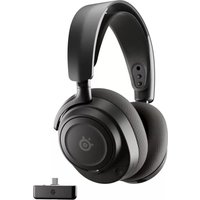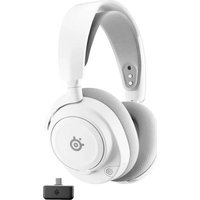
Arctis 7P+ Wireless - Headphones STEELSERIES - Free user manual and instructions
Find the device manual for free Arctis 7P+ Wireless STEELSERIES in PDF.



User questions about Arctis 7P+ Wireless STEELSERIES
0 question about this device. Answer the ones you know or ask your own.
Ask a new question about this device
Download the instructions for your Headphones in PDF format for free! Find your manual Arctis 7P+ Wireless - STEELSERIES and take your electronic device back in hand. On this page are published all the documents necessary for the use of your device. Arctis 7P+ Wireless by STEELSERIES.
USER MANUAL Arctis 7P+ Wireless STEELSERIES
PRODUCT INFORMATION GUIDE
natural_image
Line drawing of a pair of hardcover headphones (no text or symbols)CONTENTS
Product overview 5–6
Setup 7
Charging 9
Power On/Off 10
Pairing 11
Microphone 12
Multimedia Control 13
Ski Goggle Headband 14
Translations
Español 15
简体中文 17
繁體中文 19
日本語 21
한국어 23
Deutsch 25
Русский 27
Français 29
Italiano 31
Português 33
Polski 35
Regulatory 39
WELCOME TO ARCTIS
Your new headset is the result of our unyielding pursuit of perfection since 2001. We poured our hearts into creating the best possible PlayStation gaming headset by pushing the boundaries of sound quality, mic clarity, comfort and style.
Arctis is our glory; now go chase yours.
STEELSERIES GG
text_image
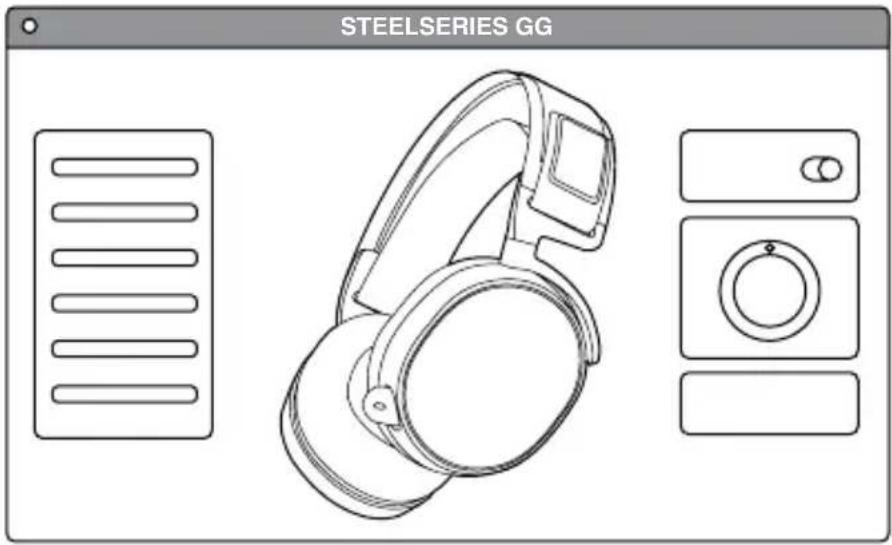
STEELSERIES GGDownload SteelSeries GG to customize your audio settings and to integrate with Engine Apps like Discord: steelseries.com/gg
Find help at support.steelseries.com
PACKAGE CONTENTS
Product Information Guide
Artcis 7P+ Wireless Headset
USB-C Wireless Dongle
USB-C to USB-A Adapter Cable
4-pole 3.5 mm Audio Cable
USB-C Charging Cable
SYSTEM COMPATIBILITY
PlayStation 5
PlayStation 4
PC
Nintendo Switch
Android (with USB-C)
PRODUCT OVERVIEW
text_image
Technical diagram of a multi-face headphones with numbered labels pointing to different ear components.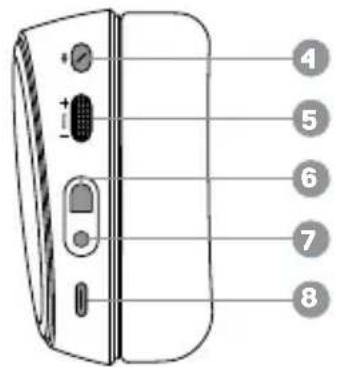
text_image
4 5 6 7 8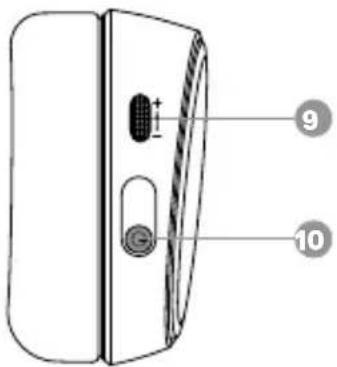
text_image
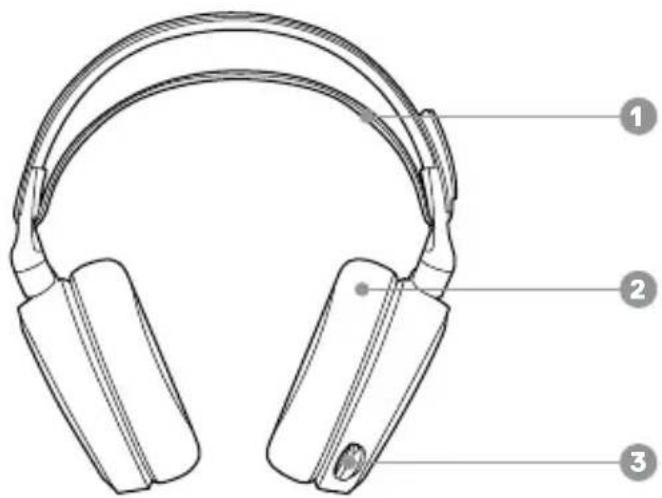
Diagram of a door panel with labeled parts and numbered annotations1 Ski Goggle Headband*
2 Airweave Ear Cushions*
3 Retractable Microphone
4 Microphone Mute Button
5 Volume Control
6 Mobile Cable Jack
7 Headphone Share Jack
8 USB-C Charging Jack
9 Sidetone Dial
10 Power Button
* Find accessories at steelseries.com/gaming-accessories
11 USB-C Wireless Dongle
12 USB-C to USB-A Adapter Cable
13 USB-C Charging Cable
14 4-pole 3.5 mm Audio Cable*
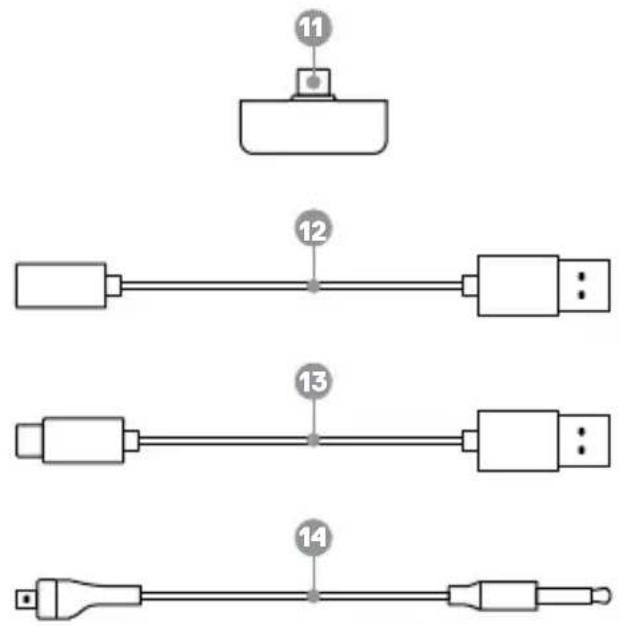
text_image
11 12 13 14SETUP
More detailed product information at steelseries.com/arctis-7p+
WIRELESS SETUP
Connection to USB-A
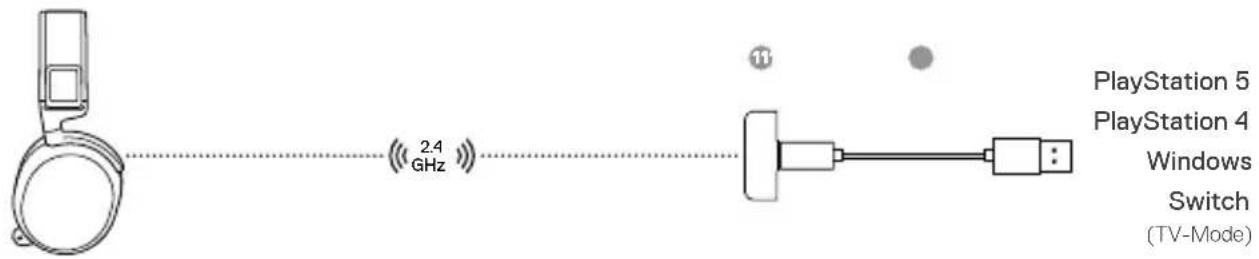
text_image
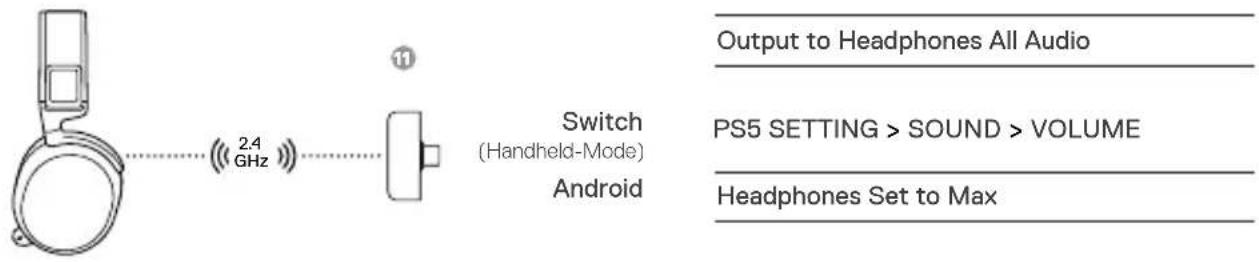
PlayStation 5 PlayStation 4 Windows Switch (TV-Mode) 2.4 GHz 11Connection to USB-C
text_image
Output to Headphones All Audio 2.4 GHz Switch (Handheld-Mode) Android PS5 SETTING > SOUND > VOLUME Headphones Set to MaxPS5 SETTING > SOUND > AUDIO OUTPUT
Output to Headphones All Audio
PS5 SETTING > SOUND > VOLUME
Headphones Set to Max
PS4 SETTING > DEVICES > AUDIO DEVICES
Output to Headphones All Audio
WIRED SETUP
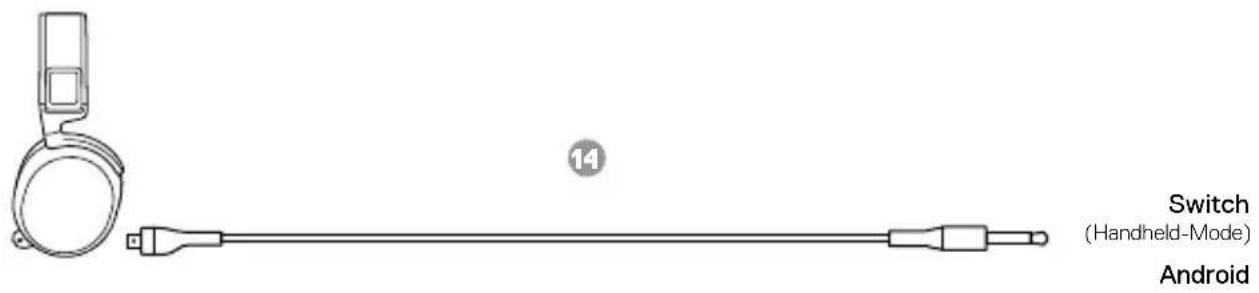
text_image
Switch (Handheld-Mode) AndroidCHARGING
text_image
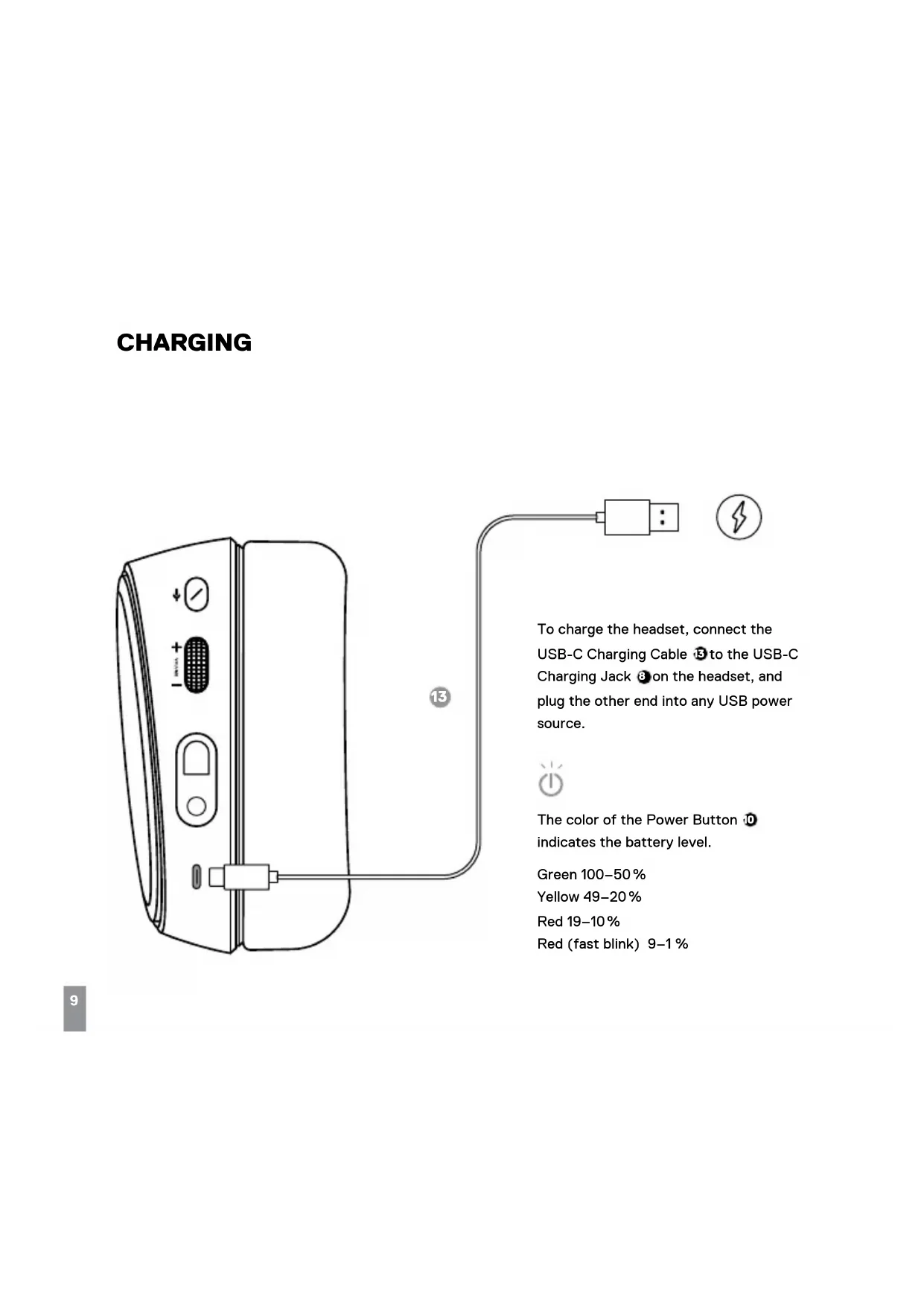
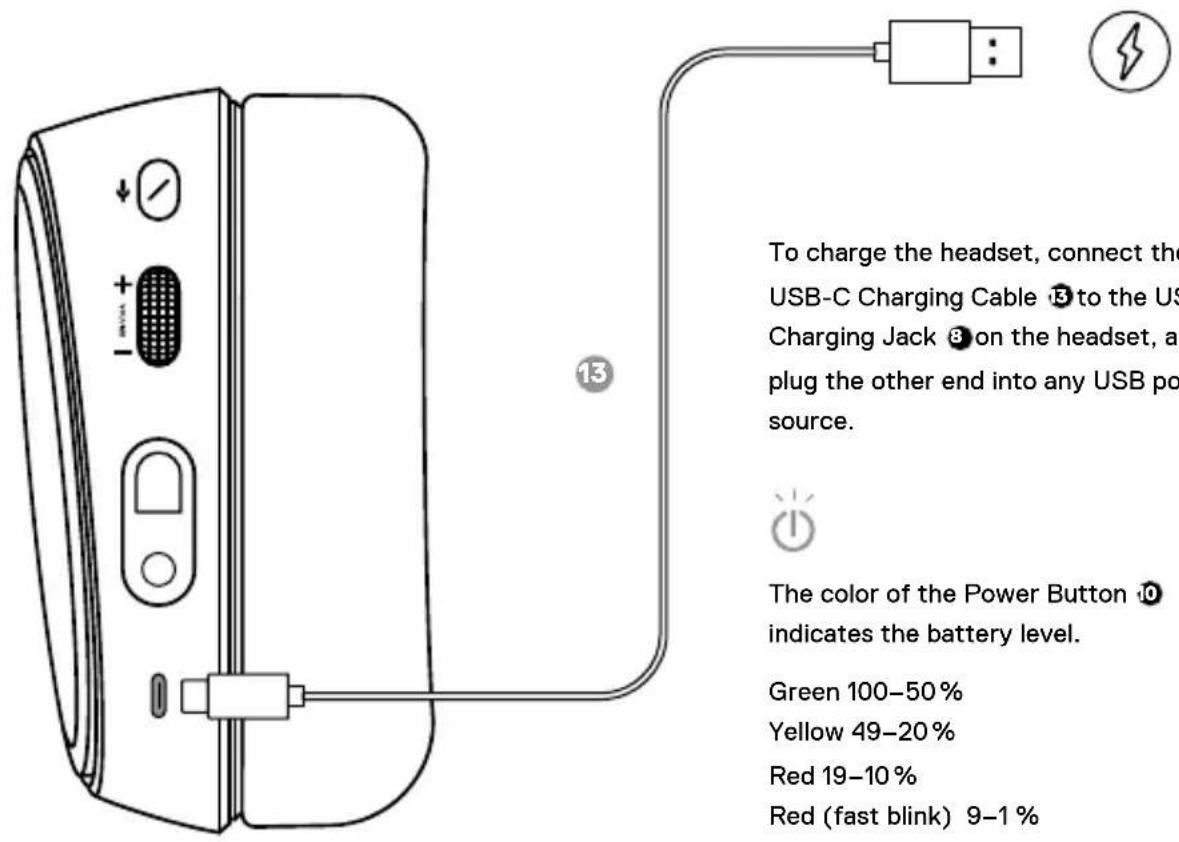
To charge the headset, connect the USB-C Charging Cable ⑤ to the US Charging Jack ⑧ on the headset, and plug the other end into any USB po source. The color of the Power Button ⑩ indicates the battery level. Green 100–50% Yellow 49–20% Red 19–10% Red (fast blink) 9–1%To charge the headset, connect the USB-C Charging Cable ③ to the USB-C Charging Jack ⑧ on the headset, and plug the other end into any USB power source.

The color of the Power Button 10 indicates the battery level.
Green 100–50%
Yellow 49–20%
Red 19–10%
Red (fast blink) 9–1%
POWER ON/OFF
text_image
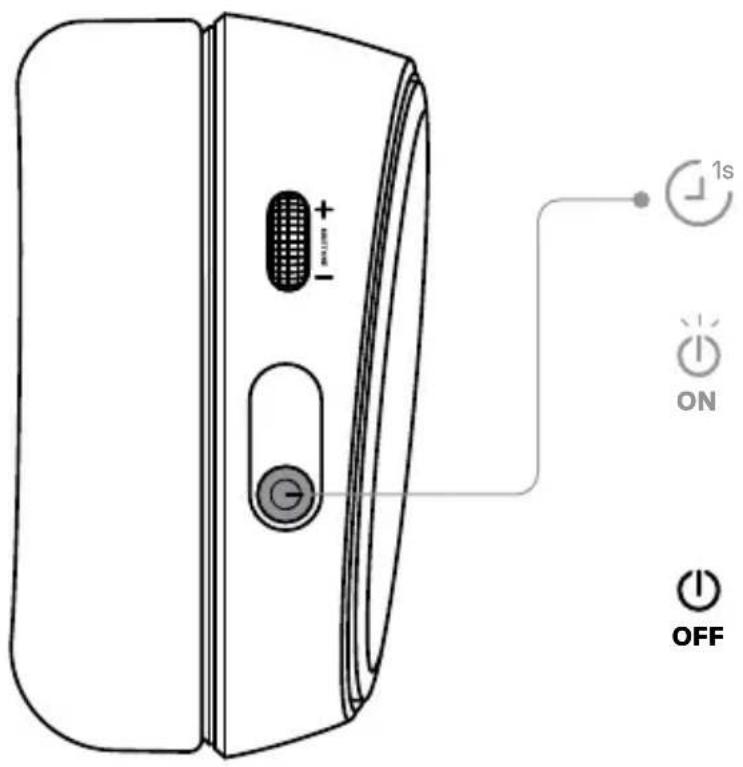
1s ON OFFTo power on the headset, press and hold the Power Button ⑩ for 1 second. You will hear a tone, and the Power Button ⑩ will illuminate.

To power off the headset, press and hold the Power Button Ⓞ for at least 3 seconds.
PAIRING
text_image
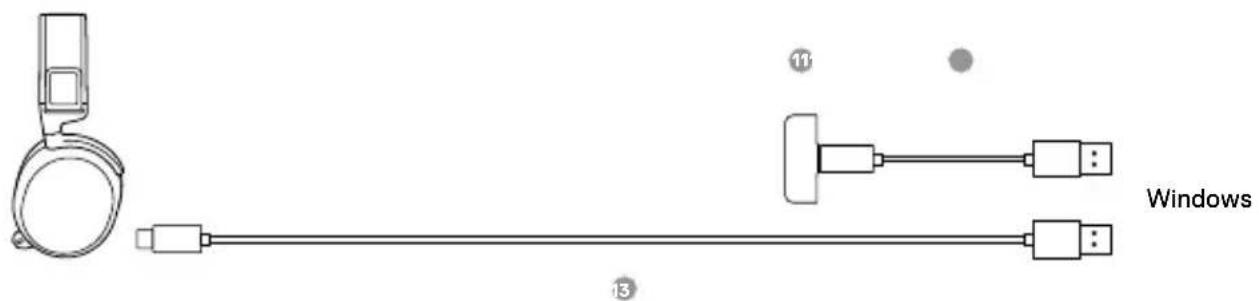
Windows 11 13Note: The headset is already paired with the Dongle out of the box. To re-pair the Dongle:
1 Connect the USB-C Wireless Dongle 📄 to a Windows PC with SteelSeries GG installed.
2 Use the USB-C Charging Cable ⬤ to connect the headset to the same PC.
3 Use Engine from SteelSeries GG software to initiate the pairing.
4 Engine will show when pairing is completed.
MICROPHONE
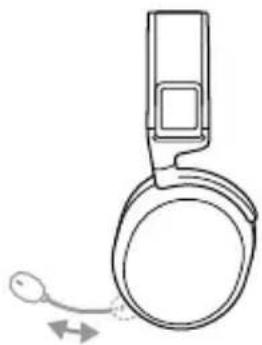
RETRACTABLE MICROPHONE POSITIONING
natural_image
Line drawing of a handheld electronic device with a circular ear and cable, no text or symbols presentSIDETONE DIAL
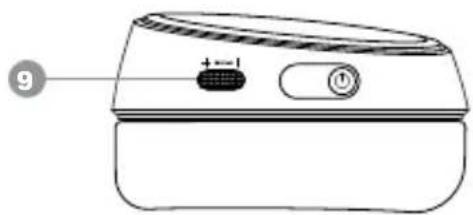
The Sidetone Dial ⑨ can be used to adjust mic monitoring levels. Increase the sidetone level by moving the dial upwards, decrease or disable sidetone by moving the dial downwards.
natural_image
Line drawing of a portable electronic device with a button and indicator (no text or symbols)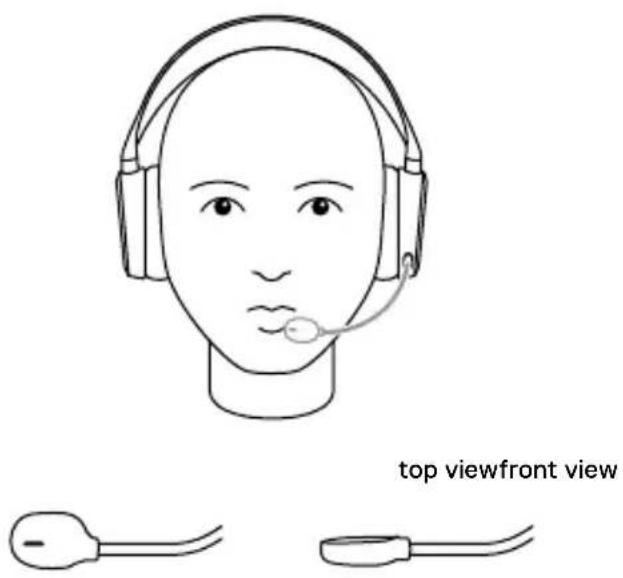
text_image
top viewfront viewPosition the ClearCast Microphone ⚙close to the corner of your mouth with the flat surface facing you.
MULTIMEDIA CONTROL
natural_image
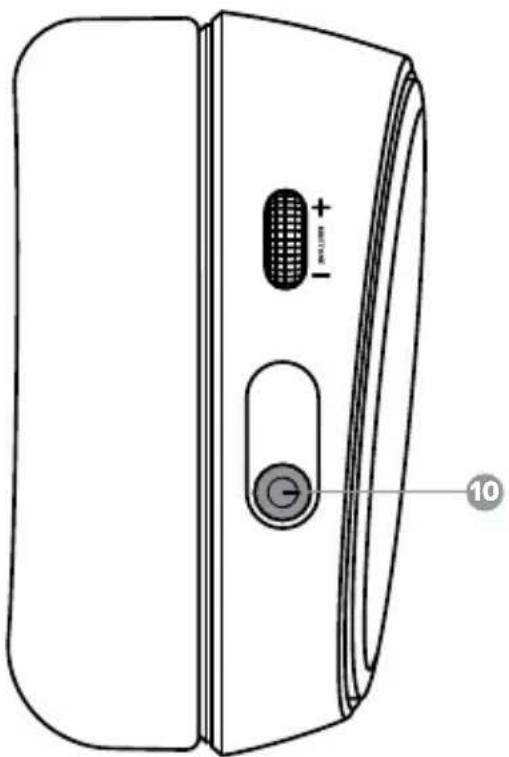
Line drawing of a device rear panel with labeled buttons and a circular button (no text or symbols)Answer/end voice call single · press Power Button 10
Play/pause music
single · press Power Button
Next track
double · · press Power Button
Previous track
triple · · · press Power Button ^0
SKI GOGGLE HEADBAND
text_image
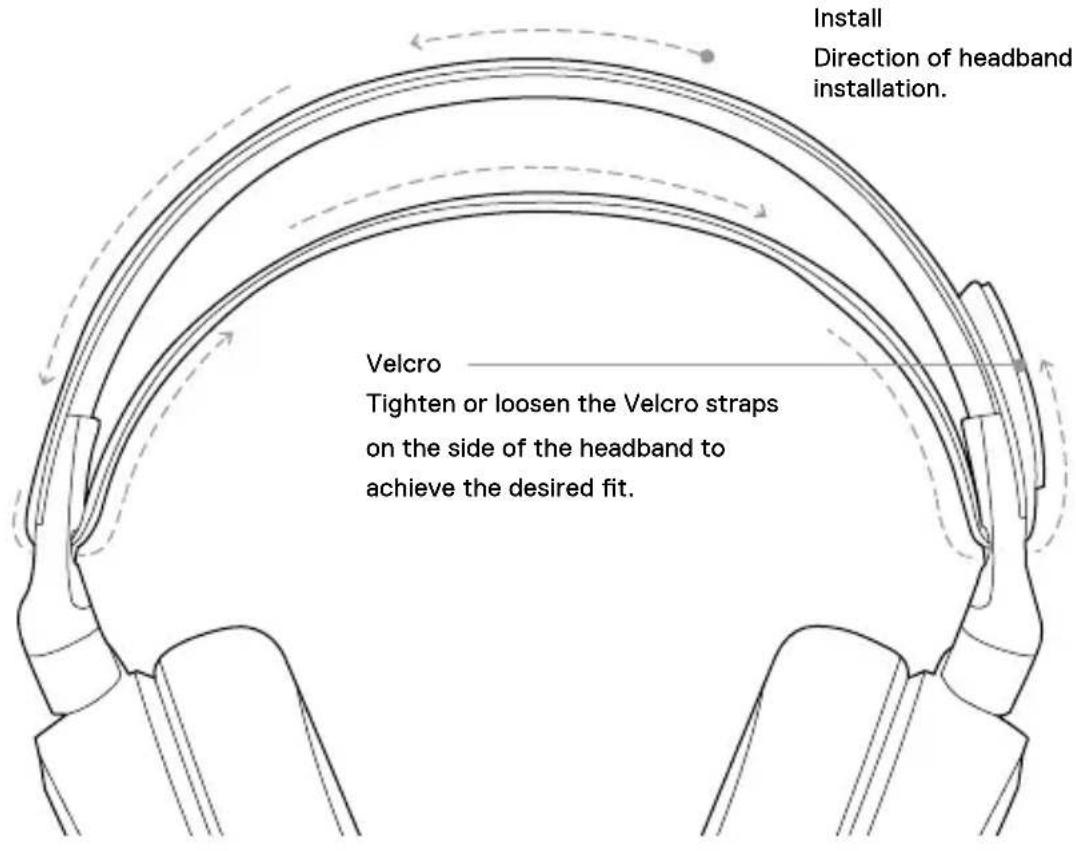
Install Direction of headband installation. Velcro Tighten or loosen the Velcro straps on the side of the headband to achieve the desired fit.ESPAÑOL
steelseries.com/gaming-accessories
CONFIGURACIÓN
support.steelseries.com
产品概览
19 滑雪护目镜头带*
20 Airweave 耳垫*
21 可伸缩麦克风
22 麦克风静音按钮
23 音量控制
24 移动电缆插孔
25 耳机共享插孔
26 USB-C 充电插孔
27 侧音控制盘
28 电源按钮
29 USB-C 无线收发器
30 USB-C 转 USB-A 适配器电缆
31 USB-C 充电线
32 4 极 3.5 mm 音频线*
*在
steelseries.com/gaming-accessories 查找配件
设置
无线设置
连接至 USB-A
连接至 USB-C
PS5 设置 > 声音 > 音频输出
输出至耳机所有音频
PS5设置 > 声音 > 音量
耳机设置为最大值
PS4 设置 > 设备 > 音频设备
输出至耳机所有音频
有线设置
充电
steelseries.com/gaming-accessories 找寻配件
設定
無線設定
連接至 USB-A
連接至 USB-C
PS5 設定 > 聲音 > 音訊輸出
輸出至耳機 所有音訊
PS5 設定 > 聲音 > 音量
耳機 設定為最大值
PS4 設定 > 設備 > 音訊設備
輸出至耳機 所有音訊
有線設定
充電
USB-C-Wireless-Dongle
11 USB-C-Wireless-Dongle
Dongle wireless USB-C
steelseries.com/gaming-accessories
CONFIGURAZIONE
steelseries.com/gaming-accessories
CONFIGURAÇÃO
Europe – EU Declaration of Conformity
Hereby, SteelSeries ApS. declares that the equipment which is compliance with directive RoHS 2.0 (2015/863/EU), R.E.D (2014/53/EU), EMC Directive (2014/30/EU), and LVD (2014/35/EU) which are issued by the Commission of the European Community.
The full text of the EU declaration of conformity is available at the following internet address: https://steelseries.com/Operating Temperature: 0 to +40 °C
SteelSeries ApS. hereby confirms, to date, based on the feedback from our suppliers indicates that our products shipping to the EU territory comply with REACH (Registration, Evaluation, Authorization, and Restriction of Chemicals - (EC) 1907/2006) compliance program. We are fully committed to offering REACH compliance on the products and posting accurate REACH compliance status for the all of products.
Frequency bands and Powers (Headset and Transceiver)
a. Frequency band(s) in which the radio equipment operates: 2.400 - 2.4835 GHz
b. Maximum radio-frequency power transmitted in the frequency band(s) in which the radio equipment operates:
•EIRP: GFSK: 7.93 dBm (Headset)
·EIRP: GFSK: 6.62 dBm (Transceiver:HS33TXB)
·EIRP: GFSK: 6.24 dBm (Transceiver:HS33TXQ)
c. Firmware Version: V1.0.0

UK Declaration of Conformity
Hereby, SteelSeries ApS. declares that the following equipment which is compliance with Electromagnetic Compatibility Regulations 2016, Electrical Equipment (Safety) Regulations 2016, Radio Equipment Regulations 2017 and The Restriction of the Use of Certain Hazardous Substances in Electrical and Electronic Equipment Regulations 2012 issued by the Department for Business, Energy & Industrial Strategy.
The full text of the UK declaration of conformity is available at the following internet address: https://steelseries.com/
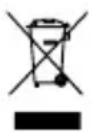
WEEE
This product must not be disposed of with your other household waste or treat them in compliance with the local regulations or contact your local city office, your household waste disposal service or the shop where you purchased the product.
TURKEY ROHS COMPLIANCE
Republic of Turkey: In conformity with the EEE Regulation
Safety Guideline for Lithium Battery
This battery must not be disposed of with your other household waste or treat them in compliance with the local regulations or contact your local city office, your household waste disposal service or the shop where you purchased the product.

Federal Communication Commission Interference Statement
This device complies with Part 15 of the FCC Rules. Operation is subject to the following two conditions: (1) This device may not cause harmful interference, and (2) this device must accept any interference received, including interference that may cause undesired operation.
This equipment has been tested and found to comply with the limits for a Class B digital device, pursuant to Part 15 of the FCC Rules. These limits are designed to provide reasonable protection against harmful interference in a residential installation. This equipment generates, uses and can radiate radio frequency energy and, if not installed and used in accordance with the instructions, may cause harmful interference to radio communications. However, there is no guarantee that interference will not occur in a particular installation. If this equipment does cause harmful interference to radio or television reception, which can be determined by turning the equipment off and on, the user is encouraged to try to correct the interference by one of the following measures:
- Reorient or relocate the receiving antenna.
- Increase the separation between the equipment and receiver.
- Connect the equipment into an outlet on a circuit different from that to which the receiver is connected.
- Consult the dealer or an experienced radio/TV technician for help.
FCC Caution:
Any changes or modifications not expressly approved by the party responsible for compliance could void the user's authority to operate this equipment.
This transmitter must not be co-located or operating in conjunction with any other antenna or transmitter.
Radiation Exposure Statement:
The device has been evaluated to meet general RF exposure requirement, the device can be used in portable exposure condition without restriction.
FCC ID: ZHK-HS33 (Wireless Headset)
FCC ID: ZHK-HS33TXQ/ ZHK-HS33TXB(Transceiver)
Frequency bands and Powers
a. Frequency band(s) in which the radio equipment operates: 2.400 - 2.4835 GHz
b. Maximum radio-frequency power transmitted in the frequency band(s) in which the radio equipment operates:
- Conducted Peak Power/GFSK: 5.18 dBm (Headset)
- Conducted Peak Power/ GFSK: 5.47 dBm (Transceiver:HS33TXB)
- Conducted Peak Power/ GFSK: 5.15 dBm (Transceiver:HS33TXQ)
c. Firmware Version: V1.0.0
| Regions Contact Information | |
| USA SteelSeries ApS., 656 W Randolph St., Suite 3E, Chicago, IL 60661, USA +1 312 258 9467 | |
More information and support from https://steelseries.com/
Industry Canada Statement:
This device complies with Industry Canada license-exempt RSS standard(s). Operation is subject to the following two conditions:
1) this device may not cause interference, and
2) this device must accept any interference, including interference that may cause undesired operation of the device. Le présent appareil est conforme aux CNR d'Industrie Canada
applicables aux appareils radio exempts de licence. L'exploitation est autorisée aux deux conditions suivantes:
This Class B digital apparatus complies with Canadian ICES-003.
This device and its antenna(s) must not be co-located or operating in conjunction with any other antenna or transmitter, except tested built-in radios.
The County Code Selection feature is disabled for products marketed in the US/ Canada.
The appliance must not be exposed to splashes or drops of water and it should not be used as a support for any object filled with liquid, such as a vase.
RISK OF EXPLOSION IF BATTERY PACK IS NOT REPLACE BY SAME TYPE AS SPECIFIED BY THE MANUFACTURER.
Please keep follow all listed important warnings and cautions below while using this battery pack to avoid any damage or hazard.
- The battery polarity (+) and (-) shall not be connected and charged reversely. Risk of explosion if the battery polarity (+) and (-) is reversed.
- Please keep this battery pack away from fire and high heat sources due to the explosion that might happen. Do not place your battery pack close to any heater or hot location.
- This battery pack shall not be hit or impacted. This battery pack shall not be dealt with any sharp or keen objects either.
- This battery pack shall not be exposed to moisture, dripping or splashing.
- If any electrolyte flows out of this battery pack when touching the user's eyes and skin, please seek medical advice immediately.
"MISE EN GARDE!"
RISQUE D'EXPLOSION SI LE BLOC-PILES N'EST PAS REMPLACÉ PAR LE MÊME TYPE QUE SPÉCIFIÉ PAR LE FABRICANT.
Radiation Exposure Statement:
The device has been evaluated to meet general RF exposure requirement. The device can be used in portable exposure condition without restriction.
Transceiver IC: 9638A-HS33TXQ/ 9638A-HS33TXB
This product is compliant with requirements of Circular No. 30/2011/TT-BCT Regulations "STIPULATING TEMPORARILY THE PERMISSIBLE CONTENT LIMITATION OF SOME TOXIC CHEMICALS IN THE ELECTRONIC, ELECTRICAL PRODUCTS"
Restriction on Hazardous Substances statement (India)
This product complies with the "India E-waste Rule 2011" and prohibits use of lead, mercury, hexavalent chromium, polybrominated biphenyls or polybrominated diphenyl ethers in concentrations exceeding 0.1 weight % and 0.01 weight % for cadmium, except for the exemptions set in Schedule 2 of the Rule.

Custom Union Compliance.
(Russia / Belarus / Kazakhstan /
Armenia / Kyrgyzstan)

Malaysia Approval (SIRIM)

ACMA Compliance
(Australia/ New Zealand)

RED (2014/53/EU),
Commission of the European
Community.)

Direct Current
Complies with IMDA Standards DA 106032
Singapore approval (IMDA)
| Region Address Telephone | ||
| Asia亞洲 | 4F.-4, No. 186, Jian 1st Rd., Zhonghe Dist., New Taipei City 235603, Taiwan新北市中和區建一路186號4樓及4樓之4 | +886 2 8227 1999 |
| Europe Havneholmen 8, 1 ^st Floor,2450 Copenhagen SV, Denmark | +45 702 500 75 | |
| USA 656 W | Randolph St., Suite 3E,Chicago, IL 60661, USA | +1 312 258 9467 |
More information and support from https://steelseries.com/
| Product Name (產品名稱/产品名称): | Wireless Headset (無線耳機/无線耳机) |
| Model No. (型號/型号): | HS33 |
| Rated (規格/規格): 5V | 500 mA |
Accessories information (配件資訊/配件信息)
| Product Name: (產品名稱/产品名称): | Transceiver (收發器/收发器) |
| Model No. (型號/型号): | HS33TXQ |
| HS33TXB | |
| Rated (規格/規格): 5V | --- 100mA |
| Made in China 中國製造/中国制造 | |
| 產品使用環境溫度: 0 - 40度 | |
| Operating Temperature: 0 to + 40 °C |

learn more at steelseries.com