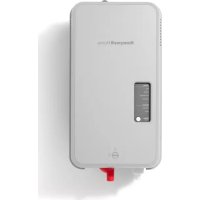
HM750A1000 - Steamer HONEYWELL - Free user manual and instructions
Find the device manual for free HM750A1000 HONEYWELL in PDF.


| Brand | Honeywell (Resideo Technologies, Inc.) |
| Model | HM750A1000 |
| Product Type | Residential Steam Humidifier |
| Dimensions (L x H x D) | 254 x 457 x 178 mm (10 x 18 x 7 in) |
| Net / Gross Weight | 4.8 kg / 8.4 kg (10.5 / 18.5 lb) |
| Available Voltages | 110-120 VAC or 220-240 VAC, 50/60 Hz (selectable by jumper) |
| Power Consumption | 1.5 kW (120 V) / 3.0 kW (240 V) |
| Steam Output | 41.6 L/day (11 gal/day) at 120 V / 83.3 L/day (22 gal/day) at 240 V |
| Current Consumption | 12 A (120 V) / 6 A (240 V) |
| Electrical Protection | Dedicated 15 A circuit breaker recommended, GFCI recommended |
| Operation | Steam generation by immersed electrodes, self-adaptive cycle, periodic automatic drain |
| Humidity Control | Compatible with humidistat or thermostat (24 VAC), fan lockout output |
| Airflow Detection | Required (air proving contact) - jumper if not used |
| Display and Indicators | LEDs: Standby, Fill, Steam, Drain, Cylinder (end of life), Fault (blinking codes) |
| Water Supply | Cold water, pressure 30-100 PSIG, conductivity 125-1200 μS/cm (tap water only, no reverse osmosis or deionized water) |
| Connections | Water inlet: 1/4 in quick connect; Drain: rubber hose (max temperature 93 °C) |
| Mounting | Wall or directly on air duct (with included distribution nozzle) |
| Periodic Maintenance | Cylinder replacement (approx. 1 year), cleaning of drain valve and inlet filter |
| Main Replacement Parts | Cylinder HM750ACYL, valve kit HM750AVKIT, nozzle kit HM750ANKIT, electronic board HM750APCB, 4.6 m steam hose HM750AHOSEKIT |
| Warranty | 5-year limited (excluding consumables) |
Frequently Asked Questions - HM750A1000 HONEYWELL
User questions about HM750A1000 HONEYWELL
0 question about this device. Answer the ones you know or ask your own.
Ask a new question about this device
Download the instructions for your Steamer in PDF format for free! Find your manual HM750A1000 - HONEYWELL and take your electronic device back in hand. On this page are published all the documents necessary for the use of your device. HM750A1000 by HONEYWELL.
USER MANUAL HM750A1000 HONEYWELL
Read and save these instructions. This guide should be kept by the installer.
HM750A1000
ADVANCED ELECTRODE STEAM HUMIDIFIER
INSTALLATION INSTRUCTIONS

INTRODUCTION
The HM750 is the most advanced residential steam humidifier available and provides steady and reliable humidification for a home. The humidifier is designed for connection directly to a supply air duct for humidity on demand. The humidifier may be directly mounted to the air duct, or remotely from the air duct, with a steam hose connecting the humidifier to a distributor nozzle installed at the air duct.
Included in the Box
– HM750 steam humidifier
- H6062 HumidiPRO
— Steam distributor nozzle
— Rubber drain hose
- LDPE water hose
— Baffle (duct mount only)
— Foam gasket (duct mount only)
— Steam hose (wall mount only)
— Fittings, hardware, and mounting template
— Installation Instructions, 33-00289EF (this document)
— Annual Operation and Maintenance Reminder
Tools Needed
— Flat-head screwdriver
— Phillips screwdriver
- W r e n c h
— Copper pipe (optional)
— Level
- H o l e s a w
Humidifier Configuration
The HM750 is configured at the factory to operate under most conditions without the need to change its configuration.
NOTE: Because the humidifier is factory configured for optimal performance, Resideo strongly discourages changes to the configuration of the humidifier not described in these instructions.
Before Installation
- Ensure that available voltage and phase corresponds with humidifier voltage and phase as indicated on humidifier's specification label.
- Ensure that the dedicated external fuse disconnect is of sufficient size to handle the rated amps as indicated on the specification label. Refer to local codes.
- Ensure sufficient clearances will be available as described in the Location section on page 6.
- If the humidifier will be wall mounted, ensure steam lines can be routed to duct as described in the Steam Line Instructions on page 7.
Table 1. Specifications.
| Volts | Steam Output GPD KW | Amps Phase | Max Ext. Fuse (Amps) | Standard Cylinder | Net/Full Weight lbs. (kg) | Dimensions W x H x D | |
| 110/120 | 11 1.5 | 12 1 15 | HM750ACYL | 10.5 / 18.5(4.8 / 8.4) | 10 x 18 x 7 in.254 x 457 x 178 mm | ||
| 220/240 | 22 3.0 |
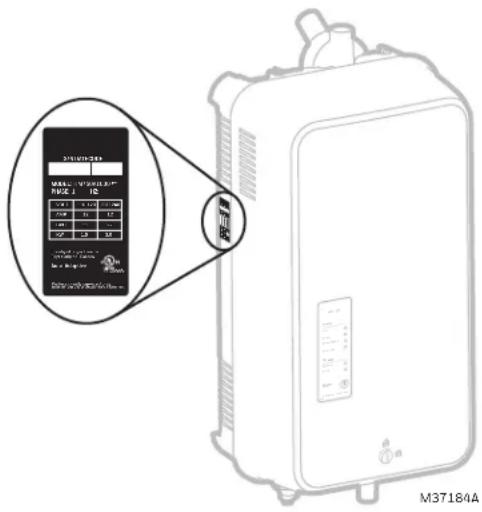
Fig. 1. Specification label location.

CAUTION
Servicing
Disconnect main power before any servicing.
- The plumbing and electrical compartments contain high voltage components and wiring. Access should be limited to authorized personnel only.
- During and following operation of the humidifier, the steam and components in contact with the steam such as the steam lines, steam distributors, and condensate lines can become hot and can burn if touched.
- Resideo does not accept any liability for installations of humidity equipment installed by unqualified personnel or the use of parts/components/equipment that are not authorized or approved by Resideo.
- To maintain warranty, only Resideo approved parts and cylinders may be used in the operation of the product.

CAUTION
Electrical
All electrical work should be done according to local and national electrical code.
Electrical connection to be performed by a licensed electrician.
Unit recommended to be powered by a dedicated GFCI circuit.

CAUTION
Plumbing
Plumbing to be performed by a licensed plumber. Drain water from humidifier can be very hot. Drain water to floor drain. Do not drain to public sink.
All plumbing work should be done according to local plumbing code.

CAUTION
Installation
Do not mount on surfaces hotter than 176 °F (80 °C).
Do not mount in area where freezing can occur.
Do not mount on vibrating surface.
Do not mount on floor.
The HM750 produces steam at atmospheric pressure. No devices which could block steam output should be connected to the steam outlet.
Steam lines must be installed so that no restriction can produce backpressure in the humidifier.
Do not mount outdoors without protection against rain, snow, condensation or equivalent.

CAUTION
Water quality
The HM750 requires a cold water connection from your home's main water supply between 15-100 PSIG. A throttle valve may be necessary, and a water shut-off valve is recommended for safety. Reverse Osmosis (RO) and Deionized (DI) water must not be used. Water conductivity is important to ensure the electrode humidifier operates effectively. Resideo recommends 125-1200 µ S/cm (microsiemens/cm).
Parts and Accessories
The following parts and accessories are available and may have been included with your HM750 humidifier. The cylinder is the only item that will need periodic replacement to maintain proper humidifier operation.
Table 2. Parts and accessories.
| Part/Accessory Part Number | |
| Replacement Cylinder HM750ACYL | |
| HumidiPRO Humidistat H6062A1000 | |
| Drain and Fill Valve Kit HM750AVKIT | |
| Remote and Duct Nozzle Kit HM750ANKIT | |
| Replacement PC Board HM750APCB | |
| 15 ft. Steam Hose Kit HM750AHOSEKIT | |
| Differential Pressure Switch for Air Proving 5002791 | 0-001 |
How the Humidifier Works
The HM750 is an atmospheric steam generator that uses heat generated by electrical current flowing between submerged electrodes to generate steam. The HM750 is designed for on-demand air humidification via a steam distributor nozzle.
STEAM GENERATION
- Once the humidistat terminals and the air proving terminals are closed (AP on the control board), the humidifier closes the power relay and measures the electrical current.
- If current is lower than full load amperage, after a brief delay the water fill valve will be activated and water will flow into the fill cup. Water from the fill cup flows into the bottom of the cylinder through a hose connected to the drain valve housing.
NOTE: The cylinder is gravity fed from the fill cup. If backpressure from the steam line is too high it will cause water to back up in the fill cup and flow down the overflow line to the drain.
- As soon as the water in the cylinder comes in contact with the energized electrodes, current flows through the water. The resistance of the water to the electrical current generates heat and in turn steam. The electrical current (and steam output) increases as the level of water increases, as more of the electrode becomes submerged. The unit continues to fill until the current reaches full load amperage, or the high water sensor detects a high water level.
- The water level and current draw in the cylinder decreases from evaporation (through steam generation).
- If the high water sensor was activated before full load amperage is achieved, the water will boil down until the high water sensor is no longer activated. If full load amperage was achieved, the water will boil down to a predefined amperage.
- The HM750 repeats the fill and boil down cycle repeatedly to provide a constant steam output.
• Over time, minerals in the water will adhere to the cylinder electrodes. The humidifier will automatically fill to a higher water level to maintain full capacity during the life of the cylinder. Eventually, because of
scale formation, it will no longer be possible for the humidifier to reach its full capacity. The HM750 software monitors this condition and, when detected, will stop operating and the Cylinder LED will be illuminated.
DRAINS
- As steam is produced, minerals are left behind, increasing the conductivity of the water. The HM750 auto-adaptive cycle will monitor the water conductivity and perform drains to maintain the water at optimal conductivity for peak performance.
- The auto-adaptive cycle ensures cylinder life is maximized. It does this by keeping the tightest control and most efficient use of water during the entire cylinder life.
STEAM DISTRIBUTION
Steam generated by the humidifier may be introduced into the air in two different ways. The humidifier may be mounted directly onto the duct, to allow the steam distributor nozzle to enter into the supply air duct. Alternatively, the humidifier may be located remotely from the air supply duct. It may be connected to the distributor nozzle at the duct using a steam hose.
STEAM LINE
The steam line between the cylinder steam outlet and the distributor nozzle serves two purposes: it is used as a conduit to transfer the atmospheric steam from the humidifier to the distributor nozzle, as well as providing a means to remove condensate. See “Steam Line Instructions” on page 7 for information on selecting steam lines.
Whenever steam is distributed, condensate is formed in the distribution system. Insulating steam lines is one important way to reduce the amount of condensate formed. Steam lines must also be sloped so that condensate does not collect in the lines and create a restriction to steam flow. As shown in the Plumbing section, steam lines should maintain a slope back to the humidifier of, as a minimum, 4 in. (10 cm) RISE per 12 in. (30 cm) of RUN.
SIZING
IMPORTANT
The HM750 should only be installed if it has been sized properly. Do not use square feet when sizing a humidifier installation. Instead, cubic feet must be used, since the humidity is filling a volume of space (width x length x height). Also, take into consideration the “tightness” of a home’s construction.
The HM750 produces 11 gallons per day (GPD) when run on 120 V and 22 GPD when run on 240 V. See Figure 20 for details on configuring the HM750 to run on a different voltage.
Table 3 contains AHRI recommendations for humidity requirements and Table 4 shows what humidifiers and output configuration will satisfy the humidification requirements.
Table 3. AHRI Recommended Humidity (in US gallons per day).
| Construction Type 8,000 ft3 | 12,000 ft3 | 16,000 ft3 | 20,000 ft3 | 24,000 ft3 | 32,000 ft3 | 40,000 ft3 | |
| Tight 3.3 5.0 | 6.7 8.3 10.0 | 13.4 16.7 | |||||
| Average 6.7 | 10.0 13.4 16.7 | 20.0 26.7 33.4 | |||||
| Loose 10.0 | 15.0 20.0 25.0 | 30.1 40.1 50.1 | |||||
Table 4. Steam humidifier(s) necessary for application. a
| Construction Type 8,000 ft3 | 12,000 ft3 | 16,000 ft3 | 20,000 ft3 | 24,000 ft3 | 32,000 ft3 | 40,000 ft3 | |
| Tight 11 GPD 11 GPD 11 | GPD 11 GPD 11 | 1 GPD | 11 GPD (x2) or 22 GPD (x1) | 11 GPD (x2) or 22 GPD (x1) | |||
| Average | 11 GPD 11 | GPD 22 | GPD 22 GPD 22 | 2 GPD | 11 GPD (x4) or 22 GPD (x2) | 11 GPD (x4) or 22 GPD (x2) | |
| Loose | 11 GPD 22 | GPD 22 GPD | 11 GPD (x4) or 22 GPD (x2) | 11 GPD (x4) or 22 GPD (x2) | 11 GPD (x4) or 22 GPD (x2) | 11 GPD (x5) or 22 GPD (x3) | |
a In the table above, 11 GPD indicates a steam humidifier configured to run on 120 V and 22 GPD indicates a steam humidifier configured to run on 240 V.
![graph TD A["MOUNTING"] --> B["STEAM DISTRIBUTION"] B --> C["CONTROLS"] C --> D["PLUMBING"] D --> E["ELECTRICAL"] subgraph STEAM_DISTRIBUTION F["4 (102)"] --> G["1 (25)"] G --> H["4 (102)"] H --> I["1 (25) IF WIRED BEFORE MOUNTING. 36 INCHES (914) FOR WIRING ACCESSIBILITY"] J["2 (51) SCREWS"] --> K["…](/content/2026/04/611145/images/c47ff8873f7004dff83fc06ab073d9da4b1b3f4436e722e52f1b87bc839a16ae.jpg)
Fig. 2. Typical HM750 Installation. Measurements in inches (mm).
LOCATION
Mount on a suitable wall or vertical surface. Do not sit the unit on the floor. Allow clearances required for plumbing and electrical connections. Clearance dimensions shown are for reference only and are the minimum required for maintenance of the humidifier.

Fig. 3. Clearances for the HM750.
Consult local and national codes before final location and installation. Resideo does not accept responsibility for installation code violations.
• Install only in areas with ambient temperature 41 to 104 °F (5 to 40 °C) and relative humidity 5 to 95 %, non-condensing.
- Humidifier must be installed below the steam distributor nozzle. Take care to provide proper steam line routing.
- DO NOT locate the humidifier any further than absolutely necessary from the steam distributor nozzle location as net output will be reduced as a result of heat loss through the steam line.
- When possible, mount the HM750 humidifier at a height convenient for servicing.
NOTE: Do not mount on surfaces above 176 °F (80 °C), where freezing can occur, vibrating surface, or floor.

Fig. 4. Distributor nozzle installed vertically in a horizontal duct. (Remote mount)
Steam Nozzle Location
Whether the humidifier is being installed directly on the air duct or remotely, the location of the distributor nozzle in the air duct should follow the subsequent rules:

Fig. 5. Distributor installed horizontally (side mount) in a horizontal duct. (Remote mount) Measurements in inches (mm).

Fig. 6. Distributor nozzle installed horizontally in a vertical duct. (Remote mount)
Steam Line Instructions
The following instructions must be followed for installation of steam lines for the HM750. Failure to use recommended material (see Table 5), or failure to follow any other steam line installation instructions will result in improper operation and could void the warranty.
Table 5. Recommended Steam Line Material for HM750 Duct.
| Voltage | Steam Output | Material * | Steam Line/hr GRDngth | Possible Losses | Minimum Airflow CFM | Max Static Pressure | ||
| Ibs/hr (kg/hr) | GPD | Steam Hose Ibs | ||||||
| 110/120V | 3.8(1.7) | 11 | 1 in. dia.4 1.1 230 | Recommended:5 ft. (1.5 m)Maximum:15 ft. (4.6 m) | 0.4 1.1 | 115 | 2.0 in. w.c. | |
| 220/240V | 7.7(3.5) | 22 0 | ||||||
* The use of steam line other than Resideo supplied steam hose line will void the warranty and may adversely affect the operation of the humidifier.
NOTE: Condensate is not returned to the humidifier using a separate condensate line. Rather, the condensate is returned to the humidifier via the steam line. Ensure proper sloping.
If a condensate pump is preferred, ensure the pump is rated for hot water.
Main Rules for Atmospheric Steam Lines
- Steam lines must not have any restrictions which could result in back pressure.
• Maximum recommended steam line length: 15 ft. (4.6 m) - Use only Resideo supplied hose and follow recommended lengths.
• Install steam line in a vertical (upwards) fashion from the HM750 to the distribution nozzle, with a minimum slope of 4 in. (10 cm) RISE for every 12 in. (30 cm) RUN. - Insulate with 1.5 in. (3.8 cm) pipe insulation on steam hose (recommended).
- Do not over tighten hose clamp at cylinder steam outlet.
- If the 15 ft. steam hose is used, support the hose to maintain proper slope and avoid excess weight on the humidifier and nozzle.
Steam Distributor Nozzle
Remote-Mount - The HM750 must be connected with a steam hose to a steam distributor nozzle installed in the supply-side of ductwork. As shipped, the HM750 is configured with a steam guide for remote mounting. The steam outlet points upwards and is only used when the humidifier is installed remote to the air supply duct.
The steam distributor nozzle should be installed as close as possible to the humidifier – to a maximum of 15 ft. (4.6 m). The HM750 is supplied with a 5 ft steam hose. A 15 ft hose is available as an accessory. Short steam distribution lines minimize condensate loss and the possibility of generating backpressure in the steam distribution line. It is important that the steam line have a constant slope of, as a minimum, 4 in. (10 cm) RISE for every 12 in. (30cm) of RUN. See Fig. 8.
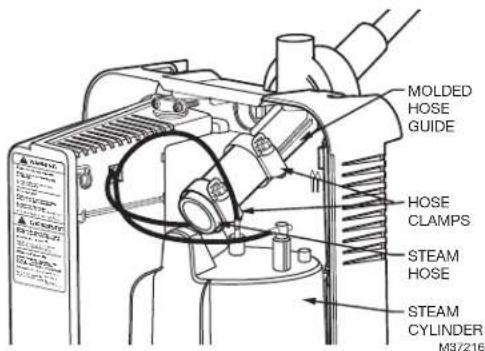
Fig. 7. Molded steam guide.

Fig. 8. Minimum slope requirements for steam line. Measurements in inches (mm).
Steam Line Installation Examples

Fig. 9. Steam distributor above humidifier (hose). Measurements in inches (mm).
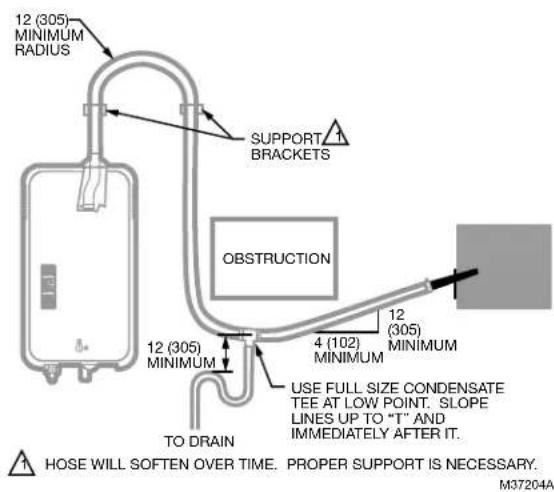
Fig. 10. Steam distributor below humidifier with obstruction (hose). Measurements in inches (mm).
![graph TD A["INSUFFICIENT BEND RADIUS"] --> B["STEAM LINE NOT SLOPED"] B --> C["INSUFFICIENT BEND RADIUS"] C --> D["NO CONDENSATE TRAP AT VERTICAL TRANSITION"] D --> E["Insufficient Bend Radius"] style A fill:#f9f,stroke:#333 style B fill:#ccf,stroke:#333 style C fill:#cfc,stroke:#333 style D fill:#f…](/content/2026/04/611145/images/4a7f730e34a25a4a03e5e70b36d5268769f7647bff13e1cabae4b29c4aaaf10b.jpg)
Fig. 11. Common steam line installation errors.
MOUNTING THE HUMIDIFIER
The HM750 can be mounted either directly on a supply air duct or remotely mounted on a wall. When remotely mounted the steam nozzle is mounted on a duct and connected to the HM750 with a steam hose.
The HM750 has a keyhole and three additional mounting holes as shown in Fig. 12.

Fig. 12. Mounting locations. (Rear view)
Mounting to a Wall
The HM750 comes in wall-mount configuration. In this configuration, the humidifier can be mounted to a 2x4 stud and the steam distributor nozzle, located at the end of a 5 ft. (1.5 m) steam hose, is inserted through the air supply duct (Fig. 13).
NOTE: Use #8 screws at least 2 in. (5 cm) in length (included) to mount directly to a 2x4 stud. Use longer screws if the stud is behind a drywall or other spacer.
NOTE: The steam distributor nozzle MUST be installed higher than the humidifier (see Fig. 13). The steam hose should maintain an inclination of at least 4 inches (10 cm) of rise for every 12 inches (30 cm) of run.

CAUTION
Do not remove the cover when the humidifier powered.
-
Remove the humidifier cover and pull out the cylinder. Insert the top screw until 1/4 in. (6 mm) is exposed. Hang the humidifier via its keyhole on the screw head (see Fig. 12).
-
After making sure the humidifier is level, affix it to the stud with another screw at the lower stud-mount location (Fig. 12).
-
Drill a 1-3/4" hole in the duct for the steam distributor nozzle. Attach the steam hose to the distributor nozzle and the remote adapter on the humidifier. Then insert the steam distributor nozzle and secure it with screws.
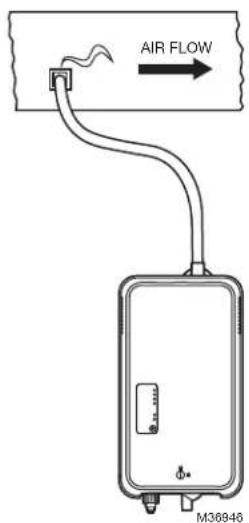
Fig. 14. Mounting with keyholes.
Mounting to the Supply Duct
The HM750 can also be mounted directly onto the supply duct. In this case, the steam guide must be removed and replaced with the steam nozzle and baffle as follows:
REMOVE THE STEAM GUIDE

CAUTION
Do not remove the cover when the humidifier powered.
- Remove the humidifier front cover.
- Remove the cylinder plugs and high water sensor plug from the cylinder pins by pulling vertically.
- Loosen the hose clamp furthest from the cylinder steam outlet (the one attached to the plastic steam guide). Remove the cylinder with the short steam hose still attached. See Fig. 15.
- Remove the hose adapter by pressing on the release tab toward the back of the humidifier and sliding the hose adapter down.

Fig. 15. Changing to duct mount configuration.
PREPARE THE STEAM NOZZLE
- Locate the supplied steam nozzle and baffle.
- Insert the baffle into the duct-mount nozzle.
NOTE: There is a keying feature on the baffle that ensures proper orientation of the baffle in the nozzle.

Fig. 16. Insert baffle into the duct-mount nozzle. Key ensures proper alignment.
INSTALL THE STEAM NOZZLE
- Install the nozzle with baffle directly onto the humidifier at the location where the hose adapter was removed. It clicks into place.
- Insert cylinder base into drain valve. Press down on the cylinder to ensure it is properly seated in the drain valve, otherwise it could leak
- Rotate the cylinder back in place while guiding the short steam hose attached to the cylinder onto the duct mount nozzle.
- Secure the steam hose to the duct mount nozzle with the hose clamp. Do NOT overtighten, or the duct mount nozzle could be damaged.
- Reconnect the cylinder plugs and high water sensor plug to the cylinder pins.
MOUNT HUMIDIFIER ON DUCT
- Using the duct mount template supplied with the humidifier, locate the template on the side of the duct where the humidifier will not interfere with the operation or maintenance of the furnace.
- Following the template, drill a 1-3/4" hole in the duct to insert the duct mount nozzle.
- Insert the top screw until 1/4 in. (6 mm) is exposed. Hang the humidifier via its keyhole on the screw head (see Fig. 17).
NOTE: The donut-shaped foam gasket must be installed between the humidifier and the duct.
- After making sure the humidifier is level, secure it to the duct using two screws at the duct-mount locations (Fig. 12), and then replace the cover.

Fig. 17. Duct mount. Install foam gasket between humidifier and air supply duct.
PLUMBING
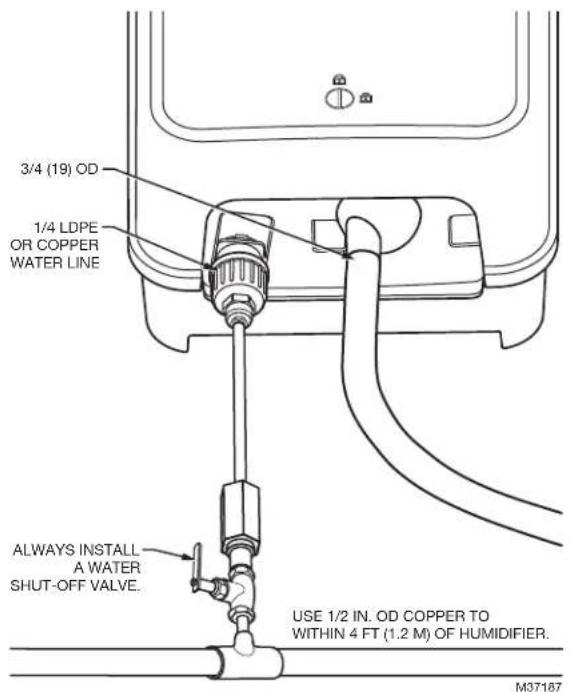
Fig. 18. Water supply and drain connection.
IMPORTANT
Use potable water.
— All water supply and drain line connections should be installed in accordance with local plumbing codes.
- Drain water is automatically cooled to 160°F (71 °C) when HM750 cycles a drain. When an emergency drain occurs, temperature may be higher. The drain material (tube and drain) must be rated for 200°F (93 °C).
- Supply water should be between 30 and 100 PSIG. A PRV may be used, if necessary.
- Do not use reverse osmosis or deionized water. Supply water must be between 125-1200 µ S/cm (microsiemens/cm) for optimal performance.
• Supply water should be cold; 39.2 to 86 °F (4 to 30 °C).
• Install water shut off valve before humidifier to facilitate servicing.
- The drain line should not end in a sink used frequently by personnel for safety reasons, or where plumbing codes prohibit it. Route to a floor drain or connect directly to building drain system.
- Ensure drain line is adequately sized to provide free and easy draining. A restricted drain can cause cylinder water to over concentrate and result in poor operation.
- Drain line must be continuously sloped down from unit.
- If a drain is not located near the humidifier, use a condensate pump rated for hot drain water.
Connecting the Water Supply Line
Connect water supply line (Copper or LDPE, supplied with equipment) to the supply connection (Fig. 18). This is done by pushing the water pipe into the quick-connect fitting.
NOTE: To remove the water supply line, the floating tip of the fill connection is pushed in slightly, which will release the grip on the water supply line. The water supply line is then free to be removed.
Connecting the Drain Line
Connect drain hose (supplied with equipment) to the drain connection (Fig. 18). Note that there is an internal air gap in the drain, so no air gap is required external of the humidifier. The drain line may be connected directly to the red drain spigot using a gear clamp or similar.

Fig. 19. Proper drain hose routing (anchors not included).
ELECTRICAL

CAUTION
Wiring to be performed by a licensed electrician. Installation on a GFCI circuit is recommended. Do not remove the cover when the humidifier powered.

CAUTION
Equipment Damage Hazard
Failure to wire the humidifier in accordance with the wiring instructions may cause permanent damage to the product and will void the warranty.
Voltage Selection
To select the correct voltage (120 VAC or 240 VAC), ensure that the jumper is properly placed between the appropriate terminals of the humidifier control board. The HM750 is factory-configured for 240 VAC. If the humidifier will run on a 120 VAC circuit, move the jumper to the 120 VAC terminals as seen in Fig. 20.

Fig. 20. Voltage selection jumper on humidifier control board.
Connecting Power
Requirements
• 12 AWG or 14 AWG wire
• Dedicated 15 amp, 120/240-volt circuit (a GFCI circuit is recommended)
- Disconnect switch (optional. The use of a disconnect switch between the humidifier and the circuit breaker is recommended and will be useful for future servicing.).

WARNING
To comply with UL product listing, the HM750 must be hardwired to a dedicated 15 amp circuit. All wiring must be done per governing electrical codes. Failure to do so will void the product warranty.
The use of electric cord plugs can cause overheating and result in risk of damage to property and/or personal injury.

Wiring Procedure
- Install a disconnect switch between the humidifier and the circuit breaker as shown in Fig. 21 and Fig. 22 (optional).
- Route the power supply wire through the strain relief located at the top of the red electrical box.
- Connect the power wires to MAIN SUPPLY terminals (L1, L2/N, and GND) on the humidifier control board.
![graph LR A["MAIN SUPPLY"] --> B["OFF ON"] B --> C["O"] B --> D["HOT"] B --> E["NEUTRAL"] B --> F["GROUND"] style A fill:#f9f,stroke:#333 style B fill:#ccf,stroke:#333 style C fill:#fff,stroke:#333 style D fill:#fff,stroke:#333 style E fill:#fff,stroke:#333 style F fill:#fff,stroke:#333](/content/2026/04/611145/images/ee3d5a74db6013b8b10c883c79e1b41371e38beef994146730d36c084c8fadb7.jpg)
Fig. 21. 120 VAC (1 Phase) primary power connection.

Fig. 22. 240 VAC (1 Phase) primary power connection.
NOTES:
— Resideo recommends the use of a GFCI circuit on this device to protect the homeowner from electrical shock.
— Ensure that adequate power is available to carry full humidifier amp draw as indicated on the specification label.
— Do not use neutral wire as a ground; connect a dedicated ground to ground termination.
— All wiring to be in accordance with national and local electrical codes.
Low-voltage Controls
Requirements
• 18 AWG solid wire or greater.
- Low voltage wiring must be routed through the hole that is to the left of the high voltage strain relief.
- Keep control wires as short as possible.
Wiring Procedure
The humidifier can be connected to the following three devices (Fig. 23):
- Humidistat or thermostat
- Air Proving device (recommended)
- External fan (required when used with a humidistat).
Humidistat or Thermostat Connection
Connect a humidistat or thermostat to the HUM terminals of the humidifier. The humidifier provides a 24-VAC source to power the humidistat or thermostat if needed (5 VA max.).
NOTE: It is acceptable, but not recommended to install the HumidiPRO in the furnace area (on duct). If possible, locate the HumidiPRO in a high traffic area inside the home.
Air Proving Device
Resideo recommends the use of an Air Proving device such as Resideo Differential Pressure Switch (50027910-001) to ensure steam is distributed only when there is air circulation. Connect the air proving device to the AP terminals. If you do not install an air proving device, place a jumper between the AP terminals.
Fan Interlock
Connect an external fan (optional) to the EXTERNAL terminals. The fan will turn on whenever there is a call for humidity.
![graph TD A["Main Supply L1 L2/NGND"] --> B["Air Proving"] B --> C["Humidistat"] C --> D["External"] D --> E["GT 2 RF GF"] F["AIR PROVING (OR JUMPER)"] --> G["THERMOSTAT, HUMIDISTAT, OR EQUIPMENT INTERFACE MODULE (EIM)"] G --> H["AIR PROVING JUMPER COMES PRE-INSTALLED. REMOVE JUMPER IF AIR PROVING IS…](/content/2026/04/611145/images/322689e23185d421fe1dd536909aaec19b97951a5b1926797edd4c8805f49a43.jpg)
Fig. 23. Wiring the steam humidifier with a digital thermostat.
Fan Interlock Wiring with HumidiPRO
When distributing steam into a duct, there could be a call for humidity when there is no air flow. The HM750 with HumidiPRO control or some other thermostat can be used to enable a fan on a call for humidity. If using another thermostat, consult that control's manual for wiring instructions to enable the fan with a powered humidification device.
NOTE: Humidifier will stop producing steam if the air proving switch is open or the air proving terminals AP are not jumped.
This information is relevant to all controls, factory supplied or otherwise. For wiring use minimum 18 AWG solid wire and keep as short as possible.
Humidity Control
- Can be located either in return air duct (preferred) or in room being humidified.
- Avoid placing near discharge diffuser of humidified air.
- Mount in area representative of room humidity (drafts, doorways, sunlight, or an overhang such as a shelf can affect reading).
Optional Outdoor Temperature Sensor (included with HumidiPRO)
- Mount outside in area representing air temperature.
![graph TD A["H6062 HUMIDIPRO"] --> B["THERMOSTAT R Rc W Y G"] A --> C["HVAC"] B --> D["R"] B --> E["C"] B --> F["U"] B --> G["S"] B --> H["S"] D --> I["AIR PROVING OR JUMPER"] E --> I F --> I G --> I H --> I I --> J["HM750"] K["24VAC COM HUM HUM"] --> L["Air Proving"] K --> M["Humidistat"] N["Externa…](/content/2026/04/611145/images/506846cd28476fb963cb4577bbef80c0d18aa3255e668ad410cf4d2b43db514e.jpg)
Fig. 24. Wiring the steam humidifier with a mechanical thermostat.
NOTE: If a Prestige, VisionPRO, T10 (or similar) is used to control humidity, wire the two U contacts from thermostat to HUM and HUM on the HM750. With the jumper in place between AP terminals on the HM750, only these two wires are necessary to control humidity. Be sure to configure the thermostat to force fan on with a call for humidity if the RF, GT, and GF wiring is not used.
START UP
Installation Check
Before turning on power to the HM750, inspect the installation to ensure that it was carried out correctly, as per these installation instructions.
On/Off
The HM750 is factory-configured to operate as an On/Off humidifier. It will run when 24 VAC from one HUM terminal is fed back into the other HUM terminal through an On/Off humidistat.

WARNING
Personal Injury Hazard.
Damaged or improperly installed units must not be operated. Damaged or improperly installed units may present a danger to persons and property.
Start Up Procedure
- Make sure the voltage selection jumper on the main circuit board is correctly configured to match the mains supply voltage (120 VAC or 240 VAC).
- If a disconnect switch is installed, turn it to the "ON" position.
- Ensure the water supply valve is open.
- Press the Power/Drain button on the front of the humidifier. This will turn the device on.
- The humidifier will perform a self-diagnostic sequence during which the LED's and internal components will be momentarily activated. See "LED Status Lights" on page 16 for an explanation of the LEDs and sequences.
- If an error is detected during the self-diagnostic sequence the humidifier will not start. The yellow Fault LED will flash in sequence to indicate the detected fault. See Tables 6 and 7 for information on diagnosing and correcting faults.
-
After the system test the humidifier is in normal operation mode.
-
Check and adjust the control set point on the control humidistat, and if applicable, the high limit humidistat. This will enable a call for humidity.
- If the fan enable relay on the control board is used, the green LED will continue to flash until the air proving closes. Once the air closes, the flashing green LED will become solid and the humidifier will start steam production.
- When the external humidistat calls for humidity, and the air proving terminals are closed, the Filling LED on the front of the humidifier will light up, the power relay on the control board will engage, the water fill valve will activate (after a delay), and the cylinder will slowly fill with water.
NOTE: While the cylinder is filling with water there should be no water flowing down the drain. If water is flowing down the drain it can indicate excessive backpressure or a leaking drain valve. See Troubleshooting.
8. It can take up to 20 minutes for the water to be heated up by the submerged electrodes and for steam to be produced.
NOTE: The humidifier is shipped with a salt tablet already inserted inside the steam cylinder. The first start-up will provide a first boil in 5-20 minutes, depending on the water supply conductivity.
NOTE: If the humidifier is being restarted after it has been drained, and it has already gone through several boil down cycles, it may take a longer period of time for the HM750 to reach full output capacity. It may take several hours with low conductivity water. During this time, the humidifier will not perform any drains and the conductivity of the water in the cylinder will increase.
NOTE: The humidifier performs drains intermittently as part of its normal process of optimizing the conductivity of the water in the cylinder. During these drains, the Drain LED will not illuminate.
OPERATION
LED Status Lights
The HM750 user interface includes a series of LEDs that provide information about the humidifier status.

Fig. 25. Humidifier User Interface.
Status
Idle
This green LED will illuminate if there is power to the humidifier, it has been turned on, but there is no demand from the humidistat.
If there is demand, but the AP terminals on the control board are not closed, the Idle LED will flash.
The Idle LED will also illuminate during a 72-hour no-demand drain, which is an automatic drain that occurs if there is no demand for humidification after 72 hours – for hygiene purposes.
Filling
This green LED will illuminate immediately after there is a demand for steam. This LED will turn off once the humidifier determines that there is steam being generated.
Humidifying
This green LED will illuminate once the humidifier determines that there is steam being generated. See Filling description.
Draining
This green LED will illuminate during a 72-hour no-demand drain (see Idle description).
This LED also illuminates when the user presses the Power/Drain button, since the humidifier will drain before turning off.
SERVICE
Cylinder
This yellow LED will illuminate when the humidifier has determined that the cylinder is nearing the end of its life, due to scale accumulation on the electrodes. The
LED will flash on and off, during which time the humidifier will continue to operate as normal. After 7 days of flashing, the LED will remain on solid, and the humidifier will not generate steam. The cylinder must be replaced. See "Cylinder Replacement Kit" on page 19.
Fault
This red LED will flash if the humidifier has detected an error:
• 1 flash: Excess Current fault
• 2 flashes: Fill/Drain fault
• 3 flashes: Insufficient Current fault
• 4 flashes: PCB fault
- 5 flashes: Wrong Voltage Selector fault
See the Troubleshooting section for more information.
MAIN BUTTON
Power/Drain
When primary power has been wired to the humidifier, the Power/Drain button must be pressed in order to enable steam generation.
When the user so decides, the humidifier may be turned off by pressing this button. Resideo does not recommend turning the humidifier off at any time during normal operation. If there is no demand for humidification, the humidifier will not draw power to the electrodes.
The Power/Drain button is also used to reset a fault. The button is pressed and held down for 5 seconds to reset the unit from a fault.
Selecting a Relative Humidity Setpoint
The optimum humidity setpoint depends on the reasons that a space is being humidified. The “ASHRAE Handbook HVAC Applications” recommends the specific design relative humidity for specific applications.
AHRI recommended humidity is shown in Table 3 on page 4.
Recommended Set-point – The benefit of humidity is most pronounced in the 40-60% RH range. A humidity setting of 40-45% RH is recommended for this purpose to prevent over humidifying.
Temperature Setback – In cold climates, it is often necessary to reduce the humidity level in a conditioned environment to prevent build-up of condensation on the inside of exterior walls, windows, and trim. It is highly recommended that any humidity setback functions from humidistats or other control devices be used under these conditions to prevent damage from condensation. The digital control with an outdoor temperature sensor installed will automatically setback the humidity setpoint to correspond with outdoor temperature.
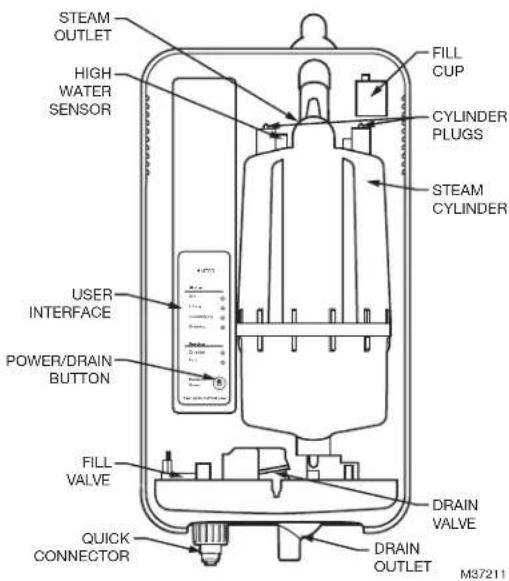
Fig. 26. Humidifier components.
| Component Function | |
| Cylinder plugs Power connectors to electrodes in cylinder. | |
| Drain outlet Connection to drain hose, used to remove water from the humidifier. | |
| Drain valve Drains water from humidifier. | |
| Fill cup Provides an air gap for backflow prevention. | |
| Fill valve Controls flow of water into humidifier. | |
| High water sensor Used to detect maximum water level in cylinder. | |
| Power/Drain button | Used to turn the humidifier on or off. Note that before the humidifier turns off, the water in the cylinder is drained. CAUTIONThe unit will still be powered internally even after being shut down. CAUTIONThe unit will still be powered internally even after being shut down. |
| Steam cylinder | Steam generating vessel that holds electrodes in water. Current between electrodes generates heat used to generate steam. |
| Steam outlet Connects to steam guide with short piece of steam hose. | |
| Supply water connection | Connection for supply water. |
| User interface Used to indicate the status of the humidifier to the user. | |
MAINTENANCE AND SERVICING
Required Maintenance
The HM750 humidifier has been designed to require minimal maintenance. Regular maintenance consists of checking the humidifier to ensure it is in good condition, replacing the cylinder when the software advises that the cylinder is spent and cleaning out the drain valve whenever the cylinder is replaced.
CYLINDER
The cylinder LED will indicate when to replace the device cylinder (see page 16). Approximate frequency of replacement is once per year.
NOTE: It is normal to hear a rattle in a new cylinder because it is shipped with a salt tablet to boost conductivity.
FILL VALVE
The inlet to the fill valve is equipped with a strainer that prevents debris in low quality supply water from entering the system. Accumulation of debris on the strainer can lead to reduced inlet water flow or complete blockage. Thus, the fill valve strainer should be cleaned periodically, depending on the water quality, or at the end of each season.
DRAIN VALVE
Inspect annually.
Remove and clean scale/debris at the end of each season, or as needed.
Running on highly conductive water can generate high amount of scale leading to blockage of the valve plunger, potentially causing a continuous leak. This could be detected by the control system indicating a drain fault or triggering GFCI if electric current leak is detected.
In all cases, proper cleaning of the drain valve is recommended.
HOSE CONNECTIONS
Inspect annually, clean as necessary.
NOZZLE (DUCT OR REMOTE)
Inspect annually, clean as necessary.
Extended Shutdown
Should it be required to disconnect power to the humidifier for a period of extended shut-down, the following procedure shall be followed:
- Press the Power/Drain button.
- Wait until the humidifier is completely drained (usually takes less than 10 minutes). During the drain cycle the fill valve will be activated to temper the drain water.
- Shut off the power to the humidifier with the external disconnect.
- Close the supply water shut-off valve.
NOTE: As long as the HM750 is powered, it will automatically drain the cylinder when there has not been a call for humidity for an extended period of time (3 days). This feature will reduce or prevent the possibility of corrosion and the accumulation of algae and bacteria growing in the cylinder. The cylinder will remain empty until there is a call for humidity at which time the fill valve will open and refill the cylinder. The unit will go through its normal process for optimum operation.
STARTING AFTER EXTENDED SHUTDOWN
- Check to see the humidifier has not been damaged and the installation has not been altered. See "Start Up Procedure" on page 15.
- Turn on the power to the humidifier with the external disconnect and open the supply water shut-off valve.
- Press the Power/Drain button.
- Ensure there is no water flowing to drain.
- Follow the start up procedure on page 15.
REPLACEMENT PARTS

CAUTION
Before Servicing
- Disconnect main power source before accessing internal compartments.
- The plumbing and electrical compartments contain high voltage components and wiring. Access should be limited to licensed HVAC professionals only.
- During and following operation of the humidifier, the steam components in contact with the steam such as the cylinder, steam lines, steam distributors, and condensate lines can become hot and burn if touched.
- Installations of humidity equipment installed by unqualified personnel or the use of non-Resideo parts and components will void warranty.
Cylinder Spent Fault
The yellow cylinder LED will illuminate when the humidifier has determined that the cylinder is nearing the end of its life, due to scale accumulation on the electrodes. The cylinder LED will flash on and off, during which time the humidifier will continue to operate as normal. After 7 days of flashing, and if the cylinder is not replaced, the humidifier will shut down and the cylinder LED will be on constantly (no flashing). At this point, the cylinder must be replaced.
The steam cylinder is disposable and must be replaced at end of cylinder life. Cylinder life is dependent on water supply conditions and humidifier use.
Always clean the drain valve before installing a new cylinder. Scale from the spent cylinder may have fallen into the drain valve and could prevent its proper operation. To properly clean the drain valve, it must be removed and disassembled.

CAUTION
Equipment Damage
Failure to replace the cylinder at the end of cylinder life will result in improper operation and may result in damage to the humidifier. Resideo is not responsible for any damages resulting from, or attributed to, the failure to replace a spent cylinder.
NOTE: Resideo recommends keeping a replacement cylinder in stock throughout the humidification season. This will prevent possible downtime when the humidifier reaches cylinder end of life.
CYLINDER REPLACEMENT KIT
Product Number: HM750ACYL
Dimensions: See Fig. 27
Included in the Box
- Replacement Cylinder
Tools Needed
- Screwdriver
- Adjustable Wrench
- Pliers

Fig. 27. Measurements in inches (mm).
Removing the Cylinder

WARNING
Disconnect main power source before accessing internal compartments.
The inside of the humidifier cabinet contains high voltage components and wiring. Access should be limited to authorized personnel.
- Drain the existing cylinder by pressing the Power/Drain button on the front of the humidifier for 1 second. Let the humidifier drain until no more water is flowing out to drain (usually not more than 10 minutes). Following the drain cycle, the humidifier will switch off.
- Close the supply water shut off valve.
- Turn off power to the humidifier with the external disconnect.
- Using a flat screwdriver, turn the lock on the humidifier's front cover 90° counterclockwise to release. Rotate the base of the cover outwards 6 inches, then lift upwards to remove.

Fig. 28. Removing the cover.
- Remove the high level water sensor connections.
- Remove the cylinder plugs from the cylinder pins by pulling vertically.
- Using a flat screwdriver or 5/16 in. nut driver, loosen the hose clamp closest to the cylinder.
- Pull the cylinder away from the steam hose to disengage. When free of steam hose, lift the cylinder out.
- Some water may remain in the cylinder, even after fully draining. Have a cloth available to absorb any water.


Fig. 29. Removing the cylinder.
IMPORTANT
Always clean the drain valve before installing a new cylinder. Scale from the spent cylinder may have fallen into the drain valve and could prevent proper operation. See page 21 for instructions.
- Install the new cylinder by following the above instructions in reverse order ensuring;
a. Cylinder is fully seated in drain valve;
b. Hose clamp is tightened to 12 in/lb.;
c. Cylinder plugs are securely reconnected.
Drain Valve Removal
(for cleaning or replacement)
Always clean the drain valve before installing a new cylinder. Scale from the spent cylinder may have fallen into the drain valve and could prevent its proper operation. To properly clean the drain valve it must be removed and disassembled.

WARNING
Disconnect main power source before accessing internal compartments.
The inside of the humidifier cabinet contains high voltage components and wiring. Access should be limited to authorized personnel.
NOTE: If the cylinder has not already been removed, follow the instructions on page 20.
- Disconnect spade terminals from the drain valve.
- Hold the hose connected to the drain valve and pull forward while at the same time pressing on the drain valve locking tab to release the valve body from its mount. See Fig. 30.
- Disconnect the hose from the drain valve by pulling on the hose. With the valve free of the humidifier it can be disassembled and cleaned.
- On a work bench or suitable work area, first remove the solenoid from the drain valve using a Phillips screwdriver. See Fig. 31.
- Pull the solenoid from the core.
- Using an adjustable wrench, unscrew the core counterclockwise from the drain valve body.
- Carefully remove the core assembly (this includes the plunger and return spring) from the plastic drain valve body. The plunger seal (rubber stop) can be cleaned using a plastic brush (tooth brush) or damp cloth. Do NOT use a metal brush or chemical cleaning agents as this could damage the part.
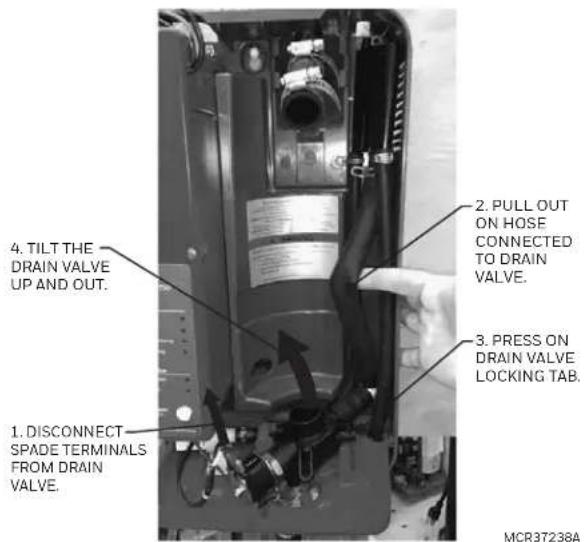
Fig. 30. Removing the drain valve.
- Rinse the valve body with cold water to clean any internal debris.
- Once the valve is clean, reassemble by performing the above procedure in reverse. When fitting the core back on the drain valve body, do NOT overtighten. Thread the core back onto the drain valve body by hand. When the core is fully threaded by hand, tighten 1/4 additional turn with an adjustable wrench.
- Reinstall the drain valve in reverse order to its removal. Be sure the hose connected to the drain valve is tucked back in position within the housing so it does not interfere with cylinder reinstallation.
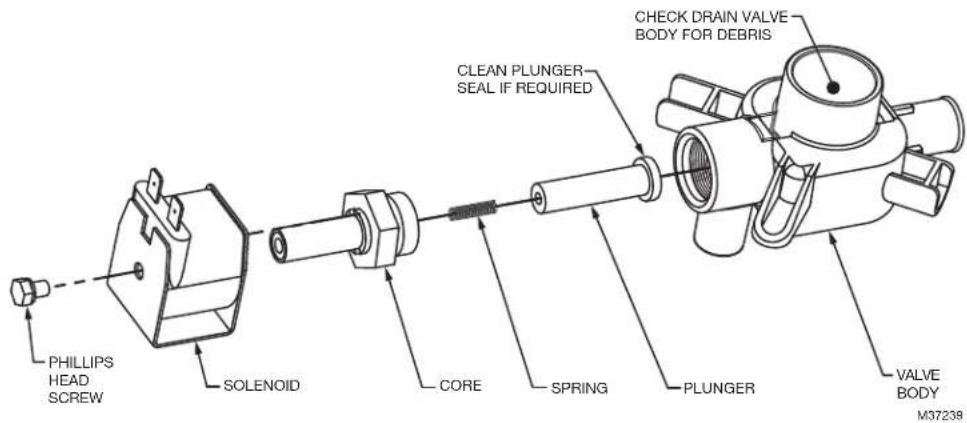
Fig. 31. Drain valve components.
Inlet Valve Strainer Cleaning
Depending on the water quality, periodic cleaning of the fill valve strainer may be required. This can be performed without removing the valve from humidifier.

WARNING
Disconnect main power source before accessing internal compartments.
The inside of the humidifier cabinet contains high voltage components and wiring. Access should be limited to authorized personnel.
- Turn off power to the humidifier with the external disconnect.
- Close the supply water shut off valve.
- Using an adjustable wrench, remove the quick connect fitting from the inlet valve. Have a cloth available to absorb any residual water in the supply line.
- Use a needle-nosed pliers to grip and remove the inlet valve strainer.
- Clean the strainer with water and a plastic brush (toothbrush), if necessary. Do not use soap or harsh chemicals as these could be carried into the cylinder when the humidifier is restarted.
- Press fit the strainer back into the inlet valve.
- Reconnect the quick connect fitting, tighten by hand, then tighten 1/4 turn with the adjustable wrench.
- Turn on the humidifier water supply. Check for any leaks.
- Turn on power at the external disconnect.
- Press the Power/Drain button for 1 second. The humidifier will perform a short self-diagnostic sequence before resuming normal operation.
CONTROL BOARD REPLACEMENT
The control board controls all aspects of the humidifier's operation. In case of damage and/or failure, the control board can be replaced. The control board will arrive with factory settings and there is no need for any special calibration other than selecting the correct mains voltage (120 VAC or 240 VAC) supplied to the humidifier. This product is shipped in anti-static packaging designed to keep the electronics on the board safe from static shock.

CAUTION
Damage to Control Board
When handling the control board, ensure that you are grounded. Static discharge can damage the board, so handle it with care.
Opening Electrical Compartment

WARNING
Disconnect main power source before accessing internal compartments.
The inside of the humidifier cabinet contains high voltage components and wiring. Access should be limited to authorized personnel.
To protect the user and the control board, the control board is mounted in a red electrical compartment housing.
-
Disconnect main power at the external disconnect.
-
Using a flat screwdriver, turn the lock on the humidifier's front cover 90° counterclockwise to release. Rotate the base of the cover outwards 6 inches, then lift upwards to remove.
-
Use a flat screwdriver to loosen the retaining screw on the red electrical compartment. Once free, pull the cover straight out.
Removing the Control Board
- Use a Phillips screwdriver to release the control board retaining screw. Keep the screw and plastic washer (which protects the control board) for the replacement control board.
- Pull the control board partially out of its housing. Use a Phillips screwdriver to remove the primary power wires from the terminal block (top-right of the board). Then remove the spade terminals (cylinder wires, high water sensor, ground wire) from the board. Use a pliers, if necessary. As the control wires are disconnected, label them to ensure they are reconnected correctly. Finally, disconnect the terminal block connection for the fill and drain valves.
- With all wires removed, the control board will slide out of its protective housing.
Installing the Control Board
- Set the control board VOLTAGE SELECTION jumper to match the voltage supplied to the humidifier. Do not assume the VOLTAGE SELECTION jumper on the replacement board is correct! Always double check the mains supply voltage.
- Slide the new control board partially into its housing and reconnect all the wires. Refer to wiring diagram on the unit for assistance. Ensure all spade connections are press fitted completely on their electrical tabs and the main power leads are well tightened and not loose (loose connections lead to heat buildup and a potential fire hazard).
- Once all wires and connections are made, slide the control board completely into its protective housing.
- Ensuring the plastic washer is placed between the screw head and the control board, secure the control board with the retaining screw.
- Replace the electrical compartment cover.
- Replace the humidifier front cover, and turn the locking screw 90° clockwise to secure it.
- Turn on the mains power to the unit at the disconnect switch.
- Press the Power/Drain button for 1 second. The humidifier will perform a short self-diagnostic sequence before resuming normal operation.
Inlet Valve Replacement

WARNING
Disconnect main power source before accessing internal compartments.
The inside of the humidifier cabinet contains high voltage components and wiring. Access should be limited to authorized personnel.
-
Drain the cylinder by pressing the Power/Drain button on the front of the humidifier for 1 second. Let the humidifier drain until no more water is flowing out to drain (usually not more than 10 minutes). Following the drain cycle, the humidifier will switch off.
-
Close the supply water shut off valve.
-
Turn off power to the humidifier with the external disconnect.
-
Using a flat screwdriver, turn the lock on the humidifier's front cover 90° counterclockwise to release. Rotate the base of the cover outwards 6 inches, then lift upwards to remove.
-
Disconnect the wiring to the solenoid. See Fig. 32
-
Remove quick connect fitting from inlet valve.
-
Grip the inlet valve and pull forward as far as possible.
-
Inside the humidifier, bend the hose attached to the inlet valve up as shown in Fig. 33
-
Using pliers, move the clamp up the hose away from the valve to release its hold. Slide the hose off the valve. Some remaining water in the hose will spill out. Have a cloth on hand to absorb the water.
-
Follow the above steps in reverse to install the new inlet valve.
-
Replace the humidifier front cover, and turn the locking screw 90° clockwise to secure it.
-
Turn on the mains power to the unit at the disconnect switch.
-
Press the Power/Drain button for 1 second. The humidifier will perform a short self-diagnostic sequence before resuming normal operation
-
Check connections for leaks.

Fig. 32. Inlet valve replacement.

Fig. 33.
TROUBLESHOOTING

CAUTION
High Voltage Hazard.
Be aware, when troubleshooting, that the humidifier is powered by high voltage and familiarity with both good practices and wiring of the humidifier is recommended. Any troubleshooting that requires opening the cabinet should be done by qualified personnel.

CAUTION
Burn and Scalding Hazard.
Hot water or steam with a temperature above 120° F ( 49° C) can cause burns from scalding.
NOTE: Most humidifier faults are not caused by faulty equipment but rather by improper installation. A complete fault diagnosis always involves a
thorough examination of the entire system. Often, the steam hose connection has not been properly executed, or the fault lies with the humidity control system.
TROUBLESHOOTING REQUIREMENTS
- Ensure the installation meets the installation requirements outlined in these instructions.
- Familiarize yourself with the operation of the humidifier by reading these instructions in their entirety.
- The wiring diagram for your specific humidifier is installed on the inside of the humidifier door. A generic copy of the HM750 wiring diagram is also included at the end of this chapter for reference purposes.
- When contacting your local representative or Resideo for troubleshooting assistance, please ensure the serial number and manufacturing date on the label at the left side of the housing has been obtained for reference purposes (Fig. 1).
Table 6. General troubleshooting.
| Symptom Cause Corrective Action(s) | ||
| Humidifier appears to have no power, even when the Power/Drain button is pressed on. | Fuse blown Check on-board fuse | located beside transformer. |
| Incorrect voltage Check voltage | against specification label and correct. | |
| Step down transformer not outputting 24 VAC | Replace the circuit board. | |
| Incorrect primary power jumper | Check that the on-board voltage selection jumper is installed correctly. If 240 VAC power was supplied to a unit where the voltage selection jumper was set to 120 VAC, the circuit board will need to be replaced. | |
| Humidifier will not humidify or not reaching humidification (RH%) setpoint | Humidistat terminals not closed. | Check voltage. |
| Low conductivity water If operated on low conductivity water, it may take several hours for the HM750 to reach full capacity. This is normal. During this time, the humidifier will not perform any drains and the conductivity of the water in the cylinder will increase. The unit will not operate on reverse osmosis or deionized water. Ensure that tap water is used. Note: New humidifier cylinders are supplied with a salt tablet inside. | ||
| No airflow in duct Check that the AP terminals on the control board are wired correctly, and closing the 24 VAC chain. | ||
| Humidifier has faulted and red Fault LED is flashing. | Software has detected an abnormal condition | Review fault-code label on the inside cover of the HM750 or see Table 7 on page 25. |
| Distributor spitting out water into duct | DUCT INSTALLATION: fill valve failed open | Check that the fill valve has not failed in the open state. This would make water flow inside the cylinder above the level of the high water sensor, to a maximum of the fill cup overflow level. At this point, water may carry over into the distributor nozzle and “spit” into the duct. |
| REMOTE INSTALLATION: condensate generation | Ensure the nozzle is oriented correctly and the steam line is sloped correctly, as per the guidelines in these installation instructions. | |
HM750 Faults
The self-diagnostic system built into the HM750 is continually monitoring the operation of the humidifier. When an abnormal condition occurs that cannot be self-corrected by the software, the HM750 will turn off power to the cylinder, drain the cylinder, and annunciate the fault using the yellow Service LEDs.
LED Flash Sequence
To differentiate between different fault conditions, the red Fault LED is flashed in different sequences. The table below lists the fault sequences that can be displayed, their meaning, possible cause(s), and suggested corrective actions.
Clearing a Fault
- Check the flash sequence against the list of fault messages and take any necessary actions to correct the cause(s) as outlined in the below table.
- Press and hold the Power/Drain button for 5 seconds. The humidifier will begin to drain and, when drained, will power off. Press the Power/Drain button again at this time to turn the humidifier back on again. The humidifier will perform a normal start-up as if it were the first power up.
Table 7. Troubleshooting HM750 Faults.
| Service LED Symptom Cause Corrective Action(s) | |||
| Cylinder flashing | Cylinder reaching end of life. | Normal operation. None. | |
| Cylinder solid | Cylinder end of life. | Normal operation. Replace cylinder. | |
| Fault 1 flash Excess Current Current has exceeded 130% of max | Drain blocked, water over concentration | Clean the drain line. | |
| Drain solenoid not energized, water over concentrated | Check and correct wiring to drain valve. | ||
| Filling too fast, wrong fill valve Fill valve may be defective – replace if necessary. | |||
| Water supply too conductive Ensure | water supply conductivity is within specification 125-1200 μS/cm (microsiemens/cm). | ||
| Cylinder spent, but not detected by software | Examine the cylinder for excessive scale. | ||
| Back pressure Eliminate back pressure by ensuring steam line has no low points (where condensate might accumulate), or steam line kinks. | |||
| Fault 2 flashes Fill/Drain Error Drain valve leaking or struck open Clean drain valve or replace. | |||
| Open shut off valve. | |||
| Eliminate back pressure by ensuring steam line has no low points (where condensate might accumulate), or steam line kinks. | |||
| Check the cylinder plug with orange cable is connected from the short cylinder electrode with a plastic shroud to the control board. | |||
| a. Check if potable water supplied to the unit, not treated water (RO or DI).b. Check conductivity of water. If less than 150 μS, add 1/4 teaspoon of salt to cylinder and restart unit. | |||
| Service LED | Symptom Cause Corrective Action(s) | |
| Fault 3 flashes | Insufficient CurrentFill valve activated for long time, but high water level not reached.Fill should be faster than 1 in. per minute. | Cylinder plugs installed incorrectly Check that cylinder plugs are completely seated on cylinder. |
| Fill valve inlet filter clogged Check fill valve inlet filter and clean if required. | ||
| Fault 4 flashes | PCB Error The control board detects current draw when the humidifier is in standby mode. | Replace circuit board. |
| Fault 5 flashes | Wrong Voltage Selection | VOLTAGE SELECTION jumper on control board is incorrectly set. If 240VAC is supplied to the humidifier, but the VOLTAGE SELECTION jumper is set to 120VAC, the control board will fail and need to be replaced.If 120VAC supplied to the humidifier, but the VOLTAGE SELECTION jumper is set to 240VAC, the 5 flash fault will occur. Correct the VOLTAGE SELECTION jumper and re-start humidifier. |
![graph TD A["STEAM CARTRIDGE"] --> B["MAIN SUPPLY"] B --> C["O&R"] C --> D["AIR PROVING"] C --> E["HUMIDISTAT"] C --> F["24VAC COM HUMIDISTAT"] C --> G["GT RF GF"] G --> H["CYLINDER LED FAULT LED"] H --> I["ON/OFF/DRAIN/FAULT RESET BUTTON"] J["VOLTAGE SELECTION"] --> K["TRANSFORMER"] L["ELECTRODES TO…](/content/2026/04/611145/images/1b6be6d7bc2cf3e87c8f916f1ab2e6f431aeb9da72148e7f900e8e40b8a83a38.jpg)
FAULT CODES
NUMBER OF FLASHES INDICATES FAULTS
TO CLEAR FAULTS, PRESS AND HOLD POWER BUTTON FOR FIVE SECONDS
1. EXCESSIVE CURRENT
2. FILL/DBAIN ERROR
3. INSUFFICIENT CURRENT
4. PCB ERROR
5. WRONG VOLTAGE SELECTION
FLASHING IDLE LED - AIR PROVING ERROR (MAKE SURE AP IS MET OR CLOSED)
M37217A
Fig. 34. Wiring diagram.
5-YEAR LIMITED WARRANTY
Resideo warrants this product, excluding maintenance items such as the cylinder, to be free from defects in workmanship or materials, under normal use and service, for a period of five (5) years from the date of first purchase by the original purchaser. If at any time during the warranty period the product is determined to be defective due to workmanship or materials, Resideo shall repair or replace it (at Resideo's option).
If the product is defective,
(i) return it, with a bill of sale or other dated proof of purchase, to the place from which you purchased it; or (ii) call Resideo Customer Care at 1-800-468-1502. Customer Care will make the determination whether the product should be returned to the following address: Resideo Return Goods, Dock 4 MN10-3860, 1985 Douglas Dr. N., Golden Valley, MN 55422, or whether a replacement product can be sent to you.
This warranty does not cover removal or reinstallation costs. This warranty shall not apply if it is shown by Resideo that the defect was caused by damage which occurred while the product was in the possession of a consumer.
Resideo's sole responsibility shall be to repair or replace the product within the terms stated above. RESIDEO SHALL NOT BE LIABLE FOR ANY LOSS OR DAMAGE OF ANY KIND, INCLUDING ANY INCIDENTAL OR CONSEQUENTIAL DAMAGES RESULTING, DIRECTLY OR INDIRECTLY, FROM ANY BREACH OF ANY WARRANTY, EXPRESS OR IMPLIED, OR ANY OTHER FAILURE OF THIS PRODUCT. Some states do not allow the exclusion or limitation of incidental or consequential damages, so this limitation may not apply to you.
THIS WARRANTY IS THE ONLY EXPRESS WARRANTY RESIDEO MAKES ON THIS PRODUCT. THE DURATION OF ANY IMPLIED WARRANTIES, INCLUDING THE WARRANTIES OF MERCHANTABILITY AND FITNESS FOR A PARTICULAR PURPOSE, IS HEREBY LIMITED TO THE FIVE YEAR DURATION OF THIS WARRANTY. Some states do not allow limitations on how long an implied warranty lasts, so the above limitation may not apply to you.
This warranty gives you specific legal rights, and you may have other rights which vary from state to state. If you have any questions concerning this warranty, please write Resideo Customer Care, 1985 Douglas Dr, Golden Valley, MN 55422 or call 1-800-633-3991.
IMPORTANT
To maintain warranty, only Resideo approved parts and cylinders may be used in the operation of the product.
The product should not be disposed of with other household waste. Check for the nearest authorized collection centers or authorized recyclers. The correct disposal of end-of-life equipment will help prevent potential negative consequences for the environment and human health.

resideo
www.resideo.com
Resideo Technologies, Inc.
1985 Douglas Drive North, Golden Valley, MN 55422
1-800-468-1502
33-00289EF-05 M.S. Rev. 04-21 | Printed in United States
© 2021 Resideo Technologies, Inc. All rights reserved.
The Honeywell Home trademark is used under license from Honeywell International, Inc. This product is manufactured by Resideo Technologies, Inc. and its affiliates.
INTRODUCTION
Fig. 19. Acheminement correct du tuyau de vidange (ancrages non inclus).
ÉLECTRICITÉ

MISE EN GARDE
Humidifying (Humidification)
Resideo Technologies, Inc.
1985 Douglas Drive North, Golden Valley, MN 55422
1-800-468-1502
33-00289EF-05 M.S. Rev. 04-21 | Printed in United States
© 2021 Resideo Technologies, Inc. All rights reserved.
The Honeywell Home trademark is used under license from Honeywell International, Inc. This product is manufactured by Resideo Technologies, Inc. and its affiliates.
- HM750A1000
- ADVANCED ELECTRODE STEAM HUMIDIFIER
- INSTALLATION INSTRUCTIONS
- INTRODUCTION
- INCLUDED IN THE BOX
- TOOLS NEEDED
- HUMIDIFIER CONFIGURATION
- BEFORE INSTALLATION
- CAUTION
- SERVICING
- ELECTRICAL
- PLUMBING
- INSTALLATION
- WATER QUALITY
- PARTS AND ACCESSORIES
- HOW THE HUMIDIFIER WORKS
- STEAM GENERATION
- DRAINS
- STEAM DISTRIBUTION
- STEAM LINE
- SIZING
- IMPORTANT
- LOCATION
- STEAM NOZZLE LOCATION
- STEAM LINE INSTRUCTIONS
- MAIN RULES FOR ATMOSPHERIC STEAM LINES
- STEAM DISTRIBUTOR NOZZLE
- MOUNTING THE HUMIDIFIER
- MOUNTING TO A WALL
- MOUNTING TO THE SUPPLY DUCT
- REMOVE THE STEAM GUIDE
- PREPARE THE STEAM NOZZLE
- INSTALL THE STEAM NOZZLE
- MOUNT HUMIDIFIER ON DUCT
- CONNECTING THE WATER SUPPLY LINE
- CONNECTING THE DRAIN LINE
- VOLTAGE SELECTION
- CONNECTING POWER
- REQUIREMENTS
- WARNING
- WIRING PROCEDURE
- NOTES
- LOW-VOLTAGE CONTROLS
- HUMIDISTAT OR THERMOSTAT CONNECTION
- AIR PROVING DEVICE
- FAN INTERLOCK
- FAN INTERLOCK WIRING WITH HUMIDIPRO
- HUMIDITY CONTROL
- OPTIONAL OUTDOOR TEMPERATURE SENSOR (INCLUDED WITH HUMIDIPRO)
- START UP
- INSTALLATION CHECK
- ON/OFF
- START UP PROCEDURE
- OPERATION
- LED STATUS LIGHTS
- STATUS
- IDLE
- FILLING
- HUMIDIFYING
- DRAINING
- SERVICE
- CYLINDER
- FAULT
- MAIN BUTTON
- POWER/DRAIN
- SELECTING A RELATIVE HUMIDITY SETPOINT
- MAINTENANCE AND SERVICING
- REQUIRED MAINTENANCE
- FILL VALVE
- DRAIN VALVE
- HOSE CONNECTIONS
- NOZZLE (DUCT OR REMOTE)
- EXTENDED SHUTDOWN
- STARTING AFTER EXTENDED SHUTDOWN
- REPLACEMENT PARTS
- BEFORE SERVICING
- CYLINDER SPENT FAULT
- EQUIPMENT DAMAGE
- CYLINDER REPLACEMENT KIT
- REMOVING THE CYLINDER
- DRAIN VALVE REMOVAL
- (FOR CLEANING OR REPLACEMENT)
- NOTE: IF THE CYLINDER HAS NOT ALREADY BEEN REMOVED, FOLLOW THE INSTRUCTIONS ON PAGE 20
- INLET VALVE STRAINER CLEANING
- CONTROL BOARD REPLACEMENT
- OPENING ELECTRICAL COMPARTMENT
- REMOVING THE CONTROL BOARD
- INSTALLING THE CONTROL BOARD
- INLET VALVE REPLACEMENT
- TROUBLESHOOTING
- TROUBLESHOOTING REQUIREMENTS
- HM750 FAULTS
- LED FLASH SEQUENCE
- CLEARING A FAULT
- 5-YEAR LIMITED WARRANTY
- ÉLECTRICITÉ
- MISE EN GARDE
- HUMIDIFYING (HUMIDIFICATION)
Brand : HONEYWELL
Model : HM750A1000
Category : Steamer