
FMY 808 I FP BK - Cooker FRANKE - Free user manual and instructions
Find the device manual for free FMY 808 I FP BK FRANKE in PDF.
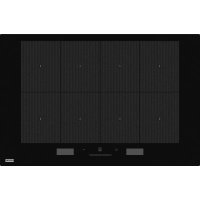



| Product type | Built-in induction hob |
| Brand | Franke |
| Model | FMY 808 I FP BK |
| Dimensions (W x D x H) | 778 x 511 x 53 mm |
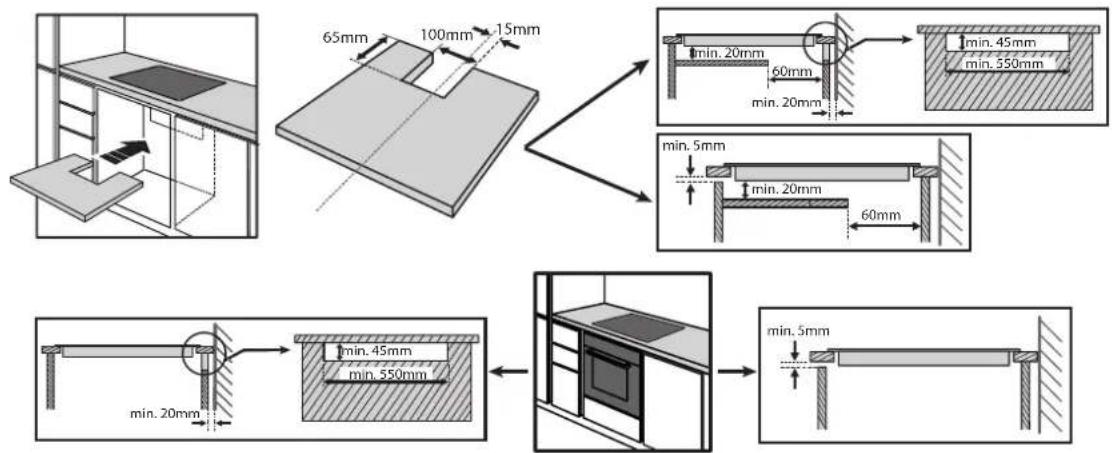
| Cut-out dimensions (W x D) | 770+8 x 513-2 mm |
| Electrical supply | 220-240 V~ or 380-415 V 3N~ (depending on connection) |
| Adjustable maximum power | 2.5 kW / 4.0 kW / 6.0 kW / 7.4 kW |
| Number of cooking zones | 4 (flexible zones possible) |
| Control type | Touch panel with central slider |
| Main functions | EasyCook (guided recipes), ProCook (4 simultaneous zones), FlexPro (single zone), Timer, Child lock |
| Indicators | Residual heat (H), text display |
| Provided accessories | Not specified (no accessories listed) |
| Compatible cookware types | Ferromagnetic bottoms (magnetic), min. diameter 10 cm |
| Care and cleaning | Clean after cooling with a soft cloth or ceramic hob cleaner; do not use abrasive products or steam |
| Safety | Automatic shut-off, pan detection, lock, overheating protection, residual heat indicator |
| Error codes (examples) | C81/C82 (overheating), F02/F04 (incorrect voltage), F01/F06/etc. (other faults) |
| Energy consumption | Compliant with standard EN 60350-2 |
| Repairability | Call a qualified technician; spare parts via Franke after-sales service |
Frequently Asked Questions - FMY 808 I FP BK FRANKE
User questions about FMY 808 I FP BK FRANKE
0 question about this device. Answer the ones you know or ask your own.
Ask a new question about this device
Download the instructions for your Cooker in PDF format for free! Find your manual FMY 808 I FP BK - FRANKE and take your electronic device back in hand. On this page are published all the documents necessary for the use of your device. FMY 808 I FP BK by FRANKE.
USER MANUAL FMY 808 I FP BK FRANKE
FMY 808 I FP BK
EN Installation and user manual
CLEANING AND MAINTENANCE....13
TROUBLESHOOTING 14
SOUNDS PRODUCED DURING OPERATION....14
VERIFIED COOKING....14
SUPPORT 14
SAFETY INFORMATION
IMPORTANT TO BE READ AND OBSERVED
Before using the appliance, read these safety instructions. Keep them nearby for future reference. These instructions and the appliance itself provide important safety warnings, to be observed at all times. The manufacturer declines any liability for failure to observe these safety instructions, for inappropriate use of the appliance or incorrect setting of controls.
WARNING: If the surface is cracked, switch off the appliance to avoid the possibility of electric shock.
WARNING: Danger of fire: Do not store items on the cooking surfaces.
CAUTION: The cooking process has to be supervised. A short cooking process has to be supervised continuously.
WARNING: Unattended cooking on a hob with fat or oil can be dangerous - risk of fire. NEVER try to extinguish a fire with water: instead, switch off the appliance and then cover flame e.g. with a lid or a fire blanket.
Do not use the hob as a work surface or support. Keep clothes or other flammable materials away from the appliance, until all the components have cooled down completely - risk of fire.
⚠ Metallic objects such as knives, forks, spoons and lids should not be placed on the hob surface since they can get hot.
⚠️ Very young children (0-3 years) should be kept away from the appliance. Young children (3-8 years) should be kept away from the appliance unless continuously supervised. Children from 8 years old and above and persons with reduced physical, sensory or mental capabilities or lack of experience and knowledge can use this appliance only if they are supervised or have been given instructions on safe use and understand the hazards involved. Children must not play with the appliance. Cleaning and user maintenance must not be carried out by children without supervision.
⚠️ After use, switch off the hob element by its control and do not rely on the pan detector.
⚠ WARNING: The appliance and its accessible parts become hot during use. Care should be taken to avoid touching heating elements. Children less than 8 years of age shall be kept away unless continuously supervised.
PERMITTED USE
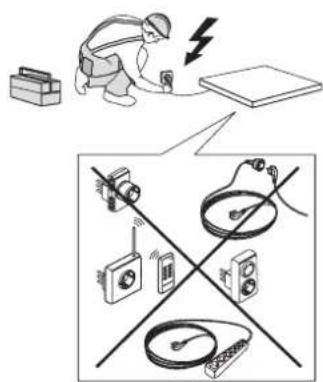
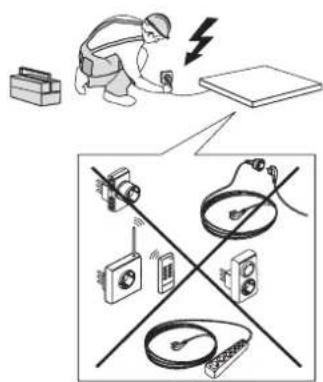
⚠️ CAUTION: the appliance is not intended to be operated by means of an external switching device, such as a timer, or separate remote controlled system.
This appliance is intended to be used in household and similar applications such as: staff kitchen areas
in shops, offices and other working environments; farm houses; by clients in hotels, motels, bed & breakfast and other residential environments.
⚠️ No other use is permitted (e.g. heating rooms).
This appliance is not for professional use. Do not use the appliance outdoors.
INSTALLATION
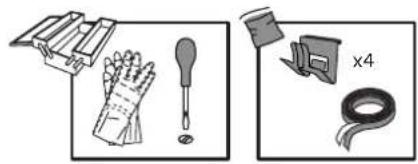
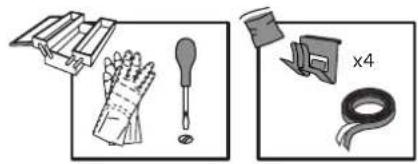
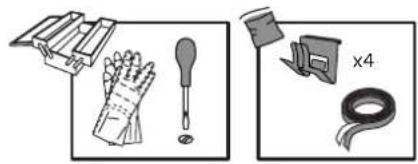
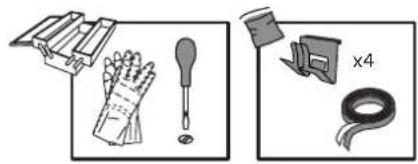
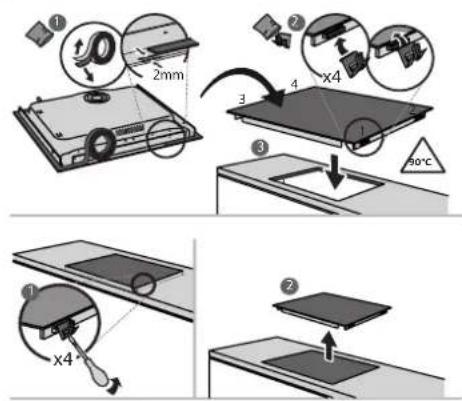
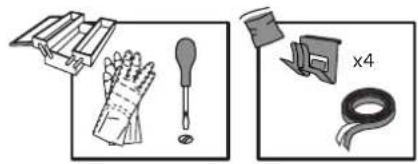
⚠ The appliance must be handled and installed by two or more persons - risk of injury. Use protective gloves to unpack and install - risk of cuts.
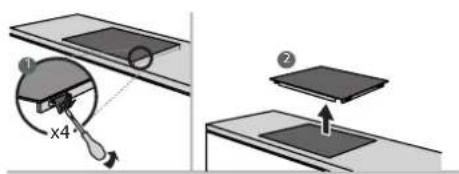
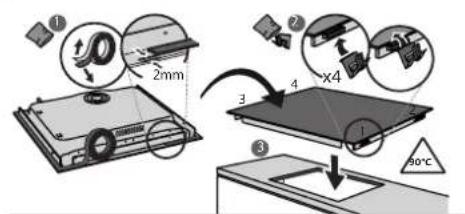
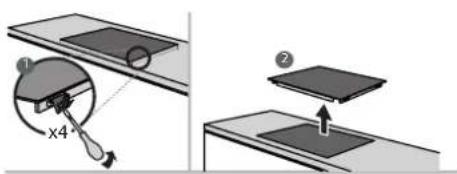
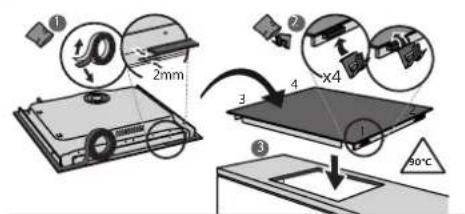
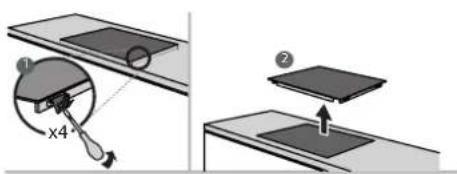
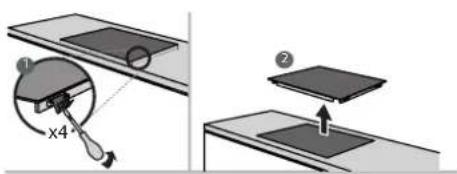
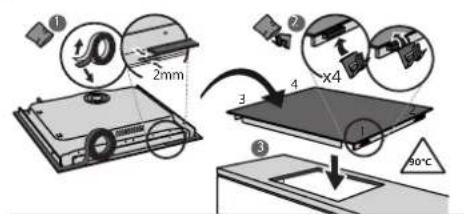
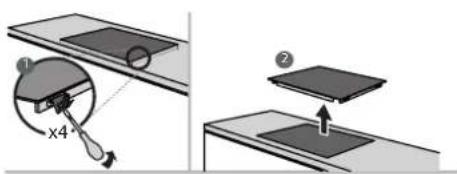
⚠️ Installation, including water supply (if any), electrical connections and repairs must be carried out by a qualified technician. Do not repair or replace any part of the appliance unless specifically stated in the user manual. Keep children away from the installation site. After unpacking the appliance, make sure that it has not been damaged during transport. In the event of problems, contact the dealer or your nearest After-sales Service. Once installed, packaging waste (plastic, styrofoam parts etc.) must be stored out of reach of children - risk of suffocation. The appliance must be disconnected from the power supply before any installation operation - risk of electric shock. During installation, make sure the appliance does not damage the power cable - risk of fire or electric shock. Only activate the appliance when the installation has been completed.
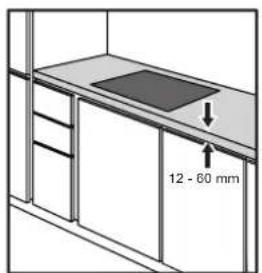
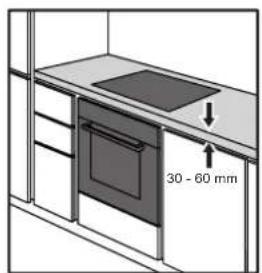
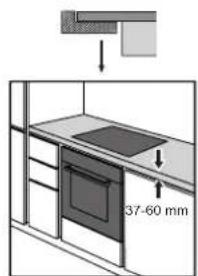
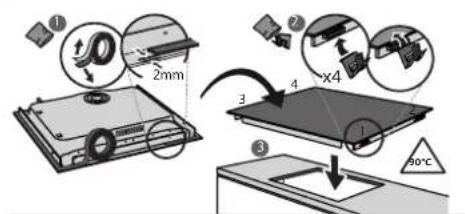
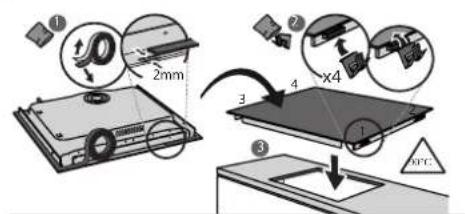
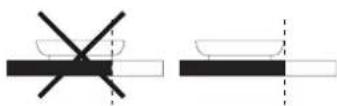
⚠️ Carry out all cabinet cutting operations before fitting the appliance and remove all wood chips and sawdust.
⚠️ If the appliance is not installed above an oven, a separator panel (not included) must be installed in the compartment under the appliance.
ELECTRICAL WARNINGS
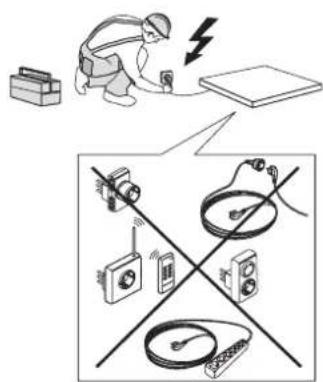
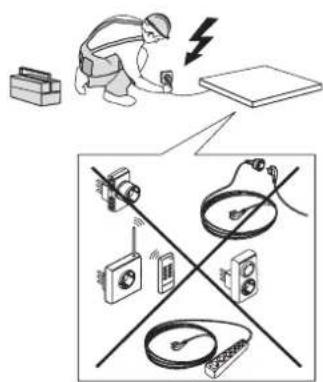
⚠ It must be possible to disconnect the appliance from the power supply by unplugging it if the plug is accessible, or by a multi-pole switch installed upstream of the socket in accordance with the wiring rules. The appliance must be earthed in conformity with national electrical safety standards.
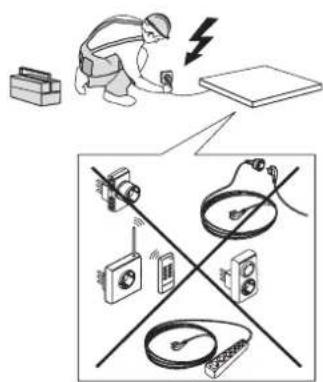
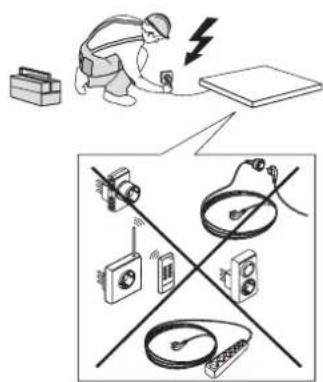
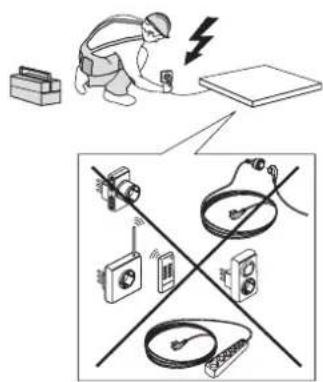
⚠ Do not use extension leads, multiple sockets, or adapters. The electrical components must not be accessible to the user after installation. Do not use the appliance when you are wet or barefoot. Do not operate this appliance if it has a damaged power cable or plug, if it is not working properly, or if it has been damaged or dropped.
⚠️ Installation using a power cable plug is not allowed unless the product is already equipped with the one provided by the manufacturer.
⚠️ If the supply cord is damaged, it must be replaced with an identical one by the manufacturer, its service agent, or similarly qualified persons in order to avoid a hazard - risk of electric shock.
CLEANING AND MAINTENANCE
⚠ WARNING: Ensure that the appliance is switched off and disconnected from the power supply before performing any maintenance operation; never use steam cleaning equipment - risk of electric shock.
⚠ Do not use abrasive or corrosive products, chlorine-based cleaners, or pan scourers.
DISPOSAL OF PACKAGING MATERIALS
The packaging material is 100% recyclable and is marked with the recycle
symbol.
The various parts of the packaging must therefore be disposed of responsibly and in full compliance with local authority regulations governing waste disposal.
DISPOSAL OF HOUSEHOLD APPLIANCES
This appliance is manufactured with recyclable or reusable materials. Dispose of it in accordance with local waste disposal regulations. For further information on the treatment, recovery, and recycling of household electrical appliances, contact your local authority, the collection service for household waste, or the store where you purchased the appliance. This appliance is marked in compliance with European Directive 2012/19/EU, Waste Electrical and Electronic Equipment (WEEE) and with the Waste Electrical and Electronic Equipment regulations 2013 (as amended).
By ensuring this product is disposed of correctly, you will help prevent negative consequences for the environment and human health.
The symbol ☐ on the product or on the accompanying documentation indicates that it should not be treated as domestic waste but must be taken to an appropriate collection center for the recycling of electrical and electronic equipment.
ENERGY SAVING TIPS
Make the most of your hot plate's residual heat by switching it off a few minutes before you finish cooking.
The base of your pot or pan should cover the hot plate completely; a container that is smaller than the hot plate will cause energy to be wasted. Cover your pots and pans with tight-fitting lids while cooking and use as little water as possible. Cooking with the lid off will greatly increase energy consumption.
Use only flat-bottomed pots and pans.
DECLARATION OF CONFORMITY
This appliance meets Ecodesign requirements of European Regulation 66/2014 and The Ecodesign for Energy-Related Products and Energy Information (Amendment) (EU Exit) Regulations 2019 in compliance with the European standard EN 60350-2.
NOTE
People with a pacemaker or similar medical device should use care when standing near this induction cooktop while it is on. The electromagnetic field may affect the pacemaker or similar device. Consult your doctor, or the manufacturer of the pacemaker or similar medical device for additional information about its effects with electromagnetic fields of the induction cooktop.
INSTALLATION
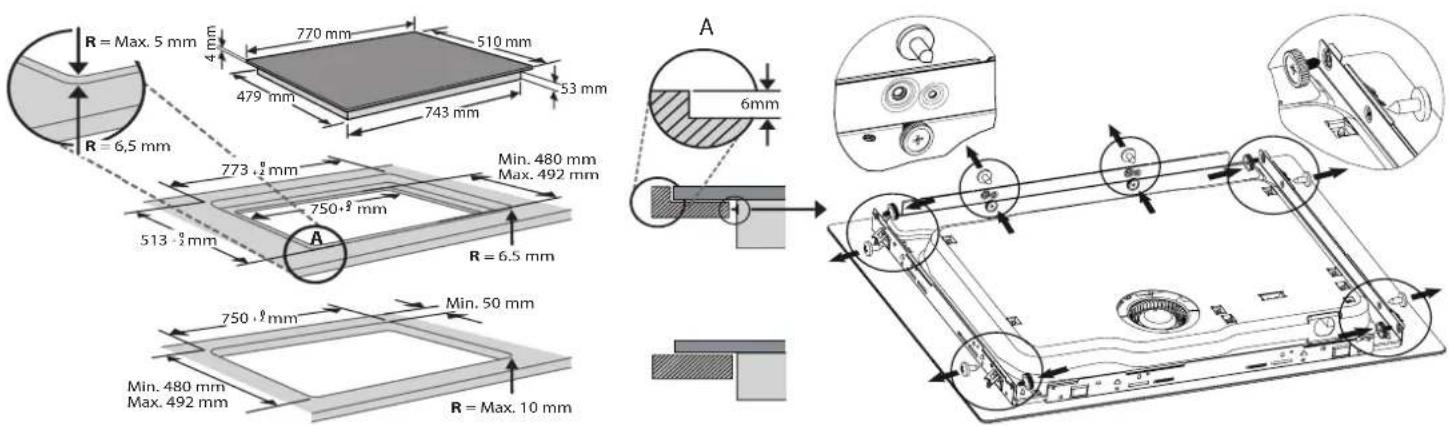
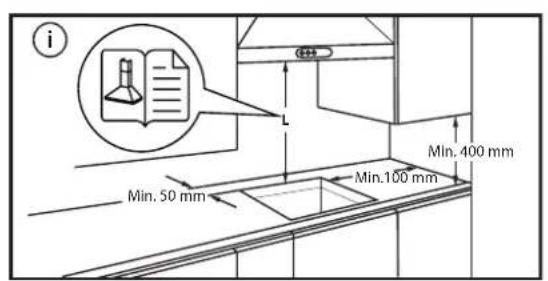
ELECTRICAL CONNECTION
Electrical connection must be made before connecting the appliance to the electricity supply.
Installation must be carried out by qualified personnel who know the current safety and installation regulations. Specifically, installation must be carried out in compliance with the regulations of the local electricity supply company.
Make sure the voltage specified on the data plate located on the bottom of the appliance is the same as that of the home.
Regulations require that the appliance be earthed: use conductors (including the earth conductor) of the appropriate size only.
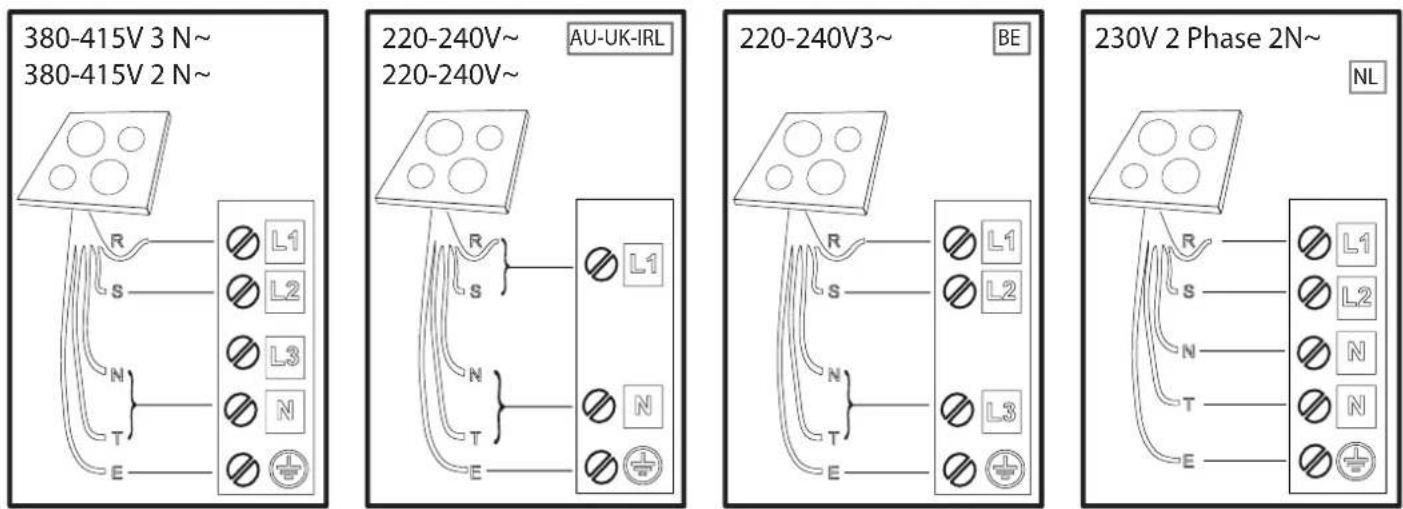
black-nero-negro-preto-μαύρος-must-melns-juodas-czarny-schwarz-noir-zwart-negru черно-цирн-črna-crno-черный-чорний-қара-černá-čierna-fekete-svart-musta-svart-sort siyah-dubh
brown-marrone-marrón-marrom-kafé-pruun-brūns-rudas-brązowy-braunen-brun-bruin maro-kaфяв-браon-rjava-smed-korичневый-korичневий-коңыр-hnědý-hnedý-barna brunt-ruskea-brunt-brun-kahverengi-donn
blue (gray)-blu (grigio)-azul (gris)-azul (cinza)-μπλε (γκρι)-sinine (hall)-zila (pelēka) mělyna(pilkas)-niebieski (szary)-blau (grau)-bleu (gris)-blauw (grijs)-albastru (gri) синьо (сиво)-плава (сива)-modro(sivo)-plava (siva)-синий (серый)-синій (cipий) көк (сүр)-modrý (šedá)-modrý(sivá)-kék (szürke)-blå (grå)-sininen (harmaa)-blå (grå) blåt (gråt)-mavi (gri)-gorm (liath)
yellow/green-giallo/verde-amarillo/verde-amarelo/verdekítrivo/трácivo-kollane/roheline dzeltens/za|š-geltona/žalia-žółty/zielony-gelb/grün-jaune/vert-geel/groen-galben/verde жълто/зелено-жуто/зелена-rumeno/zeleno-žuto/zelena-желтый/зеленый-gul/grønn жовтий/зелений-жасыл/сары-žlutá/zelená-žltá/zelená-sárga/zöld-keltainen/vihreä gul/grön-gul/grøn-sari/yeşil-buí/glas
blue-blu-azul-azul-μπλε-sinine-zila-mélyna-niebieski-blau-bleu-blauw-albastru-cinho плавa-modro-plava-cinii-sinii-kek-modry-modry-kék-blå-sininen-blå-blåt-mavi-gorm
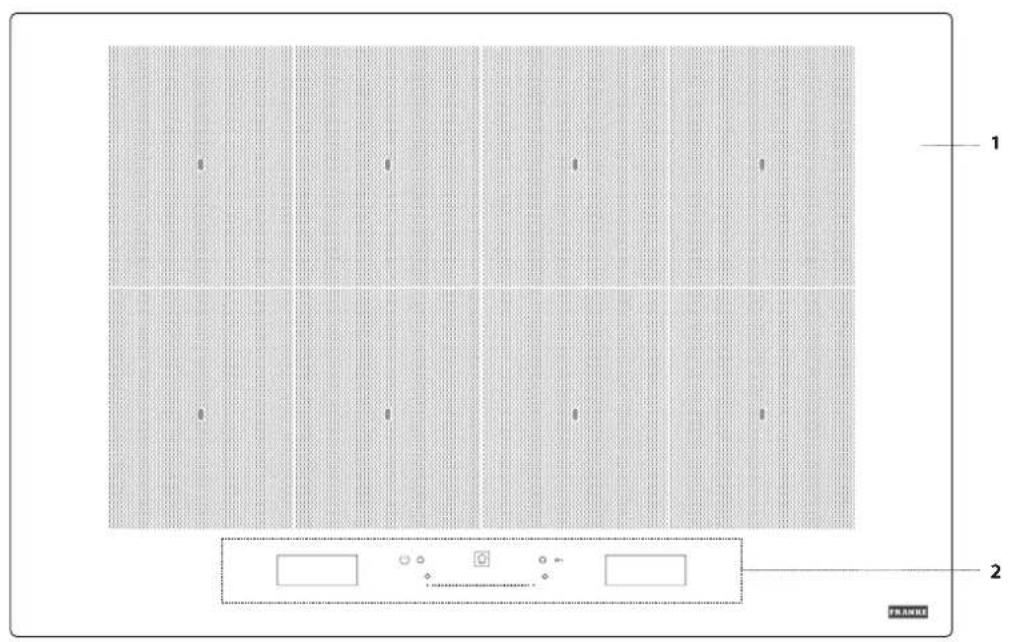
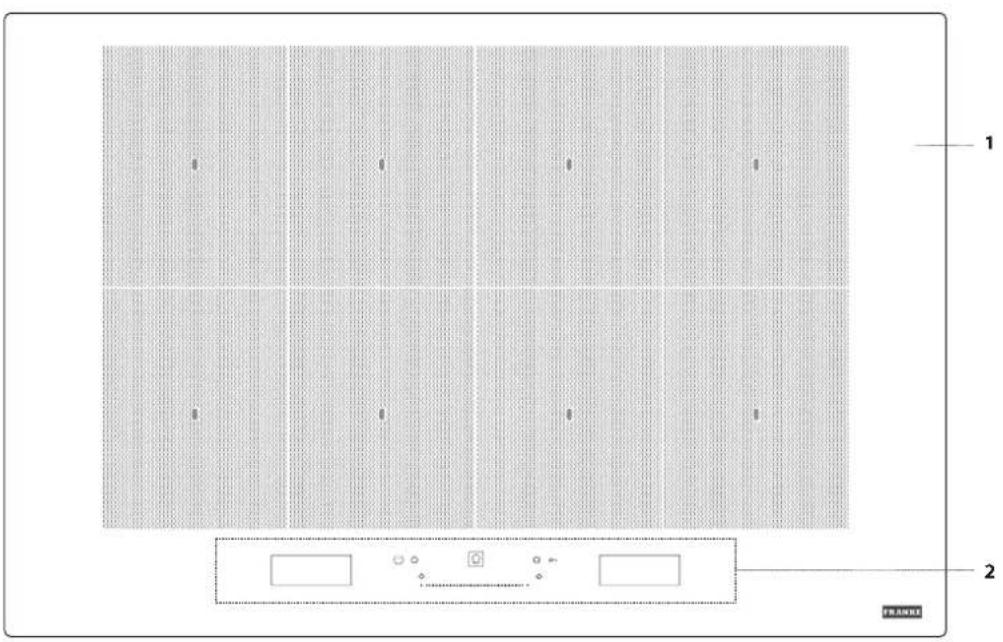
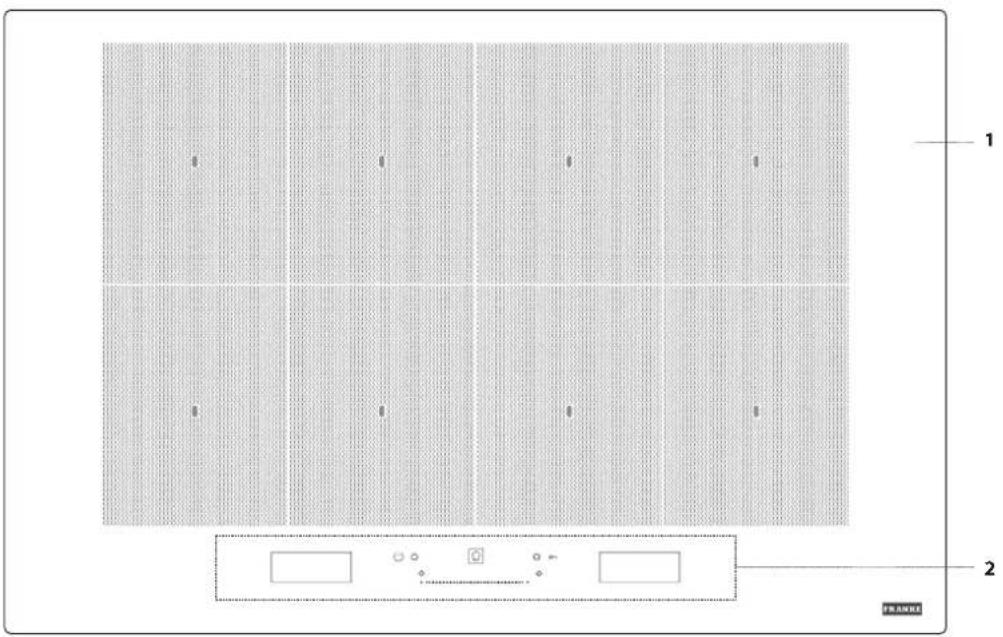
- Cooktop
- Control panel
CONTROL PANEL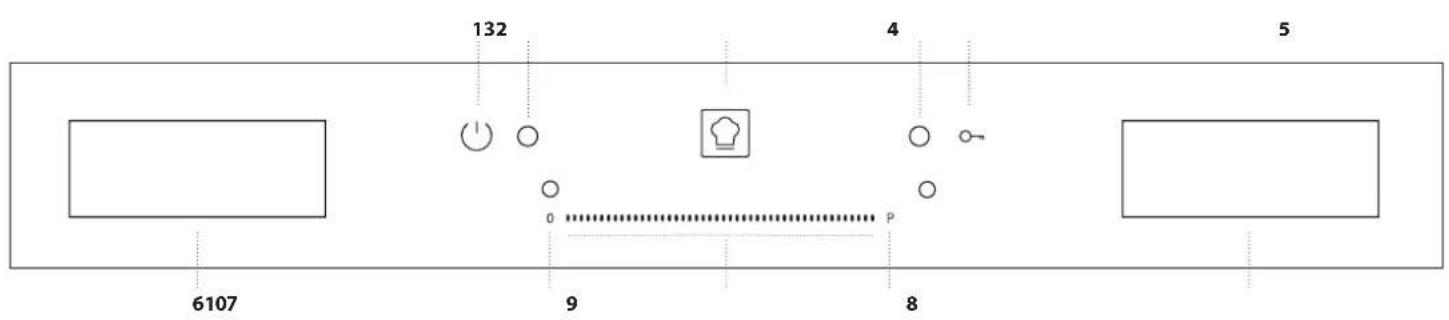
- On/off button
- Indicator light - hob switched on
- "Cookassist" button (special functions)
- Indicator light - key lock active
- Key lock
- Cooking zone selection display
- Cooking zone off button
- Slide touchscreen
- Quick heat button
- "Manage functions" display
ACCESSORIES
POTS AND PANS
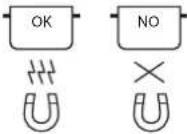
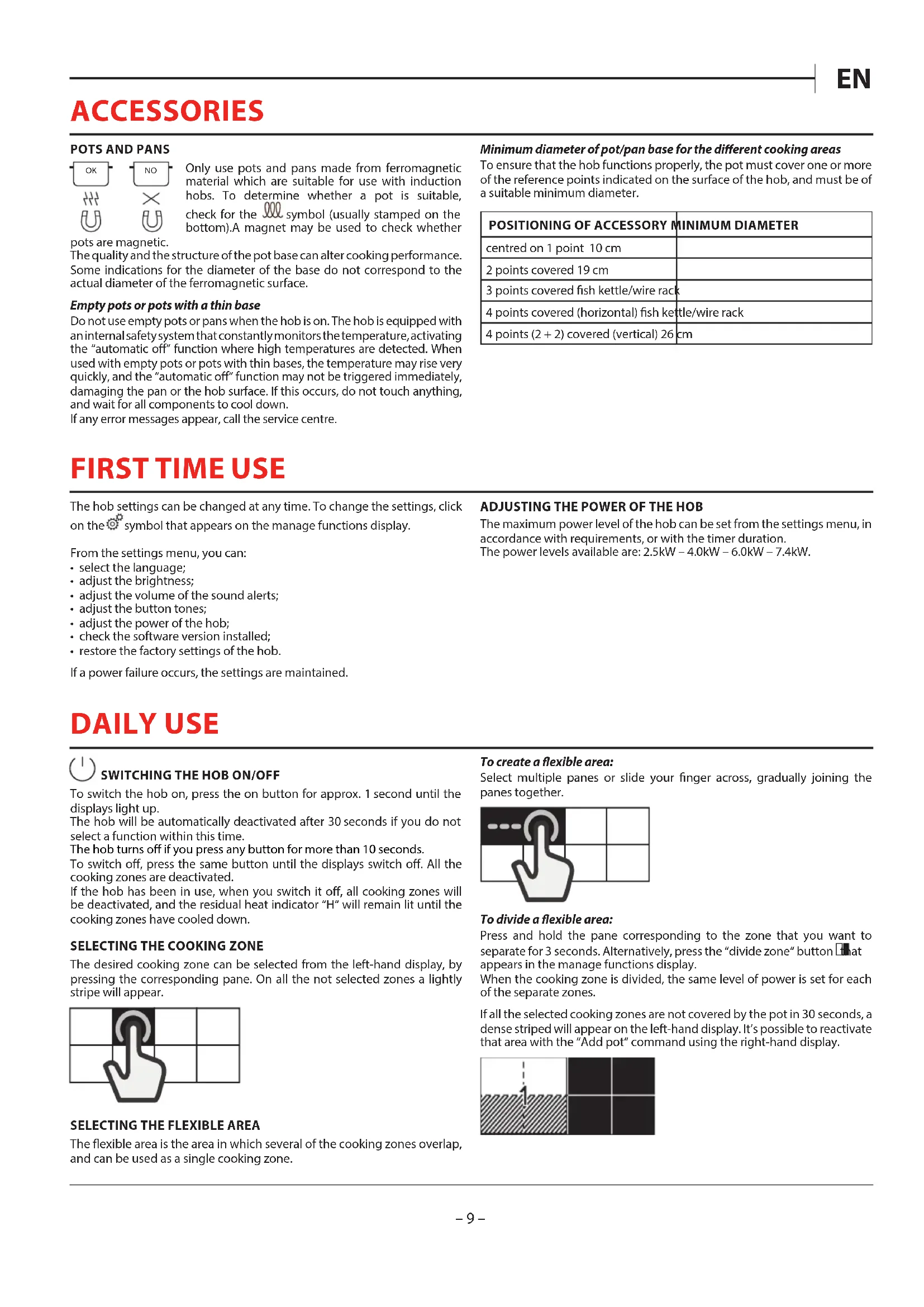
Only use pots and pans made from ferromagnetic material which are suitable for use with induction hobs. To determine whether a pot is suitable, check for the symbol (usually stamped on the bottom). A magnet may be used to check whether
pots are magnetic.
The quality and the structure of the pot base can alter cooking performance. Some indications for the diameter of the base do not correspond to the actual diameter of the ferromagnetic surface.
Empty pots or pots with a thin base
Do not use empty pots or pans when the hob is on. The hob is equipped with an internal safety system that constantly monitors the temperature, activating the "automatic off" function where high temperatures are detected. When used with empty pots or pots with thin bases, the temperature may rise very quickly, and the "automatic off" function may not be triggered immediately, damaging the pan or the hob surface. If this occurs, do not touch anything, and wait for all components to cool down.
If any error messages appear, call the service centre.
FIRST TIME USE
The hob settings can be changed at any time. To change the settings, click on the Ⓞ symbol that appears on the manage functions display.
From the settings menu, you can:
- select the language;
- adjust the brightness;
- adjust the volume of the sound alerts;
- adjust the button tones;
- adjust the power of the hob;
- check the software version installed;
- restore the factory settings of the hob.
If a power failure occurs, the settings are maintained.
DAILY USE

SWITCHING THE HOB ON/OFF
To switch the hob on, press the on button for approx. 1 second until the displays light up.
The hob will be automatically deactivated after 30 seconds if you do not select a function within this time.
The hob turns off if you press any button for more than 10 seconds.
To switch off, press the same button until the displays switch off. All the cooking zones are deactivated.
If the hob has been in use, when you switch it off, all cooking zones will be deactivated, and the residual heat indicator "H" will remain lit until the cooking zones have cooled down.
SELECTING THE COOKING ZONE
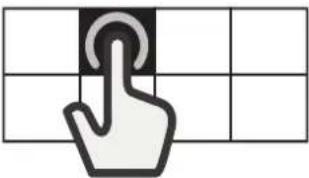
The desired cooking zone can be selected from the left-hand display, by pressing the corresponding pane. On all the not selected zones a lightly stripe will appear.
SELECTING THE FLEXIBLE AREA
The flexible area is the area in which several of the cooking zones overlap, and can be used as a single cooking zone.
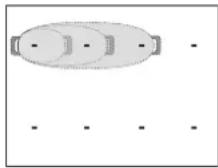
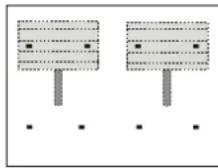
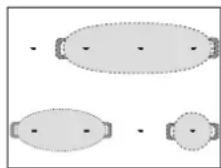
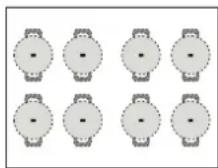
Minimum diameter of pot/pan base for the different cooking areas
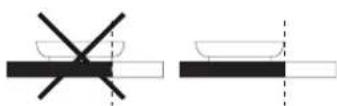
To ensure that the hob functions properly, the pot must cover one or more of the reference points indicated on the surface of the hob, and must be of a suitable minimum diameter.
| POSITIONING OF ACCESSORY MINIMUM DIAMETER | |
| centred on 1 point 10 cm | |
| 2 points covered 19 cm | |
| 3 points covered fish kettle/wire rack | |
| 4 points covered (horizontal) fish kettle/wire rack | |
| 4 points (2 + 2) covered (vertical) 26 cm | |
ADJUSTING THE POWER OF THE HOB
The maximum power level of the hob can be set from the settings menu, in accordance with requirements, or with the timer duration.
The power levels available are: 2.5kW - 4.0kW - 6.0kW - 7.4kW.
To create a flexible area:
Select multiple panes or slide your finger across, gradually joining the panes together.
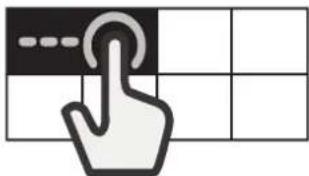
To divide a flexible area:
Press and hold the pane corresponding to the zone that you want to separate for 3 seconds. Alternatively, press the "divide zone" button that appears in the manage functions display.
When the cooking zone is divided, the same level of power is set for each of the separate zones.
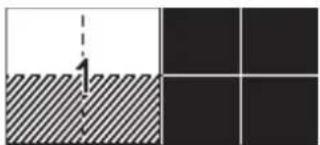
If all the selected cooking zones are not covered by the pot in 30 seconds, a dense striped pattern will appear on the left-hand display. It's possible to reactivate that area with the "Add pot" command using the right-hand display.
ACTIVATING/DEACTIVATING COOKING ZONES AND ADJUSTING POWER
To activate the cooking zones:
- Switch on the hob. If a recipient is already in place, the hob automatically detects it. Select the suggested zone to choose the power.
- Place the pot in the chosen cooking zone, ensuring that it is covering one or more of the reference points on the surface of the hob.
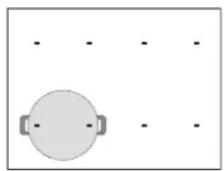
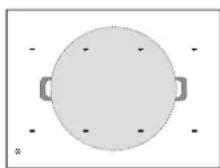
Using this position will allow you to benefit from maximum power output.
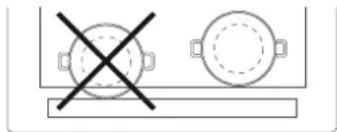
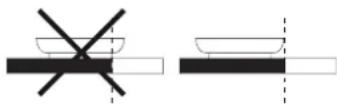
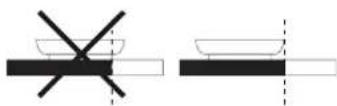
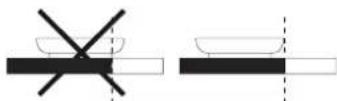
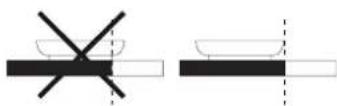
Please note: Do not cover the display or the slide touchscreen with accessories. If a utensil is covering one of the displays, the hob may not function properly. On the right display, the message "CHECK TOUCH AREA, remove the object within one minute" will appear. Remove the object and wait until the message disappears. If the problem persists, disconnect and reconnect the power to the cooktop. In the cooking zones close to the control panel, it is advisable to keep pots and pans inside the markings (taking both the bottom of the pan and the upper edge into consideration, as this tends to be larger). This prevents excessive overheating of the touchpad. When grilling or frying, please use the rear cooking zones wherever possible.
- Select the cooking zone or flexible area from the left-hand display.
- Set the desired power level by pressing or moving your finger horizontally across the slide touchscreen.

The power level set will appear in the pane of the cooking zone selected.
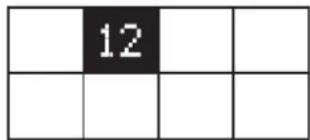
Each cooking zone offers a range of different heat settings, from "1" (minimum power) to "18" (maximum power).
Using the slide touchscreen, you can also select the quick heat function, which will appear on the display with the letter "P".
Please note: If the pot is not suitable for induction cooking, is not positioned correctly or is not of an appropriate size, the cooking zone pane will flash. If no pot is detected within 30 seconds of making the selection, the cooking zone switches off.
To deactivate the cooking zones:
Select the cooking zone in the left-hand display and press the "OFF" button at the top of the slide touchscreen. If the cooking zone is still hot, the residual heat indicator "H" will appear in the corresponding pane.
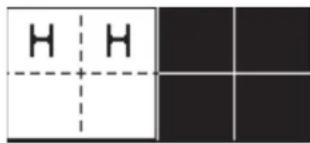
When using a cooking area composed of several zones, the pot can be placed anywhere on the active area. The hob will automatically recognise the actual positioning of the pot.
If you wish to add an additional pot to the active cooking area, use the "Add pot" + command to allow the hob to detect the new pot.
KEY LOCK
To prevent accidental activation of the hob during cleaning, or to prevent the controls from being changed accidentally whilst cooking, press the "Key lock" ○ button for 3 seconds: a beep and a warning light indicate that this function has been activated.
The control panel will be locked, with the exception of the off button.
To reactivate the controls, press the "Key Lock" button again for 3 seconds. The warning light switches off and the hob is active again.

TIMER
When the hob is off, you can use the right-hand display as a timer.
To activate the timer:
- Switch on the hob.
- Press the hourglass icon that appears on the manage functions display.
- Use the "+"/"-" buttons to set the time.
- When the set time has elapsed, an acoustic signal sounds.
To change or deactivate the timer:
- Press the hourglass icon that appears on the manage functions display.
- Use the "+" and "-" buttons to reset the desired time, or press the "STOP" button to turn off the timer.

SETTING THE COOKING TIME
The cooking zones can be programmed to switch off automatically.
To set the cooking time:
- Select the cooking zone and set the required power level.
- Press the stopwatch icon ⏻ that appears on the manage functions display.
- Use the "+"/"-" buttons to set the time.
- Once the set time has elapsed, an acoustic signal sounds and the cooking zone switches off automatically.
To change or deactivate the cooking timer:
- Select the active cooking zone.
- Press the stopwatch icon Ⓤ that appears on the manage functions display.
- Use the "+" and "-" buttons to reset the desired time, or press the "STOP" button to cancel the set cooking time.
A cooking time can be set for each zone or flexible area by following the same steps.
FUNCTIONS

COOKASSIST
The Cookassist button allows users to access a number of special features:
- EasyCook
- ProCook
- FlexPro
In the right-hand manage functions display, you can navigate between the special functions and select the option you want.
With the arrows, you can scroll through the available options.
Use the button OK to confirm your choice, and the double arrow to return to the previous menu.
EASYCOOK
This function allows you to select one of the pre-set functions which help you to cook a range of different types of food in the best possible manner. The hob assists the user by providing ideal conditions for heating and seasoning the pot. It also provides instructions to be followed during the different stages of cooking, in order to achieve optimum results.
To activate the EasyCook function:
- Press the Cookassist button.
- Select "EasyCook" from the manage functions display and confirm.
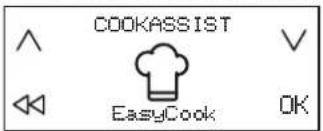
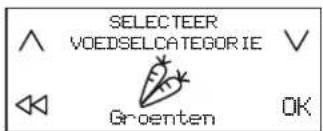
- Select the category of food that you plan to cook and confirm.
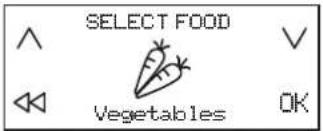
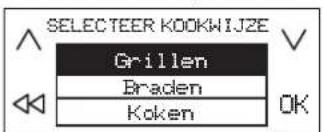
- Select the cooking method and confirm.
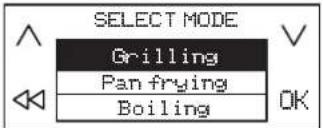
- Select the cooking conditions and confirm.
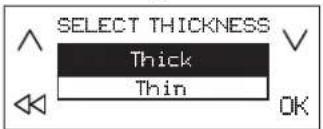
- Four cooking zones will now be available. Place the pot in position, ensuring that it is covering at least two of the reference points on the surface of the hob.
The "Moka" cooking mode is the only one which allows just one reference point to be covered.
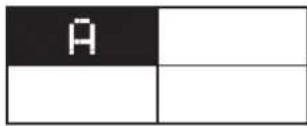
Below is an example of positioning for a number of accessories.
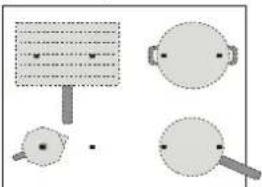
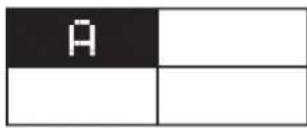
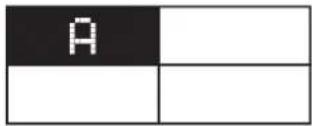
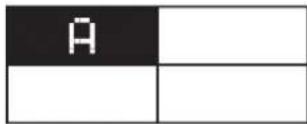
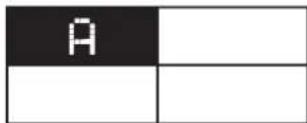
- Select the desired cooking zone from the left-hand display. An "A" will appear in the selected zone.
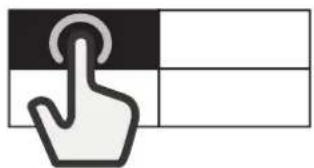
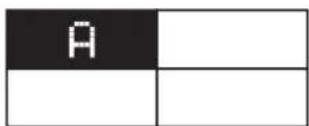
- In the right-hand display, the instructions to follow will appear (e.g. "Add Oil" or "Add food"). At the end of each stage, the user must confirm in order to proceed with cooking.
- If necessary, the pre-set power level can be changed at any time, using the "+" and "-" buttons.
- When cooking is complete, press the "STOP" button to turn off the cooking zone. If multiple zones have been used during cooking, you must first select the cooking zone you want to switch off.
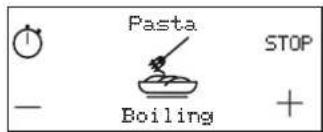
Please note: The "EasyCook" function can be activated even when one or more cooking zones are already active.
To activate the EasyCook function for more than one cooking zone:
After activating the "EasyCook" function for the first cooking zone, press the Cookassist button again, and repeat the activation process for a new cooking zone. Zones that are already active cannot be selected.
Please note: You can use up to 4 zones with the "EasyCook" function, provided that the power level setting selected allows for this.
The zones cannot be combined to form a larger area.
To cook traditionally when the EasyCook function is active:
When the "EasyCook" function is active, you can select the cooking zone that you wish to activate from the left-hand display, and set the power level for this zone, before proceeding with using this in the normal way.
Selectable options
| FOOD CATEGORY COOKING METHOD | ||
 | Meat Grilling, Pan frying, Boiling | |
 | Fish Grilling, Pan frying, Boiling | |
 | Vegetables Grilling, Pan frying, Boiling | |
 | Sauces, gravies,soups | Sauces (Tomato, Béchamel)Soups (Searing, Simmering, Creamy soups) |
 | Dessert | Custard, Panna cotta, Melted chocolate,Pancake, Rice pudding |
 | Eggs | Fried eggs, Omelette, Boiling (Boiled eggs,Soft-boiled), Frittata, Scrambled |
 | Cheese Grilling, Pan frying, Fondue | |
 | Pasta and Rice Boiling, Pan frying, Risotto, Rice pudding | |
 | Beverages Milk, Water, Moka | |
 | Custom | Boiling, Grilling, Pan frying, Simmering,Melting |
MAIN COOKING METHODS
(Each method may include additional options)

MELTING
To bring food to the ideal temperature for melting and to maintain the condition of the food without risk of burning.
This method does not damage delicate foods such as chocolate, and prevents them from sticking to the pot.
The rate of cooking can be adjusted at any time using the "+" and "-" buttons on the right-hand display.

SIMMERING
For slow-cook dishes and for slowly evaporating liquid, maintaining the condition of the food without risk of burning. This method does not damage food, and prevents it from sticking to the pot.
The quality and type of pot can affect performance or cooking times.
The rate of cooking can be adjusted at any time using the "+" and "-" buttons on the right-hand display.

BOILING
To efficiently heat water and alert the user when it begins to boil, via an audible and visual signal.
While awaiting confirmation from the user, the system keeps the water at a controlled simmer, preventing spills and wasted energy. Whilst this function is active, an audible alarm warns the user if the pot is empty (no water) or if it has boiled dry.
Only add salt after the boiling alert has sounded.

PAN FRYING
To preheat or season an empty pot or pan. An audible and visual signal indicates that the ideal temperature has been reached for food to be added to the pot or pan. While awaiting confirmation from the user, the system keeps the accessory at a controlled heat, preventing the pan from reaching damaging temperatures and avoiding energy wastage.
For optimum conditions, use this function with pots and seasoning at room temperature.
Do not use the lid - to protect against splashes, a splash guard is recommended. It is advisable to use oils that are suitable for frying when cooking with this function, such as seed oils of various types. When using different oils, always take extra care to supervise cooking during first use.

GRILLING
This function allows for optimum grilling of a range of foods, according to their thickness. When the ideal temperature has been reached for food to be added, the hob beeps. The hob then stabilises the temperature throughout cooking, keeping it constant. Once the user has confirmed that food has been added, cooking begins.
It is advisable to prepare the food during the heating stage, adding it as soon as you hear the beep.
For optimum conditions, use this function with pots and seasoning at room temperature.
If you are not using the wire rack designed for this purpose, take extra care when first using the grill function, as the quality of the base may affect heating times. Accessories with very thin bases can reach very high temperatures in a short time.

MOKA
This function allows "moka" stove-top coffee makers to be heated automatically. The heating cycle can be activated by selecting the function in the menu, and a beep will sound when the coffee is ready. The function is programmed to switch off automatically, preventing spills. When using for the first time, always check that the conditions described are met. For optimum conditions, use this function with the coffee maker and water at room temperature.
Please note: Try not to move the pot or pan during the first minute of heating, in order to allow the hob to function optimally.
PROCOOK
This function divides the hob into four cooking zones, activating these simultaneously at a pre-set power level. It allows you to move pots from one area to another, to allow you to continue cooking at different temperatures.
To activate the ProCook function:
- Place the pot in position.
- Press the Cookassist button.
- Select "ProCook" from the manage functions display and confirm.
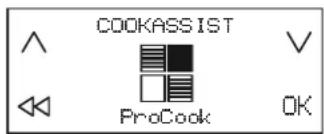
- The four cooking zone panes appear on the left-hand display, with the corresponding power level (low, medium, high).
- If you wish to add more pots, use the "Add pot" command.
- To exit this function, press "STOP".
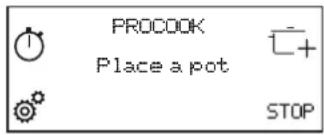
To change the power of a cooking zone:
- Select cooking zone.
- Select the desired power level by dragging your finger across the slide touch screen, which will remain visible for 1 second.
- The word corresponding to the power level selected (low, medium, high) reappears.
Please note: The changed settings are saved until you change them again or reset them.
FLEXPRO
This function allows you to use the entire hob as a single cooking area.
To activate the FlexPro function:
- Place the pot in position.
- Press the Cookassist button.
- Select "FlexPro" from the manage functions display and confirm.
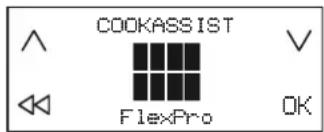
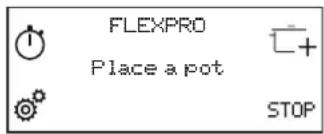
- Set the desired power level from the slide touchscreen. The power level set appears on the left-hand display.
- If you wish to add more pots, use the "Add pot" command.
- To exit this function, press "STOP".
INDICATORS

RESIDUAL HEAT
If "H" appears on the display, this means that the cooking zone is hot. The indicator lights up even if the zone has not been activated but has been heated due to the use of the adjacent zones, or because a hot pot has been placed on it.
When the cooking zone has cooled down, the "H" disappears.
COOKING TABLE
| POWER LEVEL TYPE | OF COOKING | RECOMMENDED USE(indicating cooking experience and habits) | |
| Maximum power | P Fast heating | Ideal for rapidly increasing the temperature of food to a fast boil (for water) or for rapidly heating cooking liquids. | |
| 14 – 18 | Frying – boiling | Ideal for browning, starting to cook, frying deep-frozen products, bringing liquids to the boil quickly. | |
| Browning – sautéing – boiling – grilling | Ideal for sautéing, maintaining a lively boil, cooking and grilling. | ||
| 10 – 14 | Browning – cooking – stewing – sautéing – grilling | Ideal for sautéing, maintaining a gentle boil, cooking and grilling, and preheating accessories. | |
| Cooking – stewing – sautéing – grilling – cooking until creamy | Ideal for stewing, maintaining a gentle boil, cooking and grilling (for longer periods). | ||
| 5 – 9 | Cooking – simmering – thickening – creaming | Ideal for slower-cook recipes (rice,sauces,roast,fish) with liquids (e.g. water, wine, broth, milk), and for creaming pasta. | |
| Ideal for slow-cook recipes (quantities under 1 litre: rice, sauces, roasts, fish) with liquids (e.g. water,wine,broth,milk). | |||
| 1 – 4 | Melting – defrosting Ideal for softening butter, gently melting chocolate, thawing small items. | ||
| Keeping food warm – creaming risotto | Ideal for keeping small portions of just-cooked food or serving dishes warm and for creaming risotto. | ||
| Zero power | 0 – | Hob in stand-by or off mode (possible end-of-cooking residual heat, indicated by an “H”). | |
CLEANING AND MAINTENANCE

WARNING
- Do not use steam cleaning equipment.
- Before cleaning, make sure the cooking zones are switched off and that the residual heat indicator ("H") is not displayed.
Important:
- Do not use abrasive sponges or scouring pads as they may damage the glass.
- After each use, clean the hob (when it is cool) to remove any deposits and stains from food residue.
- A surface that is not kept suitably clean may reduce the sensitivity of control panel buttons.
- Use a scraper only if residues are stuck to the hob. Follow the scraper manufacturer's instructions to avoid scratching the glass.
- Sugar or foods with a high sugar content can damage the hob and must be immediately removed.
- Salt, sugar and sand could scratch the glass surface.
- Use a soft cloth, absorbent kitchen paper or a special hob cleaner (follow the Manufacturer's instructions).
- Spills of liquid in the cooking zones can cause the pots to move or vibrate. After cleaning the hob, dry thoroughly.
TROUBLESHOOTING
- Check that the electricity supply has not been shut off.
- If you are unable to turn the hob off after using it, disconnect it from the power supply.
- If alphanumeric codes appear on the display when the hob is switched on, consult the following table for instructions.
Please note: The presence of water, liquid spilled from pots or any objects resting on any of the hob buttons can accidentally activate or deactivate the control panel lock function.
| DISPLAY CODE DE | DESCRIPTION POSSIBLE CAUSES SOLUTION | ||
| C81, C82 | The control panel switches off because of excessively high temperatures. | The internal temperature of electronic parts is too high. | Wait for the hob to cool down before using it again. |
| F02, F04 The connection voltage is wrong. | The sensor detects a discrepancy between the appliance voltage and that of the mains supply. | Disconnect the hob from the mains and check the electrical connection. | |
| F01, F06, F12, F13, F25, F34, F35, F36, F37, F41, F47, F58, F61, F76 | Disconnect the hob from the power supply. Wait a few seconds then reconnect the hob to the power supply. If the problem persists, call the service centre and specify the error code that appears on the display. | ||
SOUNDS PRODUCED DURING OPERATION
Induction hobs may whistle or creak during normal operation.
These noises actually come from the cookware and are linked to the characteristics of the pan bottoms (for example, when the bottoms are made from different layers of material or are irregular).
These noises may vary according to the type of cookware used and to the amount of food it contains and are not the symptom of something wrong.
VERIFIED COOKING
A table below has been created specially to make it possible for inspection bodies to use our products.
| VERIFIED COOKING VERIFIED COOKING POSITIONS | ||
| Heat distribution, "Pancakes" test acc. to EN 60350-2 §7.3 | 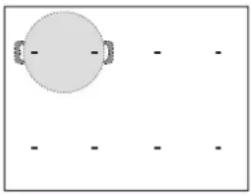 | 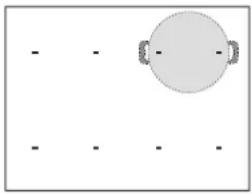 |
| Heat performance, "French fries" test acc. to EN 60350-2 §7.4 | ||
| Melting and keep warm, "chocolate" | ||
| Simmering, "rice pudding" | ||
ECO-DESIGN: The test was carried out in accordance with regulations, by selecting all of the cooking zones on the hob to form a single area, or by using the FlexPro function.
SUPPORT
In the event of any operation problems, contact a Franke Technical Service Centre.
Never use the services of unauthorised technicians.
When contacting the customer service, please provide the following information:
- type of fault
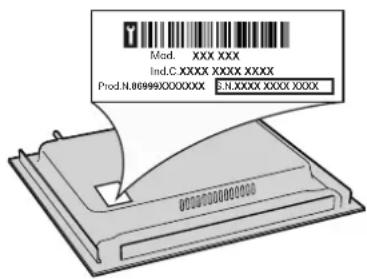
- appliance model (Art.) – serial number (S.N.)
This information is given on the data plate. The data plate is attached on the bottom side.
You must also have proof of purchase if you're still within the warranty period.
black-nero-negro-preto-μαύρος-must-melns-juodas-czarny-schwarz-noir-zwart-negru-черно-цирн-črna-crno-черный-чорний-қара-černa-čierna-fekete-svart-musta-svart-sort-siyah-dubh
brown-marrone-marrón-marrom-kafé-pruun-brūns-rudas-brązowy-braunen-brun-bruin-maro-кафяв-браon-rjava-smed-коричневый-коричневий-коңыр-hnědý-hnedý-barna-brunt-ruskea-brunt-brun-kahverengi-donn
blue (gray)-blu (grigio)-azul (gris)-azul (cinza)-μπλε (γκρι)-sinine (hall)-zila (pelēka)-mėlyna (pilkas)-niebieski (szary)-blau (grau)-bleu (gris)-blauw (grijs)-albastru (gri)-синьо (сиво)-плава (сива)-modro (sivo)-plava (siva)-синий (серый)-синій (сірий)-кек (сүр)-modrý (šedá)-modrý (sivá)-kék (szürke)-blå (grå)-sininen (harmaa)-blå (grå)-blåt (gråt)-mavi (gri)-gorm (liath)
yellow/green-giallo/verde-amarillo/verde-amarelo/verde-κίτρινο/πράσινο-kollane/roheline-dzeltens/zaļš-geltona/žalia-żółty/zielony-gelb/grün-jaune/vert-geel/groen-galben/verde-жълто/зелено-жуто/зелена-rumeno/zeleno-žuto/zelena-желтый/зеленый-gul/grønn-жовтий/зелений-жасыл/сары-žlutá/zelená-žltá/zelená-sárga/zöld-keltainen/vihreä-gul/grön-gul/grøn-sarı/yeşil-buí/glas
blue-blu-azul-azul-μπλε-sinine-zila-mėlyna-niebieski-blau-bleu-blauw-albastru-синьо-плава-modro-plava-синий-синій-кек-modrý-modrý-kék-blå-sininen-blå-blåt-mavi-gorm
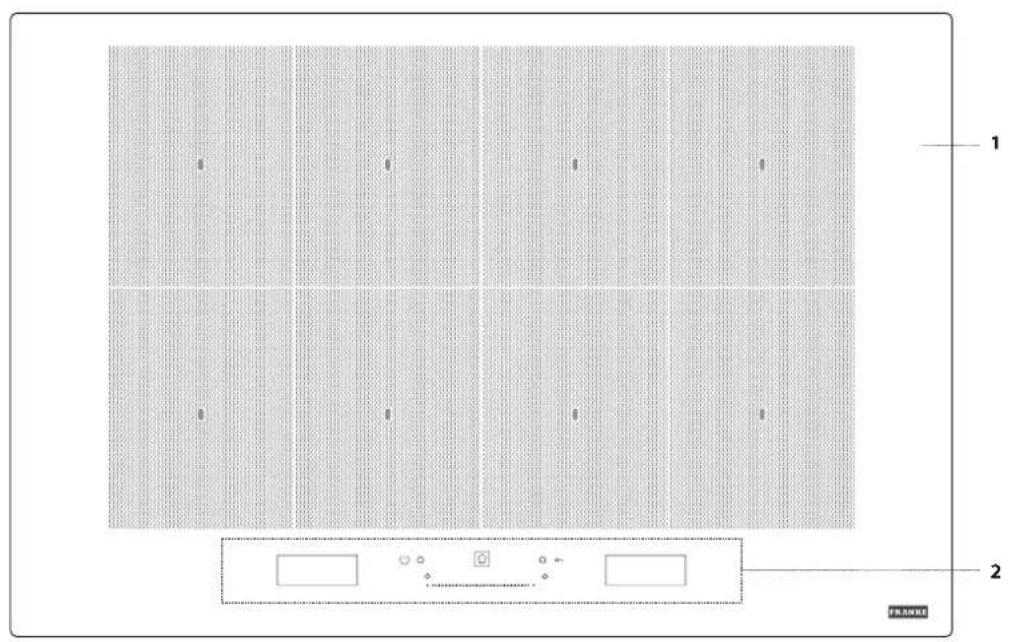
- Kochfeld
- Bedienfeld
BEDIENFELD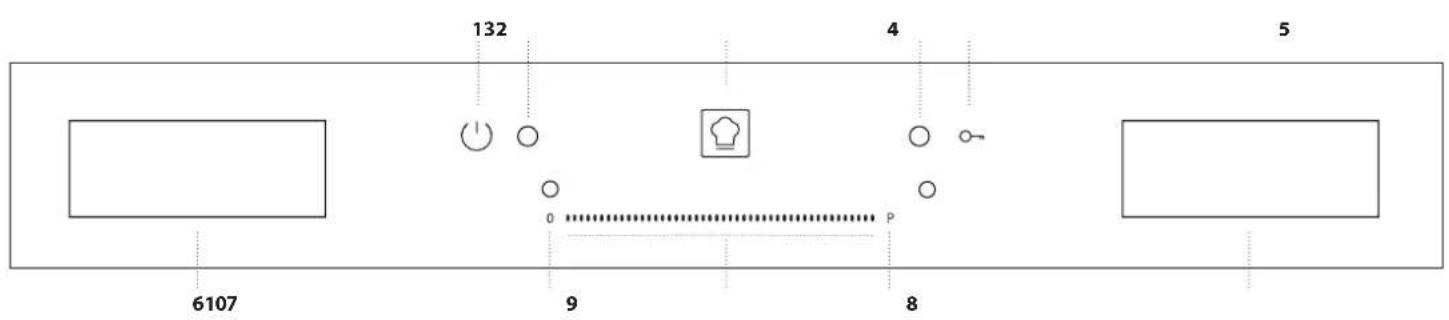
A table below has been created specially to make it possible for inspection bodies to use our products.
DÉCLARATION DE CONFORMITÉ
BRANCHEMENT ÉLECTRIQUE
black-nero-negro-preto-μαύρος-must-melns-juodas-czarny-schwarz-noir-zwart-negru-черно-цирн-črna-crno-черный-чорний-қара-černá-čierna-fekete-svart-musta-svart-sort-siyah-dubh
brown-marrone-marrón-marrom-kafé-pruun-brūns-rudas-brązowy-braunen-brun-bruin-maro-кафяв-браon-rjava-smed-коричневый-коричневий-коңыр-hnědý-hnedý-barna-brunt-ruskea-brunt-brun-kahverengi-donn
blue (gray)-blu (grigio)-azul (gris)-azul (cinza)-blue (gray)-sinine (hall)-zila (pelēka) mėlyna (pilkas)-niebieski (szary)-blau (grau)-bleu (gris)-blauw (grijs)-albastru (gri) синьо (сиво)-плава (сива)-modro (sivo)-plava (siva)-синий (серый)-синій (cipий) көк (сүр)-modrý (šedá)-modrý (sivá)-kék (szürke)-blå (grå)-sininen (harmaa)-blå (grå) blåt (gråt)-mavi (gri)-gorm (liath)
yellow/green-giallo/verde-amarillo/verde-amarelo/verde-kítrpivo/πράσινο-kollane/roheline dzeltens/zaļš-geltona/žalia-żółty/zielony-gelb/grün-jaune/vert-geel/groen-galben/verde жълто/зелено-жуто/зелена-rumeno/zeleno-žuto/zelena-желтый/зеленый-gul/grønn жовтий/зелений-жасыл/сары-žlutá/zelená-žltá/zelená-sárga/zöld-keltainen/vihreä gul/grön-gul/grøn-sarı/yeşil-buí/glas
blue-blu-azul-azul-μπλε-sinine-zila-mėlyna-niebieski-blau-bleu-blauw-albastru-cinho плавa-modro-plava-cinii-sinii-kek-modry-modry-kék-blå-sininen-blå-blå-mavi-gorm
SELECTING THE FLEXIBLE ZONE
ACTIVATE/DEACTIVATE AND ADJUST THE POWER OF THE COOKING ZONES
© Franke Technology and Trademark Ltd., Switzerland
TABLE OF CONTENTS
SAFETY INSTRUCTIONS....40
INSTALLATION....42
TROUBLESHOOTING 50
SOUNDS PRODUCED DURING OPERATION ....50
CONTROLLED COOKING....50
SUPPORT....50
- Select the food category you want to cook and confirm.
- Select the cooking method and confirm
black-nero-negro-preto-μαύρος-must-melns-juodas-czarny-schwarz-noir-zwart-negru черно-цирн-črna-crno-черный-чорний-қара-černa-čierna-fekete-svart-musta-svart-sort siyah-dubh
brown-marrone-marrón-marrom-kafé-pruun-brūns-rudas-brązowy-braunen-brun-bruin maro-kaфяв-браon-rjava-smed-korичневый-korичневий-коңыр-hnědý-hnedý-barna brunt-ruskea-brunt-brun-kahverengi-donn
blue (gray)-blu (grigio)-azul (gris)-azul (cinza)-μπλε (γκρι)-sinine (hall)-zila (pelēka) mėlyna(pilkas)-niebieski (szary)-blau (grau)-bleu (gris)-blauw (grijs)-albastru (gri) синьо (сиво)-плава (сива)-modro(sivo)-plava (siva)-синий (серый)-синій (cipий) кек (сүр)-modrý (šedá)-modrý(sivá)-kék (szürke)-blå (grå)-sininen (harmaa)-blå (grå) blåt (gråt)-mavi (gri)-gorm (liath)
yellow/green-giallo/verde-amarillo/verde-amarelo/verdekítrivo/πράζινο-kollane/roheline dzeltens/załś-geltona/żalia-żółty/zielony-gelb/grün-jaune/vert-geel/groen-galben/verde жълто/зелено-жуто/зелена-rumeno/zeleno-żuto/zelena-желтый/зеленый-gul/grønn жовтий/зелений-жасыл/сары-żlutá/zelená-żltá/zelená-sárga/zöld-keltainen/vihreä gul/grön-gul/grøn-sari/yeşil-buí/glas
blue-blu-azul-azul-μπλε-sinine-zila-mėlyna-niebieski-blau-bleu-blauw-albastru-cinho плавa-modro-plava-cinii-sinii-kek-modry-modry-kék-blå-sininen-blå-blåt-mavi-gorm
ELECTRICAL CONNECTION
ELECTRICAL CONNECTION
- Cooking hob
- Control panel
CONTROL PANEL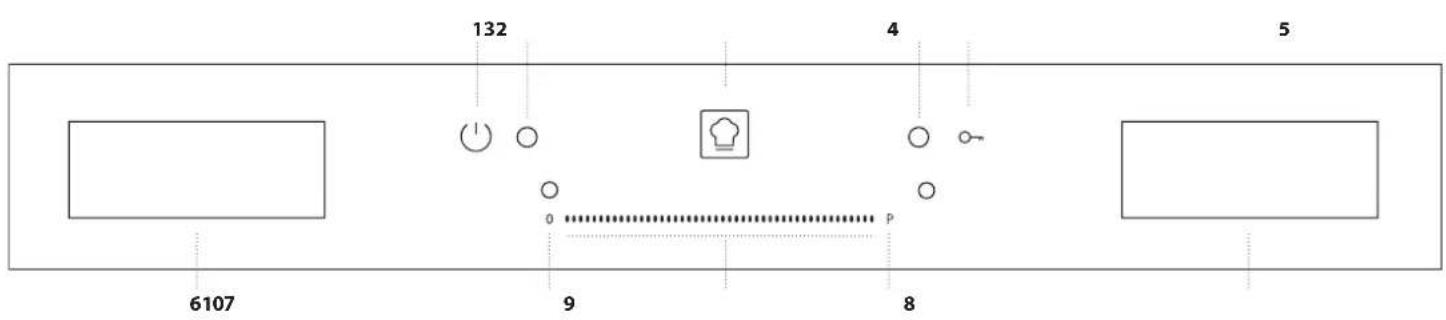
ACTIVATE/DEACTIVATE COOKING ZONES AND ADJUST POWER
To activate the cooking zones:
CL 1 400011626022 EN-DE-FR-NL-IT-ES-PT
CL 2 400011626023 PL-CS-SK-EL-RO-TR
CL 2 400011626024 RU-UK-DA-NO-SV-AR

400011626022
- FMY 808 I FP BK
- SAFETY INFORMATION
- IMPORTANT TO BE READ AND OBSERVED
- PERMITTED USE
- INSTALLATION
- ELECTRICAL WARNINGS
- CLEANING AND MAINTENANCE
- DISPOSAL OF PACKAGING MATERIALS
- DISPOSAL OF HOUSEHOLD APPLIANCES
- ENERGY SAVING TIPS
- DECLARATION OF CONFORMITY
- NOTE
- ELECTRICAL CONNECTION
- ACCESSORIES
- POTS AND PANS
- EMPTY POTS OR POTS WITH A THIN BASE
- FIRST TIME USE
- DAILY USE
- SWITCHING THE HOB ON/OFF
- SELECTING THE COOKING ZONE
- SELECTING THE FLEXIBLE AREA
- MINIMUM DIAMETER OF POT/PAN BASE FOR THE DIFFERENT COOKING AREAS
- ADJUSTING THE POWER OF THE HOB
- TO CREATE A FLEXIBLE AREA
- TO DIVIDE A FLEXIBLE AREA
- ACTIVATING/DEACTIVATING COOKING ZONES AND ADJUSTING POWER
- TO ACTIVATE THE COOKING ZONES
- TO DEACTIVATE THE COOKING ZONES
- KEY LOCK
- TIMER
- TO ACTIVATE THE TIMER
- TO CHANGE OR DEACTIVATE THE TIMER
- SETTING THE COOKING TIME
- TO SET THE COOKING TIME
- TO CHANGE OR DEACTIVATE THE COOKING TIMER
- FUNCTIONS
- COOKASSIST
- EASYCOOK
- TO ACTIVATE THE EASYCOOK FUNCTION
- TO ACTIVATE THE EASYCOOK FUNCTION FOR MORE THAN ONE COOKING ZONE
- TO COOK TRADITIONALLY WHEN THE EASYCOOK FUNCTION IS ACTIVE
- MAIN COOKING METHODS
- MELTING
- SIMMERING
- BOILING
- PAN FRYING
- GRILLING
- MOKA
- PROCOOK
- TO ACTIVATE THE PROCOOK FUNCTION
- TO CHANGE THE POWER OF A COOKING ZONE
- FLEXPRO
- TO ACTIVATE THE FLEXPRO FUNCTION
- INDICATORS
- RESIDUAL HEAT
- WARNING
- IMPORTANT
- TROUBLESHOOTING
- SOUNDS PRODUCED DURING OPERATION
- VERIFIED COOKING
- SUPPORT
- DÉCLARATION DE CONFORMITÉ
- BRANCHEMENT ÉLECTRIQUE
- SELECTING THE FLEXIBLE ZONE
- ACTIVATE/DEACTIVATE AND ADJUST THE POWER OF THE COOKING ZONES
- TABLE OF CONTENTS
- ACTIVATE/DEACTIVATE COOKING ZONES AND ADJUST POWER
Brand : FRANKE
Model : FMY 808 I FP BK
Category : Cooker