
FC-26CW - Air-conditioner BRANDT - Free user manual and instructions
Find the device manual for free FC-26CW BRANDT in PDF.


| Product type | Portable air conditioner |
| Brand | BRANDT |
| Model | FC-26CW |
| Power supply | 220-240 V ~ 50 Hz |
| Power consumption | 1500 W |
| Dimensions (W x D x H) | 495 x 350 x 310 mm |
| Net weight | 6.8 kg |
| Cooling capacity | 9000 BTU (estimated) |
| Cooling mode | Cooling, fan, dehumidification |
| Adjustable thermostat | Yes, from 16°C to 30°C |
| Built-in timer | Yes, up to 24 hours |
| Remote control | Yes |
| Air exhaust | Via flexible hose (included) |
| Noise level | ~ 55 dB |
| Energy class | A (estimated) |
| Refrigerant | R32 (estimated) |
| Maintenance and cleaning | Clean the filters regularly with a vacuum cleaner or soapy water. Clean the housing with a damp cloth. Unplug before cleaning. |
| Safety | Anti-freeze protection, automatic shut-off in case of overheating |
| Warranty | 2 years |
| After-sales service | Contact BRANDT customer service |
Frequently Asked Questions - FC-26CW BRANDT
User questions about FC-26CW BRANDT
0 question about this device. Answer the ones you know or ask your own.
Ask a new question about this device
Download the instructions for your Air-conditioner in PDF format for free! Find your manual FC-26CW - BRANDT and take your electronic device back in hand. On this page are published all the documents necessary for the use of your device. FC-26CW by BRANDT.
USER MANUAL FC-26CW BRANDT
FR MANUEL D'INSTRUCTION
EN INSTRUCTION MANUAL
Four compact 26L Compact oven 26L
FC-26CB
FC-26CW
Chère Cliente, Cher Client,
Vousexenezd'acquérirun four compactBRANDTetnousyouenremercions.
You have recently purchased a BRANDT compact oven and we would like to thank you for choosing us.
We have put all of our passion and know-how to work in designing this appliance to ensure that it meets all your needs. Innovation and performance are our key words, and we have made ease of use a priority.
Brandt also offers a wide range of other products to complement your new BRANDT compact oven: small domestic appliances, microwave ovens, hobs, ventilation hoods, electronic cookers, dishwashers, refrigerators and freezers.
Of course, in an ongoing effort to satisfy your demands with regard to our products as best as possible, our after-sales service department is available to answer your questions and welcomes any suggestions you may have.
You can also log on to our website at www.brandt.com where you will find listings of all our products, together with further useful information.
As part of our commitment towards constant improvement of our products, we reserve the right to make changes to their technical, functional and/or aesthetic characteristics in line with technological developments.

Warning: Before installing and using your appliance, please read this Guide to Installation and Use carefully. It will help you quickly familiarise yourself with your appliance's operation.
www.brandt.com

TABLE OF CONTENTS
P
1/ INFORMATION FOR THE USER 11
A. Safety recommendations 11
B. Technical data 11
C. Protecting the environment 11
2/ INSTALLING YOUR APPLIANCE 12
A.Countertop installation 12
B. Electrical connection 12
C.Description of your appliance 12
3/ USING YOUR APPLIANCE 13
A.Before using your oven 13
B. Temperature control 13
C. Cooking function selection 13
D. Cooking time setting 13
E.Use recommendations 14
4/ CARING FOR AND CLEANING YOUR APPLIANCE 15
A. Safety recommendations
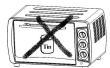
Food cannot be heated directly in a bottle or tin as the bottle or tin could break and contents could end up with the user
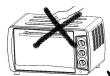
Take care during and immediately after use. The metal parts and glass window of the door come extremely hot during use. Take care not to touch them when opening and closing the door.

Oven surfaces may be hot when in use
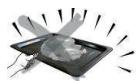
Always use the handle when inserting or removing the tray. Touching the tray may cause severe burns.
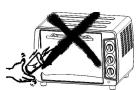
When hot, do not apply water to the glass window. It may cause the glass to break.

When unplugging the oven, always take hold of the plug itself. Never pull on the cord. This could break the wires inside the cord.
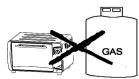
Do not position the oven near a gas burner or any other heat source, and do not direct an electric fan, etc, at the unit during USE. Doing so could affect the temperature control.

Do not touch the power cable or unit with wet hands. Always unplug the cord after use and whenever the unit is left unattended. A malfunction while the plug is inserted into the mains could cause a fire.
When cooking fat-spitting dishes such as roast chicken, it is recommended to use 2 sheets of aluminium foil in order to reduce fat spitting. Place one sheet on the tray and the other over the food. The oil will drip in to the gap between the sheets of foil.

B/ TECHNICAL DATA
| Model no. | FC-26CB / FC-26CW |
| Power supply | 220-240V 50Hz |
| Energy consumption | 1500W |
| Specifications | 495 x 350 x 310 mm |
| Net wt. | 6,8 kg |
C/ PROTECTING THE ENVIRONMENT
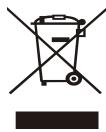
At the end of its working life, the product must not be disposed with household waste. It must be taken to a special local authority waste collection centre or to a company providing this service. Disposing household appliances separately avoids possible negative effects on the environment and health and enables the constituent materials to be recycled which saves energy and resources.
To remind you that you must dispose of this appliance correctly the symbol shown above appears on
the product warning you not to dispose of it with household waste.
For further information, contact your local authority or the shop where you bought the product.
2/ INSTALLING YOUR APPLIANCE
A. Countertop installation
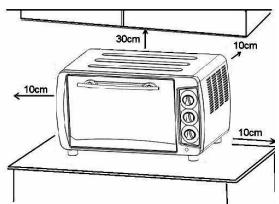
If the oven is positioned too close to a wall it may be burned or stained. Ensure curtains etc. are not in contact with the oven.
Do not put anything between the base of the oven and the surface on which it is set. Any object under the over may be burned
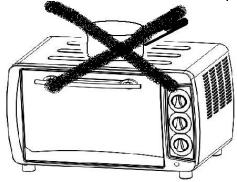
Do not put anything on top of the oven when it is use, the heat could deform, crack, etc the item.
B. Electrical connection
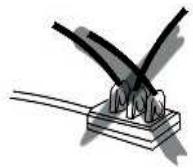
The oven must be connected to a properly wired power outlet. Insert the plug fully into the socket. If it is not properly connected, it could overheat. Do not use an electric light outlet. Never connect multiple plugs to the same power outlet
C. Description of your appliance
Oven
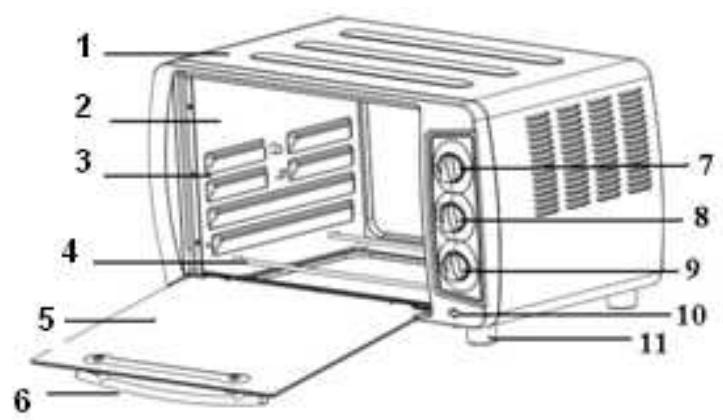
- Housing
- Cavity
- Rack support
- Heating element
- Glass
- Door handle
- Temperature control
- Function selector
- Timer knob
- Indicator light
- Stand
- Accessories
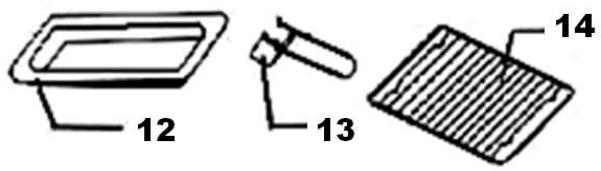
- Baking tray
- Tray handle
- Wire rack
A. Before using the oven for the first time
Heat the oven with nothing inside it.
- Insert the tray and wire rack.
- Set the cooking function switch to "UPPER & LOWER", set the temperature control knob to "250°C" and heat the empty oven for about 10 minutes.

There may be some smoke and a burning smell at first, but this is not a malfunction.
B. Temperature control
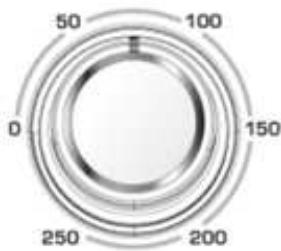
Set the Temperature Control Dial to the suitable temperature for the dish you are cooking.
Set the "Temperature Control" by turning the knob clockwise to the suitable temperature for the dish you are cooking. (Temperature Control range up to 250^ )
B. Cooking function selection
Select the suitable cooking function for the dish you are cooking.
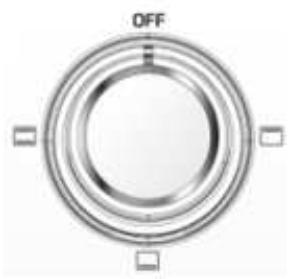
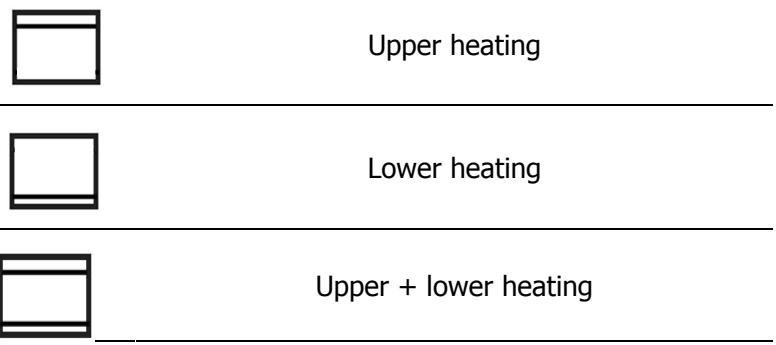

Beware of hot dripping fat!
D. Cooking time setting
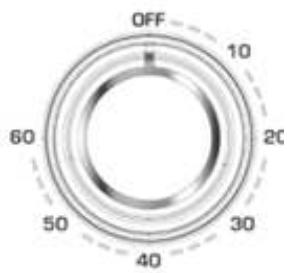
- Move the "Timer" arrow to the number which indicates the cooking time (minutes) depending on the dish you are cooking.
- Set the "Timer" by turning it clockwise.
You can check whether the heating elements are working or not by looking at the front Indicator light.
The oven will turn off automatically at the end of the selected time and a bell will ring.
3. The oven can be turned off manually during cooking by turning the "Timer" anti-clockwise to the "OFF" position.
Note:
If the inside of the oven is dirty, cooking may take slightly longer than usual.
| Type of food | Number or thickness | Temperature(℃) | Timer (min.) |
| Sandwich | 2-3 pcs | 200 | 2-3 |
| Toast | 2-4 pcs | 250 | 2-5 |
| Hamburger | 2-3 pcs | 200 | 3-5 |
| Fish | / | 200 | 7-10 |
| Ham | 2 cm | 200 | 7-12 |
| Sausage | 3-4 pcs | 200-250 | 8-10 |
| Cake | / | 150 | 20-30 |
| Steak | 1-2 cm | 250 | 10-15 |
| Chicken | Half chicken | 180-200 | 30-40 |
E. Use recommendations
- Baking Tray and Wire Rack
| Accessory | Food (For Ref. only) | How to use Tray Handle |
| Baking Tray | Roast chicken wings, hamburgers, gratin, cakes, most other oven-cooked foods | |
| Note : We recommend you use it as crumb tray. | ||
| Wire Rack | Baked potatoes, dry food | |
| Baking Tray and Wire Rack | For food which will drip, e.g. boiled fish etc. | |

Take care when removing pudding and hot liquids.
Rack Support
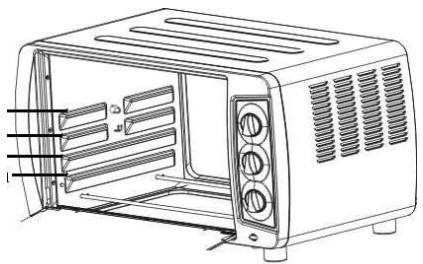
There are 4 different positions for the tray which you can adjust according to the dish you are cooking. For example, when cooking macaroni gratin, to have the top part cooked the most, use the top or second position. For roasting a chicken, use the fourth or bottom position.
4/ CLEANING & MAINTENANCE
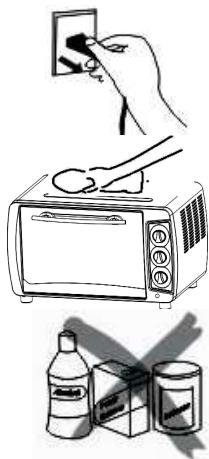
Unplug and allow the oven to cool completely before cleaning.
When cleaning, use a soft cloth (or sponge) and neutral cleaner on the interior and exterior surfaces of the oven, tray, rack, and rotisserie fork. Then rinse with clean water. Do not use a hard brush or any others cleaners to avoid scratching or damaging the interior surface of the oven, tray, wire rack and the rotisserie fork.
Do not use toxic or abrasive cleaners such as gasoline, polishing powder, solvent.

For safety reasons if the power cable is damaged, it must be replaced by the manufacturer or its servicing company or a qualified person.
Warranty and after-sale service
This product is covered by a 2-year warranty from your retailer. For more details, please refer to the warranty conditions supplied by your retailer.