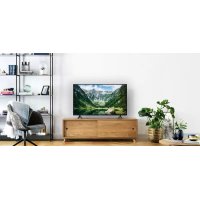
TX43LS500E - Television PANASONIC - Free user manual and instructions
Find the device manual for free TX43LS500E PANASONIC in PDF.



| Product Type | LED Television |
| Brand | Panasonic |
| Model | TX-43LS500E |
| Screen Size | 43 inches (109 cm) |
| Resolution | Full HD (1920 x 1080 pixels) |
| Operating System | Android TV |
| Dimensions (with stand) | 966.8 × 611.1 × 214.5 mm |
| Dimensions (without stand) | 966.8 × 566.4 × 88.5 mm |
| Weight (with stand) | 6.4 kg |
| Weight (without stand) | 6.3 kg |
| Power Supply | 220-240 V~, 50/60 Hz |
| Audio Power | 16 W (2 × 8 W) |
| Connectivity | 2 × HDMI (1 with ARC), 2 × USB 2.0, Ethernet, Wi-Fi, Bluetooth |
| Tuner | DVB-T/T2, DVB-C, DVB-S/S2 |
| Smart Features | Google Assistant, Chromecast built-in, Netflix, Prime Video, YouTube |
| VESA Standard | 200 × 100 mm |
| Operating Temperature | 0 °C to 45 °C |
| Operating Humidity | 20 % to 80 % RH (non-condensing) |
Frequently Asked Questions - TX43LS500E PANASONIC
User questions about TX43LS500E PANASONIC
0 question about this device. Answer the ones you know or ask your own.
Ask a new question about this device
Download the instructions for your Television in PDF format for free! Find your manual TX43LS500E - PANASONIC and take your electronic device back in hand. On this page are published all the documents necessary for the use of your device. TX43LS500E by PANASONIC.
USER MANUAL TX43LS500E PANASONIC
Operating Instructions
LED TV
Model No.
TX-24LS500E
TX-32LS500E
TX-43LS500E
natural_image
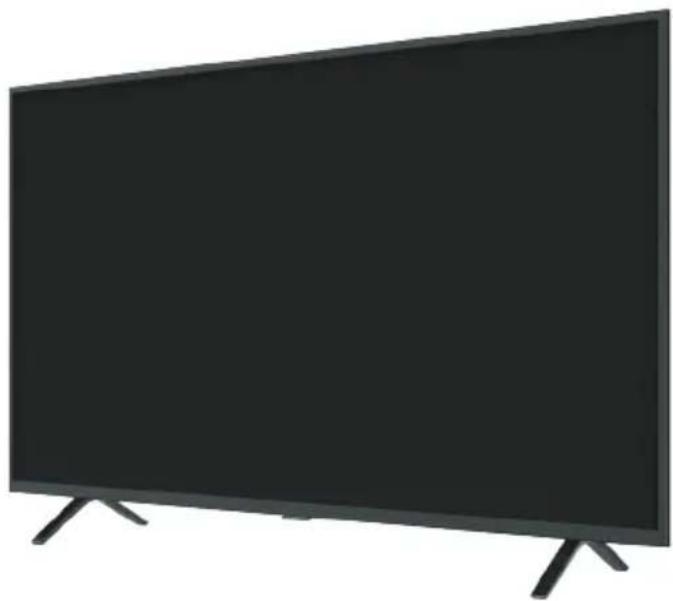
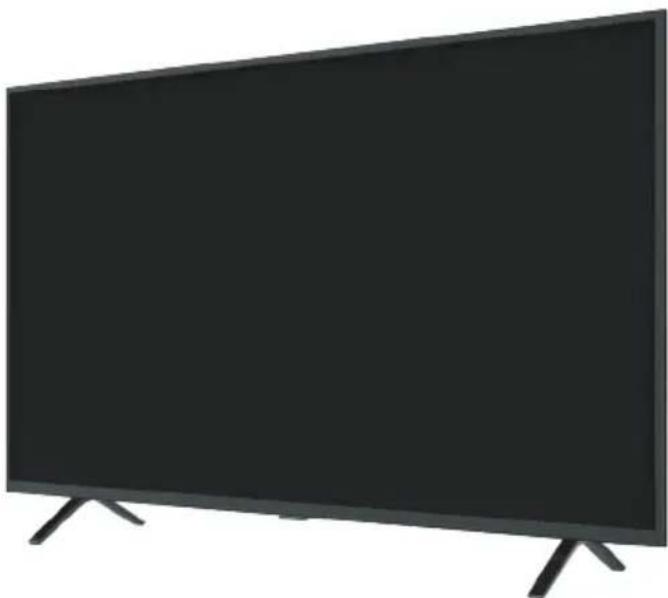
Front view of a modern black flat-screen TV with visible screen edges and legs (no text or symbols)(image: TX-43LS500E)
English
Eesti
Български
Polski
Dansk
Deutsch
Français
Suomi
Nederlands
Čeština
Hrvatski
Latviski
Lietuvių
Thank you for purchasing this Panasonic product.
Please read these instructions carefully before operating this product and retain them for future reference.
Please carefully read the "Safety Precautions" of this manual before use.
The images shown in this manual are for illustrative purposes only.
Please refer to Pan European Guarantee Card if you need to contact your local Panasonic dealer for assistance.
Contents
Be Sure to Read
Important Notice ....3
Safety Precautions ....5
Setting Up the TV....9
Connecting the TV....11
Initial Setup....13
Operating the TV 14
Watching External Inputs....16
Using Homepage - Apps....17
Using the Menu Functions....18
Using Media Player 21
Additional Information....22
Troubleshooting....23
Maintenance....24
Specifications 25
Oss License....27
HEVCAvance™ Covered by Patents at patentlist.hevcadvance.com
Dolby Audio
The terms HDMI, HDMI High-Definition Multimedia Interface, and the HDMI Logo are trademarks or registered trademarks of HDMI Licensing Administrator, Inc.
Dolby, Dolby Audio, and the double-D symbol are trademarks of Dolby Laboratories. Manufactured under license from Dolby Laboratories. Confidential unpublished works. Copyright © 1992-2015 Dolby Laboratories. All rights reserved.
Wi-Fi ^ is a registered trademark of Wi-Fi Alliance ^ . WPA2 ^TM , WPA ^TM are trademarks of Wi-Fi Alliance ^ .
The Bluetooth ^® word mark and logos are registered trademarks owned by Bluetooth SIG, Inc. and any use of such marks by Panasonic Corporation is under license.
DVB and the DVB logos are trademarks of the DVB Project.
x.v.Colour ^TM is a trademark.
DiSEqC ^TM is a trademark of EUTELSAT.
Google is a trademark of Google LLC.
Amazon, Prime Video and all related logos are trademarks of Amazon.com, Inc. or its affiliates.
This product complies with the UHD Alliance Technical Specification: UHDA Specified Reference Mode, Version 1.0. FILMMAKER MODE™ logo is a trademark of the UHD Alliance, Inc. in the United States and other countries.
The illustration for TX-43LS500E is used in this manual unless otherwise mentioned. Illustrations shown may be different depending on the model.
Important Notice
Notice for DVB/Data broadcasting/ IPTV functions
- This TV is designed to meet the standards (as of December, 2020) of DVB-T/T2 (MPEG2, MPEG4-AVC (H.264) and MPEG HEVC (H.265)) digital terrestrial services, DVB-C (MPEG2, MPEG4-AVC (H.264) and MPEG HEVC (H.265)) digital cable services and DVB-S (MPEG2, MPEG4-AVC (H.264) and MPEG HEVC (H.265)) digital satellite services.
Consult your local dealer for availability of DVB-T/T2 or DVB-S services in your area.
Consult your cable service provider for availability of DVB-C services with this TV.
- This TV may not work correctly with the signal which does not meet the standards of DVB-T/T2, DVB-C or DVB-S.
- Not all the features are available depending on the country, area, broadcaster, service provider, satellite and network environment.
- Not all CI modules work properly with this TV. Consult your service provider about the available CI module.
- This TV may not work correctly with CI module that is not approved by the service provider.
- Additional fees may be charged depending on the service provider.
- Compatibility with future services is not guaranteed.
Internet apps, voice control function are provided by their respective service providers, and may be changed, interrupted, or discontinued at any time.
Panasonic assumes no responsibility and makes no warranty for the availability or the continuity of the services.
Panasonic does not guarantee operation and performance of peripheral devices made by other manufacturers; and we disclaim any liability or damage arising from operation and/or performance from usage of such other maker's peripheral devices.

Do not touch or be close to the ANTENNA, SATELLITE IN and HDMI, and prevent electrostatic discharge to disturb, these terminals while in USB and LAN operation mode, or it will cause the TV to stop working or abnormal status.
Handling of customer information
Certain customer information such as IP address of your device (this TV)'s network interface will be collected as soon as you connect your Panasonic-branded smart television (this TV) or other devices to the internet (excerpted from our privacy policy). We do this to protect our customers and the integrity of our Service as well as to protect the rights or property of Panasonic.
When using Internet connecting function of this TV, after agreeing (in the jurisdictions where customer's consent is required to collect personal information under applicable privacy laws) to or reviewing Panasonic's terms of service/privacy policy (hereinafter referred to as terms and conditions etc.), customer information on the use of this unit may be collected and used according to terms and conditions etc.
- Panasonic will not be held responsible for collecting or using customer information via application provided by third party on this TV or website.
- When entering your credit card number, name, etc., pay special attention to the trustworthiness of the provider.
- Registered information may be registered in the server etc. of provider. Before repairing, transferring or discarding this TV, be sure to erase the information according to the terms and conditions etc. of provider.
The recording and playback of content on this or any other device may require permission from the owner of the copyright or other such rights in that content. Panasonic has no authority to and does not grant you that permission and explicitly disclaims any right, ability or intention to obtain such permission on your behalf. It is your responsibility to ensure that your use of this or any other device complies with applicable copyright legislation in your country. Please refer to that legislation for more information on the relevant laws and regulations involved or contact the owner of the rights in the content you wish to record or playback.
This product is licensed under the AVC patent portfolio license for the personal use of a consumer or other uses in which it does not receive remuneration to (i) encode video in compliance with the AVC Standard ("AVC Video") and/or (ii) decode AVC Video that was encoded by a consumer engaged in a personal activity and/or was obtained from a video provider licensed to provide AVC Video. No license is granted or shall be implied for any other use.
Additional information may be obtained from MPEG LA, L.L.C.
See http://www.mpegla.com.

This mark indicates the product operates on AC voltage.

This mark indicates a Class II or double insulated electrical appliance wherein the product does not require a safety connection to electrical earth (ground).
Transport only in upright position.
Safety Precautions
To help avoid risk of electrical shock, fire, damage or injury, please follow the warnings and cautions below:

Mains plug and lead
Warning
If you detect anything unusual, immediately remove the mains plug.

• Mains plug types vary between countries.
- This TV is designed to operate on AC \~ 220-240 V, 50/60 Hz.
- Insert the mains plug fully into the mains socket.
- To turn off the apparatus completely, you must pull the mains plug out of the mains socket.
Consequently, the mains plug should be easily accessible at all times.
- Disconnect the mains plug when cleaning the TV.
- Do not touch the mains plug with wet hands.

• Do not damage the mains lead.
- Do not place a heavy object on the lead.


- Do not place the lead near a high temperature object.

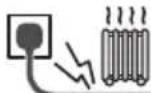
- Do not pull on the lead. Hold onto the mains plug body when disconnecting the plug.

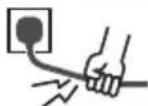
- Do not move the TV with the lead plugged into a mains socket.
- Do not twist the lead, bend it excessively or stretch it.
- Do not use a damaged mains plug or mains socket.
- Ensure the TV does not crush the mains lead.

Take care
Warning
- Do not remove covers and never modify the TV yourself as live parts are accessible and risk of electric shock when they are removed. There are no user serviceable parts inside.


- Do not expose the TV to rain or excessive moisture. This TV must not be exposed to dripping or splashing water and objects filled with liquid, such as vases, must not be placed on top of or above the TV.


- Do not insert foreign objects into the TV through the air vents.
- If the TV is used in an area where insects may easily enter the TV.
It is possible for insects to enter the TV, such as small flies, spiders, ants, etc. which may cause damage to the TV or become trapped in an area visible on the TV, e.g. within the screen.
- If the TV is used in an environment where there is dust or smoke.
It is possible for dust/smoke particles to enter the TV through the air vents during normal operation which can become trapped inside the unit. This may cause overheating, malfunction, deterioration in picture quality, etc.
- Do not use an unapproved pedestal/mounting equipment. Be sure to ask your local Panasonic dealer to perform the setup or installation of approved wall-hanging brackets.
- Do not apply any strong force or impact to the display panel.
• Ensure that children do not climb on the TV. - Do not place the TV on sloping or unstable surfaces, and ensure that the TV does not hang over the edge of the base.


Warning Stability Hazard
A TV may fall, causing serious personal injury or death. Many injuries, particularly to children, can be avoided by taking simple precautions such as:
- ALWAYS use cabinets or stands or mounting methods recommended by the manufacturer of the TV.
- ALWAYS use furniture that can safely support the TV.
- ALWAYS ensure the TV is not overhanging the edge of the supporting furniture.
- ALWAYS educate children about the dangers of climbing on furniture to reach the TV or its controls.
- ALWAYS route cords and cables connected to your TV so they cannot be tripped over, pulled or grabbed.
- NEVER place a TV in an unstable location.
- NEVER place the TV on tall furniture (for example, cupboards or bookcases) without anchoring both the furniture and the TV to a suitable support.
- NEVER place the TV on cloth or other materials that may be located between the TV and supporting furniture.
- NEVER place items that might tempt children to climb, such as toys and remote controls, on the top of the TV or furniture on which the TV is placed.
If the existing TV is going to be retained and relocated, the same considerations as above should be applied.
• This TV is designed for table-top use.
- Do not expose the TV to direct sunlight and other sources of heat.

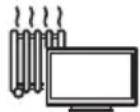
To prevent the spread of fire, keep candles or other open flames away from this product at all times

■ Suffocation/Choking Hazard
Warning
- The packaging of this product may cause suffocation, and some of the parts are small and may present a choking hazard to young children. Keep these parts out of reach of young children.
Pedestal
Warning
- Do not disassemble or modify the pedestal.
English
Caution
- Do not use any pedestal other than the one provided with this TV.
- Do not use the pedestal if it becomes warped or physically damaged. If this occurs, contact your nearest Panasonic dealer immediately.
- During setup, make sure that all screws are securely tightened.
- Ensure that the TV does not suffer any impact during installation of the pedestal.
- Ensure that children do not climb onto the pedestal.
- Install or remove the TV from the pedestal with at least two people.
- Install or remove the TV according to the specified procedure.
Radio waves
Warning
- Do not use the TV and the remote control in any medical institutions or locations with medical equipment. Radio waves may interfere with the medical equipment and may cause accidents due to malfunction.
- Do not use the TV and the remote control near any automatic control equipment such as automatic doors or fire alarms. Radio waves may interfere with the automatic control equipment and may cause accidents due to malfunction.
- Keep at least 15 cm away from the TV and the remote control if you have a cardiac pacemaker. Radio waves may interfere with the operation of the pacemaker.
- Do not disassemble or alter the TV and the remote control in any way.
Common Interface
- Turn the TV off with Mains power On/Off switch whenever inserting or removing the CI module.
- If a smart card and a CI module come as a set, first insert the CI module, then insert the smart card into the CI module.
- Insert or remove the CI module completely in the correct direction as shown.
- Normally encrypted channels will appear. (Viewable channels and their features depend on the CI module.)
If encrypted channels do not appear
→ [Common Interface] ([Setup] menu)
- There might be some CI modules in the market with older firmware versions that do not work fully interoperable with this new CI+ v1.4 TV. In this case, please contact your content provider.
- Be sure to remove the CI module card, etc. before repairing, transferring or discarding.
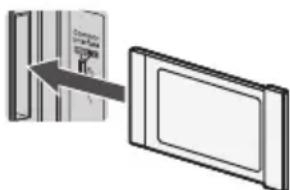
CI module

Built-in wireless LAN
Caution
- Do not use the built-in wireless LAN to connect to any wireless network (SSID*) for which you do not have usage rights. Such networks may be listed as a result of searches. However, using them may be regarded as illegal access.
* SSID is a name for identifying a particular wireless network for transmission. - Do not subject the built-in wireless LAN to high temperatures, direct sunlight or moisture.
• Data transmitted and received over radio waves may be intercepted and monitored. - The built-in wireless LAN uses 2.4 GHz and 5 GHz frequency bands. To avoid malfunctions or slow response caused by radio wave interference when using the built-in wireless LAN, keep the TV away from other devices that use 2.4 GHz and 5 GHz signals such as other wireless LAN devices, microwave ovens, and mobile phones.
- When problems occur due to static electricity, etc., the TV might stop operating to protect itself. In this case, turn the TV off at the Mains power On/Off switch, then turn it back on.

Bluetooth® wireless technology
Caution
- The TV and the remote control use the 2.4 GHz radio frequency ISM band (Bluetooth®). To avoid malfunctions or slow response caused by radio wave interference, keep the TV and the remote control away from the devices such as other wireless LAN devices, other Bluetooth® devices, microwaves, mobile phones and the devices that use 2.4 GHz signal.

Ventilation
Caution
Allow sufficient space (at least 10 cm) around the TV in order to help prevent excessive heat, which could lead to early failure of some electronic components.

(cm)
- Ventilation should not be impeded by covering the ventilation openings with items such as newspapers, tablecloths and curtains.

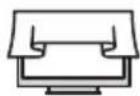
- Whether you are using a pedestal or not, always ensure the vents at the bottom of the TV are not blocked and there is sufficient space to enable adequate ventilation.

Moving the TV
Caution
Before moving the TV, disconnect all cables.
- At least two people are required to move the TV to prevent injury that may be caused by the tipping or falling of TV.
- Do not hold the screen part as shown below when moving the TV. This may cause malfunction or damage.


When not in use for a long time
Caution
This TV will still consume some power even in the Off mode, as long as the mains plug is still connected to a live mains socket.
- Remove the mains plug from the wall socket when the TV is not in use for a prolonged period of time.

Excessive volume
Caution
- Do not expose your ears to excessive volume from the headphones. Irreversible damage can be caused.


- If you hear a drumming noise in your ears, turn down the volume or temporarily stop using the headphones.
Battery for the Remote Control
Warning
- Keep the batteries out of reach of children to prevent swallowing. Adverse physical effects can result if accidentally swallowed. If you suspect a child has swallowed one, seek medical attention immediately.
Caution
- Incorrect installation may cause battery leakage, corrosion and explosion.
- Replace only with the same or equivalent type.
• Do not mix old and new batteries. - Do not mix different battery types (such as alkaline and manganese batteries).
• Do not use rechargeable batteries (Ni-Cd, etc.).
• Do not bum or break up batteries. - Do not expose batteries to excessive heat such as sunshine, fire or the like.
• Make sure you dispose of batteries correctly. - Remove the battery from the unit when not using for a prolonged period of time to prevent battery leakage, corrosion and explosion.
LED TV
Declaration of Conformity (DoC)
"Hereby, Panasonic Corporation declares that this TV is in compliance with the essential requirements and other relevant provisions of the Directive 2014/53/EU." If you want to get a copy of the original DoC of this TV, please visit the following website: https://www.ptc.panasonic.eu/compliance-documents
Authorized Representative:
Panasonic Testing Centre
Panasonic Marketing Europe GmbH
Winsbergring 15, D-22525 Hamburg, Germany

5.15 — 5.35 GHz band of wireless LAN is restricted to indoor operation only in the following countries.
Austria, Belgium, Bulgaria, Czech Republic, Denmark, Estonia, France, Germany, Iceland, Italy, Greece, Spain, Cyprus, Latvia, Liechtenstein, Lithuania, Luxembourg, Hungary, Malta, Netherlands, Norway, Poland, Portugal, Romania, Slovenia, Slovakia, Turkey, Finland, Sweden, Switzerland, Croatia Maximum radio-frequency power transmitted in the frequency bands
| Type of wireless | Frequency band | Maximum EIRP |
| Wireless LAN | 2412-2472 MHz | 18 dBm |
| 5150-5250 MHz | 18 dBm | |
| 5725-5850 MHz | 13.7 dBm | |
| Bluetooth® | 2402-2480 MHz | 7 dBm |

Moving the TV
Caution
Before moving the TV, disconnect all cables.
- Move the TV with at least two people. Support as shown to avoid injury by the TV tipping or falling.

natural_image
Illustration of two workers exchanging a package with a magnified inset showing hand gesture (no text or symbols)
Use conditions
Caution
- This appliance is intended for use in tropical climates.
Setting Up the TV
Supplied accessories
Accessories may not be placed all together. Take care not to throw them away unintentionally.
Operating Instructions
Remote Control
- RC700E
→ (p.14)

Batteries (AAA) × 2
→ (p.10)
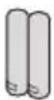
Mini Jack Adapter
Adapter AV

Pedestal
24-inch model
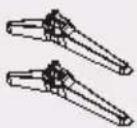
• Assembly screws

(ST3 × 12) × 4
Base
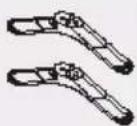
32-inch model
• Assembly screws

(ST4 × 15) × 4
Base
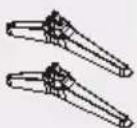
43-inch model
• Assembly screws

(ST4 × 20) × 4
Base
Attaching the pedestal
1 Assemble the pedestal
natural_image
Technical line drawing of a flat-screen monitor with screw base and labeled component A (no text or symbols beyond labels)Removing the pedestal from the TV
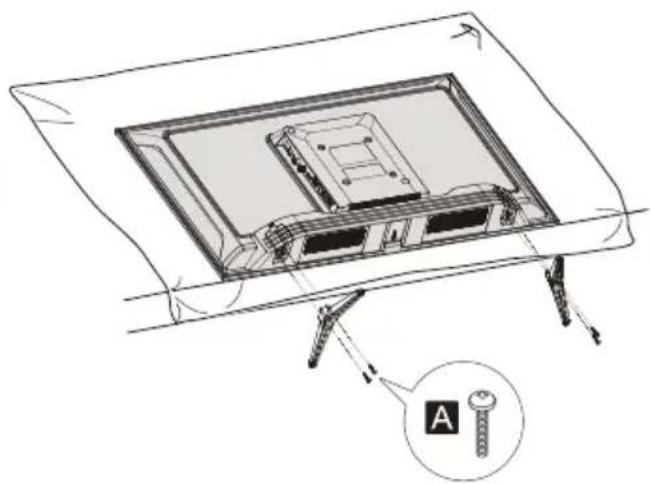
Be sure to remove the pedestal in the following way when using the wall-hanging bracket or repacking the TV.
1 Lay the TV on a foam mat or thick soft cloth on a table.
2 Remove the assembly screws A from the TV.
Inserting remote's batteries

Wall mounting the TV (optional)
Please contact your local Panasonic dealer to purchase the recommended wall-hanging bracket.
Rear of the TV (View from the side)
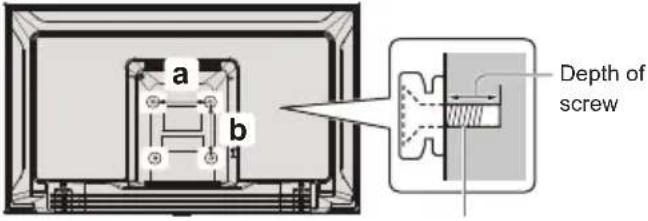
Screw for fixing the TV onto the wall-hanging bracket (not supplied)
Holes for wall-hanging bracket installation
Model a b
| 24-inch 200 mm 100 mm |
| 32-inch 100 mm 100 mm |
| 43-inch 200 mm 100 mm |
Screw specification
| Model Type | Depth of screw | |
| Minimum | Maximum | |
| 24-inch M4 11 mm 12 mm | ||
| 32-inch M4 8 mm | 9 mm | |
| 43-inch M6 10 mm 12 mm | ||
Warning
- When optional accessories such as wall brackets etc. are used, always read and follow the manufacturer installation and usage instructions.
- Do not mount the unit directly below ceiling lights (such as spotlights or halogen lights) which typically give off high heat. Doing so may warp or damage plastic cabinet parts.
- When installing wall brackets you must ensure the wall bracket is not electrically grounded to metal wall studs. Always ensure that there are no electrical cables, pipes etc. in the wall before you begin the wall bracket installation.
- To prevent fall and injury, remove the TV from its fixed wall position when it is no longer in use.
Connecting the TV
- Please ensure the TV is disconnected from the mains socket/power point before attaching or disconnecting any RF/AV leads.
- External equipment and cables are for illustrative purposes only and not supplied with this TV.
- Check the type of terminals and cable plugs are correct when connecting.
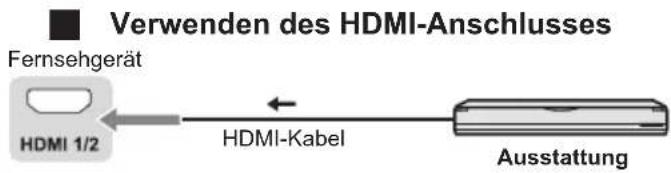
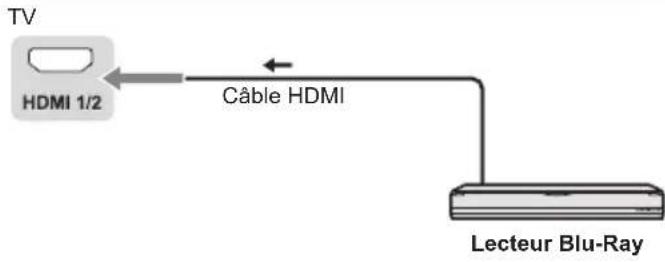
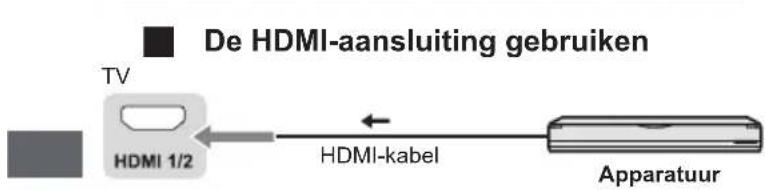
- When using an HDMI cable, use the fully wired one.
- Keep the TV away from electronic equipment (video equipment, etc.) or equipment with an infrared sensor. Otherwise, distortion of image/sound may occur or operation of other equipment may be interfered.
- Also read the manual of the equipment being connected.
Terminals
Rear of the TV

Connections
Aerial

flowchart
graph TD
    A["Antenna"] -->|Aerial| B["RF Cable"]
    B --> C["Aerial"]
    style A fill:#f9f,stroke:#333
    style B fill:#ccf,stroke:#333
    style C fill:#cfc,stroke:#333
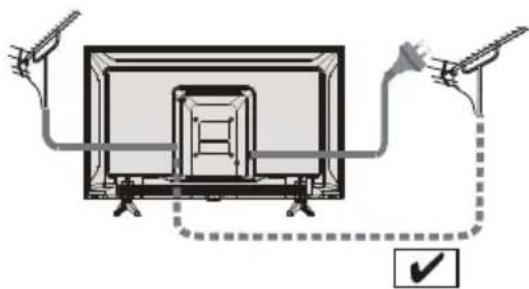
- Keep RF (aerial) cable away from the mains lead to avoid and minimise mains interference pickup.
• Do not place the RF cable under the TV. - An aerial, correct cable (75 Ω coaxial) and correct terminating plug are required to obtain optimum quality picture and sound.
- If a communal aerial system is used, you may require the correct connection cable and plug between the wall aerial socket and the TV.
- Your local Television Service Centre or dealer may be able to assist you in obtaining the correct aerial system for your particular area and the accessories required.
- Any matters regarding aerial installation, upgrading of existing systems or accessories required, and the costs incurred, are the responsibility of you, the customer.
- If the aerial is placed in the wrong location, interference might happen.
natural_image
Diagram showing a device with two hands connected to a screen, connected by a dashed line and a checkmark (no text or symbols present)
natural_image
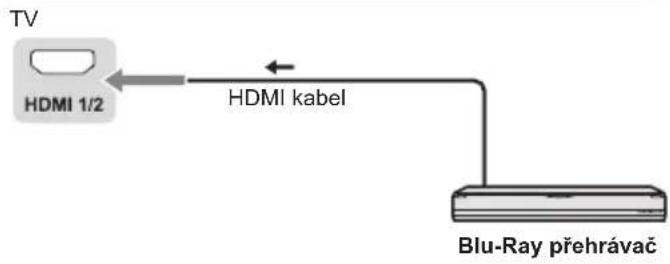
Diagram of a TV setup with cable and antenna connections, no text or symbols presentBlu-Ray Player

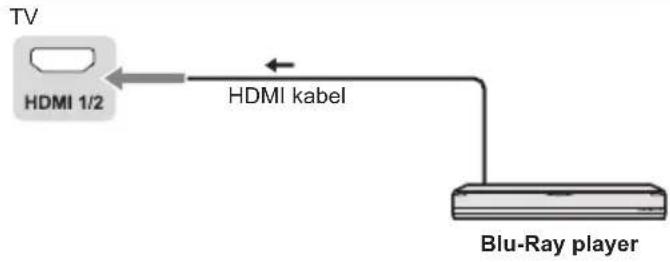
flowchart
graph LR
    TV["TV"] -->|HDMI 1/2| Cable["Hybrid Cable"]
    Cable --> Blu-Ray_Player["Blu-Ray Player"]
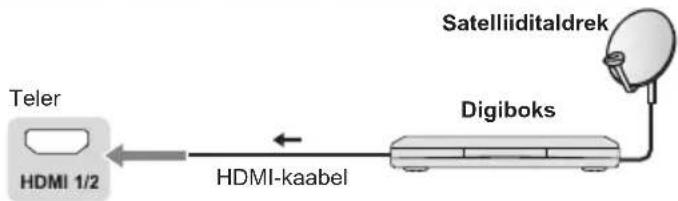
Set top box

flowchart
graph LR
    A["TV"] --> B["HDMI 1/2"]
    B --> C["HDMI cable"]
    C --> D["Set top box"]
    D --> E["Satellite dish"]
AV / Game equipment

flowchart
graph LR
    TV["TV"] -->|HDMI cable| Equipment["Equipment"]
    style TV fill:#99ccff,stroke:#333
    style Equipment fill:#cccccc,stroke:#333
Speaker system

flowchart
graph LR
    TV["TV"] -->|Coaxial cable| Amplifier["Amplifier with speaker system"]
    Amplifier -->|Coaxial cable| TV
Connecting the TV
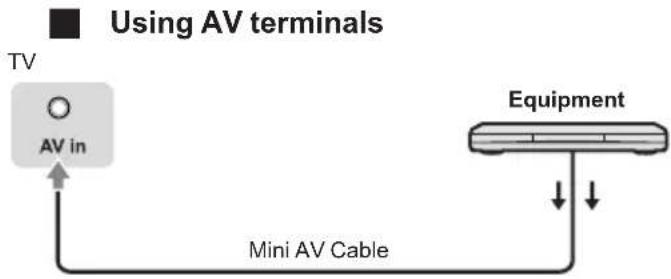
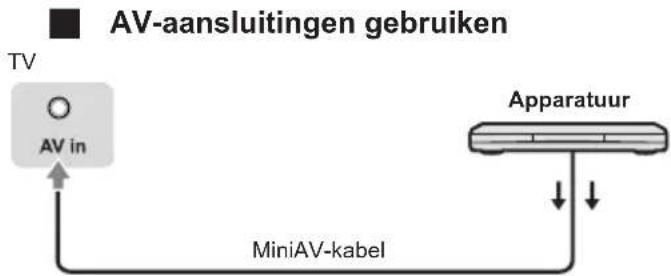
flowchart
graph TD
    A["TV"] --> B["AV in"]
    B --> C["Mini AV Cable"]
    C --> D["Equipment"]
    style A fill:#f9f,stroke:#333
    style D fill:#ccf,stroke:#333
- To enjoy the sound from the external equipment in multi-channel sound (e.g. Dolby Digital 5.1ch), connect the equipment to the amplifier. For the connections, read the manuals of the equipment and amplifier.
DVD Recorder / VCR
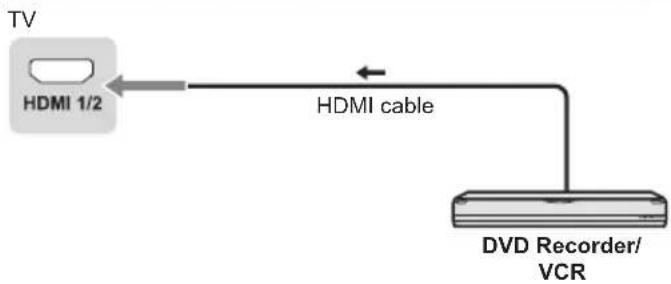
Amplifier
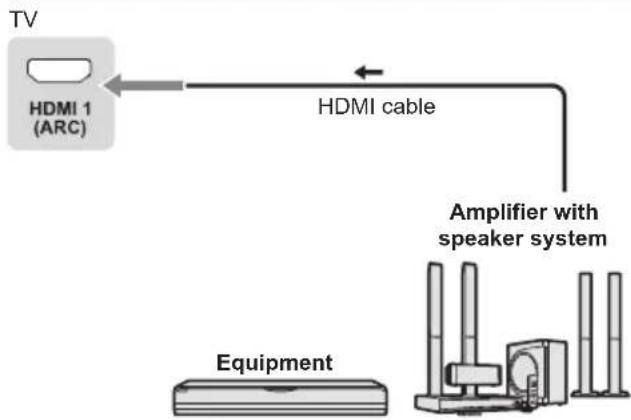
flowchart
graph TD
    A["TV"] --> B["HDMI 1 (ARC)"]
    B --> C["HDMI cable"]
    C --> D["Amplifier with speaker system"]
    D --> E["Equipment"]
- Use HDMI1 to connect the TV to an amplifier which has ARC (Audio Return Channel) function.
Initial Setup
Plug the mains plug into the socket outlet and turn on the TV.
It may take a few seconds before the screen is displayed.

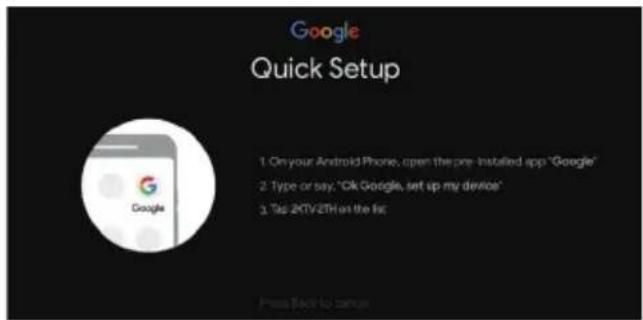
Google - Initial Setup
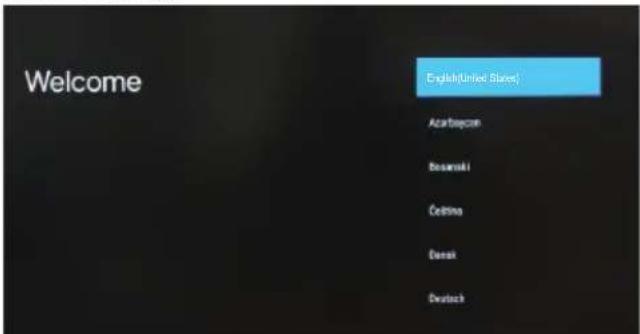
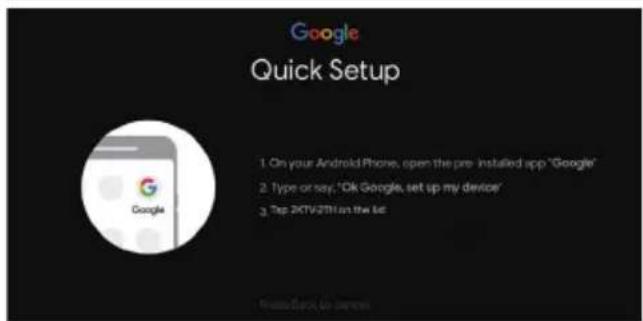
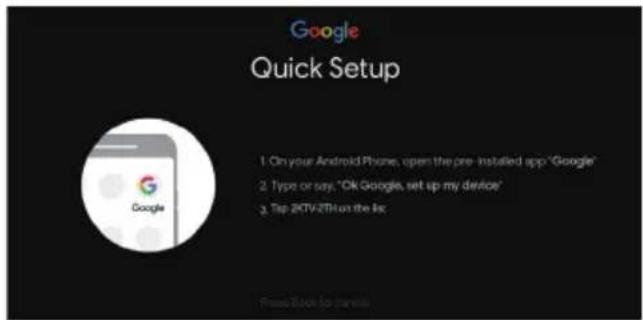
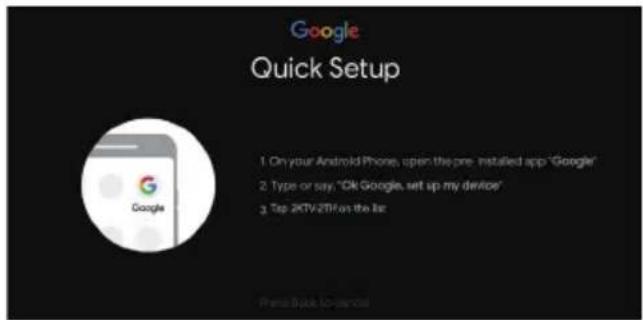
When you turn on the TV for the first time, there will show a wizard to guide you to finish the following initial settings:
Step 1: Select the menu language as you need.
Note: English (United States) is recommended. Illustrations within this publication are provided for reference only.
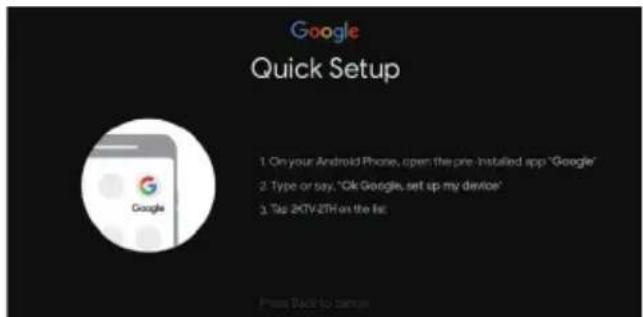
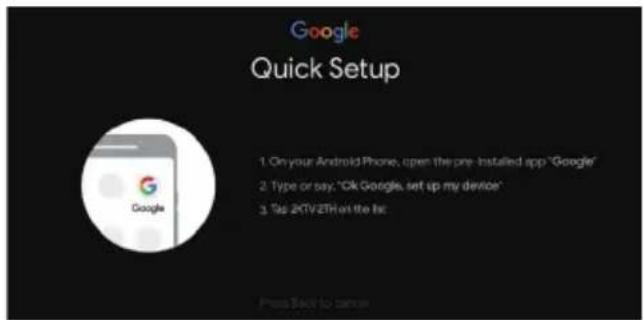
Step 2: (Only for some countries) Select whether or not to use and Android device to setup the TV.

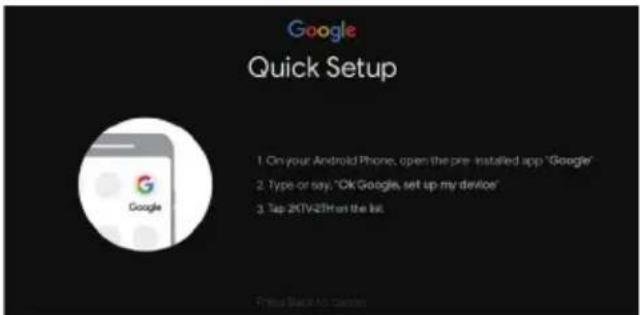
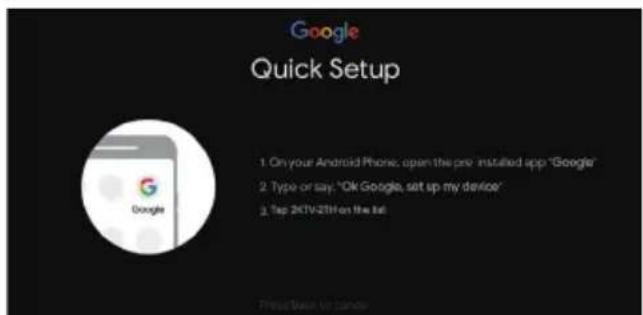
Note: If you don't want to use your Android device to setup the TV, you will skip to Step 3. If you want to use your Android device to setup the TV, please turn on the Bluetooth functions of your Android phone, then find and open "Google" application on your phone. Follow the instruction tips to set device.
Step 3: Select whether or not to connect your TV set to the Wi-Fi network.

Note: If you have connected the TV to the WI-FI network, it will check for updates like Google service updates and so on. Then please select whether or not to sign in to your Google account.
Step 4: Read to accept the Google terms of service and privacy policy.
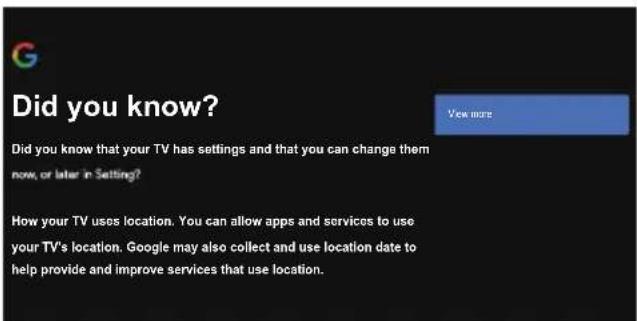
Step 5: Select whether or not to let Google or third party to use your TV location.

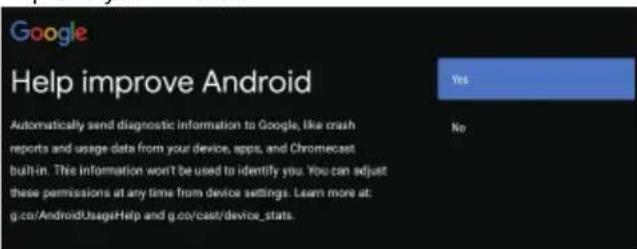
Step 6: Select whether or not to allow Google to help improve your Android TV.
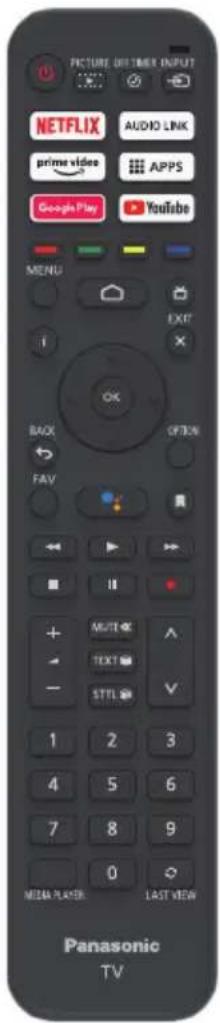
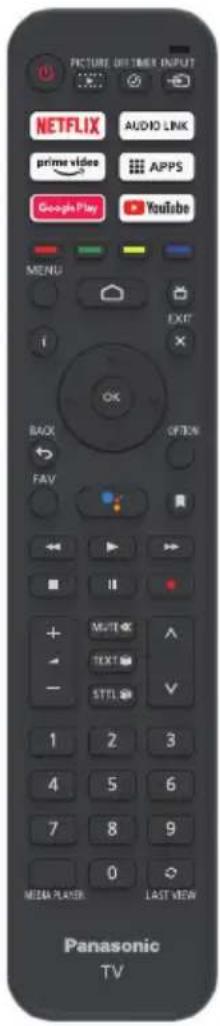
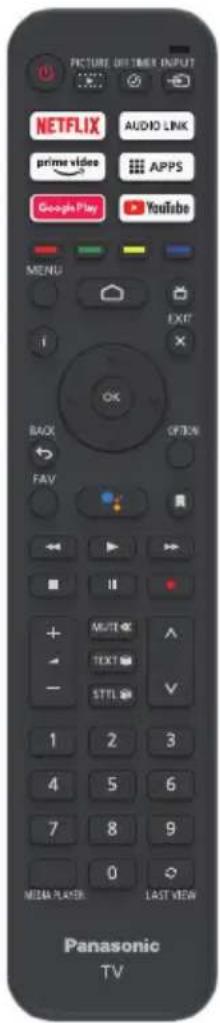
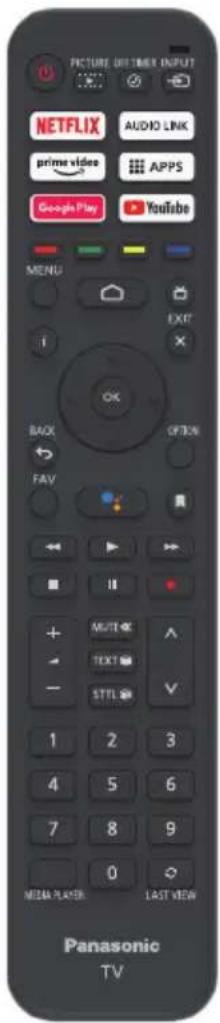
Remote Control Functions
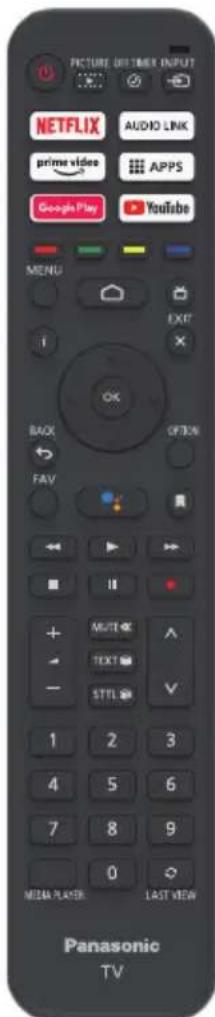
Most of your television's functions are available via the menus that appear on the screen. The remote control supplied with your set can be used to navigate through the menus and to configure all the general settings.
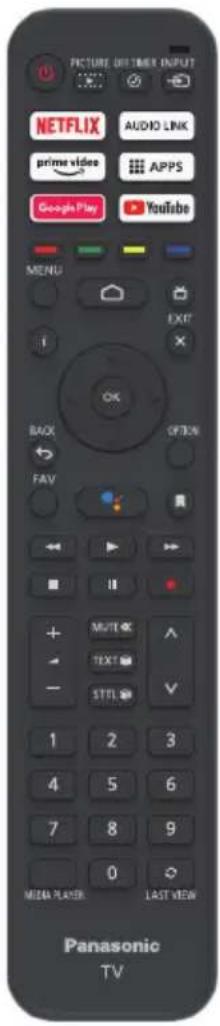
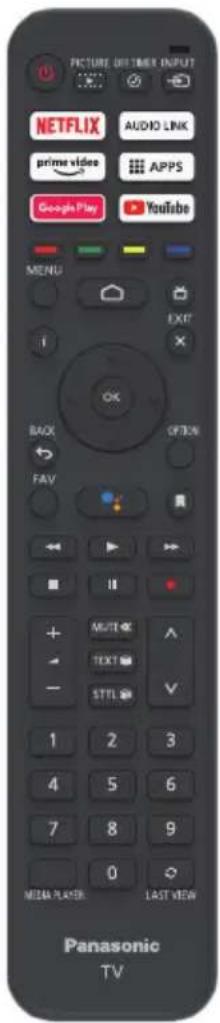
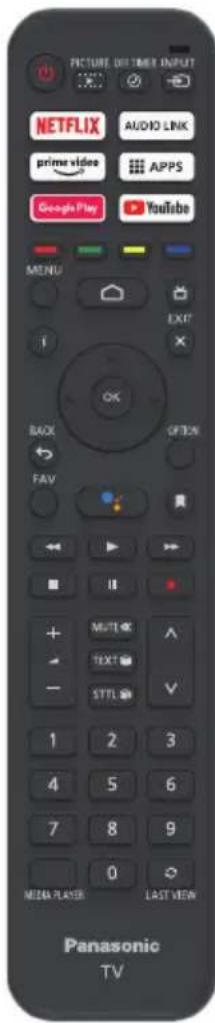
POWER ⏻ (On/Off button) Turns the TV on or off
PICTURE ▶ To enter the picture mode.
OFF TIMER ⏻ To enter the sleep timer.
INPUT → To enter source selection interface
NETFLIX Goes to the NETFLIX homepage
AUDIO LINK Goes to the AUDIO LINK homepage
prime video Goes to the prime video homepage
■ APPS To select the apps
Google Play Goes to the Google Play homepage
YouTube Goes to the YouTube homepage
Colour buttons Performs multiple operations which correspond to the operation guide displayed on the menu screen
MENU To open the settings menu
Goes to the smart TV homepage
Press to display the electronic programme guide
i Display to the information
OK Confirms your selection.
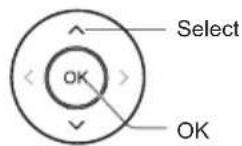
(up, down, left and right direction buttons) Highlights different items in the menu system and adjusts the menu controls.
EXIT ✗ To exit the program
BACK ← Exit the menu and return to the previous menu
OPTION Displays the options menu of selected functions
FAV To enter the channel list
(Mic) (Available only when the network connection is normal.)
To open the apps, move the apps or remove from favorites
To fast backward
To play
To fast forward
To end the running program
II To pause
Start recording


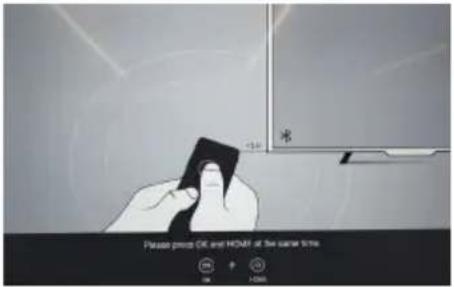
How to Pair Remote Control with the TV
This is a Bluetooth remote control, and before using it, please pair it with the TV firstly. The following steps are for your reference:
Step 1: Press button to enter the home page.
Step 2: Press button to enter the "RC pairing".
Step 3: Follow the "Settings tips" page, press OK and together.
Step 4: The screen will display "Pairing..." and the screen will display "Success!" after pairing is complete.
NOTE: If you wait more than 2 minutes and it can't pair, please repeat the above steps for pairing again.
If you want to unpair the Bluetooth remote, follow these steps:
Step 1: Press button to enter the home page.
Step 2: Press ▲/▼/◄/► to choose ⚙, and then press OK to enter.
Step 3: Press ▼ to select "Remotes & accessories" and then to choose the Bluetooth remote name to enter next steps.
Step 4: Press unpair and then choose OK button.
■ When remote control does not respond
- Press and hold the button as shown below for 3 seconds to reset remote control.
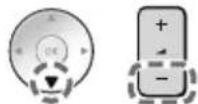
- Aim remote control reception and unpair by following below. Home > Setting > Remotes & accessories > RCU03 > Unpair
Using the TV controls
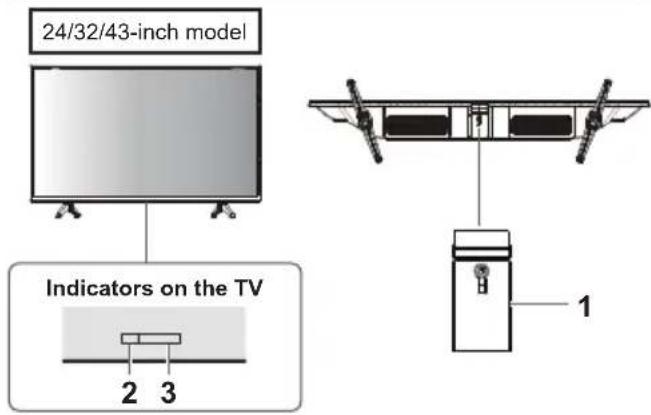
1 Power On/Power Off
2 Power LED
Red: Standby
- Green: On
3 Remote control signal receiver
Watching External Inputs
1 Connect the external equipment.
(p.12)
2 Display the [Input] menu, then select the input of the connected equipment.
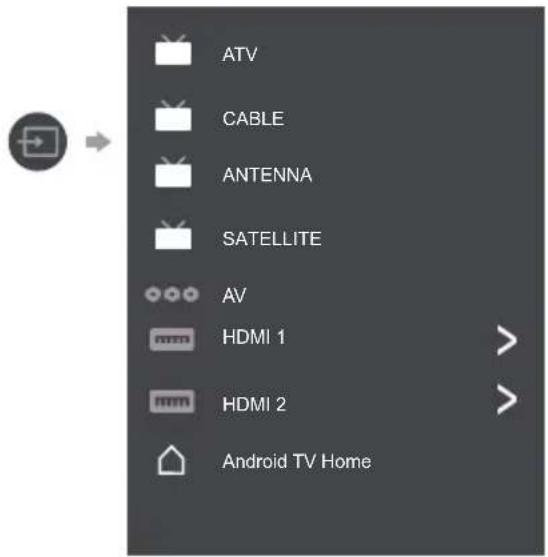
Press OK key only can access.
Note
- If the external equipment has an aspect adjustment function, set it to "16:9".
Note: This manual is for common use. Figures and illustrations in this User Manual are provided for reference only and may differ from actual product appearance. And for some models, certain options are not available.
You can select all the features from homepage.
Press to display homepage.
Press ▲/▼/◄/► to select icons from the screen list.
Press OK to enter each option.
To exit the APP, press ← or .
Google Assistant: Click to interact with Google Assistant of the TV.
Notifications: Remind you of system-critical information, such as low disk space, Google sign in or account errors, network connectivity issues, etc.
Input: Select the input source.
Settings: Access the system setting.
Apps: Show the list of favorite applications, or access the application center.
CUSTOMISE CHANNELS: Add and remove channels from your Home screen.
Note:
1) The functions and contents of "Home Page" may vary by different countries or models.
2) Before using network functions in home page like network applications and so on, please connect the TV to the network firstly.
3) Icon copyrights are owned by the application providers.
Using the Menu Functions
Using Quick Access Menu
Note: Some of the functions might be unavailable in certain sources. And for some models, certain options are not available.
This section explores the menus and settings of your TV. Each menu is outlined and detailed to help you get the most from your TV. To access the menu system:
- In TV mode, press OPTION remote control to display the quick access list.
- Press ▲/▼ to select the desired item, then press OK to open the corresponding submenu.
- In submenu, use ◀/▶ and OK buttons to make the adjustments, or use ▲/▼ to select an item, use OK to enter and operate according to the on-screen display or guide.
- Press to return to the previous menu.
Option
Picture: Enter to adjust picture mode or advanced settings.
Sound: Select this option to set the sound adjustments.
Channel: Select this option to adjust the channel.
System: Select this option to adjust the settings.

Picture

Sound

Channel

System
Picture

Picture Mode: To select the mode of Normal, Dynamic, Filmmaker, Sport, Game and Custom.
Backlight: Select the level of 1-100.
ECO Setting: To select the Off, Low and High.
Aspect Ratio:
Displays the [Aspect Ratio] screen. Follow the operation guide to select the mode. [4:3] / [16:9] / Auto / Original.
Advanced Settings:
Color Temperature: To select the Normal, Warm, Cool.
HDMI PC/AV Mode: Auto
Overscan: To select ON or OFF
Noise Reduction: To select Off, Low, Medium, High and Auto.
Picture Reset: To reset the picture.
Gamma: Select 2.2 or 2.4.
Motion Estimate and Motion Compensation (MEMC): To select Off, Low, Middle, and High.
Sound
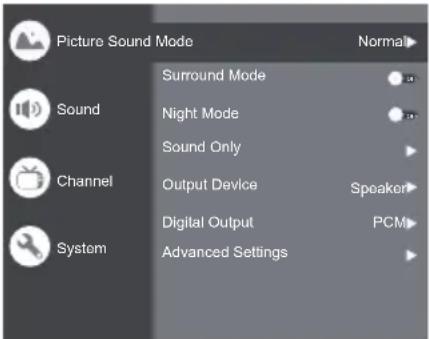
Sound Mode: To select the mode of Standard, Speech, Music, Stadium and User.
Surround Mode: Select ON or OFF/ Pure Sound/ Surround.
Night Mode: Select ON or OFF.
Sound Only: Select it and the TV screen will turn off in 10 seconds.
Output Device: To select the Speaker, SPDIF/Optical and HDMI-ARC.
Digital Output: Select the PCM/ByPass/Auto.
Advanced Settings:
- DAC-4 Dialogue Enhanced
- DAC-4 Dialogue Enhanced Level
- Balance
- Digital Audio Delay (ms)
- Digital Audio Volume
- eARC
- Sound Reset
Channel
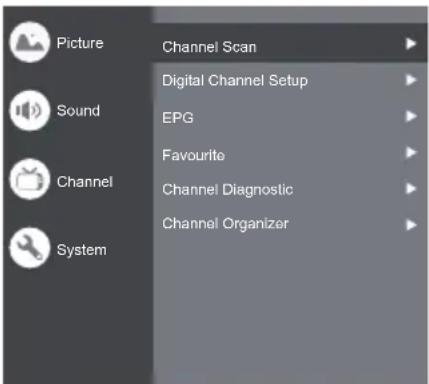
Note: This function is only available in TV mode.
Channel Scan: Allows you to scan for all available analog and digital channels.
Digital Channel Setup:
To select the option to adjust the Subtitle Setup, Teletext Setup, Audio Setup, CI Plus, LCN, Auto Service Update, Update Scan.
EPG:
Press OK/▶ to enter the Program Guide menu.
Favourite:
Setup favourite channel list.
Channel Diagnostic:
Press OK/▶ to display some signal information on the current digital channel, such as signal strength, frequency, etc.
Channel Organizer:
This option allows you to organize channels.
System

HDMI CEC Settings:
CEC control: To select On or Off.
Device Auto Power Off: To select On or Off.
Tv Auto Power On: To select On or Off.
CEC Device List: Turn devices on and select [Enable] to enable control of HDMI devices.
HDMI Signal Format: To select On or Off.
Idle TV Standby: To select After 1 hour of inactivity, After 2 hour of inactivity, After 4 hour of inactivity, After 24 hour of inactivity or Off.
TV Placement: To select Desktop and Wallmount.
Environment: To select Home and Shop.
Shop Mode: To select E-Sticker.
Settings:
- Lock: Click and lock the TV.
- Power: Turn the Wake On Network and Network Standby on or off.
- Recording Storage: Put the storage device and record the storage.
- Privacy Notice: The content about privacy notice.
- OSS License: The content about oss license.
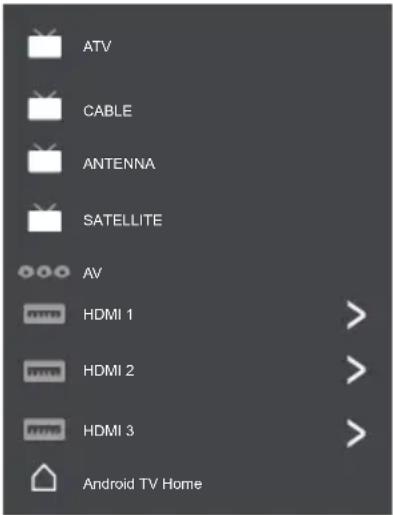
The input
Press ▶ then press ▲/▼ to select your desired source, and then press OK to confirm.
Channels setup (ATV and CABLE)
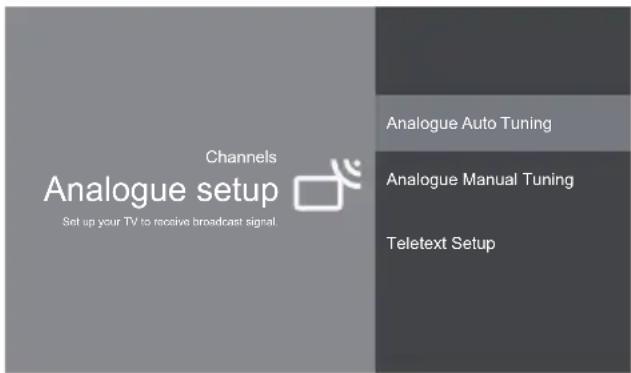
Analogue setup: Select ATV and enter.
- Analogue Auto Tuning: Press OK to start the automatic search process. The search may take a few minutes.
- Analogue Manual Tuning: Press OK to enter the interface.
Press ▲/▼ to set program, TV system or color system item, then Press ▲/▼ select frequency and press OK to search channel.
- Teletext Setup: Press OK and then use ▲/▼ to select preferred teletext.

Digital Cable Tuning: Select Cable and enter.
Auto Tune: Press OK to start the automatic search process. The search may take a few minutes. During the process, you can press and choose YES to exit.
Manual Tune: Select the channel number and start to scan
LCN: Select On or Off.
Auto service Update: Select On or Off.
TV Settings
Press 🏠 then press ▲/▼ to select your desired settings, and then press OK to confirm.
Settings
General Settings

Network & Internet No network connected

Accounts & sign-in No accounts

Apps

Device Preferences

Remotes & accessories
General Settings:
Network & Internet: Connect the network.
See all
Other options
Add new network
Scanning always available
Let Google's location service and other apps scan for networks, even when Wi-Fi is off.
Ethernet
Ethernet
Connected
Proxy settings: HTTP proxy is used by the browser but may not be used by other apps.
IP settings: To use DHCP or Static
Accounts & sign-in: To sign in the accounts.
Apps:
See all apps
App permissions
Special app access
Security & restrictions
Device Preferences

About

Date & time

Language

Keyboard

Display & Sound

Storage

Home screen

Google Assistant

Chromecast built-in

Screen saver

Energy saver

Location

Usage & diagnostics

Accessibility

Reboot
About: The information of this TV.
Date & time: Adjust date and time.
Language: Select the language.
Keyboard: Select and adjust keyboard
Display & Sound: Adjust display and sound.
Storage: Check the device storage.
Home screen: Customize channels, reorder apps and open source licenses
Google Assistant: To use the Google Assistant.
Chromecast built-in: To use the Chromecast built-in.
Screen saver: Select the mode of Screen saver.
Energy saver: To turn off display.
Location: To estimate location.
Usage & diagnostics: Automatically send diagnostic information to Google, like crash reports and usage data from your device, apps, and Chromecast built-in.
Accessibility:
Captions
High contrast text
(Experimental)
Text to speech
Accessibility shortcut
Services
TalkBack
Off
Switch Access
Off
TVserviceManager
On
Reboot: To reboot the TV.
Remotes & accessories
To searching for accessories...
(Before pairing your Bluetooth devices, make sure they're in pairing mode)
Using Media Player
Media Player allows you to enjoy photo, music or video recorded on a USB Flash Memory.
- The picture may not appear correctly on this TV depending on the digital cameras used.
- Display may take some time when there are many files and folders in the USB Flash Memory.
- Partly degraded files might be displayed at a reduced resolution.
- The folder and file names may be different depending on the digital camera used.
Inserting / Removing the USB Flash Memory

Starting Media Player
1 Insert the USB Flash Memory.
2 Select the mode.

Select Access
[Document]: Displays the thumbnail of all documents in the USB Flash Memory.
[Photo]: Displays the thumbnail of all photos in the USB Flash Memory.
[Music]: Displays the thumbnail of music folders in the USB Flash Memory.
[Video]: Displays the thumbnail of video titles in the USB Flash Memory.
[Disk]: Displays the thumbnail of all documents in the USB Flash Memory.
[Contents Display]
Follow the operation guide to perform available operations.
When the cursor stays on the icon, it displays the information of the highlighted content.
Document Video Photo Music Disk
![PANASONIC TX43LS500E - [Contents Display] - 1](/content/2026/04/609175/images/1f39d26f0689fc78d142c11eaf099a7e58ddf5d70228733e28252801c63e28fe.jpg)
natural_image
Six white rectangular outlines arranged in two rows on a black background (no text or symbols)Document:
- Select Document icon.
- Press up, down, left or right direction button to select your desired file and press OK to play.
- Use OK key to see more option: ZOOM+, ZOOM-.
- Press return key of remote to stop playing.
Video:
- Select Video icon, then press OK button to view movie file.
- Press up, down, left or right direction button to select your desired file and press OK to play.
- While playing a Video, press the OPTION to display the play console. For the Play console, Press OK key of remote to play and pause the video file. Left key of remote to fast backward. Right key of remote to fast forward.
- Use OPTION see more option: Photo scale, Looping mode, Subtitle, Subtitle code, Audio track, information and video list.
- Press return key of remote to stop playing and press return again to exit.
Photo:
- Select Picture icon, then press OK button to view the picture.
- Press up, down, left or right direction button to select your desired picture file and press OK to show.
- While showing picture, press OK to display the play console. For previous and next use remote left and right key.
- Use OK key to see more option: Left rotation, Right rotation, ZOOM+, ZOOM-, Manual play/Auto play, Information, Play mode, Play interval, BGM: On or Off.
Music:
- Select Music icon, then press OK button to listen to music.
- Press up, down, left or right direction button to select your desired file and press OK to play.
-
The Play console includes Previous, Play/Pause, Fast backward/Fast forward, Next.
Press key to see play list and video list. -
Press return key of remote to stop playing.
Disk:
- Select Disk icon, then press OK button to choose folder.
- Press up, down, left or right direction button to select your desired file and press OK to play.
- Press return key of remote to stop playing.
Additional Information
Auto power standby function
The TV will automatically go into Standby mode in the following conditions:
• No signal is received for 15 minutes.
• [Sleep timer] is active in the [System] menu (p.19).
Input signal that can be displayed
| Signal name HDMI | |
| 525 (480)/60i, 60p | ○ |
| 625 (576)/50i, 50p | ○ |
| 750 (720)/60p, 50p | ○ |
| 1,125 (1,080)/60i, 50i | ○ |
| 1,125 (1,080)/60p, 50p, 24p | ○ |
| 2,250 (2,160)/60p, 50p, 24p | ○ |
○ Mark: Applicable input signal
- Signals other than above may not be displayed properly.
- The above signals are reformatted for optimal viewing on your display.
HDMI connection
This TV incorporates HDMI ^™ technology. HDMI (high-definition multimedia interface) is the world's first complete digital consumer AV interface complying with a non-compression standard.
HDMI allows you to enjoy high-definition digital images and high-quality sound by connecting the TV and the equipment.
■ Applicable HDMI features
• Input audio signal:
2ch Linear PCM (sampling frequencies - 48 kHz, 44.1 kHz, 32 kHz)
• Input video signal:
"Input signal that can be displayed" (p.12)
Match the output setting of the digital equipment.
USB Flash Memory
For playing back in Media Player
Format: FAT32
Compliance:
Supports only USB1.1 or USB2.0 standard. Maximum USB capacity supported is 1TB.
Note
• Data modified with a PC may not be displayed.
- Do not remove the device while the TV is accessing data. Otherwise this can damage the device or TV.
- Do not touch the pins on the device.
- Insert the device in the correct direction. Otherwise this can damage device or TV.
- Electrical interference, static electricity, or erroneous operation may damage the data or device. Panasonic is not liable for any deterioration or damage of data or device during operations with the TV.
- It is recommended to connect the USB Flash Memory directly to the TV's USB port.
- Some USB devices or USB HUB may not be used with this TV.
- You cannot connect any devices by using the USB port.
- Additional information for USB devices may be on the following website. (English only)
http://panasonic.jp/support/global/cs/tv/
Troubleshooting
Before requesting service or assistance, please follow these simple guides to resolve the problem. If an error message appears, follow the message's instructions. If the problem still persists, please contact your local Panasonic dealer for assistance.
Screen
Red, blue, green or black spots on the screen.
This is the characteristic of liquid crystal panels. The liquid crystal panel is built with very high precision technology. Occasionally, a few non-active pixels may appear on the screen as points of red, green, blue or black. This does not affect the performance of your TV and it is not a quality problem.
Chaotic image, noisy.
→ Set [Noise reduction] in the [Picture] menu to remove noise (p.18).
→ Check nearby electrical products (car, motorcycle, fluorescent lamp).
No image is displayed.
→ Check the settings of [Contrast] or [Brightness] in the [Picture] menu (p.18).
→ Check the TV is in AV mode. If the TV is in AV mode, check the selected input mode match the output of the external equipment (p.19).
Unusual image is displayed.
Turn the TV off with Mains power On/Off switch (p.16), then turn it on again.
Pictures from equipment connected via HDMI are unusual.
- Check the HDMI cable is connected properly.
→Turn the TV and equipment off, then turn them on again.
→ Check an input signal from the equipment (p.12).
→ Use equipment compliant with EIA/CEA-861/861D.
Sound
No sound is produced.
- Check the sound mute setting (p.18) and volume.
Low level or distorted sound.
→ Sound signal reception may be deteriorated.
Sound output via HDMI connection is unusual.
→ Set the sound setting of the connected equipment to "2ch L.PCM".
General
The TV goes into Standby mode.
This TV is equipped with auto power standby function (p.16).
The remote control does not work or is intermittent.
→ Replace the batteries (p.10).
-Point the remote control directly at the remote control signal receiver of the TV (within about 7 m and 30 degree angle).
→ Situate the TV away from sunshine or block sources of bright light from shining on the remote control signal receiver of the TV.
Parts of the TV become hot.
Even if the temperature of parts of the front, top and rear panels has risen, these temperature rises do not cause any problems in terms of performance or quality.
The TV panel moves slightly when it is pushed with a finger.
Clattered sound might be heard.
→ There is some flexibility around the panel to prevent damage. This is not a malfunction.
Overcurrent error message appears.
The connected USB device might cause this error. Remove the device and turn the TV off with Mains power On/Off switch, then turn it on again.
- Check foreign objects are not inside the USB port.
Maintenance
First, remove the mains plug from the socket outlet.
Regular care
• Gently wipe the surface of the display panel, cabinet and pedestal by using a soft cloth.
- Wipe the mains plug with a dry cloth at regular intervals. Moisture and dust may lead to fire or electrical shock.
For stubborn dirt
First clean the dust on the surface. Dampen a soft cloth with clean water or diluted neutral detergent (1 part detergent to 100 parts water). Wring the cloth and wipe the surface. Finally, wipe away all the moisture.
Caution
- Do not use a hard cloth or rub the surface too hard as this could scratch the surface.
- Do not subject the TV's surfaces to water or detergent. Liquid inside the TV could lead to product failure.
- Do not subject the surfaces to insect repellent, solvent, thinner or other volatile substances. This may degrade surface quality or cause peeling of the paint.
- The surface of the display panel is specially treated and may be easily damaged. Take care not to tap or scratch the surface with your fingernail or other hard objects.
- Do not allow the cabinet and pedestal to make contact with a rubber or PVC substance for a long time. This may degrade surface quality.
Specifications
Model no.
24-inch model
TX-24LS500E
32-inch model
TX-32LS500E
43-inch model
TX-43LS500E
Dimensions (W x H x D)
24-inch model
551.4 × 365.3 × 131 mm (With Pedestal)
551.4 × 328 × 84 mm (TV only)
32-inch model
725.9 × 475.4 × 178.5 mm (With Pedestal)
725.9 × 430.8 × 81.7 mm (TV only)
43-inch model
966.8 × 611.1 × 214.5 mm (With Pedestal)
966.8 × 566.4 × 88.5 mm (TV only)
Mass
24-inch model
2.6 kg (With Pedestal)
2.5 kg (TV only)
32-inch model
3.6 kg (With Pedestal)
3.5 kg (TV only)
43-inch model
6.4 kg (With Pedestal)
6.3 kg (TV only)
Connection terminals
AV in
Mini, 1.0 V[p-p] (75 Ω)
EARPHONE
Mini, 130mV rms\~ 150mV rms
HDMI 1 / 2 input
TYPE A Connectors
USB
USB2.0 DC 5V, Max.500 mA
Speaker Output
24-inch model
Audio output
6 W (3 W + 3 W)
32-inch model
Audio output
10 W (5 W + 5 W)
43-inch model
Audio output
16 W (8 W + 8 W)
9 Systems
| Systems Function | |
| 1 PAL B, G | |
| 2 PAL I | |
| 3 PAL D, K Reception of broadcast | |
| 4 NTSC 4.43 | |
| 5 NTSC 3.58 | Playback from special VCR's or DVD |
| 6 PAL | |
| 7 PAL 60 Hz/5.5 MHz | Playback from special disc players and special VCR's or DVD |
| 8 PAL 60 Hz/6.0 MHz | |
| 9 PAL 60 Hz/6.5 MHz | |
Receiving channels (Analogue TV)
VHF BAND
| 2-12 (PAL) |
| 0-12 (PAL B AUST.) |
| 1-9 (PAL B N.Z.) |
| 1-12 (PAL) |
UHF BAND
| 21-69 (PAL G, H, I) |
| 28-69 (PAL B AUST.) |
| 13-57 (PAL D, K) |
Digital TV
DVB-T/T2 Standard
Aerial input
VHF / UHF
Operating conditions
Temperature
| 0 °C - 45 °C |
Humidity
| 20 % - 80 % RH (non-condensing) |
Note
- Design and Specifications are subject to change without notice. Mass and Dimensions shown are approximate.
Built-in wireless LAN
Standard compliance and Frequency range
| IEEE 802.11 a/b/g/n/ac |
| 2.4~2.5GHz and 5.15~5.825GHz |
Security
| Support for WPA/WPA2 |
Built-in Bluetooth
| Bluetooth V5.0 |
| 2.4~2.485GHz |
Note
- Design and Specifications are subject to change without notice. Mass and Dimensions shown are approximate.
- For more product information, please visit EPREL: https://eprel.ec.europa.eu.
EPREL registration number is available on https://eprel.panasonic.eu/product.
Oss License
This product incorporates the following software:
(1) The software developed independently by or for Panasonic Corporation,
(2) The software owned by third party and licensed to Panasonic Corporation,
(3) The software licensed under the GNU General Public License, Version 2.0 (GPL V2.0),
(4) The software licensed under the GNU LESSER General Public License, Version 2.1 (LGPL V2.1), and/or
(5) Open source software other than the software licensed under the GPL V2.0 and/or LGPL V2.1.
The software categorized as (3) - (5) are distributed in the hope that it will be useful, but WITHOUT ANY WARRANTY, without even the implied warranty of MERCHANTABILITY or FITNESS FOR A PARTICULAR PURPOSE. Please refer to the detailed terms and conditions thereof [System > Settings > Oss License]
At least three (3) years from delivery of this product, Panasonic will give to any third party who contacts us at the contact information provided below, for a charge no more than our cost of physically performing source code distribution, a complete machine-readable copy of the corresponding source code covered under GPL V2.0, LGPL V2.1 or the other licenses with the obligation to do so, as well as the respective copyright notice thereof.
Contact Information: osd-cd-request@gg.jp.panasonic.com
Disposal of Old Equipment and Batteries
Only for European Union and countries with recycling systems

These symbols on the products, packaging, and/or accompanying documents mean that used electrical and electronic products and batteries must not be mixed with general household waste.
For proper treatment, recovery and recycling of old products and used batteries, please take them to applicable collection points in accordance with your national legislation. By disposing of them correctly, you will help to save valuable resources and prevent any potential negative effects on human health and the environment.
For more information about collection and recycling, please contact your local authority. Penalties may be applicable for incorrect disposal of this waste, in accordance with national legislation.
Note for the battery symbol (bottom symbol):

This symbol might be used in combination with a chemical symbol. In this case it complies with the requirement set by the Directive for the chemical involved.
Customer's Record
The model number and serial number of this product may be found on its rear panel. You should note this serial number in the space provided below and retain this book, plus your purchase receipt, as a permanent record of your purchase to aid in identification in the event of theft or loss, and for Warranty Service purposes.
Model Number
Serial Number
Panasonic®
Kasutusjuhend
LED TELER
Mudeli nr.
TX-24LS500E
TX-32LS500E
TX-43LS500E
Eesti
natural_image
Front view of a modern black flat-screen TV with stand legs (no text or symbols visible)(kujutis: TX-43LS500E)
Täname, et otsite selle Panasonicu toote.
CI-moodul
natural_image
Illustration of two workers exchanging a package with a magnified inset showing hand gesture (no text or symbols)
Kasutustingimused
Ettevaatust
Patareid (AAA), 2 tk
→(Ik 10)

Minipistikuga adapter
AV-adapter

Tugialus
24-tolline mude
• Montaažikruvid
A (ST3 × 12) × 4
32-tolline mude
• Montaažikruvid
A (ST4 × 15) × 4
Alus

Alus

Alus

43-tolline mudel
• Montaažikruvid
A (ST4 × 20) × 4
natural_image
Technical line drawing of a flat-screen monitor with screw base and labeled component A (no text or symbols beyond labels)natural_image
Diagram showing a device with wires and connectors, connected to a checkmark icon (no text or symbols present)
natural_image
Diagram of a TV setup with cable and connectors, showing internal layout and connection paths (no text or symbols)Blu-Ray pleier

flowchart
graph LR
    A["Teler"] --> B["HDMI 1/2"]
    B --> C["HDMI-kaabel"]
    C --> D["Blu-Ray pleier"]
Digiboks
flowchart
graph LR
    A["Teler"] -->|HDMI 1/2| B["HDMI-kaabel"]
    B --> C["Satelliiditaldrek"]
    C --> D["Digiboks"]

Mini, 1,0 V [p-p] (75 Ω)
KUULARID
Mini, 130 mV rms, vahelduvvool, 150 mV rms
HDMI 1 / 2 sisend
A tüüpi pistmikud
USB
USB 2.0, alalisvool 5 V, max 500 mA
Kõlari väljund
24-tolline mudel
Heliväljund
6 W (3 W + 3 W)
32-tolline mudel
Heliväljund
10 W (5 W + 5 W)
43-tolline mudel
Heliväljund
16 W (8 W + 8 W)
9 süsteemi
natural_image
Front view of a modern black flat-screen TV with visible screen and legs (no text or symbols)natural_image
Illustration of two workers exchanging a package with a magnified inset showing hand gesture (no text or symbols)Условия за употреба
Внимание
natural_image
Technical line drawing of a flat-screen monitor with screw base and labeled component A (no text or symbols beyond labels)natural_image
Diagram showing a TV setup with two hands holding a cable and connecting to a screen, connected by a dashed line to a checkmark icon (no text or symbols present)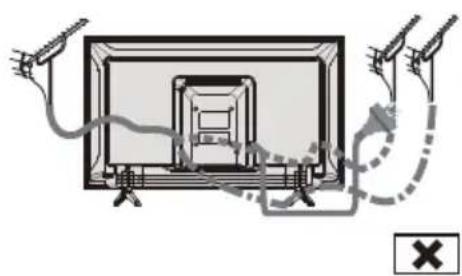
natural_image
Diagram showing a TV with cable and connectors, connected to a dashed line and a cross symbol (no text or labels)Blu-Ray плейър

Работа с телевизора
natural_image
Front view of a modern black flat-screen TV with visible screen and legs (no text or symbols)Copyright © 1992–2015
Modul CI
Panasonic Testing Centre
Panasonic Marketing Europe GmbH
natural_image
Illustration of two workers handling a large box, with a magnified inset showing hand positioning (no text or symbols)
Warunki użytkowania
Przestroga
natural_image
Technical line drawing of a flat-screen monitor with screw base and labeled component A (no text or symbols beyond labels)flowchart
graph TD
    A["Antenna"] --> B["Kabel RF"]
    B --> C["Device with Ant"]
natural_image
Diagram showing two hands connecting a TV screen to a plug, with a checkmark indicating approval (no text or symbols present)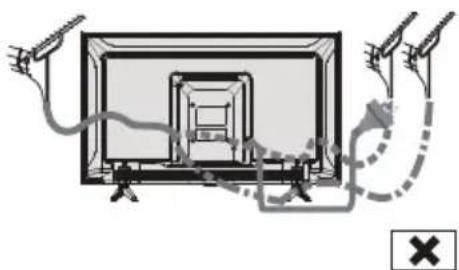
natural_image
Diagram of a TV setup with cable and antenna connections, no text or symbols presentOdtwarzacz Blu-ray
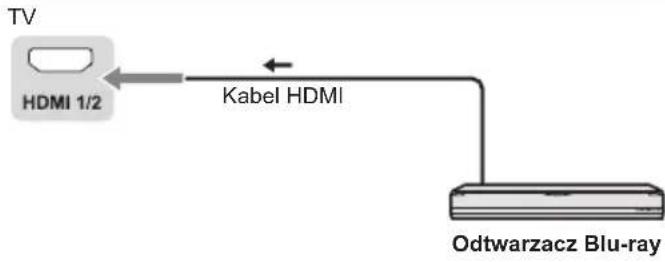
flowchart
graph LR
    TV["TV"] --> HDMI1["HDMI 1/2"]
    HDMI1 --> Kabel["Kabel HDMI"]
    Kabel --> Odtwarzacz["Odtwarzacz Blu-ray"]

Funkcje pilota
natural_image
Six empty white rectangular boxes arranged in two rows on a black background (no text or symbols)Dokument:
Mini, 1,0 V[p-p] (75 Ω)
EARPHONE
Mini, 130 mV–150 mV rms
Wejście HDMI 1/2
Gniazda TYP A
USB
USB2.0 5 V DC, maks. 500 mA
Wyjście głośników
Model 24-calowy
Wyjście audio
6 W (3 W + 3 W)
Model 32-calowy
Wyjście audio
10 W (5 W + 5 W)
Model 43-calowy
Wyjście audio
16 W (8 W + 8 W)
9 systemów
Systemy Funkcja
1 PAL B, G
2 PAL I
natural_image
Front view of a modern black flat-screen TV with visible screen and legs (no text or symbols)Copyright © 1992-2015
Dolby Laboratories. Alle rettigheder forbeholdes.
Panasonic Testing Centre
Panasonic Marketing Europe GmbH
Winsbergring 15, 22525 Hamburg, Tyskland

natural_image
Illustration of two workers exchanging a package with a magnified inset showing hand gesture (no text or symbols)Brugsforhold
Forsigtig
natural_image
Technical line drawing of a flat-screen monitor with screw base and labeled component A (no text or symbols beyond labels)natural_image
Diagram showing two hands connecting a TV screen to a device, with a checkmark indicating approval (no text or symbols present)
natural_image
Diagram of a TV setup with cable and stand connections, no text or symbols presentBluRay-afspiller

flowchart
graph LR
    TV["TV"] --> HDMI1_2["HDMI 1/2"]
    HDMI1_2 -->|HDMI-kabel| BluRay-afspiller["BluRay-afspiller"]
Set top-boks
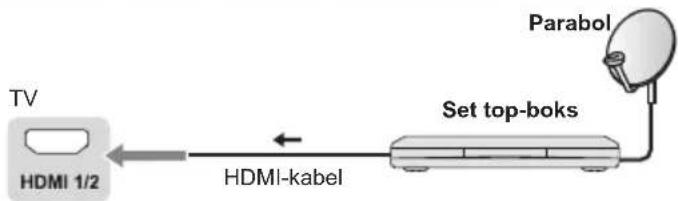
flowchart
graph LR
    TV["TV"] -->|HDMI kabel| SetTopBok["Set top-boks"]
    SetTopBok -->|Parabol| Parabol
AV-/Spiludstyr
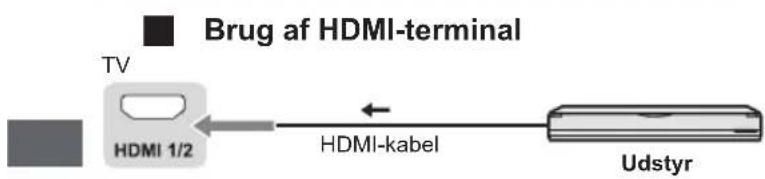
flowchart
graph LR
    TV["TV"] --> HDMI1_2["HDMI 1/2"]
    HDMI1_2 --> HDMIkLabel["HDMI-kabel"]
    HDMIkLabel --> Udstyr["Udstyr"]
    style TV fill:#f9f,stroke:#333
    style Udstyr fill:#bbf,stroke:#333
Højttalersystem
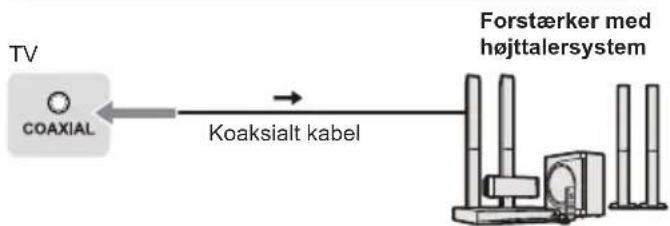
PICTURE ▶ Åbner billedtilstand.
OFF TIMER ⏻ Åbner autosluk-timeren.
natural_image
Six white outlined squares arranged in two rows on a black background (no text or symbols)Dokument:
Mini, 1,0 V[p-p] (75 Ω)
HOVEDTELEFONER
Mini, 130 mV rms-150 mV rms
HDMI-indgang 1 / 2
TYPE A-stik
USB
| 2-12 (PAL) |
| 0-12 (PAL B AUST.) |
| 1-9 (PAL B N.Z.) |
| 1-12 (PAL) |
UHF-BÄND
| 21-69 (PAL G, H, I) |
| 28-69 (PAL B AUST.) |
| 13-57 (PAL D, K) |
Digital TV
| DVB-T/T2-standard |
Antenneindgang
VHF / UHF
Driftsforhold
Temperatur
| 0 °C - 45 °C |
Luftfugtighed
| 20 % - 80 % RH (ikke-kondenserende) |
Bemærk
natural_image
Front view of a modern black flat-screen TV with visible screen and legs (no text or symbols)Panasonic Testing Centre
Panasonic Marketing Europe GmbH
Winsbergring 15, D-22525 Hamburg, Deutschland

natural_image
Illustration of two workers exchanging a package with a magnified inset showing hand gesture (no text or symbols)Einsatzbedingungen
Vorsicht
natural_image
Technical line drawing of a flat-screen monitor with screw base and labeled component A (no text or symbols beyond labels)natural_image
Diagram showing two hands connecting a TV screen to a plug, with a checkmark indicating approval (no text or symbols present)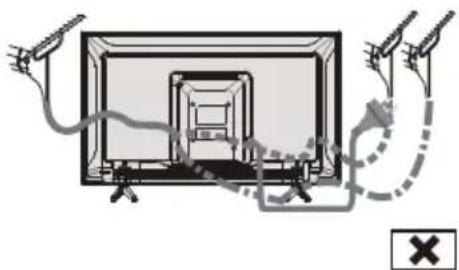
natural_image
Diagram showing a TV setup with cable and antenna connections, no text or symbols presentBlu-Ray-Player

flowchart
graph LR
    A["Fernsehgerät"] --> B["HDMI 1/2"]
    B --> C["HDMI-Kabel"]
    C --> D["Blu-Ray-Player"]
Set-Top-Box
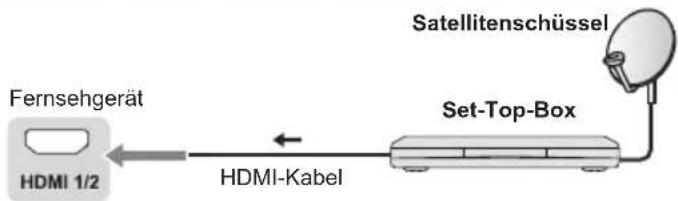
flowchart
graph LR
    A["Fernsehgerät"] --> B["HDMI 1/2"]
    B --> C["HDMI-Kabel"]
    C --> D["Set-Top-Box"]
    D --> E["Satellitenschüssel"]
AV / Gaming-Gerät

natural_image
Six identical empty white rectangular boxes arranged in a 2x2 grid on a dark background (no text or symbols)Dokument:
natural_image
Front view of a modern black flat-screen TV with visible screen and legs (no text or symbols)(illustration : TX-43LS500E)
Panasonic Testing Centre
Panasonic Marketing Europe GmbH
Winsbergring 15, D-22525 Hamburg, Allemagne

natural_image
Illustration of two workers handling a large box with a magnified inset showing hand positioning (no text or symbols)natural_image
Technical line drawing of a flat-screen monitor with screw base and labeled component A (no text or symbols beyond labels)natural_image
Diagram showing two hands connecting a TV screen to a lamp, with a checkmark indicating approval (no text or symbols present)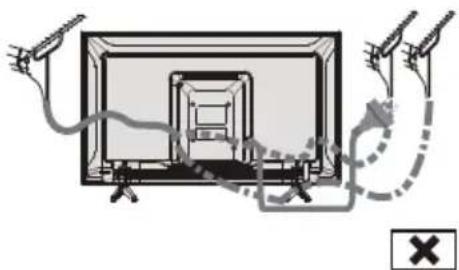
natural_image
Diagram showing cable routing around a TV screen with connectors and a warning symbol (no text or labels)Lecteur Blu-Ray
natural_image
Technical diagram of a mechanical assembly with a labeled component (no text or symbols present)Gestion des services TV
Activé
Dimensions (L x H x P)
Modèles 24 pouces
| 2-12 (PAL) |
| 0-12 (PAL B AUST.) |
| 1-9 (PAL B N.Z.) |
| 1-12 (PAL) |
BANDE UHF
| 21-69 (PAL G, H, I) |
| 28-69 (PAL B AUST.) |
| 13-57 (PAL D, K) |
TV numérique
Norme DVB-T/T2
VHF/UHF
natural_image
Front view of a modern black flat-screen TV with visible screen edges and legs (no text or symbols)(kuva: TX-43LS500E)
CI-moduuli
Panasonic Testing Centre
Panasonic Marketing Europe GmbH
Winsbergring 15, D-22525 Hampuri, Saksa

natural_image
Illustration of two workers exchanging a package with a magnified inset showing hand gesture (no text or symbols)
Käyttöehdot
Varoitus
natural_image
Technical line drawing of a flat-screen monitor with screw base and labeled component A (no text or symbols beyond labels)Jalustan irrottaminen televisiosta
natural_image
Diagram showing a device with wires and connectors connected to a box, no text or symbols present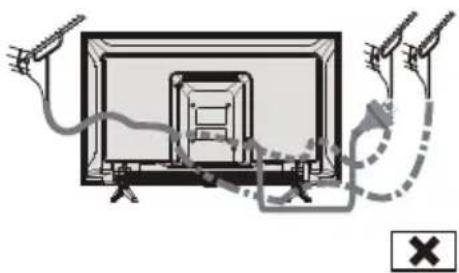
natural_image
Diagram of a TV setup with cable and antenna connections, no text or symbols presentBlu-ray-soitin
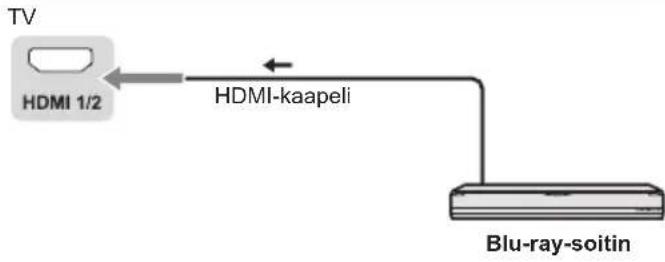
flowchart
graph LR
    TV["TV"] -->|HDMI 1/2| HDMI_kaapeli["HDMI-kaapeli"]
    HDMI_kaapeli -->|HDMI-kaapeli| Blu-ray-soitin["Blu-ray-soitin"]
Digisovitin
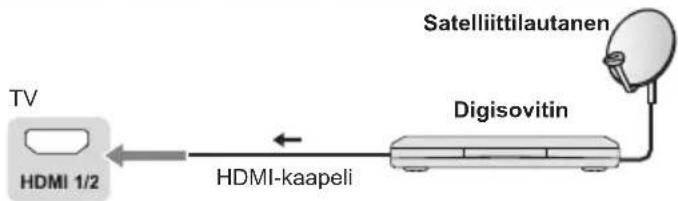
flowchart
graph LR
    TV["TV"] -->|HDMI 1/2| A["HDMI-kaapeli"]
    A --> B["Satelliittilautanen"]
    B --> C["Digisovitin"]
AV-/pelilaitteisto
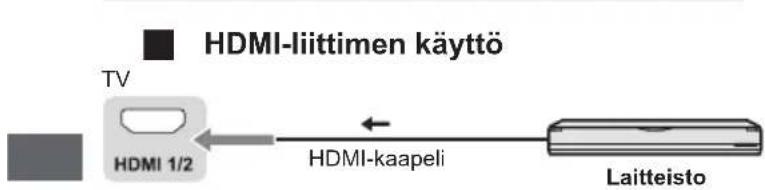

natural_image
Six white outlined squares arranged in two rows on a black background (no text or symbols)Asiakirja:
Mini, 1,0 V[p-p] (75 Ω)
KUULOKKEET
Mini, 130 mV rms\~ 150 mV rms
| 2-12 (PAL) |
| 0-12 (PAL B AUST.) |
| 1-9 (PAL B N.Z.) |
| 1-12 (PAL) |
UHF-KAISTA
| 21-69 (PAL G, H, I) |
| 28-69 (PAL B AUST.) |
| 13-57 (PAL D, K) |
Digitaali-TV
DVB-T/T2 vakio
Antennitulo
VHF / UHF
Käyttöolosuhteet
Lämpötila
| 0 °C - 45 °C |
Kosteus
natural_image
Front view of a modern black flat-screen TV with visible screen edges and legs (no text or symbols)Panasonic Testing Centre
Panasonic Marketing Europe GmbH
natural_image
Illustration of two workers exchanging a package with a magnified inset showing hand gesture (no text or symbols)
natural_image
Technical line drawing of a flat-screen monitor with screw base and labeled component A (no text or symbols beyond labels)natural_image
Diagram showing a device with wires and connectors, connected to a checkmark icon (no text or symbols present)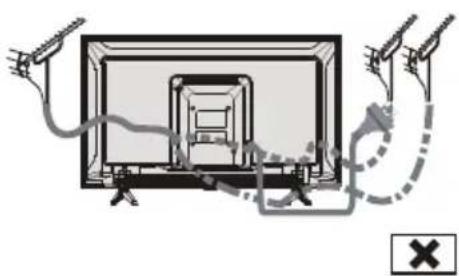
natural_image
Diagram of a TV setup with cable and antenna connections, no text or symbols presentBlu-Ray speler

flowchart
graph LR
    TV["TV"] -->|HDMI 1/2| HDMI-kabel["HDMI-kabel"]
    HDMI-kabel --> Blu-Ray_speler["Blu-Ray speler"]
Set-top box

flowchart
graph LR
    A["TV"] --> B["HDMI 1/2"]
    B --> C["HDMI-kabel"]
    C --> D["Set-top box"]
    D --> E["Satellitschotel"]
AV-/game-apparatuur
flowchart
graph LR
    TV["TV"] --> HDMI1_1/2["HDMI 1/2"]
    HDMI1_1/2 --> HDMIkabel["HDMI-kabel"]
    HDMIkabel <--> HDMI1_1/2
    style TV fill:#f9f,stroke:#333
    style HDMI1_1/2 fill:#ccf,stroke:#333
    style HDMIkabel fill:#cfc,stroke:#333
    style Apparatuur fill:#fcc,stroke:#333
Luidsprekersysteem

flowchart
graph LR
    TV["TV"] --> Coaxial["Coaxial kabel"]
    Coaxial --> Versterker["Versterker met luidsprekersysteem"]
De tv aansluiten
flowchart
graph TD
    TV["TV"] -->|AV in| MiniAV-kabel["MiniAV-kabel"]
    MiniAV-kabel --> Apparatuur["Apparatuur"]
    Apparatuur -->|Downward arrow| MiniAV-kabel
    Apparatuur -->|Downward arrow| TV
prime video De Prime Video-homepagina openen
■■ APPS Apps selecteren
Google Play De Google Play-homepagina openen
YouTube De YouTube-homepagina openen
Overscan: Selecteer AAN of UIT
CEC-bediening: Selecteer Aan of Uit.
LCN: Selecteer Aan of Uit.
Automatische service-update: Selecteer Aan of Uit.
Tv-instellingen
natural_image
Six white outlined squares arranged in two rows on a black background (no text or symbols)Document:
Mini, 1,0 V[p-p] (75 Ω)
HOOFDTELEFOON
Mini, 130mV rms\~ 150mV rms
HDMI-ingangen 1 / 2
TYPE A connectoren
USB
USB2.0 DC 5V, Max.500 mA
Luidsprekeruitgang
24-inch model
Audio-uitgang
6 W (3 W + 3 W)
32-inch model
Audio-uitgang
10 W (5 W + 5 W)
43-inch model
Audio-uitgang
16 W (8 W + 8 W)
9 systemen
| 2-12 (PAL) |
| 0-12 (PAL B AUST.) |
| 1-9 (PAL B N.Z.) |
| 1-12 (PAL) |
UHF-BAND
| 21-69 (PAL G, H, I) |
| 28-69 (PAL B AUST.) |
| 13-57 (PAL D, K) |
Digitale tv
| DVB-T-/T2-standaard |
Antenne-ingang
| VHF / UHF |
Gebruiksvoorwaarden
Temperatuur
| 0 - 45 °C |
Vochtigheid
natural_image
Front view of a modern black flat-screen TV with visible screen edges and legs (no text or symbols)(ilustrace: TX-43LS500E)
Panasonic Testing Centre
Panasonic Marketing Europe GmbH
natural_image
Illustration of two workers exchanging a package with a magnified inset showing hand gesture (no text or symbols)Podmínky použití
Varování
natural_image
Technical line drawing of a monitor setup with screw base and labeled component A (no text or symbols beyond labels)natural_image
Diagram showing two hands connecting a TV screen to a device, with a checkmark indicating approval (no text or symbols present)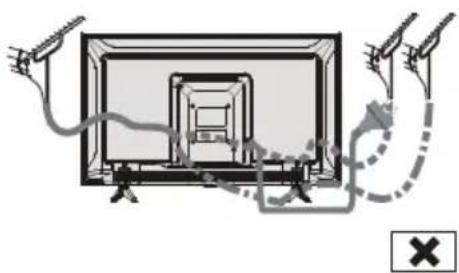
natural_image
Diagram of a TV setup with cable and stand connections, no text or symbols presentBlu-Ray přehrávač
natural_image
Six identical empty white rectangular boxes arranged in a 2x2 grid on a black background (no text or symbols)Dokumenty:
Mini, 1,0 V[p-p] (75 Ω)
SLUCHÁTKA
Mini, 130 mV rms \~ 150 mV rms
Vstup HDMI 1 / 2
Konektory typu A
USB
USB 2.0 DC 5 V, max. 500 mA
Výstup reproduktoru
| 2–12 (PAL) |
| 0–12 (PAL B AUST.) |
| 1–9 (PAL B N.Z.) |
| 1–12 (PAL) |
PÁSMO UHF
| 21–69 (PAL G, H, I) |
| 28–69 (PAL B AUST.) |
| 13–57 (PAL D, K) |
Digitální TV
Standard DVB-T/T2
Anténový vstup
VHF / UHF
Provozní podmínky
Teplota
| 0 °C - 45 °C |
Vlhkost
natural_image
Front view of a black rectangular TV with two legs and a blank screen (no text or symbols visible)(slika: TX-43LS500E)
Hvala vam što ste kupili ovaj Panasonic proizvod.
CI modul
natural_image
Illustration of two workers exchanging a package with a magnified inset showing hand gesture (no text or symbols)Uvjeti korištenja
Oprez
natural_image
Technical line drawing of a flat-screen monitor with screw base and labeled component A (no text or symbols beyond labels)Uklanjanje postolja s TV-a
natural_image
Diagram showing two hands connecting a TV screen to a cable, with a checkmark indicating approval (no text or symbols present)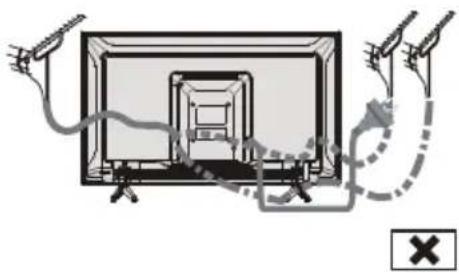
natural_image
Diagram showing cable routing around a TV screen with connectors and a warning symbol (no text or labels)Blu-Ray player
flowchart
graph LR
    TV["TV"] -->|HDMI 1/2| HDMI1["HDMS"]
    HDMI1 -->|HDMI kabel| BluRay["Blu-Ray player"]
Set top kutija
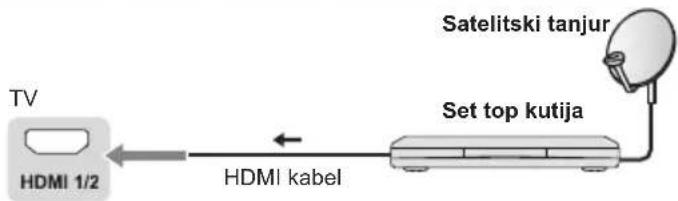
flowchart
graph LR
    A["TV"] --> B["HDMI 1/2"]
    B --> C["HDMI kabel"]
    C --> D["Set top kutija"]
    D --> E["Satelitski tanjur"]
AV / Oprema za igre
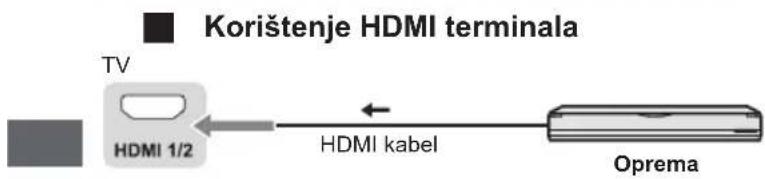
flowchart
graph LR
    A["TV"] --> B["HDMI 1/2"]
    B --> C["HDMI kabel"]
    C --> D["Oprema"]
    style A fill:#f9f,stroke:#333
    style D fill:#bbf,stroke:#333
Sustav zvučnika
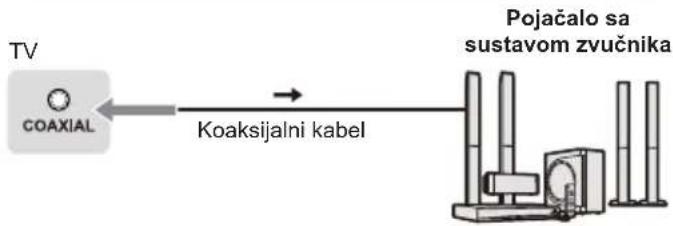
flowchart
graph LR
    TV["TV"] -->|Coaxial| A["Coaksijalni kabel"]
    A --> B["Pojačalo sa sustavom zvučnika"]
Spajanje TV-a
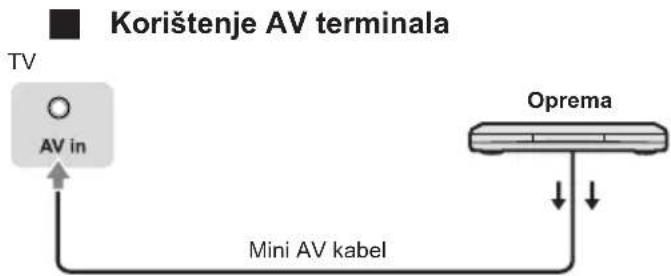
flowchart
graph TD
    A["TV"] --> B["AV in"]
    B --> C["Mini AV kabel"]
    C --> D["Oprema"]
    style A fill:#f9f,stroke:#333
    style D fill:#ccf,stroke:#333
- Za uživanje u zvuku s vanjske opreme u višekanalnom zvuku (npr. Dolby Digital 5.1ch), spojite opremu na pojačalo. Za priključke pročitajte priručnike opreme i pojačala.
DVD snimač / VCR

Pojačalo
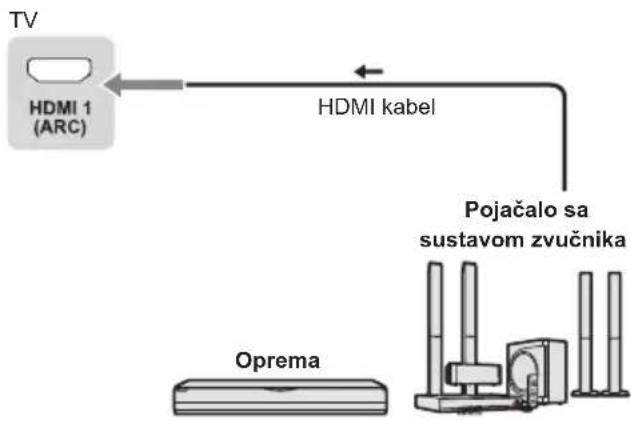
flowchart
graph TD
    A["TV"] --> B["HDMI 1 (ARC)"]
    B --> C["HDMI kabel"]
    C --> D["Oprema"]
    D --> E["Support Structure"]
    style A fill:#f9f,stroke:#333
    style B fill:#ccf,stroke:#333
    style C fill:#cfc,stroke:#333
    style D fill:#fcc,stroke:#333
    style E fill:#cff,stroke:#333
- Koristite HDMI1 za povezivanje TV-a na pojačalo koje ima funkciju ARC (povratni audio kanal).
Početno postavljanje
Utaknite mrežni utikač u utičnicu i uključite TV.
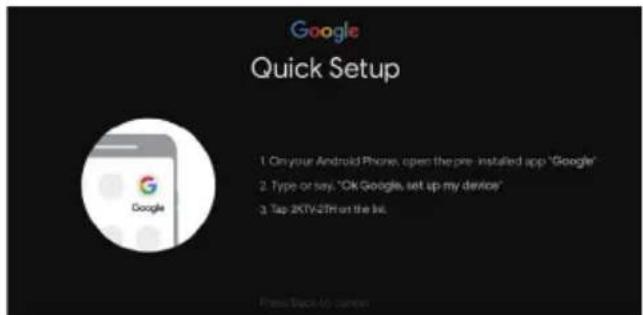
Napomena: Ako ne želite koristiti svoj Android uređaj za postavljanje TV-a, preskočit ćete na korak 3. Ako želite koristiti svoj Android uređaj za postavljanje TV-a, uključite Bluetooth funkcije na svom Android telefonu, zatim pronadite i otvorite aplikaciju "Google" na svom telefonu. Slijedite upute za postavljanje uređaja.
Korak 3: Odaberite želite li ili ne povezati svoj TV prijemnik na Wi-Fi mrežu.
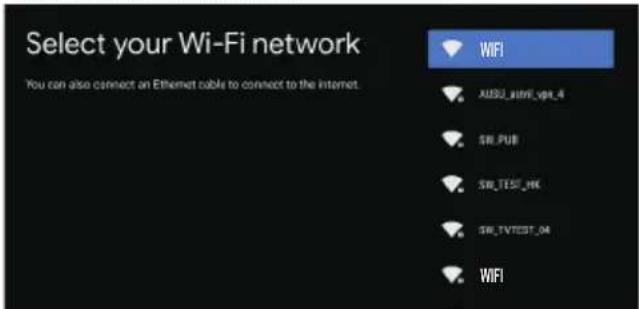
Napomena: Ako ste televizor spojili na WI-FI mrežu, on će provjeriti ima li ažuriranja poput ažuriranja Googleovih usluga i tako dalje. Zatim odaberite hoćete li se prijaviti na svoj Google račun ili ne.
Korak 5: Odaberite želite li dopustiti Googleu ili trećoj strani da koristi lokaciju vašeg TV-a.
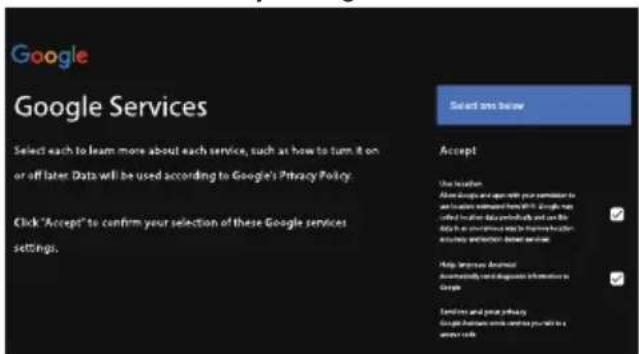
Korak 6: Odaberite želite li dopustiti Googleu da vam pomogne poboljšati vaš Android TV.

Funkcije daljinskog upravljača
Kako upariti daljinski upravljač s televizorom
Ovo je Bluetooth daljinski upravljač i prije upotrebe ga najprije uparite s TV-om. Sljedeći su koraci za vašu referencu:
| 2-12 (PAL) |
| 0-12 (PAL B AUST.) |
| 1-9 (PAL B N.Z.) |
| 1-12 (PAL) |
UHF POJAS
| 21-69 (PAL G, H, I) |
| 28-69 (PAL B AUST.) |
| 13-57 (PAL D, K) |
Digitalna TV
| DVB-T/T2 Standard |
Zračni ulaz
VHF / UHF
natural_image
Front view of a modern black flat-screen TV with visible screen and legs (no text or symbols)(attêls: TX-43LS500E)
CI modulus


Panasonic Testing Centre
Panasonic Marketing Europe GmbH
Winsbergring 15, D-22525 Hamburg, Germany

natural_image
Illustration of two workers exchanging a package with a magnified inset showing hand gesture (no text or symbols)Lietošanas apstākļi
Uzmanību!
natural_image
Technical line drawing of a monitor mounted on a stand, showing internal components and mounting bracket (no text or symbols)natural_image
Diagram showing two hands connecting a TV screen to a device, with a checkmark indicating approval (no text or symbols present)
natural_image
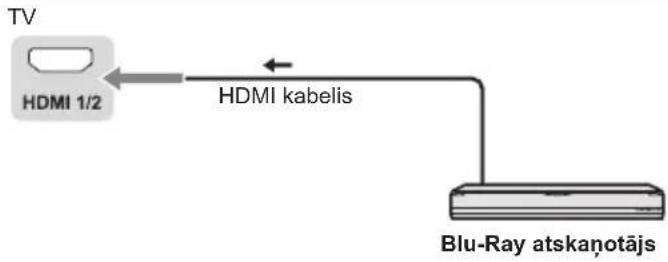
Diagram of a TV setup with cable and antenna connections, no text or symbols presentBlu-Ray atskanotājs
Televizora pieríce

natural_image
Six white outlined squares arranged in two rows on a black background (no text or symbols)Dokuments:
natural_image
Front view of a modern black flat-screen TV with visible screen and legs (no text or symbols)natural_image
Illustration of two workers exchanging a package with a magnified inset showing hand gesture (no text or symbols)Naudojimo sąlygos
Ispéjimas
natural_image
Technical line drawing of a flat-screen monitor with screw base and labeled component A (no text or symbols beyond labels)natural_image
Diagram showing two hands connecting a TV screen to a device, with a checkmark indicating approval (no text or symbols present)
natural_image
Diagram of a TV setup with cable and stand connections, no text or symbols present„Blu-Ray“ grotuvas
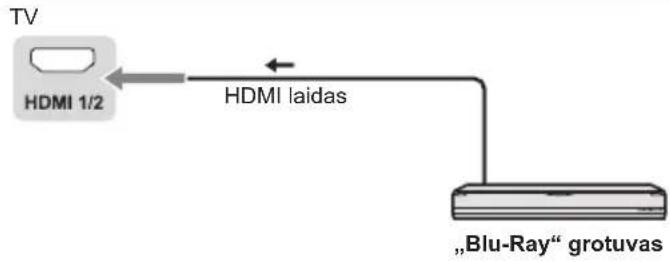
flowchart
graph LR
TV["TV"] --> HDMI1[" HDMI 1/2 "] <--> HDMI1a[" HDMI laidas "]
HDMI1a --> Grotuvas[""Blu-Ray" grotuvas"]
natural_image
Diagram of a rectangular device with internal components and an external power outlet, no text or symbols present②

①
Kint. sr. 220 - 240 V, 50/60 Hz
Mini, 1,0 V[p-p] (75 Ω)
AUSINÈS
Mini, 130 mV vkv\~ 150 mV vkv
HDMI 1 / 2 jvestis
TYPE A jungtys
USB
USB2.0 nuol. sr. 5 V, maks. 500 mA
| VHF JUOSTA |
| 2-12 (PAL) |
| 0-12 (PAL B AUST.) |
| 1-9 (PAL B N.Z.) |
| 1-12 (PAL) |
UHF JUOSTA
| 21-69 (PAL G, H, I) |
| 28-69 (PAL B AUST.) |
| 13-57 (PAL D, K) |
- Operating Instructions
- Contents
- Be Sure to Read
- Important Notice
- Notice for DVB/Data broadcasting/ IPTV functions
- Handling of customer information
- Safety Precautions
- Mains plug and lead
- Warning
- Take care
- Warning Stability Hazard
- To prevent the spread of fire, keep candles or other open flames away from this product at all times
- ■ Suffocation/Choking Hazard
- Pedestal
- Caution
- Radio waves
- Common Interface
- Built-in wireless LAN
- Bluetooth® wireless technology
- Ventilation
- Moving the TV
- When not in use for a long time
- Excessive volume
- Battery for the Remote Control
- LED TV
- Declaration of Conformity (DoC)
- Use conditions
- Setting Up the TV
- Supplied accessories
- Remote Control
- Batteries (AAA) × 2
- Mini Jack Adapter
- Attaching the pedestal
- Removing the pedestal from the TV
- Inserting remote's batteries
- Wall mounting the TV (optional)
- Holes for wall-hanging bracket installation
- Screw specification
- Connecting the TV
- Terminals
- Connections
- Initial Setup
- Plug the mains plug into the socket outlet and turn on the TV.
- Google - Initial Setup
- Step 1: Select the menu language as you need.
- Remote Control Functions
- How to Pair Remote Control with the TV
- ■ When remote control does not respond
- Using the TV controls
- Watching External Inputs
- Note
- Note:
- Using the Menu Functions
- Using Quick Access Menu
- Option
- Picture
- Sound
- Advanced Settings:
- Channel
- Digital Channel Setup:
- EPG:
- Favourite:
- Channel Diagnostic:
- Channel Organizer:
- HDMI CEC Settings:
- Settings:
- The input
- TV Settings
- Settings
- General Settings:
- Ethernet
- Apps:
- Device Preferences
- Accessibility:
- Remotes & accessories
- Using Media Player
- Inserting / Removing the USB Flash Memory
- Starting Media Player
- [Contents Display]
- Document:
- Video:
- Photo:
- Music:
- Disk:
- Additional Information
- Auto power standby function
- HDMI connection
- ■ Applicable HDMI features
- USB Flash Memory
- Troubleshooting
- Screen
- Red, blue, green or black spots on the screen.
- Chaotic image, noisy.
- No image is displayed.
- Unusual image is displayed.
- Pictures from equipment connected via HDMI are unusual.
- No sound is produced.
- Low level or distorted sound.
- Sound output via HDMI connection is unusual.
- General
- The TV goes into Standby mode.
- The remote control does not work or is intermittent.
- Parts of the TV become hot.
- The TV panel moves slightly when it is pushed with a finger.
- Clattered sound might be heard.
- Overcurrent error message appears.
- Maintenance
- Regular care
- For stubborn dirt
- Specifications
- Model no.
- Dimensions (W x H x D)
- Mass
- Connection terminals
- Speaker Output
- Aerial input
- Oss License
- Disposal of Old Equipment and Batteries
- Only for European Union and countries with recycling systems
- Note for the battery symbol (bottom symbol):
- Customer's Record
- Panasonic®
- Kasutusjuhend
- LED TELER
- Kasutustingimused
- Ettevaatust
- Patareid (AAA), 2 tk
- Minipistikuga adapter
- Tugialus
- Kõlari väljund
- Условия за употреба
- Внимание
- Работа с телевизора
- Warunki użytkowania
- Przestroga
- Funkcje pilota
- Dokument:
- Wyjście głośników
- systemów
- Systemy Funkcja
- Brugsforhold
- Forsigtig
- Antenneindgang
- Driftsforhold
- Bemærk
- Einsatzbedingungen
- Vorsicht
- Dimensions (L x H x P)
- Käyttöehdot
- Varoitus
- Jalustan irrottaminen televisiosta
- Asiakirja:
- Digitaali-TV
- Antennitulo
- Käyttöolosuhteet
- Tv-instellingen
- Luidsprekeruitgang
- Podmínky použití
- Varování
- Dokumenty:
- Digitální TV
- Anténový vstup
- Provozní podmínky
- Uvjeti korištenja
- Oprez
- Uklanjanje postolja s TV-a
- Početno postavljanje
- Utaknite mrežni utikač u utičnicu i uključite TV.
- Funkcije daljinskog upravljača
- Kako upariti daljinski upravljač s televizorom
- Zračni ulaz
- Lietošanas apstākļi
- Uzmanību!
- Dokuments:
- Naudojimo sąlygos
- Ispéjimas
Brand : PANASONIC
Model : TX43LS500E
Category : Television