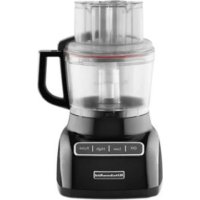
KFP0922OB - Food Processor KITCHENAID - Free user manual and instructions
Find the device manual for free KFP0922OB KITCHENAID in PDF.



| Product Type | Food Processor (Kitchen Robot) |
| Brand | KitchenAid |
| Model | KFP0922OB |
| Main Bowl Capacity | 9 cups (2.0 L) |
| Mini Bowl Capacity | 3 cups (708 ml) |
| Bowl Material | BPA-Free Plastic |
| Power Supply | 120 V AC, 60 Hz |
| Polarized Plug | Yes (wide blade) |
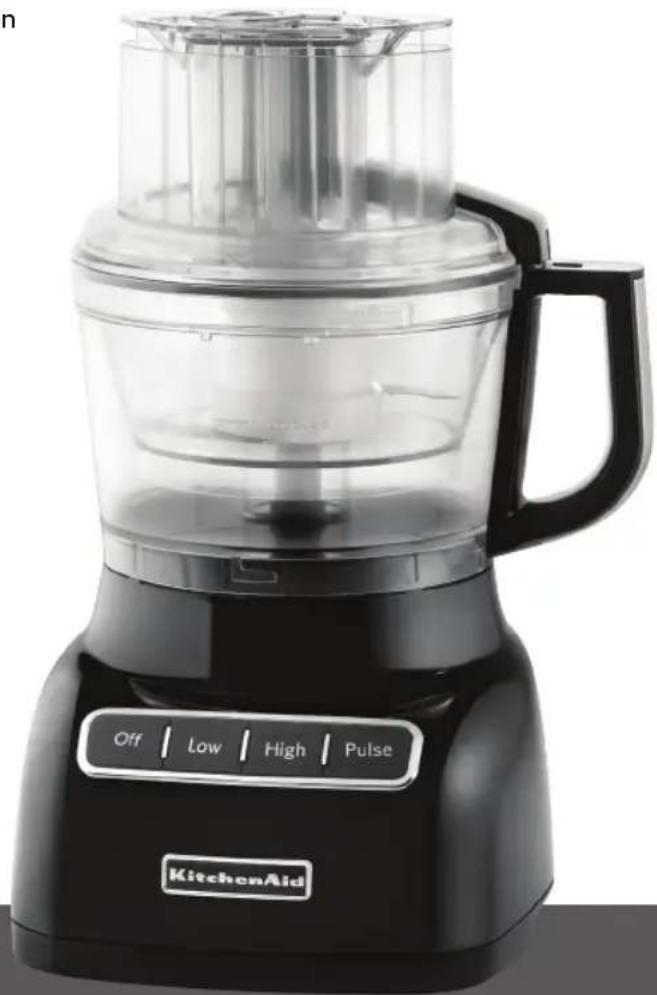
| Control Type | Buttons: Low, High, Pulse, OFF |
| Pulse Function | Yes, hold for momentary operation |
| Main Functions | Chop, Mince, Mix, Emulsify, Slice, Grate, Knead |
| Multipurpose Blade | Stainless steel, for chopping, mixing, emulsifying |
| Kneading Blade | For mixing and kneading yeast doughs |
| Adjustable Slicing Disc | Thickness from 1 mm to 6 mm |
| Reversible Grating Disc | Coarse or fine grating |
| Mini Bowl and Mini Blade | For small quantities (chopping, mixing) |
| Feed Tube | 3-in-1, with 3-piece pusher, allows drizzle of oil |
| Parts Cleaning | Dishwasher-safe (top rack) or hand wash |
| Base Cleaning | Wipe with a damp cloth, do not immerse |
| Safety | Cover lock mechanism; stops if cover not locked |
| Warranty | 1 year, free replacement (USA and Canada) |
Frequently Asked Questions - KFP0922OB KITCHENAID
User questions about KFP0922OB KITCHENAID
0 question about this device. Answer the ones you know or ask your own.
Ask a new question about this device
Download the instructions for your Food Processor in PDF format for free! Find your manual KFP0922OB - KITCHENAID and take your electronic device back in hand. On this page are published all the documents necessary for the use of your device. KFP0922OB by KITCHENAID.
USER MANUAL KFP0922OB KITCHENAID
natural_image
Close-up of fresh tomatoes with visible calyx and stems (no text or symbols)KFP0922 Food Processor
INSTRUCTIONS
Robot culinaire
INSTRUCTIONS
Welcome to the world of KitchenAid®
We're committed to helping you create a lifetime of delicious meals for family and friends. To help ensure the longevity and performance of your appliance, keep this guide handy.
It will empower you with the best way to use and care for your product. Your satisfaction is our #1 goal. Remember
to register your product online at www.kitchenaid.com, or by mail using the attached Product Registration Card.

natural_image
KitchenAid kitchen blender with control buttons (Off, Low, High, Pulse) and no visible text or symbols on the device itself.USA: 1.800.541.6390
Canada: 1.800.807.6777
KitchenAid.com
KitchenAid.ca
Table of Contents
FOOD PROCESSOR SAFETY
Important Safeguards....4
Electrical Requirements....5
PARTS AND FEATURES....6
ACCESSORIES 7
Accessories Selection Guide......8
PREPARING THE FOOD PROCESSOR FOR FIRST USE 9
SETTING UP YOUR FOOD PROCESSOR
Attaching the Work Bowl....10
Attaching the Work Bowl Cover 10
Installing the Slicing and Shredding Discs.... I I
Installing the Multipurpose Blade or Dough Blades....12
Installing the Mini-Bowl and Mini-Blade 12
Using the 3-in-1 Feed Tube ....13
USING YOUR FOOD PROCESSOR
Before Use 14
Maximum Liquid Level 14
Using the Low/High Speed Control 14
Using the Pulse Control 14
Removing Processed Foods....15
CLEANING THE FOOD PROCESSOR....16
FOOD PROCESSING TIPS
Tips for Great Results....17
Helpful Hints....19
TROUBLESHOOTING....21
WARRANTY....22
Find recipes and more at
www.kitchenaid.com
Your safety and the safety of others are very important.
We have provided many important safety messages in this manual and on your appliance. Always read and obey all safety messages.

This is the safety alert symbol.
This symbol alerts you to potential hazards that can kill or hurt you and others.
All safety messages will follow the safety alert symbol and either the word "DANGER" or "WARNING." These words mean:
! DANGER
You can be killed or seriously injured if you don't immediately follow instructions.
WARNING
You can be killed or seriously injured if you don't follow instructions.
All safety messages will tell you what the potential hazard is, tell you how to reduce the chance of injury, and tell you what can happen if the instructions are not followed.
IMPORTANT SAFEGUARDS
When using electrical appliances, basic safety precautions should always be followed, including the following:
I. Read all instructions.
2. To protect against risk of electrical shock, do not put Food Processor in water or other liquid.
3. Close supervision is necessary when any appliance is used by or near children.
4. Unplug from the outlet when not in use, before putting on or taking off parts, and before cleaning.
5. Avoid contacting moving parts.
6. Do not operate any appliance with a damaged cord or plug, or after the appliance malfunctions, or is dropped or damaged in any manner. Return appliance to the nearest Authorized Service Facility for examination, repair, or electrical or mechanical adjustment.
7. The use of attachments not recommended or sold by KitchenAid may cause fire, electric shock, or injury.
8. Do not use outdoors.
9. Do not let cord hang over edge of table or counter.
10. Keep hands and utensils away from moving blades or discs while processing food to reduce the risk of severe injury to persons or damage to the Food Processor. A scraper may be used but must be used only when the Food Processor is not running.
II. Blades are sharp. Handle carefully.
12. To reduce the risk of injury, never place cutting blade or discs on base without first putting bowl properly in place.
13. Be certain cover is securely locked in place before operating appliance.
14. Never feed food by hand. Always use the food pusher.
15. Do not attempt to defeat the cover interlock mechanism.
16. This product is designed for household use only.
SAVE THESE INSTRUCTIONS
Food Processor Safety
Electrical Requirements
Volts: 120 V.A.C.
Hertz: 60 Hz
NOTE: This Food Processor is equipped with a polarized plug (one blade is wider than the other). To reduce the risk of electrical shock, this plug will fit in a polarized outlet only one way. If the plug does not fit fully in the outlet, reverse the plug. If it still does not fit, contact a qualified electrician. Do not modify the plug in any way.
Proof of Purchase & Product Registration
Always keep a copy of the itemized sales receipt showing the date of purchase of your Food Processor. Proof of purchase will assure you of in-warranty service. Before you use your Food Processor, please fill out and mail your product registration card packed with the unit. This card will enable us to contact you in the unlikely event of a product safety notification and assist us in complying with the provisions of the Consumer Product Safety Act. This card does not verify your warranty. Please complete the following for your personal records:
Model Number ____
Serial Number ____
Date Purchased ____
Store Name ____
Parts and Features
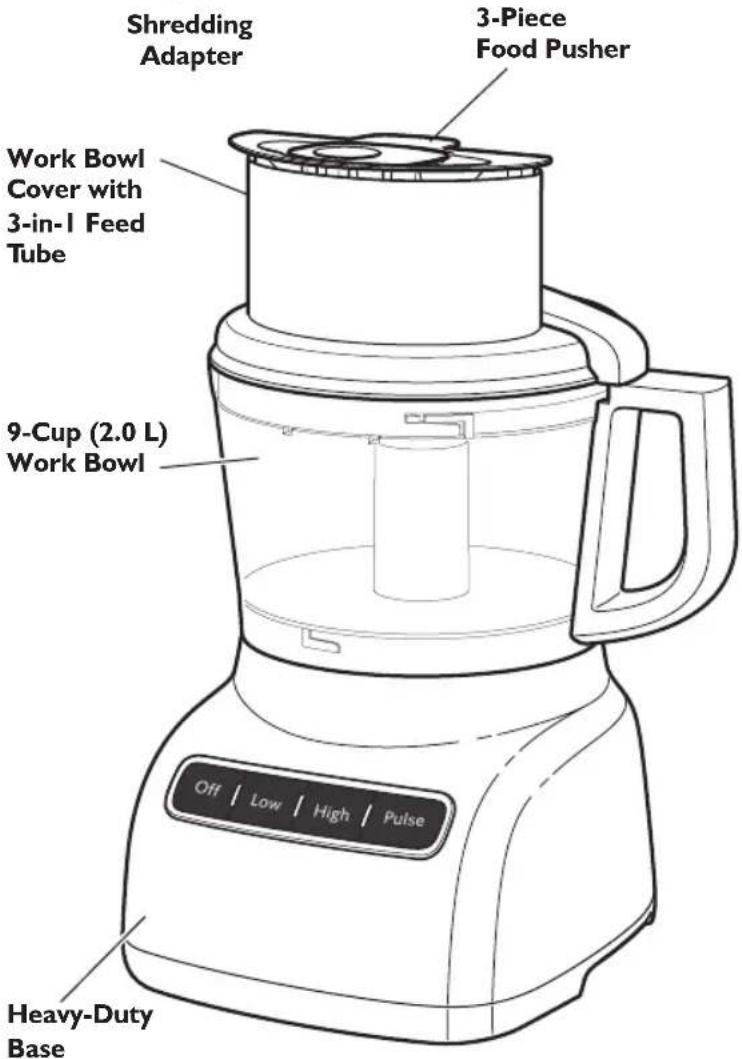
natural_image
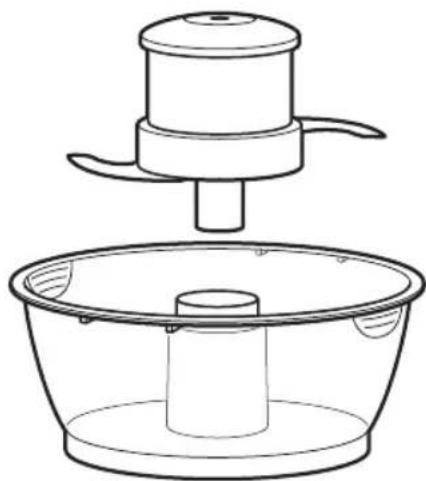
Line drawing of a kitchen utensil and a bowl (no text or symbols)3-Cup (945 ml) Mini-Bowl and Mini-Blade
natural_image
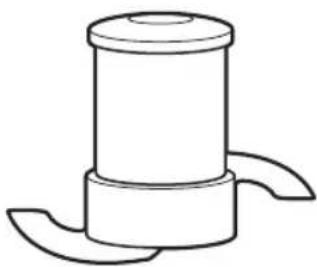
Simple line drawing of a cylindrical mechanical component with two curved ends (no text or symbols)Multipurpose Stainless Steel Blade
natural_image
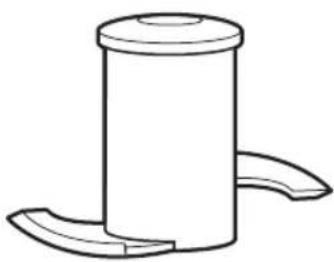
Simple line drawing of a cylindrical object with two curved ends, resembling a mechanical part or component (no text or symbols)Dough Blade
Parts and Features
Important parts and accessories included with your new Food Processor are highlighted below. Refer to the following pages for additional details on accessories included with your Food Processor as well as optional accessories you can order.
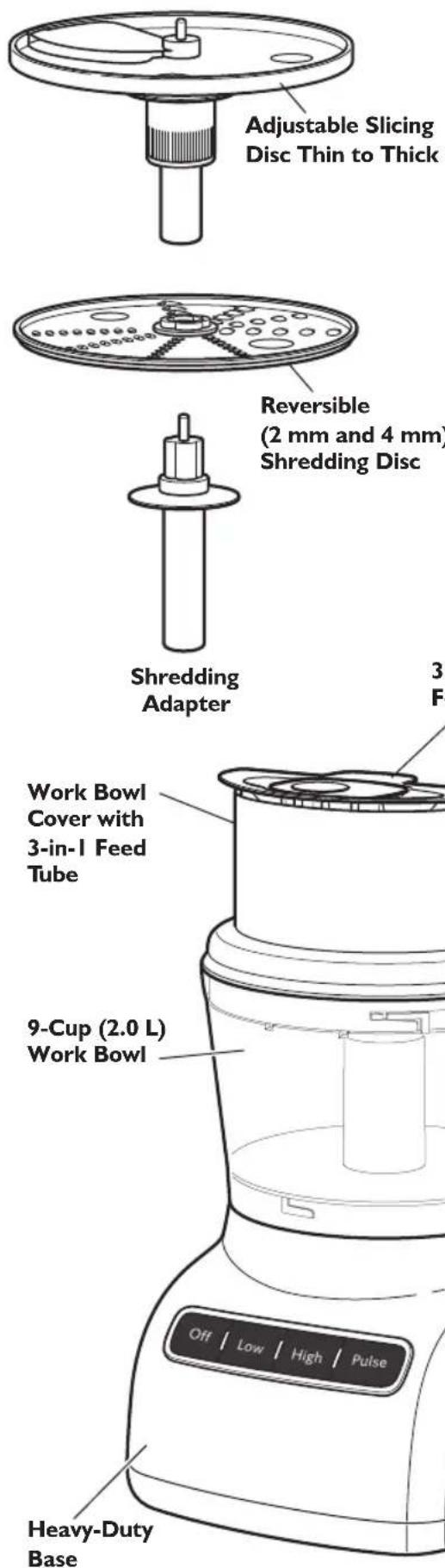
Adjustable Slicing Control
KitchenAid's® adjustable slicing disc allows you to manually adjust slicing thickness from thin to thick.
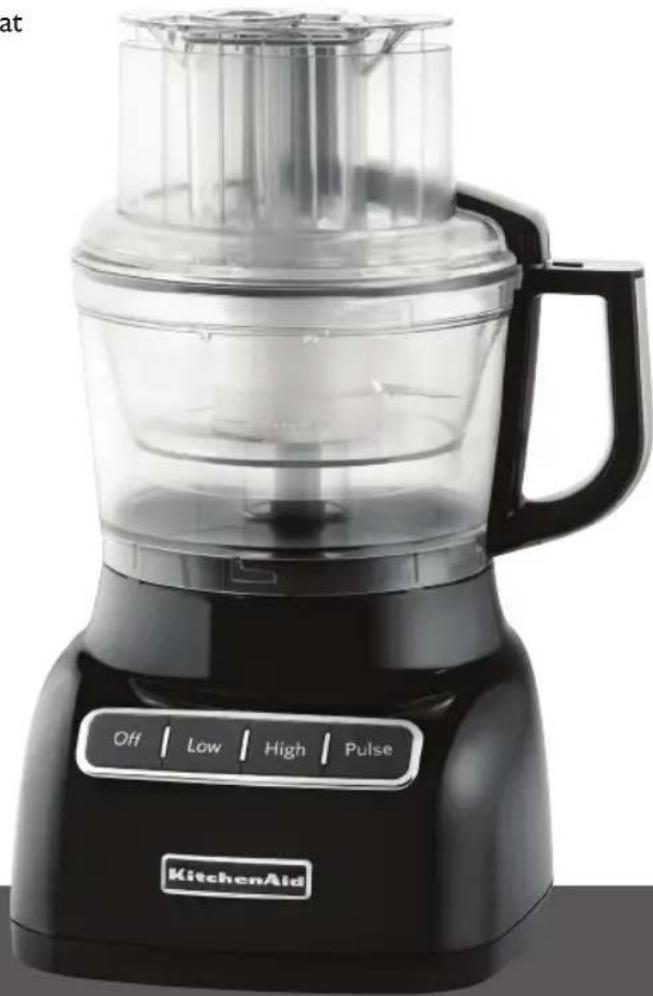
High/Low/Pulse/Control
Two speeds and Pulse provide precise control to give great results with most any food.
Work Bowl Cover with 3-in-1 Feed Tube (KFPL90FT)
One of the industry's largest, the 3-in-1 feed tube accommodates large items such as tomatoes, cucumbers, and potatoes with a minimum of sectioning or slicing.
3-Piece Food Pusher (KFP90FTP)
Three pushers are nested inside of each other. Remove the medium pusher from the large pusher to reveal a medium-size feed tube for continuous processing.
For continuous processing of smaller items (like herbs, nuts, single carrots, and celery), remove the narrow pusher and use the narrow feed tube.
A small hole in the bottom of the narrow pusher makes it easy to drizzle oil into ingredients – just fill with the desired amount of oil or other liquid ingredient.
Heavy-Duty Base
The heavy, slip-resistant base helps provide improved stability and reduced vibration during tough food processing jobs.
Accessories
Included Accessories
3-cup (708 ml) Mini-Bowl and Mini-Blade (KFP90BM)
Mini-bowl and stainless steel mini-blade are perfect for small chopping and mixing jobs.
9-Cup (2.0 L) Work Bowl (KFP90WBOB)
The durable, large work bowl provides capacity for large jobs.
Adjustable Slicing Disc (KFP90ESL)
Disc is adjustable from approximately 116 inch (1 mm) to 14 inch (6 mm) for slicing most foods.
Reversible Shredding Disc (KFP90RD)
Shredding disc is reversible to allow coarse or finely shredded cheese or vegetables.
Drive Adapter
The drive adapter is used to connect the slicing/shredding disc to the power shaft on the base.
Multipurpose Blade (KFP90BL)
Versatile blade chops, minces, blends, mixes, and emulsifies in a matter of seconds.
Dough Blade (KFP90DB)
The dough blade is specially designed for mixing and kneading yeast dough.
Accessories Selection Guide
| Action | Setting | Food | Accessor |
 |  | deChocolateFruit |  OR OR |
ChopFresh herbs | [2KYS] | NutsTofu | |
| Mini Multiple Purpose Blade | |||
| Pasta SauceMix | PestoSalsaSauces | 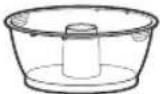 +[K8DH] +[K8DH] | |
Fruit (soft)Adjustable Slicing Disc table(soft)[IMAGE]Fruit (hard)Vegetables (hard) table(soft)[IMAGE]Fruit (hard)Vegetables (hard) |  | PotatoesTomatoes | 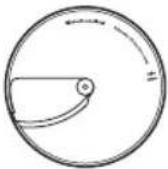 |
 | CheeseChocolate | ||
| [WZA9] toes[25C0]Vegetables (soft)[IMAGE]Shred ShredMedium FineFruit (hard)Vegetables (hard) |  | CabbageCheeseChocolate | 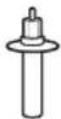 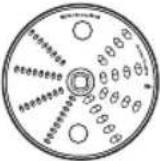 |
 | |||
 DoughBlade[BOODoughKnead] DoughBlade[BOODoughKnead] | 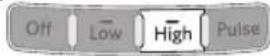 | ||
Preparing the Food Processor for First Use
WARNING
Cut Hazard
Handle blades carefully.
Failure to do so can result in cuts.
Before First Use
Before using your Food Processor for the first time, wash all parts and accessories either by hand or in the dishwasher (see "Cleaning the Food Processor").
Removing the Work Bowl Cover from the Work Bowl
Your Food Processor is shipped with the work bowl cover installed on the work bowl, with the mini-bowl inside the work bowl.
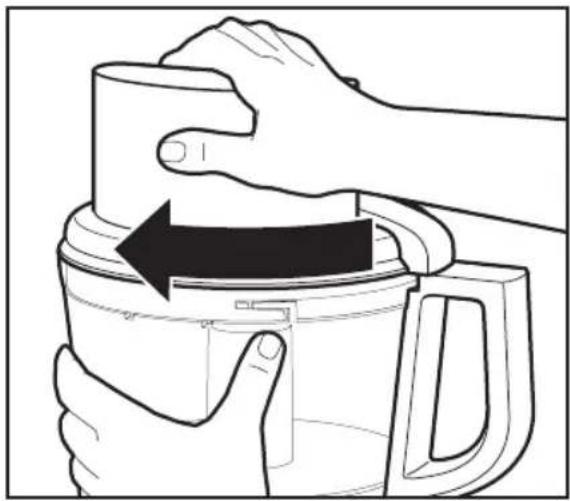
To remove the work bowl cover from the work bowl for initial cleaning:
I. Grasp the feed tube on the work bowl cover and turn it clockwise to remove it from the work bowl.
natural_image
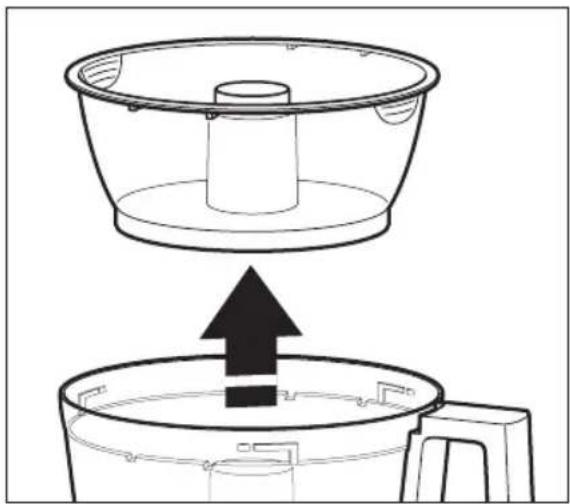
Illustration of hands using a blender to press or expand the lid (no text or symbols present)- Lift out the mini-bowl.
natural_image
Diagram showing a container being lifted by an upward arrow into a smaller container (no text or symbols)Setting Up Your Food Processor
Attaching the Work Bowl
I. Place the Food Processor on a dry, level countertop with the controls facing forward. Do not plug in the Food Processor until it is completely assembled.
2. Place the work bowl on the base, aligning the raised portion with the indentation on the base. The center hole should fit over the power shaft.
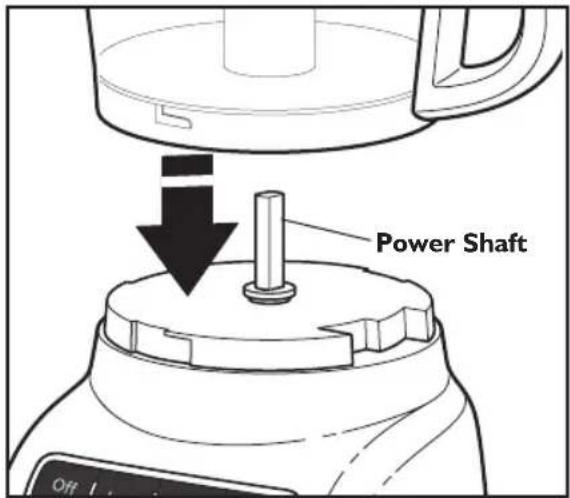
- Grasp the work bowl handle and turn the bowl counterclockwise to lock it on the base.
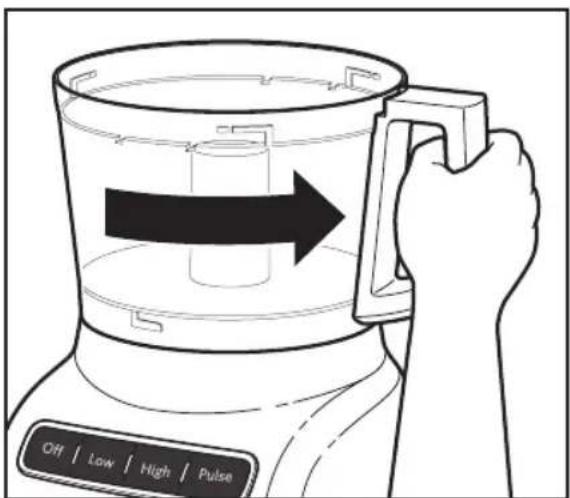
- Select the accessory you would like to use and install it according to the instructions on the following pages.
NOTE: Be sure to install the desired accessory before attaching the work bowl cover.
Attaching the Work Bowl Cover
I. Place the work bowl cover on the work bowl with the feed tube just to the left of the work bowl handle. Grasp the feed tube and turn the cover to the right until it locks into place.
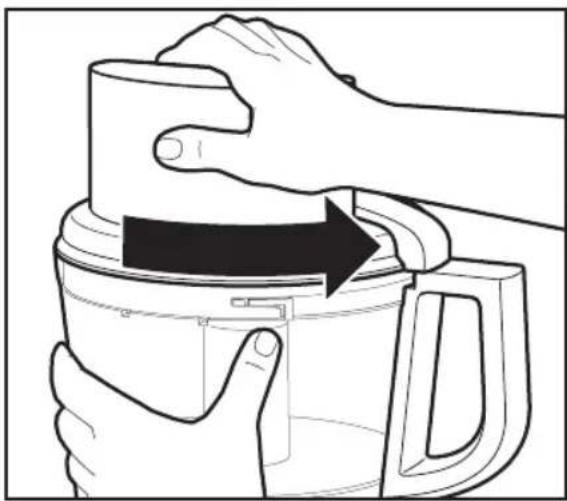
natural_image
Illustration of hands using a thermospan to press or adjust a container (no text or symbols visible)- Fit the food pusher into the 3-in-1 feed tube. See "Using the 3-in-1 Feed Tube" for details on working with different sized foods.
NOTE: Your Food Processor will not operate unless the work bowl and work bowl cover are properly locked on the base, and the large pusher is inserted to the maximum fill line on the feed tube (approximately halfway down).
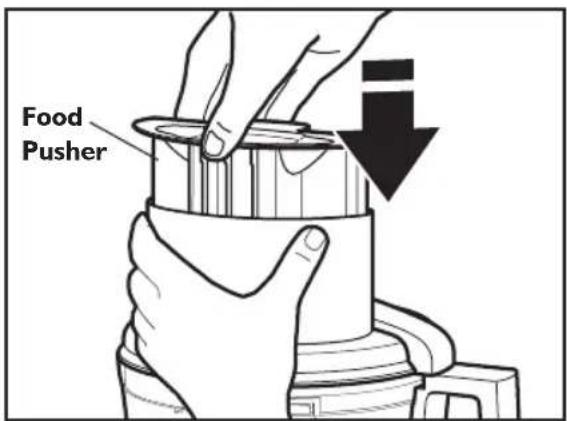
NOTE: Be sure to install the desired accessory before attaching the work bowl cover.
Setting Up Your Food Processor
Installing the Adjustable Slicing Disc
The Adjustable Slicing Disc is easily adjusted and makes slicing tasks simple. Follow these steps for adjusting and installing the Adjustable Slicing Disc.
I. Holding the slicing disc, twist the ridged portion of the shaft clockwise for thinner slices, or counterclockwise for thicker slices.
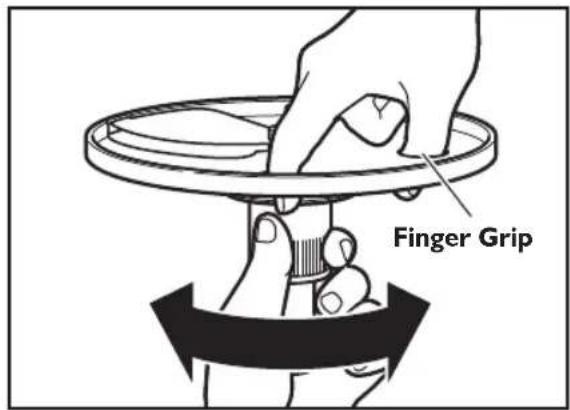
- With the work bowl installed, hold the slicing disk by the finger grips and lower it onto the drive adapter.
TIP: You may need to turn the disc/drive adapter until it drops down into place.
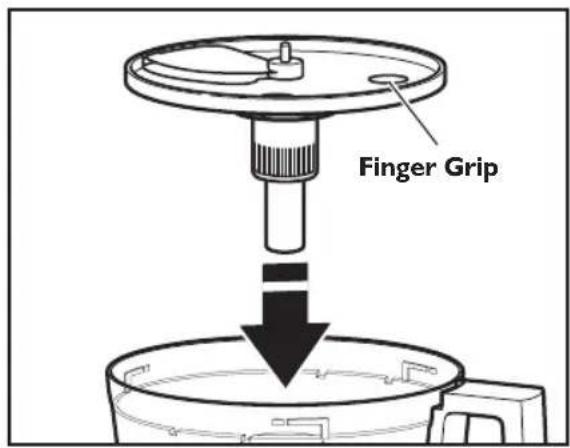
- Install the work bowl cover, being sure it locks into place.
Installing the Reversible Shredding Disc
I. Holding the reversible shredding disc by the 2 finger grips, insert the shredding adapter into the hole in the bottom of the disc.
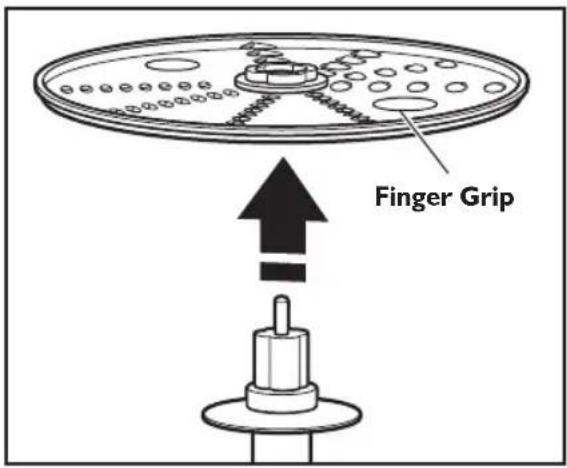
- With the work bowl installed, slide the drive adapter onto the power shaft.
TIP: You may need to turn the disc/adapter until it drops down into place.
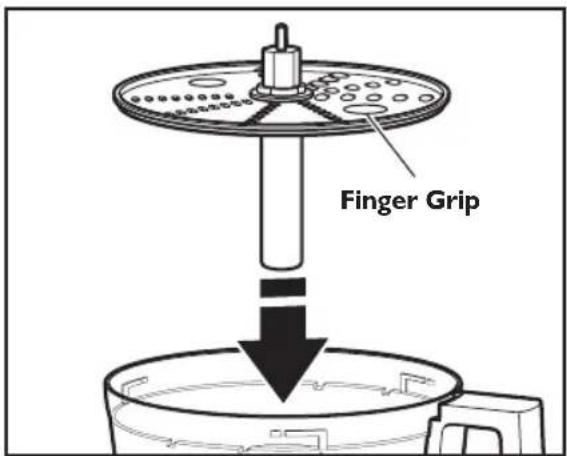
- Install the work bowl cover, being sure it locks into place.
Setting Up Your Food Processor
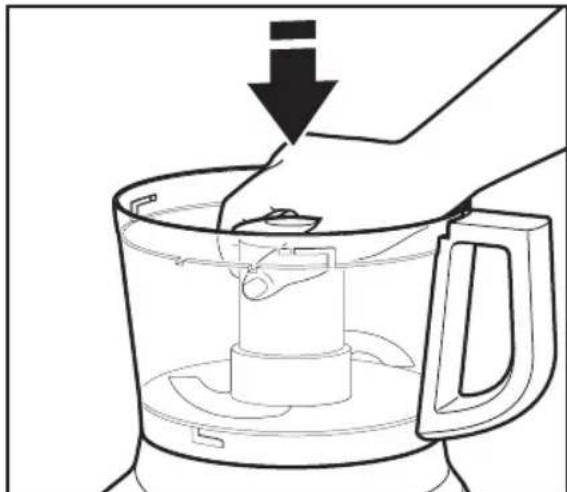
Installing the Multipurpose Blade or Dough Blade
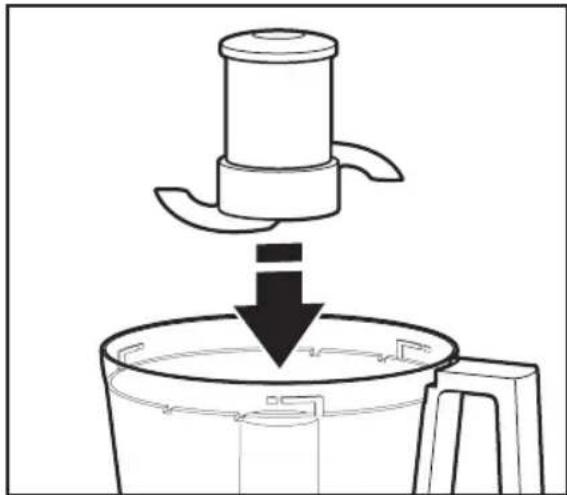
IMPORTANT: The multipurpose blade and dough blade can only be used with the work bowl.
I. Place the blade on the power shaft.
2. Rotate the blade so it falls into place on the power shaft.
natural_image
Line drawing of a kitchen mixer with a downward arrow indicating cooling or drying process (no text or symbols)- Push to lock: Press down firmly on the multipurpose blade until it is down as far as it will go. The multipurpose blade features an internal seal that fits tightly over the center of the work bowl.
natural_image
Line drawing of a hand pressing down on a kitchen blender with a downward arrow indicating the process (no text or symbols)- Install the work bowl cover, being sure it locks into place. See "Attaching the Work Bowl Cover" section.
Installing the Mini-Bowl and Mini-Blade
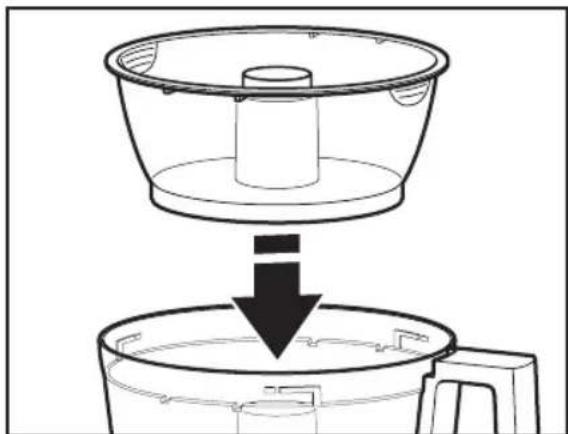
I. Place the mini-bowl inside the work bowl over the power shaft. Rotate the mini-bowl until the tabs on the top edge of the bowl drops into the indents on the top of the work bowl.
natural_image
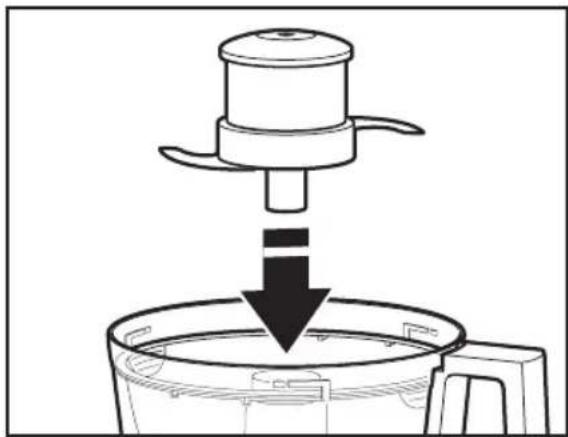
Diagram showing a container being lifted by a downward arrow into a smaller container (no text or symbols)- Insert the mini-blade, and place on the power shaft. It may be necessary to rotate the blade until it falls into place. Press down firmly to lock it into place.
natural_image
Line drawing of a kitchen appliance with a downward arrow indicating process (no text or symbols)- Install the work bowl cover, being sure it locks into place.
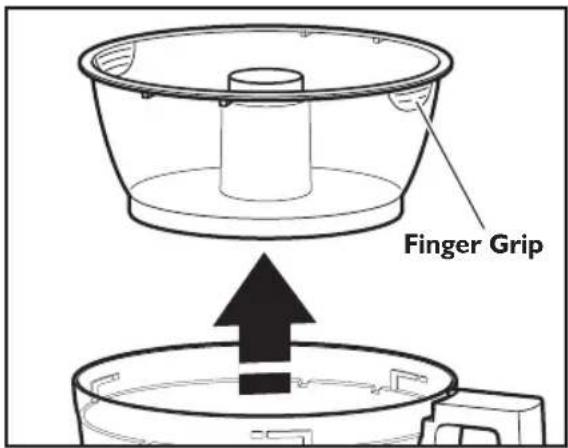
- To remove the mini-bowl after processing, remove the mini-blade by pulling straight up on the cap. Then lift the bowl straight up and out, using the two finger grips located along the top edge of the bowl.
Setting Up Your Food Processor
Using the 3-in-I Feed Tube
The 3-in-1 feed tube features a 3-piece food pusher. Use the entire food pusher to process large items, or use the inner portions to create medium-sized or small feed tubes to process smaller items.
To slice or shred small items, insert the 3-piece food pusher into the feed tube, then lift out the small pusher to remove. Use the small feed tube and pusher to process small or slender items, like single carrots or celery stalks. When not using the small feed tube, be sure to lock the small pusher into place.
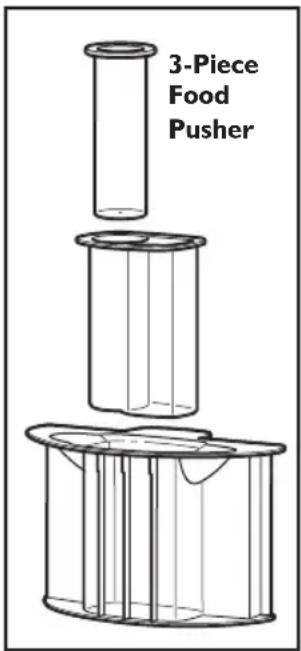
To slowly drizzle oil or other liquid ingredients into the work bowl, just fill the small pusher with the desired amount of liquid. A small hole in the bottom of the pusher will drizzle the liquid ingredient at a constant rate.
WARNING

Rotating Blade Hazard Always use food pusher. Keep fingers out of openings. Keep away from children. Failure to do so can result in amputation or cuts.
Before Use
Before operating the Food Processor, be sure the work bowl, blades, and work bowl cover are properly assembled on the Food Processor base (see "Setting Up Your Food Processor").
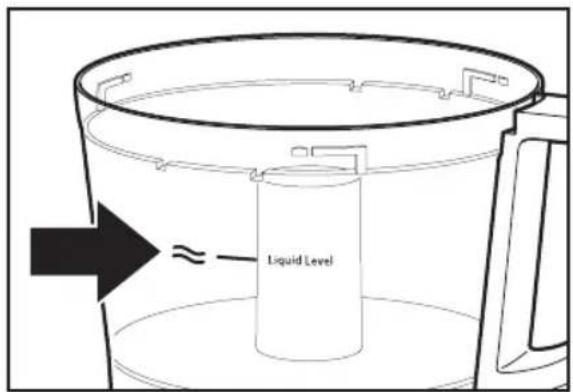
Maximum Liquid Level
This line on the work bowl indicates the maximum level of liquid that can be processed by the Food Processor.
Using the Low/High Speed Control
I. To turn on the Food Processor, press the Low or High button. The Food Processor will run continuously and the indicator light will glow.
2. To stop the Food Processor, press the OFF button. The indicator light will go out and the blade or disc will stop within a few seconds.
3. Wait until the blade or disc comes to a complete stop before removing the work bowl cover. Be sure to turn off the Food Processor before removing the work bowl cover, or before unplugging the Food Processor.
NOTE: If the Food Processor fails to operate, make sure the work bowl and cover are properly locked on the base (see "Setting Up Your Food Processor").
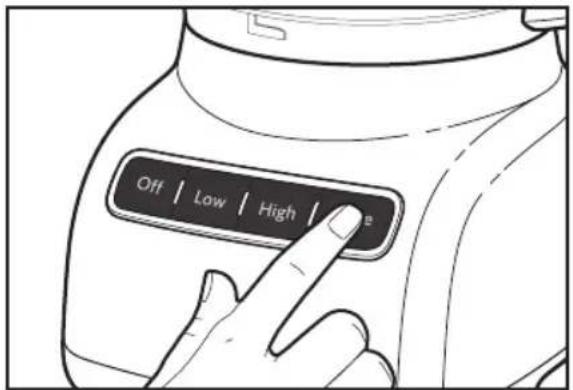
Using the Pulse Control
The pulse control allows precise control of the duration and frequency of processing. It's great for jobs which require a light touch. Just press and hold the PULSE Button to start processing at high speed, and release it to stop.
WARNING
Cut Hazard
Handle blades carefully.
Failure to do so can result in cuts.
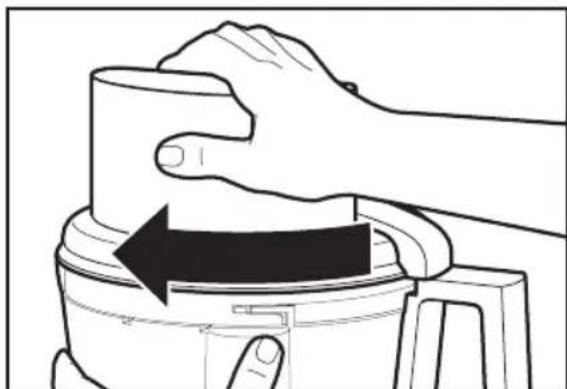
Removing Processed Foods
I. Press the OFF Button.
2. Unplug the Food Processor before disassembling.
3. Turn the work bowl cover to the left and remove.
natural_image
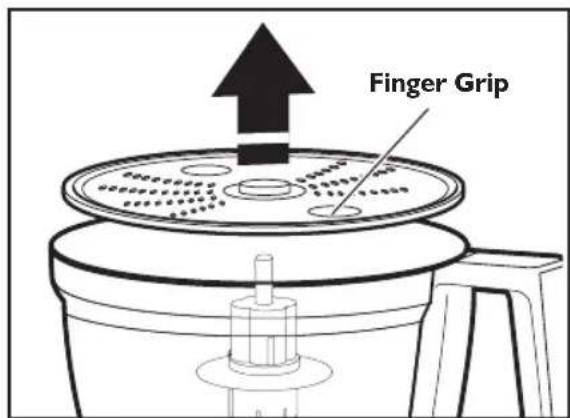
Line drawing of a hand pressing down on a mechanical component with an arrow indicating rotation (no text or symbols)- If using a disc, remove it before removing the bowl. Holding the disc by the 2 finger grips, lift it straight up. Remove the adapter when using the Shredding Disc.
- If using the mini-bowl, grasp and remove the bowl using the finger grips located along the top edge of the bowl.
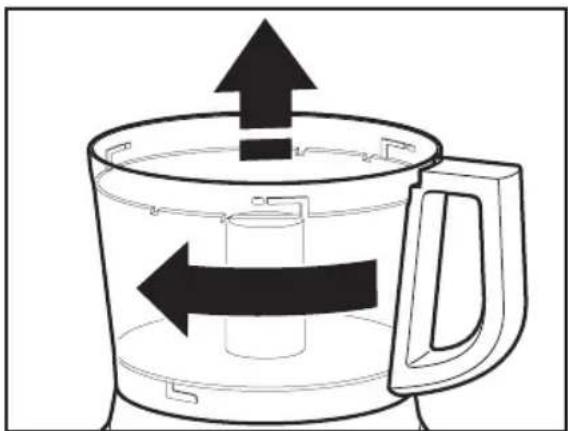
- Turn the work bowl to the left to unlock it from the base. Lift to remove.
natural_image
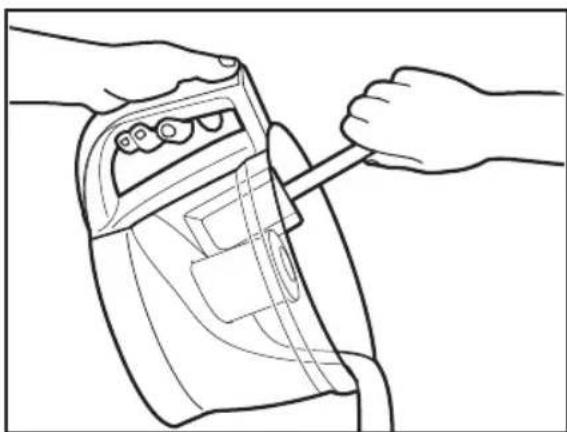
Diagram of a coffee maker with arrows indicating flow direction (no text or symbols)- The multipurpose blade can be removed from the work bowl before the contents are emptied. You may also leave the blade locked in place. Then remove food from the bowl and blade with a spatula.
natural_image
Line drawing of hands using a handheld device to adjust or install a device (no text or symbols present)Cleaning the Food Processor
WARNING
Cut Hazard
Handle blades carefully.
Failure to do so can result in cuts.
I. Press the OFF Button.
2. Unplug the Food Processor before Cleaning.
3. Wipe the base and cord with a warm, sudsy cloth, and wipe clean with a damp cloth. Dry with a soft cloth. Do not use abrasive cleansers or scouring pads.
4. Please note these BPA-free bowls require special handling. If you choose to use a dishwasher instead of hand washing, please follow these guidelines.
- All parts are top rack dishwasher safe.
- Avoid laying the bowl on its side.
- Use gentle dishwashing cycles such as Normal. Avoid high temperature cycles such as Sanitize, Steam, and Pot Scrubbing.
5. If washing the Food Processor parts by hand, avoid the use of abrasive cleansers or scouring pads. They may scratch or cloud the work bowl and cover. Thoroughly dry all parts after washing.
- To prevent damage to the locking system, always store the work bowl and work bowl cover in the unlocked position when not in use.
natural_image
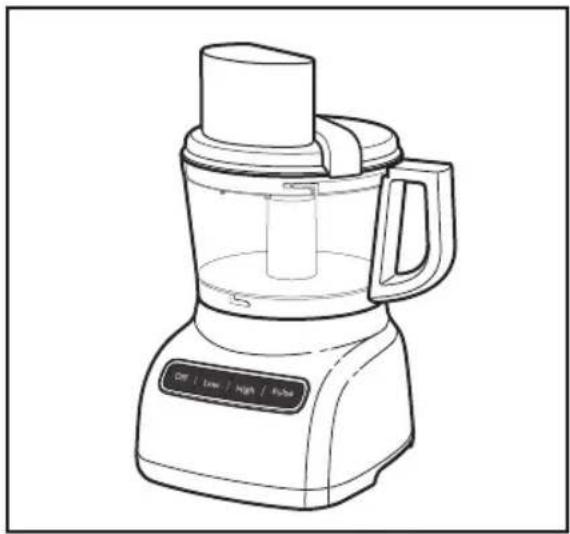
Line drawing of a blender with control panel and handle (no text or symbols)- Wrap the power cord around the work bowl. Secure the plug by clipping it to the cord.
Tips for Great Results
WARNING
Cut Hazard
Handle blades carefully.
Failure to do so can result in cuts.
Using the Multipurpose Blade
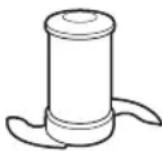
To chop fresh fruits or vegetables:
Peel, core, and/or remove seeds.
Cut food in 1 to 1^1/2 -inch
(2.5-3.75 cm) pieces. Process
food to desired size, using short pulses, 1 to 2 seconds each time. Scrape sides of bowl, if necessary.
To puree cooked fruits and vegetables (except potatoes):
Add 1/4 cup (60 ml) liquid from recipe per cup (235 ml) of food. Process food, using short pulses, until finely chopped. Then process continuously until reaching desired texture. Scrape sides of bowl, if necessary.
To prepare mashed potatoes:
Shred hot cooked potatoes using the shredding disc. Exchange shredding disc for multipurpose blade. Add softened butter, milk, and seasonings. Pulse 3 to 4 times, 2 to 3 seconds each time, until smooth and milk is absorbed. Do not over process.
To chop dried (or sticky) fruits:
The food should be cold. Add 1/4 cup (60 ml) flour from recipe per 1/2 cup (120 ml) dried fruit. Process fruit, using short pulses, until reaching desired texture.
To finely chop citrus peel:
With sharp knife, peel colored portion (without white membrane) from citrus. Cut peel in small strips. Process until finely chopped.
To mince garlic or to chop fresh herbs or small quantities of vegetables:
With processor running, add food through the feed tube. Process until chopped. For best results, make sure work bowl and herbs are very dry before chopping.
To chop nuts or make nut butters:
Process up to 3 cups (710 ml) of nuts to desired texture, using short pulses, 1 to 2 seconds each time. For a coarser texture, process smaller batches, pulsing 1 or 2 times, 1 to 2 seconds each time. Pulse more often for finer texture. For nut butters, process continuously until smooth. Store in refrigerator.
NOTE: Processing nuts and other hard foods may scratch the surface finish on the inside of the bowl.
To chop cooked or raw meat, poultry or seafood:
The food should be very cold. Cut in 1-inch (2.5 cm) pieces. Process up to 1 pound (455 g) at a time to desired size, using short pulses, 1 to 2 seconds each time. Scrape sides of bowl, if necessary.
To make bread, cookie, or cracker crumbs:
Break food into 1^1/2 to 2-inch (3.75-5 cm) pieces. Process until fine. For larger pieces, pulse 2 to 3 times, 1 to 2 seconds each time. Then process until fine.
To melt chocolate in a recipe:
Combine chocolate and sugar from recipe in work bowl. Process until finely chopped. Heat liquid from recipe. With processor running, pour hot liquid through the feed tube. Process until smooth.
To grate hard cheeses, such as Parmesan and Romano:
Never attempt to process cheese that cannot be pierced with the tip of a sharp knife. You can use the multi-purpose blade to grate hard cheeses. Cut cheese in 1-inch (2.5 cm) pieces. Place in work bowl. Process, using short pulses, until coarsely chopped. Process continuously until finely grated. Pieces of cheese can also be added through the feed tube while the processor is running.
Food Processing Tips
Using a Slicing or Shredding Disc
WARNING

Rotating Blade Hazard
Always use food pusher.
Keep fingers out of openings.
Keep away from children.
Failure to do so can result in amputation or cuts.
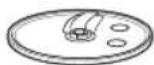
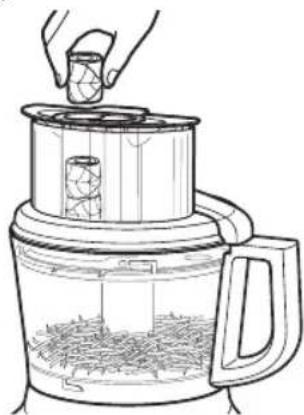
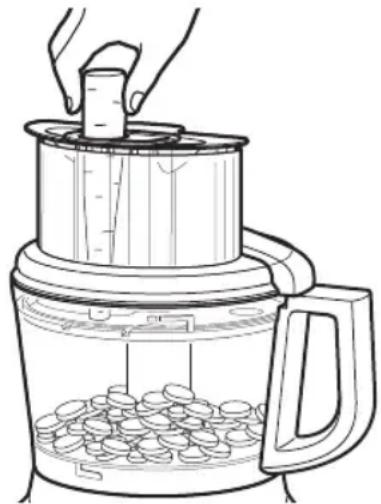
To slice or shred fruits or vegetables that are long and relatively small in diameter, such as celery, carrots, and bananas:
Cut food to fit feed tube vertically or horizontally, and pack feed tube securely to keep food positioned properly. Process using even pressure with the food pusher. Or use the small feed tube in the two-piece food pusher. Position food vertically in the tube and use the small food pusher to process food.
natural_image
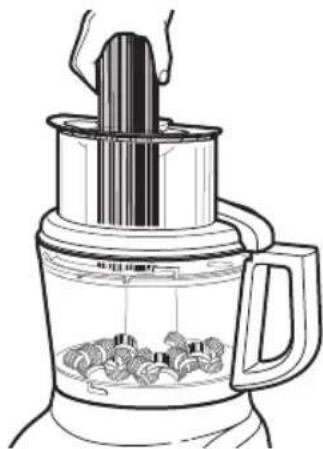
Line drawing of a blender with a lid and lid emitting vapor, showing food inside (no text or symbols)To slice or shred fruits and vegetables that are round, such as onions, apples, and green peppers:
Peel, core, and remove seeds. Cut in halves or quarters to fit feed tube. Position in feed tube. Process using even pressure with the food pusher.
To slice or shred fruits and vegetables that are small, such as strawberries, mushrooms, and radishes:
Position food vertically or horizontally in layers within the feed tube. Fill feed tube in order to keep food positioned properly.
Process using even pressure with the food pusher. Or use the small feed tube in the two-piece food pusher. Position food vertically in the tube and use the small food pusher to process food.
To slice uncooked meat or poultry, such as stir-fry meats:
Cut or roll food to fit feed tube. Wrap and freeze food until hard to the touch, 30 minutes to 2 hours, depending on thickness of food. Check to be sure you can still pierce food with the tip of a sharp knife. If not, allow to thaw slightly. Process using even pressure with the food pusher.
To slice cooked meat or poultry, including salami, pepperoni, etc.:
Food should be very cold. Cut in pieces to fit feed tube. Process food using firm, even pressure with the food pusher.
To shred spinach and other leaves:
Stack leaves. Roll up and stand up in feed tube. Process using even pressure with the food pusher.
natural_image
Line drawing of a hand pouring liquid into a layered food processor (no text or symbols)
To shred firm and soft cheeses:
Firm cheese should be very cold. For best results with soft cheeses, such as mozzarella, freeze 10 to 15 minutes before processing. Cut to fit feed tube. Process using even pressure with the food pusher.
Food Processing Tips
Using the Dough Blade
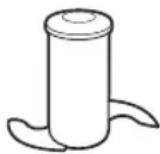
The dough blade is specially designed for mixing and kneading yeast dough quickly and thoroughly. For the best results, do not knead recipes which use more than 2-3 cups (475 - 710 ml) of flour.
Helpful Hints
- To avoid damage to the blade or motor, do not process food that is so hard or firmly frozen that it cannot be pierced with the tip of a sharp knife. If a piece of hard food, such as a carrot, becomes wedged or stuck on the blade, stop the processor and remove the blade. Gently remove food from the blade.
- Do not overfill work bowl or mini-bowl. For thin mixtures, fill work bowl up to 1/2 to 2/3 full. For thicker mixtures, fill work bowl up to 3/4 full. For liquids, fill up to the maximum level as described on page 17. When chopping, the work bowl should be no more than 1/3 to 1/2 full. Use the mini-bowl for up to 1 cup (235 ml) of liquid or 1/2 cup (155 g) solids.
- Position slicing discs so the cutting surface is just to the right of the feed tube. This allows the blade a full rotation before contacting the food.
- To capitalize on the speed of the processor, drop ingredients to be chopped through the feed tube while the processor is running.
- Different foods require varying degrees of pressure for best shredding and slicing results. In general, use light pressure for soft, delicate foods (strawberries, tomatoes, etc.), moderate pressure for medium foods (zucchini, potatoes, etc.), and firmer pressure for harder foods (carrots, apples, hard cheeses, partially frozen meats, etc.).
- Soft and medium-hard cheese may spread out or roll up on the shredding disc. To avoid this, shred only well-chilled cheese.
- Sometimes slender foods, such as carrots or celery, fall over in the feed tube, resulting in an uneven slice. To minimize this, cut food in several pieces and pack the feed tube with the food. For processing small or slender items, the small feed tube in the two piece food pusher will prove especially convenient.
natural_image
Line drawing of a kitchen appliance with a hand placing a cylindrical object into a tiered container filled with round objects (no text or symbols)- When preparing a cake or cookie batter or quick bread, use the multipurpose blade to cream fat and sugar first. Add dry ingredients last. Place nuts and fruit on top of flour mixture to prevent over chopping. Process nuts and fruits, using short pulses, until blended with other ingredients. Do not over process.
- When shredded or sliced food piles up on one side of the bowl, stop the processor and redistribute the food using a spatula.
- When food quantity reaches the bottom of a slicing or shredding disc, remove the food.
- A few larger pieces of food may remain on top of the disc after slicing or shredding. If desired, cut these by hand and add to mixture.
- Organize processing tasks to minimize bowl cleanup. Process dry or firm ingredients before liquid ingredients.
- To clean ingredients from the multipurpose blade easily, just empty the work bowl, replace the lid, and pulse 1 to 2 seconds to spin the blade clean.
• After removing the work bowl cover, place it upside down on the counter. This will help keep the counter clean.
Food Processing Tips
- Use the spatula to remove ingredients from the work bow.
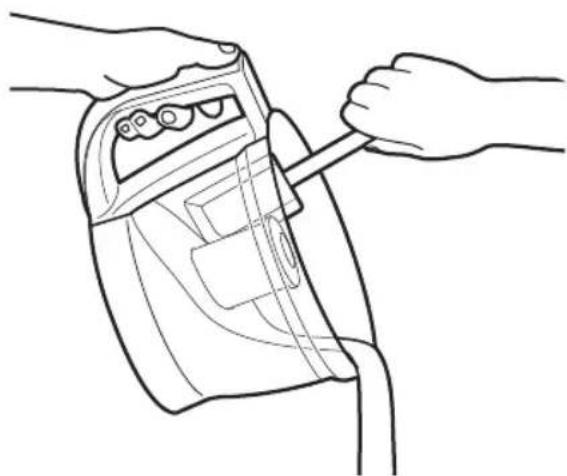
natural_image
Line drawing of hands inserting a device into a device casing (no text or symbols)- Your Food Processor is not designed to perform the following functions:
- Grind coffee beans, grains, or hard spices
- Grind bones or other inedible parts of food
- Liquefy raw fruits or vegetables
- Slice hard-cooked eggs or unchilled meats.
- If any plastic parts should discolor due to the types of food processed, clean them with lemon juice
Troubleshooting
If your Food Processor should malfunction or fail to operate, check the following:
Food Processor doesn't run:
- Make sure that the bowl and lid are properly aligned and locked in place and the large food pusher is inserted in the feed tube.
- When using the large feed tube opening, make sure that food is not above the Max. Fill line on the feed tube.
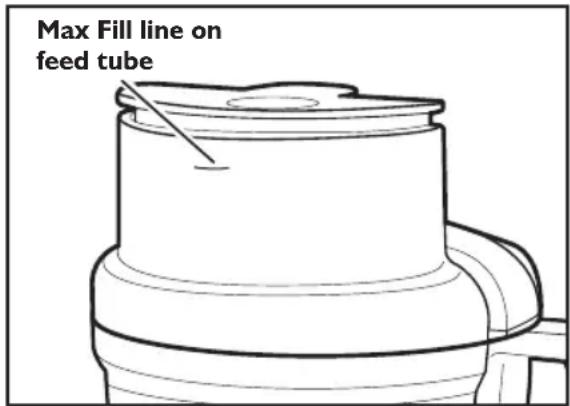
- Press only one button at a time. The Food Processor will not operate if more than one button is pressed at the same time.
• Is the Food Processor plugged in? - Is the fuse in the circuit to the Food Processor in working order? If you have a circuit breaker box, be sure the circuit is closed.
- Unplug the Food Processor, then plug it back into the outlet.
- If the Food Processor is not at room temperature, wait until it reaches room temperature and retry.
Food Processor not shredding or slicing properly:
- Make sure the raised-blade side of the disc is positioned face up on the common adapter.
- If using the adjustable slicing blade, make sure it is set to the correct thickness.
- Make sure ingredients are suitable for slicing or shredding. See “Food Processing Tips”
If the work bowl cover won't close when using the disc:
- Make sure the disc is installed correctly, with the raised nub on top, and is positioned properly on the drive adapter.
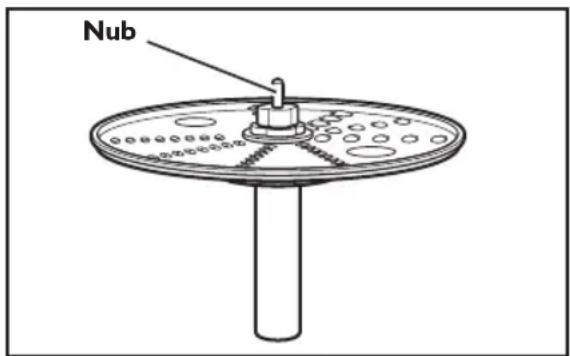
If the problem is not due to one of the above items, see "Warranty".
Do not return the Food Processor to the retailer. Retailers do not provide service.
KitchenAid® Food Processor Warranty for the 50 United States, the District of Columbia, Puerto Rico, and Canada
This warranty extends to the purchaser and any succeeding owner for Food Processors operated in the 50 United States, the District of Columbia, Puerto Rico, and Canada.
Length of Warranty: One Year Full Warranty from date of purchase.
KitchenAid Will Pay Hassle-Free Replacement of your Food Processor.
for Your Choice of: See the next page for details on how to arrange for service, or call the Customer Satisfaction Center toll-free at
I-800-541-6390.
OR

The replacement parts and repair labor costs to correct direct in materials and workmanship. Service must be provided by an Authorized KitchenAid Service Center.
KitchenAid Will A. Repairs when Food Processor is used in other than Not Pay for: normal single family home use.
B. Damage resulting from accident, alteration, misuse or abuse.
C. Any shipping or handling costs to deliver your Food Processor to an Authorized Service Center.
D. Replacement parts or repair labor costs for Food Processors operated outside the 50 United States, District of Columbia, Puerto Rico, and Canada.
DISCLAIMER OF IMPLIED WARRANTIES; LIMITATION OF REMEDIES
IMPLIED WARRANTIES, INCLUDING TO THE EXTENT APPLICABLE WARRANTIES OF MERCHANTABILITY OR FITNESS FOR A PARTICULAR PURPOSE, ARE EXCLUDED TO THE EXTENT LEGALLY PERMISSIBLE. ANY IMPLIED WARRANTIES THAT MAY BE IMPOSED BY LAW ARE LIMITED TO ONE YEAR, OR THE SHORTEST PERIOD ALLOWED BY LAW. SOME STATES AND PROVINCES DO NOT ALLOW LIMITATIONS OR EXCLUSIONS ON HOW LONG AN IMPLIED WARRANTY OF MERCHANTABILITY OR FITNESS LASTS, SO THE ABOVE LIMITATIONS OR EXCLUSIONS MAY NOT APPLY TO YOU.
IF THIS PRODUCT FAILS TO WORK AS WARRANTED, CUSTOMER'S SOLE AND EXCLUSIVE REMEDY SHALL BE REPAIR OR REPLACEMENT ACCORDING TO THE TERMS OF THIS LIMITED WARRANTY. KITCHENAID AND KITCHENAID CANADA DO NOT ASSUME ANY RESPONSIBILITY FOR INCIDENTAL OR CONSEQUENTIAL DAMAGES. This warranty gives you specific legal rights and you may also have other rights which vary from state to state or province to province.
Hassle-Free Replacement Warranty – 50 United States, District of Columbia, and Puerto Rico
We're so confident the quality of our products meets the exacting standards of KitchenAid that, if your Food Processor should fail within the first year of ownership, KitchenAid will arrange to deliver an identical or comparable replacement to your door free of charge and arrange to have your original Food Processor returned to us. Your replacement unit will also be covered by our one year limited warranty. Please follow these instructions to receive this quality service.
If your Food Processor should fail within the first year of ownership, simply call our tollfree Customer Satisfaction Center at 1-800-541-6390 Monday through Saturday. Please have your original sales receipt available when you call. Proof of purchase will be required to initiate the claim. Give the consultant your complete shipping address. (No P.O. Box numbers, please.) When you receive your replacement Food Processor, use the carton and packing materials to pack up your original Food Processor. In the carton, include your name and address on a sheet of paper along with a copy of the proof of purchase (register receipt, credit card slip, etc.).
Hassle-Free Replacement Warranty – Canada
We're so confident the quality of our products meets the exacting standards of the KitchenAid® brand that, if your Food Processor should fail within the first year of ownership, KitchenAid Canada will replace your Food Processor with an identical or comparable replacement. Your replacement unit will also be covered by our one year limited warranty. Please follow these instructions to receive this quality service.
If your Food Processor should fail within the first year of ownership, take the Food Processor or ship collect to an Authorized KitchenAid Service Centre. In the carton include your name and complete shipping address along with a copy of the proof of purchase (register receipt, credit card slip, etc.). Your replacement Food Processor will be returned prepaid and insured. If you are unable to obtain satisfactory service in this manner call our toll-free Customer Interaction Centre at 1-800-807-6777.
Or write to us at: Customer eXperience Centre KitchenAid Canada 200 - 6750 Century Ave. Mississauga, ON L5N 0B7
Arranging for Service after the Warranty Expires, or Ordering Accessories and Replacement Parts
In the United States and Puerto Rico:
For service information, , or to order accessories or replacement parts, call toll-free at 1-800-541-6390 or write to: Customer Satisfaction Center, KitchenAid Portable Appliances, P.O. Box 218, St. Joseph, MI 49085-0218
Outside the United States and Puerto Rico:
Consult your local KitchenAid dealer or the store where you purchased the Food Processor for information on how to obtain service.
For service information in Canada:
Call toll-free I-800-807-6777.
Or write to: Customer eXperience Centre KitchenAid Canada 200 - 6750 Century Ave. Mississauga, ON L5N 0B7
natural_image
KitchenAid kitchen blender with control buttons (Off, Low, High, Pulse) and no visible text or symbols on the device itself.É.-U.: 1.800.541.6390
Canada:1.800.807.6777
KitchenAid.com
KitchenAid.ca
Table des matières
SÉCURITÉ DU ROBOT CULINAIRE
natural_image
Illustration of hands using a lathe to press or expand a coffee maker into a container (no text or symbols)natural_image
Diagram showing a container being lifted by an upward arrow into a smaller container (no text or symbols)natural_image
Illustration of hands using a thermospan to press or adjust a container (no text or symbols visible)natural_image
Diagram of a kitchen mixer with a downward arrow indicating cooling or drying process (no text or symbols)natural_image
Line drawing of a hand pressing down on a kitchen blender with a downward arrow indicating the process (no text or symbols)natural_image
Diagram showing a container being lifted by a downward arrow into a smaller container (no text or symbols)natural_image
Diagram of a kitchen appliance being processed into a container (no text or symbols)AVERTISSEMENT
Risque de coupure
natural_image
Illustration of a hand pressing down on a mechanical component with an arrow indicating motion (no text or symbols)natural_image
Diagram of a coffee maker with arrows indicating flow direction (no text or symbols)natural_image
Line drawing of hands operating a mechanical device with a tool (no text or symbols)AVERTISSEMENT
Risque de coupure
natural_image
Line drawing of a blender with handle and control panel (no text or symbols)natural_image
Line drawing of a blender with a lid and spool of contents (no text or symbols)natural_image
Line drawing of a food processing machine with a hand pouring liquid into a container (no text or symbols)natural_image
Line drawing of a hand pouring liquid into a digital kitchen appliance with a handle (no text or symbols)natural_image
Line drawing of hands inserting a device into a device housing (no text or symbols)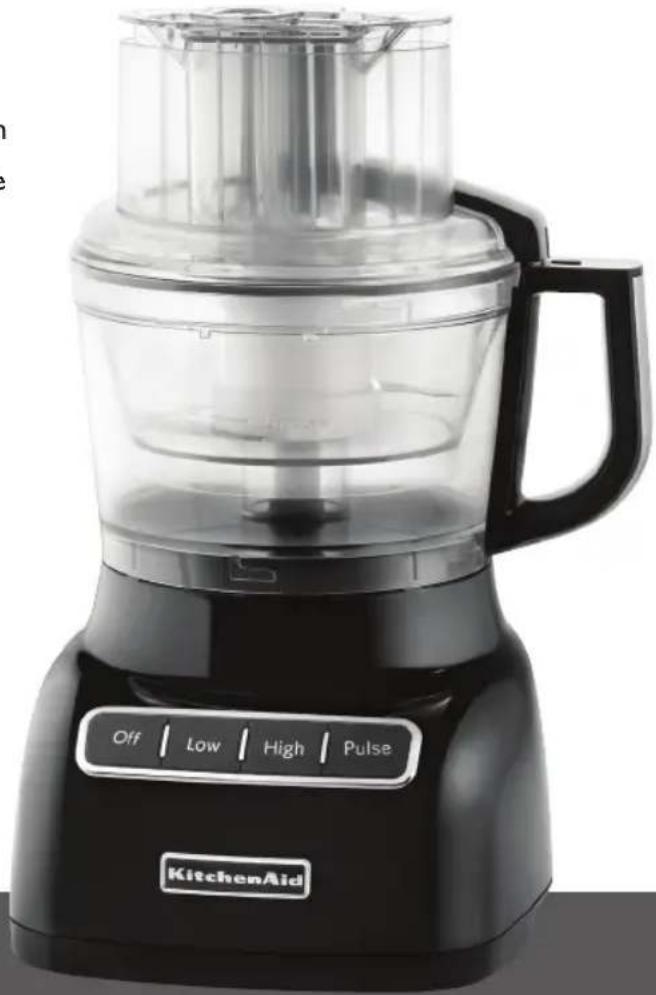
natural_image
KitchenAid kitchen blender with control buttons (Off, Low, High, Pulse) and no visible text or symbols on the device itself.natural_image
Illustration of hands using a mechanical device to press or adjust a container (no text or symbols visible)natural_image
Diagram showing a container with a lid and an upward arrow inside, no text or symbols presentnatural_image
Illustration of hands pressing down on a mechanical component with an arrow indicating motion (no text or symbols)natural_image
Line drawing of a kitchen mixer with a downward arrow indicating cooling or drying process (no text or symbols)natural_image
Line drawing of a hand pressing down on a kitchen blender with a downward arrow indicating the process (no text or symbols)natural_image
Diagram showing a container being lifted by a downward arrow into a smaller container (no text or symbols)natural_image
Diagram of a kitchen appliance being processed into a container (no text or symbols)natural_image
Illustration of a hand pressing down on a mechanical component with an arrow indicating motion (no text or symbols)natural_image
Diagram of a coffee maker with arrows indicating flow direction (no text or symbols)natural_image
Line drawing of hands using a tool to adjust or install a device component (no text or symbols present)natural_image
Line drawing of a kitchen blender with control panel and handle (no text or symbols)natural_image
Line drawing of a blender with a handle and lid, showing internal food arrangement (no text or symbols)natural_image
Line drawing of a hand pouring liquid into a multi-tiered air fryer (no text or symbols)
Para rallar quesos duros y suaves:
natural_image
Line drawing of a hand using a lathe machine to press or brush into a container filled with seeds (no text or symbols)natural_image
Line drawing of hands inserting a device into a device casing (no text or symbols)Customer Satisfaction Center,
KitchenAid Portable Appliances,
P.O. Box 218, St. Joseph, MI 49085-0218.
Customer eXperience Centre
KitchenAid Canada
200 - 6750 Century Ave.
Mississauga, ON L5N 0B7


- Welcome to the world of KitchenAid®
- Table of Contents
- FOOD PROCESSOR SAFETY
- PARTS AND FEATURES....6
- ACCESSORIES 7
- PREPARING THE FOOD PROCESSOR FOR FIRST USE 9
- SETTING UP YOUR FOOD PROCESSOR
- USING YOUR FOOD PROCESSOR
- CLEANING THE FOOD PROCESSOR....16
- FOOD PROCESSING TIPS
- TROUBLESHOOTING....21
- WARRANTY....22
- Your safety and the safety of others are very important.
- ! DANGER
- WARNING
- IMPORTANT SAFEGUARDS
- SAVE THESE INSTRUCTIONS
- Electrical Requirements
- Proof of Purchase & Product Registration
- Parts and Features
- Adjustable Slicing Control
- High/Low/Pulse/Control
- Work Bowl Cover with 3-in-1 Feed Tube (KFPL90FT)
- 3-Piece Food Pusher (KFP90FTP)
- Heavy-Duty Base
- Accessories
- Included Accessories
- 3-cup (708 ml) Mini-Bowl and Mini-Blade (KFP90BM)
- 9-Cup (2.0 L) Work Bowl (KFP90WBOB)
- Adjustable Slicing Disc (KFP90ESL)
- Reversible Shredding Disc (KFP90RD)
- Drive Adapter
- Multipurpose Blade (KFP90BL)
- Dough Blade (KFP90DB)
- Accessories Selection Guide
- Preparing the Food Processor for First Use
- Before First Use
- Removing the Work Bowl Cover from the Work Bowl
- Attaching the Work Bowl
- Attaching the Work Bowl Cover
- Installing the Adjustable Slicing Disc
- Installing the Reversible Shredding Disc
- Installing the Multipurpose Blade or Dough Blade
- Installing the Mini-Bowl and Mini-Blade
- Using the 3-in-I Feed Tube
- Before Use
- Maximum Liquid Level
- Using the Low/High Speed Control
- Using the Pulse Control
- Removing Processed Foods
- Cleaning the Food Processor
- Tips for Great Results
- Using the Multipurpose Blade
- To chop fresh fruits or vegetables:
- To puree cooked fruits and vegetables (except potatoes):
- To prepare mashed potatoes:
- To chop dried (or sticky) fruits:
- To finely chop citrus peel:
- To mince garlic or to chop fresh herbs or small quantities of vegetables:
- To chop nuts or make nut butters:
- To chop cooked or raw meat, poultry or seafood:
- To make bread, cookie, or cracker crumbs:
- To melt chocolate in a recipe:
- To grate hard cheeses, such as Parmesan and Romano:
- Using a Slicing or Shredding Disc
- Using the Dough Blade
- Helpful Hints
- Troubleshooting
- Food Processor doesn't run:
- Food Processor not shredding or slicing properly:
- If the work bowl cover won't close when using the disc:
- KitchenAid® Food Processor Warranty for the 50 United States, the District of Columbia, Puerto Rico, and Canada
- DISCLAIMER OF IMPLIED WARRANTIES; LIMITATION OF REMEDIES
- Hassle-Free Replacement Warranty – 50 United States, District of Columbia, and Puerto Rico
- Hassle-Free Replacement Warranty – Canada
- Arranging for Service after the Warranty Expires, or Ordering Accessories and Replacement Parts
- In the United States and Puerto Rico:
- Outside the United States and Puerto Rico:
- For service information in Canada:
- Table des matières
- SÉCURITÉ DU ROBOT CULINAIRE
- AVERTISSEMENT
Brand : KITCHENAID
Model : KFP0922OB
Category : Food Processor