TX32LSW504 - TV PANASONIC - Free user manual and instructions
Find the device manual for free TX32LSW504 PANASONIC in PDF.



| Product Type | LED TV |
| Model | TX-32LSW504 |
| Screen Size | 32 inches (81 cm) |
| Dimensions (with stand) | 725.9 × 475.4 × 178.5 mm |
| Dimensions (without stand) | 725.9 × 430.8 × 81.7 mm |
| Weight (with stand) | 3.6 kg |
| Weight (without stand) | 3.5 kg |
| Power Supply | 220-240 V~, 50/60 Hz |
| Power Consumption (standby) | Less than 0.5 W |
| Audio Power | 10 W (5 W + 5 W) |
| HDMI Inputs | 2 (HDMI 1 with ARC) |
| USB Port | 1 × USB 2.0 (500 mA max) |
| Network Connectivity | Wi-Fi 802.11 a/b/g/n/ac, Ethernet, Bluetooth 5.0 |
| Tuner | DVB-T/T2, DVB-C, DVB-S |
| Operating System | Google TV (Android TV) |
| Voice Assistant | Built-in Google Assistant |
| Chromecast | Built-in Chromecast |
| Picture Modes | Normal, Dynamic, Filmmaker, Sports, Game, Custom |
| Screen | LED, HD resolution (1366×768) |
| Maintenance and Cleaning | Wipe with a soft, dry cloth. Do not use solvents. |
| Safety Instructions | Do not expose to moisture, unplug before cleaning, do not block ventilation openings. |
| Spare Parts and Repairability | Support available from Panasonic. Repair by an authorized technician. |
Frequently Asked Questions - TX32LSW504 PANASONIC
User questions about TX32LSW504 PANASONIC
0 question about this device. Answer the ones you know or ask your own.
Ask a new question about this device
Download the instructions for your TV in PDF format for free! Find your manual TX32LSW504 - PANASONIC and take your electronic device back in hand. On this page are published all the documents necessary for the use of your device. TX32LSW504 by PANASONIC.
USER MANUAL TX32LSW504 PANASONIC
Operating Instructions
LED TV
Model No.
TX-24LSW504
TX-32LSW504
TX-43LSW504
TX-24LSW504S
TX-32LSW504S
TX-43LSW504S
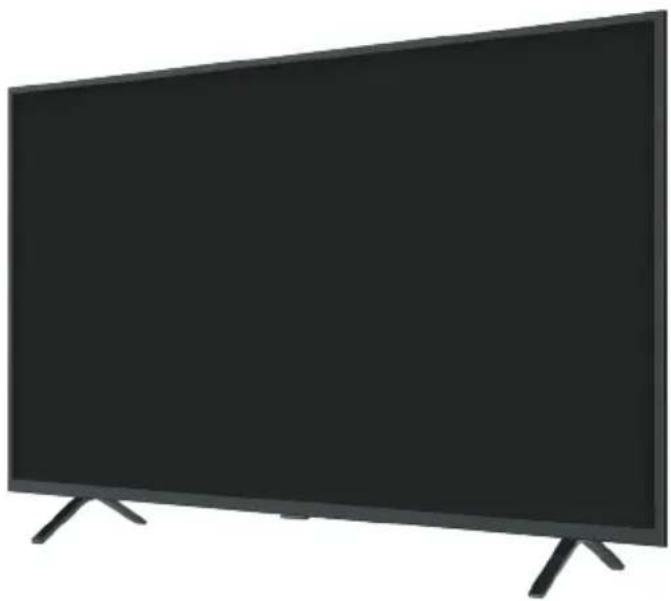
(image: TX-43LSW504*)
Thank you for purchasing this Panasonic product.
Please read these instructions carefully before operating this product and retain them for future reference.
Please carefully read the "Safety Precautions" of this manual before use.
The images shown in this manual are for illustrative purposes only.
Please refer to Pan European Guarantee Card if you need to contact your local Panasonic dealer for assistance.
English
Deutsch
Italiano
Français
Nederlandsl
Pycckn
Contents
Be Sure to Read
Important Notice 3
Safety Precautions 5
Setting Up the TV 9
Connecting the TV. 11
Initial Setup. 13
Operating the TV 14
Watching External Inputs. 16
Using Homepage - Apps. 17
Using the Menu Functions. 18
Using Media Player 21
Additional Information 22
Troubleshooting 23
Maintenance 24
Specifications 25
Oss License 27

HEVCAdvance
Covered by Patents at patentlist.hevcadvance.com

Dolby Audio
The terms HDMI, HDMI High-Definition Multimedia Interface, and the HDMI Logo are trademarks or registered trademarks of HDMI Licensing Administrator, Inc.
Dolby, Dolby Audio, and the double-D symbol are trademarks of Dolby Laboratories.
Manufactured under license from Dolby Laboratories.
Confidential unpublished works. Copyright © 1992-2015
Dolby Laboratories. All rights reserved.
Wi-Fi is a registered trademark of Wi-Fi Alliance. WPA2™, WPA™ are trademarks of Wi-Fi Alliance.
The Bluetooth® word mark and logos are registered trademarks owned by Bluetooth SIG, Inc. and any use of such marks by Panasonic Corporation is under license.
DVB and the DVB logos are trademarks of the DVB Project.
x.v. Colour^TM is a trademark.
DiSEqCTM is a trademark of EUTELSAT.
Google is a trademark of Google LLC.
Amazon, Prime Video and all related logos are trademarks of Amazon.com, Inc. or its affiliates.
This product complies with the UHD Alliance Technical Specification: UHDA Specified Reference Mode, Version 1.0. FILMMAKER MODETM logo is a trademark of the UHD Alliance, Inc. in the United States and other countries.
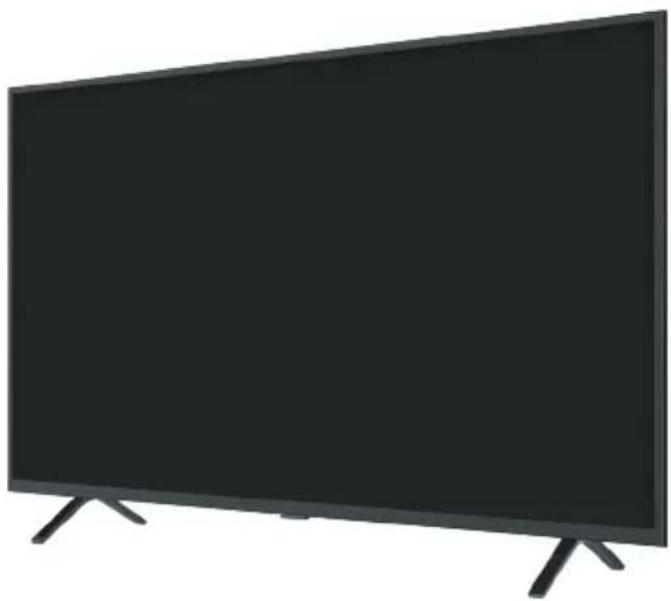
The illustration for TX-43LSW504* is used in this manual unless otherwise mentioned. Illustrations shown may be different depending on the model.
Important Notice
Notice for DVB/Data broadcasting/ IPTV functions
This TV is designed to meet the standards (as of December, 2020) of DVB-T/T2 (MPEG2, MPEG4-AVC (H.264) and MPEG HEVC (H.265)) digital terrestrial services, DVB-C (MPEG2, MPEG4-AVC (H.264) and MPEG HEVC (H.265)) digital cable services and DVB-S (MPEG2, MPEG4-AVC (H.264) and MPEG HEVC (H.265)) digital satellite services.
Consult your local dealer for availability of DVB-T/ T2 or DVB-S services in your area.
Consult your cable service provider for availability of DVB-C services with this TV.
This TV may not work correctly with the signal which does not meet the standards of DVB-T/T2, DVB-C or DVB-S.
- Not all the features are available depending on the country, area, broadcaster, service provider, satellite and network environment.
- Not all CI modules work properly with this TV. Consult your service provider about the available CI module.
This TV may not work correctly with CI module that is not approved by the service provider.
Additional fees may be charged depending on the service provider.
- Compatibility with future services is not guaranteed.
Internet apps, voice control function are provided by their respective service providers, and may be changed, interrupted, or discontinued at any time.
Panasonic assumes no responsibility and makes no warranty for the availability or the continuity of the services.
Panasonic does not guarantee operation and performance of peripheral devices made by other manufacturers; and we disclaim any liability or damage arising from operation and/or performance from usage of such other maker's peripheral devices.

Do not touch or be close to the ANTENNA, SATELLITE IN and HDMI, and prevent electrostatic discharge to disturb, these terminals while in USB and LAN operation mode, or it will cause the TV to stop working or abnormal status.
Handling of customer information
Certain customer information such as IP address of your device (this TV)'s network interface will be collected as soon as you connect your Panasonic-branded smart television (this TV) or other devices to the internet (excerpted from our privacy policy). We do this to protect our customers and the integrity of our Service as well as to protect the rights or property of Panasonic.
When using Internet connecting function of this TV, after agreeing (in the jurisdictions where customer's consent is required to collect personal information under applicable privacy laws) to or reviewing Panasonic's terms of service/privacy policy (hereinafter referred to as terms and conditions etc.), customer information on the use of this unit may be collected and used according to terms and conditions etc.
- Panasonic will not be held responsible for collecting or using customer information via application provided by third party on this TV or website.
- When entering your credit card number, name, etc., pay special attention to the trustworthiness of the provider.
- Registered information may be registered in the server etc. of provider. Before repairing, transferring or discarding this TV, be sure to erase the information according to the terms and conditions etc. of provider.
The recording and playback of content on this or any other device may require permission from the owner of the copyright or other such rights in that content. Panasonic has no authority to and does not grant you that permission and explicitly disclaims any right, ability or intention to obtain such permission on your behalf. It is your responsibility to ensure that your use of this or any other device complies with applicable copyright legislation in your country. Please refer to that legislation for more information on the relevant laws and regulations involved or contact the owner of the rights in the content you wish to record or playback.
This product is licensed under the AVC patent portfolio license for the personal use of a consumer or other uses in which it does not receive remuneration to (i) encode video in compliance with the AVC Standard ("AVC Video") and/or (ii) decode AVC Video that was encoded by a consumer engaged in a personal activity and/or was obtained from a video provider licensed to provide AVC Video. No license is granted or shall be implied for any other use.
Additional information may be obtained from MPEG LA, L.L.C.
See http://www.mpegla.com.

This mark indicates the product operates on AC voltage.

This mark indicates a Class II or double insulated electrical appliance wherein the product does not require a safety connection to electrical earth (ground).
Transport only in upright position.
Safety Precautions
To help avoid risk of electrical shock, fire, damage or injury, please follow the warnings and cautions below:

Mains plug and lead
Warning
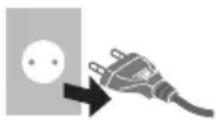
If you detect anything unusual, immediately remove the mains plug.
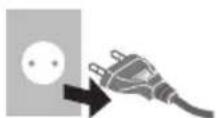
- Mains plug types vary between countries.
This TV is designed to operate on AC 220 - 240V 50 / 60Hz
- Insert the mains plug fully into the mains socket.
- To turn off the apparatus completely, you must pull the mains plug out of the mains socket.
Consequently, the mains plug should be easily accessible at all times.
- Disconnect the mains plug when cleaning the TV.
- Do not touch the mains plug with wet hands.

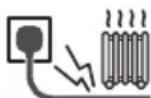
Do not damage the mains lead.
- Do not place a heavy object on the lead.

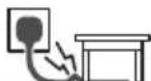
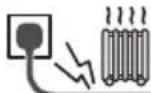
- Do not place the lead near a high temperature object.

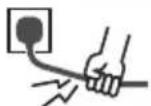
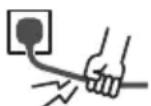
- Do not pull on the lead. Hold onto the mains plug body when disconnecting the plug.

- Do not move the TV with the lead plugged into a mains socket.
- Do not twist the lead, bend it excessively or stretch it.
- Do not use a damaged mains plug or mains socket.
- Ensure the TV does not crush the mains lead.

Take care
Warning
- Do not remove covers and never modify the TV yourself as live parts are accessible and risk of electric shock when they are removed. There are no user serviceable parts inside.


- Do not expose the TV to rain or excessive moisture. This TV must not be exposed to dripping or splashing water and objects filled with liquid, such as vases, must not be placed on top of or above the TV.

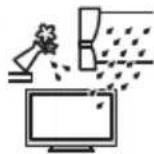
- Do not insert foreign objects into the TV through the air vents.
If the TV is used in an area where insects may easily enter the TV.
It is possible for insects to enter the TV, such as small flies, spiders, ants, etc. which may cause damage to the TV or become trapped in an area visible on the TV, e.g. within the screen.
If the TV is used in an environment where there is dust or smoke.
It is possible for dust/smoke particles to enter the TV through the air vents during normal operation which can become trapped inside the unit. This may cause overheating, malfunction, deterioration in picture quality, etc.
- Do not use an unapproved pedestal/ Mounting equipment. Be sure to ask your local Panasonic dealer to perform the setup or installation of approved wall-hanging brackets.
- Do not apply any strong force or impact to the display panel.
- Ensure that children do not climb on the TV.
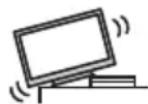
- Do not place the TV on sloping or unstable surfaces, and ensure that the TV does not hang over the edge of the base.

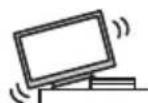
Warning Stability Hazard
A TV may fall, causing serious personal injury or death. Many injuries, particularly to children, can be avoided by taking simple precautions such as:
- ALWAYS use cabinets or stands or mounting methods recommended by the manufacturer of the TV.
- ALWAYS use furniture that can safely support the TV.
- ALWAYS ensure the TV is not overhanging the edge of the supporting furniture.
- ALWAYS educate children about the dangers of climbing on furniture to reach the TV or its controls.
- ALWAYS route cords and cables connected to your TV so they cannot be tripped over, pulled or grabbed.
- NEVER place a TV in an unstable location.
- NEVER place the TV on tall furniture (for example, cupboards or bookcases) without anchoring both the furniture and the TV to a suitable support.
- NEVER place the TV on cloth or other materials that may be located between the TV and supporting furniture.
- NEVER place items that might tempt children to climb, such as toys and remote controls, on the top of the TV or furniture on which the TV is placed.
If the existing TV is going to be retained and relocated, the same considerations as above should be applied.
This TV is designed for table-top use.
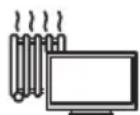
- Do not expose the TV to direct sunlight and other sources of heat.

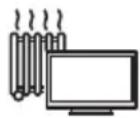
To prevent the spread of fire, keep candles or other open flames away from this product at all times

Suffocation/Choking Hazard
Warning
The packaging of this product may cause suffocation, and some of the parts are small and may present a choking hazard to young children. Keep these parts out of reach of young children.

Pedestal
Warning
- Do not disassemble or modify the pedestal.
English
Caution
- Do not use any pedestal other than the one provided with this TV.
- Do not use the pedestal if it becomes warped or physically damaged. If this occurs, contact your nearest Panasonic dealer immediately.
During setup, make sure that all screws are securely tightened. - Ensure that the TV does not suffer any impact during installation of the pedestal.
- Ensure that children do not climb onto the pedestal.
Install or remove the TV from the pedestal with at least two people.
Install or remove the TV according to the specified procedure.

Radio waves
Warning
- Do not use the TV and the remote control in any medical institutions or locations with medical equipment. Radio waves may interfere with the medical equipment and may cause accidents due to malfunction.
- Do not use the TV and the remote control near any automatic control equipment such as automatic doors or fire alarms. Radio waves may interfere with the automatic control equipment and may cause accidents due to malfunction.
- Keep at least 15cm away from the TV and the remote control if you have a cardiac pacemaker. Radio waves may interfere with the operation of the pacemaker.
- Do not disassemble or alter the TV and the remote control in any way.

Common Interface
- Turn the TV off with Mains power On/Off switch whenever inserting or removing the Cl module.
- If a smart card and a CI module come as a set, first insert the CI module, then insert the smart card into the CI module.
- Insert or remove the CI module completely in the correct direction as shown.
- Normally encrypted channels will appear. (Viewable channels and their features depend on the CI module.)
If encrypted channels do not appear
[Common Interface] ([Setup] menu)
- There might be some CI modules in the market with older firmware versions that do not work fully interoperable with this new Cl + v1.4TV . In this case, please contact your content provider.
- Be sure to remove the CI module card, etc. before repairing, transferring or discarding.
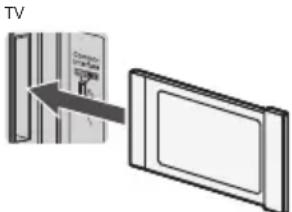
CI module

Built-in wireless LAN
Caution
- Do not use the built-in wireless LAN to connect to any wireless network (SSID) for which you do not have usage rights. Such networks may be listed as a result of searches. However, using them may be regarded as illegal access.
SSID is a name for identifying a particular wireless network for transmission. - Do not subject the built-in wireless LAN to high temperatures, direct sunlight or moisture.
Data transmitted and received over radio waves may be intercepted and monitored.
The built-in wireless LAN uses 2.4 GHz and 5 GHz frequency bands. To avoid malfunctions or slow response caused by radio wave interference when using the built-in wireless LAN, keep the TV away from other devices that use 2.4 GHz and 5 GHz signals such as other wireless LAN devices, microwave ovens, and mobile phones. - When problems occur due to static electricity, etc., the TV might stop operating to protect itself. In this case, turn the TV off at the Mains power On/Off switch, then turn it back on.

Bluetoothless technology
Caution
The TV and the remote control use the 2.4 GHz radio frequency ISM band (Bluetooth®). To avoid malfunctions or slow response caused by radio wave interference, keep the TV and the remote control away from the devices such as other wireless LAN devices, other Bluetooth® devices, microwaves, mobile phones and the devices that use 2.4 GHz signal.

Ventilation
Caution
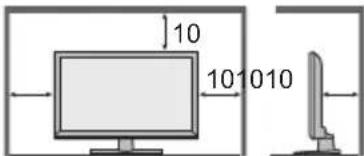
Allow sufficient space (at least 10cm around the TV in order to help prevent excessive heat, which could lead to early failure of some electronic components.
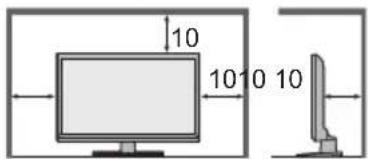
(cm)
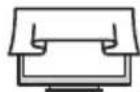
- Ventilation should not be impeded by covering the ventilation openings with items such as newspapers, tablecloths and curtains.

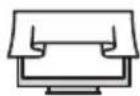
- Whether you are using a pedestal or not, always ensure the vents at the bottom of the TV are not blocked and there is sufficient space to enable adequate ventilation.

Moving the TV
Caution
Before moving the TV, disconnect all cables.
At least two people are required to move the TV to prevent injury that may be caused by the tipping or falling of TV.
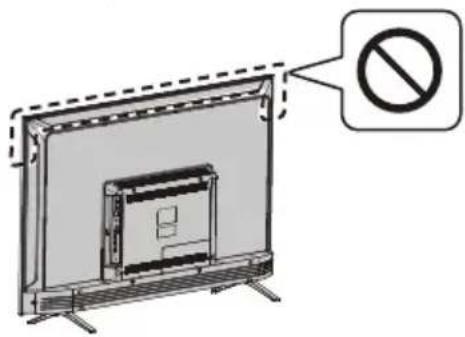
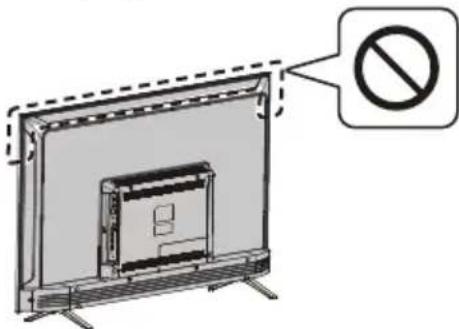
- Do not hold the screen part as shown below when moving the TV. This may cause malfunction or damage.

When not in use for a long time
Caution
This TV will still consume some power even in the Off mode, as long as the mains plug is still connected to a live mains socket.
- Remove the mains plug from the wall socket when the TV is not in use for a prolonged period of time.

Excessive volume
Caution
- Do not expose your ears to excessive volume from the headphones. Irreversible damage can be caused.

If you hear a drumming noise in your ears, turn down the volume or temporarily stop using the headphones.

Battery for the Remote Control
Warning
- Keep the batteries out of reach of children to prevent swallowing.
Adverse physical effects can result if accidentally swallowed. If you suspect a child has swallowed one, seek medical attention immediately.
Caution
Incorrect installation may cause battery leakage, corrosion and explosion.
- Replace only with the same or equivalent type.
- Do not mix old and new batteries.
- Do not mix different battery types (such as alkaline and manganese batteries).
- Do not use rechargeable batteries (Ni-Cd, etc.).
- Do not bum or break up batteries.
- Do not expose batteries to excessive heat such as sunshine, fire or the like.
Make sure you dispose of batteries correctly.
- Remove the battery from the unit when not using for a prolonged period of time to prevent battery leakage, corrosion and explosion.
LED TV
Declaration of Conformity (DoC)
"Hereby, Panasonic Corporation declares that this TV is in compliance with the essential requirements and other relevant provisions of the Directive 2014/53/EU." If you want to get a copy of the original DoC of this TV, please visit the following website: https://www.ptc.panasonic.eu/compliance-documents
Authorized Representative:
Panasonic Testing Centre
Panasonic Marketing Europe GmbH
Winsbergring 15, D-22525 Hamburg, Germany

5.15 - 5.35 GHz band of wireless LAN is restricted to indoor operation only in the following countries.
Austria, Belgium, Bulgaria, Czech Republic, Denmark, Estonia, France, Germany, Iceland, Italy, Greece, Spain, Cyprus, Latvia, Liechtenstein, Lithuania, Luxembourg, Hungary, Malta, Netherlands, Norway, Poland, Portugal, Romania, Slovenia, Slovakia, Turkey, Finland, Sweden, Switzerland, Croatia Maximum radio-frequency power transmitted in the frequency bands
| Type of wireless | Frequency band | Maximum EIRP |
| Wireless LAN | 2412-2472 MHz | 18 dBm |
| 5150-5250 MHz | 18 dBm | |
| 5725-5850 MHz | 13.7 dBm | |
| Bluetooth® | 2402-2480 MHz | 7 dBm |

Moving the TV
Caution
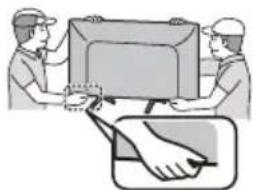
Before moving the TV, disconnect all cables.
- Move the TV with at least two people. Support as shown to avoid injury by the TV tipping or falling.

Use conditions
Caution
This appliance is intended for use in tropical climates.
Setting Up the TV
Supplied accessories
Accessories may not be placed all together. Take care not to throw them away unintentionally.
Operating Instructions
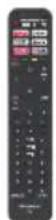
Remote Control
- RC700E
p.14
Batteries (AAA) × 2
(p.10)

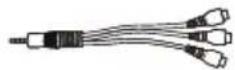
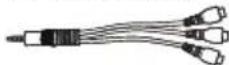
Mini Jack Adapter
- Adapter AV
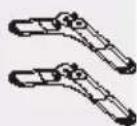
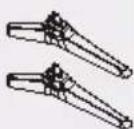
Pedestal
24-inch model
Assembly screws

(ST3×12)×4
32-inch model
Assembly screws

(ST4×15)×4
43-inch model
Assembly screws

(ST4×20)×4
Base
Base
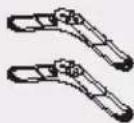
- Base
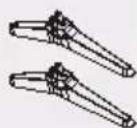
- Base
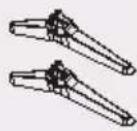

Attaching the pedestal
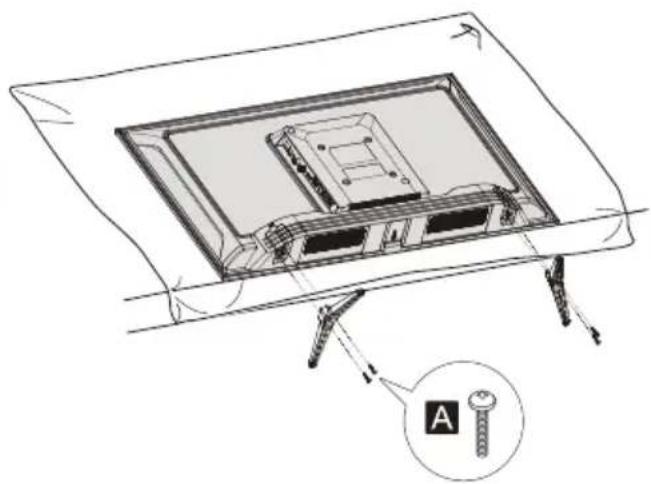
1 Assemble the pedestal
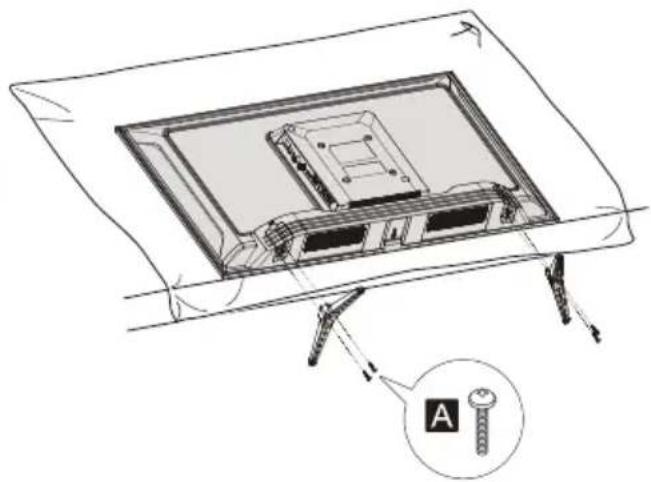
Removing the pedestal from the TV
Be sure to remove the pedestal in the following way when using the wall-hanging bracket or repacking the TV.
1 Lay the TV on a foam mat or thick soft cloth on a table.
2 Remove the assembly screws Afrom the TV.
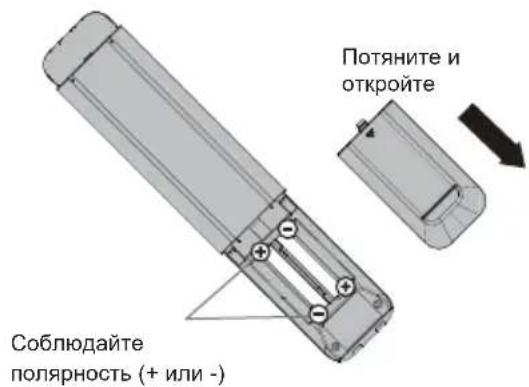
Inserting remote's batteries
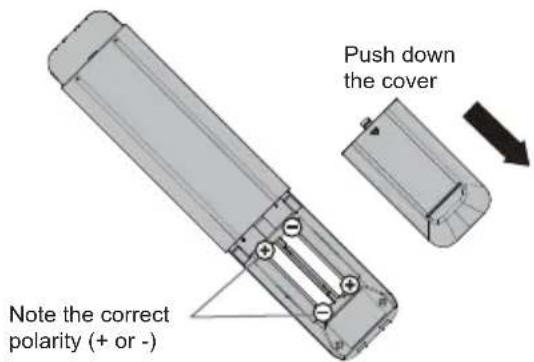
Wall mounting the TV (optional)
Please contact your local Panasonic dealer to purchase the recommended wall-hanging bracket. Rear of the TV (View from the side)
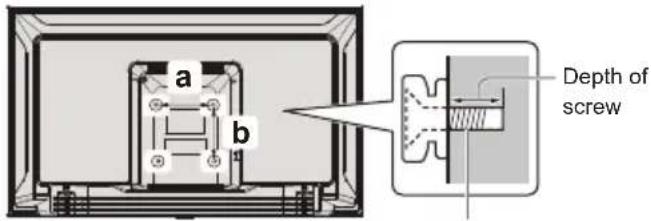
Screw for fixing the TV onto the wall-hanging bracket (not supplied)
Holes for wall-hanging bracket installation
Model a b
| 24-inch 200 mm 100 mm |
| 32-inch 100 mm 100 mm |
| 43-inch 200 mm 100 mm |
Screw specification
| Model Type | Depth of screw | |
| Minimum | Maximum | |
| 24-inch M4 11 mm 12 mm | ||
| 32-inch M4 8 mm | 9 mm | |
| 43-inch M6 10 mm 12 mm | ||
Warning
- When optional accessories such as wall brackets etc. are used, always read and follow the manufacturer installation and usage instructions.
- Do not mount the unit directly below ceiling lights (such as spotlights or halogen lights) which typically give off high heat. Doing so may warp or damage plastic cabinet parts.
- When installing wall brackets you must ensure the wall bracket is not electrically grounded to metal wall studs. Always ensure that there are no electrical cables, pipes etc. in the wall before you begin the wall bracket installation.
- To prevent fall and injury, remove the TV from its fixed wall position when it is no longer in use.
Connecting the TV
- Please ensure the TV is disconnected from the mains socket/power point before attaching or disconnecting any RF/AV leads.
- External equipment and cables are for illustrative purposes only and not supplied with this TV.
- Check the type of terminals and cable plugs are correct when connecting.
- When using an HDMI cable, use the fully wired one.
- Keep the TV away from electronic equipment (video equipment, etc.) or equipment with an infrared sensor. Otherwise, distortion of image/sound may occur or operation of other equipment may be interfered.
- Also read the manual of the equipment being connected.
Terminals
Rear of the TV
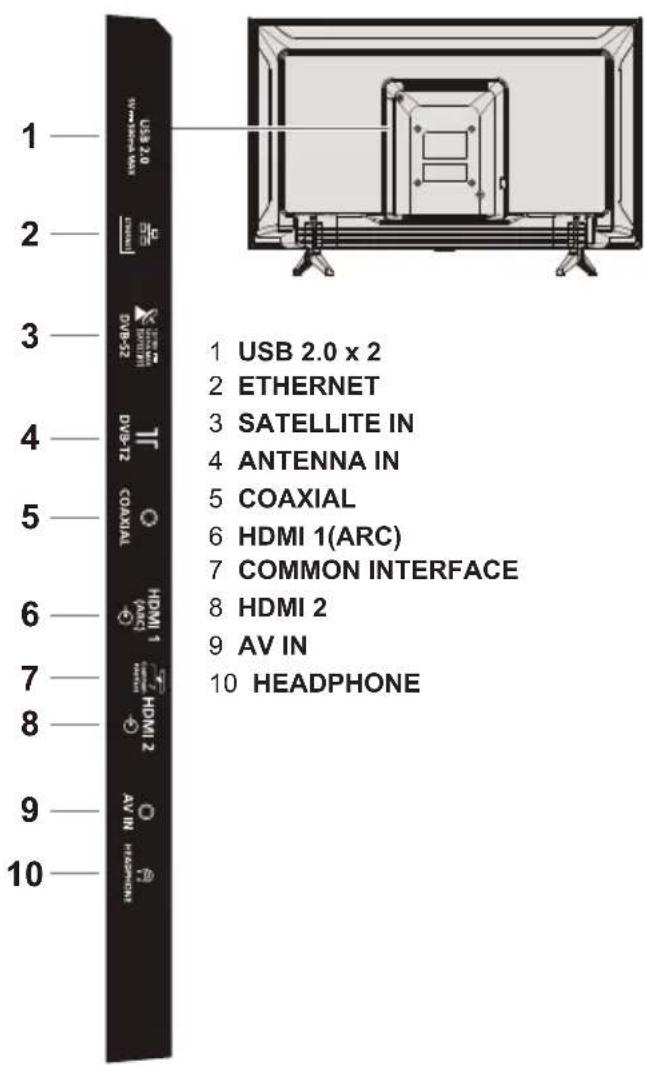
Connections
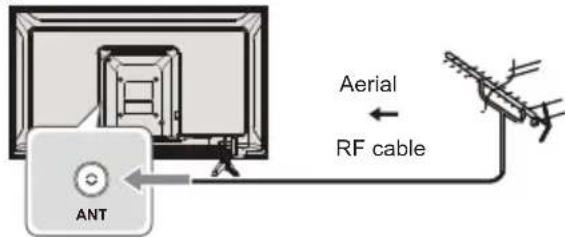
Aerial
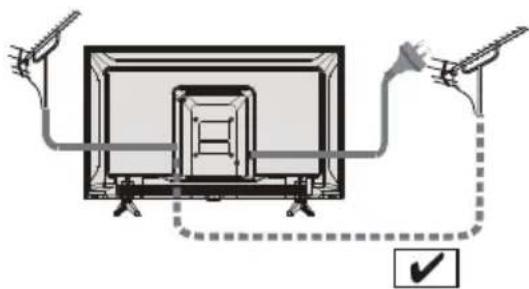
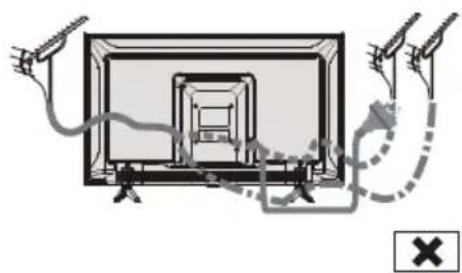
- Keep RF (aerial) cable away from the mains lead to avoid and minimise mains interference pickup.
Do not place the RF cable under the TV.
An aerial, correct cable (75Ω coaxial) and correct terminating plug are required to obtain optimum quality picture and sound.
If a communal aerial system is used, you may require the correct connection cable and plug between the wall aerial socket and the TV. - Your local Television Service Centre or dealer may be able to assist you in obtaining the correct aerial system for your particular area and the accessories required.
- Any matters regarding aerial installation, upgrading of existing systems or accessories required, and the costs incurred, are the responsibility of you, the customer.
If the aerial is placed in the wrong location, interference might happen.
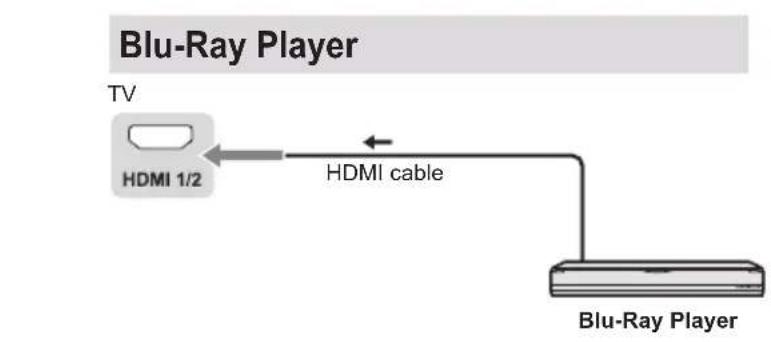
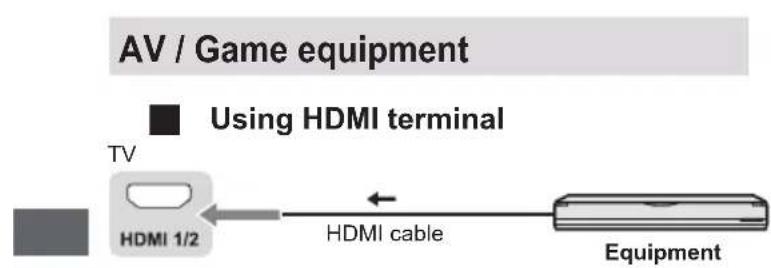
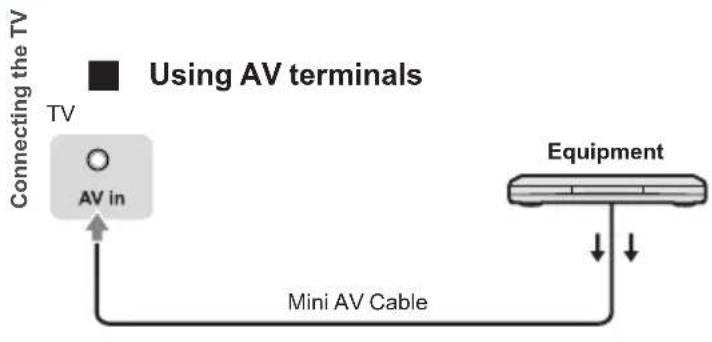
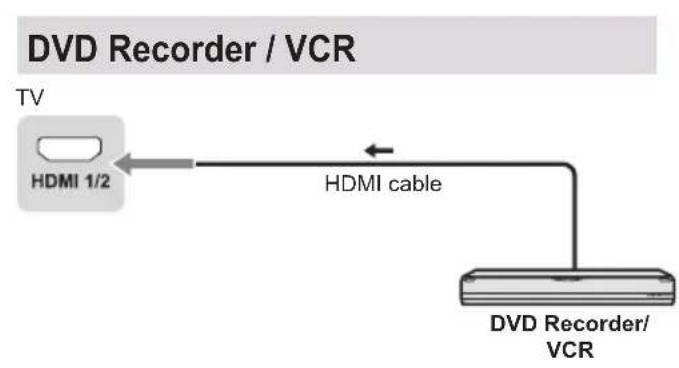
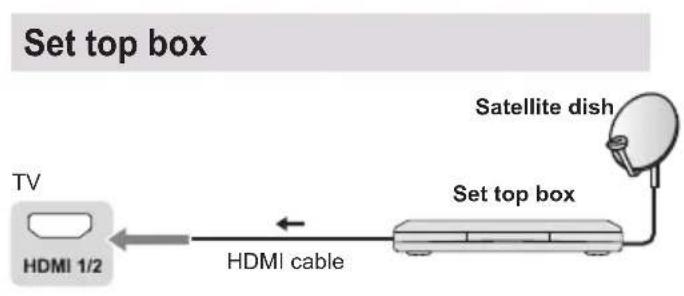
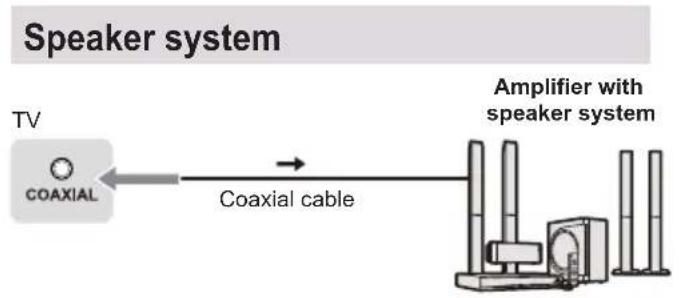
To enjoy the sound from the external equipment in multi-channel sound (e.g. Dolby Digital 5.1ch), connect the equipment to the amplifier. For the connections, read the manuals of the equipment and amplifier.
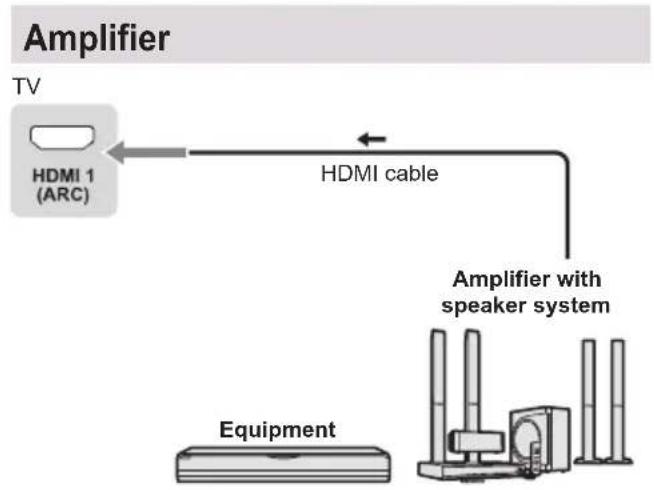
Use HDMI1 to connect the TV to an amplifier which has ARC (Audio Return Channel) function.
Initial Setup
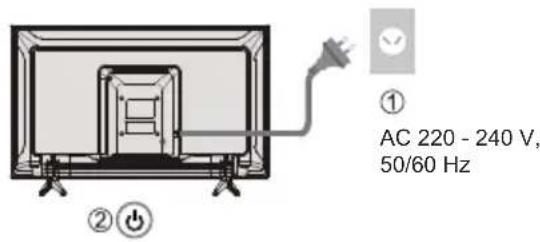
Plug the mains plug into the socket outlet and turn on the TV.
It may take a few seconds before the screen is displayed.
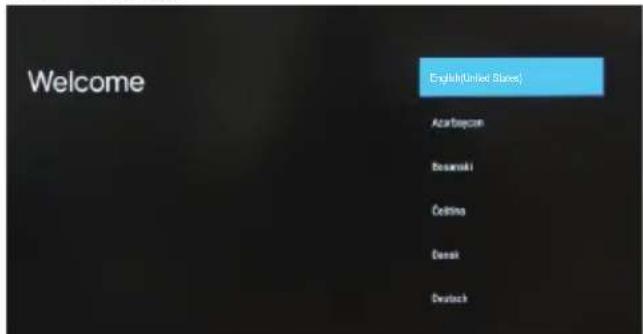
Google - Initial Setup
When you turn on the TV for the first time, there will show a wizard to guide you to finish the following initial settings:
Step 1: Select the menu language as you need.
Note: English (United States) is recommended. Illustrations within this publication are provided for reference only.
Step 2: (Only for some countries) Select whether or not to use and Android device to setup the TV.
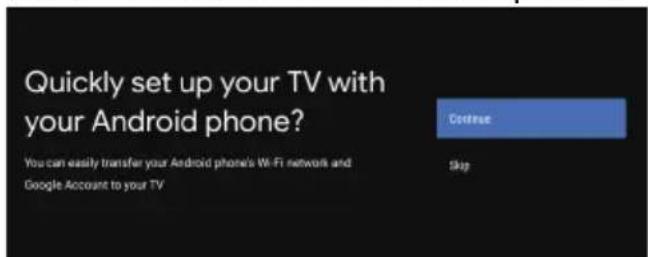
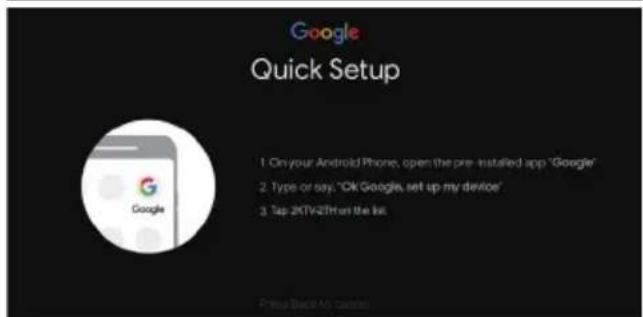
Note: If you don't want to use your Android device to setup the TV, you will skip to Step 3. If you want to use your Android device to setup the TV, please turn on the Bluetooth functions of your Android phone, then find and open "Google" application on your phone. Follow the instruction tips to set device.
Step 3: Select whether or not to connect your TV set to the Wi-Fi network.
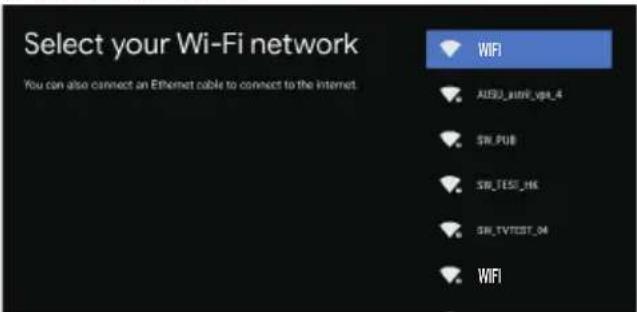
Note: If you have connected the TV to the WI-Fi network, it will check for updates like Google service updates and so on. Then please select whether or not to sign in to your Google account.
Step 4: Read to accept the Google terms of service and privacy policy.
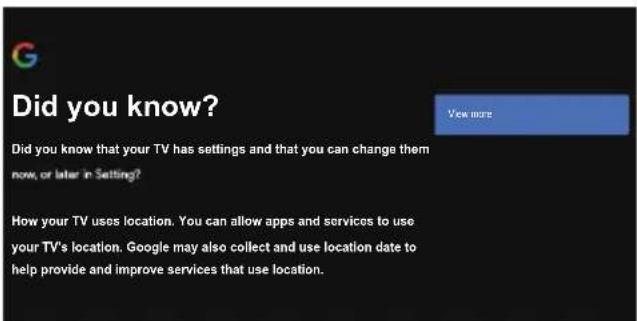
Step 5: Select whether or not to let Google or third party to use your TV location.
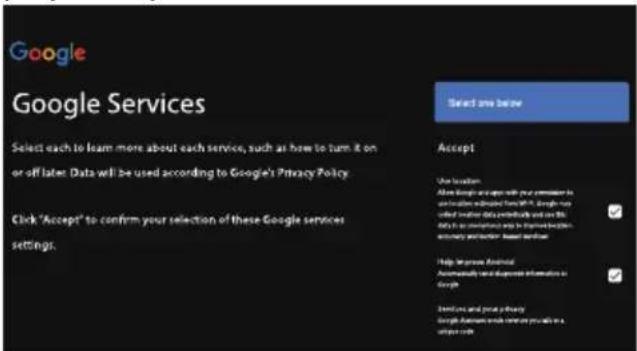
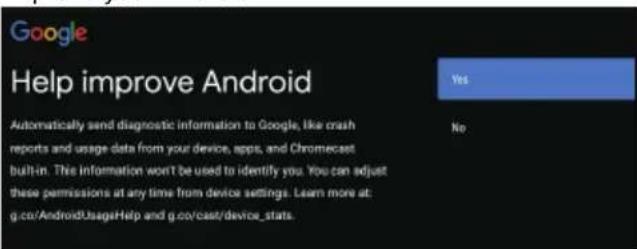
Step 6: Select whether or not to allow Google to help improve your Android TV.
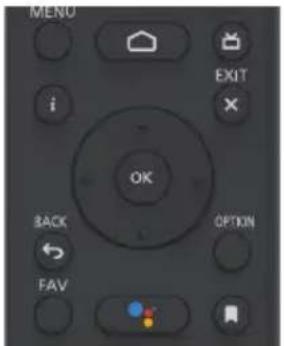
Remote Control Functions
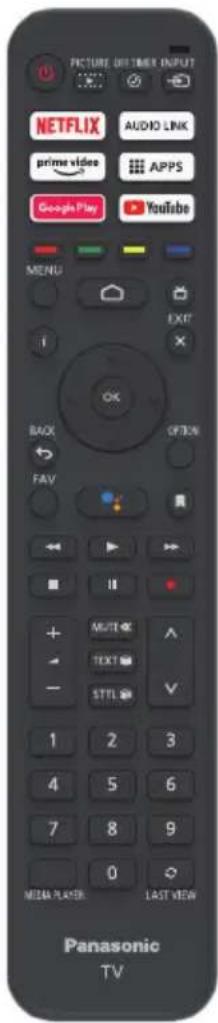
Most of your television's functions are available via the menus that appear on the screen. The remote control supplied with your set can be used to navigate through the menus and to configure all the general settings.
POWER (On/Off button) Turns the TV on or off
PICTURE To enter the picture mode.
OFF TIMER To enter the sleep timer.
INPUT To enter source selection interface
NETFLIX Goes to the NETFLIX homepage
AUDIO LINK Goes to the AUDIO LINK homepage
prime video Goes to the prime video homepage
APPS To select the apps
Google Play Goes to the Google Play homepage
YouTube Goes to the YouTube homepage
Colour buttons Perform multis operations which correspond to the operation guide displayed on the menu screen
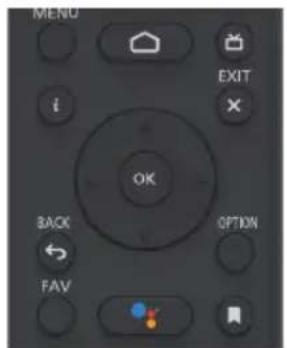
MENU To open the settings menu
Goes to the smart TV homepage
Press to display the electronic programme guide
i Display to the information
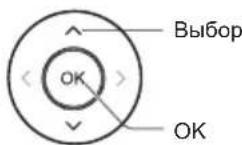
OK Confirms your selection.
up, down, left and right direction buttons) Highlights different items in the menu system and adjusts the menu controls.
EXIT X To exit the program
BACK Exit the menu and return to the previous menu
OPTION Displays the options menu of selected functions
FAV To enter the channel list
(Mic) (Available only when the network connection is normal.)
To open the apps, move the apps or remove from favorites
To fast backward
To play
To fast forward
To end the running program
To pause
Start recording

Increases or decreases the volume
MUTE
To mute and un-mute the sound
TEXT
To show the picture and text
STTL
To show the subtitles

Channel up/down
0~9
Select the digital key number
MEDIA PLAYER
To enter the media player
LAST VIEW
Return to the last program
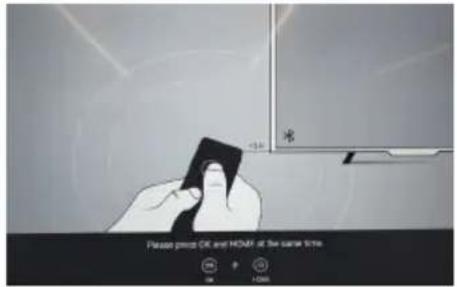
How to Pair Remote Control with the TV
This is a Bluetooth remote control, and before using it, please pair it with the TV firstly. The following steps are for your reference:
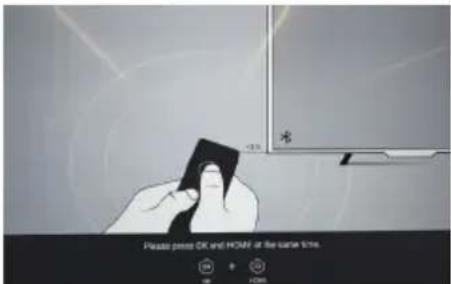
Step 1: Press button to enter the home page.
Step 2: Press button to enter the "RC pairing".
Step 3: Follow the "Settings tips" page, press OK and together.
Step 4: The screen will display "Pairing..." and the screen will display "Success!" after pairing is complete.
NOTE: If you wait more than 2 minutes and it can't pair, please repeat the above steps for pairing again.
If you want to unpair the Bluetooth remote, follow these steps:
Step 1: Press button to enter the home page.
Step 2: Press / / to choose, and then press OK to enter.
Step 3: Press to select "Remotes & accessories" and then to choose the Bluetooth remote name to enter next steps.
Step 4: Press unpair and then choose OK button.
When remote control does not respond
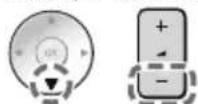
- Press and hold the button as shown below for 3 seconds to reset remote control.
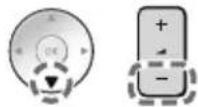
- Aim remote control reception and unpair by following below. Home > Setting > Remotes & accessories > RCU03 > Unpair
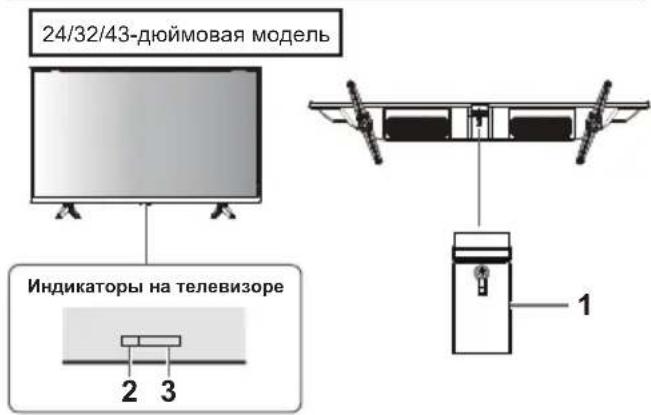
Using the TV controls
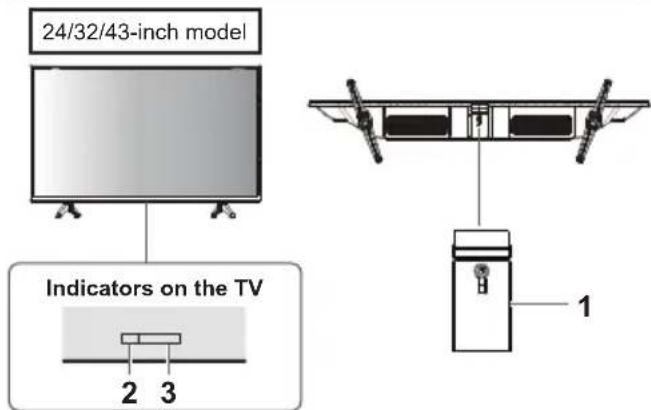
1 Power On/Power Off
2 Power LED
Red: Standby
Green: On
3 Remote control signal receiver
Watching External Inputs
1 Connect the external equipment.

(p.12)
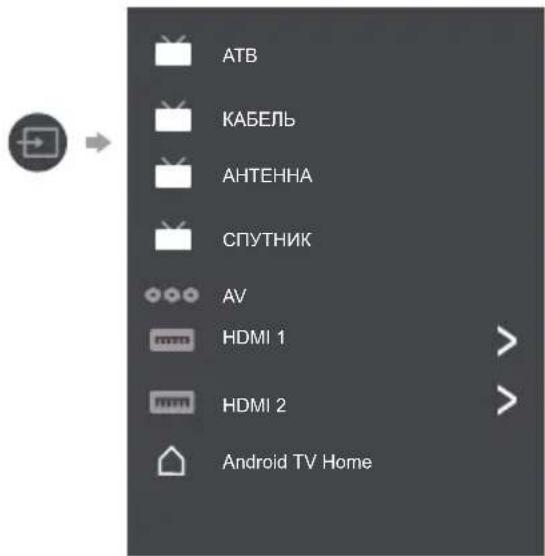
2 Display the [Input] menu, then select the input of the connected equipment.
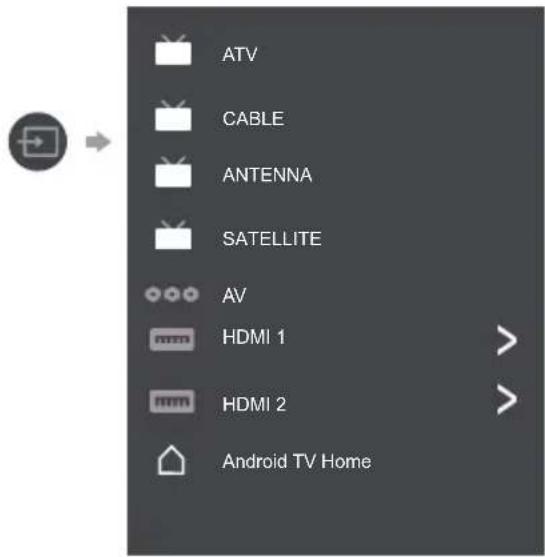
Press OK key only can access.
Note
If the external equipment has an aspect adjustment function, set it to "16:9".
Note: This manual is for common use. Figures and illustrations in this User Manual are provided for reference only and may differ from actual product appearance. And for some models, certain options are not available.
You can select all the features from homepage.
Press to display homepage.
Press / / to select icons from the screen list.
Press OK to enter each option.
To exit the APP, press or
Google Assistant: Click to interact with Google Assistant of the TV.
Notifications: Remind you of system-critical information, such as low disk space, Google sign in or account errors, network connectivity issues, etc.
Input: Select the input source.
Settings: Access the system setting.
Apps: Show the list of favorite applications, or access the application center.
CUSTOMISE CHANNELS: Add and remove channels from your Home screen.
Note:
1) The functions and contents of "Home Page" may vary by different countries or models.
2) Before using network functions in home page like network applications and so on, please connect the TV to the network firstly.
3) Icon copyrights are owned by the application providers.
Using the Menu Functions
Using Quick Access Menu
Note: Some of the functions might be unavailable in certain sources. And for some models, certain options are not available.
This section explores the menus and settings of your TV. Each menu is outlined and detailed to help you get the most from your TV. To access the menu system:
- In TV mode, press OPTiOnemote control to display the quick access list.
- Press / to select the desired item, then press OK to open the corresponding submenu.
- In submenu, use / and OK buttons to make the adjustments, or use / to select an item, use OK to enter and operate according to the on-screen display or guide.
- Press to return to the previous menu.
Option
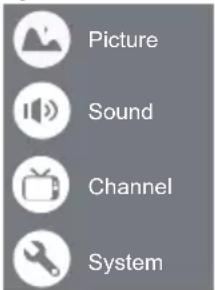
Picture: Enter to adjust picture mode or advanced settings.
Sound: Select this option to set the sound adjustments.
Channel: Select this option to adjust the channel.
System: Select this option to adjust the settings.
Picture
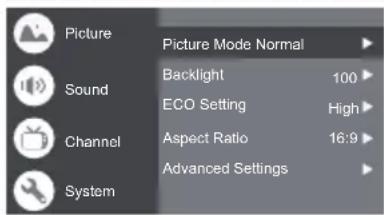
Picture Mode: To select the mode of Normal, Dynamic, Filmmaker, Sport, Game and Custom.
Backlight: Select the level of 1-100.
ECO Setting: To select the Off, Low and High.
Aspect Ratio:
Displays the [Aspect Ratio] screen. Follow the operation guide to select the mode. [4:3] / [16:9] / Auto / Original.
Advanced Settings:
Color Temperature: To select the Normal, Warm, Cool.
HDMI PC/AV Mode: Auto
Overscan: To select ON or OFF
Noise Reduction: To select Off, Low, Medium, High and Auto.
Picture Reset:To reset the picture.
Gamma: Select 2.2 or 2.4.
Motion Estimate and Motion Compensation (MEMC): To select Off, Low, Middle, and High.
Sound
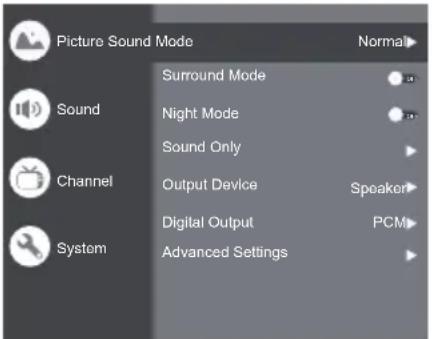
Sound Mode: To select the mode of Standard, Speech, Music, Stadium and User.
Surround Mode: Select ON or OFF/ Pure Sound/ Surround.
Night Mode: Select ON or OFF.
Sound Only: Select it and the TV screen will turn off in 10 seconds.
Output Device: To select the Speaker, SPDIF/Optical and HDMI-ARC.
Digital Output: Select the PCM/ByPass/Auto.
Advanced Settings:
- DAC-4 Dialogue Enhanced
- DAC-4 Dialogue Enhanced Level
- Balance
- Digital Audio Delay (ms)
- Digital Audio Volume
6.eARC - Sound Reset
Channel
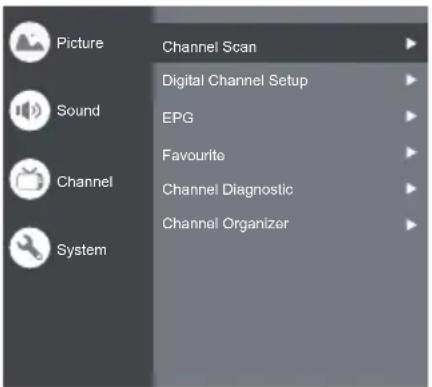
Note: This function is only available in TV mode.
Channel Scan: Allows you to scan for all available analog and digital channels.
Digital Channel Setup:
To select the option to adjust the Subtitle Setup, Teletext Setup, Audio Setup, CI Plus, LCN, Auto Service Update, Update Scan.
EPG:
Press OK to enter the Program Guide menu.
Favourite:
Setup favourite channel list.
Channel Diagnostic:
Press OK to display some signal information on the current digital channel, such as signal strength, frequency, etc.
Channel Organizer:
This option allows you to organize channels.
System
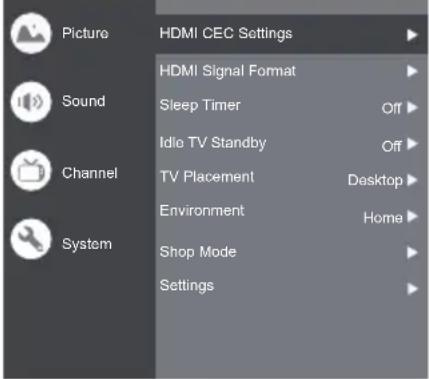
HDMI CEC Settings:
CEC control: To select On or Off.
Device Auto Power Off: To select On or Off.
Tv Auto Power On: To select On or Off.
CEC Device List: Turn devices on and select [Enable] to enable control of HDMI devices.
HDMI Signal Format: To select On or Off.
Idle TV Standby: To select After 1 hour of inactivity, After 2 hour of inactivity, After 4 hour of inactivity, After 24 hour of inactivity or Off.
TV Placement: To select Desktop and Wallmount.
Environment: To select Home and Shop.
Shop Mode: To select E-Sticker.
Settings:
- Lock: Click and lock the TV.
- Power: Turn the Wake On Network and Network Standby on or off.
- Recording Storage: Put the storage device and record the storage.
- Privacy Notice: The content about privacy notice.
- OSS License: The content about oss license.
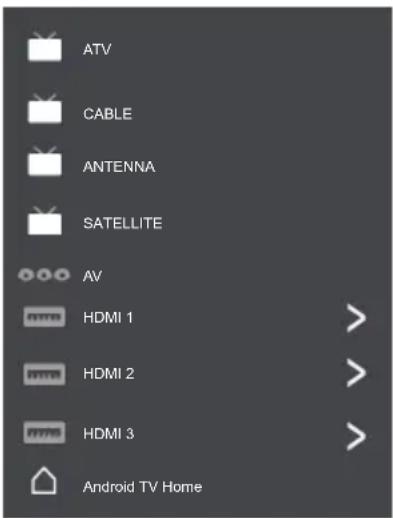
The input
Press then press / to select your desired source, and then press OK to confirm.
Channels setup (ATV and CABLE)
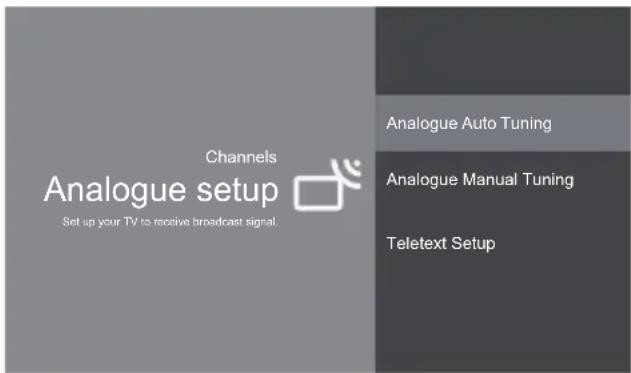
Analogue setup: Select ATV and enter.
- Analogue Auto Tuning: Press OK to start the automatic search process. The search may take a few minutes.
- Analogue Manual Tuning: Press OK to enter the interface.
Press / to set program, TV system or color system item, then Press / select frequency and press OK to search channel.
- Teletext Setup: Press OK and then use / to select preferred teletext.
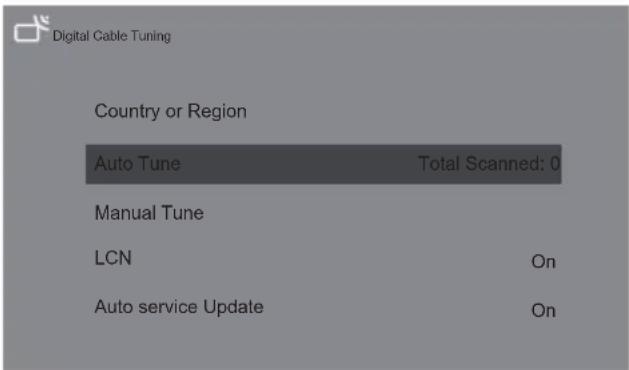
Digital Cable Tuning: Select Cable and enter.
Auto Tune: Press OK to start the automatic search process. The search may take a few minutes. During the process, you can press BACK choose YES to exit.
Manual Tune: Select the channel number and start to scan
LCN: Select On or Off.
Auto service Update: Select On or Off.
TV Settings
Press then press / to select your desired settings, and then press OK to confirm.
Settings
General Settings

Network & Internet
No network connected

Accounts & sign-in
No accounts

Apps

Device Preferences

Remotes & accessories
General Settings:
Network & Internet: Connect the network.
See all
Other options
Add new network
Scanning always available
Let Google's location service and other apps scan for networks, even when Wi-Fi is off.
Ethernet
Ethernet
Connected
Proxy settings: HTTP proxy is used by the browser but may not be used by other apps.
IP settings: To use DHCP or Static
Accounts & sign-in: To sign in the accounts.
Apps:
See all apps
App permissions
Special app access
Security & restrictions
Device Preferences

About

Date & time

Language

Keyboard

Display & Sound

Storage

Home screen

Google Assistant

Chromecast built-in

Screen saver

Energy saver

Location

Usage & diagnostics

Accessibility

Reboot
About: The information of this TV.
Date & time: Adjust date and time.
Language: Select the language.
Keyboard: Select and adjust keyboard
Display & Sound: Adjust display and sound.
Storage: Check the device storage.
Home screen: Customize channels,reorder apps and open source licenses
Google Assistant: To use the Google Assistant.
Chromecast built-in: To use the Chromecast built-in.
Screen saver: Select the mode of Screen saver.
Energy saver: To turn off display.
Location: To estimate location.
Usage & diagnostics: Automatically send diagnostic information to Google, like crash reports and usage data from your device, apps, and Chromecast built-in.
Accessibility:
Captions
High contrast text
(Experimental)
Text to speech
Accessibility shortcut
Services
TalkBack
Off
Switch Access
Off
TVserviceManager
On
Reboot: To reboot the TV.
Remotes & accessories
To searching for accessories...
(Before pairing your Bluetooth devices, make sure they're in pairing mode)
Using Media Player
Media Player allows you to enjoy photo, music or video recorded on a USB Flash Memory.
The picture may not appear correctly on this TV depending on the digital cameras used.
- Display may take some time when there are many files and folders in the USB Flash Memory.
Partly degraded files might be displayed at a reduced resolution.
The folder and file names may be different depending on the digital camera used.
Inserting / Removing the USB Flash Memory
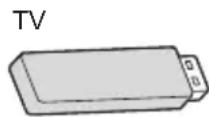

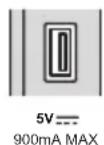
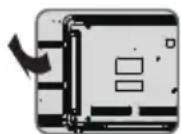
- Insert or remove straight and completely.
Starting Media Player
1 Insert the USB Flash Memory.
2 Select the mode.
Select Access
[Document]: Displays the thumbnail of all documents in the USB Flash Memory.
[Photo]: Displays the thumbnail of all photos in the USB Flash Memory.
[Music]: Displays the thumbnail of music folders in the USB Flash Memory.
[Video]: Displays the thumbnail of video titles in the USB Flash Memory.
[Disk]: Displays the thumbnail of all documents in the USB Flash Memory.
[Contents Display]
Follow the operation guide to perform available operations.
When the cursor stays on the icon,it displays the information of the highlighted content.
![PANASONIC TX32LSW504 - [Contents Display] - 1](/content/2026/04/607394/images/908ed548903ac7b9873381388a7f1eba70f7aee11c466a9d77540540f1bb143d.jpg)
Document Video Photo Music Disk
![PANASONIC TX32LSW504 - [Contents Display] - 2](/content/2026/04/607394/images/540a0f5f62847581c0d59da0d5081a46b38eccbf75c6ee71bd816d426d0d9c22.jpg)
![PANASONIC TX32LSW504 - [Contents Display] - 3](/content/2026/04/607394/images/f5d281dd3e8604e875334aecbfcb8775ec5d5ba98751861f81d941deca7cf0d4.jpg)
![PANASONIC TX32LSW504 - [Contents Display] - 4](/content/2026/04/607394/images/1c639badeb5fc6c81a3e56f0953edbd3249427493d9dba700e4e56d69ee97ba3.jpg)
![PANASONIC TX32LSW504 - [Contents Display] - 5](/content/2026/04/607394/images/07173797842c24019cf821de932d2db4b12b39aa8e2f1589d45a96c51ffba7ef.jpg)
![PANASONIC TX32LSW504 - [Contents Display] - 6](/content/2026/04/607394/images/8f4371258fa6c4f14324bb8aaa0bdb38bd503a1d1406f83a85e4ea9395bb779c.jpg)
Document:
- Select Document icon.
- Press up, down, left or right direction button to select your desired file and press OK to play.
- Use OK key to see more option: ZOOM+, ZOOM-.
- Press return key of remote to stop playing.
Video:
- Select Video icon, then press OK button to view movie file.
- Press up, down, left or right direction button to select your desired file and press OK to play.
- While playing a Video, press the button to display the play console. For the Play console, Press OK key of remote to play and pause the video file. Left key of remote to fast backward. Right key of remote to fast forward.
4.Use cTionsee more option:Photo scale, Looping mode, Subtitle, Subtitle code, Audio track, information and video list. - Press return key of remote to stop playing and press return again to exit.
Photo:
- Select Picture icon, then press OK button to view the picture.
- Press up, down, left or right direction button to select your desired picture file and press OK to show.
- While showing picture, press OK to display the play console. For previous and next use remote left and right key.
- Use OK key to see more option: Left rotation, Right rotation, ZOOM+, ZOOM-, Manual play/Auto play, Information, Play mode, Play interval, BGM: On or Off.
Music:
- Select Music icon, then press OK button to listen to music.
- Press up, down, left or right direction button to select your desired file and press OK to play.
- The Play console includes Previous, Play/Pause, Fast backward/Fast forward, Next.
Press OK! see play list and video list.
- Press return key of remote to stop playing.
Disk:
- Select Disk icon, then press OK button to choose folder.
- Press up, down, left or right direction button to select your desired file and press OK to play.
- Press return key of remote to stop playing.
Additional Information
Auto power standby function
The TV will automatically go into Standby mode in the following conditions:
No signal is received for 15 minutes.
- [Sleep timer] is active in the [System] menu (p.19).
Input signal that can be displayed
| Signal name HDMI | |
| 525 (480)/60i, 60p | ○ |
| 625 (576)/50i, 50p | ○ |
| 750 (720)/60p, 50p | ○ |
| 1,125 (1,080)/60i, 50i | ○ |
| 1,125 (1,080)/60p, 50p, 24p | ○ |
| 2,250 (2,160)/60p, 50p, 24p | ○ |
Mark: Applicable input signal
Signals other than above may not be displayed properly.
The above signals are reformatted for optimal viewing on your display.
HDMI connection
This TV incorporates HDMI technology. HDMI (high-definition multimedia interface) is the world's first complete digital consumer AV interface complying with a non-compression standard.
HDMI allows you to enjoy high-definition digital images and high-quality sound by connecting the TV and the equipment.
Applicable HDMI features
Input audio signal:
2ch Linear PCM (sampling frequencies - 48 kHz, 44.1 kHz, 32 kHz)
- Input video signal:
"Input signal that can be displayed" (p.12)
Match the output setting of the digital equipment.
USB Flash Memory
For playing back in Media Player
Format: FAT32
Compliance:
Supports only USB1.1 or USB2.0 standard.
Maximum USB capacity supported is 1TB.
Note
Data modified with a PC may not be displayed.
- Do not remove the device while the TV is accessing data. Otherwise this can damage the device or TV.
- Do not touch the pins on the device.
- Insert the device in the correct direction. Otherwise this can damage device or TV.
- Electrical interference, static electricity, or erroneous operation may damage the data or device. Panasonic is not liable for any deterioration or damage of data or device during operations with the TV.
It is recommended to connect the USB Flash Memory directly to the TV's USB port.
Some USB devices or USB HUB may not be used with this TV.
- You cannot connect any devices by using the USB port.
Additional information for USB devices may be on the following website. (English only) http://panasonic.jp/support/global/cs/tv/
Troubleshooting
Before requesting service or assistance, please follow these simple guides to resolve the problem. If an error message appears, follow the message's instructions. If the problem still persists, please contact your local Panasonic dealer for assistance.
Screen
Red, blue, green or black spots on the screen.
This is the characteristic of liquid crystal panels. The liquid crystal panel is built with very high precision technology. Occasionally, a few non-active pixels may appear on the screen as points of red, green, blue or black. This does not affect the performance of your TV and it is not a quality problem.
Chaotic image, noisy.
Set [Noise reduction] in the [Picture] menu to remove noise (p.18).
Check nearby electrical products (car, motorcycle, fluorescent lamp).
No image is displayed.
Check the settings of [Contrast] or [Brightness] in the [Picture] menu (p.18).
Check the TV is in AV mode. If the TV is in AV mode, check the selected input mode match the output of the external equipment (p.19).
Unusual image is displayed.
Turn the TV off with Mains power On/Off switch (p.16), then turn it on again.
Pictures from equipment connected via HDMI are unusual.
- Check the HDMI cable is connected properly.
Turn the TV and equipment off, then turn them on again.
Check an input signal from the equipment (p.12).
Use equipment compliant with EIA/CEA-861/861D.
Sound
No sound is produced.
- Check the sound mute setting (p.18) and volume.
Low level or distorted sound.
Sound signal reception may be deteriorated.
Sound output via HDMI connection is unusual.
Set the sound setting of the connected equipment to "2ch L.PCM".
General
The TV goes into Standby mode.
This TV is equipped with auto power standby function (p.16).
The remote control does not work or is intermittent.
Replace the batteries (p.10).
- Point the remote control directly at the remote control signal receiver of the TV (within about 7 m and 30 degree angle).
Situate the TV away from sunshine or block sources of bright light from shining on the remote control signal receiver of the TV.
Parts of the TV become hot.
Even if the temperature of parts of the front, top and rear panels has risen, these temperature rises do not cause any problems in terms of performance or quality.
The TV panel moves slightly when it is pushed with a finger.
Clattered sound might be heard.
There is some flexibility around the panel to prevent damage. This is not a malfunction.
Overcurrent error message appears.
The connected USB device might cause this error. Remove the device and turn the TV off with Mains power On/Off switch, then turn it on again.
- Check foreign objects are not inside the USB port.
Maintenance
First, remove the mains plug from the socket outlet.
Regular care
Gently wipe the surface of the display panel, cabinet and pedestal by using a soft cloth.
- Wipe the mains plug with a dry cloth at regular intervals. Moisture and dust may lead to fire or electrical shock.
For stubborn dirt
First clean the dust on the surface. dampen a soft cloth with clean water or diluted neutral detergent (1 part detergent to 100 parts water). Wring the cloth and wipe the surface. Finally, wipe away all the moisture.
Caution
- Do not use a hard cloth or rub the surface too hard as this could scratch the surface.
- Do not subject the TV's surfaces to water or detergent. Liquid inside the TV could lead to product failure.
- Do not subject the surfaces to insect repellent, solvent, thinner or other volatile substances. This may degrade surface quality or cause peeling of the paint.
The surface of the display panel is specially treated and may be easily damaged. Take care not to tap or scratch the surface with your fingernail or other hard objects. - Do not allow the cabinet and pedestal to make contact with a rubber or PVC substance for a long time. This may degrade surface quality.
Specifications
Model no.
24-inch model
TX-24LSW504 TX-24LSW504S
32-inch model
TX-32LSW504 TX-32LSW504S
43-inch model
TX-43LSW504 TX-43LSW504S
Dimensions (W× H× D)
24-inch model
551.4 × 365.3 × 131 ~mm (With Pedestal)
551.4 × 328 × 84 ~mm (TV only)
32-inch model
725.9 × 475.4 × 178.5 ~mm (With Pedestal)
725.9 × 430.8 × 81.7 ~mm (TV only)
43-inch model
966.8 × 611.1 × 214.5 ~mm (With Pedestal)
966.8 × 566.4 × 88.5 ~mm (TV only)
Mass
24-inch model
2.6 kg (With Pedestal)
2.5 kg (TV only)
32-inch model
3.6 kg (With Pedestal)
3.5 kg (TV only)
43-inch model
6.4 kg (With Pedestal)
6.3 kg (TV only)
Connection terminals
AV in
Mini, 1.0 V[p-p] (75 Ω)
EARPHONE
Mini, 130mV rms 150mV rms
HDMI 1/2 input
TYPE A Connectors
USB
USB2.0 DC 5V, Max.500 mA
Speaker Output
24-inch model
Audio output
6 W (3 W + 3 W)
32-inch model
Audio output
10W(5W+5W)
43-inch model
Audio output
16W (8W + 8W)
9 Systems
Digital TV
| Systems Function | |
| 1 PAL B, G | |
| 2 PAL I | |
| 3 PAL D, K Reception of broadcast | |
| 4 NTSC 4.43 | |
| 5 NTSC 3.58 | Playback from special |
| 6 PAL | VCR's or DVD |
| 7 PAL 60 Hz/5.5 MHz | Playback from special |
| 8 PAL 60 Hz/6.0 MHz | disc players and special |
| 9 PAL 60 Hz/6.5 MHz | VCR's or DVD |
Receiving channels (Analogue TV)
VHF BAND
2-12 (PAL)
0-12 (PAL BAUST.)
1-9 (PAL B N.Z.)
1-12 (PAL)
UHF BAND
21-69 (PAL G, H, I)
28-69 (PAL BAUST.)
13-57 (PAL D, K)
DVB-T/T2 Standard
Aerial input
VHF/UHF
Operating conditions
Temperature
0^ - 45^
Humidity
20% - 80% RH (non-condensing)
Note
- Design and Specifications are subject to change without notice. Mass and Dimensions shown are approximate.
Built-in wireless LAN
Standard compliance and Frequency range
IEEE 802.11 a/b/g/n/ac
2.4~2.5GHz and 5.15~5.825GHz
Security
Support for WPA/WPA2
Built-in Bluetooth
Bluetooth V5.0
2.4~2.485GHz
Note
- Design and Specifications are subject to change without notice. Mass and Dimensions shown are approximate.
For more product information, please visit EPREL: https://eprel.ec.europa.eu.
EPREL registration number is available on https://eprel.panasonic.eu/product.
Oss License
This product incorporates the following software:
(1) The software developed independently by or for Panasonic Corporation,
(2) The software owned by third party and licensed to Panasonic Corporation,
(3) The software licensed under the GNU General Public License, Version 2.0 (GPL V2.0),
(4) The software licensed under the GNU LESSER General Public License, Version 2.1 (LGPL V2.1), and/or
(5) Open source software other than the software licensed under the GPL V2.0 and/or LGPL V2.1.
The software categorized as (3) - (5) are distributed in the hope that it will be useful, but WITHOUT ANY WARRANTY, without even the implied warranty of MERCHANTABILITY or FITNESS FOR A PARTICULAR PURPOSE. Please refer to the detailed terms and conditions thereof [System > Settings > Oss License]
At least three (3) years from delivery of this product, Panasonic will give to any third party who contacts us at the contact information provided below, for a charge no more than our cost of physically performing source code distribution, a complete machine-readable copy of the corresponding source code covered under GPL V2.0, LGPL V2.1 or the other licenses with the obligation to do so, as well as the respective copyright notice thereof.
Contact Information: osd-cd-request@gg.jp.panasonic.com
Disposal of Old Equipment and Batteries
Only for European Union and countries with recycling systems
These symbols on the products, packaging, and/or accompanying documents mean that used electrical and electronic products and batteries must not be mixed with general household waste. For proper treatment, recovery and recycling of old products and used batteries, please take them to applicable collection points in accordance with your national legislation. By disposing of them correctly, you will help to save valuable resources and prevent any potential negative effects on human health and the environment.
For more information about collection and recycling, please contact your local authority. Penalties may be applicable for incorrect disposal of this waste, in accordance with national legislation.
Note for the battery symbol (bottom symbol):
This symbol might be used in combination with a chemical symbol. In this case it complies with the requirement set by the Directive for the chemical involved.
Customer's Record
The model number and serial number of this product may be found on its rear panel. You should note this serial number in the space provided below and retain this book, plus your purchase receipt, as a permanent record of your purchase to aid in identification in the event of theft or loss, and for Warranty Service purposes.
Model Number
Serial Number
Panasonic Entertainment & Communication Co., Ltd.
Web Site: http://www.panasonic.com
72-24LSW5-X41Z1
English
Printed in China
Bedienungsanleitung
LED-Fernsehgerät
Modell-Nr.
TX-24LSW504
TX-32LSW504
TX-43LSW504
TX-24LSW504S
TX-32LSW504S
TX-43LSW504S
Deutsch
Panasonic Testing Centre
Panasonic Marketing Europe GmbH
Winsberging 15, D-22525 Hamburg, Deutschland

Dimensioni (L x A x P)
Modello 24 pollici
551,4× 365,3× 131mm (con piedistallo)
551,4× 328× 84mm (solo TV)
Modello 32 pollici
725,9× 475,4× 178,5mm (con piedistallo)
725,9× 430,8× 81,7mm (solo TV)
Modello 43 pollici
Mini, 1,0 V[p-p] (75 Ω)
CUFFIE
Mini, 130mV rms 150mV rms
Ingresso HDMI 1/2
Panasonic Testing Centre
Panasonic Marketing Europe GmbH
Winsbergring 15, D-22525 Hamburg, Allemagne

Gestion des services TV
Activé
Panasonic Testing Centre
Panasonic Marketing Europe GmbH
| Model Type | Schroefdiepe |
| Minimum Maximum | |
| 24-inch M4 11 mm 12 mm | |
| 32-inch M4 8 mm 9 mm | |
| 43-inch M6 10 mm 12 mm | |
Waarschuwing
prime video De Prime Video-homepageina openen
APPs Appss selectoren
Google Play De Google Play-homepagina openen
YouTube De YouTube-homepageinaopen
Overscan: Selecteer AAN of UIT
CEC-bediening: Selecteer Aan of Uit.
LCN: Selecteer Aan of Uit.
Automatische service-update: Selecteer Aan of Uit.
Tv-installingen
Beveiling & restrictions
Apparaatvoorkeuren

Over

Datum & tijd

Taal

Toetsenbord

Weergave & geluid

Opslag

Homeschem

Google Assistant

Chromecast built-in

Schermbeveiliging

Energiebesparing

Locatie

Mini, 1,0 V[p-p] (75 Ω)
HOOFDTELEFOON
Mini, 130mV rms 150mV rms
HDMI-ingangen 1/2
TYPE A connectoren
USB
USB2.0 DC 5V, Max.500 mA
Luidsprekeruitgang
24-inch model
Audio-uitgang
6 W (3 W + 3 W)
32-inch model
Audio-uitgang
10W(5W+5W)
43-inch model
Audio-uitgang
16W (8W + 8W)
9 systemen
Ppoun3BedeNo no pInueH3nn Dolby Laboratories.
KoHΦnIeHuaJIbHbIe HeOny6nKOBaHHbIe MaTePnaJIbI. © 1992-2015.
Dolby Laboratories. BCE aBToPcKne npaba 3aunueneHbl.
Wi-Fi®явлгетс TopROB Марко Wi-Fi Alliance®. WPA2™, WPA™явлгетс TopROBIMu Маркам Ni-Fi Alliance®.
3HaNn NoroTunblueth BnIOTc 3apeHnCTpnpOBaHHbIMN TopROBbIMN MapKaMn Kopnpaunn BluethoSHG,Inc.Kopnpaunn Panasonic nCnoNb3ayet 3Tu 3HaNn no NInceHnn.
DVB n IoroTnbl DVB ABJIAOTc TOpROBbIMN Mapkamn DVB Project.
Amazon, Prime Video n BCE cOnyTCTbUOuIe Iorotnbl rBnIOTcT ToproBbIMN MapkamKOMnaHm Amazon.com, Inc. nn ee fnnnaNoB.
ДанhoeиЗдпсоOTВETCTByeTTEXHueCKIM yCNoBnM UHD Alliance: «Спразвочьй реким, yctaHOBHeHHbUHDA», Bepcna 1.0. Iorotin FILMMAKER MODETЯВЯТСТОРROВМарКоU UHD Alliance, Inc. B CUSAИДPyRnx cTpaHax.
B daHOM pyKOBoODCTBe nCNoIb3yOTcR
n3o6paxeHn moEi TX-43LSW504*,ecn He
yKa3aHO nHoe.
n3o6paxeHn MOrT OTnuaTbcR B 3aBNCIMOCTn OT
MoJeN.
Baxkha nHΦopMaçna
YBeDOMHeHne dIaФyHKcN DVB / nepeaun daHHbIX / IPTV
-Данн布局 TeileBn3op pa3pa6OtaH B COOTBeTCTBn co cTaHapTaMn (no coCToRnHnHa DeKa6pb 2020 roJa) uΦpoBbix Ha3eMHbIX cnyk6 DVB-T/T2 (MPEG2, MPEG4-AVC (H.264) n MPEG HEVC (H.265)), uΦpoBbix Ka6eJIbHbIX cnyk6 DVB-C (MPEG2, MPEG4-AVC(H.264) n MPEG HEVC (H.265)), a TaIoke uΦpoBbix cnyTHNKOBbIX cnyk6 DVB-S (MPEG2, MPEG4-AVC (H.264) n MPEG HEVC (H.265)).
Docynnoctb cnky6 DVB-T/T2 n DVB-S B Baewem peHone MOxHO yTOuHNtB y MeCTHO dInepa. HOpMaunIO O DocTyNHOCTn cnyk6 DVB-C dJa daHHoro TeNEBu3Opa yTOuHNrTe y BaWero NoCTabUknka ycIyr Kaebhoro TeJeBnDeHnra.
-Даннь TelebeN3Op MOKeT pa6oTaTB He npaBnBHO C cnHaIOM, He COOTBeTCTByIOUIM CTaHApTaM DVB-T/T2, DVB-C nIIN DVB-S.
HeKOTOpbIe FyHKcIMM MOrYT 6bITb HeNoCTynHbIB 3aBNCIMOCTN OT CtpaHbI, OblaCTN, CtaHcINTeJeBeUaHnI, NocTaBcNkA yCnyr, CnyTHnKa IN XapakTepncTnK CETn.
He Bce Moyn CI pa6oTaOT c daHbIM TeJeBn3OpOM HaJnxKaunm Oba3OM. PpOKOHcyIbTnpuYTeCb BaUNM NoCTaUnKOM ycnyr no NOBOy doCTynHO Ro MOnyJIa Cl.
-Данн布局 TeJIeBn3Op MoKeT pa6ToTaH HeIpaBnIbHO C mOdyem Cl, He Odo6peHHbIM nocTabuNkOM ycIyr.
B 3aBnCmOCTn OT nocTaBunka ycnyr moKet B3MaTbCRA DOnoJIHHTeJbHaar nnata.
He rapaHTnpyETcO CBMeCTnMOCTb CO CnyK6amN, KOToPbIe 6dyT 3anyuJeHb B 6dyUem.
IHTepHET-πpNIIOXeHnI ΦyHKZIa ITOLOCOBOrO ynpabJIeHnI ppeIOCTaBnIOTcra COOTBeTCTByIOUIMN IOCTaBzIKamN yCJyr, KOTOpbIE MOYt BHOCITb I3MeHeHnA, a TaKKe IpeBaTb IIN IpeKpaTNTb IN X IOndepkky B JIO60MOMeHT.
KomnnaHra Panasonic He Hecet HnkaKoI OTBeTCTBeHHocTN He npedocTabJareT rapaHTNI DOCTyNHOCTu INHn HenpepbIBHOCTu ycnyr.
Kompanya Panasonic He daet Hukaknx rapaHTn OTHOCHTbHO pa60TbI npOn3BOdNTeNbHOCTN nepupepnHbIX yCTpOcTB CTOpOHNX u3rOToBtJeK. Kpome TOrO, MbI He Hecem OTBetCTBEHHOCTN 3a nOTehunbHbI yUep6, KOtOpbIMoKET BO3HKnHyTb BCNECTBHe pa60TbI INI pON3BOdNTeNbHOCTN TaKHX yCTpOcTB.

He npikacaiTecb K nopTaM «AHTEHHA»,
«BXOD CNTYTHNKA» «HDMI» « He haxoDInTecb
pRdOM C HMM, a TAKKe He dOnyckaIte
3JIeKTPocTaTtueccknX pa3PraOB, cNoCo6hIx
HapyuINb HopMaIbHyIO pa6Ory 3TNx pa3BeMoB,
B pExmpepaToB USB n LAN, Nocoklbky 3TO
MOKeT pPiBecTn K ppeKaIeHnIO pa6OBy IIN K
HEHopMaIbHOMy COCTOHNIO TebeN3Opa.
06pa6oTka HOpMaun O KIneHTe
OnpeJeHnHa HOpMaun OKnHeT, Taka KaI IP-aDPEC cTeBOro INTEPeEca BaUero yCTpoiCTBa (DaHHoro TeNEBn3Opa),coBpuaetc npn NOkKnHoueHN BaUero cMapr-TeLEBn3Opa Panasonic (DaHHoro TeNEBn3Opa) nIN dpynx ycTPOiCTB K INHTepHETy (BbIDepKka n3 HaWei noNtIKn KOHpEnuHaJIbHOCTN). 3TO OcyueCTBnIeTcC C eIbIIO 3aUnTI bHaUNX KIneHTOB u ObecneueHn r CeIOCTHOCTn HaUNx CnyK6, a TaKKe DnA 3aUnTIb I npab IIN CO6CTBeHHOCTH KOMNaHn Panasonic. PnNCIOJb3OBAHn PhHKuNN NOkKnUoyHn K INHTepHETy DaHHORo TeNEBn3Opa Nocne IOdTBePckJeHn corNacn (B IOpncDnKcIyX, B KOToPbIX dIra c6opa nepcoHaJIbHOH INHOpMaun B COOTBEcTBn C pnpMeHmblIM 3aKOHAMn O KOHpEnuHaJIbHOCTn Tpe6yeTcR corNacne KIneHTa) C npabUanAmn npdeOCTabNeHn ycIyr / noNTIKoN KOHpEnuHaJIbHOCTn KomnaHnn Panasonic (daane No TEkCTy - «YcNOBnIuNoLOXeHn») MoKET OcUeCTBnIbTCsCB c6op IHOpMaun O KnHeTc, OTHoCSeIcR K 3KcNPyATAuun DaHHoro n3DeJIyN, I ee NcNoJIb3OBaHnE B COOTBEcTBn C ycNOBnMn I NOLOXeHnMI.
KomnaHn Panasonic He Hecet OTBeTCTBHeHHocTn 3a c6op nnnncnoJIb3OBAHne nHOpMaun O KJIneHTe uepe3 npINOKeHn, npEOCTaBJeHHbIe TpeTbUMN CTopoHAMn Ha daHHOM TeJIeBN3ope nn Ha Be6-caTe.
- Y6eIITecb B HaIeKHOCTn NOCTaBUNka ycnyr npexJe CEM BBOINt b HOMep BaWe KpeiTHoH KapTbi, BaIe IMr N T. D.
PerncpnymaHnOpMaun MoKet perncpObaTcRa Ha cepBepe N dpynx cpeCTbax xpaHeHnaHHbIX NoctabuNka. Nepeed Cdaeey daHHoro TeJIeBn3opa B peMOHT, a TaKKe erO nepeDauey Hnn yTuIN3aUneHneO6xOdmo CtepeTb INOpMaUNo B COOTBECTBm C ycIOBnMn I NOLOKeHNMA M NoCTabuNka.
3aNcB N BOCPOn3BeDeHne MaTePnAna Ha DaHHOM HIN JIO6OM dpyrom yCTPOIcTBe MOKe TOTpe6oBaTb pa3peWeHnC o CTOpOHb I BnaJeNbca aBTOpCKnx INn aHaONuHbIX npAB Ha 3T0T MaTePnA.I. KomNaHn Panasonic He nMeet nJHomOChn H He daET Bam TaKOrO pa3peWeHn, a TaKKe HeDByCMbcIeHNO OTKa3bIBaEtCg OT npAB, BO3MOXHOCTe N HAmepeHn nOlyuATb TaKoe pa3peWeHn OE BAwero IMeH.N OTBETCTBeHHocb 3a IcNoJIb3ObaHne DaHHoro INn IIO6Oro dpyrO yCTPOIcTBa B COOTBETCTBm C npIMHeHMbIM 3aKOHOdaTeJIbCTBOM 6b ABTopCKnx npabax B BaSeI CTpaHE ueNIkOM neKHT Ha nOlb3OBaTeJe. DOnONHnteJIbHbIE CBeDEHn O COOTBETCTBYUxN 3aKOHAx N npabNJax CM. B COOTBETCTBYUxN 3aKOHOdaTeJIbHbIX DOKUMeHTAX INn O6paTInTEcB K BnaJeNbCy TaKHX npAB B MaTePnAne, KOToPbI Bbl XOTNTe 3aNNCaTB NIN BOCPOn3BecTI.
Данhoeи3делпилсьнрваноHopTфелм ПаTeHToBAVCДЯпсрСоньHOrOи НЕКOMМерчecKOrOИСПОЛБ3OBAHNЯNotpe6nteLem ДЯ (i)КODINPOВАньВИdeо corlaCHO cTaHdApTyAVC («ВИdeоAVC»)и/и (ii)ДeKOДIPOBaHNYВИdeоAVC, KOTOpoe6blIOЗAKoDINPOBAHONoJIb3OBaTeIeMДЯ прсоHANbHorOИСПОЛБ3OBAHNYI/NIIb6blIOnONUyeHo OTnoCTaBшkaВИdeОпpoDyKcIM,OblaDAJOшero ПицEH3NeHaPreDoCTaBNeHneВИdeO cTaHdApTa AVC.ДЯИСПОЛБ3OBaHNYI3DEЛNBApyrnxцELYX ПицEH3NHePreDoCTaBnEeTcR.
DOnonHInTeJIbHyIO INHΦopMaIHO MOxHO NOJyHTb, o6paTnBUnCb B KOMpaHnIO MPEG LA, L.L.C.
Nocetnte caHT http://www.mpegla.com.

DAnHbI CmB0J yKa3bIbaeT, YTO n3JeJIne pa6Otae TIOd HaprrKeHHem NepemEHHOro TOka.

DaHbCIMBOINcONb3yeTcIgno6o3HaueHnAeKtpopnp6opaKnacca3auntbIIInn3eKtpopnp6opa cDBoHOnn3oJaunei,ndKOTopoRoHe Tpe6yETcAJIeKtpuueckoe 3aemJeHne.
TpaHcnpTnpoBky Heo6xoJIMO OcyueCTBnraTb TOnbKO BBePTNkaJIbHOMIIOLOXeHN.
MepbI
празoctорожноctи
Bo n36exaHne pUCKa nopaxeHn 3JIeKtpnuecknM TOKOM, noXapa, noBpeJdeHn nn TpaBM co6JIHOaTe npIBeDeHHbIe HNKe MEPbl PpeOCTOpOXHOCTn.
UTeNceJIbHaB BnIka N UHyp NTaHna
PpeynpekdeHne
Pn HeHopMaJIbHOM
yHKUHOHPOBaHNI
TeJIeBUN3opa HEmEJNeHHO
BbIHbTe UTeNCeJIbHyIO BUNKy
n3 po3eTKI!
TnI TTeNCEbHOB BUNKIO TINUaETcB 3aBNCMOCTNOT CTpaHbl.
-Даннь TeileBn3Op CneDyET NOdkNIOuTaB K cetn 3JIeKTPoPNTaHnI NepemEHHO TOka 220-240 B, 50/60 T.
- PONHOCTbIO BCTaBnIe WTeNCEJIbHyIO BNIKy BCteByIO po3ETky.
Дя nonHoro OTKNoeHn yctpoNCTBa Heo6xOdmo n3BLeyb WTeNceJIbHyO BnIky N3 ceTeBOY po3ETKn. ITo npUHe Heo6xOdmo obecneuTb JerKni doCTyn K WTeNceJIbHOB BNKe.
- Pered ouhctkoTeneBn3opa n3BneKaIte uTeNCeJIbHyIO BUNKy n3 ceTeBOI p03eTK.
He npikacaiTecb K wTeNceIbHOB BUNKe MOKpbIMn pyKaMn.

He donyckaTne noBpeKdHnA shHpy nTuHnA.
He cTaBbTe Ha uHyp nHTaHnT TaeKeIbIe npEmdTebl.


He pa3MeuaiTe HHyp NITAHNA BO3Ne 06bekTOB C BbICOKO TeMnepaTypoI.

He TAHNTe 3a uHyp. Pn n3BneHnn 13 p03eTKn Heo6xOIMo DePkaTbCra 3a ee KOpNyc, a He 3a uHyp nITaHn.

He nepemeeuTe TeIeBn3Op, KOrda OH NOdkluoyen K cTeBoi po3eTke.
He nepekpyuBaIte, Ype3MepHo He crn6aIte HepacTgBaIte UHyp nHTaHna.
He nCnoB3yIe Tne nobpeXdEHHyo ITeTceJIbHyIO BnIKy nn CeTeByIO po3eTKy.
- Y6eIntecb, YTO TeIeBn3Op He nepeIaBnBaet HHyp NITaHn.
Co6nOdaIte ocToPOxHocTb
PpeynpeKdHne
He CHIMaIte KpbIuKn HbBHOCTeMOINQKaUIN BTeJIeBUN3Op cAmOCToTaeJIbHo, NocKoJIbKy CyUeCTByeT ONaCHOCtB NopaxKeHnA 3JIeKTpUeCKM TOKOM npi KOHTaKTc BHyTpeHHMn DeTaJIaMn yCTpoIcTba, HaxOp HAnpJxKeHnEM. B TeJIeBUN3Op 06ClykBaEmble IOnb3ObaTe


He noDBepraTe TeJIeBn3Op BO3DeIcTBnIO DoXJa IINI Ype3MePHOI BnaJxHocTn. He DonyckaTe nOpaHaHn Ha TeJIeBn3Op KaneIb IINI 6pbl3r BoDbl. He pa3MeuaIte NaI TeJIeBn3OpOM cocybl, COdePkaUne JxNkOcTb, TaKne KaK Ba3bl.


He BCTaBJIte Te TTeJIeBN3Op NOcToPOHHne npEIMeTbI Yepe3 BeHTNJIaUOnHbIe OTBepCTnJ.
- Ecni TeJIeBn3Op nCIOJIb3yETcB MecTax, rDe B Hero JERKO MOrY T npOHKnHcyTB HaceKOMbIe. HaceKOMbIe, TaKHe KaK MyxN, NaYKn, MypaBbN t.Д., MOrY T npOHKnHcyTB B TeJIeBn3Op N npINBeCTN K NOBpeJdeHnO, a TaKHe 3acTpraTb O6LnactN, BnIMoH Ha TeJIeBn3OpE, HAnpIMep, BHyTpN 3KpaHa.
- Ecπι Ετηλευκαρι Κισηλβ3γετς B Νβιλβούνι έπη 3aδιβιΜινηνιν Κρεί.
YactuKINbIINNbIMaMoryT npOHnKaTbB TeJIeBn3Op uepe3 BeHTnIauOnHbIe OTBepCTN BO Bpem HOpMaJIbHOpa6Otbl N 3acTepeBaTB HEM. 3TO MOKeT npBeCTN K nepepeBy, HeNCnPpABHoCTN, yXyUHeHIO KaueCTBa n3O6paXeHn I T. D.
He nCnoJIb3yIte He yTBePxJdeHHbIe u3rOToBtTeJIem noCTaBky IINKpeNexKHOe o6OpyDObAHne. O6paauTeCb K MeCTHOMy dInIepy KOMnAHnIg Panasonic iHaCTpoKn IIN yCTaHOBKn C IcNoJIb3OBAHNEm peKOMeHDoBaHHbIX KPOHHTeHOB dIpy KpeNJIeHNA Ha CTehy.
He noDbepraTe 3KpaH cnIbHbIM BHeUHM BO3JeCTBnM nIy yapam.
He pa3pewaiTe DeTm B36npaTbcra Ha TeJeBn3Op.
He yctaHaBnBaIte TeJeBn3Op Ha HAKNoHHbIX IIN HeycToHbBix NOBepXHocTx. Y6eHntecb, UTO KpaTeJeBn3Opa He CBncaIOT.

OnachOCTb, CBA3aHHa C yTOHBOCTbIO
TepeBn3Op MOKeT yNaCTb, CTaB npuHHOI cepbe3hblx TpaBM, B TOM uNcIe C JeTaJIbHbIM nCXoIOM. MHorne TpaMbbl, Oco6eHNO cpeiNe DeTei, MoKHO IpeIoTbPaTb, pInHAB IpocTbIe MepbI IpeIOCTOPOXHOCTN, KOTOpble IpeueNCIeHbl Hnke:
- IcnoIb3yIte IkaΦbl, cToiKN mTeOdbI MOHTaKa, peKOMeHIOBaHHbI e N3rTOBtJeM TeJIeBu3Opa.
- IcnoJb3yIte Me6eJIb, cNooc6HyO o6ecneuTb HAdexKHyIO NOIepKky TeJeBu3opa.
- YdOCTOBepbTecb, yTO TeJIeBn3Op He BbICTynaET 3a Kpar ONOPHOI NOBepxHocTm Me6JI.
- 06barchte DeTm, yTO 3aJIe3aTb Ha IpeDMET Me6eIN B NOIbITke DOTaHyTbCra Do TeNeBn3Opa nn erO 3JeMENTOB ynpabJNeHnO nacHO.
- PpoklaIbIaIte npoBOna n Ka6eN, NOdkHoueHHbIe K TeJIeBu3Opy, TaKIM O6pa3OM, YTO6blYepe3 HIX HeJIb3A 6blIO CNOTKHytbcR, a TAKKe YTO6bl HeBO3MOxHO 6blIO NOTAHytb ININ CXBaTtB IX.
He yctaHaBnBaIte TeIeBn3Op Ha HeycToHbOM OCHObaHN.
He pa3MeuAte TeIeBn3Op Ha BbICOKx npedMeTAX Me6eN (HaNPmep, CTeHOM nN KnHexHom uKapy), He npKpeINB npedMeT Me6eN I TeIeBn3Op K yCTOuHBoI NOBepXHOCTN.
He cTaBbTe TeneBn3Op Ha TkaHb NJIHa dpyrIe MaTePnaJIbI, paCNoIOKeHHbIe MExJy TeneBn3OpOM I ONOPHOI NOBepXHOCTbIO Me6eJI.
He pa3MeuataTe npedMeTbI, KOtOpbIe MOryT npBLech BHMaHne DeTei, TaKne KaK npyuKN iN PyIbTbI DY, Ha TeleBn3ope uIN Ha Me6eIN, Ha KOTopoOH pacNoJIOKeH.
EcnBbCHMaeteTeJeBn3Op npecTabnareTe eroBdpyroMeCTO,Heo6xoJMoTakKe co6nOdaT MepbI npedocTopoxHOCTN, nepeuNCHeHHbe Bblwe.
-Даннь TeJIeBn3Op IpeIHa3HaueH dЯ yCTaHOBKn Ha cTOn.
He donyckaTe BO3deICTBna Ha TeJIeBN3Op npMbIX COJHeYHbIX Jyuei IN dpynx NcTOHnKOB Tena.

Bo n36eXaHne noxapa He pa3MeuTe n3deJnE B HeNocpeDCTBENHO 6IIN3OCTN OT CBeuei N dpynx IcTOUHNKOB OTKpbIToro ORHЯ


Onachoctb ydyweHn
PpeynpeKdHne
HeHaJIeXaUee o6paUeHne c yIaNKOBkO daHHoro 3dEInn MaKeT npBecTu K yDuWeHIO, a HeKOToPbIe MeIKNe DeTaN MOrY TnpEdCTabJIb Tb ONaCHOCTb yDuWeHn DnA DeTei. XpaHnTe 3TN DeTaN B HeoCTyNHOM dnn MaIeHbKnx DeTei MeCTe.

POnctabKa
PpeynpeKdHne
He pa3bpaaiTe nOCTaBky u He BHOCHTe B Hee u3MeHeHn.
BHMaHne
IcnoB3yTe TOnbKO NOCTaBky, NOCTaBnEMyO C DaHHbIM TeJIeBN3OpOM.
He nCnoJb3yIte noDCTaBky,ecn OHa NCKpNBHeHa nn NOBpeKdHeA. B 3TOM cnyae He3aMeJInTeJbHO o6paTNTecb K 6JInxKaIWeMy DInepy KomnaHn Panasonic.
HaJekHO 3aTnHtE BCE BHTbI BO BpeM yCTaHOBKn.
He donyckaIte ynapHoro BO3deIcTBnHa TeJIeBn3Op BO Bpemy yCTaHOBKn HA cToiKy.
He pa3pewaIte DeTAM B36npaTbcra Ha noDCTaBky.
YcTaHOBky n CHrTne TeJIeBuN3Opa C NOCTaBKn DOJXHbI OCyUeCTBnTb He MeHee DByx YeJIOBeK.
BbINOJIHnIe yCTaHOBky n CHrTne TeJIeBu3Opa B COOTBeTCTBUN C yKa3aHHoN npOceDypoN.

PaIIOBOJHbI
PpeDynpexKeHne
BecnpoBODnayTexHoiJorNyBluetooth
BHHMaHHe
TeIeBn3Op nIyIpa6oTaHn paIIOuOAcToTe ISM 2,4Tg(Clueoth)Bo n36ExKaHne HeINcnpaBHOCTeNmMeJNeHHOrO OTKnNka H3-3a INHTeppepeHcnn paIIOBOHn DEpKInTe npbT DBy BdaNNOT dpYnx yCTPOINCTB, NOkKnUOaEmbIX K 6ecnpoBOHOH NOKaJIbHOH cETn, dpyrNX yCTPOINCTB Bluetooth®, MKNpOBONHObIX Neey, MObINbHbIX TeIeΦoHOB nYCTPOINCTB, IcNoJIb3yIOuNX CnHaJI 2,4Tg.
Bentnlae
BHHMaHHe
Heo6xOIMO o6ecneuHb doCTaTOUHOe paccToHHe (He Mehee 10 cm) BOKpy TeJIeBn3opa I npEoTbpaueHn Ype3MepHoro HarpeBa, KOtOpb MoKeT pNBeCTn K npExKDeBpeMeHHOMy BbIXOy N3 CTPOHekOTopbix 3NeKTPoHHbIX KOMNoHEHTOB.

(cm)
BeHTnIaIe He
DOJIxHa HApUwA TbBcra
H3-3a NepeKpbITn
BeHTnJIaIOHHbIX
OTBepCTNI NOCTOpOHHMNIpeIMTaMNI,TAkIMN KAK
ra3eTbI,CKaTePTN,3aHaBeCckN T.I.
He3aBcIMo OTTO,NCN0b3yETcJN NIOCTaBka, Heo6xOIMO oBeCneuTb OTCyTCTBn IppeTCTBn DnBa BEHTNJRAUHOHBIX OTBepCTn,paCNOJOKeHHbIX B HnKHeI qACTn TEJIeBN3opa,a TAKKe DOCTaTOOHoe nPoCTpAChTBO DnBa BEHTNJRAUIN.
IepeMeueHne TeJeBn3opa
BHHMaHHe
IpeepepeemeeHnem TeJeBn3opa OTKnOuaTe BCE Ka6enn.
- IepemeueHne TeNEBn3Opa DoJnxHbI OcyuecTBJIbTb He MeHee DByx YenOBek dJa npeDoTbpaueHn NOTeHuaNbHbIX TpaBM N3-3a ONpOKnDbBaHnN nn NaDeHnTeNEBn3Opa.
Bo BpemnpeHockn He ydepKbAaTe TeneBn3Op 3a Yactb 3kpaHa, NOKa3aHHyHO Ha pucyHKe HIXe. 3TO MOKeT npuBeCTN K HeNCnPabHocTn INI NOBPEKDeHNM.

Pn dnteIbHOM HeuCNoIb3ObaHHN
BHHMaHHe
JaKe B BbIKIOeHHOM COCTOHN TeJIeBn3Op
Ntpe6JrET HeKOToPOe KOINueCTBO 3JeKTPo3Hepnn,
Noka WTeNCeJIbHaB BuJIka BCTaBNeHa B CeTeByo
po3eTky.
- N3BNeKeNTe WTeNcEJIbHyIO BUNKy u3 CeTeBOI p03eTKN, ecNI TeJIeBUN3Op He IcNoJIb3YeTcR B TeUHeHne DInTEJIbHOrO BpeMeHN.

Upe3MepHa rpoMKocTb
BHHMaHne
He yctaHaBnBaIte Upe3MepHO BbICOKN
ypoBeHb 3Byka B
HayuHnKax.3To MoKeT
PnPBecTu K Heo6paTMOMy
NOBpeKdEHHcIyxa.


- Пп ВОЗнКНовен B yшax ShyMoB OT Bn6paCINуMeHbUHTe rPOMKocTb NIN BpeMeHHO npeKpaTntEICNoJIb3OBaHHe HayuHKnOB.

BaTaPeKn nyIbTa dNCTaHcNoHHorO
ynpaBneHn
PpeynpeKdHne
XpaHnte 6aTapeKn BHe OocraemocTn DeTeN BO n36exKaHne npOrnaTbBaHn.
CnyaHoe nporlaTbVbAHne MOKeT npnbEcTe
K BpeHbIM Φn3nueckm BO3deNCTBnM. PpI NOo3peHnHa npOrJaTbIBaHn pe6eHkOM
6aTapeiKn Heo6xOIMo HemeJeHNO 6paTntbca K BpaCy.
BHHMaHne
He npabnblbna yctaHOBka moKet npnbectn K yTeueKe 3neKtpoNtua n3 6aTapeeK, a TaKke Knx Kopp0nn B3pBlBy.
OcuyueCTBJIaIe 3aMeHy ToIbKO Ha 6aTapeKn TaKOrO JKe IIN aHaJOnHrHOr Tnna.
He nCnoNb3yIe BmecTe cTapbie HOBbie 6atapeiKn.
He nCnoJb3yIte BmecTe 6aTapeKn pa3hblx TInOB (HanpImep, uEIoOHyIe I MapraHZeBbIe).
He nCnoJb3yIte nepe3apjXaemblc 6atapeKn (Ni-Cd n T. d.).
He cKnraTe n He pa3pyaainTe 6aTapeeKn.
He donyckaTe neperpeBa 6atapei, Hanpimep, NOB03deIcTBnEM COJHeuHbIX Jyuei, OTHN T. n.
- Ytunu3npyIte 6aTaapeKn HauJIeXaUcM cNoCo6om.
Ecnn yctpoinCTBO He nCnObl3yeTcB TeueHne DnnteIbHoro BpeMeHN, n3BNeKaIne 6aTaapeKn, YTO6bl npedOTbpaTnTB yTeky 3JeKtpOnNTa, Kopp03HIO nOnachOCTb B3pbIBa.
LED-TEJIEBN3OP
DeknapauncoOTBeTCTBnA
《HactoIIM Kopnpaun Panasonic 3aBJIeT, TTO daHHbI TeIeBn3Op COOTBeTCTByET o6raTeJbHbIM Tpe6oBaHnM IN dpyrIM CBra3aHHbIM IIOXKeHnM DInpeKTHBbl 2014/53/EC》.
KoHnOpunHaJa DeKnapaCn COOTBeTCTBnA DnA daHHoro TeLeBn3Opa DoCTynHa Ha caIe:
https://www.ptc.panasonic.eu/compliance-documents
YnHOMOeHHbI npeCTaBtTeJIb:
Panasonic Testing Centre
Panasonic Marketing Europe GmbH
Winsberging 15, D-22525 Hamburg, Germany (Германь)

Hana30h yactot 6ecnpoBHOH nokabHo cTeN 5,15-5,35 Tpu pa3peeHo NCNoB3OBaTb TOJbKO B NOMeueHn B nepeuNCHeHHbx Hxke cTpaHax.
ABCtpn,BeIbIg,BoIrpA,YeIckaPecny6nka, DaHn,3ctOnn,Phaun,FeMaHn,IncaHn,ITanN,Peu,INcnaH,Nkp,LatBn
JnxTeHsTeH, JntBa, IIOKcem6ypr, BeHrpna, MaIbTa, HndePnAHybl, HopBerna, Nolbaa, NopTyraNa, PymbHna, CNoBHeHna, CNoBakna, TypuHa, PhHHJaHdna, WBeuHa, WBeuZapna, XOpBaTna
MaKcImaJIbHaMoUHocTb PUY-CnHnHaJa.
IpepeNaBaemOrB Dnna3oHx YaCTOTbl
YcIOBnI nCNoJIb3OBaHnI
BHHMaHne
-Данньnpиборпpeнданautheн Дя ИсноьзOBаньВуCSOBnxТрпчecKOrКIMMaTa.
ПодгOTOBka Teлевизopa к pa6ote
IocTabIaRbIe npHaJnEHXHOCTN
PnHaIeKHOCTM Moryt pacnoIaratbcra OTeJIbHo dpyr ot pyra. BHMateJIbHO npOBepaIte ynaKOBky, YTO6bl cIyauaHNO He BBipocuTb HeKOToPbIe n3 HIX!
Hnctpykunno 3Kcnnyataaenn
NynbT AY
- RC700E
(cTp. 14)
Батуаркн (AAA) × 2
(ctp.10)

PepexoHnk mini jack
AV-nevepexoHnK
Nopctabka
24-1IOHMOBARMOIJI
OchOBaHne
C60pOuHbIe BnHTbl

(ST3×12)×4
32-IOHMOBaMoJeB
OchOBaHne
C60poHbIe BnHTbl

(ST4×15)×4
43-IOHMOBaMoIeIb
OchobAHue
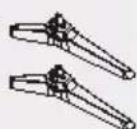
C60opOHyIe BnHTbl

(ST4×20)×4
KpenneHne noDCTaBKn
1 Co6epTe noDCTaBky
I3BneHne NOcTaBKn n3 TeJeBn3opa
B cnyuae HacTeHHoro MOHTaKa TeIeBu3opa nIe erO NOBTOpHOYyNAKOBKN Heo6XoDnMO N3BJIeYb IODCTaBky CJeNyUOUM O6pa3OM.
1 NIOXHTeTeJEBn3Op Ha Hactn n3 neHONnacta nnHa TOHKyO MmKyo TkaHb Ha CTONE.
2 OTBnHTnte c6opohhie BNHTbI A
YcTaHOBka 6aTaapeek B nyIbT Ny
HacteHHbIM MOHTaX TeJIeBn3Opa (onzna)
prime video IepexoHa DomaWHHO CTpaHnuy prime video
APPS Bb6op npnIOxehn
Google Play NepexoHa Domaunio CtpaHnuy Google Play
YouTube NepexoHa DomaunHouO ctpaHnuy YouTube
BbINONHraIOT pa3nHbIe DeiCTBnB CooTBeTCTBnC NOcka3kAMN, KOHNK OTo6paKaembIMHa 3KpaHe MeHIO
MENU OTo6paXeHHe MeHIO HAcTpoKn
IpepexoHaDomaunioCTpaHnCySmartTV
OTo6paXeHHe 3JNeKtpOHHO nporpAmMbI TeJepepa
OTo6paXeHne INHΦopMaun
OK POnTBePKeHne Bb6opa.
KhoNKn BBepx/Bn3/BneBO/BnpaBO. BbIeJIeHHe 3JIeMeHTOB MeHIO npeRyI npOBka napaMeTpOB.
EXIT BbIXoNn nporpaMMbl
BACK BbIXoN3 MeHIO N BO3BpaT K ppebldyuemy MeHIO
OPTION OTo6paKeHne MeHIO HAcTpoE K BbI6paHHbIX cyHKcN
FAV IepexoK cNcKy KaHaIOB
(MinkpofoH)
(DocTyHToTOnbKO npCtabNbHOM CTeBOM NOKIOUOHeHH.)
OTkpblTne npnIOXeHn, nepemeueHne npnIOXeHn n ydaJeHne n3 136paHHoro
IpeemOTka Ha3aD
Bocnpoun3BeDeneHne
IepemOTka BnpePe
3aBepHHeNbIIOJIHOJUeCn pOprpMMbl

PpnoctaHOBNTb

Haatab 3aunscb

YBeJIHHeHneIJIn yMeHbSeHneYpOBHr IpOMKoCTN

BkIIOueHne n BbIKIOueHne 6e33ByuHoro peKIma

OTo6paXeHne n3o6paXeHn n TeKCTa

OTo6paKHeHcCy6TnTpoB

Cneyuon/npdebyuyn kaHan

LnpbI DnB BbOpa Homepa KaHana

IepexoK MeiHaonpBbBaTeJIIO
LAST VIEW
Bo3BpaueHne K nocJeHne nporpamme
CoprajxeHne npbTa dncTaHcNoHHoro ynpaBJIeHn c TeIeBN3Opom
Данн布局у pa6oTaET no texHONorNn Bluetooth.пepeн нayaIOM nCNoJIb3OBAHnRA Heo6xOДnmo BbIIOJNHtB erO coprжehne c TeNeBn3OpM.Поряdk DeiCTBn:
War 1. Haxmte KhoNky Tnna nepexoHa rnaBHyoctpaHcy.
War 2. Haxmte KhoNky npepexoB pexim «ConpjaKeHne npIbTa DY>.
War 3. Cnéduy yka3aHnM Ha cTpaHnCe «Подсka3kn no HacTpoKe», OДнOBpeMeHNo Haxmnte KhONK Ok n
War 4. Ha ékpahe noBHTcH aDnncb «ConpJKeHne...», a nocne 3aBepSeHnA conPjKeHn noBHTcH aDnncb «YcneuHo!’.
Pumeyue. Ecnu no npowecmeuu deyx muhym npouecc copxhen He 3aepwumcra, noemopume yka3aHHbIe bIwe wa zu eue pa3.
YTo6bl pa3OpBaTb cOnpJKeHne nyIbTa DY no Bluetooth, BbINOHNHe CNeDyUOuNe WArn:
War 1. Haxmte KhoNky nna nepexoda Ha rnaBHyO cTpaHcy.
War 2. C nOMOJI KHOJOK / / / BBi6epnte a 3aTeM HAXMNTe OK.
War 3. Haxmte KhoKny DnB Bb6opa NyHKta «PynbTbI N npHaadneXHocTN》,a 3aTeM Bb6epnte NmR Bluetooth-nybTa DY, YTO6bl nepeitN K cJeDyUOM mwarM.
War 4. BbI6epnte «Pa3OpBaTb coPraJKeHne», a 3aTeM hAXMnTE KHOJIky OK.
EcnnybTnctaHOnHOynpAbeHeOTBeHaET
1.HaxMnte u ydepxnBaTe KhoNky, Ka noka3aHo Ha pucyHke Hxke,B TeueHne Tpex cekyn dny C6poc a npbTa DY.
- Pa30pBnTe cOnpJxKeHne nyIbTa Dv, nepeiJaNo yKa3aHHomy HnKe nTyMeHIO. TnaBHyI 3KpaH > HAcTpoNka > Nytbl Dv I npHaadnExHoCTn > RCUO3 > Pa30pBaTb cOnpJxKeHne
IcnoJIb3OBAHne opraHOB ynpaBHeHnTeJeBu3opa
1 BkIOueHne/BBIKIOueHne
2 HdkaTop nHTAHN
KpaChbI:PeXIMOxUdaHnA
3eJHeHbB: BkI.
3 PnpemHnK cnHnA nynbTa Dy
ПресмотсВHEшнХИСТОЧнКOB
1 PódklouHTe BHeUHee o6OpydoBaHne.
(cTp.12)
2Перейдпerte B MeHIO[BxOД],a 3aTeM BbI6epnte BXOD NOkNIOUeHHOrO O6OpyOBAHn.
HaxmTe KhoNky OK dny DocTyna.
PpimueaHne
Ecni y BHeHrero o6OpyDoBaHn IMeeTc4yHKuN KoppeKTIPOBKn OTHOWeHn CToPOH, yCTaHOBNTe ero Ha 16:9
Bb mokeTe Bb6paTb BCE cyHKun Ha IaBHO CTpaHnue.
HaxmTe KhONky Tnry OTo6paXeHnraBHOcTpaHnCbl.
C NOMOUIKHOHOK ▲/▼/▲ BBb6epnte 3HaUKN3 cNncka Ha 3KpaHe.
Длдяdoу Na KaKdoon Ongин HaxmamTe KhoNky OK.
IyBbIXoHa3 npuJIOxHnHaXmTe KHOKU
Google AccncteHT. B3aMDoEiCTBHe c Google AccncteHTOM TeJIeBu3Opa.
YBeDMnHn. HanOMHaHn, OTHOcIeNcK CNTMe, HApIMep, O 3aKaHnBaIOeMc npocTpaHCTBe HaDnCKe, O BXoJe B aKKayHT Google nJIn OUn6kax aKKayHTa, npo6JIeMax c CeTeBbIM CoeINHeHEm N T. D.
Bxod. Bby6op nCTOuHnKa BXoHOrO cnHaJa.
HactpoKn. NepexoK NaCTpoKaM cNCTeMbI.
PpIIOXeHn. OTo6paXeHne cInsKa n36paHHbIX npIIOXeHn nII nepeXoD B ceHTp npIIOXeHn.
HACTPOINTb KAHAJbl. I6abHeHne KaHaoB Ha rnaBHy 3KpaH nn ux ydaJeHne C Hero.
PpumeyaHue.
1)Функцu u codepkuumoe «Глвноусmpaunu» Moaym omluuambcra dna pa3hbyx cmpan unu MODEneu.
2) Ipeed ucnno3oaeHem cemebix yHKuH Ha 2naeHou cmpaHue, makux ka cemeeble npunoKeHua m. d., Heobxodmo nodknioummb meeeu3op Kcemu.
3) Aemopckue npaa Ha uKoHku npuHaDnEkam nocmaeukam npuIooHeu.
OTo6paKeHne 3kpHa [CooTHoWeHne cToPOH]
CneyuTe HnctpyKUmM DnA Bb6opa peKIma.
[4:3] / [16:9] / ABTO / NcXoIH.
PacunpeHHbIe HacTpoKn.
LBeTobaa TempepaTypa. BbIbepuTe «Hopm.», «Tenblu», «XoJOnHbIu».
PexMMHDMI K/AV.ABTO
Ponck KaHaoB. PONCK BCEx DOCTyINbIX aHaIOrOBbIX n CnΦpoBbIX KaHaJIoB.
HacrpoKa ufoPoBoro kaHaJa.
I03BOJnREt N3MeHnTBnapaMeTpbl《HacTpoiKa cy6TuTPOB》,《HAcTpoiKa TeTeKeCTa》,《HAcTpoiKa ayDIO,《CI PIIOC》,《LCN》,《ABTomatueckoe 0bOBHeHne cnyk6》,《ObHOJIeHne cKaHIpOBaHnra
3NT.
Hakmnte OKI>ДЯпесда В MeHIO «Поррамma Teelenepedau».
N36paHhoe.
HactpoKa cnpca n36paHHbIX kaHaJIOB.
ДиагнoctиKaHajla.
Haxmnte OK/Длго OTobpaKeHЯ INФopMaци O cnHaJIe TeKyuIero UnpoBOrO KaHaJa, TAKO KaM MOUHOCTb CNHaHa, YactOTa n np.
Oprahau3ep kaHaIOB.
I03BONrER opraHn3OBaTb KaHaNbl.
Cnctema
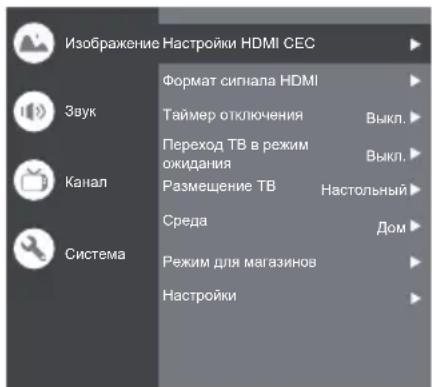
HactpoKn HDMl CEC.
UnpaBHeHne CEC. BbI6epnte 已 BKn.> nnn 已 BbIKn.> ABToMaTnueckoe BbIKIOueHne ycTeoCTBa. BbI6epnte 已 BKn.> nnn 已 BbIKn.>
ABTomatnueckoe BkIIOUeHne TeJeBn3Opa. BbI6epnte 《BKn.》nnn《BbIKJ.》.
Cnncok yctpoiCTB CEC. BkIIOHTe ycTPOiCTBO N Bbl6epnte [BkIIOHTb] nra akTnBaun ynpabNeHnry ycTpoiCTbAmn HDMI.
ΦopMaT cHrHa HDMI. Bb6epTe «Bkn.» nJIn «BbKn.»
TaimepOTKIOUChH.N.BbI6epnte 15 MNH.》,《30MnH.》,《45MNH.》,《60MNH.》,《90MNH.》,《120MNH.》NJN《BbIKJ.》
IpepxoT B B pexm oXnDaHn. Bb6epnte OINN 3 DOCTyINhIX BapnaHTOB: «Yepe3 1 vac 6e3dienCTBnR», «Yepe3 2 yaca 6e3dienCTBnR», «Yepe3 4 yaca 6e3dienCTBnR», «Yepe3 24 yaca 6e3dienCTBnR» nnn «BbIKI.
Pa3MeueHne TB. BbI6epuTe «HaCToJIbHbI» nII N «HaCTeHHbI»
Cpea.Bb6epnte «Iom» nnn «MaraznH.
Pekm dma mara3nHOB. BbI6epnte E-Sticker. HactpoiKn.
1.Блokирвka.HaЖMuTe,чTo6bI 3a6NoKIpOBaTb TeJIeBu3Op.
2.Питане.ВкночипЕ ИИ NвБКЛЧОпЕ «Пpo6уждене NO cETN»И «CTeBoI peKIM OxNiДаHЯ»
3. XpaHnIInuIe 3aIncIe. YcTaHOBuTe yCtpoIcTBo XpaHeHnI dIy 3aIncN Ha Hero.
4. YBeDOMJIeHnE o KOHΦnIeHcuaJIbHOCTn: INΦopMauŋaOB yBeDOMJIeHnO KOHΦnIeHcuaJIbHOCTn.
5.ПиценяпОсИК.NHфорmaцЯ OлцeнHa nporpaMMHoe obecneueHne c OTKpbITbIM NcXoHbIM KOdom.
Bxod
HaXMMTe a 3aTeM C NOMOuBHO KHOJOK ▲/▼ BbI6epHTe Heo6xOuMbI INCTOuyHk I HaXMMTe OK IJIЯ NOITBepKdEHH.
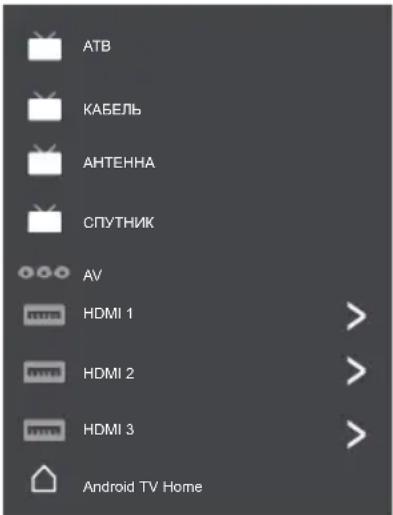
Hactpoikka kaHaIOB (ATB)N KABENb
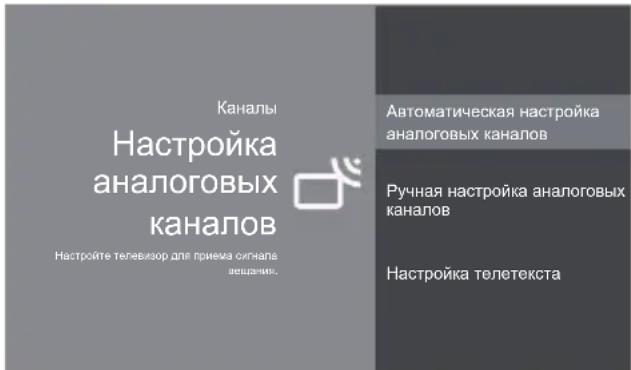
Hactpoika ananorobbix kanaonB. Bby6epnte «ATB» I noTBePnTe.
- ABTomatuecka Hactpoika aHaIorOBbIX KaHaIIOB. HaxMnte OKДЯЗуcka abTomatueckoro noncka.ПОИСК может 3aHЯТь HeCKOЛьКо MнHyT.
-PyuHaHaHacTpoKa aHaIorOBbIX KaHaIIOB. HaKMnte OK nIe npexOda b INTEpeic.
C nOMOJIbIO KHOJOK A/V NaCTpoIe nporpaMMy, cnCTeMy TB nIN ZBeTOBvIO CnCTeMy, a 3aTeM C nOMOJIbIO KHOJOK A/V BbIbepNTe YacTOTy N HaxMMTe OK drr noncka KaHana.
- HactpoikKa TeIeTeKcTa. HaXMMte OK n c nomoubIO KHOIOK ▲/▼ Bbl6epnte Heo6xOIMMbI TeJIeTEKCT.
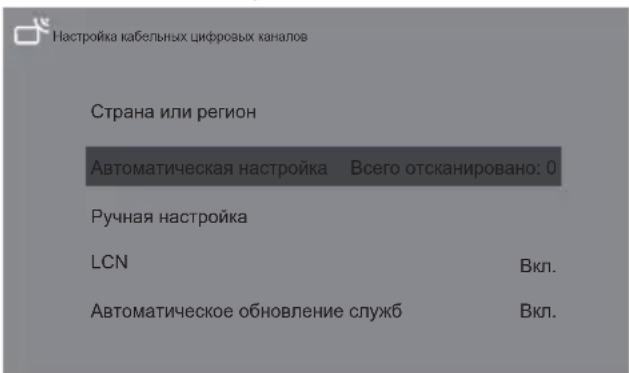
HacpoKa Ka6eBbHbIX cHpPoBbIX KaHaIOB.
Bb6epnte KabeIb I noTBePnTe.
ABTomatnuecka Hactpoika. Haxmte OK nla 3anycka aBtOMaTnueckoro noncka. NOnCK MoKet 3aHrTB HeCKoNbKO MNHyT. Bo BpeM npOcecca moXHO HAKaTb KHONkY BA66paTb «DA» nla BbIXOda.
Pyhna Hactpoika. BbIbepnte Homep kaHana n 3anyCTnte cKaHnpObaHne.
LCN (JIoInueckn Homep kaHaJa). BbIbepeTe «BKn.» IJIIN «BbIKI.»
ABTomatuueckoe 6OBHbneHn cnyk6.BbIbepnte «BKn.» nnn «BbIKn.»
Hac tropon TepeBn3opa
HaxmTe 3aTem C NOMOuKHOJOK ▲/V Bb6epTe Heo6xOdMbIe HAcTpoiKn HaxmTe OK IJIPOITBepKdEHH.
Hactpojki
O6uHe HacTroKn

Cetb n nHTepHET
Cetbeoe noeknueHne oTcyTCTByET

AkkayHTbI IN BXOD B CnCTeMY
AkkayHTbI OTCyTCTByOT

PpIIOxKeHn

HactpoKu yctpoNCTBa

NtBtIy npHaDnExHocTIn
06uhe hacrpoKn.
Cetb n HHTepHET. POnKJIIOUHTbcra K Cetn.
CM.BCE
Dpyrne onu
IobabntbHOByo CeTb
CkaHnpOBaHne BcERda DocTyHNO
Pa3peuHt bclyKbe onpeJeHnM MeCToNOJIOXeHn
Google n npyrrn npinnoxhenm cKaHnpoBaT bcTn daKe npn BbIKJIOueHHom Wi-Fi.
Ethernet
Ethernet
IopdknIOueHo
Iapametpbipnpkcn-cepBepa.IpOKCN-cepBep, noDepKBAOuHTN HTTP, nCnoB3yeTc
6pay3epom, HO MOKET He NcnoJIb3OBaTbcra DpyrMM npNJIOKeHHaMn.
Hacpoikn IP. NcnojIb3ObaTb DHCP nnn CTaTn
AkkayHTbI IN BXoD B CnCTemy. BxoD BAKKayHTbl. PpInIOxKeHH.
CM.BCE npJIOXeHHN
Pa3peSeHn npInJoxKeHn
Docyn K cneuaJIbHbIM npNJIOXKeHHaM
Be30nacHocbN orpaHnueHnra
HactpoKn ycTpoNCTBa

CbeHn

Data n Bpemn

3bIK

KtabnAtypa

13a6paXeHne n 3Byk

XpaHnJnIe

TlaBbIy 3KpaH

Google AccnteHT

BctpoeHHa TExHOJIOTnia Chromecast

3acTaBka

3KoHOMNn 3HePtnN

Mectononoloxene

IcnoIb3OBAHnue nDnaIarHOCTnKa

OCTyINHOCTb

Npeesarpy3ka
CbeHn. HOpmaun O daHHOM TeJeBn3ope.
Data n BpeMn. HactpoNkA daTbI n BpeMeHn.
3bIK. Bb6op 3bka.
KnaBnatya. BbI6op n HacTpoNka KlaBnAtpybl.
1306paXeHne n 3Byk. HacTpoKa n3o6paXeHnra n 3Byka.
XpaHnIInSe. IpoBepka ycTpoiCTBa xpaHeHHa DaHHbIX.
TnaBbI 3KpaH. HAcToPka KaHaJIOB, n3MeHeHne npAka npIIOKeHn I NJIeH3nn Ha npOprpAMMHOe o6ecneHHe C OTKpbITbIM KOdOM.
Google AccnCTeHT. NcNoJIb3OBAHne Google AccnCTeHTa. BcTpoEHNa TExHOJorria Chromecast NcNoJIb3OBAHne BcTpoEHHO JTexHOJorria Chromecas
3acTaBka. BbI6oppeXIMMa 3actaBkn.
3KoHOMn 3Heprn. OTKIIOueHne 3KpaHa.
MectonoJoxeHne. OueHka MeCToNIOJoxeHnA.
McnoIb3ObaHne n dnaIarHOCTnka.ABTOMaTNUeCKaOTnpaBkdaNarHOCTnueCKo INHΦOpMaUIN B
Google, TAKO KAK OTYeTbI O c6oRx IN daHHble 06 nCNoJIb3OBAHn yCTpoNCTBa, pPINOKeHn IN BCTpoEHHO TexHoNOrn Chromecast.
OoctynHOCTb.
Cy6TuTpbI
BbICOKOKoHTpaTHeI TeKCT
(3KcnepemuMeHTaIbHbH)
TeKCTBpeyb
Apnbik dnn doctyna
Cnyx6bl
TalkBack
BbIKn.
BbipTaB n noTBePdntb
BbIKn.
MeHeJKePcBnCoTB
Bkn.
Npe3arpy3ka. Npe3arpy3ka TeIeBu3opa.
NylbIy n npHaJneKHOCTN
K noncky npnHaJnxHocTei...
(Перед сорожене Bluetooth-усточн HeobxODIMO nepeBecTu IN B pexm coprajkeHnA)
Исpenьзованке mednappongpbivatela
MeHua npRpbBaTeNb no3BONaET npOcMaTpNBaTb
ΦOTorpaΦnN, CnyuAaTb My3bIKy NIN BOCnpoN3BODNTb
BnDeo3anncn c USB-HakonnteJ.
IynbT dNCTaHcNoHHoro ynpabNeHn He pa6oTaET nI npa6oTaET c nepe6oMaM.
BamHeTe 6aTapeuKu (cTp.10).
→ HanpaBbTe npblT dNCTaHcNOHHoro ynpabHeHn HEnocpeDCTBeHHo Ha npneMHNK cHHaJa (B npdeJenax 7 M n yrna 30 rpaIycob).
PacnoonKeTe TeneBn3Op BdAnOT CoNHeuHOro CBeta ININ 3a6loKnpyTe NCTouHnKn IrpKOrO CBeta, HAppaBHeHbIe Ha npneMHNK CnHaJa nYJbTa DInCTaHcUHOHHo ynpaBNeHn.
Tae Tne TeJeBn3opa HArpeBaHOTcA.
B cnyae noBbIeHnA TemnepaTpybI qacteI TeJeBn3Opa, TaKx KaNpeDnA, BepXnA, IN 3aHnA nHeJn, 3TO He npBedeT K npo6nemam B qactn pOn3BOIDTeJIbHOCTu IN N KaueCTBa.
PanaBteBn3opa cierka Cdbraetc npn HadaBnBaHn naIbem.
Moxet 6bItb cIbIeH noctopOHn IyM.
Nopnepmety nahe npeDycmOTpeHa HeKOTopar
r6kocTB dnn ppeoTbpaueHn NOBpeKdHn.
3To He RaBnreTc HncnpaBHO.
OTo6paXaetc coo6eHne o6 owN6ke, CB3aHHo c nepeRpy3KoN no TOky.
Ta OwN6ka MoKeT 6bItb Bbl3BaHa NOKIOUeHHbIM USB-ycTpOINCTBOM. N3BNEKInTe yCTpOINCTBO, BIKIOUHTe TeIeBN3Op C NOMIOBbO BIKIOUaTeIaNTAHIA . / . , a 3aTEM CHOBA BKIOHTe erO.
Y6eINTecb BOTcyTCTBHNIOCTOpOHnX npeIMTOB BnopTe USB.
06cnyxmbaHne
PpeBapnteBHO n3BJIeknTe wTeNceBHyIO BnKy n3 cTeBOI po3ETKn.
Perynnyhynyxo
- AkkypaTHO npOTpuTe NOBepxHocTn 3KpaHa, KOpnyca H NOCTaBKn MRAKO TKAHbIO.
- Perynnapno npotnpaite wTencelbHyIO BUNky cyxon TkaHbIO. Bnara n nbIb Moryt cTaB npuHoi NoXapa nn npopaxeHna 3JneKTpueckm TOKOM.
Pn cnilbHom 3arpa3HeHnn
Chauana OunchTe Nblc NOBepxHocTn. CMOHTe MraKyo TkaHb BOIO pa3BeDeHHbIM HeITpAlbHbIM MOOUMCpeDCTBOM (1 cactb Ha 100 cacte BODbl). XopoIo OTOXMMte TkaHb N npOTpTe NOBepxHocTb. I hakoHeu, COtpTe BCIO Bnary.
BHHMaHHe
He nCnoB3yIe JKeCTkyIO TkaHb I He TpNTe NOBepxHOCTb CnIIuKOM CnJIbHO. 3TO MOXeT npINBeCTN K IOBJIeHNIO capaNNH Ha NOBepxHOCTN.
He noBepraTe NOBepxHocTn TeJeBn3opa BO3eNCTBnIO BObI INM MOUeRO cpeDCTBa. IOnaDaHne KJNDKoCTn BHyTpB TeJeBn3opa MoKeT npVBecTn Kero HeNCnPpABHOcTn.
He onyckaTe KOHTaTaNOBepxHocTei TeIeBn3opa Co CpeCTBaMn IpOTnB HaceKOMbIX, paCTbOpNTeYMaN IN DpyTmN JeTyHMN BeIeCTBaMn. 3To MoKeT NcNOPtNTb NOBepxHocTb IIN pINBeCTN KOTcNoEHHIO KpaKn.
C NOBepxHocTbIO 3KpaHa CneJeYeT 06XoDnTbcra OcObeHNO OCTOpOXHO, NocKoNbKy ee JERKO NOBpeINb. He cTyUHe No NOBepxHocTn H He UapanaTe ee HOrTaMn I DpyrIMN TBepDbIMN PpeDMetamn.
He donyckaTe dntteJbHoro KOHTaTaNOBepxHOCTn TeJIeBn3Opa n NOCTaBKn C pe3nHOINII NBX-cOedePkaUMM BeueCTBaMn. 3TO MOKeTNCNOPITb NOBepxHOCTb.
Texhnueckne xapaktepncnkn
MoBn
24-Дюймовая модаль.
TX-24LSW504 TX-24LSW504S
32-Диюмовая морель
TX-32LSW504 TX-32LSW504S
43-Диюмовая модь.
TX-43LSW504 TX-43LSW504S
Ta6apuTbI (UxxBxΓ)
24-IOHMOBAMoIb
COOTBETCTBNE cTaNdapTaM n Dnana3OH YactOT
IEEE 802.11 a/b/g/n/ac