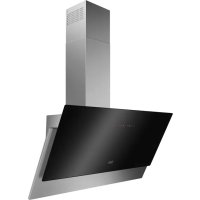
FFV919Y - Basket FAURE - Free user manual and instructions
Find the device manual for free FFV919Y FAURE in PDF.


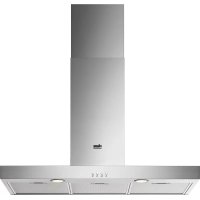
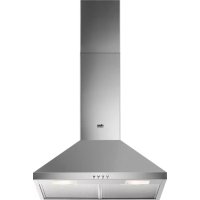
| Product type | Extractor hood |
| Brand | FAURE |
| Model | FFV919Y |
| Dimensions (W x D x H) | 90 x 50 x 60 cm (estimate) |
| Weight | 15 kg (estimate) |
| Power supply | 220-240 V, 50 Hz |
| Motor power | 250 W (estimate) |
| Speed levels | 4 speeds + maximum speed (8 min) |
| Breeze function | Yes (air refresh after cooking, automatic shutdown after 60 min) |
| Hob to Hood function | Yes (automatic connection with compatible hob) |
| Lighting | LED (replacement by technician) |
| Grease filter type | Metallic, dishwasher safe (short cycle, low temperature) |
| Grease filter cleaning | At least once a month |
| Charcoal filter type | Non-washable, replacement every 4 months |
| Repairability | LED bulb can only be replaced by a technician |
| Spare parts | Available via after-sales service |
| Safety | Safety instructions in separate installation booklet |
| General information | User manual available for free download |
Frequently Asked Questions - FFV919Y FAURE
User questions about FFV919Y FAURE
0 question about this device. Answer the ones you know or ask your own.
Ask a new question about this device
Download the instructions for your Basket in PDF format for free! Find your manual FFV919Y - FAURE and take your electronic device back in hand. On this page are published all the documents necessary for the use of your device. FFV919Y by FAURE.
USER MANUAL FFV919Y FAURE
natural_image
Simple line drawing of a kitchen range hood with three dots on the base (no text or symbols)PËRSHKRIM I PRODUKTIT
PËRMBLEDHJE E PANELIT TË KONTROLLIT

FUNKSIONI "HOB TO HOOD"
natural_image
Simple line drawing of a folded paper or document with a labeled arrow indicating '1' (no text or symbols present)natural_image
Technical line drawing of a mechanical component with two labeled parts (1 and 2), showing internal structure and rotation arrows (no text or symbols beyond labels)natural_image
Simple line drawing of a folded paper or sheet with a labeled arrow indicating '1' (no text or symbols present)natural_image
Simple line drawing of a rectangular object with a curved arrow labeled '1' pointing to its side, resting on a base (no text or symbols beyond the label)- Pritisnite ručku montažne kopče na ploči filtra ispod nape (1).
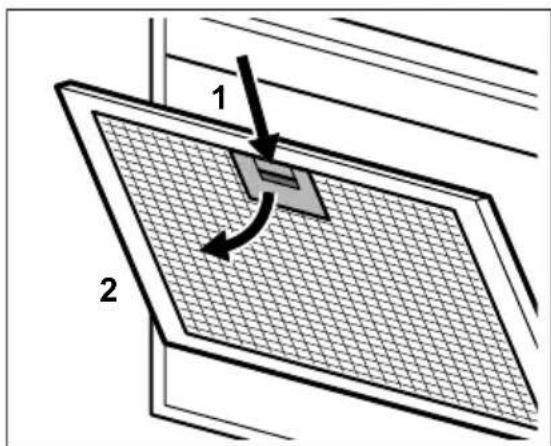
- Lagano nagnite prednji dio filtra prema dolje (2), a zatim ga povucite.
Ponovite prva dva koraka za sve filtre.
- Očistite filtre pomoću spužve s deterdžentima koji nisu abrazivni ili u stroju za pranje posuđa.

natural_image
Technical line drawing of a mechanical component with two labeled parts (1 and 2), showing internal structure and rotation arrows (no text or symbols beyond labels)natural_image
Simple line drawing of a folded paper or panel with a labeled arrow indicating '1' (no text or symbols present)natural_image
Technical line drawing of a mechanical component with two labeled parts (1 and 2), showing internal structure and rotation arrows (no text or symbols beyond labels)natural_image
Simple line drawing of a rectangular object with a curved arrow labeled '1' pointing to its side, placed on a base (no text or symbols beyond the label)- Tryk på grebet til monteringsclipsen på filterpanelet under emhætten (1).
natural_image
Technical line drawing of a mechanical component with two labeled parts (1 and 2), showing internal structure and rotation arrows (no text or symbols beyond labels)BESCHRIJVING VAN HET PRODUCT
OVERZICHT BEDIENINGSPANEEEL

natural_image
Simple line drawing of a rectangular object with a curved arrow labeled '1' pointing to its base, resting on a flat base (no text or symbols beyond the label)natural_image
Technical line drawing of a mechanical component with two labeled parts (1 and 2), showing internal structure and rotation arrows (no text or symbols beyond labels)SAFETY INFORMATION AND INSTALLATION

WARNING! Refer to the separate
Installation Instructions booklet for Safety Information and Installation.
Read carefully the Safety chapters before any use or maintenance of the appliance.
PRODUCT DESCRIPTION
CONTROL PANEL OVERVIEW

1 On / Off
2 First motor speed
3 Second motor speed
4 Third motor speed
5 Maximum motor speed
6 Breeze function
7 Filter reminder
8 Hob to Hood function
9 Lamp
DAILY USE
USING THE HOOD
Check the recommended speed according to the table below.
 | While heating up food, cooking with covered pots. | |
 | While cooking with covered pots on multiple cooking zones or burners, gentle frying. | |
 | While boiling and frying big quantities of food without a lid, cooking on multiple cooking zones or burners. | |
 | While boiling and frying big quantities of food without a lid,big humidity. | |
 | Refreshes the air in kitchen after cooking at a very low noiselevel. It can be activated and de-activated by touching thesymbol. The function turns off automatically after 60 min-utes. Use after cooking only. |

It is recommended to leave the hood operating for approximately 15 minutes after cooking.

The control Panel is a sensor field. Touch the symbols for 1 second to activate the functions.
To operate the hood:
- Turn on the appliance by pressing the symbol.
You can now activate the functions. - To activate the function touch the symbol.
- If needed, touch the light symbol ⚙ to illuminate the cooking surface.
To turn off the appliance press the Ⓐ symbol again.
HOB TO HOOD FUNCTION
It is an automatic function which connects the hob with a hood. Both the hob and the hood have an
CARE AND CLEANING
CLEANING THE GREASE FILTER
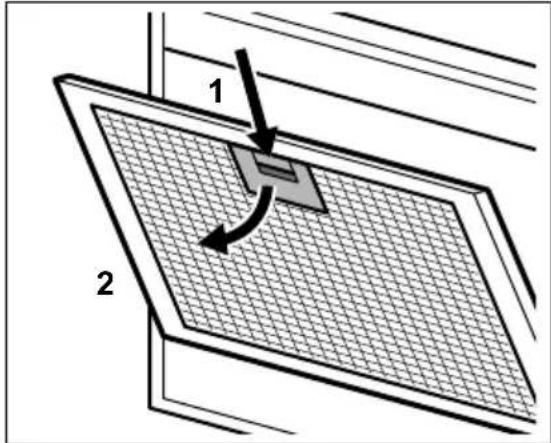
Each filter must be cleaned at least once a month. Filters are mounted with the use of clips and pins on the opposite side.
To clean the filter:
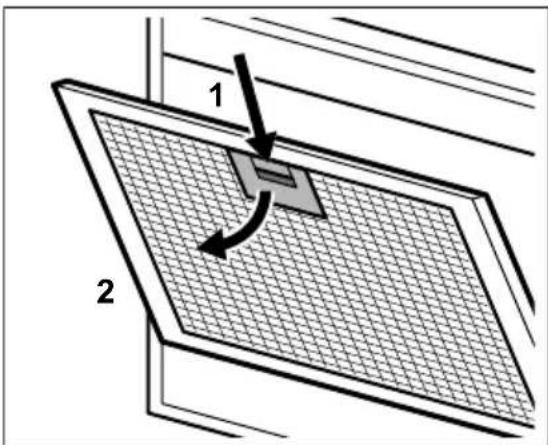
- Pull the cover to open it.
natural_image
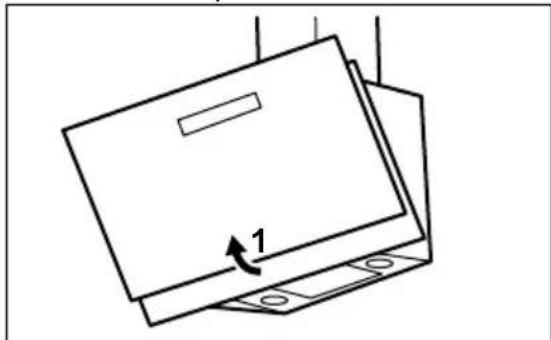
Simple line drawing of a folded paper or box with a labeled arrow indicating '1' (no text or symbols present)- Press the handle of the mounting clip on the filter panel underneath the hood (1).
infrared signal communicator. Speed of the fan is defined automatically on basis of mode setting and temperature of the hottest cookware on the hob. You can also operate the fan using the hob manually. The function can be activated from panel of the hob.

For more information how to use the function refer to the hob user manual.
ACTIVATING MAXIMUM MOTOR SPEED
When you press the button ✦, the Maximum Motor Speed starts to operate for 8 minutes. After that time, the appliance returns to its previous speed settings.

When the function is turned on, additional touch on the button does not have any effects.
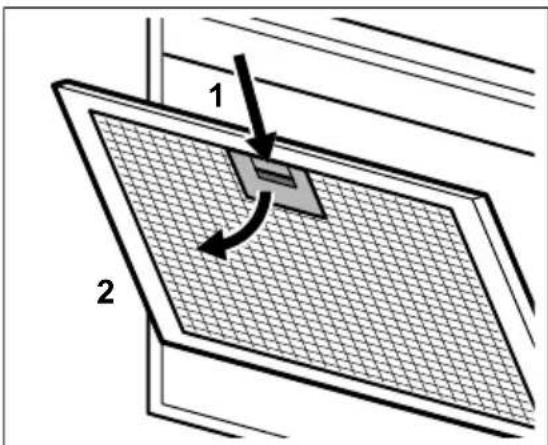
- Slightly tilt the front of the filter downwards (2), then pull.
Repeat the first two steps for all filters. - Clean the filters using a sponge with non abrasive detergents or in a dishwasher.

The dishwasher must be set to a low temperature and a short cycle. The grease filter may discolour, it has no influence on the performance of the appliance.
- To mount the filters back follow the first two steps in reverse order.
Repeat the steps for all filters if applicable.
REPLACING THE CHARCOAL FILTER

WARNING! The charcoal filter is non-washable!
The time of saturation of the charcoal filter varies depending on the type of cooking and the regularity of cleaning the grease filter.
To replace the filter:
- Remove the grease filters from the appliance.
Refer to "Cleaning the grease filter" in this chapter. - To install a new filter, perform the same steps in reverse order.
In any case, it is necessary to replace the filters at least every four months.
REPLACING THE CHARCOAL FILTER
The time of saturation of the charcoal filter varies depending on the type of cooking and the regularity of cleaning the grease filter.
ENVIRONMENTAL CONCERNS
Recycle materials with the symbol Put the packaging in relevant containers to recycle it. Help protect the environment and human health by recycling waste of electrical and electronic appliances. Do not dispose of appliances marked

WARNING! The charcoal filter is NON-washable! The filter cannot be regenerated!
To replace the charcoal filter:
- Remove the grease filters from the appliance. Refer to "Cleaning the grease filter" in this chapter.
- Turn the filter counterclockwise (1) and then pull (2).
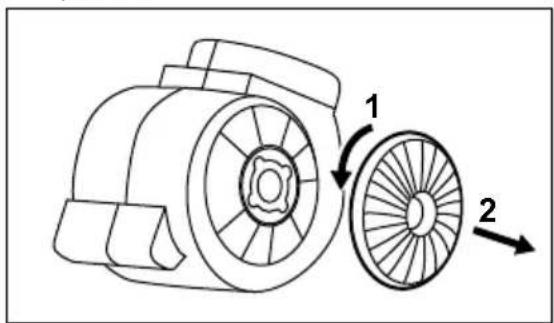
To mount the filters back follow the steps in reverse order.
REPLACING THE LAMP
This appliance is supplied with a LED lamp. This part can be replaced by a technician only. In case of any malfunction refer to "Service" in the "Safety Instructions" chapter.
with the symbol 📄 with the household waste. Return the product to your local recycling facility or contact your municipal office.
OHUTUSINFO JA PAIGALDAMINE

HOIATUS! Ohutusinfo ja
paigaldamise kohta leiate teavet
eraldi paigaldusjuhiste lehelt. Enne
natural_image
Simple line drawing of a rectangular object with a label '1' and a curved arrow, no text or symbols present.HOB TO HOOD -TOIMINTO
natural_image
Simple line drawing of a folded paper or document with a labeled arrow indicating '1' (no text or symbols present)natural_image
Technical line drawing of a mechanical component with two labeled parts (1 and 2), showing internal structure and rotation arrows (no text or symbols beyond labels)natural_image
Simple line drawing of a folded paper or sheet with a labeled arrow indicating '1' (no text or symbols beyond the label)REPLACEMENT DU FILTRE AU CHARBON

REPLACEMENT DU FILTRE AU CHARBON
natural_image
Technical line drawing of a mechanical component with two labeled parts (1 and 2), showing internal structure and rotation arrows (no text or symbols beyond labels)natural_image
Simple line drawing of a folded paper or panel with a 1-inch arrow indicating rotation (no text or symbols)natural_image
Simple line drawing of a folded paper or document with a labeled arrow indicating '1' (no text or symbols present)natural_image
Simple line drawing of a folded paper or sheet with a labeled arrow indicating '1' (no text or symbols present)natural_image
Technical line drawing of a mechanical component with two labeled parts (1 and 2), showing internal structure and rotation arrows (no text or symbols beyond labels)natural_image
Simple line drawing of a rectangular object with a curved arrow labeled '1' pointing to its side, resting on a base (no text or symbols beyond the label)natural_image
Technical line drawing of a mechanical component with two labeled parts (1 and 2), showing internal structure and rotation arrows (no text or symbols beyond labels)natural_image
Simple line drawing of a folded paper or document with a labeled arrow indicating '1' (no text or symbols present)FUNKCIJA "HOB TO HOOD"
natural_image
Simple line drawing of a folded paper or document with a labeled arrow indicating '1' (no text or symbols present)natural_image
Technical line drawing of a mechanical component with two labeled parts (1 and 2), showing internal structure and rotation arrows (no text or symbols beyond labels)natural_image
Simple line drawing of a folded paper or sheet with a labeled arrow indicating '1' (no text or symbols present)natural_image
Technical line drawing of a mechanical component with two labeled parts (1 and 2), showing internal structure and motion arrows (no text or symbols beyond labels)natural_image
Simple line drawing of a folded paper or document with a labeled arrow indicating '1' (no text or symbols present)natural_image
Simple line drawing of a rectangular object with a curved arrow labeled '1' pointing to its base, resting on a flat base (no text or symbols beyond the label)- Trykk på håndtaket til monteringsklipsen på filterpanelet under ventilatoren (1).
Viftehastigheten defineres automatisk på grunnlag av modusen og temperaturen til de varmeste kokekarene på koketoppen. Du kan også betjene viften fra koketoppen manuelt. Denne funksjonen kan aktiveres fra betjeningspanelet på koketoppen.

natural_image
Simple line drawing of a rectangular object with a curved arrow labeled '1' and base plates (no text or symbols)natural_image
Technical line drawing of a mechanical component with two labeled parts (1 and 2), showing internal structure and rotation arrows (no text or symbols beyond labels)natural_image
Simple line drawing of a folded paper or box with a labeled arrow indicating '1' (no text or symbols present)natural_image
Technical line drawing of a mechanical component with two labeled parts (1 and 2), showing internal structure and rotation arrows (no text or symbols beyond labels)FUNCTIA PLITĂ CĂTRE HOTĂ
natural_image
Simple line drawing of a rectangular object with a curved arrow labeled '1' pointing to its side, resting on a base (no text or symbols beyond the label)natural_image
Simple line drawing of a rectangular object with a curved arrow labeled '1' pointing to its side, resting on a base (no text or symbols beyond the label)natural_image
Technical line drawing of a mechanical component with two labeled parts (1 and 2), showing internal structure and rotation arrows (no text or symbols beyond labels)natural_image
Simple line drawing of a rectangular object with a curved arrow labeled '1' and base plates (no text or symbols)- Притисните ручку затеге за монтажу на панелу филтера испод аспиратора (1).