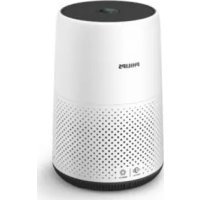
AC0850 - Air purifier PHILIPS - Free user manual and instructions
Find the device manual for free AC0850 PHILIPS in PDF.


| Product Type | Air Purifier |
| Brand | Philips |
| Model | AC0850 |
| Power Supply | Power adapter SAW30A-240-1000U (input 100-240V, output 24V 1A) |
| Filter Type | NanoProtect filter (non-washable, non-reusable) |
| Operating Modes | Auto, Turbo, Sleep |
| Air Quality Indicator | PM2.5 sensor, color indicator: Blue (good ≤12 µg/m³), Blue-purple (moderate 13-35), Purple-red (unhealthy 36-55), Red (very unhealthy >55) |
| Wi-Fi Connectivity | 802.11b/g/n 2.4 GHz, compatible with Philips Air+ app |
| Certifications | FCC, ISED, ENERGY STAR |
| Warranty | 2-year limited |
| Maintenance: Sensor Cleaning | Every 2 months with a dry cotton swab |
| Maintenance: Filter Cleaning | Every 4 weeks (vacuum cleaner or damp cloth) |
| Filter Replacement | When the red indicator lights up; hold the mode button for 3 seconds to reset |
| Safety Lock | If the filter is not replaced in time, the device stops and locks |
| Country of Import | USA (Versuni USA), Canada (Versuni Canada) |
| Mobile App | Philips Air+ (iOS and Android) |
Frequently Asked Questions - AC0850 PHILIPS
User questions about AC0850 PHILIPS
0 question about this device. Answer the ones you know or ask your own.
Ask a new question about this device
Download the instructions for your Air purifier in PDF format for free! Find your manual AC0850 - PHILIPS and take your electronic device back in hand. On this page are published all the documents necessary for the use of your device. AC0850 by PHILIPS.
USER MANUAL AC0850 PHILIPS
EN Usermanual 1
FR Mode d'emploi 28
FCC & ISED Compliance 3
Disposal ....3
2 Your air purifier ....5
Product Overview 5
Controls overview 6
3 Getting started 6
Installing the filter 6
Wi-Fi indicator 7
Wi-Fi connection 7
4 Using the air purifier 8
Understanding the air quality light 8
Connecting power 8
Turning on and off 8
Changing the mode setting 8
5 Cleaning 9
Cleaning schedule 9
Cleaning the body of the air purifier 9
Cleaning the air quality sensor 9
Cleaning the surface of the filter 10
6 Replacing the filter 10
Understanding filter replacement indicator ....10
Replacing the filter 10
Filter reset 11
7 Storage 11
8 Troubleshooting 11
9 Warranty 13
Order parts or accessories 13
1 IMPORTANT SAFEGUARDS
READ AND SAVE THESE INSTRUCTIONS
Read this user manual carefully before you use the appliance, and save it for future reference.
To ensure the best performance, please ensure your purifier is upgraded to the latest version. You can do this upgrade via the Air+ app.
Danger
- Do not clean the appliance with water, any other liquid, or a (flammable) detergent, nor let them enter the appliance, to avoid electric shock and/or a fire hazard.
- Do not spray any flammable materials such as insecticides or fragrance around the appliance.
Warning
- To reduce the risk of fire or electric shock, do not use this fan with any solid-state speed control device.
- Check if the voltage indicated on the appliance corresponds to the local power voltage before you connect the appliance.
- If the power cord is damaged, you must have it replaced by Philips, a service center authorized by Philips, or similarly qualified persons in order to avoid a hazard.
- Do not use the appliance if the adapter, the power cord, or the appliance itself is damaged.
• Only use the adapter (SAW30A-240-1000U) provided with the appliance. - This appliance can be used by children aged from 8 years and above and persons with reduced physical, sensory or mental capabilities or lack of experience and knowledge if they have been given supervision or instruction concerning use of the appliance in a safe way and understand the hazards involved. Child shall not play with the appliance. Cleaning and maintenance shall not be made by children without supervision.
• Children shall not play with the appliance.
• Cleaning and maintenance shall not be made by children without supervision.
• Do not spray any liquid on filter for cleaning, it may damage internal structure of filter.
• Do not block the air inlet and outlet. - Do not place any items on top of the air outlet, or in front of the air inlet.
• Make sure that foreign objects do not fall into the appliance through the air outlet.
• Unplugging the appliance to override smart enabled or remote functions. - Standard WiFi interface based on 802.11b/g/n at 2.4 GHz with a maximum output power of 31.62 mW EIRP.
Caution
- This appliance is not a substitute for proper ventilation, regular vacuum cleaning, or use of an extractor hood or fan while cooking.
• Always place and use the appliance on a dry, stable, level, and horizontal surface. - Leave at least 20cm free space around the appliance and leave at least 30cm free space above the appliance.
• Do not sit or stand on the appliance. Do not place anything on top of the appliance. - Do not place the appliance directly below an air conditioner to prevent condensation from dripping onto the appliance.
• Only use the original Philips filters specially intended for this appliance. Do not use any other filters. - Combustion of the filter may cause irreversible human hazard and/or jeopardize other lives. Do not use the filter as fuel or for similar purpose.
- Avoid knocking against the appliance (the air inlet and outlet in particular) with hard objects.
- Do not insert your fingers or objects into the air outlet or the air inlet to prevent physical injury or malfunctioning of the appliance.
-
Do not use this appliance when you have used indoor smoke-type insect repellents or in places with oily residues, burning incense, or chemical fumes.
-
Do not use the appliance near gas appliances, heating devices or fireplaces.
• Always turn off the air purifier first, then unplug adapter from wall outlet, when you want to moving, cleaning appliance, replacing the filters or carry out other maintenance.
• The appliance is only intended for household use under normal operating conditions. - Do not use the appliance in wet surroundings or in surroundings with high ambient temperatures, such as the bathroom, toilet, or kitchen, or in a room with major temperature changes.
- The appliance does not remove carbon monoxide (CO) or radon (Rn). It cannot be used as a safety device in case of accidents with combustion processes and hazardous chemicals.
Electromagnetic fields (EMF)
This appliance complies with the applicable standards and regulations regarding exposure to electromagnetic fields.
FCC & ISED Compliance
Please take attention that changes or modification not expressly approved by the party responsible for compliance could void the user's authority to operate the equipment.
RF Exposure Information
This transmitter must not be co-located or operating in conjunction with any other antenna or transmitter. This equipment should be installed and operated with a minimum distance of 20 cm between the radiator and your body.
For the United States
This equipment has been tested and found to comply with the limits for a Class B digital device, pursuant to part 15 of the FCC Rules. These limits are designed to provide reasonable protection against harmful interference in a residential installation. This equipment generates, uses and can radiate radio frequency energy and, if not installed and used in accordance with the instructions, may cause harmful interference to radio communications. However, there is no guarantee that interference will not occur in a particular installation. If this equipment does cause harmful interference to radio or television reception, which can be determined by turning the equipment off and on, the user is encouraged to try to correct the interference by one or more of the following measures:
• Reorient or relocate the receiving antenna.
- Increase the separation between the equipment and receiver.
- Connect the equipment into an outlet on a circuit different from that to which the receiver is connected.
- Consult the dealer or an experienced radio/TV technician for help.
For Canada
This device contains licence-exempt transmitter(s)/receiver(s) that comply with Innovation, Science and Economic Development Canada's licence-exempt RSS(s). Operation is subject to the following two conditions:
-
This device may not cause interference.
-
This device must accept any interference, including interference that may cause undesired operation of the device.
Disposal
Your product is designed and manufactured with high quality materials and components, which can be recycled and reused. For recycling information, please contact your local waste management facilities or visit www.recycle.philips.com.
Supplier's Declaration of Conformity
47 CFR §2.1077 Compliance Information
Responsible Party – U.S. Contact Information
Versuni USA Corporation
1600 Summer Street,
Stamford, CT 06905,
United States of America
www.philips.com/support
FCC Compliance Statement
This device complies with Part 15 of the FCC Rules. Operation is subject to the following two conditions: (1) This device may not cause harmful interference, and (2) this device must accept any interference received, including interference that may cause undesired operation.
Contains FCC ID: P53-EMW3080
2 Your air purifier
Congratulations on your purchase, and welcome to Philips!
To fully benefit from the support that Philips offers, register your product at www.philips.com/welcome.
Product Overview
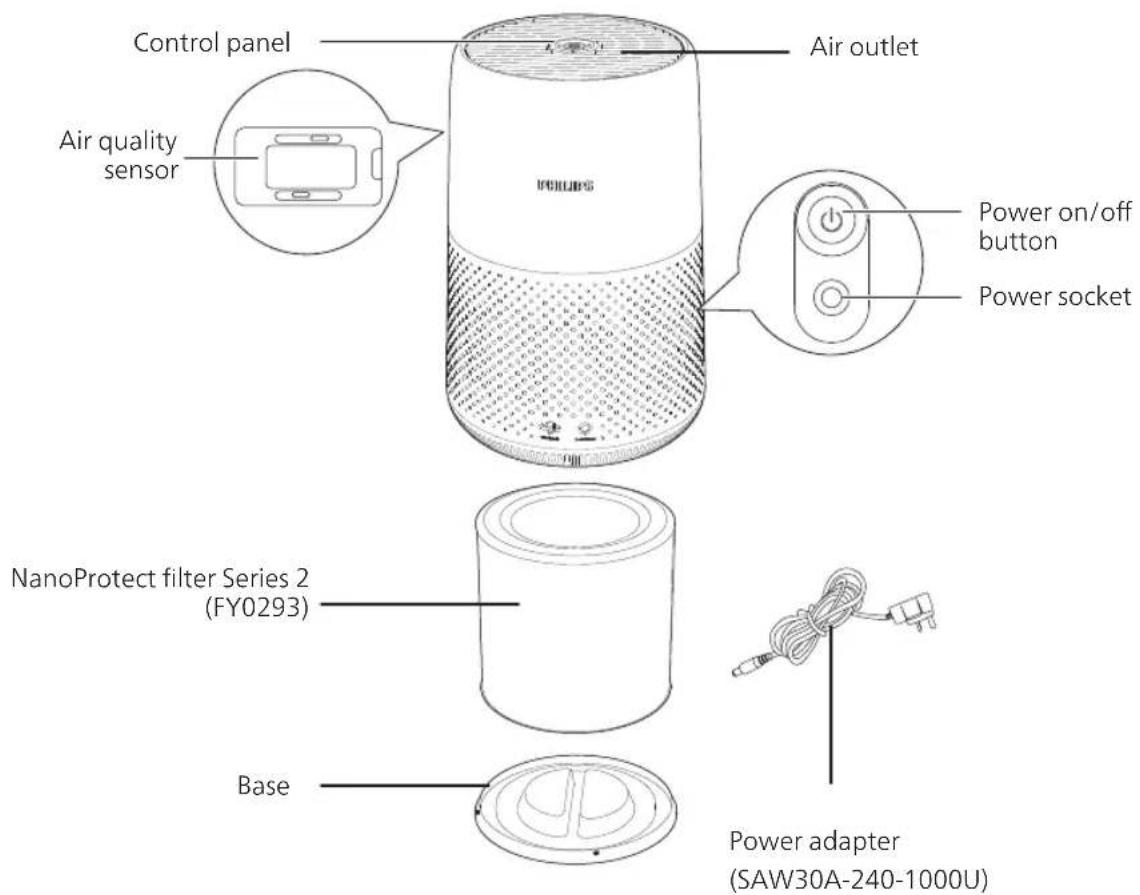
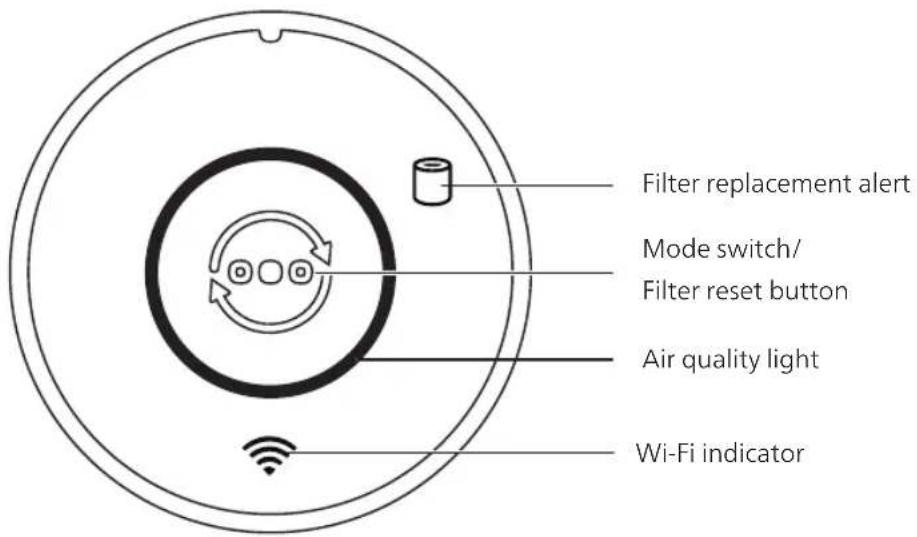
Controls overview
3 Getting started
Installing the filter
Remove all packaging of the filter before use.
Note: Make sure the air purifier is unplugged from the electrical outlet before installing the filter.
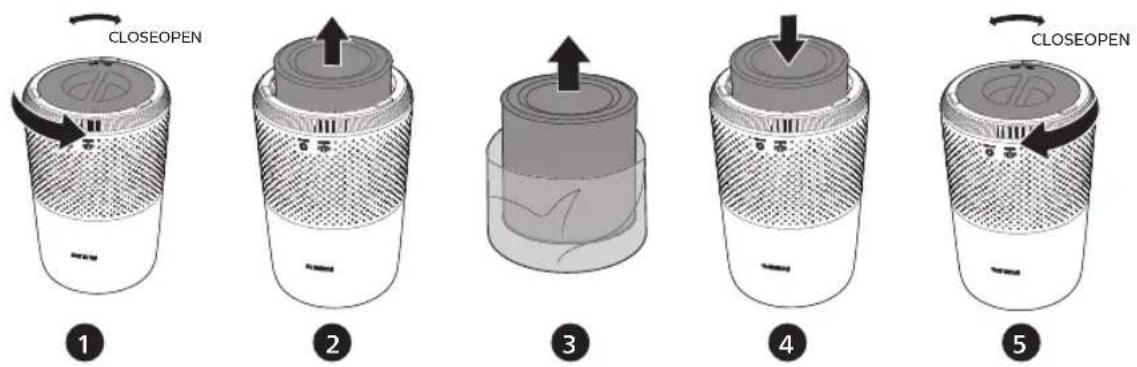
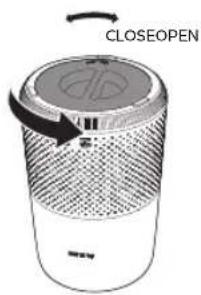
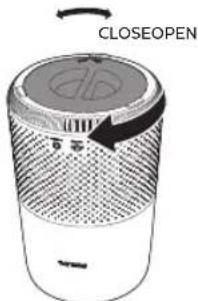
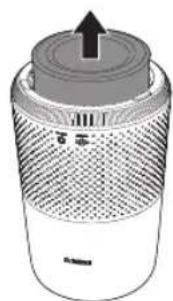
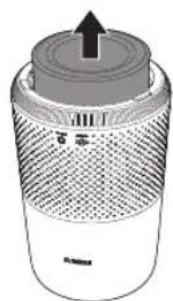
1 Rotate the base anti-clockwise to remove it from the appliance.
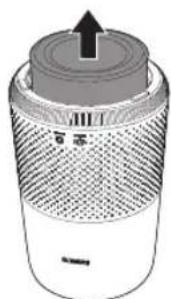
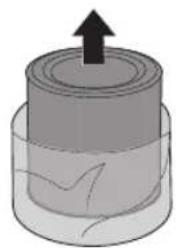
2 Pull the filter out from the appliance.
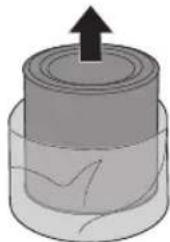
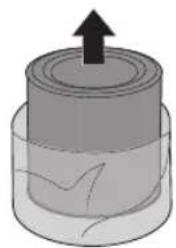
3 Remove all packaging materials of the air purification filter.
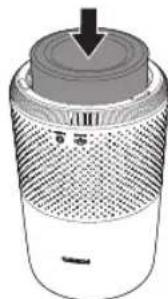
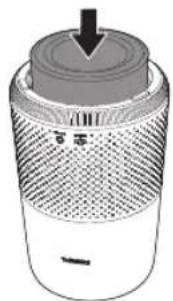
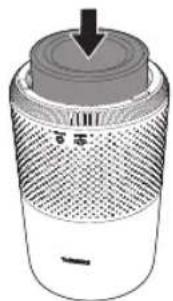
4 Put the filter back into the appliance.
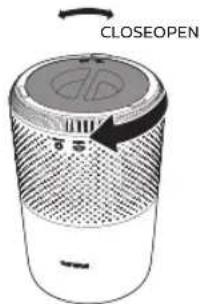
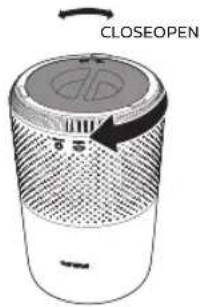
5 Reattach the base and rotate it clockwise to fasten the base.
Wi-Fi indicator
| Wi-Fi icon status Wi-Fi connection status | |
| Blink in orange Connecting to the smartphone | |
| Blink in white Connecting to the router | |
| Stable in white Connected to the router | |
| Off Wi-Fi function disabled | |
Wi-Fi connection
Setting up the Wi-Fi connection for the first time
1 Download and install the Philips "Air+" app from the App Store or Google Play.
2 Put the plug of the air purifier in the power socket and touch to turn on the air purifier.
→The Wi-Fi indicator links orange for the first time.
3 Make sure that your smartphone or tablet is successfully connected to your Wi-Fi network.
4 Launch the "Air+" app and click on "Connect a New Device" or press the "+" button on the top of the screen. Follow the onscreen instructions to connect the air purifier to your network.
Note:
- This instruction is only valid when the air purifier is being set up for the first time. If the network has changed or the setup needs to be performed again, see Chapter "Reset the Wi-Fi connection" on page 7.
- If you want to connect more than one air purifier to your smartphone or tablet, you have to do this one by one.
- Make sure that the distance between your smartphone or tablet and the air purifier is less than 10 m without any obstructions.
Reset the Wi-Fi connection
Note:
- Reset the Wi-Fi connection when your default network has changed.
1 Put the plug of the air purifier in the power socket and touch to turn on the air purifier.
2 Press for 3 seconds until you hear a beep.
→The air purifier goes to pairing mode.
→The Wi-Fi indicator thinks orange.
3 Follow the steps 3-4 in "Setting up the Wi-Fi connection for the first time" section.
4 Using the air purifier
Understanding the air quality light
The color of air quality light corresponds to the ambient air quality. The brightness of air quality light reflects the current running mode.
| PM2.5 level Air quality light color | Air quality level | |
| ≤12 Blue Good | ||
| 13-35 Blue-purple | Fair | |
| 36-55 Purple-red Poor | ||
| >55 Red Very poor |
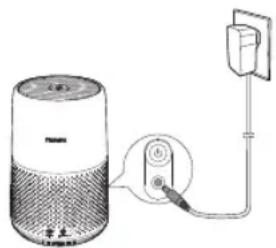
Connecting power
Note: Risk of electric shock! When you unplug the AC power cord, always pull the plug from the socket. Never pull the cord.
Connect the power adapter to:
• First, the power socket on the appliance.
• Then, the wall outlet.
Turning on and off
Note:
- For optimum purification performance, close doors and windows.
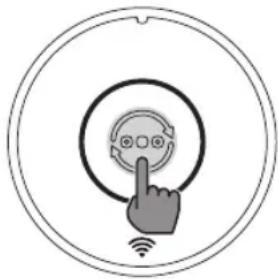
1 Press the power button on the back of the air purifier to switch on. →The air purifier operates in the auto mode by default.
2 Press the power button again to switch off the air purifier.
Changing the mode setting
You can choose Auto mode, Turbo mode or the Sleep mode by pressing the mode switch button. The brightness of air quality light reflects the current running mode:
• Sleep mode-lowest brightness
• Auto mode-mid level brightness
• Turbo mode-highest level brightness
Auto mode
In Auto mode, the appliance selects the fan speed in accordance with the ambient air quality.
Turbo mode
In Turbo mode, the air purifier operates on the highest speed.
Sleep mode
In Sleep mode, the air purifier operates quietly at a low speed.
5 Cleaning
Note:
- Never use abrasive, aggressive, or flammable cleaning agents such as bleach or alcohol to clean any part of the appliance.
Cleaning schedule
| Frequency Cleaning method | |
| When necessary | Wipe the surface of the appliance with a soft dry cloth |
| Clean the air outlet cover | |
| Every two months Clean the air quality sensor with a dry cotton swab | |
| Every four weeks Clean the surface of the filter | |
Cleaning the body of the air purifier
Regularly clean the inside and outside of the air purifier to prevent dust from collecting.
1 Use a soft, dry cloth to clean both the interior and exterior of the air purifier.
2 The air outlet can also be cleaned with a dry, soft cloth.
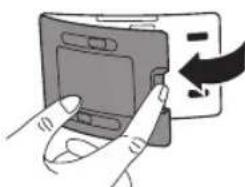
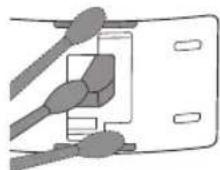
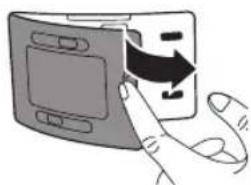
Cleaning the air quality sensor
Clean the air quality sensor every two months for optimal functioning of the appliance.
Note:
- If the air purifier is used in a dusty environment, it may need to be cleaned more often. - If the humidity level in the room is very high, condensation may develop on the air quality sensor and the air quality light may indicate a poorer air quality even though the air quality is actually good. If this occurs, clean the air quality sensor or use the air purifier on a manual speed setting.
1 Switch off the air purifier and unplug from the power socket.
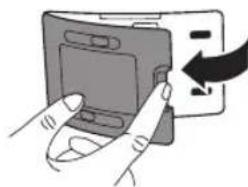
2
3
4
6
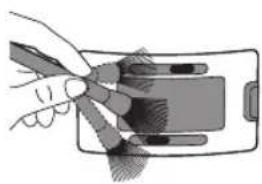
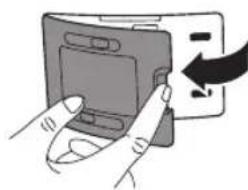
2 Clean the inlet and outlet of the air quality sensor with a soft brush.
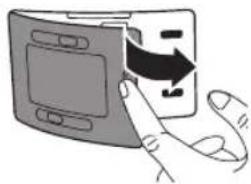
3 Open the air quality sensor cover.
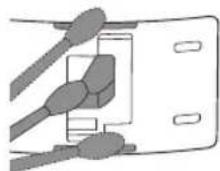
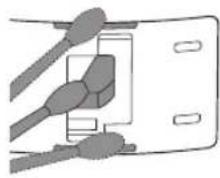
4 Clean the air quality sensor, the dust inlet and the dust outlet with a damp cotton swab.
5 Dry all parts thoroughly with a dry cotton swab.
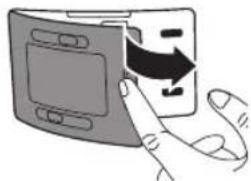
6 Reattach the air quality sensor cover.
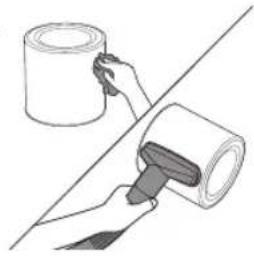
Cleaning the surface of the filter
Wipe the surface of the filter with soft wet cloth or clean the surface of the filter with a vacuum cleaner.
Note:
- if you use a high power/ industrial vacuum cleaner, it may damage the filter.
6 Replacing the filter
Understanding filter replacement indicator
This appliance is equipped with the healthy air protect lock to make sure that the NanoProtect filter is in optimal condition when the appliance is operating. When the filter is almost expired, the filter replacement alert (☐) lights up red, which indicates that it needs to be replaced. If you do not replace the filter in time, the filter replacement alert (☐) will flash. The appliance will stop operating and get locked.
Replacing the filter
Note:
• The filter is not washable or reusable.
• Always turn off the air purifier and unplug from the electrical outlet before replacing the filter.
1
2
3
4
5
1 Rotate the base anti-clockwise to remove it from the appliance.
2 Pull the filter out from the appliance. Discard the used filter.
3 Remove all packaging materials of the new filter.
4 Put the filter into the appliance.
5 Reattach the base and rotate it clockwise to fasten the base.
6 Put the plug of the air purifier in the power socket.
7 Press the power button to switch on the appliance.
8 Press and hold 📞 for 3 seconds to reset the filter lifetime counter.
9 Wash your hands thoroughly after replacing the filter.
Filter reset
You can replace the filter even before filter replacement alert (☐) displays on the screen. After replacing a filter, you need to reset the filter lifetime counter manually.
1 Press the power button to turn on the appliance.
2 Within 10 seconds after power on, press and hold the mode switch button ⏻ for 5 seconds to reset the filter lifetime counter.
7 Storage
1 Turn off the air purifier and unplug from the power socket.
2 Clean the air purifier, air quality sensor and the surface of the filter (see chapter 'Cleaning').
3 Let all parts air dry thoroughly before storing.
4 Wrap the filter in air tight plastic bags.
5 Store the air purifier, filter in a cool, dry location.
6 Always thoroughly wash hands after handling a filter.
8 Troubleshooting
This chapter summarizes the most common problems you could encounter with the appliance. If you are unable to solve the problem with the information below, contact the Consumer Care Center in your country.
Problem Possible solution
| The appliance does not work even though it is plugged in. | · The filter replacement alert is flashing but you have not replaced the corresponding filter. As a result, the appliance is now locked. In this case, replace the filter and reset the filter lifetime counter. |
| The airflow that comes out of the air outlet is significantly weaker than before. | · The surface of the filter is dirty. Clean the surface of the filter (see the chapter "Cleaning"). |
| The air quality does not improve, even though the appliance has been operating for a long time. | · Check if the packing material is removed from the filter. · Make sure that the filter is properly installed. · The air quality sensor is dirty or wet. Clean the air quality sensor (See the chapter "Cleaning"). · Room size is large or the outdoor air quality is poor. For optimum purification performance, please close the doors and windows when operating the air purifier. · There are indoor pollution resources. For instances, smoking, cooking, incense. · Filter reaches the end of life. Replace the filter with a new one. |
Problem Possible solution
| The appliance produces a strange smell. | · The first few times you use the appliance, it may produce a plastic smell. This is normal. However, if the appliance produces a burnt smell even if removing the filter, contact your Philips dealer or an authorized Philips service center. The filter may produce smell after being used for a while because of the absorption of indoor gases. It's recommended that you reactivate the filter by putting it in direct sunlight for repeated use. If odor still exists, replace the filter. |
| The appliance is extra loud. | · Check if the packing of the filter is removed.· The appliance will run in high speed when the air quality is poor, which will causes higher noises. When using the appliance in a bedroom at night, choose the Sleep speed.· if anything drop into air outlet, it may also cause abnormal loud sounds. Immediate turn off appliance, turn appliance upside down, to get foreign objectives out of appliance. |
| The appliance still indicates that I need to replace a filter, but I already did. | · Perhaps you did not reset the filter lifetime counter. Switch on the appliance. Then press and hold the mode switch button ( ) for 3 seconds until disappears. |
| Appliance keeps off, but air quality light blinks for one minute. | · The appliance has malfunctions. Contact the Consumer Care Center in your country. |
| The Wi-Fi setup is not successful. | · If the router your purifier is connected to is dual – band and currently it is not connecting to a 2.4GHz network, please switch to another band of the same router (2.4GHz) and try to pair your purifier again. 5GHz networks are not supported.· Web authentication networks are not supported.· Check if the purifier is within range of the Wi-Fi router. You can try to locate the air purifier closer to the Wi-Fi router.· Check if the network name is correct. The network name is case-sensitive.· Check if the Wi-Fi password is correct. The password is case-sensitive.· Retry the setup with the instructions in section "Reset the Wi-Fi connection".· The Wi-Fi connectivity can be interrupted by electromagnetic or other interferences. Keep the appliance away from other electronic devices that may cause interferences.· Check if the mobile device is in airplane mode. Make sure to have the airplane mode deactivated when connecting to the Wi-Fi network.· Consult the help section in the App for extensive and up-to-date troubleshooting tips. |
9 Warranty
If you need information, support, or if you have a problem, please visit www.philips.com/support or in the US or Canada only call 1-833-737-1212 for assistance.
Two years limited warranty
Versuni warrants that this product shall be free from defects in material, workmanship and assembly, under normal use, in accordance with the specifications and warnings, for a period of two years from the date of purchase. This warranty extends only to the original purchaser of the product, and is not transferable. To exercise your rights under this warranty, you must provide proof of purchase in the form of an original sales receipt that shows the product name and the date of purchase. For customer support or to obtain warranty service, please visit our website www.philips.com/support. THERE ARE NO OTHER EXPRESS OR IMPLIED WARRANTIES. Versuni's liability is limited to repair or, at its sole option, replacement of the product. Incidental, special and consequential damages are disclaimed where permitted by law. This warranty gives you specific legal rights. You may also have other rights that vary from state to state, province to province or country to country.
IN U.S. ONLY
Importer
Versuni USA Corporation
1600 Summer Street,
Stamford, CT 06905,
United States of America
Canada only
40 University Avenue, Suite 904,
Toronto, Ontario M5J 1T1 Canada
For support, please visit www.philips.com/support
PHILIPS and the Philips Shield Emblem are registered trademarks of Koninklijke Philips N.V. and are used under license.
2023 © Versuni Holding B.V.

LISTED
This symbol on the product's nameplate means it is listed by Underwriters Laboratories, Inc.
App Store is a service mark of Apple Inc.
Google Play is a trademark of Google Inc.
"Philips Air+" app developed by FreshIdeas Studio.

ENERGY STAR
The energy efficiency of this ENERGY STAR qualified model is measured based on a ratio between the model's CADR for Dust and the electrical energy it consumes, or CADR/Watt.
Order parts or accessories
If you have to replace a part or want to purchase an additional part, go to your Philips dealer or visit www.philips.com/support.
If you have problems obtaining the parts, please contact the Philips Consumer Care Center in your country.
Contenido
1 PRECAUCIONES IMPORTANTES 15
Campos electromagnéticos (CEM) 16
www.philips.com/support
Encendido y apagado
Nota:
5 Limpieza
Nota:
2
3
4
6
1
2
3
4
5
40 University Avenue, Suite 904,
Toronto, Ontario M5J 1T1, Canadá
Para obtener asistencia, visite www.philips.com/support
5 Nettoyage
Remarque :
2
3
4
6
1
2
3
4
5
40 University Avenue, Suite 904,
Toronto, Ontario M5J 1T1 Canada
PHILIPS and the Philips Shield Emblem are registered trademarks of Koninklijke Philips N.V. and are used under license.
This product has been manufactured by and is sold under the responsibility of Versuni Holding B.V., and Versuni Holding B.V. is the warrantor in relation to this product.
2023 © Versuni Holding B.V.
3000.103.2587.1 (20/04/2023)
- 2 YOUR AIR PURIFIER ....5
- 3 GETTING STARTED 6
- 4 USING THE AIR PURIFIER 8
- 5 CLEANING 9
- 6 REPLACING THE FILTER 10
- 7 STORAGE 11
- 8 TROUBLESHOOTING 11
- 9 WARRANTY 13
- 1 IMPORTANT SAFEGUARDS
- READ AND SAVE THESE INSTRUCTIONS
- DANGER
- WARNING
- CAUTION
- ELECTROMAGNETIC FIELDS (EMF)
- FCC & ISED COMPLIANCE
- RF EXPOSURE INFORMATION
- FOR THE UNITED STATES
- FOR CANADA
- DISPOSAL
- SUPPLIER'S DECLARATION OF CONFORMITY
- 47 CFR §2.1077 COMPLIANCE INFORMATION
- RESPONSIBLE PARTY – U.S. CONTACT INFORMATION
- FCC COMPLIANCE STATEMENT
- 2 YOUR AIR PURIFIER
- PRODUCT OVERVIEW
- CONTROLS OVERVIEW
- 3 GETTING STARTED
- INSTALLING THE FILTER
- WI-FI CONNECTION
- SETTING UP THE WI-FI CONNECTION FOR THE FIRST TIME
- NOTE
- RESET THE WI-FI CONNECTION
- 4 USING THE AIR PURIFIER
- UNDERSTANDING THE AIR QUALITY LIGHT
- CONNECTING POWER
- TURNING ON AND OFF
- CHANGING THE MODE SETTING
- AUTO MODE
- TURBO MODE
- SLEEP MODE
- 5 CLEANING
- CLEANING SCHEDULE
- CLEANING THE BODY OF THE AIR PURIFIER
- CLEANING THE AIR QUALITY SENSOR
- CLEANING THE SURFACE OF THE FILTER
- 6 REPLACING THE FILTER
- UNDERSTANDING FILTER REPLACEMENT INDICATOR
- REPLACING THE FILTER
- FILTER RESET
- 7 STORAGE
- 8 TROUBLESHOOTING
- 9 WARRANTY
- TWO YEARS LIMITED WARRANTY
- IN U.S. ONLY
- CANADA ONLY
- ORDER PARTS OR ACCESSORIES
- CONTENIDO
- 1 PRECAUCIONES IMPORTANTES 15
- ENCENDIDO Y APAGADO
- NOTA
- 5 LIMPIEZA
- 5 NETTOYAGE
- REMARQUE
Brand : PHILIPS
Model : AC0850
Category : Air purifier