Ultralink ULM100USB - Microphone BEHRINGER - Free user manual and instructions
Find the device manual for free Ultralink ULM100USB BEHRINGER in PDF.


| Product Type | Wireless Microphone |
| Brand | Behringer |
| Model | Ultralink ULM100USB |
| Operating Range | 120 m maximum (line of sight) |
| Frequency Response | 20 Hz – 15 kHz (wireless link) |
| Sampling Frequency | 31.25 kHz |
| Audio Coding | Pulse Code Modulation (PCM) |
| RF Channels | ISM band 2.4 GHz (2417 - 2471 MHz), 19 channels |
| Latency | 9 ms |
| RF Output | +17 dBm (50 mW) |
| Dynamic Range | >67 dB |
| Microphone Power Supply | 160 mA @ 2.7 Vcc / 140 mA @ 3 Vcc |
| USB Receiver Power Supply | 100 mA @ 5 Vcc |
| Dimensions (L x D x H) | 45 x 45 x 245 mm |
| Weight | 0.2 kg |
| Minimum Operating Distance | 15 mm between the radiator and head |
| Compliance | FCC and EU Recommendations 1999/519/EC |
| Power On | Press the ▲ button |
| Volume Adjustment | ▼ and ▲ buttons |
| Mute Function | Hold ▼ to mute |
| Synchronization | Automatic with USB receiver |
| Auto Power Off | After 1 minute without signal |
Frequently Asked Questions - Ultralink ULM100USB BEHRINGER
User questions about Ultralink ULM100USB BEHRINGER
0 question about this device. Answer the ones you know or ask your own.
Ask a new question about this device
Download the instructions for your Microphone in PDF format for free! Find your manual Ultralink ULM100USB - BEHRINGER and take your electronic device back in hand. On this page are published all the documents necessary for the use of your device. Ultralink ULM100USB by BEHRINGER.
USER MANUAL Ultralink ULM100USB BEHRINGER
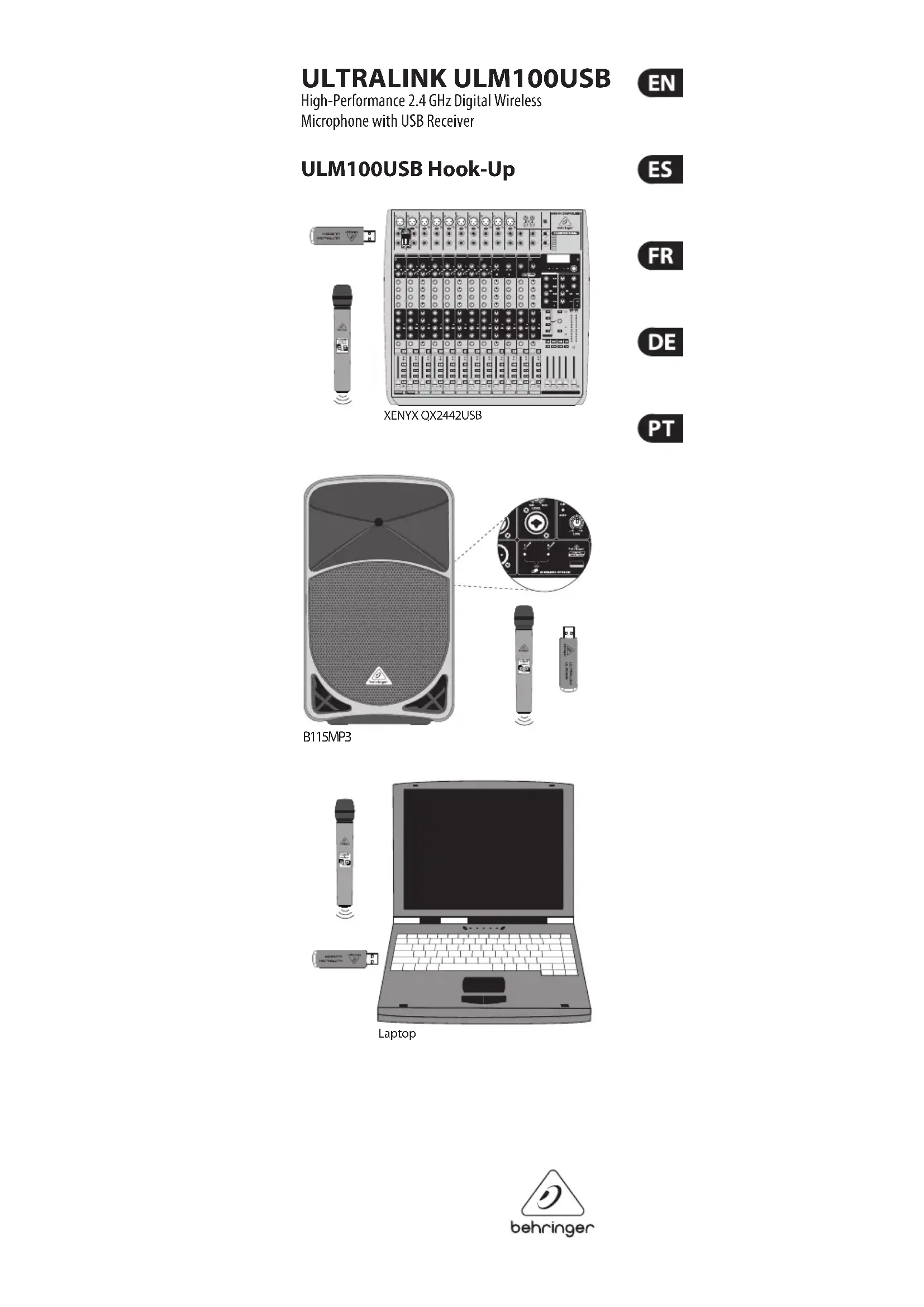
High-Performance 2.4 GHz Digital Wireless
Microphone with USB Receiver
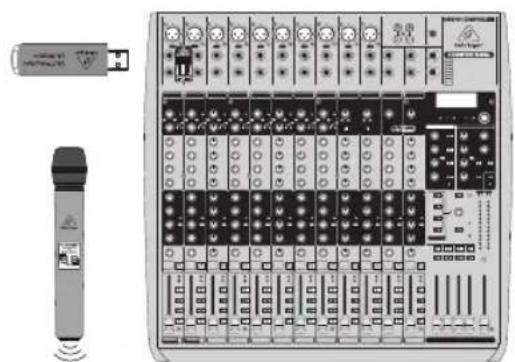
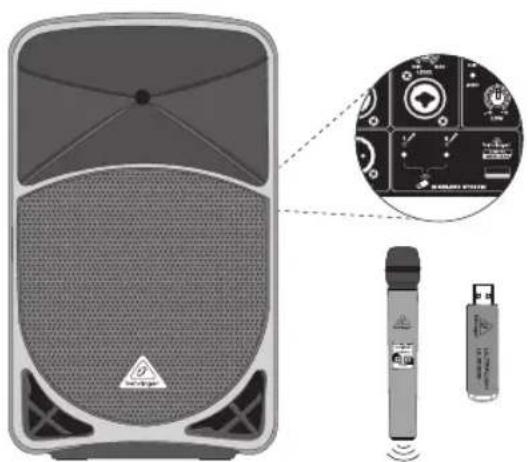
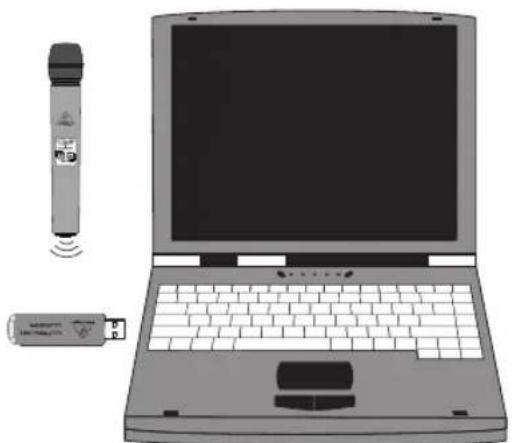
ULM100USB Hook-Up
natural_image
Front view of a portable audio workstation with control panel and external connector (no visible text or labels)XENYX QX2442USB


natural_image
Illustration of a speaker with a close-up inset showing internal components (no text or symbols)B115MP3
natural_image
Illustration of a laptop with a wireless device and a USB flash unit nearby (no text or symbols)Laptop
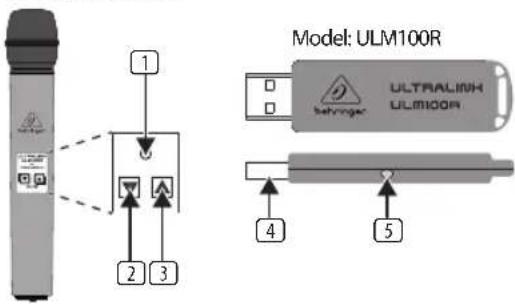
ULM100USB Controls
Model: ULM100M
Model: ULM100R
(1)
(4) (5)
(2)(3)
Type of product: Wireless Microphone
ULM100USB Controls
1. POWER/STATUS LED
- ▼ VOLUME Button (Mute/volume down)
- ▲ VOLUME Button (Power on/unmute/volume up)
- USB connector
- Wireless Link Status LED
ULM100USB Getting Started
- Press and hold the ▲ button to power on the ULM100M wireless microphone.
- Connect the ULM100R wireless receiver to the wireless only USB connector on the wireless enabled device or to a USB p on a computer. The ULM wireless microphone will sync to t receiver automatically.
- Use the ▼ and ▲ buttons on the ULM100M wireless microphone to adjust the volume.
- Press and hold the ▼ button to mute the volume of the ULM100M wireless microphone.
- Press and hold the ▲ button to unmute the volume of the ULM100M wireless microphone.
- Disconnect the ULM100R wireless receiver. The ULM100M v microphone will power o when no wireless signal is detected for more than 1 minute. To ensure longer battery life, unplug the ULM100R wireless receiver after use.
Speci cation
RF output +17 dBm (50 mW)
Working range 120 m maximum (Line of Sight)
Dynamic range > 67 dB
Frequency response 20 Hz – 15 kHz (Wireless Link)
Sampling rate 31.25 kHz
Audio coding Pulse-coded modulation (PCM)
RF channel 2.4 GHz ISM band (2417 - 2471 MHz), 19 channels
Latency 9 ms
Power supply current 160 mA @ +2.7 VDC, (microphone) 140 mA @ +3 VDC
Power supply current 100 mA @ +5 VDC (USB receiver)
Dimensions (W x D x H) 45 x 45 x 245 mm (1.8 x 1.8 x 9.6")
Weight 0.2 kg (0.4 lbs)
ULM100USB Controles
Model: ULM100M
© 2013 MUSIC Group IP Ltd. Trident Chambers, Wickhams Cay, P.O. Box 146, Road Town, Tortola, British Virgin Islands
LIMITED WARRANTY
For the applicable warranty terms and conditions and additional information regarding MUSIC Group's Limited Warranty, please see complete details online at www.music-group.com/warranty.
For USB Receiver:
This equipment meets the government's requirements for exposure to radio waves. For body worn operation, this equipment has been tested and meets the FCC RF exposure guidelines.
The highest SAR value for this USB Receiver as reported to the FCC when tested for use at the Body-worn is 0.071 W/kg.
This equipment complies with the European Council Recommendation of 12 July 1999 on the Limitation of Exposure of the General Public to Electromagnetic Fields [1999/519/EC].
For Microphone:
This microphone should be installed and operated with a minimum distance of 15 mm between the radiator and your head.
NEGACIÓN LEGAL
LAS ESPECIFICACIONES TÉCNICAS Y LA APARIENCIA EXTERIOR ESTÁN SUJETAS A CAMBIOS SIN PREVIO AVISO Y NO PODEMOS GARANTIZAR LA TOTAL EXACTITUD DE TODO LO QUE APARECE AQUI. BEHRINGER, KLARK TEKNIK, MIDAS, BUGERA, Y TURBOSOUND SON PARTE DEL GRUPO MUSIC GROUP (MUSIC-GROUP.COM). TODAS LAS MARCAS REGISTRADAS SON PROPIEDAD DE SUS RESPECTIVOS DUEÑOS. MUSIC GROUP NO ACEPTA NINGÚN TIPO DE RESPONSABILIDAD POR POSIBLES DAÑOS Y PERJUICIOS SUFRIDOS POR CUALQUIER PERSONA QUE SE HAYA BASADO COMPLETAMENTE O EN PARTE EN LAS DESCRIPCIONES, FOTOGRAFÍAS O EXPLICACIONES QUE APARECEN EN ESTE DOCUMENTO. LOS COLORES Y ESPECIFICACIONES TÉCNICAS PUEDEN VARIAR LIGERAMENTE DE UN PRODUCTO A OTRO. LOS PRODUCTOS MUSIC GROUP SON COMERCIALIZADOS ÚNICAMENTE A TRAVÉS DE DISTRIBUIDORES OFICIALES. LOS DISTRIBUIDORES Y MAYORISTAS NO SON AGENTES DE MUSIC GROUP, POR LO QUE NO ESTÁN AUTORIZADOS A CONCEDER NINGÚN TIPO DE CONTRATO O GARANTÍA QUE OBLIGUE A MUSIC GROUP DE FORMA EXPRESA O IMPLICITA. ESTE MANUAL ESTÁ PROTEGIDO POR LAS LEYES DEL COPYRIGHT. ESTE MANUAL NO PUEDE SER REPRODUCIDO O TRANSMITIDO, NI COMPLETO NI EN PARTE, POR NINGÚN TIPO DE MEDIO, TANTO SI ES ELECTRÓNICO COMO MECÁNICO, INCLUYENDO EL FOTOCOPIADO O REGISTRO DE CUALQUIER TIPO Y PARA CUALQUIER FIN, SIN LA AUTORIZACIÓN EXPRESA Y POR ESCRITO DE MUSIC GROUP IP LTD.


GARANTÍA LIMITADA
© 2013 MUSIC Group IP Ltd. Trident Chambers, Wickhams Cay,
P.O. Box 146, Road Town, Tortola, Iles Vierges Britanniques
GARANTIE LIMITÉE
© 2013 MUSIC Group IP Ltd. Trident Chambers, Wickhams Cay, P.O. Box 146, Road Town, Tortola, British Virgin Islands
BESCHRÄNKTE GARANTIE
© 2013 MUSIC Group IP Ltd. Trident Chambers, Wickhams Cay, P.O. Box 146, Road Town, Tortola, Ilhas Virgens Britânicas
GARANTIA LIMITADA
Responsible Party Name: MUSIC Group Services US Inc.
Address: 18912 North Creek
Parkway, Suite 200
Bothell, WA 98011, USA
Phone/Fax No.: Phone: +1 425 672 0816
Fax: +1 425 673 7647
ULTRALINK ULM100USB
complies with the FCC rules as mentioned in the following paragraph:
This equipment has been tested and found to comply with the limits for a Class B digital device, pursuant to part 15 of the FCC Rules. These limits are designed to provide reasonable protection against harmful interference in a residential installation. This equipment generates, uses and can radiate radio frequency energy and, if not installed and used in accordance with the instructions, may cause harmful interference to radio communications. However, there is no guarantee that interference will not occur in a particular installation. If this equipment does cause harmful interference to radio or television reception, which can be determined by turning the equipment off and on, the user is encouraged to try to correct the interference by one or more of the following measures:
• Reorient or relocate the receiving antenna
- Increase the separation between the equipment and receiver
- Connect the equipment into an outlet on a circuit different from that to which the receiver is connected
- Consult the dealer or an experienced radio/TV technician for help
This device complies with Part 15 of the FCC rules. Operation is subject to the following two conditions:
(1) this device may not cause harmful interference, and
(2) this device must accept any interference received, including interference that may cause undesired operation.
Important information:
Changes or modifications to the equipment not expressly approved by MUSIC Group can void the user's authority to use the equipment.

We Hear You


Brand : BEHRINGER
Model : Ultralink ULM100USB
Category : Microphone