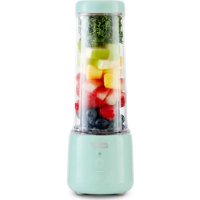
Portable USB DPPB120 - Blender Dash - Free user manual and instructions
Find the device manual for free Portable USB DPPB120 Dash in PDF.


| Product Type | Portable USB Blender |
| Brand | Dash |
| Model | Portable USB DPPB120 |
| Power Source | USB rechargeable (built-in battery) |
| Bottle Capacity | Approximately 500 ml |
| Bottle Material | BPA-free Plastic |
| Blade Material | Stainless Steel |
| Dimensions (approx.) | 8 cm (diameter) x 20 cm (height) |
| Weight (approx.) | 0.5 kg |
| Recommended Maximum Mixing Time | 2 minutes |
| Maximum Liquid Temperature | 49 °C (120 °F) |
| Safety | Bottle lock, safety lid, automatic overload shut-off |
| Care and Cleaning | Base not dishwasher safe; wipe with damp cloth; bottle hand washable |
| Included Accessories | Bottle, lid, blending base, USB cable |
| Warranty | Consult manufacturer (StoreBound) |
Frequently Asked Questions - Portable USB DPPB120 Dash
User questions about Portable USB DPPB120 Dash
0 question about this device. Answer the ones you know or ask your own.
Ask a new question about this device
Download the instructions for your Blender in PDF format for free! Find your manual Portable USB DPPB120 - Dash and take your electronic device back in hand. On this page are published all the documents necessary for the use of your device. Portable USB DPPB120 by Dash.
USER MANUAL Portable USB DPPB120 Dash
Instruction Manual | Recipe Guide





PORTABLE USB BLENDER
Important Safeguards. 4-6
Parts & Features. 7
Using Your Portable USB Blender. 8-11
Tips & Tricks 12-13
Layering Guide. 14
Cleaning & Maintenance 15
Recipes. 16-27
FCC Compliance Statement. 28
Industry Canada Statement 29
Customer Support 30
Warranty 31
IMPORTANT SAFEGUARDS
To get the most out of your Dash Portable USB Blender, be sure to read through these important callouts. Keep this Instruction Manual handy and stay safe!
- Remove all packaging and labels from appliance prior to use. To protect against risk of electrical shock, do not put cord, plugs, or appliance in or near water or other liquids.
- Do not put cord, plugs, or appliance in or near water or other liquids, microwave oven or freezer, on a hot gas plate, hot electric burner or in a heated oven. Do not operate this appliance with a damaged charging cable, after the appliance malfunctions, or is damaged in any manner.
- Do not use or assemble/disassemble appliance while plugged into the charger. Avoid contact with moving parts. Make sure the motor stops completely before disassembling.
- Only use attachments that are recommended or sold by the appliance manufacturer. Do not use without the Lid in place.
- Do not leave this appliance unattended while it is operating.
- Do not let the charging cable hang over the edge of tables, counters, or touch hot surfaces.
Always make sure that the Bottle is locked securely in place before engaging the motor. Do not remove the Bottle before the blender is finished operating. - The blades in the Blender are sharp. Do not touch the blades with bare hands and keep hands and utensils away from moving blades. If food becomes lodged, turn off Blender before trying to remove ingredients. Always wait for the blades to stop before opening the Bottle.
- When cleaning, do not submerge the Blending Base (with electrical parts) in any liquid; instead
use a soft, wet cloth to wipe down. The Base is NOT dishwasher safe.
- Do not operate the Blender when the Bottle is empty, as this may damage the blender.
- Do not put anything carbonated in your Blender and do not let food sit in your Blender for long periods of time, as these situations may cause pressure to build up that could result in a mess, damage to the blender or possible injury.
- Do not use hot liquids over 120^ / 49^ , as this can cause damage to the Jar and Base.
- Keep the blending time below 2 minutes to prevent the motor from overloading or overheating. If the motor stops abruptly, allow the motor temperature to decrease before continuing to blend.
Always place hard ingredients or ice cubes in the blender first, so that once the blender is flipped, they are farthest away from the blades. - This appliance can be used by persons with reduced physical, sensory or mental capabilities or lack of experience of knowledge, if they have been given supervision or instruction concerning use of the appliance in a safe way and understand the hazards involved.
- This appliance is not a toy. Do not let children use this appliance. Close supervision is necessary when any kitchen appliance is used by or near children.
- For any maintenance other than cleaning, please contact StoreBound directly at 1-800-898-6970 from 9AM - 9PM EST Monday - Friday, or by email at support@bydash.com. StoreBound shall not accept liability for damages caused by improper use of the appliance.
GARANTIES IMPORTANTES
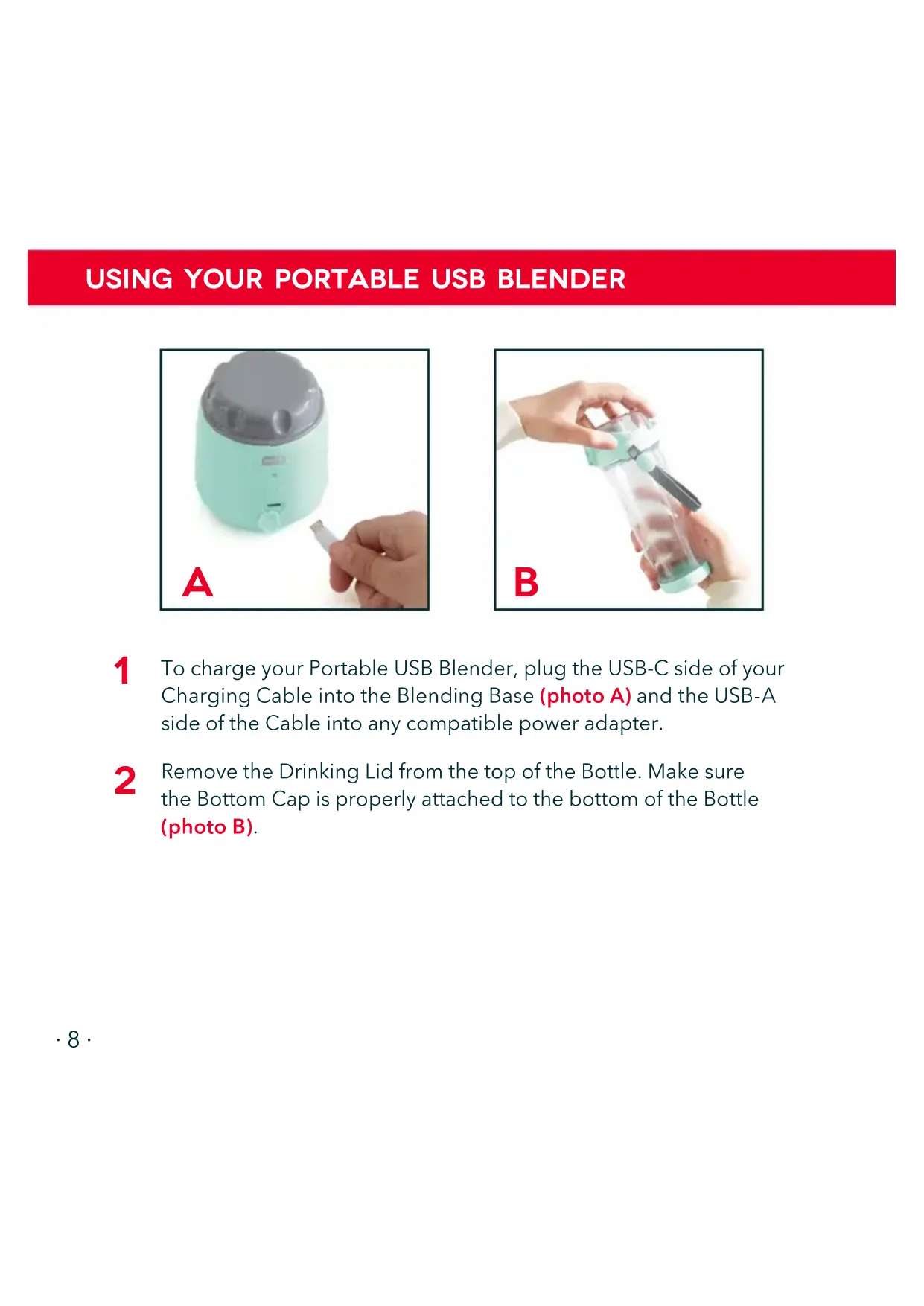
To charge your Portable USB Blender, plug the USB-C side of your Charging Cable into the Blending Base (photo A) and the USB-A side of the Cable into any compatible power adapter.
2 Remove the Drinking Lid from the top of the Bottle. Make sure the Bottom Cap is properly attached to the bottom of the Bottle (photo B).
USING YOUR PORTABLE USB BLENDER
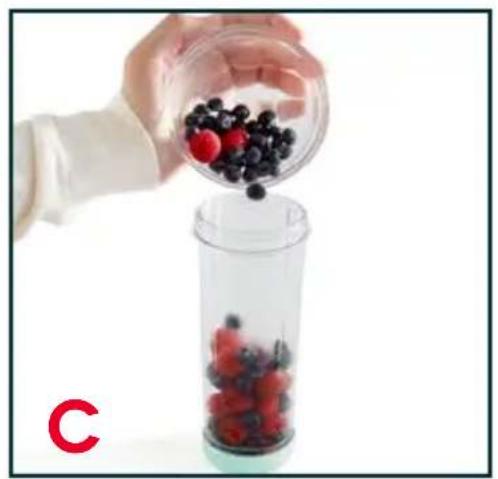
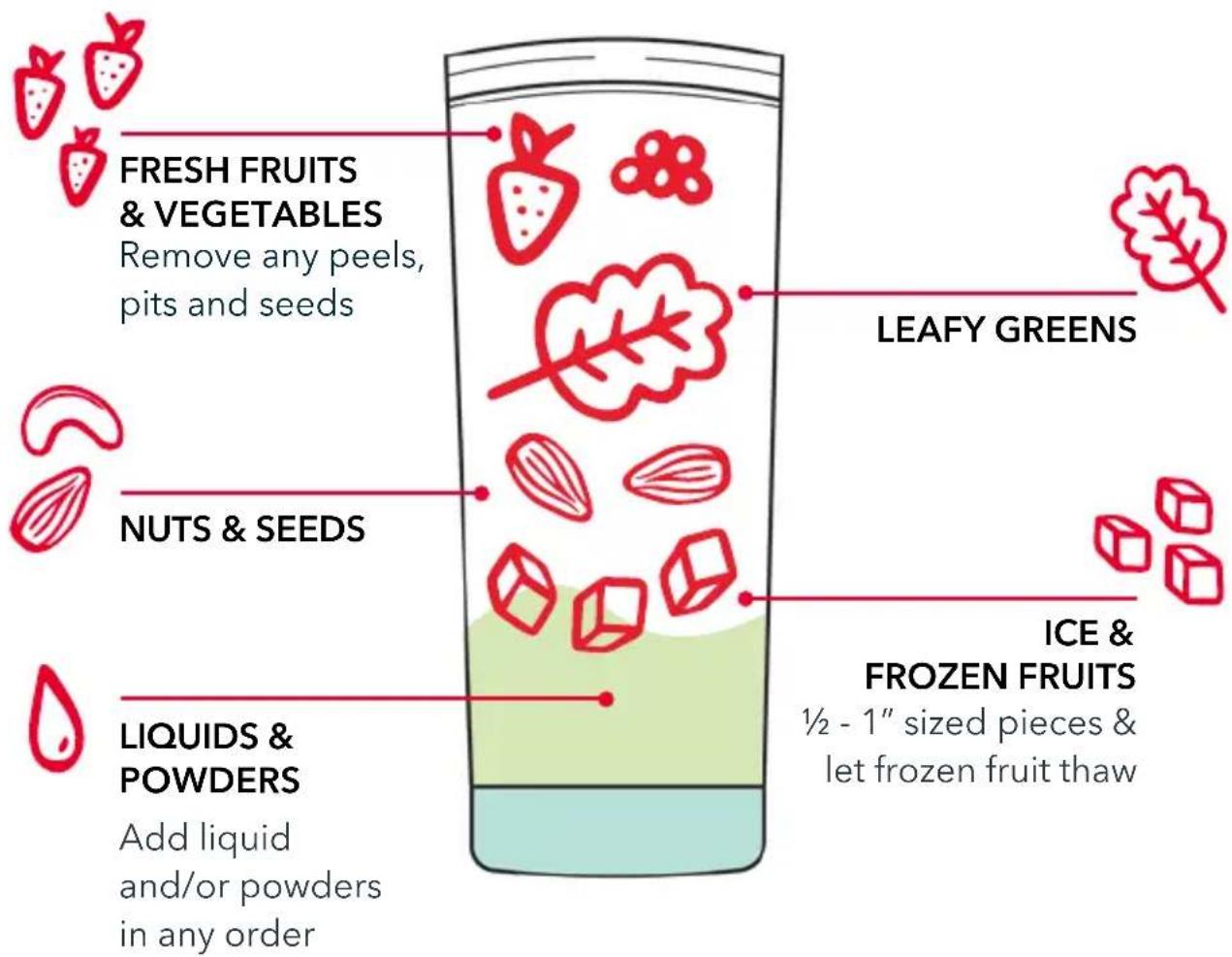
3 Fill the Bottle with what you'd like to blend (photo C). For best performance, see our Layering Guide on Page 14.
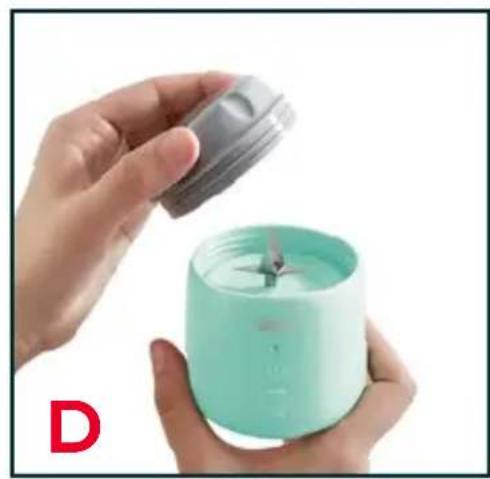
4 Unscrew and remove the Blade Cover from the Blending Base (photo D).
USING YOUR PORTABLE USB BLENDER
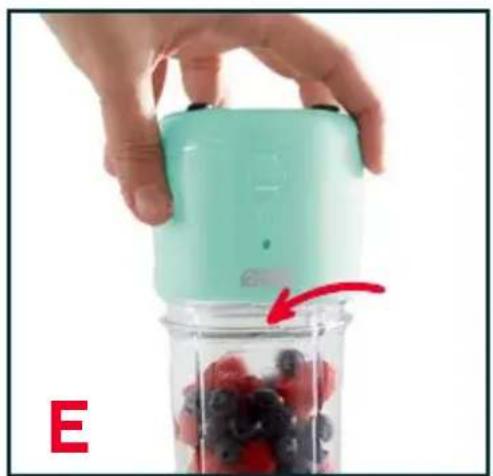
5 Screw the Base to the top of the Bottle, making sure the small arrow on the Bottle is aligned with the arrow on the Base (photo E). Once the Bottle and Base are properly aligned you're ready to blend!
NOTE: It is possible to tighten the base past the arrow. Make sure the arrow and base are aligned or the Indicator Light will blink and the blender will not activate.
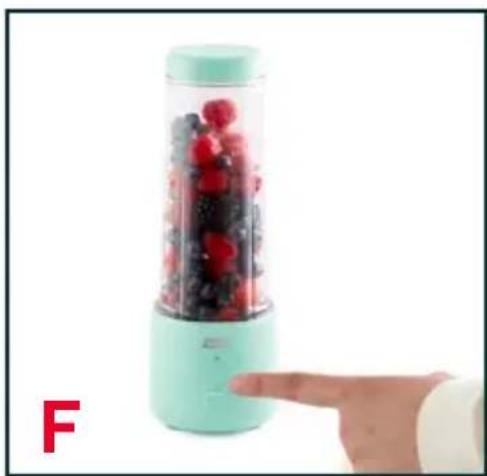
6 Flip your Blender over and press the Power Button to start a 40 second blending cycle (photo F). Press the Power Button again to stop blending earlier than that.
USING YOUR PORTABLE USB BLENDER
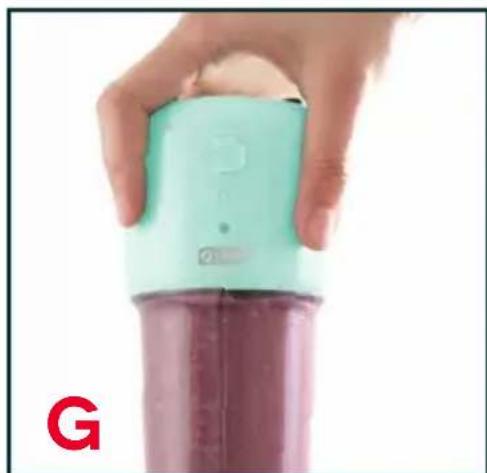
Once blending has stopped, flip your Blender over and unscrew the Base from the Bottle (photo G).
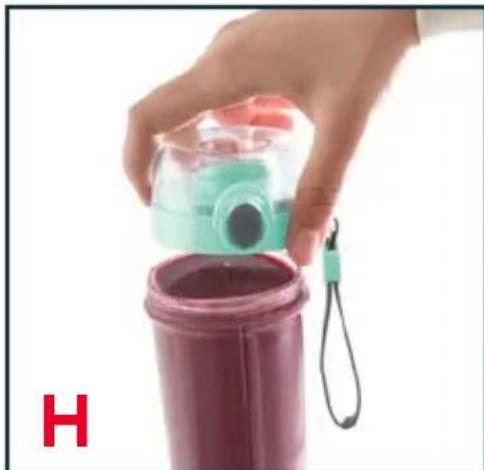
8 Reattach the Drinking Lid to the Bottle (photo H). To unlock the Lid, simply move the lock to the bottom position and press the gray button to open the lid. Enjoy!
9 After cleaning your Blending Base, be sure to reattach the Blade Cover to avoid injury and for easy transportation and storage.

To help blend your ingredients, we recommend gently shaking the blender while it is active. This prevents large pieces of food or frozen fruit from jamming the blades.
TIPS & TRICKS

BLENDING
- Remove fruit peels, pits and seeds before blending. Your blender can blend frozen fruit, but for easier blending, allow frozen fruit to thaw for at least 15 minutes.
Tip: try prepping your smoothie with frozen fruit the night before and let it thaw in the fridge overnight. - For best performance, do not blend anything bigger than 12 - 1 "sized pieces.
- For best performance, when blending fresh or frozen fruit, mix 1:1 with water or milk.
- Do not blend meat, hard, sticky or dry foods.
- When blending ice, be sure to blend 1:1 with water. Use the smallest sized ice possible.

CHARGING
To extend the life of your Portable USB Blender, we recommend:
- Using the included USB-C Charging Cable to charge it. If lost or misplaced, a non-fast charging USB-C charging cable will work fine. DO NOT use a USB-A to USB-C charging cable to charge the Portable USB Blender.
- Charging your Blender once every 2-3 months to keep the rechargeable battery fresh.
NOTE: the blender will not activate while it is charging.
TIPS & TRICKS

INDICATOR LIGHT
The Indicator Light can blink and show a variety of colors, depending on the situation:
- Blinks 2-3 times when the base and jar aren't aligned: the blender will not turn on.
- Lights up when blending.
Red light flashes 8 times: battery is dead. - White light slowly flashes while it is charging.
- Fully charged: white light will stay on until the charger is removed.
- Blender shuts off and red light flashes 4 times: food is stuck/ overload protection. Try giving your blender a shake and hitting the Power Button again
LAYERINGGUIDE
Once your Bottle is packed, attach the Blending Base, flip and blend!
CLEANING & MAINTENANCE
The Bottle, Drinking Lid, Bottom Cap, and Blade Cover are all top-rack dishwasher safe. The Blending Base is NOT dishwasher safe. Wipe down the Blending Base with a wet cloth to clean.
For a quick and easy way to clean the blades, add warm water (about 32 of the bottle) and a drop of dish soap to your assembled blender and run a blending cycle. When finished, pour out soapy water and rinse.
NEVER touch the blades. Clean using the above method or a nylon cleaning brush.
RECIPE

Follow us!
@bydash | recipes, videos, & inspiration
@unprocessyourfood | veg & vegan-friendly meals

BREAKFAST ENERGY DRINK
Calories: 193
Total Fat: 4 g
Protein: 3 g
Fiber: 6 g
Cholesterol: 0mg
Carbohydrates: 38 g
Ingredients:
14 cup frozen blueberries
12 banana, sliced
1 / 4 cup oats
12 tsp vanilla
1 cup Unsweetened Vanilla Almond Milk (or milk of choice)

Add a scoop of your favorite protein powder for an extra kick!
Directions:
- Place all ingredients in your Blending Bottle in the order listed in the Ingredients.
- Attach the Blending Base and tilt the blender at a 45^ angle and press the Power Button. Rotate the blender at an angle to keep the frozen fruit moving onto the blades.
- Blend to desired consistency.

PB&J SMOOTHHIE
Calories: 330
Total Fat: 17 g
Protein: 10 g
Fiber: 7 g
Cholesterol: 0 mg
Carbohydrates: 42 g
Ingredients:
2 tbsp creamy peanut butter
12 frozen banana, sliced
12 cup organic frozen strawberries
(about 4-5 small strawberries)
12 cup Unsweetened Vanilla Almond Milk
(or milk of choice)

Add a scoop of your favorite protein powder for an extra kick!
Directions:
-
Prepare the frozen banana and strawberries by slicing. The banana should be sliced in 14 in pieces and any large berries should be sliced in half.
-
Add the ingredients to the blender in the order above. You can use any milk you prefer in this recipe.
-
Attach the blender base and tilt the blender in a circle at a 45^ angle to keep the frozen fruit moving. This smoothie recipe has a lot of frozen fruit so you may need to shake the blender to keep the blades from jamming, this is normal.
-
Blend for 2 cycles or until all the frozen fruit is processed.

STRAWBERRY SHAKE
Calories: 190
Total Fat: 6 g
Protein: 5 g
Fiber: 6 g
Cholesterol: 1 mg
Carbohydrates: 31 g
Ingredients:
314 cup frozen sliced strawberries
14 cup yogurt
1 tbsp maple syrup,
34 cup Unsweetened Vanilla Almond Milk (or milk of choice)
1 tbsp chia seeds

Add a scoop of your favorite protein powder for an extra kick!
Directions:
- Place all ingredients in your Blending Bottle in the order listed in the Ingredients.
- Attach the Blending Base and tilt the blender at a 45^ angle and press the Power Button. Rotate the blender at an angle to keep the frozen fruit moving onto the blades.
- Blend to desired consistency.
- Serve and top your bowl how you like it! We recommend granola, nuts, seeds, dried fruit, honey, fresh fruit, or coconut flakes.
GREEN DREAM MACHINE
Calories: 420
Total Fat: 23 g
Protein: 7 g
Fiber: 14 g
Cholesterol: 0 mg
Carbohydrates: 55 g
Ingredients:
12 cup baby kale
12 frozen banana, sliced
1 / 4 avocado, sliced
1 tbsp maple syrup
1 tbsp chia seeds
34 cup Unsweetened Vanilla Almond Milk
(or milk of choice)
Directions:
- Place all ingredients in your Blending Bottle in the order listed in the Ingredients.
- Attach the Blending Base and tilt the blender at a 45^ angle and press the Power Button. Rotate the blender at an angle to keep the solids moving onto the blades.
- Blend to desired consistency.
ORANGE CREAMSICLE DRINK
Calories: 346
Total Fat: 1 g
Protein: 6 g
Fiber: 11 g
Cholesterol: 2 mg
Carbohydrates: 84 g
Ingredients:
12 frozen banana, sliced into 14 slices
2 orange sections, peeled
12 cup plain yogurt
12 cup orange juice
Directions:
- Add the ingredients above in the order they are listed into the blending bottle.
- Attach the blender base. Tilt the blender at a 45^ angle and press the power button. Rotate the blender at an angle to keep the fruit moving onto the blades.
- Blend for 2 cycles or until all the frozen banana is processed.

Fresh squeezed OJ takes this recipe over the top! Juicing 1 orange makes about 12 cup of fresh squeezed juice.
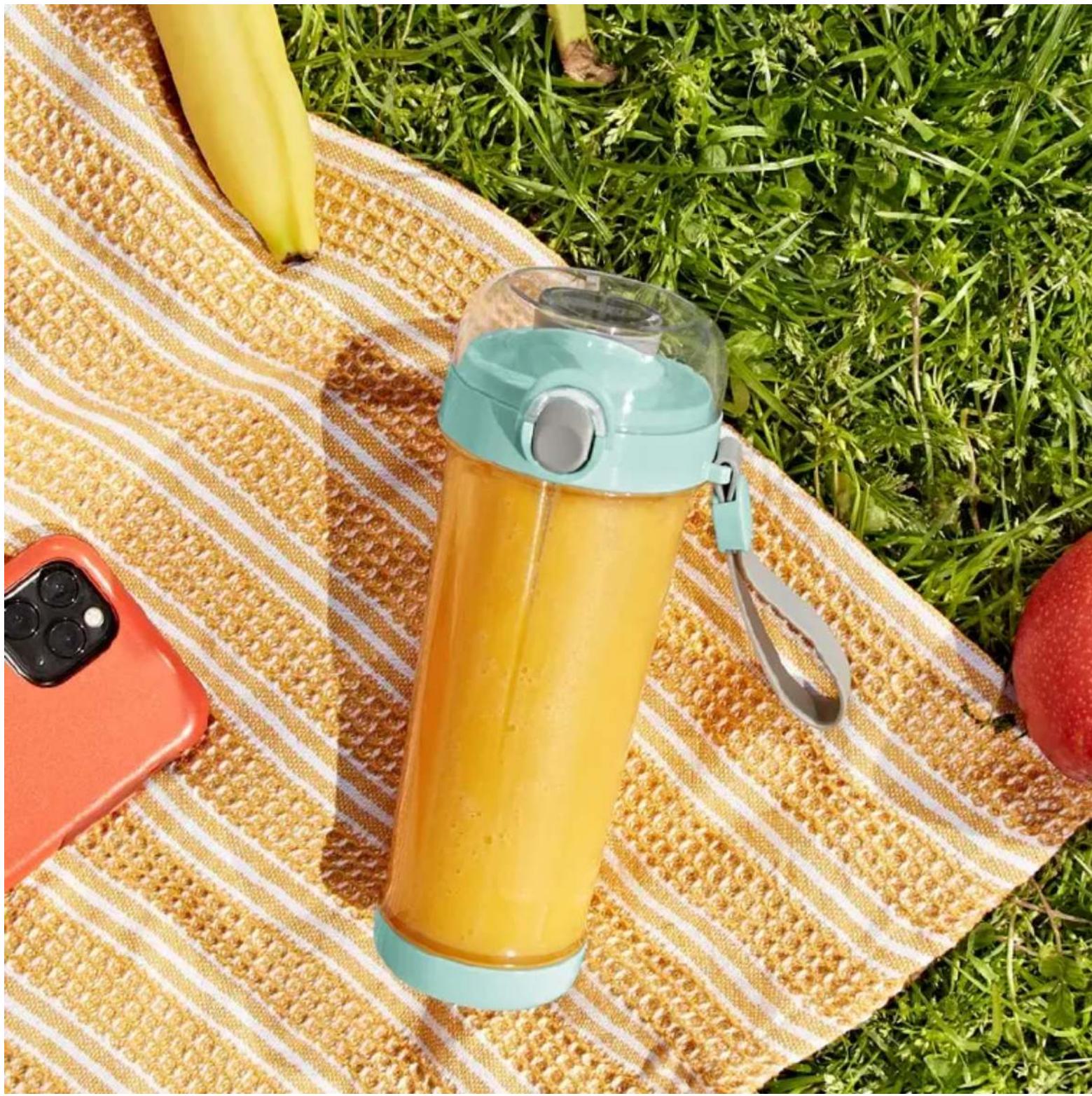

CHERRY ALMOND CHIA PROTEIN SMOOTHHIE
Calories: 200
Total Fat: 4 g
Protein: 18 g
Fiber: 4 g
Cholesterol: 28 mg
Carbohydrates: 22 g
Ingredients:
34 cup frozen cherries
1 tsp vanilla extract
1 tsp almond extract
1 scoop (1 / 4 cup) vanilla protein powder
34 cup Unsweetened Vanilla Almond Milk (or milk of choice)
1 tsp chia seeds
Directions:
- Place all ingredients in your Blending Bottle in the order listed in the Ingredients.
- Attach the Blending Base and tilt the blender at a 45^ angle and press the Power Button. Rotate the blender at an angle to keep the solids moving onto the blades.
- Blend to desired consistency.

VEGAN MANGO-COCONUT GREEN SMOOTHHIE
Calories: 319
Total Fat: 2 g
Protein: 3 g
Fiber: 6 g
Cholesterol: 0 mg
Carbohydrates: 74 g
Ingredients:
12 cup spinach
12 cup frozen mango
12 frozen banana, sliced
3/4 cup orange juice
12 cup coconut milk
1 tbsp maple syrup

Directions:
- Place all ingredients in your Blending Bottle in the order listed in the Ingredients.
- Attach the Blending Base and tilt the blender at a 45^ angle and press the Power Button. Rotate the blender at an angle to keep the frozen fruit moving onto the blades.
- Blend to desired consistency.

COLD BREW SMOOTHHIE
Calories: 258
Total Fat: 0g
Protein: 7 g
Fiber: 1 g
Cholesterol: 10 mg
Carbohydrates: 55 g
Ingredients:
1 cup cold brew
1 cup nonfat frozen yogurt or vanilla ice cream
12 cup ice cubes
2 tsp honey
Directions:
- Place all ingredients in your Blending Bottle in the order listed in the Ingredients.
- Attach the Blending Base and tilt the blender at a 45^ angle and press the Power Button. Rotate the blender at an angle to keep the solids moving onto the blades.
- Blend to desired consistency.
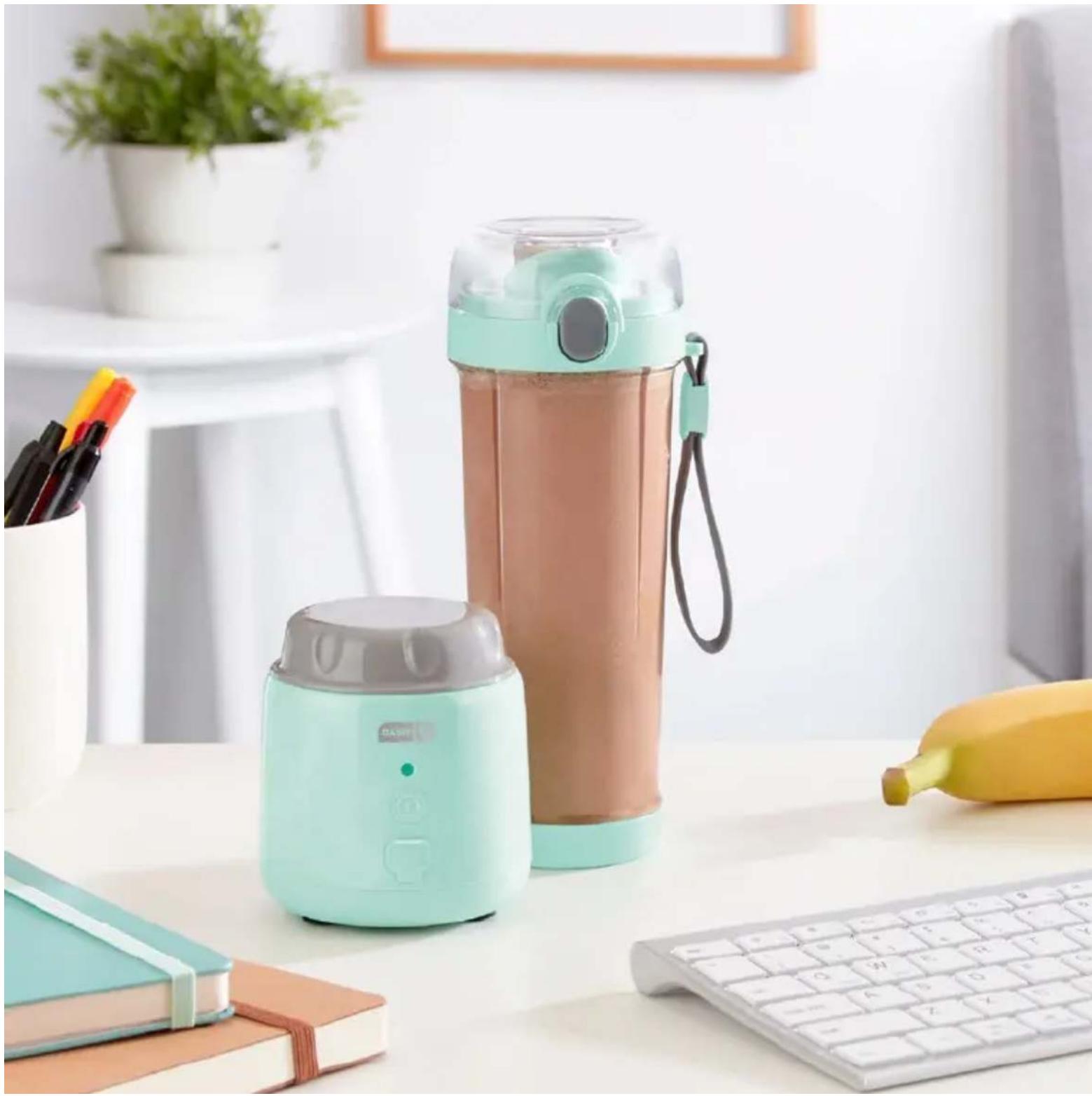
FCC COMPLIANCE STATEMENT
This device complies with part 15 of the FCC Rules. Operation is subject to the following two conditions:
(1) This device may not cause harmful interference, and
(2) this device must accept any interference received, including interference that may cause undesired operation.
NOTE: This equipment has been tested and found to comply with the limits for a Class B digital device, pursuant to part 15 of the FCC Rules. These limits are designed to provide reasonable protection against harmful interference in a residential installation. This equipment generates, uses and can radiate radio frequency energy and, if not installed and used in accordance with the instructions, may cause harmful interference to radio communications. However, there is no guarantee that interference will not occur in a particular installation. If this equipment does cause harmful interference to radio or television reception, which can be determined by turning the equipment off and on, the user is encouraged to try to correct the interference by one or more of the following measures:
- Reorient or relocate the receiving antenna.
- Increase the separation between the equipment and receiver.
- Connect the equipment into an outlet on a circuit different from that to which the receiver is connected.
- Consult the dealer or an experienced radio/TV technician for help.
INDUSTRY CANADA STATEMENT
CANICES-3 (B)/NMB-3(B)
This device complies with Industry Canada licence-exempt RSS standard(s). Operation is subject to the following two conditions:
(1) This device may not cause interference, and
(2) This device must accept any interference, including interference that may cause undesired operation of the device.
Dash values quality and workmanship and stands behind this product with our Feel Good Guarantee™. To learn more about our commitment to quality, visit bydash.com/feelgood.
Our customer support teams in the US and Canada are at your service Monday - Friday during the times below.
Contact us at 1 (800) 898-6970 or support@bydash.com
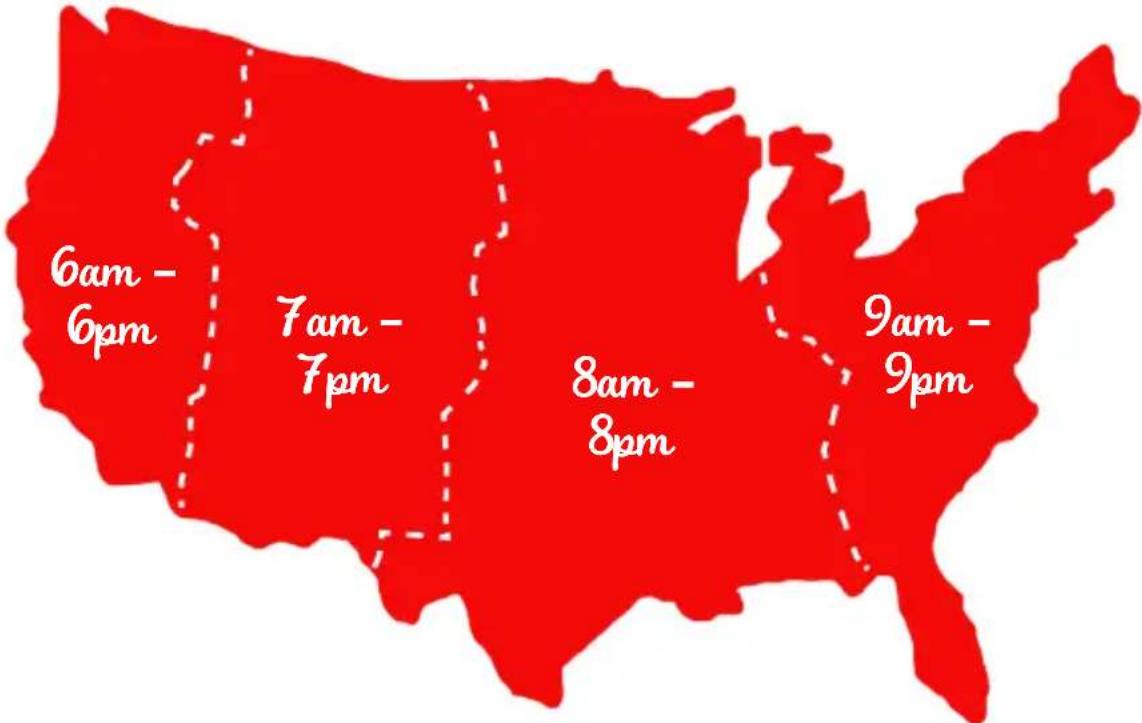
Hey Hawaii! You can reach our customer service team from 3AM to 3PM.
And also, Alaska, feel free to reach out from 5AM to 5PM.
STOREBOUND, LLC - 1 YEAR LIMITED WARRANTY
Your StoreBound product is warranted to be free from defects in material and workmanship for a period of one (1) year from the date of the original purchase when utilized for normal and intended household use. Should any defect covered by the terms of the limited warranty be discovered within one (1) year, StoreBound, LLC will repair or replace the defective part. To process a warranty claim, contact Customer Support at 1-800-898-6970 for further assistance and instruction. A Customer Support agent will assist you by troubleshooting minor problems. If troubleshooting fails to fix the problem, a return authorization will be issued. Proof of purchase indicating the date and place of purchase is required and should accompany the return. You must also include your full name, shipping address, and telephone number. We are unable to ship returns to a PO box. StoreBound will not be responsible for delays or unprocessed claims resulting from a purchaser's failure to provide any or all of the necessary information. Freight costs must be prepaid by the purchaser.
Send all inquiries to support@bydash.com.
There are no express warranties except as listed above.
REPAIR OR REPLACEMENT AS PROVIDED UNDER THIS WARRANTY IS THE EXCLUSIVE REMEDY OF THE CUSTOMER. STOREBOUND SHALL NOT BE LIABLE FOR ANY INCIDENTAL OR CONSEQUENTIAL DAMAGES OR FOR BREACH OF ANY EXPRESS OR IMPLIED WARRANTY ON THIS PRODUCT EXCEPT TO THE EXTENT REQUIRED BY APPLICABLE LAW. ANY IMPLIED WARRANTY OF MERCHANTABILITY OR FITNESS FOR A PARTICULAR PURPOSE ON THIS PRODUCT IS LIMITED IN DURATION TO THE DURATION OF THIS WARRANTY.
Some states do not allow the exclusion or limitation of incidental or consequential damages, or limitations on how long an implied warranty lasts. Therefore, the above exclusions or limitations may not apply to you. This warranty gives you specific legal rights and you may also have other rights, which vary from state to state.
REPAIRS
DANGER! Risk of electric shock! The Dash Portable USB Blender is an electrical appliance.
Do not attempt to repair the appliance yourself under any circumstances.
Contact Customer Support regarding repairs to the appliance.
TECHNICAL SPECIFICATIONS
Power Rating 7.4V (9.62WH)
Stock#: DPPB120_20220517_v2

- PORTABLE USB BLENDER
- IMPORTANT SAFEGUARDS
- GARANTIES IMPORTANTES
- USING YOUR PORTABLE USB BLENDER
- TIPS & TRICKS
- BLENDING
- CHARGING
- INDICATOR LIGHT
- LAYERINGGUIDE
- CLEANING & MAINTENANCE
- RECIPE
- BREAKFAST ENERGY DRINK
- Ingredients:
- Directions:
- PB&J SMOOTHHIE
- STRAWBERRY SHAKE
- GREEN DREAM MACHINE
- ORANGE CREAMSICLE DRINK
- CHERRY ALMOND CHIA PROTEIN SMOOTHHIE
- VEGAN MANGO-COCONUT GREEN SMOOTHHIE
- COLD BREW SMOOTHHIE
- FCC COMPLIANCE STATEMENT
- INDUSTRY CANADA STATEMENT
- CANICES-3 (B)/NMB-3(B)
- STOREBOUND, LLC - 1 YEAR LIMITED WARRANTY
- REPAIRS
- TECHNICAL SPECIFICATIONS
Brand : Dash
Model : Portable USB DPPB120
Category : Blender