KM1995 - Loudspeaker Krüger&Matz - Free user manual and instructions
Find the device manual for free KM1995 Krüger&Matz in PDF.



| Product Type | Compact hi-fi system with speakers |
| Brand | Krüger&Matz |
| Model | KM1995 |
| Power output (RMS) | 2 x 50 W |
| Speaker impedance | 4 Ohms |
| Amplifier | Class A with VU meters |
| Radio | FM (87.5-108 MHz) and DAB+ (174.928-239.200 MHz) |
| CD player | CD, CD-R, CD-RW |
| Bluetooth connectivity | Version 5.0, A2DP profile, range 10 m |
| USB port | Playback and charging (5 V / 1 A) |
| Audio inputs | AUX (RCA), optical, 3.5 mm jack |
| Audio outputs | Headphone (3.5 mm jack), speakers (banana plugs) |
| Dimensions (main unit) | 180 x 315 x 235 mm |
| Weight (main unit) | 4.4 kg |
| Power supply | 230 V~, 50 Hz, power consumption 45 W |
| Maintenance and cleaning | Disconnect before cleaning. Use a soft, slightly damp cloth. Do not use chemicals. |
| Safety | Do not expose to water, moisture or heat sources. Do not open the device. If damaged, contact an authorized service. |
| Spare parts and repairability | Repair only by an authorized technical service. No spare parts provided. |
| Package contents | Power cord, optical cable, RCA cable, speaker cable, radio antenna, remote control, user manual |
| Regulatory information | Compliant with directive 2014/53/EU. CE declaration available at www.fondex.fr. |
Frequently Asked Questions - KM1995 Krüger&Matz
User questions about KM1995 Krüger&Matz
0 question about this device. Answer the ones you know or ask your own.
Ask a new question about this device
Download the instructions for your Loudspeaker in PDF format for free! Find your manual KM1995 - Krüger&Matz and take your electronic device back in hand. On this page are published all the documents necessary for the use of your device. KM1995 by Krüger&Matz.
USER MANUAL KM1995 Krüger&Matz
Stereo HiFi system KM1995
-
Place the device on flat, stable surface.
-
Do not place heavy objects on the device.
-
Do not place anything in speakers interior.
-
Do not place the device in close proximity to heat sources, such as radiators etc. Do not place the device on unstable surfaces.
-
Position the device in a properly ventilated place. Do not obstruct ventilation by covering ventilation openings.
-
Protect this device from humidity, water and other liquid. Avoid using/storing it in extreme temperatures. Do not expose it to direct sunlight and other sources of heat.
-
Before connecting the device to power supply socket, make sure the voltage indicated on the appliance corresponds to the voltage in the power supply socket.
-
Keep the volume at a reasonable level throughout entire time of using the speaker. To prevent damage to your hearing, do not raise the volume too high.
-
If you experience tinnitus, discomfort or other concerning behaviors, stop using the device immediately.
10.Make sure, that the device is placed away from electrical devices that generate
-
Disconnect from power outlet if the device is not to be used for a long time.
-
Do not handle this device with wet hands.
-
Do not use this device if it has been damaged.
-
Do not attempt to repair this device yourself. In case of damage, contact authorized service point for check-up or repair.
-
Always disconnect the product from the power source before cleaning.
-
Clean this device with a soft, slightly damp cloth. Do not use any chemical agents to clean this device.
-
When you disconnect the power cord, grasp and pull the plug, not the cord/cable.
-
Protect the power cable from bending and damage, especially near the plug..
Krüger&Matz
Owner's manual Owner's manual
Krüger&Matz
MAIN UNIT DESCRIPTION
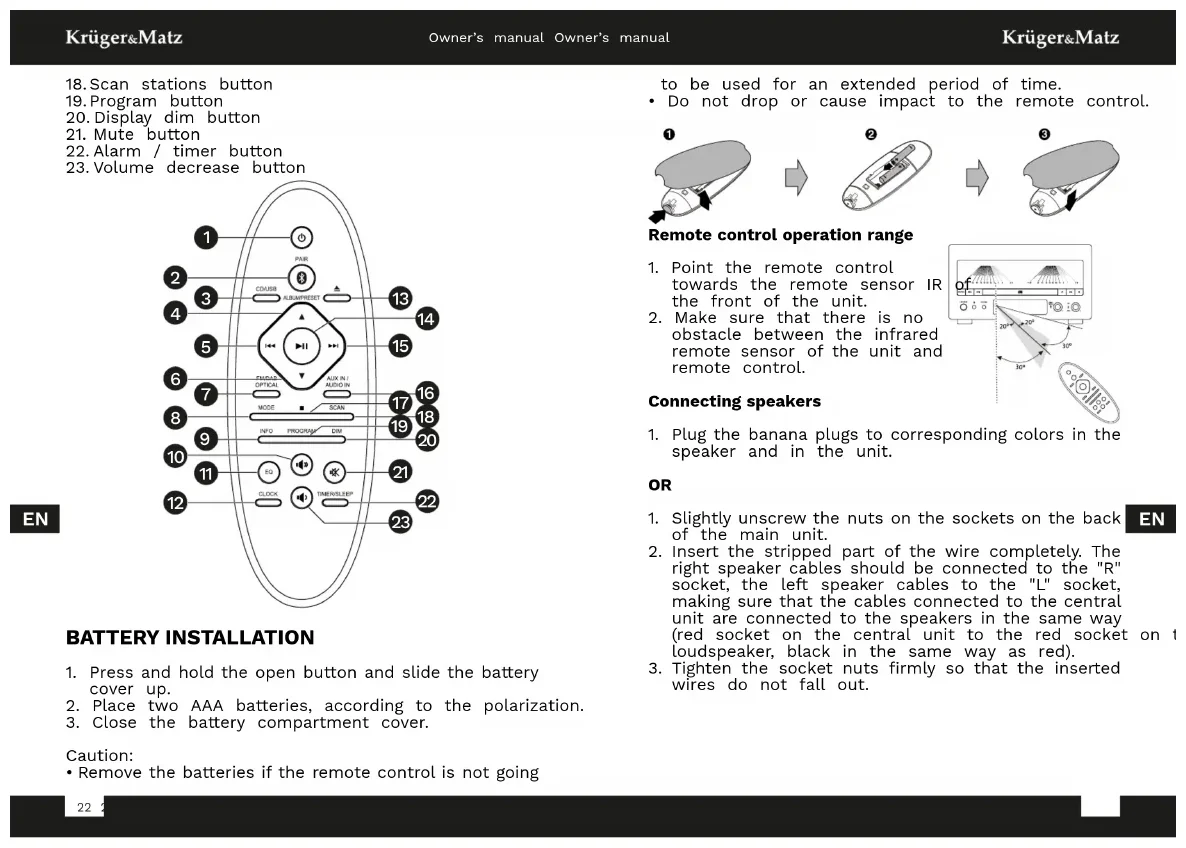
1.Mode button
2. Power button
3. Previous track button
4. Earphone jack
5. Next track button
6. Audio input (3,5 mm)
7. CD drive
8. Remote receiver
9. Display
10. BASS/TREBLE knob
11. Disc tray eject button
12. Equalizer / volume knob
13. Play / pause button
14. STOP button
15. Speakers i
16. FM/DAB+ antenna socket
17. Optical input
18. AUX input
19. USB socket
20. Power cable socket
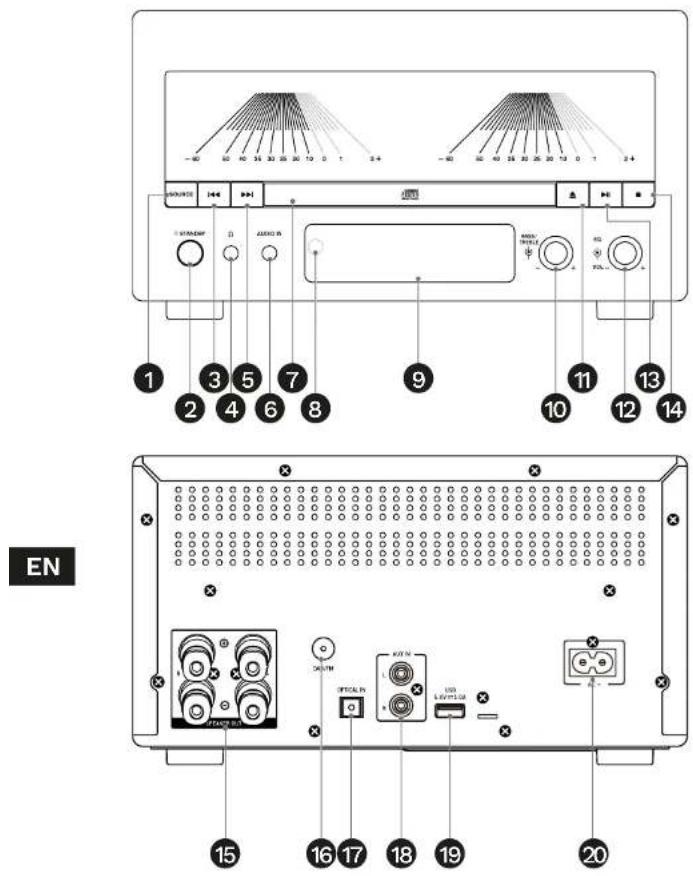
REMOTE DESCRIPTION
- Standby button
- Bluetooth mode button
- USB/CD mode button
- Next station / album
- Previous track / backward
- Previous station / album
- FM / DAB+ / optical input mode button
- Mono/stereo mode bu
- Info button
- Volume increase button
- Equalizer button
- Clock display button
- Disc tray eject button
- Play / pause button
- Next track / forward
- AUX IN / AUDIO IN button
- STOP button
EN
Krüger&Matz
Owner's manual Owner's manual
Krüger&Matz
18.Scan stations button
19. Program button
20.Display dim button
21. Mute button
22. Alarm / timer button
23. Volume decrease button
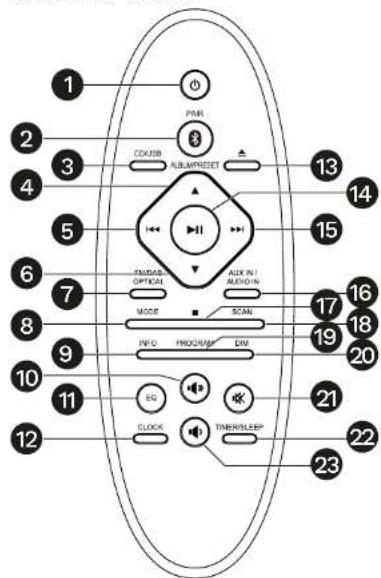
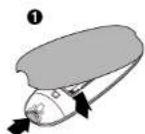
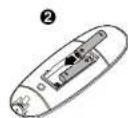
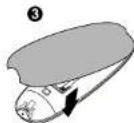
BATTERY INSTALLATION
- Press and hold the open button and slide the battery cover up.
- Place two AAA batteries, according to the polarization.
- Close the battery compartment cover.
Caution:
- Remove the batteries if the remote control is not going
to be used for an extended period of time.
- Do not drop or cause impact to the remote control.
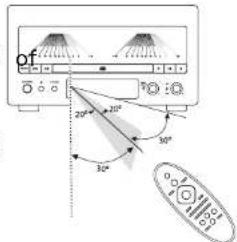
Remote control operation range
- Point the remote control towards the remote sensor IR the front of the unit.
- Make sure that there is no obstacle between the infrared remote sensor of the unit and remote control.
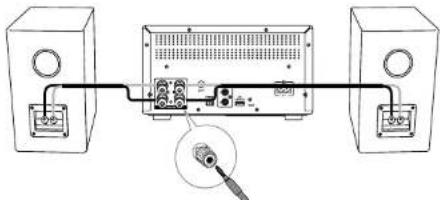
Connecting speakers
- Plug the banana plugs to corresponding colors in the speaker and in the unit.
OR
- Slightly unscrew the nuts on the sockets on the back of the main unit.
- Insert the stripped part of the wire completely. The right speaker cables should be connected to the "R" socket, the left speaker cables to the "L" socket, making sure that the cables connected to the central unit are connected to the speakers in the same way (red socket on the central unit to the red socke loudspeaker, black in the same way as red).
- Tighten the socket nuts firmly so that the inserted wires do not fall out.
Krüger&Matz
Owner's manual Owner's manual
Krüger&Matz
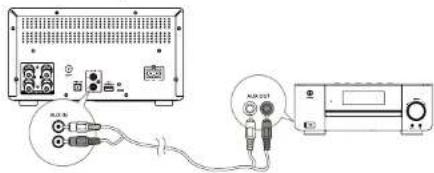
Connecting external device
With an RCA cable
Connect left and right channel to AUX IN socket.
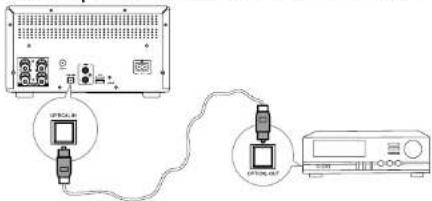
With an optical cable
Connect the optical cable to the OPTICAL IN socket
EN
With a 3,5 mm audio cable
Connect the cable to the 3,5 mm audio input.
Connecting FM / DAB+ antenna
- Connect the FM antenna to FM radio socket at the ba of the unit.
- If connection is poor, connect the outside antenna. Caution: To avoid noise, keep antennas away from the system, the connecting cord and the AC power cord.
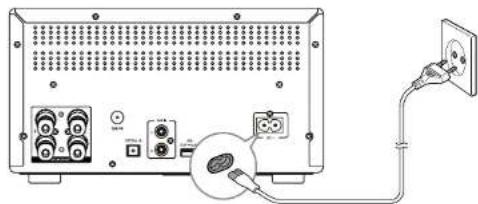
Connecting to power supply
Caution:
- Ensure that the power supply voltage corresponds to the voltage printed on the back or the underside of the unit.
- Before connecting the AC power cord, ensure you have completed all other connections.
EN
Krüger&Matz
Owner's manual Owner's manual
Krüger&Matz
OPERATION
Turn on/off
To turn on device, press the power button. The device will return to the last selected source. To turn off the device, pres the power button again.
Attention: after 15 minutes of being idle, the device will automatically go to the power saving mode (apart from FM / DAB+ radio and Bluetooth mode with connected external device).
ECO mode
To turn the ECO mode on or off, press and hold the power button (while the device is in standby mode) for 2 seconds. In ECO mode, the clock will not be displayed, and the standby mode will be indicated with the red LED on the power button.
Set sleep timer
The device is equipped with the turn off timer. After this is enabled, the device will go to the standby mode after set time.
EN
- When the device is turned on, press the timer button. The display will show a message about activating the timer function.
- Keep pressing the timer button, until you get the desired time. After a moment, the countdown will start and there will be Zz icon on the display.
- To turn off the timer, keep pressing the timer button until you get the "SLEEP OFF" message on the display.
Setting the clock
- While in standby mode, press and hold the CLOCK button to start setting the clock.
- Use the track change buttons to select the desired value.
- Press CLOCK button on the remote to go to next option.
Adjusting the display brightness
Press the DIM button to select brightness level.
Play from Bluetooth device
To connect your Bluetooth device to the unit, you need to pair the device to the unit.
- To connect the devices, go to the Bluetooth mode by pressing the SOURCE button, or Bluetooth button on the remote.
- Turn on the Bluetooth function on your device.
- Search for other Bluetooth device with your device.
- Select "KM1995" from the list.
- Enter default password "0000" if necessary.
- To clear pairings, press and hold the Bluetooth button on the remote.
Caution:
- The operational range between this unit and a Bluetooth device is approximately 10m .
- Compatibility with all Bluetooth devices is not guaranteed.
- Any obstacle between this unit and a Bluetooth device can reduce the operational range.
- Keep this unit away from any other electronic device that may cause interference. EN
- If the distance between the devices exceeds the communication range, the devices will be disconnected. To reconnect the devices, place them within range.
Playing from an external device
- To play tracks from an external device, connect the device to the main unit with an audio cable to the ALIN or AUDIO IN socket.
- Press corresponding AUDIO IN/AUX IN button to select the audio input.
- Start playing on the external device.
Krüger&Matz
Owner's manual Owner's manual
Krüger&Matz
FM/DAB+radio
Tuning FM / DAB+ stations
- Press the FM/DAB+ button on the remote, or press the SOURCE button on the device, to go to the radio mode.
- Press and hold forward / back button on the front panel (or on the remote control), the radio tunes to a first station automatically.
- Repeat step 2 to tune to more stations. To tune to a station manually, press the next / previous track button repeatedly until you find desired frequency.
Automatic saving FM stations
You can program a maximum of 20 preset radio stations. While in FM radio mode, press and hold the PROGRAM button to activate automatic station saving.
[AUTO] is displayed briefly.
- All available stations are programmed in the order of waveband reception strength.
Automatic saving DAB+ stations
EN
You can program a maximum of 30 preset DAB+ radio stations. While in DAB+ radio mode, press and hold the SCAN button to activate automatic station saving.
The display will show SCANNING message.
- The unit will save every found DAB+ station automatically, according to signal strength, and play first saved station.
Program radio stations manually
You can program a maximum of 20 preset radio stations.
1. Tune to a radio station.
2. Press the PROGRAM button to activate saving mode. The PROG message will flash on the display. Select the preset number with the up and down buttons. Confirm with the PROGRAM button. The preset number and the frequency of the preset station are displayed.
3. Repeat the previous steps to program other stations.
Note: To overwrite a programmed station, store another station in its place.
Tune to a preset radio station
To tune to a preset radio station, press the up or down button.
MONO/STEREO mode
To switch between MONO and STEREO modes, press the MODE button on the remote.
Showing information on the display
To show and cycle through information on the display, press the INFO button.
Adjust volume level and sound effect
Adjust volume level
During play, press the VOL+/- button on the remote on a volume regulation knob on the main unit to increase/ decrease the volume level
Adjusting bass and treble
Press the BASS/TREBLE knob to go to the adjustment menu. Use the knob, to adjust the bass or treble.
Mute button
During playback, press the MUTE button to enable or disable the sound.
Equalizer settings
During playback, press the volume knob a few times to select one of the equalizer setting: FLAT / POP / JAZZ / ROCK / CLASSIC
Krüger&Matz
Owner's manual Owner's manual
Krüger&Matz
Set alarm timer
Note: Make sure that you have set the time correctly.
- In standby mode, press and hold TIMER button, until [TIMER SET] scrolls on the display.
- Use the next and previous buttons to select the sound source and press the TIMER button.
- Set the hour of the timer and press the TIMER button. Set the minutes of the timer and press the TIMER button.
- Set the timer volume with the next / previous track buttons and press the TIMER button.
- The timer has been set and enabled. When the timer is enabled, the clock icon is shown on the display. To disable the timer press the TIMER button.
Playing from USB
After connecting the USB device (flash drive, card reader), the device will play tracks saved on this USB drive. To do this:
- Plug the USB device to the USB socket on the back of the main unit.
- Press the source button, or the CD/USB button on the remote to go to the USB playing mode.
- To start playing, press the play button on the main unit or on the remote.
- To stop playing, press the stop button on the main unit or on the remote.
- To change tracks, use the next / previous track buttons.
- To change the album, use the album change buttons.
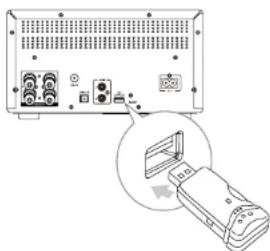
Charging external devices
When the device is plugged to power, the USB port can be used to charge external devices. Maximum input voltage is 5V / 1A .
Playing CDs
- Press the SOURCE button on the main unit, or press the CD/USB button on the remote. The "DISC" message will appear on the display.
- Press the disc eject button on the main unit or on the remote, place the CD on the tray and press the disc eject button again.
- To start playing, press the play button on the main unit or on the remote.
- To stop playing, press the stop button on the main ur or on the remote.
- To change tracks, use the next / previous track button
Programming playing
This device comes with a feature of playing just the selected tracks from the CD.
- To start programming press the STOP button on the remote/main unit.
- Press the PROGRAM button on the remote- the o will show 001 P-01.
- To select a track number, press the next / previous buttons. The track number will be shown on the display.
- To confirm the track and go to select next track, press the PROGRAM button. Keep programming the tracks.
- To start playing programmed tracks, press the play button.
- To turn off playing programmed tracks and return to normal playing, press the STOP button twice.
Krüger&Matz
Owner's manual Owner's manual
Krüger&Matz
SPECIFICATION
Main features
Class A amplifier
VU meters
FM/DAB++ radio
Playing discs: CD, CD-R, CD-RW
Playing from USB storage
Playing from Bluetooth
Playing from inputs: 3,5 mm jack, optical, AUX
Charging external devices
Remote control
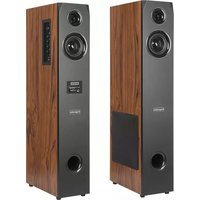
Speaker specification
Impedance: 4 Ohm
Power: 75 W
Woofer size: 4,5" (115 mm)
Tweeter size: 1,2" (30 mm)
Plug: banana
Dimensions: 180 x 315 x 235 mm
Weight: 4,4 kg
Amplituner specification
EN
FM frequency range: 87,5 - 108 MHz
DAB++ frequency range: 174,928 - 239,200 MHz
Power consumption: 45 W
Output power (RMS): 2 x 50 W
THD: <1% (1 KHz, 1 W)
USB port: 5 V / 1 A
Bluetooth version: 5.0
Bluetooth profile: A2DP
Bluetooth range: up to 10 m
Max. Bluetooth power transmission: 4 dBm
Bluetooth frequency: 2402-2480 MHz
Sockets:
Radio antenna input
Optical input
AUX input
3,5 mm jack input
USB (playing / charging)
Headphones output
Speakers output
Power supply: 230 V~; 50 Hz
Dimensions: 245 x 136 x 296 mm
Weight: 6 kg
In set: power cord, optical cable, RCA cable, speaker
cables, radio antenna, remote
Lechpol Electronics Leszek Sp.k. hereby declares that Stereo HiFi
system KM1995 is consistent with directive 2014/53/UE.
Full text of the EU Declaration of Conformity is available at following
Internet address: www.technpol.pl.
EN

English
Correct Disposal of This Product
(Waste Electrical & Electronic Equipment)

(Applicable in the European Union and other European countries with separate collection systems) This marking shown on the product or its literature, indicates that it should not be disposed with other household wastes at the end of its working life.
To prevent possible harm to the environment or human health from uncontroll waste disposal, please separate this from other types of wastes and recycle responsiblly to promote the sustainable reuse of material resources. Household users should contact either the retailer where they purchased this product, or their local government office, for details of where and how they can take this item for environmentally safe recycling. Business users should contact their supplier an check the terms and conditions of the purchase contract. This product should not be mixed with other commercial wastes for disposal.
Made in China for Lechpol Electronics Leszek Sp.k., ul Garwolinska 1, 08-400 Mietne.
Krüger&Matz
Cu cablu audio 3.5 mm
Conectati cablul la intrarea audio de 3,5mm.
Conectarea antenei FM / DAB
Specifications amplifier
Interval de freventa FM: 87,5 - 108 MHz
Interval de freventa DAB+: 174,928 - 239,200 MHz
Putere consumata: 45 W
Putere de iesire (RMS): 2 x 50 W
THD: <1% (1 KHz, 1 W)
Port USB: 5 V / 1 A
Versiune Bluetooth: 5.0
Profile Bluetooth: A2DP
Raza de actiene Bluetooth: pana la 10 m
RO
Krüger&Matz
Manual de'utilizaré
Naladenie Rozhlasovych stanic FM/DAB+
- Ak chcete prejst do rezimu rádia FM/DAB, stlačte tlacidlo FM/DAB na dialkovom ovládaci alebo tlacidlo SOURCE na hlavnej jegnotke.
- Stlacenim a vpodrzanim tlaclidla vpred / spat spustite automaticke vyhladavanie rozhlasovych stanic.
- Ak chcete vyhladat dalsie stanice, zopakujte krok 2. Ak chcete rozhlasovu staniciu vyhladat manuaine, opakovane stlacajte tlacidlo nasledujucej / predchadzajucej skladby, kym nebude pozadovanafrekvencia spravna.
Automaticke ulozenie rozhlasovych stanic FM

Krüger&Matz is a registered trademark
- Stereo HiFi system KM1995
- MAIN UNIT DESCRIPTION
- REMOTE DESCRIPTION
- Krüger&Matz
- BATTERY INSTALLATION
- Remote control operation range
- Connecting speakers
- OR
- Owner's manual Owner's manual
- Connecting external device
- EN
- Connecting FM / DAB+ antenna
- Connecting to power supply
- OPERATION
- Turn on/off
- ECO mode
- Set sleep timer
- Setting the clock
- Adjusting the display brightness
- Play from Bluetooth device
- Caution:
- Playing from an external device
- FM/DAB+radio
- Tuning FM / DAB+ stations
- Automatic saving FM stations
- Automatic saving DAB+ stations
- Program radio stations manually
- Tune to a preset radio station
- MONO/STEREO mode
- Showing information on the display
- Adjust volume level and sound effect
- Adjust volume level
- Adjusting bass and treble
- Mute button
- Equalizer settings
- Set alarm timer
- Playing from USB
- Charging external devices
- Playing CDs
- Programming playing
- SPECIFICATION
- Main features
- Speaker specification
- Amplituner specification
- Conectarea antenei FM / DAB
- Specifications amplifier
- RO
- Naladenie Rozhlasovych stanic FM/DAB+
- Automaticke ulozenie rozhlasovych stanic FM
Brand : Krüger&Matz
Model : KM1995
Category : Loudspeaker