XD85L2 - Dehumidifier XPower - Free user manual and instructions
Find the device manual for free XD85L2 XPower in PDF.


User questions about XD85L2 XPower
0 question about this device. Answer the ones you know or ask your own.
Ask a new question about this device
Download the instructions for your Dehumidifier in PDF format for free! Find your manual XD85L2 - XPower and take your electronic device back in hand. On this page are published all the documents necessary for the use of your device. XD85L2 by XPower.
USER MANUAL XD85L2 XPower
Read and save these instructions
LGR Deshumidificador
Manual de Nombre
WARNING - READ AND SAVE THESE INSTRUCTIONS BEFORE USING THIS PRODUCT.
The user of electrical products may create hazards that include, but are not limited to injury, fire, electrical shock. Failure to follow these instructions may damage and/or impair its operation and void the warranty.
- Before operating, remove all packaging material and check for any damage that may have occurred during shipping or any missing items.
- Check household power supply to ensure it matches the appliance's specification.
- DO NOT operate the appliance with a damaged cord or plug. Discard or return to an authorized service facility for examination and/or repair.
- DO NOT use an extension cord with this appliance. Use only with GFCI protected receptacles. Contact a qualified electrician for verification or installation of a GFCI receptacle if necessary.
- DO NOT run cord under carpeting. DO NOT cover cord with throw rugs, runners, or similar coverings. DO NOT route cord under furniture or appliances. Arrange cord away from traffic area and where it will not be tripped over.
- To reduce the risk of fire or electric shock, DO NOT use this appliance with any solid state speed control device.
- DO NOT touch this appliance or the plug with wet hands or while standing in water.
- DO NOT operate the appliance near any pooled water.
- DO NOT use the product in areas where gasoline, paint or other flammable goods and objects are used or stored.
- DO NOT insert or allow objects to enter any ventilation or exhaust opening as this may damage the appliance and void the warranty.
- DO NOT cover the air inlet or outlet on the appliance.
DO NOT direct the air flow at human faces or bodies. - DO NOT allow children to play with this appliance.
- AUTOMATICALLY OPERATED DEVICE - To reduce the risk of injury, disconnect from power supply before servicing.
- Remove the power cord from the electrical receptacle by grasping and pulling on the power cord plug-end only, DO NOT pull the cord directly.
- DO NOT attempt to repair or adjust any electrical or mechanical functions of this appliance, as this may cause danger and void the warranty.
- If the appliance is damaged or it malfunctions, DO NOT continue to use it. Unplug the product from the electrical outlet. Refer to troubleshooting guide or contact XPOWER.
- Store in a dry area, away from exposure to sunlight, extreme temperature and humidity, or other extreme environment, when not in use.
- DO NOT stack this appliance to more than three units.
- Always grip the trolley handle and keep the unit up when transporting from room to room. DO NOT tilt the product on its side or upside down.
- If the dehumidifier was transported tilted on its side or upside down, you must position it upright and wait at least 4 hours before using it again.
- An electronic instruction manual can be obtained through manufacturer's website www.xpower.com.
LGR Dehumidifier Introduction
- XPOWER LGR (Low Grain Refrigerant) Commercial Dehumidifiers are designed to maximize water extraction while combining the highest efficiency in performance and portability.
- Latest technology and a high efficiency extraction process ensures peak performance in even the most challenging environments, such as extreme temperature and low environment humidity.
- With high efficient water removal capacity, the LGR (Low Grain Refrigerant) Dehumidifier allows an extreme dry zone in the working area and water migration to the air from all the surfaces. It is ideal for water damage restoration and industrial applications where maximum air drying performance is needed.
Items Included
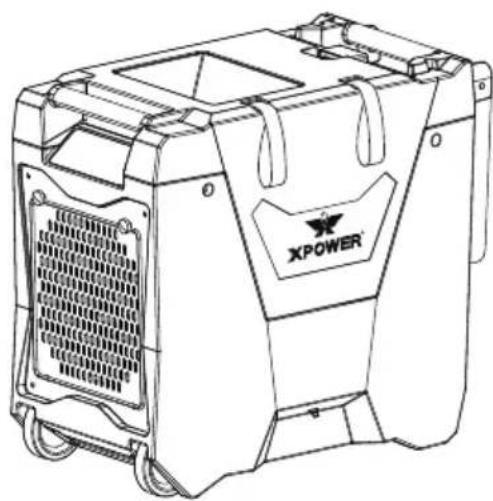
Dehumidifier x 1
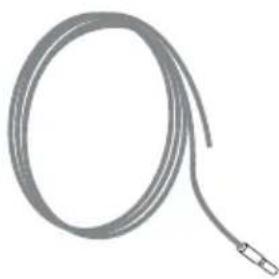
Drain Hose x 1
Owner's Manual x 1
Parts Description
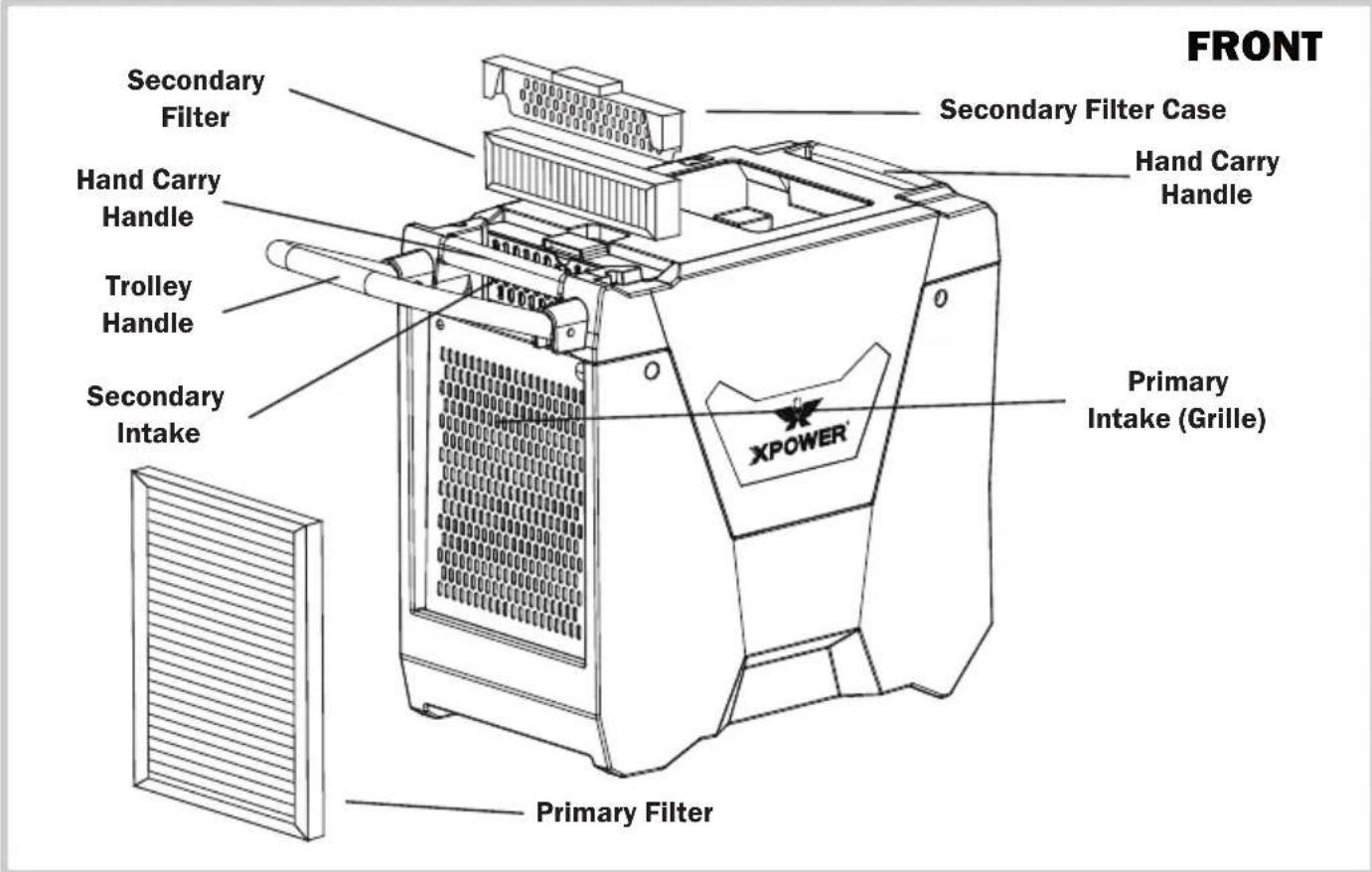
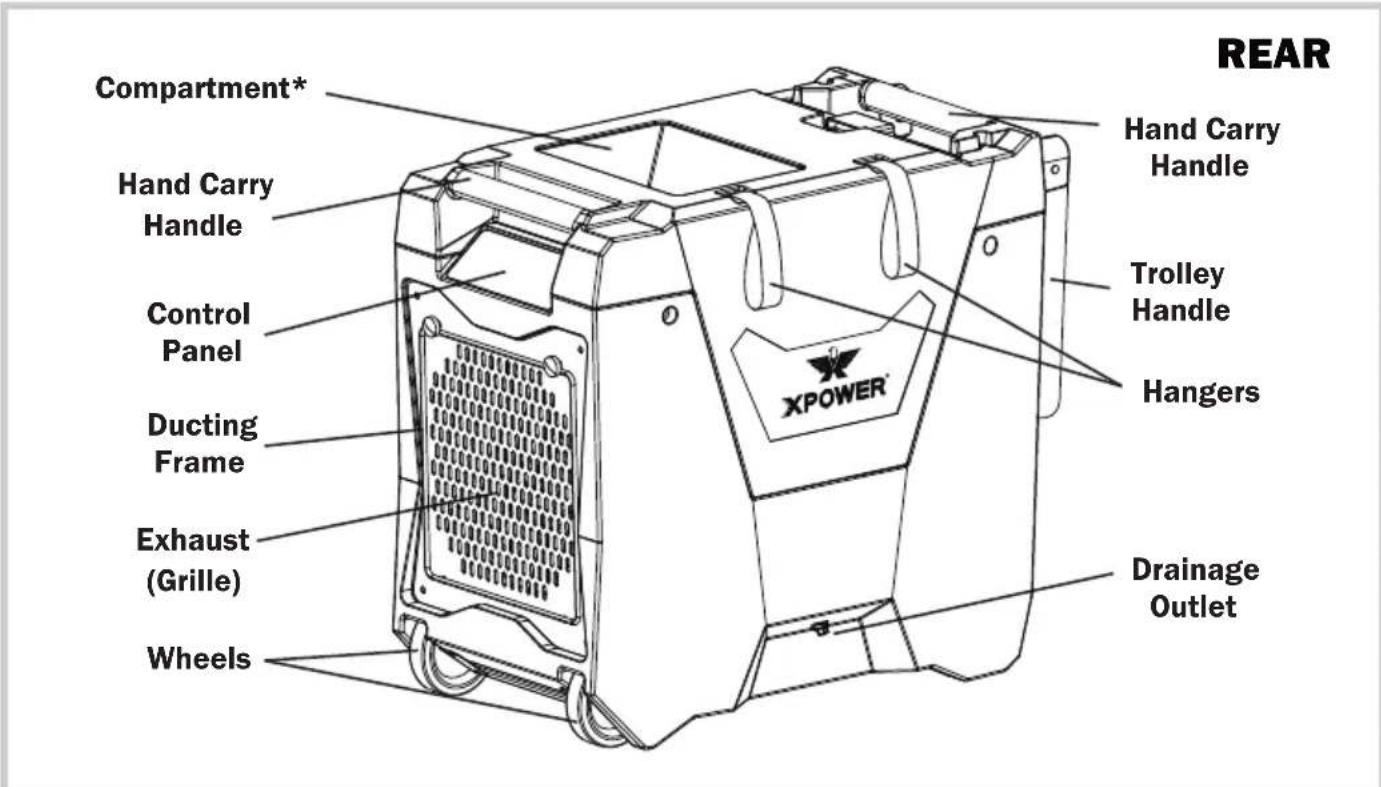
* These features do not apply to all models mentioned in this manual.
Installation and Operation Guide
Selecting a Location (Important)
- Positioning: Before using the dehumidifier, place the unit UPRIGHT for at least 1 hour before use to allow the refrigerant to stabilize. If the unit was tilted on its side or upside-down during transportation, set the unit UPRIGHT for at least 4 hours before use. The dehumidifier must be positioned UPRIGHT on a level surface during use.
- Enclosed Area: For optimal efficiency, the dehumidifier must be operated in an enclosed area. Keep all doors, windows and other outside entrances to the room closed. Turn off the air conditioning.
- Air Circulation: It's suggested to have a constant efficient air circulation inside the area that you are going to work in, for example, setting up a circulation with XPOWER Air Mover combinations.
- Environment Temperature/Humidity: The dehumidifier is designed to work in an environment with a temperature of 33^ to 105^ (0.6 °C to 40.6 °C) and relative humidity level of 20% and higher. The dehumidifier may not function normally or efficiently if the room temperature and humidity level exceed this temperature and humidity level range.
- Power Cord and Drain Hose: The power cord has a length of 25 feet (7.5 meters) and the drain hose has a length of 40 feet (12 meters). Select a location where the power cord can reach the power source and the drain hose can reach the area you want. Please do not lift the drainage hose higher than 16 feet (5 m) above the machine.
- Inlet and Outlet Orientation: Also pay attention to the orientation of the air inlet and air outlet. Make sure the airflow won't influence any object nearby the dehumidifier.
- IMPORTANT: The effectiveness of the dehumidifier can be influenced by different factors. You should keep any new moisture-laden air away from the working area and allow sufficient enclosed air circulation in the room. You may also find that installing multiple dehumidifiers may be required for larger enclosed areas.
Installation and Operation Guide (Continued)
Drain Hose Installation
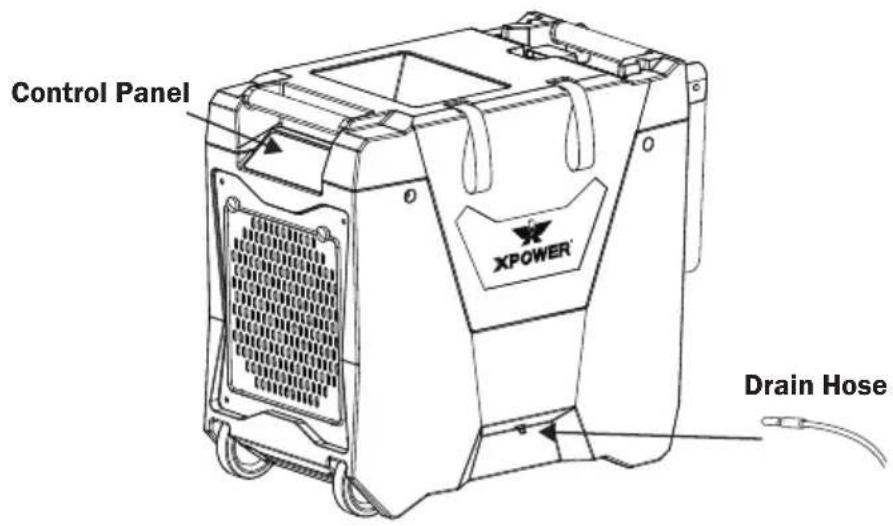
- Attach the drain hose inlet to the drain outlet of the machine.
The machine's outlet can be found as the graph on the left.
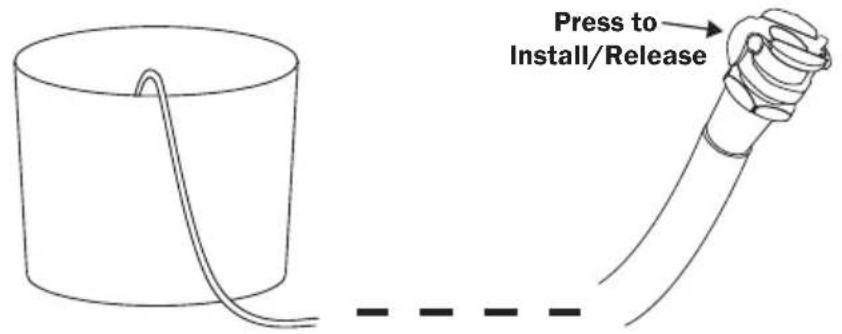
- Please have a separate container to collect the water coming from the other end of the drain hose.
Installation and Operation Guide (Continued)
Extension Setup (Optional)
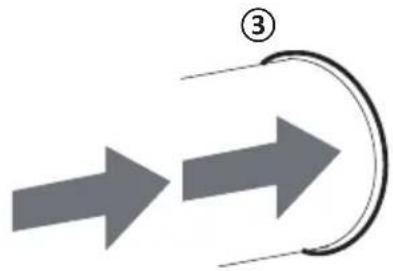
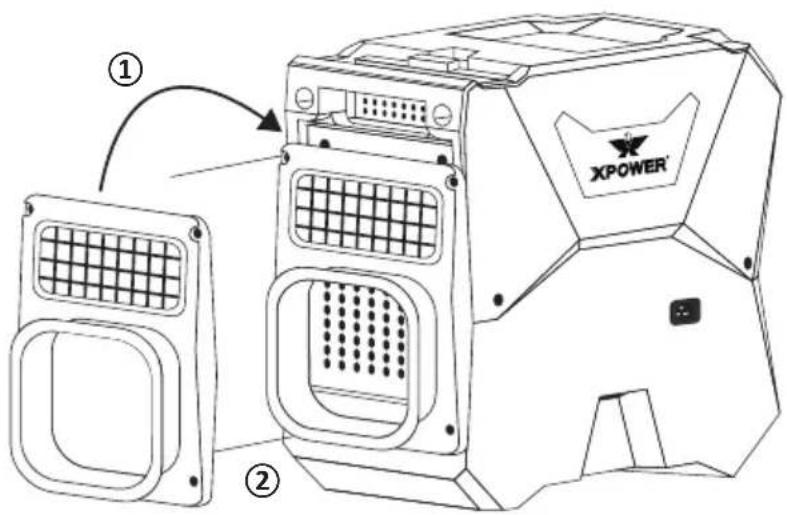
Intake Ducting*
① Install the intake adapter**.
② Screw on the four screws.
③ Attach the ducting hose to the intake adapter.
- For model XD-85LH only.
** The intake adapter is sold separately.
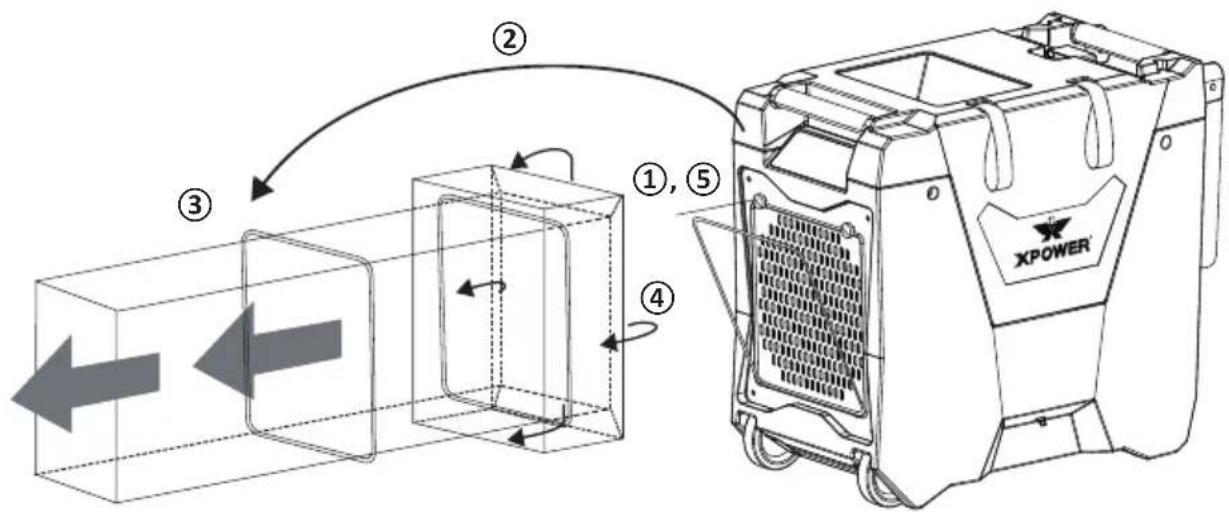
Exhaust Ducting (Lay Flat) (12 inch/30.5 cm Diameter)
① Screw off the two screws.
② Take out the ducting frame.
③ Let the ducting hose go through the ducting frame.
④ Turn the ducting hose around the frame to its back.
(5) Reinstall the ducting frame and screw on the two screws.
Installation and Operation Guide (Continued)
Control Panel
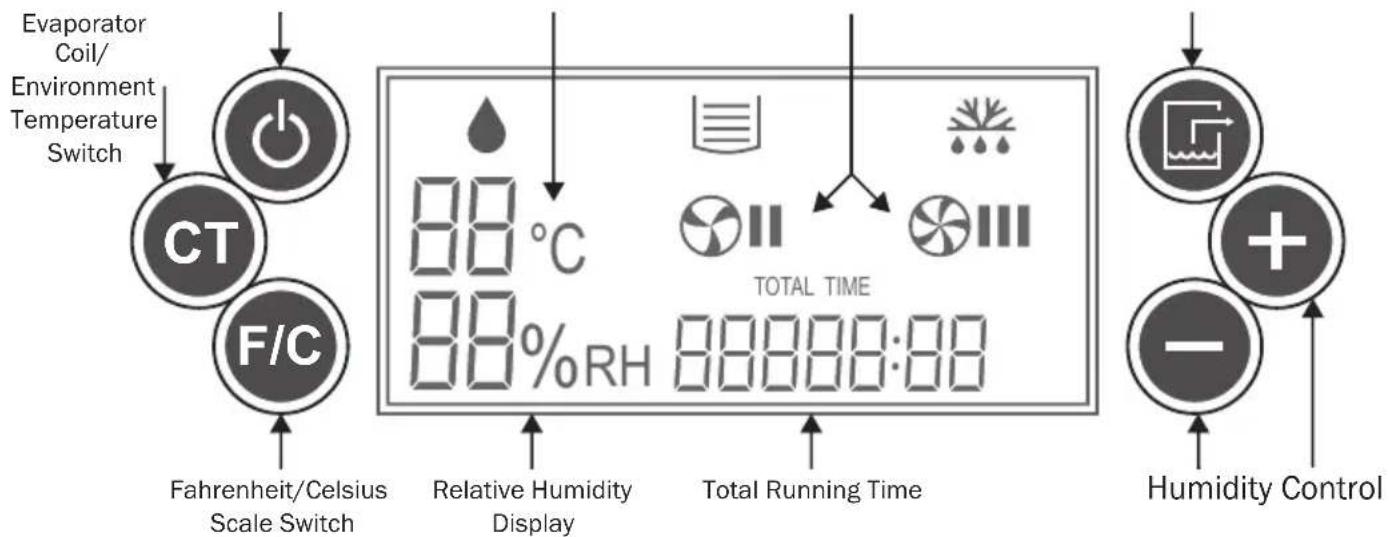
Temperature DisplayPowerSpeed Manual Drainage
Buttons
Power Control

Press to switch the dehumidifier ON or OFF.
Fahrenheit/Celsius Scale Switch F/C
Press to switch the display of the temperature in Fahrenheit or Celsius scale.
Evaporator Coil/Environment
Temperature Switch
Press to switch the display of the temperature of the evaporator coil or environment.
Manual Drainage

Press to drain manually. Manual drain will last for 45 seconds. [See Page 11: Drainage (Important)]
Humidity Control


Tap +^ / - ^ to increase/decrease the desired humidity level by 1% increments. Touch and hold to increase/decrease the setting humidity level by 5 % per second. The adjustable range is 30% to 90%
Information
Relative Humidity Display
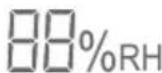
This will show the relative humidity level of the setting or environment. As default, it displays the environment humidity. When adjusting humidity, it will display the setting humidity and blink. After 5 seconds from the last adjustment, it will display the environment humidity again. (See Page 8: Humidity Control)
Temperature Display 88^ C
This will show the temperature of the evaporator or environment (See Page 8: Evaporator Coil/Environment Temperature Switch). When in Celsius scale, will be illuminated. When in Fahrenheit scale, will turn off. If the temperature to show is higher than 99^ , the scale will be set to Celsius automatically (See Page 8: Fahrenheit/Celsius Scale Switch).
Fan Speed

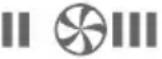
This will show if the machine is running on low (⊗III) or high (⊗III) fan speed. The dehumidifier will control the fan speed according to the environment temperature and humidity.
Total Running Time
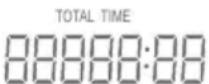
This will show the total running time from the first usage to the current moment. Running time starts to count during the time when the machine turns on. The value can't be reset.
Indicators
Defrosting Light

This light indicates the evaporator coil or environment temperature is too low. Frost may start to appear on the evaporator coil. The machine is now defrosting.
Constant Dehumidification [0% 0% RH] At the humidity level setting of 30% , if humidity control button “-” is pressed, will blink on the humidity display. The machine will enter into constant dehumidification mode and won’t stop dehumidification as environment humidity changes.
"OFF" Light

This light indicates the machine is connected to power source and it is now turned off.
Dehumidification Light

When this light blinks, it indicates the machine is now preparing for dehumidification. When this light stays bright, it indicates the machine is now dehumidifying.
Drainage Indicator Light

When this light blinks, it indicates the machine is in drainage process. When this light stays bright, it indicates the water tank is full.
Error Codes
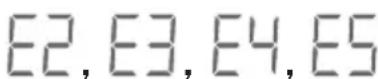
These are error codes. Please refer to Troubleshooting Guide for more information.
Installation and Operation Guide (Continued)
Start Your Job
Turn on the dehumidifier
Press the Power Control button to switch on the machine. You may see the dehumidification light is flashing. Please wait for 3 minutes (180 seconds) until the machine completes the startup.
Write down the starting time
Please remember to write down the starting time right after the machine starts, if you want to calculate the usage time.
Set the desired humidity level
- Tap the humidity control button to adjust the setting humidity level. The default humidity setting is 30% . The adjust range is from 30% to 90% (See Page 8: Humidity Control). The machine will try to match the setting humidity level and maintain it.
- If you want the machine to work constantly, please adjust the humidity level down to 30% , and then press “-” (See Page 9: Constant Dehumidification). Tap “+” to exit constant dehumidification mode.
- If the dehumidifier loses power accidentally, when turned on again, the dehumidifier will work on the last known configuration.
Dehumidification
- When the machine is dehumidifying, the dehumidification light goes on.
- You may see the dehumidification light is flashing. That means the dehumidification temporally pauses or the environment humidity has reached the setting level. Please wait until the machine completes the startup or until the humidity level rises up again.
- The dehumidifier will control the fan speed according to the environment temperature and humidity.
Defrosting
- When the evaporator coil or the environment temperature is too low, frost may appear on the evaporator. This will cause a lower effectiveness of the dehumidification. The machine will start defrosting until the temperature goes back to normal.
- When the machine is defrosting, the dehumidification pauses. The dehumidification light goes off, and the defrosting light will go on.
- Do not turn off the machine during defrosting process.
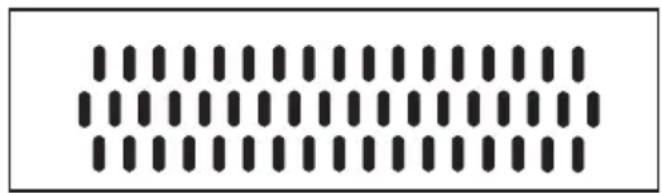
Secondary Intake (Opened)
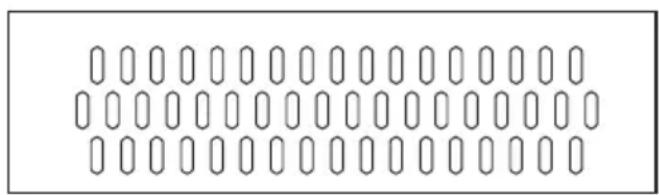
Secondary Intake (Closed)
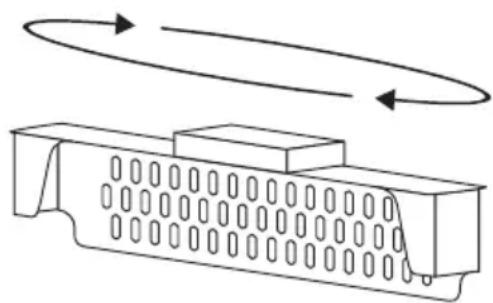
Secondary Filter Case
Important: Close the secondary intake when environment temperature falls under 68^ (20^) or in contaminated environment for better efficiency.
To close the secondary intake, remove the filter case, rotate and re-install.
Drainage (Important)
- Press the Manual Drainage button to process drainage manually. It will last for 45 seconds and won't stop dehumidification or defrosting process.
- If the water tank is full or not positioned horizontally, the water tank full indicator light will go on. Any dehumidification or defrosting process will pause and the machine will automatically process drainage for 45 seconds. Afterwards, if the water tank is still detected full, an error code will be displayed (See Page 9: Error Codes or Page 14: Troubleshooting Guide).
- When turned off, the machine will automatically process drainage for 60 seconds. Please wait until this process completes.
- Please do not lift the drainage hose higher than 16 feet (5 m) above the machine.
Calculate the usage time
- Please remember to write down the ending time right before the machine shuts down.
- Compare the starting time and the ending time to calculate the usage time.
TOTAL TIME

Installation and Operation Guide (Continued)
Start Your Job (Continued)
Turn off the dehumidifier
Press the Power Control button to switch off the machine. When turned off, the machine will automatically process drainage for 60 seconds. Please wait until this process completes.
Transportation
Before transportation, you should always:
- Process a drainage manually. Otherwise the water may spill and enter in core parts of the machine during transportation. This may also void the warranty.
- Disconnect the machine from the power source.
- Remove all the extension setup and uninstall the power cord and drain hose.
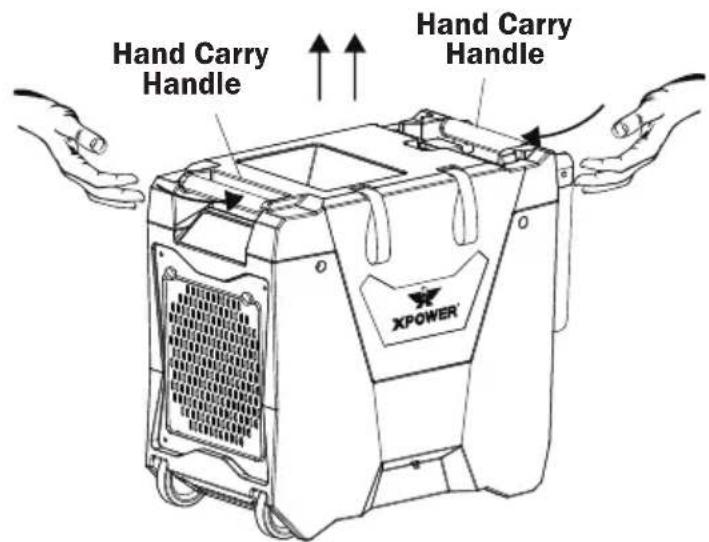
Lift with Hand Carry Handles
- Lift the dehumidifier with the two hand carry handles on the two ends on the top.
- Be aware of the weight of the machine.
WARNING: do not use the hanger as hand carry handles.
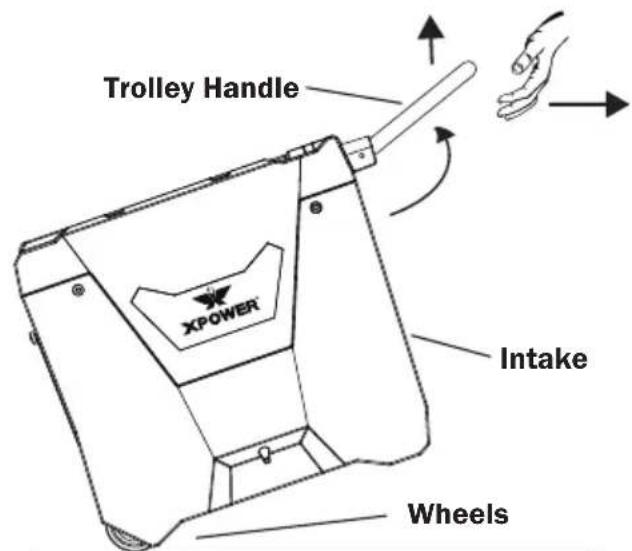
Transport with Trolley Handle
- Lift the dehumidifier on the wheels with the trolley handle.
- Pull to transport with the trolley handle.
User Maintenance Instructions
Frequent maintenance is recommended on this appliance. Failure to follow the maintenance instructions may cause failure of the appliance and void the warranty.
Before maintenance or storage, you should always:
- Process a drainage manually.
- Disconnect the machine from the power source.
- Remove all the extension setup.
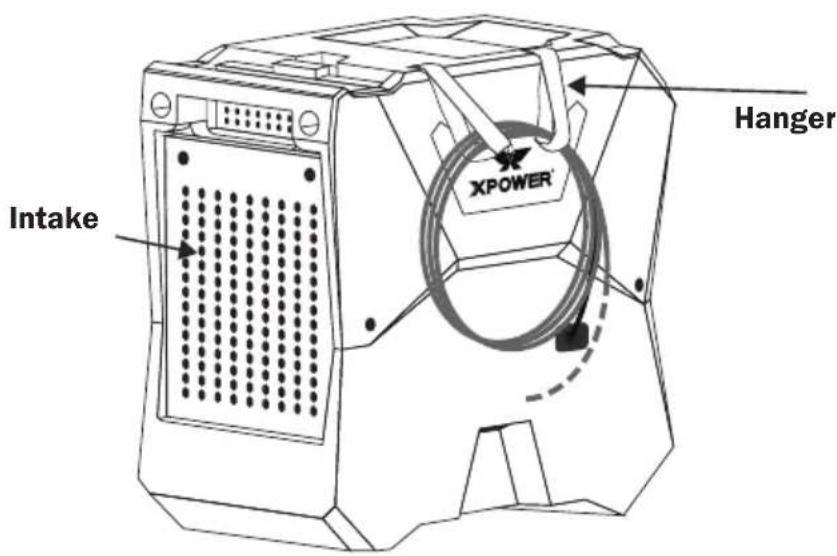
Organize the Power Cord and Drain Hose
For XD-85LH:
- Remove the drain hose from the outlet of the machine.
- Open the velcro on the hangers.
- Hang the drain hose and power cord on the hangers and close the velcro.
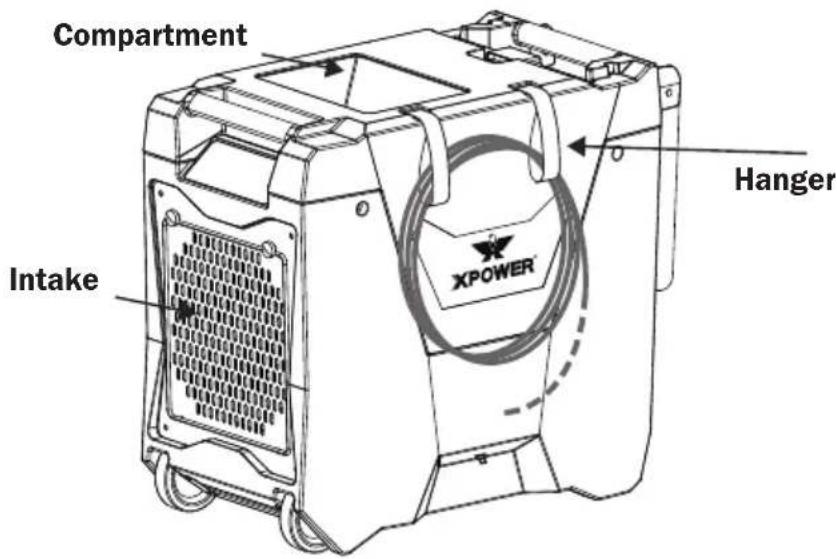
For XD-85L2:
- Remove the drain hose from the outlet of the machine.
- Open the velcro on the hangers.
- Hang the drain hose on the hangers and close the velcro.
- Store the power cord or the drain hose in the compartment.
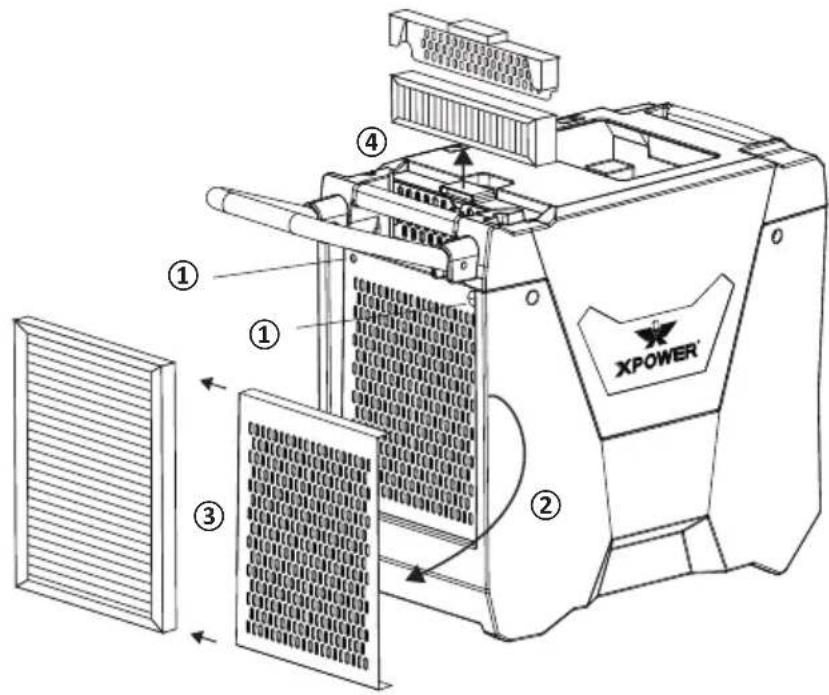
Store or Replace the Filters
① Screw off the two screws.
② Take out filter grille.
③ Slide off the primary filter from the grille.
(4) Take out secondary filter case and the secondary filter from the slot.
- Clean and wash the filters with water.
- Store the filter in dry and cool area in a sealed container.
- Replace filters if necessary.
Clean the surface
- Use a damp cloth to wipe the surface of the housing. Do not clean the unit with water directly.
- Do not clean the fins of the evaporator and condenser by yourself.
Store the machine
- Store the appliance in a dry and cool indoor place, away from direct sunlight as well as chemicals and out of reach of children.
- IMPORTANT: make sure the machine is levelly positioned.
- If you want to stack this appliance, stack them on their tops with the same orientation.
- Do not stack more than three units of this appliance.
Troubleshooting Guid
PROBLEM POSSIBLE CAUSE SOLUTION
| Dehumidifier does not start | No electricity. Check for power supply. | |
| The power cord is not properly plugged in. | Remove and reconnect the power cord. | |
| Dehumidifier runs but humidity level does not decrease | The dehumidification system is within startup process. | Wait for 3 minutes (180 seconds) until the dehumidification light stops blinking. |
| The humidity level setting is too high. | Decrease the humidity level setting. | |
| The working area is not enclosed. | Make sure the area is tightly sealed. | |
| There are other sources of humidity in the room. | Remove these sources or wait until they completely volatilize. | |
| The humidity level has reached the setting level. | Decrease the humidity level setting, set to constant dehumidification mode, wait until the humidity level rises up again. | |
| Dehumidifier runs but humidity level does not decrease | The machine was tilted and wasn't positioned upright for enough time before use. | Position the machine upright on a level surface and wait for at least 4 hours before next use. |
| The air filter or air inlet/outlet is blocked. | Remove blockage. | |
| The environment temperature is too low/high or the humidity level is too low. | The dehumidifier is designed to work in an environment with a temperature of 33 °F to 105 °F (0.6 °C to 40.6 °C) and relative humidity level of 20% and higher. Make sure the room temperature/humidity does not exceed this range. | |
Troubleshooting (Continued)
| PROBLEM | POSSIBLE CAUSE SOLUTION | |
| Water on the floor The drain hose is loose. Tighten the connection of the drain hose. | ||
| Sudden noise The machine starts drainage process. | The water pump can create sounds during operation. This is a normal sound. | |
| Error Code: E2 Failure of the temperature sensor. | The dehumidification can function but you won't be able to see the temperature/humidity on the screen. Contact XPOWER for more assistance. | |
| Error Code: E3 Failure of the humidity sensor. | ||
| Error Code: E4 Failure of the water pump Contact XPOWER for more assistance. | The machine is not positioned levelly. | Position the machine on a level surface. |
| Error Code: E5 Failure of the defrost sensor. The dehumidification can function but will defrost for 5 minutes every half an hour. Contact XPOWER for more assistance. | The drain hose is blocked. Remove blockage. | |
If troubleshooting does not resolve your problem, please contact XPOWER or other parties authorized by XPOWER for further instructions.
Technical Specification
| MODEL NUMBER XD-85LH XD-85L2 | ||
| Voltage / Frequency 115 V~60 Hz | ||
| Amperage 6.7 A | ||
| Operation Temperature/ Relative Humidity Requirement | 33 °F - 105 °F (0.6 °C to 40.6 °C) / 20% RH or higher | |
| Rated Airflow 180 CFM | ||
| Speed Control Automatic | ||
| Water Removal Efficiency 105 °F (40.6 °C) / 20% RH | 22 Pints (10.4 L)/day | |
| Water Removal Efficiency 80 °F (26.7 °C) / 60% RH | 85 Pints (40 L)/day | |
| Water Removal Efficiency 90 °F (32.2 °C) / 90% RH | 150 Pints (71 L)/day | |
| Compartment Feature No Yes | ||
| Time Meter Up to 9999 hours | 50 minutes | |
| Filter Type Stainless Steel Filter | ||
| Cord Length 25 ft. / 7.5 m | ||
| Drain Hose Length | 40 ft. / 12.0 m | |
| Unit Dimension (L) x (W) x (H) | 13.1 x 31.5 x 22.6 in. / 33.3 x 80.1 x 57.5 cm | 13.1 x 32.3 x 22.5 in. / 33.2 x 82.1 x 57.1 cm |
| Unit Weight | 71.0 lbs. / 32.2 kg | 70.5 lbs. / 32.0 kg |
| Safety Certification | ETL/C-ETL | |
If your product(s) is not listed above, please visit www.xpower.com for more information.
XPOWER Limited Warranty (USA)
1 YEAR LIMITED WARRANTY
XPOWER-branded products purchased in the U.S. from authorized distributors include a 1-year limited warranty. Contact XPOWER to confirm warranty information about your product(s).
This limited warranty covers defects in materials and workmanship in your XPOWER-branded products, purchased in the U.S. ONLY. Local warranty policy (if any) in your country will cover products purchased outside the U.S.

IMPORTANT:
(1) Please finish the online warranty registration before usage. Visit www.xpower.com/service-support/warranty-registration.
(2) This Limited Warranty applies with its own timeliness. Contact XPOWER or visit www.xpower.com for more information.
Items mentioned but not limited to below are not covered by warranty:
(1) Power cord, filters or any other components considered as a "consumable parts" by XPOWER.
(2) Normal wear and tear.
(3) Problems that result, directly or indirectly, at XPOWER's sole discretion, from:
(3.1) External causes such as accident, abuse, misuse or problems with electrical power supply.
(3.2) Disassembling, servicing or modification not authorized by XPOWER.
(3.3) Usage that is not accordant with product instructions stated in Owner's Manual.
(3.4) Failure to follow the product instructions or lack of necessary maintenance stated in Owner's Manual.
Before contacting XPOWER, please try one or more of the following:
(1) Consult this Owner's Manual and follow the instructions of troubleshooting guide.
(2) Access www.xpower.com for more advice and information that could be helpful to address your problems.
If you need additional assistance from XPOWER, please:
(1) Email info@xpower.com.
(2) Call XPOWER U.S. Customer Service Department at 855-855-8868 or other numbers provided on www.xpower.com.
(3) Visit XPOWER U.S. Head Office at 668 S. 6th Ave., City of Industry, CA 91746 or the most current address provided on www.xpower.com.
Please also have your original proof of purchase and the serial number(s) of your product(s) ready when you contact XPOWER.
XPOWER Limited Warranty (USA) (Continued)
If you are instructed to return the unit for service or replacement, please:
(1) Request a RMA (Return-Merchandise-Authorization) number.
(2) Use the original or an equivalent packaging, prepay shipping charges at your own expense to the address provided by XPOWER, with the RMA number on the shipping label or the packaging.
(3) Include all the original parts and components.
XPOWER will inspect, assess and advise the repairs needed and applicable cost, if any. For products under warranty, we will pay to ship the repaired or replaced product(s) to you if you use an address within the Contiguous United States. Otherwise, we will ship the product(s) to you at your own expense.
PROBLEMA POSIBLE CAUSA SOLUCION
PROBLEMA POSIBLE CAUSA SOLUCION
PROBLEMA POSIBLE CAUSA SOLUCION
XPOWER Manufacture, INC.
668 S. 6th Ave.,
City of Industry, CA 91746 USA
www.xpower.com | 1-(855)-855-8868 | info@xpower.com
Read and save these instructions