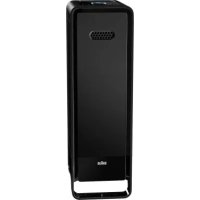
Scan & Clean BFD104BE - Air purifier BRAUN - Free user manual and instructions
Find the device manual for free Scan & Clean BFD104BE BRAUN in PDF.


| Product Type | Air Purifier |
| Brand | Braun |
| Model | Scan & Clean BFD104BE |
| Power Supply | 220-240 V ~ 50 Hz |
| Power | 85 W |
| Recommended Room Volume | Up to 310 m³ |
| Filtration Stages | 4 stages: mesh pre-filter, washable ECO filter, ionizer, odor and VOC reduction filter |
| ECO Filter | Permanent, washable with water (every 3 months) |
| Odor and VOC Reduction Filter | Replacement every 6 months (ref. BRFV1E) |
| Ionizer | Built-in, enhances purification |
| Purification Levels | 4 adjustable levels |
| Smart Automatic Mode | Yes, adjusts speed according to air quality |
| Timer (Auto Shut-off) | 1, 2, 4 or 8 hours |
| Air Quality Indicator | 3 colors: blue (good), orange (medium), red (bad) |
| Cleaning/Replacement Reminders | Electronic indicators for ECO filter, VOC filter and particle detector |
| Particle Detector | Cleanable with a dry cotton swab (every 3 months) |
| Warranty | 3 years |
| Safety | Programmable automatic shut-off (timer), unplug before cleaning |
Frequently Asked Questions - Scan & Clean BFD104BE BRAUN
User questions about Scan & Clean BFD104BE BRAUN
0 question about this device. Answer the ones you know or ask your own.
Ask a new question about this device
Download the instructions for your Air purifier in PDF format for free! Find your manual Scan & Clean BFD104BE - BRAUN and take your electronic device back in hand. On this page are published all the documents necessary for the use of your device. Scan & Clean BFD104BE by BRAUN.
USER MANUAL Scan & Clean BFD104BE BRAUN
Certain trademarks used under license from
The Procter & Gamble Company or its affiliates,
sublicensed by De'Longhi Appliances Srl, Treviso, Italy.
The ECO filter uses patented ifD technology.
The IfD Trademark is used by Kaz Europe Srl under
License from Darwin Technology International
Kaz Europe Srl
A Helen of Troy company
Place Chauderon 18
CH-1003 Lausanne
Switzerland
© 2020, All rights reserved.
BFD104BE
P/N A003908R0

02DEC19

Made and
printed in China

Control panelComponents
Important safety instructions
Read through all the instructions before starting to use the appliance. Keep this manual in a safe place for future reference.
These instructions are also available on our website. Please visit www.hot-europe.com.
- This appliance must only be operated as instructed in this user manual.
- WARNING: Prior to cleaning or other user maintenance, the appliance must be disconnected from the mains supply.
- This appliance can be used by children aged from 8 years and above and persons with reduced physical, sensory or mental capabilities or lack of experience and knowledge if they have been given supervision or instruction concerning use of the appliance in a safe way and understand the hazards involved.
Children shall not play with the appliance. - Cleaning and user maintenance shall not be made by children without supervision.
- If the supply cord is damaged, it must be replaced by the manufacturer, its service agent or similarly qualified persons in order to avoid a hazard.
- This appliance requires regular cleaning. Refer to the CLEANING instructions provided.
- Do not expose the air purifier to rain, or use near water, in a bathroom, laundry area or other damp location.
- The air purifier must be used in an upright position.
- Do not allow foreign objects to enter air inlet or outlet grilles as this may cause electric shock or damage to the air purifier.
- Unwind the power cord completely. Failure to do so could cause overheating and possible fire hazard.
- Do not tug at the power cord to disconnect the plug. Do not touch the power cord with wet hands. Do not remove the power plug from the power socket while the product is in use.
- Do not use accessories, spare parts or components supplied by other manufacturers, and that are not designed for use with this appliance.
- Always switch the appliance off and disconnect the power plug from the power socket when the appliance is not in use or during transport.
- Do not use this appliance if it is damaged or shows any signs of possible damage or if it is not functioning properly. Disconnect the power plug from the power socket.
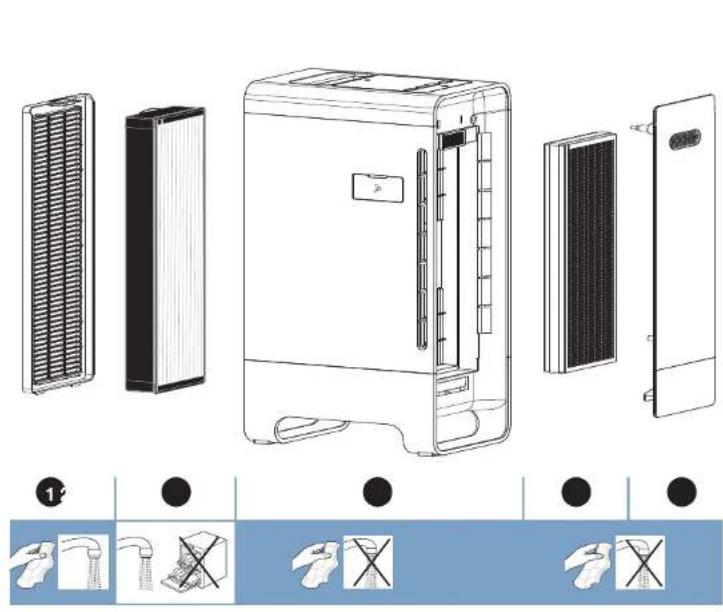
Components See page 2
Back cover with mesh pre-filter
2 ECO filter - permanent and washable
3 Air purifier unit with built-in ionizer
Odour & VOC filter
5 Front cover
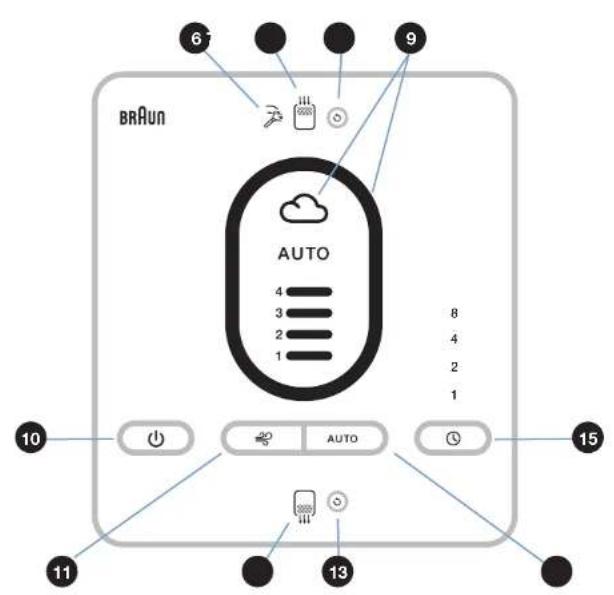
CONTROL PANEL
6 Clean particle sensor indicator
ECO filter clean reminder
8 Clean particle & ECO filter indicator reset button
9 Air quality indicator
10 Power button
11 Purification level button
Odour & VOC filter replacement reminder
Odour & VOC filter indicator reset button
Automatic smart mode button
19 Timer (auto shut-off) button
How it works
This air purifier incorporates a 4-stage cleaning system to help clean the air that passes through the filters in the unit.
Step 1: Mesh pre-filter 1 attached to the back grille, captures larger airborne particles.
Step 2: Permanent, washable ECO filter ② captures visible and microscopic airborne particles as small as 0.3 microns. ^1
Step 3: Electronic ionizer boosts the cleaning power.
Step 4: Odour & VOC filter traps odours and VOCs, including Formaldehyde.
English
Initial set-up
Select a firm, level, and flat location. For best airflow, locate the unit at least 1 meter away from any wall or furniture.
When operating, large volumes of air are drawn toward the air purifier. Surrounding areas should be cleaned and/or vacuumed frequently to prevent build-up of dust and other contaminants. This may also help to prolong the life of the filter. If the unit is placed on a light colored carpet, a small mat or rug should be used underneath to prevent permanent staining. This is especially important in homes with contamination from smoking or fireplaces.
Ensure the front of the unit faces away from the closest wall or furniture.
Ensure no grilles are blocked.
Ensure the air purifier is unplugged from the power outlet before setting up the filters.
ECO filter set-up
The ECO filter has been installed in the air purifier. No further set-up is needed for the ECO filter before first operation.
Odour & VOC filter set-up
CAUTION: POWER OFF the air cleaner, but leave the unit plugged in to electrical outlet. Wait 60 seconds before removing the rear grille to check the filters.
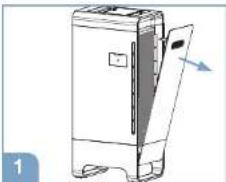
Remove the front cover from the air purifier.
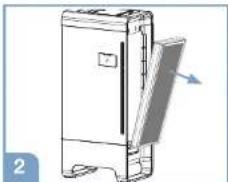
Take the VOC filter out of the unit.
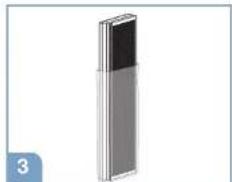
Remove the packaging from the filter.
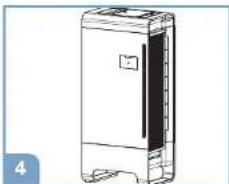
Install the filter back into the air purifier.
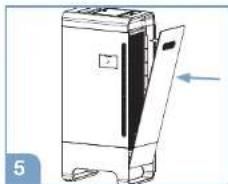
Return the front cover to its original place.
Proceed to the operation section after all filters are installed.
Operation
Note: portable air purifiers are more effective in rooms where all doors and windows are closed. Ensure the air purifier is plugged into a working electrical outlet. Press the power button (U) to turn on. The unit will start in the (Auto mode and will adjust the level depending on the air quality. The unit will remain in Auto mode until another cleaning level is chosen.
Purification function

Purification level button
Once the unit is powered on, use the purification level button ( select the air cleaning level. Model BFD104BE has 4 different cleaning levels.
Continue to press the button to cycle through cleaning levels to reach the desired setting. The LED lights will illuminate the chosen setting as you change the cleaning levels.
AutomaticsmartmodeAUTO
Automaticsmartmode
Press the automatic smart mode button (A) and the air purifier will enter the Auto mode. The fan speed is automatically adjusted depending on the air quality indicator.
For example: when the air quality sensor detects an increase of airborne particles or a higher concentration of odours, the system will adjust to high speed and the air quality indicator ( ) change to amber or red. When the air quality indicator shows the air is cleaner, the system will run speed.
Timer function
Timer (auto shut-off) I
Push the timer button ( ) if you would like your air purifier to run and then automatically shut-off after a certain amount of time.
Model BFD104BE features a 1, 2, 4 & 8 hour timer.
Electronic filter clean/replacement reminders

Electronic filter indicators
When it is time to clean the filters, the indicator light will illuminate. When this light illuminates, you will need to clean the ECO filter ( ) (see filter cleaning instructions on page 8-10) or replace the odour & VOC filter ( )
Depending on operating conditions, the ECO filter should be cleaned once every 3 months and the odour & VOC filter should be replaced every 6 months. After you have cleaned or replaced the filters, you will need to reset the electronic filter indicator by pressing the reset button (O). See instructions below.
Reset the electronic filter indicator
After the ECO filter and odour & VOC filter have been cleaned/replaced and reinstalled to the unit, plug the unit into the power outlet, with the unit in power off ( mode. When the unit is off, press and hold the corresponding filter reset button for 2 seconds.
The filter indicator will flash twice and shut off indicating the check filter alert has been reset.
The indicator light will no longer be illuminated.
The cleaning intervals are intended as guidelines only. Performance of any filter media is dependent upon the concentration of contaminants going through the system. High concentrations of contaminants such as dust, pel dander and smoke particles will reduce the useful performance of the filter and they may need to be cleaned or replaced more frequently.
It is recommended that you periodically check the filters.
Air quality indicator

The air quality indicator represents the air quality in the room detected by the sensors. The blue color indicates that the air quality in the room has a lower level of contaminants, the red color indicates it has a higher level of contaminants. When the unit is first turned on, the amber color indicates an increased level of contaminants, and the red color indicates a higher level of contaminants, and the air quality indicator will run between blue, amber and red for 30 seconds and stop at the respective color based on the air quality detected by the sensors.
Particle sensor clean reminder

When the particle sensor indicator light illuminates, you will need to clean the particle sensor (see sensor cleaning instructions on page 12).
The particle sensor should be cleaned every 3 months to optimize performance. After you have cleaned the sensor, you will need to reset the indicator by pressing the reset button ( ) twice in 1 second.
Cleaning the ECO filter
Ensure that the air purifier is unplugged from the wall outlet before cleaning the filter.
The ECO filter should be cleaned approximately once every 3 months.
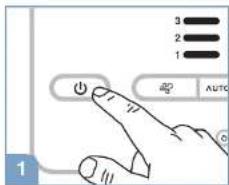
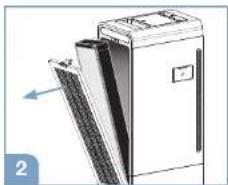
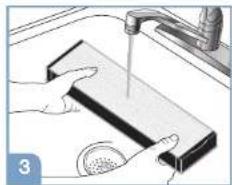
the air purifier.
Remove the ECO filter. Turn the power switch off and clean tap water.
If the filter still appears dirty, follow step 4-7. Otherwise proceed to "Drying" section. DO NOT leave filter in water for more than 5 minutes.
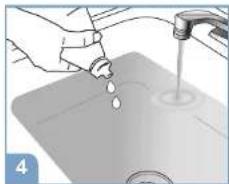
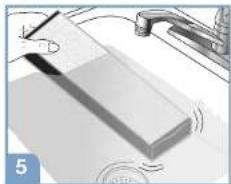
Fill a sink with lukewarm water and add a few drops of mild dish soap.
Gently swish the filter in the soap solution to clean.
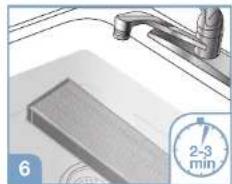
Soak the filter for 2-3 minutes. DO NOT leave filter in water for more than 5 minutes.
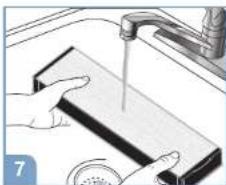
Rinse the filter with clean tap water.
Note that the filter may still be discolored even after washing. This is normal staining that occurs and will not affect performance.
Drying the ECO filter
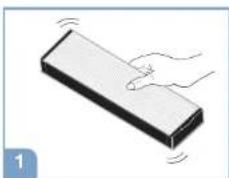
Shake the filter to remove any excess water.
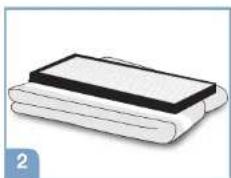
Place the filter on a towel.
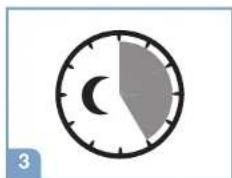
Allow the ECO filter to dry for a few hours or overnight.
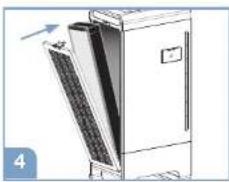
When the ECO filter is completely dry, place back into the air purifier and return the rear cover to its original place.
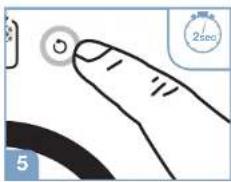
Plug the unit into the power outlet. When the unit is off, press and hold the ECO filter reset button for 2 seconds. The filter indicator will flash twice and shut off.
CAUTION:
NEVER place a wet ECO filter in your air purifier.
DO NOT place the ECO filter in a dishwasher or subject it to other extreme hot water conditions.
DO NOT use any solvents, strong cleaning agents or flammable liquids to clean the ECO filter.
English
Cleaning & drying the mesh pre-filter
The pre-filter should be cleaned once every 3 months. The pre-filter does not have a separate electronic filter indicator and should be cleaned based on the ECO filter schedule.
CAUTION: Tum off the unit and wait 60 seconds before removing the grille to clean the filters.
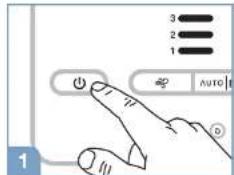
Turn the power off and unplug the air purifier.
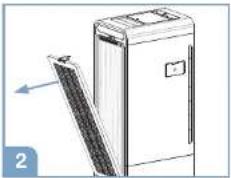
Remove the back cover with mesh pre-filter from the air purifier.
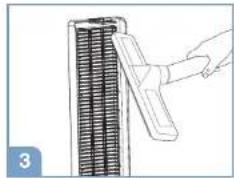
The pre-filter can be shaken over a trash can or vacuumed clean.
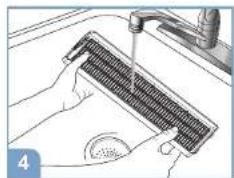
Alternatively, the pre-filter can be rinsed by hand under warm water to clean.
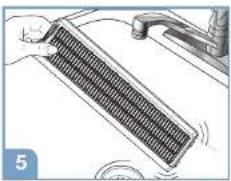
Shake the filter to remove any excess water.
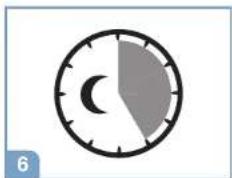
Allow the mesh pre-filter to dry for a few hours or overnight.
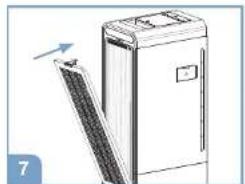
When the mesh-pro-filter is completely dry, place it back in the air purifier.
CAUTION:
NEVER place a wet mesh pre-filter in your air purifier.
- DO NOT place the mesh pre-filter in a dishwasher or subject it to other extreme hot water conditions.
- DO NOT use any solvents, strong cleaning agents or flammable liquids to clean the mesh pre-filter.
Replacing the odour & VOC filter
Ensure the air purifier is unplugged from the wall outlet before replacing the filter. The odour & VOC filter should be replaced once every 6 months to ensure its performance.
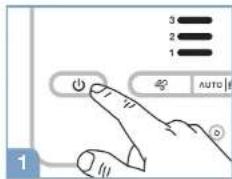
Turn the power off and unplug the air purifier.
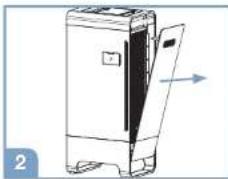
Remove the air purifier front cover.
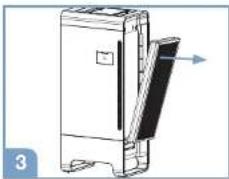
Remove the used odour & VOC filter.
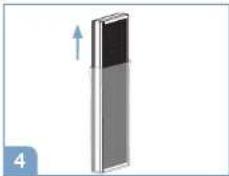
Remove plastic bag from the new odour & VOC filter.
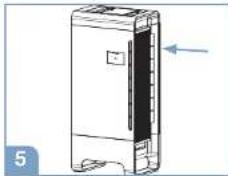
Install the new odour & VOC filter in the unit.
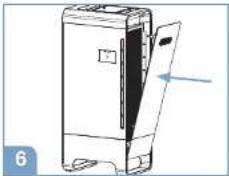
Return the front cover to its original place.
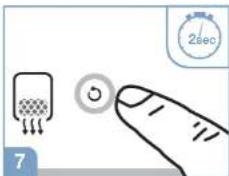
Plug the unit into the power outlet. When the unit is off, press and hold the alert reset button for 2 seconds. The filter indicator will flash twice and shut off.
Cleaning the particle sensor
Ensure that the air purifier is unplugged from the wall outlet before cleaning the particle sensor.
The particle sensor needs to be cleaned every 3 months to optimize performance. Follow the steps below to clean the sensor when the indicator is illuminated:
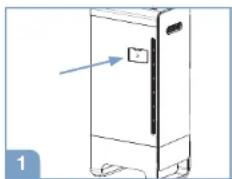
Find the brush icon at the side of air purifier.
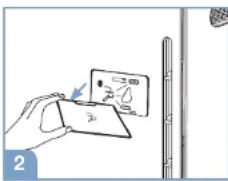
Remove the sensor cover.
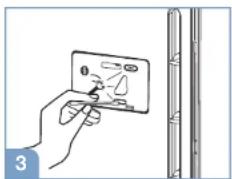
Use a dry cotton swab to clean the lens.
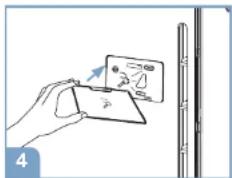
Return the sensor cover after cleaning.
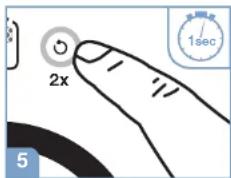
Reset the particle sensor indicator by pressing the reset button twice in 1 second.
DO NOT use any cleaners or liquids when cleaning the particle sensor.
Cleaning and storage
We recommend that you clean the air purifier at least once every 3 months and before extended storage. Unplug unit from outlet before cleaning. Use only a dry cloth to wipe the external surfaces of the air purifier.
Do not use water, wax polish, or any chemical solution.
If your air purifier will not be used for more than 30 days, we recommend:
- Remove the ECO filter and odour & VOC filter from the air purifier.
- Place them into an airtight plastic bag for storage.
Accessories and replacement filters
Odour & VOC filter replacement: BRFV1E
You may purchase the Braun odour & VOC filter from the retailer where you purchased the air purifier.
Troubleshooting
| Problem Solution | |
| My unit will not turn on. Please ensure the unit is plugged into a working outlet. | |
| My air purifier is starting to make noise and the air output is lower. | The filters may be dirty. High amounts of contaminants can block the pores in the filters and stop the air from moving through them. The filters should be cleaned/ replaced. |
| The electronic filter indicator light has not illuminated but the filter is dirty when checked. | The indicator runs on a timer. When the air has more particles than average, the filter may capture airborne particles faster than indicated on the display. The indicator is used as a guideline and can vary with individual environmental conditions. Clean or replace the filter as needed and reset the electronic filter indicator based on the instructions on page 7. |
| The air quality indicator is not changing even when the air becomes cleaner. | The particle sensor may be dirty. Please clean the sensor based on the instructions on page 12. |
| The electronic filter indicator alert is still illuminated after cleaning and replacing the filter. | The electronic filter indicator alert may not have been reset. Please hold the reset button for 2 seconds until the alert light flashes twice and shuts off. |
| The air quality seems to have no improvement after the air purifier has been in use. | For best results, the purifier should operate 24 hours a day when possible. This unit will be more effective when doors and windows are closed. |
| The odour & VOC filter is very dirty. The odour & VOC filter is not washable. It should be replaced every 6 months. | |
| What are VOCs? Volatile Organic Compounds (VOCs) are emitted from various solids and liquids such as paints, cleaning supplies, building materials, and permanent markers. Some of these compounds can have adverse short and long term effects and consistently have higher concentrations indoors than outside. (Source: http://www.epa.gov/laq/voc.html) | |
Disposal
This appliance complies with EU legislation 2012/19/EU on end of life recycling. Products showing the 'Crossed Through' wheeled bin symbol on either the rating label, gift box or instructions must be recycled separately from household waste at the end of their useful life.
Please DO NOT dispose of appliance in normal household waste. Your local appliance retailer may operate a "take-back" scheme when you are ready to purchase a replacement product, alternatively contact your local government authority for further help and advice on where to take your appliance for recycling.
Guarantee
Please read all instructions before attempting to use this device. Please retain the receipt as proof of and date of purchase. The receipt must be presented when making any claim within the relevant guarantee period. Any claim under the guarantee will not be valid without a proof of purchase.
Your device is guaranteed for three Years (3 Years) from date of purchase.
This guarantee covers defects in materials or workmanship that occur under normal use; defective devices meeting these criteria will be replaced free of charge.
The guarantee DOES NOT cover defects or damage resulting from abuse or failure to follow the user instructions. The guarantee becomes void if the device is opened, tampered with or used with other parts or accessories, or if repairs are undertaken by unauthorised persons.
Accessories and consumables are excluded from any warranty.
For support requests, please visit
www.hot-europe.com/support or find service contact information at the end of this owner's manual. This Guarantee is applicable to Europe, Russia, Middle East and Africa only.
UK Only: This does not affect your consumer statutory rights.
The LOT and SN of your device are printed on the rating label on the packaging of the product.
Condition of purchase
As condition of purchase the purchaser assumes responsibility for the correct use and care of this product according to these user instructions. The purchaser or user must himself or herself decide when and for how long this product is in use.
WARNING: IF PROBLEMS ARE WITH THIS PRODUCT, PLEASE OBSERVE THE INSTRUCTIONS IN THE GUARantee CONDITIONS. DO NOT ATTEMPT TO OPEN OR REPAIR THE PRODUCT YOURSELF, AS THIS COULD LEAD TO TERMINATION OF THE GUARantee AND CAUSE DAMAGE TO PERSONS AND PROPERTY.
This product carries the CE mark and is manufactured in conformity with the Electromagnetic Directive 2014/30/EU, the Low Voltage Directive 2014/35/EU and the RoHS Directive 2011/65/EU.
Technical modifications reserved
BFD104BE
220-240V -50Hz
85W
Supplementary information:
In a room with up to 310m^3 the air purifier BFD104BE can filter out at least 99.9% of microscopic allergens as small as 0.3 microns within 60 minutes.
from the air that passes trough the filter
Support contact numbers
United Kingdom/Northern Ireland
+44 (0) 207 949 0115
France
+33(0)185148095
Germany
Creative Department Artwork Specifications
Brand: Braun
Category: Air Purifier
Model: BFD104BE
Artwork Part #: A003908RO
Die Line Part #: N/A
Subject: Owner's Manual
Region: EMEA
Flat Size: MM: W296 x H210
Folded Size: MM: W148 x H210
Scale: 1/1
Material: 50# matte text inside
80# gloss text cover
Page Count: 40
Revision: 5
02DEC19
Date: 02D
Release Date: 12DEC19
Re-release Date:
Colors:
Dielines (Do not print) Spot Colors
Cyan 0%
Magenta 0%
Yellow 0 %
Black P 100% 6
PMS 645C
PMS XXXX





Special Instructions:
Quality Requirement of Artwork and Quality Clarification Process of Artwork Printing: Meet Eng-QS-06&02
Helen of Troy
Creative Services
Marlborough, MA 01752, USA
+15084907000