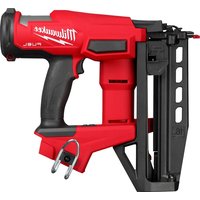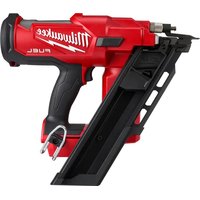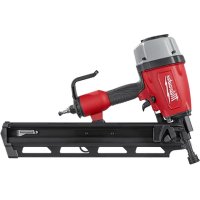
720020 - Stapler MILWAUKEE - Free user manual and instructions
Find the device manual for free 720020 MILWAUKEE in PDF.


| Product Type | Pneumatic Nailer |
| Brand | Milwaukee |
| Model | 7200-20 |
| Operating Pressure | 4.8 - 8.3 BAR |
| Air Supply | Compressed Air (max 13.8 BAR) |
| Fastener Type | 20°-22° angled nails, diameter 2.9-3.8 mm, length 50.8-88.9 mm |
| Magazine Capacity | 64-72 nails |
| Air Consumption | 4.53 L/cycle at 6.9 BAR |
| Quick Coupler | 3/8" NPT |
| Approximate Weight | 2.5 kg |
| Approximate Dimensions (L x W x H) | 300 x 100 x 250 mm |
| Actuation Modes | Sequential and Contact (selectable) |
| Depth Adjustment | Integrated dial |
| Exhaust Deflector | Adjustable |
| Belt Hook | Removable, adjustable |
| Rubber Pad | Removable and replaceable |
| Maintenance | Daily lubrication (pneumatic tool oil) |
| Cleaning | Damp cloth, mild soap |
| Safety | Anti-start trigger, contact element, reload indicator |
| Operating Temperature | -18°C to 50°C |
| Warranty | According to manufacturer's terms |
Frequently Asked Questions - 720020 MILWAUKEE
User questions about 720020 MILWAUKEE
0 question about this device. Answer the ones you know or ask your own.
Ask a new question about this device
Download the instructions for your Stapler in PDF format for free! Find your manual 720020 - MILWAUKEE and take your electronic device back in hand. On this page are published all the documents necessary for the use of your device. 720020 by MILWAUKEE.
USER MANUAL 720020 MILWAUKEE
natural_image
Technical line drawing of a precision tool assembly (no text or symbols)Cat. No. / No de cat.
7200-20
WARNING To reduce the risk of injury, user must read and understand operator's manual.
| GENERAL SAFETY INSTRUCTIONS | |
| ▲DANGER | Important safety instructions.Save these instructions pertaining to a risk of injury or death. |
| ▲WARNING | When using tools, basic precautions should always be followed, including the following:GENERAL |
| •To reduce the risk of injury, read all instructions before using the tool.WORK AREA | |
| •Keep the work area clean and well lighted. Cluttered benches and dark areas increase the risk of injury.•Do not operate the tool in explosive atmospheres, such as in the presence of flammable liquids gases, or dust. The tool is able to create sparks resulting in the ignition of the dust or fumes.•Keep bystanders, children, and visitors away while operating the tool. Distractions are able to result in the loss of control of the tool.•Know what is behind your workpiece. A fastener could travel through the workpiece and out the other side, striking a bystander and causing serious injury. ▲DANGER Avoid performing operations where the fastener may contact hidden wiring. Contact with a "live" wire will make exposed metal parts of the tool "live" and shock the operator, resulting in serious injury or death. Contact a qualified electrician to ensure a safe work environment exists.PERSONAL SAFETY | |
| •Stay alert. Watch what you are doing and use common sense when operating the tool. Do not use the tool while tired or under the influence of drugs, alcohol, or medication. A moment of inattention while operating the tool increases the risk of injury to persons.•Dress properly. Do not wear loose clothing or jewelry. Contain long hair. Keep hair, clothing, and gloves away from moving parts. Loose clothes, jewelry, or long hair increases the risk of injury to persons as a result of being caught in moving parts.•Avoid unintentional starting. Remove finger from the trigger when not driving fasteners. Be sure the trigger is not pulled before connecting to the air supply. Do not carry the tool with your finger on the trigger or connect the tool to the air supply with the trigger pulled.•Do not overreach. Keep proper footing and balance at all times. Proper footing and balance enables better control of the tool in unexpected situations.•Use safety equipment. A dust mask, non-skid safety shoes and a hard hat used for appropriate conditions will reduce personal injuries.•The operator and other people in the work area must wear eye protection in accordance with ANSI Z87.1. Eye protection does not fit all operators in the same way. Make sure the eye protection chosen has side shields or provides protection from flying debris both from the front and sides. The employer is responsible for enforcing the use of eye protection by the operator and other people in the work area. When required, wear head protection in accordance with ANSI Z89.1.•Always wear ear protectors when using the tool for extended periods. Prolonged exposure to high intensity noise is able to cause hearing loss.•Do not carry an air hose or a tool connected to an air hose when climbing ladders, rigging or scaffolding. | |
- Do not attach an air hose or tool connected to an air hose to your body when working at elevated heights. Attach the hose to the structure to reduce the risk of loss of balance and injury if the hose shifts. - Always assume that the tool contains fasteners. Careless handling of the tool can result in unexpected firing of fasteners and personal injury. - Do not point the tool towards yourself or anyone nearby. Unexpected triggering will discharge the fastener causing an injury. - Do not nail on top of another nail. This can cause the nail to be deflected and hit someone, or cause the tool to react and result in a risk of injury to persons.
TOOL USE AND CARE
- Use clamps or another practical way to secure and support the workpiece to a stable platform. Holding the work by hand or against the body is unstable and is able to lead to loss of control. - Do not force the tool. Use the correct tool for the application. The correct tool will do the job better and safer at the rate for which the tool is designed. - Do not use the tool if the trigger does not turn the tool on or off. Any tool that cannot be controlled with the trigger is dangerous and must be repaired. - Disconnect the tool from the air source, then empty the magazine before making adjustments, doing tool maintenance, clearing jams, touching the workpiece contact or tool is outside your supervision or control. Verify the tool is empty and there is no residual pressure in the tool prior to performing these actions. Such precautionary measures reduce the risk of injury to persons.
- Disconnect the tool from the power source when the fastener jams in the tool. While removing a jammed fastener, the tool may be accidentally activated if it is plugged in.
- Use caution while removing a jammed fastener. The mechanism may be under compression and the fastener may be forcefully discharged while attempting to free a jammed condition.
- Store idle tools out of reach of children and other untrained persons. A tool is dangerous in the hands of untrained users.
- Maintain the tool with care. A properly maintained tool reduces the risk of injury. If the tool has been dropped, received a sharp blow, been run over, etc., perform the "Required Daily Testing" before further use. - Check for misalignment or binding of moving parts, breakage of parts, and any other condition that affects the tool's operation. If damaged, have the tool serviced before using. Many accidents are caused by poorly maintained tools. There is an increased risk of the tool bursting if the tool is damaged.
- Use only those fasteners specifically recommended. Fasteners not identified for use with this tool by the tool manufacturer are able to result in a risk of injury to persons or tool damage when used in this tool. See the "Specifications" section for fastener requirements. - Do not use this tool for fastening electrical cables. It is not designed for electric cable installation and may damage the insulation of electric cables thereby causing electric shock or fire hazards.
- Use only accessories that are identified by the manufacturer for the specific tool model. Use of an accessory not intended for use with the specific tool model, increases the risk of injury to persons. - Do not attempt to modify tool or defeat safety measures. Serious injury could occur.
SERVICE
•a) Tool service must be performed only by qualified repair personnel.
b) The wrench provided is for tightening screws during "Required Daily Testing".
c) Use only identical replacement parts recommended by the manufacturer.
- Use only the air tool lubricants supplied with the tool or specified by the manufacturer. Do not use other lubricants; they will damage the tool. See "Accessories" for a list of recommended air tool lubricants.
AIR SOURCE
▲DANGER Do not use oxygen, combustible gases or bottled gases as a power source for this tool. The tool will explode and cause death or serious injury.
- Never connect to an air source that is capable of exceeding 200 psi. Over pressurizing the tool may result in bursting, abnormal operation, breakage of the tool or serious injury to persons. Use only clean, dry, regulated compressed air at the rated pressure or within the rated pressure range as marked on the tool. Prior to using the tool, always verify that the air source has been adjusted to the rated air pressure or within the rated air-pressure range. Air compressors should comply with ANSI B19.3.
SPECIFIC SAFETY INSTRUCTIONS FOR NAILERS
• Use air supply hoses with a minimum working pressure rating of 200 psi.
- Use pressure regulators to limit the air pressure supplied to the tool. Set the regulators to no more than 120 psi.
- Install only hose couplings that will allow all pressure to be removed from tool when disconnected from the source. If the wrong fitting is installed pressure may remain in the tool after disconnection, allowing it to drive a fastener, possibly causing injury. - Prior to each use, check workpiece contact and trigger for correct operation. Do not disassemble or clamp parts of the workpiece contact, trigger, or driving mechanism. This will cause unexpected actuation, resulting in serious injury.
- Never point the discharge area of the tool at any body parts or at other people. Always assume the tool is loaded and capable of driving a fastener. - Do not actuate the tool unless the tool is placed firmly against the workpiece. If the tool is not in contact with the workpiece, the fastener may be deflected away from your target.
- Do not engage in horseplay. The discharged fasteners are projectiles capable of causing serious injury. - When using the tool, ensure the workpiece contact is securely placed on the workpiece. Hold the tool firmly and be prepared for the recoil.
- Do not remove, tamper with, or otherwise cause the tool operating controls to become inoperable. This will cause unexpected actuation, resulting in serious injury. - Do not operate a tool if any portion of the tool operating controls is inoperable, disconnected, altered, or not working properly. This will cause unexpected actuation, resulting in serious injury.
•Always keep hands and body away from discharge area of the tool. Never attempt to clear a jammed workpiece contact by grasping the discharge area of the tool. Fasteners discharged from tool can cause serious injury if they contact hands or body.
- Do not drive fasteners close to the edge of the workpiece. Fasteners can slip off corners and edges or penetrate through thin material, making them projectiles capable of causing serious injury. - Use the tool only for the intended purpose. Do not abuse the tool. Do not use as a hammer, stamp or engrave information onto parts, drop or impact the tool or otherwise apply excess force to the tool in use. Do not mount the tool to stands or modify it for stationary use. - Do not carry tool by the air hose. Only carry the tool by the handle with your finger off of the trigger. - Do not use this tool without the safety warning label in place. If the label is damaged or missing, contact MILWAUKEE for a free replacement.
FUNCTIONAL DESCRIPTION
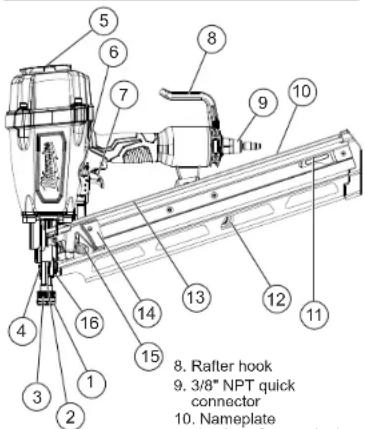
- No-mar pad
- Toe-nail claw
(not shown) - Workpiece contact
- Depth of drive
adjustment - Exhaust deflector
- Actuation selector
-
Trigger
-
Nail stop tab
- Extra no-mar
pad storage
(on back of - Warning label
(on top of magazine)
14 Pusher - Pusher release button
-
Nail guide
-
Rafter hook
-
3/8" NPT quick
connector
- Nameplate
(on top of magazine)
SPECIFICATIONS
Cat. No....7200-20
Operating Pressure ....min. 70 PSI
max. 120 PSI
Fastener Length min. 2"
max. 3.5"
Collation Angle.... 20°-22°
Fastener Size (Diameter) min. 0.113"
max. 0.148"
Air Consumption....0.16 ft ^3 /cycle at 100 PSI
Air Inlet 3/8" NPT
Magazine Capacity 64-72 nails
Recommended Ambient
Operating Temperature....0°F to 125°F
SYMBOLOGY

operator's manual

eye protection

ands away

gle Sequential Actuation

Contact (Bump) Actuation
TERMINOLOGY
Actuate
To cause movement of the tool component(s) intended to drive a fastener.
Actuation System
The use of a trigger, workpiece contact and/or other operating control, separately or in some combination or sequence, to actuate the tool.
- Single sequential actuation - An actuation system that requires the workpiece contact and then the trigger to be activated in a specific sequence to drive a fastener. Additional actuation can occur when the trigger is released and reactivated.
- Contact actuation - An actuation system that requires the workpiece contact and the trigger to be activated in any sequence to drive a fastener. Additional actuation can occur when either the workpiece contact or the trigger is released and reactivated. - Selective actuation - An actuation system that allows selection of actuation systems: single sequential actuation or contact actuation.
Fastener
A staple, pin, brad, nail, or other fastening device which is designed and manufactured for use in the tools.
Jam
An obstruction in the feed or drive areas of the tool.
Workpiece Contact
An operating control element on the tool intended to be activated by the workpiece to be fastened.
ASSEMBLY
⚠WARNING Disconnect the air supply from the tool and remove fastener strips before changing or removing accessories. Only use accessories specifically recommended for this tool by the manufacturer. Others may be hazardous.
The operator and other people in the work area must wear eye protection in accordance with ANSI Z87.1. Eye protection does not fit all operators in the same way. Make sure the eye protection chosen has side shields or provides protection from flying debris both from the front and sides.
No-Mar Pad
The No-Mar Pad on the nose of the tool protects the workpiece when the workpiece contact is compressed during actuation. The pad can be removed and replaced.
-
Before removing or replacing no-mar pads, disconnect the air supply from the tool and remove fastener strips.
-
To remove the pad, pull the pad open and away from the toe-nailing claw.
-
Storage for an additional pad is available on the magazine of the tool.
-
To replace the pad, fit it into place over the points of the claw.
Exhaust
The exhaust cap can be adjusted to direct the exhaust as desired. Turn the exhaust cap to the desired locking position.
Removing and Installing the Rafter Hook
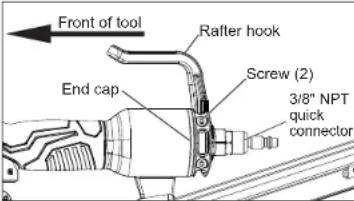
To remove the hook:
-
Rotate the hook until it snaps into one of the preset positions.
-
Remove the two mounting screws using the wrench provided.
-
Pull the hook off the rear of the tool.
To install the hook:
-
Align the spring-loaded post on the hook with a slot on the rear of the tool.
-
Slide the hook onto the tool, making sure the hook points toward the front of the tool. Push the hook up against the end cap.
-
Install the two mounting screws using the wrench provided. Tighten securely.
-
Verify that the hook is installed correctly by firmly pulling the hook toward the air inlet. It must not move.
Lubricating the Tool
Lubricate the tool with air tool lubricant before connecting the air supply. Under low use, lubricate once a day. Under heavy use, lubricate twice a day. Use only a few drops of oil at a time. Using too much oil will cause it to collect in the tool and be noticeable in the exhaust. Do not use detergent oil, WD-40, transmission fluid, motor oil, or other lubricants not specifically designated as air tool lubricant. These lubricants will cause accelerated wear to the seals, o-rings and bumpers in the tool, resulting in poor tool performance and frequent maintenance.
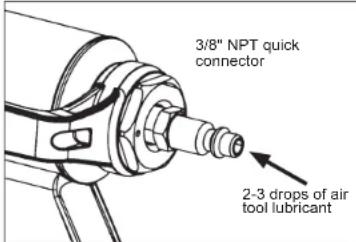
Connecting the Air Supply
▲DANGER Do not use oxygen, combustible gases or bottled gases as a power source for this tool. The tool will explode and cause death or serious injury.
△WARNING Always use a coupling that discharges all the compressed air in the tool at the time the fitting or hose coupling is disconnected. Using a coupling that does not discharge the compressed air could cause unintended operation and serious injury.
Use only clean, dry compressed air with a maximum pressure of 200 psi. Before connecting the tool to the air supply, check the air compressor regulator gauge to be sure it is functioning properly, with a range between 70-120 psi. Air pressure higher than 120 psi could cause injury and property damage. The correct pressure is the lowest pressure that will do the job. To connect the air supply:
- Remove the plastic plug from the quick connector.
-
Lubricate the quick connector with 2-3 drops air tool lubricant.
-
Snap the air hose onto the quick connector.
- Check for air leakage.
NOTE: Use only a 3/8" NPT quick connector. To improve the seal between the connector and the tool, and to help protect against oxidation, apply a PTFE tape or paste to the connector threads before insertion.
Installing Fastener Strips
⚠WARNING Always point the tool away from yourself and others when installing fasteners. Failure to do so could result in Injury. Always make sure the tool's magazine is EMPTY before connecting to the air supply. The tool may actuate when the tool is first connected to the air supply. Always connect the tool to the air supply before loading nails to prevent injury from unintended actuation.
Never install fasteners with the workpiece contact or trigger activated. Failure to do so could result in injury.
Use only recommended fasteners of the correct size, length, collation angle and head type, as indicated on the tool's nameplate. Refer to the "Accessories" section for information on recommended fasteners. Other fasteners could result in tool malfunction, leading to injury.
-
Verify that the magazine is empty and then connect the air supply to the tool.
-
Lay the tool on its side and point the nose of the tool away from yourself and others.
-
Feed fastener strips into the magazine and over the nail stop tab. Be sure the point of the fasteners is pointed downward.
NOTE: Use only recommended fasteners of the correct size, length, collation angle and head type as indicated on the tool's nameplate.
-
Slide the pusher to the rear of the magazine and over the nail stop tab.
-
Gently allow the pusher to slide forward, pushing the fasteners toward the driving mechanism. The pusher will stop when it rests against the end of the fastener strip.
NOTE: The fasteners must be aligned with the nose of the tool for the fasteners to be installed correctly.
Removing Fastener Strips
⚠ WARNING To avoid serious injury, disconnect the tool from the air supply before removing fastener strips or clearing a jammed fastener.
Keep fingers clear of fastener track of magazine. Pusher could pinch fingers, causing injury.
-
Lay the tool on its side and point the nose of the tool away from yourself and others.
-
Disconnect the air supply from the tool.
-
To remove fasteners, press the pusher release button on the pusher and gently slide the pusher forward toward the driving mechanism.
-
Slide the nails back until they stop.
-
Press down on the fastener stop tab near the end of the magazine and slide the fasteners over the tab.
-
Remove fastener strip from the tool.
-
Reload according to "Installing Fastener Strips".
Clearing a Jammed Fastener
Most jams are caused by a fastener or part of a fastener wedging between the driver blade and the nail guide. Fastener strips with an incorrect collation angle or the wrong fastener type (such as clipped head fasteners) may cause continuous jamming. To clear the lam:
to clear the jam.
-
Lay the tool on its side and point the nose of the tool away from yourself and others.
-
Disconnect the air supply from the tool and remove fastener strip.
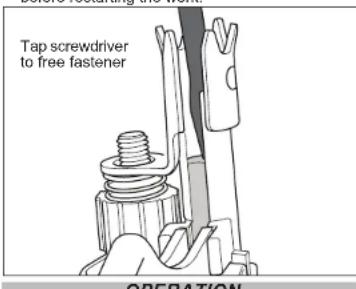
- Insert a screwdriver into the end of the nail guide. The tip of the screwdriver should contact the tip of the driver blade.
- Tap the screwdriver gently with a hammer. The screwdriver will push the driver blade back, freeing the jam.
- Remove the fastener and other debris (use needle-nose pliers if necessary).
- Follow the steps under "Required Daily Testing" before restarting the work.
⚠WARNING To reduce the risk of injury, the operator and other people in the work area must wear eye protection in accordance with ANSI Z87.1. Eye protection does not fit all operators in the same way. Make sure the eye protection chosen has side shields or provides protection from flying debris both from the front and sides. The employer is responsible for enforcing the use of eye protection by the operator and other people in the work area. When required, wear head protection in accordance with ANSI Z89.1.
Selecting Actuation Mode
The selectable trigger can be set to either Single Sequential Actuation mode or Contact Actuation mode.
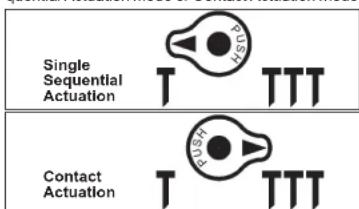
- Push in and hold the Actuation Selector.
- Rotate the Selector to Single Sequential Actuation (T) or Contact Actuation (TTT).
- Release the Actuation Selector. NOTE: Be sure the selector is snapped into position. Understand the actuation process before use.
⚠WARNING To reduce the risk of injury to yourself and others, test the tool before beginning work each day according to the "Required Daily Testing" section. Do not use the tool unless you thoroughly understand the actuation operation selected. Disconnect the air supply from the tool and remove fastener strips before leaving the work area, moving the tool to another location, or handing the tool to another person. Failure to do so could result in serious injury. Do not carry an air hose or a tool connected to an air hose when climbing ladders, rigging o scaffolding. Do not attach an air hose or too connected to an air hose to your body when working at elevated heights. Attach the hose to the structure to reduce the risk of loss of balance and injury if the hose shifts. Do not use this tool for fastening electrical cables. It is not designed for electric cable installation and may damage the insulation of electric cables thereby causing electric shock or fire hazards.
Single Sequential Actuation Operation 1. Grip the handle firmly.
2. Position the nose of the tool on the work surface.
3. Push the tool against the work surface, compressing the workpiece contact.
4. Pull the trigger to drive the fastener. The tool will recoil away from the workpiece as the fastener is driven.
5. Remove your finger from the trigger and remove the tool from the workpiece.
NOTE: If the tool is not removed from the workpiece, another fastener may be driven if the trigger is pulled again.
Contact Actuation Operation
- Grip the handle firmly.
- Pull and hold the trigger.
- Push the tool against the work surface, compressing the workpiece contact to drive the fastener. The tool will recoil away from the workpiece as the fastener is driven.
NOTE: Contact Actuation will also work by first compressing the workpiece contact, then pulling the trigger.
Reload Indicator
To indicate that the magazine is almost empty of fasteners (about 4-5 left), the workpiece contact will not compress, preventing operation under usual pressure. Install more fasteners to continue working.
WARNING NEVER wedge or hold back the workpiece contact mechanism during operation of the tool. Never attempt to clear a jammed workpiece contact by grasping the discharge area of the tool. Doing so could result in serious injury.
To avoid serious injury, do not attempt to prevent the recoil by holding the tool too firmly against the work. Keep face and body away from the tool. During normal use, the tool will recoil immediately after driving a fastener. This is a normal function of the tool. Restriction to the recoil can result in a second fastener being driven when the tool is in Contact Actuation mode. Grip the handle firmly, let the tool do the work, and do not place a second hand on top of the tool or near exhaust.
Setting the Air Pressure and Depth of Drive The amount of air pressure required will depend on the size of the fastener and the workpiece material. △WARNING Know what is behind your workpiece. A fastener could travel through the workpiece and out the other side, striking a bystander and causing serious injury. Lower the air pressure and/or depth of drive to prevent the fastener from being pushed all the way through the workpiece.
- Lay the tool on its side and point the nose of the tool away from yourself and others.
- Disconnect the air supply from the tool and remove fastener strip.
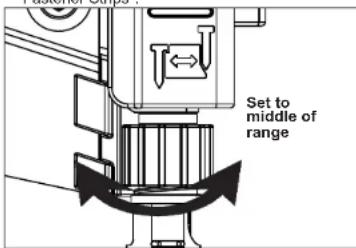
- Set the depth of drive adjustment to the middle of its range.
- Reload fastener strip according to "Installing Fastener Strips".
- Begin testing the depth of drive by driving a test fastener into the same type of workpiece material used for the actual job using an air pressure of 90-95 psi.
- Raise or lower the air pressure to find the lowest setting that will drive the fastener consistently. Do not exceed 120 psi.
NOTE: It may be possible to achieve the desired depth with air pressure adjustments alone. If finer adjustments are needed, use the depth of drive adjustment. - To fine-tune the depth of drive, disconnect the air supply and lay the tool on its side and point the nose of the tool away from yourself and others. Remove fastener strip. Turn the depth selector left or right to increase or decrease the driving depth.
- Reload fastener strip according to "Installing Fastener Strips".
- Drive a test fastener and repeat step 7 and 8 until desired depth is reached.
⚠ WARNING To reduce the risk of injury to yourself and others, test the tool before beginning work each day or if the tool is dropped received a sharp blow, been run over, etc. Complete the following checklist IN ORDER. If the tool does not work as it should, contact a MILWAUKEE service facility immediately. Always point tool away from yourself and others. 1. Disconnect the air supply from the tool and remove fastener strip. 2. Check all screws, bolts, nuts, and pins on the tool. Any loose fasteners must be tightened.
- Pull back the fastener pusher on the magazine (to override the Reload Indicator) and press the workpiece contact against a workpiece. It must move smoothly.
- With the workpiece contact pressed against the workpiece, pull the trigger. It must move smoothly.
- Connect the air supply (at 70 psi) to the tool. DO NOT load a fastener strip.
- Select the Single Sequential Actuation Operation. Air must not leak from the tool.
Without pulling the trigger, pull back the fastener pusher on the magazine (to override the Reload Indicator) and press the workpiece contact against a workpiece. The tool must not operate.
Holding the workpiece contact away from the workpiece, pull back the fastener pusher on the magazine (to override the Reload Indicator). Pull and hold the trigger for 5 seconds. The tool must not operate.
Continue to pull and hold the trigger and push the workpiece contact against a workpiece. The tool must not operate.
Without pulling the trigger, pull back the fastener pusher on the magazine (to override the Reload Indicator) and press the workpiece contact against a workpiece. Pull the trigger. The tool must operate. Release the trigger. The driver must move up. - Select the Contact Actuation Operation. Holding the workpiece contact away from the workpiece, pull back the fastener pusher on the magazine (to override the Reload indicator) and pull the trigger. The tool must not operate.
pull the trigger. The tool must not operate. Continue to pull and hold the trigger and push the workpiece contact against a workpiece. The tool must operate. - If all previous tests work properly, set the tool for your work. Select the operation and load fastener strips.
- Set the depth of drive according to the "Setting the Air Pressure and Depth of Drive" section.
- If all tests operate properly, the tool is ready for use. Repeat these tests before use each day or if the tool is dropped, received a sharp blow, been run over, jammed, etc.
WARNING To reduce the risk of injury, use only identical replacement parts recommended by the manufacturer. Tool service must be performed only by qualified repair personnel. Always wear safety goggles or glasses with side shields when servicing tools. Disconnect tool from air supply before servicing.
Clean dust and debris from tool vents. Keep tool handles clean, dry and free of oil or grease. Use only mild soap and a damp cloth to clean the tool, since certain cleaning agents and solvents are harmful to plastics and other parts. Some of these include gasoline, turpentine, lacquer thinner, paint thinner, chlorinated cleaning solvents, ammonia and household detergents containing ammonia. Never use flammable or combustible solvents around tools
Frequent, but not excessive, lubrication is required for best performance. Oil added through the air line connection will lubricate the internal parts. Do not use detergent oil, WD-40, transmission fluid, motor oil, or other lubricants not specifically designated as
MAINTENANCE
Cleaning
Lubrication
air tool lubricant. These lubricants will cause accelerated wear to the seals, o-rings and bumpers in the tool, resulting in poor tool performance and frequent maintenance.
Cold Weather Operation
For cold weather operation, near and below freezing the moisture in the air line may freeze and prevent tool operation. Use an air tool lubricant or permanent antifreeze as a cold weather lubricant in the air line. Do not store tools in a below-freezing environment. Ice or frost could form on the tools' operating valves and mechanisms, causing tool failure.
Air Supply-Pressure and Volume
Air volume is as important as air pressure. The air volume supplied to the tool may be inadequate because of undersized fittings and hoses, or from the effects of dirt and water in the system. Restricted air flow will prevent the tool from receiving an adequate volume of air, even though the pressure reading is high. The results will be slow operation or reduced driving power. Before evaluating tool problems for these symptoms, trace the air supply from the tool to the supply source for restrictive connectors, low points containing water and anything else that would prevent full volume flow of air to the tool.
ACCESSORIES
⚠WARNING Use only recommended accessories. Others may be hazardous.
For a complete listing of accessories, go online to www.milwaukeeetool.com or contact a distributor.
SERVICE - UNITED STATES
1-800-SAWDUST (1.800.729.3878)
Monday-Friday, 7:00 AM - 6:30 PM CST
or visit www.milwaukeeetool.com
Contact Corporate After Sales Service Technical Support with technical, service/repair, or warranty questions.
Email: metproductsupport@milwaukeeetool.com
Become a Heavy Duty Club Member at www.milwaukeeetool.com to receive important notifications regarding your tool purchases.
SERVICE - CANADA
Milwaukee Tool (Canada) Ltd 1.800.268.4015
Monday-Friday, 7:00 AM - 4:30 PM CST
or visit www.milwaukeeetool.ca
LIMITED WARRANTY USA & CANADA
Every MILWAUKEE air nailer - stapler is warranted to the original purchaser only to be free from defects in material and workmanship. Subject to certain exceptions. MILWAUKEE will repair or replace any part on an air nailer - stapler which, after examination, is determined by MILWAUKEE to be defective in material or workmanship for a period of five (5) years after the date of purchase. Return the air nailer - stapler to MILWAUKEE factory Service Center isolation of MILWAUKEE facilities and Service Center shall be carried out and not limited to the other. A copy of the proof of purchase should be included with the return product this warranty does not apply to damage that MILWAUKEE determines to be from repairs made or attempted by anyone other than MILWAUKEE authorized personnel, misuse, alterations, abuse, normal wear and tear, lack of maintenance, or accidents. Normal Wear: air nallers - staplers, like all power tools, these products had periodic parts replacement and service to achieve best performance. If you do not cover repair when normal use has exhausted the life of a part including, but not limited to o-rings, seals, bumps and driver blades.
Warranty Registration is not necessary to obtain the applicable warranty on a MILWAUKEE product. The manufacturing date of the product will be used to determine the warranty period if no proof of purchase is provided at the time warranty service is requested.
ACCEPTANCE OF THE EXCLUSIVE REPAIR AND REPLACEMENT REMEDIES DESCRIBED HEREIN IS A CONDITION OF THE CONTRACT FOR THE PURCHASE OF EVERY MILWAUKEE PRODUCT. THIS STATE IS NOT AVAILABLE. ANY OTHER WRITTEN PURCHASE THE PRODUCT IN NO EVENT SHALL MILWAUKEE BE LIABLE FOR ANY INCIDENTAL, SPECIAL, CONSEQUENTIAL OR PUNITIVE DAMAGES, OR FOR ANY COSTS, ATTORNEY FEES, EXPENSES, LOSSES OR DELAYS ALLEGED TO BE AS A CONSEQUENCE OF ANY DAMAGE TO, FAILURE OF, OR DEFECT IN ANY OTHER WRITTEN PURCHASE. THIS STATE IS NOT ALLOWED FOR LOSS OF PROFITS. SOME STATES DO NOT ALLOW THE EXCLUSION OR LIMITATION OF INCIDENTAL OR CONSEQUENTIAL DAMAGES, SO THE ABOVE LIMITATION OR EXCLUSION MAY NOT APPLY TO YOU. THIS WARRANTY IS EXCLUSIVE AND IN LIEU WITHOUT ANY OTHER WRITTEN PURCHASE. THIS STATE IS NOT PERMITTED TO THE EXTENT PERMITTED BY LAW, MILWAUKEE DISCLAIMS ANY IMPLIED WARRANTIES, INCLUDING WITHOUT LIMITATION ANY IMPLIED WARRANTY OF MERCHANTABILITY OR FITNESS FOR A PARTICULAR USE OR PURPOSE; TO THE EXTENT SUCH WARRANTIES NOT PERMITTED BY LAW, SUCH IMPROVEMENTS ARE TO PREVENT THE ORDER OF THIS STATE. THIS EXPRESS WARRANTY AS DESCRIBED ABOVE. SOME STATES DO NOT ALLOW LIMITATIONS ON HOW LONG AN IMPLIED WARRANTY LASTS, SO THE ABOVE LIMITATION MAY NOT APPLY TO YOU. THIS WARRANTY GIVES YOU SPECIFIC LEGAL RIGHTS, ANY OTHER RIGHTS SHOULD HAVE OTHER RIGHTS WHICH VARY FROM STATE TO STATE.
This warranty applies to product sold in the U.S.A. and Canada only. Please consult the 'Service Center Search' In the Parts & Service section of MILWAUKEE's website www.milwaukeecol.com or call 1.800.SAWDUST (1.800.729.3878) to locate your nearest service facility for warranty and non-warranty service on air nailers - staplers.
INSTRUCTIONS D'ENTRETIEN GÉNÉRALES
Milwaukee Tool (Canada) Ltd
1.800.268.4015
Monday-Friday, 7:00 AM - 4:30 PM CST
www.milwaukeetool.ca
GARANTIE LIMITÉE - AUX ÉTATS-UNIS ET AU CANADA
Lunes a Viernes (9am a 6pm)
13135 West Lisbon Road
Brookfield, WI 53005 USA
58147100d6 07907900102Q-06(A)
05/20 Printed in Taiwan