GoAux 4 - Monitor KRK - Free user manual and instructions
Find the device manual for free GoAux 4 KRK in PDF.


User questions about GoAux 4 KRK
0 question about this device. Answer the ones you know or ask your own.
Ask a new question about this device
Download the instructions for your Monitor in PDF format for free! Find your manual GoAux 4 - KRK and take your electronic device back in hand. On this page are published all the documents necessary for the use of your device. GoAux 4 by KRK.
USER MANUAL GoAux 4 KRK
Thank you for purchasing your new KRK GoAux monitoring system. Countless pro engineers, producers, artists, and mixers from all genres—all over the world, have used KRK monitors to deliver award-winning productions globally. This monitoring system was engineered with over 30-years of innovation and experience in our state-of-the-art facility in Nashville, TN, USA, where we design and develop products that deliver a natural and balanced frequency response with low distortion and superior imaging.
IMPORTANT SAFETY INSTRUCTIONS FOLLOW
SAFETY INSTRUCTIONS
-
Read instructions - All the safety and operating instructions should be read before the product is operated.
-
Retain instructions - The safety and operating instructions should be retained for future reference
-
Heed Warnings - All warnings on the product and in the operating instructions should be adhered to.
-
Follow Instructions - All operating and use instructions should be followed.
-
Cleaning - Unplug this product from the wall outlet before cleaning. Do not use liquid cleaners or aerosol cleaners. Use a damp cloth for cleaning.
-
Attachments - Do not use attachments not recommended by the product manufacturer as they may cause hazards.
-
Water and Moisture - Do not use this product near water-for example, near a bathtub, washbowl, kitchen sink, or laundry tub; in a wet basement; or near a swimming pool; and the like.
-
Accessories - Do not place this product on an unstable cart, stand, tripod, bracket, or table. The product may fall, causing serious injury to a child or adult and serious damage to the product. Use only with a cart, stand, tripod, bracket, or table recommended by the manufacturer or sold with the product. Any mounting of the product should follow the manufacturer's instructions and should use a mounting accessory recommended by the manufacturer.
-
Cart - A product and cart combination should be moved with care. Quick stops, excessive force, and uneven surfaces may cause the product and cart combination to overturn.
-
Ventilation - Slots and openings in the cabinet are provided for ventilation to ensure reliable operation of the product and to protect it from overheating. These openings must not be blocked or covered. The openings should never be blocked by placing the product on a bed, sofa, rug, or other similar surface. This product should not be placed in a built-in installation such as a bookcase or rack unless proper ventilation is provided, or the manufacturer's instructions have been adhered to.
-
Power Sources - This product should be operated only from the type of power source indicated on the marking label.
-
Power-Cord Protection - Power-supply cords should be routed so that they are not likely to be walked on or pinched by items placed upon or against them, paying particular attention to cords at plugs, convenience receptacles, and the point where they exit from the product.
-
Mains Plug - Where the mains plug or an appliance coupler is used as the disconnect device, the disconnect device shall remain readily operable.
-
Lightning - For added protection for this product during a lightning storm, or when it is left unattended and unused for long periods of time, unplug it from the wall outlet and disconnect the antenna or cable system. This will prevent damage to the product due to lightning and power-line surges.
-
Overloading - Do not overload wall outlets, extension cords, or integral convenience receptacles as this can result in a risk of fire or electric shock.
-
Flame Sources - No naked flame sources, such as lighted candles, should be placed on the product.
-
Object and Liquid Entry - Never push objects of any kind into this product through openings as they may touch dangerous voltage points or short-out parts that could result in a fire or electric shock. Never spill liquid of any kind on the product.
-
Loudspeakers - Excessive sound pressure from loudspeakers can cause hearing loss.
-
Damage Requiring Service - Unplug this product from the wall outlet and refer servicing to qualified service personnel under the following conditions:
a. When the power-supply cord or plug is damaged.
b. If liquid has been spilled, or objects have fallen into the product.
c. If the product has been exposed to rain or water.
d. If the product does not operate normally by following the operating instructions. Adjust only those controls that are covered by the operating instructions as an improper adjustment of other
controls may result in damage and will often require extensive work by a qualified technician to restore the product to its normal operation.
e. If the product has been dropped or damaged in any way.
f. When the product exhibits a distinct change in performance—this indicates a need for service.
- Replacement Parts - When replacement parts are required, be sure the service technician has used replacement parts specified by the manufacturer or have the same characteristics as the original part.
Unauthorized substitutions may result in fire, electric shock, or other hazards.
- Safety Check - Upon completion of any service or repairs to this product, ask the service technician to perform safety checks to determine that the product is in proper operating condition.
WARNING
The lightning flash with arrowhead symbol, within an equilateral triangle is intended to alert the user to the presence of uninsulated "dangerous voltage" within the product's enclosure that may be of sufficient magnitude to constitute a risk of electric shock to persons.
The exclamation point within an equilateral triangle is intended to alert the user to the presence of important operating and maintenance (servicing) instructions in the literature accompanying the appliance.

THE EQUIPMENT MUST BE CONNECTED TO AN EARTHED MAINS SOCKET-OUTLET
CAUTION REGARDING PLACEMENT
To maintain proper ventilation, be sure to leave a space around the unit (from the largest outer dimensions including projections) than is equal to, or greater than shown below.
Top, Bottom, Front, Rear, Left, Right Sides: 10 cm
CAUTION
Changes or modifications to this equipment not expressly approved by KRK SYSTEMS for compliance could void the user's authority to operate this equipment.
CAUTION
To prevent electric shock, match wide blade of plug to wide slot, fully insert.
CAUTION
Marking and rating plate can be found at the rear panel of the apparatus.
WARNING
To reduce the risk of fire or electric shock, do not expose this apparatus to rain or moisture.
The apparatus shall not be exposed to dripping or splashing and that no objects filled with liquids, such as vases, shall be placed on apparatus.
Mains plug is used as disconnect device and it should remain readily operable during intended use. In order to disconnect the apparatus from the mains completely, the mains plug should be disconnected from the mains socket outlet completely.
Battery shall not be exposed to excessive heat such as sunshine, fire or the like.
NOTES ON ENVIRONMENTAL PROTECTION
At the end of its useful life, this product must not be disposed of with regular household waste but must be returned to a collection point for the recycling of electrical and electronic equipment. The symbol on the product, user's manual, and packaging point this out.
The materials can be reused in accordance with their markings. Through re-use, recycling of raw materials, or other forms of recycling of old products, you are making an important contribution to the protection of our environment.
Your local administrative office can advise you of the responsible waste disposal point.

FCC STATEMENT
This device complies with Part 15 of the FCC Rules. Its operation is subject to the following two conditions:
(1) This device may not cause harmful interference, and
(2) This device must accept any interference received, including interference that may cause undesired operation.
NOTE: This equipment has been tested and found to comply with the limits for a Class B digital device, pursuant to part 15 of the FCC Rules. These limits are designed to provide reasonable protection against harmful interference in a residential installation.
This equipment generates uses and can radiate radio frequency energy and, if not installed and used in accordance with the instructions, may cause harmful interference to radio communications. However, there is no guarantee that interference will not occur in a particular Installation. If this equipment does cause harmful interference to radio or television reception, which can be determined by turning the equipment off and on, the user is encouraged to try to correct the interference by one or more of the following measures:
- Reorient or relocate the receiving antenna.
- Increase the separation between the equipment and receiver.
-Connect the equipment into an outlet on a circuit different from that to which the receiver is connected.
-Consult the dealer or an experienced radio/TV technician for help
NOTE: The manufacturer is not responsible for any radio or TV interference caused by unauthorized modifications to this equipment. Such modifications could void the user's authority to operate the equipment.
RF Exposure
This equipment complies with FCC radiation exposure limits set forth for an uncontrolled environment. This equipment should be installed and operated with minimum distance of 20 cm between the radiator and your body. This transmitter must not be co-located or operating in conjunction with any other antenna or transmitter.
This device complies with CAN ICES-003 (B)/NMB-003(B).
Science and Economic Development Canada's licence-exempt RSS(s). Operation is subject to the following two conditions:
(1) This device may not cause interference.
(2) This device must accept any interference, including interference that may cause undesired operation of the device.
Hereby, Gibson Brands, Inc. declares that the radio equipment type GoAux 3 and GoAux 4 is in compliance with Directive 2014/53/EU. The full text of the EU declaration of conformity is available at the following internet address: www.krkmusic.com
Manufacturer information:
Company name: Gibson Brands, Inc.
Address: 209 10th Avenue South, Nashville, TN 37203, USA
Operation temperature: 0\~45°C
Operation frequency(Max power)
GoAux 3: 2.402GHz-2.480GHz (6.1dBm)
GoAux 4: 2.402GHz-2.480GHz (8.9dBm)
GoAux 3 Net Weight: 3.15KG
GoAux 4 Net Weight: 4.3KG


Follow the below steps for setup of your GoAux. Visit www.krkmusic.com for support videos and guides.
- Unzip the protective carry bag and remove both adjustable isolation stands and both speakers.
- Locate and remove the knurled thumb screws from the bag pocket (2 pieces).
- With the speakers positioned upside down, mount the stands to the speakers using the thumbscrews, notating the direction of the speakers.
a. The front of the speakers should be oriented to the front of the stand if you need to angle the speakers up. If you need the speakers to angle down, then orient the front of the speakers to the rear.
- Place the speakers according to the instructions in the PLACEMENT section.
-
Connect the power cable, OUT TO RIGHT speaker cable to both speakers, and input cables (if not using Bluetooth).
-
Turn on the power switch located on the rear of the left speaker; notice that the front volume knob lights up amber, indicating that the system is active and ready to use.
- If you are using the Bluetooth option, push the Bluetooth button on the rear of the left speaker to enable pairing, and pair to your source device according to your device's instructions.
- If you are using the USB input (GoAux 4 only); ensure that you select it as your audio output in the sound settings of your computer or DAW.
- Play an audio track from your source and slowly bring up the volume of the source device (mixer, audio interface, or computer) to the desired listening level; Then, use the volume knob on the front of the left speaker to further adjust the level.
- If you have a GoAux 4 and want to use the Automatic Room Correction feature, please see the AUTO ARC SETUP section.

text_image
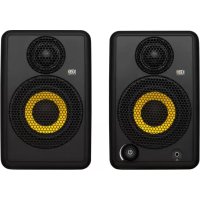
KRK ARC MIC INPUT VOLUME / STANDBY HEADPHONE OUTPUTImages - GoAux 4 shown (GoAux 3 is similar).
text_image
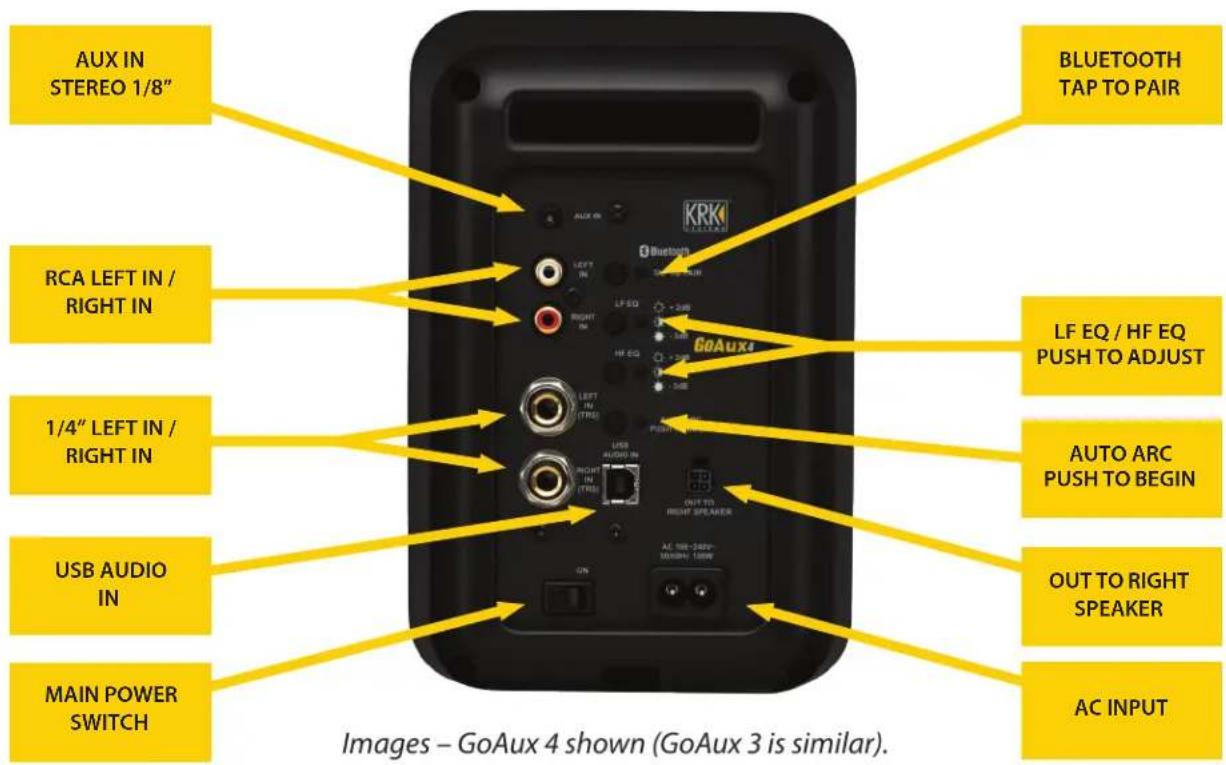
AUX IN STEREO 1/8" RCA LEFT IN / RIGHT IN 1/4" LEFT IN / RIGHT IN USB AUDIO IN MAIN POWER SWITCH BLUETOOTH TAP TO PAIR LF EQ / HF EQ PUSH TO ADJUST AUTO ARC PUSH TO BEGIN OUT TO RIGHT SPEAKER AC INPUT KRKI GoAux4 USB AUDIO IN RIGHT IN (TRE) LEFT IN (RTR) 300 300 300 300 300 300 300 300 300 300 300 300 300 300 300 300 300 300 300 300 300 300 300 300 300 300SYSTEM CONTROLS AND CONNECTIONS
AUX IN – Stereo 1/8" analog input. Connect to computer, media player, or cell phone outputs.
RCA LEFT / RIGHT IN – Unbalanced RCA inputs. Connection to audio interfaces, DJ mixers, or consumer audio gear.
TRS LEFT / RIGHT IN (GoAux 4 only) – Balanced 14 " inputs. Connection to audio interfaces, mixing consoles, or other professional audio equipment.
USB AUDIO IN (GoAux 4 only) – USB-Type B input. Connection directly to USB computer port. When using this connection, be sure that you select it as your audio output in the sound settings of your computer or DAW.
BLUETOOTH – Bluetooth input for wireless audio streaming. Connect to Bluetooth-capable audio device, i.e., computer, iPhone, Android, media player, etc. Push and hold to pair; the blue LED will blink rapidly when in pairing mode and become solid color when paired.
LF / HF EQ – Adjusts the level of the Low Frequency band and High Frequency band to help balance for your listening environment or tastes. Push the button to adjust between +2dB (white LED bright), FLAT (white LED nominal), and -3dB (white LED dim).
AUTO ARC (GoAux 4 only) – Automatic Room Correction feature. Push and hold to begin. (See the AUTO ARC SETUP section for details.)
OUT TO RIGHT SPEAKER – Speaker-level connection to the right speaker via 4-pin locking connectors.
MAIN POWER SWITCH – Main power switch for the system. Ensure the switch is in the "ON" position to supply power to the system.
AC INPUT – Connect the included power cable here.
HEADPHONE OUTPUT – Stereo 1/8" headphone output. Disables output from the speakers when headphones are plugged in. Use for checking your work or for silent listening.
AUTO ARC MIC INPUT (GoAux 4 only) - 1/8" input for the AUTO ARC measurement microphone (See Auto ARC Setup section for details).
VOLUME / STANDBY – Multi-function knob. Turn clockwise to raise volume and counterclockwise to reduce volume. Push twice to wake up system out of standby mode. Push and hold for 3 seconds to put system into standby mode. (The LED ring will glow amber when the system is active and turn off when the system is in standby mode.)
PLACEMENT
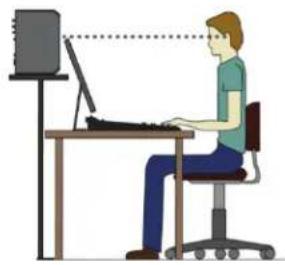
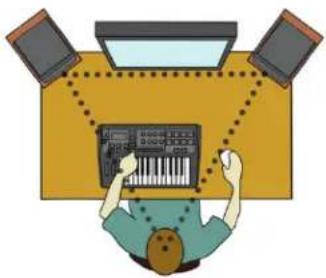
Ensure that you place the monitor with the power and input connections on the left side. Download and use the free KRK Audio Tools app for the next steps. The left and right studio monitors should be approximately 1 to 1.5 meters (3 to 5 feet) apart and directed at a 60-degree angle towards the listening location. Measure the distance between the left and right studio monitors and note that the listening position is the same distance to both sides. This will form an equilateral triangle. It is important that both left and right studio monitors are level matched.
natural_image
Illustration of a person using a computer at a desk, with a monitor and tower in the background (no text or symbols)The GoAux monitor series are a two-way studio monitor with a tweeter (producing high frequencies) and a woofer (producing mid and low frequencies) in one enclosure. The midpoint between the tweeter and woofer is the acoustic axis. Ensure the acoustic axis is pointed to ear level in the listening position. Use the tilting mechanism integrated into the isolation stands to orient the acoustic axis to the correct position.
natural_image
Illustration of a person working at a keyboard with three monitors, no text or symbols presentAUTO ARC SETUP (GoAux 4 only)
Ensure that you have completed the PLACEMENT section before beginning.
- Attach the included microphone to the microphone input on the front left of the monitor.
- Position the microphone at ear level in your ideal listening position.
- Push and hold the Auto ARC button on the rear of the left speaker.
- The speakers will produce a series of 25 tones then repeat; this may last several minutes. Do not move the microphone during this time.
- When the test is complete, a quick low frequency tone will indicate that the Auto ARC is finished. You can now disconnect and store your microphone in the carry bag.
KRK PRODUCT WARRANTY
ABOUT YOUR WARRANTY
If used in strict accordance with KRK instructions and only for products operated in the United States, KRK Systems warrants parts and labor on all monitors and grill accessories for a period of three (3) years from the original date of purchase for all products purchased from a US Authorized Dealer. For goods purchased outside of the United States, please contact your local dealer or distributor for specific information on warranty terms and conditions. For Expose Series recording monitors, refer to the dedicated Expose Series warranty card and policy. KRK Systems warrants parts and labor on all headphones, computer audio devices, including room correction devices, for a period of one (1) year from the original date of purchase. Defective parts will be repaired under this warranty when a defect occurs under normal installation and use.
This warranty is limited to repair of parts and replacements necessitated by defective workmanship or materials. KRK accepts no responsibility for damage or malfunction which, in the sole opinion of KRK Systems, is the result of misuse, abuse, neglect, accident, shipping damage or unauthorized repair. Any such misuse, abuse, neglect, accident, shipping damage or unauthorized repair will result in the voiding of this warranty.
Except as set forth herein, KRK Systems makes no representations or warranties, whether expressed or implied, including any implied warranties of merchantability or suitability for a particular purpose, all of which are expressly waived and disclaimed hereby, as to any KRK Systems products.
In no event shall KRK Systems be liable for special, incidental, consequential, punitive, or indirect damages, including without limitation loss of profits or loss of data. For any action brought against KRK Systems, whether intort, contract or any other theory of law, in no event shall KRK Systems' liability exceed the total amount paid by the purchaser to an authorized dealer or representative for the product given rise to the underlying claim.
Some states and countries do not allow the exclusion or limitation of incidental or consequential damages, so the above limitation or exclusion may not apply to you. This warranty gives you specific legal rights, and you may also have other rights, which vary from state to state. This warranty only applies to KRK Systems products purchased by the consumer from an authorized KRK dealer.
To contact a Gibson Customer Service Representative, call 1.800.4GIBSON or email service@gibson.com. For support in Europe, please call 00+800.4GIBSON1 or email service.europe@gibson.com. All other regions, please contact 1.615.871.4500 or email service@gibson.com.

text_image
QR code image containing encoded data, no visible human-readable textwww.krkmusic.com/warranty


text_image
QR code image containing encoded data, no visible human-readable textManuals available in multiple languages. Scan to download.
www.krkmusic.com/support/product-documentation
SPANISH


text_image
GO AUX™text_image
QR code image containing encoded data, no visible human-readable textwww.krkmusic.com/warranty


text_image
QR code image containing encoded data, no visible human-readable textwww.krkmusic.com/support/product-documentation
FRENCH


text_image
GO AUX™natural_image
Illustration of a person using a computer at a desk (no text or symbols present)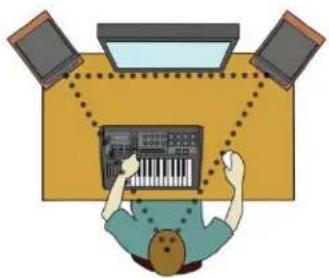
natural_image
Illustration of a person using a keyboard with three monitors in the background (no text or symbols)CONFIGURATION DE L'ARC AUTOMATIQUE (GoAux 4 uniquement)
text_image
QR code image containing encoded data, no visible human-readable textwww.krkmusic.com/warranty


text_image
QR code image containing encoded data, no visible human-readable textwww.krkmusic.com/support/product-documentation
GERMAN


text_image
GO AUX™Adresse: 209 10th Avenue South, Nashville, TN 37203, USA
natural_image
Illustration of a person sitting at a desk using a computer, with no visible text or symbols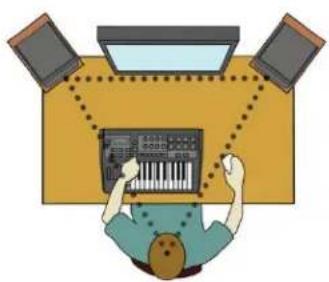
natural_image
Illustration of a person working at a desk with three monitors and a keyboard (no text or symbols visible)text_image
QR code image containing encoded data, no visible human-readable textwww.krkmusic.com/warranty


text_image
QR code image containing encoded data, no visible human-readable textwww.krkmusic.com/support/product-documentation
CHINESE


text_image
GO AUX™GoAux 监听音箱系统 快速入门指南
natural_image
Illustration of a person using a computer at a desk (no text or symbols present)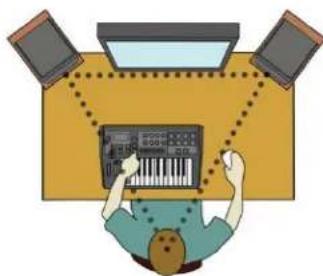
natural_image
Illustration of a person using a keyboard and audio equipment with three monitors (no text or symbols)text_image
QR code image containing encoded data, no visible human-readable textwww.krkmusic.com/warranty


text_image
QR code image containing encoded data, no visible human-readable text手册以多种语言提供。扫描下载。
www.krkmusic.com/support/product-documentation
JAPANESE


text_image
GO AUX™住所:209 10th Avenue South, Nashville, TN 37203, USA
動作溫度:0\~45℃
動作周波数 (最大出力電力)
GoAux 3 : 2.402GHz\~2.480GHz (6.1dBm)
GoAux 4 : 2.402GHz\~2.480GHz (8.9dBm)
GoAux 3 の総重量:3.15kg
GoAux 4 の総重量: 4.3kg


natural_image
Illustration of a person working at a desk with a computer, no text or symbols present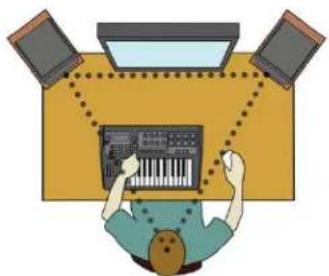
natural_image
Top-down illustration of a person using a keyboard on a keyboard, with three monitors and a monitor above (no text or symbols)自動ARC設定(GoAux 4のみ)
text_image
QR code image containing encoded data, no visible human-readable textwww.krkmusic.com/warranty


text_image
QR code image containing encoded data, no visible human-readable textwww.krkmusic.com/support/product-documentation