
Libero 27BQ70C - Monitor LG - Free user manual and instructions
Find the device manual for free Libero 27BQ70C LG in PDF.
 FR
FR
 BG
BG
 CS
CS
 DA
DA
 DE
DE
 EL
EL
 EN
EN
 ES
ES
 ET
ET
 FI
FI
 HU
HU
 ID
ID
 IT
IT
 JA
JA
 KK
KK
 KO
KO
 LT
LT
 LV
LV
 MK
MK
 NL
NL
 NO
NO
 PL
PL
 PT
PT
 RO
RO
 RU
RU
 SK
SK
 SL
SL
 SQ
SQ
 SV
SV
 TR
TR
 UK
UK
 ZH
ZH
| Product Type | LCD Monitor |
| Brand | LG |
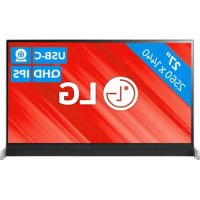
| Model | Libero 27BQ70C |
| Category | Monitor |
| Screen Size | 27 inches |
| Recommended Resolution | To be defined according to manufacturer specifications |
| Display Technology | Active Matrix LCD |
| Power Supply | Mains via supplied adapter or power cord |
| Power Consumption in Standby | Sleep mode and Off mode for energy saving |
| Power Saving Functions | VESA DPMS compatible |
| Communication Protocol | DDC (Display Data Channel) – DDC1/DDC2B/DDC2AB/DDC2B+/DDC2Bi and E-DDC |
| Image Adjustments | Red, Green, Blue (RGB) adjustable |
| Maintenance and Cleaning | Unplug before cleaning; use a soft, slightly damp cloth; do not use chemicals (benzene, alcohol, thinners) |
| General Safety | Do not open the housing; use only the supplied power cord; avoid humidity and high temperatures |
| Installation | Do not block ventilation openings; place on a stable surface; avoid heat sources |
| Prevention of Image Retention | Use a screen saver; turn off the screen if not used for extended periods |
| Wall Mount Compatibility | Use only mounts recommended by the manufacturer |
| Repairability | Entrust any repair to a qualified technician; do not attempt to repair yourself |
| Recycling and Environment | Recyclable product; contact retailer or LG for recycling program |
| User Manual | 177 pages, available in multiple languages |
Frequently Asked Questions - Libero 27BQ70C LG
User questions about Libero 27BQ70C LG
0 question about this device. Answer the ones you know or ask your own.
Ask a new question about this device
Download the instructions for your Monitor in PDF format for free! Find your manual Libero 27BQ70C - LG and take your electronic device back in hand. On this page are published all the documents necessary for the use of your device. Libero 27BQ70C by LG.
USER MANUAL Libero 27BQ70C LG
Waves MaxxAudio and additional MAXX trademarks are trademarks and/or registered trademarks of Waves Audio Ltd.
The SuperSpeed USB Trident logo is a registered trademark of USB Implementers Forum, Inc.
* USB Type-CTM and USB-CTM are trademarks of USB Implementers Forum.
OPEN SOURCE SOFTWARE NOTICE
CAUTION
CAUTION
NOTE
| Lengte hanger (A) | B-type 80 mm | |
| C-type 200 mm |
NOTE

CAUTION
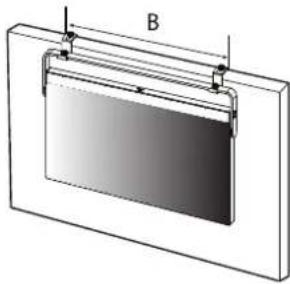
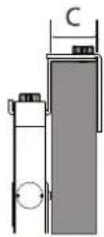
| A | B-type | ≥550mm |
| C-type | ≥670mm | |
| B 530 mm | ||
| C 30~70 mm | ||
CAUTION
![graph TD A["Device 1"] --> B["Device 2"] B --> C["Device 3"] C --> D["Device 4"] D --> E["Device 5"] style A fill:#f9f,stroke:#333 style B fill:#f9f,stroke:#333 style C fill:#f9f,stroke:#333 style D fill:#f9f,stroke:#333 style E fill:#f9f,stroke:#333](/content/2026/04/598706/images/ee0bd40393e5853ed54fea186c3d5afc3cf7c8e0a751dd4470709c8e60e62c0b.jpg)
USING THE MONITOR
[Picture] > [Game Adjust]
[Picture] > [Color Adjust]
This Product qualifies for ENERGY STAR®
Changing the factory default configuration and settings or enabling certain optional features and functionalities may increase energy consumption beyond the limits required for ENERGY STAR® certification. Refer to ENERGYSTAR.gov for more information on the ENERGY STAR® program.
IMPORTANT PRECAUTIONS
This unit has been engineered and manufactured to ensure your personal safety, however improper use may result in potential electrical shock or fire hazards. In order to allow the proper operation of all safeguards incorporated in this display, observe the following basic rules for its installation, use, and servicing. All precautions and safety information apply to LCD and OLED models.
On Safety
Use only the power cord supplied with the unit. In case you use another power cord, make sure that it is certified by the applicable national standards if not being provided by the supplier. If the power cable is faulty in any way, please contact the manufacturer or the nearest authorized repair service provider for a replacement.
The appliance coupler is used as the disconnect device.
Please make sure the device is installed near the wall outlet to which it is connected and that the outlet is easily accessible.
Operate the display only from a power source indicated in the specifications of this manual or listed on the display. If you are not sure what type of power supply you have in your home, consult with your dealer.
Overloaded AC outlets and extension cords are dangerous. So are frayed power cords and broken plugs. They may result in a shock or fire hazard. Call your service technician for replacement.
As long as this unit is connected to the AC wall outlet, it is not disconnected from the AC power source even if the unit is turned off.
Do not Open the Display:
- There are no user serviceable components inside.
- There are Dangerous High Voltages inside, even when the power is OFF.
- Contact your dealer if the display is not operating properly.
To Avoid Personal Injury :
- Do not place the display on a sloping shelf unless properly secured.
- Use only a stand recommended by the manufacturer.
- Do not drop an object on or apply impact to the product. Do not throw any toys or objects on the product screen. It can cause injury to human, problem to product and damage the display.
To Prevent Fire or Hazards:
- Always turn the display OFF if you leave the room for more than a short period of time. Never leave the display ON when leaving the house.
- Keep children from dropping or pushing objects into the display's cabinet openings. Some internal parts carry hazardous voltages.
- Do not add accessories that have not been designed for this display.
- When the display is to be left unattended for an extended period of time, unplug it from the wall outlet.
- In the presence of thunder and lightning, never touch the power cord and signal cable because it can be very dangerous. It can cause electric shock.
On Installation
Do not allow anything to rest upon or roll over the power cord, and do not place the display where the power cord is subject to damage.
Do not use this display near water such as near a bathtub, washbowl, kitchen sink, laundry tub, in a wet basement, or near a swimming pool.
Displays are provided with ventilation openings in the cabinet to allow the release of heat generated during operation. If these openings are blocked, built-up heat can cause failures which may result in a fire hazard.
Therefore, NEVER:
- Block the bottom ventilation slots by placing the display on a bed, sofa, rug, etc.
- Place the display in a built-in enclosure unless proper ventilation is provided.
- Cover the openings with cloth or other material.
- Place the display near or over a radiator or heat source.
Do not rub or strike the Active Matrix LCD with anything hard as this may scratch, mar, or damage the Active Matrix LCD permanently.
Do not press the LCD screen with your finger for a long time as this may cause some afterimages.
Some dot defects may appear as Red, Green or Blue spots on the screen.
However, this will have no impact or effect on the display performance.
If possible, use the recommended resolution to obtain the best image quality for your LCD display. If used under any mode except the recommended resolution, some scaled or processed images may appear on the screen. However, this is characteristic of the fixed-resolution LCD panel.
Displaying a still image for long time on the monitor may leave persistent image or stain on the monitor screen. To avoid this problem, use a screen saver and power off when this product is not used. Persistent image or stain caused by long time usage are not covered by the warranty on this product.
Do not shock or scratch the front and sides of the screen with metallic objects.
Otherwise, it may cause damage to the screen.
Make sure the panel faces forward and hold it with both hands to move. If you drop the product, the damaged product can cause electric shock or fire. Contact an authorized the service center for repair.
Avoid high temperatures and humidity.
Do not install this product on a wall if it could be exposed to oil or oil mist.
- This may damage the product and cause it to fall.
For displays with glossy bezels the user should consider the placement of the display as the bezel may cause disturbing reflections from surrounding light and bright surfaces.
Do not use products using high voltage around the Monitor. (ex. Electrical Swatter)
• Monitor may malfunction due to electrical shock.
Precautions for the AC Adapter and Power
If water or any foreign substance goes inside the product (TV, monitor, power cord, or AC adapter), disconnect the power cord immediately and contact the service center.
- Otherwise, this may cause a fire or electric shock due to damage to the product. Do not touch the power plug or AC adapter with wet hands. If the pins of the plug are wet or dusty, wipe and dry them before use.
- Otherwise, this may cause a fire or electric shock.
Make sure to completely insert the power cord into the AC adapter.
- If loosely connected, the poor connection may cause a fire or electric shock.
Be sure to use power cords and AC adapters provided or approved by LG Electronics, Inc.
- The use of non-approved products may cause a fire or electric shock.
When unplugging the power cord, always pull it by the plug. Do not bend the power cord with excessive force.
- The power line can be damaged, which may cause electric shock or fire.
Be careful not to step on or place heavy objects (electronic appliances, clothing, etc.) on the power cord or AC adapter. Be careful not to damage the power cord or AC adapter with sharp objects.
- Damaged power cords may cause a fire or electric shock.
Never disassemble, repair or modify the power cord or AC adapter.
• This may cause a fire or electric shock.
Be sure to keep the outlet, AC adapter, and pins of the power plug clean from dust and etc.
• This may cause a fire.
On Cleaning
- Unplug the display before cleaning the face of the display screen.
- Use a slightly damp (not wet) cloth. Do not use an aerosol directly on the display screen because over-spraying may cause electrical shock.
- When cleaning the product, unplug the power cord and scrub gently with a soft cloth to prevent scratching. Do not clean with a wet cloth or spray water or other liquids directly onto the product. An electric shock may occur. (Do not use chemicals such as benzene, paint thinners or alcohol)
- Spray water onto a soft cloth 2 to 4 times, and use it to clean the front frame; wipe in one direction only. Too much moisture may cause staining.
![graph LR A["WATER"] --> B["Reinjection"] B --> C["Filter"] C --> D["Extraction"] D --> E["Chemical Detection"] E --> F["Output"]](/content/2026/04/598706/images/6677623640d5449a4682d8c21ebe7d2e57010af700608370b9890d502b0d2bb7.jpg)
On Repacking
- Do not throw away the carton and packing materials. They make an ideal container in which to transport the unit. When shipping the unit to another location, repack it in its original material.
IMPORTANT SAFETY PRECAUTIONS
Repacking
- Do not discard the packaging material and cardboard box. It is the ideal container for transporting the device. When moving the device to another location, repack it in the original material.
IMPORTANT SAFETY PRECAUTIONS
Packaging
Packaging
Repacking
Packaging
- Keep the cartons and/or packing material. They are ideal for packing if you need to transport the unit later. When shipping the unit, pack it in the original packaging.
IMPORTANT SAFETY PRECAUTIONS
Packaging
IMPORTANT SAFETY PRECAUTIONS
To prevent personal injury:
- Do not install the display on slanted shelves if it is not properly secured.
- Use only stands recommended by the manufacturer.
- Do not throw objects onto the product or subject it to any impact. Do not throw toys or other objects at the product screen. This may cause injury to people, product-related problems, and damage to the display.
Packaging
Use at the rated voltage.
Do not let water get in or get wet.
DDC is a communication channel over which the monitor automatically informs the host system (PC) about its capabilities.
DDC protocol
① DDC1/DDC2B: A uni-directional communication channel. ② DDC 2AB/DDC2B+/DDC2Bi: A bi-directional communication channel.
Note
- PC must support DDC functions to do this.
E-DDC (Enhanced DDC)
A protocol based on I²C and used on a bidirectional data channel between the display and host. This protocol accesses devices at I²C address of A0/A1 as well as the address 60. The 60 address is used as a segment register to allow larger amounts of data to be retrieved than is possible using DDC2B protocols. The protocol is compatible with DDC2B protocols.
DEUTSCH
DDC (Display Data Channel)
② DDC 2AB/DDC2B+/DDC2Bi
② DDC 2AB/DDC2B+/DDC2Bi
② DDC 2AB/DDC2B+/DDC2Bi
② DDC 2AB/DDC2B+/DDC2Bi
② DDC 2AB/DDC2B+/DDC2Bi
Bidirectional communication channel.
Main
② DDC 2AB/DDC2B+/DDC2Bi
Bidirectional communication channel.
Note
This program is designed to have computer equipment manufacturers build circuitry into their products to reduce power consumption when it is not in operation.
When this monitor is used with a PC on which a screen blanking software complying with the VESA Display Power Management Signalling (DPMS) Protocol is installed, it can conserve significant energy by reducing power consumption when it is not in operation.
There are 2 signal lines, 3 modes of operation.
: On Mode, Sleep Mode, Off Mode.
| Mode Definition | |
| On mode | The normal operation.When the monitor is on mode, being connected to a power source, it displays an image. |
| Sleep Mode | The reduced power state returns to on mode when the user moves the mouse or presses a key on the keyboard. |
| Off Mode | The lowest power consumption state returns to on mode when the user pushes a power switch. |
Note
- The energy saving Design monitors only work while connected to the computers that have energy saving features.
Unplug the monitor from the wall outlet and refer servicing to qualified service personnel when :
The power cord or plug is damaged or frayed.
Liquid has been spilled into the monitor.
The monitor has been exposed to rain or water.
The monitor does not operate normally following the operating instructions. Adjust only those controls that are covered in the operating instructions. An improper adjustment of other controls may result in damage and often requires extensive work by a qualified technician to restore the monitor to normal operation.
The monitor has been dropped or the cabinet has been damaged.
The monitor exhibits a distinct change in performance.
Snapping or popping from the monitor is continuous or frequent while the monitor is operating. It is normal for some monitors to make occasional sounds when being turned on or off, or when changing video modes.
Do not attempt to service the monitor yourself, as opening or removing covers may expose you to dangerous voltage or other hazards. Refer all servicing to qualified service personnel.
Please read this manual carefully before operating your set and retain it for future reference.
INFORMATION FOR ENVIRONMENTAL PRESERVATION
Information for Environmental Preservation
LGE. announced the 'LG Declaration for a Cleaner Environment' in 1994, and this ideal has served as a guiding managerial principle ever since. The Declaration is a foundation that has allowed us to undertake environmentally friendly activities in careful consideration of economic, environmental, and social aspects.
We promote activities for environmental preservation, and we specifically develop our products to embrace the concept of environment-friendly.
We minimize the hazardous materials contained in our products. For example, there is no cadmium to be found in our product.
Information for recycling
This product may contain parts which could be hazardous to the environment. It is important that this product be recycled after use.
LGE. handles all waste product through an environmentally acceptable recycling method. There are several take-back and recycling systems currently in operation worldwide. Many parts will be reused and recycled, while harmful substances and heavy metals are treated by an environmentally friendly method.
If you want to find out more information about our recycling program, please contact your local LG vendor or a corporate representative of LG.
We set our vision and policies on a cleaner world by selecting the issue of the global environment as a task for corporate improvement. Please visit our website for more information about our 'green' policies.
http://www.lg.com/global/sustainability/environment/take-back-recycling.jsp
German
http://www.lg.com/global/sustainability/environment/take-back-recycling.jsp
French
http://www.lg.com/global/sustainability/environment/take-back-recycling.jsp
Italian
http://www.lg.com/global/sustainability/environment/take-back-recycling.jsp
Spanish
http://www.lg.com/global/sustainability/environment/take-back-recycling.jsp
Portuguese
http://www.lg.com/global/sustainability/environment/take-back-recycling.jsp
Dutch
http://www.lg.com/global/sustainability/environment/take-back-recycling.jsp
Russian
http://www.lg.com/global/sustainability/environment/take-back-recycling.jsp
Korean
Environmental conservation information
http://www.lg.com/global/sustainability/environment/take-back-recycling.jsp
EPEAT

"EPEAT registered where applicable/supported. EPEAT registration varies by country - see
www.epeat.net for registration status by country."
JORDAN ONLY
WEEE
Disposal of your appliance
The symbol indicating separate collection for electrical and electronic equipment consists of the crossed-out wheeled bin.
JORDAN ONLY
WEEE
- OPEN SOURCE SOFTWARE NOTICE
- CAUTION
- NOTE
- USING THE MONITOR
- [PICTURE] > [GAME ADJUST]
- [PICTURE] > [COLOR ADJUST]
- IMPORTANT PRECAUTIONS
- ON SAFETY
- DO NOT OPEN THE DISPLAY
- TO AVOID PERSONAL INJURY
- TO PREVENT FIRE OR HAZARDS
- ON INSTALLATION
- THEREFORE, NEVER
- PRECAUTIONS FOR THE AC ADAPTER AND POWER
- ON CLEANING
- ON REPACKING
- IMPORTANT SAFETY PRECAUTIONS
- REPACKING
- PACKAGING
- TO PREVENT PERSONAL INJURY
- DDC PROTOCOL
- E-DDC (ENHANCED DDC)
- DEUTSCH
- DDC (DISPLAY DATA CHANNEL)
- MAIN
- INFORMATION FOR ENVIRONMENTAL PRESERVATION
- INFORMATION FOR RECYCLING
- GERMAN
- FRENCH
- ITALIAN
- SPANISH
- PORTUGUESE
- DUTCH
- RUSSIAN
- KOREAN
- ENVIRONMENTAL CONSERVATION INFORMATION
- EPEAT
- JORDAN ONLY
- WEEE
- DISPOSAL OF YOUR APPLIANCE
Brand : LG
Model : Libero 27BQ70C
Category : Monitor