AC2056 - Industrial electronic equipment IFM - Free user manual and instructions
Find the device manual for free AC2056 IFM in PDF.


| Product Type | AS-i Airbox (AS-i network slave) |
| Brand | IFM |
| Model | AC2056 |
| Category | Industrial electronic equipment |
| Main functions | Communication with AS-i master, management of two dual sensors and two pneumatic distributors |
| Power supply | Via AS-i network (100 mA total for sensors) and external power supply (Ext. PWR) |
| Electrical connections | M12 connectors for sensors, EEMS wiring module for AS-i |
| Pneumatic connections | Legris 3000/8 mm system, external calibration according to CETOP RP 54 P |
| Compressed air pressure | 2 to 8 bar (peaks > 8 bar not allowed) |
| Manual control | Push/pull or push/turn/lock |
| Addressing | Free address 1-31 (set to 0 at delivery), via addressing unit |
| Materials | Viton (seals), stainless steel 303 (screws, connectors) |
| Electromagnetic compatibility (EMC) | Tested according to EN 61000-4-2: contact discharge ±4 kV, air discharge ±8 kV |
| LED indicators | Green (AS-i supply), yellow (input/output status), green (external supply) |
| Maintenance | Use filtered air 5 μm, lubricated (ISO-VG10) or non-lubricated; if lubricated once, always lubricated |
| Safety | Avoid electrostatic discharges; depressurize before pneumatic installation |
Frequently Asked Questions - AC2056 IFM
User questions about AC2056 IFM
0 question about this device. Answer the ones you know or ask your own.
Ask a new question about this device
Download the instructions for your Industrial electronic equipment in PDF format for free! Find your manual AC2056 - IFM and take your electronic device back in hand. On this page are published all the documents necessary for the use of your device. AC2056 by IFM.
USER MANUAL AC2056 IFM
natural_image
Top-down schematic of a device casing with multiple circular components and mounting pins (no text or symbols)Function and features
The AS-i AirBox is a slave in the AS-i system (AS-i profile S 7.F). It is the connection between the two dual sensors, the two pneumatic outputs and the AS-i master.
- Integrated sensor supply (a total of 100mA per module)
- Plug-in sensor connection
- AS-i connection via EEMS module lower part
- Connection to pneumatic system via push fit tube connector Legris 3000 /8mm, outside calibration according to CETOP standards RP 54P
- Operation with compressed air of 2...8 bar including any pressure peaks (Pressure peaks >8bar can cause permanent leaks and irreparable damage of the AirBox).
- Manual override by pressing/releasing or pressing/turning/locking
![exhaust 3 [R] I-1 I-3 I-3/4 flat cable yellow I-1/2 flat cable black I-2, AS-i PWR, O-3 pneumatic outputs O-3/O-4 I-4, O-4 Ext. PWR compressed air 1 [R] manual override 1 for O-3 manual override 2 for O-4](/content/2026/04/596356/images/92d5f6bf566b92efec076f67e12aa8332bfa96220cb20efb09ef8bd3e72afa6b.jpg)
Mounting
Address assignment by means of the addressing unit
Fix the module onto the addressing unit. Assign a free address between 1 and 31; the factory preset is 0.
Mount the module onto the wired module lower part of the AS-i network, tightening torque 0.8Nm.

In a dusty environment the AirBox should be mounted with the filter facing downwards.
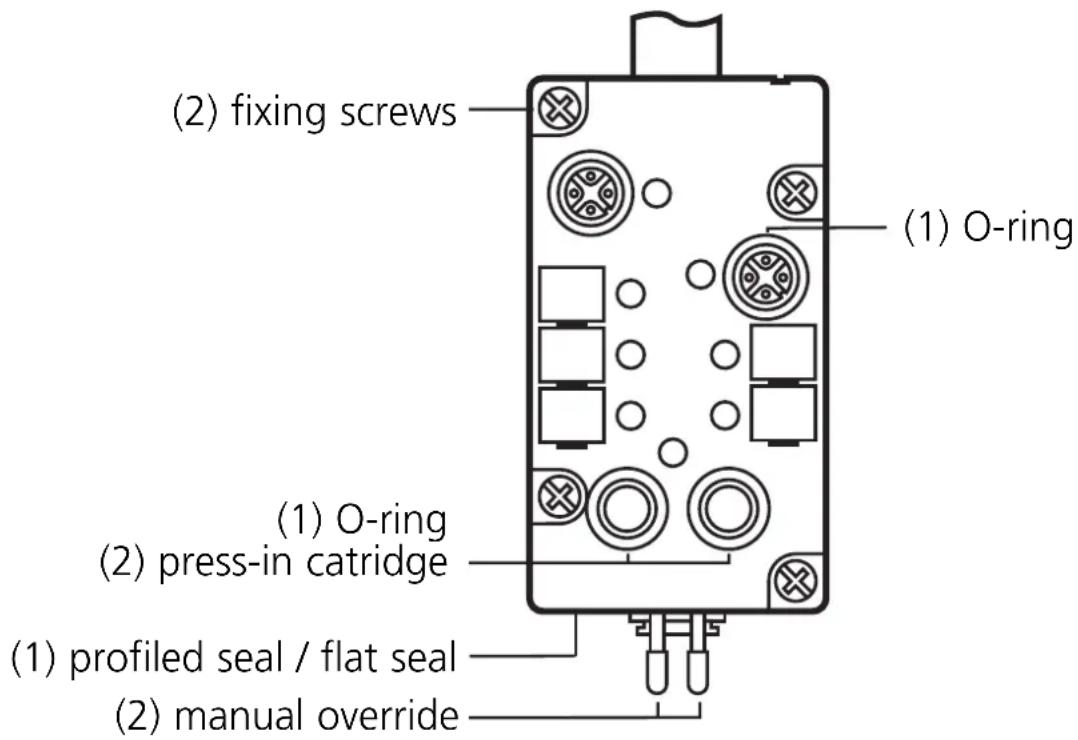
Materials
(1) Viton
(2) stainless steel (303 S21)
Compressed air
Adhere to the safety regulations and provisions for the installation of pneumatic systems. Switch off pressure.
Connect the compressed air supply 1 (P), the pneumatic outputs (O-3, O-4) and, if necessary, the exhaust 3 (R) to the pneumatic system. Cut the connection tube straight and push it into the tube fitting until you can feel the tube latch.
Removal of the tubes
To remove the tubes, push the black ring and pull out the tube at the same time.
The manual overrides can operate the pneumatic outputs. Connect the compressed air supply to the AS-i AirBox. If you then push the manual override 1, the output O-3 is triggered. If you push the manual override 2, the output O-4 is triggered.
Electromagnetic compatibility (EMC):
The AirBox is rated for operation in industrial environments. The test of the electrostatic discharge was carried out in accordance with EN 61000-4-2 with the following test levels:
- Contact discharge ±4kV
- air discharge ±8kV
Special applications such as the conveying and distribution of bulk material can generate higher electrostatic charges.
To avoid electrostatic discharge the following remedial actions are possible, among others:
- Equalisation of potential according to the installation instructions
-
Separate laying of
-
signal and bus cables
- equipotential bonding conductors
- power cables
- physical separation of the AirBox and all cables from all parts carrying or discharging electrostatic charges
If these discharges are not avoided there is the danger of:
- injury to/incapacitation of operators and maintenance staff
- spark formation
- damage to the AirBox
- damage to the electrical equipment

The electrical triggering has priority over the mechanical triggering.
| M12 socket pin | |
| sensor supply L+ | 1 |
| sensor supply L- 3 | |
| data input I 4 | |
| data input II 2 |
| data bit D0 D1 D2 D3 | ||||
| inputs/outputs | I-1 I-2 I-3/O-3 | I-4/O-4 | ||
| socket | I-1/2 | I-1/2 | I-3/4 | I-3/4 |
| pin | 4 | 2 | 4 | 2 |
Operation
Check the safe functioning of the unit. Display by LEDs:
• LED green: supply voltage via the AS-i system
• LEDs yellow: external voltage supply
• LED green: external voltage supply
For trouble-free operation sufficiently treated air must be used (filtered air 5μm, lubricated (ISO-VG10)1) or not lubricated). Once the AirBox has been operated with lubricated air, it always has to be operated with lubricated air as the oil removes the initial lubrication.
1) You can find further notes on compressed air and EMC/ESD for the AirBox at www.ifm-electronic.com. Enter the article number of your AirBox on the start page under "Data sheet direct". You receive the additional product information by clicking on "Additional data".
Brand : IFM
Model : AC2056
Category : Industrial electronic equipment