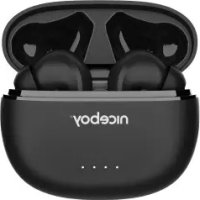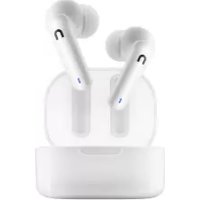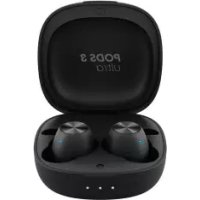
HIVE Pods 3 Ultra - Earphones Niceboy - Free user manual and instructions
Find the device manual for free HIVE Pods 3 Ultra Niceboy in PDF.


| Product type | True Wireless Earbuds |
| Brand | Niceboy |
| Model | HIVE Pods 3 Ultra |
| Connectivity | Bluetooth 5.1 |
| Frequency band | 2.4 GHz |
| Radio frequency power | ≤ 2.5 mW |
| Compatible Bluetooth profiles | HFP, HSP, A2DP, AVRCP |
| Compatible codecs | AAC, SBC |
| Protection level | IP55 |
| Frequency response | 20 Hz – 20 kHz |
| Impedance | 16 Ω |
| Sensitivity | 94 dB ± 3 dB |
| Speaker | 6 mm |
| Earbuds battery capacity | 2 x 50 mAh |
| Charging case battery capacity | 470 mAh |
| Charging type | USB-C |
| Touch control | Multifunction (play/pause, volume, tracks, Gaming mode, voice assistant) |
| Gaming mode | Yes (reduced audio latency) |
| Voice assistant | Yes (Siri/Google Assistant) |
| Associated app | Niceboy ION |
| Box contents | Earbuds, charging case, spare ear tips, USB-C cable, manual |
| Care | Clean with a dry cloth, avoid moisture and extreme temperatures |
| Safety | Do not expose to liquids, do not listen at excessive volume, do not disassemble |
| Manufacturer | NICEBOY s. r. o., Czech Republic |
Frequently Asked Questions - HIVE Pods 3 Ultra Niceboy
User questions about HIVE Pods 3 Ultra Niceboy
0 question about this device. Answer the ones you know or ask your own.
Ask a new question about this device
Download the instructions for your Earphones in PDF format for free! Find your manual HIVE Pods 3 Ultra - Niceboy and take your electronic device back in hand. On this page are published all the documents necessary for the use of your device. HIVE Pods 3 Ultra by Niceboy.
USER MANUAL HIVE Pods 3 Ultra Niceboy
Niceboy HIVE Pods 3 Ultra earphones Charging box
Spare earbuds
USB-C charging cable
Manual
PRODUCT DESCRIPTION
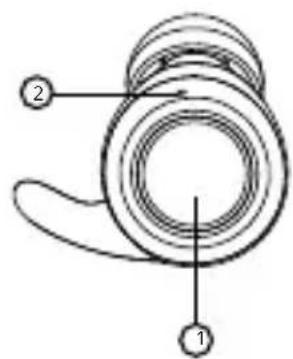
- Multi-functional touch button
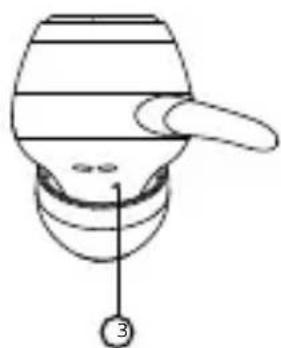
- LED
- Microphone
- Charging input
- LED charging indicator
- USB-C charging port
natural_image
Diagram of a mechanical component with a handle and labeled part (3), no readable text or symbols present.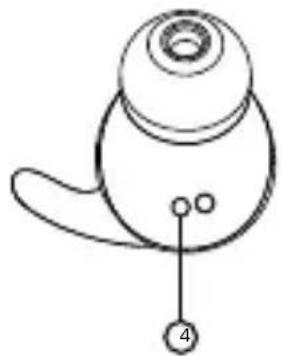
natural_image
Simple line drawing of a bird's head with a labeled point (no text or symbols)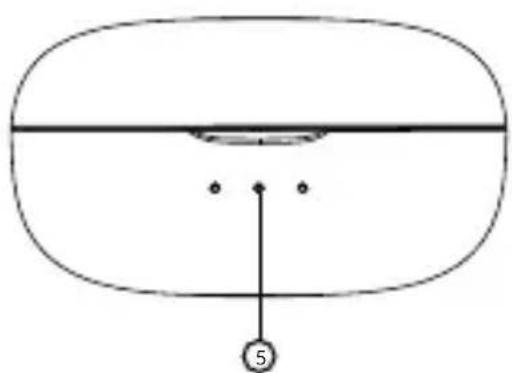
natural_image
Simple line drawing of a rounded rectangular shape with a horizontal line and two dots, no text or symbols present.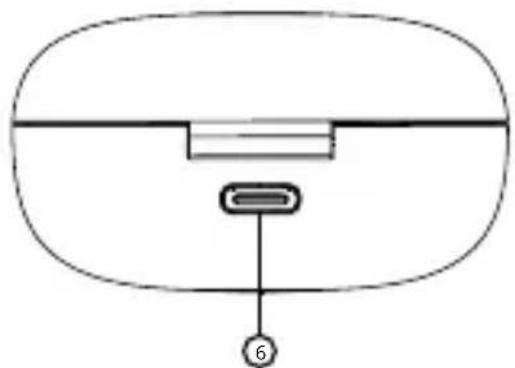
natural_image
Simple diagram of a device with a labeled component (no text or symbols present)FIRST START-UP AND PAIRING
- Remove both earphones from the pack and remove the stickers protecting the earphone charging pins (4).
- Place both earphones in the charging box and let them charge. Durin charging, the LED indicator glows red and turns off once charging is completed.
- Remove the earphones from the box. They will switch themselves on and pair with each other automatically.
- After the LED on one of the headphones (2) starts flashing blue, the headphones are ready to connect to a Bluetooth device.
- Open Bluetooth settings on your device and search for Niceboy HIVE Pods 3 Ultra in the list of available devices.
- Successful pairing will be announced by an acoustic message and the LEDs (2) will turn off. To reconnect to a device that has already been paired, simply remove the earphones from the box. They will switch on and connect to the device automatically.
SWITCHING ON AND OFF
To switch the earphones on, simply remove them from the charging box, or manually switch them on by pressing and holding both multi-functional buttons. To switch them off, simply place the earphones in the charging box. They will automatically turn off and disconnect from your device. The earphones are placed correctly in the box when the LED (2) lights up in red. When the earphones are fully charged, the LED turns off. You can also turn off the earphones by pressing and holding both multi-functional buttons for approx.4 s. The earphones turn off after 5 minutes of inactivity to save power.
MULTI-FUNCTIONAL BUTTON - BASIC CONTROLS
One press of either button – play/pause, accept/end call Double press of the right button – increase volume by one level Double press of the left button – decrease volume by one level Press and hold the right button for 2 seconds – next song, reject call Press and hold the left button for 2 seconds – previous song, reject call Triple press of the right button – turn gaming mode on/off Triple press of the left button – activate Siri / Google Assistant
GAMING MODE
The earphones feature gaming mode with very low audio delay. Activate gaming mode by briefly pressing the right multi-functional button three times. Note that this mode drains more power.
CHARGING THE CHARGING BOX
Before using the earphones for the first time, we recommend fully charging the battery. Charge the earphones using the enclosed USB-C cable and any 5 V/1 A power adapter or a USB port on a PC, power bank etc. Plug the charging cable into the USB-C port (6) on the charging box. The LEDs (5) flash while the box is charging. Once charging is complete, they will light up for 10 minutes, then turn off.
CONNECTING TO THE APP
- Download the app by scanning the QR code using your phone or search for „Niceboy ION“ in the mobile app store and download it.
- Start the „Niceboy ION“ app and register a new account or sign in with your existing account.
- Set the password and proceed to „Add device“.
- Turn on Bluetooth; nearby devices will be detected based on the strength of the signal.
- Press the „+“ button.
- Wait for „connection“.
- If the device was added successfully, "completed" appears on the screen.
- Your device is now successfully connected.
Note: Reset the earphones to factory settings before pairing them with any new device and connect them to the Niceboy ION app.
FACTORY SETTINGS
- Disconnect and remove the headphones from the list of all paired devices.
- Make sure Both earbuds are in the Charging Case. Meanwhile, hold down on each earbud for 10 seconds until the Blue and Red indicators flashes, which means the RESET has succeeded.
SPECIFICATIONS
BT: 5.1
Frequency band: 2.4 GHz
Radiofrequency power: ≤ 2.5 mW
Supported BT profiles: HFP,HSP,A2DP,AVRCP
Supported codecs: AAC, SBC
Enclosure rating: IP55
Transmission range: 10 m
Frequency: 20 Hz-20 kHz
Impedance: 16 Ω
Sensitivity: 94 dB ± 3 dB
Speaker: 6 mm
Earphone battery capacity: 2x 50 mAh
Charging box battery capacity: 470 mAh
SAFETY INFORMATION
Listening to music at very high volume can damage your hearing. Do not expose the device to fluids or humidity. Do not expose the device to extreme temperatures or try to disassemble it. Protect the device from sharp objects and falls from height. Batteries – improper handling (prolonged charging, short circuit, breakage by other objects, etc.) may result in fire, overheating or battery leakage. The battery or accumulator that may be included with the product has a service life of six months, as it is a consumable.
Information on all frequency bands in which the radio equipment operates and intentionally transmits radio waves as well as the maximum radio frequency power transmitted in the frequency band in which the radio equipment is operated is included in the instructions and safety information.
NICEBOY s.r.o. hereby declares that the type of radio equipment HIVE PODS 3 Ultra complies with Directives 2014/53 / EU, 2014/30 / EU, 2014/35 / EU, and 2011/65 / EU. The full content of EU Declaration of Conformity is available on the following websites: https://niceboy.eu/en/declaration/hive-pods-3-ultra
USER INFORMATION FOR DISPOSING ELECTRICAL AND ELECTRONIC DEVICES (HOME USE)

This symbol located on a product or in the product's original documentation means that the used electrical or electronic products may not be disposed together with the communal waste. In order to dispose of these products correctly, take them to a designated collection site, where they will be accepted for free. By disposing of a product in this way, you are helping to protect precious natural resources and helping to prevent any potential negative impacts on the environment and human health, which could be the result of incorrect waste disposal. You may receive more detailed information from your local authority or nearest collection site. According to national regulations, fines may also be given
out to anyone who disposes of this type of waste incorrectly. User information for disposing electrical and electronic devices. (Business and corporate use) In order to correctly dispose of electrical and electronic devices for business and corporate use, refer to the product's manufacturer or importer. They will provide you with information regarding all disposal methods and, according to the date stated on the electrical or electronic device on the market, they will tell you who is responsible for financing the disposal of this electrical or electronic device. Information regarding disposal processes in other countries outside the EU. The symbol displayed above is only valid for countries within the European Union. For the correct disposal of electrical and electronic devices, request the relevant information from your local authorities or the device seller.
DE
LIEFERUMFANG
In-Ear Kopfhörer
Niceboy HIVE Pods 3 Ultra
Ladebox
Ersatz-Ohrstöpsel
USB-C-Ladekabel
Anleitung
PRODUKTBESCHREIBUNG
https://niceboy.eu/pl/declaration/hive-pods-3-ultra
INFORMACJA DLA UŻYTKOWNIKÓW DOTYCZĄCA UTYLIZACJI SPRZĘTU ELEKTRYCZNEGO I ELEKTRONICZNEGO (GOSPODARSTWA DOMOWE)
https://niceboy.eu/ro/declaration/hive-pods-3-ultra
INFORMATII PENTRU UTILIZATORI PRIVIND LICHIDAREA ECHIPAMENTELOR ELECTRICE ŞI ELECTRONICE (GOSPODĂRII)