KM0232S5 - Television Krüger&Matz - Free user manual and instructions
Find the device manual for free KM0232S5 Krüger&Matz in PDF.



| Product Type | LED TV |
| Screen Size | 32 inches (approximately 81 cm) |
| Resolution | 1920 x 1080 pixels (Full HD) |
| Tuner | DVB-T/T2/C (terrestrial) and DVB-S/S2 (satellite) |
| Connectivity | HDMI, USB, CI+, RJ-45 (LAN), Wi-Fi, Composite AV, Optical SPDIF output, Headphone output (3.5 mm jack) |
| Power Supply | 220-240 V ~50 Hz |
| Dimensions (without stand) | Approximately 73 x 43 x 8 cm |
| Weight | Approximately 4 kg |
| Main Features | Smart TV (Netflix, YouTube), EPG, Teletext, PVR recording, Parental lock, Standby mode |
| Care and Cleaning | Use a soft, damp cloth. Do not use abrasive products or solvents. |
| Safety | Do not open the casing. Do not expose to rain or moisture. Unplug during a thunderstorm or if not used for an extended period. |
| Spare Parts and Repairability | Contact a qualified service provider. Do not attempt to repair yourself. |
| Default Lock Code | 1234 |
| Lock Reset Code | 0423 |
| General Information | Brand: Krüger&Matz, Model: KM0232S5, Manufacturer: Lechpol Electronics, Made in China |
Frequently Asked Questions - KM0232S5 Krüger&Matz
User questions about KM0232S5 Krüger&Matz
0 question about this device. Answer the ones you know or ask your own.
Ask a new question about this device
Download the instructions for your Television in PDF format for free! Find your manual KM0232S5 - Krüger&Matz and take your electronic device back in hand. On this page are published all the documents necessary for the use of your device. KM0232S5 by Krüger&Matz.
USER MANUAL KM0232S5 Krüger&Matz
natural_image
Line drawing of a flatboard-mounted device with a central display unit and mounting brackets (no text or symbols)Krok 1
natural_image
Technical line drawing of a flat-panel electronic device with mounting brackets and connectors (no text or symbols)Krok 2
natural_image
Technical line drawing of a flat-panel electronic device with a central module and mounting brackets (no text or symbols)A
Schritt 1
natural_image
Technical line drawing of a flat-panel electronic device with mounting brackets and connectors (no text or symbols)B
Schritt 2
Owner's manual Owner's manual
Krüger&Matz


CAUTION
TO REDUCE THE RISK OF ELECTRIC SHOCK, DO NOT REMOVE COVER (OR BACK). NO USER SERVICEABLE PARTS INSIDE, REFER SERVICING TO QUALIFIED SERVICE PERSONNEL.

The symbol indicates that dangerous voltages constituting a risk of electric shock are present within this unit.

The symbol indicates that there are important operating and maintenance Instructions in the literaturaccompanying this unit.
IMPORTANT SAFETY INSTRUCTION
1) Read these instructions.
2) Keep these instructions.
3) Heed all warnings.
4) Follow all instructions.
5) Do not use this apparatus near water.
6) Clean only with dry cloth.
7) Do not block any ventilation openings, install in accordance with the instructions.
8) Do not install near any heat sources such as radiations, heat registers, stoves, or other apparatus (including amplifiers) that produce heat.
9) Do not defeat the safety purpose of the polarized plug. If the provided plug does not fit into your outlet, consult an electrician for replacement of the obsolete outlet.
10) Protected the power cord from being walked on or pinched particularly at plugs, convenience receptacles, and the point where they exit from the apparatus.
11) Only use attachments/accessories specified by the manufacturer.
12) Unplug this apparatus during lighting storms or when unused for long periods of time.
13) Refer all servicing to qualified service personnel. Servicing is required when the apparatus has been damaged in anyway, such as power-supply cord or plug is damaged, liquid has been spilled or objects have fallen into the apparatus, the apparatus has been exposed to rain or moisture, does not operate normally, or has been dropped. 14) Mains plug is used as the disconnect device, the disconnect device shall remain readily operable.
15) The ventilation should not be impeded by covering the ventilation openings with items, such as newspapers, table-cloth, curtains, etc. 16) No naked flame sources, such as lighted candles, should be placed on the apparatus.
17) Attention should be drawn to the environmental aspects of battery disposal.
18) The use of apparatus in moderate climate.
19) The apparatus shall not be exposed to dripping or splashing and that no objects filled with liquids, such as vases, shall be placed on the apparatus.
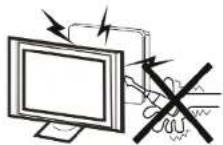
Warning
High voltages are used in the operation of this television receiver. Do not remove the cabinet back from your set. Refer servicing to qualified service personnel.
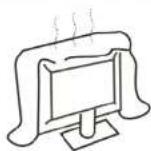
Caution
Do not block the ventilation holes in the back cover. Adequate ventilation is essential to prevent failure of electrical components.
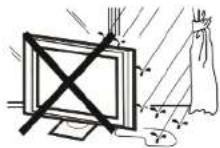
Warning
To prevent fire or electrical shock hazard, do not expose the television receiver to rain or moisture.
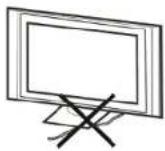
Caution
Do not trap the power supply cord under the television receiver.
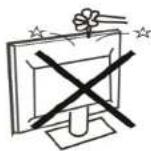
Warning
Do not drop or push objects into the television cabinet slots or openings. Never spill any kind of liquid on the television receiver.
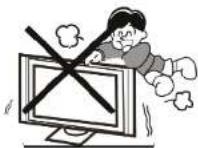
Caution
Never stand on, lean on, or suddenly push the television or its stand. You should pay special attention to children. Serious injury may result if it should fall.
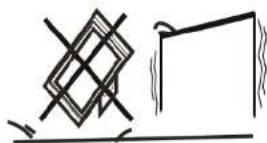
Caution
Do not place your television on an unstable cart, stand, shelf or table. Serious injury to an individual, and damage to the television, may result if it should fall.
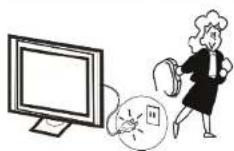
Caution
When the television receiver is not used for an extended period of time, it is advisable to disconnect the AC power cord from the AC outlet.
INSTALLATION
- Locate the TV in the room where light does not strike the screen directly.
- Total darkness or a reflection on the picture screen can cause eyestrain. Soft and indirect lighting is recommended for comfortable viewing.
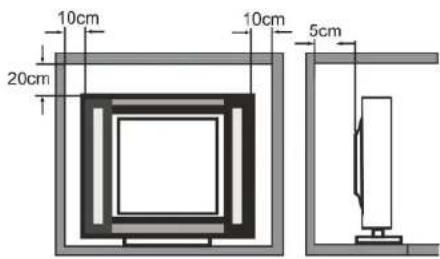
- Allow enough space between the TV and the wall to permit ventilation.
- Avoid excessively warm locations to prevent possible damage to the cabinet or premature component failure.
- Do not cover the ventilation openings when using the TV.
Minimum distances
Base stand assembly instruction
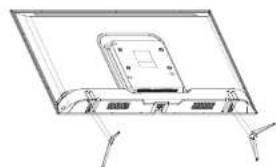
When you install the base, the need to face down flat on the TV platform. Before installing (or removing) the stand, unplug the AC power cord from the AC outlet before performing the operation, laying cushion in place the TV will be placed to prevent damage to the TV.
natural_image
Line drawing of a flat-screen monitor with a central display and mounting bracket (no text or symbols)A
Step 1
Locate the 2 pcs of bottom bracket into the gap in the bottom of the TV, and check that it is securely held in place as in illustration A) below.
natural_image
Technical line drawing of a flat-panel electronic device with mounting brackets and connectors (no text or symbols)B
Step 2
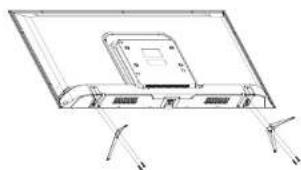
Lock the 2 pcs screws in the designated location as In illustration B) below. Check each screw is firmly tightened.
Warning:
Be sure to follow the instructions for installation, if the base is not installed correctly, it may result in the TV falling over. To remove the stand, perform the steps in reverse order, the base can not adjust the angle. During the installation process, be careful to avoid damage to the TV and your hand caught and ground to the bottom of the TV.
Mounting on a wall
IMPORTANT This operation requires two people!
To ensure a safe installation, comply with the following safety instructions:
- Disconnect from power supply before mounting.
- Check that the wall can support the weight of the TV set and wall mount assembly.
- Follow the mounting instructions provided with the wall mount.
• The TV set must be installed on a vertical wall.
• Make sure to use only screws suitable for the material of the wall.
• Make sure that the TV set cables are placed in such a way that there is no danger of tripping over them. - Mounting the TV set on the wall should be performed only by professionals.
BUTTON ON THE TV SET
Note: The location, names and availability of the buttons may vary according to the TV model. Please refer to the actual product.
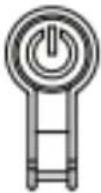
- Press the button to turn on the TV.
- When the TV is on, press it to bring up the Menu.
- While in the Menu, press the button to select the option. Press and hold the button to confirm the option.
SOCKETS
Note: The location, names and availability of the sockets may vary according to the TV model.
| Socket Function | |
| RF input:1x analogue DVB-T/T2/C1x DVB-S/S2 | Connect with ground-based or satellite television with an antenna cable. Connect plug of an antenna cable to the ANTENNA INPUT. Connect the plug of a satellite antenna cable to the SATELLITE Input. |
| Headphones output (3,5 mm jack) | Connect headphones to the TV set. |
| CI+ slot Technology that allows you | to insert a CI module that allows your TV set to receive scrambled TV channels. |
| HDMI input | Transmits video and audio data from external device such as DVD or Blu-Ray player, video game console or PC (with compatible video card) to your TV set with a HDMI cable. |
| USB input | Connect USB storage device. |
| AV composite input | Designed to transmit video and audio data from external devices such as PVR, camera, DVD player, video game console to the TV set with RCA cable. |
| SPDIF (Optical) output | Transmits audio data from the TV set to external devices such as amplifier or speaker set with optical cable. |
| RJ-45 | Connect the TV set to the Internet with LAN cable. |
CONNECTING TO THE INTERNET
The TV set can be connected to the network in two ways:
- Wired, using the RJ-45 port.
• Wireless, using Wi-Fi network.
Connecting to a wired network
- Ensure you have:
• LAN cable long enough to reach your TV set. - Router or modem with available RJ-45 port;
• High-speed Internet connection. - Connect LAN cable to the router and to the RJ-45 port.
- Enter Network Settings to configure the Internet connection.
- The TV set should have connected to the selected wired network.
Connecting to a wireless network
- Ensure you have:
• High-speed internet connection. - Enter Network settings to configure the Internet connection.
- The TV set should have connected to the selected wireless network.
REMOTE CONTROL
Most of your television's functions are available via the menus that appear on the screen. The remote control supplied with your set can be used to navigate through the menus and to configure all the general settings.
Note! The location, names and availability of the buttons on the remote control may vary according to the TV model. Some buttons may not be available on your remote control.

| Switch the TV between on and standby mode | |
| Switch the sound off/on | |
| 0-9 | Number key |
| FAV | Display favorite channel list |
| LIST | Display channel list |
| +/- | Increase/decrease volume |
| TV | Enter TV mode |
| SMART | SMART functions |
| P +/- | Next/previous channel |
| Open homepage of Smart TV portal | |
| ≡ | Display option menu |
| ▲▼◀▶ | Use to navigate the menu and adjust options |
| OK | Confirm an entry or selection |
| ← | Return to the previous menu |
| □ | Display and select Input source |
| EXIT | Exit the menu |
| ZOOM | Select screen mode |
| ⊗ | Enter main menu |
| INFO | Display program information (if available) |
| EPG | Enter Electronic Program Guide in TV mode |
| ○Lang/AD | Select audio language |
| USB | Enter Multimedia menu |
| SUBT. | Display subtitle menu |
| TEXT | Display Teletext |
| COLOR BUTTONS | Additional function |
| ◀◀ | Search backward |
| ▶ | Play |
| || | Pause |
| ▶▶ | Search forward |
| ◀◀ | Previous |
| ■ | Stop |
| ▶| | Next |
| • | PVR function |
| NETFLIX | Enter Netflix main page |
| □◀◀◀ | Enter YouTube main page |
BASIC OPERATION
- Connect the device to power supply socket.
- Connect the antenna cable into the appropriate RF input.
Switch the TV on and off
- When the TV is connected to power supply, it will be turned on directly or be in standby mode (red LED is on). If the TV is In standby mode, press the Power button to turn it on.
- To put the TV set into standby mode, press the Power button on the TV set or remote control. The TV set remains on, but with low energy consumption. To switch off the TV set, unplug it from power supply. Note: For some models, press Power button to switch off the TV set.
INITIAL SETUP
The first time you switch the TV set on, the Welcome screen appears, which guides you through the initial setup process. Follow the on-screen instructions to finish the initial setup process such as selecting the language, connecting to the network, scanning channels and more. During each step, either make a choice or skip the step. If you skip a step, you can perform the setup later from the settings menu.
LOCK CODE
To enable lock function, input default code 1234. Default code should be changed in the lock menu. If you forget existing code, input code 0423 to access the lock menu.
Krüger&Matz
Owner's manual
For more information on this device visit: www.krugermatz.com.
Visit www.krugermatz.com website for more products and accessories.
In case of any doubts or questions reach out to our Frequently Asked Questions section.
Lechpol Electronics Sp. z o.o. Sp.k. hereby declares that LED TV KM0232-S5 is consistent with directive 2014/53/UE. Full text of the EU Declaration of Conformity is available at following Internet address: www.lechpol.pl
Radio Information
• 2.4G WI-Fi transmitter frequency range: 2412 - 2472MHz
• 2.4G WI-Fi transmitter power: 16dBm (+/- 4dB)
• DVB-T/T2/C tuner frequency range: 45 - 858MHz
• DVB-S/S2 tuner frequency range: 950 - 2150MHz

Do not touch or be close to the ANT IN, SATELLITE IN, LAN port, AV IN, AV OUT, HDMI input, USB 2.0 port and prevent electrostatic discharge to disturb these terminals when in USB and LAN mode; otherwise it will cause the TV to stop working or abnormal status.
N

English
Correct Disposal of This Product (Waste Electrical & Electronic Equipment)


It is forbidden to place equipment waste marked with the symbol of a crossed-out trash bin together with other waste. This equipment is subject to collection and recycling. The harmful substances it contains can cause environmental pollution and pose a threat to human health.
Made in China for LECHPOL ELECTRONICS Sp. z o.o. Sp.k., ul. Garwolińska 1, 08-400 Miętne.
HDMI


ATENCIÓN
PARA EVITAR EL RIESGO DE SUFRIR UNA DESCARGA ELÉCTRICA, NO DEBE RETIRARSE LA CARCASA DEL TELEVISOR. LOS TRABAJOS DE SERVICIO TÉCNICO DEBERÁN SER REALIZADOS EXCLUSIVAMENTE POR PERSONAL CUALIFICADO.

natural_image
Line drawing of a flat-screen monitor with a small screen and stand (no text or symbols)Paso 1
natural_image
Technical line drawing of a flat-panel electronic device with mounting feet and a central component (no text or symbols)Paso 2
natural_image
Simple line drawing of a geometric shape with intersecting lines and a rectangular frame (no text or symbols)Attention
natural_image
Technical line drawing of a flat-panel electronic device with mounting brackets and a central component (no text or symbols)Etape 1
natural_image
Technical line drawing of a flat-panel electronic device with mounting feet and a central component (no text or symbols)Etape 2
natural_image
Simple line drawing of a mechanical component with no text or symbolsLet op
natural_image
Technical line drawing of a flat-panel electronic device with mounting brackets and a central panel (no text or symbols)Stap 1
natural_image
Technical line drawing of a flat-panel electronic device with mounting feet and a central component (no text or symbols)Stap 2
natural_image
Simple line drawing of a geometric shape with intersecting lines and a rectangular frame (no text or symbols)Uwaga
natural_image
Technical line drawing of a flat-panel electronic device with mounting brackets and a central component (no text or symbols)Krok 1
natural_image
Technical line drawing of a flat-screen monitor or tablet device with mounting brackets and a central display (no text or symbols)Krok 2
natural_image
Simple line drawing of a geometric shape with intersecting lines and a rectangular frame (no text or symbols)Atentie
natural_image
Technical line drawing of a flat-panel electronic device with mounting bracket and side connectors (no text or symbols)Etapa 1
natural_image
Technical line drawing of a flat-panel electronic device with mounting brackets and a central display (no text or symbols)Etapa 2
natural_image
Completely dark image with no visible content, text, or symbols.
www.krugermatz.com
Krüger&Matz is a registered trademark


- A
- Schritt 1
- B
- Schritt 2
- Owner's manual Owner's manual
- Krüger&Matz
- CAUTION
- IMPORTANT SAFETY INSTRUCTION
- INSTALLATION
- Base stand assembly instruction
- Step 1
- Step 2
- Warning:
- Mounting on a wall
- BUTTON ON THE TV SET
- SOCKETS
- CONNECTING TO THE INTERNET
- Connecting to a wired network
- Connecting to a wireless network
- REMOTE CONTROL
- BASIC OPERATION
- Switch the TV on and off
- INITIAL SETUP
- LOCK CODE
- Radio Information
- N
- English
- ATENCIÓN
Brand : Krüger&Matz
Model : KM0232S5
Category : Television