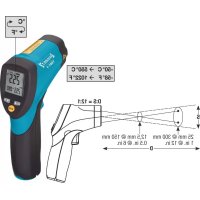
19911 - Thermometer Hazet - Free user manual and instructions
Find the device manual for free 19911 Hazet in PDF.



| Product Type | Non-contact Infrared Thermometer |
| Brand | Hazet |
| Model | 19911 |
| Temperature Range | -50 °C to 550 °C (-58 °F to 1022 °F) |
| Display Resolution | 0.1 °C (0.1 °F) up to 999.9°, then 1 °F |
| Accuracy (at 10-50 °C ambient) | -50 to 20 °C: ±2.5 °C; 20 to 300 °C: ±1.0% ±1.0 °C; 300 to 550 °C: ±1.5% |
| Repeatability | ±1.3 °C for -50 to 20 °C; ±0.5% or ±0.5 °C for 20 to 550 °C |
| Response Time | 150 ms |
| Distance to Spot Ratio (D:S) | 12:1 |
| Spectral Response | 8 to 14 µm |
| Emissivity | Digitally adjustable from 0.10 to 1.0 (default 0.95) |
| Power Supply | 9 V battery (NEDA 1604A or IEC 6LR61) |
| Operating Temperature | 0 °C to 50 °C (32 °F to 122 °F) |
| Storage Temperature | -10 °C to 60 °C (14 °F to 140 °F) |
| Relative Humidity | 10% to 90% operating, < 80% storage |
| Aiming Laser | Class 2, < 1 mW, wavelength 630-670 nm |
| Display | LCD with backlight |
| Main Functions | Trigger lock, data hold (HOLD), min/max alarms, °C/°F selection, adjustable emissivity, auto-off (7 s) |
| Applications | Food preparation, safety installations, plastic processing, asphalt, HVAC, engines, etc. (not for medical use) |
| Maintenance and Cleaning | Wipe the housing with a dry cloth; do not use solvents; repair by manufacturer only |
| Safety | Do not look directly into the laser; do not point at eyes or reflective surfaces; avoid explosive gases |
| Package Contents | Infrared thermometer, instruction manual |
Frequently Asked Questions - 19911 Hazet
User questions about 19911 Hazet
0 question about this device. Answer the ones you know or ask your own.
Ask a new question about this device
Download the instructions for your Thermometer in PDF format for free! Find your manual 19911 - Hazet and take your electronic device back in hand. On this page are published all the documents necessary for the use of your device. 19911 by Hazet.
USER MANUAL 19911 Hazet
HIGHEST TECHNOLOGY IN TOOL MANUFACTURE SINCE 1868

Geniales Werkzeug
Ingenious Tools
1991-1

Betriebsanleitung
Infrarot-Thermometer
Operating Instructions
Non-Contact
Infrared Thermometer
Mode d'emploi
Hitzequelle lokalisieren
Dear Customer, You have made a good choice. This HAZET tool in front of you is a high-quality product that will make your work easier.
1. General Information
- Please make sure that the user of this tool carefully reads these operating instructions and fully understands all information given before it is used.
- These operating instructions contain important advice that is necessary for a safe and trouble-free operation of your HAZET Infrared Thermometer.
- Special caution is required, if the laser beam is switched on.
- For effective use of the Infrared Thermometer as intended, it is essential that all safety and other information in these operating instructions is adhered to.
- For this reason, always keep these operating instructions together with your HAZET Infrared Thermometer.
- This tool has been designed exclusively for specific applications. HAZET emphasizes that any modification to the tool and/or use on an application not detailed to its intended application are strictly forbidden.
- HAZET will not be liable for any injuries to persons or damage to property originating from improper application, misuse of the tool or a disregard of the safety instructions.
• Furthermore, the general safety regulations and regulations for the prevention of accidents valid for the application area of this tool must be observed and respected.
2. Explanation of Symbols
ATTENTION: Please pay attention to these symbols!
Read the Operating Instructions!

The user/owner of this tool is obliged to observe the operating instructions and should ensure all users of the tool use it according to the information given in these operating instructions.
NOTICE!

This symbol marks advice which is helpful when using the tool.

CAUTION!

This symbol marks important specifications, dangerous conditions, safety risks and safety advice.
ATTENTION!

This symbol marks advice which if disregarded results in damage, malfunction and/or functional failure of the tool.
3. Liability and Warranty

- Any deviation from the intended use and/or any misapplication of the tool is not allowed and will be considered as improper use.
- Any claims against the manufacturer and/or its authorized agents because of damage caused by improper use of the tool are void.
- Any personal injury or material losses caused by improper use of the tool are the sole responsibility of the operator and user.
4. Disposal
Electric devices must not be disposed of in the domestic waste, but at special collecting points.


Electronic waste, electronic components, are subject to the regulations of hazardous waste and may only be disposed of by certified specialist companies.
Do not let the beam enter your eye, another person's eye or the eye of an animal! This may cause severe eye injuries.

This paragraph gives an overview of important security advice to help to ensure the optimal protection of the personnel as well as the safe and trouble-free operation of the tool.
Additionally, the different chapters contain security advice that is marked with symbols in order to avert immediate danger. Furthermore, all stickers and labels on the tool must be observed and must be kept legible.
1. General Aspects

- This tool was developed and manufactured according to the technical norms and standards valid at the time and is considered to be operationally reliable. Nevertheless, the tool can present a danger when it is not used as intended or in an inappropriate way by unqualified personnel. Please make sure that any person using this tool or carrying out maintenance work carefully reads these operating instructions and fully understands all information given, before using the tool.
- Any modification of the tool is strictly forbidden.
- All security advices, warning and operation notices on the device have to be kept legible. Replace all damaged labels or stickers.
- All indications concerning setting values and setting ranges must be observed.
2. Owner's Liability

- Keep the operating instructions together with the tool at all times.
- The tool must only be used if it is in good working order.
- All safety equipment, e.g. fire extinguisher etc., must always be within reach and should be checked regularly.
- In addition to the safety advice given in these operating instructions, the general safety regulations, regulations for the prevention of accidents and regulations for environmental protection being valid for the application area of this tool have to be observed and respected.
3. Appropriate Use

Operational reliability can only be ensured, if the tool is used as intended and in compliance with the indications
given in these operating instructions. In addition to the safety advice given in these operating instructions, the general safety regulations, regulations for the prevention of accidents and regulations for environmental protection being valid for the application area of this tool have to be observed and respected.
Power tools have to be used, inspected and maintained always in compliance with the respective local, state, national or federal regulations.
- The Non-Contact Infrared Thermometer can be used to measure the temperature of an objects' surface that is improper to be measured by traditional (contact) thermometer (such as moving objects, live components or objects with restricted access.)
- The built-in laser pointer increases target accuracy.
- The backlight LCD-diplay and the handy push-button enable convenient, ergonomic operation.
WIDE RANGE APPLICATION:
- Food preparation, safety and fire inspectors, plastic moulding, asphalt, marine and screen printing, measuring ink and dryer temperature, HVAC/R, diesel and fleet maintenance.
- This Infrared Thermometer must not be used for medical purposes

- Do not let the beam enter your eye, another person's eye or the eye of an animal.
- Be careful no to let the beam on a reflective surface strike your eye.
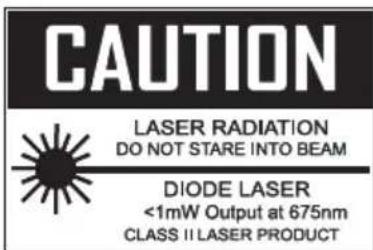
- Do not allow the laser light beam impinge on any gas which can explode.

Do not let the beam enter your eye, another person's eye or the eye of an animal! This may cause severe eye injuries.
USA
② For Your Safety
GB
- Any deviation from the intended use and/or any misapplication of the tool is not allowed and will be considered as improper use.
- Any claims against the manufacturer and/or its authorized agents because of damage caused by improper use of the tool will be void.
- Any personal injury or material losses caused by improper use are the sole responsibility of the operator and user.
4. Storage
The tool has been stored according to the following conditions:
- Do not store the tool outdoors.
- Keep tool in a dry and dust-free place.
- Do not expose the tool to liquids or aggressive substances.
- Relative humidity max. 80% at storage and 10% - 90% while operating.
5. Dangers emanating from the tool

Before each use, check the HAZET Infrared Thermometer for full operatability. Do not use the Infrared Thermometer if operatability cannot be ensured or if dam is detected. If the Infrared Thermometer led, although its full operatability cannot be ensured, you risk severe injuries to persons damage to property.

In order to avoid injuries or fire the following safety instructions have to be observed and respected:
- Ensure housing is not damaged. Infrared Thermometers that have fallen down or that are damaged, must be checked by qualified personnel before restarting operation.
- Do not use tools whose on/off-switch is defective. Tools that cannot be switched on or off with their on/off switch are dangerous and have to be repaired.
-
The Infrared Thermometer must not be exposed to water or other liquids.
-
Service and repair work should be carried out by qualified technical personnel only. In order ensure the working reliability in the long term, always use original spare parts.
- The Thermometer must not be disassembled. Inappropriate assembly can lead to a reduction of the functionality, and/or to injury.
- Do not remove any safety devices and/or housing parts.
- Do not operate the tool, if safety covers or safety devices are missing or defective.
- Only use the Thermometer within the prescribed places, and governed under the current regulations relating to the working environment and to electrical systems.
- For safety reasons all modifications of the HAZET Infrared Thermometer are strictly forbidden. Any modification of the tool will lead to the exclusion of liability.
- Only use parts, attachments and accessories that are recommended by the manufacturer.
- Do not clean plastic parts with solvents.
- Solvents like benzine, carbon tetrachloride and alcohol can deform plastic parts or make them break. Keep these solvents away from the tool.

Do not let the beam enter your eye, another person's eye or the eye of an animal! This may cause severe eye injuries.
1. Technical Information / Elements of the Device
- Rapid detection function
- Precise non-contact measurements
- Dual laser sighting
• Automatic Data Hold - ° C / °F switch
- Emissivity digitally adjustable from 0.1 to 1.0
• MAX temperature displays - Backlight LCD display
• Automatic selection range and Display Resolution 0.1 °C (0.1 °F) - Trigger lock
- Set high and low alarms
| Temperature range- 50 to 550 °C(- 58 °F ~ 1022 °F)Display resolution 0.1°C (0.1 °F)1 °F | D:S12:1< 1.000> 1.000 |
| Accuracy for targets:Assumes ambient operating temperature of 10 to 50 °C(50 to 122 °F)- 50 °C ~ 20 °C(- 58 °F ~ 68 °F)20 °C ~300 °C(68 °F ~572 °F)300 °C ~550 °C(572 °F ~ 1.022 °F) | -± 2.5 °C (4.5 °F)± 1.0 % ± 1.0 °C(1.8 °F)± 1.5 % |
| Measuring sequence- 50 ~ 20 °C(- 58 ~ 68 °F)20 ~ 550 °C(68 ~ 1.022 °F) | ± 1.3 °C (2.3 °F)± 0.5 % oder± 0.5 °C (0.9 °F) |
| Reaction time | 150 ms |
| Spectral response 8 ~ | 14 um |
| Emissivity Digitally adjustablefrom 0.1 to 1.0 | |
| Over range indication LCD will show “----” | |
| Polarity Automatic (no indi-cation for positive polarity)Minus (-) sign for negative polarityt | |
| Diode laser output < 1 | mW, Wavelength 630 ~ 670 nm, Class 2laser product |
| Operating temp. 0 to 50 °C (32 to 122 °F) | |
| Storage temp. - 10 to 60 °C (14 to 140 °F) | |
| Relative humidity 10 % | ~ 90 % RH operating, < 80 % RH storage |
| Power supply 9 V battery, NEDA 1.604 A or IEC 6LR61 or equivalent | |
| Safety “CE” Comply with EMC | |
2. Included
• HAZET Infrared Thermometer
3. Application

CAUTION:
- Field of View: Make sure that the target is larger than the unit's spot size. The smaller the target, the closer you should be to it. When accuracy is critical, make sure the target is at least twice as large as the spot size


Do not let the beam enter your eye, another person's eye or the eye of an animal! This may cause severe eye injuries.
4.1 FRONT PANEL DESCRIPTION

① IR sensor
② LCD Display Laser pointer beam
③ Up button
④ Down button
⑤ MODE-button
⑥ Measurement Trigger
⑦ Battery Cover
⑧ Handle Grip
4.2 INDICATOR
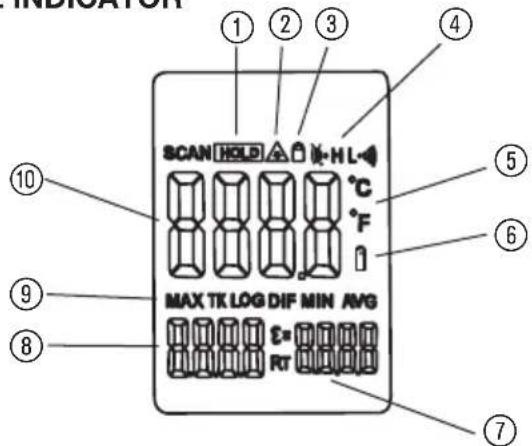
① Data hold
② Laser " on" symbols
③ Lock symbol
④ High alarm and low alarm symbol
⑤ °C/°F symbol
⑥ Low power symbols
⑦ Emissivity symbol and value
⑧ Temperature values for the MAX
⑨ Symbols for MAX
⑩ Current temperature value
4.3 BUTTONS

① Up button (for EMS, HAL, LAL)
② Down button (for EMS,HAL,LAL)
③ MODE button
(for cycling through the mode loop)
Functional Design
- The °C/°F switch is located in the battery compartment.
- When measuring, use the up and down button to adjust the emissivity.
- During data hold, use the up button to turn the laser off. Use the down button to turn on/off the backlight.
- To set values for the High Alarm (HAL), Low Alarm (LAL) and Emissivity (EMS), press the MODE button until the appropriate code appears in the display, press the up and down buttons to adjust the desired values.
MODE Button Function
- Press the mode button also allows you to access the set state, Emissivity (EMS), Lock on/off, HAL on/off, HAL adjustment LOW on/off, LOW adjustment. Each time you press set you advance through the mode cycle. The diagram shows the sequence of functions in the mode cycle.
EMS adjustment
- The Emissivity (EMS) is digitally adjustable from 0.10 to 1.0, LOCK on/off. The lock mode is particularly useful for continuous monitoring of temperatures. Press the up button or down button to turn on or off. Press the Measurement Trigger to confirm the lock measurement mode. The IR Thermometer will continuously display the temperature until is pressed again the Measurement Trigger.

Do not let the beam enter your eye, another person's eye or the eye of an animal! This may cause severe eye injuries.
GB
③ Design and Function
USA
- In lock mode, press the up button or down button to adjust the Emissivity. HAL (LOW) on/off. Press the up button or down button to turn on or turn off. Press the Measurement Trigger to confirm the High (Low) alarm mode. Hal (LOW) adjustment. The high (Low) alarm adjustable form -50 to 550 °C (-58°F \~ 1022°F)
![graph TD A["EMS-Adjustment"] --> B["LOCK on/off"] B --> C["HAL on/off"] C --> D["HAL-Adjustment"] D --> E["LOW on/off"] E --> F["LOW-Adjustment"] F --> G["MODE"]](/content/2026/04/594461/images/fc6e5d17cae5f6bc1eab25b276b14b4390835cf1bf35a0acd0e1bf68fb431aad.jpg)
Switching C/F
- Select the temperature units (°C or °F) using the °C/°F switch ①.
- Max indicate the max record that displays between the pressing and releasing the "ON/OFF" button each time.

- Hold the Thermometer by its Handle Grip and point it toward the surface to be measured.
- Pull and hold the Trigger to turn the Thermometer on and begin testing. The display will light if the battery is good. Replace the battery if the display does not light.
- Release the Trigger and the HOLD display icon will appear on the LCD indicating that the reading is being held. In HOLD status, press the UP button to turn on or off the laser. And press the DOWN button to turn on or off the backlight.
- The Thermometer will automatically power down after approximately 7 seconds after the trigger is released.(Unless the unit is locked on).

Note:
Measurement considerations
Holding the Thermometer by its handle, point the IR Sensor toward the object whose temperature is to be measured. The Thermometer automatically compensates
for temperature deviations from ambient temperature. Keep in mind that it will take the Thermometer up to 30 minutes after high temperature measurement to adjust to the ambient temperatures, some time (several minutes) is required after the low (and before the high) temperature measurements are made.
This is a result of the cooling process, which must take place for the IR sensor.
5. BATTERY REPLACEMENT
- As battery power is not sufficient, LCD will display “......” and replacement with one new battery type 9V is required.
- Open battery cover, then take out the battery out of the battery compartment and replace with a new 9-Volt battery and place the battery cover back.
6. How it Works
- Infrared thermometers measure the surface temperature of an object. The unit's optics sensor does emit, reflect and transmit energy, which is collected and focused onto a detector. The unit's electronics translate the information into a temperature reading, which is displayed on the unit. In units with a laser, the laser is used for aiming purposes only.
Field of View
- Make sure that the target is larger than the unit's spot size. The smaller the target, the closer you should be to it. When accuracy is critical, make sure the target is at least twice as large as the spot size.
Distance & Spot Size
- As the distance (D) from the object increases, the spot size (S) of the area measured by the unit becomes larger.
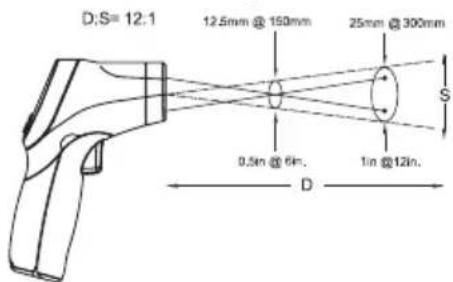
Locating a hot Spot
• To find a hot spot aim the thermometer outside the area of interest, then scan across with an up and down motion until you locate hot spot.

Do not let the beam enter your eye, another person's eye or the eye of an animal! This may cause severe eye injuries.

Reminders
- Not recommended for use in measuring shiny or polished metal surfaces (stainless steel, aluminium, etc.). See Emissivity.
- The unit cannot measure through transparent surfaces such as glass. It will measure the surface temperature of the glass instead.
- Steam, dust, smoke, etc., can prevent accurate measurement by obstructing the unit's optics.
Emissivity
- Emissivity is a term used to describe the energy-emitting characteristics of materials.
- Most (90% of typical applications) organic materials and painted or oxidized surfaces have an emissivity of 0.95 (pre-set in the unit). Inaccurate readings will result from measuring shiny or polished metal surfaces. To compensate, cove the surface to be measured with masking tape or flat black paint. Allow time for the tape to reach the same temperature as the material underneath it. Measure the temperature of the tape or painted surface. (See EMS adjustment on pages 15 and 16)
| Emissivity Values | |
| Substance Thermal emissivity | |
| Asphalt 0.90 to 0.98 | |
| Cloth (black) | 0.98 |
| Concrete | 0.94 |
| Human skin | 0.98 |
| Cement | 0.96 |
| Leather | 0.75 to 0.80 |
| Sand 0.90 | |
| Charcoal (powder) | 0.96 |
| Earth | 0.92 to 0.96 |
| Lacquer | 0.80 to 0.95 |
| Water | 0.92 to 0.96 |
| Lacquer (matt) | 0.97 |
| Ice | 0.96 to 0.98 |
| Rubber (black) | 0.94 |
| Snow | 0.83 |
| Plastic 0.85 to 0.95 | |
| Glass 0.90 to 0.95 | |
| Timber 0.90 | |
| Ceramic 0.90 to 0.94 | |
| Paper | 0.70 to 0.94 |
| Marble 0.94 | |
| Chromium oxides | 0.81 |
| Plaster 0.80 to 0.90 | |
| Copper oxides | 0.78 |
| Mortar 0.89 to 0.91 | |
| Iron oxides | 0.78 to 0.82 |
| Brick | 0.93 to 0.96 |
| Textiles | 0.90 |

Do not let the beam enter your eye, another person's eye or the eye of an animal! This may cause severe eye injuries.
5. MAINTENANCE
- Impacts, falling down and the exposure to liquids can damage the Infrared Thermometer and impair its functionality.
• Always keep device clean. - Periodically, wipe the body with a dry cloth. Do not use abrasives or solvents on this instrument.
- Repair and service work should only be carried out by the manufacturer.
- For any question concerning warranty and/or repair, please contact your local HAZET distributor.
HAZET - WERK • 10 04 61 • D-42804 Remscheid • Germany • +49 (0) 21 91 / 7 92-0
FAX +49 (0) 21 91 / 7 92-375 (National) • FAX +49 (0) 21 91 / 7 92-400 (International)
www.hazet.com • e-mail info@hazet.de



- INFRAROT-THERMOMETER
- NON-CONTACT
- INFRARED THERMOMETER
- HITZEQUELLE LOKALISIEREN
- GENERAL INFORMATION
- EXPLANATION OF SYMBOLS
- READ THE OPERATING INSTRUCTIONS
- NOTICE
- CAUTION
- ATTENTION
- LIABILITY AND WARRANTY
- DISPOSAL
- GENERAL ASPECTS
- OWNER'S LIABILITY
- APPROPRIATE USE
- WIDE RANGE APPLICATION
- USA
- ② FOR YOUR SAFETY
- GB
- STORAGE
- DANGERS EMANATING FROM THE TOOL
- TECHNICAL INFORMATION / ELEMENTS OF THE DEVICE
- INCLUDED
- APPLICATION
- FUNCTIONAL DESIGN
- MODE BUTTON FUNCTION
- EMS ADJUSTMENT
- ③ DESIGN AND FUNCTION
- SWITCHING C/F
- NOTE
- MEASUREMENT CONSIDERATIONS
- BATTERY REPLACEMENT
- HOW IT WORKS
- FIELD OF VIEW
- DISTANCE & SPOT SIZE
- LOCATING A HOT SPOT
- REMINDERS
- EMISSIVITY
- MAINTENANCE
Brand : Hazet
Model : 19911
Category : Thermometer