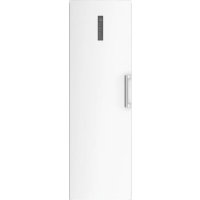
H3F330WEH1 - Freezer HAIER - Free user manual and instructions
Find the device manual for free H3F330WEH1 HAIER in PDF.



| Brand | Haier |
| Model | H3F330WEH1 |
| Category | Upright freezer |
| Product type | No Frost upright freezer |
| Energy class | E |
| Annual energy consumption | 266 kWh/year |
| Freezer volume | 330 L |
| Freezing capacity | 23 kg/24h |
| Autonomy in case of power failure | 12 h |
| Number of stars | **** |
| Climate class | SN-T (10 °C to 43 °C) |
| Noise level | 38 dB(A) |
| Refrigerant | R600a (isobutane) |
| Power supply | 220-240 V ~ / 50 Hz |
| Dimensions (H x W x D) | 1910 x 595 x 675 mm |
| Weight (net) | Approximately 75 kg |
| Main functions | Super freezing, Fresher Zone, Eco mode, child lock, Wi-Fi, power interruption memory, open door alarm and high temperature alarm |
| Interior lighting | LED, energy efficiency class G |
| Included accessories | Ice maker with scoop, door balconies, glass shelves, drawers, adjustable feet |
| Door reversibility | Yes, from right to left |
| Maintenance and cleaning | Automatic defrost (No Frost); exterior and interior cleaning with warm water and mild detergent; do not use sharp objects or steam cleaners |
| Spare parts and repairability | Parts available (thermostat, sensors, electronic board, lighting) for 7 years; handles, hinges, trays for 7 years; door gaskets for 10 years |
| Warranty | 2 years (EU), 3 years (Turkey), 1 year (UK, Russia, Morocco), 5 years (Norway), 2 years (Serbia) – depending on country |
| Connectivity | Wi-Fi 802.11 b/g/n, Bluetooth 4.2; hOn app for remote control |
| General information | Household use only; do not store explosive substances; ambient temperature 10-43 °C; wait 6 hours before first use |
Frequently Asked Questions - H3F330WEH1 HAIER
User questions about H3F330WEH1 HAIER
0 question about this device. Answer the ones you know or ask your own.
Ask a new question about this device
Download the instructions for your Freezer in PDF format for free! Find your manual H3F330WEH1 - HAIER and take your electronic device back in hand. On this page are published all the documents necessary for the use of your device. H3F330WEH1 by HAIER.
USER MANUAL H3F330WEH1 HAIER
Thank you for purchasing a Haier Product.
Please read these instructions carefully before using this appliance. The instructions contain important information which will help you get the best out of the appliance and ensure safe and proper installation, use and maintenance.
Keep this manual in a convenient place so you can always refer to it for the safe and proper use of the appliance.
If you sell the appliance, give it away, or leave it behind when you move house, make sure you also pass this manual so that the new owner can become familiar with the appliance and safety warnings.
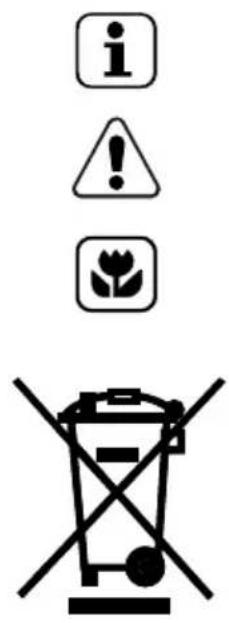
Legend
General information and tips
Warning – Important Safety information
Environmental information
Disposal
Help protect the environment and human health. Put the packaging in applicable containers to recycle it. Help to recycle waste of electrical and electronic appliances. Do not dispose appliances marked with this symbol with the household waste. Return the product to your local recycling facility or contact your municipal office.

Warning!
Risk of injury or suffocation!
Refrigerants and gases must be disposed of professionally. Ensure that the tubing of the refrigerant circuit is not damaged before being properly disposed of. Disconnect the appliance from the mains supply. Cut off the mains cable and dispose of it. Remove the door, the door catch and seals, to prevent children and pets to get closed in the appliance.
1 - Safety ....4
2 - Intended Use ....8
3 -ProductDescription ......9
4 - Control panel 10
5 - Use 11
6 - Energy saving 11
7 - Equipment 11
8 - Care and Cleaning 15
9 - Troubleshooting 17
10 - Installation 20
11 - Technical Data 24
12 -CustomerService.... 25
13-Connectivity Wi-fi....26
Before switching on the appliance for the first time, read the following safety hints!:

WARNING!
Before first use
▶ Make sure there is no transport damage.
Remove all packaging and keep out of children's reach.
▶ Wait at least six hours before installing the appliance in order to ensure the refrigerant circuit is fully efficient.
▶ Handle the appliance always with at least two persons because it is heavy.
Installation
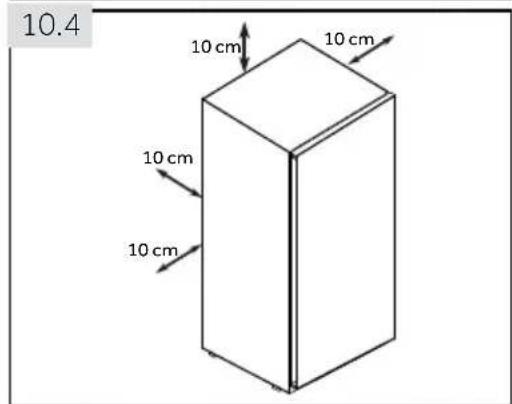
The appliance should be placed in a well-ventilated place. Ensure a space of at least 10 cm above and around the appliance.
▶ Do not cover air vent openings.
▶ Never place the appliance in a damp area or location where it might be splashed with water. Clean and dry water splashes and stains with a soft clean cloth.
▶ Do not install the appliance in direct sunlight or in the near of heat sources(e.g. stoves, heaters).
▶ Install and level the appliance in an area suitable for its size and use.
- Keep ventilation openings in the appliance or in the in-built structure clear of obstruction.
▶ Make sure that the electrical information on the rating plate agrees with the power supply. If it does not, contact an electrician.
The appliance is operated by a 220-240 VAC/50 Hz power supply. Abnormal voltage fluctuation may cause the appliance to fail to start, or damage to the temperature control or compressor, or there may be an abnormal noise when operating. In such case, an automatic regulator shall be mounted.
▶ Use a separate earthed socket for the power supply which is easily accessible during cleaning. The appliance must be earthed.
▶ Only for UK: The appliance's power cable is fitted with 3-cord (grounding). plug that fits a standard 3-cord (grounded) socket. Never cut off or dismount the third pin (grounding). After the appliance is installed, the plug should be accessible.
▶ Do not use multi-plug adapters and extension cables.
▶ Ensure that the power cable is not trapped by the freezer. Do not step on the power cable.
▶ Do not damage the refrigerant circuit.

WARNING!
Daily use
This appliance can be used by children aged from 8 years and above and persons with reduced physical, sensory or mental capabilities or lack of experience and knowledge if they have been given supervision or instruction concerning use of the appliance in a safe way and understand the hazards involved.
- Keep away children under 3 years of age from the appliance unless they are constantly supervised.
▶ Children shall not play with the appliance.
If cool gas or other inflammable gas is leaking in the vicinity of the appliance, turn off the valve of the leaking gas, open the doors and windows and do not unplug a plug in the power cable of the freezer or any other appliance.
▶ Notice that the appliance is set for operation at a specific ambient range between 10 and 43 °C. The appliance may not work properly if it is left for a long period at a temperature above or below the indicated range.
▶ Do not place unstable articles (heavy objects, containers filled with water) on top of the freezer, to ovoid personal injury caused by falling or electric shock caused by contact with water.
▶ Open and close the doors only with the handles. The gap between the doors and between the doors and the cabinet is very narrow. Do not extend your hands in these areas to avoid pinching your fingers. Open or close the freezer doors only when there are no children standing within the range of door movement.
▶ Do not store or use inflammable, explosive or corrosive materials in the appliance or in the vicinity.
Do not store medicines, bacteria or chemical agents in the appliance. This appliance is a household appliance. It is not recommended to store materials that require strict temperatures.
On refrigerating mode without a 4-star compartment: this refrigerating appliance is not suitable for freezing foodstuffs; on freezing mode with a 4-star compartment: this freezing appliance is not suitable for refrigerating foodstuffs.
▶ Never store liquids in bottles or cans (besides high percentage spirits) especially carbonated beverages in the freezer, as these will burst during freezing.
▶ Check the condition of food if a warming in the freezer has taken place.
▶ Do not set unnecessarily low temperature in the freezer compartment. Attention: Bottles can burst.

WARNING!
Daily use
- Do not touch frozen goods with wet hands (wear gloves). Especially do not eat ice lollies immediately after removal from the freezer compartment. There is the risk to freeze or the formation of frost blisters. FIRST aid: keep immediately under running cold water. Do not pull away!
- Do not touch the inside surface of the freezer when in operation, especially with wet hands. Your hands may freeze onto the surface.
▶ Unplug the appliance in the event of a power interruption or before cleaning. Allow at least 5 minutes before restarting the appliance, as frequent starting may damage the compressor.
▶ Do not use electrical devices inside the food storage compartments of the appliance, unless they are of the type recommended by the manufacturer.
If the illuminating lamps is damaged, it must be replaced by the manufacturer or by the qualified person at the specified maintenance provider.
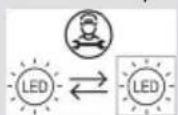
Maintenance/cleaning
▶ Make sure children are supervised if they carry out cleaning and maintenance.
▶ Disconnect the appliance from the electrical supply before undertaking any routine maintenance. Allow at least 5 minutes before restarting the appliance, as frequent starting may damage the compressor.
▶ Hold the plug, not the cable, when unplugging the appliance.
▶ Do not scrape off frost and ice with sharp objects. Do not use sprays, electric heaters like heater, hair dryer, steam cleaners or other sources of heat in order to avoid damage to the plastic parts.
- Do not use mechanical devices or other means to accelerate the defrosting process, other than those recommended by the manufacturer.
▶ Do not spray or flush the appliance during cleaning.
▶ Do not use water spray or steam to clean the appliance.
If the supply cord is damaged, it must be replaced by the manufacturer, its service agent or similarly qualified persons in order to avoid a hazard.
Do not try to repair, disassemble or modify the appliance by yourself. In case of repair please contact our customer service.
Refrigerant gas information

WARNING!
The appliance contains the flammable refrigerant ISOBUTHANE (R600a). Ma ke sure the refrigerant circuit is not damaged during transportation or installation. Leaking refrigerant may cause eye injuries or ignite. If a damage has occurred, keep away open fire sources, thoroughly ventilate the room, do not plug or unplug the power cords of the appliance or any other appliance. Inform the customer service.
In case of eyes get into contact with the refrigerant, rinse immediately it under running water and call immediately the eye specialist.

WARNING!
▶ Taking care to avoid causing a fire by igniting flammable material.
▶ WARNING: When positioning the appliance, ensure the supply cord is not trapped or damaged.
▶ WARNING: Do not locate multiple portable socket-outlets or portable power supplies at the rear of the appliance.
▶ Do not store explosive substances such as aerosol cans with a flammable propellant in this appliance.
For flammable refrigerants is used in the freezer, please be careful when installing, handling, serving and recycling the appliance.
▶ Please contact to the service agent to dispose the appliance because the flammable blowing gas was used.
2 - Intended use
2.1 Intended Use
"This appliance is intended to be used in household and similar applications such as
– staff kitchen areas in shops, offices and other working environments;
– farm houses and by clients in hotels, motels and other residential type environments;
- bed and breakfast type environments;
– catering and similar non-retail applications.
This appliance is intended for freezing food. It has been designed exclusively for use in dry interior house-holds. It is not intended for commercial or industrial use. On demand this appliance can be used as fresh food compartment.
Changes or modifications to the device are not allowed. Unintended use may cause hazards and loss of warranty claims.
2.2 Accessories
Check the accessories and literature in accordance with this list:
2.2
Energy label

Warranty card Connectivity
Quick Guide


User manual
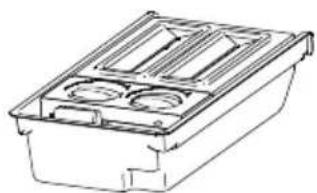
natural_image
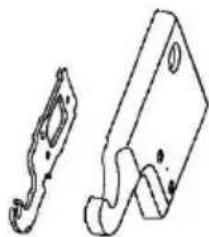
Technical line drawing of a mechanical component with three circular cavities (no text or symbols)Twist Ice Maker
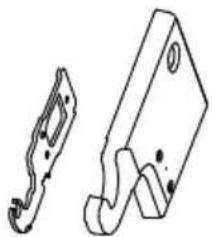
natural_image
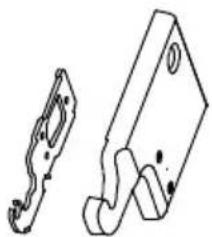
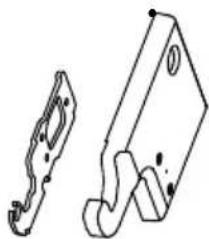
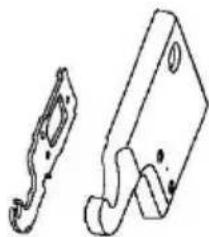
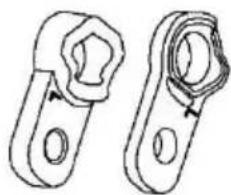
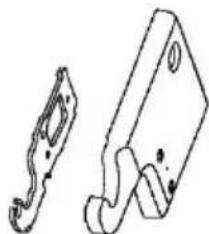
Technical line drawing of two mechanical components (no text or symbols)Upper left hinge for door reversibility
Upper left hinge cover
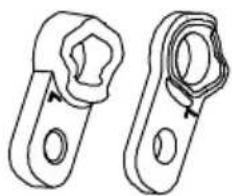
natural_image
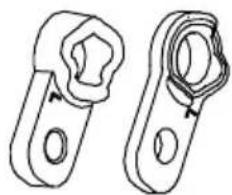
Two mechanical clamping components shown in line drawing (no text or symbols)Axe covers

Notice: Differences
Due to technical changes and different models, some of the illustrations in this manual may differ from your model.
Picture of appliance (Fig. 3)

1 Control panel
2 LED light
3 Multi-air flow
4 Glass shelves
5 Drawers
6 Adjustable feet
7 Removable door racks
8 Door handle
Note: This product contains a light source of energy efficiency class
4 - Control panel
Control panel (Fig. 4)
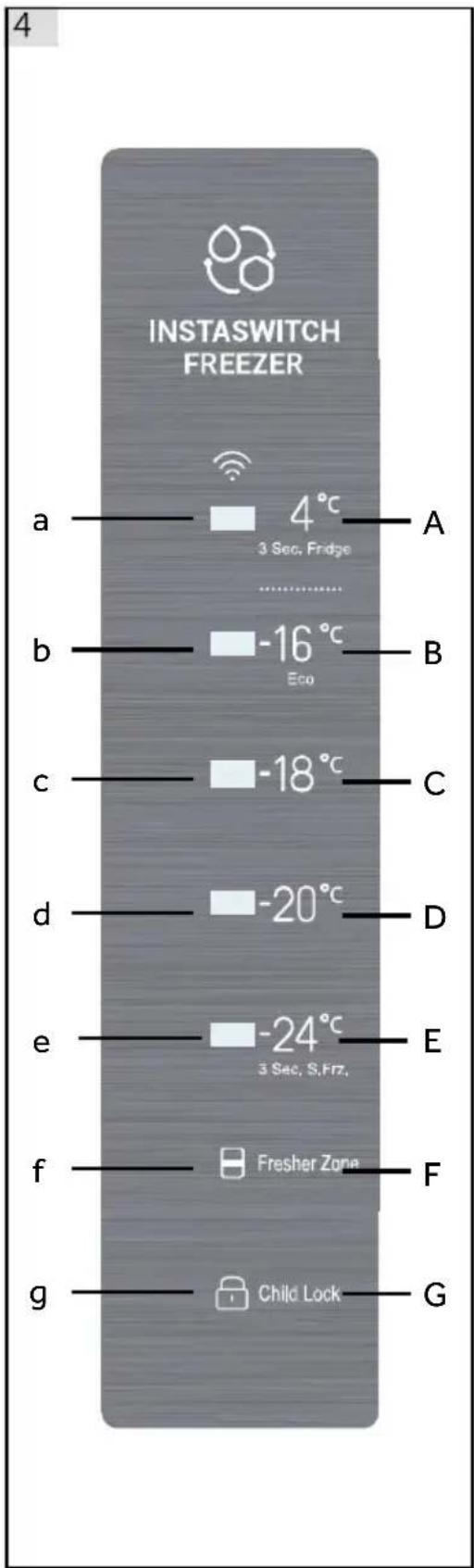
A Fridge mode

B Freeze temperature - Eco

C Freeze temperature

D Freeze temperature
E Freeze temperature and
Super freeze mode
F Fresher zone
G Child lock
5.1 Before first Use
Remove all packaging materials, keep them out of childrens reach and dispose them in an environmentally friendly manner.
Clean the inside and outside of the appliance with water and a mild detergent before putting any food in it.
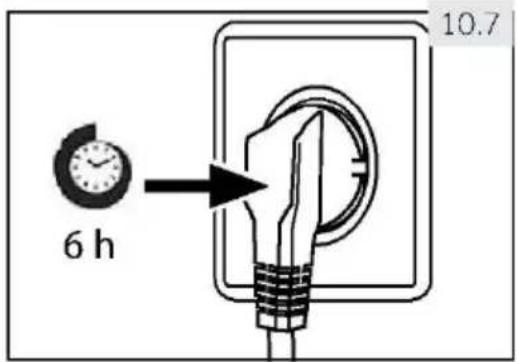
After the appliance has been levelled and cleaned, wait for at least 6 hours before connecting it to the power supply. See Section INSTALLATION.
▶ Precool the compartment for 2 hours at high settings before loading with food. To do so, please set the temperature to -20ircC or -24ircC .
5.2 Switching the appliance on /off
The appliance is in operation as soon as it is connected to the power supply.
The freezer temperature is automatically set to -18°C. This is the recommended setting and the ideal temperature for frozen goods. If desired, you can change the temperatures manually. Please see ADJUSTING THE TEMPERATURE.
Indicators (a-g) will flash once consecutively. If the door is closed, the display switches off after 30 seconds. The panel lock might be active.

ce: Presettings
The appliance is preset to the recommended temperature of -18ircC . Under normal ambient condition you don't need to set a temperature.
When the appliance is switched on after being disconnected from the main power supply, it may take up to 12 hours for the correct temperature to be reached.
Empty the appliance before switching off. To switch off the appliance, pull the power cord out off the power socket.
5.3 Standby-mode of display
When the door is closed the display screen turns off automatically 30 seconds after without operation. The display locks automatically. It lights up automatically when touching any but ton or opening the door.
5.4 Display lock and unlock
Automatic locking
Display is automatically locked after 30 seconds without operation.
Manual locking
When the display is unlocked, press "Child lock" (G) and hold for 3 seconds, after a beep, "Child lock"(g) indicator is light, display is locked. When the display is locked, press "Child lock" (G) and hold for 3 seconds, after a beep, "Child lock"(g) indicator is off, display is unlocked.

ce: Displ
ay lock
When display is locked, functions such as temperature setting or super freeze are disabled. When above operation is attempted, Child lock indicator will blink for 3 times, to remind that the display is locked.
5.5 Temperature setting
When display is unlocked, by touching different temperature buttons, different temperature could be set, this process will be accompanied by beeps.
Freeze and Fridge (4°C)(A) mode has big difference in temperature, and is for different food storage. Prior to making any mode change, please make sure to change the food inside the freezer, so that food will not be damaged because of mode change.
5.6 Freeze mode (-16°C to -24°C) (B - E)
When display is unlocked, by touching different freeze temperature buttons, different temperature could be set, indicators on left of the touch button will be light and others will be off. Temperature could be set to "-16°C", "-18°C", "-20°C" and "-24°C".
5.7 Fridge mode(4°C) (A)
When display is unlocked, by touching (4°C) (A) and hold for 3 seconds, indicators "4°C" (a) will be light, the freezer works in fridge mode. After stabilization, temperature is around 4°C.
5.8 Super freeze mode (E)
Super freeze mode is optimal for preserving food nutrition, it could freeze food in less time. Before putting lots of food inside the freezer, activate super freeze function to have lower temperature, to make sure better freeze result.
When display is unlocked, touch and hold (-24°C) (E) for 3 seconds, indicators (b - e) will be light, the freezer works in super freeze mode. To deactivate manually super freeze function, repeat steps above. If not deactivated manually, the function will be deactivated automatically after 50 hours.
If you have a large amount of food to freeze at one time, it is recommended that the function is activated 24 hours before inserting food. Function will stop automatically after 50 hours or manually. Power consumption will increase when this function is on.

ce: Super freeze
In super freeze mode, temperature could not be adjusted. If you do so, super freeze indicator will blink for 3 times to remind that the freezer is in super freeze mode.
5.9 Fresher Zone (F)
In the Freezer mode, FresherZone works as SHOCK FREEZE, the entire zone can be quickly cooled to the freezing temperature.
When temperature is set at -16ircC or lower, touch FresherZone button(F), the FresherZone indicator(f) illuminates, then the blast function is activated. When activated, the functions will be automatically deactivated when temperature is reached or after 24 hours.
Repeat the operation to deactivate manually.
In the Fridge mode, FresherZone works as QUICKCOOL, the entire zone can be quickly cooled to the freezing temperature.
When temperature is set at 4irc C, touch FresherZone button (F), the FresherZone indicator(f) illuminates, then the FresherZone function is activated. When activated, the functions will be automatically deactivated when temperature is reached or after 3 hours.
Repeat the operation to deactivate manually.
Deactivate FresherZone before switching from freezer to fridge temperature, or switching from fridge to freezer temperature.
5.10 Eco mode (-16°C) (B)
When display is unlocked, by touching (-16°C) (B) the appliance is set into Eco mode. In this mode the energy consumption is lower, while appropriate freezing performance is still guaranteed. To exit the Eco mode select other temperature.
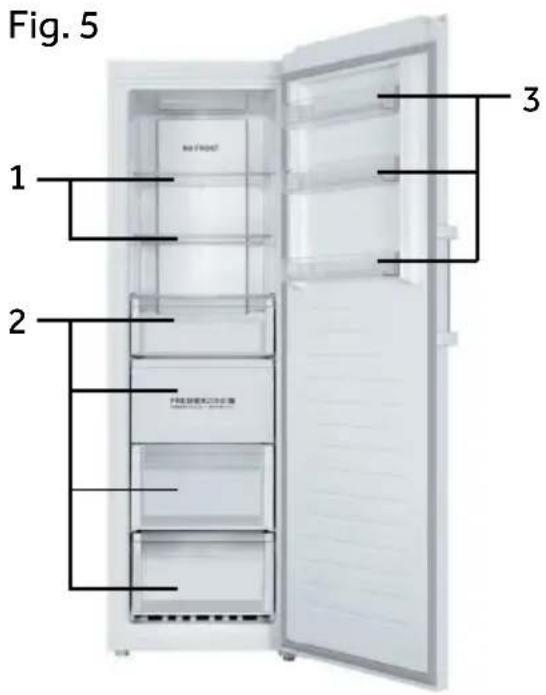
Different foods should be placed in different areas according to their properties (Fig. 5).
1 Pickled foods, canned food, fruit, vegetables, salad, etc.
2 Eggs, canned food, spices, drinks and bottled foods, etc.
3 Meat products, snack foods, etc.
On refrigerating mode without a 4-star compartment: this refrigerating appliance is not suitable for freezing foodstuffs; on freezing mode with a 4-star compartment this freezing appliance is not suitable for refrigerating foodstuffs.
Food can be stored in the freezer at a temperature of at least -18°C for 2 to 12 months, depending on
its properties (e.g., meat: 3-12 months, vegetables: 6-12 months).
In order to avoid expiration of storage periods, please note the freezing date, time limit and name of the food on the packaging according to the storage periods of different foods.
5.11 Power-off memory
This freezer has power-off memory, settings before power-off will be memorized. When power is back on, freezer will return to settings before power-off and continue to function. Child lock is not memorized, after power back on, display is unlocked.
5.12 Door open alarm
When freezer is kept open for more than 1 minute, beeper will make 3 beeps with interval of 0.5 second. The beeps will be repeated every 30 seconds if door is kept open. The beeps will stop until door is closed or after 7 mins of door opening. The beeper stops bee ping and freezer light goes off.
5.13 High temperature alarm
This freezer is equipped with high temperature alarm. In freeze mode or super freeze mode, if current temperature setting indicator blinks with beeps, touch any button, the beep will stop, but current temperature setting indicator keeps blinking, that means temperature in the freezer is too high. Please check if freezer door is tightly closed or if large amount of warm food is put inside the freezer. After a period, current temperature indicator will stop blinking. If it does not stop blinking for a long period, and beeps that are manually cancelled come back, please contact aftersales service.
5.14 Error indication
This freezer is equipped with error indication. When an error is encountered, display will blink every 1/4 second different codes for different errors. In this situation, the freezer could still freeze butuser should contact aftersales service as soon as possible for optimal control of the freezer.
5.15 Wi-Fi
When the appliance is connected with Wi-Fi, it could be controlled from distant [temperature setting adjustment, activation and deactivation of super freeze and FresherZone function]. When the door is left open or when there is temperature deviation, real time information could be informed through the application.
6 - Energy saving tips
EN

Energy saving tips
Make sure the appliance is properly ventilated (see INSTALLATION).
Do not install the appliance in direct sunlight or in the near of heat sources (e.g. stoves, heaters).
Avoid unnecessarily low temperature in the appliance. The energy consumption increases the lower the temperature in the appliance is set.
▶ Allow warm food to cool down before placing it in the appliance.
▶ Open the appliance door as little and as briefly as possible.
Make sure the door always closes correctly and unimpaired by food position. Keep door seals clean.
▶ Defreeze frozen food in a fridge.
Clean the rear of the appliance regularly. Dust increases energy consumption.
The most energy-saving configuration requires drawer, food box and shelves to be positioned in the appliance on factory-fresh condition, and food to be placed without blocking the air outlet of the duct.
7 - Equipment
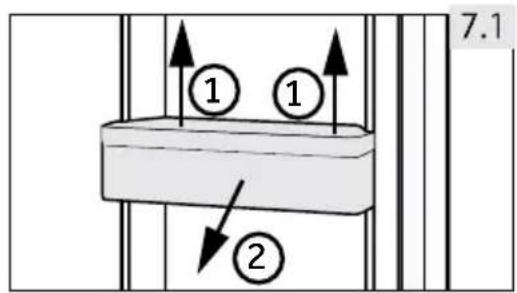
7.1 Removable door racks
The door rack can be removed for cleaning:
Place hands on each side of the rack, lift it upwards (1) and pull it out (2) (Fig. 7.3).
In order to insert the door rack, the above steps are carried out in reverse order.
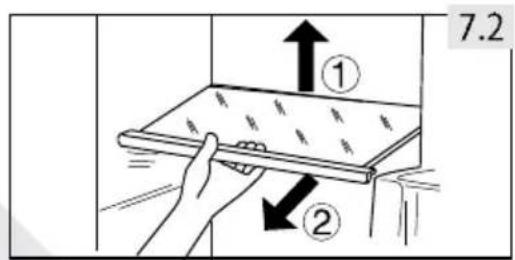
7.2 Glass shelves
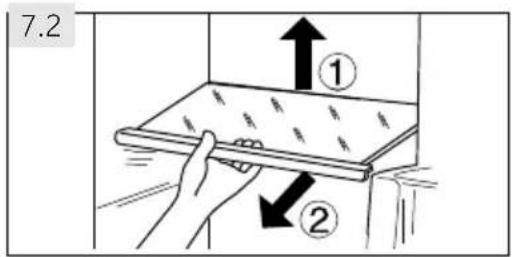
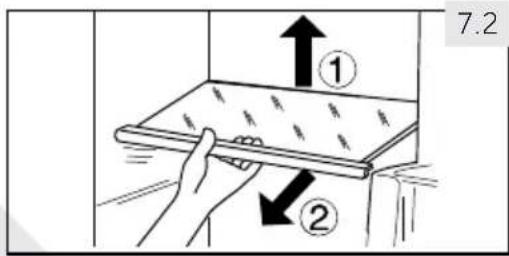
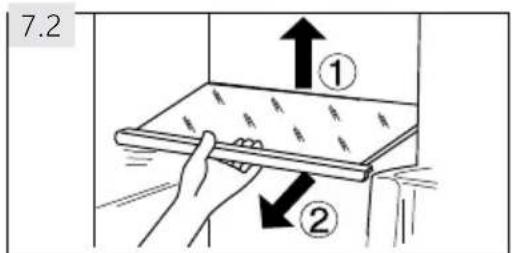
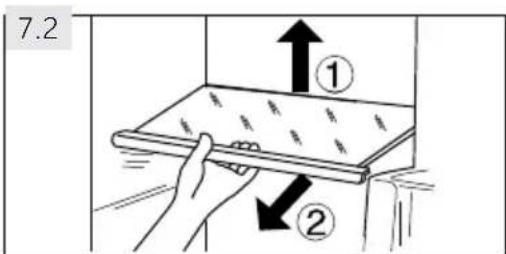
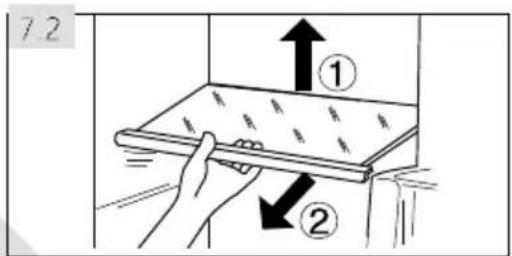
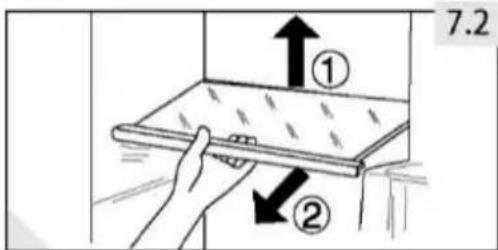
- To take out a shelf, remove it first by uplifting its hind edge (1) and pulling it out (2) (Fig. 7.2).
- To reinstall it, put it on the lugs on both sides and push it to the most rearward position until the rear of the shelf is fixed inside the slots in the sides.
WARNING!
Disconnect the appliance from the power supply before cleaning.
8.1 General
Clean the appliance when only little or no food is stored.
WARNING!
Do not clean the appliance with hard brushes, wire brushes, detergent powder, petrol, amyl acetate, acetone and similar organic solutions, acid or alkaline solutions. Please clean with special freezer detergent to avoid damage.
▶ Do not spray or flush the appliance during cleaning.
▶ Do not scrape off frost and ice with sharp objects.
Do not use sprays, electric heaters like heater, hair dryer, steam cleaners or other sources of heat in order to avoid damage to the plastic parts.
▶ Do not clean the cold glass shelves with hot water. Sudden temperature change may cause the glass to break.
Do not touch the inside surface of the freezer storage compartment, especially with wet hands, as your hands may freeze onto the surface.
In case of heating check the condition of frozen goods.
Do not try to repair the appliance by yourself. In case of repair please contact our customer service.
▶ Always keep the door gasket clean.
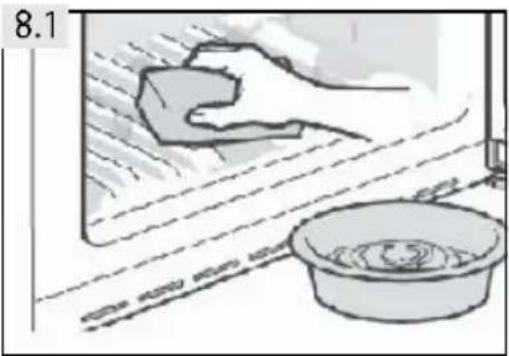
▶ Clean the inside and housing of the appliance with a soft cloth or sponge dampened in warm water and neutral detergent (Fig. 8.1).
▶ Rinse and dry with soft cloth.
- Do not clean any of the parts of the appliance in a dishwasher.
▶ Clean the accessory only with warm water and mild neutral detergent.
natural_image
Illustration of a hand cleaning a window with a soap block and a basin (no text or symbols)8- Care and Cleaning
8.2 Non-use for a longer period
If the appliance is not used for an extended period of time:
▶ Take out the food.
▶ Unplug the power cord.
▶ Clean the appliance as described above.
▶ Keep the door and freezer drawers open to prevent the creation of bad odours inside.
Remove the door of the appliance (open the door and hold it before removing the screws) to avoid children entering into the appliance and getting locked in.

Notice: Switch off
To ensure the service life of the appliance, only turn it off only if strictly necessary.
8.3 Moving the appliance
- Remove all food and unplug the appliance.
- Secure shelves and other moveable parts in the freezer with adhesive tape.
- Close the door and secure it with tape.
- Do not tilt the freezer more than 45irc to avoid damaging the refrigerating system.
- Wrap the feet of the freezer to avoid scratching the floor. Never move the freezer forcefully.
▶ Do not lift the appliance by its handles.
▶ Never place the appliance horizontally on the ground.
Many occurring problems could be solved by yourself without specific expertise. In case of a problem please check all shown possibilities and follow below instructions before you contact an after sales service. See CUSTOMER SERVICE.
WARNING!
Before maintenance, deactivate the appliance and disconnect the mains plug from the mains socket.
Electrical equipment should be serviced only by qualified electrical experts, because improper repairs can cause considerable consequential damages.
▶ A damaged supply should only be replaced by the manufacturer, its service agent or similarly qualified persons in order to avoid a hazard.
The acoustic alarm can be switched off by pressing any button..
9.1 Troubleshooting
| Problem Possible Cause Possible Solution | ||
| The compressor does not work. | Mains plug is not connected in the mains socket. | Connect the mains plug. |
| The appliance runs frequently or for a too long period of time. | The indoor or outdoor temperature is too high.The appliance has been off power for a period of time.The door of the appliance is not tightly closed.The door has been opened too frequently or for too long.The temperature setting is too low.The door gasket is dirty, worn, cracked or mis-matched.The required air circulation is not guaranteed.The interior is covered in ice. | In this case, it is normal for the appliance to run longer.Normally, it takes 8 to 12 hours for the appliance to cool down completely.Close the door and ensure the appliance is located on a level ground and there is no food or container jarring the door.Do not open the door too frequently.Set the temperature higher until a satisfactory temperature is obtained. It takes 24 hours for the temperature to become stable.Clean the door gasket or replace them by the customer service.Ensure adequate ventilation.Defrost the appliance. |
| The appliance makes abnormal sounds. | The appliance is not located on level ground.The appliance touches an object close to it.The appliance stands on a wooden floor or near wooden walls. | Level the appliance.Remove objects around the appliance.Wood amplifies the sound. Set the appliance somewhere else. |
9 - Troubleshooting
| Problem Possible Cause | Possible Solution | |
| The appliance makes a clicking sound | This is normal. It is caused by the refrigeration unit switching on or off. | - |
| A slight sound is to be heard similar to that of flowing water. | This is normal. | - |
| The appliance makes a motor sound | The refrigeration unit has just turned itself on. This is normal | - |
| It is not cold enough inside the appliance. | The temperature is set too high.Goods that are too warm have been stored.Too much food has been stored at a time.The goods are too close to each other.The door is not tightly closed.The door has been opened too frequently or for too long. | Reset the temperature.Always cool down goods before storing them.Always store small quantities of food.Leave a gap between several foods allowing air flowing.Close the door.Do not open the door too frequently. |
| It is too cold inside the appliance. | The temperature is set too low.The Fast-freezing function is activated or has been running too long. | Reset the temperature.Switch off the Fast-freezing function. |
| Moisture accumulates on the surface of the appliance. | The climate is too warm and too damp. | This is normal in damp climate and will change when the humidity decreases. Wipe dry with a cloth. |
| Strong ice and frost in the freezer compartment. | The goods were not adequately packaged.The door is not tightly closed.The door has been opened too frequently or for too long.The door gasket is dirty, worn, cracked or mis-matched.Something on the inside prevents the door from closing properly. | Always pack the goods well.Close the door.Do not open the door too frequently.Clean the door gasket or replace them by the customer service.Reposition the shelves, door racks, or internal containers to allow the door to close. |
| The cooling system does not work. | Mains plug is not connected to the mains socket.The power supply is not intact. | Connect the mains plug.Check the electrical supply to the room. Call the local electricity company! |
| Problem Possible Cause Possible Solution | ||
| The sides of the cabinet and door strip get warm. | This is normal. | - |
| You hear an alarm signal. | The door is openThe temperature inside product is too high | Close the door or silence the alarm manually. |
| The door is difficult to open. | Once the appliance runs, it has an internal vacuum. | Open the door seal gently to let air enter the appliacne. |
| The door can't be closed properly. It always leaves a gap. | Because of the appliances's low temperature, the door seal can easily get hard and deformed. | Use a hair dryer or put a hot towel on the spot where the gasket is deformed.When the gasket is soft once again, close the door and compress it tightly. |
Minimum guarantee is: 2 years for EU Countries, 3 years for Turkey, 1 year for UK, 1 year for Russia, 3 years for Sweden, 2 years for Serbia, 5 years for Norway, 1 year for Morocco, 6 months for Algeria, Tunisia no legal warranty required.
Thermostats, temperature sensors, printed circuit boards and light sources are available for a minimum period of seven years after placing the last unit of the model on the market.
Door handles, door hinges, trays and baskets for a minimum period of seven years and door gaskets for a minimum period of 10 year, after placing the last unit of the model on the market.
9.2 Power Interruption
In the event of a power cut, food should remain safely cold for about 18 hours. Follow these tips during a prolonged power interruption, especially in summer:
▶ Open the door as few times as possible.
Do not put additional food into the freezer during a power interruption.
If prior notice of a power interruption is given and the interruption duration is longer than 15 hours, make some ice and put it in a container in the top of the freezer compartment.
As temperature in the freezer will rise during a power interruption or other failure, the storage period and edible quality of food will be reduced. Any food that defrosts should be either consumed, or cooked and refrozen (where suitable) soon afterwards in order to prevent health risks.

Notice: Memory function during power interruption
After restoration of power the appliance continues with the settings that were set before the power failure.
10.1 Unpacking

RNING!
The appliance is heavy. Always handle with at least two persons.
- Keep all packaging materials out of childrens reach and dispose them in an environmentally friendly manner.
▶ Take the appliance out of the packaging.
▶ Remove all packaging materials.
10.2 Environmental conditions
The room temperature should always be between 18 °C and 43 °C, since it can influence the temperature inside the appliance and its energy consumption. Do not install the appliance near other heat-emitting appliances (ovens, refrigerators) without isolation.
10.3 Space requirements
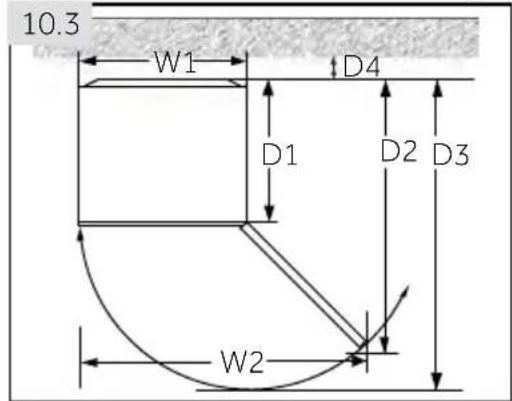
Required space to open the door (Fig. 10.3):
| Widthin mm | Depthin mm | Distance to wallin mm | ||
| W1 | W2 | D1 | D2 | D3 D4 |
| 595 | 955 | 592 | 1105 | 1215 100 |
FOR a free standing appliance: this refrigerating appliance is not intended to be used as a built-in appliance.
10.4 Ventilaton cross-section
To achieve sufficient ventilation of the appliance for safety reasons, the information of the required ventilation cross sections must be observed (Fig. 10.4).
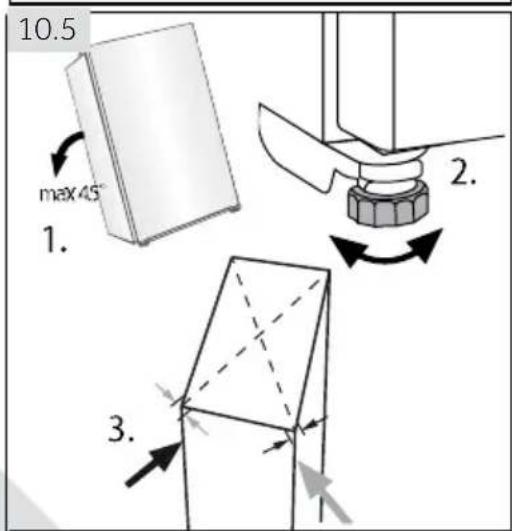
10.5 Aligning the appliance
The appliance should be placed on a fat and solid surface. If the appliance is placed on a pedestal, strong and fire-resistant materials must be used. Never use the foam packing material as a pedestal.
- Tilt the appliance slightly backwards (Fig. 10.5).
- Set the feet to the desired level.
- The stability can be checked by alternately bumping on the diagonals. The slight swaying should be the same in both directions. Otherwise the frame can warp; possible leaking door seals are the result. A low tendency to the rear eases the closing of the door.
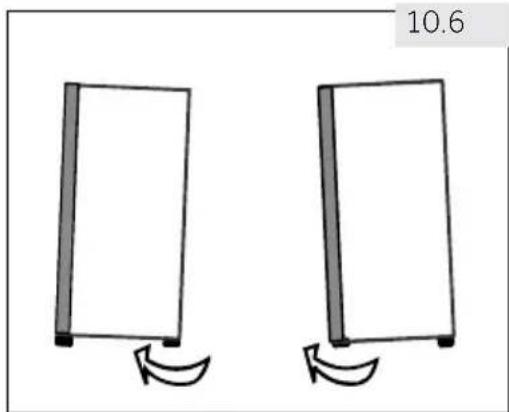
10.6 Using adjustable feet
If the freezer is unstable, the feet can be adjusted: Rotate the adjustable feet according to the direction of arrow (Fig. 10.6) to turn them up or down:
▶ Turning the feet clockwise raises the appliance.
▶ Turning the feet counterclockwise lowers it.
natural_image
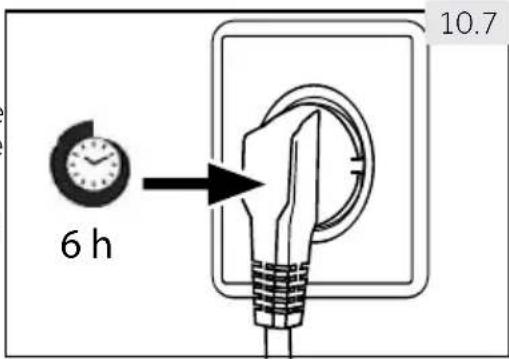
Two identical rectangular panels with curved arrows indicating rotation, no text or symbols present10.7 Waiting time
To the maintenance-free lubrication oil is located in the capsule of the compressor. This oil can get through the closed pipe system during slanting transport. Before connecting the appliance to the power supply you have to wait 6 hours (Fig. 10.7) so that the oil runs back into the capsule.
10.8 Electrical connection
Before each connection check if:
▶ power supply, socket and fusing are appropriate to the rating plate.
▶ the power socket is earthed and no multi-plug or extension.
▶ the power plug and socket are strictly according.
Connect the plug to a properly installed household socket.
To avoid risks a damaged power cord must be replaced by the customer service (see warranty card).
10 - Installation
10.9 Door Reversibility
Before connecting the appliance to the power supply you should check, whether the door swing must changed from right (as delivered) to left, if this is required by the installation location and the usability.

NING!
The appliance is heavy. You need two persons to carry out the door reversibility.
Before any operation, first unplug the appliance from the mains.
▶ Do not tilt the appliance more than 45irc to prevent damage of the cooling system.
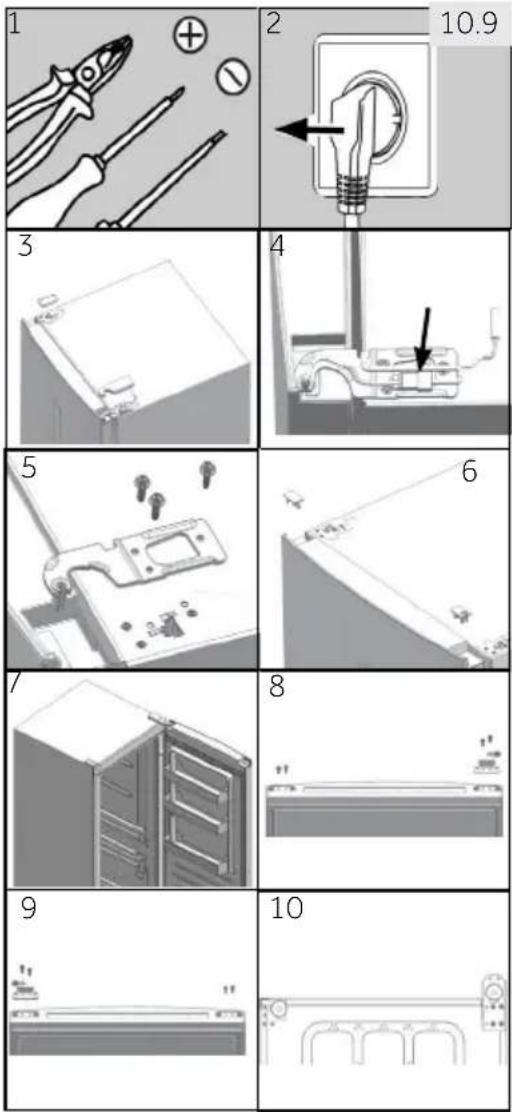
Assembly steps (Fig. 10.9):
- Provide necessary tool.
- Unplug the appliance.
- Remove hinge hole cover and hinge cover.
-
Unplug the connection cable.
-
Removes screws and hinge
-
Remove cover on door. Remove axe cover on door
-
Open and remove the door.
-
Turn the door upside down, remove 2 screws on the bottom of the door. Remove 2 screws, door stopper and axe cover on the bottom of the door.
-
Take door stopper from last step and the thinner axe cover from the accessory bag, fix them with 2 screws. Fix 2 screws also on the other side of the door.
-
Tilt slightly backwards the cabinet, remove 4 screws and then the lower hinge.
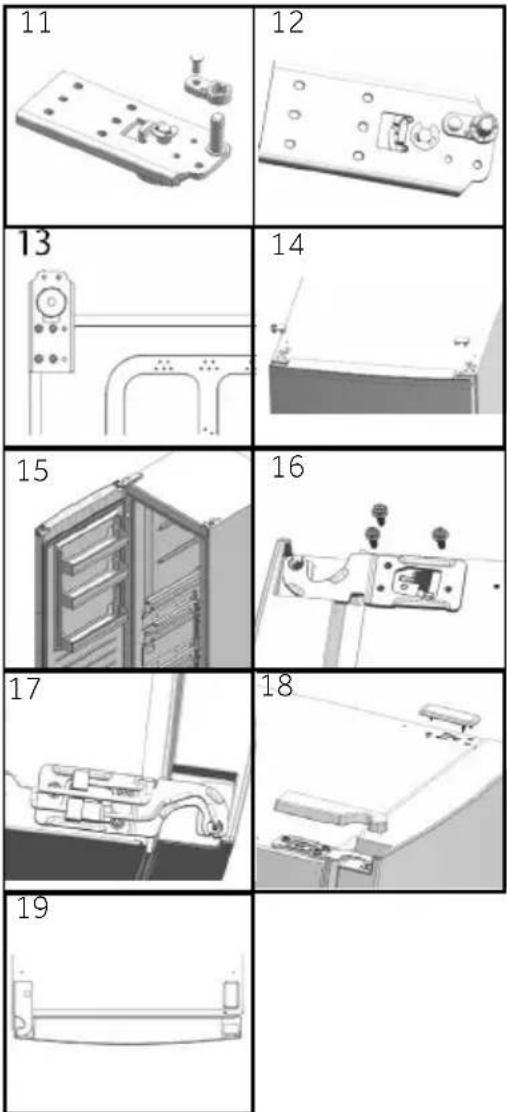
- Remove screw and axe cover. Remove hinge axe and fix it into the hole next to it.
- Take the thicker axe cover from the accessory bag. Fix it with screw from last step.
- Fix the hinge to the opposite position of the cabinet with 4 screws.
- On opposite side of the door, pull out left side connection cable and put it through the axe cover from step 5, mount axe cover. Mount the hole cover on the right side.
- Mount the door.
- Fix upper right upper hinge with 3 screws.
- Connect the cable connectors:
- Fix hinge hole cover and upper left hinge cover.
- Finished.
For further information about the product, please consult.
https://eprel.ec.europa.eu/ or scan the QR on the energy label supplied with the appliance.
To contact the technical assistance, visit our website:
https://corporate.haier-europe.com/en/
Under the section "website", choose the brand of your product and your country.
You will be redirected to the specific website where you can find the telephone number and form to contact the technical assistance.
11 - Technical Data
11.1 Product fiche according to regulation (EU) 2019/2016
| Trade mark | Haier | ||||
| Model identifier | H3F-280*SAAU1 | H3F285*EH1 | H3F-320*SAAU1 | H3F-320*TAAU1 | H3F330*EH1 |
| Category of the model | Upright freezer | ||||
| Energy efficiency class | F | E | F | D | E |
| Annual energy consumption (kWh/year) 1) 300 | 248 266 | 328 212 | |||
| Storage volume cooling(L) | not applicable | ||||
| Storage volume freezing(L)**** | 285 330 | ||||
| Star rating **** | |||||
| Temperature of other compartments>14 °C | not applicable | ||||
| Frostfree system | yes | ||||
| Power cut safe (h) | 13 | 12 | 19 | 12 | |
| Freezing capacity (kg/24h) | 18.5 2223 | ||||
| Climate classThis appliance is intended to be used at an ambient temperature between 10 °C and 43 °C | SN-T | ||||
| Airborne acoustical noise emissions(dB(A) re 1pW) | 38 | ||||
| Construction type | freestanding | ||||
1) based on standard test results for 24 hours. Actual energy consumption will depend on how the appliance is used and where it is located.
Regarding specification details, please consult the rating plate and energy label inside the product.
This appliance is intended to be used at an ambient temperature indicated below:
| SN | +10°C~+32°C |
| N | +16°C~+32°C |
| ST | +16°C~+38°C |
| T | +16°C~+43°C |
11.2 Additional Technical Data
| Voltage / Frequency 220-240V ~/ 50Hz | |
| Main fuse (A) | 1.0 |
| Coolant R600a | • |
| Dimensions (H/W/D in mm) H3F-280*SAAU1/285*EH1 | 171/59.5/67.5 |
| Dimensions (H/W/D in mm)H3F-320*(S/T)AAU1/330*EH1 | 191/59.5/67.5 |
| Light power/Light voltage 1.5W/ DC 12V |
11.3 Standards and directives

This product meets the requirements of all applicable EC directives with the corresponding harmonised standards, which provide for CE marking.
We recommend our Haier Customer Service and the use of original spare parts.
If you have a problem with your appliance, please first check section TROUBLESHOOTING
If you cannot find a solution there, please contact
▶ your local dealer or
the Service & Support area at www.haier.com where you can find telephone numbers and FAQs and where you can activate the service claim.
To contact our Service, ensure that you have the following data available.
The information can be found on the rating plate.
Model ____ Serial No. ____
Also check the Warranty Card supplied with the product in case of warranty.
For general business enquiries please find below our addresses in Europe:
European Haier addresses
| Country* | Postal address | Country* Postal address | |
| Italy | Haier Europe • Trading SRLVia De Cristoforis, 1221100 VareseITALY . | France | Haier France SAS3-5 rue des Graviers92200 Neuilly sur SeineFRANCE |
| Spain Portugal | Haier Iberia SLPg. Garcia Faria, 49-5108019 BarcelonaSPAIN | Belgium-FRBelgium-NLNetherlandsLuxembourg | Haier Benelux SAAnderlechtRoute de Lennik 451BELGIUM |
| Germany Austria | Haier Deutschland GmbHHewlett-Packard-Str. 4D-61352 Bad HomburgGERMANY | PolandCzechiaHungaryGreece.RomaniaRussia | Haier Poland Sp. zo.o.Al. Jerozolimskie 181B02-222 WarszawaPOLAND |
| United Kingdom | Haier Appliances UK Co.Ltd.One Crown SquareChurch Street EastWoking, Surrey, GU21 6HRUK | ||
*For more information please refer to www.haier.com
Wireless parameters
| Technology | Wi-Fi | Bluetooth |
| Standard | IEE 802.11 b/g/n | Bluetooth v4.2, BR/EDR, BLE |
| Frequency Band(s) [MHz] | 2401~2483 | 2402~2480 |
| Maximum power [mW]Band(s) [MHz] | 100 | 10 |
Product information
How to activate Wi-Fi module:
- Press the Fresher Zone button for 3 seconds to activate the Wi-Fi.
- The Wi-Fi module is switched on the Wi-Fi icon starts to blink.
- If the freezer is enrolled and connected, the Wi-Fi icon is always on.
• To reset the Wi-Fi, press the Fresher Zone for 3 seconds.
In APP pairing procedure
Step 1
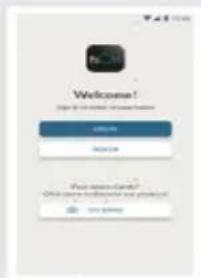
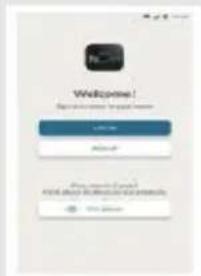
. Download the hOn app on the stores.

Step 2
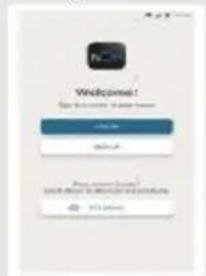
- Log in or sign up.
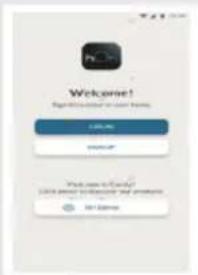
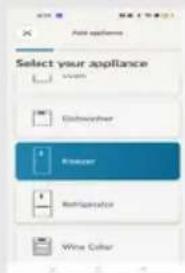
Step 3
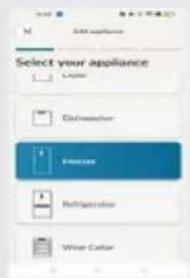
. Add a new appliance, selecting the freezer from the list.
Step 4
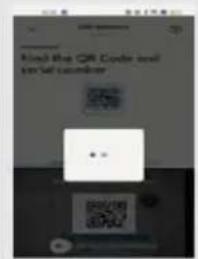
- Scan the QR or insert manually the serial number.
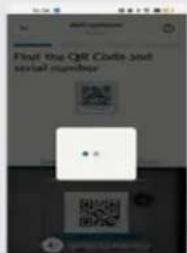
Step 5
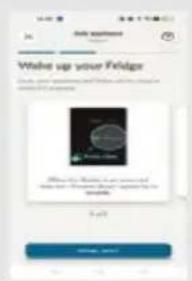
- Press the Fresher Zone button on the product for 3s to activate the Wi-Fi.
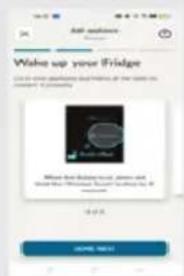
Step 6
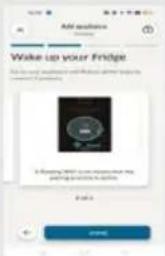
- The Wi-Fi icon will blink, the pairing process is in progress.
• You will have 5 minutes to complete the pairing process. - When the process is completed the Wi-Fi icon will stop blinking and it will remain always on.

area
| Category | Value | | -------- | ----- | | Top Left | 100 | | Top Right | 80 | | Bottom Left | 95 | | Bottom Right | 75 |H3F-280/320_AAU1_V01_EN_210702
Haier
Bedienungsanleitung
Tiefkühlschrank
H3F285*EH1
H3F330*EH1
* - Farbcode
DE
natural_image
Symbol of a trash bin crossed with diagonal lines, representing waste sorting or restriction (no text present)Legende
natural_image
Technical line drawing of a mechanical component with three circular cavities (no text or symbols)natural_image
Technical line drawing of two mechanical components (no text or symbols)natural_image
Two mechanical clamping components shown in line drawing (no text or symbols)Achsenabdeckungen

natural_image
Illustration of a hand cleaning a window with a soap block and a basin (no text or symbols)natural_image
Two identical rectangular panels with curved arrows indicating rotation, no text or symbols present10.7 Wartezeit
Schritt 2
Schritt 3
Schritt 4
Schritt 5

area
| Category | Value | | -------- | ----- | | Top Left | 100 | | Top Right | 80 | | Bottom Left | 95 | | Bottom Right | 75 |H3F-280/320_AAU1_V01_DE_210702
Haier
natural_image
Symbol of a trash bin with crossed lines indicating no waste or discharge (no text or labels)
Légende
natural_image
Technical line drawing of a rectangular container with internal compartments (no text or symbols)natural_image
Two mechanical clamping components shown in line drawing (no text or symbols)Couverture des axes

natural_image
Illustration of a hand cleaning a window with a soap block and a basin (no text or symbols)Étape 2
Étape 3
Étape 4
Étape 5
Étape 6

area
| Category | Value | | -------- | ----- | | Top Left | 100 | | Top Right | 80 | | Bottom Left | 95 | | Bottom Right | 75 |H3F-280/320_AAU1_V01_FR_210702
Haier
natural_image
Technical line drawing of a mechanical component with three circular cavities and a rectangular housing (no text or symbols)natural_image
Two mechanical clamping components shown in line drawing (no text or symbols)Copripunti

natural_image
Illustration of a hand cleaning a window with a sink, no text or symbols presentnatural_image
Two identical rectangular objects with curved arrows indicating rotation, no text or symbols present10.7 Tempo d'attesa
Passo 2
Passo 3
Passo 4
Passo 5
Passo 6

pie
| Category | Value | |---|---| | Top Left | 100 | | Top Right | 50 | | Bottom Left | 80 | | Bottom Right | 60 |H3F-280/320_AAU1_V01_IT_210702
Haier
Manual del usuario
Congelador vertical
H3F285*EH1
H3F330*EH1
* - Código de color
ES
natural_image
Technical line drawing of a mechanical component with three circular cavities and a rectangular housing (no text or symbols)natural_image
Technical line drawing of two mechanical clamping components (no text or symbols)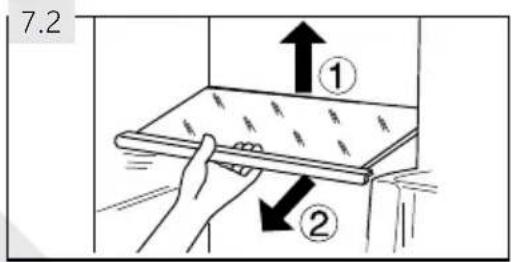
natural_image
Illustration of a hand cleaning a window with a soap block and a basin (no text or symbols)natural_image
Two identical rectangular objects with curved arrows indicating rotation, no text or symbols presentPaso 2
Paso 3
Paso 4
Paso 5
Paso 6

area
| Category | Value | | -------- | ----- | | Top Left | 100 | | Top Right | 80 | | Bottom Left | 95 | | Bottom Right | 75 |H3F-280/320_AAU1_V01_ES_210702
Haier
natural_image
Symbol of a trash bin crossed with no text or numbers, representing waste sorting or disposal (no text present)Verwijdering
natural_image
Technical line drawing of a mechanical component with three circular cavities (no text or symbols)natural_image
Technical line drawing of two mechanical clamping components (no text or symbols)As afdek-
kingen
Afdekking bo-
venste scharnier
links

elet: Verschillen
5.12 Deur opening alarm
natural_image
Illustration of a hand cleaning a window with a soap block and a basin (no text or symbols)natural_image
Two identical rectangular panels with curved arrows indicating rotation, no text or symbols present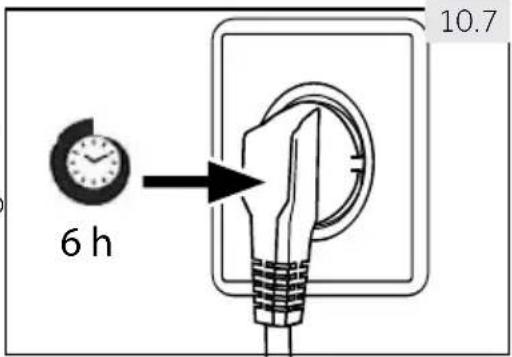
Stap 2
Stap 3
Stap 4
Stap 5
Stap 6

area
| Category | Value | | -------- | ----- | | Top Left | 100 | | Top Right | 80 | | Bottom Left | 95 | | Bottom Right | 75 |H3F-280/320_AAU1_V01_NL_210702
Haier
natural_image
Technical line drawing of a mechanical component with four circular cavities and a rectangular housing (no text or symbols)natural_image
Two mechanical clamping components shown in line drawing (no text or symbols)Ostony sworznia
natural_image
Illustration of a hand cleaning a window with a soap block and a basin (no text or symbols)natural_image
Two identical rectangular panels with curved arrows indicating rotation, no text or symbols presentKrok 2
Krok 3
Krok 4
Krok 5
Krok 6

pie
| Category | Value | |---|---| | Slice 1 | 45 | | Slice 2 | 30 | | Slice 3 | 60 | | Slice 4 | 25 |H3F-280/320_AAU1_V01_PL_210702
Haier
Návod k použití
Vertikářnám znič
H3F285*EH1
H3F330*EH1
* - Barevní kód
natural_image
Symbol of a trash bin crossed with no text or numbers, representing waste sorting or disposal (no text present)Likvidace
natural_image
Technical line drawing of a mechanical component with internal cavities (no text or symbols)Otoční vyráběč ledu
natural_image
Technical line drawing of two mechanical components (no text or symbols)natural_image
Two mechanical clamping components shown in line drawing (no text or symbols)natural_image
Illustration of a hand cleaning a window with a soap block and a basin (no text or symbols)natural_image
Two identical rectangular panels with curved arrows indicating rotation, no text or symbols present10.7 Čekací doba
Krok 2
Krok 3
Krok 4
Krok 5

pie
| Category | Value | |---|---| | Slice 1 | 45 | | Slice 2 | 30 | | Slice 3 | 60 | | Slice 4 | 25 |H3F-280/320_AAU1_V01_CZ_210702
Haier
Manual do Utilizador
Congelador vertical
H3F285*EH1
H3F330*EH1
* - Código de cor
PT
natural_image
Symbol of a trash bin crossed with diagonal lines, representing waste sorting or restriction (no text present)Eliminação
natural_image
Technical line drawing of a mechanical housing or enclosure with internal compartments (no text or symbols)Máquina de gelo com concha de gelado
natural_image
Technical line drawing of two mechanical clamping components (no text or symbols)When the appliance is connected with Wi-Fi, it could be controlled from distant [temperature setting adjustment, activation and deactivation of super freeze and FresherZone function]. When the door is left open or when there is temperature deviation, real time information could be informed through the application.
natural_image
Illustration of a hand cleaning a window with a soap block and a basin (no text or symbols)Passo 2
Passo 3
Passo 4
• Digitalize o QR ou insira manualmente o número de série.
Passo 5
Passo 6

area
| Category | Value | | -------- | ----- | | Top Left | 100 | | Top Right | 80 | | Bottom Left | 95 | | Bottom Right | 75 |H3F-280/320_AAU1_V01_PT_210702
Haier
Návod na použtie
natural_image
Interior view of a modern refrigerator with no visible text or symbols on the door or casingnatural_image
Symbol of a trash bin crossed with diagonal lines, representing waste or discharge (no text or labels)Likvidácia
natural_image
Technical line drawing of a mechanical component with internal cavities (no text or symbols)Výrobník du
natural_image
Technical line drawing of two mechanical components (no text or symbols)Layhorný zá ves preto čn de ve
natural_image
Technical line drawing of two mechanical clamping components (no text or symbols)natural_image
Illustration of a hand cleaning a window with a soap block and a basin (no text or symbols)8- Starostlivost a čistenie
natural_image
Two identical rectangular objects with curved arrows indicating rotation, no text or symbols present10.7. Čakacia doba
Krok 2
- Prihláste sa alebo sa zaregistrujte.
Krok 3
- Pridajte nový spotrebič a vyberte mrazničku zo zoznamu.
Krok 4
Krok 6

area
| Category | Value | | -------- | ----- | | Top Left | 100 | | Top Right | 80 | | Bottom Left | 95 | | Bottom Right | 75 |Haier
Brugervejledning
Skabsfryser
H3F285*EH1
H3F330*EH1
* -Farvekode
DA
natural_image
Symbol of a trash bin with crossed lines indicating no waste or discharge (no text or labels)Bortskaffelse
natural_image
Illustration of a hand cleaning a window with a soap block and a basin nearby (no text or symbols)natural_image
Two identical rectangular objects with curved arrows below, no text or symbols present10.7 Ventetid
Trin 2
- Log på eller tilmeld dig.
Trin 4
Trin 5
- Tryk på knappen Fresher Zone på apparatet i 3 sekunder for at aktivere Wi-Fi.
Trin 6

area
| Category | Value | | -------- | ----- | | Top Left | 35 | | Top Right | 28 | | Bottom Left | 42 | | Bottom Right | 38 |H3F-280/320_AAU1_V01_DA_210702
Haier
Käyttöopas
Pystypakastin
H3F285*EH1
H3F330*EH1
* -Värikoodi
natural_image
Symbol of a trash bin with crossed lines indicating no waste or discharge (no text or labels)Hävittäminen
natural_image
Technical line drawing of a mechanical housing or enclosure with internal compartments (no text or symbols)Twist-jääpalakone
natural_image
Technical line drawing of two mechanical components (no text or symbols)natural_image
Technical line drawing of two mechanical clamping components (no text or symbols)natural_image
Illustration of a hand cleaning a window with a soap block and a basin (no text or symbols)natural_image
Two identical rectangular objects with curved arrows indicating rotation, no text or symbols present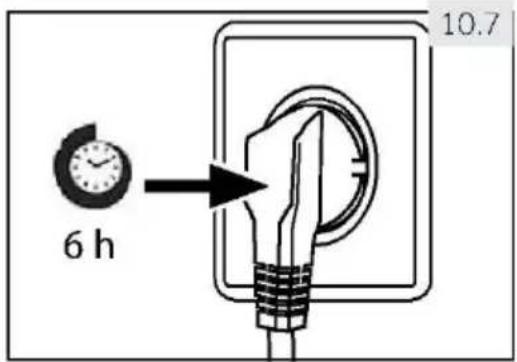
10.8 Sähköliitäntä
Vaihe 2
Vaihe 3
Vaihe 4

area
| Category | Value | | -------- | ----- | | Top Left | 35 | | Top Right | 28 | | Bottom Left | 42 | | Bottom Right | 38 |H3F-280/320_AAU1_V01_FI_210702
Haier
Brukerhåndbok
Stående fryser
H3F285*EH1
H3F330*EH1
* -Fargekode
NO
Takk for at du kjøpte et Haier-produkt.
natural_image
Symbol of a trash bin with crossed lines indicating no waste or discharge (no text or labels)Kassering
natural_image
Technical line drawing of a mechanical housing or enclosure with internal compartments (no text or symbols)Twist Ice Maker
natural_image
Technical line drawing of two mechanical components (no text or symbols)∅vre venstre hengsel for dørvendbarhet
∅vre venstre hengseldeksel
natural_image
Two mechanical clamping components shown in line drawing (no text or symbols)Aksedeksler

natural_image
Illustration of a hand cleaning a window with a soap block and a basin (no text or symbols)natural_image
Two identical rectangular objects with curved arrows indicating rotation, no text or symbols present10.7 Ventetid
Til den vedlikeholdsfrie smøreoljen er det plassert i kapselen til kompressoren. Denne oljen kan komme gjennor det lukkede rørsystemet under skråtransport. Før du kobler apparatet til strømforsyningen må du vente 6 timer (fig. 10.7) slik at oljen renner tilbake i kapselen.
10.8 Elektrisk tilkobling
I APP-paringsprosedyren
- Logg på eller registrer deg.
Trinn 3
Trinn 4
- Skann QR-en eller sett inn serienummeret manuelt.
Trinn 5
Trinn 6

area
| Category | Value | | -------- | ----- | | Top Left | 100 | | Top Right | 80 | | Bottom Left | 95 | | Bottom Right | 60 |H3F-280/320_AAU1_V01_NO_210702
Haier
Bruksanvisning
Frysskåp
H3F285*EH1
H3F330*EH1
* -Färgkod
SV
natural_image
Symbol of a trash bin crossed with no text or labelsBortskaffande
natural_image
Technical line drawing of a mechanical housing or enclosure with internal compartments (no text or symbols)Ismaskin
natural_image
Technical line drawing of two mechanical components (no text or symbols)natural_image
Two mechanical clamping components shown in line drawing (no text or symbols)Axelskydd

7.1 Avtagbara dörrhyllor
natural_image
Illustration of a hand cleaning a window with a soap block and a basin (no text or symbols)natural_image
Two identical rectangular objects with curved arrows indicating rotation, no text or symbols present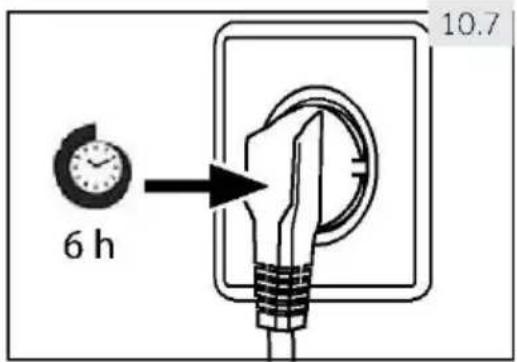
10.8 Elanslutning
Steg 2
- Logga in eller registrera dig.
Steg 3
Steg 4
- Skanna QR-koden eller ange serienumret manuellt.
Steg 5
Steg 6

pie
| Category | Value | |---|---| | Slice 1 | 45 | | Slice 2 | 30 | | Slice 3 | 60 | | Slice 4 | 25 |H3F-280/320_AAU1_V01_SV_210702
Haier
Εγχειρίδιο χρήσης
'Ορθιος καταψύκτης
H3F285*EH1
H3F330*EH1
natural_image
Symbol of a trash bin crossed with no text or labelsΑπόρριψη
natural_image
Technical line drawing of a mechanical housing or enclosure with internal compartments (no text or symbols)natural_image
Technical line drawing of two mechanical components (no text or symbols)natural_image
Technical line drawing of two mechanical clamping components (no text or symbols)7.1
natural_image
Illustration of a hand cleaning a window with a cloth and a basin (no text or symbols)natural_image
Two identical rectangular panels with curved arrows indicating rotation, no text or symbols present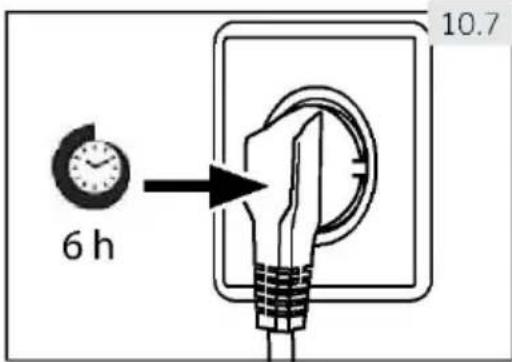
Bñμα 2
Bñμα 3
Bñua 4
Bήμα 5
Βήμα 6

area
| Category | Value | | -------- | ----- | | Top Left | 100 | | Top Right | 80 | | Bottom Left | 95 | | Bottom Right | 75 |Haier
- Thank you for purchasing a Haier Product.
- Legend
- Disposal
- Warning!
- Risk of injury or suffocation!
- Before first use
- Installation
- Daily use
- Maintenance/cleaning
- Refrigerant gas information
- - Intended use
- Intended Use
- Accessories
- Notice: Differences
- - Control panel
- Before first Use
- Switching the appliance on /off
- ce: Presettings
- Standby-mode of display
- Display lock and unlock
- ce: Displ
- ay lock
- Temperature setting
- Freeze mode (-16°C to -24°C) (B - E)
- Fridge mode(4°C) (A)
- Super freeze mode (E)
- Fresher Zone (F)
- Eco mode (-16°C) (B)
- Power-off memory
- Door open alarm
- High temperature alarm
- Error indication
- Wi-Fi
- - Energy saving tips
- Energy saving tips
- - Equipment
- Removable door racks
- Glass shelves
- General
- 8- Care and Cleaning
- Non-use for a longer period
- Notice: Switch off
- Moving the appliance
- Troubleshooting
- - Troubleshooting
- Power Interruption
- Unpacking
- RNING!
- Environmental conditions
- Space requirements
- Ventilaton cross-section
- Aligning the appliance
- Using adjustable feet
- Waiting time
- Electrical connection
- Before each connection check if:
- - Installation
- Door Reversibility
- NING!
- Assembly steps (Fig. 10.9):
- - Technical Data
- Standards and directives
- Product information
- In APP pairing procedure
- Step 1
- Step 2
- Step 3
- Step 4
- Step 5
- Step 6
- Haier
- Bedienungsanleitung
- Legende
- Wartezeit
- Schritt 2
- Schritt 3
- Schritt 4
- Schritt 5
- Légende
- Étape 2
- Étape 3
- Étape 4
- Étape 5
- Étape 6
- Tempo d'attesa
- Passo 2
- Passo 3
- Passo 4
- Passo 5
- Passo 6
- Manual del usuario
- Congelador vertical
- Paso 2
- Paso 3
- Paso 4
- Paso 5
- Paso 6
- Verwijdering
- elet: Verschillen
- Deur opening alarm
- Stap 2
- Stap 3
- Stap 4
- Stap 5
- Stap 6
- Krok 2
- Krok 3
- Krok 4
- Krok 5
- Krok 6
- Návod k použití
- Vertikářnám znič
- Likvidace
- Čekací doba
- Manual do Utilizador
- Eliminação
- Návod na použtie
- Likvidácia
- 8- Starostlivost a čistenie
- Čakacia doba
- Brugervejledning
- Bortskaffelse
- Ventetid
- Käyttöopas
- Hävittäminen
- Sähköliitäntä
- Vaihe 2
- Vaihe 3
- Vaihe 4
- Brukerhåndbok
- Takk for at du kjøpte et Haier-produkt.
- Kassering
- Elektrisk tilkobling
- I APP-paringsprosedyren
- Bruksanvisning
- Bortskaffande
- Avtagbara dörrhyllor
- Elanslutning
- Εγχειρίδιο χρήσης
- Απόρριψη
- Bñμα 2
- Bñμα 3
- Bñua 4
- Bήμα 5
- Βήμα 6
Brand : HAIER
Model : H3F330WEH1
Category : Freezer