
CMCG451B - Grinder Craftsman - Free user manual and instructions
Find the device manual for free CMCG451B Craftsman in PDF.



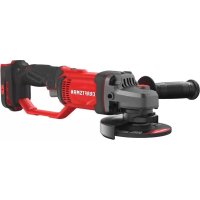
| Product Type | Cordless Angle Grinder |
| Brand | Craftsman |
| Model | CMCG451B |
| Power Source | 20V Max Lithium-Ion Battery (18V nominal) |
| Wheel Capacity | 115 mm (4-1/2 in) |
| Main Functions | Grinding, sanding, wire brushing |
| Auxiliary Handle | Yes, removable (two-position mounting) |
| Compatible Battery Pack | CRAFTSMAN 20V Max Li-Ion |
| Compatible Charger | CRAFTSMAN chargers (except CMCB101 for wall mount) |
| No-Load Speed | Not specified in manual |
| Weight | Approximately 1.8 kg (without battery pack) |
| Dimensions (L x W x H) | Not specified |
| Safety | Adjustable guard, spindle lock, paddle switch, auxiliary handle |
| Maintenance and Cleaning | Blow air through vents with compressed air; do not use solvents |
| Warranty | 3 years (tool), 2 years (battery pack) |
| Included Accessories | Side handle, guard, flanges, wrench, mounting screw |
Frequently Asked Questions - CMCG451B Craftsman
User questions about CMCG451B Craftsman
0 question about this device. Answer the ones you know or ask your own.
Ask a new question about this device
Download the instructions for your Grinder in PDF format for free! Find your manual CMCG451B - Craftsman and take your electronic device back in hand. On this page are published all the documents necessary for the use of your device. CMCG451B by Craftsman.
USER MANUAL CMCG451B Craftsman
English (original instructions) 1
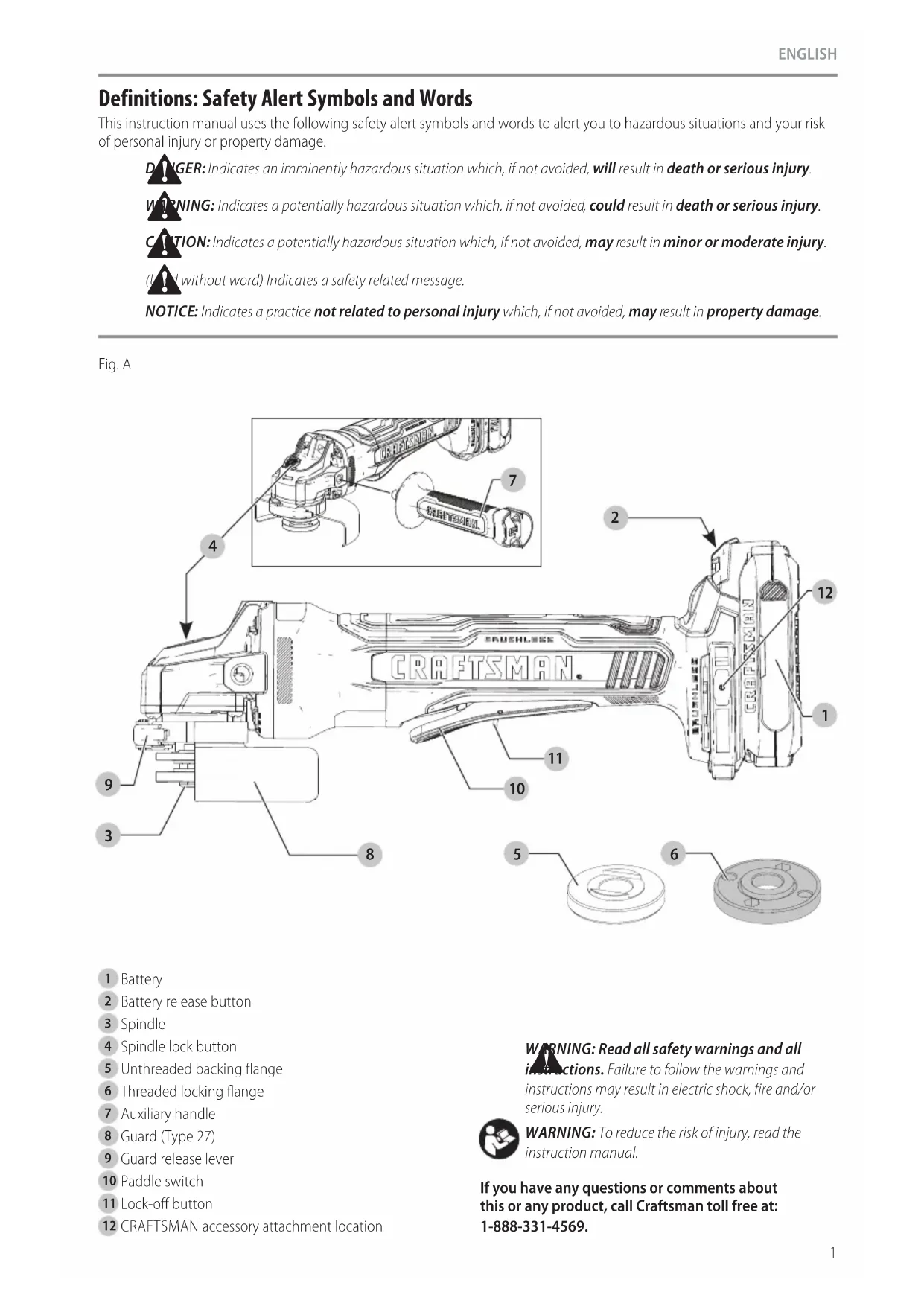
Definitions: Safety Alert Symbols and Words
This instruction manual uses the following safety alert symbols and words to alert you to hazardous situations and your risk of personal injury or property damage.

ER: Indicates an imminently hazardous situation which, if not avoided, will result in death or serious injury.

IING: Indicates a potentially hazardous situation which, if not avoided, could result in death or serious injury.

ION: Indicates a potentially hazardous situation which, if not avoided, may result in minor or moderate injury.

without word) Indicates a safety related message.
NOTICE: Indicates a practice not related to personal injury which, if not avoided, may result in property damage.
Fig. A
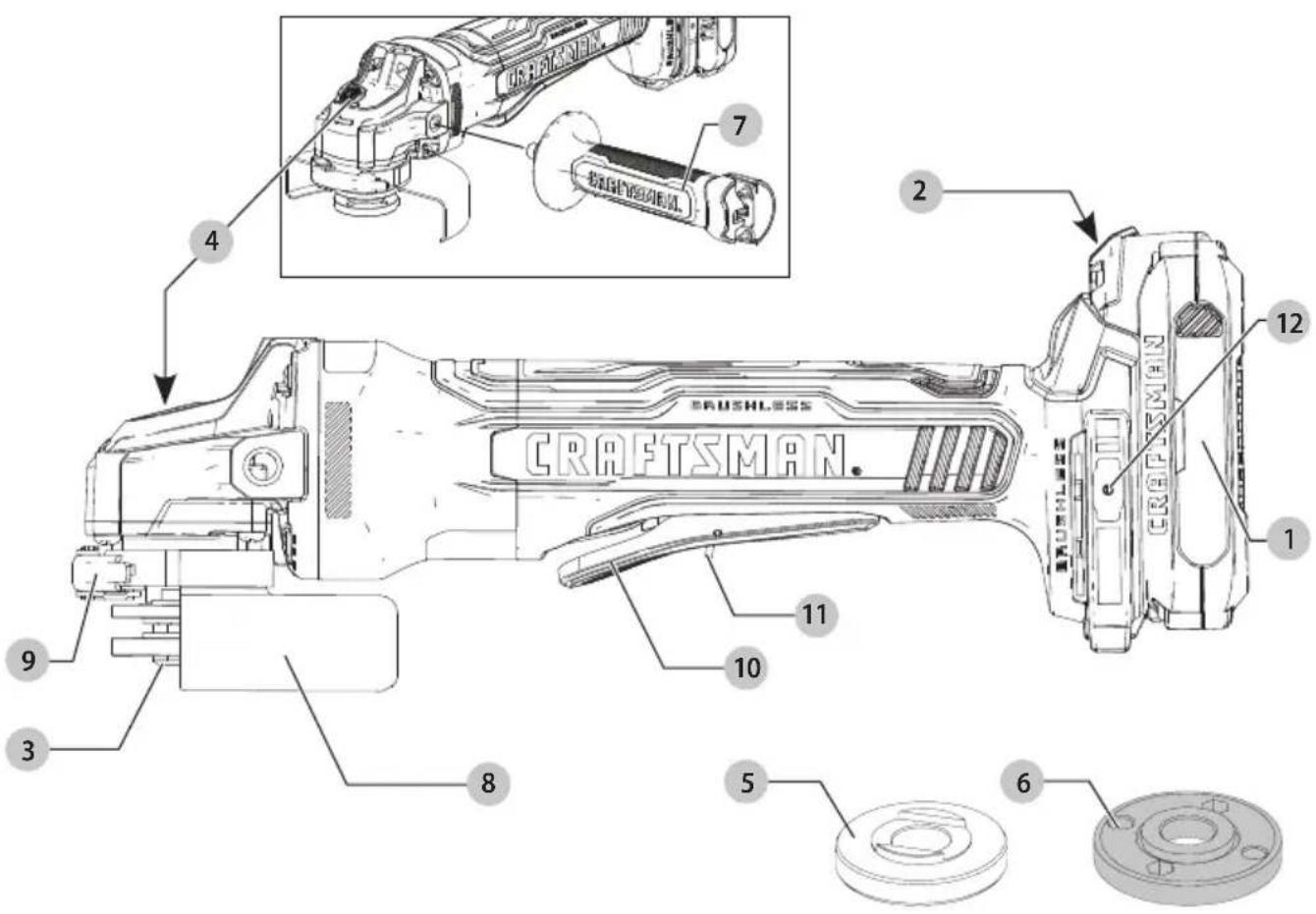
1 Battery
2 Battery release button
3 Spindle
4 Spindle lock button
5 Unthreaded backing flange
6 Threaded locking flange
7 Auxiliary handle
8 Guard (Type 27)
9 Guard release lever
10 Paddle switch
11 Lock-off button
12 CRAFTSMAN accessory attachment location
WARNING: Read all safety warnings and all instructions. Failure to follow the warnings and instructions may result in electric shock, fire and/or serious injury.

WARNING: To reduce the risk of injury, read the instruction manual.
If you have any questions or comments about this or any product, call Craftsman toll free at: 1-888-331-4569.
20V Max\* 4-1/2" (115 mm) Grinder CMCG451
GENERAL POWER TOOL SAFETY WARNINGS
WARNING: Read all safety warnings, instructions, illustrations and specifications provided with this power tool. Failure to follow all instructions listed below may result in electric shock, fire and/or serious injury.
SAVE ALL WARNINGS AND INSTRUCTIONS FOR FUTURE REFERENCE.
The term "power tool" in the warnings refers to your mains-operated (corded) power tool or battery-operated (cordless) power tool.
1) Work Area Safety
a) Keep work area clean and well lit. Cluttered or dark areas invite accidents.
b) Do not operate power tools in explosive atmospheres, such as in the presence of flammable liquids, gases or dust. Power tools create sparks which may ignite the dust or fumes.
c) Keep children and bystanders away while operating a power tool. Distractions can cause you to lose control.
2) Electrical Safety
a) Power tool plugs must match the outlet. Never modify the plug in any way. Do not use any adapter plugs with earthed (grounded) power tools. Unmodified plugs and matching outlets will reduce risk of electric shock.
b) Avoid body contact with earthed or grounded surfaces, such as pipes, radiators, ranges and refrigerators. There is an increased risk of electric shock if your body is earthed or grounded.
c) Do not expose power tools to rain or wet conditions. Water entering a power tool will increase the risk of electric shock.
d) Do not abuse the cord. Never use the cord for carrying, pulling or unplugging the power tool. Keep cord away from heat, oil, sharp edges or moving parts. Damaged or entangled cords increase the risk of electric shock.
e) When operating a power tool outdoors, use an extension cord suitable for outdoor use. Use of a cord suitable for outdoor use reduces the risk of electric shock.
f) If operating a power tool in a damp location is unavoidable, use a ground fault circuit interrupter (GFCI) protected supply. Use of a GFCI reduces the risk of electric shock.
3) Personal Safety
a) Stay alert, watch what you are doing and use common sense when operating a power tool. Do not use a power tool while you are tired or under
the influence of drugs, alcohol or medication. A moment of inattention while operating power tools may result in serious personal injury.
b) Use personal protective equipment. Always wear eye protection. Protective equipment such as a dust mask, non-skid safety shoes, hard hat, or hearing protection used for appropriate conditions will reduce personal injuries.
c) Prevent unintentional starting. Ensure the switch is in the off-position before connecting to power source and/or battery pack, picking up or carrying the tool. Carrying power tools with your finger on the switch or energizing power tools that have the switch on invites accidents.
d) Remove any adjusting key or wrench before turning the power tool on. A wrench or a key left attached to a rotating part of the power tool may result in personal injury.
e) Do not overreach. Keep proper footing and balance at all times. This enables better control of the power tool in unexpected situations.
f) Dress properly. Do not wear loose clothing or jewelry. Keep your hair, clothing and gloves away from moving parts. Loose clothes, jewelry or long hair can be caught in moving parts.
g) If devices are provided for the connection of dust extraction and collection facilities, ensure these are connected and properly used. Use of dust collection can reduce dust-related hazards.
h) Do not let familiarity gained from frequent use of tools allow you to become complacent and ignore tool safety principles. A careless action can cause severe injury within a fraction of a second.
4) Power Tool Use and Care
a) Do not force the power tool. Use the correct power tool for your application. The correct power tool will do the job better and safer at the rate for which it was designed.
b) Do not use the power tool if the switch does not turn it on and off. Any power tool that cannot be controlled with the switch is dangerous and must be repaired.
c) Disconnect the plug from the power source and/or remove the battery pack, if detachable, from the power tool before making any adjustments, changing accessories, or storing power tools. Such preventive safety measures reduce the risk of starting the power tool accidentally.
d) Store idle power tools out of the reach of children and do not allow persons unfamiliar with the power tool or these instructions to operate the power tool. Power tools are dangerous in the hands of untrained users.
e) Maintain power tools and accessories. Check for misalignment or binding of moving parts, breakage of parts and any other condition
that may affect the power tool's operation. If damaged, have the power tool repaired before use. Many accidents are caused by poorly maintained power tools.
f) Keep cutting tools sharp and clean. Properly maintained cutting tools with sharp cutting edges are less likely to bind and are easier to control.
g) Use the power tool, accessories and tool bits etc. in accordance with these instructions, taking into account the working conditions and the work to be performed. Use of the power tool for operations different from those intended could result in a hazardous situation.
h) Keep handles and grasping surfaces dry, clean and free from oil and grease. Slippery handles and grasping surfaces do not allow for safe handling and control of the tool in unexpected situations.
5) Battery Tool Use and Care
a) Recharge only with the charger specified by the manufacturer. A charger that is suitable for one type of battery pack may create a risk of fire when used with another battery pack.
b) Use power tools only with specifically designated battery packs. Use of any other battery packs may create a risk of injury and fire.
c) When battery pack is not in use, keep it away from other metal objects, like paper clips, coins, keys, nails, screws or other small metal objects, that can make a connection from one terminal to another. Shorting the battery terminals together may cause burns or a fire.
d) Under abusive conditions, liquid may be ejected from the battery; avoid contact. If contact accidentally occurs, flush with water. If liquid contacts eyes, additionally seek medical help. Liquid ejected from the battery may cause irritation or burns.
e) Do not use a battery pack or tool that is damaged or modified. Damaged or modified batteries may exhibit unpredictable behavior resulting in fire, explosion or risk of injury.
f) Do not expose a battery pack or tool to fire or excessive temperature. Exposure to fire or temperature above 265 °F (130 °C) may cause explosion.
g) Follow all charging instructions and do not charge the battery pack or tool outside the temperature range specified in the instructions. Charging improperly or at temperatures outside the specified range may damage the battery and increase the risk of fire.
6) Service
a) Have your power tool serviced by a qualified repair person using only identical replacement parts. This will ensure that the safety of the power tool is maintained.
b) Never service damaged battery packs. Service of battery packs should only be performed by the manufacturer or authorized service providers.
SAFETY INSTRUCTIONS FOR ALL OPERATIONS
Safety Warnings Common for Grinding, Sanding, Wire Brushing Operations
a) This power tool is intended to function as a grinder, sander, or wire brush tool. Read all safety warnings, instructions, illustrations and specifications provided with this power tool. Failure to follow all instructions listed below may result in electric shock, fire and/or serious injury.
b) Operations such as polishing and cut off are not recommended to be performed with this power tool. Operations for which the power tool was not designed may create a hazard and cause personal injury.
c) Do not use accessories which are not specifically designed and recommended by the tool manufacturer. Just because the accessory can be attached to your power tool, it does not assure safe operation.
d) The rated speed of the accessory must be at least equal to the maximum speed marked on the power tool. Accessories running faster than their rated speed can break and fly apart.
e) The outside diameter and the thickness of your accessory must be within the capacity rating of your power tool. Incorrectly sized accessories cannot be adequately guarded or controlled.
f) Threaded mounting of accessories must match the grinder spindle thread. For accessories mounted by flanges, the arbor hole of the accessory must fit the locating diameter of the flange. Accessories that do not match the mounting hardware of the power tool will run out of balance, vibrate excessively and may cause loss of control.
g) Do not use a damaged accessory. Before each use inspect the accessory such as abrasive wheels for chips and cracks, backing pad for cracks, tear or excess wear, wire brush for loose or cracked wires. If power tool or accessory is dropped, inspect for damage or install an undamaged accessory. After inspecting and installing an accessory, position yourself and bystanders away from the plane of the rotating accessory and run the power tool at maximum no-load speed for one minute. Damaged accessories will normally break apart during this test time.
h) Wear personal protective equipment. Depending on application, use face shield, safety goggles or safety glasses. As appropriate, wear dust mask, hearing protectors, gloves and workshop apron capable of stopping small abrasive or workpiece fragments. The eye protection must be capable of stopping flying debris generated by various operations. The dust mask or respirator must be
English
capable of filtrating particles generated by your operation. Prolonged exposure to high intensity noise may cause hearing loss.
i) Keep bystanders a safe distance away from work area. Anyone entering the work area must wear personal protective equipment. Fragments of workpiece or of a broken accessory may fly away and cause injury beyond immediate area of operation.
j) Hold the power tool by insulated gripping surfaces only, when performing an operation where the cutting accessory may contact hidden wiring. Cutting accessory contacting a "live" wire may make exposed metal parts of the power tool "live" and could give the operator an electric shock.
k) Never lay the power tool down until the accessory has come to a complete stop. The spinning accessory may grab the surface and pull the power tool out of your control.
1) Do not run the power tool while carrying it at your side. Accidental contact with the spinning accessory could snag your clothing, pulling the accessory into your body.
m) Regularly clean the power tool's air vents. The motor's fan will draw the dust inside the housing and excessive accumulation of powdered metal may cause electrical hazards.
n) Do not operate the power tool near flammable materials. Sparks could ignite these materials.
o) Do not use accessories that require liquid coolants. Using water or other liquid coolants may result in electrocution or shock.
p) Do not use Type 11 (flaring cup) wheels on this tool. Using inappropriate accessories can result in injury.
q) Always use auxiliary handle. Tighten the handle securely. The auxiliary handle should always be used to maintain control of the tool at all times.
r) When starting the tool with a new or replacement wheel, or a new or replacement wire brush installed, hold the tool in a well protected area and let it run for one minute. If the wheel has an undetected crack or flaw, it should burst in less than one minute. If the wire brush has loose wires, they will be detected. Never start the tool with a person in line with the wheel. This includes the operator.
s) To prevent the spindle end from contacting the bottom of the hole of the abrasive product, use accessories that have a threaded hole depth of at least 21 mm. Failure to use an accessory with the appropriate thread depth could result in damage to the abrasive product and injury to the operator or persons in the area.
t) The arbor size of hubbed wheels, flanges, backing pads or any other accessory must properly fit the spindle of the power tool. Accessories with arbor holes that do not match the
mounting hardware of the power tool will run out of balance, vibrate excessively and may cause loss of control.
u) Use clamps or another practical way to secure and support the workpiece to a stable platform. Holding the work by hand against your body leaves it unstable and may lead to loss of control.
Kickback and Related Warnings
Kickback is a sudden reaction to a pinched or snagged rotating wheel, backing pad, brush or any other accessory. Pinching or snagging causes rapid stalling of the rotating accessory which in turn causes the uncontrolled power tool to be forced in the direction opposite of the accessory's rotation at the point of the binding.
For example, if an abrasive wheel is snagged or pinched by the workpiece, the edge of the wheel that is entering into the pinch point can dig into the surface of the material causing the wheel to climb out or kick out. The wheel may either jump toward or away from the operator, depending on direction of the wheel's movement at the point of pinching. Abrasive wheels may also break under these conditions.
Kickback is the result of tool misuse and/or incorrect operating procedures or conditions and can be avoided by taking proper precautions as given below:
a) Maintain a firm grip on the power tool and position your body and arm to allow you to resist kickback forces. Always use auxiliary handle, if provided, for maximum control over kickback or torque reaction during start up. The operator can control torque reaction or kickback forces, if proper precautions are taken.
b) Never place your hand near the rotating accessory. Accessory may kickback over your hand.
c) Do not position your body in the area where power tool will move if kickback occurs. Kickback will propel the tool in direction opposite to the wheel's movement at the point of snagging.
d) Use special care when working corners, sharp edges etc. Avoid bouncing and snagging the accessory. Corners, sharp edges or bouncing have a tendency to snag the rotating accessory and cause loss of control or kickback.
e) Do not attach a saw chain woodcarving blade or toothed saw blade. Such blades create frequent kickback and loss of control.
Safety Warnings Specific for Grinding Operations
a) Use only wheel types that are recommended for your power tool and the specific guard designed for the selected wheel. Wheels for which the power tool was not designed cannot be adequately guarded and are unsafe.
b) The grinding surface of center depressed wheels must be mounted below the plane of the guard lip. An improperly mounted wheel that
projects through the plane of the guard lip cannot be adequately protected.
c) The guard must be securely attached to the power tool and positioned for maximum safety, so the least amount of wheel is exposed towards the operator. The guard helps to protect the operator from broken wheel fragments, accidental contact with wheel and sparks that could ignite clothing.
d) Wheels must be used only for recommended applications. For example: do not grind with the side of cut-off wheel. Abrasive cut-off wheels are intended for peripheral grinding, side forces applied to these wheels may cause them to shatter.
e) Always use undamaged wheel flanges that are of correct size and shape for your selected wheel. Proper wheel flanges support the wheel thus reducing the possibility of wheel breakage. Flanges for cut-off wheels may be different from grinding wheel flanges.
f) Do not use worn down wheels from larger power tools. Wheel intended for larger power tool is not suitable for the higher speed of a smaller tool and may burst.
Safety Warnings Specific for Sanding Operations
a) Do not use excessively oversized sanding disc paper. Follow manufacturers recommendations, when selecting sanding paper. Larger sanding paper extending beyond the sanding pad presents a laceration hazard and may cause snagging, tearing of the disc or kickback.
Safety Warnings Specific for Wire Brushing Operations
a) Be aware that wire bristles are thrown by the brush even during ordinary operation. Do not overstress the wires by applying excessive load to the brush. The wire bristles can easily penetrate light clothing and/or skin.
b) If the use of a guard is recommended for wire brushing, do not allow any interference of the wire wheel or brush with the guard. Wire wheel or brush may expand in diameter due to work and centrifugal forces.
c) Safety goggles or safety glasses with side shields and a full face shield compliant with ANSI Z87.1 MUST be worn by the operator and others that are within 50' (15.2 m) of the use of this product.
Additional Safety Information
WARNING: Never modify the power tool or any part of damage or personal injury could result.
WARNING: ALWAYS use safety glasses. Everyday eyeglasses are NOT safety glasses. Also use face or dust mask if operation is dusty. ALL USERS AND BYSTANDERS MUST ALWAYS WEAR CERTIFIED SAFETY EQUIPMENT:
• ANSI Z87.1 eye protection (CAN/CSA Z94.3),
• ANSI S12.6 (S3.19) hearing protection,
• NIOSH/OSHA/MSHA respiratory protection.
WARNING: Some dust created by power sanding, sanding, grinding, drilling, and other construction activities contains chemicals known to the State of California to cause cancer, birth defects or other reproductive harm. Some examples of these chemicals are:
- lead from lead-based paints,
• crystalline silica from bricks and cement and other masonry products, and
• arsenic and chromium from chemically-treated lumber.
Your risk from these exposures varies, depending on how often you do this type of work. To reduce your exposure to these chemicals: work in a well ventilated area, and work with approved safety equipment, such as those dust masks that are specially designed to filter out microscopic particles.
- Avoid prolonged contact with dust from power sanding, sawing, grinding, drilling, and other construction activities. Wear protective clothing and wash exposed areas with soap and water. Allowing dust to get into your mouth, eyes, or lay on the skin may promote absorption of harmful chemicals.
WARNING: Use of this tool can generate and/or disperse dust, which may cause serious and permanent respiratory or other injury. Always use NIOSH/OSHA approved respiratory protection appropriate for the dust exposure. Direct particles away from face and body.
WARNING: Always wear proper personal hearing protection that conforms to ANSI S12.6 (S3.19)
during use. Under some conditions and duration of use, noise from this product may contribute to hearing loss.
CAUTION: When not in use, place tool on its side in a stable surface where it will not cause
a tripping or falling hazard. Some tools with large battery packs will stand upright on the battery pack but may be easily knocked over.
- Air vents often cover moving parts and should be avoided. Loose clothes, jewelry or long hair can be caught in moving parts.
English
The label on your tool may include the following symbols. The symbols and their definitions are as follows:
V.....volts
Hz ..... hertz
min ...... minutes
- - - or DC.....direct current
Class I Construction (grounded)
.../min.....per minute
BPM.....beats per minute
⚠️......safety alert symbol
△......visible radiation
...... avoid staring at light
E....wearrespiratory protection
Weareye
protection
O....wearhearing
protection
readall
documentation
IPXX....IPsymbol
BATTERIES AND CHARGERS
The battery pack is not fully charged out of the carton. Before using the battery pack and charger, read the safety instructions below and then follow charging procedures outlined. When ordering replacement battery packs, be sure to include the catalog number and voltage.
READ ALL INSTRUCTIONS
Important Safety Instructions for All Battery Packs
WARNING: Read all safety warnings, instructions, and cautionary markings for the battery pack, charger and product. Failure to follow the warnings and instructions may result in electric shock, fire and/or serious injury.
- Do not charge or use the battery pack in explosive atmospheres, such as in the presence of flammable liquids, gases or dust. Inserting or removing the battery pack from the charger may ignite the dust or fumes.
- NEVER force the battery pack into the charger. DO NOT modify the battery pack in any way to fit into a non-compatible charger as battery pack may rupture causing serious personal injury. Consult the chart at the end of this manual for compatibility of batteries and chargers.
-
Charge the battery packs only in CRAFTSMAN chargers.
• DO NOT splash or immerse in water or other liquids.
• DO NOT allow water or any liquid to enter battery pack. -
Do not store or use the tool and battery pack in locations where the temperature may reach or exceed 104 °F (40 °C) (such as outside sheds or metal buildings in summer). For best life store battery packs in a cool, dry location.
NOTE: Do not store the battery packs in a tool with the trigger switch locked on. Never tape the trigger switch in the ON position. - Do not incinerate the battery pack even if it is severely damaged or is completely worn out. The battery pack can explode in a fire. Toxic fumes and materials are created when lithium-ion battery packs are burned.
- Do not expose a battery pack or appliance to fire or excessive temperature. Exposure to fire or temperature above 265 °F (130 °C) may cause explosion.
- If battery contents come into contact with the skin, immediately wash area with mild soap and water. If battery liquid gets into the eye, rinse water over the open eye for 15 minutes or until irritation ceases. If medical attention is needed, the battery electrolyte is composed of a mixture of liquid organic carbonates and lithium salts.
- Contents of opened battery cells may cause respiratory irritation. Provide fresh air. If symptoms persist, seek medical attention.
- Battery liquid may be flammable if exposed to spark or flame.
- Never attempt to open the battery pack for any reason. If the battery pack case is cracked or damaged, do not insert into the charger. Do not crush, drop or damage the battery pack. Do not use a battery pack or charger that has received a sharp blow, been dropped, run over or damaged in any way (e.g., pierced with a nail, hit with a hammer, stepped on). Damaged battery packs should be returned to the service center for recycling.
Storage Recommendations
The best storage place is one that is cool and dry, away from direct sunlight and excess heat or cold. Store the fully charged battery pack out of the charger.
Battery Pack Cleaning Instructions
Dirt and grease may be removed from the exterior of the battery pack using a cloth or soft non-metallic brush. Do not use water or any cleaning solutions.
Fuel Gauge Battery Packs
Some battery packs include a fuel gauge. When the fuel gauge button is pressed and held, the LED lights will indicate the approximate level of charge remaining. This does not indicate tool functionality and is subject to variation based on product components, temperature, and end-user application.
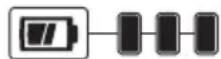
75–100% charged
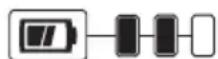
51–74% charged
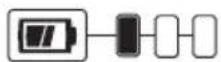
< 50% charged
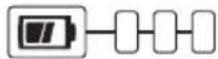
Pack needs to be charged
Transportation
WARNING: Fire hazard. Do not store, carry, or transport the battery pack so that metal objects can contact exposed battery terminals. For example, do not place the battery pack in aprons, pockets, tool boxes, product kit boxes, drawers, etc., with loose nails, screws, keys, coins, hand tools, etc. When transporting individual battery packs, make sure that the battery terminals are protected and well insulated from materials that could contact them and cause a short circuit. NOTE: Li-ion battery packs should not be put in checked baggage on airplanes and must be properly protected from short circuits if they are in carry-on baggage.
The RBRC® Seal
The RBRC® (Rechargeable Battery Recycling Corporation) Seal on the nickel cadmium, nickel metal hydride or lithiumion batteries (or battery packs) indicates that the costs to recycle these batteries (or battery packs) at the end of their useful life have already been paid by CRAFTSMAN. In some areas, it is illegal to place spent nickel cadmium, nickel metal hydride or lithium-ion batteries in the trash or municipal solid waste stream and the Call 2 Recycle® program provides an environmentally conscious alternative.
Call 2 Recycle, Inc., in cooperation with CRAFTSMAN and other battery users, has established the program in the United States and Canada to facilitate the collection of spent nickel cadmium, nickel metal hydride or lithium-ion batteries. Help protect our environment and conserve natural resources by returning the spent nickel cadmium, nickel metal hydride or lithium-ion batteries to an authorized CRAFTSMAN service center or to your local retailer for recycling. You may also contact your local recycling center for information on where to drop off the spent battery. RBRC® is a registered trademark of Call 2 Recycle, Inc.
Important Safety Instructions for All Battery Chargers
WARNING: Read all safety warnings, instructions, and cautionary markings for the battery pack, charger and product. Failure to follow the warnings and instructions may result in electric shock, fire and/or serious injury.
- DO NOT attempt to charge the battery pack with any chargers other than a CRAFTSMAN charger. CRAFTSMAN chargers and battery packs are specifically designed to work together.
• These chargers are not intended for any uses other than charging CRAFTSMAN rechargeable batteries.

Any other uses may result in risk of fire, electric shock or electrocution.
- Do not expose the charger to rain or snow.
- Pull by the plug rather than the cord when disconnecting the charger. This will reduce the risk of damage to the electric plug and cord.
• Make sure that the cord is located so that it will not be stepped on, tripped over or otherwise subjected to damage or stress.
- Do not use an extension cord unless it is absolutely necessary. Use of improper extension cord could result in risk of fire, electric shock or electrocution.
- When operating a charger outdoors, always provide a dry location and use an extension cord suitable for outdoor use. Use of a cord suitable for outdoor use reduces the risk of electric shock.
- An extension cord must have adequate wire size (AWG or American Wire Gauge) for safety. The smaller the gauge number of the wire, the greater the capacity of the cable, that is, 16 gauge has more capacity than 18 gauge. An undersized cord will cause a drop in line voltage resulting in loss of power and overheating. When using more than one extension to make up the total length, be sure each individual extension contains at least the minimum wire size. The following table shows the correct size to use depending on cord length and nameplate ampere rating. If in doubt, use the next heavier gauge. The lower the gauge number, the heavier the cord.
Minimum Gauge for Cord Sets
| Volts | Total Length of Cord in Feet (meters) | ||||
| 120V 25 (7.6) | 50 (15.2) 100 (30.5) 150 (45.7) | ||||
| 240V 50 (15.2) | 100 (30.5) 200 (61.0) 300 (91.4) | ||||
| Ampere Rating | American Wire Gauge | ||||
| More Than | Not More Than | ||||
| 0618 | 161614 | ||||
| 610 | 18161412 | ||||
| 1012 | 16161412 | ||||
| 1216 | 1412 Not Recommended | ||||
WARNING: If the plug or power cord is damaged, it must be replaced by the manufacturer or its representative or by an equally qualified person to avoid danger.
- Do not place any object on top of the charger or place the charger on a soft surface that might block the ventilation slots and result in excessive internal heat. Place the charger in a position away from any heat source. The charger is ventilated through slots in the top and the bottom of the housing.
- Do not operate the charger with a damaged cord or plug – have them replaced immediately.
- Do not operate the charger if it has received a sharp blow, been dropped or otherwise damaged in any way. Take it to an authorized service center.
- Do not disassemble the charger; take it to an authorized service center when service or repair
is required. Incorrect reassembly may result in a risk of electric shock, electrocution or fire.
- Disconnect the charger from the outlet before attempting any cleaning. This will reduce the risk of electric shock. Removing the battery pack will not reduce this risk.
- NEVER attempt to connect 2 chargers together.
- The charger is designed to operate on standard 120V household electrical power. Do not attempt to use it on any other voltage. This does not apply to the vehicular charger.
WARNING: Shock hazard. Do not allow any liquid to go inside the charger. Electric shock may result.
WARNING: Burn hazard. Do not submerge the battery pack in any liquid or allow any liquid to enter the battery pack. Never attempt to open the battery pack for any reason. If the plastic housing of the battery pack breaks or cracks, return to a service center for recycling.
CAUTION: Burn hazard. To reduce the risk of injury, charge only CRAFTSMAN rechargeable battery packs. Other types of batteries may overheat and burst resulting in personal injury and property damage.
CAUTION: Under certain conditions, with the charger plugged into the power supply, the charger can be shorted by foreign material. Foreign materials of a conductive nature, such as, but not limited to, grinding dust, metal chips, steel wool, aluminum foil or any buildup of metallic particles should be kept away from the charger cavities. Always unplug the charger from the power supply when there is no battery pack in the cavity. Unplug the charger before attempting to clean.
Charging a Battery
- Plug the charger into an appropriate outlet.
- Insert and fully seat battery pack. Green charging light(s) will continuously blink while charging.
- Charging is complete when the green charging light(s) remain(s) continuously ON. Battery pack can be left in charger or removed.
WARNING: Only charge batteries in air temperature over 10 °F (4.5 °C) and below 105 °F (40.5 °C).
- Charger will not charge a faulty battery pack, which may be indicated by the charging light(s) staying OFF. Take charger and battery pack to an authorized service center if light(s) stay(s) OFF.
NOTE: Refer to label near charging light(s) on charger for blink patterns.
NOTE: To remove the battery pack, some chargers require the battery pack release button to be pressed.
Indicators for all chargers except CMCB101
| Charging | — — — — — — |
| Fully Charged | — — — — — — |
| Hot/Cold Pack Delay | — — — — — — |
Only CMCB101 Charger Indicators
| Charging | ||
| Fully Charged | ||
| Hot/Cold Pack Delay |
Hot/Cold Pack Delay
When the charger detects a battery pack that is too hot or too cold, it automatically starts a Hot/Cold Pack Delay, suspending charging until the battery pack has reached an appropriate temperature. The charger then automatically switches to the pack charging mode. This feature ensures maximum battery pack life.
A cold battery pack may charge at a slower rate than a warm battery pack.
The hot/cold pack delay will be indicated by the green light(s) continuing to blink and with the red light continuously ON or blinking. Once the battery pack has reached an appropriate temperature, the red light will turn OFF and the charger will resume the charging process.
Electronic Protection System
Li-lon tools are designed with an Electronic Protection System that will protect the battery pack against overloading, overheating or deep discharge. The tool will automatically turn off and the battery pack will need to be recharged.
Important Charging Notes
- Longest life and best performance can be obtained if the battery pack is charged when the air temperature is between 65 °F - 75 °F ( 18 °C - 24 °C ). DO NOT charge when the battery pack is below +40 °F (+4.5 °C), or above +104 °F (+40 °C). This is important and will prevent serious damage to the battery pack.
- The charger and battery pack may become warm to the touch while charging. This is a normal condition, and does not indicate a problem. To facilitate the cooling of the battery pack after use, avoid placing the charger or battery pack in a warm environment such as in a metal shed or an uninsulated trailer.
- If the battery pack does not charge properly:
a. Check operation of receptacle by plugging in a lamp or other appliance;
b. Check to see if receptacle is connected to a light switch which turns power off when you turn out the lights;
c. Move the charger and battery pack to a location where the surrounding air temperature is approximately 65^ F – 75^ F ( 18^ C – 24^ C);
d. If charging problems persist, take the tool, battery pack and charger to your local service center.
- The battery pack should be recharged when it fails to produce sufficient power on jobs which were easily done previously. DO NOT CONTINUE to use under these conditions. Follow the charging procedure. You may also
charge a partially used pack whenever you desire with no adverse effect on the battery pack.
-
Foreign materials of a conductive nature such as, but not limited to, grinding dust, metal chips, steel wool, aluminum foil, or any buildup of metallic particles should be kept away from charger cavities. Always unplug the charger from the power supply when there is no battery pack in the cavity. Unplug the charger before attempting to clean.
-
Do not freeze or immerse the charger in water or any other liquid.
Charger Cleaning Instructions
WARNING: Shock hazard. Disconnect the charger from the AC outlet before cleaning. Dirt and grease may be removed from the exterior of the charger using a cloth or soft non-metallic brush. Do not use water or any cleaning solutions.
Wall Mounting
Some CRAFTSMAN chargers are designed to be wall mountable or to sit upright on a table or work surface. If wall mounting, locate the charger within reach of an electrical outlet, and away from a corner or other obstructions which may impede air flow. Use the back of the charger as a template for the location of the mounting screws on the wall. Mount the charger securely using drywall screws (purchased separately) at least 1" (25.4 mm) long, with a screw head diameter of 0.28–0.35" (7–9 mm), screwed into wood to an optimal depth leaving approximately 7/32" (5.5 mm) of the screw exposed. Align the slots on the back of the charger with the exposed screws and fully engage them in the slots.
NOTE: Do not attempt to mount CMCB101 charger under a bench or table.
NOTE: Only mount CMCB101 charger with the charging lights pointed upward toward the ceiling.
VersaTrack™
WARNING: Do not charge batteries while charger is ready on Trackwall.
CRAFTSMAN chargers, except the CMCB101, can be stored on CRAFTSMAN VersaTrack™ Trackwall. Hooks and accessories are sold separately. Please refer to the VersaTrack™ Trackwall accessory sheet for further information.
NOTE: The CMCB101 charger is not CRAFTSMAN VersaTrack™ Trackwall compatible.
SAVE THESE INSTRUCTIONS FOR FUTURE USE
Intended Use
Your small angle grinder has been designed for household use for grinding, sanding, and wire brush applications.
DO NOT use under wet conditions or in presence of flammable liquids or gases.
DO NOT let children come into contact with the tool. Supervision is required when inexperienced operators use this tool.
ASSEMBLY AND ADJUSTMENTS
WARNING: To reduce the risk of serious personal injury, turn unit off and remove the battery pack before making any adjustments or removing/installing attachments or accessories. An accidental start-up can cause injury.
Attaching the Auxiliary Handle (Fig. A)
WARNING: This handle SHOULD BE USED AT ALL TIMES to maintain complete control of the tool.
Always make sure the handle is tight.
Screw the auxiliary handle 7 tightly into one of the threaded mounting holes of the gear case.
Guards
CAUTION: Guards must be used with all grinding wheels, sanding flap discs, wire brushes, and wire wheels. The tool may be used without a guard only when sanding with conventional sanding discs. Refer to Figure A to see guards provided with the unit. Some applications may require purchasing the correct guard from your local dealer or authorized service center.
NOTE: Edge grinding and cutting can be performed with Type 27 wheels designed and specified for this purpose; 0.25" (6.35 mm) thick wheels are designed for surface grinding while thinner Type 27 wheels need to be examined for the manufacturer's label to see if they can be used for surface grinding or only edge grinding/cutting.
NOTE: See the Accessories Chart to select the proper guard / accessory combination.
Mounting and Removing Guard (Type 27)
Mounting Guard (Fig. B)
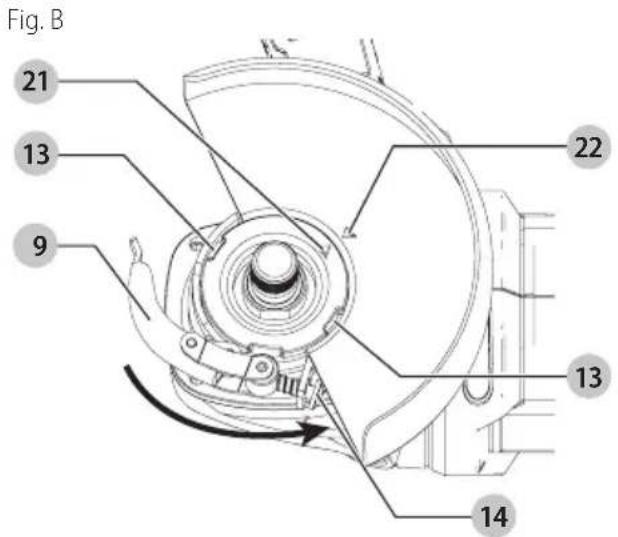
- Open the guard latch lever 9, and align the arrow on the gear case 21 with the arrow 22 on the guard.
- Push the guard down until the guard lugs 13 engage and rotate freely in the groove on the gear case hub.
- With the guard latch open, rotate the guard into the desired working position. The guard body should be positioned between the spindle and the operator to provide maximum operator protection.
- Close the guard latch to secure the guard on the gear case cover. You should not be able to rotate the guard by hand when the latch is closed. Do not operate the grinder with a loose guard or the clamp lever in open position.
ENGLISH
Removing Guard (Fig. B)
To remove the guard, open the guard latch, rotate the guard so that the lugs on the guard are aligned with the slots on the gear case cover, and pull the guard away from the gear case cover.
NOTE: The guard is pre-adjusted to the diameter of the gear case hub at the factory. If, after a period of time, the guard becomes loose, tighten the adjusting screw 14 with latch in the closed position and guard installed on the tool.
CAUTION: Do not tighten the adjusting screw with the latch in the open position. Undetectable damage to the guard or the mounting hub may result. If the guard cannot be tightened by the guard latch, do not use the tool and take the tool and guard to a service center to repair or replace the guard.
Flanges and Wheels
CAUTION: Turn unit off and remove the battery panel before making any adjustments or removing/installing attachments or accessories.
Mounting Non-Hubbed Wheels (Fig. C, D)
WARNING: Failure to properly seat the flanges and/or wheel could result in serious injury (or damage to the tool or wheel).
CAUTION: Included flanges must be used with depressed center Type 27/42 grinding wheels. See the Accessories Chart for more information.
WARNING: Use of a damaged flange or guard or guard to use proper flange and guard can result in injury due to wheel breakage and wheel contact. See the Accessories Chart for more information.
Depressed center Type 27 grinding wheels must be used with included flanges.
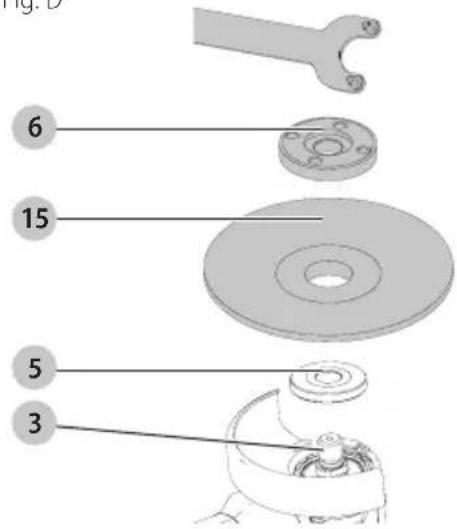
- Place the tool on a table, guard up.
- Install the unthreaded backing flange 5 on spindle 3 with the raised center (pilot) facing the wheel.
-
Place wheel 15 against the backing flange, centering the wheel on the raised center (pilot) of the backing flange.
-
While depressing the spindle lock button 4, thread the threaded locking flange 6 on spindle.
NOTE: If the wheel you are installing is more than 1/8" (3.17 mm) thick, place the threaded clamp nut on the spindle so that the raised section (pilot) fits into the center of the wheel. If the wheel you are installing is 1/8" (3.17 mm) thick or less, place the threaded clamp nut on the spindle so that the raised section (pilot) is not against the wheel.
- To remove the wheel, depress the spindle lock button and loosen the threaded locking flange.
Fig. C
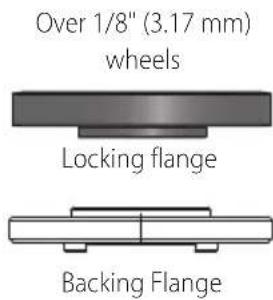
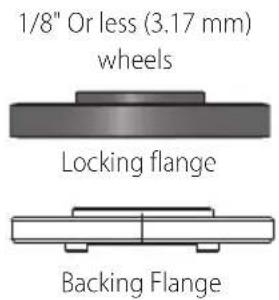
Fig. D
Mounting Sanding Backing Pads (Fig. A, E)
NOTE: Use of a guard with sanding discs that use backing pads, often called fiber resin discs, is not required. Since a guard is not required for these accessories, the guard may or may not fit correctly if used.
WARNING: Failure to properly seat the clamp nut and, or pad could result in serious injury (or damage to the tool or wheel).
WARNING: Proper guard must be reinstalled for gouting wheel, sanding flap disc, wire brush or wire wheel applications after sanding applications are complete.
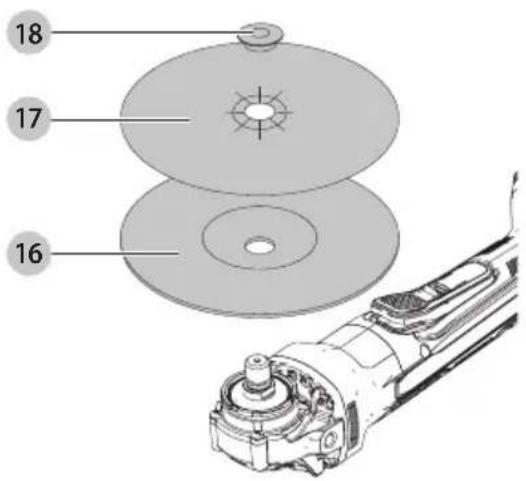
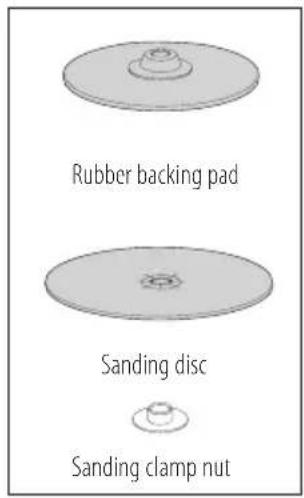
- Place or appropriately thread backing pad 16 on the spindle.
- Place the sanding disc 17 on the backing pad.
- While depressing spindle lock button 4, thread the sanding clamp nut 18 on spindle, piloting the raised
hub on the clamp nut into the center of san ding disc and backing pad.
- Tighten the clamp nut by hand. Then depress the spindle lock button while turning the sanding disc until the sanding disc and clamp nut are snug.
- To remove the wheel, grasp and turn the backing pad and sanding pad while depressing the spindle lock button.
Fig. E
Mounting and Removing Hubbed Wheels (Fig. A)
Hubbed wheels install directly on the spindle. Thread of accessory must match thread of spindle.
- Remove backing flange by pulling away from tool.
- Thread the wheel on the spindle 3 by hand.
- Depress the spindle lock button 4 and use a wrench to tighten the hub of the wheel.
- Reverse the above procedure to remove the wheel.
NOTICE: Failure to properly seat the wheel before turning the tool on may result in damage to the tool or the wheel.
Mounting Wire Cup Brushes and Wire Wheels (Fig. A)
WARNING: Failure to properly seat the brush/wheel could result in serious injury (or damage to the tool or wheel).
CAUTION: To reduce the risk of personal injury, work gloves when handling wire brushes and wheels. They can become sharp.
CAUTION: To reduce the risk of damage to the wheel or brush must not touch guard when mounted or while in use. Undetectable
damage could occur to the accessory, causing wires to fragment from accessory wheel or cup.
Wire cup brushes or wire wheels install directly on the threaded spindle without the use of flanges. Use only wire brushes or wheels provided with a threaded hub. These accessories are available at extra cost from your local dealer or authorised service center.
-
Place the tool on a table, guard up.
-
Thread the wheel on the spindle by hand.
- Depress spindle lock button 4 and use a wrench on the hub of the wire wheel or brush to tighten the wheel.
- To remove the wheel, reverse the above procedure.
NOTICE: To reduce the risk of damage to the tool, properly seat the wheel hub before turning the tool on.
Prior to Operation
• Install the guard and appropriate disc or wheel. Do not use excessively worn discs or wheels.
- Be sure the backing and threaded locking flange are mounted correctly. Follow the instructions given in the Accessories Chart.
• Make sure the disc or wheel rotates in the direction of the arrows on the accessory and the tool.
- Do not use a damaged accessory. Before each use inspect the accessory such as abrasive wheels for chips and cracks, backing pad for cracks, tear or excess wear, wire brush for loose or cracked wires. If power tool or accessory is dropped, inspect for damage or install an undamaged accessory. After inspecting and installing an accessory, position yourself and bystanders away from the plane of the rotating accessory and run the power tool at maximum no-load speed for one minute. Damaged accessories will normally break apart during this test time.
OPERATION
WARNING: To reduce the risk of serious personal injury, turn unit off and remove the battery pack before making any adjustments or removing/installing attachments or accessories. An accidental start-up can cause injury.
Installing and Removing the Battery Pack (Fig. F)
NOTE: For best results, make sure your battery pack is fully charged.
To install the battery pack 1 into the tool handle, align the battery pack with the rails inside the tool's handle and slide it into the handle until the battery pack is firmly seated in the tool and ensure that it does not disengage.
To remove the battery pack from the tool, press the release button 2 and firmly pull the battery pack out of the tool handle. Insert it into the charger as described in the charger section of this manual
English
Fig. F
2
1
Proper Hand Position (Fig. G)
WARNING: To reduce the risk of serious personal injury, ALWAYS use proper hand position as shown. WARNING: To reduce the risk of serious personal injury, ALWAYS hold securely in anticipation of a sudden reaction.
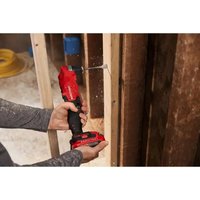
Proper hand position requires one hand on the auxiliary handle 7, with the other hand on the body of the tool.
Fig. G
7
Paddle Switch (Fig. A)
CAUTION: Hold the side handle and body of the tool family to maintain control of the tool at start up and during use and until the wheel or accessory stops rotating. Make sure the wheel has come to a complete stop be fore laying the tool down.
NOTE: To reduce unexpected tool movement, do not switch the tool on or off while under load conditions. Allow the grinder to run up to full speed before touching the work surface. Lift the tool from the surface before turning the tool off. Allow the tool to stop rotating before putting it down.
- To turn the tool on, push the lock-off lever 11 toward the back of the tool, then depress the paddle switch 10. The tool will run while the switch is depressed.
- Turn the tool off by releasing the paddle switch.
Spindle Lock (Fig. A)
The spindle lock 4 is provided to prevent the spindle from rotating when installing or removing wheels. Operate the spindle lock only when the tool is turned off, the battery is removed and has come to a complete stop.
NOTICE: To reduce the risk of damage to the tool, do not engage the spindle lock while the tool is operating. Damage to the tool will result and attached accessory may spin off possibly resulting in injury.
To engage the lock, depress the spindle lock button and rotate the spindle until you are unable to rotate the spindle further.
Surface Grinding, Sanding and Wire Brushing (Fig. H)
CAUTION: Always use the correct guard per the instructions in this manual.
To perform work on the surface of a workpiece:
- Allow the tool to reach full speed before touching the tool to the work surface.
- Apply minimum pressure to the work surface, allowing the tool to operate at high speed. Material removal rate is greatest when the tool operates at high speed.
Fig. H
Angle
- Maintain an appropriate angle between the tool and work surface. Refer to the chart according to particular function.
Function Angle
Grinding 20°-30°
Sanding with Flap Disc 5°-10°
Sanding with Backing Pad 5°-15°
Wire Brushing 5°-10°
- Maintain contact between the edge of the wheel and the work surface.
- If grinding, sanding with flap discs or wire brushing move the tool continuously in a forward and back motion to avoid creating gouges in the work surface.
- If sanding with a backing pad, move the tool constantly in a straight line to prevent burning and swirling of work surface.
nOTE: Allowing the tool to rest on the work surface without moving will damage the work piece.
- Remove the tool from work surface before turning tool off. Allow the tool to stop rotating before laying it down.
CAUTION: Use extra care when working over an edge, as a sudden sharp movement of grinder may be experienced.
Precautions To Take When Working on a Painted Workpiece
- Sanding or wire brushing of lead based paint is NOT RECOMMENDED due to the difficulty of controlling the contaminated dust. The greatest danger of lead poisoning is to children and pregnant women.
- Since it is difficult to identify whether or not a paint contains lead without a chemical analysis, we recommend the following precautions when sanding any paint:
Personal Safety
- No children or pregnant women should enter the work area where the paint sanding or wire brushing is being done until all clean up is completed.
- A dust mask or respirator should be worn by all persons entering the work area. The filter should be replaced daily or whenever the wearer has difficulty breathing.
NOTE: Only those dust masks suitable for working with lead paint dust and fumes should be used. Ordinary painting masks do not offer this protection. See your local hardware dealer for the proper N.I.O.S.H. approved mask. - NO EATING, DRINKING or SMOKING should be done in the work area to prevent ingesting contaminated paint particles. Workers should wash and clean up BEFORE eating, drinking or smoking. Articles of food, drink, or smoking should not be left in the work area where dust would settle on them.
Environmental Safety
- Paint should be removed in such a manner as to minimize the amount of dust generated.
- Areas where paint removal is occurring should be sealed with plastic sheeting of 4 mils thickness.
- Sanding should be done in a manner to reduce tracking of paint dust outside the work area.
Cleaning and Disposal
- All surfaces in the work area should be vacuumed and thoroughly cleaned daily for the duration of the sanding project. Vacuum filter bags should be changed frequently.
- Plastic drop cloths should be gathered up and disposed of along with any dust chips or other removal debris. They should be placed in sealed refuse receptacles and disposed of through regular trash pick-up procedures. During clean up, children and pregnant women should be kept away from the immediate work area.
- All toys, washable furniture and utensils used by children should be washed thoroughly before being used again.
MAINTENANCE
WARNING: To reduce the risk of serious personal injury, turn unit off and remove the battery pack before making any adjustments or removing/installing attachments or accessories. An accidental start-up can cause injury.
Accessories
WARNING: Since accessories, other than those obtained by CRAFTSMAN, have not been tested with this product, use of such accessories with this tool could be hazardous. To reduce the risk of injury, only CRAFTSMAN recommended accessories should be used with this product.
Recommended accessories for use with your tool are available at extra cost from your local dealer or authorized service center. If you need assistance in locating any accessory, please contact CRAFTSMAN call 1-888-331-4569.
Cleaning
WARNING: Blow dirt and dust out of all air vents and dust ports with clean, dry air at least once a week. To minimize the risk of eye injury, always wear ANSI Z87.1 approved eye protection when performing this procedure.
WARNING: Never use solvents or other harsh chemicals for cleaning the non-metallic parts of the tool. These chemicals may weaken the plastic materials used in these parts. Use a cloth dampened only with water and mild soap. Never let any liquid get inside the tool; never immerse any part of the tool into a liquid.
Blowing dust and grit out of the motor housing using compressed air is a necessary maintenance procedure. Dust and grit from metal grinding often accumulate on interior surfaces and could create an electrical shock hazard if not cleaned out.
• Always handle accessories with care when mounting or removing.
- The best storage place for accessories is one that is cool and dry away from direct sunlight and excess heat or cold.
WARNING: ALWAYS use safety glasses. Everyday eyeglasses are NOT safety glasses. Also use face or dust mask if operation is dusty. ALWAYS WEAR CERTIFIED SAFETY EQUIPMENT:
• ANSI Z87.1 eye protection (CAN/CSA Z94.3),
• ANSI S12.6 (S3.19) hearing protection,
• NIOSH/OSHA/MSHA respiratory protection.
Repairs
The charger and battery pack are not serviceable. There are no serviceable parts inside the charger or battery pack.
WARNING: To assure product SAFETY and REACHIBILITY, repairs, maintenance and adjustment (including brush inspection and replacement, when applicable) should be performed by a CRAFTSMAN factory service center or a CRAFTSMAN authorized service center. Always use identical replacement parts.
VersaTrack™ (Fig. A, I)
WARNING: To reduce the risk of serious personal injury, turn unit off and remove the battery pack before making any adjustments or removing/installing attachments or accessories. An accidental start-up can cause injury.
WARNING: To reduce the risk of serious personal injuries, do not use a damaged VersaTrack™ hang hook or VersaTrack™ Trackwall. A damaged VersaTrack™ hang hook or VersaTrack™ Trackwall will not support the weight of the tool.
WARNING: To reduce the risk of serious personal injury, ensure the screw holding the VersaTrack™ hang hook is securely tightened.
WARNING: To reduce the risk of serious personal injury, DO NOT suspend tool overhead or suspend objects from the hang hook. ONLY suspend tool on the VersaTrack™ Trackwall using the hang hook.
WARNING: The Versatrack™ integral hang hook is not a belt hook.
WARNING: Ensure that the tool weight does not be added the maximum rated weight of 20 lb (9 kg) for the selected VersaTrack™ hook.
WARNING: When hanging objects on a VersaTrack™ Trackwall rail, adequately space the tools in order to not exceed 75 lb (35 kg) per linear foot.
IMPORTANT: When attaching the VersaTrack™ hang hook, use only the screw that is provided. Be sure to securely tighten the screw. VersaTrack™ accessories mount compatible tools securely to the VersaTrack™ Trackwall system.
- Turn the tool off, remove the battery pack and accessories.
CAUTION: Any product with exposed cutting teeth must have them covered securely if it is to be on the VersaTrack™ Trackwall.
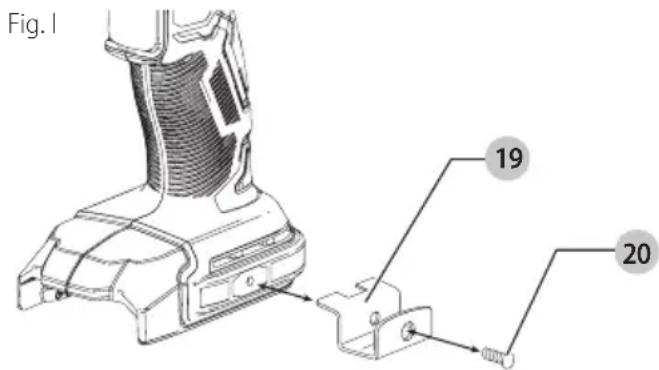
- Attach the hang hook 19 on the tool.
a. Place the VersaTrack™ hang hook onto the mounting location 12 at the base of the tool.
b. Use a screwdriver to secure the hang hook with the provided screw 20. Do not use any other screw for this.
NOTE: VersaTrack™ accessories for use with your tool are available at extra cost from your local dealer or authorized service center. If you need assistance in locating any accessory, please contact CRAFTSMAN, call 1-888-331-4569.
Register Online
Thank you for your purchase. Register your product now for:
- WARRANTY SERVICE: Registering your product will help you obtain more efficient warranty service in case there is a problem with your product.
- CONFIRMATION OF OWNERSHIP: In case of an insurance loss, such as fire, flood or theft, your registration of ownership will serve as your proof of purchase.
- FOR YOUR SAFETY: Registering your product will allow us to contact you in the unlikely event a safety notification is required under the Federal Consumer Safety Act.
- Register online at www.craftsman.com/registration
Three Year Limited Warranty
CRAFTSMAN will repair or replace, without charge, any defects due to faulty materials or workmanship for three years from the date of purchase (two years for batteries). This warranty does not cover part failure due to normal wear or tool abuse. For further detail of warranty coverage and warranty repair information, visit www.craftsman.com or call 1-888-331-4569. This warranty does not apply to accessories or damage caused where repairs have been made or attempted by others. THIS LIMITED WARRANTY IS GIVEN IN LIEU OF ALL OTHERS, INCLUDING THE IMPLIED WARRANTY OF MERCHANTABILITY AND FITNESS FOR A PARTICULAR PURPOSE, AND EXCLUDES ALL INCIDENTAL OR CONSEQUENTIAL DAMAGES. Some states do not allow limitations on how long an implied warranty lasts or the exclusion or limitation of incidental or consequential damages, so these limitations may not apply to you. This warranty gives you specific legal rights and you may have other rights which vary in certain states or provinces.
2 YEARS FREE SERVICE ON CRAFTSMAN BATTERY PACKS
CMCB201, CMCB2011, CMCB2015
3 YEARS FREE SERVICE ON CRAFTSMAN BATTERY PACKS
CMCB202, CMCB204, CMCB205, CMCB206, CMCB209
NOTE: Battery warranty voided if the battery pack is tampered with in any way. CRAFTSMAN is not responsible for any injury caused by tampering and may prosecute warranty fraud to the fullest extent permitted by law.
90 DAY MONEY BACK GUARANTEE
If you are not completely satisfied with the performance of your CRAFTSMAN Power Tool or Nailer for any reason, you can return it within 90 days from the date of purchase with a receipt for a full refund – no questions asked.
LATIN AMERICA: This warranty does not apply to products sold in Latin America. For products sold in Latin America, see country specific warranty information contained in the packaging, call the local company or see website for warranty information.
FREE WARNING LABEL REPLACEMENT: If your warning labels become illegible or are missing, call 1-888-331-4569 for a free replacement.
ACCESSORIES CHART
4 1/2" (115 mm) Grinding Wheels
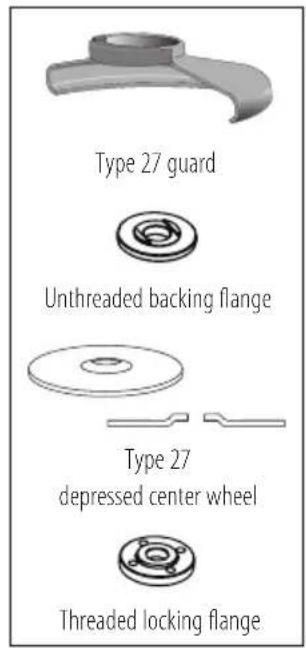
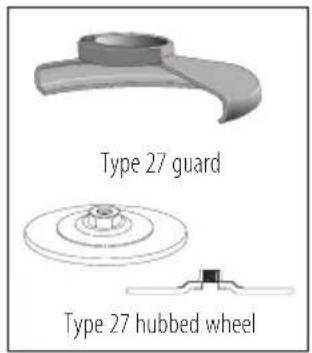
4 1/2" (115 mm) Sanding Flap Discs
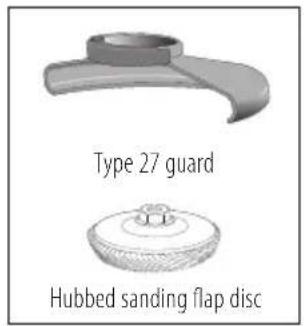
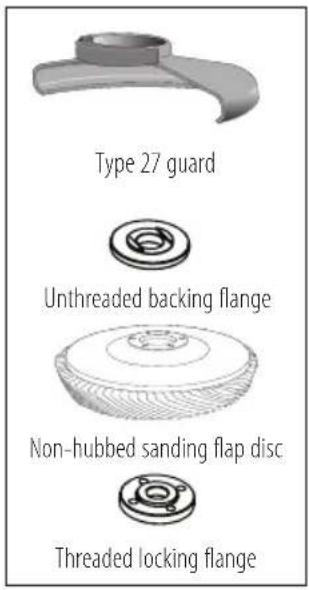
Wire Wheels
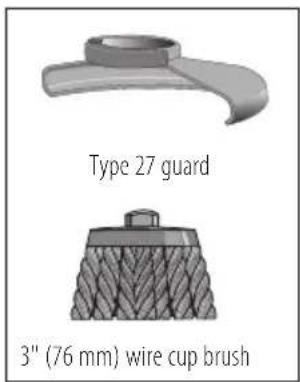
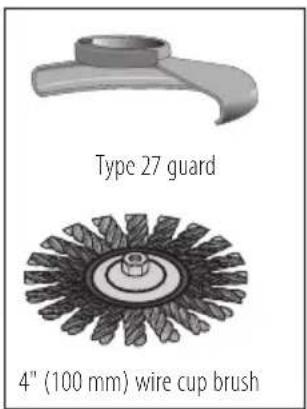
Sanding Discs
natural_image
Illustration of hands operating a mechanical device with a numbered label (7), no readable text or symbols present.CMCB201, CMCB2011, CMCB2015
CONTRAT D'ENTRETIEN GRATUIT DE TROIS ANS SUR LES BLOC-PILES CRAFTSMAN
CMCB202, CMCB204, CMCB205, CMCB206, CMCB209
Eje Central Lázaro Cárdenas No. 18 - Local (55) 5588 9377 D, Col. Obrera
MERIDA, YUC
Calle 63 #459-A - Col. Centro (999) 928 5038
MONTERREY, N.L.
Av. Francisco I. Madero 831 Poniente - Col. (818) 375 23 13 Centro
PUEBLA, PUE
17 Norte #205 - Col. Centro (222) 246 3714
QUERETARO, QRO
Av. San Roque 274 - Col. San Gregorio (442) 2 17 63 14
SAN LUIS POTOSI, SLP
CMCB201, CMCB2011, CMCB2015
CMCB202, CMCB204, CMCB205, CMCB206, CMCB209
* Maximum initial battery voltage (measured without a workload) is 20 volts. Nominal voltage is 18.
HING: Use of any other battery packs may create a risk of injury and fire.


- Definitions: Safety Alert Symbols and Words
- 20V Max\* 4-1/2" (115 mm) Grinder CMCG451
- GENERAL POWER TOOL SAFETY WARNINGS
- SAVE ALL WARNINGS AND INSTRUCTIONS FOR FUTURE REFERENCE.
- 1) Work Area Safety
- 2) Electrical Safety
- 3) Personal Safety
- 4) Power Tool Use and Care
- 5) Battery Tool Use and Care
- 6) Service
- SAFETY INSTRUCTIONS FOR ALL OPERATIONS
- Safety Warnings Common for Grinding, Sanding, Wire Brushing Operations
- English
- Kickback and Related Warnings
- Safety Warnings Specific for Grinding Operations
- Safety Warnings Specific for Sanding Operations
- Safety Warnings Specific for Wire Brushing Operations
- Additional Safety Information
- BATTERIES AND CHARGERS
- READ ALL INSTRUCTIONS
- Important Safety Instructions for All Battery Packs
- Storage Recommendations
- Battery Pack Cleaning Instructions
- Fuel Gauge Battery Packs
- Transportation
- The RBRC® Seal
- Important Safety Instructions for All Battery Chargers
- Charging a Battery
- Hot/Cold Pack Delay
- Electronic Protection System
- Important Charging Notes
- Charger Cleaning Instructions
- Wall Mounting
- VersaTrack™
- SAVE THESE INSTRUCTIONS FOR FUTURE USE
- Intended Use
- ASSEMBLY AND ADJUSTMENTS
- Attaching the Auxiliary Handle (Fig. A)
- Guards
- Mounting and Removing Guard (Type 27)
- Mounting Guard (Fig. B)
- Removing Guard (Fig. B)
- Flanges and Wheels
- Mounting Non-Hubbed Wheels (Fig. C, D)
- Mounting Sanding Backing Pads (Fig. A, E)
- Mounting and Removing Hubbed Wheels (Fig. A)
- Mounting Wire Cup Brushes and Wire Wheels (Fig. A)
- Prior to Operation
- OPERATION
- Installing and Removing the Battery Pack (Fig. F)
- Proper Hand Position (Fig. G)
- Paddle Switch (Fig. A)
- Spindle Lock (Fig. A)
- Surface Grinding, Sanding and Wire Brushing (Fig. H)
- Precautions To Take When Working on a Painted Workpiece
- Personal Safety
- Environmental Safety
- Cleaning and Disposal
- MAINTENANCE
- Accessories
- Cleaning
- Repairs
- VersaTrack™ (Fig. A, I)
- Register Online
- Three Year Limited Warranty
- YEARS FREE SERVICE ON CRAFTSMAN BATTERY PACKS
- YEARS FREE SERVICE ON CRAFTSMAN BATTERY PACKS
- DAY MONEY BACK GUARANTEE
- ACCESSORIES CHART
- CONTRAT D'ENTRETIEN GRATUIT DE TROIS ANS SUR LES BLOC-PILES CRAFTSMAN
- MERIDA, YUC
- MONTERREY, N.L.
- PUEBLA, PUE
- QUERETARO, QRO
- SAN LUIS POTOSI, SLP
Brand : Craftsman
Model : CMCG451B
Category : Grinder