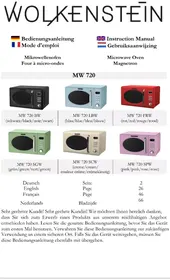
WMW720 SG - Microwave Oven Wolkenstein - Free user manual and instructions
Find the device manual for free WMW720 SG Wolkenstein in PDF.



| Product type | Freestanding microwave oven |
| Brand | Wolkenstein |
| Model | WMW720 SG |
| Oven volume | 20 litres |
| Maximum power (microwave) | 700 W |
| Voltage / Frequency | 230 V AC / 50 Hz |
| Power levels | 5 (100%, 80%, 60%, 40%, 20%) |
| Automatic programs | 8 (Popcorn, Pizza, Drinks, Potatoes, Fish) |
| Display | Digital display |
| Timer | Digital, max. 60 minutes |
| End signal | Yes, with reminder every 3 minutes |
| Child safety | Yes (control panel lock) |
| Turntable | Yes, suitable diameter |
| Power cord length | 85 cm |
| Dimensions (H x W x D) | 25.80 x 45.10 x 34.80 cm |
| Net weight | 10.50 kg |
| Gross weight | 11.30 kg |
| Additional functions | Auto defrost, quick start, clock, delayed start, multi-stage cooking |
| Care and cleaning | Clean interior with a damp cloth and mild detergent; turntable washable with soapy water |
| Allowed materials | Microwave-safe dishes: ceramic, glass, heat-resistant plastic (no metal) |
| Warranty | 24 months on material and workmanship defects |
Frequently Asked Questions - WMW720 SG Wolkenstein
User questions about WMW720 SG Wolkenstein
0 question about this device. Answer the ones you know or ask your own.
Ask a new question about this device
Download the instructions for your Microwave Oven in PDF format for free! Find your manual WMW720 SG - Wolkenstein and take your electronic device back in hand. On this page are published all the documents necessary for the use of your device. WMW720 SG by Wolkenstein.
USER MANUAL WMW720 SG Wolkenstein
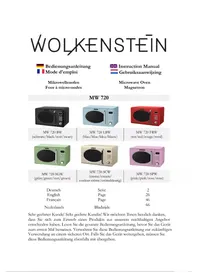
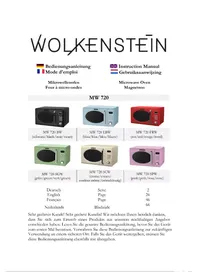
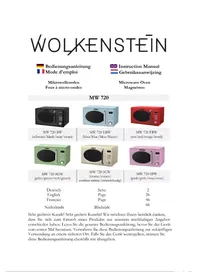
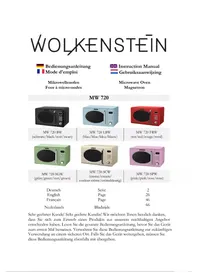
natural_image
Black microwave oven with control panel and door (no visible text or symbols)MW 720 BW (schwarz/black/noir/swart)
natural_image
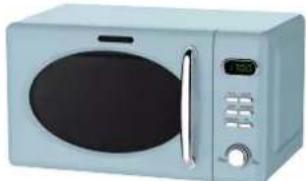
Modern light blue microwave oven with control panel and door (no visible text or symbols)MW 720 LBW (blau/blue/bleu/blauw)
natural_image
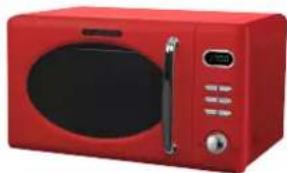
Red microwave oven with black lid and control panel (no visible text or symbols)MW 720 FRW (rot/red/rouge/rood)
natural_image
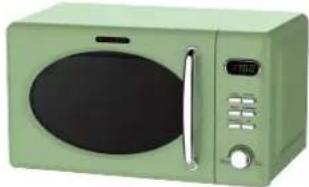
Green microwave oven with control panel and door (no visible text or symbols)natural_image
White microwave oven with control panel and door (no visible text or symbols)natural_image
Pink microwave oven with black door and control panel (no visible text or symbols)MW 720 SPW (pink/pink/rose/roze)
Deutsch
English
Français
Nederlands
Seite
Page
Page
Bladzijde
2
26
46
66
text_image
Labeled diagram of a microwave oven showing interior components and open door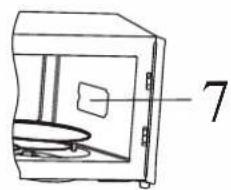
natural_image
Line drawing of a mechanical device with a labeled part (7), no text or symbols presentnatural_image
Pure diagram of a U-shaped object with horizontal bands and the number 1 inside, no text or symbols present.Dear customer! We would like to thank you for purchasing a product from our wide range of domestic appliances. Read the complete instruction manual before you operate the appliance for the first time. Retain this instruction manual in a safe place for future reference. If you transfer the appliance to a third party, also hand over this instruction manual.
Index
- Safety information .... 27
1.1 Signal words....28
1.2 Safety instructions.... 28
- Installation 31
2.1 Appliance 31
2.2 Installation of the appliance 32
2.3 Installation of the turntable.... 33
- Operation.... 33
3.1 Control panel.... 33
3.2 General operational information 34
3.3 Setting of the clock.... 35
3.4 Cooking of food 36
3.5 Express.... 36
3.6 Defrosting.... 37
3.7 Auto-Cooking.... 38
3.8 Programmed start of cooking.... 39
3.9 Multi-Sequence Cooking.... 39
3.10 Child lock....40
- Microwave cooking.... 40
4.1 Basics of microwave cooking.... 40
4.2 Suitable materials for microwave cooking 40
4.3 Unsuitable materials for microwave cooking 42
- Cleaning and maintenance 42
-
Trouble shooting....43
-
Technical data....44
-
Waste management....44
-
Guarantee conditions 45
The figures in this instruction manual may differ in some details from the current design of your appliance. Nevertheless follow the instructions in such a case. Delivery without content.
i Any modifications, which do not influence the functions of the appliance. shall remain reserved by the manufacturer. Please dispose of the packing with respect to your current local and municipal regulations.
The appliance you have purchased may be an enhanced version of the unit this manual was printed for. Nevertheless, the functions and operating conditions are identical. This manual is therefore still valid. Technical modifications as well as misprints shall remain reserved.
EU - Declaration of Conformity
★ The products, which are described in this instruction manual, comply with the harmonized regulations.
★ The relevant documents can be requested from the final retailer by the competent authorities.
1. Safety information
READ THE SAFETY INFORMATION AND THE SAFETY INSTRUCTIONS CAREFULLY BEFORE YOU OPERATE THE APPLIANCE FOR THE FIRST TIME.
All information included in those pages serve for the protection of the operator. If you ignore the safety instructions, you will endanger your health and life.
Store this manual in a safe place so you can use it whenever it is needed. Strictly observe the instructions to avoid damage to persons and property.
Check the technical periphery of the appliance! Do all wires and connections to the appliance work properly? Or are they time-worn and do not match the technical requirements of the appliance? A check-up of existing and newly-made connections must be done by an authorized professional. All connections and energy-leading components (incl. wires inside a wall) must be checked by a qualified professional. All modifications to the electrical mains to enable the installation of the appliance must be performed by a qualified professional.
The appliance is intended for private use only as well as to be used (1) in staff kitchen areas of shops, offices and other working environments; (2) by clients in hotels, motels, B&B and other residential type environments.
i The appliance is intended for cooking only.
i The appliance is intended for indoor-use only.
The appliance is not intended to be operated for commercial purposes, during camping and in public transport.
Operate the appliance in accordance with its intended use only.
Do not allow anybody who is not familiar with this instruction manual to operate the appliance.
Precautions to avoid possible exposure to excessive microwave energy
1 Do not attempt to operate this appliance with the door open as open-door operating can result in harmful exposure to microwave energy. Do no break or tamper with the safety interlocks.
2 Do not place any object between the front of the appliance and the door or allow soil or cleaner residuals to accumulate on the sealing surfaces.
3 Do not operate the appliance if it is damaged. It is particularly important that the door closes properly and that there is not any damage on the:
a door (bent).
b hinges and latches ( must not be broken or loosened ).
c door seals and sealing surfaces.
4 The appliance should not be adjusted or repaired by anyone except properly qualified service personal.
1.1 Signal words
⚠️ DANGER! indicates a hazardous situation which, if ignored, will result in death or serious injury.
WARNING! indicates a hazardous situation which, if ignored, could result in death or serious injury.
⚠️ CAUTION! indicates a hazardous situation which, if not avoided, may result in minor or moderate injury.
NOTICE! indicates possible damage to the appliance.
1.2 Safety instructions
DANGER!
-
Do not connect the appliance to the mains if the appliance itself or the power cord or the plug are visibly damaged.
-
Always check that the power cord is not placed under the appliance or damaged by moving the appliance.
- Never try to repair the appliance yourself. If the appliance does not operate properly, disconnect it from the mains and contact the shop you purchased the appliance at. Original spare parts should be used only.
- When the power cord is damaged, it must be replaced by the manufacturer or an authorized aftersales service or a qualified professional only.
- Never remove the mica-plate which covers the wave guide inside the oven.
WARNING!
- Operate the appliance with 220\~240V AC/50Hz only. Do not use an extension cord or a multiple socket.
- Connect the appliance to a properly grounded socket only. Use a safety socket to minimize any risk of electric shock.
- The technical data of your energy supply must meet the data on the rating label. The main current circuit must be equipped with a safety shut-down device.
- Any repair or service work including the removal of any cover, which protects from exposure to microwave energy, must be performed by an qualified professional only.
- Only operate the appliance when the door is closed.
- Unattended cooking with fat or oil can be dangerous and may result in fire. NEVER try to extinguish a fire with water, but switch off the appliance and then cover flame e.g. with a lid or a fire blanket..
- Accessible parts may become hot during use. Young children should be kept away. Do not touch the hot parts of the appliance. RISK OF BURNS!
- Do not use the appliance to dry clothes or wet newspapers etc.
- Do not use the appliance when it is empty.
-
In order to reduce any risk of fire in the appliance:
a. Check the appliance frequently when you use plastic or paper containers.
b. Remove wire twist-ties from paper or plastic bags before you place such a bag in the appliance.
c. Switch off or unplug the appliance if you notice any smoke. Keep the door closed to stifle any flames.
d. Do not use the appliance to store anything inside.
e. Do not leave any items, e.g. paper, cooking utensils or food, inside the appliance even when it is not running. -
Do not fry in the appliance. Hot oil can damage parts of the appliance
and result in skin-burns.
-
Never heat any food or liquids in sealed containers, because they can explode.
-
The contents of feeding bottles and baby food should be stirred or shaken and their temperature should be checked before serving to avoid burns.
-
Do not use a steam cleaner to clean the appliance. RISK OF ELECTRIC SHOCK!
-
Disconnect the appliance from the mains before cleaning or maintenance.
-
While unpacking, the packaging materials (polythene bags, polystyrene pieces, etc.) should be kept away from children and pets. CHOKING HAZARD!
-
This appliance may be operated by children aged from 8 years and above as well as by persons with reduced physical, sensory and mental capabilities or lack of experience and knowledge if they are supervised or have been instructed concerning the safe use of the appliance and do comprehend the hazards involved. Children must not play with the appliance. Cleaning and user-maintenance must not be carried out by children unless they are supervised.
-
Children must never play with the appliance. Touching the appliance during operation can cause serious burns.
-
Only allow children to use the appliance without supervision, when adequate instructions have been given before so that the child is able to use the appliance in a safe way and understands the risks of improper use.
CAUTION!
-
This appliance complies with the current European safety legislation. We do wish to emphasize that this compliance does not negate the fact that the surfaces of the appliance will become hot while operating and will retain and emit heat even if it has stopped operating.
-
Lead the power cord in such a way that you will not trip on it.
-
Microwave heating of beverages can result in delayed eruptive boiling. Be extremely careful when handling the container.
-
Do not heat eggs in their shell or hard-boiled eggs as they may explode even after microwave heating has ended.
-
Cooking utensils may become hot because of the heat transferred by the heated food. Pot-holders may be needed to handle such utensils.
NOTICE
-
Do not use the door to transport the appliance as you will damage the hinges.
-
Do not connect your appliance to the mains unless all packaging and transit protectors have been removed. Do not use any aggressive detergents to remove the transit protectors.
-
Regularly cleaning and maintenance grants proper operation and optimal performance of your appliance.
-
Check your utensils if they are suitable for use in a microwave appliance.
-
The rating plate must not be removed or made illegible, otherwise all terms of the warranty become invalid!
2. Installation
2.1 Appliance
Remove all packaging materials before installation.
text_image
Labeled diagram of a microwave oven showing interior components and open door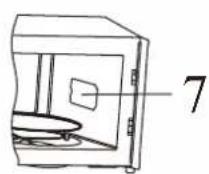
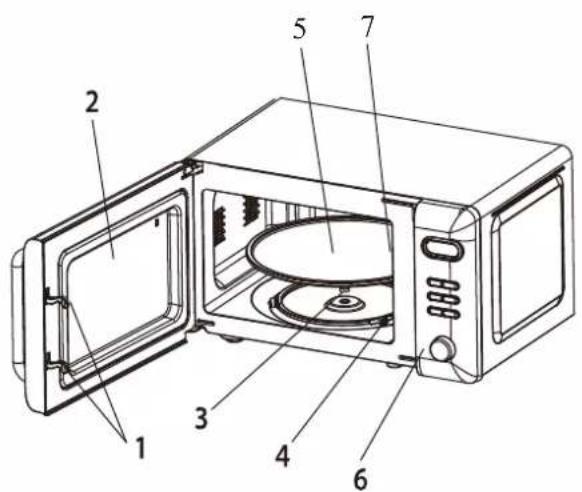
| 1 | Door lock | The door has to be closed for proper operation. |
| 2 | Window | Helps you to observe the cooking procedure. |
| 3 | Rotation axis | The turntable is placed on the rotation axis. The motor installed below enables the rotational movement. |
| 4 | Rotation ring | The turntable is also placed on the rotation ring which stabilises the turntable and maintenances its balance. |
| 5 | Turntable | Place the food on the turntable. The rotation ensures uniform cooking. |
| 6 | Control panel | See chapter 3, OPERATION. |
| 7 | Wave guide | The wave guide is installed on the right side inside the oven cavity. |
2.2 Installation of the appliance
-
remove all packaging materials. If a safety film is on the appliance, pull it off carefully. Check that the appliance is not damaged. If you detect any damage, please contact the shop you purchased the appliance at.
-
Install the appliance in a dry and corrosion-safe place. Keep the appliance away from sources of heat and moisture such as gas burners, water containers etc.
-
Strictly observe the minimum distances for proper ventilation on the schedule below:
| Back of the appliance ↔ Wall | min. 10 cm |
| Sides of the appliance ↔ Wall, cupboard etc. | min. 5 cm |
| Free space above the appliance | min. 20 cm |
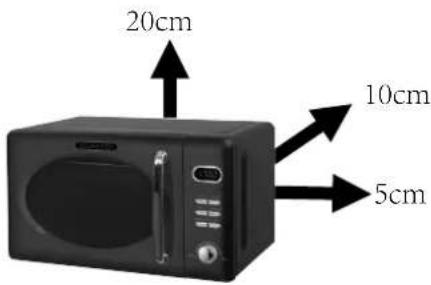
text_image
20cm 10cm 5cm-
The distance to the ground should be min. 85 cm.
-
Install the appliance more than 5 m away from TV-sets, radios and antennas to avoid interferences.
-
The plug must always be accessible after installation. Only use a proper grounded safety socket for connection.
-
Operate the appliance with its door closed only.
-
Manufacturing residues or oil having remained in the oven cavity or on the heating element may cause some odours and smoke emission. These are normal operational parameters, which will disappear after a number of uses. Open the
room door or a window to ensure proper ventilation. We strongly recommend to place a cup of water on the turntable; then operate the appliance with high power a few times.
2.3 Installation of the turntable
- Place the rotation ring first.
- Place the turntable on the rotation axis. Ensure that the turntable is positioned properly.
- Never place the turntable upside down. The rotation of the turntable must never be restricted.
- Never use the appliance without the turntable and rotating ring.
- All food or containers with food must be placed on the turntable.
- Do not operate the appliance when the turntable and/or rotating ring are damaged.
3. Operation
3.1 Control panel
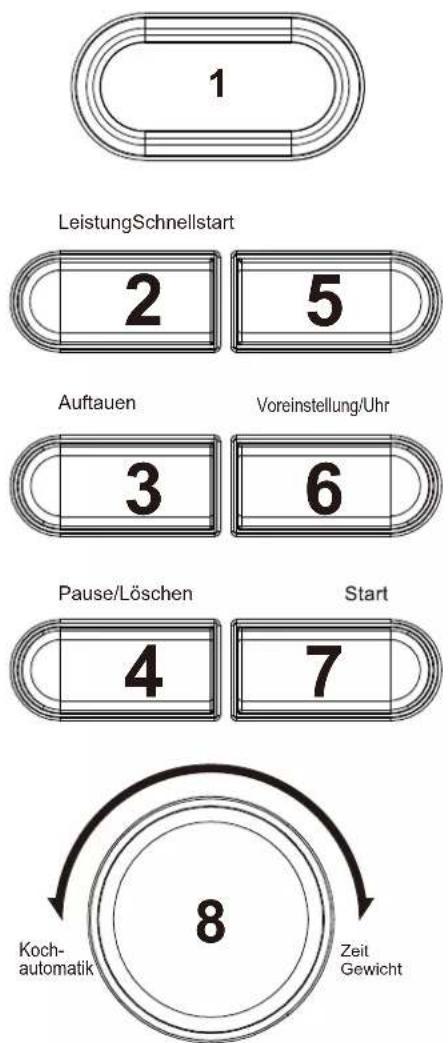
flowchart
graph TD
    A["1"] --> B["LeistungSchnellstart"]
    B --> C["2"]
    B --> D["5"]
    C --> E["Auftauen"]
    D --> F["Voreinstellung/Uhr"]
    E --> G["3"]
    F --> H["6"]
    G --> I["Pause/Löschen"]
    H --> J["Start"]
    I --> K["4"]
    J --> L["7"]
    K --> M["Koch-automatik"]
    L --> N["8"]
    M --> O["Zeit Gewicht"]
| 1 | Display |
| 2 | Power |
| 3 | Defrost |
| 4 | Pause / Cancel |
| 5 | Express |
| 6 | Pre-set / Clock |
| 7 | Start |
| 8 | Rotary knob for Auto-Cooking (anti-clockwise) and Time / Weight (clockwise). |
3.2 General operational information
→ Initial use
When you have switched on the appliance, the DISPLAY flashes thrice. Then the colon ":" flashes. Now you can set the cooking menu and time.
→ Rotary knob Auto-Cooking/Time-Weight (8)
You can increase and decrease the cooking time and the weight of the food or select AUTO-COOKING using the ROTARY KNOB.
→ Pause/Cancel (4)
- At the start of operation or during input: Press once to cancel your input.
- During operation: Press once to stop operation. Press twice to cancel the programme.
→ Auto reminder
When the preset cooking procedure has ended, the DISPLAY indicates End. Three acoustic signals sound to remind you to remove the cooked food. If you do not press PAUSE/CANCEL (4) once or open the door, the acoustic signals continue in intervals of 3 minutes.
→ Instant Cooking
Press the START-button (7) during stand-by status. The appliance runs with high power; the default cooking time is 1 minute. You can increase or decrease the cooking time using the ROTARY KNOB (8).
❖ INSTANT COOKING is applicable to the 3 following conditions:
You can activate INSTANT COOKING within 2 minutes when
a) you have closed the door of the appliance.
b) you have pressed the PAUSE/CANCEL-button (4).
c) a preset programme has ended.
3.3 Setting of the clock
Example: 12:30 (12:30 pm)
| 1. The colon flashes after switching on. | : |
| 2. Press the PRE-SET/CLOCK-button (6) once. | 00:00 |
| 3. Set the hours using the ROTARY KNOB (8). | 12:00 |
| 4. Press the PRE-SET/CLOCK-button (6) once. | 12:00 |
| 5. Set the minutes using the ROTARY KNOB (8). | 12:30 |
| 6. Press the PRE-SET/CLOCK-BUTTON (6) once or wait 5 seconds to confirm. |
3.4 Cooking of food
WARNING! Do not use the appliance when it is empty.
Press the POWER-button (2). The DISPLAY indicates 100P-80P-60P-40P-20P cyclically.
| High power | 100 % microwave power. Suitable for quick and thorough cooking. |
| Medium-high power | 80 % microwave power. Suitable for medium-quick cooking. |
| Medium power | 60 % microwave power. Suitable for stewing. |
| Medium-low power | 40 % microwave power. Suitable for defrosting of food |
| Low power | 20 % microwave power. Suitable for keeping food warm. |
◆ The max. adjustable cooking time is 60 minutes.
When operating with high power, the appliance will decrease the power after a certain period of time to extend its service life.
If you turn the food during operation, press the START-button (7) once to continue the preset cooking programme.
If you want to remove the food before the cooking time has elapsed, you must press the PAUSE/CANCEL-button (4) once. In doing so, you delete the set programme to avoid unintended operation during next use.
Example: Cooking with 80 % power for 10 minutes.
| 1. The colon flashes after switching on | : |
| 2. Select the desired power by pressing the POWER-button (2) consecutively. | 80P |
| 3. Set the cooking time (10 minutes) using the ROTARY KNOB (8). | 10:00 |
| 4. Press the START-button (7) to initialise cooking. The DISPLAY indicates the cooking time remaining. |
3.5 Express
When you press the EXPRESS-button (5), the DISPLAY indicates 0:30, 1:00, 1:30 cyclically. You can heat a cup of water or beverage relevant to the cooking time steps
when using the EXPRESS function. Which cooking time step you use depends on the quantity of the beverage.
Example: EXPRESS-cooking for 1 minute.
| 1. The colon flashes after switching on. | : |
| 2. Select the desired cooking time step by pressing the EXPRESS-button (2) consecutively. | 1:00 |
| 3. Press the START-button (7) to initialise cooking. |
3.6 Defrosting
Press the DEFROST-button (3) for the defrosting of food. The DISPLAY indicates d.1-d.2-d.3 cyclically.
| d.1 | For the defrosting of meat with a weight of 0.1 to 2.0 kg. |
| d.2 | For the defrosting of poultry with a weight of 0.2 to 3.0 kg. |
| d.3 | For the defrosting of seafood with a weight of 0.1 to 0.9 kg. |
◆ Turn the food during defrosting for an uniform result.
◆ Defrosting requires a longer period of time than cooking.
When you can cut the food using a knife, the defrosting can be considered as to be completed.
◆ Microwaves penetrate most of frozen food by approx. 4 cm.
◆ Consume defrosted food as soon as possible. Do not refreeze after defrosting!
Example: Defrosting of 0.4 kg of poultry.
| 1. The colon flashes after switching on. | : |
| 2. Press the DEFROST-button (3) to select the kind of food. | d.2 |
| 3. Set the weight using the ROTARY KNOB (8). | 0.4 |
| 4. Press the START-button (7) to initialise defrosting. | |
| 5. An acoustic signal sounds twice during defrosting. Open the door and turn the food. Close the door and press the START-button (7) to proceed. |
3.7 Auto-Cooking
Turn the ROTARY KNOB (8) while the colon is flashing on the DISPLAY. The DISPLAY indicates A.1, A.2 ....A.8 cyclically. Select a suitable menu relevant to the kind and weight of the food. Observe the information on the schedule below; otherwise the result of cooking can be influenced strongly.
Auto-Cooking settings
| DISPLAY | FOOD | METHOD |
| A.1 | Popcorn | Suitable for commercially available popcorn bags with a weight of 85 g. When the popping-speed has decreased to once every 1-2 seconds, press the PAUSE/CANCEL-button (4). |
| A.2 | Popcorn | Same as A.1, but for 100 g bags. |
| A.3 | Pizza | Suitable to warm a piece of 150 g. |
| A.4 | Beverages | Suitable for a cup containing 250 ml of a liquid at a temperature of 5-10 °C. Use mugs. The mug must not be sealed. |
| A.5 | Beverages | Same as A.6, but for 500 ml. |
| A.6 | Potatoes | Cut 450 g of potatoes into strips (5 mm thick and high) Place the strips on a large dish. Cover the dish using a suitable thin foil to avoid water loss. |
| A.7 | Potatoes | Same as A.6, but for 650 g. |
| A.8 | Fish | Suitable for stewing 450 g of fish. Wash the fish and remove the fish scales. Slightly cut into the fish skin. Place the fish on a shallow plate (diameter 22-27 cm). Season the fish and cover using a suitable thin foil to avoid water loss. Allow to rest for 2 minutes after cooking. |
The temperature of the food should be 20-25°C before cooking. Higher or lower temperatures require increase or decrease of the cooking times.
- Temperature, weight and shape of the food will affect the result of cooking. If you detect differences to the factors on the schedule, you can modify the cooking times accordingly.
Example: Stewing of 450 g of fish.
| 1. The colon flashes after switching on. | : |
| 2. Use the ROTARY KNOB (8) to select the menu. | A.8 |
| 3. Press the START-button (7) to initialise cooking. The DISPLAY indicates the cooking time remaining. |
3.8 Programmed start of cooking
➢ Ensure that the time of the day is set properly (see chapter 3.3).
Carry out your programming.
Example: It is 12:30. You want the appliance to operate for 9 minutes and 30 seconds at 14:20 (2:20 pm).
| 1. Set the power using the POWER-button(2. | 100P |
| 2. Set the cooking time using the ROTARY KNOB (8). | 9:30 |
| 3. Press and hold the PRE-SET/CLOCK-button (6) for 3 seconds to enter the time of the day indication. | |
| 4. Set the desired starting time (see chapter 3.3, items 3,4 and 5). | 14:20 |
| 5. Press the PRE-SET/CLOCK-button (6) to confirm. The programme has been activated. Cooking will start at 14:20. | |
| 6. You can check the preset starting time by pressing the PRE-SET/CLOCK-button (6). |
3.9 Multi-Sequence Cooking
Some recipes require different cooking methods and cooking times to reach the best result.
Example: You want to cook with 100P power for 3 minutes and then with 20P for 9 minutes.
This example is a 2-sequence-programming.
You can programme up to 4 sequences by repeating the steps.
| 1. 100P power for 3 minutes. | |
| a. Set the power using the POWER-button (2). | 100P |
| b. Set the cooking time using the ROTARY KNOB (8). | 3:00 |
| 2. 20P power for 9 minutes. | |
| a. Set the power using the POWER-button (2). | 20P |
b. Set the cooking time using the ROTARY KNOB (8).
9:00
3. Press the START-button (7) to initialise cooking.
3.10 Child lock
| Activation | Press and hold the PAUSE/CANCEL-button (4) for 3 seconds. |
| Deactivation | Press and hold the PAUSE/CANCEL-button (4) for 3 seconds. |
4. Microwave cooking
4.1 Basics of microwave cooking
- Arrange your food carefully. Place thick pieces at the outer areas of your arrangement.
- Consider the cooking times. Choose the shortest time available. If needed, add some more cooking time later. Any food, which is cooked too long in a microwave, can begin to fume or catch fire.
- Cover food while it is cooking. Covering avoids splashes and enhances an even cooking procedure.
- Turn over your food once while cooking it. Food like chicken or hamburgers will then cook faster. Larger pieces like roasts must be turned over at least once.
- Rearrange food like meat-balls in the middle of the cooking time from the outer areas to the inner ones (and inversely) and also turn them over.
- If you use microwave-safe plastic wrap, it must not contact the food as the wrap may melt.
- Some microwave-safe plastic cookware might not be suitable for cooking food with a high content of fat and sugar. Moreover, the preheating time specified in the dish instruction manual must not be exceeded.
4.2 Suitable materials for microwave cooking
- Use microwave-safe cookware made of heat-resistant ceramic, glass or plastic only.
- Do not use metal-made cookware or other metal-made items or plates with metal-made ornaments. Microwave radiation cannot penetrate metal.
- ⚠ WARNING! Metal can generate sparks. RISK OF FIRE.
| MATERIAL | REMARKS |
| Aluminium foil | Only suitable to protect small parts of the food. You can cover the thin parts of meat or poultry using small parts of aluminium foil as an overcooking-protection. When the parts of the aluminium foil are too close to the walls of the appliance, sparking can occur. The aluminium foil must be at least 2.5 cm away from the walls of the appliance. |
| Browning dishes | Observe the information given by the relevant manufacturer. The bottom of the browning dish must be at least 5 mm above the turntable. Improper use can break the turntable. |
| Tableware | Use microwave-safe tableware only. Observe the information given by the relevant manufacturer. Do not use cracked or chipped tableware. |
| Glass jars | Always remove the lid. Heat-up the food until it is just warm. Most glass jars are not heat-resistant and can break. |
| Glass tableware | Use heat-resistant glass tableware only. The glass tableware must not contain any metal components. Do not use cracked or chipped glass tableware. |
| Oven cooking bags | Observe the information given by the relevant manufacturer. Do not close using metal ties. make small openings to allow steam to escape. |
| Paper plates/cups | Only suitable for short-time cooking or reheating. Do not leave the appliance unattended while it is operating. |
| Paper towel | Only suitable for short-time cooking or reheating. Do not leave the appliance unattended while it is operating. |
| Parchment paper | Use as a cover to prevent splattering or as a cover for steaming. |
| Plastic | Only use microwave-safe plastic. Observe the information given by the relevant manufacturer. The plastic must be labelled "Microwave-safe". Some plastic containers can melt when the food they contain becomes hot. Boiling bags and tightly closed plastic bags must be equipped with small openings, pierced or vented as described on their packaging. |
| Plastic wrap | Only use microwave-safe plastic wrap. You can use plastic wrap to cover the food so moisture is retained. The plastic wrap must not touch the food! |
| Thermometer | Only use microwave-safe thermometers. |
| Wax paper | You can use wax paper as a cover to protect the appliance from splatters or to retain moisture. |
4.3 Unsuitable materials for microwave cooking
| MATERIAL | REMARKS |
| Aluminium trays | Aluminium trays can cause sparking. Transfer the food into a microwave-safe container. |
| Food carton with metal handle etc. | Food cartons with metal handle etc. can cause sparking. Transfer the food into a microwave-safe container. |
| Metal-made or metal-trimmed items | Metal shields the food from the microwave energy. Metal components can cause sparking! |
| Paper bags | Paper bags can catch fire in the appliance. RISK OF FIRE! |
| Plastic foam | Plastic foam can melt when exposed to high temperatures and/or contaminate the food. |
| Wood | Wood used in a microwave appliance can dry and/or can get cracks. Wood can catch fire in the appliance. RISK OF FIRE! |
5. Cleaning and maintenance
⚠ WARNING! Disconnect the appliance from the mains before you clean or maintain it.
- Keep the inside of your appliance clean. When food splatters or spilled liquids are on the walls of your appliance, clean it with a damp cloth. Mild detergents may be used if the appliance has become very dirty. Avoid the use of sprays and other harsh cleaners as they may stain, streak or dull the door-surface.
- Clean the outside with a damp cloth. Water should not run into the ventilation-openings to prevent damage to the operating parts inside the appliance.
- Wipe both sides of the door and the window, the door seals and adjacent parts frequently using a damp cloth to remove any spills or spatters. Do not use abrasive cleaners.
- The control panel should not become wet. Clean it with a soft and damp cloth. When cleaning the control panel, leave the door open so the appliance cannot be switched on accidentally.
- If steam accumulates inside or around the outside of the door, wipe it with a soft cloth. This may occur when the appliance runs under high-humidity-conditions. It is a normal occurrence.
- It is sometimes necessary to remove the turntable and/or rotating ring for cleaning. Wash the turntable/ring in warm soapy water, then rinse and dry thoroughly. When having removed the rotating ring from the appliance, you must reinstall it in its proper position.
⚠ WARNING! If it is necessary to remove the internal light ^2 of the appliance, please contact the shop you purchased the appliance at.
6. Trouble shooting
| NORMAL OPERATING CONDITIONS | |
| Interference to radio or television reception | Radio and TV reception can be interfered while the appliance is operating, similar to interferences of other electric appliances such as mixers, vacuum cleaners, electric fans etc. |
| Dim oven light | The oven light may become dim while the appliance is operating in lower power cooking. |
| Steam accumulation on door/hot air escapes from the air vents | During cooking, steam escapes from the food. Most of the steam is discharged via the ventilation openings. Nethertheless, some steam can accumulate at the cooler parts of the appliance, e.g. the door. |
| The appliance was accidentally-started without load (food). | WARNING! Never operate the appliance when it is empty. |
| MALFUNCTION | |
| POSSIBLE CAUSE(S) | POSSIBLE MEASURE(S) |
| THE APPLIANCE CANNOT BE STARTED. | |
| 1. The power cord is not plugged in properly.2. Blown fuse in household fuse box.3. Socket malfunction. | 1. Unplug. Plug in again after 10 seconds.2. Check household fuse box.3. Check the socket using another electric appliance. |
| THE APPLIANCE DOES NOT HEAT. | |
The door of the appliance is not closed properly. Close the door of the appliance properly.
THE TURNTABLE GENERATES UNUSUAL NOISE.
| The rotating ring or the bottom of the appliance inside is contaminated. | Clean the relevant parts (look also chapter CLEANING AND MAINTENANCE). |
7. Technical data
| Type | Microwave oven |
| Volume | 20 l |
| Max. power / microwave | 700 W |
| Voltage / frequency | 230 V AC / 50 Hz |
| Power levels microwave | 5 |
| Auto-programmes | 8 |
| Display | √ |
| Acoustic end signal | √ |
| Child lock | √ |
| Timer | digital / max. 60 minutes |
| Turntable | √ |
| Length of power cord in cm | 85 |
| Dimensions H*W*D in cm | 25.80*45.10*34.80 |
| Weight net / gross in kg | 10.50 / 11.30 |
◆ Technical modifications reserved.
8. Waste management
- While unpacking, the packaging materials (polythene bags, polystyrene pieces, etc.) should be kept away from children and pets. CHOKING HAZARD!
- Old and unused appliances must be send for disposal to the responsible recycling centre. Never expose to open flames.
- Before you dispose of an old appliance, render it inoperative. Unplug the appliance and cut off the entire power cord. Dispose of the power cord and the plug immediately.
- Dispose of any paper and cardboard into the corresponding containers.
-
Dispose of any plastics into the corresponding containers.
-
If suitable containers are not available at your residential area, dispose of these materials at a suitable municipal collection point for waste-recycling.
- Receive more detailed information from your retailer or your municipal facilities.

Materials marked with this symbol are recyclable.

Please contact your local authorities to receive further information.
9. Guarantee conditions
This appliance includes a 24-month guarantee for the consumer given by the manufacturer, dated from the day of purchase, referring to its flawless material-components and its faultless fabrication. The consumer is accredited with both the dues of the guarantee given by the manufacturer and the vendor's guarantees. These are not restricted to the manufacturer's guarantee. Any guarantee claim has to be made immediately after the detection and within 24 months after the delivery to the first ultimate vendee. The guarantee claim has to be verified by the vendee by submitting a proof of purchase including the date of purchase and/or the date of delivery. The guarantee does not establish any entitlement to withdraw from the
purchase contract or for a price reduction. Replaced components or exchanged appliances demise to us as our property.
The guarantee claim does not cover:
- fragile components as plastic, glass or bulbs;
- minor modifications of the Wolkenstein-products concerning their authorized condition if they do not influence the utility value of the product;
- damage caused by handling errors or false operation;
- damage caused by aggressive environmental conditions, chemicals, detergents;
- damage caused by non-professional installation and haulage;
- damage caused by non common household use;
- damages which have been caused outside the appliance by a Wolkenstein-product unless a liability is forced by legal regulations.
The validity of the guarantee will be terminated if:
- the prescriptions of the installation and operation of the appliance are not observed.
- the appliance is repaired by a non-professional.
- the appliance is damaged by the vendor, the installer or a third party.
- the installation or the start-up is performed inappropriately.
- the maintenance is inadequately or incorrectly performed.
- the appliance is not used for its intended purpose.
- the appliance is damaged by force majeur or natural disasters, including, but with not being limited to fires or explosions.
The guarantee claims neither extend the guarantee period nor initiate a new guarantee period. The geographical scope of the guarantee is limited with respect to appliances, which are purchased and used in Germany, Austria, Belgium, Luxembourg and the Netherlands.
WOLKENSTEIN
August 2014
text_image
Labeled diagram of a microwave oven showing interior components and casing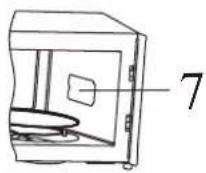
natural_image
Simple line drawing of an oval shape with three horizontal bands and a central number '1' (no text or symbols beyond the numeral)text_image
Labeled diagram of a microwave oven showing interior components and casing view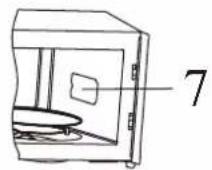
natural_image
Pure diagram of an oval shape with horizontal lines and the number '1' inside, no text or symbols present.3.9 Multi-sequentie Koken
Please contact the shop you purchased the appliance at.
Subject to alterations
Updated 05/09/2023