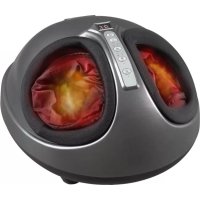
PCFM 3099 - Massage device ProfiCare - Free user manual and instructions
Find the device manual for free PCFM 3099 ProfiCare in PDF.


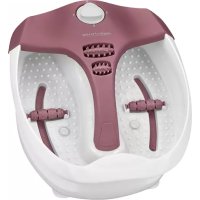
| Product type | Foot massage device |
| Brand | ProfiCare |
| Model | PC-FM 3099 |
| Intended use | Soothing and relaxing foot massage |
| Usage | Private, domestic (non-medical) |
| Power supply | 220–240 V~, 50–60 Hz |
| Power consumption | 40 W |
| Protection class | II |
| Dimensions (L × W × H) | approx. 36 × 24 × 42 cm |
| Net weight | approx. 3.4 kg |
| Cover material | Polyester |
| Massage functions | Plantar massage (2 modes) + pressure massage |
| Intensity levels | 3 (Low, Medium, High) |
| Heat function | Yes (activation/deactivation by button) |
| Timer | Yes, adjustable in 5-minute increments up to 30 minutes |
| Automatic shut-off | Yes, after programmed duration |
| Cover cleaning | Machine washable at 30°C, delicate cycle |
| Housing cleaning | Damp cloth, mild detergent if necessary |
| Maintenance | Unplug before cleaning, do not immerse |
| Contraindications | Pacemaker, diabetes, pregnant women, persistent pain, open wounds |
| Certification | Compliant with EC directives |
Frequently Asked Questions - PCFM 3099 ProfiCare
User questions about PCFM 3099 ProfiCare
0 question about this device. Answer the ones you know or ask your own.
Ask a new question about this device
Download the instructions for your Massage device in PDF format for free! Find your manual PCFM 3099 - ProfiCare and take your electronic device back in hand. On this page are published all the documents necessary for the use of your device. PCFM 3099 by ProfiCare.
USER MANUAL PCFM 3099 ProfiCare
natural_image
Close-up of a black fitness device with digital display and control buttons, showing interior space filled with fabric (no text or symbols visible)Be sure to read the separately enclosed safety instructions first.
Instruction Manual
Thank you for choosing our product. We hope you will enjoy using the appliance.
Read the instruction manual and the separately enclosed safety instructions very carefully before using this appliance. Keep these documents, including the warranty certificate, receipt and, if possible, the box with the inner packaging in a safe place. If you pass the appliance on to a third party, always include all the relevant documents.
Symbols in this Instruction Manual
Important information for your safety is specially marked. It is essential to comply with these instructions in order to avoid accidents and prevent damage to the appliance:

WARNING:
This warns you of dangers to your health and indicates possible injury risks.

CAUTION:
This refers to possible hazards to the appliance or other objects.
Content
Unpacking the Appliance 6
Intended Use....6
Health Notes 6
Preparation....6
Operation 6
Cleaning 7
Technical Data....7
Disposal....8
Unpacking the Appliance
-
Remove the appliance from the package.
-
Remove all packaging material such as films, filler, cable ties and cardboard.
-
Check the appliance for possible transport damage to avoid hazards. Do not operate a damaged appliance. Return it to the dealer immediately.
Intended Use
The appliance is designed for a soothing and relaxing foot massage.
The appliance is not intended for medical or therapeutic use. If you have any health problems or are unsure, consult a doctor before using this appliance.
Use the appliance only for private and intended use. This appliance is not intended for commercial use.
Health Notes
- If you have any concerns about your health, you should consult your doctor before using the appliance for the first time. This applies equally to people with pacemakers, diabetes or other diseases, pregnant women, people with long-lasting muscle and / or joint pain. Persistent pain can be a symptom of a serious illness.
- A massage should be pleasant and relaxing. If you feel pain or discomfort after a massage, you should consult a doctor before using the massage again.
- Never use massagers on open wounds, areas with poor circulation, swelling, burns, inflammation or broken skin and pus sores.
Preparation
- Place the appliance on the floor so that you can sit comfortably in front of it.
- Insert the mains plug into a properly installed protective contact socket. The ⬤️ button for the button flashes.
- Sit down before placing your feet in the appliance. Never stand up while your feet are still inside the appliance.
Operation
Operate the appliance using the buttons only.
The order of the buttons listed corresponds to their position on the appliance from bottom to top.
Switching the Appliance On/Off ⏻
To switch the appliance on / off, press the ON/OFF
The LED under the button indicates the status:
| LED Status | |
| Flashing | The appliance is connected to the power supply and switched off. |
| On The appliance is switched on. | |
Heating Function ⚙️
To switch the heating function on or off, press the ⚙HEAT button.
The LED under the button indicates the status:
| LED Status |
| On Heating function on |
| Off Heating function off |
Intensity Level
To set the intensity level, press the bint of
The LEDs under the button indicate the intensity level:
| LED | Intensity | |
| I II | ||
| ○ | Low | |
| ○ | Medium | |
| High | ||
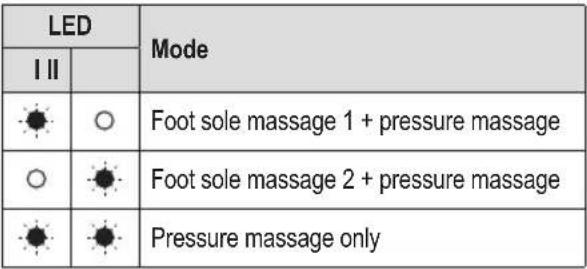
Massage Mode
To set the massage mode, press the CMODE
The LEDs under the button indicate the mode:
 |
Massage Duration
To set the massage duration, press the CBTIMER
- The display above the button shows the set / remaining massage time.
• After the massage time has elapsed, the appliance switches off automatically. - The maximum massage time is 30 minutes and can be set in 5-minute increments.
- The massage duration can be adjusted at any time by pressing the ⓄTIMER button.
Cleaning

WARNING:
• Always disconnect the mains plug from the socket before cleaning!
- Never immerse the appliance in water for cleaning. It could cause an electric shock or fire.

CAUTION:
- Do not use a wire brush or other abrasive objects.
- Do not use sharp or abrasive cleaning agents.
Fabric Cover
The cover for the feet can be removed for washing.
- Separate the cover by carefully opening the zip.
- Carefully pull off the Velcro fastener from the inside at the front end of the cover. This is attached to the padding underneath.
- Remove the cover.
- Wash the cover at 30^ C on the delicate cycle or by hand. Allow the cover to dry afterwards.
- Put the cover back into the appliance.
- First attach the Velcro fastener of the cover to the front end of the footwell area and close the zip.
Housing
• To clean the appliance, use only a damp cleaning cloth. In case of heavy soiling, a mild detergent can be added.
• Dry the appliance with a dry cloth.
Technical Data
Model: PC-FM 3099
Power supply: 220-240V\~, 50-60Hz
Power consumption: 40W
Protection class:....II
Material fabric cover:Polyester
Dimensions: ....approx. 36 × 24 × 42 cm
Net weight: .... approx. 3.4 kg
The right to make technical and design modifications in the course of continuous product development remains reserved.
This appliance has been tested according to all applicable, current CE directives and built according to the latest safety regulations.
Disposal
Meaning of the "Dustbin" Symbol
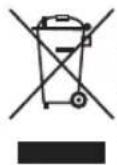
Protect our environment: do not dispose of electrical equipment in the domestic waste.
Please return any electrical equipment that you will no longer use to the collection points provided for their disposal.
This helps avoid the potential effects of incorrect disposal on the environment and human health.
This will contribute to the recycling and other forms of re-utilisation of electrical and electronic equipment.
Information concerning where the equipment can be disposed of can be obtained from your local authority. Your dealer and contractual partner is also obliged to take back the old appliance free of charge.
BELANGRIJK:
CTC Clatronic Sp. z o.o
Ul. Brzeska 1
45-960 Opole
Usuwanie
PC-FM 3099.....الطراز
ي revisIr مؤشر LED LinkedIn Manufacturer LED
- Be sure to read the separately enclosed safety instructions first.
- Instruction Manual
- Symbols in this Instruction Manual
- WARNING:
- CAUTION:
- Content
- Unpacking the Appliance
- Intended Use
- Health Notes
- Preparation
- Operation
- Switching the Appliance On/Off ⏻
- Heating Function ⚙️
- Intensity Level
- Massage Mode
- Massage Duration
- Cleaning
- Fabric Cover
- Housing
- Technical Data
- Disposal
- Meaning of the "Dustbin" Symbol
- BELANGRIJK:
- Usuwanie
Brand : ProfiCare
Model : PCFM 3099
Category : Massage device