
PAVILION ZT3120EA - Laptop HP - Free user manual and instructions
Find the device manual for free PAVILION ZT3120EA HP in PDF.


User questions about PAVILION ZT3120EA HP
0 question about this device. Answer the ones you know or ask your own.
Ask a new question about this device
Download the instructions for your Laptop in PDF format for free! Find your manual PAVILION ZT3120EA - HP and take your electronic device back in hand. On this page are published all the documents necessary for the use of your device. PAVILION ZT3120EA by HP.
USER MANUAL PAVILION ZT3120EA HP
Using a Wireless LAN Adapter
LAN
Koristenje bežićnog LAN adaptera
Using a Wireless LAN Adapter
Your notebook model may include a wireless local area network (WLAN) adapter. A WLAN adapter enables your notebook to connect to a compatible wireless network access point or to another, compatible, wireless-enabled notebook. A WLAN adapter cannot be used to connect the notebook to a mobile telephone service, a Bluetooth wireless device, or a cordless telephone.
Setting up a wireless network requires:
A notebook equipped with a WLAN adapter —The WLAN adapter can be integrated or a free-standing add-on, such as a PC Card.
A wireless access point—Wireless access point functionality can be provided by a standalone device or be included with another networking device, such as a router.
Accessing the Internet through a wireless network requires:
An Internet access device, such as a broadband cable or DSL (digital subscriber line) modem or a shared analog modem connected to a phone line.
Service from an ISP (Internet service provider).
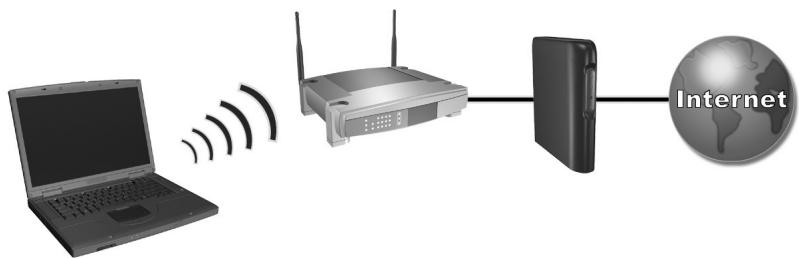
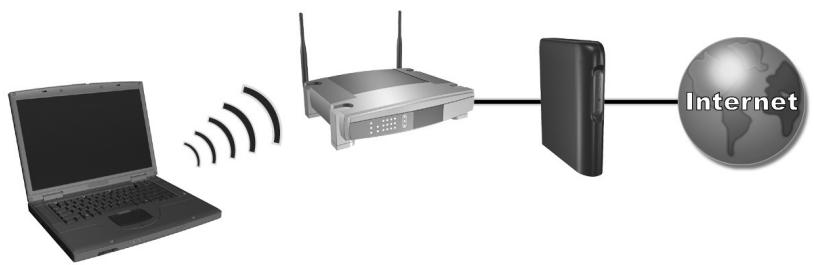
Hardware requirements for an Internet connection include a WLAN adapter in the notebook, a wireless access point, and a modem.
(Notebook appearance varies by model.)
To use a wireless LAN connection:
- Verify that all drivers required by the WLAN adapter are installed and that the WLAN adapter is correctly configured.
If you are using an integrated WLAN adapter, all required drivers are installed and the adapter is preconfigured and ready for use.
- If you are using an integrated WLAN adapter, verify that the WLAN adapter is enabled. When the WLAN adapter is enabled, the wireless device light is on. If the wireless device light is off, press the wireless device button to enable the WLAN adapter.

To identify the wireless device light and button on your notebook, look on your notebook for the button and light identified with the wireless symbol illustrated here, or refer to your model-specific documentation.
- Verify that your access point is correctly configured. For instructions, refer to your access point documentation.
- When you are setting up a WLAN connection for the first time, place your notebook very near a compatible WLAN access point (or a compatible wireless-equipped computer). Functional range for subsequent WLAN connections will vary, depending on your notebook's WLAN implementation and any interference from varying types of walls and other electronic devices.
- To configure your wireless network connection using Windows XP, follow the instructions available at Start > Help and Support.
For more information about using a WLAN connection:
Access the information and Web site links provided at Start > Help and Support.
Refer to the documentation included with your notebook. The Troubleshooting guide on the Documentation Library CD contains a "Wireless LAN (WLAN) Device Problems" section.
Refer to the documentation included with your supplementary networking devices and services.
:ayLw yLw yLw Lw
JWAN WLAN Jwaggul gll jy
. WLAN
J 1
alil 1jolg [la]
J. WLAN
jglg jgljL JGLJGLJGLJGLJGLJGLJGL
.WLANJgssjssjll jgsjbsa.
jssll jssll jssll jssll jssll
cagaaa a a a a a a a a a a a a a a a a a a a a a
Aadss ss jIyBaaasall gaiy aay

aJg aikay cldalj gle Jgall.aaagaae yabrybgyll abnnn nn nnnn .
Jssll abaiy aolal yil
Jgagabjno JyjUgall jycksl s oJ WLAN Juaa aae!ie.
Lwaiy jbiillg yj.(LkWJ jje gao jn jnn WLAN
J 1 1 1 1 1 1 1 1 1 1 1 1 1 1 1 1 1 1 1 1 1 1 1 1 1 1 1
al plisul jz cllgale all jy jy gle Uusall
S 长与体重之差 = S长 - 12 长与体重之差 = S长 - 12 × 4t
Jds jn Jg jll .Windows XP 1s
. Help and Support < Start
:dlkayWLANJall jgclalalljzglle
Help and < Start 1
.Support
y
aJl 1jL jSll" pall sle Documentation Library
.(WLAN)
Aaal 1 aaii Aaiiaai iaiiaai
LAN
JWAN (WLAN) aSLwAaLbAsuJGauuaauiy jll JGauaaaiy jn Jauay bJUaBjUaBjUaBjUaBjUaBjUaBjUaBjUaBjUaBjUaBjUaBjUaBjUaBjUaBjUaBjUaBjUaBjUaBjUaBjUaBjUaBjUaBjUaBjUaBjUaBjUaB
(1) a4 = a1 + 2d a_4 = 23
WLAN WLAN WAN
j j 1 j 1 j 1 j 1 j 1 j 1 j 1 j 1 j 1 j 1 j 1 j 1 j 1 j 1 j 1 j 1 j 1 j 1 j 1 j 1 j 1 j 1 j 1 j 1 j 1 j 1 j 1 j 1 j 1 j 1 j 1 j 1 j 1 j 1
:JyIyIyIyIyIyIyIyIyIyIyIyIyIy
p 1 (g j)DSL g j g j j j j j j j j j j j j j j j
.(ISP)
JwL WAN JyIyIyIyIyIyIyIyIyIy
(1)
Koristenje bezićnog LAN adaptera
Vaš model prijenosnog računala moze ukljucivati bežićni adapter za lokalnu mrežu (WLAN) WLAN adapter omogucava vašem prijenosnom računalu da se spoji s točkom pristupa kompatibilnoj bežićnj mreži ili drugim prijenosnim računalom koje je osposobljeno za bežićno povezivanje. WLAN adapter se ne要考虑 koristiti za spajanje prijenosnog računala sPokretnim Telefonskim servisom, Bluetooth bežićnim urežajem ili bežićnim Telefonom.
© 2003 Hewlett-Packard Development Company, L.P.
The information contained herein is subject to change without notice. HP shall not be liable for technical or editorial errors or omissions contained herein.
First Edition July 2003

348246-021