
I55VM 1110 S UK 1 - Refrigerator INDESIT - Free user manual and instructions
Find the device manual for free I55VM 1110 S UK 1 INDESIT in PDF.


User questions about I55VM 1110 S UK 1 INDESIT
0 question about this device. Answer the ones you know or ask your own.
Ask a new question about this device
Download the instructions for your Refrigerator in PDF format for free! Find your manual I55VM 1110 S UK 1 - INDESIT and take your electronic device back in hand. On this page are published all the documents necessary for the use of your device. I55VM 1110 S UK 1 by INDESIT.
USER MANUAL I55VM 1110 S UK 1 INDESIT
Instructions for use
ENGLISH Instructions for use Page 26
Keep flammable materials away from the appliance and do not place petrol or other flammable materials near the appliance.
Do not use the sparking device (non-oxygen) on the packaging for ignition (on some models). Do not consume ice cubes or ice lollies directly from the freezer, as this may cause frostbite. For ignition, designed for use with the burner, the ventilation opening must be installed when the appliance is operating. Do not store glass containers, sparkling drinks, or the freezer compartment, as they may burst. Do not cover the ventilation (if any) with cloth. After placing the appliance, check that the freezer door closes properly. Any damaged parts must be replaced as soon as possible. Use the freezer compartment only for storing frozen food, freezing fresh food, and making ice cubes. Avoid storing unnecessary items in direct contact with the interior surfaces of the freezer.
The appliance is used as a refrigerator in the household and similar applications.
The compartments of the appliance are most suitable for storing certain types of food, taking into account the optimal temperature distribution in them:
1) Top zone of the refrigerator compartment - with door -
Warm zone: for storing tropical fruits, preserves, drinks, eggs, cheese, oil, condiments
2) Middle zone of the refrigerator compartment - cool zone: for storing dairy products, milk, dairy products, delicatessen, yogurt 3) Bottom zone of the refrigerator compartment - coldest zone: for storing sausages, desserts, meat and fish, fresh pasta, sauces, sour cream, dough/pastry, homemade food, creams, puddings and creams 4) Drawer for fruits and vegetables - the lowest part of the refrigerator compartment: for storing fruits and vegetables (except tropical fruits) 5) Freezer compartment: in this coldest drawer store only meat and fish to avoid spoilage of food. Follow the specific instructions:
- Leaving the door open for a prolonged period may lead to a significant increase in temperature in the compartments of the appliance. -Clean regularly the surfaces that may come into contact with food and the drainage system. -Clean the water reservoirs if they have not been used for 48 hours; flush the system connected to the water supply if you have not drawn water for 5 days. -Store raw meat and fish in suitable containers.
The appliance must not be in contact with other appliances during operation above the appliance. The freezer compartment, marked with two stars, is suitable for storing pre-frozen food, storing and making ice cream and making ice cubes. Do not freeze fresh food in the compartment marked with one, two, or three stars. If the appliance is left empty for a long period of time, switch it off, defrost it, clean it, and dry it, and leave the door open to prevent the formation of mold inside.
INSTALLATION
WARNING: The installation and mounting of the device must be carried out by two or more persons - there is a risk of injury. Use protective gloves for unpacking and installation of the device - there is a risk of injury. Installation, including water supply (if applicable) and electrical connection, and repair must be carried out by a qualified technician. Do not repair or replace parts of the device unless explicitly stated in the user manual. Keep the device away from the place where installation is carried out. After unpacking the device, check that it has not been damaged during transport. In case of problems, contact the retailer or the nearest authorized service center. After the device has been installed, dispose of the
The packaging (plastic, polystyrene, etc.) must be kept away from children - there is a risk of suffocation. The device must be disconnected from the power supply before installation - there is a risk of electric shock. During installation, be careful not to damage the power cord - there is a risk of electric shock. Connect the device only after installation is complete.
Be careful not to damage the floor coverings (e.g., parquet) when moving the device. Install the device on a floor that is sufficiently stable to support the weight, in a place suitable for the size and use of the device. During installation, make sure that the device is not close to heat sources and that the edges rest firmly on the floor, adjusting if necessary, and then check that the device is leveled perfectly with the help of a level. Wait at least two hours before switching on the device to ensure that the cooling system is fully functional.
To ensure proper ventilation, leave space on both sides and above the device. The distance between the rear part of the device and the wall behind it must be 50 mm to avoid contact with hot surfaces. Reducing this space will increase the energy consumption of the device.
WARNING: When placing the device in its location, make sure that the power cord is not pinched or damaged. WARNING: For
To avoid danger due to instability, the placement and fixing of the device must be carried out in accordance with the manufacturer's instructions. It is mandatory to place the refrigerator in such a way that the metal pipe of the gas bottle, metal pipes for gas or water, or electrical cables do not come into contact with the rear wall of the refrigerator (the condenser coil).
WARNING: ELECTRICAL SHOCK HAZARD
It must be possible to disconnect the appliance from the power supply by unplugging it, if it is fitted with a plug, or by a multi-pole switch installed before the contact, and the appliance must be earthed in accordance with national electrical safety standards.
Do not use the humidifier, the switch with a socket, or the appliance. After installation, the electrical components must not be accessible to the user. Do not use the device when your hands or feet are wet. Do not use the device if the power cord or plug is damaged, if it does not work properly, or if it has been damaged or dropped.
If the power cord is damaged, it must be replaced by the manufacturer, its service agent, or a similarly qualified person in order to avoid a hazard, such as an electric shock.
WARNING: Do not place the switch with sockets in the vicinity of the appliance.
The appliance and its devices are in the designated area of the device.
CLEANING AND MAINTENANCE
WARNING: Before performing any cleaning or maintenance on the surface of the device, make sure that the device is disconnected from the power supply; never use the device for cleaning purposes - there is a risk of electric shock.
Do not use abrasive or harsh cleaning agents, such as sprays for glass, scouring pads, abrasive cleaners, concentrated detergents, benzene, or cleaning agents containing petroleum products, on the plastic parts, the interior, and the insulation of the door. Do not use harsh brushes, scouring pads, or other rough cleaning agents.
DISPOSAL OF PACKAGING MATERIAL
Packaging material is 100% recyclable and is marked with the recycling symbol.
The various packaging materials must be disposed of separately in accordance with local regulations for waste disposal.
DISPOSAL OF HOUSEHOLD ELECTRICAL APPLIANCES
This device is made of materials that are recyclable or reusable. When disposing of it, follow local regulations for waste disposal. For further information on the treatment, recovery, and recycling of household electrical appliances, contact your local authorities, the waste collection service, or the store where you purchased the device. This device is marked in accordance with Directive 2012/19/EC on waste electrical and electronic equipment (WEEE). By ensuring that this device is disposed of correctly, you will help prevent potential
NEGATIVE CONSEQUENCES FOR THE ENVIRONMENT
The appliance must be installed in accordance with the manufacturer's instructions and the local regulations for electrical equipment.
Tips for saving energy
Install the appliance away from heat sources (e.g., radiators, cookers, etc.) and in a well-ventilated room, away from direct sunlight. If necessary, use an insulating plate.
To ensure proper ventilation, follow the installation instructions. Insufficient ventilation in the appliance's compartment increases energy consumption and reduces cooling efficiency. Opening the door frequently also increases energy consumption. The internal temperature and energy consumption can be affected by the ambient temperature as well as the placement of the appliance. When setting the temperature, consider these factors. Keep door openings to a minimum. You can increase the storage capacity of frozen food by removing drawers and the Frost Free shelf (if available).
The noises made by the compressor during operation are normal and should not cause concern.
Keep the appliance away from heat sources. If necessary, the Fast Freeze function can be used to ensure optimal performance of the appliance, 24 hours before placing fresh food in the freezer.
Follow the instructions in the manual for quick start, to activate/deactivate the function.
As a rule, for rapid freezing, about 24 hours after placing the food is sufficient; after this period, switch off the Fast Freeze function (if available). For appliances without this button, turn the thermostat back to its original position.
Attention:
To save energy when freezing small quantities of food, the fast freezing function can be deactivated after a few hours.
The user must maintain the appliance according to the instructions given in the chapter on maintenance.
USE FOR THE FIRST TIME
After installing the appliance, wait at least two hours before connecting it to the mains. Once connected, turn the thermostat knob to switch it on. After switching on, wait 4-6 hours to reach the correct storage temperature for normal operation. - Frost may form on the refrigerator when it is first switched on. This is normal and will disappear once the refrigerator has finished cooling.
INFORMATION ABOUT OPERATION
Thermostat setting
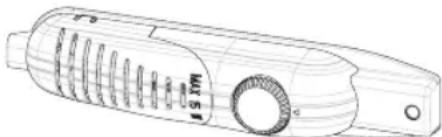
The refrigerator has a low-temperature compartment for freezing, but it can also cool down to +5°C. The thermostat automatically regulates the temperature inside the cooling compartment. The temperature can be set from position 1 to 5, with lower numbers giving lower temperatures. The “·” position indicates that the thermostat is off and there is no cooling. For short-term storage of food in the freezer/cooling compartment, you can set the dial between minimum and medium position (1-3). For long-term storage of food, you can set the dial to a higher position (3-4).
Temperature warning indicator
The refrigerator has a low-temperature compartment for freezing, but it can also cool down to around 0-6°C. The set temperature, the temperature of freshly stored food, and the frequency of opening the door affect the temperature inside the refrigerator. If necessary, you can change the temperature setting. It is not recommended to operate the refrigerator in an environment lower than 10°C, as this may affect the efficiency of the appliance. When setting the thermostat, consider how often the appliance door is opened, how much food is stored in the refrigerator, and the environment in which the refrigerator is located. When the appliance is switched on, let it run for 24 hours to reach the operating temperature before placing a large quantity of food inside. During this time, do not open the door and do not place a large quantity of food inside. Switch off the appliance during a power failure to prevent damage to the compressor. After the power supply is restored, wait 5 to 10 minutes before switching the appliance back on. This will help prevent damage to the appliance components. Your appliance is designed to operate in the temperature ranges specified in the standards, according to the climate class indicated on the information label. It is not recommended to operate the refrigerator in an environment that is outside the specified temperature range. This will reduce the cooling efficiency of the appliance. This appliance is intended for use at ambient temperatures between 10°C and 43°C.
| Климатчес Клас | OK. Temn. (°C) |
| SN: 0T 10 do 32°C | |
| ST: 0T 16 do 38°C; | |
| N: 0T 16 do 32°C | |
| T: 0T 16 do 43°C | |
Placement of food in the coldest zone of the refrigerator
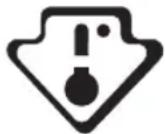
For best preservation of food, place it in the most suitable cooling zone. The coldest zone is located just above the crisper.
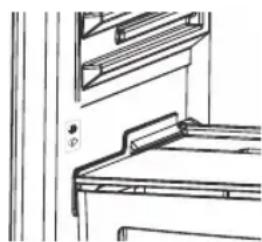
To ensure that the temperature in this zone is sufficiently low, make sure that the shelves are placed at the level of the symbol shown in the illustration.
Temperature indicator (on some models)
To help you set your refrigerator, we have installed a temperature indicator located in the coldest zone.
You can easily check whether the temperature in the coldest zone is correct: when the indicator shows "OK", it means that the thermostat is correctly set and the internal temperature is correct.
When "OK" appears on the display, it may be difficult to see the indicator in low light. To see the indicator better, you need sufficient light.
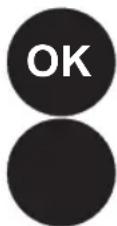
If the "OK" indicator does not appear, the temperature is too high: you do not need to change the thermostat setting and wait 12 hours, but first perform a visual check of the temperature.
NOTE: With frequent door openings (or if the door is left open for a long time), it is normal for the "OK" indicator not to light up. In case of abnormal loading of the freezer (at the bottom of the appliance) above the evaporator in the refrigerator compartment (previous appliance, high room temperature, frequent door openings), set the temperature regulator to a lower setting until the corresponding compressor shutdown is achieved.
The exact boundary of the cold zone is indicated by the full side of the sticker (the top of the arrow). The exact row of the cold zone should be at the same level as the top of the arrow. The cold zone is below this level.
If these rows are visible, make sure they are at the same level as the zone boundaries marked on the stickers, to guarantee the correct temperatures in these zones.
Each type of food has its own ideal storage temperature; therefore, it should be placed in a precisely defined location.
| Места Празукту | |
| Горни рафтоBE СгОТBEHи xpaHи, Deceptи И BCЯКВа xpaHа, KOЯTO TrяБВа DA ce KOHCyMUpaДостаТьЧИЗБьрЗО | |
| Най-студану зона МECO, птуve мECO, ДИВЕЧОВ мECO и сурOBа рИБа. Мakсимално Врeme NaСыханени: 1do 2dHi. ПrecHI пLOДове, сROSТВЕНС CBINСКО мECO. | |
| Чекmedжecrisper ПrecHI пLOДове и Зеленчци. | |
| РафтоBE NaВразнITE | В дOLната чаft Ha paФтOBeTe Ha BpATNTe TrяБВа DA ce ПОCTавRT 6byTILKNI, aВ ГорнATERЧАСТУСТО ИЗПОЛЗВАп ПразуКТN C MaJIbK OБЕМ, KaTO KINCELO MЯДК, пяСHA сMetaHa Nдр. |
| МаслоTO, ЗрELITE сирЕнa и РИцATA TrяБВа DA ce ПОCTавRT в СБOTВETHITe ИМ NOCTABKN. |
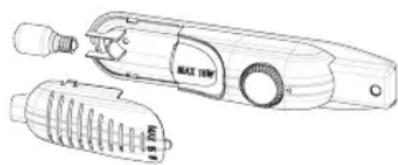
Replacing the light bulb in the refrigerator compartment;
1. Unplug the appliance from the power supply. 2. Remove the lamp cover using a screwdriver. 3. Replace with a bulb of maximum 15 watts. 4. Mount the cover. 5. Wait 5 minutes before switching on again and set the thermostat to its original position.
Replacing the LED lighting
If your refrigerator has LED lighting, contact the technical service department, as this lighting must only be replaced by authorized personnel.
TRANSPORTATION AND REPOSITIONING OF THE INSTALLATION SITE
The original packaging and polystyrene (PS) can be kept if necessary. - During transportation, the appliance must be secured with a wide tape or strong straps. The instructions written on the packaging must be followed during transportation. - During transportation or repositioning of the installation site, all moving objects (i.e., shelves, drawers...) must be removed or secured with tape to prevent damage.
Carry the refrigerator in an upright position.
Reversing the door opening direction
It is not possible to change the door opening direction of the refrigerator if the handles of your refrigerator are mounted on the front surface of the door. It is possible to change the door opening direction on models without handles. If the door opening direction of your refrigerator can be changed, you must contact the nearest authorized service to change the door opening direction.
BEFORE CALLING SERVICE
If your refrigerator does not work, check the power supply to the refrigerator before calling an electrician or the after-sales service department.
What to do if your refrigerator does not work:
Check:
The refrigerator is plugged in. - The thermostat is not set to the off position, - The thermostat setting is at position «·» - The contact is no longer functional. To check this, plug in another device that you are sure works into the same contact.
What to do if your refrigerator does not work well:
Check:
You have not overloaded the device, close the doors properly, - There is no dust on the condenser, - There is enough space for air circulation around and behind the device.
If your refrigerator works too noisily
Normal noise
- Noise from the fan (fan noise): (for devices with technology for frost/frost free)
- During automatic defrosting. When the device cools or heats (defrosting of the device material).
- Light clicking: Heard when the thermostat turns the compressor on/off
Compressor noise
Normal motor noise: This noise means that the compressor works normally. The compressor may produce higher noise for a short time when it is turned on for the first time.
Noise from the evaporator and dripping:
The noise is caused by the flow of the refrigerant in the pipes of the system.
If the refrigerator is working properly, it is normal.
- To maintain the set cooling temperature, the compressor may turn on from time to time. The noise from the refrigerator at that moment is normal and is heard during its operation. When the desired cooling level is reached, the noises will stop automatically.
- The device is not level.
- Nothing touches the back part of the device.
- Objects on top of the device vibrate.
Noise from water flow: (for devices with technology frost/frost free) Normal noise from water flow in the evaporation container during the defrosting process. This noise may be heard during defrosting.
Air circulation noise: If the device has a fan in the freezer/refrigerator compartment.
This noise can be heard in the refrigerator during normal operation of the system and air circulation.
If the device makes a sound:
The cooling gas, which circulates in the cooling circuit, may make a slight sound (like bubbling), even when the compressor is not working. This is normal. If these sounds are different, check the following:
- The device is not level,
- Nothing touches the back part of the device,
- Objects on top of the device vibrate.
If the water in the drain part of the refrigerator:
Warning:
- The drain opening for defrosting is not clogged (use the drain plug for defrosting to start the drain opening).
If the appliance is not cooling sufficiently:
The appliance is designed to operate within the temperature limits specified in the climate class indicated on the information plate. Do not use the appliance outside these specified temperature limits.
Troubleshooting
If the appliance has been unplugged or switched off, wait at least 5 minutes before switching it on again to prevent damage to the compressor. If you will not use the appliance for a long time (e.g., during summer holidays), disconnect it from the power supply. Clean the appliance according to the cleaning chapter and leave the door open to prevent mold and odors. If the problem persists after you have followed all the instructions above, please contact the nearest authorized service center. - The appliance you have purchased is intended for household use only. It is not suitable for commercial or public use. If the consumer uses the appliance in a way that does not comply with this, they acknowledge that the manufacturer or seller is not responsible for any repairs to the appliance during the warranty period.
PARTS AND COMPONENTS OF THE APPLIANCE
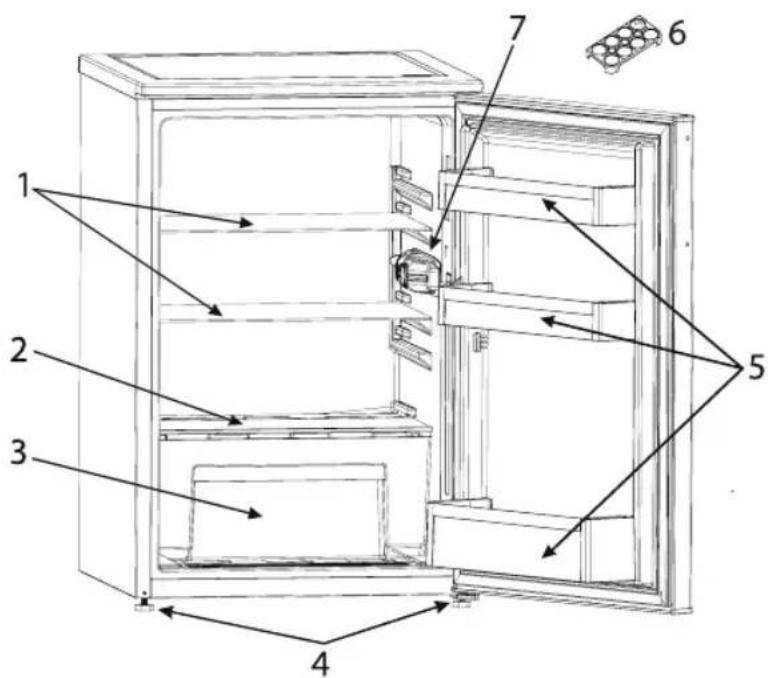
The illustration is for reference only for the parts of the appliance. Parts may vary depending on the model.
- Refrigerator compartment
- Drip tray for defrost water
- Shelf for bottles and jars
- Leveling feet
- Door rack
SAFETY INSTRUCTIONS
It is important to read and follow them carefully
Read this instruction manual before using the appliance. Keep it for future reference.
IMPORTANT to be read and observed
Before using the appliance, read these safety instructions. Keep them nearby for future reference.
These instructions and the appliance itself provide important safety warnings, to be observed at all times. The manufacturer declines any liability for failure to observe these safety instructions, for inappropriate use of the appliance or incorrect setting of controls.
Very young children (0-3 years) should be kept away from the appliance. Young children (3-8 years) should be kept away from the appliance unless continuously supervised. Children from 8 years old and above and persons with reduced physical, sensory or mental capabilities or lack of experience and knowledge can use this appliance only if they are supervised or have been given instructions on safe use and understand the hazards involved. Children must not play with the appliance. Cleaning and user maintenance must not be carried out by children without supervision.
Children aged from 3 to 8 years are allowed to load and unload refrigerating appliances.
PERMITTED USE
CAUTION: The appliance is not intended to be operated by means of an external switching device, such as a timer, or separate remote controlled system. This appliance is intended to be used in household and similar applications such as: staff kitchen areas in shops, offices and other
working environments; farm houses; by clients in hotels, motels, bed & breakfast and other residential environments.
This appliance is not for professional use. Do not use the appliance outdoors. The bulb used inside the appliance is specifically designed for domestic appliances and is not suitable for general room lighting within the home (EC Regulation 244/2009). The appliance is designed for operation in places where the ambient temperature comes within the following ranges, according to the climatic class given on the rating plate. The appliance may not work properly if it is left for a long time at a temperature outside the specified range.
Climatic Class Amb. T. (°C)
SN: From 10 to 32°C
ST: From 16 to 38°C
N: From 16 to 32°C
T: From 16 to 43°C
This appliance does not contain CFCs. The refrigerant circuit contains R600a (HC). Appliances with Isobutane (R600a): isobutane is a natural gas without environmental impact, but is flammable. Therefore, make sure the refrigerant circuit pipes are not damaged, especially when emptying the refrigerant circuit.
WARNING: Do not damage the appliance refrigerant circuit pipes.
WARNING: Keep ventilation openings, in the appliance enclosure or in the built-in structure, clear of obstruction. WARNING: Do not use mechanical, electric or chemical means other than those recommended by the Manufacturer to speed up the defrost process. WARNING: Do not use or place electrical devices inside the appliance compartments if they are not of the type expressly authorised by the Manufacturer. WARNING: Ice makers and/or water dispensers not directly connected to the water supply must be filled with potable water only. WARNING: Automatic ice-makers and/or water dispensers must be connected to a water supply that delivers potable water only, with mains water pressure between 0.17 and 0.81 MPa (1.7 and 8.1 bar). Do not store explosive substances such as aerosol cans and do not place or use gasoline or other flammable materials in or near the appliance. Do not swallow the contents (non-toxic) of the ice packs (provided with some models). Do not eat ice cubes or ice lollies immediately after taking them out of the freezer since they may cause cold burns. For products designed to use an air filter inside an accessible fan cover, the filter must always be in position when the refrigerator is in function. Do not store glass containers with liquids in the freezer
compartment since they may break. Do not obstruct the fan (if included) with food items.
After placing the food check that the door of compartments closes properly, especially the freezer door.
Damaged gaskets must be replaced as soon as possible. Use the refrigerator compartment only for storing fresh food and the freezer compartment only for storing frozen food, freezing fresh food and making ice cubes. Avoid storing unwrapped food in direct contact with internal surfaces of the refrigerator or freezer compartments.
Appliances could have special compartments (Fresh Food Compartment, Zero Degree Box,...). Unless differently specified in the specific booklet of product, they can be removed, maintaining equivalent performances.
Pentane is used as blowing agent in the insulation foam and it is a flammable gas.
The most appropriate compartments of the appliance where specific types of food are to be stored, taking into account different temperature distribution in different compartments in the appliance, are as follows:
1) Upper area of the refrigerator compartment & door - temperature zone: Store tropical fruit, cans, drinks, eggs, sauces, pickles, butter, jam. 2) Middle area of the refrigerator compartment - cool zone: Store cheese, milk, dairy food, deli food, yoghurt. 3) Lower area of the refrigerator
compartment - coldest zone: Store cold cuts, desserts, meat and fish, cheesecake, fresh pasta, sour cream, pesto/salsa, home-cooked food, pastry cream, pudding and cream cheese.
4) Fruit & vegetable drawer at the bottom of the refrigerator compartment: Store vegetables and fruits (excluding tropical fruits). 5) Chiller compartment: Only store meat and fish in the coldest drawer. To avoid food contamination, please observe the following:
- Opening the door for long periods can cause a significant increase of the temperature in the compartments of the appliance.
- Regularly clean surfaces that may come into contact with food and accessible drainage systems.
- Clean water tanks if they have not been used for 48 hours; flush the water system connected to a water supply if water has not been drawn for 5 days.
- Store raw meat and fish in suitable containers in the refrigerator, so that it does not come into contact with or drip onto other food.
- Two-star frozen food compartments are suitable for storing pre-frozen food, storing or making ice cream and ice cubes.
- Do not freeze fresh food in one, two or three-star compartments.
- If the refrigerating appliance is left empty for long periods, switch off, defrost, clean, dry, and leave the door open to prevent mould developing inside the appliance.
INSTALLATION
The appliance must be handled and installed by two or more persons - risk of injury. Use
protective gloves to unpack and install - risk of cuts.
Installation, including water supply (if any), electrical connections, and repairs must be carried out by a qualified technician. Do not repair or replace any part of the appliance unless specifically stated in the user manual. Keep children away from the installation site. After unpacking the appliance, make sure that it has not been damaged during transport. In the event of problems, contact the dealer or your nearest Aftersales Service. Once installed, packaging waste (plastic, styrofoam parts, etc.) must be stored out of reach of children - risk of suffocation. The appliance must be disconnected from the power supply before any installation operation - risk of electric shock. During installation, make sure the appliance does not damage the power cable - risk of fire or electric shock. Only activate the appliance when the installation has been completed. Be careful not to damage the floors (e.g., parquet) when moving the appliance. Install the appliance on a floor or support strong enough to take its weight and in a place suitable for its size and use. Make sure the appliance is not near a heat source and that the four feet are stable and resting on the floor, adjusting them as required, and check that the appliance is perfectly level using a spirit level. Wait at least two hours before switching the appliance on, to ensure that the refrigerant circuit is fully efficient. WARNING: When positioning the
appliance, ensure the supply cord is not trapped or damaged.
WARNING: To avoid a hazard due to instability, positioning or fixing of the appliance must be done in accordance with the manufacturer's instructions.
It is forbidden to place the refrigerator in such a way that the metal hose of a gas stove, metal gas or water pipes, or electrical wires are in contact with the refrigerator's back wall (condenser coil).
To guarantee adequate ventilation, leave a space on both sides and above the appliance. The distance between the rear of the appliance and the wall behind it should be 50 mm to avoid access to hot surfaces. A reduction of this space will increase the energy consumption of the product. Please remove the power cord from the condenser hook during installation before connecting the product to the power supply.
ELECTRICAL WARNINGS
It must be possible to disconnect the appliance from the power supply by unplugging it if the plug is accessible, or by a multi-pole switch installed upstream of the socket in accordance with the wiring rules, and the appliance must be earthed in conformity with national electrical safety standards.
Do not use extension leads, multiple sockets, or adapters. The electrical components must not be accessible to the user after installation. Do not use the appliance when you are wet or barefoot. Do not operate this appliance if it
has a damaged power cable or plug, if it is not working properly, or if it has been damaged or dropped.
If the supply cord is damaged, it must be replaced with an identical one by the manufacturer, its service agent, or similarly qualified persons in order to avoid a hazard - risk of electric shock. WARNING: Do not locate multiple portable socket-outlets or portable power supplies at the rear of the appliance.
CLEANING AND MAINTENANCE
WARNING: Ensure that the appliance is switched off and disconnected from the power supply before performing any maintenance operation; never use steam cleaning equipment - risk of electric shock. Do not use abrasive or harsh cleaners such as window sprays, scouring cleansers, flammable fluids, cleaning waxes, concentrated detergents, bleaches, or cleansers containing petroleum products on plastic parts, interior and door liners, or gaskets. Do not use paper towels, scouring pads, or other harsh cleaning tools.
DISPOSAL OF PACKAGING MATERIALS
The packaging material is 100% recyclable and is marked with the recycle symbol.
The various parts of the packaging must therefore be disposed of responsibly and in full compliance with local authority regulations governing waste disposal.
DISPOSAL OF HOUSEHOLD APPLIANCES
This appliance is manufactured with recyclable or reusable materials.
Dispose of it in accordance with local waste disposal regulations. For further information on the treatment, recovery, and recycling of
household electrical appliances, contact your local authority, the collection service for household waste, or the store where you purchased the appliance. This appliance is marked in compliance with European Directive 2012/19/EU, Waste Electrical and Electronic Equipment (WEEE). By ensuring this product is disposed of correctly, you will help prevent negative consequences for the environment and human health.
The symbol on the product or on the accompanying documentation indicates that it should not be treated as domestic waste but must be taken to an appropriate collection centre for the recycling of electrical and electronic equipment.
ENERGY SAVING TIPS
Install the appliance in a dry, well ventilated room far away from any heat source (e.g. radiator, cooker, etc.) and in a place not exposed directly to the sun. If required, use an insulating plate.
To guarantee adequate ventilation, follow installation instructions.
Insufficient ventilation at the back of the product increases energy consumption and decreases cooling efficiency.
Frequent door opening might cause an increase in energy consumption.
The internal temperature of the appliance and the energy consumption may also be affected by the ambient temperature, as well as the location of the appliance. Temperature setting should take these factors into consideration. Reduce door opening to a minimum.
When thawing frozen food, place it in the refrigerator. The low temperature of the frozen products cools the food in the refrigerator.
Allow warm food and drinks to cool down before placing them in the appliance.
Positioning of the shelves in the refrigerator has no impact on the efficient usage of energy. Food should be placed on the shelves in such a way as to ensure proper air circulation (food should not touch each other and distance between food and the rear wall should be kept).
You can increase storage capacity of frozen food by removing baskets and, if present, the Stop Frost shelf.
Do not worry about noises coming from the compressor, which are normal operation noises.
FIRST TIME USE
- Wait at least two hours after installation before connecting the appliance to the power supply. Connect the appliance to the power supply and turn the thermostat knob to switch on the appliance. After turning the appliance on, you must wait for 4-6 hours for the correct storage temperature to be reached for a normally filled appliance.
- Your fridge may have a smell when it is operated for the first time. This is normal and the smell will fade away when your fridge starts to cool.
USAGE INFORMATION
Thermostat setting
- Larders (coolers) do not have any freezer compartment but can cool below 5°C.
- The thermostat automatically regulates the inside temperature of the refrigerator compartment. By rotating the knob from position 1 to 5, colder temperatures can be obtained.
- The "•" position shows the thermostat is closed and no cooling is available.
- For short-term storage of food in the freezer/refrigerator compartment, you can set the knob between minimum and medium position (1-3).
- For long-term storage of food, you can set the knob to medium position (3-4).
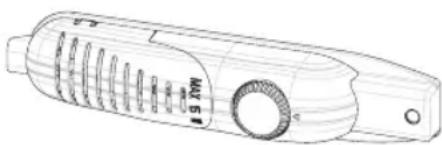
Temperature Settings Warnings
- Larders (coolers) do not have a freezer compartment but can cool up to 4 - 6°C.
- The ambient temperature, the temperature of freshly stored food, and how often the door is opened affect the temperature in the fridge. If required, change the temperature setting.
- It is not recommended that you operate your fridge in environments colder than 10°C in terms of its efficiency.
- When setting the thermostat, take into consideration how often the appliance door is opened and closed, how much food is stored in the refrigerator, and the environment in which the refrigerator is located.
- When the appliance is first switched on, allow it to run for 24 hours in order to reach operating temperature. During this time, do not open the door and do not keep a large quantity of food inside.
- Unplug your appliance during a power cut to prevent damage to the compressor. Once power is restored, delay plugging in your appliance for 5 to 10 minutes. This will help prevent damage to the appliance's components.
- Your appliance is designed to operate in the ambient temperature ranges stated in the standards, according to the climate class stated on the information label. It is not recommended that your fridge is operated in environments outside the stated temperature ranges. This will reduce the cooling efficiency of the appliance.
- This appliance is designed for use at an ambient temperature within the 10°C - 43°C range.
| Climatic Class Amb. T. (℃) |
| SN: From 10 to 32 ℃ |
| ST: From 16 to 38 ℃; |
| N: From 16 to 32 ℃ |
| T: From 16 to 43 ℃ |
Putting food in the coldest area of the refrigerator
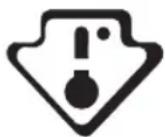
Your foods will be better stored if you put them in the most appropriate cooling area. The coldest area is just above the crisper.
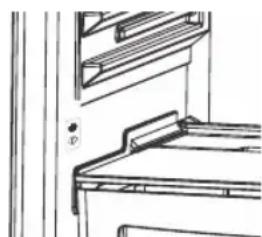
To be sure to have a low temperature in this area, make sure the shelf is located at the level of this symbol, as shown in the illustration.
Temperature indicator (In some models)
To help you better set your refrigerator, we have equipped it with a temperature indicator located in the coldest area.
You can easily check that the temperature of the coldest area is appropriate: when the indicator shows "OK", it means the thermostat is set properly and the inside temperature is correct.
Since "OK" appears in black, it will be difficult to see this indication if the temperature indicator is badly lit. To be able to see this indication properly, there should be enough light.
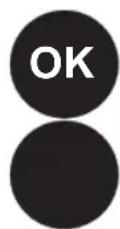
If the "OK" symbol does not appear, it means that the temperature is too high: you will then have to modify the thermostat setting, and wait 12 hours before visually checking the temperature again.
NOTE: Following repeated openings (or prolonged opening) of the door or after putting fresh food into the appliance, it is normal for the indication "OK" not to appear in the temperature setting indicator. If there is an abnormal ice crystals build up (bottom wall of the appliance) on the refrigerator compartment evaporator (overloaded appliance, high room temperature, frequent door openings), put the temperature setting device on a lower position until compressor off periods are obtained again.
The upper limit of the coldest area is indicated by the lower side of the sticker (head of the arrow). The coldest area upper shelf must be at the same level with the arrow head. The coldest area is below this level.
As these shelves are removable, make sure they are always at the same level with these zone limits described on the stickers, in order to guarantee temperatures in this area.
Each type of food has an ideal conservation temperature and consequently a particular location to follow.
| Locations Products |
| Upper shelves Cooked foods, desserts and all foods to be eaten fast enough |
| Coldest area Meat, poultry, game and raw fish Maximum conservation tim e : 1 to 2 days. Fresh fruits, cooked pork meat. |
| Crisper Fresh vegetables and fruits. |
| Door-liner Door tays shall contain bottles at the bottom side and, in their upper parts, low volume and currently used products like yoghurt, fresh cream, etc. |
| Butter, cooked cheese and eggs shall be introduced in appropriate holders. |
FOOD STORAGE
- To reduce humidity and avoid formation of frost, never place liquids in unsealed containers in the refrigerator. Frost tends to concentrate in the coldest parts of the evaporating liquid and, in time, your appliance will require more frequent defrosting.
- Never place warm food in the refrigerator. Warm food should be allowed to cool at room temperature and should be arranged to ensure adequate air circulation in the refrigerator compartment.
- Make sure no items are in direct contact with the rear wall of the appliance as frost will develop and packaging will stick to it. Do not open the refrigerator door frequently.
- We recommend that meat and clean fish are loosely wrapped and stored on the glass shelf just above the vegetable bin where the air is cooler, as this provides the best storage conditions.
- Store loose fruit and vegetable items in the crisper containers.
- Do not put wet vegetables into the refrigerator. Storage time for all food products depends on the initial quality of the food and an uninterrupted refrigeration cycle before refrigerator storage.
- To avoid cross-contamination, do not store meat products with fruit and vegetables. Water leaking from meat may contaminate other products in the refrigerator. You should package meat products and clean any leakages on the shelves.
- Do not put food in front of the air flow passage.
- Consume packaged foods before the recommended expiry date.
CLEANING AND MAINTENANCE
- Disconnect the unit from the power supply before cleaning.
- Do not clean the appliance by pouring water.
- Make sure that no water enters the lamp housing and other electrical components.
- The refrigerator compartment should be cleaned periodically using a solution of bicarbonate of soda and lukewarm water.
- Clean the accessories separately with soap and water. Do not clean them in the dishwasher.
- Do not use abrasive products, detergents, or soaps. After washing, rinse with clean water and dry carefully. When you have finished cleaning, reconnect the plug to the mains supply with dry hands.
- Clean the condenser with a broom at least twice a year. This will help you save on energy costs and increase productivity.
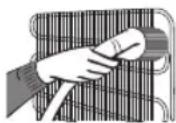
Defrosting
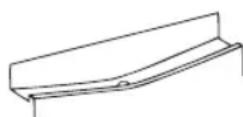
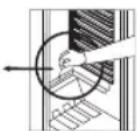
- Defrosting occurs automatically in the refrigerator compartment during operation; the defrost water is collected by the evaporating tray and evaporates automatically.
- The evaporating tray and the defrost water drain hole should be cleaned periodically with the defrost drain plug to prevent water from collecting on the bottom of the refrigerator instead of flowing out.
- You can also pour 1/2 glass of water into the drain hole to clean inside.
Replacing The Light Bulb
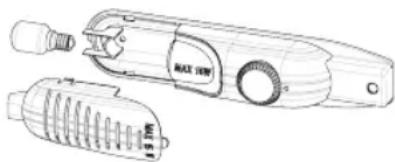
When replacing the light of the refrigerator compartment:
- Unplug the unit from the power supply.
- Remove the cover of the box from the claws using a screwdriver.
- Replace with a bulb of maximum 15 Watts.
- Install the cover.
- Wait for 5 minutes before re-plugging and bring the thermostat to its original position.
Replacing LED Lighting
If your refrigerator has LED lighting, contact the help desk as this should be changed by authorized personnel only.
TRANSPORTATION AND CHANGING OF INSTALLATION POSITION
- The original packages and foamed polystyrene (PS) can be retained if required.
- During transportation, the appliance should be secured with a wide string or a strong rope. The instructions written on the corrugated box must be followed while transporting.
- Before transporting or changing the installation position, all the moving objects (i.e., shelves, crisper...) should be taken out or fixed with bands in order to prevent them from getting damaged.
Carry your fridge in the upright position.
Repositioning the door
- It is not possible to change the opening direction of your fridge door, if the door handles on your fridge are installed from the front surface of the door.
- It is possible to change the opening direction of the door on models without any handles.
- If the door opening direction of your fridge may be changed, you should contact the nearest Authorised Service to have the opening direction changed.
BEFORE CALLING SERVICE
If your refrigerator is not operating as expected, check the solutions listed below before calling an electrician or the after sales service.
What to do if your refrigerator does not operate:
Check that :
- Your fridge is plugged in and switched on,
- The fuse is not blown and there is not a power cut,
- The thermostat setting is in the on « • » position,
- The socket is no longer functioning. To check this, plug in an appliance that you know is working into the same socket.
What to do if your refrigerator performs poorly:
Check that:
- You have not overloaded the appliance,
- The doors are fully closed,
- There is no dust on the condenser,
- There is enough space for air circulation at the rear and side of the appliance.
If your fridge is operating too loudly
Normal Noises
- Cracking (Ice cracking) Noise: (For no frost/frost free appliances)
- During automatic defrosting. When the appliance is cooled or warmed (due to expansion of appliance material).
- Short cracking: Heard when the thermostat switches the compressor on/off.
Compressor noise
- Normal motor noise: This noise means that the compressor operates normally
- The compressor may cause more noise for a short time when it is first activated.
Bubbling noise and splash:
- This noise is caused by the flow of the fridge freezer in the tubes of the system.
If your fridge is operating too loudly
- To maintain the set cooling level, compressor may be activated from time to time. Noises from your fridge at this time are normal and due to its function. When the required cooling level is reached, noises will be decreased automatically.
If the noises persist;
- If you will not use your fridge for a long time (e.g. in summer holidays), put the thermostat to "..." Is your appliance stable? Are the legs adjusted? Is there anything behind your fridge?
- Are the shelves or dishes on the shelves vibrating? Re-place the shelves and/or dishes
if this is the case.
- Are the items placed on your fridge vibrating?
If you hear any other noises check that:
The appliance is level - Nothing is touching the rear of the appliance - The objects on the appliance are vibrating.
Water flow noise: (For no frost/frost free appliances) Normal flow noise of water flowing to the evaporation container during defrosting. This noise can be heard during defrosting.
Air Blow Noise: If the appliance has fan in freezer/cooler /bottom cabinet compartments. - This noise can be heard in fridges during normal operation of the system due to the circulation of air.
If the appliance is making a noise:
The cooling gas which circulates in the refrigerator circuit may make a slight noise (bubbling sound) even when the compressor is not running. This is normal. If these sounds are different check that:
The appliance is level, - Nothing is touching the rear of the appliance, - Items on or in the appliance are vibrating.
If there is water in the lower part of the refrigerator:
Check that:
- The drain hole for the defrost water is not clogged (use the defrost drain plug to clean the drain hole).
If your fridge is not cooling enough;
- Your fridge is designed to operate within specific ambient temperature ranges, according to the climate class stated on the information label. We do not recommend operating your
- fridge outside the stated temperatures value limits.
Recommendations
- If the appliance is switched off or unplugged, wait at least 5 minutes before plugging the appliance in or restarting it in order to prevent damage to the compressor.
- If you will not use your fridge for a long time (e.g. in summer holidays) unplug it. Clean your fridge according to chapter cleaning and leave the door open to prevent humidity and smell.
- If a problem persists after you have followed all the above instructions, please consult the nearest authorised service centre.
- The appliance you have purchased is designed for domestic use only. It is not suitable for commercial or common use. If the consumer uses the appliance in a way that does not comply with this, we emphasise that the manufacturer and the dealer will not be responsible for any repair and failure within the guarantee period.
THE PARTS OF THE APPLIANCE AND THE COMPARTMENTS
This presentation is only for information about the parts of the appliance. Parts may vary according to the appliance model.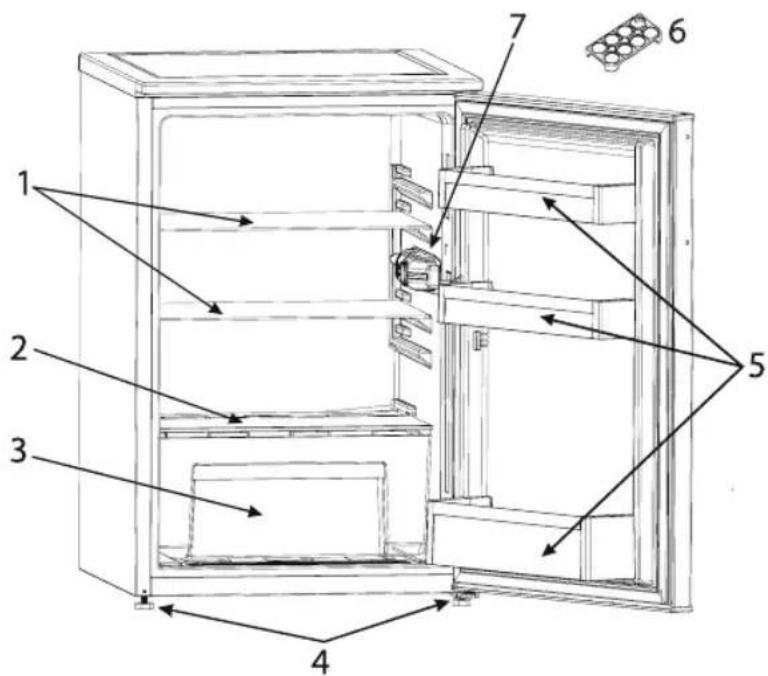
- Refrigerator Shelf
- Crisper cover
- Crisper
- Levelling feet
- Door Shelf
- Egg holder
- Refrigerator Light & Thermostat
To guarantee adequate ventilation follow installation instructions.
| Climatic Class Amb. T. (℃) |
| SN: From 10 to 32 ℃ |
| ST: From 16 to 38 ℃; |
| N: From 16 to 32 ℃ |
| T: From 16 to 43 ℃ |
Cleaning and Maintenance
- INSTALLATION
- WARNING: ELECTRICAL SHOCK HAZARD
- CLEANING AND MAINTENANCE
- DISPOSAL OF PACKAGING MATERIAL
- DISPOSAL OF HOUSEHOLD ELECTRICAL APPLIANCES
- TIPS FOR SAVING ENERGY
- ATTENTION
- USE FOR THE FIRST TIME
- INFORMATION ABOUT OPERATION
- THERMOSTAT SETTING
- TEMPERATURE WARNING INDICATOR
- PLACEMENT OF FOOD IN THE COLDEST ZONE OF THE REFRIGERATOR
- TEMPERATURE INDICATOR (ON SOME MODELS)
- REPLACING THE LED LIGHTING
- TRANSPORTATION AND REPOSITIONING OF THE INSTALLATION SITE
- REVERSING THE DOOR OPENING DIRECTION
- BEFORE CALLING SERVICE
- WHAT TO DO IF YOUR REFRIGERATOR DOES NOT WORK
- CHECK
- WHAT TO DO IF YOUR REFRIGERATOR DOES NOT WORK WELL
- IF YOUR REFRIGERATOR WORKS TOO NOISILY
- NORMAL NOISE
- COMPRESSOR NOISE
- NOISE FROM THE EVAPORATOR AND DRIPPING
- IF THE REFRIGERATOR IS WORKING PROPERLY, IT IS NORMAL
- IF THE DEVICE MAKES A SOUND
- IF THE WATER IN THE DRAIN PART OF THE REFRIGERATOR
- WARNING
- IF THE APPLIANCE IS NOT COOLING SUFFICIENTLY
- TROUBLESHOOTING
- PARTS AND COMPONENTS OF THE APPLIANCE
- SAFETY INSTRUCTIONS
- PERMITTED USE
- ELECTRICAL WARNINGS
- DISPOSAL OF PACKAGING MATERIALS
- DISPOSAL OF HOUSEHOLD APPLIANCES
- ENERGY SAVING TIPS
- FIRST TIME USE
- USAGE INFORMATION
- TEMPERATURE SETTINGS WARNINGS
- PUTTING FOOD IN THE COLDEST AREA OF THE REFRIGERATOR
- TEMPERATURE INDICATOR (IN SOME MODELS)
- FOOD STORAGE
- DEFROSTING
- REPLACING THE LIGHT BULB
- REPLACING LED LIGHTING
- TRANSPORTATION AND CHANGING OF INSTALLATION POSITION
- REPOSITIONING THE DOOR
- WHAT TO DO IF YOUR REFRIGERATOR DOES NOT OPERATE
- CHECK THAT
- WHAT TO DO IF YOUR REFRIGERATOR PERFORMS POORLY
- IF YOUR FRIDGE IS OPERATING TOO LOUDLY
- NORMAL NOISES
- BUBBLING NOISE AND SPLASH
- IF THE NOISES PERSIST
- RECOMMENDATIONS
- THE PARTS OF THE APPLIANCE AND THE COMPARTMENTS
Brand : INDESIT
Model : I55VM 1110 S UK 1
Category : Refrigerator