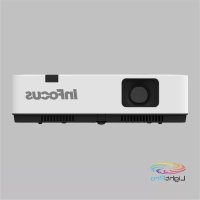
LightPro IN1046 - Projector INFOCUS - Free user manual and instructions
Find the device manual for free LightPro IN1046 INFOCUS in PDF.


| Product Type | DLP Projector |
| Brand | InFocus |
| Model | LightPro IN1046 |
| Native Resolution | WXGA (1280 x 800) |
| Maximum Supported Resolution | WUXGA (1920 x 1200) |
| Number of Colors | 1.07 billion |
| Display Technology | LCD |
| Keystone Correction | Vertical and horizontal, angle correction, curved correction |
| Zoom | Digital and optical zoom (zoom ring) |
| Focus | Manual (focus ring) |
| Video Inputs | VGA, HDMI (x2), Composite Video, USB-A, USB-B, LAN |
| Audio Input | Audio IN (3.5mm jack), HDMI audio |
| Audio Output | Audio OUT (3.5mm jack), built-in speaker |
| Power Supply | AC 100-240 V, 50/60 Hz |
| Power Consumption (Normal Mode) | Approximately 260 W |
| Power Consumption (Standby Mode) | Less than 0.5 W (ECO mode) |
| Lamp | Replaceable, lifespan varies by mode |
| Air Filter | Cleanable and replaceable |
| Security Features | Keypad lock, PIN code, Kensington security slot |
| OSD Menu Languages | 26 languages including French, English, German, Spanish, etc. |
| Operating Temperature | 0°C to 40°C |
| Operating Humidity | 20% to 80% (non-condensing) |
Frequently Asked Questions - LightPro IN1046 INFOCUS
User questions about LightPro IN1046 INFOCUS
0 question about this device. Answer the ones you know or ask your own.
Ask a new question about this device
Download the instructions for your Projector in PDF format for free! Find your manual LightPro IN1046 - INFOCUS and take your electronic device back in hand. On this page are published all the documents necessary for the use of your device. LightPro IN1046 by INFOCUS.
USER MANUAL LightPro IN1046 INFOCUS
Copyright © 2021 InFocus
Copyright © 2020 by InFocus Corporation
https://infocus.com/support/contact/
Pour les modèles IN1029, IN1039, IN1049, IN1059, IN1024, IN1034, IN1044, IN1026, IN1036, IN1046
Terminaux
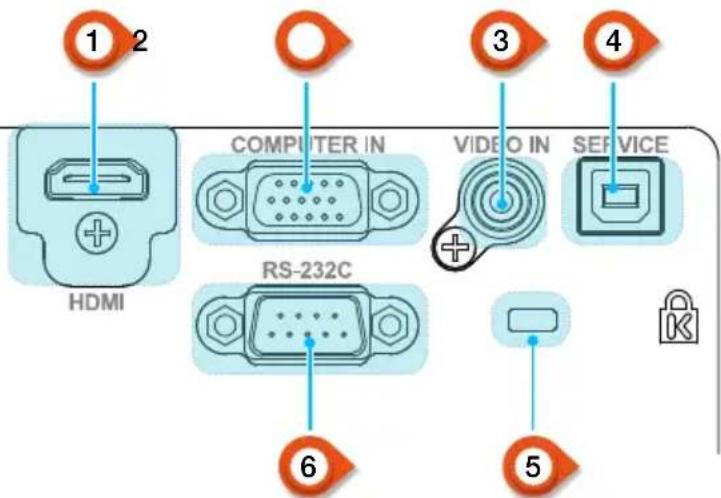
1 Port HDMI
IN1024, IN1034, IN1044
| Taille d'écran | Distance de projection | |||||
| Standard 4:3 Compatible 16:9 | ||||||
| Taille d'écran(pouce) | Largeur(m) | Hauteur(m) | Large | Télé | Large | Télé |
| 30" 0.6100.457 0.8121.347 0.885 1.467 | ||||||
| 60" 1.2190.9141.630 2.702 1.776 2.944 | ||||||
| 80" 1.6261.2192.178 3.610 2.373 3.933 | ||||||
| 100" 2.032 1.524 | 2.728 4.523 | 2.972 4.927 | ||||
| 150" 3.048 2.2864 | .1146.8204.4 | 827.430 | ||||
| 200" 4.0643.048 5 | .514 9.1416 | .0089.959 | ||||
| 250" 5.080 3.810 | 6.92911.486 | 7.549 12.513 | ||||
| 300" 6.0964.572 8 | .358 13.855 | 9.10615.094 | ||||
IN1026
| Taille d'écran | Distance de projection | |||||
| Standard 4:3 Compatible 16:9 | ||||||
| Taille d'écran(pouce) | Largeur(m) | Hauteur(m) | Large | Télé | Large | Télé |
| 30" 0.6460.4040.94 | 42 1.137 | 0.969 1.169 | ||||
| 60" 1.2920.8081.91 | 0 2.299 | 1.963 2.363 | ||||
| 80" 1.723 1.077 2 | 554 3.073 | 2.626 3.159 | ||||
| 100" 2.154 1.346 | 3.199 3.848 | 3.289 3.956 | ||||
| 150" 3.231 2.0194 | 811 5.785 | 4.946 5.946 | ||||
| 200" 4.308 2.6926 | 423 7.721 | 6.602 7.937 | ||||
| 250" 5.385 3.365 | 8.035 9.658 | 8.259 9.927 | ||||
| 300" | 6.462 | 4.039 | 9.647 | 11.595 | 9.916 | 11.917 |
IN1046, IN1039, IN1059
| Taille d'écran | Distance de projection | |||||
| Standard 4:3 Compatible 16:9 | ||||||
| Taille d'écran(pouce) | Largeur(m) | Hauteur(m) | Large | Télé | Large | Télé |
| 30" 0.6460.4040.81 | 2 1.347 0 | 835 1.384 | ||||
| 60" 1.2920.8081.63 | 0 2.702 1 | 675 2.777 | ||||
| 80" 1.723 1.077 2 | 178 3.610 | 2.239 3.711 | ||||
| 100" 2.154 1.346 | 2.728 4.523 | 2.804 4.648 | ||||
| 150" 3.231 2.0194 | 114 6.820 | 4.228 7.009 | ||||
| 200" 4.308 2.6925 | 520 9.150 | 5.673 9.405 | ||||
| 250" 5.385 3.365 | 6.936 11.498 | 7.129 11.817 | ||||
| 300" 6.4624.039 8 | 367 13.869 | 8.599 14.255 | ||||
IN1036, IN1029, IN1049
| Taille d'écran | Distance de projection | |||||
| Standard 4:3 Compatible 16:9 | ||||||
| Taille d'écran(pouce) | Largeur(m) | Hauteur(m) | Large | Télé | Large | Télé |
| 30" 0.6460.4040.87 | 2 1.053 0 | 896 1.082 | ||||
| 60" 1.2920.8081.76 | 9 2.129 1 | 818 2.188 | ||||
| 80" 1.723 1.077 2 | 365 2.845 | 2.431 2.924 | ||||
| 100" 2.154 1.346 | 2.962 3.563 | 3.044 3.662 | ||||
| 150" 3.231 2.0194 | 455 5.356 | 4.578 5.505 | ||||
| 200" 4.308 2.6925 | 947 7.149 | 6.113 7.348 | ||||
| 250" 5.385 3.365 | 7.440 8.943 | 7.647 9.191 | ||||
| 300" 6.4624.039 8 | 932 10.736 | 9.181 11.035 | ||||
Pour les modèles IN1029, IN1039, IN1049, IN1059, IN1024, IN1034, IN1044, IN1026, IN1036, IN1046
Pour les modèles IN1029, IN1039, IN1049, IN1059, IN1024, IN1034, IN1044, IN1026, IN1036, IN1046
Pour les modèles IN1029, IN1039, IN1049, IN1059, IN1024, IN1034, IN1044, IN1026, IN1036, IN1046
Pour les modèles IN1029, IN1039, IN1049, IN1059, IN1024, IN1034, IN1044, IN1026, IN1036, IN1046
VOLUME + / - (VOLUME + / -
[PAL] [SECAM] [NTSC] [NTSC4.43] [PAL-M] [PAL-N] [PAL60]