RP145 - Turntable Fenton - Free user manual and instructions
Find the device manual for free RP145 Fenton in PDF.



User questions about RP145 Fenton
0 question about this device. Answer the ones you know or ask your own.
Ask a new question about this device
Download the instructions for your Turntable in PDF format for free! Find your manual RP145 - Fenton and take your electronic device back in hand. On this page are published all the documents necessary for the use of your device. RP145 by Fenton.
USER MANUAL RP145 Fenton
natural_image
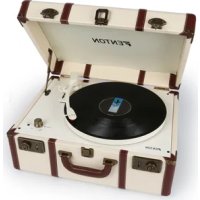
White FENTON portable cassette liver with open lid and handle, no visible text or symbols on device bodyINSTRUCTION MANUAL GEBRUIKSAANWIJZING BEDIENUNGSANLEITUNG MANUAL DE INSTRUCCIONES MANUEL D'INSTRUCTIONS
Congratulations to the purchase of this Fenton product. Please read this manual thoroughly prior to using the unit in order to benefit fully from all features.
Read the manual prior to using the unit. Follow the instructions in order not to invalidate the warranty. Take all precautions to avoid fire and/or electrical shock. Repairs must only be carried out by a qualified technician in order to avoid electrical shock. Keep the manual for future reference.
- Prior to using the unit, please ask advice from a specialist. When the unit is switched on for the first time, some smell may occur. This is normal and will disappear after a while.
- The unit contains voltage carrying parts. Therefore do NOT open the housing.
- Do not place metal objects or pour liquids into the unit This may cause electrical shock and malfunction.
- Do not place the unit near heat sources such as radiators, etc. Do not place the unit on a vibrating surface. Do not cover the ventilation holes.
- The unit is not suitable for continuous use.
- Be careful with the mains lead and do not damage it. A faulty or damaged mains lead can cause electrical shock and malfunction.
- When unplugging the unit from a mains outlet, always pull the plug, never the lead.
- Do not plug or unplug the unit with wet hands.
- If the plug and/or the mains lead are damaged, they need to be replaced by a qualified technician.
- If the unit is damaged to such an extent that internal parts are visible, do NOT plug the unit into a mains outlet and DO NOT switch the unit on. Contact your dealer. Do NOT connect the unit to a rheostat or dimmer.
- To avoid fire and shock hazard, do not expose the unit to rain and moisture.
- All repairs should be carried out by a qualified technician only.
- Connect the unit to an earthed mains outlet (220-240Vac/50Hz) protected by a 10-16A fuse.
- During a thunderstorm or if the unit will not be used for a longer period of time, unplug it from the mains. The rule is: Unplug it from the mains when not in use.
- If the unit has not been used for a longer period of time, condensation may occur. Let the unit reach room temperature before you switch it on. Never use the unit in humid rooms or outdoors.
-
To prevent accidents in companies, you must follow the applicable guide lines and follow the instructions.
-
Do not repeatedly switch the fixture on and off. This shortens the life time.
- Keep the unit out of the reach of children. Do not leave the unit unattended.
- Do not use cleaning sprays to clean switches. The residues of these sprays cause deposits of dust and grease. In case of malfunction, always seek advice from a specialist.
- Do not force the controls.
- This unit is with speaker inside which can cause magnetic field. Keep this unit at least 60cm away from computer or TV.
- If this unit have a built-in lead-acid rechargeable battery. Please recharge the battery every 3 months if you are not going to use the unit for a long period of time. Or the battery may be damaged.
- If the battery is damaged please replace with same specifications battery. And dispose the damaged battery environment friendly.
- If the unit has fallen, always have it checked by a qualified technician before you switch the unit on again.
- Do not use chemicals to clean the unit. They damage the varnish. Only clean the unit with a dry cloth.
- Keep away from electronic equipment that may cause interference.
- Only use original spares for repairs, otherwise serious damage and/or dangerous radiation may occur.
- Switch the unit off prior to unplugging it from the mains and/or other equipment. Unplug all leads and cables prior to moving the unit.
- Make sure that the mains lead cannot be damaged when people walk on it. Check the mains lead before every use for damages and faults!
- The mains voltage is 220-240Vac/50Hz. Check if power outlet match. If you travel, make sure that the mains voltage of the country is suitable for this unit.
- Keep the original packing material so that you can transport the unit in safe conditions.

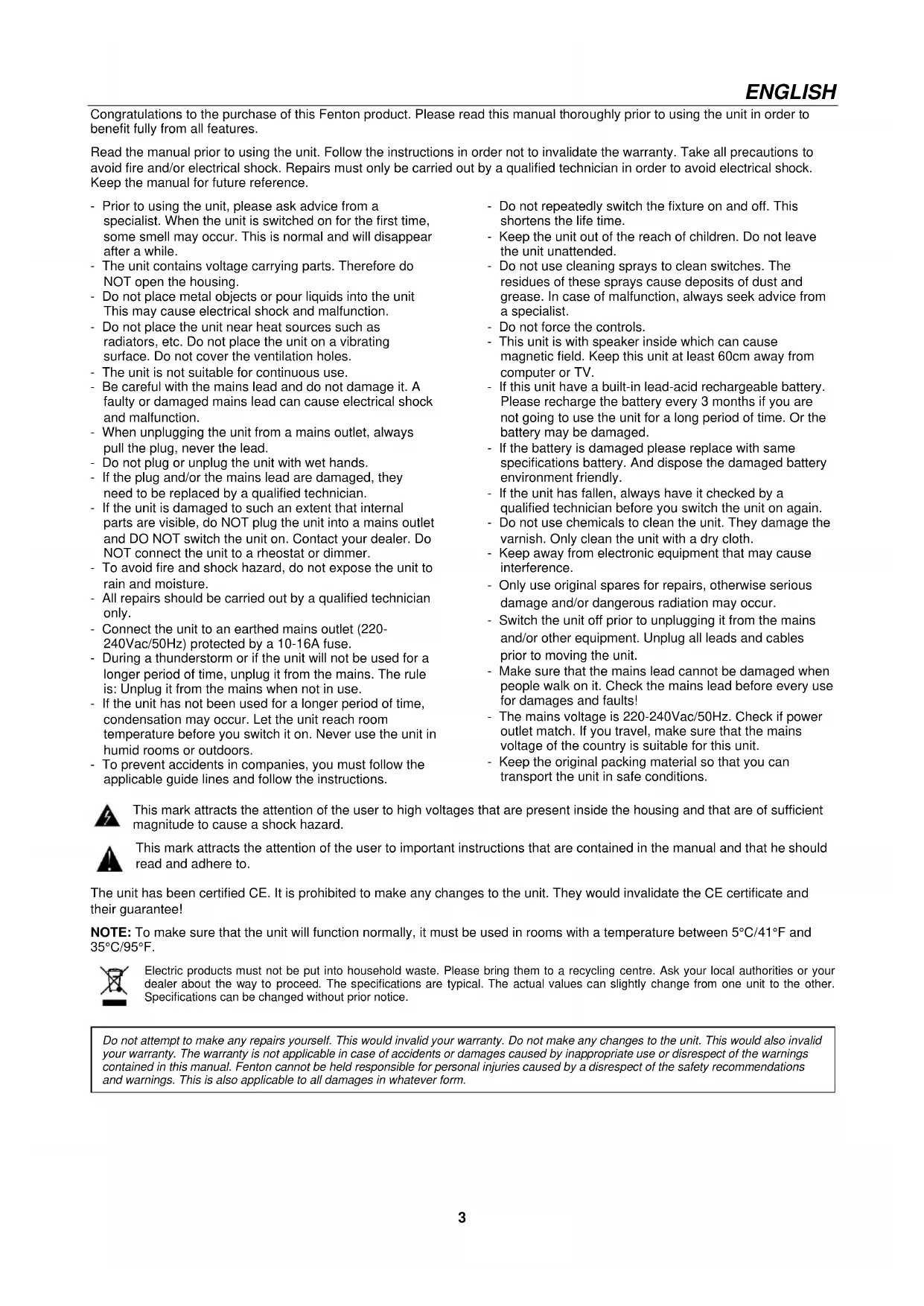
This mark attracts the attention of the user to high voltages that are present inside the housing and that are of sufficient magnitude to cause a shock hazard.

This mark attracts the attention of the user to important instructions that are contained in the manual and that he should read and adhere to.
The unit has been certified CE. It is prohibited to make any changes to the unit. They would invalidate the CE certificate and their guarantee!
NOTE: To make sure that the unit will function normally, it must be used in rooms with a temperature between 5^ C/ 41^ F and 35^ C/ 95^ F.

Electric products must not be put into household waste. Please bring them to a recycling centre. Ask your local authorities or your dealer about the way to proceed. The specifications are typical. The actual values can slightly change from one unit to the other. Specifications can be changed without prior notice.
Do not attempt to make any repairs yourself. This would invalid your warranty. Do not make any changes to the unit. This would also invalid your warranty. The warranty is not applicable in case of accidents or damages caused by inappropriate use or disrespect of the warnings contained in this manual. Fenton cannot be held responsible for personal injuries caused by a disrespect of the safety recommendations and warnings. This is also applicable to all damages in whatever form.
1. Platter
Place your record here.
2. Arm Clip
This specially designed arm clip secures the tonearm while at rest or when not in use.
3. Autostop Switch ON/OFF
This switch turns auto stop on or off. When the automatic stop is enabled, the platform will start rotating as soon as the tone arm is placed over the record and will stop rotating when it has reached the end of the record. Some vinyl records stop before the end or do not stop when the end is reached. In this case set Auto-stop to OFF.
4. 33 / 45 / 78 RPM Switch
This switch controls the RPM of the turntable platter.
5. Tone arm
The fixed tonearm can be raised and lowered by hand, or by pressing the raise / lower lever.
6. Power & volume control knob
To power on the record player, turn this knob clockwise until it clicks. When powered on, use this knob to adjust the volume
for the internal speakers and headphones. To turn off the record player, turn this knob counter clockwise until it clicks.
7. Line input
Connect a CD player, digital media player, or other audio source to this 3.5mm (1/8") stereo line input.
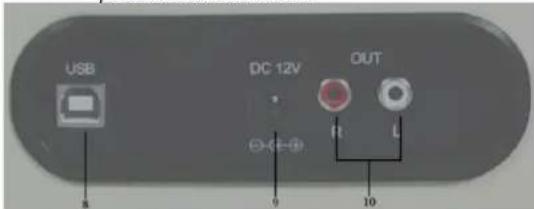
8. USB port
Use the included USB cable to connect your turntable to your computer. The USB connection will send audio from the turntable to your computer
9. DC IN port
Connecting the 12Volt/DC power adaptor.
10. Line output
The audio from a playing vinyl record is sent to this line-level coaxial audio output. This must not be connected to phono level devices.
text_image
USB DC 12V OUT 0 10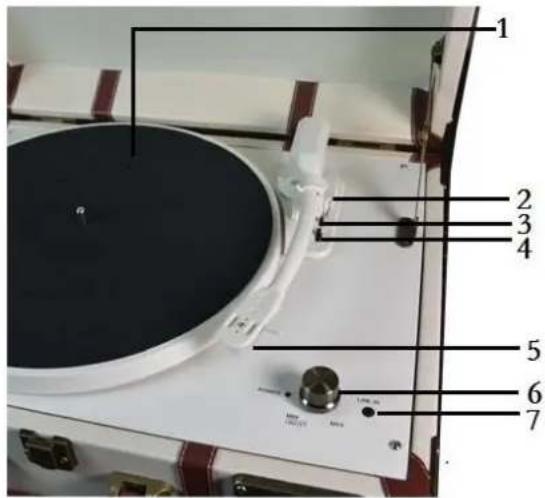
text_image
Labeled diagram of a radio with numbered parts for identificationOPERATION
natural_image
White vintage-style suitcase with brown leather casing and black handle, showing two side lock buttons and red directional arrows (no text or symbols)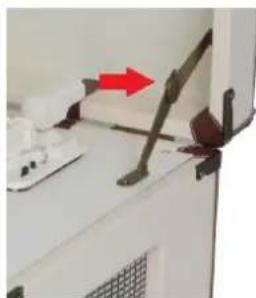
natural_image
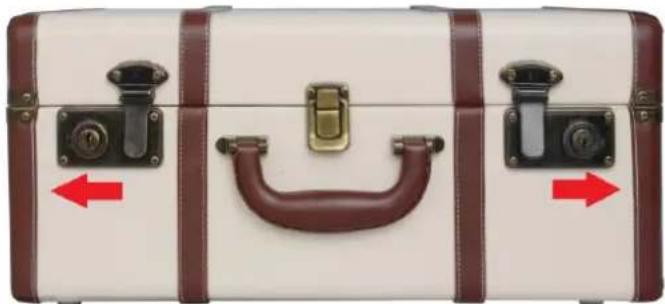
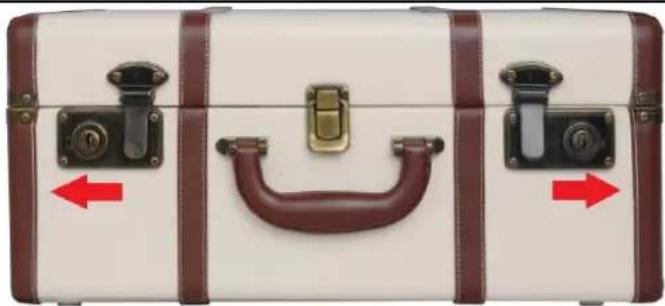
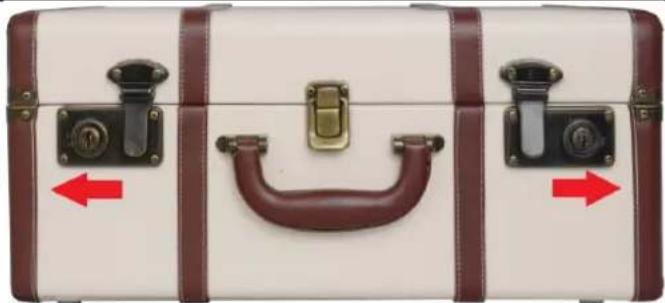
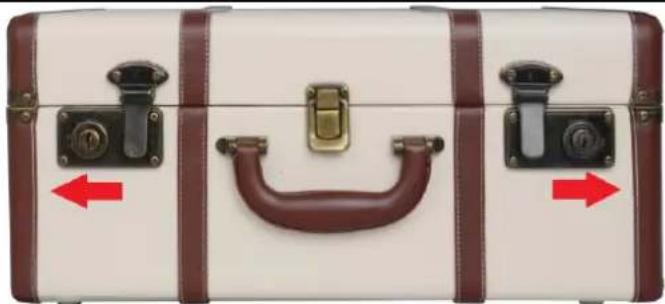
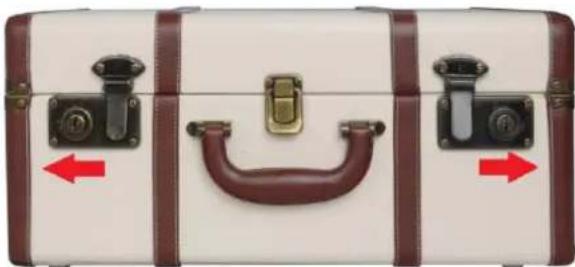
Close-up of a mechanical device with a red arrow pointing to a component (no visible text or symbols)- Open the top lip. Move the lock door following the direction from picture.
Note: There is no key for lock. It is decoration only for the key hole.
-
Connect the record player with the power adapter and plug the other end into a wall power outlet.
-
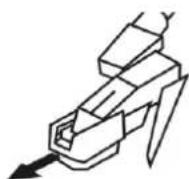
Remove white protective needle cover by gently pulling towards the front of the unit.
-
Place a vinyl record on the turntable platter and select the desired speed (33/45/78 RPM) according to the record.
-
Open the tone arm clip to release the tone arm. Gently move the tone arm and put the cartridge onto the desired position of the record and the turntable player starts to play.
-
Turn the volume control knob clockwise to adjust the volume.
Noted: If the AUTO STOP ON/OFF Switch is turned ON, the record will stop automatically when finished. If Auto Stop Control is turned OFF, record will NOT stop automatically when finished.
Before you connect the turntable to a computer, unplug it from your mixer or Hi-Fi system.
The included software is a third party application and therefore Fenton does not handle any questions or problems regarding the software.
- Turn the computer on
- If the computer is booted, connect the turntable. The computer will now install the drivers.
- After the drivers are installed, you must now install the Audacity software.
Windows users: insert the CD or download the newest software via http://audacity.sourceforge.net
MAC users: download the newest software via http://audacity.sourceforge.net
To Install Software (PC)
- Plug in your turntable to an power supply and connect the USB port on the Turntable to the USB port of your computer.
- Turn on the power switch to your turntable.
- The Windows system will detect a new device and indicate that it is available to use.
- Insert the CD that came with your USB turntable.
- Run the file to install the Audacity software. Once installed, run the Audacity program.
To Install Software (MAC)
1) Insert the included CD.
2) Open the CD icon on the desktop.
3) Drag the installation folder for audacity to your hard drive. We recommend that you move the folder to your "Applications" folder.
4) A window will come up which shows the files copying.
5) EJECT the CD.
6) Open "Audacity" from where you moved it to on your hard drive.
SOFTWARE CONFIGURATION
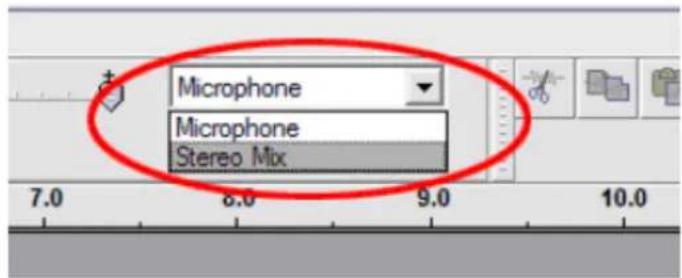
- Click on Microphone in the drop down menu and select "Stereo Mix".
text_image
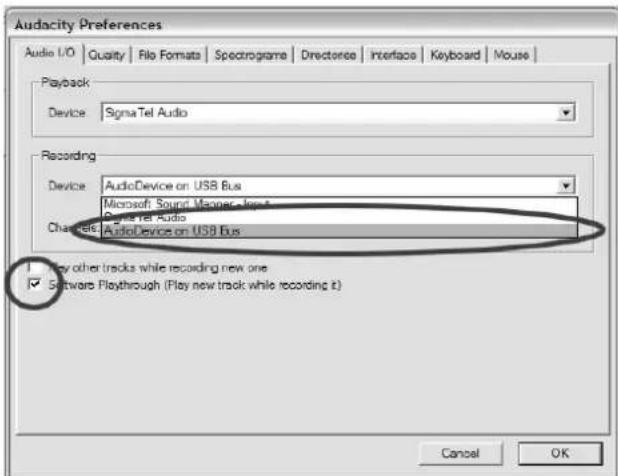
Microphone Microphone Stereo Mix- Select the "Edit" menu and then "Preferences"
Select the USB audio device under the "Recording" selection as shown. Select "Software Playthrough" to hear the audio while recording.
text_image
Audacity Preferences Audio I/O | Quality | File Format | Spectrogram | Directance | Interface | Keyboard | Mouse | Playback Device: SignaTel Audio Recording Device: AudioDevice on USB Bus Microsoft Sound Manager - Joint SignaTel Audio Channels: AudioDevice on USB Bus Play other tracks while recording new one Software Playthrough (Play new track while recording it) Cancel OK- After the above settings are completed, you are ready for recording. If you are still having difficulties in finding the USB Turntable, try to check your system settings or control panel to adjust the audio input settings from the sound control panel.
Note: The attached Audacity software is for reference only. For more information and latest software version, please check the website: http://www.audacity.com
text_image
USB DC 12V OUT R L 9 10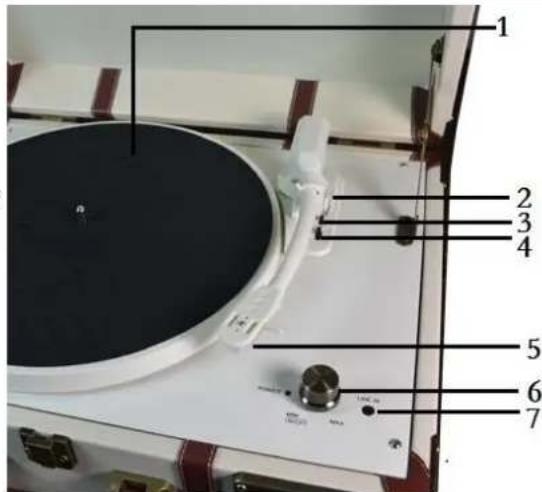
text_image
1 2 3 4 5 6 7WERKING
natural_image
White vintage suitcase with brown leather casing and black handle, showing two side lockers and red directional arrows (no text or symbols)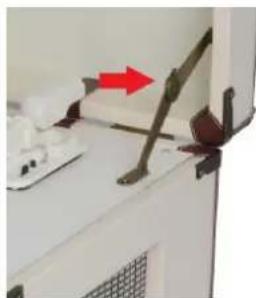
natural_image
Close-up of a mechanical device with a red arrow pointing to a component, no visible text or symbolstext_image
Microphone Microphone Stereo Mixtext_image
Audio Frequency Preferences Audio I/O Quality File Sources Spectrograms Directories Interlock Keyboard Mouse Plutback Device: Sign-to Audio Recording Device: Audio Device on USB Bus Microsoft Sound Players Inc. Applied to Audio Audio Device on USB Bus Play after tracks while recording new one Software PlayThrough Play new track while recording it Cancel OKtext_image
USB DC 12V OUT 8 9 10BENUTZING
natural_image
White suit case with brown leather straps and a handle, showing two side lock handles and red directional arrows (no text or symbols)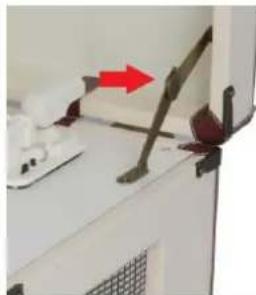
natural_image
Close-up of a kitchen appliance with a red arrow pointing to a handle (no visible text or symbols)text_image
Microphone Microphone Stereo Mixtext_image
Audacity Preferences Audio I/O | Quality | File Formats | Spectrograms | Directories | Interface | Keyboard | Mouse | Playback Device: SigmaTel Audio Recording Device: AudioDevice on USB Bus Microsoft Audio Devices, Inc. One device: AudioDevice on USB Bus Play other tracks while recording new one Software Playthrough (Play new track while recording it) Cancel OKtext_image
Labeled diagram of a radio with numbered parts for identification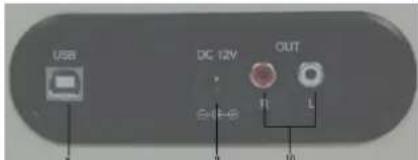
text_image
USB DC 12V OUT 11 L 9 10OPERACIÓN
natural_image
White vintage suitcase with brown leather casing and black handle, showing two side lock buttons and red directional arrows (no text or symbols)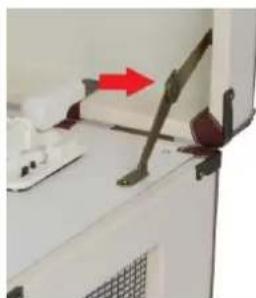
natural_image
Close-up of a kitchen appliance with a red arrow pointing to a mechanical lever (no visible text or symbols)text_image
Microphone Microphone Stereo Mixtext_image
Audacity Preferences Audio I/O | Quality | File Formats | Spectrograms | Directone | Interface | Keyboard | Mouse | Playback Device: Sigma Tel Audio Recording Device: AudioDevice on USB Bus Microsoft Sound Manager - Input Sigma Tel Audio Chronic Audio Device on USB Bus Play other tracks while recording new one ✓ Software Playthrough (Play new track while recording it) Cancel OKConnect a CD player, digital media player, or other audio source to this 3.5mm stereo line input.
8. Port USB
text_image
USB DC 12V OUT 0 10FONCTIONNEMENT
natural_image
White and brown suitcase with black handle and red directional arrows indicating left and right sides (no text or symbols)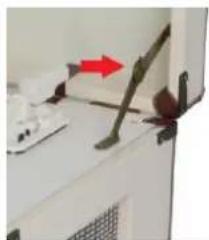
natural_image
Close-up of a kitchen appliance with a red arrow pointing to a component (no visible text or symbols)text_image
Microphone Microphone Stereo Mixtext_image
Audacity Preferences Audio I/O | Quality | Rila Format | Spectrogram | Directorate | Interface | Keyboard | Mouse | Playback Device: Sigma Tel Audio Recording Device: AudioDevice on USB Bus Microsoft Sound Manager, Joint SignalTel Audio Channels: AudioDevice on USB Bus □ May other tracks while recording new one ☑ Software Playthrough (Play new track while recording it) Cancel OKStylus: Ceramic Stereo cartridge with stylus
Speed: 3-speeds for 33 1/3, 45 and 78 RPM
Power supply: 12VDC / 1000mA
Dimesions: 455 x 330 x 200mm
The specifications are typical. The actual values can slightly change from one unit to the other. Specifications can be changed without prior notice.
The products referred to in this manual conform to the European Community Directives to which they are subject:
- Low Voltage (LVD) 2014/35/EU
• Electromagnetic Compatibility (EMC) 2014/30/EU
• Restriction of Hazardous Substances (RoHS) 2011/65/EU

Specifications and design are to change without prior notice..
www.tronios.com
Copyright © 2019 by TRONIOS the Netherlands